@llinn/ccstatusline 2.3.0
This diff represents the content of publicly available package versions that have been released to one of the supported registries. The information contained in this diff is provided for informational purposes only and reflects changes between package versions as they appear in their respective public registries.
- package/LICENSE +21 -0
- package/README.md +830 -0
- package/dist/ccstatusline.js +68803 -0
- package/package.json +75 -0
package/README.md
ADDED
|
@@ -0,0 +1,830 @@
|
|
|
1
|
+
<div align="center">
|
|
2
|
+
|
|
3
|
+
<pre>
|
|
4
|
+
_ _ _ _
|
|
5
|
+
___ ___ ___| |_ __ _| |_ _ _ ___| (_)_ __ ___
|
|
6
|
+
/ __/ __/ __| __/ _` | __| | | / __| | | '_ \ / _ \
|
|
7
|
+
| (_| (__\__ \ || (_| | |_| |_| \__ \ | | | | | __/
|
|
8
|
+
\___\___|___/\__\__,_|\__|\__,_|___/_|_|_| |_|\___|
|
|
9
|
+
|
|
10
|
+
</pre>
|
|
11
|
+
|
|
12
|
+
# ccstatusline
|
|
13
|
+
|
|
14
|
+
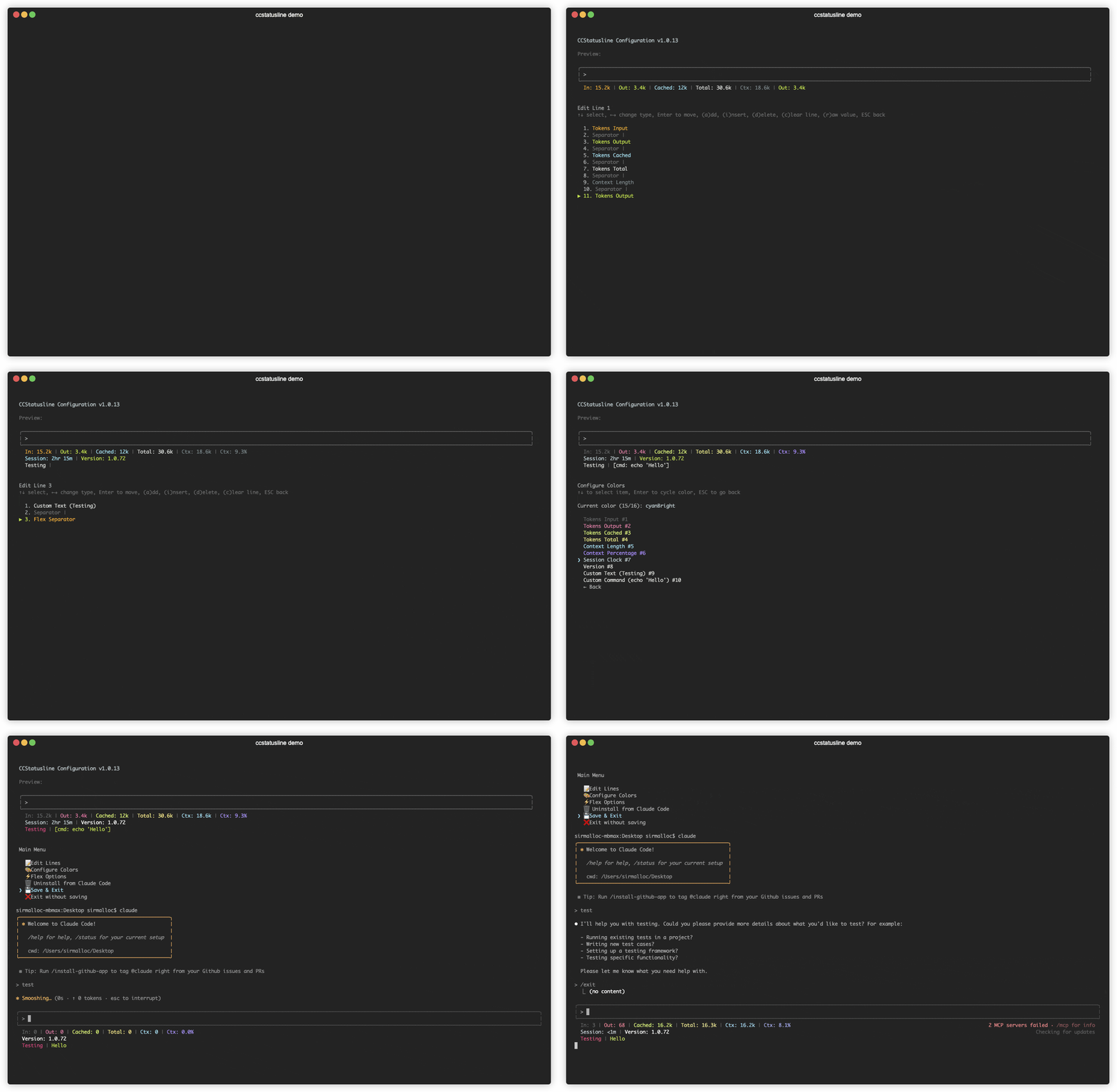
**🎨 A highly customizable status line formatter for Claude Code CLI**
|
|
15
|
+
*Display model info, git branch, token usage, and other metrics in your terminal*
|
|
16
|
+
|
|
17
|
+
[](https://www.npmjs.com/package/ccstatusline)
|
|
18
|
+
[](https://www.npmjs.com/package/ccstatusline)
|
|
19
|
+
[](https://github.com/sirmalloc/ccstatusline/blob/main/LICENSE)
|
|
20
|
+
[](https://nodejs.org)
|
|
21
|
+
[](https://packagephobia.com/result?p=ccstatusline)
|
|
22
|
+
[](https://github.com/sirmalloc/ccstatusline/graphs/commit-activity)
|
|
23
|
+
|
|
24
|
+
[](https://github.com/hesreallyhim/awesome-claude-code)
|
|
25
|
+
[](https://claudelog.com/)
|
|
26
|
+
|
|
27
|
+
|
|
28
|
+
|
|
29
|
+
|
|
30
|
+
</div>
|
|
31
|
+
|
|
32
|
+
## 📚 Table of Contents
|
|
33
|
+
|
|
34
|
+
- [Recent Updates](#-recent-updates)
|
|
35
|
+
- [Features](#-features)
|
|
36
|
+
- [Quick Start](#-quick-start)
|
|
37
|
+
- [Windows Support](#-windows-support)
|
|
38
|
+
- [Usage](#-usage)
|
|
39
|
+
- [API Documentation](#-api-documentation)
|
|
40
|
+
- [Development](#️-development)
|
|
41
|
+
- [Contributing](#-contributing)
|
|
42
|
+
- [License](#-license)
|
|
43
|
+
- [Related Projects](#-related-projects)
|
|
44
|
+
|
|
45
|
+
---
|
|
46
|
+
|
|
47
|
+
## 🆕 Recent Updates
|
|
48
|
+
|
|
49
|
+
### v2.2.0 - v2.2.6 - Speed, widgets, links, and reliability updates
|
|
50
|
+
|
|
51
|
+
- **🚀 New Token Speed widgets** - Added three widgets: **Input Speed**, **Output Speed**, and **Total Speed**.
|
|
52
|
+
- Each speed widget supports a configurable window of `0-120` seconds in the widget editor (`w` key).
|
|
53
|
+
- `0` disables window mode and uses a full-session average speed.
|
|
54
|
+
- `1-120` calculates recent speed over the selected rolling window.
|
|
55
|
+
- **🧩 New Skills widget controls (v2.2.1)** - Added configurable Skills modes (last/count/list), optional hide-when-empty behavior, and list-size limiting with most-recent-first ordering.
|
|
56
|
+
- **🌐 Usage API proxy support (v2.2.2)** - Usage widgets honor the uppercase `HTTPS_PROXY` environment variable for their direct API call to Anthropic.
|
|
57
|
+
- **🧠 New Thinking Effort widget (v2.2.4)** - Added a widget that shows the current Claude Code thinking effort level.
|
|
58
|
+
- **🍎 Better macOS usage lookup reliability (v2.2.5)** - Improved reliability when loading usage API tokens on macOS.
|
|
59
|
+
- **⌨️ New Vim Mode widget (v2.2.5)** - Added a widget that shows the current vim mode, with ASCII and optional Nerd Font icon display.
|
|
60
|
+
- **🔗 Git widget link modes (v2.2.6)** - `Git Branch` can render clickable GitHub branch links, and `Git Root Dir` can render clickable IDE links for VS Code and Cursor.
|
|
61
|
+
- **🤝 Better subagent-aware speed reporting** - Token speed calculations continue to include referenced subagent activity so displayed speeds better reflect actual concurrent work.
|
|
62
|
+
|
|
63
|
+
### v2.1.0 - v2.1.10 - Usage widgets, links, new git insertions / deletions widgets, and reliability fixes
|
|
64
|
+
|
|
65
|
+
- **🧩 New Usage widgets (v2.1.0)** - Added **Session Usage**, **Weekly Usage**, **Block Reset Timer**, and **Context Bar** widgets.
|
|
66
|
+
- **📊 More accurate counts (v2.1.0)** - Usage/context widgets now use new statusline JSON metrics when available for more accurate token and context counts.
|
|
67
|
+
- **🪟 Windows empty file bug fix (v2.1.1)** - Fixed a Windows issue that could create an empty `c:\dev\null` file.
|
|
68
|
+
- **🔗 New Link widget (v2.1.3)** - Added a new **Link** widget with clickable OSC8 rendering, preview parity, and raw mode support.
|
|
69
|
+
- **➕ New Git Insertions widget (v2.1.4)** - Added a dedicated Git widget that shows only uncommitted insertions (e.g., `+42`).
|
|
70
|
+
- **➖ New Git Deletions widget (v2.1.4)** - Added a dedicated Git widget that shows only uncommitted deletions (e.g., `-10`).
|
|
71
|
+
- **🧠 Context format fallback fix (v2.1.6)** - When `context_window_size` is missing, context widgets now infer 1M models from long-context labels such as `[1m]` and `1M context` in model identifiers.
|
|
72
|
+
- **⏳ Weekly reset timer split (v2.1.7)** - Added a separate `Weekly Reset Timer` widget.
|
|
73
|
+
- **⚙️ Custom config file flag (v2.1.8)** - Added `--config <path>` support so ccstatusline can load/save settings from a custom file location.
|
|
74
|
+
- **🔣 Unicode separator hex input upgrade (v2.1.9)** - Powerline separator hex input now supports 4-6 digits (full Unicode code points up to `U+10FFFF`).
|
|
75
|
+
- **🌳 Bare repo worktree detection fix (v2.1.10)** - `Git Worktree` now correctly detects linked worktrees created from bare repositories.
|
|
76
|
+
|
|
77
|
+
### v2.0.26 - v2.0.29 - Performance, git internals, and workflow improvements
|
|
78
|
+
|
|
79
|
+
- **🧠 Memory Usage widget (v2.0.29)** - Added a new widget that shows current system memory usage (`Mem: used/total`).
|
|
80
|
+
- **⚡ Block timer cache (v2.0.28)** - Cache block timer metrics to reduce JSONL parsing on every render, with per-config hashed cache files and automatic 5-hour block invalidation.
|
|
81
|
+
- **🧱 Git widget command refactor (v2.0.28)** - Refactored git widgets to use shared git command helpers and expanded coverage for failure and edge-case tests.
|
|
82
|
+
- **🪟 Windows UTF-8 piped output fix (v2.0.28)** - Sets the Windows UTF-8 code page for piped status line rendering.
|
|
83
|
+
- **📁 Git Root Dir widget (v2.0.27)** - Added a new Git widget that shows the repository root directory name.
|
|
84
|
+
- **🏷️ Session Name widget (v2.0.26)** - Added a new widget that shows the current Claude Code session name from `/rename`.
|
|
85
|
+
- **🏠 Current Working Directory home abbreviation (v2.0.26)** - Added a `~` abbreviation option for CWD display in both preview and live rendering.
|
|
86
|
+
- **🧠 Context model suffix fix (v2.0.26)** - Context widgets now recognize the `[1m]` suffix across models, not just a single model path.
|
|
87
|
+
- **🧭 Widget picker UX updates (v2.0.26)** - Improved widget discovery/navigation and added clearer, safer clear-line behavior.
|
|
88
|
+
- **⌨️ TUI editor input fix (v2.0.26)** - Prevented shortcut/input leakage into widget editor flows.
|
|
89
|
+
- **📄 Repo docs update (v2.0.26)** - Migrated guidance from `CLAUDE.md` to `AGENTS.md` (with symlink compatibility).
|
|
90
|
+
|
|
91
|
+
### v2.0.16 - Add fish style path abbreviation toggle to Current Working Directory widget
|
|
92
|
+
|
|
93
|
+
### v2.0.15 - Block Timer calculation fixes
|
|
94
|
+
|
|
95
|
+
- Fix miscalculation in the block timer
|
|
96
|
+
|
|
97
|
+
### v2.0.14 - Add remaining mode toggle to Context Percentage widgets
|
|
98
|
+
|
|
99
|
+
- **Remaining Mode** - You can now toggle the Context Percentage widgets between usage percentage and remaining percentage when configuring them in the TUI by pressing the 'u' key.
|
|
100
|
+
|
|
101
|
+
### v2.0.12 - Custom Text widget now supports emojis
|
|
102
|
+
|
|
103
|
+
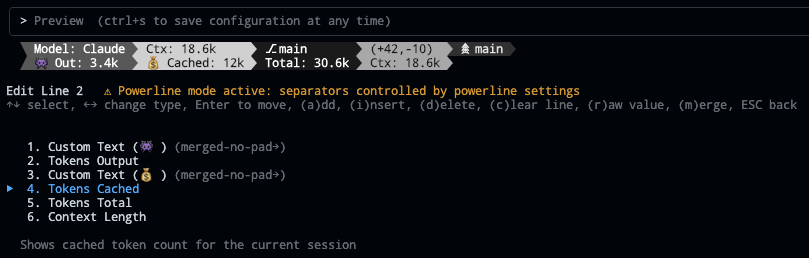
- **👾 Emoji Support** - You can now paste emoji into the custom text widget. You can also turn on the merge option to get emoji labels for your widgets like this:
|
|
104
|
+
|
|
105
|
+
|
|
106
|
+
|
|
107
|
+
### v2.0.11 - Unlimited Status Lines
|
|
108
|
+
|
|
109
|
+
- **🚀 No Line Limit** - Configure as many status lines as you need - the 3-line limitation has been removed
|
|
110
|
+
|
|
111
|
+
### v2.0.10 - Git Updates
|
|
112
|
+
|
|
113
|
+
- **🌳 Git Worktree widget** - Shows the active worktree name when working with git worktrees
|
|
114
|
+
- **👻 Hide 'no git' message toggle** - Git widgets now support hiding the 'no git' message when not in a repository (toggle with 'h' key while editing the widget)
|
|
115
|
+
|
|
116
|
+
### v2.0.8 - Powerline Auto-Alignment
|
|
117
|
+
|
|
118
|
+
|
|
119
|
+
|
|
120
|
+
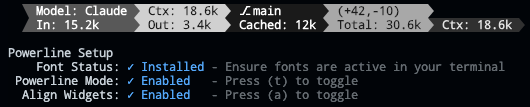
- **🎯 Widget Alignment** - Auto-align widgets across multiple status lines in Powerline mode for a clean, columnar layout (toggle with 'a' in Powerline Setup)
|
|
121
|
+
|
|
122
|
+
### v2.0.7 - Current Working Directory & Session Cost
|
|
123
|
+
|
|
124
|
+

|
|
125
|
+
|
|
126
|
+
- **📁 Current Working Directory** - Display the current working directory with configurable segment display
|
|
127
|
+
- Set the number of path segments to show (e.g., show only last 2 segments: `.../Personal/ccstatusline`)
|
|
128
|
+
- Supports raw value mode for compact display
|
|
129
|
+
- Automatically truncates long paths with ellipsis
|
|
130
|
+
- **💰 Session Cost Widget** - Track your Claude Code session costs (requires Claude Code 1.0.85+)
|
|
131
|
+
- Displays total session cost in USD
|
|
132
|
+
- Supports raw value mode (shows just `$X.YZ` vs `Cost: $X.YZ`)
|
|
133
|
+
- Real-time cost tracking from Claude Code session data
|
|
134
|
+
- Note: Cost may not update properly when using `/resume` (Claude Code limitation)
|
|
135
|
+
- **🐛 Bug Fixes**
|
|
136
|
+
- Fixed Block Timer calculations for accurate time tracking across block boundaries
|
|
137
|
+
- Improved widget editor stability with proper Ctrl+S handling
|
|
138
|
+
- Enhanced cursor display in numeric input fields
|
|
139
|
+
|
|
140
|
+
### v2.0.2 - Block Timer Widget
|
|
141
|
+
|
|
142
|
+

|
|
143
|
+
|
|
144
|
+
- **⏱️ Block Timer** - Track your progress through 5-hour Claude Code blocks
|
|
145
|
+
- Displays time elapsed in current block as hours/minutes (e.g., "3hr 45m")
|
|
146
|
+
- Progress bar mode shows visual completion percentage
|
|
147
|
+
- Two progress bar styles: full width (32 chars) or compact (16 chars)
|
|
148
|
+
- Automatically detects block boundaries from transcript timestamps
|
|
149
|
+
|
|
150
|
+
### v2.0.0 - Powerline Support & Enhanced Themes
|
|
151
|
+
- **⚡ Powerline Mode** - Beautiful Powerline-style status lines with arrow separators and customizable caps
|
|
152
|
+
- **🎨 Built-in Themes** - Multiple pre-configured themes that you can copy and customize
|
|
153
|
+
- **🌈 Advanced Color Support** - Basic (16), 256-color (with custom ANSI codes), and truecolor (with hex codes) modes
|
|
154
|
+
- **🔗 Widget Merging** - Merge multiple widgets together with or without padding for seamless designs
|
|
155
|
+
- **📦 Easy Installation** - Install directly with `npx` or `bunx` - no global package needed
|
|
156
|
+
- **🔤 Custom Separators** - Add multiple Powerline separators with custom hex codes for font support
|
|
157
|
+
- **🚀 Auto Font Install** - Automatic Powerline font installation with user consent
|
|
158
|
+
|
|
159
|
+
---
|
|
160
|
+
|
|
161
|
+
## ✨ Features
|
|
162
|
+
|
|
163
|
+
- **📊 Real-time Metrics** - Display model name, git branch, token usage, session duration, block timer, and more
|
|
164
|
+
- **🎨 Fully Customizable** - Choose what to display and customize colors for each element
|
|
165
|
+
- **⚡ Powerline Support** - Beautiful Powerline-style rendering with arrow separators, caps, and custom fonts
|
|
166
|
+
- **📐 Multi-line Support** - Configure multiple independent status lines
|
|
167
|
+
- **🖥️ Interactive TUI** - Built-in configuration interface using React/Ink
|
|
168
|
+
- **🔎 Fast Widget Picker** - Add/change widgets by category with search and ranked matching
|
|
169
|
+
- **⚙️ Global Options** - Apply consistent formatting across all widgets (padding, separators, bold, background)
|
|
170
|
+
- **🚀 Cross-platform** - Works seamlessly with both Bun and Node.js
|
|
171
|
+
- **🔧 Flexible Configuration** - Supports custom Claude Code config directory via `CLAUDE_CONFIG_DIR` environment variable
|
|
172
|
+
- **📏 Smart Width Detection** - Automatically adapts to terminal width with flex separators
|
|
173
|
+
- **⚡ Zero Config** - Sensible defaults that work out of the box
|
|
174
|
+
|
|
175
|
+
---
|
|
176
|
+
|
|
177
|
+
## 🚀 Quick Start
|
|
178
|
+
|
|
179
|
+
### No installation needed! Use directly with npx or bunx:
|
|
180
|
+
|
|
181
|
+
```bash
|
|
182
|
+
# Run the configuration TUI with npm
|
|
183
|
+
npx -y ccstatusline@latest
|
|
184
|
+
|
|
185
|
+
# Or with Bun (faster)
|
|
186
|
+
bunx -y ccstatusline@latest
|
|
187
|
+
```
|
|
188
|
+
|
|
189
|
+
### Configure ccstatusline
|
|
190
|
+
|
|
191
|
+
The interactive configuration tool provides a terminal UI where you can:
|
|
192
|
+
- Configure multiple separate status lines
|
|
193
|
+
- Add/remove/reorder status line widgets
|
|
194
|
+
- Customize colors for each widget
|
|
195
|
+
- Configure flex separator behavior
|
|
196
|
+
- Edit custom text widgets
|
|
197
|
+
- Install/uninstall to Claude Code settings
|
|
198
|
+
- Preview your status line in real-time
|
|
199
|
+
|
|
200
|
+
> 💡 **Tip:** Your settings are automatically saved to `~/.config/ccstatusline/settings.json`
|
|
201
|
+
|
|
202
|
+
> 🔧 **Custom Claude Config:** If your Claude Code configuration is in a non-standard location, set the `CLAUDE_CONFIG_DIR` environment variable:
|
|
203
|
+
> ```bash
|
|
204
|
+
> # Linux/macOS
|
|
205
|
+
> export CLAUDE_CONFIG_DIR=/custom/path/to/.claude
|
|
206
|
+
>
|
|
207
|
+
> # Windows PowerShell
|
|
208
|
+
> $env:CLAUDE_CONFIG_DIR="C:\custom\path\.claude"
|
|
209
|
+
> ```
|
|
210
|
+
|
|
211
|
+
> 🌐 **Usage API proxy:** Usage widgets honor the uppercase `HTTPS_PROXY` environment variable for their direct API call to Anthropic.
|
|
212
|
+
|
|
213
|
+
### Claude Code settings.json format
|
|
214
|
+
|
|
215
|
+
When you install from the TUI, ccstatusline writes a `statusLine` command object to your Claude Code settings:
|
|
216
|
+
|
|
217
|
+
```json
|
|
218
|
+
{
|
|
219
|
+
"statusLine": {
|
|
220
|
+
"type": "command",
|
|
221
|
+
"command": "npx -y ccstatusline@latest",
|
|
222
|
+
"padding": 0
|
|
223
|
+
}
|
|
224
|
+
}
|
|
225
|
+
```
|
|
226
|
+
|
|
227
|
+
Other supported command values are:
|
|
228
|
+
- `bunx -y ccstatusline@latest`
|
|
229
|
+
- `ccstatusline` (for self-managed/global installs)
|
|
230
|
+
|
|
231
|
+
---
|
|
232
|
+
|
|
233
|
+
## 🪟 Windows Support
|
|
234
|
+
|
|
235
|
+
ccstatusline works seamlessly on Windows with full feature compatibility across PowerShell (5.1+ and 7+), Command Prompt, and Windows Subsystem for Linux (WSL).
|
|
236
|
+
|
|
237
|
+
### Installation on Windows
|
|
238
|
+
|
|
239
|
+
#### Option 1: Using Bun (Recommended)
|
|
240
|
+
```powershell
|
|
241
|
+
# Install Bun for Windows
|
|
242
|
+
irm bun.sh/install.ps1 | iex
|
|
243
|
+
|
|
244
|
+
# Run ccstatusline
|
|
245
|
+
bunx -y ccstatusline@latest
|
|
246
|
+
```
|
|
247
|
+
|
|
248
|
+
#### Option 2: Using Node.js
|
|
249
|
+
```powershell
|
|
250
|
+
# Using npm
|
|
251
|
+
npx -y ccstatusline@latest
|
|
252
|
+
|
|
253
|
+
# Or with Yarn
|
|
254
|
+
yarn dlx ccstatusline@latest
|
|
255
|
+
|
|
256
|
+
# Or with pnpm
|
|
257
|
+
pnpm dlx ccstatusline@latest
|
|
258
|
+
```
|
|
259
|
+
|
|
260
|
+
### Windows-Specific Features
|
|
261
|
+
|
|
262
|
+
#### Powerline Font Support
|
|
263
|
+
For optimal Powerline rendering on Windows:
|
|
264
|
+
|
|
265
|
+
**Windows Terminal** (Recommended):
|
|
266
|
+
- Supports Powerline fonts natively
|
|
267
|
+
- Download from [Microsoft Store](https://aka.ms/terminal)
|
|
268
|
+
- Auto-detects compatible fonts
|
|
269
|
+
|
|
270
|
+
**PowerShell/Command Prompt**:
|
|
271
|
+
```powershell
|
|
272
|
+
# Install JetBrains Mono Nerd Font via winget
|
|
273
|
+
winget install DEVCOM.JetBrainsMonoNerdFont
|
|
274
|
+
|
|
275
|
+
# Alternative: Install base JetBrains Mono font
|
|
276
|
+
winget install "JetBrains.JetBrainsMono"
|
|
277
|
+
|
|
278
|
+
# Or download manually from: https://www.nerdfonts.com/font-downloads
|
|
279
|
+
```
|
|
280
|
+
|
|
281
|
+
#### Path Handling
|
|
282
|
+
ccstatusline automatically handles Windows-specific paths:
|
|
283
|
+
- Git repositories work with both `/` and `\` path separators
|
|
284
|
+
- Current Working Directory widget displays Windows-style paths correctly
|
|
285
|
+
- Full support for mapped network drives and UNC paths
|
|
286
|
+
- Handles Windows drive letters (C:, D:, etc.)
|
|
287
|
+
|
|
288
|
+
### Windows Troubleshooting
|
|
289
|
+
|
|
290
|
+
#### Common Issues & Solutions
|
|
291
|
+
|
|
292
|
+
**Issue**: Powerline symbols showing as question marks or boxes
|
|
293
|
+
```powershell
|
|
294
|
+
# Solution: Install a compatible Nerd Font
|
|
295
|
+
winget install JetBrainsMono.NerdFont
|
|
296
|
+
# Then set the font in your terminal settings
|
|
297
|
+
```
|
|
298
|
+
|
|
299
|
+
**Issue**: Git commands not recognized
|
|
300
|
+
```powershell
|
|
301
|
+
# Check if Git is installed and in PATH
|
|
302
|
+
git --version
|
|
303
|
+
|
|
304
|
+
# If not found, install Git:
|
|
305
|
+
winget install Git.Git
|
|
306
|
+
# Or download from: https://git-scm.com/download/win
|
|
307
|
+
```
|
|
308
|
+
|
|
309
|
+
**Issue**: Permission errors during installation
|
|
310
|
+
```powershell
|
|
311
|
+
# Use non-global installation (recommended)
|
|
312
|
+
npx -y ccstatusline@latest
|
|
313
|
+
|
|
314
|
+
# Or run PowerShell as Administrator for global install
|
|
315
|
+
```
|
|
316
|
+
|
|
317
|
+
**Issue**: "Execution Policy" errors in PowerShell
|
|
318
|
+
```powershell
|
|
319
|
+
# Temporarily allow script execution
|
|
320
|
+
Set-ExecutionPolicy -ExecutionPolicy RemoteSigned -Scope CurrentUser
|
|
321
|
+
```
|
|
322
|
+
|
|
323
|
+
**Issue**: Windows Defender blocking execution
|
|
324
|
+
```powershell
|
|
325
|
+
# If Windows Defender flags the binary:
|
|
326
|
+
# 1. Open Windows Security
|
|
327
|
+
# 2. Go to "Virus & threat protection"
|
|
328
|
+
# 3. Add exclusion for the ccstatusline binary location
|
|
329
|
+
# Or use temporary bypass (not recommended for production):
|
|
330
|
+
Add-MpPreference -ExclusionPath "$env:USERPROFILE\.bun\bin"
|
|
331
|
+
```
|
|
332
|
+
|
|
333
|
+
#### Windows Subsystem for Linux (WSL)
|
|
334
|
+
ccstatusline works perfectly in WSL environments:
|
|
335
|
+
|
|
336
|
+
```bash
|
|
337
|
+
# Install in WSL Ubuntu/Debian
|
|
338
|
+
curl -fsSL https://bun.sh/install | bash
|
|
339
|
+
source ~/.bashrc
|
|
340
|
+
bunx -y ccstatusline@latest
|
|
341
|
+
```
|
|
342
|
+
|
|
343
|
+
**WSL Benefits**:
|
|
344
|
+
- Native Unix-style path handling
|
|
345
|
+
- Better font rendering in WSL terminals
|
|
346
|
+
- Seamless integration with Linux development workflows
|
|
347
|
+
|
|
348
|
+
### Windows Terminal Configuration
|
|
349
|
+
|
|
350
|
+
For the best experience, configure Windows Terminal with these recommended settings:
|
|
351
|
+
|
|
352
|
+
#### Terminal Settings (settings.json)
|
|
353
|
+
```json
|
|
354
|
+
{
|
|
355
|
+
"profiles": {
|
|
356
|
+
"defaults": {
|
|
357
|
+
"font": {
|
|
358
|
+
"face": "JetBrainsMono Nerd Font",
|
|
359
|
+
"size": 12
|
|
360
|
+
},
|
|
361
|
+
"colorScheme": "One Half Dark"
|
|
362
|
+
}
|
|
363
|
+
}
|
|
364
|
+
}
|
|
365
|
+
```
|
|
366
|
+
|
|
367
|
+
#### Claude Code Integration
|
|
368
|
+
Configure ccstatusline in your Claude Code settings:
|
|
369
|
+
|
|
370
|
+
**Settings Location:**
|
|
371
|
+
- Default: `~/.claude/settings.json` (Windows: `%USERPROFILE%\.claude\settings.json`)
|
|
372
|
+
- Custom: Set `CLAUDE_CONFIG_DIR` environment variable to use a different directory
|
|
373
|
+
|
|
374
|
+
**For Bun users**:
|
|
375
|
+
```json
|
|
376
|
+
{
|
|
377
|
+
"statusLine": {
|
|
378
|
+
"type": "command",
|
|
379
|
+
"command": "bunx -y ccstatusline@latest",
|
|
380
|
+
"padding": 0
|
|
381
|
+
}
|
|
382
|
+
}
|
|
383
|
+
```
|
|
384
|
+
|
|
385
|
+
**For npm users**:
|
|
386
|
+
```json
|
|
387
|
+
{
|
|
388
|
+
"statusLine": {
|
|
389
|
+
"type": "command",
|
|
390
|
+
"command": "npx -y ccstatusline@latest",
|
|
391
|
+
"padding": 0
|
|
392
|
+
}
|
|
393
|
+
}
|
|
394
|
+
```
|
|
395
|
+
|
|
396
|
+
> 💡 **Custom Config Directory:** If you use a non-standard Claude Code configuration directory, set the `CLAUDE_CONFIG_DIR` environment variable before running ccstatusline. The tool will automatically detect and use your custom location.
|
|
397
|
+
|
|
398
|
+
### Performance on Windows
|
|
399
|
+
|
|
400
|
+
ccstatusline includes Windows-specific runtime behavior:
|
|
401
|
+
- **UTF-8 piped output fix**: In piped mode, it attempts to set code page `65001` for reliable symbol rendering
|
|
402
|
+
- **Path compatibility**: Git and CWD widgets handle both `/` and `\` separators
|
|
403
|
+
- **Block timer cache**: Cached block metrics reduce repeated JSONL scanning
|
|
404
|
+
|
|
405
|
+
### Windows-Specific Widget Behavior
|
|
406
|
+
|
|
407
|
+
Some widgets have Windows-specific optimizations:
|
|
408
|
+
|
|
409
|
+
- **Current Working Directory**: Displays Windows drive letters and UNC paths
|
|
410
|
+
- **Git Widgets**: Handle Windows line endings (CRLF) automatically
|
|
411
|
+
- **Custom Commands**: Support both PowerShell and cmd.exe commands
|
|
412
|
+
- **Block Timer**: Accounts for Windows timezone handling
|
|
413
|
+
|
|
414
|
+
---
|
|
415
|
+
|
|
416
|
+
## 📖 Usage
|
|
417
|
+
|
|
418
|
+
Once configured, ccstatusline automatically formats your Claude Code status line. The status line appears at the bottom of your terminal during Claude Code sessions.
|
|
419
|
+
|
|
420
|
+
### Runtime Modes
|
|
421
|
+
|
|
422
|
+
- **Interactive mode (TUI)**: Launches when there is no stdin input
|
|
423
|
+
- **Piped mode (renderer)**: Parses Claude Code status JSON from stdin and prints one or more formatted lines
|
|
424
|
+
|
|
425
|
+
```bash
|
|
426
|
+
# Interactive TUI
|
|
427
|
+
bun run start
|
|
428
|
+
|
|
429
|
+
# Piped mode with example payload
|
|
430
|
+
bun run example
|
|
431
|
+
```
|
|
432
|
+
|
|
433
|
+
### 📊 Available Widgets
|
|
434
|
+
|
|
435
|
+
- **Model** - Displays the Claude model name (e.g., "Claude 3.5 Sonnet")
|
|
436
|
+
- **Output Style** - Shows the current Claude Code output style
|
|
437
|
+
- **Git Branch** - Shows the current git branch name
|
|
438
|
+
- **Git Changes** - Shows git changes count (`+insertions`, `-deletions`)
|
|
439
|
+
- **Git Insertions** - Shows git insertions count
|
|
440
|
+
- **Git Deletions** - Shows git deletions count
|
|
441
|
+
- **Git Root Dir** - Shows the git repository root directory name
|
|
442
|
+
- **Git Worktree** - Shows the current git worktree name
|
|
443
|
+
- **Current Working Dir** - Shows current working directory with segment limit, fish-style abbreviation, and optional `~` home abbreviation
|
|
444
|
+
- **Tokens Input** - Shows input token count for the current session
|
|
445
|
+
- **Tokens Output** - Shows output token count for the current session
|
|
446
|
+
- **Tokens Cached** - Shows cached token count for the current session
|
|
447
|
+
- **Tokens Total** - Shows total token count (`input + output + cache`) for the current session
|
|
448
|
+
- **Input Speed** - Shows session-average input token speed (`tokens/sec`) with optional per-widget window (`0-120` seconds; `0` = full-session average)
|
|
449
|
+
- **Output Speed** - Shows session-average output token speed (`tokens/sec`) with optional per-widget window (`0-120` seconds; `0` = full-session average)
|
|
450
|
+
- **Total Speed** - Shows session-average total token speed (`tokens/sec`) with optional per-widget window (`0-120` seconds; `0` = full-session average)
|
|
451
|
+
- **Context Length** - Shows the current context window size in tokens
|
|
452
|
+
- **Context %** - Shows percentage of context window used or remaining
|
|
453
|
+
- **Context % (usable)** - Shows percentage of usable context used or remaining (80% of max before auto-compact)
|
|
454
|
+
- **Session Clock** - Shows elapsed time since current session started
|
|
455
|
+
- **Session Cost** - Shows the total session cost in USD
|
|
456
|
+
- **Block Timer** - Shows current 5-hour block elapsed time or progress
|
|
457
|
+
- **Terminal Width** - Shows current terminal width in columns
|
|
458
|
+
- **Version** - Shows Claude Code CLI version number
|
|
459
|
+
- **Custom Text** - Displays user-defined custom text
|
|
460
|
+
- **Custom Command** - Executes a custom shell command and displays output (refreshes whenever Claude Code updates the status line)
|
|
461
|
+
- **Link** - Displays a clickable terminal hyperlink using OSC 8
|
|
462
|
+
- **Claude Session ID** - Shows the current Claude Code session ID from status JSON
|
|
463
|
+
- **Session Name** - Shows the session name set via `/rename` in Claude Code
|
|
464
|
+
- **Memory Usage** - Shows system memory usage (used/total)
|
|
465
|
+
- **Session Usage** - Shows daily/session API usage percentage
|
|
466
|
+
- **Weekly Usage** - Shows weekly API usage percentage
|
|
467
|
+
- **Block Reset Timer** - Shows time remaining until current 5-hour block reset window
|
|
468
|
+
- **Weekly Reset Timer** - Shows time remaining until weekly usage reset
|
|
469
|
+
- **Context Bar** - Shows context usage as a progress bar with short/full display modes
|
|
470
|
+
- **Skills** - Shows skill activity as last used, total count, or unique list (with optional list limit and hide-when-empty toggle)
|
|
471
|
+
- **Vim Mode** - Displays current vim editor mode
|
|
472
|
+
- **Separator** - Visual divider between widgets (available when Powerline mode is off and no default separator is configured)
|
|
473
|
+
- **Flex Separator** - Expands to fill available space (available when Powerline mode is off)
|
|
474
|
+
|
|
475
|
+
---
|
|
476
|
+
|
|
477
|
+
### Terminal Width Options
|
|
478
|
+
These settings affect where long lines are truncated, and where right-alignment occurs when using flex separators:
|
|
479
|
+
- **Full width always** - Uses full terminal width (may wrap if auto-compact message appears or IDE integration adds text)
|
|
480
|
+
- **Full width minus 40** - Reserves 40 characters for auto-compact message to prevent wrapping (default)
|
|
481
|
+
- **Full width until compact** - Dynamically switches between full width and minus 40 based on context percentage threshold (configurable, default 60%)
|
|
482
|
+
|
|
483
|
+
---
|
|
484
|
+
|
|
485
|
+
### ⚙️ Global Options
|
|
486
|
+
|
|
487
|
+
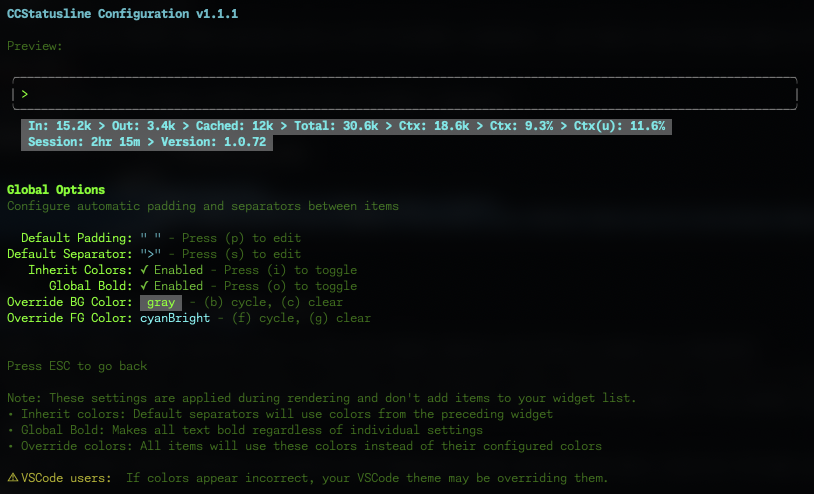
Configure global formatting preferences that apply to all widgets:
|
|
488
|
+
|
|
489
|
+
|
|
490
|
+
|
|
491
|
+
#### Default Padding & Separators
|
|
492
|
+
- **Default Padding** - Add consistent padding to the left and right of each widget
|
|
493
|
+
- **Default Separator** - Automatically insert a separator between all widgets
|
|
494
|
+
- Press **(p)** to edit padding
|
|
495
|
+
- Press **(s)** to edit separator
|
|
496
|
+
|
|
497
|
+
<details>
|
|
498
|
+
<summary><b>Global Formatting Options</b></summary>
|
|
499
|
+
|
|
500
|
+
- **Inherit Colors** - Default separators inherit foreground and background colors from the preceding widget
|
|
501
|
+
- Press **(i)** to toggle
|
|
502
|
+
- **Global Bold** - Apply bold formatting to all text regardless of individual widget settings
|
|
503
|
+
- Press **(o)** to toggle
|
|
504
|
+
- **Override Foreground Color** - Force all widgets to use the same text color
|
|
505
|
+
- Press **(f)** to cycle through colors
|
|
506
|
+
- Press **(g)** to clear override
|
|
507
|
+
- **Override Background Color** - Force all widgets to use the same background color
|
|
508
|
+
- Press **(b)** to cycle through colors
|
|
509
|
+
- Press **(c)** to clear override
|
|
510
|
+
|
|
511
|
+
</details>
|
|
512
|
+
|
|
513
|
+
> 💡 **Note:** These settings are applied during rendering and don't add widgets to your widget list. They provide a consistent look across your entire status line without modifying individual widget configurations.
|
|
514
|
+
|
|
515
|
+
> ⚠️ **VSCode Users:** If colors appear incorrect in the VSCode integrated terminal, the "Terminal › Integrated: Minimum Contrast Ratio" (`terminal.integrated.minimumContrastRatio`) setting is forcing a minimum contrast between foreground and background colors. You can adjust this setting to 1 to disable the contrast enforcement, or use a standalone terminal for accurate colors.
|
|
516
|
+
|
|
517
|
+
### ⏱️ Block Timer Widget
|
|
518
|
+
|
|
519
|
+
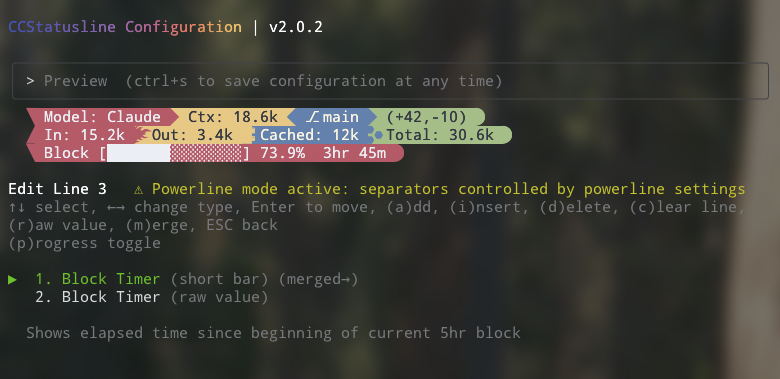
The Block Timer widget helps you track your progress through Claude Code's 5-hour conversation blocks:
|
|
520
|
+
|
|
521
|
+
|
|
522
|
+
|
|
523
|
+
**Display Modes:**
|
|
524
|
+
- **Time Display** - Shows elapsed time as "3hr 45m" (default)
|
|
525
|
+
- **Progress Bar** - Full width 32-character progress bar with percentage
|
|
526
|
+
- **Progress Bar (Short)** - Compact 16-character progress bar with percentage
|
|
527
|
+
|
|
528
|
+
**Features:**
|
|
529
|
+
- Automatically detects block boundaries from transcript timestamps
|
|
530
|
+
- Floors block start time to the hour for consistent tracking
|
|
531
|
+
- Shows "Block: 3hr 45m" in normal mode or just "3hr 45m" in raw value mode
|
|
532
|
+
- Progress bars show completion percentage (e.g., "[████████████████████████░░░░░░░░] 73.9%")
|
|
533
|
+
- Toggle between modes with the **(p)** key in the widgets editor
|
|
534
|
+
|
|
535
|
+
### 🔤 Raw Value Mode
|
|
536
|
+
|
|
537
|
+
Some widgets support "raw value" mode which displays just the value without a label:
|
|
538
|
+
- Normal: `Model: Claude 3.5 Sonnet` → Raw: `Claude 3.5 Sonnet`
|
|
539
|
+
- Normal: `Session: 2hr 15m` → Raw: `2hr 15m`
|
|
540
|
+
- Normal: `Block: 3hr 45m` → Raw: `3hr 45m`
|
|
541
|
+
- Normal: `Ctx: 18.6k` → Raw: `18.6k`
|
|
542
|
+
|
|
543
|
+
### ⌨️ Widget Editor Keybinds
|
|
544
|
+
|
|
545
|
+
Common controls in the line editor:
|
|
546
|
+
- `a` add widget
|
|
547
|
+
- `i` insert widget
|
|
548
|
+
- `Enter` enter/exit move mode
|
|
549
|
+
- `d` delete selected widget
|
|
550
|
+
- `r` toggle raw value (supported widgets)
|
|
551
|
+
- `m` cycle merge mode (`off` → `merge` → `merge no padding`)
|
|
552
|
+
|
|
553
|
+
Widget-specific shortcuts:
|
|
554
|
+
- **Git widgets**: `h` toggle hide `no git` output
|
|
555
|
+
- **Context % widgets**: `u` toggle used vs remaining display
|
|
556
|
+
- **Block Timer**: `p` cycle display mode (time/full bar/short bar)
|
|
557
|
+
- **Block Reset Timer**: `p` cycle display mode (time/full bar/short bar)
|
|
558
|
+
- **Weekly Reset Timer**: `p` cycle display mode (time/full bar/short bar)
|
|
559
|
+
- **Current Working Dir**: `h` home abbreviation, `s` segment editor, `f` fish-style path
|
|
560
|
+
- **Custom Command**: `e` command, `w` max width, `t` timeout, `p` preserve ANSI colors
|
|
561
|
+
- **Link**: `u` URL, `e` link text
|
|
562
|
+
|
|
563
|
+
---
|
|
564
|
+
|
|
565
|
+
### 🔧 Custom Widgets
|
|
566
|
+
|
|
567
|
+
#### Custom Text Widget
|
|
568
|
+
Add static text to your status line. Perfect for:
|
|
569
|
+
- Project identifiers
|
|
570
|
+
- Environment indicators (dev/prod)
|
|
571
|
+
- Personal labels or reminders
|
|
572
|
+
|
|
573
|
+
#### Custom Command Widget
|
|
574
|
+
Execute shell commands and display their output dynamically:
|
|
575
|
+
- Refreshes whenever the statusline is updated by Claude Code
|
|
576
|
+
- Receives the full Claude Code JSON data via stdin (model info, session ID, transcript path, etc.)
|
|
577
|
+
- Displays command output inline in your status line
|
|
578
|
+
- Configurable timeout (default: 1000ms)
|
|
579
|
+
- Optional max-width truncation
|
|
580
|
+
- Optional ANSI color preservation (`preserve colors`)
|
|
581
|
+
- Examples:
|
|
582
|
+
- `pwd | xargs basename` - Show current directory name
|
|
583
|
+
- `node -v` - Display Node.js version
|
|
584
|
+
- `git rev-parse --short HEAD` - Show current commit hash
|
|
585
|
+
- `date +%H:%M` - Display current time
|
|
586
|
+
- `curl -s wttr.in?format="%t"` - Show current temperature
|
|
587
|
+
- `npx -y ccusage@latest statusline` - Display Claude usage metrics (set timeout: 5000ms)
|
|
588
|
+
|
|
589
|
+
> ⚠️ **Important:** Commands should complete quickly to avoid delays. Long-running commands will be killed after the configured timeout. If you're not seeing output from your custom command, try increasing the timeout value (press 't' in the editor).
|
|
590
|
+
|
|
591
|
+
> 💡 **Tip:** Custom commands can be other Claude Code compatible status line formatters! They receive the same JSON via stdin that ccstatusline receives from Claude Code, allowing you to chain or combine multiple status line tools.
|
|
592
|
+
|
|
593
|
+
#### Link Widget
|
|
594
|
+
Create clickable links in terminals that support OSC 8 hyperlinks:
|
|
595
|
+
- `metadata.url` - target URL (http/https)
|
|
596
|
+
- `metadata.text` - optional display text (defaults to URL)
|
|
597
|
+
- Falls back to plain text when URL is missing or unsupported
|
|
598
|
+
|
|
599
|
+
---
|
|
600
|
+
|
|
601
|
+
### 🔗 Integration Example: ccusage
|
|
602
|
+
|
|
603
|
+
[ccusage](https://github.com/ryoppippi/ccusage) is a tool that tracks and displays Claude Code usage metrics. You can integrate it directly into your status line:
|
|
604
|
+
|
|
605
|
+
1. Add a Custom Command widget
|
|
606
|
+
2. Set command: `npx -y ccusage@latest statusline`
|
|
607
|
+
3. Set timeout: `5000` (5 seconds for initial download)
|
|
608
|
+
4. Enable "preserve colors" to keep ccusage's color formatting
|
|
609
|
+
|
|
610
|
+

|
|
611
|
+
|
|
612
|
+
> 📄 **How it works:** The command receives Claude Code's JSON data via stdin, allowing ccusage to access session information, model details, and transcript data for accurate usage tracking.
|
|
613
|
+
|
|
614
|
+
### ✂️ Smart Truncation
|
|
615
|
+
|
|
616
|
+
When terminal width is detected, status lines automatically truncate with ellipsis (...) if they exceed the available width, preventing line wrapping.
|
|
617
|
+
Truncation is ANSI/OSC-aware, so preserved color output and OSC 8 hyperlinks remain well-formed.
|
|
618
|
+
|
|
619
|
+
---
|
|
620
|
+
|
|
621
|
+
## 📖 API Documentation
|
|
622
|
+
|
|
623
|
+
Complete API documentation is generated using TypeDoc and includes detailed information about:
|
|
624
|
+
|
|
625
|
+
- **Core Types**: Configuration interfaces, widget definitions, and render contexts
|
|
626
|
+
- **Widget System**: All available widgets and their customization options
|
|
627
|
+
- **Utility Functions**: Helper functions for rendering, configuration, and terminal handling
|
|
628
|
+
- **Status Line Rendering**: Core rendering engine and formatting options
|
|
629
|
+
|
|
630
|
+
### Generating Documentation
|
|
631
|
+
|
|
632
|
+
To generate the API documentation locally:
|
|
633
|
+
|
|
634
|
+
```bash
|
|
635
|
+
# Generate documentation
|
|
636
|
+
bun run docs
|
|
637
|
+
|
|
638
|
+
# Clean generated documentation
|
|
639
|
+
bun run docs:clean
|
|
640
|
+
```
|
|
641
|
+
|
|
642
|
+
The documentation will be generated in the `docs/` directory and can be viewed by opening `docs/index.html` in your web browser.
|
|
643
|
+
|
|
644
|
+
### Documentation Structure
|
|
645
|
+
|
|
646
|
+
- **Types**: Core TypeScript interfaces and type definitions
|
|
647
|
+
- **Widgets**: Individual widget implementations and their APIs
|
|
648
|
+
- **Utils**: Utility functions for configuration, rendering, and terminal operations
|
|
649
|
+
- **Main Module**: Primary entry point and orchestration functions
|
|
650
|
+
|
|
651
|
+
---
|
|
652
|
+
|
|
653
|
+
## 🛠️ Development
|
|
654
|
+
|
|
655
|
+
### Prerequisites
|
|
656
|
+
|
|
657
|
+
- [Bun](https://bun.sh) (v1.0+)
|
|
658
|
+
- Git
|
|
659
|
+
- Node.js 14+ (optional, for running the built `dist/ccstatusline.js` binary or npm publishing)
|
|
660
|
+
|
|
661
|
+
### Setup
|
|
662
|
+
|
|
663
|
+
```bash
|
|
664
|
+
# Clone the repository
|
|
665
|
+
git clone https://github.com/sirmalloc/ccstatusline.git
|
|
666
|
+
cd ccstatusline
|
|
667
|
+
|
|
668
|
+
# Install dependencies
|
|
669
|
+
bun install
|
|
670
|
+
```
|
|
671
|
+
|
|
672
|
+
### Development Commands
|
|
673
|
+
|
|
674
|
+
```bash
|
|
675
|
+
# Run in TUI mode
|
|
676
|
+
bun run start
|
|
677
|
+
|
|
678
|
+
# Test piped mode with example payload
|
|
679
|
+
bun run example
|
|
680
|
+
|
|
681
|
+
# Run tests
|
|
682
|
+
bun test
|
|
683
|
+
|
|
684
|
+
# Run typecheck + eslint checks without modifying files
|
|
685
|
+
bun run lint
|
|
686
|
+
|
|
687
|
+
# Apply ESLint auto-fixes intentionally
|
|
688
|
+
bun run lint:fix
|
|
689
|
+
|
|
690
|
+
# Build for distribution
|
|
691
|
+
bun run build
|
|
692
|
+
|
|
693
|
+
# Generate TypeDoc documentation
|
|
694
|
+
bun run docs
|
|
695
|
+
```
|
|
696
|
+
|
|
697
|
+
### Configuration Files
|
|
698
|
+
|
|
699
|
+
- `~/.config/ccstatusline/settings.json` - ccstatusline UI/render settings
|
|
700
|
+
- `~/.claude/settings.json` - Claude Code settings (`statusLine` command object)
|
|
701
|
+
- `~/.cache/ccstatusline/block-cache-*.json` - block timer cache (keyed by Claude config directory hash)
|
|
702
|
+
|
|
703
|
+
If you use a custom Claude config location, set `CLAUDE_CONFIG_DIR` and ccstatusline will read/write that path instead of `~/.claude`.
|
|
704
|
+
|
|
705
|
+
### Build Notes
|
|
706
|
+
|
|
707
|
+
- Build target is Node.js 14+ (`dist/ccstatusline.js`)
|
|
708
|
+
- During install, `ink@6.2.0` is patched to fix backspace handling on macOS terminals
|
|
709
|
+
|
|
710
|
+
### 📁 Project Structure
|
|
711
|
+
|
|
712
|
+
```
|
|
713
|
+
ccstatusline/
|
|
714
|
+
├── src/
|
|
715
|
+
│ ├── ccstatusline.ts # Main entry point
|
|
716
|
+
│ ├── tui/ # React/Ink configuration UI
|
|
717
|
+
│ │ ├── App.tsx # Root TUI component
|
|
718
|
+
│ │ ├── index.tsx # TUI entry point
|
|
719
|
+
│ │ └── components/ # UI components
|
|
720
|
+
│ │ ├── MainMenu.tsx
|
|
721
|
+
│ │ ├── LineSelector.tsx
|
|
722
|
+
│ │ ├── ItemsEditor.tsx
|
|
723
|
+
│ │ ├── ColorMenu.tsx
|
|
724
|
+
│ │ ├── PowerlineSetup.tsx
|
|
725
|
+
│ │ └── ...
|
|
726
|
+
│ ├── widgets/ # Status line widget implementations
|
|
727
|
+
│ │ ├── Model.ts
|
|
728
|
+
│ │ ├── GitBranch.ts
|
|
729
|
+
│ │ ├── TokensTotal.ts
|
|
730
|
+
│ │ ├── OutputStyle.ts
|
|
731
|
+
│ │ └── ...
|
|
732
|
+
│ ├── utils/ # Utility functions
|
|
733
|
+
│ │ ├── config.ts # Settings management
|
|
734
|
+
│ │ ├── renderer.ts # Core rendering logic
|
|
735
|
+
│ │ ├── powerline.ts # Powerline font utilities
|
|
736
|
+
│ │ ├── colors.ts # Color definitions
|
|
737
|
+
│ │ └── claude-settings.ts # Claude Code integration (supports CLAUDE_CONFIG_DIR)
|
|
738
|
+
│ └── types/ # TypeScript type definitions
|
|
739
|
+
│ ├── Settings.ts
|
|
740
|
+
│ ├── Widget.ts
|
|
741
|
+
│ ├── PowerlineConfig.ts
|
|
742
|
+
│ └── ...
|
|
743
|
+
├── dist/ # Built files (generated)
|
|
744
|
+
├── package.json
|
|
745
|
+
├── tsconfig.json
|
|
746
|
+
└── README.md
|
|
747
|
+
```
|
|
748
|
+
## 🤝 Contributing
|
|
749
|
+
|
|
750
|
+
Contributions are welcome! Please feel free to submit a Pull Request.
|
|
751
|
+
|
|
752
|
+
1. Fork the repository
|
|
753
|
+
2. Create your feature branch (`git checkout -b feature/amazing-feature`)
|
|
754
|
+
3. Commit your changes (`git commit -m 'Add some amazing feature'`)
|
|
755
|
+
4. Push to the branch (`git push origin feature/amazing-feature`)
|
|
756
|
+
5. Open a Pull Request
|
|
757
|
+
|
|
758
|
+
---
|
|
759
|
+
|
|
760
|
+
## Support
|
|
761
|
+
|
|
762
|
+
If ccstatusline is useful to you, consider buying me a coffee:
|
|
763
|
+
|
|
764
|
+
<a href="https://www.buymeacoffee.com/sirmalloc" target="_blank"><img src="https://cdn.buymeacoffee.com/buttons/v2/default-yellow.png" alt="Buy Me A Coffee" style="height: 60px !important;width: 217px !important;" ></a>
|
|
765
|
+
|
|
766
|
+
---
|
|
767
|
+
|
|
768
|
+
## 📄 License
|
|
769
|
+
|
|
770
|
+
[MIT](LICENSE) © Matthew Breedlove
|
|
771
|
+
|
|
772
|
+
---
|
|
773
|
+
|
|
774
|
+
## 👤 Author
|
|
775
|
+
|
|
776
|
+
**Matthew Breedlove**
|
|
777
|
+
|
|
778
|
+
- GitHub: [@sirmalloc](https://github.com/sirmalloc)
|
|
779
|
+
|
|
780
|
+
---
|
|
781
|
+
|
|
782
|
+
## 🔗 Related Projects
|
|
783
|
+
|
|
784
|
+
- [tweakcc](https://github.com/Piebald-AI/tweakcc) - Customize Claude Code themes, thinking verbs, and more.
|
|
785
|
+
- [ccusage](https://github.com/ryoppippi/ccusage) - Track and display Claude Code usage metrics.
|
|
786
|
+
|
|
787
|
+
---
|
|
788
|
+
|
|
789
|
+
## 🙏 Acknowledgments
|
|
790
|
+
|
|
791
|
+
- Built for use with [Claude Code CLI](https://claude.ai/code) by Anthropic
|
|
792
|
+
- Powered by [Ink](https://github.com/vadimdemedes/ink) for the terminal UI
|
|
793
|
+
- Made with ❤️ for the Claude Code community
|
|
794
|
+
|
|
795
|
+
---
|
|
796
|
+
|
|
797
|
+
## Star History
|
|
798
|
+
|
|
799
|
+
<a href="https://www.star-history.com/#sirmalloc/ccstatusline&Timeline">
|
|
800
|
+
<picture>
|
|
801
|
+
<source media="(prefers-color-scheme: dark)" srcset="https://api.star-history.com/svg?repos=sirmalloc/ccstatusline&type=Timeline&theme=dark" />
|
|
802
|
+
<source media="(prefers-color-scheme: light)" srcset="https://api.star-history.com/svg?repos=sirmalloc/ccstatusline&type=Timeline" />
|
|
803
|
+
<img alt="Star History Chart" src="https://api.star-history.com/svg?repos=sirmalloc/ccstatusline&type=Timeline" />
|
|
804
|
+
</picture>
|
|
805
|
+
</a>
|
|
806
|
+
|
|
807
|
+
<div align="center">
|
|
808
|
+
|
|
809
|
+
### 🌟 Show Your Support
|
|
810
|
+
|
|
811
|
+
Give a ⭐ if this project helped you!
|
|
812
|
+
|
|
813
|
+
[](https://github.com/sirmalloc/ccstatusline/stargazers)
|
|
814
|
+
[](https://github.com/sirmalloc/ccstatusline/network/members)
|
|
815
|
+
[](https://github.com/sirmalloc/ccstatusline/watchers)
|
|
816
|
+
|
|
817
|
+
[](https://www.npmjs.com/package/ccstatusline)
|
|
818
|
+
[](https://www.npmjs.com/package/ccstatusline)
|
|
819
|
+
[](https://github.com/sirmalloc/ccstatusline/blob/main/LICENSE)
|
|
820
|
+
[](https://bun.sh)
|
|
821
|
+
|
|
822
|
+
[](https://github.com/sirmalloc/ccstatusline/issues)
|
|
823
|
+
[](https://github.com/sirmalloc/ccstatusline/pulls)
|
|
824
|
+
[](https://github.com/sirmalloc/ccstatusline/graphs/contributors)
|
|
825
|
+
|
|
826
|
+
### 💬 Connect
|
|
827
|
+
|
|
828
|
+
[Report Bug](https://github.com/sirmalloc/ccstatusline/issues) · [Request Feature](https://github.com/sirmalloc/ccstatusline/issues) · [Discussions](https://github.com/sirmalloc/ccstatusline/discussions)
|
|
829
|
+
|
|
830
|
+
</div>
|