@ljwei-stak/dsh-model-route-bot 0.64.0 → 0.66.0
This diff represents the content of publicly available package versions that have been released to one of the supported registries. The information contained in this diff is provided for informational purposes only and reflects changes between package versions as they appear in their respective public registries.
- package/.dsh-plugin/client.js +694 -407
- package/CHANGELOG.md +47 -0
- package/README.i18n.yaml +2 -2
- package/README.md +209 -147
- package/README.zh.md +208 -146
- package/apps/integration-client/bot-attention.mjs +2 -2
- package/apps/integration-client/panels.jsx +239 -134
- package/apps/integration-client/product.css +36 -0
- package/apps/integration-client/routing-submissions.mjs +68 -0
- package/apps/integration-client/task-progress.mjs +46 -0
- package/apps/integration-client/tasks-panel.jsx +147 -0
- package/modules/bot-runtime/read-model.mjs +2 -2
- package/package.json +3 -1
- package/packages/capability-broker/src/authority.mjs +15 -1
- package/packages/model-router-plugin/README.md +39 -15
- package/packages/model-router-plugin/README.zh.md +40 -16
- package/packages/model-router-plugin/package.json +1 -1
- package/packages/orchestration/src/bot-routing-candidates.mjs +6 -6
- package/packages/orchestration/src/bot-routing-service.mjs +30 -5
- package/packages/orchestration/src/bot-routing.mjs +6 -4
- package/packages/orchestration/src/product-composition.mjs +65 -31
- package/packages/orchestration/src/sqlite-router-state.mjs +33 -8
- package/packages/orchestration/src/stop-proof.mjs +37 -0
- package/packages/orchestration/src/task-contract.mjs +42 -2
- package/packages/orchestration/src/task-journal.mjs +143 -37
- package/packages/orchestration/src/task-product.mjs +49 -0
- package/packages/orchestration/src/task-service.mjs +110 -18
- package/packages/orchestration/src/task-stage.mjs +36 -0
- package/packages/orchestration/src/write-retry.mjs +56 -0
- package/remote-computer-agent/build.mjs +48 -13
- package/remote-computer-agent/dist/cli.mjs +11 -1
- package/remote-computer-agent/dist/cli.mjs.map +2 -2
- package/remote-computer-agent/dist/index.mjs +11 -1
- package/remote-computer-agent/dist/index.mjs.map +2 -2
package/CHANGELOG.md
CHANGED
|
@@ -1,5 +1,52 @@
|
|
|
1
1
|
# Changelog
|
|
2
2
|
|
|
3
|
+
## 0.66.0 — 2026-11-07
|
|
4
|
+
|
|
5
|
+
- 工作台发送的五个任务动作有了声明的请求形状:多余字段会被拒绝,处理函数读了未声明的字段则检查失败。两个方向都能拦住漂移。
|
|
6
|
+
- 新增生产端与契约的枚举一致性检查:任何模块声明契约不接受的任务来源或发起人类别,都会在发布前置检查里失败(此前正是这类不一致让 Bot 交接整体不可用)。
|
|
7
|
+
- 修复 Bot 之间交接任务无法提交的问题:交接计划声明来源为"交接",而任务契约只接受个人与群组两种来源,交接在契约层就被拒绝(`INVALID_TASK_PLAN`)。
|
|
8
|
+
- 任务增加"谁发起的"归因(本人 / Bot / 例程 / 交接 / 职责 / 记忆)。它与"以谁的权限执行"是两件事:定时任务和委派都以某人的权限运行,但当时没有人在场,此前无法区分。
|
|
9
|
+
- 任务请求契约升到 v2 以容纳该字段;v1 保持冻结,调用方不发送时行为不变。
|
|
10
|
+
- 新增分层边界测试:宿主侧共享层不得反向依赖包层、服务端不得依赖客户端产物、固定版本的 vendored 运行时不得增加新的引用点、停止证明的后端集合只允许一处定义。已有例外以冻结清单登记,只能按计划减少。
|
|
11
|
+
- 新增跨进程契约目录与 `npm run check:contracts` 发布前置检查:任务请求、任务事件、产品动作三类消息各带 schema 与夹具,已发布版本按哈希冻结,改动必须新开版本。
|
|
12
|
+
- 产品通道的 28 个动作有了全表声明(调用者类别:本人 / Bot)。新增动作或改动某个动作的调用者,会在检查里失败直到表被有意更新。
|
|
13
|
+
- 校验器只接受它真正实现的 schema 关键字,写错的词在加载时报错,不会静默放行。
|
|
14
|
+
- 每次尝试现在记录四道检查的判定(准入、执行租约、派发、结算),结果里同时给出"走过哪些闸"和"是否真的进入执行",失败原因不必再靠猜。
|
|
15
|
+
- 路由账本改为只写变化的部分。此前每次提交都会删除并重写全部运行记录,200 条运行就是 200 次同步落盘;现在只写新增与改动的行,未变动的行原样保留。
|
|
16
|
+
- 任务被拒绝时记录是哪一道检查拦下的(`task/execute`、后端能力、重试能力、模型路由、输入校验、执行租约),不再只显示一个笼统的拒绝码。
|
|
17
|
+
- 移除从未接线的 `approval-gate` 兼容桥(三个导出无消费方,风险等级靠子任务数量猜测并把结论拼进交给下游模型的说明文本)。审批属于宿主的用户审批能力,不再保留一份影子实现。
|
|
18
|
+
- 工作台的任务动作(查看、提交计划、取消计划、取消、重试、核对)在入口声明自己只属于已登录的人,与远端桌面、用量核对保持一致。
|
|
19
|
+
- 任务列表一次读取一页,不再逐条查询。512 条的任务面板此前要发约 4,600 条查询,长时间占住同一进程,正是运行器租约被挤掉的原因。
|
|
20
|
+
- 已结束的计划不再在每次任务写入时重新推导状态;计划数量增长后,提交任务的开销不再随历史计划线性增长。
|
|
21
|
+
- 新增《状态权威与丢窗口》实现文档,逐项写明哪种状态以账本为准、哪种是可重算的派生态、丢失后用户会看到什么,以及七种必须声明的窗口。
|
|
22
|
+
- 托管任务运行器在失去租约后自行重建,任务不再无限期停留在“排队中”。停止时记录原因,重启保留上一次原因直到真正恢复。
|
|
23
|
+
- 运行器的租约与到期判断改用账本自己的时钟。系统时间跳变、虚拟机挂起或多机时钟不一致不再让同一任务出现两个执行者。
|
|
24
|
+
- 两个 Host 同时打开同一账本时,写冲突改为有界等待而不是启动失败;等待超时给出的错误会说明等了多久。
|
|
25
|
+
- 容器命令任务纳入停止证明检查。此前它不在名单里,一次失败可能被当作可安全重试而把同一命令执行第二次。
|
|
26
|
+
- 部署在注册阶段拒绝“无法证明已停止”的写入后端,新增远端写入能力不会再因为漏登记而静默重放。
|
|
27
|
+
- 任务账本的 41 项原生用例、写冲突与运行器重建用例纳入 `npm test`;未纳入的测试文件在测试计划中逐个写明原因,并有回归测试守住这份声明。
|
|
28
|
+
|
|
29
|
+
## 0.65.0 — 2026-11-07
|
|
30
|
+
|
|
31
|
+
- Add a multi-Bot task overview with state/Bot filters and search by task, plan or operation identity; loaded-record limits are explicit.
|
|
32
|
+
- Show the full pending-item count and expand beyond six reminders; every reminder opens its task and approvals open the original Bot conversation.
|
|
33
|
+
- Read a task's durable event timeline and attempt identities on demand through the authenticated owner channel, without dispatching work or exposing raw backend inputs and proofs.
|
|
34
|
+
- Prioritize pending and active records across known Bots instead of keeping each Bot's oldest 128 tasks; ordinary funding admission is shown as in progress.
|
|
35
|
+
- Add portable submission lookup codes containing only original Bot/request IDs; an owner can paste a saved code after reloading to query the original record without creating work.
|
|
36
|
+
- Keep codes available while a submission is in flight or the Host is unavailable, with manual copy fallback and local rejection of malformed or unsupported codes.
|
|
37
|
+
- Preserve structured lookup errors through the product page and explain sign-in, unavailable-feature, identity-mismatch and connection failures without discarding the reference.
|
|
38
|
+
- Add an authenticated owner lookup for an original routed submission's durable plan and operation IDs, without another dispatch, grant or model call.
|
|
39
|
+
- Retain unresolved submission references across same-Host page remounts in window memory; late acknowledgements confirm the original, and missing-record reads never imply a safe replay.
|
|
40
|
+
- Keep lookup results minimal and owner-scoped. Explicit reminder dismissal after an operator checks records clears only the notice.
|
|
41
|
+
- Retire edited, refreshed or replaced-Host routing previews; submit only their captured task and prevent duplicate clicks and repeated confirmed creation.
|
|
42
|
+
- Show candidate comparisons, readable rejection reasons and actual plan IDs; incomplete submission acknowledgements stay unconfirmed and do not automatically replay.
|
|
43
|
+
- Describe proposed computer permissions without claiming that a preview grants access or that disabled automatic grants will be applied.
|
|
44
|
+
- Keep Bot names and numeric scores readable on narrow screens with horizontally scrolling routing tables.
|
|
45
|
+
- Read routing prices from each Bot's own committed funding settings, including when multiple Bots share the same model.
|
|
46
|
+
- Treat negative prices, invalid load values and quality outside the 0–1 range as unknown rather than rewarding them in routing scores.
|
|
47
|
+
- Prefer known prices when routing scores tie, retaining deterministic Bot identity ordering and quality/cost trade-offs.
|
|
48
|
+
- Compile Remote Agent artifacts before publishing complete files, preserving existing entry points during concurrent builds and compiler failures.
|
|
49
|
+
|
|
3
50
|
## 0.64.0 — 2026-11-06
|
|
4
51
|
|
|
5
52
|
- Split installation into `@ljwei-stak/dsh-model-route-bot` (complete Bot workspace and routing) and `@ljwei-stak/dsh-model-router` (routing workbench only).
|
package/README.i18n.yaml
CHANGED
|
@@ -1,4 +1,4 @@
|
|
|
1
1
|
# README translation pairing for this repository.
|
|
2
2
|
# Reviewed together; Git blob hashes identify the exact synchronized texts.
|
|
3
|
-
README.md:
|
|
4
|
-
README.zh.md:
|
|
3
|
+
README.md: fc1506364af2f9df9ba678e2a9112f20857bd01d
|
|
4
|
+
README.zh.md: 11bc4683240c10b8e23266deca2164ecee6a788d
|
package/README.md
CHANGED
|
@@ -6,184 +6,274 @@
|
|
|
6
6
|
|
|
7
7
|
[](https://dshfind.com/en/plugins/Alice-Marx/dsh-model-router?ref=badge)
|
|
8
8
|
|
|
9
|
-
|
|
9
|
+
|
|
10
10
|
|
|
11
|
-
|
|
11
|
+
**Model routing and a persistent Bot workspace for [DeepSeek Harness](https://github.com/deepseek-ai/deepseek-harness).**
|
|
12
12
|
|
|
13
|
-
|
|
14
|
-
|---|---|
|
|
15
|
-
| `@ljwei-stak/dsh-model-route-bot` | Complete Bot workspace plus model routing, computers, library and routines. |
|
|
16
|
-
| `@ljwei-stak/dsh-model-router` | Routing workbench in the standard Harness interface; no DS Bot. |
|
|
13
|
+
Turn a task into a reviewable execution plan, select suitable configured models or native CLI tools, and follow the results in one workspace. Add the full Bot edition for long-running conversations, multi-Bot delegation, private files, and your own Windows computers.
|
|
17
14
|
|
|
18
|
-
|
|
15
|
+
This is a community plugin. It reuses Harness model configuration and Host services; each provider or CLI uses its own account and access rights.
|
|
19
16
|
|
|
20
|
-
|
|
17
|
+
**Current stable version: 0.66.0 · Windows Remote Agent: 0.1.1**
|
|
21
18
|
|
|
22
|
-
|
|
19
|
+
[Choose an edition](#editions) · [Install](#install) · [First task](#quick-evaluation) · [Bot delegation](#bot-routing) · [Remote computers](#computers) · [Support](#troubleshooting)
|
|
23
20
|
|
|
24
|
-
|
|
21
|
+
<a id="editions"></a>
|
|
25
22
|
|
|
26
|
-
|
|
23
|
+
## Choose the workspace you need
|
|
27
24
|
|
|
28
|
-
|
|
25
|
+
| Edition | Package to enter in **Plugins → Add plugin** | What it adds |
|
|
26
|
+
| --- | --- | --- |
|
|
27
|
+
| **DSH Bot + Model Router** | `@ljwei-stak/dsh-model-route-bot` | The full Bot workspace, model-routing workbench, Bot delegation, remote computers, private libraries, and routines. |
|
|
28
|
+
| **Model Router** | `@ljwei-stak/dsh-model-router` | A **Model Router** entry in the standard Harness interface, with route planning, tools, execution, and accounting. DS Bot is not installed. |
|
|
29
29
|
|
|
30
|
-
|
|
31
|
-
| --- | --- |
|
|
32
|
-
| Bot conversations | Named Bots with their own model, role, working folder, private conversation and permission settings; side chat, questions and approval cards. |
|
|
33
|
-
| Team work | Groups, parallel mentions, staged group goals, Bot-to-Bot handoffs and retained results. |
|
|
34
|
-
| Context and memory | Conversation checkpoints/parts and search; Bot/group/team memories, change history, and reviewable learned-skill/project-rule proposals. |
|
|
35
|
-
| Browser and documents | Per-Bot browser partitions and page tools, Office file reading/previews, connectors and secret-entry cards; avatar library and team appearance settings. |
|
|
36
|
-
| Scheduling | Upstream scheduled-task integration when the Host's Automation tasks service is enabled; continued work requires the Host and relevant Agent to stay running. |
|
|
37
|
-
| Bot routing | Saved economy/balanced/quality policy, committed model/tool/machine candidates, preview with refusal reasons, and actual worker-task dispatch. |
|
|
38
|
-
| Remote computer | A paired Windows desktop, watch/control handoff, keyboard/mouse/text input, monitor selection and enlarged viewing. |
|
|
39
|
-
| Routines | Demonstrate acknowledged inputs, save per Bot, replay through the real desktop session, inspect results and reconcile unknown effects. |
|
|
40
|
-
| Private library | Per-Bot folders, binary upload/download, text editing, name filtering and private text search from the page or granted Bot tools. |
|
|
41
|
-
| Model workbench | Local model-route planning, dependent work packages, official CLI detection/installation/terminal, execution history and separate API/subscription accounting. |
|
|
30
|
+
Use **one edition per Harness profile**. Both editions share the routing configuration. To switch, remove the existing package entry in plugin management, add the other edition in the same profile, and retain your data directories and configured Bot home. [Routing-only guide](packages/model-router-plugin/README.md).
|
|
42
31
|
|
|
43
|
-
<a id="
|
|
32
|
+
<a id="capabilities"></a>
|
|
33
|
+
|
|
34
|
+
## Capabilities at a glance
|
|
35
|
+
|
|
36
|
+
| Workflow | What you can do | Edition |
|
|
37
|
+
| --- | --- | --- |
|
|
38
|
+
| Task-oriented model routing | Start from a task template; compare economy, balanced, or quality-first plans; use one route, a dependency-based team, or an exact model. | Both |
|
|
39
|
+
| Reviewable execution | Inspect models, tools, workspace, permissions, and estimates before confirming; track progress, results, cancellation, and supported retries. | Both |
|
|
40
|
+
| Native CLI tools | Detect and install registered tools, check login and mode readiness, and open an interactive terminal. | Both |
|
|
41
|
+
| Budgets and feedback | Set API limits, track reservations and receipts, inspect subscription calls/tokens separately, and use optional reviews and explicit ratings. | Both |
|
|
42
|
+
| Persistent Bot conversations | Give each Bot its own model, role, work directory, private chat, and permissions; handle side chats, questions, and approval cards. | Full Bot |
|
|
43
|
+
| Groups and shared context | Use mentions, staged group goals, handoffs, conversation search/checkpoints, and Bot/group/team memory with revision history. | Full Bot |
|
|
44
|
+
| Browser and document work | Use per-Bot browser partitions, supported Office reading/previews, connectors, credential cards, avatars, and team appearance settings. | Full Bot |
|
|
45
|
+
| Scheduled work | Schedule a target Bot or group through the Host's Automation tasks service. | Full Bot |
|
|
46
|
+
| Bot-to-Bot routing | Let a Main Bot select an eligible execution Bot from committed model, tool, computer, and funding settings, then dispatch real tasks. | Full Bot |
|
|
47
|
+
| Windows computers and routines | Pair your own computer, watch or control its desktop, record confirmed input, and replay saved routines. | Full Bot |
|
|
48
|
+
| Private file libraries | Organize files per Bot, upload/download binary files, edit text, and search private text with line-level results. | Full Bot |
|
|
44
49
|
|
|
45
|
-
|
|
50
|
+
<a id="install"></a>
|
|
46
51
|
|
|
47
|
-
|
|
52
|
+
## Installation
|
|
48
53
|
|
|
49
|
-
1.
|
|
50
|
-
|
|
51
|
-
|
|
54
|
+
1. Open **Plugins → Add plugin** in Harness Desktop and enter **one** package:
|
|
55
|
+
- Full workspace: `@ljwei-stak/dsh-model-route-bot@0.66.0`
|
|
56
|
+
- Routing only: `@ljwei-stak/dsh-model-router@0.66.0`
|
|
57
|
+
2. Enable it, fully quit Harness **including its tray process**, then restart so the Host loads the installed version.
|
|
58
|
+
3. Configure provider credentials and models in the official Harness **Models** settings. Open the Bot workspace for the full edition, or **Model Router** in the sidebar for the routing-only edition.
|
|
52
59
|
|
|
53
|
-
|
|
60
|
+
CLI installation is also supported. Choose the command for your edition:
|
|
54
61
|
|
|
55
62
|
```powershell
|
|
56
|
-
|
|
63
|
+
# Full Bot workspace
|
|
64
|
+
dsh plugin --profile desktop add @ljwei-stak/dsh-model-route-bot@0.66.0
|
|
65
|
+
|
|
66
|
+
# Routing-only workspace
|
|
67
|
+
dsh plugin --profile desktop add @ljwei-stak/dsh-model-router@0.66.0
|
|
57
68
|
```
|
|
58
69
|
|
|
59
|
-
|
|
70
|
+
Alternatively, import the matching `.tgz` from [GitHub Releases](https://github.com/Alice-Marx/dsh-model-router/releases/latest). For an extracted local package, select the inner `package` directory containing `package.json` and `.dsh-plugin`. A global npm installation alone does not register a Harness plugin.
|
|
60
71
|
|
|
61
72
|
<a id="quick-evaluation"></a>
|
|
62
73
|
|
|
63
|
-
##
|
|
74
|
+
## Complete your first task
|
|
64
75
|
|
|
65
|
-
|
|
66
|
-
2. Open **Bot bindings / Bot 绑定**. Review the Bot's tools, working folder, machine permissions and funding settings. A role description does not grant permissions.
|
|
67
|
-
3. Mark your coordinating Bot as Main using the Bot settings. Configure worker Bots with the models and tools they should actually use.
|
|
68
|
-
4. Send a small task with a concrete output and acceptance check. Inspect the task state and the output; an accepted plan ID means work was submitted, not completed.
|
|
69
|
-
5. For computer work, complete the pairing steps below. For delegation, enable [Bot routing](#bot-routing) and first preview the candidate decision.
|
|
76
|
+
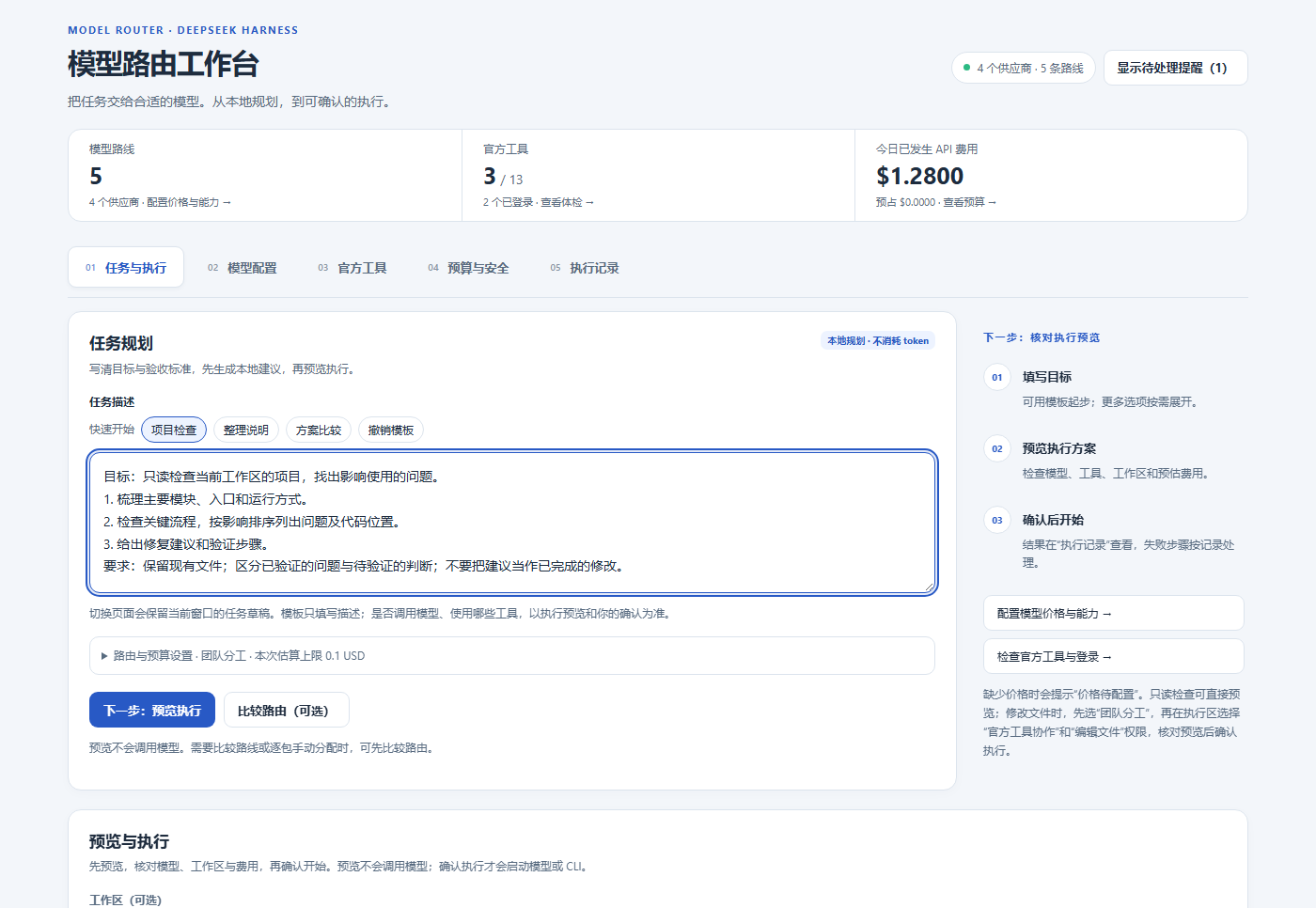
The model-routing workbench is available in both editions. In the full Bot workspace, open **Advanced workbench**.
|
|
70
77
|
|
|
71
|
-
|
|
78
|
+
1. **Prepare a model.** Add a working provider/model in Harness. In **Model configuration**, refresh routes and enter known prices and capabilities. Leave unknown information blank.
|
|
79
|
+
2. **Describe the result.** In **Task & execution**, choose **Project check**, **Organize documentation**, or **Compare approaches**, then edit the task and acceptance criteria. **Undo template** restores your previous text.
|
|
80
|
+
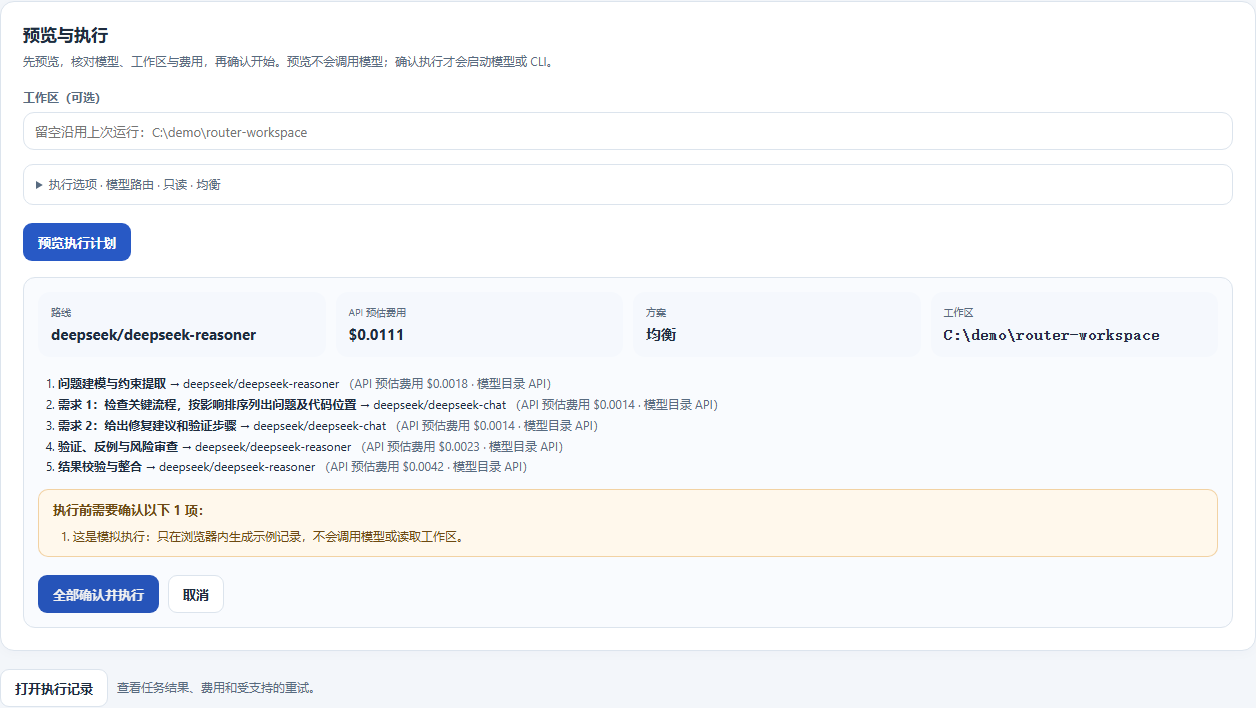
3. **Go to the preview.** Click **Next: preview execution**, then **Preview execution plan**. Check the selected models/tools, workspace, permissions, and estimated API cost or subscription usage.
|
|
81
|
+
4. **Confirm the run.** Read the confirmation items and choose **Confirm all and execute**. Creating or previewing a plan does not invoke a model; confirmation starts execution.
|
|
82
|
+
5. **Inspect the result.** Open **Execution history** for output, receipts, status, cancellation, and supported retry actions. Verify the requested artifact before treating the task as complete.
|
|
72
83
|
|
|
73
|
-
|
|
84
|
+
The application currently uses Chinese interface labels; English descriptions here explain the corresponding controls.
|
|
74
85
|
|
|
75
|
-
|
|
86
|
+
|
|
76
87
|
|
|
77
|
-
|
|
88
|
+
*Actual workbench component with offline demonstration data. Models, prices, usage, and paths shown in these screenshots are examples.*
|
|
89
|
+
|
|
90
|
+
<a id="workbench"></a>
|
|
78
91
|
|
|
79
|
-
|
|
92
|
+
## Model-routing workbench
|
|
93
|
+
|
|
94
|
+
| Tab | Main use |
|
|
80
95
|
| --- | --- |
|
|
81
|
-
|
|
|
82
|
-
|
|
|
83
|
-
|
|
|
84
|
-
|
|
|
85
|
-
|
|
|
96
|
+
| **Task & execution / 任务与执行** | Write a task, choose a planning mode, optionally compare or assign packages, preview, and confirm execution. |
|
|
97
|
+
| **Model configuration / 模型配置** | Manage exact configured routes, prices, quality evidence, billing preferences, and CLI model mappings. |
|
|
98
|
+
| **Native tools / 官方工具** | Inspect tool installation, login, and execution-mode readiness; manage installations and terminals. |
|
|
99
|
+
| **Budget & safety / 预算与安全** | Set API limits and execution policy; inspect actual spend, reservations, and subscription usage. |
|
|
100
|
+
| **Execution history / 执行记录** | Review task output, receipts, interrupted/unknown states, cancellation, and supported recovery actions. |
|
|
86
101
|
|
|
87
|
-
|
|
102
|
+
Choose **Single task** for one route, **Team** for packages with dependencies, or **Exact model** to use a specific configured route. **Compare routes** is optional; after comparison, you can keep the recommendations or manually select an API model/tool for each package.
|
|
88
103
|
|
|
89
|
-
|
|
104
|
+
Route/budget and execution options are collapsed until needed. Draft task text, mode, selected model, and explicit per-task estimate stay in the **current window's memory** when pages remount; closing the app or reloading the client clears this draft. The **Needs your attention** panel can be closed with **×** and restored from the header; this visibility preference is remembered on the device. Failed-task reminders open the relevant execution record.
|
|
90
105
|
|
|
91
|
-
|
|
106
|
+
|
|
92
107
|
|
|
93
|
-
|
|
94
|
-
2. Extract the **entire** `DSH-RemoteAgent-windows-x64-…zip` into a directory you will retain. The complete bundle includes Node, production dependencies, `dist`, setup/launch files and native helpers. Copying only `start.cmd` or one executable is insufficient.
|
|
95
|
-
3. Double-click **`start.cmd`**. In the setup wizard choose the workspace directory, the concrete local/private VPN address to listen on, port (default `9701`), and the Agent base URL reachable from the Harness computer.
|
|
96
|
-
4. For another machine, first configure your WireGuard/Tailscale network or a protected tunnel. Confirm the private-tunnel option only for a network you have actually configured. Loopback is suitable for local use or a separately configured SSH forwarding path.
|
|
97
|
-
5. Decide whether to enable **`hostManagedBots`**. Explicitly enabling it lets this trusted authenticated Host authorize current/future team Bots within the paired root/tool ceiling. Disabling it requires fixed allowed Bot IDs. It does not give models the pairing secret or remove root/tool restrictions.
|
|
98
|
-
6. Choose any optional command/browser permissions. Setup registers Agent and desktop-helper tasks for the current signed-in user, without storing a Windows password. It displays the installation path and creates **`private/pairing.private.json`** there. Rerunning setup preserves existing configuration and credentials.
|
|
108
|
+
*Offline preview example; no model was called. In a live workspace, confirmation starts the selected model or supported CLI.*
|
|
99
109
|
|
|
100
|
-
|
|
110
|
+
Model routing executes read-only analysis. To modify files, choose **Team → Native-tool collaboration → Edit files**, then review the execution preview. A separate worktree collects changes; it does not restrict system access outside that tree.
|
|
101
111
|
|
|
102
|
-
|
|
103
|
-
|
|
104
|
-
|
|
105
|
-
4. In a Bot's right-hand **Computer operations / 电脑操作** tab, or the computer page, select the machine/monitor and click **Connect desktop / 连接桌面**. Start in **Watch / 仅观看**.
|
|
106
|
-
5. Click **Take control / 取得控制权** and wait for the control acknowledgement before using mouse, keyboard, wheel or text entry. Human control fences that Bot's conflicting desktop automation. Click **Watch / 仅观看** to release control and held input.
|
|
107
|
-
6. Use **Enlarge / 放大** for the application-filling viewer, or double-click while watching; **Close enlargement / 关闭放大** returns to the panel. Disconnect when finished and inspect any unconfirmed-stop message.
|
|
112
|
+
<a id="official-tools"></a>
|
|
113
|
+
<a id="session-tools"></a>
|
|
114
|
+
<a id="team-lifecycle"></a>
|
|
108
115
|
|
|
109
|
-
|
|
116
|
+
### Use native tools with their own accounts
|
|
110
117
|
|
|
111
|
-
|
|
118
|
+
The tool registry includes **Kimi Code, Claude Code, Codex, MiniMax Code, MiMo Code, Grok Build, Gemini, OpenCode, StepCode, Pi, Hermes, ZCode, and DSH TUI**. In **Native tools**, detect the tool, choose an available install method, complete the vendor's login, then check readiness for the execution mode you want.
|
|
119
|
+
|
|
120
|
+
An interactive terminal exposes the installed tool's own workflow and capabilities. Managed single-tool and team execution use supported adapters; installation or login alone does not establish readiness for every mode or model. Vendor-native processes run with the current system user's permissions. Provider credentials and coding-plan endpoints remain in Harness settings.
|
|
121
|
+
|
|
122
|
+
<a id="daily-work"></a>
|
|
123
|
+
|
|
124
|
+
## Build a persistent Bot workspace
|
|
125
|
+
|
|
126
|
+
**Full Bot edition.** Create a Bot, select an exact configured model, and set its role and work directory. In **Bot bindings**, commit its allowed tools, computer/workspace access, and funding settings. Mark a coordinating Bot as **Main** when you want it to delegate work.
|
|
127
|
+
|
|
128
|
+
| To do this | Use this workflow |
|
|
129
|
+
| --- | --- |
|
|
130
|
+
| Hold a private conversation | Select a Bot in the sidebar, send a message, and respond to questions or approval cards as they appear. |
|
|
131
|
+
| Collaborate in a group | Create a group from the chat selector, set members/administrators and response rules, and use `@` mentions to address Bots. Configure staged goals for longer work. |
|
|
132
|
+
| Manage long-term context | Search conversations, use checkpoints/segments, and edit Bot, group, or team memories. Review proposed skill/project-rule learning before accepting it. |
|
|
133
|
+
| Work with pages and documents | Open the current Bot's browser panel, manage pages, and attach supported Office documents for reading/preview. Configure connectors and enter secrets through credential cards when needed. |
|
|
134
|
+
| Schedule recurring work | Enable the Host's Automation tasks service, choose the target Bot/group, task, and schedule, then check the next-run state. The Host and relevant Agent must remain running. |
|
|
135
|
+
| Customize the workspace | Manage avatars and team appearance independently of the private file library. |
|
|
112
136
|
|
|
113
|
-
|
|
137
|
+
Integration mode reuses Harness Sessions. An optional independent runtime has its own session store; switch ownership explicitly so a Bot is served by one runtime at a time.
|
|
114
138
|
|
|
115
|
-
|
|
116
|
-
2. Demonstrate the workflow. Only inputs acknowledged by that desktop session enter the recording. Consecutive mouse motion is sampled into **200 ms** waypoints; button/key/text/wheel ordering and the final position before those actions are retained.
|
|
117
|
-
3. Click **Finish and save / 结束并保存**. The client drains input, confirms held-input release, and saves to that Bot's private routine store. Typed text is included in the saved routine. Missing save confirmation retains a draft instead of showing success.
|
|
118
|
-
4. Open **Routines / 例行任务**, select the Bot/computer and restore the starting screen. Run the saved routine and inspect its actual result and stopped step.
|
|
119
|
-
5. The recording is limited to **200 retained steps**, with at most **60 seconds** between retained actions. Replay checks the exact display ID, physical dimensions, coordinate system and recorded DPI. Changed layout/application state still requires a new demonstration; sampled pointer motion is unsuitable for fine drawing.
|
|
139
|
+
<a id="task-progress"></a>
|
|
120
140
|
|
|
121
|
-
|
|
141
|
+
## Multi-Bot task progress and pending items
|
|
122
142
|
|
|
123
|
-
|
|
143
|
+
**Available in the full Bot edition 0.66.0.** On **Tasks**, inspect task counts per Bot, filter by **All / In progress / Needs attention / Ended**, or search task names and task, plan, or operation IDs. Counts and filters cover loaded records; funding admission is in progress, while budget waiting needs attention.
|
|
144
|
+
|
|
145
|
+
**Needs your attention** reports the full count and expands beyond six items. Each reminder opens the original task; approval reminders can open the owning Bot's conversation to show its original request. Open a task's **timeline** for queue, admission, execution, stop-request, and reconciliation events, with the original identities for each attempt. Reading history does not dispatch tasks or invoke models; stop requests still require confirmation. Older Hosts without history support retain existing receipt details.
|
|
146
|
+
|
|
147
|
+
The Host loads at most **512 tasks**, prioritizing pending and active work before newer historical records, and explicitly reports loaded and total counts when truncated. History reads the latest **80 events** on demand and reports its total when truncated. These are durable managed-task records; they do not cover every chat message or live provider output.
|
|
148
|
+
|
|
149
|
+
This iteration draws on [Agents Anywhere](https://github.com/anywhere-labs/Agents-Anywhere)'s timeline and capability-based actions. See the [task workspace notes](docs/integration/agents-anywhere-tasks.md) for implementation and verification.
|
|
124
150
|
|
|
125
151
|
<a id="bot-routing"></a>
|
|
126
152
|
|
|
127
|
-
##
|
|
153
|
+
## Delegate from a Main Bot to execution Bots
|
|
128
154
|
|
|
129
|
-
|
|
130
|
-
2. On **Tasks / 任务 → Bot routing / Bot 路由**, enable routing and choose **Economy / 省钱优先**, **Balanced / 均衡**, or **Quality / 效果优先**. Save settings using the supplied controls.
|
|
131
|
-
3. Enter a task, choose automatic routing or a pinned Bot, and specify a machine/root and read/write/desktop/browser need when applicable. **Preview routing / 预览路由** shows the chosen candidate, missing conditions/refusal reasons and any proposed binding.
|
|
132
|
-
4. Select **Create task with this route / 按此路由创建任务** for real dispatch. Optional automatic computer authorization remains bounded by the committed machine ceiling and the requesting Main Bot's delegation rights.
|
|
133
|
-
5. A Main Bot can call **`bot_route_task`** or its **`bot_dispatch`** alias. Both dispatch by default. Explicit **`preview:true`** only previews and does not create a task or grant permissions. Inspect actual plan/task state with `bot_task_plan_status` and check the deliverable before reporting completion.
|
|
155
|
+
**Full Bot edition.** Model routing chooses a model route; Bot routing chooses a configured Bot and dispatches a task to it.
|
|
134
156
|
|
|
135
|
-
|
|
157
|
+
Routing uses each Bot's own saved prices, including when Bots share the same model. Invalid prices or quality scores remain unknown. When scores tie, a known price takes precedence before the Bot ID.
|
|
136
158
|
|
|
137
|
-
|
|
159
|
+
Changing a task, refreshing candidates, or switching Hosts retires the previous preview. Expand **View comparison basis** to inspect candidate scores and unknown information. Creating a task requires a current preview; a confirmed submission shows its plan ID and disables repeat creation. If the acknowledgement is missing or incomplete, refresh the task records and check the original submission before creating another task. On narrow screens, scroll tables horizontally to inspect all columns.
|
|
138
160
|
|
|
139
|
-
|
|
161
|
+
**Check original submission** reads the original request's durable plan and operation IDs without resubmitting, granting access, or calling a model. A missing record is a current observation: the original request may still complete. The reminder survives page remounts for the same connected Host in this window, and stores only the submission reference in memory. Reloading the app clears it. After checking the records yourself, an explicit reminder dismissal only clears the notice; it does not stop the original task or create another one.
|
|
140
162
|
|
|
141
|
-
|
|
163
|
+
Before reloading, expand **Save submission code** and copy the code. After reloading, connect to the original Host and paste it into **Check a saved submission** to query the original record. The code contains only the original Bot and request IDs; it contains no task text or credentials and does not authorize execution. Invalid codes are rejected locally. If clipboard access is unavailable, select and copy the code manually. Lookup failures explain whether to sign in again, update the Host, check a mismatched record, or reconnect; the reference remains available for another read.
|
|
142
164
|
|
|
143
|
-
|
|
165
|
+
```mermaid
|
|
166
|
+
flowchart LR
|
|
167
|
+
U["Task + acceptance criteria"] --> M["Main Bot"]
|
|
168
|
+
M --> R["Check eligible Bots and preview route"]
|
|
169
|
+
R --> A["Research Bot · configured model/tools"]
|
|
170
|
+
R --> B["Build Bot · configured model/tools"]
|
|
171
|
+
R --> C["Review Bot · configured model/tools"]
|
|
172
|
+
A --> E["Task records + outputs + receipts"]
|
|
173
|
+
B --> E
|
|
174
|
+
C --> E
|
|
175
|
+
```
|
|
144
176
|
|
|
145
|
-
|
|
177
|
+
*An example team arrangement. Create these Bots and commit their access before routing work to them.*
|
|
146
178
|
|
|
147
|
-
|
|
148
|
-
|
|
149
|
-
|
|
150
|
-
|
|
151
|
-
<a id="architecture"></a>
|
|
179
|
+
1. Configure the Main Bot and execution Bots with their actual models, allowed tools, computer/workspace grants, and funding settings.
|
|
180
|
+
2. Open **Tasks → Bot routing**, enable it, select **Economy**, **Balanced**, or **Quality first**, and save the policy.
|
|
181
|
+
3. Enter a task and choose automatic routing or a specific Bot. Select the computer/directory and operation type if required. **Preview route** explains the selection, missing conditions, rejection reasons, and proposed bindings.
|
|
182
|
+
4. Choose **Create task with this route** to dispatch. Follow the task record and inspect the output. An accepted plan ID means submitted, not completed.
|
|
152
183
|
|
|
153
|
-
|
|
184
|
+
The Main Bot can also call `bot_route_task` or its alias `bot_dispatch`. Both dispatch by default; `preview: true` only previews. `bot_task_plan_status` returns the actual plan/task state. Each execution Bot's model call has its own budget admission and receipt linked to the parent task. Role text does not grant tool or computer permissions.
|
|
154
185
|
|
|
155
|
-
|
|
186
|
+
<a id="computers"></a>
|
|
187
|
+
|
|
188
|
+
## Connect your Windows or cloud computer
|
|
156
189
|
|
|
157
|
-
|
|
190
|
+
**Full Bot edition.** Bring your own **Windows x64 computer or cloud desktop**. The setup wizard creates the local Agent configuration and pairing file; the Host must be able to reach the Agent over your configured network, VPN, or tunnel.
|
|
158
191
|
|
|
159
|
-
|
|
192
|
+
**On the computer to control:**
|
|
160
193
|
|
|
161
|
-
|
|
194
|
+
1. Download the [complete Windows Agent 0.1.1 package](https://github.com/Alice-Marx/dsh-model-router/releases/download/v0.63.3/dsh-remote-agent-0.1.1-windows-x64.zip), extract it into a permanent directory, and run `start.cmd`. Keep the interactive Windows user signed in.
|
|
195
|
+
2. In the setup wizard, configure the accessible address, port, approved work directories, and optional command/browser capabilities. It registers the Agent and desktop helper for the current user and generates `private/pairing.private.json` without storing a Windows password. Subsequent runs retain the existing configuration.
|
|
162
196
|
|
|
163
|
-
|
|
197
|
+
**In Harness:**
|
|
164
198
|
|
|
165
|
-
|
|
199
|
+
3. Open **Remote computers → Add computer** and import `private/pairing.private.json`. Check the populated endpoint and grants, select the allowed Bots, then pair/probe the computer. Keep this pairing file private.
|
|
200
|
+
4. In **Bot bindings**, save the Bot's computer and tool grants. Open **Computer operations** or the computer page, select a display, and choose **Connect desktop** to watch first.
|
|
201
|
+
5. Choose **Take control** and wait for confirmation before sending keyboard, mouse, wheel, or text input. **Watch only** returns control and releases held input. Use **Expand** or double-click while watching for a larger view; disconnect when finished.
|
|
166
202
|
|
|
167
|
-
|
|
168
|
-
2. In **Task and execution**, enter the task and choose a single route, a dependent team, or manual per-package assignments. Generate recommendations, inspect the preview and confirm the actual execution you want.
|
|
169
|
-
3. In **Official tools**, detect/install the required CLI and check its available modes and login. Use the interactive terminal when appropriate; configured access to a CLI does not imply every model has a managed runner.
|
|
170
|
-
4. In **Budget and security** and the usage page, configure API limits/subscription preferences and inspect receipts. Follow running work in the task/history view; cancel, retry or reconcile from its recorded state.
|
|
203
|
+
Desktop viewing uses adaptive JPEG streaming with native input acknowledgements and a visible measured frame rate. Human control prevents conflicting Bot desktop automation. The current desktop implementation targets an available, signed-in Windows interactive session; performance depends on resolution and network conditions. Secure/UAC desktops are outside this capture scope. Computer pairing configures access; it does not provision a cloud machine or establish network connectivity.
|
|
171
204
|
|
|
172
|
-
|
|
205
|
+
<a id="routines"></a>
|
|
206
|
+
|
|
207
|
+
## Record and replay a routine
|
|
208
|
+
|
|
209
|
+
**Full Bot edition.** Routines save a demonstrated desktop sequence privately for the selected Bot.
|
|
210
|
+
|
|
211
|
+
1. Connect to the desktop, take control, restore the application to a known starting state, enter a routine name, and choose **Start recording**.
|
|
212
|
+
2. Demonstrate the workflow. Only successfully acknowledged inputs are recorded; mouse movement is sampled into 200 ms waypoints.
|
|
213
|
+
3. Choose **Stop and save**. Saving waits for queued input and confirmed release of held keys/buttons. Recorded text is part of the saved routine.
|
|
214
|
+
4. Open **Routines**, select the Bot/computer, restore the same starting layout, and run the saved sequence. Check the result and any stopped step.
|
|
215
|
+
|
|
216
|
+
A routine holds up to **200 retained steps**, with pauses up to **60 seconds**, and checks display identity, physical resolution, coordinates, and recorded DPI. It replays coordinates and timing, so application/layout changes may require a new recording. If an input may have taken effect but its acknowledgement was lost, the result is **unknown**. Inspect the real desktop and provide a reconciliation note before unblocking another run. A stop request remains pending until stopping is confirmed.
|
|
217
|
+
|
|
218
|
+
<a id="library"></a>
|
|
219
|
+
|
|
220
|
+
## Give each Bot a private file library
|
|
221
|
+
|
|
222
|
+
**Full Bot edition.** Open **Library**, select a Bot and folder, then upload/download files, create folders, or edit supported text. Name filtering narrows the current folder. **Search text** scans the selected Bot's private text files and returns file paths, line numbers, and matching lines; open a result to edit and explicitly save the file.
|
|
223
|
+
|
|
224
|
+
Binary transfers preserve the original bytes, with a **16 MiB per-file limit**; text reading/editing is limited to **1 MiB per file**. Same-name uploads are rejected. Authorized `bot_library_search` calls use the calling Bot's own library. PDF/Office uploads are stored as files; searchable text here is not a general OCR or semantic-indexing service.
|
|
173
225
|
|
|
174
226
|
<a id="costs"></a>
|
|
175
227
|
|
|
176
|
-
##
|
|
228
|
+
## Understand execution and accounting
|
|
229
|
+
|
|
230
|
+
- **Plan locally.** Route comparison and execution preflight do not call models. Confirmed execution sends the selected task/context to a provider or CLI and may incur charges.
|
|
231
|
+
- **Control API spending.** Per-task estimates and daily/monthly limits check recorded spend plus active reservations. Unknown prices or amounts require the relevant confirmation under a finite budget. Estimates are planning controls; provider bills remain authoritative.
|
|
232
|
+
- **Track subscriptions separately.** Subscription calls and reported input/output/cache tokens are recorded independently of API money. Missing usage remains unknown and does not imply zero usage or prove a vendor's remaining quota.
|
|
233
|
+
- **Choose fallback behavior.** Billing preferences can favor subscription, require subscription, or use API only. A subscription-to-API change requires fresh API estimation, budget admission, and any required confirmation. Managed editable/single-tool/team runs do not automatically retry on API.
|
|
234
|
+
- **Recover from evidence.** Execution records retain attempts, receipts, reservations, and unknown effects. Review interrupted work before retrying; elapsed time or a stop request does not prove that a remote action stopped.
|
|
235
|
+
- **Refine routing deliberately.** Optional stronger-model reviews may add calls. Explicit ratings adjust a bounded preference term; they do not raise measured quality or bypass quality floors. Learning can be disabled, ratings withdrawn, and the learning baseline reset.
|
|
177
236
|
|
|
178
|
-
|
|
179
|
-
|
|
180
|
-
|
|
181
|
-
|
|
182
|
-
|
|
183
|
-
|
|
184
|
-
|
|
237
|
+
<a id="architecture"></a>
|
|
238
|
+
<a id="data"></a>
|
|
239
|
+
|
|
240
|
+
## Integration, data, and compatibility
|
|
241
|
+
|
|
242
|
+
The Host owns committed model, tool, computer, funding, and operation identity. Bot dispatch, model-originated tools, and owner workbench actions follow this authority. Worktree isolation organizes code changes; vendor-native processes use the current user's system access.
|
|
243
|
+
|
|
244
|
+
Provider credentials and authenticated sessions are managed by Harness. Routing state, receipts, committed Bot bindings, private libraries, and routine ledgers live under `<DSH_HOME>/model-router/`. The configured Bot home stores upstream conversations, memory, browser state, and team files. Agent configuration and pairing credentials remain on the controlled computer. Back up these locations before changing runtime ownership; keep pairing files, recordings, logs, and private files out of public reports.
|
|
245
|
+
|
|
246
|
+
| Component | Current scope |
|
|
247
|
+
| --- | --- |
|
|
248
|
+
| Harness integration | Declared Host versions are listed in [package.json](package.json); integration verification uses the actual Harness SDK **0.2.2-rc.1**. |
|
|
249
|
+
| Bot foundation | Pinned [DS Bot](https://github.com/Fei2411/DS-Bot) **0.2.7**, with project-specific integration and product overlays. |
|
|
250
|
+
| Remote desktop | Windows x64 Agent **0.1.1**, with an available signed-in interactive desktop. |
|
|
251
|
+
| Tool execution | Availability depends on the local platform, installed CLI, account, exact model, and supported execution adapter shown by the workbench. |
|
|
252
|
+
|
|
253
|
+
<a id="troubleshooting"></a>
|
|
185
254
|
|
|
186
|
-
|
|
255
|
+
## Troubleshooting and support
|
|
256
|
+
|
|
257
|
+
| Symptom | What to check |
|
|
258
|
+
| --- | --- |
|
|
259
|
+
| Old interface after an update | Fully quit the tray Host, verify the installed package/version, and restart. |
|
|
260
|
+
| No route or eligible execution Bot | Check configured exact models, allowed tools, grants, availability, and the route preview's rejection reasons. |
|
|
261
|
+
| Tool installed but execution blocked | Check login, model access, mode-specific readiness, workspace, and committed permissions. |
|
|
262
|
+
| Agent reachable but desktop unavailable | Check the signed-in Windows session, Agent/helper tasks, display access, and native logs. |
|
|
263
|
+
| New Bot cannot use a paired computer | Check the pairing's allowed Bots/managed-Bot limit, then save that Bot's computer and tool grants. |
|
|
264
|
+
| Can watch but cannot take control | Check desktop-input permission, write access, and current control ownership. |
|
|
265
|
+
| Interrupted, unknown, or stop pending | Inspect execution records and the actual remote result; reconcile before another attempt. |
|
|
266
|
+
| Routine reports a display change | Restore the original display, resolution, DPI, and application layout, or record again. |
|
|
267
|
+
| Library upload/edit refused | Check file size and same-name collisions; binary transfer and text-edit limits differ. |
|
|
268
|
+
| Cost or usage unknown | Check actual model identity, configured prices, and reported usage. Missing data is not zero. |
|
|
269
|
+
|
|
270
|
+
Use [GitHub Issues](https://github.com/Alice-Marx/dsh-model-router/issues) for reproducible problems and [GitHub Releases](https://github.com/Alice-Marx/dsh-model-router/releases/latest) for installation files. Include the edition, plugin/Host versions, platform, steps, and a sanitized screenshot or error. Remove credentials, pairing files, and private task content.
|
|
271
|
+
|
|
272
|
+
## License and acknowledgements
|
|
273
|
+
|
|
274
|
+
Project extensions are [MIT licensed](LICENSE). The bundled DS Bot source retains its **Apache-2.0** license and notices; provenance is recorded in [SOURCE.json](modules/bot-runtime/SOURCE.json). Thanks to [DeepSeek Harness](https://github.com/deepseek-ai/deepseek-harness) and [DS Bot](https://github.com/Fei2411/DS-Bot) for the Host and Bot foundations.
|
|
275
|
+
|
|
276
|
+
## Technical reference: accounting and routing
|
|
187
277
|
|
|
188
278
|
### Actual cost versus planning estimate
|
|
189
279
|
|
|
@@ -204,13 +294,13 @@ For example, a complete API result with 1,000 uncached input tokens at \$1/milli
|
|
|
204
294
|
|
|
205
295
|
<a id="routing"></a>
|
|
206
296
|
|
|
207
|
-
|
|
297
|
+
### How routing works
|
|
208
298
|
|
|
209
|
-
Manual assignment: after planning, choose algorithm recommendations or select an API model / official tool for each package. See the [
|
|
299
|
+
Manual assignment: after planning, choose algorithm recommendations or select an API model / official tool for each package. See the [workbench workflow](#workbench).
|
|
210
300
|
|
|
211
301
|
The planner is a deterministic local heuristic, not a trained success predictor. It classifies text, estimates complexity, creates suitable analysis/execution/verification/synthesis packages, discovers exact configured routes, overlays profiles, and applies capability/quality constraints. An explicit route bypasses comparison with other routes. Catalog quality/latency/risk hints are experimental priors, not measured success probabilities or live vendor quotes. Execution is currently text-oriented; a vision label does not establish an end-to-end multimodal pipeline.
|
|
212
302
|
|
|
213
|
-
|
|
303
|
+
#### Token and price estimate
|
|
214
304
|
|
|
215
305
|
Without matching resource evidence, base input tokens are $`\max(80,\lceil n/3.7\rceil)`$, then adjusted by package-stage multipliers. Base output is 900, adjusted by stage/reasoning effort, with minimum 220. Here $`n`$ is the JavaScript `text.length` value. This is a text-length heuristic, not a vendor tokenizer. Sufficient matching, complete history replaces these heuristics with empirical P90 resource estimates, without applying effort or stage multipliers again. Let $`I`$ be total estimated input, $`R`$/$`W`$ the cached-read/write portions, $`O`$ output, and prices USD per million tokens:
|
|
216
306
|
|
|
@@ -226,7 +316,7 @@ U_c = \frac{1}{1+C/\max(C_{\mathrm{ref}},10^{-12})}
|
|
|
226
316
|
|
|
227
317
|
$`U_c`$ is `costUtility`. The price symbols are the same as above. $`C_{\mathrm{ref}}`$ uses fixed reference prices (input 1, output 5, cache read/write 1 USD/million), not a vendor offer. Fixed scaling prevents an unrelated expensive candidate from flattening all cost penalties. Unknown prices produce a public estimate of `null` and cost utility 0. Internal unconstrained search uses a cost sentinel of 0, but finite-budget assignment excludes unknown-price candidates; the sentinel never means free execution.
|
|
228
318
|
|
|
229
|
-
|
|
319
|
+
#### Candidate objective and quality floors
|
|
230
320
|
|
|
231
321
|
With normalized quality $`q`$ and normalized latency, specialty, reasoning-fit and risk proxies:
|
|
232
322
|
|
|
@@ -261,7 +351,7 @@ Quality first uses sufficient matching objective task evidence, then falls back
|
|
|
261
351
|
|
|
262
352
|
Base quality floors are **0.75 / 0.78 / 0.82** for simple/balanced/complex tasks; critical complex packages raise the floor, and complex synthesis is at least 0.84. The economy preset multiplies quality/cost/latency weights by 0.75/1.6/1.1 and lowers the floor by 0.04. Quality-first multiplies quality/cost/specialty/reasoning by 1.35/0.5/1.2/1.2 and raises the floor by 0.04. Tilted weights are renormalized to the original total; adjusted floors are clamped to [0.5, 0.97]. Balanced applies no tilt.
|
|
263
353
|
|
|
264
|
-
|
|
354
|
+
#### Candidate pruning and assignment search
|
|
265
355
|
|
|
266
356
|
1. Prefer candidates meeting each package's floor. If none qualify, retain up to three highest-quality fallbacks and report relaxation.
|
|
267
357
|
2. Keep at most **12 candidates per package**, including anchors for lowest known cost, greatest utility and highest quality. Local Pareto pruning is disabled when dependencies exist, because route identity affects handoffs.
|
|
@@ -271,32 +361,4 @@ Base quality floors are **0.75 / 0.78 / 0.82** for simple/balanced/complex tasks
|
|
|
271
361
|
|
|
272
362
|
“Exact” applies only to the retained candidate space and proxy objective. Candidate caps and beam pruning prevent a guarantee of global optimality over all configured models; use the preview to inspect the selected route and any relaxed quality floor.
|
|
273
363
|
|
|
274
|
-
|
|
275
|
-
|
|
276
|
-
<a id="data"></a>
|
|
277
|
-
|
|
278
|
-
## Data and privacy
|
|
279
|
-
|
|
280
|
-
Harness owns provider credentials and authenticated sessions. Router state/receipts live under `<DSH_HOME>/model-router/`; the product also keeps committed Bot bindings, task records, private libraries and routine/run journals there. The upstream Bot home retains conversations, memory, browser state and related team files according to its configured location. Remote Agent state and pairing credentials remain in the installed computer's directory.
|
|
281
|
-
|
|
282
|
-
Task/context sent to a provider or CLI follows that service's account and billing terms. Saved routines contain the demonstrated text. Treat pairing exports, histories, logs and private files as private data. Back up application state before changing runtime owners or downgrading; do not erase receipts or uncertain-operation journals to bypass a blocked run.
|
|
283
|
-
|
|
284
|
-
<a id="troubleshooting"></a>
|
|
285
|
-
|
|
286
|
-
## Troubleshooting
|
|
287
|
-
|
|
288
|
-
| Symptom | What to check |
|
|
289
|
-
| --- | --- |
|
|
290
|
-
| Old UI/version after an update | Fully quit the tray Host, confirm the installed package path/version and restart. |
|
|
291
|
-
| No route or no eligible worker | Exact configured model, allowed tools, machine/root permissions, current availability and the preview refusal reason. |
|
|
292
|
-
| `TOOL_DENIED` or a blocked task | Read the actual committed Bot grant and requested operation; do not broaden a model-supplied identity or assume a role prompt grants access. |
|
|
293
|
-
| Agent online but no desktop | Current signed-in Windows session, both installed tasks, full-desktop helper and its native logs. |
|
|
294
|
-
| Agent cannot be reached | Correct reachable base URL/port and already configured private VPN/tunnel; importing a pairing file does not create that network. |
|
|
295
|
-
| Chief connects but a new worker cannot | Check the Agent pairing Bot-ID/`hostManagedBots` ceiling, then save that worker's computer/tool grant. A fixed allowlist does not automatically include new Bots. |
|
|
296
|
-
| Watch works but takeover is disabled | All required desktop input tools, write-mode grant and current control ownership. |
|
|
297
|
-
| Routine reports display changed | Restore the recorded monitor/resolution/DPI or record a new routine; match the application layout as well. |
|
|
298
|
-
| Unknown effect or unconfirmed stop | Inspect the real computer and the execution record before resolving; do not blindly replay or delete the journal. |
|
|
299
|
-
| Library file is refused | Binary transfer limit is 16 MiB per file; text editing/reading limit is 1 MiB; same-name uploads are refused. |
|
|
300
|
-
| API/subscription amount unknown | Inspect actual model identity, price and provider usage evidence; missing counters are not zero. |
|
|
301
|
-
|
|
302
|
-
[Update history (GitLab)](https://gitlab.com/Alice_marx/dsh-model-router/-/blob/main/CHANGELOG.md) · [Source build guide (GitLab)](https://gitlab.com/Alice_marx/dsh-model-router/-/blob/main/docs/DEVELOPMENT.md) · [MIT license](LICENSE)
|
|
364
|
+
Routing profiles support matching resource evidence, fallback rules, reasoning-effort handling, and optional JSON validation with escalation. Escalation defaults to off and permits at most one additional ordinary API request after billing and budget checks.
|