@liustack/modlens 3.7.0 → 3.8.0
This diff represents the content of publicly available package versions that have been released to one of the supported registries. The information contained in this diff is provided for informational purposes only and reflects changes between package versions as they appear in their respective public registries.
- package/CHANGELOG.md +9 -0
- package/README.md +24 -23
- package/README.zh-CN.md +33 -32
- package/dist/main.js +972 -508
- package/{skills/modlens/references → docs}/cli.md +19 -4
- package/{skills/modlens/references → docs}/output-schema.md +13 -2
- package/package.json +1 -1
- package/skills/modlens/SKILL.md +33 -136
- package/skills/modlens/references/configure.md +13 -6
- package/skills/modlens/references/find-image.md +33 -0
- package/skills/modlens/references/onboard.md +51 -0
- package/skills/modlens/references/runtime.md +1 -1
- package/skills/modlens/scripts/run.ps1 +1 -1
- package/skills/modlens/scripts/run.sh +1 -1
package/CHANGELOG.md
CHANGED
|
@@ -1,5 +1,14 @@
|
|
|
1
1
|
# Changelog
|
|
2
2
|
|
|
3
|
+
## 3.8.0 - 2026-08-13
|
|
4
|
+
|
|
5
|
+
- **Reuse: per-harness grants for the logins already on your machine.** A signed-in Codex, an OpenCode vision model, or credentials held by pi can now serve as vision engines, each behind one explicit yes recorded as `reuse.<claude|codex|opencode|pi>` (true grants, false means never ask again, absent means never asked; `claude` absent counts as granted since `claude-cli` predates the model, and `reuse.claude false` now removes it from the chain). pi credentials with an exactly-supported api shape (`openai-completions`, `anthropic-messages`) and a printable API key run through the existing inline providers with every guard intact; OAuth logins and other shapes (Responses, Vertex) drive pi itself (`pi -p` with the `@file` attachment), and codex (`codex exec -i`) and opencode (`opencode run -f`) join as agent routes. Reused engines get no priority: one chain, two regions, speed-class placement only, and every reused answer adds a `meta.warnings` line naming whose quota it spent. Keys are fetched at call time, live only in memory, and no subprocess output ever travels into an error message.
|
|
6
|
+
- **The failover chain leads inline everywhere.** The local chain becomes gemini-api, openai, anthropic, then antigravity-cli, then claude-cli: a configured key answers in 5-10 seconds while an agent loop takes 15-45, so with both set up the old agent-first order made every read slower than it had to be. A `config set provider` preference still moves any provider to the front for local images; for remote URLs inline-first stays a security boundary even against a preferred agent, since only the inline download path runs the private-address guards, the magic-byte check, and the size cap.
|
|
7
|
+
- **Onboarding is one consent conversation, symmetric across harnesses.** INSTALL.md's engine step now reads doctor's Reuse section and asks one question per never-asked harness, the harness you are installing into included, so a Codex-only or Pi-only machine gets the same zero-config offer a Claude Code machine always had. The same flow lives in the skill as `references/onboard.md` for machines where the skill arrived without a config. Refusals are recorded and never re-asked; `config show` renders the tri-state so the flow can tell.
|
|
8
|
+
- **doctor tells the whole truth.** The Auto section becomes Reuse (per-harness decision plus what discovery found), the failover chains display includes reused routes labeled `(reused)` so a machine living entirely on granted logins no longer reads as having no engine, and a fully failed chain distinguishes never-asked reusable vision from a grant that stopped working. A stock codex install without a config.toml counts as vision-capable, and a cache timestamp that fails to parse now expires instead of living forever.
|
|
9
|
+
- **SKILL.md went progressive.** 59 lines instead of 164: the trigger contract, the launcher, and the loop stay; machine state is read from `doctor` and `config show` at run time, and the heavy flows load on demand from references (`find-image.md` for the per-harness paste-path branches, `onboard.md` for first-run setup, `configure.md` for every key). `cli.md` and `output-schema.md` moved to `docs/`: they are manuals for humans, not run-time knowledge.
|
|
10
|
+
- The whole reuse surface passed an independent code acceptance review (run through a reused Codex, fittingly): nine findings fixed, from credential redaction and exact api-shape mapping to preference preservation and the remote security boundary, each with a regression test. 279 tests.
|
|
11
|
+
|
|
3
12
|
## 3.7.0 - 2026-08-13
|
|
4
13
|
|
|
5
14
|
- An image-extension path is now the skill's primary trigger. Transcript forensics on a Claude Code cli session explained why the skill loaded but never fired for a text-only model there: the harness silently swaps a pasted image for a usable `[Image: source: <path>]` line, so no failure ever pushes the model to consult its skill list, and a path in hand makes hand-rolled OCR the path of least resistance (the same model behind OpenCode, where the gateway error "model does not support image input" is loud, found and followed this skill exactly). The description now keys on what the model perceives first: any file path or URL ending in an image extension (.png, .jpg, .jpeg, .webp, .gif, .bmp, .heic) it cannot see behind is a hard trigger, with self-built OCR, PIL, and tesseract explicitly forbidden. Placeholder cues (`[Image #1]`, `[Unsupported Image]`) remain as the second tier.
|
package/README.md
CHANGED
|
@@ -10,7 +10,7 @@
|
|
|
10
10
|
<a href="./README.zh-CN.md">简体中文</a> ·
|
|
11
11
|
<a href="docs/troubleshooting.md">Troubleshooting</a> ·
|
|
12
12
|
<a href="skills/modlens/references/configure.md">Configuration</a> ·
|
|
13
|
-
<a href="
|
|
13
|
+
<a href="docs/output-schema.md">Output contract</a> ·
|
|
14
14
|
<a href="docs/security.md">Security</a> ·
|
|
15
15
|
<a href="https://github.com/liustack/modsearch">ModSearch (web)</a>
|
|
16
16
|
</p>
|
|
@@ -24,34 +24,36 @@
|
|
|
24
24
|
<img src="https://img.shields.io/badge/users-unknown-lightgrey?style=flat-square" alt="Users unknown">
|
|
25
25
|
</p>
|
|
26
26
|
|
|
27
|
-
DeepSeek
|
|
27
|
+
DeepSeek and GLM have no vision capability and cannot read images. ModLens is a plug-in vision engine that gives a text-only model sight. **ModLens reads images pasted straight into the chat**, no saving to a file and passing a path first.
|
|
28
28
|
|
|
29
29
|
## Talk to us
|
|
30
30
|
|
|
31
|
-
|
|
31
|
+
Issues are welcome any time: [open one](https://github.com/liustack/modlens/issues/new/choose). And come find me on X: **[@liustack](https://x.com/liustack)**. What you built with it, which harness you are on, what should come next. New releases land there first, and a proper community space is on the way.
|
|
32
32
|
|
|
33
33
|
## Highlights
|
|
34
34
|
|
|
35
|
-
|
|
36
|
-
|
|
35
|
+
**Paste an image and it reads it.** No saving to a file and passing a path first.
|
|
36
|
+
|
|
37
|
+
- **Zero-config start.** Reuses what Claude Code, Codex, OpenCode, or Pi already have set up: the multimodal models on your machine go straight to work. Nothing at all? Antigravity CLI is a free no-key channel, and a free Gemini key brings a read down to 5-10 seconds.
|
|
38
|
+
- **Evidence, not imagination.** Full transcription, reading-order layout regions, entity and relation lists. The model quotes specifics.
|
|
37
39
|
- **Install once, use everywhere.** Verified on real machines in Claude Code, Codex, Pi, and OpenCode.
|
|
38
40
|
|
|
39
41
|
## Installation
|
|
40
42
|
|
|
41
|
-
**Step 1,
|
|
43
|
+
**Step 1, hand it to your AI.** Send it this line:
|
|
44
|
+
|
|
45
|
+
> Install and configure the modlens skill following https://github.com/liustack/modlens/blob/main/INSTALL.md, then run the health check and tell me the result.
|
|
42
46
|
|
|
43
|
-
|
|
47
|
+
The install starts by checking what your machine already has. An existing login in Claude Code, Codex, OpenCode, or Pi can be enough: modlens asks before reusing any of them, and the health check tells you where things stand.
|
|
44
48
|
|
|
45
|
-
To avoid any sign-up, install Antigravity CLI instead, then sign in:
|
|
49
|
+
**Step 2, only if the health check comes back empty, set up a free engine.** The recommended choice is a free Gemini API key (about three minutes at [Google AI Studio](https://aistudio.google.com), no credit card), which also makes every read 5-10 seconds. A free OpenAI-compatible key from another platform works too. To avoid any sign-up, install Antigravity CLI instead, then sign in:
|
|
46
50
|
|
|
47
51
|
```bash
|
|
48
52
|
curl -fsSL https://antigravity.google/cli/install.sh | bash
|
|
49
53
|
agy # sign in, then exit
|
|
50
54
|
```
|
|
51
55
|
|
|
52
|
-
|
|
53
|
-
|
|
54
|
-
> Install and configure the modlens skill following https://github.com/liustack/modlens/blob/main/INSTALL.md, then run the health check and tell me the result.
|
|
56
|
+
The install also inventories vision reachable through your other local harness CLIs (Codex, OpenCode, Pi) and asks, per harness, whether modlens may reuse it. Granted logins join the engine pool as equals, and every reused read is labeled with whose quota it spent.
|
|
55
57
|
|
|
56
58
|
## Usage
|
|
57
59
|
|
|
@@ -61,35 +63,34 @@ Once installed, just chat. Paste an image or drop a path, ask anything, and the
|
|
|
61
63
|
|
|
62
64
|
Unedited runs, all driving a text-only DeepSeek-V4-Flash.
|
|
63
65
|
|
|
64
|
-
A tweet screenshot in the Codex desktop app. It reads the caption, the
|
|
66
|
+
A tweet screenshot in the Codex desktop app. It reads the author, the caption, the photo itself (down to what both people are wearing), the timestamp, and every engagement number: 5.4M views, 1.6K replies, 5.7K reposts, 116K likes.
|
|
65
67
|
|
|
66
|
-

|
|
67
69
|
|
|
68
|
-
Three images pasted at once. The model
|
|
70
|
+
Three images pasted at once. The model reads them one by one, spots that they belong to one visual family, and describes each illustration's content and style.
|
|
69
71
|
|
|
70
|
-

|
|
71
73
|
|
|
72
|
-
The stress test: a scatter plot
|
|
74
|
+
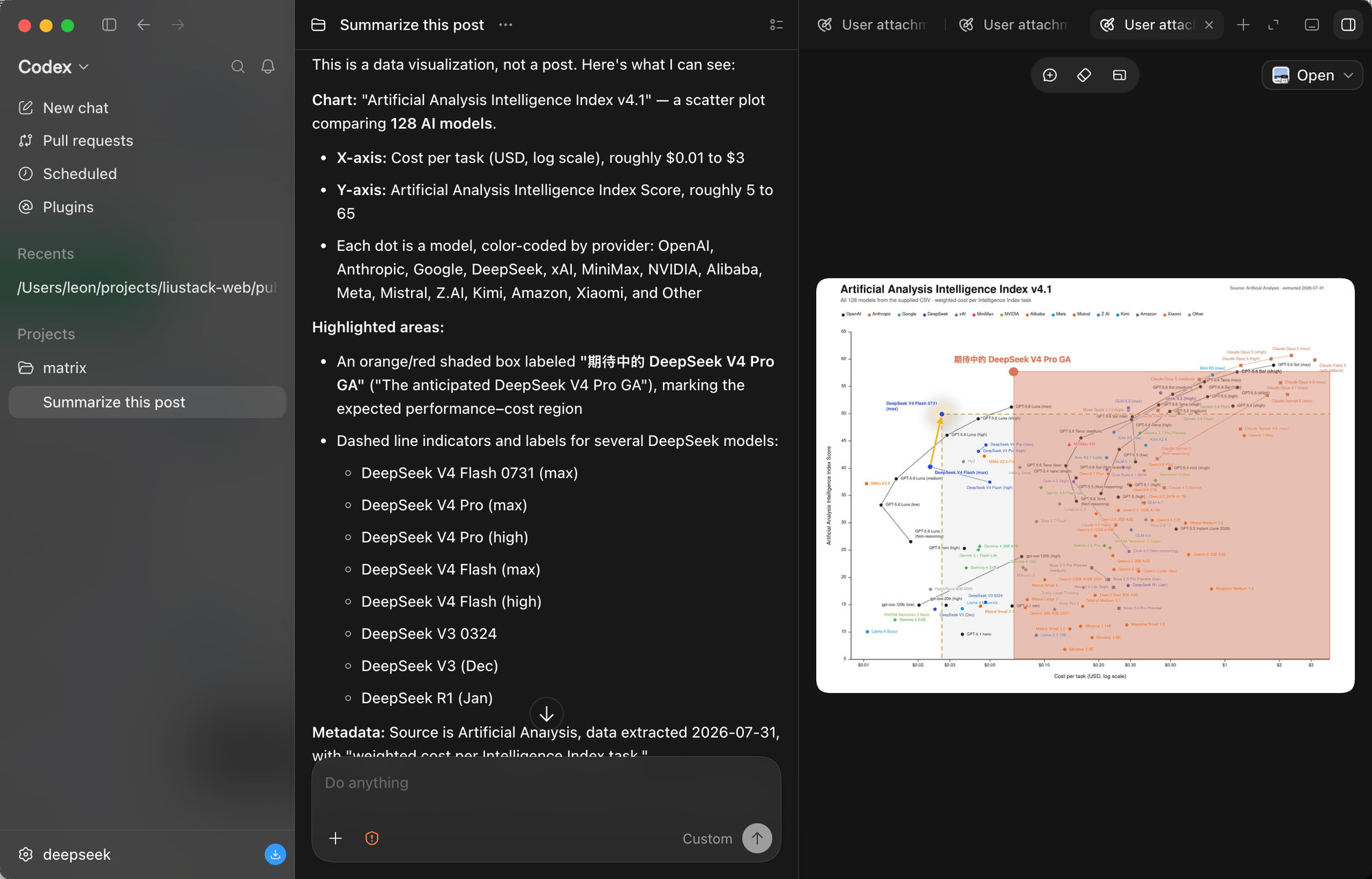
The stress test: a scatter plot comparing 128 AI models. It reads both axes, the log scale, the per-provider color coding, the highlighted region, and every DeepSeek model called out with dashed markers. Dense charts are where vision bridges most often fail.
|
|
73
75
|
|
|
74
|
-
|
|
75
77
|
|
|
76
|
-
And the paste path, end to end
|
|
78
|
+
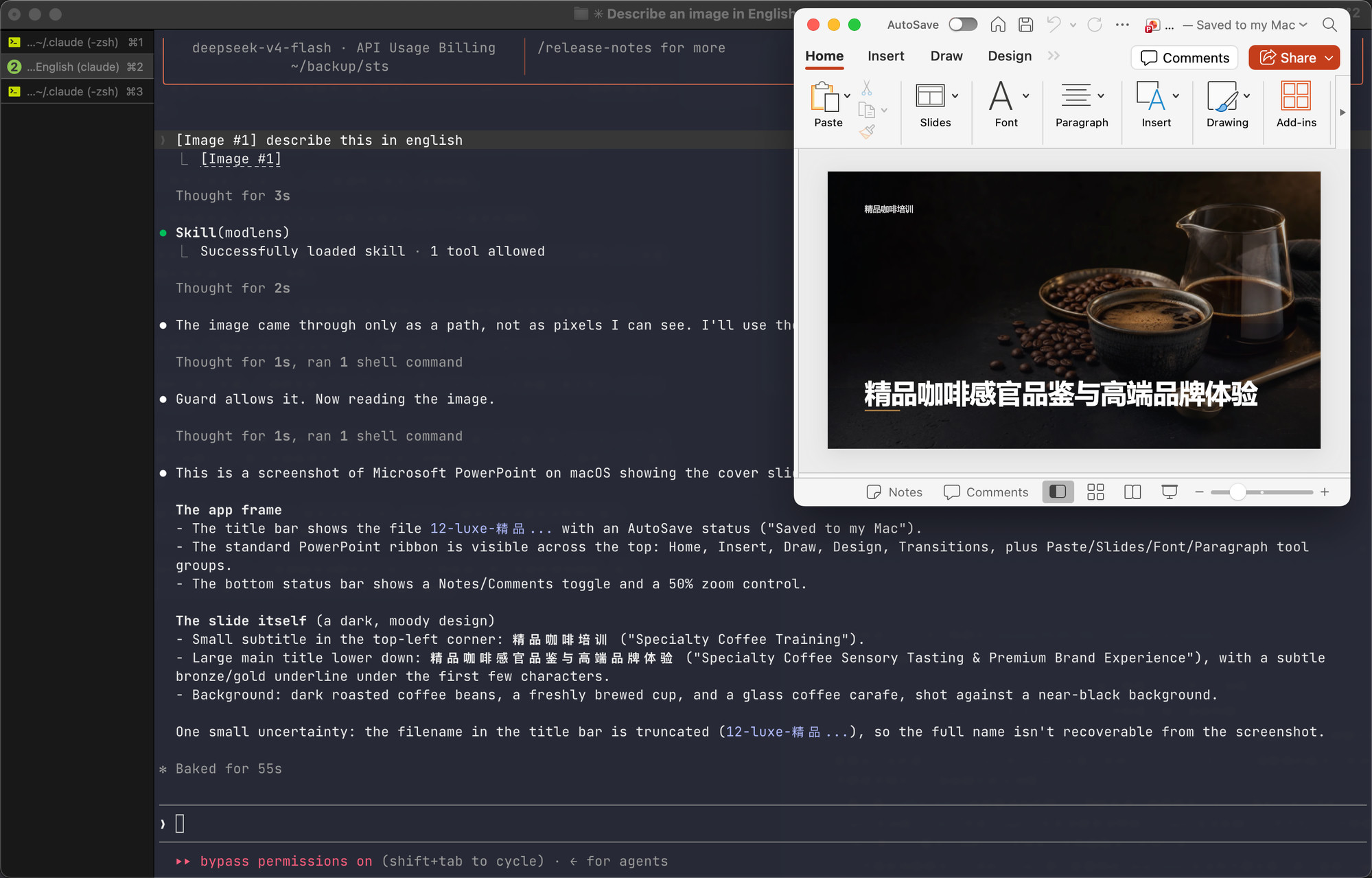
And the paste path, end to end, in a Claude Code terminal on DeepSeek. The pasted image arrives as a path rather than pixels, the skill triggers on its own, the guard confirms the model truly has no vision, and the slide's full content comes back: titles, layout, background, plus an honestly stated uncertainty about the truncated filename.
|
|
77
79
|
|
|
78
|
-
|
|
79
81
|
|
|
80
82
|
## Documentation
|
|
81
83
|
|
|
82
84
|
| Doc | Read it when |
|
|
83
85
|
| :-- | :-- |
|
|
84
|
-
| [
|
|
85
|
-
| [CLI manual](
|
|
86
|
+
| [Install guide](INSTALL.md) | Installing the skill step by step (written for an agent) |
|
|
87
|
+
| [CLI manual](docs/cli.md) | The CLI the skill drives: flags, config, doctor |
|
|
86
88
|
| [Troubleshooting](docs/troubleshooting.md) | A command failed and the message needs decoding |
|
|
87
89
|
| [Configuration](skills/modlens/references/configure.md) | Setting a key, switching providers, fixing config |
|
|
88
|
-
| [Output contract](
|
|
90
|
+
| [Output contract](docs/output-schema.md) | Parsing the JSON or building on it |
|
|
89
91
|
| [Harness setup](docs/harness-setup.md) | Wiring it into Codex, Claude Code, Pi, or OpenCode |
|
|
90
92
|
| [Security](docs/security.md) | File permissions, image content as untrusted input |
|
|
91
93
|
| [CHANGELOG](CHANGELOG.md) | Finding what changed in a version |
|
|
92
|
-
| [AGENTS.md](AGENTS.md) | Working on this codebase |
|
|
93
94
|
|
|
94
95
|
## Contributing
|
|
95
96
|
|
package/README.zh-CN.md
CHANGED
|
@@ -10,7 +10,7 @@
|
|
|
10
10
|
<a href="./README.md">English</a> ·
|
|
11
11
|
<a href="docs/troubleshooting.md">故障排查</a> ·
|
|
12
12
|
<a href="skills/modlens/references/configure.md">配置</a> ·
|
|
13
|
-
<a href="
|
|
13
|
+
<a href="docs/output-schema.md">输出契约</a> ·
|
|
14
14
|
<a href="docs/security.md">安全</a> ·
|
|
15
15
|
<a href="https://github.com/liustack/modsearch">ModSearch(联网)</a>
|
|
16
16
|
</p>
|
|
@@ -24,34 +24,36 @@
|
|
|
24
24
|
<img src="https://img.shields.io/badge/users-unknown-lightgrey?style=flat-square" alt="Users unknown">
|
|
25
25
|
</p>
|
|
26
26
|
|
|
27
|
-
DeepSeek
|
|
27
|
+
DeepSeek 和 GLM 没有视觉能力,无法进行图片识别。ModLens 借助外挂视觉引擎,为纯文本模型补上视觉能力。**ModLens 支持直接粘贴图片识别**,无需先保存成文件再提供路径。
|
|
28
28
|
|
|
29
29
|
## 交流
|
|
30
30
|
|
|
31
|
-
|
|
31
|
+
欢迎随时提[issue](https://github.com/liustack/modlens/issues/new/choose)。也欢迎来 X 上聊:**[@liustack](https://x.com/liustack)**,你用它做了什么、在哪个 harness 上跑、接下来该做什么,新版本也是那边先发。社群正在筹备中。
|
|
32
32
|
|
|
33
33
|
## 亮点
|
|
34
34
|
|
|
35
|
-
|
|
36
|
-
|
|
35
|
+
**直接粘贴图片识别** 无需先保存成文件再提供路径。
|
|
36
|
+
|
|
37
|
+
- **零配置起手。** 复用 Claude Code、Codex、OpenCode、Pi 已配置,直接复用你本机的其他多模态模型。什么都没有?Antigravity CLI 是免 key 的免费通道,配一个免费 Gemini key 可将识别耗时降至 5 到 10 秒。
|
|
38
|
+
- **基于证据而非想象。** 全文转录、按阅读顺序划分的版面区块、实体与关系列表,模型引用的是具体内容。
|
|
37
39
|
- **一次安装,多端可用。** Claude Code、Codex、Pi、OpenCode 均经真机验证。
|
|
38
40
|
|
|
39
41
|
## 安装
|
|
40
42
|
|
|
41
|
-
|
|
43
|
+
**第一步,交给你的 AI。** 把这句话发给它:
|
|
44
|
+
|
|
45
|
+
> 按 https://github.com/liustack/modlens 的 INSTALL.md 安装并配置 modlens skill,完成后运行体检并把结果告诉我。
|
|
42
46
|
|
|
43
|
-
|
|
47
|
+
安装会先盘点你机器上已有的东西。Claude Code、Codex、OpenCode 或 Pi 里任何一个已有的登录态都可能就够了:modlens 复用前一定先征得你同意,体检报告会说清现状。
|
|
44
48
|
|
|
45
|
-
|
|
49
|
+
**第二步,只在体检两手空空时,才需要你配一个免费引擎。** 推荐免费的 Gemini api key(到 [Google AI Studio](https://aistudio.google.com) 领取,约三分钟,无需信用卡),配上后每次识别 5 到 10 秒。其他平台的免费 openai 兼容 key 也行。想完全免注册就装 Antigravity CLI,然后完成登录:
|
|
46
50
|
|
|
47
51
|
```bash
|
|
48
52
|
curl -fsSL https://antigravity.google/cli/install.sh | bash
|
|
49
53
|
agy # 浏览器完成登录后退出
|
|
50
54
|
```
|
|
51
55
|
|
|
52
|
-
|
|
53
|
-
|
|
54
|
-
> 按 https://github.com/liustack/modlens 的 INSTALL.md 安装并配置 modlens skill,完成后运行体检并把结果告诉我。
|
|
56
|
+
安装还会盘点本机其他 harness CLI(Codex、OpenCode、Pi)里可触达的视觉能力,并逐个询问是否允许 modlens 复用。获准的登录态与你自己配的引擎平级入池,每次复用都会在结果里标明花的是谁的额度。
|
|
55
57
|
|
|
56
58
|
## 用法
|
|
57
59
|
|
|
@@ -61,35 +63,34 @@ agy # 浏览器完成
|
|
|
61
63
|
|
|
62
64
|
以下均为原样记录,驱动的都是纯文本的 DeepSeek-V4-Flash。
|
|
63
65
|
|
|
64
|
-
Codex 桌面 App
|
|
66
|
+
Codex 桌面 App 中识别一张推文截图。作者、配文、照片内容(连两人的穿着都在内)、发帖时间和全部互动数据(540 万浏览、1.6K 回复、5.7K 转发、11.6 万点赞)逐项读出。
|
|
65
67
|
|
|
66
|
-

|
|
67
69
|
|
|
68
|
-
|
|
70
|
+
一次粘贴三张图。模型逐张读取,认出三张同属一个视觉家族,并分别描述每张插画的内容和风格。
|
|
69
71
|
|
|
70
|
-

|
|
71
73
|
|
|
72
|
-
压力测试:128
|
|
74
|
+
压力测试:128 个模型的对比散点图。双轴定义、对数刻度、按厂商的配色、高亮区域,以及虚线标注的每一个 DeepSeek 型号全部识别。密集图表是视觉方案最容易出错的场景。
|
|
73
75
|
|
|
74
|
-

|
|
75
77
|
|
|
76
|
-
粘贴链路的端到端记录:接入 DeepSeek 的 Claude Code
|
|
78
|
+
粘贴链路的端到端记录:接入 DeepSeek 的 Claude Code 终端里,粘贴的图片以路径而非像素到达,skill 自动触发,guard 确认当前模型确实没有视觉后才开读,PPT 封面幻灯的标题、版式、背景逐项读出,连文件名被截断这个不确定点都如实说明。
|
|
77
79
|
|
|
78
|
-

|
|
79
81
|
|
|
80
82
|
## 文档
|
|
81
83
|
|
|
82
|
-
| 文档
|
|
83
|
-
|
|
|
84
|
-
| [
|
|
85
|
-
| [CLI 手册](
|
|
86
|
-
| [故障排查](docs/troubleshooting.md)
|
|
87
|
-
| [配置手册](skills/modlens/references/configure.md)
|
|
88
|
-
| [输出契约](
|
|
89
|
-
| [宿主接入](docs/harness-setup.md)
|
|
90
|
-
| [安全说明](docs/security.md)
|
|
91
|
-
| [更新日志](CHANGELOG.md)
|
|
92
|
-
| [AGENTS.md](AGENTS.md) | 修改本项目代码 |
|
|
84
|
+
| 文档 | 适用场景 |
|
|
85
|
+
| :------------------------------------------------- | :----------------------------------------- |
|
|
86
|
+
| [安装手册](INSTALL.md) | 一步步安装 skill(为 agent 编写) |
|
|
87
|
+
| [CLI 手册](docs/cli.md) | skill 所驱动的 CLI:参数、配置与体检 |
|
|
88
|
+
| [故障排查](docs/troubleshooting.md) | 命令报错,查成因和解法 |
|
|
89
|
+
| [配置手册](skills/modlens/references/configure.md) | 配置 key、切换 provider、排查配置 |
|
|
90
|
+
| [输出契约](docs/output-schema.md) | 解析 JSON 或构建下游工具 |
|
|
91
|
+
| [宿主接入](docs/harness-setup.md) | 在 Codex、Claude Code、Pi、OpenCode 中配置 |
|
|
92
|
+
| [安全说明](docs/security.md) | 恢复文件的权限、图片内容作为不可信输入 |
|
|
93
|
+
| [更新日志](CHANGELOG.md) | 查询版本变更 |
|
|
93
94
|
|
|
94
95
|
## 参与方式
|
|
95
96
|
|
|
@@ -98,9 +99,9 @@ Codex 桌面 App 中识别一张推文截图。配文、互动数据(2.9K 回
|
|
|
98
99
|
- **[提交 issue](https://github.com/liustack/modlens/issues)。** bug、建议、难以理解的报错或文档都欢迎。issue 会被认真阅读,并影响后续开发方向。
|
|
99
100
|
- **Fork。** MIT 协议下你的副本完全归你,修改和发布不受限制。
|
|
100
101
|
|
|
101
|
-
##
|
|
102
|
+
## 插入一条硬广
|
|
102
103
|
|
|
103
|
-
关注微信公众号「liustack」:AI
|
|
104
|
+
关注微信公众号「liustack」:AI 创业机会、独立开发见解、AI 实战与工具,第一时间推送。微信扫码,或搜一搜「liustack」:
|
|
104
105
|
|
|
105
106
|
<p align="center">
|
|
106
107
|
<img src="https://raw.githubusercontent.com/liustack/modlens/main/assets/wechat-qrcode.png" width="420" alt="微信公众号 liustack" />
|