@liustack/modlens 3.0.0 → 3.1.0
This diff represents the content of publicly available package versions that have been released to one of the supported registries. The information contained in this diff is provided for informational purposes only and reflects changes between package versions as they appear in their respective public registries.
- package/CHANGELOG.md +9 -1
- package/README.md +18 -123
- package/README.zh-CN.md +38 -143
- package/dist/main.js +14 -11
- package/docs/harness-setup.md +6 -0
- package/docs/troubleshooting.md +9 -1
- package/package.json +15 -13
- package/skills/modlens/SKILL.md +23 -8
- package/skills/modlens/references/cli.md +77 -0
- package/skills/modlens/references/configure.md +34 -0
- package/skills/modlens/references/runtime.md +95 -0
- package/skills/modlens/scripts/run.ps1 +250 -0
- package/skills/modlens/scripts/run.sh +283 -0
package/CHANGELOG.md
CHANGED
|
@@ -1,6 +1,14 @@
|
|
|
1
1
|
# Changelog
|
|
2
2
|
|
|
3
|
-
## 3.
|
|
3
|
+
## 3.1.0 - 2026-08-07
|
|
4
|
+
|
|
5
|
+
- Windows joins the CI matrix (Node 22 and 24), so the CLI core, config, `doctor`, harness detection, and OpenCode paste recovery run on a real Windows runner rather than being assumed. The POSIX-only cases (subprocess signal handling, permission-bit assertions, and the Claude Code and Pi JSONL home-layout fixtures) are guarded with `describe.skipIf`, and the OpenCode path normalization from #11 now runs end to end on Windows, not only as an injected-path unit test. A `.gitattributes` pins text files to LF so the Windows checkout matches the other platforms and Biome does not fail on line endings.
|
|
6
|
+
- Two guards that assumed POSIX permissions are fixed for Windows, where files report `0o666`/`0o777` and access is ACL-based. `recover-paste --out-dir` no longer rejects an existing private directory, and `doctor` no longer flags the config file's mode. Both checks now run only where `process.getuid` exists, and the symlink guard on `--out-dir` stays in force everywhere.
|
|
7
|
+
- The skill now launches the CLI through a bundled launcher (`skills/modlens/scripts/run.sh` for macOS/Linux, `run.ps1` for Windows) instead of a hard-coded `npx`, because a Claude Code native install has none of `node`, `npx`, `bun`, or `bunx` on PATH, so a fixed command failed for a whole class of users. Both launchers resolve the same way, forward every argument to the CLI unchanged, and share a `doctor --json` diagnosis: a compatible `modlens` already on PATH (same major version and not older than the pinned one), then the pinned-version `npx`, then `bunx --bun`, then a structured diagnosis on stderr with `nextSteps` and exit 78 when nothing can run. `doctor` is offline and chains the CLI's own provider/config doctor when a CLI is reachable. The native-artifact branch is a phase-B placeholder that reports none is published yet. The two scripts are POSIX sh and PowerShell 5.1, identical apart from their version constants and shell syntax, and a new `references/runtime.md` documents the pin, the compatibility rule, and the diagnostic fields.
|
|
8
|
+
- `SKILL.md` is rewritten to drive the launcher: the usage section runs `run.sh` / `run.ps1`, keeps a plain-language version of the same resolution order for harnesses that forbid running scripts, and drops the bare-`npx` fallback. Its frontmatter is brought in line with the Agent Skills spec: `allowed-tools` becomes the spec's space-separated string (`Bash`) instead of a YAML list, and a `compatibility` field states the runtime requirement.
|
|
9
|
+
- Release tooling stamps the pinned version so it cannot drift. A new `scripts/stamp.mjs` rewrites the version constant in `run.sh`, `run.ps1`, and `runtime.md` from `package.json`, `scripts/release.mjs` calls it on every bump, and `scripts/stamp.test.mjs` fails the build if the three copies ever disagree with `package.json`. The npm `files` list now ships `skills/modlens/scripts`.
|
|
10
|
+
- Root `INSTALL.md`, written for an AI agent installing the skill on a user's behalf, is rebuilt around the launcher and the machine as found. Four ordered, idempotent steps (find the harness's skill directory, copy `skills/modlens` in, give it one vision engine, verify), each with an "if it fails" branch and Windows notes. It installs into the user-global skill directory by default, probes before configuring (the README now has the user prepare an engine first, so an already-ready provider is the common case), prefers the Gemini key for headless reliability with Antigravity as the no-signup path, and verifies through the launcher, including the exit-78 no-runtime diagnosis.
|
|
11
|
+
- The README installation section (both languages) is reordered to match how the install actually flows: step 1 is the only human part, preparing an engine (get a free Gemini key, or install Antigravity and sign in), and step 2 hands one line to the user's AI, which follows `INSTALL.md` and reports back. The hero one-liner above the fold, three highlight bullets, and the how-it-works section are removed, keeping the highlights to evidence output, free start, and install-once-use-everywhere, and the docs table links `INSTALL.md`. The platform line is rewritten to state per-OS support honestly, and the harness and troubleshooting docs gain a Windows section.
|
|
4
12
|
|
|
5
13
|
A code-review pass. Two user-facing bugs, a stack of doc corrections, and the tooling a public repo is expected to carry.
|
|
6
14
|
|
package/README.md
CHANGED
|
@@ -17,84 +17,38 @@
|
|
|
17
17
|
|
|
18
18
|
<p align="center">
|
|
19
19
|
<a href="https://www.npmjs.com/package/@liustack/modlens"><img src="https://img.shields.io/npm/v/@liustack/modlens?style=flat-square&label=npm&color=cb3837" alt="npm"></a>
|
|
20
|
-
<a href="https://github.com/liustack/modlens/actions/workflows/ci.yml"><img src="https://img.shields.io/github/actions/workflow/status/liustack/modlens/ci.yml?branch=main&style=flat-square&label=ci" alt="CI"></a>
|
|
21
20
|
<a href="https://nodejs.org"><img src="https://img.shields.io/node/v/@liustack/modlens?style=flat-square" alt="Node.js"></a>
|
|
22
21
|
<a href="LICENSE"><img src="https://img.shields.io/badge/license-MIT-blue?style=flat-square" alt="License"></a>
|
|
23
22
|
</p>
|
|
24
23
|
|
|
25
|
-
|
|
26
|
-
npx -y skills add liustack/modlens # install the skill
|
|
27
|
-
npx @liustack/modlens -i screenshot.png # or just use the CLI
|
|
28
|
-
```
|
|
29
|
-
|
|
30
|
-
Models like DeepSeek-V4-Flash are cheap, fast, capable, and blind. Throw one a screenshot of an error and it sees nothing. ModLens hands the image to a real vision engine and brings back evidence your model can quote: every word transcribed, the layout mapped, the doubts declared. And **you just paste**: other bridges make you save a file and report its path, while ModLens pulls the pasted image straight back out of session storage.
|
|
24
|
+
DeepSeek-V4-Flash has no vision capability and cannot process screenshots or images. ModLens is a plug-in vision engine that gives a text-only model sight. **ModLens reads images pasted straight into the chat**, no saving to a file and passing a path first.
|
|
31
25
|
|
|
32
26
|
## Highlights
|
|
33
27
|
|
|
34
|
-
- **
|
|
35
|
-
- **Evidence, not an impression.**
|
|
36
|
-
- **
|
|
37
|
-
- **Keep your model.** You picked it for price and reasoning, not eyesight. That choice stays.
|
|
38
|
-
- **Starts with no key.** The default engine (Antigravity CLI) needs none. A free Gemini key cuts a read to 5-10 seconds.
|
|
39
|
-
- **Install once, works everywhere.** Verified on real machines in Claude Code, Codex, Pi, and OpenCode.
|
|
28
|
+
- **Completely free.** The default channel is Antigravity CLI, no API key needed. A free Gemini key brings a read down to 5-10 seconds.
|
|
29
|
+
- **Evidence, not an impression.** Full transcription, reading-order layout regions, entity and relation lists. The model quotes specifics.
|
|
30
|
+
- **Install once, use everywhere.** Verified on real machines in Claude Code, Codex, Pi, and OpenCode.
|
|
40
31
|
|
|
41
32
|
## Installation
|
|
42
33
|
|
|
43
|
-
|
|
44
|
-
npx -y skills add liustack/modlens
|
|
45
|
-
```
|
|
34
|
+
**Step 1, set up a vision engine (the only part that needs your hands).** The recommended choice is a free Gemini API key: get one at [Google AI Studio](https://aistudio.google.com), about three minutes, no credit card.
|
|
46
35
|
|
|
47
|
-
|
|
36
|
+
A free API key in the OpenAI-compatible format from another platform is also a good option.
|
|
48
37
|
|
|
49
|
-
|
|
38
|
+
To avoid any sign-up, install Antigravity CLI instead, then sign in:
|
|
50
39
|
|
|
51
40
|
```bash
|
|
52
|
-
|
|
53
|
-
|
|
41
|
+
curl -fsSL https://antigravity.google/cli/install.sh | bash
|
|
42
|
+
agy # sign in, then exit
|
|
54
43
|
```
|
|
55
44
|
|
|
56
|
-
|
|
57
|
-
|
|
58
|
-
```bash
|
|
59
|
-
curl -fsSL https://antigravity.google/cli/install.sh | bash && agy # sign in, then exit
|
|
60
|
-
```
|
|
45
|
+
**Step 2, hand the rest to your AI.** Send it this line, along with the key if you chose the Gemini API key:
|
|
61
46
|
|
|
62
|
-
|
|
47
|
+
> Install and configure the modlens skill following https://github.com/liustack/modlens/blob/main/INSTALL.md, then run the health check and tell me the result.
|
|
63
48
|
|
|
64
49
|
## Usage
|
|
65
50
|
|
|
66
|
-
|
|
67
|
-
|
|
68
|
-
```bash
|
|
69
|
-
modlens -i screenshot.png # local image
|
|
70
|
-
modlens -i https://example.com/chart.png # remote image
|
|
71
|
-
modlens -i chart.png --prompt "focus on axes" # extra focus
|
|
72
|
-
modlens recover-paste # pull a pasted image into a file
|
|
73
|
-
```
|
|
74
|
-
|
|
75
|
-
Output is a fixed JSON shape:
|
|
76
|
-
|
|
77
|
-
```json
|
|
78
|
-
{
|
|
79
|
-
"image": "/path/to/screenshot.png",
|
|
80
|
-
"provider": "gemini-api",
|
|
81
|
-
"result": {
|
|
82
|
-
"summary": "A workflow diagram with four nodes connected by labeled arrows.",
|
|
83
|
-
"ocr": { "full_text": "/shaping\nBEFORE YOU BUILD\n...", "lines": [] },
|
|
84
|
-
"layout": { "regions": [{ "reading_order": 1, "type": "title", "text": "/shaping" }] },
|
|
85
|
-
"uncertainty": []
|
|
86
|
-
},
|
|
87
|
-
"meta": {
|
|
88
|
-
"generatedAt": "2026-08-06T12:00:00.000Z",
|
|
89
|
-
"model": "gemini-3.6-flash",
|
|
90
|
-
"conversationId": null,
|
|
91
|
-
"durationSeconds": 6.4,
|
|
92
|
-
"usage": { "promptTokenCount": 1234, "candidatesTokenCount": 567 }
|
|
93
|
-
}
|
|
94
|
-
}
|
|
95
|
-
```
|
|
96
|
-
|
|
97
|
-
`meta` records how the result was produced: when (`generatedAt`), which `model`, the provider's `conversationId` when it has one, wall-clock `durationSeconds`, and the raw `usage` the provider reported (shape varies by provider, `null` when none).
|
|
51
|
+
Once installed, just chat. Paste an image or drop a path, ask anything, and the skill triggers on its own: the image goes to a vision engine and the answer comes back grounded in what it read.
|
|
98
52
|
|
|
99
53
|
## See it work
|
|
100
54
|
|
|
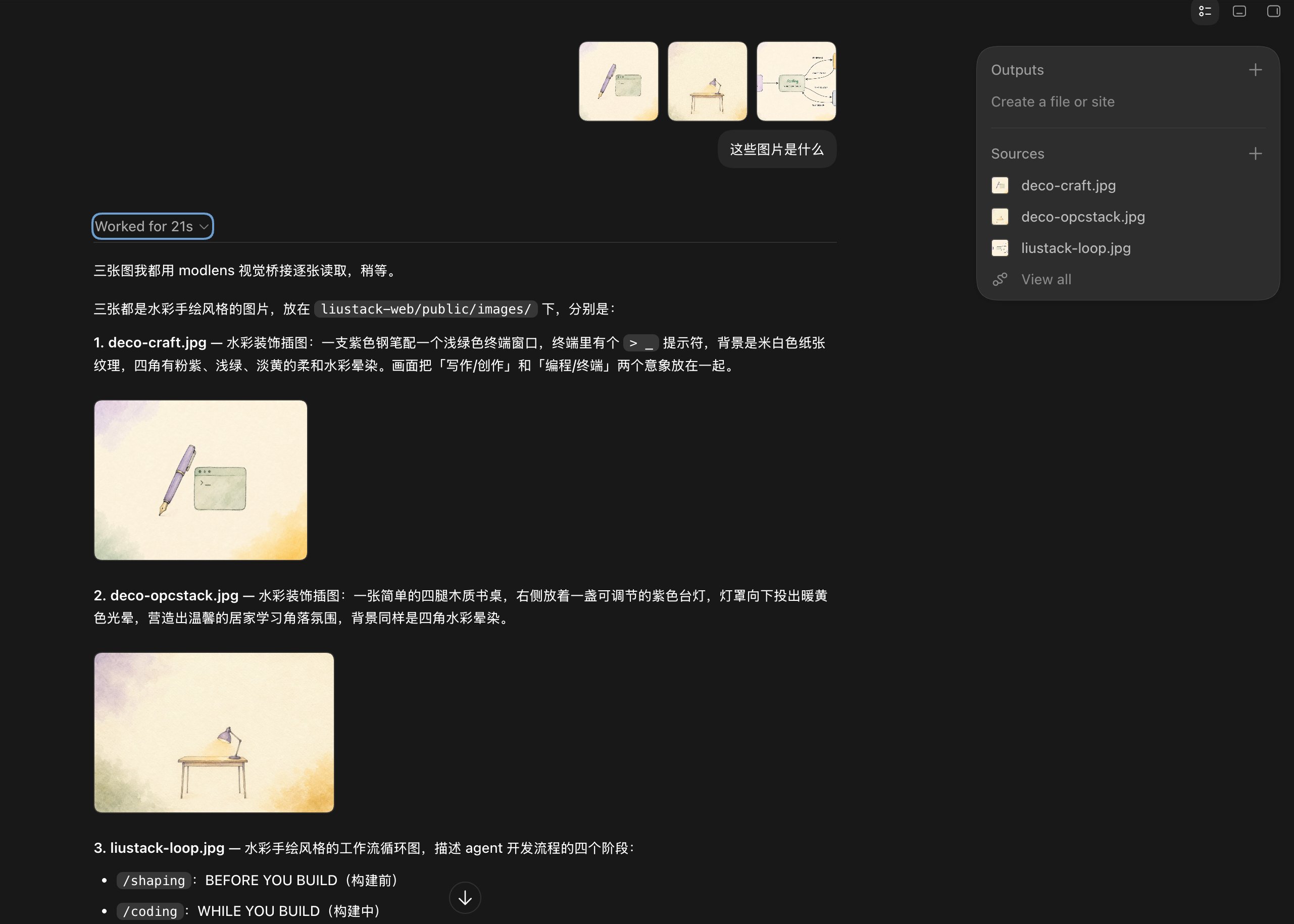
@@ -108,7 +62,7 @@ Three images pasted at once. The model queues them up and reads them one by one,
|
|
|
108
62
|
|
|
109
63
|
|
|
110
64
|
|
|
111
|
-
The stress test: a scatter plot of 128 models. It identifies the chart, both axes, the log scale, and picks the one highlighted point out of the crowd with its coordinates (about $0.028, intelligence score 50). Dense charts are where vision models
|
|
65
|
+
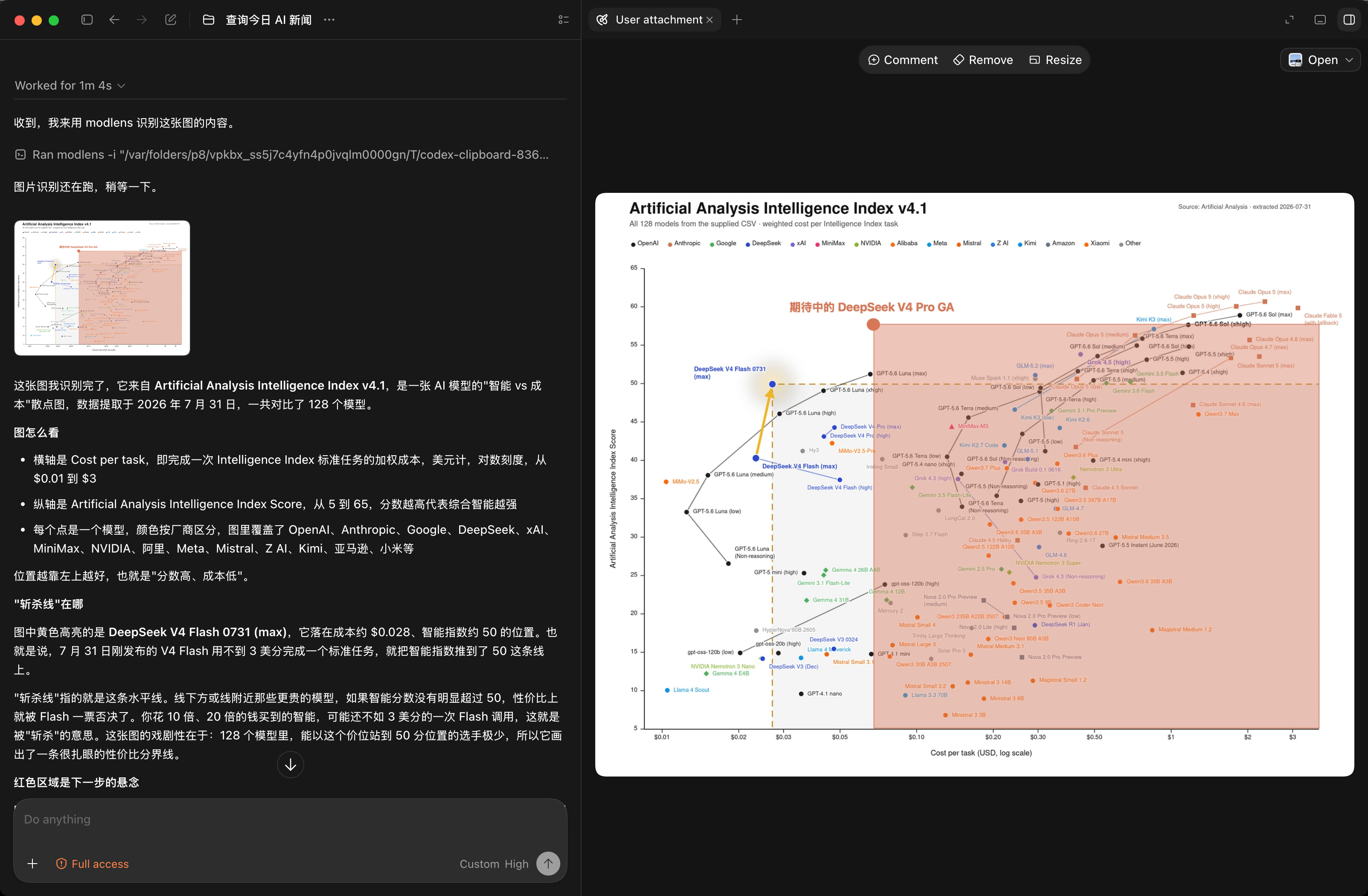
The stress test: a scatter plot of 128 models. It identifies the chart, both axes, the log scale, and picks the one highlighted point out of the crowd with its coordinates (about $0.028, intelligence score 50). Dense charts are where vision models most often fail.
|
|
112
66
|
|
|
113
67
|
|
|
114
68
|
|
|
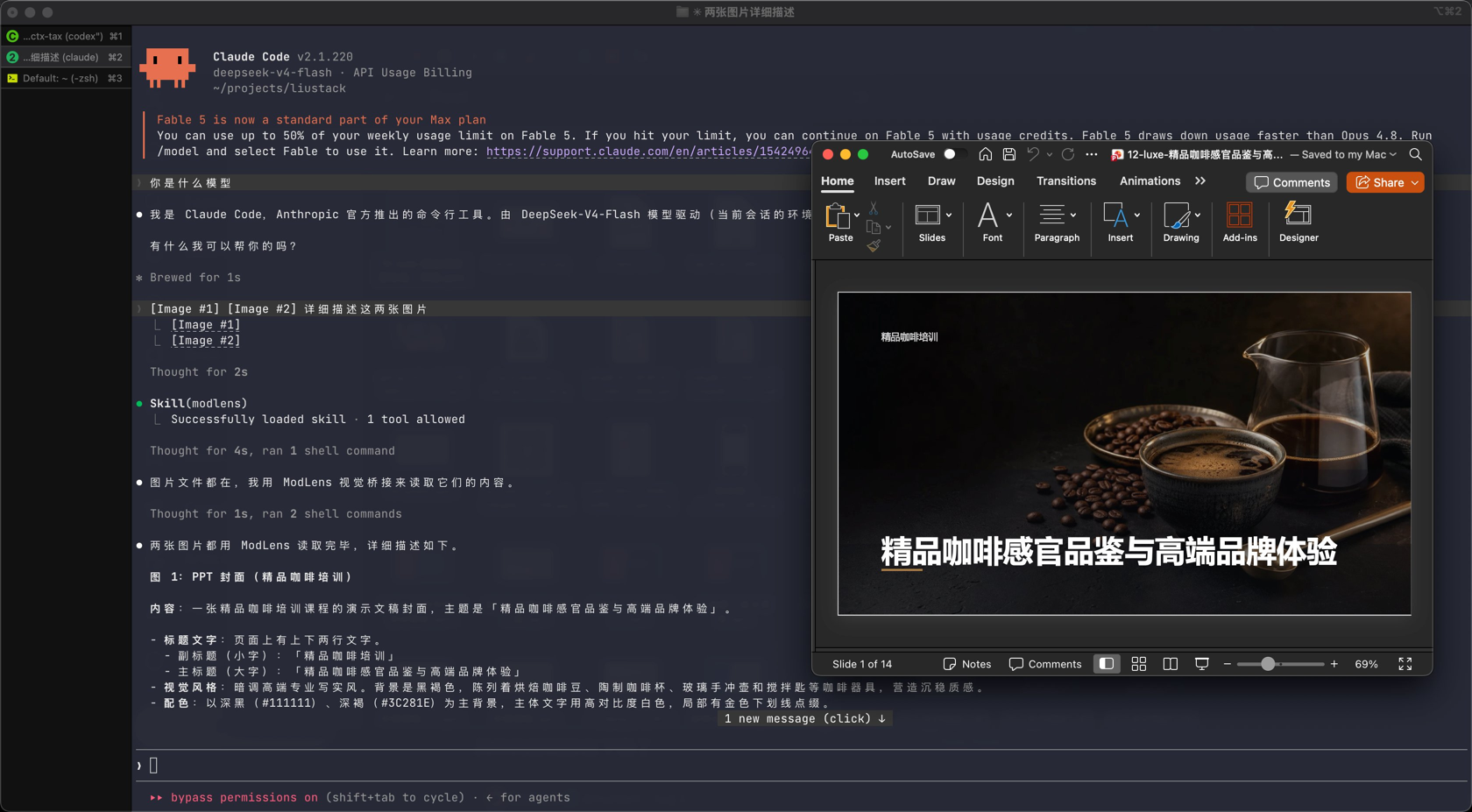
@@ -116,71 +70,12 @@ And the paste path, end to end: Claude Code on a DeepSeek gateway, two images pa
|
|
|
116
70
|
|
|
117
71
|
|
|
118
72
|
|
|
119
|
-
## How it works
|
|
120
|
-
|
|
121
|
-
|
|
122
|
-
|
|
123
|
-
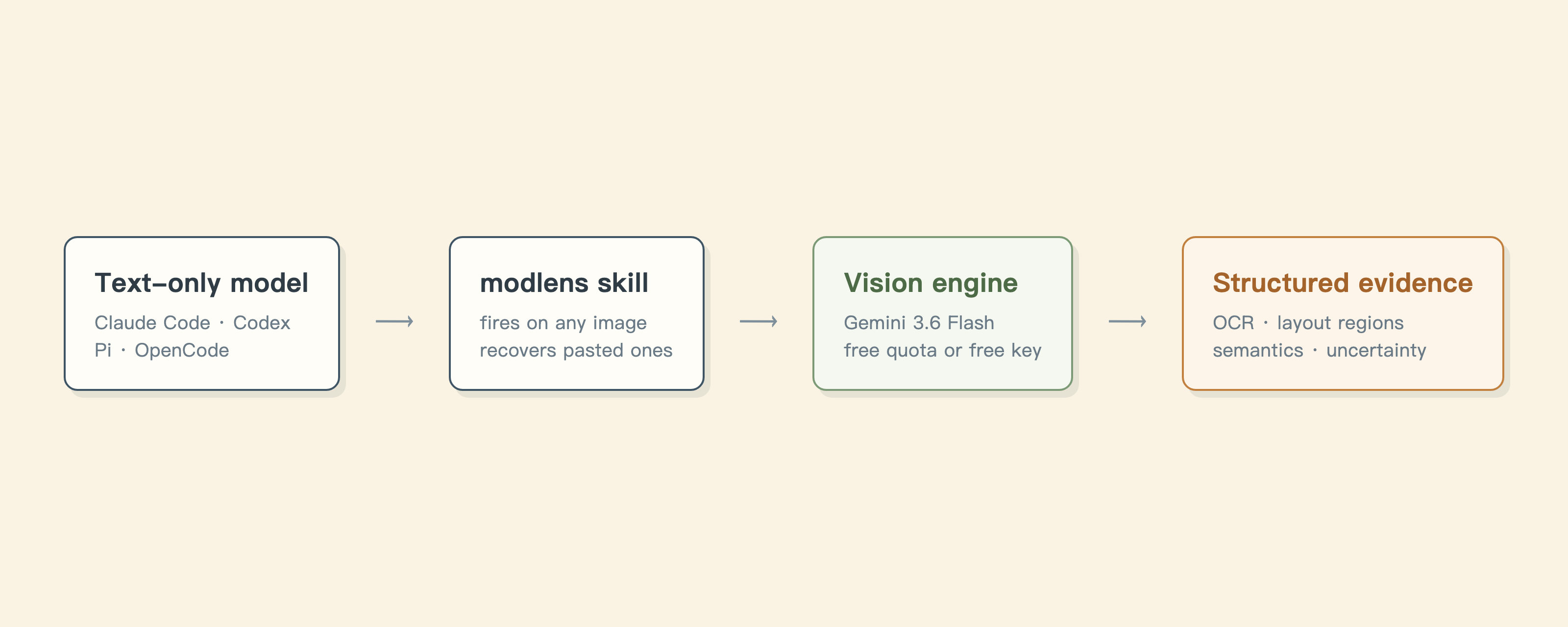
No magic, four steps:
|
|
124
|
-
|
|
125
|
-
1. The skill triggers when an image shows up: a path, a URL, or the bare placeholder a text-only model gets left with after a paste.
|
|
126
|
-
2. It runs the `modlens` CLI, which hands the image to a vision engine. Five to choose from, the free Antigravity CLI by default.
|
|
127
|
-
3. The engine's reading is forced into a fixed JSON schema: transcription, layout, semantics, uncertainty. Output that does not match the schema is rejected, never patched up.
|
|
128
|
-
4. Your model quotes the evidence and answers.
|
|
129
|
-
|
|
130
|
-
The paste trick is the part nobody else does. A pasted image is handled inside the client: encoded and sent the moment it lands, gone before any outside tool can touch it, which is why other bridges tell you to save a file and report the path. But before those bytes leave, the harness has already written them into its local session record. `recover-paste` reads them back from there: JSONL in Claude Code and Pi, SQLite in OpenCode, and Codex needs no recovery at all because its pastes already land as temp files. Details in [harness setup](docs/harness-setup.md).
|
|
131
|
-
|
|
132
|
-
| | Swap in a multimodal model | Other vision bridges (MCP servers etc.) | ModLens |
|
|
133
|
-
| :-- | :-- | :-- | :-- |
|
|
134
|
-
| Your chosen model | has to change | stays | stays |
|
|
135
|
-
| An image pasted into the chat | visible if the model supports it | out of reach | recovered and read |
|
|
136
|
-
| What you get back | the model's own reading | usually a description | transcription, layout regions, entities |
|
|
137
|
-
| Where it cannot read | may invent | may invent | says so in `uncertainty` |
|
|
138
|
-
| Cost | multimodal model pricing | usually per API call | agy's free quota or a free Gemini key |
|
|
139
|
-
|
|
140
|
-
The weaknesses, in the same place: agy's free tier is a weekly quota and heavy use hits the wall (a free Gemini key sidesteps it). Session storage layouts are each harness's internals with no compatibility promise, so if recovery ever breaks, dragging the file in still works everywhere.
|
|
141
|
-
|
|
142
|
-
## CLI reference
|
|
143
|
-
|
|
144
|
-
`modlens analyze` (the default command):
|
|
145
|
-
|
|
146
|
-
| Flag | Meaning | Default |
|
|
147
|
-
| :-- | :-- | :-- |
|
|
148
|
-
| `-i, --input <path\|url>` | Image to analyze (required) | |
|
|
149
|
-
| `-p, --provider <name>` | Vision provider | `antigravity-cli` |
|
|
150
|
-
| `-m, --model <name>` | Provider model | per provider (below) |
|
|
151
|
-
| `-o, --output <path>` | Also write JSON to a file | |
|
|
152
|
-
| `--prompt <text>` | Extra focus | |
|
|
153
|
-
| `--timeout <ms>` | Provider timeout | `180000` |
|
|
154
|
-
| `--provider-bin <path>` | Provider binary path | `agy` / `claude` |
|
|
155
|
-
| `--workdir <path>` | Working directory for the provider | image's directory |
|
|
156
|
-
|
|
157
|
-
The default `-m` model depends on the provider:
|
|
158
|
-
|
|
159
|
-
| Provider | Default model |
|
|
160
|
-
| :-- | :-- |
|
|
161
|
-
| `antigravity-cli` (default) | `gemini-3.6-flash-low` |
|
|
162
|
-
| `gemini-api` | `gemini-3.6-flash` |
|
|
163
|
-
| `anthropic` | `claude-haiku-4-5-20251001` |
|
|
164
|
-
| `claude-cli` | `haiku` |
|
|
165
|
-
| `openai` | none, `-m` is required |
|
|
166
|
-
|
|
167
|
-
`modlens recover-paste`:
|
|
168
|
-
|
|
169
|
-
| Flag | Meaning | Default |
|
|
170
|
-
| :-- | :-- | :-- |
|
|
171
|
-
| `--count <n>` | How many recent pasted images to recover | `1` |
|
|
172
|
-
| `--out-dir <path>` | Where to write recovered images | a fresh private `<tmpdir>/modlens-paste-*` per run |
|
|
173
|
-
| `--session <id>` | Session id for exact targeting | auto-detect |
|
|
174
|
-
| `--transcript <path>` | Explicit transcript `.jsonl` or `.db` (overrides `--session`) | |
|
|
175
|
-
| `--harness <name>` | Force storage scope: `claude-code`, `pi`, `opencode`, `none` | auto-detect |
|
|
176
|
-
| `--cwd <path>` | Project directory the image was pasted in | current directory |
|
|
177
|
-
|
|
178
|
-
Five providers: `antigravity-cli` (default, no key), `gemini-api` (fastest free route), `openai` (any OpenAI-compatible multimodal endpoint), `anthropic`, and `claude-cli` (rides your Claude subscription). Two more subcommands: `modlens config <init|set|show>`, and `modlens doctor` (checks Node, provider readiness, which provider will be selected and why, and the detected harness, without spending quota or touching the network. Add `--json` for a machine-readable report).
|
|
179
|
-
|
|
180
73
|
## Documentation
|
|
181
74
|
|
|
182
75
|
| Doc | Read it when |
|
|
183
76
|
| :-- | :-- |
|
|
77
|
+
| [INSTALL.md](INSTALL.md) | Installing the skill step by step (written for an agent) |
|
|
78
|
+
| [CLI manual](skills/modlens/references/cli.md) | The CLI the skill drives: flags, config, doctor |
|
|
184
79
|
| [Troubleshooting](docs/troubleshooting.md) | A command failed and the message needs decoding |
|
|
185
80
|
| [Configuration](skills/modlens/references/configure.md) | Setting a key, switching providers, fixing config |
|
|
186
81
|
| [Output contract](skills/modlens/references/output-schema.md) | Parsing the JSON or building on it |
|
|
@@ -191,10 +86,10 @@ Five providers: `antigravity-cli` (default, no key), `gemini-api` (fastest free
|
|
|
191
86
|
|
|
192
87
|
## Contributing
|
|
193
88
|
|
|
194
|
-
ModLens does not accept pull requests.
|
|
89
|
+
ModLens does not accept pull requests. The project is maintained by a single author who reviews every line, which is a deliberate choice for reliability. Two effective ways to contribute:
|
|
195
90
|
|
|
196
|
-
- **[Open an issue](https://github.com/liustack/modlens/issues).** Bugs,
|
|
197
|
-
- **Fork it.** MIT
|
|
91
|
+
- **[Open an issue](https://github.com/liustack/modlens/issues).** Bugs, suggestions, confusing errors, unclear docs. Issues are read and shape what gets built next.
|
|
92
|
+
- **Fork it.** Under MIT your copy is fully yours to modify and publish.
|
|
198
93
|
|
|
199
94
|
## Shameless plug
|
|
200
95
|
|
package/README.zh-CN.md
CHANGED
|
@@ -4,7 +4,7 @@
|
|
|
4
4
|
|
|
5
5
|
<h1 align="center">ModLens</h1>
|
|
6
6
|
|
|
7
|
-
<p align="center"><b
|
|
7
|
+
<p align="center"><b>为纯文本模型补上视觉能力,直接粘贴图片就能识别。</b></p>
|
|
8
8
|
|
|
9
9
|
<p align="center">
|
|
10
10
|
<a href="./README.md">English</a> ·
|
|
@@ -17,198 +17,93 @@
|
|
|
17
17
|
|
|
18
18
|
<p align="center">
|
|
19
19
|
<a href="https://www.npmjs.com/package/@liustack/modlens"><img src="https://img.shields.io/npm/v/@liustack/modlens?style=flat-square&label=npm&color=cb3837" alt="npm"></a>
|
|
20
|
-
<a href="https://github.com/liustack/modlens/actions/workflows/ci.yml"><img src="https://img.shields.io/github/actions/workflow/status/liustack/modlens/ci.yml?branch=main&style=flat-square&label=ci" alt="CI"></a>
|
|
21
20
|
<a href="https://nodejs.org"><img src="https://img.shields.io/node/v/@liustack/modlens?style=flat-square" alt="Node.js"></a>
|
|
22
21
|
<a href="LICENSE"><img src="https://img.shields.io/badge/license-MIT-blue?style=flat-square" alt="License"></a>
|
|
23
22
|
</p>
|
|
24
23
|
|
|
25
|
-
|
|
26
|
-
npx -y skills add liustack/modlens # 装 skill
|
|
27
|
-
npx @liustack/modlens -i screenshot.png # 或者直接当 CLI 用
|
|
28
|
-
```
|
|
29
|
-
|
|
30
|
-
DeepSeek-V4-Flash 这类模型便宜、快、能打,唯独看不见图。你甩过去一张报错截图,它一片漆黑。ModLens 把图交给真正的视觉引擎,带回你的模型能引用的证据:图里的字一句不落地转录,版面切好,读不准的地方明说。而且**你直接粘贴就行**:别的方案都要你先存成文件再报路径,ModLens 直接从会话存储里把粘贴的图捞回来。
|
|
24
|
+
DeepSeek-V4-Flash 没有视觉能力,无法处理截图和图片。ModLens 借助外挂视觉引擎,为纯文本模型补上视觉能力。**ModLens 支持直接粘贴图片识别**,无需先保存成文件再提供路径。
|
|
31
25
|
|
|
32
26
|
## 亮点
|
|
33
27
|
|
|
34
|
-
-
|
|
35
|
-
-
|
|
36
|
-
-
|
|
37
|
-
- **模型不用换。** 你选 DeepSeek 图的是价格和推理,不是视力,这个选择不用动。
|
|
38
|
-
- **零 key 起步。** 默认引擎 Antigravity CLI 不要 key;领个免费 Gemini key,识图缩到 5 到 10 秒。
|
|
39
|
-
- **一次装好,处处能用。** Claude Code、Codex、Pi、OpenCode 都在真机上验证过。
|
|
28
|
+
- **完全免费。** 默认走 Antigravity CLI 通道,无需 api key。配一个免费的 Gemini key 可将识别耗时降至 5 到 10 秒。
|
|
29
|
+
- **返回证据,而非印象。** 全文转录、按阅读顺序划分的版面区块、实体与关系列表,模型引用的是具体内容。
|
|
30
|
+
- **一次安装,多端可用。** Claude Code、Codex、Pi、OpenCode 均经真机验证。
|
|
40
31
|
|
|
41
32
|
## 安装
|
|
42
33
|
|
|
43
|
-
|
|
44
|
-
npx -y skills add liustack/modlens
|
|
45
|
-
```
|
|
34
|
+
**第一步,准备一个视觉引擎(唯一需要你亲手做的)。** 推荐免费的 Gemini api key:到 [Google AI Studio](https://aistudio.google.com) 领取,约三分钟,无需信用卡。
|
|
46
35
|
|
|
47
|
-
|
|
36
|
+
也推荐申请其他平台免费的 openai api 兼容格式的 api key。
|
|
48
37
|
|
|
49
|
-
|
|
38
|
+
想完全免注册就改装 Antigravity CLI,然后完成登录:
|
|
50
39
|
|
|
51
40
|
```bash
|
|
52
|
-
|
|
53
|
-
|
|
41
|
+
curl -fsSL https://antigravity.google/cli/install.sh | bash
|
|
42
|
+
agy # 浏览器完成登录后退出
|
|
54
43
|
```
|
|
55
44
|
|
|
56
|
-
|
|
57
|
-
|
|
58
|
-
```bash
|
|
59
|
-
curl -fsSL https://antigravity.google/cli/install.sh | bash && agy # 浏览器登录后退出
|
|
60
|
-
```
|
|
45
|
+
**第二步,剩下的交给你的 AI。** 把这句话发给它,用 Gemini api key 的话把 key 一起发:
|
|
61
46
|
|
|
62
|
-
|
|
47
|
+
> 按 https://github.com/liustack/modlens 的 INSTALL.md 安装并配置 modlens skill,完成后运行体检并把结果告诉我。
|
|
63
48
|
|
|
64
49
|
## 用法
|
|
65
50
|
|
|
66
|
-
|
|
67
|
-
|
|
68
|
-
```bash
|
|
69
|
-
modlens -i screenshot.png # 本地图片
|
|
70
|
-
modlens -i https://example.com/chart.png # 远程图片
|
|
71
|
-
modlens -i chart.png --prompt "重点看数据轴" # 指定关注点
|
|
72
|
-
modlens recover-paste # 把刚粘贴的图捞成文件
|
|
73
|
-
```
|
|
74
|
-
|
|
75
|
-
输出是结构固定的 JSON:
|
|
76
|
-
|
|
77
|
-
```json
|
|
78
|
-
{
|
|
79
|
-
"image": "/path/to/screenshot.png",
|
|
80
|
-
"provider": "gemini-api",
|
|
81
|
-
"result": {
|
|
82
|
-
"summary": "四个节点的工作流图,箭头带标注。",
|
|
83
|
-
"ocr": { "full_text": "/shaping\nBEFORE YOU BUILD\n...", "lines": [] },
|
|
84
|
-
"layout": { "regions": [{ "reading_order": 1, "type": "title", "text": "/shaping" }] },
|
|
85
|
-
"uncertainty": []
|
|
86
|
-
},
|
|
87
|
-
"meta": {
|
|
88
|
-
"generatedAt": "2026-08-06T12:00:00.000Z",
|
|
89
|
-
"model": "gemini-3.6-flash",
|
|
90
|
-
"conversationId": null,
|
|
91
|
-
"durationSeconds": 6.4,
|
|
92
|
-
"usage": { "promptTokenCount": 1234, "candidatesTokenCount": 567 }
|
|
93
|
-
}
|
|
94
|
-
}
|
|
95
|
-
```
|
|
96
|
-
|
|
97
|
-
`meta` 记录这份结果是怎么来的:生成时间(`generatedAt`)、用的 `model`、provider 给的 `conversationId`(没有就是 null)、实际耗时 `durationSeconds`、以及 provider 报告的原始 `usage`(结构随 provider 而定,没有就是 null)。
|
|
51
|
+
装好之后不需要记任何命令。正常聊天,粘贴图片或给出图片路径,提问即可,skill 自动触发:图片交给视觉引擎,答案基于读到的内容返回。
|
|
98
52
|
|
|
99
53
|
## 实测
|
|
100
54
|
|
|
101
|
-
|
|
55
|
+
以下均为原样记录,驱动的都是纯文本的 DeepSeek-V4-Flash。
|
|
102
56
|
|
|
103
|
-
Codex 桌面 App
|
|
57
|
+
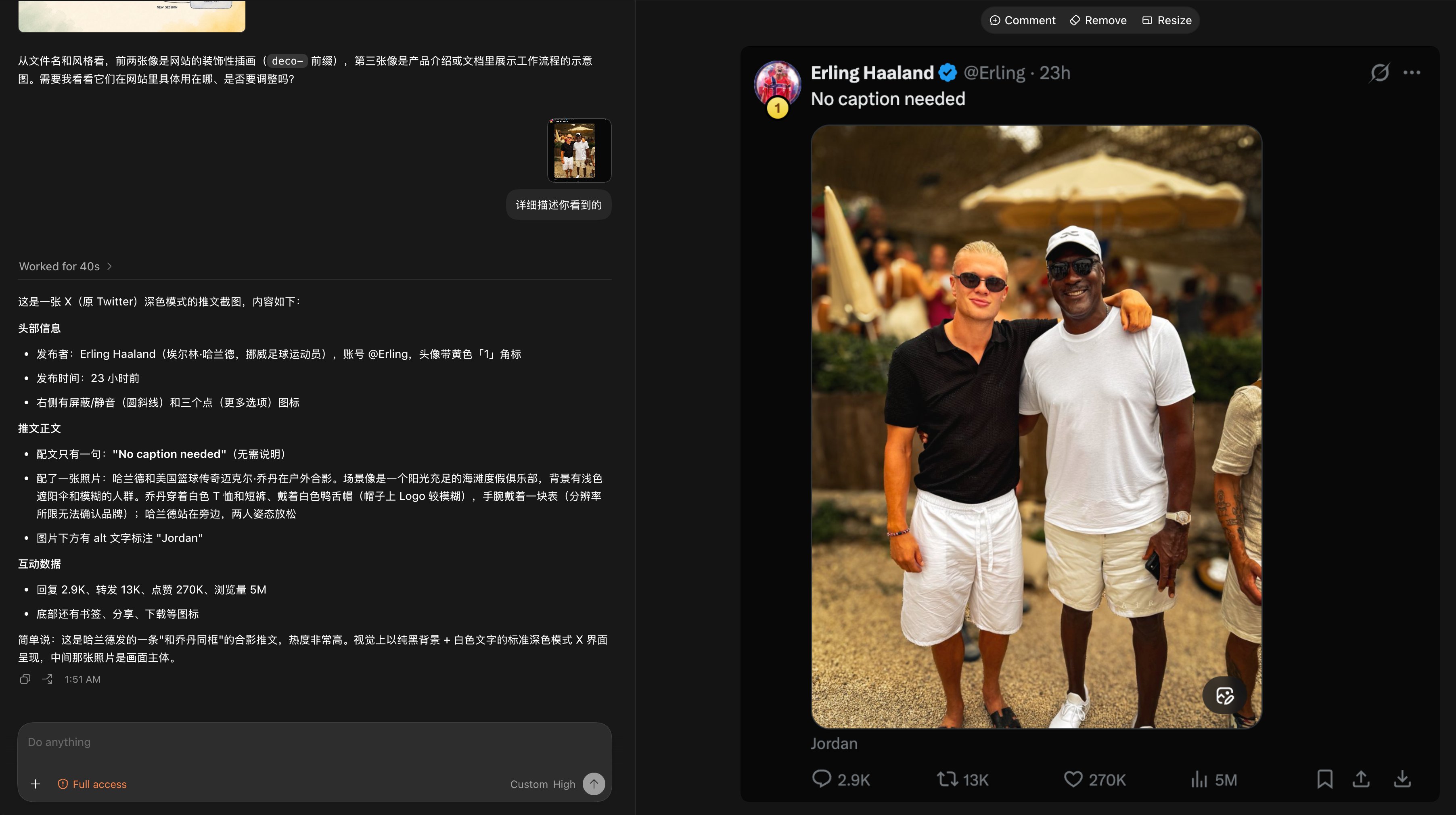
Codex 桌面 App 中识别一张推文截图。配文、互动数据(2.9K 回复、270K 点赞、5M 浏览)以及图片的 alt 文字全部读出。分辨率不足的部分明确说明无法确认,没有编造。
|
|
104
58
|
|
|
105
59
|
|
|
106
60
|
|
|
107
|
-
|
|
61
|
+
一次粘贴三张图。模型依次读取,包括对设计意图的判断。
|
|
108
62
|
|
|
109
|
-

|
|
110
64
|
|
|
111
|
-
压力测试:128
|
|
65
|
+
压力测试:128 个模型的散点图。图表类型、双轴定义、对数刻度全部识别,并从密集点群中准确读出高亮点的位置(成本约 $0.028,智能指数 50)。密集图表是视觉模型最容易出错的场景。
|
|
112
66
|
|
|
113
67
|

|
|
114
68
|
|
|
115
|
-
|
|
116
|
-
|
|
117
|
-

|
|
118
|
-
|
|
119
|
-
## 它是怎么干活的
|
|
120
|
-
|
|
121
|
-
|
|
122
|
-
|
|
123
|
-
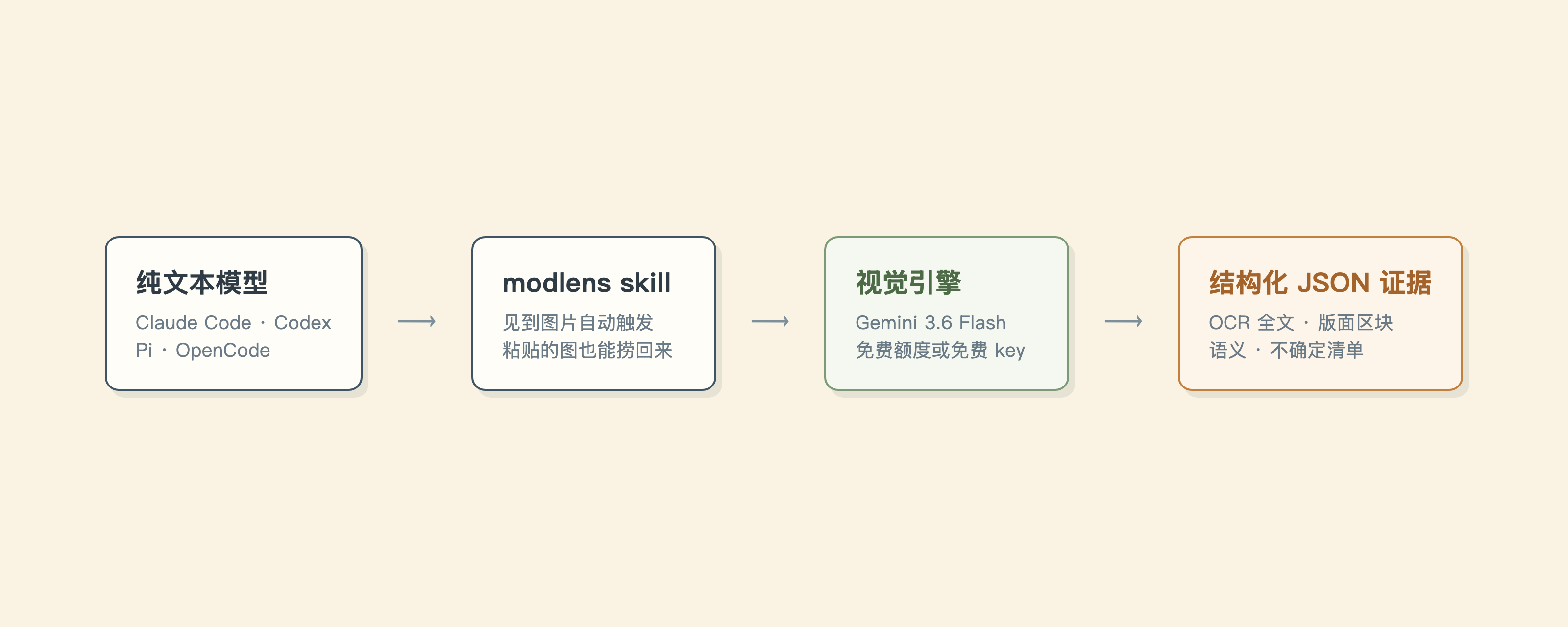
没有魔法,四步:
|
|
124
|
-
|
|
125
|
-
1. 图片出现时 skill 触发:一个路径、一个 URL,或者纯文本模型粘贴后剩下的那个占位符。
|
|
126
|
-
2. skill 跑 `modlens` 命令,把图交给视觉引擎。五个引擎可选,默认是免费的 Antigravity CLI。
|
|
127
|
-
3. 引擎的识读结果被强制装进固定的 JSON 结构:转录、版面、语义、不确定项。不合规的输出直接拒收,绝不凑合。
|
|
128
|
-
4. 模型引用证据,回答问题。
|
|
129
|
-
|
|
130
|
-
粘贴这一手是别家都没有的。粘贴从头到尾在客户端内部完成:图一落进对话框就被编码发走,外部工具根本没机会碰到,所以别的方案只能教你存文件报路径。但字节发走之前,harness 已经把它原样写进了本地会话记录,`recover-paste` 就是去那里捞:Claude Code 和 Pi 存 JSONL,OpenCode 存 SQLite,Codex 的粘贴本来就落成临时文件所以不需要捞。细节见[宿主接入](docs/harness-setup.md)。
|
|
131
|
-
|
|
132
|
-
| | 换个多模态模型 | 其他识图外挂(MCP server 这类) | ModLens |
|
|
133
|
-
| :-- | :-- | :-- | :-- |
|
|
134
|
-
| 你选的模型 | 得换掉 | 不用换 | 不用换 |
|
|
135
|
-
| 粘贴进对话的图 | 模型支持才看得见 | 接不住 | 捞回来直接读 |
|
|
136
|
-
| 拿到手的是什么 | 模型自己的理解 | 通常一段描述 | 全文转录、版面区块、实体关系 |
|
|
137
|
-
| 读不准的地方 | 可能编 | 可能编 | 进 `uncertainty` |
|
|
138
|
-
| 花费 | 多模态模型的价格 | 多数按 API 计费 | agy 免费额度或免费 Gemini key |
|
|
139
|
-
|
|
140
|
-
短板一并摆这儿:agy 免费额度是周配额,重度用会撞墙(换免费 Gemini key 绕开)。会话存储格式是各家 harness 的内部实现,没有兼容承诺,哪天捞不动了,拖文件永远是保底。
|
|
141
|
-
|
|
142
|
-
## CLI 参数
|
|
143
|
-
|
|
144
|
-
`modlens analyze`(默认命令):
|
|
145
|
-
|
|
146
|
-
| 参数 | 含义 | 默认值 |
|
|
147
|
-
| :-- | :-- | :-- |
|
|
148
|
-
| `-i, --input <path\|url>` | 要解析的图片(必填) | |
|
|
149
|
-
| `-p, --provider <name>` | 视觉 provider | `antigravity-cli` |
|
|
150
|
-
| `-m, --model <name>` | provider 模型 | 按 provider(见下) |
|
|
151
|
-
| `-o, --output <path>` | 同时把 JSON 写入文件 | |
|
|
152
|
-
| `--prompt <text>` | 额外关注点 | |
|
|
153
|
-
| `--timeout <ms>` | provider 超时 | `180000` |
|
|
154
|
-
| `--provider-bin <path>` | provider 可执行文件路径 | `agy` / `claude` |
|
|
155
|
-
| `--workdir <path>` | provider 的工作目录 | 图片所在目录 |
|
|
156
|
-
|
|
157
|
-
`-m` 的默认模型取决于 provider:
|
|
158
|
-
|
|
159
|
-
| Provider | 默认模型 |
|
|
160
|
-
| :-- | :-- |
|
|
161
|
-
| `antigravity-cli`(默认) | `gemini-3.6-flash-low` |
|
|
162
|
-
| `gemini-api` | `gemini-3.6-flash` |
|
|
163
|
-
| `anthropic` | `claude-haiku-4-5-20251001` |
|
|
164
|
-
| `claude-cli` | `haiku` |
|
|
165
|
-
| `openai` | 无默认,必须指定 `-m` |
|
|
166
|
-
|
|
167
|
-
`modlens recover-paste`:
|
|
168
|
-
|
|
169
|
-
| 参数 | 含义 | 默认值 |
|
|
170
|
-
| :-- | :-- | :-- |
|
|
171
|
-
| `--count <n>` | 恢复最近几张粘贴的图 | `1` |
|
|
172
|
-
| `--out-dir <path>` | 恢复的图写到哪个目录 | 每次运行新建的私有目录 `<tmpdir>/modlens-paste-*` |
|
|
173
|
-
| `--session <id>` | 精确锁定的 session id | 自动检测 |
|
|
174
|
-
| `--transcript <path>` | 显式指定 `.jsonl` 或 `.db`(优先于 `--session`) | |
|
|
175
|
-
| `--harness <name>` | 强制存储范围:`claude-code`、`pi`、`opencode`、`none` | 自动检测 |
|
|
176
|
-
| `--cwd <path>` | 图片是在哪个项目目录粘贴的 | 当前目录 |
|
|
69
|
+
粘贴链路的端到端记录:接入 DeepSeek 的 Claude Code,两张图直接粘贴进对话。界面中只显示占位符,skill 从会话存储恢复两张图片并逐一读出,包括 PPT 封面的配色色值。
|
|
177
70
|
|
|
178
|
-
|
|
71
|
+

|
|
179
72
|
|
|
180
73
|
## 文档
|
|
181
74
|
|
|
182
|
-
| 文档
|
|
183
|
-
|
|
|
184
|
-
| [
|
|
185
|
-
| [
|
|
186
|
-
| [
|
|
187
|
-
| [
|
|
188
|
-
| [
|
|
189
|
-
| [
|
|
190
|
-
| [
|
|
75
|
+
| 文档 | 适用场景 |
|
|
76
|
+
| :----------------------------------------------------- | :----------------------------------------- |
|
|
77
|
+
| [INSTALL.md](INSTALL.md) | 一步步安装 skill(为 agent 编写) |
|
|
78
|
+
| [CLI 手册](skills/modlens/references/cli.md) | skill 所驱动的 CLI:参数、配置与体检 |
|
|
79
|
+
| [故障排查](docs/troubleshooting.md) | 命令报错,查成因和解法 |
|
|
80
|
+
| [配置手册](skills/modlens/references/configure.md) | 配置 key、切换 provider、排查配置 |
|
|
81
|
+
| [输出契约](skills/modlens/references/output-schema.md) | 解析 JSON 或构建下游工具 |
|
|
82
|
+
| [宿主接入](docs/harness-setup.md) | 在 Codex、Claude Code、Pi、OpenCode 中配置 |
|
|
83
|
+
| [安全说明](docs/security.md) | 恢复文件的权限、图片内容作为不可信输入 |
|
|
84
|
+
| [更新日志](CHANGELOG.md) | 查询版本变更 |
|
|
85
|
+
| [AGENTS.md](AGENTS.md) | 修改本项目代码 |
|
|
191
86
|
|
|
192
87
|
## 参与方式
|
|
193
88
|
|
|
194
|
-
|
|
89
|
+
本仓库不接受 PR。项目由作者独立维护,所有代码经作者本人审阅,这是它可靠性的前提。两种有效的参与方式:
|
|
195
90
|
|
|
196
|
-
- **[
|
|
197
|
-
- **Fork。** MIT
|
|
91
|
+
- **[提交 issue](https://github.com/liustack/modlens/issues)。** bug、建议、难以理解的报错或文档都欢迎。issue 会被认真阅读,并影响后续开发方向。
|
|
92
|
+
- **Fork。** MIT 协议下你的副本完全归你,修改和发布不受限制。
|
|
198
93
|
|
|
199
|
-
##
|
|
94
|
+
## 插入硬广一条
|
|
200
95
|
|
|
201
|
-
AI 工具、实践与想法,第一时间推送。微信扫码,或搜一搜「liustack
|
|
96
|
+
关注微信公众号「liustack」:AI 工具、实践与想法,第一时间推送。微信扫码,或搜一搜「liustack」:
|
|
202
97
|
|
|
203
98
|
<p align="center">
|
|
204
99
|
<img src="https://raw.githubusercontent.com/liustack/modlens/main/assets/wechat-qrcode.png" width="420" alt="微信公众号 liustack" />
|
|
205
100
|
</p>
|
|
206
101
|
|
|
207
|
-
⭐
|
|
102
|
+
⭐ 如果它对你有用,请给 [ModLens](https://github.com/liustack/modlens) 一个 star,这是其他开发者找到它的方式。
|
|
208
103
|
|
|
209
104
|
## 免责声明
|
|
210
105
|
|
|
211
|
-
本项目依下方 MIT 协议按现状提供。作者不对任何特定用途(含商业使用)提供保证或背书。上游引擎(Antigravity CLI,Gemini、OpenAI、Anthropic 的 API,以及任何 OpenAI
|
|
106
|
+
本项目依下方 MIT 协议按现状提供。作者不对任何特定用途(含商业使用)提供保证或背书。上游引擎(Antigravity CLI,Gemini、OpenAI、Anthropic 的 API,以及任何 OpenAI 兼容端点)的使用受各自条款和额度约束,由使用者负责。
|
|
212
107
|
|
|
213
108
|
## License
|
|
214
109
|
|
package/dist/main.js
CHANGED
|
@@ -1320,7 +1320,8 @@ function inspectConfigFile(configPath) {
|
|
|
1320
1320
|
try {
|
|
1321
1321
|
const stat = fs.statSync(configPath);
|
|
1322
1322
|
const mode = stat.mode & 511;
|
|
1323
|
-
const
|
|
1323
|
+
const enforcesPosixPerms = typeof process.getuid === "function";
|
|
1324
|
+
const permissionsOk = !enforcesPosixPerms || (mode & 63) === 0;
|
|
1324
1325
|
return {
|
|
1325
1326
|
path: configPath,
|
|
1326
1327
|
exists: true,
|
|
@@ -1712,15 +1713,17 @@ function prepareOutDir(explicit) {
|
|
|
1712
1713
|
throw new Error(`--out-dir exists but is not a directory: ${outDir}.`);
|
|
1713
1714
|
}
|
|
1714
1715
|
const uid = typeof process.getuid === "function" ? process.getuid() : void 0;
|
|
1715
|
-
if (uid !== void 0
|
|
1716
|
-
|
|
1717
|
-
|
|
1718
|
-
|
|
1719
|
-
|
|
1720
|
-
|
|
1721
|
-
|
|
1722
|
-
|
|
1723
|
-
|
|
1716
|
+
if (uid !== void 0) {
|
|
1717
|
+
if (stat.uid !== uid) {
|
|
1718
|
+
throw new Error(
|
|
1719
|
+
`--out-dir is owned by another user (uid ${stat.uid}, not ${uid}): ${outDir}. On a shared machine that user could read the recovered images.`
|
|
1720
|
+
);
|
|
1721
|
+
}
|
|
1722
|
+
if (stat.mode & 63) {
|
|
1723
|
+
throw new Error(
|
|
1724
|
+
`--out-dir is group- or world-accessible (mode ${(stat.mode & 511).toString(8)}): ${outDir}. Recovered screenshots can hold anything; use a private directory (chmod 700).`
|
|
1725
|
+
);
|
|
1726
|
+
}
|
|
1724
1727
|
}
|
|
1725
1728
|
return outDir;
|
|
1726
1729
|
}
|
|
@@ -1854,7 +1857,7 @@ function recoverPastedImages(options = {}) {
|
|
|
1854
1857
|
return result;
|
|
1855
1858
|
}
|
|
1856
1859
|
const program = new Command();
|
|
1857
|
-
program.name("modlens").description("Plug-in vision for text-only LLMs: image in, structured JSON evidence out").version("3.
|
|
1860
|
+
program.name("modlens").description("Plug-in vision for text-only LLMs: image in, structured JSON evidence out").version("3.1.0");
|
|
1858
1861
|
program.command("analyze", { isDefault: true }).description("Analyze an image into structured JSON evidence (default command)").requiredOption("-i, --input <path|url>", "Input image path or https URL").option("-o, --output <path>", "Write result JSON to a file").option("-m, --model <name>", "Provider model name").option("-p, --provider <name>", `Vision provider (${listProviders().join(", ")})`).option("--prompt <text>", "Extra focus for this image").option("--timeout <ms>", "Provider timeout in milliseconds", "180000").option("--provider-bin <path>", "Provider binary path (default: agy)").option("--workdir <path>", "Working directory for the provider").action(async (options) => {
|
|
1859
1862
|
try {
|
|
1860
1863
|
const timeoutMs = Number.parseInt(options.timeout, 10);
|
package/docs/harness-setup.md
CHANGED
|
@@ -38,6 +38,12 @@ Running a text-only model behind `ANTHROPIC_BASE_URL` in Claude Code, a pasted i
|
|
|
38
38
|
|
|
39
39
|
Symlinks work in all of them, so linking the skill folder once keeps every agent on the latest version.
|
|
40
40
|
|
|
41
|
+
## Platform support
|
|
42
|
+
|
|
43
|
+
macOS and Linux are fully supported and verified in CI on Node 22 and 24.
|
|
44
|
+
|
|
45
|
+
Windows runs the same CI matrix. Detection there skips the process-ancestry pass, since there is no `ps`, and falls back to the environment fingerprints above, so a harness that sets none of them reads as undetected (force it with `--harness` or `MODLENS_HARNESS`). OpenCode paste recovery is covered on Windows, including the path-separator normalization from [#11](https://github.com/liustack/modlens/issues/11): opencode records `session.directory` with forward slashes while `path.resolve` returns backslashes there, and both sides are normalized before matching. The JSONL stores (Claude Code, Pi) key off `os.homedir()` and each harness's own on-disk slug, and are exercised on POSIX. External engines (Antigravity CLI, the Claude CLI) run only where they ship a Windows build.
|
|
46
|
+
|
|
41
47
|
## Gateway setups
|
|
42
48
|
|
|
43
49
|
OpenCode with DeepSeek: `opencode auth login`, pick DeepSeek and paste the key (it lands in `~/.local/share/opencode/auth.json`), then set the default model in `~/.config/opencode/opencode.jsonc` to `deepseek/deepseek-v4-flash`. Pi reads its key from `~/.pi/agent/auth.json`.
|
package/docs/troubleshooting.md
CHANGED
|
@@ -81,7 +81,7 @@ The output lists images oldest to newest, so the **last** entry is the most rece
|
|
|
81
81
|
`recover-paste` auto-detects which harness it runs inside (process ancestry first, then environment fingerprints) and reads only that harness's storage. Two knobs override it:
|
|
82
82
|
|
|
83
83
|
- **`MODLENS_HARNESS`** forces the storage scope without a flag: `claude-code`, `pi`, `opencode`, `codex`, or `none` (scan every store, no scoping). Detection reads it first, so it wins over ancestry and env fingerprints. `--harness` does the same for a single run.
|
|
84
|
-
- **`--out-dir`** sets where recovered images land. By default each run mints a fresh, unpredictable `<tmpdir>/modlens-paste-*` directory (0700, holding 0600 files), so nobody can pre-create a shared path to intercept the bytes. Point it elsewhere when the system temp dir is not where you want them. An explicit `--out-dir` that already exists is rejected unless it is a real directory (not a symlink), owned by you, with no group or world access.
|
|
84
|
+
- **`--out-dir`** sets where recovered images land. By default each run mints a fresh, unpredictable `<tmpdir>/modlens-paste-*` directory (0700, holding 0600 files), so nobody can pre-create a shared path to intercept the bytes. Point it elsewhere when the system temp dir is not where you want them. An explicit `--out-dir` that already exists is rejected unless it is a real directory (not a symlink), owned by you, with no group or world access. On Windows those ownership and permission checks are skipped, since the platform has no POSIX bits (see the Windows section below). The symlink guard still applies.
|
|
85
85
|
|
|
86
86
|
## This is a Codex session
|
|
87
87
|
|
|
@@ -127,6 +127,14 @@ antigravity-cli provider timed out after 210000 ms.
|
|
|
127
127
|
|
|
128
128
|
Retry once with `--timeout 300000`. Dense images on agy legitimately take 15-40 seconds, and `-m gemini-3.1-pro-high` is slower still. Engines that ignore SIGTERM are escalated to SIGKILL, so a timeout returns promptly regardless.
|
|
129
129
|
|
|
130
|
+
## Windows
|
|
131
|
+
|
|
132
|
+
ModLens runs on Windows. Three platform differences are worth knowing:
|
|
133
|
+
|
|
134
|
+
- **No POSIX permission checks.** Windows files carry no owner, group, or world bits (they read back as `0o666`/`0o777`, with access governed by ACLs), so `doctor` does not judge the config file's mode and `recover-paste --out-dir` does not reject a directory on ownership or group/world access. The symlink guard on `--out-dir` still applies.
|
|
135
|
+
- **Harness detection uses environment fingerprints.** There is no `ps` to read the process tree, so detection relies on the environment variables each harness sets. If a run guesses wrong, force it with `--harness <name>` or `MODLENS_HARNESS`.
|
|
136
|
+
- **Paste recovery.** OpenCode recovery is covered on Windows (issue #11). The Claude Code and Pi JSONL paths depend on `os.homedir()` and each harness's on-disk slug there. If recovery comes up empty, pass `--transcript` at the file, or drag the image into the terminal.
|
|
137
|
+
|
|
130
138
|
## Still stuck
|
|
131
139
|
|
|
132
140
|
Include the exact command and the full error in an issue: https://github.com/liustack/modlens/issues
|
package/package.json
CHANGED
|
@@ -1,15 +1,29 @@
|
|
|
1
1
|
{
|
|
2
2
|
"name": "@liustack/modlens",
|
|
3
|
-
"version": "3.
|
|
3
|
+
"version": "3.1.0",
|
|
4
4
|
"description": "Plug-in vision for text-only LLMs, powered by the free Antigravity CLI",
|
|
5
5
|
"type": "module",
|
|
6
6
|
"bin": {
|
|
7
7
|
"modlens": "./dist/main.js"
|
|
8
8
|
},
|
|
9
|
+
"scripts": {
|
|
10
|
+
"dev": "vite build --watch",
|
|
11
|
+
"build": "vite build",
|
|
12
|
+
"typecheck": "tsc --noEmit",
|
|
13
|
+
"test": "vitest run",
|
|
14
|
+
"coverage": "vitest run --coverage",
|
|
15
|
+
"lint": "biome check src scripts",
|
|
16
|
+
"format": "biome check --write src scripts",
|
|
17
|
+
"eval": "node evals/run.mjs",
|
|
18
|
+
"release": "node scripts/release.mjs",
|
|
19
|
+
"prepublishOnly": "pnpm build",
|
|
20
|
+
"docs:list": "node scripts/docs-list.js"
|
|
21
|
+
},
|
|
9
22
|
"files": [
|
|
10
23
|
"dist",
|
|
11
24
|
"docs",
|
|
12
25
|
"skills/modlens/SKILL.md",
|
|
26
|
+
"skills/modlens/scripts",
|
|
13
27
|
"skills/modlens/references",
|
|
14
28
|
"CHANGELOG.md",
|
|
15
29
|
"SECURITY.md"
|
|
@@ -49,17 +63,5 @@
|
|
|
49
63
|
"typescript": "^5.9.3",
|
|
50
64
|
"vite": "^6.4.1",
|
|
51
65
|
"vitest": "^3.2.7"
|
|
52
|
-
},
|
|
53
|
-
"scripts": {
|
|
54
|
-
"dev": "vite build --watch",
|
|
55
|
-
"build": "vite build",
|
|
56
|
-
"typecheck": "tsc --noEmit",
|
|
57
|
-
"test": "vitest run",
|
|
58
|
-
"coverage": "vitest run --coverage",
|
|
59
|
-
"lint": "biome check src scripts",
|
|
60
|
-
"format": "biome check --write src scripts",
|
|
61
|
-
"eval": "node evals/run.mjs",
|
|
62
|
-
"release": "node scripts/release.mjs",
|
|
63
|
-
"docs:list": "node scripts/docs-list.js"
|
|
64
66
|
}
|
|
65
67
|
}
|