@liustack/modlens 2.7.2 → 2.7.4
This diff represents the content of publicly available package versions that have been released to one of the supported registries. The information contained in this diff is provided for informational purposes only and reflects changes between package versions as they appear in their respective public registries.
- package/README.md +44 -15
- package/README.zh-CN.md +44 -15
- package/dist/main.js +171 -28
- package/package.json +1 -1
package/README.md
CHANGED
|
@@ -11,28 +11,29 @@
|
|
|
11
11
|
|
|
12
12
|
DeepSeek-V4-Flash gives you a lot of model for very little money: fast, strong, and its one real flaw is no multimodal. And it's not just DeepSeek. Every text-only model running inside Codex, Claude Code, Pi Agent, or OpenClaw hits the same wall.
|
|
13
13
|
|
|
14
|
-
ModLens fixes this the lightest way possible
|
|
14
|
+
ModLens fixes this the lightest way possible: it never touches your config, never adds a local proxy, and is just a vision plug-in you can run as a CLI or install as an Agent Skill. What it hands back is not a one-line caption but structured visual evidence: text, layout, regions, entities, relations, visual clues. Five vision engines to pick from. The default one needs no key at all, and the fastest one runs on a free Gemini key whose image understanding embarrasses most flagships, Fable 5 included. How it works:
|
|
15
15
|
|
|
16
16
|
```text
|
|
17
17
|
text-only model in your agent harness ──▶ modlens skill (auto-triggers on images)
|
|
18
18
|
│
|
|
19
19
|
▼
|
|
20
|
-
|
|
20
|
+
vision engine · Gemini 3.6 Flash (free)
|
|
21
21
|
│
|
|
22
22
|
▼
|
|
23
23
|
structured JSON evidence ──▶ model answers with sight
|
|
24
24
|
```
|
|
25
25
|
|
|
26
|
-
##
|
|
26
|
+
## You can just paste the image
|
|
27
27
|
|
|
28
|
-
|
|
28
|
+
Every other bridge makes you save the image to a file first, then mention the path in the chat. ModLens lets you paste it.
|
|
29
29
|
|
|
30
|
-
|
|
31
|
-
|
|
32
|
-
|
|
33
|
-
```
|
|
30
|
+
That is not laziness on their part. Pasting is handled end to end by the client: the moment an image lands in the chat box it is encoded and sent, and a vision MCP server never gets a chance to step in, which is why their docs can only tell you to save the file and report the path. ModLens takes the other route. Before those bytes are ever sent, the harness has already written them to local session storage, so the skill goes there, pulls them back out into a real file, and feeds that to the vision engine. You do nothing, and the model answers with the full image instead of asking you for a path.
|
|
31
|
+
|
|
32
|
+
Verified on real machines across four harnesses: Claude Code pinpoints the exact session from its injected session id, Pi stores sessions the same way, OpenCode swaps in SQLite, and Codex's pasted images already carry a temp path so the path-tag route handles them. Before touching anything, `recover-paste` works out which harness it is running inside, by walking the process ancestry and checking environment fingerprints, and reads only that harness's storage, so another tool's stale sessions can't impersonate it.
|
|
34
33
|
|
|
35
|
-
|
|
34
|
+
## Quick start
|
|
35
|
+
|
|
36
|
+
**1. Install the skill.** Just tell your agent (Claude Code, Codex, OpenClaw, Cursor, ...):
|
|
36
37
|
|
|
37
38
|
```text
|
|
38
39
|
Install the skill from https://github.com/liustack/modlens
|
|
@@ -46,7 +47,23 @@ npx -y skills add liustack/modlens
|
|
|
46
47
|
|
|
47
48
|
Harnesses look for skills in different places: Claude Code reads `~/.claude/skills/`, Codex reads `~/.codex/skills/`, Pi and OpenCode read `~/.agents/skills/`. Symlinks work in all of them, so linking the skill folder once keeps every agent on the latest version.
|
|
48
49
|
|
|
49
|
-
**
|
|
50
|
+
**2. Wire up a vision engine.** Recommended: a free Gemini key from [aistudio.google.com](https://aistudio.google.com). Three minutes, no credit card, 5-10 seconds per image:
|
|
51
|
+
|
|
52
|
+
```bash
|
|
53
|
+
modlens config set gemini-api.apiKey <key>
|
|
54
|
+
modlens config set provider gemini-api
|
|
55
|
+
```
|
|
56
|
+
|
|
57
|
+
Don't feel like typing those two lines? Tell your agent "set my Gemini key in modlens" and it runs them for you.
|
|
58
|
+
|
|
59
|
+
Skipping the sign-up is fine too: Antigravity CLI works with no key at all, it is just slower (15-40s) and its free quota is tight.
|
|
60
|
+
|
|
61
|
+
```bash
|
|
62
|
+
curl -fsSL https://antigravity.google/cli/install.sh | bash
|
|
63
|
+
agy # opens browser sign-in, then exit
|
|
64
|
+
```
|
|
65
|
+
|
|
66
|
+
**3. Use it.** Paste an image, or throw a path at it, and ask anything. The skill fires on its own.
|
|
50
67
|
|
|
51
68
|
## See it work
|
|
52
69
|
|
|
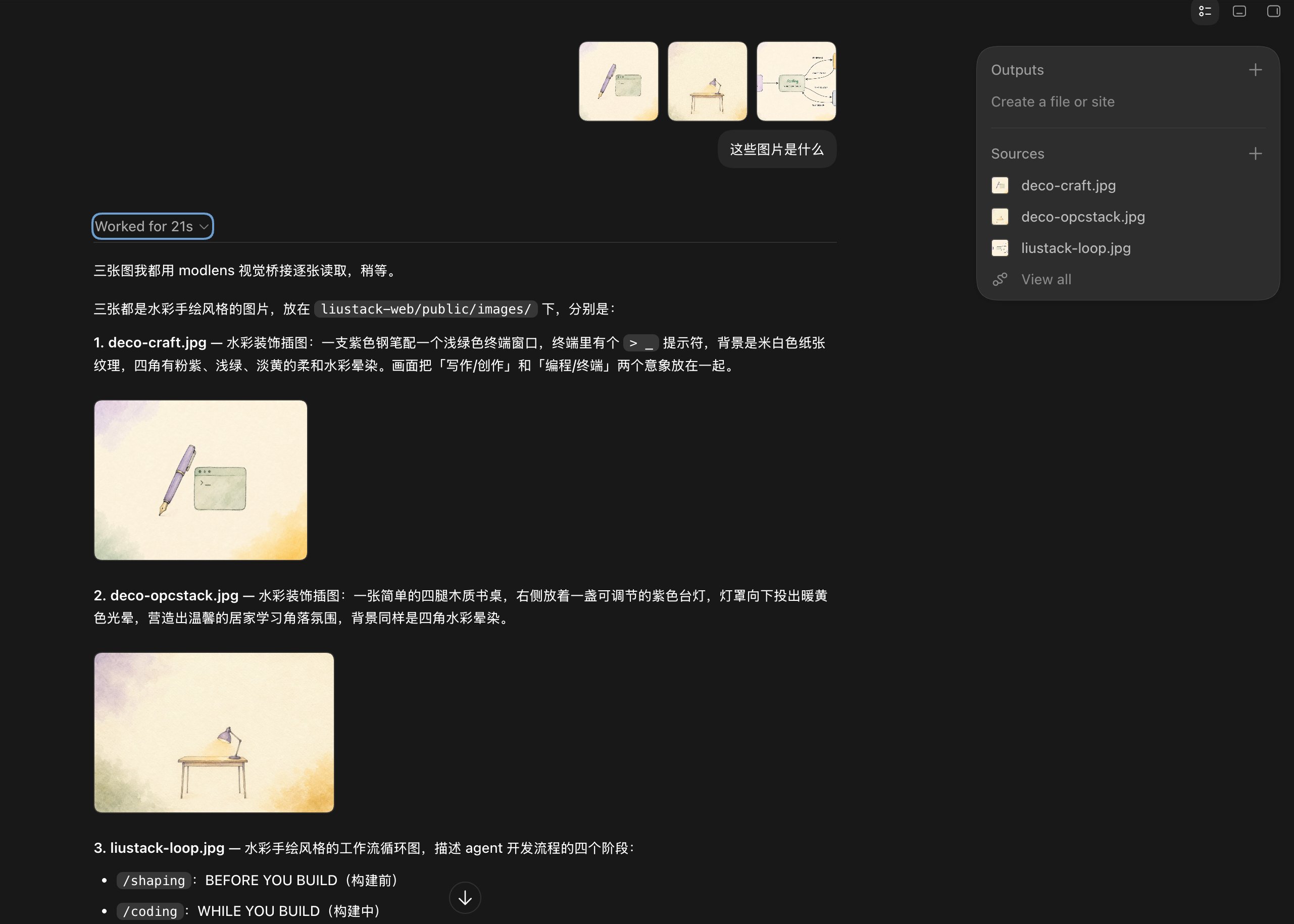
@@ -92,7 +109,7 @@ Batch mode works too: drop three illustrations at once, and the model announces
|
|
|
92
109
|
|
|
93
110
|
|
|
94
111
|
|
|
95
|
-
Stress test: a scatter plot of 128 models. ModLens pulls out the axes, the log scale, and the highlighted DeepSeek V4 Flash point at $0.028 and score 50, then walks through the cost-performance cutoff line. Dense charts are where vision models usually fold
|
|
112
|
+
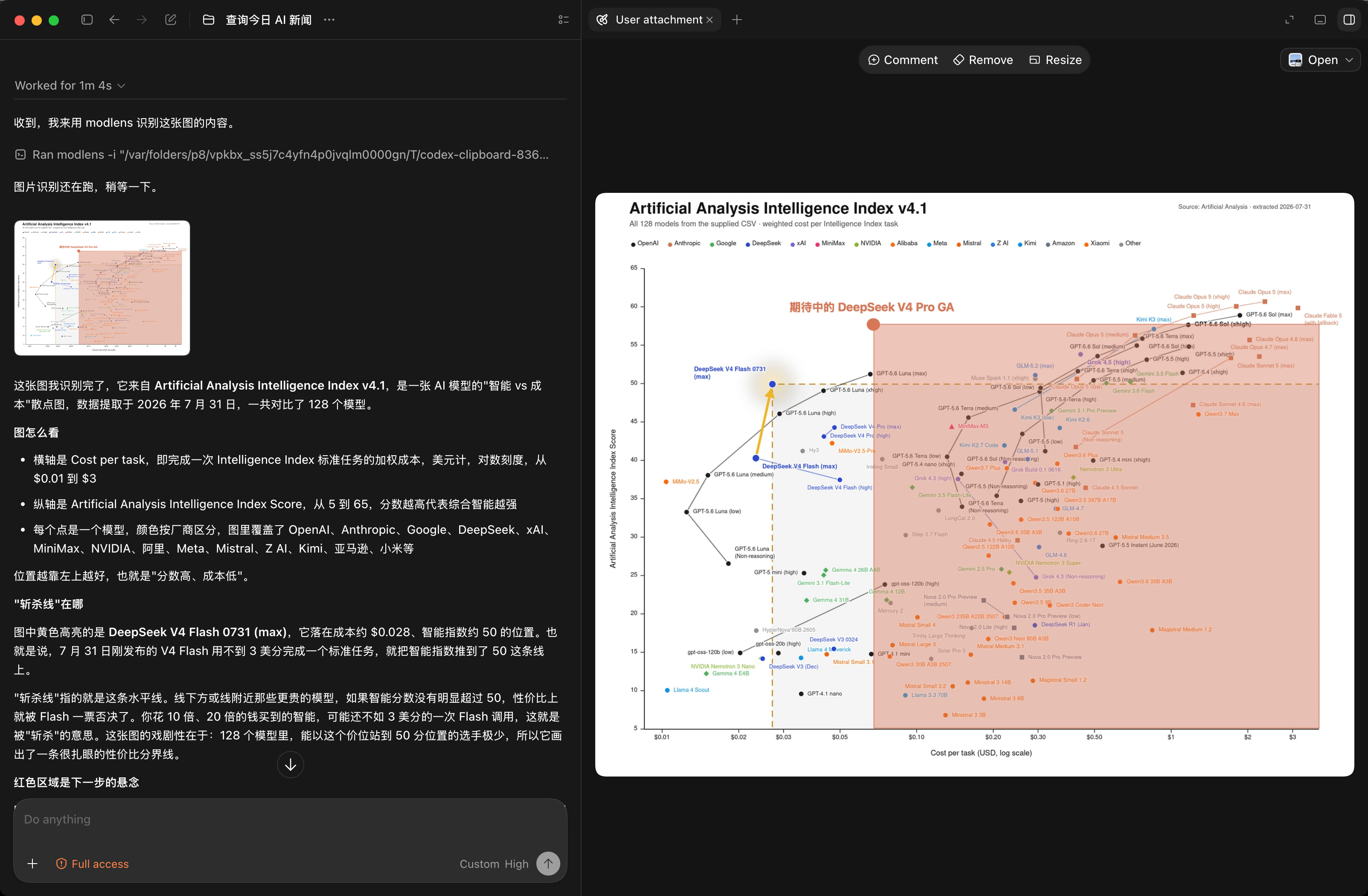
Stress test: a scatter plot of 128 models. ModLens pulls out the axes, the log scale, and the highlighted DeepSeek V4 Flash point at $0.028 and score 50, then walks through the cost-performance cutoff line. Dense charts are where vision models usually fold. This one holds.
|
|
96
113
|
|
|
97
114
|
|
|
98
115
|
|
|
@@ -130,12 +147,14 @@ ModLens ships five vision providers. `antigravity-cli` stays the default: zero k
|
|
|
130
147
|
|
|
131
148
|
| Provider | Needs | Typical speed | Notes |
|
|
132
149
|
| :-- | :-- | :-- | :-- |
|
|
133
|
-
| `antigravity-cli` (default) | `agy` signed in | 15-40s | free quota, full agent loop |
|
|
134
|
-
| `gemini-api` | free AI Studio key | 5-10s | fastest free route, schema enforced server-side |
|
|
150
|
+
| `antigravity-cli` (default) | `agy` signed in | 15-40s | free quota, full agent loop, quota is tight (see below) |
|
|
151
|
+
| `gemini-api` (recommended) | free AI Studio key | 5-10s | fastest free route, schema enforced server-side |
|
|
135
152
|
| `openai` | baseUrl + apiKey + model | endpoint-dependent | any OpenAI-compatible multimodal endpoint (qwen-vl, GLM, ...) |
|
|
136
153
|
| `anthropic` | `ANTHROPIC_API_KEY` | a few seconds | Claude Haiku by default, schema via forced tool call |
|
|
137
154
|
| `claude-cli` | Claude Code signed in | 20-45s | no key, rides your Claude subscription, Read-only permissions |
|
|
138
155
|
|
|
156
|
+
`antigravity-cli` wins on needing no key and loses on both other fronts: it's slower (a full agent loop takes 15-40 seconds against 5-10 for `gemini-api` direct) and its quota is tight. The free tier is now a one-time weekly grant, pooled across the desktop app, the CLI, and the SDK, and parallel subagents drain it faster. Once it's gone you wait out the cycle: we hit that wall ourselves and the message read "94 hours until reset." Great for a first look, but `gemini-api` is what holds up day to day.
|
|
157
|
+
|
|
139
158
|
Config lives in `~/.modlens/config.json`. Environment variables override the file (`GEMINI_API_KEY`, `OPENAI_API_KEY`, `OPENAI_BASE_URL`, `ANTHROPIC_API_KEY`), and CLI flags override everything.
|
|
140
159
|
|
|
141
160
|
```bash
|
|
@@ -145,7 +164,9 @@ modlens config show # keys come out masked
|
|
|
145
164
|
modlens config set provider gemini-api # switch the default provider
|
|
146
165
|
```
|
|
147
166
|
|
|
148
|
-
The free Gemini key takes three minutes at [aistudio.google.com](https://aistudio.google.com), no credit card.
|
|
167
|
+
The free Gemini key takes three minutes at [aistudio.google.com](https://aistudio.google.com), no credit card.
|
|
168
|
+
|
|
169
|
+
You don't actually have to remember any of these commands. The skill ships a per-provider setup guide, so once it's installed you can just ask your agent: "how do I configure modlens," "set my Gemini key in modlens," "switch modlens to claude-cli." It reads the guide and runs them.
|
|
149
170
|
|
|
150
171
|
## Using it in Codex (DeepSeek and friends)
|
|
151
172
|
|
|
@@ -160,7 +181,15 @@ One catch: once text-only is declared, the Codex TUI **blocks Ctrl+V image paste
|
|
|
160
181
|
|
|
161
182
|
No setup needed: drag the image file into the terminal, or type its path, and the skill takes over.
|
|
162
183
|
|
|
163
|
-
Paste is trickier. If you run a text-only model behind `ANTHROPIC_BASE_URL`, Claude Code never writes pasted images to a regular temp file and has no modality switch
|
|
184
|
+
Paste is trickier. If you run a text-only model behind `ANTHROPIC_BASE_URL`, Claude Code never writes pasted images to a regular temp file and has no modality switch. A pasted image reaches the model as a pathless `[Unsupported Image]` placeholder (lenient gateways like DeepSeek's Anthropic endpoint) or breaks the request outright ([#62009](https://github.com/anthropics/claude-code/issues/62009)). But the bytes are not gone: Claude Code appends every user message, images included, to the local session transcript before the gateway ever sees it, and that is what `modlens recover-paste` exploits: it pulls the images back out and prints real file paths, ready for `modlens -i`. The skill runs this automatically the moment it spots the placeholder.
|
|
185
|
+
|
|
186
|
+
Transcripts are per-session files, so skills can pass the exact one via `--session` (Claude Code substitutes `${CLAUDE_SESSION_ID}` into skill text since v2.1.9). Without it, recovery picks the transcript holding the newest pasted image by message timestamp, so concurrent sessions in the same project do not confuse it either way.
|
|
187
|
+
|
|
188
|
+
[Pi](https://github.com/earendil-works/pi) stores sessions the same way (`~/.pi/agent/sessions/`, images as base64 in JSONL). [OpenCode](https://github.com/sst/opencode) keeps them in SQLite instead (`~/.local/share/opencode/opencode.db`, images as data URLs, reading it needs Node 22.5+ for node:sqlite).
|
|
189
|
+
|
|
190
|
+
`recover-paste` first identifies the harness it is running inside, by walking the process ancestry and checking env fingerprints (`CLAUDECODE`, `PI_CODING_AGENT`, `CODEX_THREAD_ID`), and reads only that harness's storage, so one tool's stale sessions can never hijack another tool's paste. In Claude Code it targets the exact session from the injected session id. In Codex it refuses outright and points back to the path tag. Only when detection comes up empty does it fall back to racing all three stores by newest image timestamp.
|
|
191
|
+
|
|
192
|
+
Verified live in all four harnesses: Claude Code recovers the paste via its injected session id, OpenCode runs the whole loop on DeepSeek with the skill firing on its own, Pi stays scoped to its own store, and Codex is refused with the path-tag guidance. One honest caveat: transcript layouts are internal implementation details of those tools with no compatibility promise. If recovery ever breaks, dragging the file still works everywhere.
|
|
164
193
|
|
|
165
194
|
Pointing OpenCode at DeepSeek takes two lines of setup: `opencode auth login`, pick DeepSeek and paste your key (it lands in `~/.local/share/opencode/auth.json`), then set the default model in `~/.config/opencode/opencode.jsonc` to `deepseek/deepseek-v4-flash`. Pi reads its key from `~/.pi/agent/auth.json`.
|
|
166
195
|
|
package/README.zh-CN.md
CHANGED
|
@@ -11,28 +11,29 @@
|
|
|
11
11
|
|
|
12
12
|
DeepSeek-V4-Flash 碗大又好吃,速度快,性能强,要说唯一的缺点就是没有多模态。不仅 DeepSeek-V4-Flash,只要是纯文本语言模型,跑在 Codex、Claude Code、Pi Agent、OpenClaw 中,都有这个问题。
|
|
13
13
|
|
|
14
|
-
ModLens
|
|
14
|
+
ModLens 用最轻的方式解决它:不动你的配置,不装本地代理,就是一个视觉外挂,CLI 和 skill 两种用法。它产出的不是一句话描述,是结构化的视觉证据:文字、版面、区块、实体、关系、视觉线索。视觉引擎有五个可选,默认那个零 key 就能跑,最快的那个用免费 Gemini key,识图能力连 Fable 5 都吊打。原理如下:
|
|
15
15
|
|
|
16
16
|
```text
|
|
17
17
|
Agent Harness 中的纯文本模型 ──▶ modlens skill(遇到图片自动触发)
|
|
18
18
|
│
|
|
19
19
|
▼
|
|
20
|
-
|
|
20
|
+
视觉引擎 · Gemini 3.6 Flash(免费)
|
|
21
21
|
│
|
|
22
22
|
▼
|
|
23
23
|
结构化 JSON 证据 ──▶ 模型带着视力回答
|
|
24
24
|
```
|
|
25
25
|
|
|
26
|
-
##
|
|
26
|
+
## 你可以直接粘贴图片
|
|
27
27
|
|
|
28
|
-
|
|
28
|
+
别的方案让你先把图存成文件,再在对话里报一句路径。ModLens 让你直接粘贴。
|
|
29
29
|
|
|
30
|
-
|
|
31
|
-
|
|
32
|
-
|
|
33
|
-
```
|
|
30
|
+
这不怪它们偷懒。粘贴这个动作从头到尾是客户端办的,图一进对话框就被转码发走,识图 MCP server 连插手的机会都没有,所以它们的文档只能教你存文件、报路径。ModLens 走的是另一条路:图片字节在发走之前,早被 harness 原样写进了本地会话存储,skill 直接去那里把它捞回来落成文件,再喂给视觉引擎。你什么都不用做,模型拿到的是完整图片,不是一句「麻烦告诉我路径」。
|
|
31
|
+
|
|
32
|
+
四家 harness 真机验证过:Claude Code 按注入的会话 ID 精确定位,Pi 的存储路数和它同构,OpenCode 换成了 SQLite,Codex 的粘贴图本来就带临时路径,走路径标签就行。动手之前 `recover-paste` 会先认清自己跑在哪一家(查进程祖先链,核对环境变量指纹),只读那一家的存储,别家的旧会话冒充不了。
|
|
34
33
|
|
|
35
|
-
|
|
34
|
+
## 快速开始
|
|
35
|
+
|
|
36
|
+
**1. 装 skill。** 直接告诉你的 agent(Claude Code、Codex、OpenClaw、Cursor 等):
|
|
36
37
|
|
|
37
38
|
```text
|
|
38
39
|
安装这个 skill https://github.com/liustack/modlens
|
|
@@ -46,7 +47,23 @@ npx -y skills add liustack/modlens
|
|
|
46
47
|
|
|
47
48
|
各家 harness 找 skill 的位置不一样:Claude Code 读 `~/.claude/skills/`,Codex 读 `~/.codex/skills/`,Pi 和 OpenCode 读 `~/.agents/skills/`。软链接在哪家都好使,把 skill 目录链一次,各家永远用最新版。
|
|
48
49
|
|
|
49
|
-
**
|
|
50
|
+
**2. 接一个视觉引擎。** 推荐去 [aistudio.google.com](https://aistudio.google.com) 领个免费 Gemini key,三分钟,不要信用卡,出图 5-10 秒:
|
|
51
|
+
|
|
52
|
+
```bash
|
|
53
|
+
modlens config set gemini-api.apiKey <key>
|
|
54
|
+
modlens config set provider gemini-api
|
|
55
|
+
```
|
|
56
|
+
|
|
57
|
+
懒得敲这两行?跟 agent 说一句「帮我把 Gemini key 配进 modlens」,它自己会跑。
|
|
58
|
+
|
|
59
|
+
不想注册也行,装上 Antigravity CLI 就能零 key 开跑,代价是慢(15-40 秒),免费额度也紧:
|
|
60
|
+
|
|
61
|
+
```bash
|
|
62
|
+
curl -fsSL https://antigravity.google/cli/install.sh | bash
|
|
63
|
+
agy # 浏览器完成登录后退出
|
|
64
|
+
```
|
|
65
|
+
|
|
66
|
+
**3. 用起来。** 粘贴一张图,或者甩个图片路径,随便问。skill 自己会触发。
|
|
50
67
|
|
|
51
68
|
## 看看效果
|
|
52
69
|
|
|
@@ -130,12 +147,14 @@ ModLens 内置五个视觉 provider,默认还是 `antigravity-cli`:零 key
|
|
|
130
147
|
|
|
131
148
|
| Provider | 需要什么 | 速度 | 说明 |
|
|
132
149
|
| :-- | :-- | :-- | :-- |
|
|
133
|
-
| `antigravity-cli`(默认) | `agy` 登录过 | 15-40 秒 | 免费额度,完整 agent
|
|
134
|
-
| `gemini-api
|
|
150
|
+
| `antigravity-cli`(默认) | `agy` 登录过 | 15-40 秒 | 免费额度,完整 agent 循环,额度紧(见下文) |
|
|
151
|
+
| `gemini-api`(推荐) | 免费 AI Studio key | 5-10 秒 | 最快的免费路线,服务端强制 schema |
|
|
135
152
|
| `openai` | baseUrl + apiKey + model | 看端点 | 任何 OpenAI 兼容的多模态端点(qwen-vl、GLM 等) |
|
|
136
153
|
| `anthropic` | `ANTHROPIC_API_KEY` | 几秒 | 默认 Claude Haiku,强制工具调用保 schema |
|
|
137
154
|
| `claude-cli` | Claude Code 已登录 | 20-45 秒 | 零 key,吃你的 Claude 订阅额度,只放行 Read 工具 |
|
|
138
155
|
|
|
156
|
+
`antigravity-cli` 胜在零 key,输在两头:慢(完整 agent 循环 15-40 秒,`gemini-api` 直连 5-10 秒),额度紧。它的免费档如今是一次性发放的周配额,桌面应用、CLI、SDK 共用一个池子,subagent 并行还加倍消耗,用超了得等下个周期(我们实测撞过一次,提示「94 小时后重置」)。所以它适合尝鲜,日常主力还是 `gemini-api` 稳。
|
|
157
|
+
|
|
139
158
|
配置放在 `~/.modlens/config.json`,环境变量能盖过它(`GEMINI_API_KEY`、`OPENAI_API_KEY`、`OPENAI_BASE_URL`、`ANTHROPIC_API_KEY`),CLI 参数最大。
|
|
140
159
|
|
|
141
160
|
```bash
|
|
@@ -145,11 +164,13 @@ modlens config show # key 打码显示
|
|
|
145
164
|
modlens config set provider gemini-api # 换默认 provider
|
|
146
165
|
```
|
|
147
166
|
|
|
148
|
-
免费 Gemini key 去 [aistudio.google.com](https://aistudio.google.com)
|
|
167
|
+
免费 Gemini key 去 [aistudio.google.com](https://aistudio.google.com) 领,三分钟,不要信用卡。
|
|
168
|
+
|
|
169
|
+
这些命令你其实一条都不用记。skill 自带一份分 provider 的配置手册,装完之后直接问你的 agent:「modlens 怎么配置」「帮我把 Gemini key 配进 modlens」「把默认 provider 切成 claude-cli」,它照着手册自己跑完。
|
|
149
170
|
|
|
150
171
|
## 在 Codex 里用(DeepSeek 等纯文本模型)
|
|
151
172
|
|
|
152
|
-
Codex 只认 Responses API,DeepSeek 官方端点原生支持。先照着[官方集成文档](https://api-docs.deepseek.com/zh-cn/quick_start/agent_integrations/codex)配好:它的 `models.json` 把 deepseek-v4-flash 声明成纯文本(`input_modalities: ["text"]
|
|
173
|
+
Codex 只认 Responses API,DeepSeek 官方端点原生支持。先照着[官方集成文档](https://api-docs.deepseek.com/zh-cn/quick_start/agent_integrations/codex)配好:它的 `models.json` 把 deepseek-v4-flash 声明成纯文本(`input_modalities: ["text"]`),这一行就是解锁下面整条链路的钥匙。
|
|
153
174
|
|
|
154
175
|
有个坑要注意:声明纯文本之后,Codex TUI 会**直接拦下 Ctrl+V 粘贴图片**(报错 `Model deepseek-v4-flash does not support image inputs`),闸门卡在输入框那一层,图片压根到不了消息里。能用的招数有两个,都拿 deepseek-v4-flash 端到端验证过:
|
|
155
176
|
|
|
@@ -160,7 +181,15 @@ Codex 只认 Responses API,DeepSeek 官方端点原生支持。先照着[官
|
|
|
160
181
|
|
|
161
182
|
不用任何配置:把图片文件拖进终端,或手打路径,skill 直接接手。
|
|
162
183
|
|
|
163
|
-
粘贴要多说两句。走 `ANTHROPIC_BASE_URL` 网关跑纯文本模型时,Claude Code 粘贴的图片从不写普通临时文件,也没有声明模型无视觉的开关,粘贴的图要么变成一个不带路径的 `[Unsupported Image]` 占位符到达模型(DeepSeek 的 Anthropic 兼容端点这类宽容网关),要么直接把请求搞挂([#62009](https://github.com/anthropics/claude-code/issues/62009))。但图片字节没有蒸发:Claude Code
|
|
184
|
+
粘贴要多说两句。走 `ANTHROPIC_BASE_URL` 网关跑纯文本模型时,Claude Code 粘贴的图片从不写普通临时文件,也没有声明模型无视觉的开关,粘贴的图要么变成一个不带路径的 `[Unsupported Image]` 占位符到达模型(DeepSeek 的 Anthropic 兼容端点这类宽容网关),要么直接把请求搞挂([#62009](https://github.com/anthropics/claude-code/issues/62009))。但图片字节没有蒸发:Claude Code 在网关看到消息之前,就把每条用户消息(含图片)原样写进了本地会话记录,`modlens recover-paste` 干的就是把它们捞回来、落成真实文件路径,直接喂给 `modlens -i`。skill 看到占位符会自动跑这一步。
|
|
185
|
+
|
|
186
|
+
会话记录本来就是一个会话一个文件,skill 可以通过 `--session` 传入精确会话(Claude Code 从 v2.1.9 起会把 `${CLAUDE_SESSION_ID}` 替换进 skill 文本)。不传时按消息时间戳挑「持有最新粘贴图」的那份,两条路都不怕同项目并发多开。
|
|
187
|
+
|
|
188
|
+
[Pi](https://github.com/earendil-works/pi) 的会话存储和它同构(`~/.pi/agent/sessions/`,图片以 base64 存 JSONL)。[OpenCode](https://github.com/sst/opencode) 换了个存法,图片以 data URL 塞进 SQLite(`~/.local/share/opencode/opencode.db`,读它需要 Node 22.5+ 的 node:sqlite)。
|
|
189
|
+
|
|
190
|
+
`recover-paste` 会先搞清楚自己正跑在哪家宿主里(沿进程祖先链往上找,再核对 `CLAUDECODE`、`PI_CODING_AGENT`、`CODEX_THREAD_ID` 这些环境变量指纹),然后只读那一家的存储,别家的陈年会话再也没机会冒充。在 Claude Code 里还会直接用注入的会话 ID 精确定位,在 Codex 里则干脆拒绝执行并把你指回 path tag。实在识别不出来才退回按最新图片时间戳在三家赛跑。
|
|
191
|
+
|
|
192
|
+
四家宿主全部活体验证过:Claude Code 靠注入的会话 ID 精确捞回粘贴,OpenCode 上 DeepSeek 全程自动触发 skill 跑完整条链路,Pi 只认自家存储不受别家污染,Codex 被拒之门外并指回 path tag。一句老实话:会话记录格式是这些工具的内部实现,没有兼容承诺,哪天捞不动了,拖文件永远是保底。
|
|
164
193
|
|
|
165
194
|
OpenCode 接 DeepSeek 只要两步:`opencode auth login` 选 DeepSeek 贴上 key(落在 `~/.local/share/opencode/auth.json`),再把 `~/.config/opencode/opencode.jsonc` 的默认模型设成 `deepseek/deepseek-v4-flash`。Pi 的 key 放 `~/.pi/agent/auth.json`。
|
|
166
195
|
|
package/dist/main.js
CHANGED
|
@@ -36,8 +36,18 @@ function loadConfigFile(configPath = CONFIG_PATH) {
|
|
|
36
36
|
function defaultProviderName(config2) {
|
|
37
37
|
return config2.provider?.trim() || "antigravity-cli";
|
|
38
38
|
}
|
|
39
|
+
const PROVIDER_ALIASES = {
|
|
40
|
+
antigravity: "antigravity-cli",
|
|
41
|
+
agy: "antigravity-cli",
|
|
42
|
+
gemini: "gemini-api",
|
|
43
|
+
claude: "claude-cli"
|
|
44
|
+
};
|
|
39
45
|
function resolveProviderSettings(providerName, config2, env = process.env) {
|
|
40
|
-
const
|
|
46
|
+
const aliasNames = Object.entries(PROVIDER_ALIASES).filter(([, canonical]) => canonical === providerName).map(([alias]) => alias);
|
|
47
|
+
const fromFile = {
|
|
48
|
+
...Object.assign({}, ...aliasNames.map((alias) => config2.providers?.[alias] ?? {})),
|
|
49
|
+
...config2.providers?.[providerName] ?? {}
|
|
50
|
+
};
|
|
41
51
|
const bindings = ENV_BINDINGS[providerName] ?? {};
|
|
42
52
|
const settings = { ...fromFile };
|
|
43
53
|
for (const [field, envName] of Object.entries(bindings)) {
|
|
@@ -314,11 +324,74 @@ function tryParseJson$1(text) {
|
|
|
314
324
|
return null;
|
|
315
325
|
}
|
|
316
326
|
}
|
|
327
|
+
const SWITCH_HINT = `Or switch to a provider with its own quota and no interactive login:
|
|
328
|
+
modlens config set gemini-api.apiKey <key> # free key, no card: https://aistudio.google.com
|
|
329
|
+
modlens config set provider gemini-api`;
|
|
330
|
+
function describeAntigravityFailure(context) {
|
|
331
|
+
const since = context.startedAt ?? Date.now() - LOG_FRESHNESS_MS;
|
|
332
|
+
let envelope = null;
|
|
333
|
+
try {
|
|
334
|
+
envelope = parseEnvelope$1(context.stdout);
|
|
335
|
+
} catch {
|
|
336
|
+
envelope = null;
|
|
337
|
+
}
|
|
338
|
+
if (!envelope) {
|
|
339
|
+
return null;
|
|
340
|
+
}
|
|
341
|
+
const agyError = typeof envelope?.error === "string" ? envelope.error.trim() : "";
|
|
342
|
+
const evidence = `${agyError}
|
|
343
|
+
${context.stderr}
|
|
344
|
+
${readRecentAgyLog(since)}`.toLowerCase();
|
|
345
|
+
if (evidence.includes("quota")) {
|
|
346
|
+
return [
|
|
347
|
+
agyError || "Antigravity CLI reported a quota error.",
|
|
348
|
+
"agy's free tier is one weekly bucket shared by the desktop app, the CLI, and the SDK, and subagents drain it in parallel. Wait for the reset shown above, or use a different provider.",
|
|
349
|
+
SWITCH_HINT
|
|
350
|
+
].join("\n\n");
|
|
351
|
+
}
|
|
352
|
+
if (evidence.includes("not logged into antigravity") || evidence.includes("getting token source") || evidence.includes("keyring") || evidence.includes("failed to read token store")) {
|
|
353
|
+
return [
|
|
354
|
+
"Antigravity CLI cannot read its stored login token.",
|
|
355
|
+
"On Linux this usually means the OS keyring is locked, which is normal for headless sessions (agents, cron, systemd, SSH without a desktop login). agy then reports it as being signed out and tries a browser sign-in that cannot complete without a display. Unlock the keyring, or run modlens from a desktop session, or sign in again with `agy`.",
|
|
356
|
+
SWITCH_HINT
|
|
357
|
+
].join("\n\n");
|
|
358
|
+
}
|
|
359
|
+
const totalTokens = envelope?.usage?.total_tokens;
|
|
360
|
+
if (agyError || totalTokens === 0) {
|
|
361
|
+
return [
|
|
362
|
+
agyError || "Antigravity CLI exited before doing any work (no tokens consumed).",
|
|
363
|
+
`Usually auth or quota. Check \`agy\` interactively, and look at the newest log in ${agyLogDir()} for the real reason.`,
|
|
364
|
+
SWITCH_HINT
|
|
365
|
+
].join("\n\n");
|
|
366
|
+
}
|
|
367
|
+
return null;
|
|
368
|
+
}
|
|
369
|
+
function agyLogDir() {
|
|
370
|
+
return path.join(os.homedir(), ".gemini", "antigravity-cli", "log");
|
|
371
|
+
}
|
|
372
|
+
const LOG_FRESHNESS_MS = 2 * 60 * 1e3;
|
|
373
|
+
function readRecentAgyLog(since) {
|
|
374
|
+
try {
|
|
375
|
+
const dir = agyLogDir();
|
|
376
|
+
const newest = fs.readdirSync(dir).filter((name) => name.endsWith(".log")).map((name) => {
|
|
377
|
+
const full = path.join(dir, name);
|
|
378
|
+
return { full, mtime: fs.statSync(full).mtimeMs };
|
|
379
|
+
}).sort((a, b) => b.mtime - a.mtime)[0];
|
|
380
|
+
if (!newest || newest.mtime < since) {
|
|
381
|
+
return "";
|
|
382
|
+
}
|
|
383
|
+
return fs.readFileSync(newest.full, "utf-8").slice(-8e3);
|
|
384
|
+
} catch {
|
|
385
|
+
return "";
|
|
386
|
+
}
|
|
387
|
+
}
|
|
317
388
|
const antigravityCliProvider = {
|
|
318
389
|
name: "antigravity-cli",
|
|
319
390
|
defaultModel: DEFAULT_MODEL,
|
|
320
391
|
buildInvocation: buildAntigravityInvocation,
|
|
321
|
-
parseOutput: parseAntigravityOutput
|
|
392
|
+
parseOutput: parseAntigravityOutput,
|
|
393
|
+
describeFailure: describeAntigravityFailure,
|
|
394
|
+
hasInternalTimeout: true
|
|
322
395
|
};
|
|
323
396
|
const MIME_BY_EXT = {
|
|
324
397
|
".jpg": "image/jpeg",
|
|
@@ -671,9 +744,12 @@ Respond with ONE JSON object only, no markdown fences, no commentary. Fill this
|
|
|
671
744
|
throw new Error(`OpenAI-compatible API returned non-JSON output: ${truncate(text)}`);
|
|
672
745
|
}
|
|
673
746
|
const shaped = result;
|
|
674
|
-
|
|
747
|
+
const missing = ["summary", "ocr", "layout", "semantics", "visual", "uncertainty"].filter(
|
|
748
|
+
(field) => shaped[field] === void 0 || shaped[field] === null
|
|
749
|
+
);
|
|
750
|
+
if (missing.length > 0 || typeof shaped.summary !== "string" || typeof shaped.ocr !== "object" || !Array.isArray(shaped.uncertainty)) {
|
|
675
751
|
throw new Error(
|
|
676
|
-
`OpenAI-compatible API returned JSON that does not match the vision schema (missing
|
|
752
|
+
`OpenAI-compatible API returned JSON that does not match the vision schema${missing.length > 0 ? ` (missing: ${missing.join(", ")})` : ""}. Retry, or switch to gemini-api / anthropic for enforced schemas. Got: ${truncate(text)}`
|
|
677
753
|
);
|
|
678
754
|
}
|
|
679
755
|
return {
|
|
@@ -750,10 +826,12 @@ async function analyzeImage(options) {
|
|
|
750
826
|
parsed = await provider.execute(providerOptions);
|
|
751
827
|
} else if (provider.buildInvocation && provider.parseOutput) {
|
|
752
828
|
const invocation = provider.buildInvocation(providerOptions);
|
|
829
|
+
const backstop = provider.hasInternalTimeout ? timeoutMs + KILL_GRACE_MS : timeoutMs;
|
|
753
830
|
const commandResult = await runCommand(
|
|
754
831
|
provider.name,
|
|
755
832
|
invocation,
|
|
756
|
-
|
|
833
|
+
backstop,
|
|
834
|
+
provider.describeFailure
|
|
757
835
|
);
|
|
758
836
|
parsed = provider.parseOutput(commandResult.stdout);
|
|
759
837
|
} else {
|
|
@@ -798,12 +876,15 @@ function validateInputFile(filePath) {
|
|
|
798
876
|
throw new Error(`Input is not a file: ${filePath}`);
|
|
799
877
|
}
|
|
800
878
|
}
|
|
801
|
-
function runCommand(providerName, invocation, timeoutMs) {
|
|
879
|
+
function runCommand(providerName, invocation, timeoutMs, describeFailure) {
|
|
880
|
+
const runStartedAt = Date.now();
|
|
802
881
|
return new Promise((resolve, reject) => {
|
|
803
882
|
const child = spawn(invocation.command, invocation.args, {
|
|
804
883
|
cwd: invocation.cwd,
|
|
805
884
|
stdio: ["ignore", "pipe", "pipe"]
|
|
806
885
|
});
|
|
886
|
+
const outDecoder = new TextDecoder("utf-8");
|
|
887
|
+
const errDecoder = new TextDecoder("utf-8");
|
|
807
888
|
let stdout = "";
|
|
808
889
|
let stderr = "";
|
|
809
890
|
let timedOut = false;
|
|
@@ -828,9 +909,10 @@ function runCommand(providerName, invocation, timeoutMs) {
|
|
|
828
909
|
return;
|
|
829
910
|
}
|
|
830
911
|
if (code !== 0) {
|
|
912
|
+
const explained = describeFailure?.({ stdout, stderr, code, startedAt: runStartedAt }) ?? null;
|
|
831
913
|
reject(
|
|
832
914
|
new Error(
|
|
833
|
-
`${providerName} provider failed with code ${code}.${stderr ? ` stderr: ${stderr.trim()}` : ""}`
|
|
915
|
+
explained ?? `${providerName} provider failed with code ${code}.${stderr ? ` stderr: ${stderr.trim()}` : ""}`
|
|
834
916
|
)
|
|
835
917
|
);
|
|
836
918
|
return;
|
|
@@ -847,11 +929,11 @@ function runCommand(providerName, invocation, timeoutMs) {
|
|
|
847
929
|
drainTimer = setTimeout(() => settle(exitCode), DRAIN_GRACE_MS);
|
|
848
930
|
};
|
|
849
931
|
child.stdout.on("data", (chunk) => {
|
|
850
|
-
stdout +=
|
|
932
|
+
stdout += outDecoder.decode(chunk, { stream: true });
|
|
851
933
|
restartDrain();
|
|
852
934
|
});
|
|
853
935
|
child.stderr.on("data", (chunk) => {
|
|
854
|
-
stderr +=
|
|
936
|
+
stderr += errDecoder.decode(chunk, { stream: true });
|
|
855
937
|
restartDrain();
|
|
856
938
|
});
|
|
857
939
|
child.on("error", (error) => {
|
|
@@ -862,9 +944,10 @@ function runCommand(providerName, invocation, timeoutMs) {
|
|
|
862
944
|
clearTimeout(timer);
|
|
863
945
|
clearTimeout(drainTimer);
|
|
864
946
|
if (error.code === "ENOENT") {
|
|
947
|
+
const missingCwd = !fs.existsSync(invocation.cwd);
|
|
865
948
|
reject(
|
|
866
949
|
new Error(
|
|
867
|
-
`Provider CLI not found: ${invocation.command}. Install
|
|
950
|
+
missingCwd ? `Working directory does not exist: ${invocation.cwd}` : `Provider CLI not found: ${invocation.command}. Install it and sign in first.`
|
|
868
951
|
)
|
|
869
952
|
);
|
|
870
953
|
return;
|
|
@@ -879,12 +962,39 @@ function runCommand(providerName, invocation, timeoutMs) {
|
|
|
879
962
|
child.on("close", (code) => settle(code));
|
|
880
963
|
});
|
|
881
964
|
}
|
|
965
|
+
function extensionFromMediaType(mediaType) {
|
|
966
|
+
const subtype = mediaType.split("/")[1]?.split("+")[0]?.replace(/[^a-z0-9]/gi, "");
|
|
967
|
+
return subtype ? subtype.toLowerCase() : "bin";
|
|
968
|
+
}
|
|
882
969
|
const EXT_BY_MIME = {
|
|
883
970
|
"image/png": "png",
|
|
884
971
|
"image/jpeg": "jpg",
|
|
885
972
|
"image/webp": "webp",
|
|
886
973
|
"image/gif": "gif"
|
|
887
974
|
};
|
|
975
|
+
function transcriptBelongsTo(filePath, cwd) {
|
|
976
|
+
const wanted = path.resolve(cwd);
|
|
977
|
+
let raw;
|
|
978
|
+
try {
|
|
979
|
+
raw = fs.readFileSync(filePath, "utf-8");
|
|
980
|
+
} catch {
|
|
981
|
+
return false;
|
|
982
|
+
}
|
|
983
|
+
for (const line of raw.split("\n")) {
|
|
984
|
+
if (!line.includes('"cwd"')) {
|
|
985
|
+
continue;
|
|
986
|
+
}
|
|
987
|
+
try {
|
|
988
|
+
const recorded = JSON.parse(line).cwd;
|
|
989
|
+
if (typeof recorded === "string") {
|
|
990
|
+
const resolved = path.resolve(recorded);
|
|
991
|
+
return resolved === wanted || resolved.startsWith(`${wanted}${path.sep}`);
|
|
992
|
+
}
|
|
993
|
+
} catch {
|
|
994
|
+
}
|
|
995
|
+
}
|
|
996
|
+
return true;
|
|
997
|
+
}
|
|
888
998
|
function forEachJsonLine(filePath, visit) {
|
|
889
999
|
let raw;
|
|
890
1000
|
try {
|
|
@@ -944,6 +1054,9 @@ function jsonlAdapter(options) {
|
|
|
944
1054
|
findNewest: (cwd) => {
|
|
945
1055
|
let best = null;
|
|
946
1056
|
for (const file of listJsonl(dirFor(cwd))) {
|
|
1057
|
+
if (!transcriptBelongsTo(file, cwd)) {
|
|
1058
|
+
continue;
|
|
1059
|
+
}
|
|
947
1060
|
const timestamp = newestJsonlTimestamp(file, extractLine);
|
|
948
1061
|
if (timestamp !== null && (!best || timestamp > best.timestamp)) {
|
|
949
1062
|
best = { ref: jsonlSource(name, file, extractLine), timestamp };
|
|
@@ -953,7 +1066,7 @@ function jsonlAdapter(options) {
|
|
|
953
1066
|
},
|
|
954
1067
|
findSession: (cwd, sessionId) => {
|
|
955
1068
|
for (const file of listJsonl(dirFor(cwd))) {
|
|
956
|
-
if (matchesSession(path.basename(file), sessionId)) {
|
|
1069
|
+
if (matchesSession(path.basename(file), sessionId) && transcriptBelongsTo(file, cwd)) {
|
|
957
1070
|
return jsonlSource(name, file, extractLine);
|
|
958
1071
|
}
|
|
959
1072
|
}
|
|
@@ -1012,6 +1125,9 @@ const piAdapter = jsonlAdapter({
|
|
|
1012
1125
|
function opencodeDbPath() {
|
|
1013
1126
|
return path.join(os.homedir(), ".local", "share", "opencode", "opencode.db");
|
|
1014
1127
|
}
|
|
1128
|
+
function escapeLikePattern(value) {
|
|
1129
|
+
return value.replace(/[\\%_]/g, (char) => `\\${char}`);
|
|
1130
|
+
}
|
|
1015
1131
|
function opencodeQuery(dbPath, cwd, sessionId) {
|
|
1016
1132
|
let DatabaseSync;
|
|
1017
1133
|
try {
|
|
@@ -1025,8 +1141,10 @@ function opencodeQuery(dbPath, cwd, sessionId) {
|
|
|
1025
1141
|
const db = new DatabaseSync(dbPath, { readOnly: true });
|
|
1026
1142
|
try {
|
|
1027
1143
|
const resolved = path.resolve(cwd);
|
|
1028
|
-
const
|
|
1029
|
-
const
|
|
1144
|
+
const directoryFilter = `(session.directory = ? OR session.directory LIKE ? || '/%' ESCAPE '\\' OR ? LIKE session.directory || '/%' ESCAPE '\\')`;
|
|
1145
|
+
const escaped = escapeLikePattern(resolved);
|
|
1146
|
+
const sessionFilter = sessionId ? `AND ${directoryFilter} AND (session.id = ? OR session.slug = ?)` : `AND ${directoryFilter}`;
|
|
1147
|
+
const params = sessionId ? [resolved, escaped, resolved, sessionId, sessionId] : [resolved, escaped, resolved];
|
|
1030
1148
|
const rows = db.prepare(
|
|
1031
1149
|
`SELECT part.data AS data, part.time_created AS time_created, part.session_id AS session_id
|
|
1032
1150
|
FROM part
|
|
@@ -1119,8 +1237,16 @@ function harnessFromPsTable(psOutput, startPid) {
|
|
|
1119
1237
|
if (!proc) {
|
|
1120
1238
|
return null;
|
|
1121
1239
|
}
|
|
1122
|
-
|
|
1123
|
-
|
|
1240
|
+
const tokens = proc.command.trim().split(/\s+/);
|
|
1241
|
+
const candidates = [tokens[0]];
|
|
1242
|
+
if (/^(node|bun|deno)$/.test(path.basename(tokens[0] ?? ""))) {
|
|
1243
|
+
const script = tokens.slice(1).find((token) => !token.startsWith("-"));
|
|
1244
|
+
if (script) {
|
|
1245
|
+
candidates.push(script);
|
|
1246
|
+
}
|
|
1247
|
+
}
|
|
1248
|
+
for (const token of candidates) {
|
|
1249
|
+
const mapped = token ? HARNESS_BY_BASENAME[path.basename(token)] : void 0;
|
|
1124
1250
|
if (mapped) {
|
|
1125
1251
|
return mapped;
|
|
1126
1252
|
}
|
|
@@ -1157,26 +1283,29 @@ function detectHarness() {
|
|
|
1157
1283
|
return null;
|
|
1158
1284
|
}
|
|
1159
1285
|
const ADAPTERS = [claudeAdapter, piAdapter, opencodeAdapter];
|
|
1160
|
-
function sourceForExplicitPath(filePath) {
|
|
1161
|
-
|
|
1286
|
+
function sourceForExplicitPath(filePath, cwd, harness) {
|
|
1287
|
+
const declared = harness && harness !== "none" ? harness : void 0;
|
|
1288
|
+
if (declared === "opencode" || !declared && filePath.endsWith(".db")) {
|
|
1162
1289
|
return {
|
|
1163
1290
|
harness: "opencode",
|
|
1164
1291
|
location: filePath,
|
|
1165
|
-
extract: () => opencodeImagesFromRows(opencodeQuery(filePath,
|
|
1292
|
+
extract: () => opencodeImagesFromRows(opencodeQuery(filePath, cwd))
|
|
1166
1293
|
};
|
|
1167
1294
|
}
|
|
1168
|
-
if (filePath.includes(`${path.sep}.pi${path.sep}`)) {
|
|
1295
|
+
if (declared === "pi" || !declared && filePath.includes(`${path.sep}.pi${path.sep}`)) {
|
|
1169
1296
|
return jsonlSource("pi", filePath, piExtractLine);
|
|
1170
1297
|
}
|
|
1171
1298
|
return jsonlSource("claude-code", filePath, claudeExtractLine);
|
|
1172
1299
|
}
|
|
1173
1300
|
function locateSource(cwd, adapters = ADAPTERS) {
|
|
1174
1301
|
let best = null;
|
|
1302
|
+
const blockers = [];
|
|
1175
1303
|
for (const adapter of adapters) {
|
|
1176
1304
|
let candidate = null;
|
|
1177
1305
|
try {
|
|
1178
1306
|
candidate = adapter.findNewest(cwd);
|
|
1179
|
-
} catch {
|
|
1307
|
+
} catch (error) {
|
|
1308
|
+
blockers.push(`${adapter.name}: ${error instanceof Error ? error.message : String(error)}`);
|
|
1180
1309
|
}
|
|
1181
1310
|
if (candidate && (!best || candidate.timestamp > best.timestamp)) {
|
|
1182
1311
|
best = candidate;
|
|
@@ -1184,25 +1313,31 @@ function locateSource(cwd, adapters = ADAPTERS) {
|
|
|
1184
1313
|
}
|
|
1185
1314
|
if (!best) {
|
|
1186
1315
|
const dirs = adapters.map((a) => a.describe(cwd)).join(" , ");
|
|
1316
|
+
const blocked = blockers.length > 0 ? `
|
|
1317
|
+
Blocked: ${blockers.join(" | ")}` : "";
|
|
1187
1318
|
throw new Error(
|
|
1188
|
-
`No pasted images found in any session storage for this directory (looked in: ${dirs}). The user may not have pasted any, or the storage format changed; ask for a file path instead
|
|
1319
|
+
`No pasted images found in any session storage for this directory (looked in: ${dirs}). The user may not have pasted any, or the storage format changed; ask for a file path instead.${blocked}`
|
|
1189
1320
|
);
|
|
1190
1321
|
}
|
|
1191
1322
|
return best.ref;
|
|
1192
1323
|
}
|
|
1193
1324
|
function sourceForSession(cwd, sessionId, adapters = ADAPTERS) {
|
|
1325
|
+
const blockers = [];
|
|
1194
1326
|
for (const adapter of adapters) {
|
|
1195
1327
|
try {
|
|
1196
1328
|
const ref = adapter.findSession(cwd, sessionId);
|
|
1197
1329
|
if (ref) {
|
|
1198
1330
|
return ref;
|
|
1199
1331
|
}
|
|
1200
|
-
} catch {
|
|
1332
|
+
} catch (error) {
|
|
1333
|
+
blockers.push(`${adapter.name}: ${error instanceof Error ? error.message : String(error)}`);
|
|
1201
1334
|
}
|
|
1202
1335
|
}
|
|
1203
1336
|
const dirs = adapters.map((a) => a.describe(cwd)).join(" , ");
|
|
1337
|
+
const blocked = blockers.length > 0 ? `
|
|
1338
|
+
Blocked: ${blockers.join(" | ")}` : "";
|
|
1204
1339
|
throw new Error(
|
|
1205
|
-
`No session ${sessionId} with pasted images under this project (looked in: ${dirs}). Check --cwd, or drop --session to auto-locate by newest pasted image
|
|
1340
|
+
`No session ${sessionId} with pasted images under this project (looked in: ${dirs}). Check --cwd, or drop --session to auto-locate by newest pasted image.${blocked}`
|
|
1206
1341
|
);
|
|
1207
1342
|
}
|
|
1208
1343
|
function recoverPastedImages(options = {}) {
|
|
@@ -1222,7 +1357,7 @@ function recoverPastedImages(options = {}) {
|
|
|
1222
1357
|
const adapters = scoped ? ADAPTERS.filter((adapter) => adapter.name === scoped) : ADAPTERS;
|
|
1223
1358
|
let source = null;
|
|
1224
1359
|
if (options.transcript) {
|
|
1225
|
-
source = sourceForExplicitPath(options.transcript);
|
|
1360
|
+
source = sourceForExplicitPath(options.transcript, cwd, options.harness);
|
|
1226
1361
|
} else if (options.session) {
|
|
1227
1362
|
source = sourceForSession(cwd, options.session, adapters);
|
|
1228
1363
|
} else {
|
|
@@ -1244,14 +1379,22 @@ function recoverPastedImages(options = {}) {
|
|
|
1244
1379
|
`No pasted images found in ${source.location}. The user may not have pasted any, or the storage format changed; ask for a file path instead.`
|
|
1245
1380
|
);
|
|
1246
1381
|
}
|
|
1247
|
-
fs.mkdirSync(outDir, { recursive: true });
|
|
1382
|
+
fs.mkdirSync(outDir, { recursive: true, mode: 448 });
|
|
1383
|
+
try {
|
|
1384
|
+
fs.chmodSync(outDir, 448);
|
|
1385
|
+
} catch {
|
|
1386
|
+
}
|
|
1248
1387
|
const picked = all.slice(-count);
|
|
1249
1388
|
const images = picked.map((image) => {
|
|
1250
1389
|
const buffer = Buffer.from(image.data, "base64");
|
|
1251
1390
|
const hash = crypto.createHash("sha256").update(buffer).digest("hex").slice(0, 8);
|
|
1252
|
-
const ext = EXT_BY_MIME[image.mediaType] ??
|
|
1391
|
+
const ext = EXT_BY_MIME[image.mediaType] ?? extensionFromMediaType(image.mediaType);
|
|
1253
1392
|
const filePath = path.join(outDir, `paste-${hash}.${ext}`);
|
|
1254
|
-
fs.writeFileSync(filePath, buffer);
|
|
1393
|
+
fs.writeFileSync(filePath, buffer, { mode: 384 });
|
|
1394
|
+
try {
|
|
1395
|
+
fs.chmodSync(filePath, 384);
|
|
1396
|
+
} catch {
|
|
1397
|
+
}
|
|
1255
1398
|
const recovered = {
|
|
1256
1399
|
path: filePath,
|
|
1257
1400
|
mediaType: image.mediaType,
|
|
@@ -1269,7 +1412,7 @@ function recoverPastedImages(options = {}) {
|
|
|
1269
1412
|
return result;
|
|
1270
1413
|
}
|
|
1271
1414
|
const program = new Command();
|
|
1272
|
-
program.name("modlens").description("Plug-in vision for text-only LLMs: image in, structured JSON evidence out").version("2.7.
|
|
1415
|
+
program.name("modlens").description("Plug-in vision for text-only LLMs: image in, structured JSON evidence out").version("2.7.4");
|
|
1273
1416
|
program.command("analyze", { isDefault: true }).description("Analyze an image into structured JSON evidence (default command)").requiredOption("-i, --input <path|url>", "Input image path or https URL").option("-o, --output <path>", "Write result JSON to a file").option("-m, --model <name>", "Provider model name").option("-p, --provider <name>", `Vision provider (${listProviders().join(", ")})`).option("--prompt <text>", "Extra focus for this image").option("--timeout <ms>", "Provider timeout in milliseconds", "180000").option("--provider-bin <path>", "Provider binary path (default: agy)").option("--workdir <path>", "Working directory for the provider").action(async (options) => {
|
|
1274
1417
|
try {
|
|
1275
1418
|
const timeoutMs = Number.parseInt(options.timeout, 10);
|