@liustack/modlens 2.7.11 → 2.8.0
This diff represents the content of publicly available package versions that have been released to one of the supported registries. The information contained in this diff is provided for informational purposes only and reflects changes between package versions as they appear in their respective public registries.
- package/README.md +87 -160
- package/README.zh-CN.md +94 -167
- package/dist/main.js +1 -1
- package/package.json +1 -1
package/README.md
CHANGED
|
@@ -1,223 +1,150 @@
|
|
|
1
|
-
<
|
|
2
|
-
<img src="https://raw.githubusercontent.com/liustack/modlens/main/assets/banner.jpg" width="100%" alt="ModLens
|
|
3
|
-
|
|
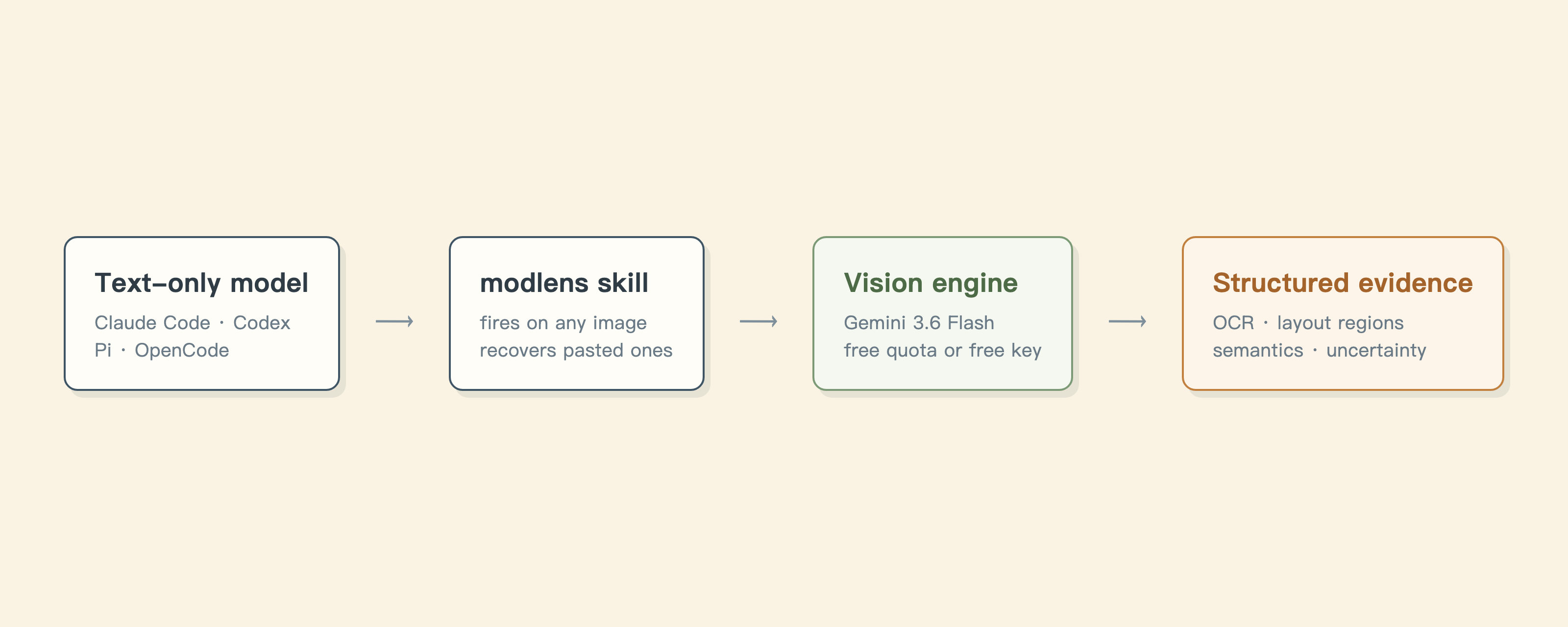
4
|
-
|
|
5
|
-
|
|
6
|
-
|
|
7
|
-
|
|
8
|
-
|
|
9
|
-
|
|
10
|
-
|
|
1
|
+
<p align="center">
|
|
2
|
+
<img src="https://raw.githubusercontent.com/liustack/modlens/main/assets/banner.jpg" width="100%" alt="ModLens" />
|
|
3
|
+
</p>
|
|
4
|
+
|
|
5
|
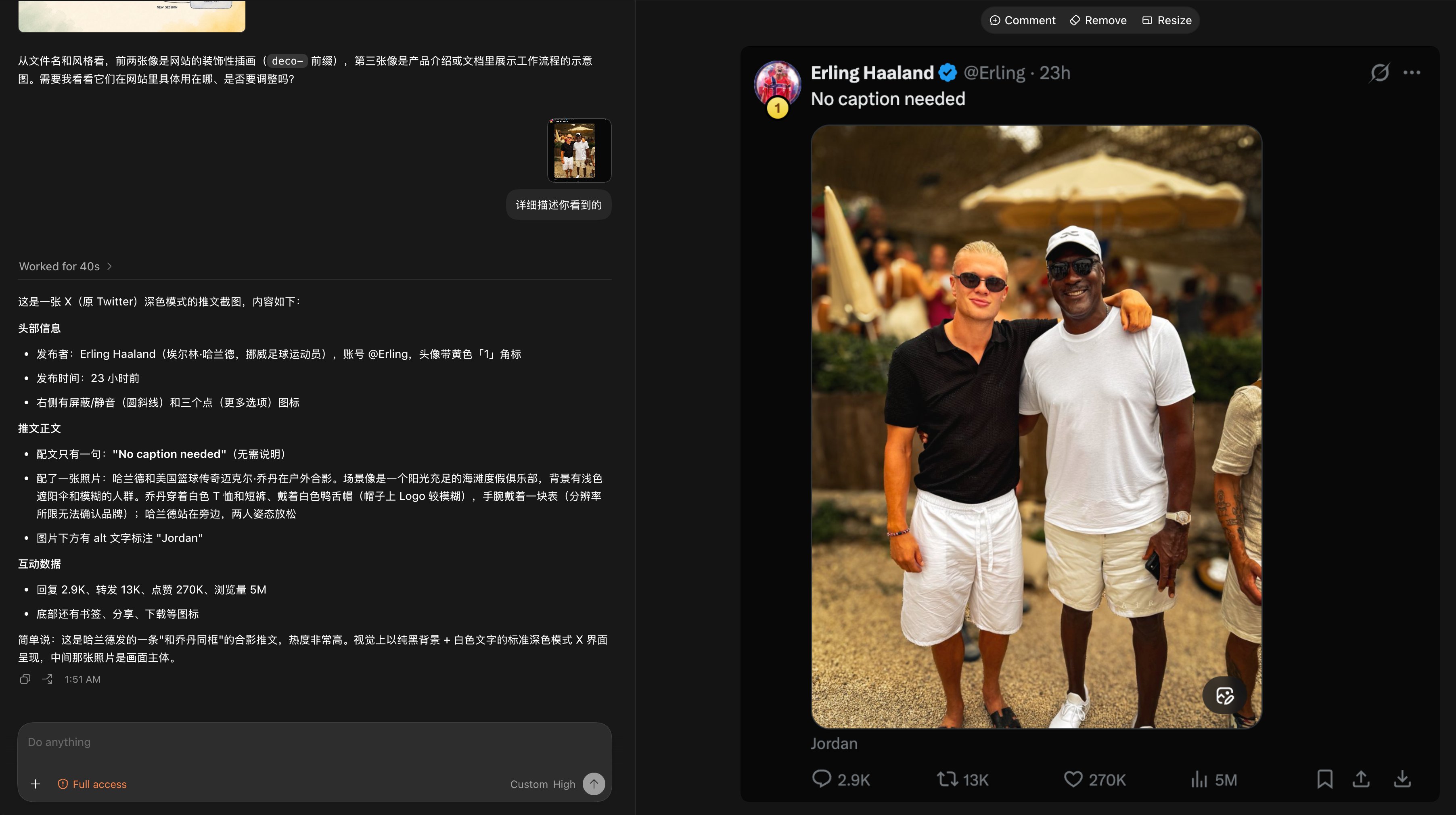
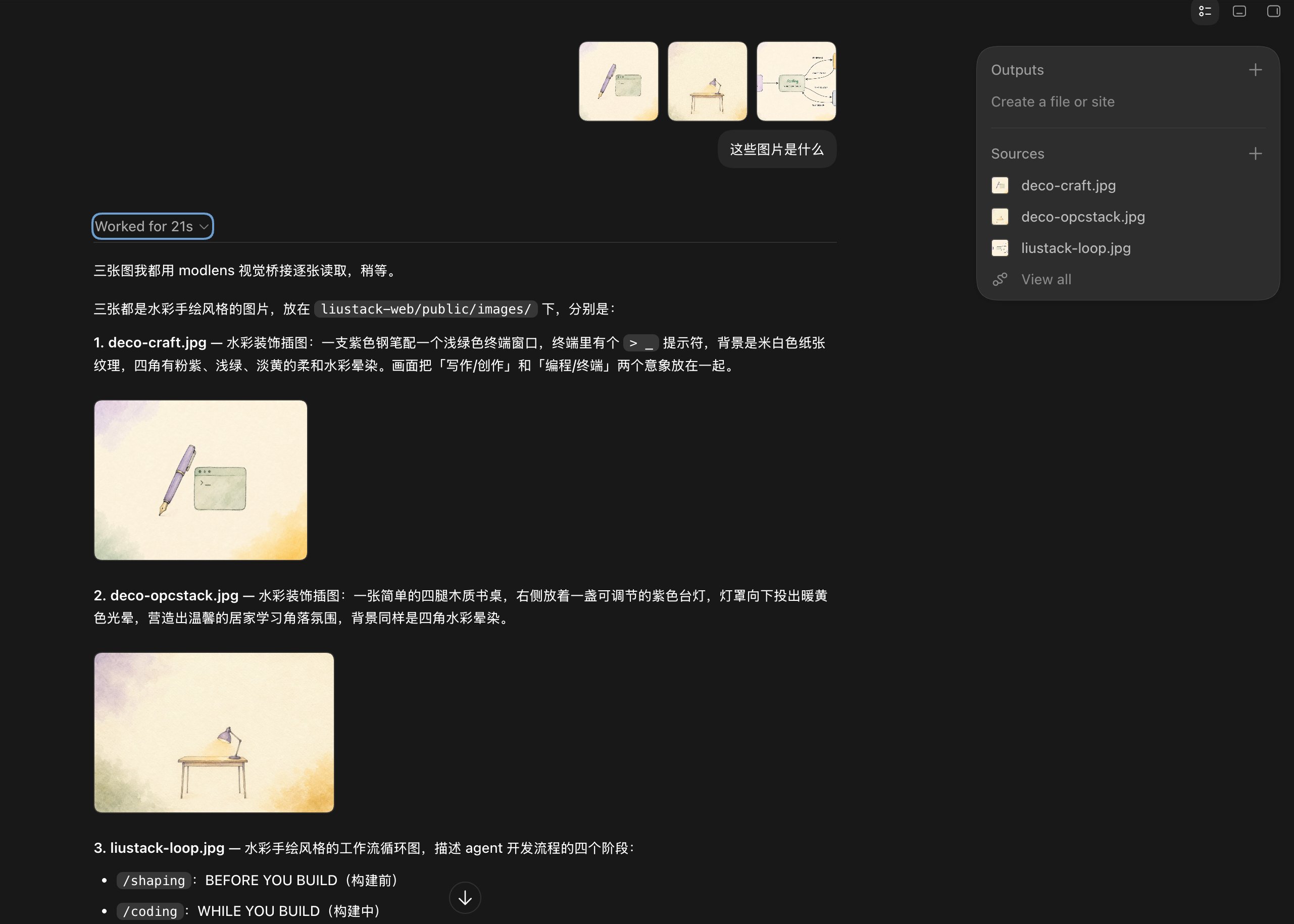
+
<h1 align="center">ModLens</h1>
|
|
6
|
+
|
|
7
|
+
<p align="center"><b>Give a text-only model sight, and just paste the image.</b></p>
|
|
8
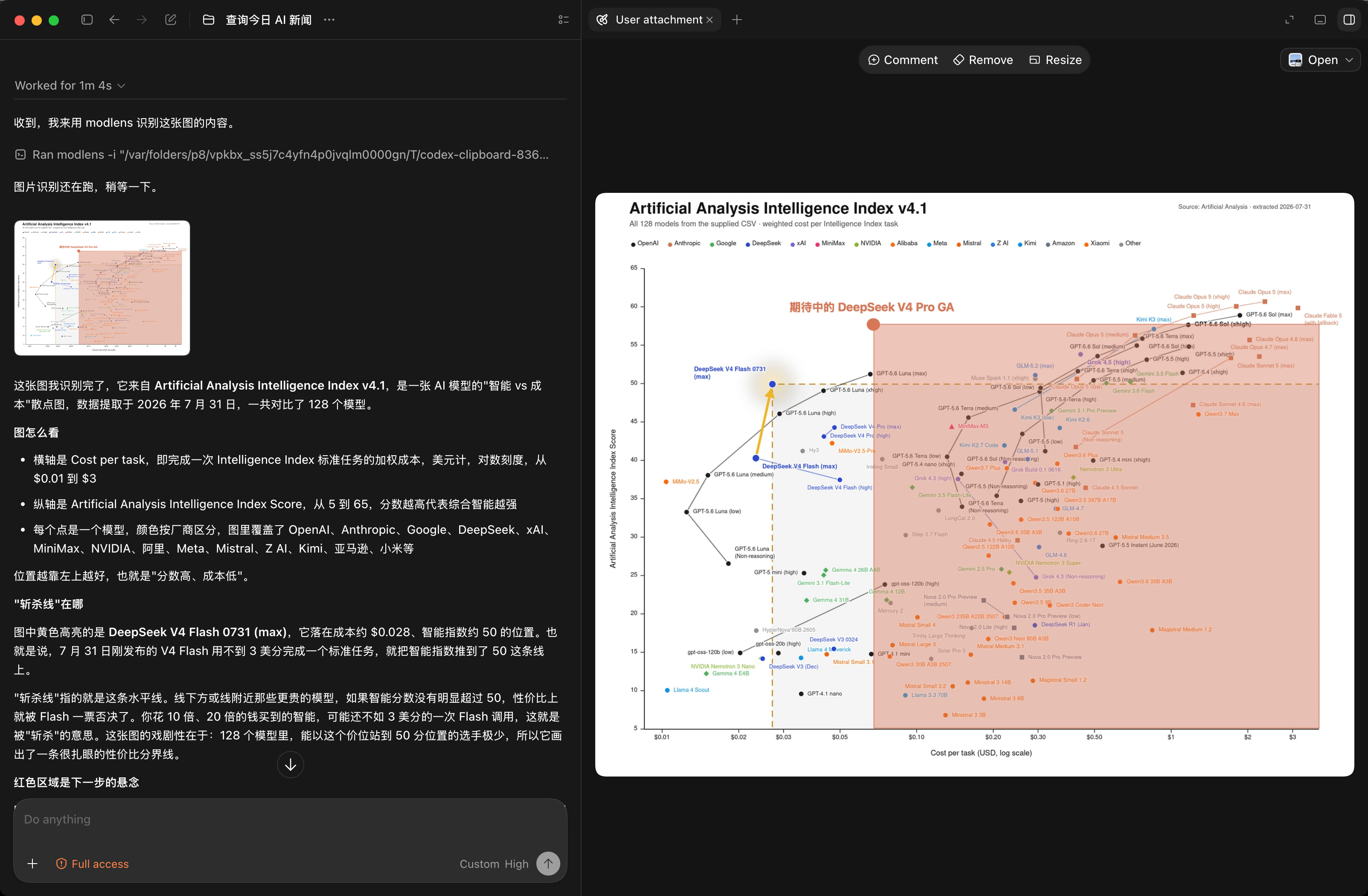
|
+
|
|
9
|
+
<p align="center">
|
|
10
|
+
<a href="./README.zh-CN.md">简体中文</a> ·
|
|
11
|
+
<a href="docs/troubleshooting.md">Troubleshooting</a> ·
|
|
12
|
+
<a href="skills/modlens/references/configure.md">Configuration</a> ·
|
|
13
|
+
<a href="skills/modlens/references/output-schema.md">Output contract</a> ·
|
|
14
|
+
<a href="docs/security.md">Security</a> ·
|
|
15
|
+
<a href="https://github.com/liustack/modsearch">ModSearch (web)</a>
|
|
16
|
+
</p>
|
|
17
|
+
|
|
18
|
+
<p align="center">
|
|
19
|
+
<a href="https://www.npmjs.com/package/@liustack/modlens"><img src="https://img.shields.io/npm/v/@liustack/modlens?style=flat-square&label=npm&color=cb3837" alt="npm"></a>
|
|
20
|
+
<a href="https://github.com/liustack/modlens/actions/workflows/ci.yml"><img src="https://img.shields.io/github/actions/workflow/status/liustack/modlens/ci.yml?branch=main&style=flat-square&label=ci" alt="CI"></a>
|
|
21
|
+
<a href="https://nodejs.org"><img src="https://img.shields.io/node/v/@liustack/modlens?style=flat-square" alt="Node.js"></a>
|
|
22
|
+
<a href="LICENSE"><img src="https://img.shields.io/badge/license-MIT-blue?style=flat-square" alt="License"></a>
|
|
23
|
+
</p>
|
|
11
24
|
|
|
12
|
-
|
|
13
|
-
|
|
14
|
-
|
|
25
|
+
```bash
|
|
26
|
+
npx -y skills add liustack/modlens # install the skill
|
|
27
|
+
npx @liustack/modlens -i screenshot.png # or just use the CLI
|
|
28
|
+
```
|
|
15
29
|
|
|
16
|
-
|
|
30
|
+
Models like DeepSeek-V4-Flash are cheap, fast, capable, and blind. Throw one a screenshot of an error and it sees nothing. ModLens turns the image into evidence it can quote, and **you just paste**: every other bridge makes you save a file and report its path, while ModLens pulls the pasted image back out of session storage.
|
|
17
31
|
|
|
18
|
-
|
|
32
|
+
## Highlights
|
|
19
33
|
|
|
20
|
-
|
|
34
|
+
- **Pasting works.** Vision MCP servers cannot catch a paste (the client encodes and sends it the moment it lands), so ModLens reads it from local session storage instead.
|
|
35
|
+
- **Evidence, not an impression.** Every word transcribed, layout cut into regions in reading order, entities and relations listed, all of it quotable.
|
|
36
|
+
- **It says when it cannot read something.** Uncertain parts land in `uncertainty`. Pixel coordinates and confidence scores, the two things models fabricate most, were dropped in v2.
|
|
37
|
+
- **Keep your model.** You picked it for price and reasoning, not eyesight. That choice stays.
|
|
38
|
+
- **Starts with no key.** agy needs none. A free Gemini key makes it 5 to 10 seconds per image.
|
|
39
|
+
- **Install once, works everywhere.** Verified on real machines in Claude Code, Codex, Pi, and OpenCode.
|
|
21
40
|
|
|
22
|
-
|
|
41
|
+
## Installation
|
|
23
42
|
|
|
24
|
-
```
|
|
25
|
-
|
|
43
|
+
```bash
|
|
44
|
+
npx -y skills add liustack/modlens
|
|
26
45
|
```
|
|
27
46
|
|
|
28
|
-
Or
|
|
47
|
+
Or tell your agent: "Install the skill from https://github.com/liustack/modlens".
|
|
29
48
|
|
|
30
|
-
|
|
49
|
+
Then give it a vision engine. A free **[AI Studio](https://aistudio.google.com) Gemini key** is the fast answer (three minutes, no credit card, 5 to 10 seconds per image):
|
|
31
50
|
|
|
32
51
|
```bash
|
|
33
52
|
modlens config set gemini-api.apiKey <key>
|
|
34
53
|
modlens config set provider gemini-api
|
|
35
54
|
```
|
|
36
55
|
|
|
37
|
-
|
|
38
|
-
|
|
39
|
-
**3. Use it.** Paste an image, or throw a path at it, and ask anything. The skill fires on its own.
|
|
40
|
-
|
|
41
|
-
Requirements, in one line: Node 18+ (22.5+ for OpenCode paste recovery), macOS or Linux.
|
|
42
|
-
|
|
43
|
-
## Why pasting works here and nowhere else
|
|
56
|
+
Skipping the sign-up is fine: **Antigravity CLI** works with no key, it is just slower (15 to 40 seconds) with a tight free quota:
|
|
44
57
|
|
|
45
|
-
|
|
46
|
-
|
|
47
|
-
|
|
48
|
-
|
|
49
|
-
All four harnesses are verified on real machines: Claude Code pinpoints the exact session from its injected session id, Pi stores sessions the same way, OpenCode swaps in SQLite, and Codex's pasted images already carry a temp path, so the path-tag route handles them. Before touching anything, `recover-paste` works out which harness it is running inside (process ancestry, then environment fingerprints) and reads only that harness's storage, so a neighbouring project's old sessions cannot impersonate it. Recovered files are written 0600.
|
|
58
|
+
```bash
|
|
59
|
+
curl -fsSL https://antigravity.google/cli/install.sh | bash && agy # sign in, then exit
|
|
60
|
+
```
|
|
50
61
|
|
|
51
|
-
|
|
52
|
-
| :-- | :-- | :-- | :-- |
|
|
53
|
-
| Your chosen model | has to change | stays | stays |
|
|
54
|
-
| An image pasted into the chat | visible if the model supports it | out of reach, save a file and report the path | handled directly |
|
|
55
|
-
| What you get back | the model's own reading | usually a description | full transcription, layout regions, entities and relations, visual clues |
|
|
56
|
-
| Where it cannot read | may invent | may invent | says so in `uncertainty` |
|
|
57
|
-
| Cost | multimodal model pricing | usually per API call | agy's free quota, or a free Gemini key |
|
|
58
|
-
| Setup | change config, change model | install a server, edit config | one CLI or one skill |
|
|
62
|
+
Requires Node 18+ (22.5+ for OpenCode paste recovery), macOS or Linux.
|
|
59
63
|
|
|
60
|
-
|
|
64
|
+
## Usage
|
|
61
65
|
|
|
62
|
-
|
|
66
|
+
With the skill installed you do not type commands: paste an image or drop a path, ask anything, and it fires on its own. By hand:
|
|
63
67
|
|
|
64
68
|
```bash
|
|
65
|
-
|
|
69
|
+
modlens -i screenshot.png # local image
|
|
70
|
+
modlens -i https://example.com/chart.png # remote image
|
|
71
|
+
modlens -i chart.png --prompt "focus on axes" # extra focus
|
|
72
|
+
modlens recover-paste # pull a pasted image into a file
|
|
66
73
|
```
|
|
67
74
|
|
|
68
|
-
|
|
75
|
+
Output is a fixed JSON shape:
|
|
69
76
|
|
|
70
77
|
```json
|
|
71
78
|
{
|
|
72
|
-
"image": "/
|
|
73
|
-
"provider": "
|
|
79
|
+
"image": "/path/to/screenshot.png",
|
|
80
|
+
"provider": "gemini-api",
|
|
74
81
|
"result": {
|
|
75
82
|
"summary": "A workflow diagram with four nodes connected by labeled arrows.",
|
|
76
|
-
"ocr": {
|
|
77
|
-
|
|
78
|
-
"lines": [
|
|
79
|
-
{ "language": "en", "text": "/shaping" },
|
|
80
|
-
{ "language": "en", "text": "BEFORE YOU BUILD" }
|
|
81
|
-
]
|
|
82
|
-
},
|
|
83
|
-
"layout": {
|
|
84
|
-
"regions": [
|
|
85
|
-
{
|
|
86
|
-
"reading_order": 1,
|
|
87
|
-
"text": "/shaping BEFORE YOU BUILD",
|
|
88
|
-
"type": "other"
|
|
89
|
-
}
|
|
90
|
-
]
|
|
91
|
-
},
|
|
83
|
+
"ocr": { "full_text": "/shaping\nBEFORE YOU BUILD\n...", "lines": [] },
|
|
84
|
+
"layout": { "regions": [{ "reading_order": 1, "type": "title", "text": "/shaping" }] },
|
|
92
85
|
"uncertainty": []
|
|
93
|
-
}
|
|
94
|
-
"meta": { "model": "gemini-3.6-flash-low", "durationSeconds": 25.4 }
|
|
86
|
+
}
|
|
95
87
|
}
|
|
96
88
|
```
|
|
97
89
|
|
|
98
|
-
|
|
90
|
+
Inside the Codex desktop app: drop in a tweet screenshot and a text-only DeepSeek reads the caption, the engagement numbers (2.9K replies, 270K likes, 5M views), even the image's alt text. Where the resolution runs out, it says so.
|
|
99
91
|
|
|
100
92
|
|
|
101
93
|
|
|
102
|
-
|
|
94
|
+
## How it works
|
|
103
95
|
|
|
104
|
-
|
|
105
97
|
|
|
106
|
-
|
|
98
|
+
Pasting works here because of a different route. The paste itself is handled end to end by the client: the image is encoded and sent the moment it lands, so an MCP server never gets a chance, which is why their docs tell you to save a file and report the path. But before those bytes go anywhere, the harness has already written them to local session storage, and that is where `recover-paste` goes. Each harness stores them differently (JSONL in Claude Code and Pi, SQLite in OpenCode, real temp files in Codex): see [harness setup](docs/harness-setup.md).
|
|
107
99
|
|
|
108
|
-
|
|
100
|
+
| | Swap in a multimodal model | Vision MCP servers | ModLens |
|
|
101
|
+
| :-- | :-- | :-- | :-- |
|
|
102
|
+
| Your chosen model | has to change | stays | stays |
|
|
103
|
+
| An image pasted into the chat | visible if the model supports it | out of reach | handled directly |
|
|
104
|
+
| What you get back | the model's own reading | usually a description | transcription, layout regions, entities |
|
|
105
|
+
| Where it cannot read | may invent | may invent | says so in `uncertainty` |
|
|
106
|
+
| Cost | multimodal model pricing | usually per API call | agy's free quota or a free Gemini key |
|
|
109
107
|
|
|
110
|
-
|
|
108
|
+
The weaknesses, in the same place: agy's free tier is a weekly quota and heavy use hits the wall (a free Gemini key sidesteps it). Session storage layouts are each harness's internals with no compatibility promise, so if recovery ever breaks, dragging the file in still works everywhere.
|
|
111
109
|
|
|
112
|
-
|
|
113
|
-
modlens -i <image-path-or-url> [options]
|
|
114
|
-
```
|
|
110
|
+
## CLI reference
|
|
115
111
|
|
|
116
112
|
| Flag | Meaning | Default |
|
|
117
113
|
| :-- | :-- | :-- |
|
|
118
114
|
| `-i, --input <path\|url>` | Image to analyze (required) | |
|
|
119
|
-
| `-o, --output <path>` | Also write JSON to a file | |
|
|
120
|
-
| `-m, --model <name>` | Provider model | `gemini-3.6-flash-low` |
|
|
121
115
|
| `-p, --provider <name>` | Vision provider | `antigravity-cli` |
|
|
122
|
-
|
|
|
116
|
+
| `-m, --model <name>` | Provider model | `gemini-3.6-flash-low` |
|
|
117
|
+
| `-o, --output <path>` | Also write JSON to a file | |
|
|
118
|
+
| `--prompt <text>` | Extra focus | |
|
|
123
119
|
| `--timeout <ms>` | Provider timeout | `180000` |
|
|
124
|
-
| `--provider-bin <path>` | Provider binary | `agy` |
|
|
125
|
-
| `--workdir <path>` | Working directory for the provider | |
|
|
126
120
|
|
|
127
|
-
|
|
121
|
+
Five providers: `antigravity-cli` (default, no key), `gemini-api` (fastest free route), `openai` (any OpenAI-compatible multimodal endpoint), `anthropic`, and `claude-cli` (rides your Claude subscription). Two more subcommands: `modlens config <init|set|show>` and `modlens recover-paste`.
|
|
128
122
|
|
|
129
|
-
|
|
123
|
+
## Documentation
|
|
130
124
|
|
|
131
|
-
|
|
132
|
-
|
|
133
|
-
|
|
134
|
-
modlens
|
|
135
|
-
modlens
|
|
136
|
-
|
|
137
|
-
|
|
138
|
-
|
|
139
|
-
|
|
140
|
-
|
|
141
|
-
## Providers and config
|
|
142
|
-
|
|
143
|
-
ModLens ships five vision providers. `antigravity-cli` stays the default: zero keys, pure free quota.
|
|
144
|
-
|
|
145
|
-
| Provider | Needs | Typical speed | Notes |
|
|
146
|
-
| :-- | :-- | :-- | :-- |
|
|
147
|
-
| `antigravity-cli` (default) | `agy` signed in | 15-40s | free quota, full agent loop, quota is tight (see below) |
|
|
148
|
-
| `gemini-api` (recommended) | free AI Studio key | 5-10s | fastest free route, schema enforced server-side |
|
|
149
|
-
| `openai` | baseUrl + apiKey + model | endpoint-dependent | any OpenAI-compatible multimodal endpoint (qwen-vl, GLM, ...) |
|
|
150
|
-
| `anthropic` | `ANTHROPIC_API_KEY` | a few seconds | Claude Haiku by default, schema via forced tool call |
|
|
151
|
-
| `claude-cli` | Claude Code signed in | 20-45s | no key, rides your Claude subscription, Read-only permissions |
|
|
152
|
-
|
|
153
|
-
`antigravity-cli` wins on needing no key and loses on both other fronts: it's slower (a full agent loop takes 15-40 seconds against 5-10 for `gemini-api` direct) and its quota is tight. The free tier is now a one-time weekly grant, pooled across the desktop app, the CLI, and the SDK, and parallel subagents drain it faster. Once it's gone you wait out the cycle: we hit that wall ourselves and the message read "94 hours until reset." Great for a first look, but `gemini-api` is what holds up day to day.
|
|
154
|
-
|
|
155
|
-
Config lives in `~/.modlens/config.json`. Environment variables override the file (`GEMINI_API_KEY`, `OPENAI_API_KEY`, `OPENAI_BASE_URL`, `ANTHROPIC_API_KEY`), and CLI flags override everything.
|
|
156
|
-
|
|
157
|
-
```bash
|
|
158
|
-
modlens config init # write a starter config
|
|
159
|
-
modlens config set gemini-api.apiKey <key> # saved with 0600 perms
|
|
160
|
-
modlens config show # keys come out masked
|
|
161
|
-
modlens config set provider gemini-api # switch the default provider
|
|
162
|
-
```
|
|
163
|
-
|
|
164
|
-
The free Gemini key takes three minutes at [aistudio.google.com](https://aistudio.google.com), no credit card.
|
|
165
|
-
|
|
166
|
-
You don't actually have to remember any of these commands. The skill ships a per-provider setup guide, so once it's installed you can just ask your agent: "how do I configure modlens," "set my Gemini key in modlens," "switch modlens to claude-cli." It reads the guide and runs them.
|
|
167
|
-
|
|
168
|
-
## Using it in Codex (DeepSeek and friends)
|
|
169
|
-
|
|
170
|
-
Codex speaks only the Responses API, and DeepSeek's official endpoint supports it natively. Start with the [official integration guide](https://api-docs.deepseek.com/quick_start/agent_integrations/codex/): its `models.json` declares deepseek-v4-flash as text-only (`input_modalities: ["text"]`), and that one line is what unlocks the whole flow.
|
|
171
|
-
|
|
172
|
-
One catch: once text-only is declared, the Codex TUI **blocks Ctrl+V image paste outright** (`Model deepseek-v4-flash does not support image inputs`). The gate sits in the input box itself, so the image never makes it into the message. Two moves get around it, both verified end to end with deepseek-v4-flash:
|
|
173
|
-
|
|
174
|
-
- **Drag the image file into the terminal**, or type its path. The path lands as plain text, and the modlens skill picks it up from there.
|
|
175
|
-
- Attach it with `codex exec -i image.png "..."`. The skill reads the path out of the message tag.
|
|
176
|
-
|
|
177
|
-
## Using it in Claude Code, Pi, and OpenCode (gateway models)
|
|
178
|
-
|
|
179
|
-
No setup needed: drag the image file into the terminal, or type its path, and the skill takes over.
|
|
180
|
-
|
|
181
|
-
Paste is trickier. If you run a text-only model behind `ANTHROPIC_BASE_URL`, Claude Code never writes pasted images to a regular temp file and has no modality switch. A pasted image reaches the model as a pathless `[Unsupported Image]` placeholder (lenient gateways like DeepSeek's Anthropic endpoint) or breaks the request outright ([#62009](https://github.com/anthropics/claude-code/issues/62009)). But the bytes are not gone: Claude Code appends every user message, images included, to the local session transcript before the gateway ever sees it, and that is what `modlens recover-paste` exploits: it pulls the images back out and prints real file paths, ready for `modlens -i`. The skill runs this automatically the moment it spots the placeholder.
|
|
182
|
-
|
|
183
|
-
Transcripts are per-session files, so skills can pass the exact one via `--session` (Claude Code substitutes `${CLAUDE_SESSION_ID}` into skill text since v2.1.9). Without it, recovery picks the transcript holding the newest pasted image by message timestamp, so concurrent sessions in the same project do not confuse it either way.
|
|
184
|
-
|
|
185
|
-
[Pi](https://github.com/earendil-works/pi) stores sessions the same way (`~/.pi/agent/sessions/`, images as base64 in JSONL). [OpenCode](https://github.com/sst/opencode) keeps them in SQLite instead (`~/.local/share/opencode/opencode.db`, images as data URLs, reading it needs Node 22.5+ for node:sqlite).
|
|
186
|
-
|
|
187
|
-
`recover-paste` first identifies the harness it is running inside, by walking the process ancestry and checking env fingerprints (`CLAUDECODE`, `PI_CODING_AGENT`, `CODEX_THREAD_ID`), and reads only that harness's storage, so one tool's stale sessions can never hijack another tool's paste. In Claude Code it targets the exact session from the injected session id. In Codex it refuses outright and points back to the path tag. Only when detection comes up empty does it fall back to racing all three stores by newest image timestamp.
|
|
188
|
-
|
|
189
|
-
Verified live in all four harnesses: Claude Code recovers the paste via its injected session id, OpenCode runs the whole loop on DeepSeek with the skill firing on its own, Pi stays scoped to its own store, and Codex is refused with the path-tag guidance. One honest caveat: transcript layouts are internal implementation details of those tools with no compatibility promise. If recovery ever breaks, dragging the file still works everywhere.
|
|
190
|
-
|
|
191
|
-
Pointing OpenCode at DeepSeek takes two lines of setup: `opencode auth login`, pick DeepSeek and paste your key (it lands in `~/.local/share/opencode/auth.json`), then set the default model in `~/.config/opencode/opencode.jsonc` to `deepseek/deepseek-v4-flash`. Pi reads its key from `~/.pi/agent/auth.json`.
|
|
192
|
-
|
|
193
|
-
## Why a bridge instead of a multimodal model?
|
|
194
|
-
|
|
195
|
-
- **Keep your model.** You picked DeepSeek-V4-Flash (or gpt-oss, or whatever else) for its price and its reasoning, not its eyesight. ModLens adds sight without touching that choice.
|
|
196
|
-
- **Evidence beats pixels.** Text models reason best over structured text, not raw pixels. ModLens hands them the transcribed words, the segmented layout, and the extracted meaning, not a base64 blob.
|
|
197
|
-
- **Engines die, the bridge survives.** v1 ran on Gemini CLI's free tier until Google shut it down in June 2026. v2 moved to its successor, Antigravity CLI, behind the same provider interface, so the next engine swap costs one file, not a rewrite.
|
|
198
|
-
|
|
199
|
-
ModSearch, ModLens's sibling project, plays the same trick for web search and page fetching: [liustack/modsearch](https://github.com/liustack/modsearch).
|
|
125
|
+
| Doc | Read it when |
|
|
126
|
+
| :-- | :-- |
|
|
127
|
+
| [Troubleshooting](docs/troubleshooting.md) | A command failed and the message needs decoding |
|
|
128
|
+
| [Configuration](skills/modlens/references/configure.md) | Setting a key, switching providers, fixing config |
|
|
129
|
+
| [Output contract](skills/modlens/references/output-schema.md) | Parsing the JSON or building on it |
|
|
130
|
+
| [Harness setup](docs/harness-setup.md) | Wiring it into Codex, Claude Code, Pi, or OpenCode |
|
|
131
|
+
| [Security](docs/security.md) | File permissions, image content as untrusted input |
|
|
132
|
+
| [CHANGELOG](CHANGELOG.md) | Finding what changed in a version |
|
|
133
|
+
| [AGENTS.md](AGENTS.md) | Working on this codebase |
|
|
200
134
|
|
|
201
135
|
## Shameless plug
|
|
202
136
|
|
|
203
|
-
This project runs on LIUSTACK Skills
|
|
204
|
-
|
|
205
|
-
**ModLens gives your model eyes. LIUSTACK Skills gives your dev workflow wings:**
|
|
137
|
+
This project runs on LIUSTACK Skills: `shaping` before you build, `coding` while you build, `dig` when it breaks, `snapshot` when you hand off. Lighter than Superpowers, and stronger.
|
|
206
138
|
|
|
207
139
|
```bash
|
|
208
140
|
npx -y skills add liustack/liustack -g
|
|
209
141
|
```
|
|
210
142
|
|
|
211
|
-
⭐
|
|
212
|
-
|
|
213
|
-
## Security notes
|
|
214
|
-
|
|
215
|
-
- ModLens runs `agy` with `--dangerously-skip-permissions`, because print mode can fail in some setups without it. The prompt keeps the agent to reading that one image and tells it to treat image content as data, never as instructions. Even so, only point it at images you would open yourself, and run it inside a sandboxed workspace when you can.
|
|
216
|
-
- Vision output is evidence. Anything the engine cannot read lands in `uncertainty` instead of getting invented. Pixel bounding boxes and confidence scores were dropped in v2 because models fabricate them.
|
|
143
|
+
⭐ If it helps, star [ModLens](https://github.com/liustack/modlens) and [liustack](https://github.com/liustack/liustack). Stars are how the next developer finds them.
|
|
217
144
|
|
|
218
145
|
## Disclaimer
|
|
219
146
|
|
|
220
|
-
|
|
147
|
+
For personal study and experimentation, not commercial use. Antigravity CLI usage is bound by your own Google account terms and quota.
|
|
221
148
|
|
|
222
149
|
## License
|
|
223
150
|
|
package/README.zh-CN.md
CHANGED
|
@@ -1,219 +1,146 @@
|
|
|
1
|
-
<
|
|
2
|
-
<img src="https://raw.githubusercontent.com/liustack/modlens/main/assets/banner.jpg" width="100%" alt="ModLens
|
|
3
|
-
|
|
4
|
-
|
|
5
|
-
|
|
6
|
-
|
|
7
|
-
|
|
8
|
-
|
|
9
|
-
|
|
10
|
-
</
|
|
1
|
+
<p align="center">
|
|
2
|
+
<img src="https://raw.githubusercontent.com/liustack/modlens/main/assets/banner.jpg" width="100%" alt="ModLens" />
|
|
3
|
+
</p>
|
|
4
|
+
|
|
5
|
+
<h1 align="center">ModLens</h1>
|
|
6
|
+
|
|
7
|
+
<p align="center"><b>给纯文本模型装上视力,而且你直接粘贴就行。</b></p>
|
|
8
|
+
|
|
9
|
+
<p align="center">
|
|
10
|
+
<a href="./README.md">English</a> ·
|
|
11
|
+
<a href="docs/troubleshooting.md">故障排查</a> ·
|
|
12
|
+
<a href="skills/modlens/references/configure.md">配置</a> ·
|
|
13
|
+
<a href="skills/modlens/references/output-schema.md">输出契约</a> ·
|
|
14
|
+
<a href="docs/security.md">安全</a> ·
|
|
15
|
+
<a href="https://github.com/liustack/modsearch">ModSearch(联网)</a>
|
|
16
|
+
</p>
|
|
17
|
+
|
|
18
|
+
<p align="center">
|
|
19
|
+
<a href="https://www.npmjs.com/package/@liustack/modlens"><img src="https://img.shields.io/npm/v/@liustack/modlens?style=flat-square&label=npm&color=cb3837" alt="npm"></a>
|
|
20
|
+
<a href="https://github.com/liustack/modlens/actions/workflows/ci.yml"><img src="https://img.shields.io/github/actions/workflow/status/liustack/modlens/ci.yml?branch=main&style=flat-square&label=ci" alt="CI"></a>
|
|
21
|
+
<a href="https://nodejs.org"><img src="https://img.shields.io/node/v/@liustack/modlens?style=flat-square" alt="Node.js"></a>
|
|
22
|
+
<a href="LICENSE"><img src="https://img.shields.io/badge/license-MIT-blue?style=flat-square" alt="License"></a>
|
|
23
|
+
</p>
|
|
11
24
|
|
|
12
|
-
|
|
13
|
-
|
|
14
|
-
|
|
25
|
+
```bash
|
|
26
|
+
npx -y skills add liustack/modlens # 装 skill
|
|
27
|
+
npx @liustack/modlens -i screenshot.png # 或者直接当 CLI 用
|
|
28
|
+
```
|
|
15
29
|
|
|
16
|
-
|
|
30
|
+
DeepSeek-V4-Flash 这类模型便宜、快、能打,唯独看不见图。你甩过去一张报错截图,它一片漆黑。ModLens 把图读成能引用的证据交给它,而且**你直接粘贴就行**:别的方案都要你先存成文件再报路径,ModLens 从会话存储里把粘贴的图捞回来。
|
|
17
31
|
|
|
18
|
-
|
|
32
|
+
## 亮点
|
|
19
33
|
|
|
20
|
-
|
|
34
|
+
- **粘贴就能用。** 识图类 MCP server 接不住粘贴(图一进对话框就被客户端发走了),ModLens 从本地会话存储里捞。
|
|
35
|
+
- **给的是证据,不是印象。** 图里的字一句不落地转录、版面按阅读顺序切块、实体和关系单列,模型能引用具体内容。
|
|
36
|
+
- **读不准就说读不准。** 拿不准的地方进 `uncertainty`。像素坐标和置信度分数这两样模型最爱编的,v2 直接删了。
|
|
37
|
+
- **模型不用换。** 你选 DeepSeek 图的是价格和推理,不是视力,这个选择不用动。
|
|
38
|
+
- **零 key 起步。** agy 不要 key;想快就领个免费 Gemini key,识图 5 到 10 秒。
|
|
39
|
+
- **一次装好,处处能用。** Claude Code、Codex、Pi、OpenCode 都在真机上验证过。
|
|
21
40
|
|
|
22
|
-
|
|
41
|
+
## 安装
|
|
23
42
|
|
|
24
|
-
```
|
|
25
|
-
|
|
43
|
+
```bash
|
|
44
|
+
npx -y skills add liustack/modlens
|
|
26
45
|
```
|
|
27
46
|
|
|
28
|
-
|
|
47
|
+
或者跟你的 agent 说一句「安装这个 skill https://github.com/liustack/modlens」。
|
|
29
48
|
|
|
30
|
-
|
|
49
|
+
再给它一个视觉引擎。推荐 **[AI Studio](https://aistudio.google.com) 的免费 Gemini key**(三分钟,不要信用卡,识图 5 到 10 秒):
|
|
31
50
|
|
|
32
51
|
```bash
|
|
33
52
|
modlens config set gemini-api.apiKey <key>
|
|
34
53
|
modlens config set provider gemini-api
|
|
35
54
|
```
|
|
36
55
|
|
|
37
|
-
|
|
38
|
-
|
|
39
|
-
**三、直接用。** 粘一张图,或者甩个图片路径,随便问。skill 自己会触发。
|
|
40
|
-
|
|
41
|
-
环境要求就一行:Node 18+(OpenCode 的粘贴恢复需要 22.5+),macOS 或 Linux。
|
|
56
|
+
不想注册就用 **Antigravity CLI**,零 key,代价是慢(15 到 40 秒)且免费额度紧:
|
|
42
57
|
|
|
43
|
-
|
|
44
|
-
|
|
45
|
-
|
|
46
|
-
|
|
47
|
-
ModLens 走的是另一条路。图片字节在发给模型之前,早被 harness 原样写进了本地会话存储。skill 直接去那儿把它捞回来落成文件,喂给视觉引擎。你什么都不用做,模型拿到的是完整图片,而不是一句「麻烦告诉我路径」。
|
|
48
|
-
|
|
49
|
-
四家 harness 都在真机上验证过:Claude Code 按注入的会话 ID 精确定位,Pi 的存储路数和它同构,OpenCode 换成了 SQLite,Codex 的粘贴图本来就带临时路径、走路径标签即可。动手之前 `recover-paste` 会先认清自己跑在哪一家(查进程祖先链,核对环境变量指纹),只读那一家的存储,隔壁项目的旧会话冒充不了,捞出来的文件权限是 0600。
|
|
58
|
+
```bash
|
|
59
|
+
curl -fsSL https://antigravity.google/cli/install.sh | bash && agy # 浏览器登录后退出
|
|
60
|
+
```
|
|
50
61
|
|
|
51
|
-
|
|
52
|
-
| :-- | :-- | :-- | :-- |
|
|
53
|
-
| 你选的模型 | 得换掉 | 不用换 | 不用换 |
|
|
54
|
-
| 粘贴进对话的图 | 模型支持就能看 | 接不住,得先存文件报路径 | 直接接住 |
|
|
55
|
-
| 拿到手的是什么 | 模型自己的理解 | 通常一段描述 | 全文转录、版面区块、实体关系、视觉线索 |
|
|
56
|
-
| 读不准的地方 | 可能编 | 可能编 | 进 `uncertainty`,明说读不准 |
|
|
57
|
-
| 花费 | 多模态模型的价格 | 多数按 API 计费 | agy 免费额度,或免费 Gemini key |
|
|
58
|
-
| 上手 | 改配置换模型 | 装 server、改配置 | 一个 CLI 或一个 skill |
|
|
62
|
+
需要 Node 18+(OpenCode 的粘贴恢复需要 22.5+),macOS 或 Linux。
|
|
59
63
|
|
|
60
|
-
|
|
64
|
+
## 用法
|
|
61
65
|
|
|
62
|
-
|
|
66
|
+
装完 skill 就不用记命令:粘一张图或甩个图片路径,问什么都行,skill 自己触发。手动用:
|
|
63
67
|
|
|
64
68
|
```bash
|
|
65
|
-
|
|
69
|
+
modlens -i screenshot.png # 本地图片
|
|
70
|
+
modlens -i https://example.com/chart.png # 远程图片
|
|
71
|
+
modlens -i chart.png --prompt "重点看数据轴" # 指定关注点
|
|
72
|
+
modlens recover-paste # 把刚粘贴的图捞成文件
|
|
66
73
|
```
|
|
67
74
|
|
|
68
|
-
|
|
75
|
+
输出是结构固定的 JSON:
|
|
69
76
|
|
|
70
77
|
```json
|
|
71
78
|
{
|
|
72
|
-
"image": "/
|
|
73
|
-
"provider": "
|
|
79
|
+
"image": "/path/to/screenshot.png",
|
|
80
|
+
"provider": "gemini-api",
|
|
74
81
|
"result": {
|
|
75
|
-
"summary": "
|
|
76
|
-
"ocr": {
|
|
77
|
-
|
|
78
|
-
"lines": [
|
|
79
|
-
{ "language": "en", "text": "/shaping" },
|
|
80
|
-
{ "language": "en", "text": "BEFORE YOU BUILD" }
|
|
81
|
-
]
|
|
82
|
-
},
|
|
83
|
-
"layout": {
|
|
84
|
-
"regions": [
|
|
85
|
-
{
|
|
86
|
-
"reading_order": 1,
|
|
87
|
-
"text": "/shaping BEFORE YOU BUILD",
|
|
88
|
-
"type": "other"
|
|
89
|
-
}
|
|
90
|
-
]
|
|
91
|
-
},
|
|
82
|
+
"summary": "四个节点的工作流图,箭头带标注。",
|
|
83
|
+
"ocr": { "full_text": "/shaping\nBEFORE YOU BUILD\n...", "lines": [] },
|
|
84
|
+
"layout": { "regions": [{ "reading_order": 1, "type": "title", "text": "/shaping" }] },
|
|
92
85
|
"uncertainty": []
|
|
93
|
-
}
|
|
94
|
-
"meta": { "model": "gemini-3.6-flash-low", "durationSeconds": 25.4 }
|
|
86
|
+
}
|
|
95
87
|
}
|
|
96
88
|
```
|
|
97
89
|
|
|
98
|
-
|
|
90
|
+
Codex 桌面 App 里的实拍:丢一张推文截图,纯文本的 DeepSeek 读出了配文、互动数据(2.9K 回复、270K 点赞、5M 浏览),连图片的 alt 文字都没放过。分辨率不够的地方它老实说读不清。
|
|
99
91
|
|
|
100
92
|

|
|
101
93
|
|
|
102
|
-
|
|
103
|
-
|
|
104
|
-
|
|
105
|
-
|
|
106
|
-
压力测试:一张 128 个模型的智能对成本散点图。ModLens 读出双轴、对数刻度,把高亮的 DeepSeek V4 Flash 精准拎出来(成本约 $0.028、智能指数 50),还讲明白了性价比斩杀线。密集图表是识图模型最容易露怯的地方,这一关它扛住了。
|
|
107
|
-
|
|
108
|
-
|
|
109
|
-
|
|
110
|
-
## CLI 参数
|
|
111
|
-
|
|
112
|
-
```bash
|
|
113
|
-
modlens -i <图片路径或 URL> [选项]
|
|
114
|
-
```
|
|
115
|
-
|
|
116
|
-
| 参数 | 含义 | 默认值 |
|
|
117
|
-
| :------------------------ | :-------------------------------- | :--------------------- |
|
|
118
|
-
| `-i, --input <path\|url>` | 要解析的图片(必填) | |
|
|
119
|
-
| `-o, --output <path>` | 同时把 JSON 写入文件 | |
|
|
120
|
-
| `-m, --model <name>` | provider 模型 | `gemini-3.6-flash-low` |
|
|
121
|
-
| `-p, --provider <name>` | 视觉 provider | `antigravity-cli` |
|
|
122
|
-
| `--prompt <text>` | 额外关注点,比如 `"重点提取表格"` | |
|
|
123
|
-
| `--timeout <ms>` | provider 超时 | `180000` |
|
|
124
|
-
| `--provider-bin <path>` | provider 可执行文件 | `agy` |
|
|
125
|
-
| `--workdir <path>` | provider 运行目录 | |
|
|
126
|
-
|
|
127
|
-
截图信息密集或文档难啃,换成 `-m gemini-3.1-pro-high`。输出契约见 [skills/modlens/references/output-schema.md](skills/modlens/references/output-schema.md)。
|
|
128
|
-
|
|
129
|
-
另外两个子命令:`modlens config <init|set|show>` 管 provider 和 key(下文详述),`modlens recover-paste` 抢救粘贴进 Claude Code、Pi、OpenCode 的图片:
|
|
130
|
-
|
|
131
|
-
```bash
|
|
132
|
-
modlens recover-paste # 捞最新一张,路径以 JSON 打印
|
|
133
|
-
modlens recover-paste --count 3 # 捞最近三张
|
|
134
|
-
modlens recover-paste --session <id> # 精确会话(skill 会传 ${CLAUDE_SESSION_ID})
|
|
135
|
-
modlens recover-paste --harness pi # 强制按某家宿主的格式解析
|
|
136
|
-
# --transcript <path> 优先级最高,--cwd <dir> 指定项目目录
|
|
137
|
-
```
|
|
138
|
-
|
|
139
|
-
恢复出来的图片写成 0600、放进 0700 目录,共享机器上别人读不到。定位会话时除了目录,还会核对会话记录里写着的真实工作目录,因为目录 slug 会碰撞(`/tmp/a.b` 和 `/tmp/a-b` 算出同一个),不核对就可能把隔壁项目的图交给你。
|
|
94
|
+
## 它是怎么干活的
|
|
140
95
|
|
|
141
|
-
|
|
96
|
+
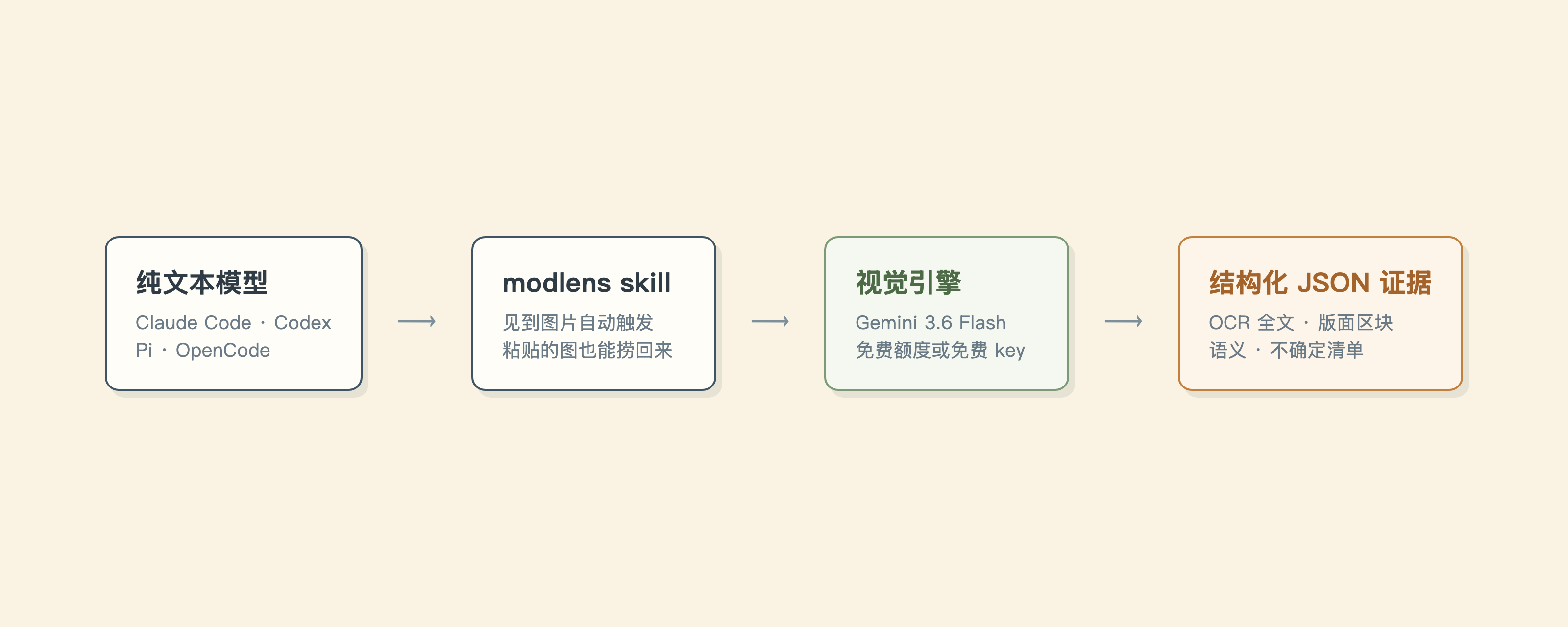
|
|
142
97
|
|
|
143
|
-
|
|
98
|
+
粘贴之所以只有它接得住,是因为走了另一条路:粘贴从头到尾是客户端办的事,图一进对话框就被转码发走,MCP server 连插手的机会都没有,所以它们只能教你存文件报路径。而图片字节在发走之前,早被 harness 原样写进了本地会话存储,`recover-paste` 直接去那儿捞。四家 harness 的存储各不相同(Claude Code 和 Pi 是 JSONL,OpenCode 是 SQLite,Codex 本来就有临时文件),细节见[宿主接入](docs/harness-setup.md)。
|
|
144
99
|
|
|
145
|
-
|
|
|
100
|
+
| | 换个多模态模型 | 识图类 MCP server | ModLens |
|
|
146
101
|
| :-- | :-- | :-- | :-- |
|
|
147
|
-
|
|
|
148
|
-
|
|
|
149
|
-
|
|
|
150
|
-
|
|
|
151
|
-
|
|
|
152
|
-
|
|
153
|
-
`antigravity-cli` 胜在零 key,输在两头:慢(完整 agent 循环 15-40 秒,`gemini-api` 直连 5-10 秒),额度紧。它的免费档如今是一次性发放的周配额,桌面应用、CLI、SDK 共用一个池子,subagent 并行还加倍消耗,用超了得等下个周期(我们实测撞过一次,提示「94 小时后重置」)。所以它适合尝鲜,日常主力还是 `gemini-api` 稳。
|
|
154
|
-
|
|
155
|
-
配置放在 `~/.modlens/config.json`,环境变量能盖过它(`GEMINI_API_KEY`、`OPENAI_API_KEY`、`OPENAI_BASE_URL`、`ANTHROPIC_API_KEY`),CLI 参数最大。
|
|
156
|
-
|
|
157
|
-
```bash
|
|
158
|
-
modlens config init # 生成配置骨架
|
|
159
|
-
modlens config set gemini-api.apiKey <key> # 落盘即 0600 权限
|
|
160
|
-
modlens config show # key 打码显示
|
|
161
|
-
modlens config set provider gemini-api # 换默认 provider
|
|
162
|
-
```
|
|
163
|
-
|
|
164
|
-
免费 Gemini key 去 [aistudio.google.com](https://aistudio.google.com) 领,三分钟,不要信用卡。
|
|
165
|
-
|
|
166
|
-
这些命令你其实一条都不用记。skill 自带一份分 provider 的配置手册,装完之后直接问你的 agent:「modlens 怎么配置」「帮我把 Gemini key 配进 modlens」「把默认 provider 切成 claude-cli」,它照着手册自己跑完。
|
|
167
|
-
|
|
168
|
-
## 在 Codex 里用(DeepSeek 等纯文本模型)
|
|
169
|
-
|
|
170
|
-
Codex 只认 Responses API,DeepSeek 官方端点原生支持。先照着[官方集成文档](https://api-docs.deepseek.com/zh-cn/quick_start/agent_integrations/codex)配好:它的 `models.json` 把 deepseek-v4-flash 声明成纯文本(`input_modalities: ["text"]`),这一行就是解锁下面整条链路的钥匙。
|
|
171
|
-
|
|
172
|
-
有个坑要注意:声明纯文本之后,Codex TUI 会**直接拦下 Ctrl+V 粘贴图片**(报错 `Model deepseek-v4-flash does not support image inputs`),闸门卡在输入框那一层,图片压根到不了消息里。能用的招数有两个,都拿 deepseek-v4-flash 端到端验证过:
|
|
173
|
-
|
|
174
|
-
- **把图片文件拖进终端**,或者手打路径。路径以纯文本形式落进消息,modlens skill 接着从这里接手。
|
|
175
|
-
- 用 `codex exec -i 图片.png "..."` skill 从这里把路径抠出来。
|
|
176
|
-
|
|
177
|
-
## 在 Claude Code、Pi、OpenCode 里用(网关接第三方模型)
|
|
178
|
-
|
|
179
|
-
不用任何配置:把图片文件拖进终端,或手打路径,skill 直接接手。
|
|
180
|
-
|
|
181
|
-
粘贴要多说两句。走 `ANTHROPIC_BASE_URL` 网关跑纯文本模型时,Claude Code 粘贴的图片从不写普通临时文件,也没有声明模型无视觉的开关,粘贴的图要么变成一个不带路径的 `[Unsupported Image]` 占位符到达模型(DeepSeek 的 Anthropic 兼容端点这类宽容网关),要么直接把请求搞挂([#62009](https://github.com/anthropics/claude-code/issues/62009))。但图片字节没有蒸发:Claude Code 在网关看到消息之前,就把每条用户消息(含图片)原样写进了本地会话记录,`modlens recover-paste` 干的就是把它们捞回来、落成真实文件路径,直接喂给 `modlens -i`。skill 看到占位符会自动跑这一步。
|
|
182
|
-
|
|
183
|
-
会话记录本来就是一个会话一个文件,skill 可以通过 `--session` 传入精确会话(Claude Code 从 v2.1.9 起会把 `${CLAUDE_SESSION_ID}` 替换进 skill 文本)。不传时按消息时间戳挑「持有最新粘贴图」的那份,两条路都不怕同项目并发多开。
|
|
184
|
-
|
|
185
|
-
[Pi](https://github.com/earendil-works/pi) 的会话存储和它同构(`~/.pi/agent/sessions/`,图片以 base64 存 JSONL)。[OpenCode](https://github.com/sst/opencode) 换了个存法,图片以 data URL 塞进 SQLite(`~/.local/share/opencode/opencode.db`,读它需要 Node 22.5+ 的 node:sqlite)。
|
|
186
|
-
|
|
187
|
-
`recover-paste` 会先搞清楚自己正跑在哪家宿主里(沿进程祖先链往上找,再核对 `CLAUDECODE`、`PI_CODING_AGENT`、`CODEX_THREAD_ID` 这些环境变量指纹),然后只读那一家的存储,别家的陈年会话再也没机会冒充。在 Claude Code 里还会直接用注入的会话 ID 精确定位,在 Codex 里则干脆拒绝执行并把你指回 path tag。实在识别不出来才退回按最新图片时间戳在三家赛跑。
|
|
188
|
-
|
|
189
|
-
四家宿主全部活体验证过:Claude Code 靠注入的会话 ID 精确捞回粘贴,OpenCode 上 DeepSeek 全程自动触发 skill 跑完整条链路,Pi 只认自家存储不受别家污染,Codex 被拒之门外并指回 path tag。一句老实话:会话记录格式是这些工具的内部实现,没有兼容承诺,哪天捞不动了,拖文件永远是保底。
|
|
190
|
-
|
|
191
|
-
OpenCode 接 DeepSeek 只要两步:`opencode auth login` 选 DeepSeek 贴上 key(落在 `~/.local/share/opencode/auth.json`),再把 `~/.config/opencode/opencode.jsonc` 的默认模型设成 `deepseek/deepseek-v4-flash`。Pi 的 key 放 `~/.pi/agent/auth.json`。
|
|
102
|
+
| 你选的模型 | 得换掉 | 不用换 | 不用换 |
|
|
103
|
+
| 粘贴进对话的图 | 模型支持才看得见 | 接不住 | 直接接住 |
|
|
104
|
+
| 拿到手的是什么 | 模型自己的理解 | 通常一段描述 | 全文转录、版面区块、实体关系 |
|
|
105
|
+
| 读不准的地方 | 可能编 | 可能编 | 进 `uncertainty` |
|
|
106
|
+
| 花费 | 多模态模型的价格 | 多数按 API 计费 | agy 免费额度或免费 Gemini key |
|
|
192
107
|
|
|
193
|
-
|
|
108
|
+
短板一并摆这儿:agy 免费额度是周配额,重度用会撞墙(换免费 Gemini key 绕开)。会话存储格式是各家 harness 的内部实现,没有兼容承诺,哪天捞不动了,拖文件永远是保底。
|
|
194
109
|
|
|
195
|
-
|
|
196
|
-
- **证据强过像素。** 文本模型最擅长在结构化文本上推理,不是盯着原始像素。ModLens 递过去的是转录好的文字、切好的版面、拆好的语义,不是一坨 base64。
|
|
197
|
-
- **引擎会死,桥不会死。** v1 跑在 Gemini CLI 免费档上,2026 年 6 月被 Google 一刀切停掉。v2 换到继任者 Antigravity CLI,还是同一个 provider 接口,下次再换引擎,改一个文件就行,不用重写。
|
|
110
|
+
## CLI 参数
|
|
198
111
|
|
|
199
|
-
|
|
112
|
+
| 参数 | 含义 | 默认值 |
|
|
113
|
+
| :-- | :-- | :-- |
|
|
114
|
+
| `-i, --input <path\|url>` | 要解析的图片(必填) | |
|
|
115
|
+
| `-p, --provider <name>` | 视觉 provider | `antigravity-cli` |
|
|
116
|
+
| `-m, --model <name>` | provider 模型 | `gemini-3.6-flash-low` |
|
|
117
|
+
| `-o, --output <path>` | 同时把 JSON 写入文件 | |
|
|
118
|
+
| `--prompt <text>` | 额外关注点 | |
|
|
119
|
+
| `--timeout <ms>` | provider 超时 | `180000` |
|
|
120
|
+
|
|
121
|
+
五个 provider 可选:`antigravity-cli`(默认,零 key)、`gemini-api`(最快的免费路线)、`openai`(任何 OpenAI 兼容多模态端点)、`anthropic`、`claude-cli`(吃你的 Claude 订阅)。另有 `modlens config <init|set|show>` 管配置,`modlens recover-paste` 抢救粘贴的图。
|
|
122
|
+
|
|
123
|
+
## 文档
|
|
124
|
+
|
|
125
|
+
| 文档 | 什么时候看 |
|
|
126
|
+
| :-- | :-- |
|
|
127
|
+
| [故障排查](docs/troubleshooting.md) | 命令报错,想知道成因和解法 |
|
|
128
|
+
| [配置手册](skills/modlens/references/configure.md) | 配 key、换 provider、排查配置 |
|
|
129
|
+
| [输出契约](skills/modlens/references/output-schema.md) | 要解析 JSON 或写下游工具 |
|
|
130
|
+
| [宿主接入](docs/harness-setup.md) | 在 Codex、Claude Code、Pi、OpenCode 里配置 |
|
|
131
|
+
| [安全说明](docs/security.md) | 恢复文件的权限、图片内容作为不可信输入 |
|
|
132
|
+
| [更新日志](CHANGELOG.md) | 想知道某个版本改了什么 |
|
|
133
|
+
| [AGENTS.md](AGENTS.md) | 要改这个项目的代码 |
|
|
200
134
|
|
|
201
135
|
## 插入一条硬广告
|
|
202
136
|
|
|
203
|
-
本项目由 LIUSTACK Skills
|
|
204
|
-
|
|
205
|
-
**ModLens 给你的模型装上眼睛,LIUSTACK Skills 给你的开发工作流装上翅膀:**
|
|
137
|
+
本项目由 LIUSTACK Skills 驱动:动手前 `shaping` 捋清楚,编码时 `coding` 上纪律,出问题 `dig` 挖根因,交接时 `snapshot` 留快照。比 Superpowers 更轻,也更强。
|
|
206
138
|
|
|
207
139
|
```bash
|
|
208
140
|
npx -y skills add liustack/liustack -g
|
|
209
141
|
```
|
|
210
142
|
|
|
211
|
-
⭐
|
|
212
|
-
|
|
213
|
-
## 安全说明
|
|
214
|
-
|
|
215
|
-
- ModLens 调用 `agy` 时带上 `--dangerously-skip-permissions`,因为 prompt/print 模式不带这个参数在某些场景会失败。提示词已经把 agent 限定在只读那一张图,并要求把图片内容当数据看,绝不当指令执行。即便如此,也只解析你自己敢打开的图片,尽量在沙箱化的工作目录里跑。
|
|
216
|
-
- 视觉输出是证据,引擎读不准的地方会进 `uncertainty`,而不是被编出来凑数。v2 把像素坐标和置信度分数都删了,因为模型会瞎编这两样。
|
|
143
|
+
⭐ 好用的话给 [ModLens](https://github.com/liustack/modlens) 和 [liustack](https://github.com/liustack/liustack) 各点一个 star。star 是下一个开发者找到它们的方式。
|
|
217
144
|
|
|
218
145
|
## 免责声明
|
|
219
146
|
|
package/dist/main.js
CHANGED
|
@@ -1478,7 +1478,7 @@ function recoverPastedImages(options = {}) {
|
|
|
1478
1478
|
return result;
|
|
1479
1479
|
}
|
|
1480
1480
|
const program = new Command();
|
|
1481
|
-
program.name("modlens").description("Plug-in vision for text-only LLMs: image in, structured JSON evidence out").version("2.
|
|
1481
|
+
program.name("modlens").description("Plug-in vision for text-only LLMs: image in, structured JSON evidence out").version("2.8.0");
|
|
1482
1482
|
program.command("analyze", { isDefault: true }).description("Analyze an image into structured JSON evidence (default command)").requiredOption("-i, --input <path|url>", "Input image path or https URL").option("-o, --output <path>", "Write result JSON to a file").option("-m, --model <name>", "Provider model name").option("-p, --provider <name>", `Vision provider (${listProviders().join(", ")})`).option("--prompt <text>", "Extra focus for this image").option("--timeout <ms>", "Provider timeout in milliseconds", "180000").option("--provider-bin <path>", "Provider binary path (default: agy)").option("--workdir <path>", "Working directory for the provider").action(async (options) => {
|
|
1483
1483
|
try {
|
|
1484
1484
|
const timeoutMs = Number.parseInt(options.timeout, 10);
|