@liustack/modlens 2.0.0 → 2.2.0
This diff represents the content of publicly available package versions that have been released to one of the supported registries. The information contained in this diff is provided for informational purposes only and reflects changes between package versions as they appear in their respective public registries.
- package/README.md +53 -20
- package/README.zh-CN.md +61 -28
- package/dist/main.js +577 -17
- package/package.json +1 -1
- package/skills/modlens/SKILL.md +18 -10
- package/skills/modlens/references/configure.md +85 -0
package/README.md
CHANGED
|
@@ -1,7 +1,7 @@
|
|
|
1
1
|
<div align="center">
|
|
2
2
|
<img src="https://raw.githubusercontent.com/liustack/modlens/main/assets/banner.jpg" width="100%" alt="ModLens, plug-in vision for text-only LLMs" />
|
|
3
3
|
<h1>ModLens</h1>
|
|
4
|
-
<p><b>
|
|
4
|
+
<p><b>Free plug-in vision for your text-only LLM.</b></p>
|
|
5
5
|
<p>
|
|
6
6
|
<a href="https://www.npmjs.com/package/@liustack/modlens"><img src="https://img.shields.io/npm/v/@liustack/modlens" alt="npm"></a>
|
|
7
7
|
<a href="LICENSE"><img src="https://img.shields.io/badge/license-MIT-blue.svg" alt="License"></a>
|
|
@@ -9,12 +9,12 @@
|
|
|
9
9
|
<p><a href="./README.zh-CN.md">简体中文</a></p>
|
|
10
10
|
</div>
|
|
11
11
|
|
|
12
|
-
DeepSeek-V4-Flash
|
|
12
|
+
DeepSeek-V4-Flash gives you a lot of model for very little money: fast, strong, and its one real flaw is no multimodal. And it's not just DeepSeek. Every text-only model running inside Codex, Claude Code, Pi Agent, or OpenClaw hits the same wall.
|
|
13
13
|
|
|
14
|
-
|
|
14
|
+
ModLens fixes this the lightest way possible. It never touches your config and never adds a local proxy. It's just a vision plug-in, usable as a CLI or as an Agent Skill, that turns any image into structured visual evidence: text, layout, regions, entities, relations, visual clues. Under the hood it runs on [Antigravity CLI](https://antigravity.google) (`agy`), whose vision comes from free-quota Gemini 3.6 Flash. And Gemini's image understanding is famously good, good enough to embarrass most flagships, Fable 5 included. How it works:
|
|
15
15
|
|
|
16
16
|
```text
|
|
17
|
-
|
|
17
|
+
text-only model in your agent harness ──▶ modlens skill (auto-triggers on images)
|
|
18
18
|
│
|
|
19
19
|
▼
|
|
20
20
|
agy · Gemini 3.6 Flash (free quota)
|
|
@@ -23,8 +23,6 @@ your text-only model ──▶ modlens skill (auto-triggers on images)
|
|
|
23
23
|
structured JSON evidence ──▶ model answers with sight
|
|
24
24
|
```
|
|
25
25
|
|
|
26
|
-
Install the skill once and your agent starts handling images on its own. No model swap, no API key, no prompt surgery.
|
|
27
|
-
|
|
28
26
|
## Quick start
|
|
29
27
|
|
|
30
28
|
**1. Install Antigravity CLI and sign in** (one-time):
|
|
@@ -34,7 +32,7 @@ curl -fsSL https://antigravity.google/cli/install.sh | bash
|
|
|
34
32
|
agy # opens browser sign-in, then exit
|
|
35
33
|
```
|
|
36
34
|
|
|
37
|
-
**2. Install the skill.**
|
|
35
|
+
**2. Install the skill.** Just tell your agent (Claude Code, Codex, OpenClaw, Cursor, ...):
|
|
38
36
|
|
|
39
37
|
```text
|
|
40
38
|
Install the skill from https://github.com/liustack/modlens
|
|
@@ -46,7 +44,7 @@ or do it yourself:
|
|
|
46
44
|
npx -y skills add liustack/modlens
|
|
47
45
|
```
|
|
48
46
|
|
|
49
|
-
**3. Use it.**
|
|
47
|
+
**3. Use it.** Paste an image path into the CLI and ask anything. The skill fires on its own.
|
|
50
48
|
|
|
51
49
|
## See it work
|
|
52
50
|
|
|
@@ -69,14 +67,28 @@ Real output, truncated:
|
|
|
69
67
|
{ "language": "en", "text": "BEFORE YOU BUILD" }
|
|
70
68
|
]
|
|
71
69
|
},
|
|
72
|
-
"layout": {
|
|
70
|
+
"layout": {
|
|
71
|
+
"regions": [
|
|
72
|
+
{
|
|
73
|
+
"reading_order": 1,
|
|
74
|
+
"text": "/shaping BEFORE YOU BUILD",
|
|
75
|
+
"type": "other"
|
|
76
|
+
}
|
|
77
|
+
]
|
|
78
|
+
},
|
|
73
79
|
"uncertainty": []
|
|
74
80
|
},
|
|
75
81
|
"meta": { "model": "gemini-3.6-flash-low", "durationSeconds": 25.4 }
|
|
76
82
|
}
|
|
77
83
|
```
|
|
78
84
|
|
|
79
|
-
|
|
85
|
+
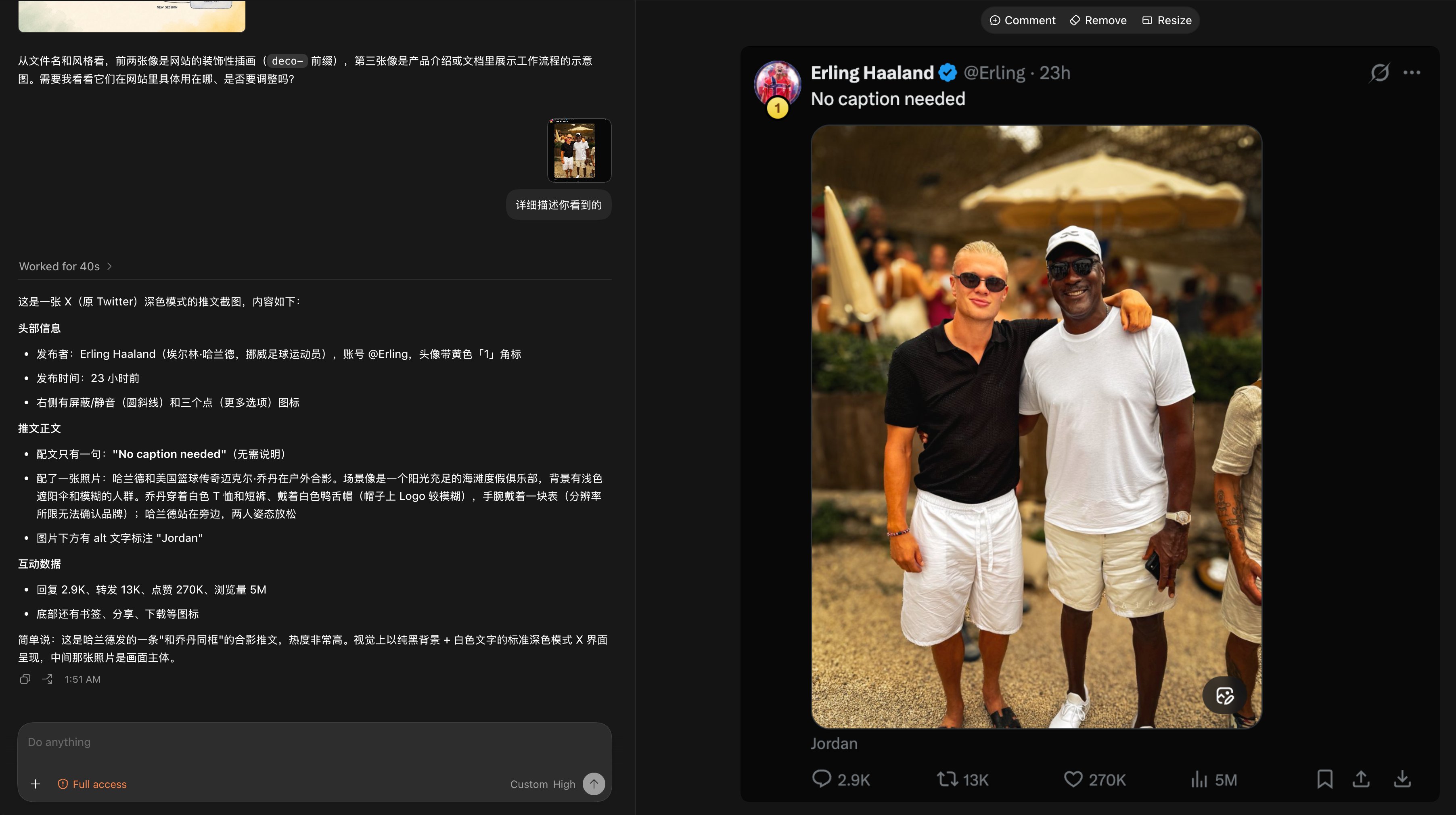
Here is the whole loop inside the Codex desktop app: drop in a tweet screenshot, and a text-only DeepSeek-V4-Flash reads all of it through ModLens: the caption, the engagement numbers (2.9K replies, 270K likes, 5M views), even the image's alt text. Where the resolution runs out, it says so instead of guessing.
|
|
86
|
+
|
|
87
|
+
|
|
88
|
+
|
|
89
|
+
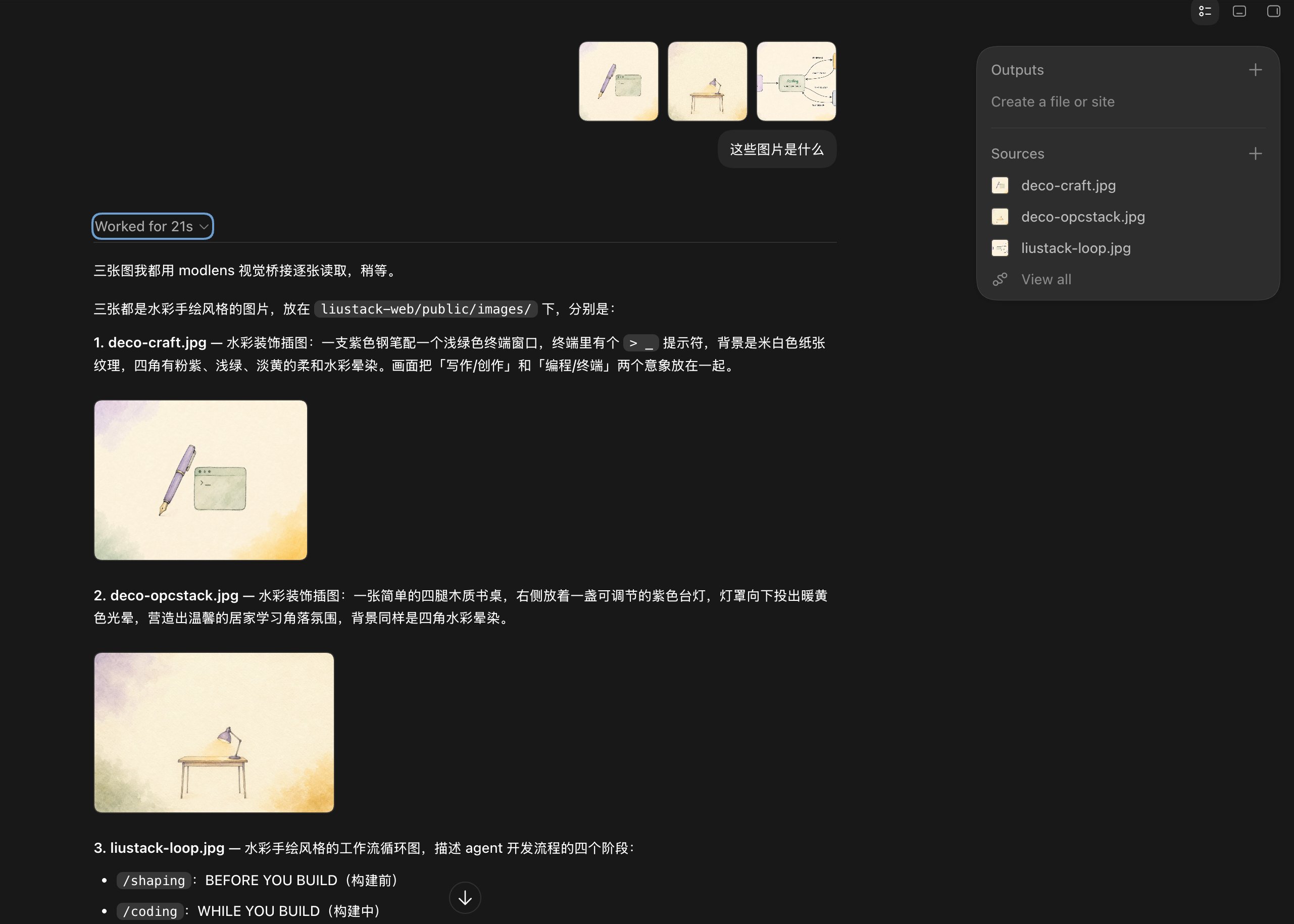
Batch mode works too: drop three illustrations at once, and the model announces it will read them one by one through ModLens, then delivers all three descriptions in 21 seconds, design intent included.
|
|
90
|
+
|
|
91
|
+
|
|
80
92
|
|
|
81
93
|
## CLI reference
|
|
82
94
|
|
|
@@ -97,16 +109,37 @@ modlens -i <image-path-or-url> [options]
|
|
|
97
109
|
|
|
98
110
|
Reach for `-m gemini-3.1-pro-high` on dense screenshots or tricky documents. Output contract: [skills/modlens/references/output-schema.md](skills/modlens/references/output-schema.md).
|
|
99
111
|
|
|
112
|
+
## Providers and config
|
|
113
|
+
|
|
114
|
+
ModLens ships five vision providers. `antigravity-cli` stays the default: zero keys, pure free quota.
|
|
115
|
+
|
|
116
|
+
| Provider | Needs | Typical speed | Notes |
|
|
117
|
+
| :-- | :-- | :-- | :-- |
|
|
118
|
+
| `antigravity-cli` (default) | `agy` signed in | 15-40s | free quota, full agent loop |
|
|
119
|
+
| `gemini-api` | free AI Studio key | 5-10s | fastest free route, schema enforced server-side |
|
|
120
|
+
| `openai` | baseUrl + apiKey + model | endpoint-dependent | any OpenAI-compatible multimodal endpoint (qwen-vl, GLM, ...) |
|
|
121
|
+
| `anthropic` | `ANTHROPIC_API_KEY` | a few seconds | Claude Haiku by default, schema via forced tool call |
|
|
122
|
+
| `claude-cli` | Claude Code signed in | 20-45s | no key, rides your Claude subscription, Read-only permissions |
|
|
123
|
+
|
|
124
|
+
Config lives in `~/.modlens/config.json`. Environment variables override the file (`GEMINI_API_KEY`, `OPENAI_API_KEY`, `OPENAI_BASE_URL`, `ANTHROPIC_API_KEY`), and CLI flags override everything.
|
|
125
|
+
|
|
126
|
+
```bash
|
|
127
|
+
modlens config init # write a starter config
|
|
128
|
+
modlens config set gemini-api.apiKey <key> # saved with 0600 perms
|
|
129
|
+
modlens config show # keys come out masked
|
|
130
|
+
modlens config set provider gemini-api # switch the default provider
|
|
131
|
+
```
|
|
132
|
+
|
|
133
|
+
The free Gemini key takes three minutes at [aistudio.google.com](https://aistudio.google.com), no credit card. Or skip the manual work entirely and tell your agent: "configure modlens with my Gemini API key".
|
|
134
|
+
|
|
100
135
|
## Using it in Codex (DeepSeek and friends)
|
|
101
136
|
|
|
102
|
-
Codex speaks only the Responses API, and DeepSeek's official endpoint supports it natively. Start with the [official integration guide](https://api-docs.deepseek.com/quick_start/agent_integrations/codex/): its `models.json` declares deepseek-v4-flash as text-only (`input_modalities: ["text"]`), and that one line is what unlocks
|
|
137
|
+
Codex speaks only the Responses API, and DeepSeek's official endpoint supports it natively. Start with the [official integration guide](https://api-docs.deepseek.com/quick_start/agent_integrations/codex/): its `models.json` declares deepseek-v4-flash as text-only (`input_modalities: ["text"]`), and that one line is what unlocks the whole flow.
|
|
103
138
|
|
|
104
139
|
One catch: once text-only is declared, the Codex TUI **blocks Ctrl+V image paste outright** (`Model deepseek-v4-flash does not support image inputs`). The gate sits in the input box itself, so the image never makes it into the message. Two moves get around it, both verified end to end with deepseek-v4-flash:
|
|
105
140
|
|
|
106
141
|
- **Drag the image file into the terminal**, or type its path. The path lands as plain text, and the modlens skill picks it up from there.
|
|
107
|
-
- Attach it with `codex exec -i image.png "..."`.
|
|
108
|
-
|
|
109
|
-
Skip `models.json` (a bare custom-model config) and Codex assumes your model can see images, sending them raw, and whether that survives depends on the provider's patience. Dragging the file in is the one move that works everywhere, in every harness.
|
|
142
|
+
- Attach it with `codex exec -i image.png "..."`. The skill reads the path out of the message tag.
|
|
110
143
|
|
|
111
144
|
## Why a bridge instead of a multimodal model?
|
|
112
145
|
|
|
@@ -116,22 +149,22 @@ Skip `models.json` (a bare custom-model config) and Codex assumes your model can
|
|
|
116
149
|
|
|
117
150
|
ModSearch, ModLens's sibling project, plays the same trick for web search and page fetching: [liustack/modsearch](https://github.com/liustack/modsearch).
|
|
118
151
|
|
|
119
|
-
##
|
|
152
|
+
## Shameless plug
|
|
120
153
|
|
|
121
|
-
ModLens v2 was shaped, coded, and shipped with **[liustack](https://github.com/liustack/liustack)
|
|
154
|
+
This project runs on LIUSTACK Skills. ModLens v2 was shaped, coded, and shipped with **[liustack](https://github.com/liustack/liustack)** end to end: `shaping` before you build, `coding` while you build, `dig` when it breaks, `snapshot` when you hand off. Lighter than Superpowers, and sharper.
|
|
122
155
|
|
|
123
|
-
**ModLens
|
|
156
|
+
**ModLens gives your model eyes. LIUSTACK Skills gives your dev workflow wings:**
|
|
124
157
|
|
|
125
158
|
```bash
|
|
126
159
|
npx -y skills add liustack/liustack -g
|
|
127
160
|
```
|
|
128
161
|
|
|
129
|
-
⭐ Like
|
|
162
|
+
⭐ Like it? [Star ModLens](https://github.com/liustack/modlens) and [star liustack](https://github.com/liustack/liustack). Stars are how the next developer finds them.
|
|
130
163
|
|
|
131
164
|
## Security notes
|
|
132
165
|
|
|
133
|
-
- ModLens runs `agy` with `--dangerously-skip-permissions`, because print mode
|
|
134
|
-
- Vision output is evidence
|
|
166
|
+
- ModLens runs `agy` with `--dangerously-skip-permissions`, because print mode can fail in some setups without it. The prompt keeps the agent to reading that one image and tells it to treat image content as data, never as instructions. Even so, only point it at images you would open yourself, and run it inside a sandboxed workspace when you can.
|
|
167
|
+
- Vision output is evidence. Anything the engine cannot read lands in `uncertainty` instead of getting invented. Pixel bounding boxes and confidence scores were dropped in v2 because models fabricate them.
|
|
135
168
|
|
|
136
169
|
## Disclaimer
|
|
137
170
|
|
package/README.zh-CN.md
CHANGED
|
@@ -1,7 +1,7 @@
|
|
|
1
1
|
<div align="center">
|
|
2
2
|
<img src="https://raw.githubusercontent.com/liustack/modlens/main/assets/banner.jpg" width="100%" alt="ModLens,给纯文本 LLM 外挂视觉" />
|
|
3
3
|
<h1>ModLens</h1>
|
|
4
|
-
<p><b
|
|
4
|
+
<p><b>免费给你的大语言模型(纯文本 LLM)外挂视觉能力。</b></p>
|
|
5
5
|
<p>
|
|
6
6
|
<a href="https://www.npmjs.com/package/@liustack/modlens"><img src="https://img.shields.io/npm/v/@liustack/modlens" alt="npm"></a>
|
|
7
7
|
<a href="LICENSE"><img src="https://img.shields.io/badge/license-MIT-blue.svg" alt="License"></a>
|
|
@@ -9,12 +9,12 @@
|
|
|
9
9
|
<p><a href="./README.md">English</a></p>
|
|
10
10
|
</div>
|
|
11
11
|
|
|
12
|
-
DeepSeek-V4-Flash
|
|
12
|
+
DeepSeek-V4-Flash 碗大又好吃,速度快,性能强,要说唯一的缺点就是没有多模态。不仅 DeepSeek-V4-Flash,只要是纯文本语言模型,跑在 Codex、Claude Code、Pi Agent、OpenClaw 中,都有这个问题。
|
|
13
13
|
|
|
14
|
-
|
|
14
|
+
ModLens 用最轻量级方案解决这个问题。ModLens 不会入侵你的配置,也不会给你添加本地代理,ModLens 只是一个视觉外挂,有 cli 或 skill 两种模式。ModLens 能产出结构化的视觉证据:文字、版面、区块、实体、关系、视觉线索。ModLens 由 Antigravity [Antigravity CLI](https://antigravity.google)(`agy`)驱动,而 Antigravity 的视觉由免费额度的 Gemini 3.6 Flash 驱动。众所周知,Gemini 的识图能力,连 Fable 5 都吊打。原理如下:
|
|
15
15
|
|
|
16
16
|
```text
|
|
17
|
-
|
|
17
|
+
Agent Harness 中的纯文本模型 ──▶ modlens skill(遇到图片自动触发)
|
|
18
18
|
│
|
|
19
19
|
▼
|
|
20
20
|
agy · Gemini 3.6 Flash(免费额度)
|
|
@@ -23,8 +23,6 @@ DeepSeek-V4-Flash 便宜又能打,可惜是个瞎子。甩一张截图过去
|
|
|
23
23
|
结构化 JSON 证据 ──▶ 模型带着视力回答
|
|
24
24
|
```
|
|
25
25
|
|
|
26
|
-
skill 装一次,你的 agent 以后见着图片自己就处理了。模型不用换,API key 不用要,提示词也不用改。
|
|
27
|
-
|
|
28
26
|
## 快速开始
|
|
29
27
|
|
|
30
28
|
**1. 安装 Antigravity CLI 并登录**(一次性):
|
|
@@ -37,7 +35,7 @@ agy # 浏览器完成登录后退出
|
|
|
37
35
|
**2. 安装 skill。** 直接告诉你的 agent(Claude Code、Codex、OpenClaw、Cursor 等):
|
|
38
36
|
|
|
39
37
|
```text
|
|
40
|
-
|
|
38
|
+
安装这个 skill https://github.com/liustack/modlens
|
|
41
39
|
```
|
|
42
40
|
|
|
43
41
|
或者自己动手:
|
|
@@ -46,7 +44,7 @@ Install the skill from https://github.com/liustack/modlens
|
|
|
46
44
|
npx -y skills add liustack/modlens
|
|
47
45
|
```
|
|
48
46
|
|
|
49
|
-
**3. 用起来。**
|
|
47
|
+
**3. 用起来。** 在 cli 里粘贴个图片路径,随便问,skill 会自动触发。
|
|
50
48
|
|
|
51
49
|
## 看看效果
|
|
52
50
|
|
|
@@ -69,14 +67,28 @@ npx @liustack/modlens -i workflow.jpg
|
|
|
69
67
|
{ "language": "en", "text": "BEFORE YOU BUILD" }
|
|
70
68
|
]
|
|
71
69
|
},
|
|
72
|
-
"layout": {
|
|
70
|
+
"layout": {
|
|
71
|
+
"regions": [
|
|
72
|
+
{
|
|
73
|
+
"reading_order": 1,
|
|
74
|
+
"text": "/shaping BEFORE YOU BUILD",
|
|
75
|
+
"type": "other"
|
|
76
|
+
}
|
|
77
|
+
]
|
|
78
|
+
},
|
|
73
79
|
"uncertainty": []
|
|
74
80
|
},
|
|
75
81
|
"meta": { "model": "gemini-3.6-flash-low", "durationSeconds": 25.4 }
|
|
76
82
|
}
|
|
77
83
|
```
|
|
78
84
|
|
|
79
|
-
|
|
85
|
+
整条链路在 Codex 桌面 App 里跑起来是这样:丢一张推文截图,纯文本的 DeepSeek-V4-Flash 通过 ModLens 读出了全部内容:配文、互动数据(2.9K 回复、270K 点赞、5M 浏览)、连图片的 alt 文字都没放过。分辨率不够的地方,它老实说读不清,不瞎编。
|
|
86
|
+
|
|
87
|
+

|
|
88
|
+
|
|
89
|
+
批量也不在话下:一次丢三张插画进去,模型自己说「三张图我都用 modlens 视觉桥接逐张读取」,21 秒后逐张交卷,连画面的设计意图都点出来了。
|
|
90
|
+
|
|
91
|
+

|
|
80
92
|
|
|
81
93
|
## CLI 参数
|
|
82
94
|
|
|
@@ -84,19 +96,42 @@ npx @liustack/modlens -i workflow.jpg
|
|
|
84
96
|
modlens -i <图片路径或 URL> [选项]
|
|
85
97
|
```
|
|
86
98
|
|
|
87
|
-
| 参数
|
|
88
|
-
|
|
|
89
|
-
| `-i, --input <path\|url>` | 要解析的图片(必填)
|
|
90
|
-
| `-o, --output <path>`
|
|
91
|
-
| `-m, --model <name>`
|
|
92
|
-
| `-p, --provider <name>`
|
|
93
|
-
| `--prompt <text>`
|
|
94
|
-
| `--timeout <ms>`
|
|
95
|
-
| `--provider-bin <path>`
|
|
96
|
-
| `--workdir <path>`
|
|
99
|
+
| 参数 | 含义 | 默认值 |
|
|
100
|
+
| :------------------------ | :-------------------------------- | :--------------------- |
|
|
101
|
+
| `-i, --input <path\|url>` | 要解析的图片(必填) | |
|
|
102
|
+
| `-o, --output <path>` | 同时把 JSON 写入文件 | |
|
|
103
|
+
| `-m, --model <name>` | provider 模型 | `gemini-3.6-flash-low` |
|
|
104
|
+
| `-p, --provider <name>` | 视觉 provider | `antigravity-cli` |
|
|
105
|
+
| `--prompt <text>` | 额外关注点,比如 `"重点提取表格"` | |
|
|
106
|
+
| `--timeout <ms>` | provider 超时 | `180000` |
|
|
107
|
+
| `--provider-bin <path>` | provider 可执行文件 | `agy` |
|
|
108
|
+
| `--workdir <path>` | provider 运行目录 | |
|
|
97
109
|
|
|
98
110
|
截图信息密集或文档难啃,换成 `-m gemini-3.1-pro-high`。输出契约见 [skills/modlens/references/output-schema.md](skills/modlens/references/output-schema.md)。
|
|
99
111
|
|
|
112
|
+
## Provider 与配置
|
|
113
|
+
|
|
114
|
+
ModLens 内置五个视觉 provider,默认还是 `antigravity-cli`:零 key,纯免费额度。
|
|
115
|
+
|
|
116
|
+
| Provider | 需要什么 | 速度 | 说明 |
|
|
117
|
+
| :-- | :-- | :-- | :-- |
|
|
118
|
+
| `antigravity-cli`(默认) | `agy` 登录过 | 15-40 秒 | 免费额度,完整 agent 循环 |
|
|
119
|
+
| `gemini-api` | 免费 AI Studio key | 5-10 秒 | 最快的免费路线,服务端强制 schema |
|
|
120
|
+
| `openai` | baseUrl + apiKey + model | 看端点 | 任何 OpenAI 兼容的多模态端点(qwen-vl、GLM 等) |
|
|
121
|
+
| `anthropic` | `ANTHROPIC_API_KEY` | 几秒 | 默认 Claude Haiku,强制工具调用保 schema |
|
|
122
|
+
| `claude-cli` | Claude Code 已登录 | 20-45 秒 | 零 key,吃你的 Claude 订阅额度,只放行 Read 工具 |
|
|
123
|
+
|
|
124
|
+
配置放在 `~/.modlens/config.json`,环境变量能盖过它(`GEMINI_API_KEY`、`OPENAI_API_KEY`、`OPENAI_BASE_URL`、`ANTHROPIC_API_KEY`),CLI 参数最大。
|
|
125
|
+
|
|
126
|
+
```bash
|
|
127
|
+
modlens config init # 生成配置骨架
|
|
128
|
+
modlens config set gemini-api.apiKey <key> # 落盘即 0600 权限
|
|
129
|
+
modlens config show # key 打码显示
|
|
130
|
+
modlens config set provider gemini-api # 换默认 provider
|
|
131
|
+
```
|
|
132
|
+
|
|
133
|
+
免费 Gemini key 去 [aistudio.google.com](https://aistudio.google.com) 领,三分钟,不要信用卡。嫌麻烦就直接跟你的 agent 说一句「帮我把 Gemini key 配进 modlens」,让它自己跑命令。
|
|
134
|
+
|
|
100
135
|
## 在 Codex 里用(DeepSeek 等纯文本模型)
|
|
101
136
|
|
|
102
137
|
Codex 只认 Responses API,DeepSeek 官方端点原生支持。先照着[官方集成文档](https://api-docs.deepseek.com/zh-cn/quick_start/agent_integrations/codex)配好:它的 `models.json` 把 deepseek-v4-flash 声明成纯文本(`input_modalities: ["text"]`),这一行就是打通下面整条链路的钥匙。
|
|
@@ -104,9 +139,7 @@ Codex 只认 Responses API,DeepSeek 官方端点原生支持。先照着[官
|
|
|
104
139
|
有个坑要注意:声明纯文本之后,Codex TUI 会**直接拦下 Ctrl+V 粘贴图片**(报错 `Model deepseek-v4-flash does not support image inputs`),闸门卡在输入框那一层,图片压根到不了消息里。能用的招数有两个,都拿 deepseek-v4-flash 端到端验证过:
|
|
105
140
|
|
|
106
141
|
- **把图片文件拖进终端**,或者手打路径。路径以纯文本形式落进消息,modlens skill 接着从这里接手。
|
|
107
|
-
- 用 `codex exec -i 图片.png "..."`
|
|
108
|
-
|
|
109
|
-
不配 `models.json`(裸的自定义模型配置)的话,Codex 会默认你的模型能看图,把图片原样发过去,能不能扛住全看服务商脾气好不好。拖文件这一招,换到哪个宿主都稳。
|
|
142
|
+
- 用 `codex exec -i 图片.png "..."` skill 从这里把路径抠出来。
|
|
110
143
|
|
|
111
144
|
## 为什么外挂,而不是换多模态模型?
|
|
112
145
|
|
|
@@ -116,11 +149,11 @@ Codex 只认 Responses API,DeepSeek 官方端点原生支持。先照着[官
|
|
|
116
149
|
|
|
117
150
|
姊妹项目 ModSearch 用同一招补上联网搜索和网页抓取:[liustack/modsearch](https://github.com/liustack/modsearch)。
|
|
118
151
|
|
|
119
|
-
##
|
|
152
|
+
## 插入一条硬广告
|
|
120
153
|
|
|
121
|
-
ModLens v2 从需求成形、编码到交付,全程用 **[liustack](https://github.com/liustack/liustack)**
|
|
154
|
+
本项目由 LIUSTACK Skills 驱动,ModLens v2 从需求成形、编码到交付,全程用 **[liustack](https://github.com/liustack/liustack)** 驱动:动手前 `shaping` 捋清楚,编码时 `coding` 上纪律,出问题 `dig` 挖根因,交接时 `snapshot` 留快照。比 Superpowers 更轻,也更强。
|
|
122
155
|
|
|
123
|
-
**ModLens 给你的模型装上眼睛,
|
|
156
|
+
**ModLens 给你的模型装上眼睛,LIUSTACK Skills 给你的开发工作流装上翅膀:**
|
|
124
157
|
|
|
125
158
|
```bash
|
|
126
159
|
npx -y skills add liustack/liustack -g
|
|
@@ -130,8 +163,8 @@ npx -y skills add liustack/liustack -g
|
|
|
130
163
|
|
|
131
164
|
## 安全说明
|
|
132
165
|
|
|
133
|
-
- ModLens 调用 `agy` 时带上 `--dangerously-skip-permissions`,因为 print
|
|
134
|
-
-
|
|
166
|
+
- ModLens 调用 `agy` 时带上 `--dangerously-skip-permissions`,因为 prompt/print 模式不带这个参数在某些场景会失败。提示词已经把 agent 限定在只读那一张图,并要求把图片内容当数据看,绝不当指令执行。即便如此,也只解析你自己敢打开的图片,尽量在沙箱化的工作目录里跑。
|
|
167
|
+
- 视觉输出是证据,引擎读不准的地方会进 `uncertainty`,而不是被编出来凑数。v2 把像素坐标和置信度分数都删了,因为模型会瞎编这两样。
|
|
135
168
|
|
|
136
169
|
## 免责声明
|
|
137
170
|
|
package/dist/main.js
CHANGED
|
@@ -3,8 +3,121 @@ import { Command } from "commander";
|
|
|
3
3
|
import * as fs from "fs";
|
|
4
4
|
import * as path from "path";
|
|
5
5
|
import { spawn } from "child_process";
|
|
6
|
+
import * as os from "os";
|
|
7
|
+
const CONFIG_DIR = path.join(os.homedir(), ".modlens");
|
|
8
|
+
const CONFIG_PATH = path.join(CONFIG_DIR, "config.json");
|
|
9
|
+
const ENV_BINDINGS = {
|
|
10
|
+
"gemini-api": { apiKey: "GEMINI_API_KEY" },
|
|
11
|
+
openai: { apiKey: "OPENAI_API_KEY", baseUrl: "OPENAI_BASE_URL" },
|
|
12
|
+
anthropic: { apiKey: "ANTHROPIC_API_KEY", baseUrl: "ANTHROPIC_BASE_URL" }
|
|
13
|
+
};
|
|
14
|
+
function loadConfigFile(configPath = CONFIG_PATH) {
|
|
15
|
+
let raw;
|
|
16
|
+
try {
|
|
17
|
+
raw = fs.readFileSync(configPath, "utf-8");
|
|
18
|
+
} catch {
|
|
19
|
+
return {};
|
|
20
|
+
}
|
|
21
|
+
try {
|
|
22
|
+
const parsed = JSON.parse(raw);
|
|
23
|
+
if (!parsed || typeof parsed !== "object") {
|
|
24
|
+
return {};
|
|
25
|
+
}
|
|
26
|
+
return parsed;
|
|
27
|
+
} catch (error) {
|
|
28
|
+
throw new Error(
|
|
29
|
+
`Failed to parse ${configPath}: ${error.message}. Fix or delete the file.`
|
|
30
|
+
);
|
|
31
|
+
}
|
|
32
|
+
}
|
|
33
|
+
function defaultProviderName(config2) {
|
|
34
|
+
return config2.provider?.trim() || "antigravity-cli";
|
|
35
|
+
}
|
|
36
|
+
function resolveProviderSettings(providerName, config2, env = process.env) {
|
|
37
|
+
const fromFile = config2.providers?.[providerName] ?? {};
|
|
38
|
+
const bindings = ENV_BINDINGS[providerName] ?? {};
|
|
39
|
+
const settings = { ...fromFile };
|
|
40
|
+
for (const [field, envName] of Object.entries(bindings)) {
|
|
41
|
+
const value = env[envName]?.trim();
|
|
42
|
+
if (value) {
|
|
43
|
+
settings[field] = value;
|
|
44
|
+
}
|
|
45
|
+
}
|
|
46
|
+
return settings;
|
|
47
|
+
}
|
|
48
|
+
function setConfigValue(dottedKey, value, configPath = CONFIG_PATH) {
|
|
49
|
+
const config2 = loadConfigFile(configPath);
|
|
50
|
+
if (dottedKey === "provider") {
|
|
51
|
+
config2.provider = value;
|
|
52
|
+
} else {
|
|
53
|
+
const dot = dottedKey.indexOf(".");
|
|
54
|
+
if (dot <= 0 || dot === dottedKey.length - 1) {
|
|
55
|
+
throw new Error(
|
|
56
|
+
`Invalid config key: ${dottedKey}. Use "provider" or "<provider>.<apiKey|baseUrl|model>".`
|
|
57
|
+
);
|
|
58
|
+
}
|
|
59
|
+
const providerName = dottedKey.slice(0, dot);
|
|
60
|
+
const field = dottedKey.slice(dot + 1);
|
|
61
|
+
if (!["apiKey", "baseUrl", "model"].includes(field)) {
|
|
62
|
+
throw new Error(`Unknown config field: ${field}. Use apiKey, baseUrl, or model.`);
|
|
63
|
+
}
|
|
64
|
+
config2.providers ??= {};
|
|
65
|
+
config2.providers[providerName] ??= {};
|
|
66
|
+
config2.providers[providerName][field] = value;
|
|
67
|
+
}
|
|
68
|
+
fs.mkdirSync(path.dirname(configPath), { recursive: true });
|
|
69
|
+
fs.writeFileSync(configPath, `${JSON.stringify(config2, null, 2)}
|
|
70
|
+
`, { mode: 384 });
|
|
71
|
+
try {
|
|
72
|
+
fs.chmodSync(configPath, 384);
|
|
73
|
+
} catch {
|
|
74
|
+
}
|
|
75
|
+
}
|
|
76
|
+
const CONFIG_TEMPLATE = {
|
|
77
|
+
provider: "antigravity-cli",
|
|
78
|
+
providers: {
|
|
79
|
+
"antigravity-cli": { model: "gemini-3.6-flash-low" },
|
|
80
|
+
"gemini-api": { apiKey: "", model: "gemini-3.6-flash" },
|
|
81
|
+
openai: { baseUrl: "", apiKey: "", model: "" },
|
|
82
|
+
anthropic: { apiKey: "", model: "claude-haiku-4-5-20251001" },
|
|
83
|
+
"claude-cli": { model: "haiku" }
|
|
84
|
+
}
|
|
85
|
+
};
|
|
86
|
+
function initConfigFile(configPath = CONFIG_PATH, force = false) {
|
|
87
|
+
if (!force && fs.existsSync(configPath)) {
|
|
88
|
+
throw new Error(`${configPath} already exists. Use --force to overwrite.`);
|
|
89
|
+
}
|
|
90
|
+
fs.mkdirSync(path.dirname(configPath), { recursive: true });
|
|
91
|
+
fs.writeFileSync(configPath, `${JSON.stringify(CONFIG_TEMPLATE, null, 2)}
|
|
92
|
+
`, { mode: 384 });
|
|
93
|
+
try {
|
|
94
|
+
fs.chmodSync(configPath, 384);
|
|
95
|
+
} catch {
|
|
96
|
+
}
|
|
97
|
+
}
|
|
98
|
+
function renderConfig(config2) {
|
|
99
|
+
const masked = {
|
|
100
|
+
...config2,
|
|
101
|
+
providers: Object.fromEntries(
|
|
102
|
+
Object.entries(config2.providers ?? {}).map(([name, settings]) => [
|
|
103
|
+
name,
|
|
104
|
+
{
|
|
105
|
+
...settings,
|
|
106
|
+
...settings.apiKey ? { apiKey: maskKey(settings.apiKey) } : {}
|
|
107
|
+
}
|
|
108
|
+
])
|
|
109
|
+
)
|
|
110
|
+
};
|
|
111
|
+
return JSON.stringify(masked, null, 2);
|
|
112
|
+
}
|
|
113
|
+
function maskKey(key) {
|
|
114
|
+
if (key.length <= 8) {
|
|
115
|
+
return "****";
|
|
116
|
+
}
|
|
117
|
+
return `${key.slice(0, 6)}...${key.slice(-2)}`;
|
|
118
|
+
}
|
|
6
119
|
function buildVisionPrompt(options) {
|
|
7
|
-
const readInstruction = options.imageKind === "remote" ? `Fetch the image at this URL and analyze it: ${options.imageSource}` : `Read the image file at this path and analyze it: ${options.imageSource}`;
|
|
120
|
+
const readInstruction = options.imageKind === "inline" ? "Analyze the image attached to this message." : options.imageKind === "remote" ? `Fetch the image at this URL and analyze it: ${options.imageSource}` : `Read the image file at this path and analyze it: ${options.imageSource}`;
|
|
8
121
|
const basePrompt = `${readInstruction}
|
|
9
122
|
|
|
10
123
|
You are a vision parsing engine for a text-only LLM.
|
|
@@ -157,11 +270,11 @@ function buildAntigravityInvocation(options) {
|
|
|
157
270
|
};
|
|
158
271
|
}
|
|
159
272
|
function parseAntigravityOutput(stdout) {
|
|
160
|
-
const envelope = parseEnvelope(stdout);
|
|
273
|
+
const envelope = parseEnvelope$1(stdout);
|
|
161
274
|
if (envelope.status && envelope.status !== "SUCCESS") {
|
|
162
275
|
throw new Error(`Antigravity CLI reported status ${envelope.status}.`);
|
|
163
276
|
}
|
|
164
|
-
const result = envelope.structured_output ?? (typeof envelope.response === "string" ? tryParseJson(envelope.response) : null);
|
|
277
|
+
const result = envelope.structured_output ?? (typeof envelope.response === "string" ? tryParseJson$1(envelope.response) : null);
|
|
165
278
|
if (result === null || result === void 0) {
|
|
166
279
|
throw new Error(
|
|
167
280
|
"Antigravity CLI output contains no structured result. Check that the model finished the task (auth, quota, timeout)."
|
|
@@ -176,14 +289,14 @@ function parseAntigravityOutput(stdout) {
|
|
|
176
289
|
}
|
|
177
290
|
};
|
|
178
291
|
}
|
|
179
|
-
function parseEnvelope(stdout) {
|
|
292
|
+
function parseEnvelope$1(stdout) {
|
|
180
293
|
const trimmed = stdout.trim();
|
|
181
|
-
let parsed = tryParseJson(trimmed);
|
|
294
|
+
let parsed = tryParseJson$1(trimmed);
|
|
182
295
|
if (parsed === null) {
|
|
183
296
|
const firstBrace = trimmed.indexOf("{");
|
|
184
297
|
const lastBrace = trimmed.lastIndexOf("}");
|
|
185
298
|
if (firstBrace >= 0 && lastBrace > firstBrace) {
|
|
186
|
-
parsed = tryParseJson(trimmed.slice(firstBrace, lastBrace + 1));
|
|
299
|
+
parsed = tryParseJson$1(trimmed.slice(firstBrace, lastBrace + 1));
|
|
187
300
|
}
|
|
188
301
|
}
|
|
189
302
|
if (!parsed || typeof parsed !== "object") {
|
|
@@ -191,7 +304,7 @@ function parseEnvelope(stdout) {
|
|
|
191
304
|
}
|
|
192
305
|
return parsed;
|
|
193
306
|
}
|
|
194
|
-
function tryParseJson(text) {
|
|
307
|
+
function tryParseJson$1(text) {
|
|
195
308
|
try {
|
|
196
309
|
return JSON.parse(text);
|
|
197
310
|
} catch {
|
|
@@ -204,19 +317,408 @@ const antigravityCliProvider = {
|
|
|
204
317
|
buildInvocation: buildAntigravityInvocation,
|
|
205
318
|
parseOutput: parseAntigravityOutput
|
|
206
319
|
};
|
|
320
|
+
const MIME_BY_EXT = {
|
|
321
|
+
".jpg": "image/jpeg",
|
|
322
|
+
".jpeg": "image/jpeg",
|
|
323
|
+
".png": "image/png",
|
|
324
|
+
".webp": "image/webp",
|
|
325
|
+
".gif": "image/gif",
|
|
326
|
+
".heic": "image/heic",
|
|
327
|
+
".heif": "image/heif"
|
|
328
|
+
};
|
|
329
|
+
function mimeTypeFor(source) {
|
|
330
|
+
const ext = path.extname(new URL(source, "file:///").pathname).toLowerCase();
|
|
331
|
+
return MIME_BY_EXT[ext] ?? "image/jpeg";
|
|
332
|
+
}
|
|
333
|
+
function readLocalImageBase64(filePath) {
|
|
334
|
+
const data = fs.readFileSync(filePath).toString("base64");
|
|
335
|
+
return { data, mimeType: mimeTypeFor(filePath) };
|
|
336
|
+
}
|
|
337
|
+
async function fetchRemoteImageBase64(url, timeoutMs) {
|
|
338
|
+
const response = await fetch(url, { signal: AbortSignal.timeout(timeoutMs) });
|
|
339
|
+
if (!response.ok) {
|
|
340
|
+
throw new Error(`Failed to download image (${response.status}): ${url}`);
|
|
341
|
+
}
|
|
342
|
+
const buffer = Buffer.from(await response.arrayBuffer());
|
|
343
|
+
const contentType = response.headers.get("content-type")?.split(";")[0]?.trim();
|
|
344
|
+
return {
|
|
345
|
+
data: buffer.toString("base64"),
|
|
346
|
+
mimeType: contentType?.startsWith("image/") ? contentType : mimeTypeFor(url)
|
|
347
|
+
};
|
|
348
|
+
}
|
|
349
|
+
function extractJson(text) {
|
|
350
|
+
const trimmed = text.trim();
|
|
351
|
+
const direct = tryParse(trimmed);
|
|
352
|
+
if (direct !== null) {
|
|
353
|
+
return direct;
|
|
354
|
+
}
|
|
355
|
+
const fenced = /```(?:json)?\s*([\s\S]*?)```/i.exec(trimmed);
|
|
356
|
+
if (fenced) {
|
|
357
|
+
const parsed = tryParse(fenced[1].trim());
|
|
358
|
+
if (parsed !== null) {
|
|
359
|
+
return parsed;
|
|
360
|
+
}
|
|
361
|
+
}
|
|
362
|
+
const first = trimmed.indexOf("{");
|
|
363
|
+
const last = trimmed.lastIndexOf("}");
|
|
364
|
+
if (first >= 0 && last > first) {
|
|
365
|
+
return tryParse(trimmed.slice(first, last + 1));
|
|
366
|
+
}
|
|
367
|
+
return null;
|
|
368
|
+
}
|
|
369
|
+
function tryParse(text) {
|
|
370
|
+
try {
|
|
371
|
+
return JSON.parse(text);
|
|
372
|
+
} catch {
|
|
373
|
+
return null;
|
|
374
|
+
}
|
|
375
|
+
}
|
|
376
|
+
const ANTHROPIC_DEFAULT_MODEL = "claude-haiku-4-5-20251001";
|
|
377
|
+
const DEFAULT_BASE_URL$1 = "https://api.anthropic.com";
|
|
378
|
+
const TOOL_NAME = "report_vision_evidence";
|
|
379
|
+
async function executeAnthropicApi(options) {
|
|
380
|
+
const apiKey = options.settings?.apiKey;
|
|
381
|
+
if (!apiKey) {
|
|
382
|
+
throw new Error(
|
|
383
|
+
"anthropic provider needs an API key. Set ANTHROPIC_API_KEY, or run: modlens config set anthropic.apiKey <key>"
|
|
384
|
+
);
|
|
385
|
+
}
|
|
386
|
+
const model = options.model || options.settings?.model || ANTHROPIC_DEFAULT_MODEL;
|
|
387
|
+
const baseUrl = (options.settings?.baseUrl || DEFAULT_BASE_URL$1).replace(/\/$/, "");
|
|
388
|
+
const imageSource = options.imageKind === "remote" ? { type: "url", url: options.imageSource } : (() => {
|
|
389
|
+
const image = readLocalImageBase64(options.imageSource);
|
|
390
|
+
return {
|
|
391
|
+
type: "base64",
|
|
392
|
+
media_type: image.mimeType,
|
|
393
|
+
data: image.data
|
|
394
|
+
};
|
|
395
|
+
})();
|
|
396
|
+
const prompt = `${buildVisionPrompt({
|
|
397
|
+
imageSource: options.imageSource,
|
|
398
|
+
imageKind: "inline",
|
|
399
|
+
extraPrompt: options.extraPrompt
|
|
400
|
+
})}
|
|
401
|
+
|
|
402
|
+
Report your findings by calling the ${TOOL_NAME} tool.`;
|
|
403
|
+
const startedAt = Date.now();
|
|
404
|
+
const response = await fetch(`${baseUrl}/v1/messages`, {
|
|
405
|
+
method: "POST",
|
|
406
|
+
headers: {
|
|
407
|
+
"x-api-key": apiKey,
|
|
408
|
+
"anthropic-version": "2023-06-01",
|
|
409
|
+
"Content-Type": "application/json"
|
|
410
|
+
},
|
|
411
|
+
body: JSON.stringify({
|
|
412
|
+
model,
|
|
413
|
+
max_tokens: 4096,
|
|
414
|
+
tools: [
|
|
415
|
+
{
|
|
416
|
+
name: TOOL_NAME,
|
|
417
|
+
description: "Report the structured visual evidence extracted from the image.",
|
|
418
|
+
input_schema: VISION_RESULT_SCHEMA
|
|
419
|
+
}
|
|
420
|
+
],
|
|
421
|
+
tool_choice: { type: "tool", name: TOOL_NAME },
|
|
422
|
+
messages: [
|
|
423
|
+
{
|
|
424
|
+
role: "user",
|
|
425
|
+
content: [
|
|
426
|
+
{ type: "image", source: imageSource },
|
|
427
|
+
{ type: "text", text: prompt }
|
|
428
|
+
]
|
|
429
|
+
}
|
|
430
|
+
]
|
|
431
|
+
}),
|
|
432
|
+
signal: AbortSignal.timeout(options.timeoutMs)
|
|
433
|
+
});
|
|
434
|
+
if (!response.ok) {
|
|
435
|
+
const body = await response.text();
|
|
436
|
+
throw new Error(`Anthropic API error ${response.status}: ${truncate$3(body)}`);
|
|
437
|
+
}
|
|
438
|
+
const payload = await response.json();
|
|
439
|
+
const toolUse = payload.content?.find((block) => block.type === "tool_use");
|
|
440
|
+
if (!toolUse?.input) {
|
|
441
|
+
throw new Error("Anthropic API returned no tool_use block.");
|
|
442
|
+
}
|
|
443
|
+
return {
|
|
444
|
+
result: toolUse.input,
|
|
445
|
+
meta: {
|
|
446
|
+
conversationId: null,
|
|
447
|
+
durationSeconds: (Date.now() - startedAt) / 1e3,
|
|
448
|
+
usage: payload.usage ?? null
|
|
449
|
+
}
|
|
450
|
+
};
|
|
451
|
+
}
|
|
452
|
+
function truncate$3(text) {
|
|
453
|
+
return text.length > 300 ? `${text.slice(0, 300)}...` : text;
|
|
454
|
+
}
|
|
455
|
+
const anthropicApiProvider = {
|
|
456
|
+
name: "anthropic",
|
|
457
|
+
defaultModel: ANTHROPIC_DEFAULT_MODEL,
|
|
458
|
+
execute: executeAnthropicApi
|
|
459
|
+
};
|
|
460
|
+
const CLAUDE_CLI_DEFAULT_MODEL = "haiku";
|
|
461
|
+
function buildClaudeCliInvocation(options) {
|
|
462
|
+
if (options.imageKind === "remote") {
|
|
463
|
+
throw new Error(
|
|
464
|
+
"claude-cli provider reads local files only. Download the image first, or use -p gemini-api for remote URLs."
|
|
465
|
+
);
|
|
466
|
+
}
|
|
467
|
+
const prompt = buildVisionPrompt({
|
|
468
|
+
imageSource: options.imageSource,
|
|
469
|
+
imageKind: "local",
|
|
470
|
+
extraPrompt: options.extraPrompt
|
|
471
|
+
});
|
|
472
|
+
const args = [
|
|
473
|
+
"-p",
|
|
474
|
+
prompt,
|
|
475
|
+
"--output-format",
|
|
476
|
+
"json",
|
|
477
|
+
"--json-schema",
|
|
478
|
+
visionResultSchemaJson(),
|
|
479
|
+
"--allowedTools",
|
|
480
|
+
"Read",
|
|
481
|
+
"--model",
|
|
482
|
+
options.model || options.settings?.model || CLAUDE_CLI_DEFAULT_MODEL
|
|
483
|
+
];
|
|
484
|
+
return {
|
|
485
|
+
command: options.providerBin || "claude",
|
|
486
|
+
args,
|
|
487
|
+
cwd: path.resolve(options.workdir || path.dirname(options.imageSource))
|
|
488
|
+
};
|
|
489
|
+
}
|
|
490
|
+
function parseClaudeCliOutput(stdout) {
|
|
491
|
+
const envelope = parseEnvelope(stdout);
|
|
492
|
+
if (envelope.is_error || envelope.subtype && envelope.subtype !== "success") {
|
|
493
|
+
throw new Error(
|
|
494
|
+
`Claude CLI reported ${envelope.subtype ?? "an error"}: ${truncate$2(envelope.result ?? "")}`
|
|
495
|
+
);
|
|
496
|
+
}
|
|
497
|
+
if (typeof envelope.result !== "string" || !envelope.result.trim()) {
|
|
498
|
+
throw new Error("Claude CLI output contains no result. Check login state (run: claude).");
|
|
499
|
+
}
|
|
500
|
+
let result;
|
|
501
|
+
try {
|
|
502
|
+
result = JSON.parse(envelope.result);
|
|
503
|
+
} catch {
|
|
504
|
+
throw new Error(`Claude CLI returned non-JSON result: ${truncate$2(envelope.result)}`);
|
|
505
|
+
}
|
|
506
|
+
return {
|
|
507
|
+
result,
|
|
508
|
+
meta: {
|
|
509
|
+
conversationId: envelope.session_id ?? null,
|
|
510
|
+
durationSeconds: typeof envelope.duration_ms === "number" ? envelope.duration_ms / 1e3 : null,
|
|
511
|
+
usage: envelope.usage ?? null
|
|
512
|
+
}
|
|
513
|
+
};
|
|
514
|
+
}
|
|
515
|
+
function parseEnvelope(stdout) {
|
|
516
|
+
const trimmed = stdout.trim();
|
|
517
|
+
let parsed = tryParseJson(trimmed);
|
|
518
|
+
if (parsed === null) {
|
|
519
|
+
const firstBrace = trimmed.indexOf("{");
|
|
520
|
+
const lastBrace = trimmed.lastIndexOf("}");
|
|
521
|
+
if (firstBrace >= 0 && lastBrace > firstBrace) {
|
|
522
|
+
parsed = tryParseJson(trimmed.slice(firstBrace, lastBrace + 1));
|
|
523
|
+
}
|
|
524
|
+
}
|
|
525
|
+
if (!parsed || typeof parsed !== "object") {
|
|
526
|
+
throw new Error("Failed to parse Claude CLI JSON output.");
|
|
527
|
+
}
|
|
528
|
+
return parsed;
|
|
529
|
+
}
|
|
530
|
+
function tryParseJson(text) {
|
|
531
|
+
try {
|
|
532
|
+
return JSON.parse(text);
|
|
533
|
+
} catch {
|
|
534
|
+
return null;
|
|
535
|
+
}
|
|
536
|
+
}
|
|
537
|
+
function truncate$2(text) {
|
|
538
|
+
return text.length > 300 ? `${text.slice(0, 300)}...` : text;
|
|
539
|
+
}
|
|
540
|
+
const claudeCliProvider = {
|
|
541
|
+
name: "claude-cli",
|
|
542
|
+
defaultModel: CLAUDE_CLI_DEFAULT_MODEL,
|
|
543
|
+
buildInvocation: buildClaudeCliInvocation,
|
|
544
|
+
parseOutput: parseClaudeCliOutput
|
|
545
|
+
};
|
|
546
|
+
const GEMINI_API_DEFAULT_MODEL = "gemini-3.6-flash";
|
|
547
|
+
const DEFAULT_BASE_URL = "https://generativelanguage.googleapis.com";
|
|
548
|
+
async function executeGeminiApi(options) {
|
|
549
|
+
const apiKey = options.settings?.apiKey;
|
|
550
|
+
if (!apiKey) {
|
|
551
|
+
throw new Error(
|
|
552
|
+
"gemini-api provider needs an API key. Set GEMINI_API_KEY, or run: modlens config set gemini-api.apiKey <key> (free key: https://aistudio.google.com)"
|
|
553
|
+
);
|
|
554
|
+
}
|
|
555
|
+
const model = options.model || options.settings?.model || GEMINI_API_DEFAULT_MODEL;
|
|
556
|
+
const baseUrl = (options.settings?.baseUrl || DEFAULT_BASE_URL).replace(/\/$/, "");
|
|
557
|
+
const image = options.imageKind === "remote" ? await fetchRemoteImageBase64(options.imageSource, options.timeoutMs) : readLocalImageBase64(options.imageSource);
|
|
558
|
+
const prompt = buildVisionPrompt({
|
|
559
|
+
imageSource: options.imageSource,
|
|
560
|
+
imageKind: "inline",
|
|
561
|
+
extraPrompt: options.extraPrompt
|
|
562
|
+
});
|
|
563
|
+
const startedAt = Date.now();
|
|
564
|
+
const response = await fetch(`${baseUrl}/v1beta/models/${model}:generateContent`, {
|
|
565
|
+
method: "POST",
|
|
566
|
+
headers: {
|
|
567
|
+
"x-goog-api-key": apiKey,
|
|
568
|
+
"Content-Type": "application/json"
|
|
569
|
+
},
|
|
570
|
+
body: JSON.stringify({
|
|
571
|
+
contents: [
|
|
572
|
+
{
|
|
573
|
+
parts: [
|
|
574
|
+
{ inline_data: { mime_type: image.mimeType, data: image.data } },
|
|
575
|
+
{ text: prompt }
|
|
576
|
+
]
|
|
577
|
+
}
|
|
578
|
+
],
|
|
579
|
+
generationConfig: {
|
|
580
|
+
responseMimeType: "application/json",
|
|
581
|
+
responseJsonSchema: VISION_RESULT_SCHEMA
|
|
582
|
+
}
|
|
583
|
+
}),
|
|
584
|
+
signal: AbortSignal.timeout(options.timeoutMs)
|
|
585
|
+
});
|
|
586
|
+
if (!response.ok) {
|
|
587
|
+
const body = await response.text();
|
|
588
|
+
throw new Error(`Gemini API error ${response.status}: ${truncate$1(body)}`);
|
|
589
|
+
}
|
|
590
|
+
const payload = await response.json();
|
|
591
|
+
const text = payload.candidates?.[0]?.content?.parts?.map((part) => part.text ?? "").join("");
|
|
592
|
+
if (!text) {
|
|
593
|
+
throw new Error("Gemini API returned no text candidate.");
|
|
594
|
+
}
|
|
595
|
+
let result;
|
|
596
|
+
try {
|
|
597
|
+
result = JSON.parse(text);
|
|
598
|
+
} catch {
|
|
599
|
+
throw new Error(`Gemini API returned non-JSON output: ${truncate$1(text)}`);
|
|
600
|
+
}
|
|
601
|
+
return {
|
|
602
|
+
result,
|
|
603
|
+
meta: {
|
|
604
|
+
conversationId: null,
|
|
605
|
+
durationSeconds: (Date.now() - startedAt) / 1e3,
|
|
606
|
+
usage: payload.usageMetadata ?? null
|
|
607
|
+
}
|
|
608
|
+
};
|
|
609
|
+
}
|
|
610
|
+
function truncate$1(text) {
|
|
611
|
+
return text.length > 300 ? `${text.slice(0, 300)}...` : text;
|
|
612
|
+
}
|
|
613
|
+
const geminiApiProvider = {
|
|
614
|
+
name: "gemini-api",
|
|
615
|
+
defaultModel: GEMINI_API_DEFAULT_MODEL,
|
|
616
|
+
execute: executeGeminiApi
|
|
617
|
+
};
|
|
618
|
+
async function executeOpenaiCompat(options) {
|
|
619
|
+
const apiKey = options.settings?.apiKey;
|
|
620
|
+
const baseUrl = options.settings?.baseUrl?.replace(/\/$/, "");
|
|
621
|
+
const model = options.model || options.settings?.model;
|
|
622
|
+
if (!apiKey || !baseUrl || !model) {
|
|
623
|
+
throw new Error(
|
|
624
|
+
"openai provider needs baseUrl, apiKey, and model. Set OPENAI_BASE_URL and OPENAI_API_KEY, or run: modlens config set openai.baseUrl <url> / openai.apiKey <key> / openai.model <name>"
|
|
625
|
+
);
|
|
626
|
+
}
|
|
627
|
+
const imageUrl = options.imageKind === "remote" ? options.imageSource : toDataUrl(readLocalImageBase64(options.imageSource));
|
|
628
|
+
const prompt = `${buildVisionPrompt({
|
|
629
|
+
imageSource: options.imageSource,
|
|
630
|
+
imageKind: "inline",
|
|
631
|
+
extraPrompt: options.extraPrompt
|
|
632
|
+
})}
|
|
633
|
+
|
|
634
|
+
Respond with ONE JSON object only, no markdown fences, no commentary. Fill this exact structure with your findings from the image (do not repeat this template literally, replace every value):
|
|
635
|
+
{"summary":"one paragraph describing the image","ocr":{"full_text":"all visible text","lines":[{"text":"one line","language":"en"}]},"layout":{"regions":[{"type":"title|subtitle|paragraph|list|table|chart|form|code|image|icon|other","reading_order":1,"text":"region text"}]},"semantics":{"scene":"what kind of scene","intent":"what the image is for","entities":[{"name":"entity","type":"kind","evidence":"where seen"}],"relations":[{"subject":"a","predicate":"relates to","object":"b"}]},"visual":{"dominant_colors":["color"],"style":"visual style","notes":["notable visual detail"]},"uncertainty":["anything unreadable or ambiguous"]}`;
|
|
636
|
+
const startedAt = Date.now();
|
|
637
|
+
const response = await fetch(`${baseUrl}/chat/completions`, {
|
|
638
|
+
method: "POST",
|
|
639
|
+
headers: {
|
|
640
|
+
Authorization: `Bearer ${apiKey}`,
|
|
641
|
+
"Content-Type": "application/json"
|
|
642
|
+
},
|
|
643
|
+
body: JSON.stringify({
|
|
644
|
+
model,
|
|
645
|
+
messages: [
|
|
646
|
+
{
|
|
647
|
+
role: "user",
|
|
648
|
+
content: [
|
|
649
|
+
{ type: "image_url", image_url: { url: imageUrl } },
|
|
650
|
+
{ type: "text", text: prompt }
|
|
651
|
+
]
|
|
652
|
+
}
|
|
653
|
+
]
|
|
654
|
+
}),
|
|
655
|
+
signal: AbortSignal.timeout(options.timeoutMs)
|
|
656
|
+
});
|
|
657
|
+
if (!response.ok) {
|
|
658
|
+
const body = await response.text();
|
|
659
|
+
throw new Error(`OpenAI-compatible API error ${response.status}: ${truncate(body)}`);
|
|
660
|
+
}
|
|
661
|
+
const payload = await response.json();
|
|
662
|
+
const text = payload.choices?.[0]?.message?.content;
|
|
663
|
+
if (!text) {
|
|
664
|
+
throw new Error("OpenAI-compatible API returned no message content.");
|
|
665
|
+
}
|
|
666
|
+
const result = extractJson(text);
|
|
667
|
+
if (result === null) {
|
|
668
|
+
throw new Error(`OpenAI-compatible API returned non-JSON output: ${truncate(text)}`);
|
|
669
|
+
}
|
|
670
|
+
const shaped = result;
|
|
671
|
+
if (typeof shaped.summary !== "string" || typeof shaped.ocr !== "object") {
|
|
672
|
+
throw new Error(
|
|
673
|
+
`OpenAI-compatible API returned JSON that does not match the vision schema (missing summary/ocr). Retry, or switch to gemini-api / anthropic for enforced schemas. Got: ${truncate(text)}`
|
|
674
|
+
);
|
|
675
|
+
}
|
|
676
|
+
return {
|
|
677
|
+
result,
|
|
678
|
+
meta: {
|
|
679
|
+
conversationId: null,
|
|
680
|
+
durationSeconds: (Date.now() - startedAt) / 1e3,
|
|
681
|
+
usage: payload.usage ?? null
|
|
682
|
+
}
|
|
683
|
+
};
|
|
684
|
+
}
|
|
685
|
+
function toDataUrl(image) {
|
|
686
|
+
return `data:${image.mimeType};base64,${image.data}`;
|
|
687
|
+
}
|
|
688
|
+
function truncate(text) {
|
|
689
|
+
return text.length > 300 ? `${text.slice(0, 300)}...` : text;
|
|
690
|
+
}
|
|
691
|
+
const openaiCompatProvider = {
|
|
692
|
+
name: "openai",
|
|
693
|
+
defaultModel: "",
|
|
694
|
+
execute: executeOpenaiCompat
|
|
695
|
+
};
|
|
207
696
|
const PROVIDERS = {
|
|
208
697
|
"antigravity-cli": antigravityCliProvider,
|
|
209
698
|
antigravity: antigravityCliProvider,
|
|
210
|
-
agy: antigravityCliProvider
|
|
699
|
+
agy: antigravityCliProvider,
|
|
700
|
+
"gemini-api": geminiApiProvider,
|
|
701
|
+
gemini: geminiApiProvider,
|
|
702
|
+
openai: openaiCompatProvider,
|
|
703
|
+
"openai-compat": openaiCompatProvider,
|
|
704
|
+
anthropic: anthropicApiProvider,
|
|
705
|
+
claude: anthropicApiProvider,
|
|
706
|
+
"claude-cli": claudeCliProvider,
|
|
707
|
+
"claude-code": claudeCliProvider
|
|
211
708
|
};
|
|
212
709
|
function resolveProvider(providerName = "antigravity-cli") {
|
|
213
710
|
const normalized = providerName.trim().toLowerCase();
|
|
214
711
|
const provider = PROVIDERS[normalized];
|
|
215
712
|
if (!provider) {
|
|
216
|
-
throw new Error(
|
|
713
|
+
throw new Error(
|
|
714
|
+
`Unsupported provider: ${providerName}. Available: ${listProviders().join(", ")}`
|
|
715
|
+
);
|
|
217
716
|
}
|
|
218
717
|
return provider;
|
|
219
718
|
}
|
|
719
|
+
function listProviders() {
|
|
720
|
+
return [...new Set(Object.values(PROVIDERS).map((provider) => provider.name))];
|
|
721
|
+
}
|
|
220
722
|
const DEFAULT_TIMEOUT_MS = 18e4;
|
|
221
723
|
const KILL_GRACE_MS = 3e4;
|
|
222
724
|
async function analyzeImage(options) {
|
|
@@ -224,20 +726,35 @@ async function analyzeImage(options) {
|
|
|
224
726
|
if (resolvedInput.kind === "local") {
|
|
225
727
|
validateInputFile(resolvedInput.source);
|
|
226
728
|
}
|
|
227
|
-
const
|
|
729
|
+
const config2 = options.config ?? loadConfigFile();
|
|
730
|
+
const provider = resolveProvider(options.provider || defaultProviderName(config2));
|
|
731
|
+
const settings = resolveProviderSettings(provider.name, config2);
|
|
228
732
|
const timeoutMs = options.timeoutMs ?? DEFAULT_TIMEOUT_MS;
|
|
229
|
-
const model = options.model || provider.defaultModel;
|
|
230
|
-
const
|
|
733
|
+
const model = options.model || settings.model || provider.defaultModel;
|
|
734
|
+
const providerOptions = {
|
|
231
735
|
imageSource: resolvedInput.source,
|
|
232
736
|
imageKind: resolvedInput.kind,
|
|
233
737
|
model,
|
|
234
738
|
extraPrompt: options.prompt,
|
|
235
739
|
providerBin: options.providerBin,
|
|
236
740
|
workdir: options.workdir,
|
|
237
|
-
timeoutMs
|
|
238
|
-
|
|
239
|
-
|
|
240
|
-
|
|
741
|
+
timeoutMs,
|
|
742
|
+
settings
|
|
743
|
+
};
|
|
744
|
+
let parsed;
|
|
745
|
+
if (provider.execute) {
|
|
746
|
+
parsed = await provider.execute(providerOptions);
|
|
747
|
+
} else if (provider.buildInvocation && provider.parseOutput) {
|
|
748
|
+
const invocation = provider.buildInvocation(providerOptions);
|
|
749
|
+
const commandResult = await runCommand(
|
|
750
|
+
provider.name,
|
|
751
|
+
invocation,
|
|
752
|
+
timeoutMs + KILL_GRACE_MS
|
|
753
|
+
);
|
|
754
|
+
parsed = provider.parseOutput(commandResult.stdout);
|
|
755
|
+
} else {
|
|
756
|
+
throw new Error(`Provider ${provider.name} implements neither execute nor buildInvocation.`);
|
|
757
|
+
}
|
|
241
758
|
return {
|
|
242
759
|
image: resolvedInput.source,
|
|
243
760
|
provider: provider.name,
|
|
@@ -327,7 +844,8 @@ function runCommand(providerName, invocation, timeoutMs) {
|
|
|
327
844
|
});
|
|
328
845
|
}
|
|
329
846
|
const program = new Command();
|
|
330
|
-
program.name("modlens").description("Plug-in vision for text-only LLMs: image in, structured JSON evidence out").version("2.
|
|
847
|
+
program.name("modlens").description("Plug-in vision for text-only LLMs: image in, structured JSON evidence out").version("2.2.0");
|
|
848
|
+
program.command("analyze", { isDefault: true }).description("Analyze an image into structured JSON evidence (default command)").requiredOption("-i, --input <path|url>", "Input image path or https URL").option("-o, --output <path>", "Write result JSON to a file").option("-m, --model <name>", "Provider model name").option("-p, --provider <name>", `Vision provider (${listProviders().join(", ")})`).option("--prompt <text>", "Extra focus for this image").option("--timeout <ms>", "Provider timeout in milliseconds", "180000").option("--provider-bin <path>", "Provider binary path (default: agy)").option("--workdir <path>", "Working directory for the provider").action(async (options) => {
|
|
331
849
|
try {
|
|
332
850
|
const timeoutMs = Number.parseInt(options.timeout, 10);
|
|
333
851
|
if (!Number.isFinite(timeoutMs) || timeoutMs <= 0) {
|
|
@@ -358,4 +876,46 @@ program.name("modlens").description("Plug-in vision for text-only LLMs: image in
|
|
|
358
876
|
process.exit(1);
|
|
359
877
|
}
|
|
360
878
|
});
|
|
879
|
+
const config = program.command("config").description(`Manage ${CONFIG_PATH} (providers, keys, models)`);
|
|
880
|
+
config.command("init").description(`Create a starter config at ${CONFIG_PATH}`).option("--force", "Overwrite an existing config file").action((options) => {
|
|
881
|
+
try {
|
|
882
|
+
initConfigFile(CONFIG_PATH, Boolean(options.force));
|
|
883
|
+
process.stdout.write(
|
|
884
|
+
`Created ${CONFIG_PATH}
|
|
885
|
+
Fill in the apiKey fields you need, or use: modlens config set <provider>.apiKey <key>
|
|
886
|
+
`
|
|
887
|
+
);
|
|
888
|
+
} catch (error) {
|
|
889
|
+
process.stderr.write(
|
|
890
|
+
`Error: ${error instanceof Error ? error.message : String(error)}
|
|
891
|
+
`
|
|
892
|
+
);
|
|
893
|
+
process.exit(1);
|
|
894
|
+
}
|
|
895
|
+
});
|
|
896
|
+
config.command("set <key> <value>").description("Set a value, e.g. modlens config set gemini-api.apiKey <key>").action((key, value) => {
|
|
897
|
+
try {
|
|
898
|
+
setConfigValue(key, value);
|
|
899
|
+
process.stdout.write(`Saved ${key} to ${CONFIG_PATH}
|
|
900
|
+
`);
|
|
901
|
+
} catch (error) {
|
|
902
|
+
process.stderr.write(
|
|
903
|
+
`Error: ${error instanceof Error ? error.message : String(error)}
|
|
904
|
+
`
|
|
905
|
+
);
|
|
906
|
+
process.exit(1);
|
|
907
|
+
}
|
|
908
|
+
});
|
|
909
|
+
config.command("show").description("Print the effective config with API keys masked").action(() => {
|
|
910
|
+
try {
|
|
911
|
+
process.stdout.write(`${renderConfig(loadConfigFile())}
|
|
912
|
+
`);
|
|
913
|
+
} catch (error) {
|
|
914
|
+
process.stderr.write(
|
|
915
|
+
`Error: ${error instanceof Error ? error.message : String(error)}
|
|
916
|
+
`
|
|
917
|
+
);
|
|
918
|
+
process.exit(1);
|
|
919
|
+
}
|
|
920
|
+
});
|
|
361
921
|
program.parse();
|
package/package.json
CHANGED
package/skills/modlens/SKILL.md
CHANGED
|
@@ -1,6 +1,6 @@
|
|
|
1
1
|
---
|
|
2
2
|
name: modlens
|
|
3
|
-
description: "Plug-in vision for text-only models. Use whenever the user shares an image (local path, screenshot, photo, chart, document scan, or image URL) and the active model cannot see images or has no vision tool. Runs the modlens CLI to convert the image into structured JSON evidence: OCR text, layout, semantics, visual clues."
|
|
3
|
+
description: "Plug-in vision for text-only models. Use whenever the user shares an image (local path, screenshot, photo, chart, document scan, or image URL) and the active model cannot see images or has no vision tool. Runs the modlens CLI to convert the image into structured JSON evidence: OCR text, layout, semantics, visual clues. Also use when the user asks how to install, configure, or switch modlens providers (Gemini API key, OpenAI-compatible endpoints, Claude API or Claude Code CLI)."
|
|
4
4
|
allowed-tools:
|
|
5
5
|
- Bash
|
|
6
6
|
---
|
|
@@ -12,6 +12,7 @@ Use this skill when:
|
|
|
12
12
|
- The user provides an image path or image URL and asks anything about it
|
|
13
13
|
- The active model has no native vision (text-only model in a coding agent)
|
|
14
14
|
- You need OCR text, layout, or chart/document structure as evidence before reasoning
|
|
15
|
+
- The user asks how to configure modlens, get an API key for it, or switch its provider: follow `references/configure.md` and run the commands for them
|
|
15
16
|
|
|
16
17
|
Do not use this skill for:
|
|
17
18
|
|
|
@@ -22,23 +23,30 @@ Do not use this skill for:
|
|
|
22
23
|
|
|
23
24
|
```bash
|
|
24
25
|
modlens --version
|
|
25
|
-
agy --version
|
|
26
26
|
```
|
|
27
27
|
|
|
28
28
|
If `modlens` is missing, run it via `npx @liustack/modlens` instead.
|
|
29
29
|
|
|
30
|
-
|
|
30
|
+
ModLens supports five vision providers. Check what is configured:
|
|
31
31
|
|
|
32
32
|
```bash
|
|
33
|
-
|
|
33
|
+
modlens config show
|
|
34
34
|
```
|
|
35
35
|
|
|
36
|
-
|
|
36
|
+
- **antigravity-cli** (default, no key needed): needs `agy` installed and signed in. If `agy --version` fails: `curl -fsSL https://antigravity.google/cli/install.sh | bash`, then ask the user to run `agy` once and complete the Google sign-in (cannot be done non-interactively).
|
|
37
|
+
- **gemini-api**: needs `GEMINI_API_KEY` env or `modlens config set gemini-api.apiKey <key>` (free key from https://aistudio.google.com).
|
|
38
|
+
- **openai**: any OpenAI-compatible multimodal endpoint; needs baseUrl + apiKey + model via env (`OPENAI_BASE_URL`, `OPENAI_API_KEY`) or `modlens config set openai.<field> <value>`.
|
|
39
|
+
- **anthropic**: needs `ANTHROPIC_API_KEY` env or config; defaults to Claude Haiku.
|
|
40
|
+
- **claude-cli**: rides an existing Claude Code login (`claude`), no key, Read-only tool permissions, local files only.
|
|
41
|
+
|
|
42
|
+
`modlens config init` writes a starter config to `~/.modlens/config.json` when none exists. Full setup recipes per provider: `references/configure.md`.
|
|
37
43
|
|
|
38
44
|
## Command
|
|
39
45
|
|
|
40
46
|
```bash
|
|
41
47
|
modlens -i <image-path-or-url>
|
|
48
|
+
# pick a provider explicitly
|
|
49
|
+
modlens -i <image> -p gemini-api
|
|
42
50
|
# or without a global install
|
|
43
51
|
npx @liustack/modlens -i <image-path-or-url>
|
|
44
52
|
```
|
|
@@ -49,8 +57,7 @@ Optional flags:
|
|
|
49
57
|
modlens -i <image> -o <output.json> -m <model> --prompt "<extra focus>" --timeout <ms>
|
|
50
58
|
```
|
|
51
59
|
|
|
52
|
-
-
|
|
53
|
-
- A run typically takes 15-40 seconds. Do not treat silence as a hang before the timeout.
|
|
60
|
+
Speed expectations: `gemini-api` typically 5-10 seconds, `antigravity-cli` 15-40 seconds and `claude-cli` 20-45 seconds (full agent loops), `openai`/`anthropic` depend on the endpoint. For dense or hard images on antigravity-cli, try `-m gemini-3.1-pro-high`.
|
|
54
61
|
|
|
55
62
|
## Finding the image path in the chat
|
|
56
63
|
|
|
@@ -80,10 +87,11 @@ Top level: `{ image, provider, result, meta }`. Inside `result`:
|
|
|
80
87
|
- `visual`: colors and style clues
|
|
81
88
|
- `uncertainty[]`: what the vision engine was unsure about
|
|
82
89
|
|
|
83
|
-
Structure is enforced by
|
|
90
|
+
Structure is enforced by schema on antigravity-cli and claude-cli (`--json-schema`), gemini-api (`responseJsonSchema`), and anthropic (forced tool call). The openai route uses a template prompt plus shape validation and fails loudly on mismatch.
|
|
84
91
|
|
|
85
92
|
## Failure Handling
|
|
86
93
|
|
|
87
|
-
-
|
|
88
|
-
-
|
|
94
|
+
- `Provider CLI not found`: Antigravity CLI is not installed. Install it, or switch provider: `-p gemini-api`.
|
|
95
|
+
- Missing key errors name the exact env var and `config set` command to run. Relay that to the user.
|
|
96
|
+
- `does not match the vision schema` on the openai route: retry once, then switch to `-p gemini-api` or `-p anthropic` for enforced schemas.
|
|
89
97
|
- Timeouts: retry once with `--timeout 300000`. If it still fails, report the exact error instead of fabricating image content.
|
|
@@ -0,0 +1,85 @@
|
|
|
1
|
+
# Configuring ModLens
|
|
2
|
+
|
|
3
|
+
Read this when the user asks how to set up, configure, or switch ModLens providers. Prefer running the commands for the user over explaining them.
|
|
4
|
+
|
|
5
|
+
## Where config lives
|
|
6
|
+
|
|
7
|
+
`~/.modlens/config.json`, managed by the CLI. Precedence: CLI flags > environment variables > config file > built-in defaults. The default provider with zero config is `antigravity-cli`.
|
|
8
|
+
|
|
9
|
+
```bash
|
|
10
|
+
modlens config init # write a starter config (refuses to overwrite; --force to redo)
|
|
11
|
+
modlens config show # effective file, API keys masked
|
|
12
|
+
modlens config set provider <name> # change the default provider
|
|
13
|
+
modlens config set <provider>.<field> <value> # fields: apiKey, baseUrl, model
|
|
14
|
+
```
|
|
15
|
+
|
|
16
|
+
`config set` writes the file with 0600 permissions.
|
|
17
|
+
|
|
18
|
+
## Provider setup recipes
|
|
19
|
+
|
|
20
|
+
### antigravity-cli (default, free, no key)
|
|
21
|
+
|
|
22
|
+
Needs Antigravity CLI installed and signed in:
|
|
23
|
+
|
|
24
|
+
```bash
|
|
25
|
+
curl -fsSL https://antigravity.google/cli/install.sh | bash
|
|
26
|
+
agy # user must complete browser sign-in themselves, then exit
|
|
27
|
+
```
|
|
28
|
+
|
|
29
|
+
Any free Google account works; no Google AI Pro needed. Sign-in cannot be automated, ask the user to run `agy` once.
|
|
30
|
+
|
|
31
|
+
### gemini-api (free key, fastest free route, 5-10s)
|
|
32
|
+
|
|
33
|
+
1. The user creates a key at https://aistudio.google.com (three minutes, no credit card, free tier does not expire).
|
|
34
|
+
2. Store it either way:
|
|
35
|
+
|
|
36
|
+
```bash
|
|
37
|
+
modlens config set gemini-api.apiKey <key>
|
|
38
|
+
# or environment: export GEMINI_API_KEY=<key>
|
|
39
|
+
```
|
|
40
|
+
|
|
41
|
+
Default model `gemini-3.6-flash` has vision on the free tier (about 10-15 requests/min, 1500/day). Free-tier data may be used by Google to improve products; mention this if the user handles sensitive images.
|
|
42
|
+
|
|
43
|
+
### openai (any OpenAI-compatible multimodal endpoint)
|
|
44
|
+
|
|
45
|
+
Needs three values. Example for DashScope qwen:
|
|
46
|
+
|
|
47
|
+
```bash
|
|
48
|
+
modlens config set openai.baseUrl https://dashscope.aliyuncs.com/compatible-mode/v1
|
|
49
|
+
modlens config set openai.apiKey <sk-key>
|
|
50
|
+
modlens config set openai.model qwen3.6-27b
|
|
51
|
+
```
|
|
52
|
+
|
|
53
|
+
For official OpenAI: baseUrl `https://api.openai.com/v1`, a vision-capable model. Environment equivalents: `OPENAI_BASE_URL`, `OPENAI_API_KEY`. The model must be multimodal; text-only models will fail or hallucinate. This route has no server-side schema enforcement, so occasional shape failures are surfaced as explicit errors; retry or switch provider.
|
|
54
|
+
|
|
55
|
+
### anthropic (Claude API key)
|
|
56
|
+
|
|
57
|
+
```bash
|
|
58
|
+
modlens config set anthropic.apiKey <sk-ant-key>
|
|
59
|
+
# or: export ANTHROPIC_API_KEY=<key>
|
|
60
|
+
```
|
|
61
|
+
|
|
62
|
+
Default model is Claude Haiku (`claude-haiku-4-5-20251001`). Schema is enforced through a forced tool call.
|
|
63
|
+
|
|
64
|
+
### claude-cli (Claude Code login, no key)
|
|
65
|
+
|
|
66
|
+
Rides an existing `claude` sign-in, so it costs the user's Claude subscription quota, not a separate API bill. Requires Claude Code installed and logged in (`claude --version` to check). Runs with `--allowedTools Read` only. Local image files only; for remote URLs use gemini-api instead. Default model alias `haiku`.
|
|
67
|
+
|
|
68
|
+
```bash
|
|
69
|
+
modlens config set provider claude-cli # make it the default if the user wants
|
|
70
|
+
```
|
|
71
|
+
|
|
72
|
+
## Choosing a provider for the user
|
|
73
|
+
|
|
74
|
+
- Wants zero setup and free: `antigravity-cli` (needs agy sign-in, 15-40s per image).
|
|
75
|
+
- Wants fast and free: `gemini-api` (three-minute key, 5-10s).
|
|
76
|
+
- Already pays for Claude: `claude-cli` (no extra key) or `anthropic` (API billing).
|
|
77
|
+
- Has a favorite multimodal endpoint (qwen, GLM, ...): `openai`.
|
|
78
|
+
|
|
79
|
+
## Troubleshooting
|
|
80
|
+
|
|
81
|
+
- Error names a missing env var or `config set` command: run exactly that.
|
|
82
|
+
- `Provider CLI not found: agy`: install Antigravity CLI or switch provider.
|
|
83
|
+
- `Claude CLI reported ...` or empty result: check `claude` login state.
|
|
84
|
+
- openai route `does not match the vision schema`: retry once, then switch to gemini-api or anthropic.
|
|
85
|
+
- `config init` refusing to run: the file exists; use `modlens config show` first, `--force` only if the user agrees to overwrite.
|