@liiift-studio/deploy-vercel-from-sanity 1.2.1 → 1.3.1
This diff represents the content of publicly available package versions that have been released to one of the supported registries. The information contained in this diff is provided for informational purposes only and reflects changes between package versions as they appear in their respective public registries.
- package/README.md +184 -37
- package/dist/index.d.mts +54 -4
- package/dist/index.d.ts +54 -4
- package/dist/index.js +527 -394
- package/dist/index.mjs +352 -219
- package/package.json +9 -4
- package/proxy/.env.example +40 -0
- package/proxy/README.md +228 -0
- package/proxy/core.ts +283 -0
- package/proxy/nextjs-app-router/route.ts +129 -0
package/README.md
CHANGED
|
@@ -8,31 +8,51 @@
|
|
|
8
8
|
|
|
9
9
|
|
|
10
10
|
|
|
11
|
+
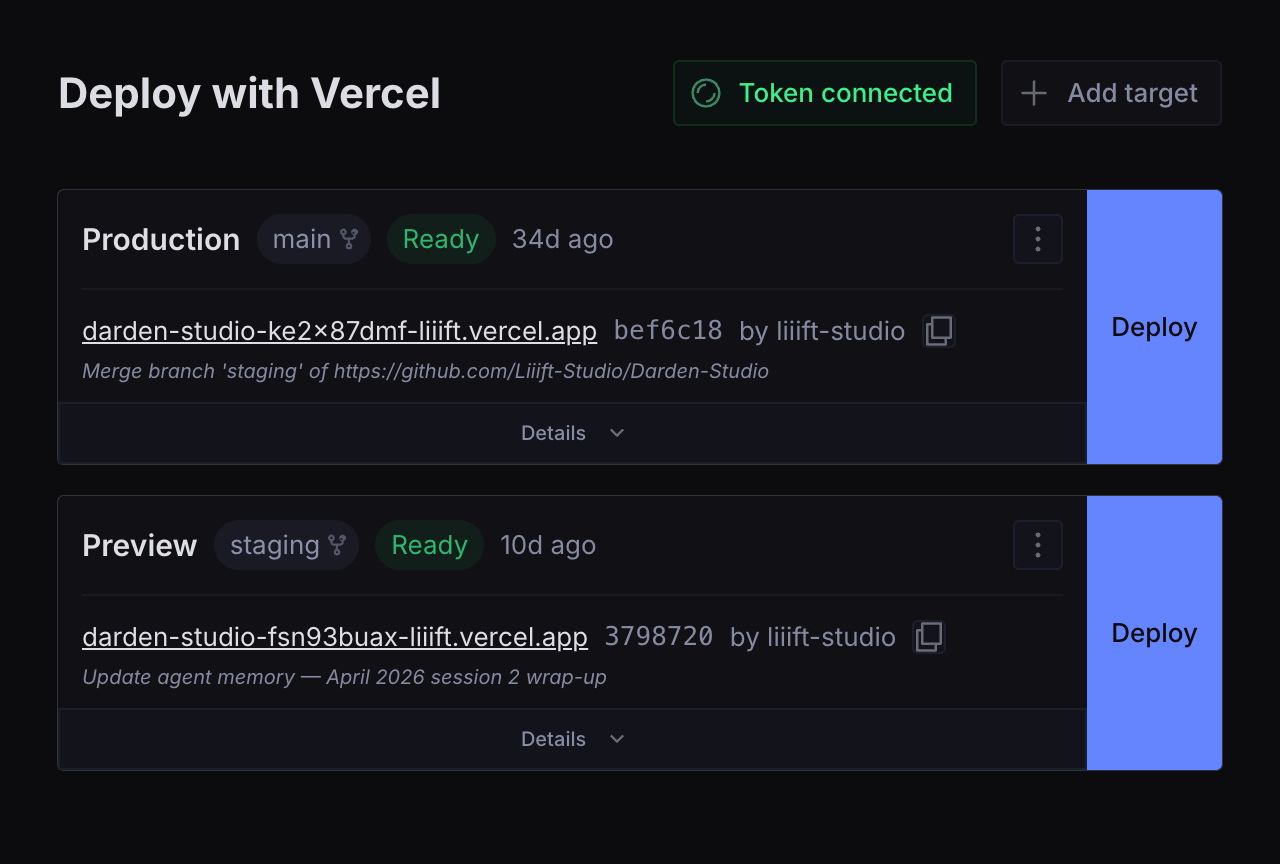
> **Using Sanity but not setting it up?** Your developer installs this once. Day
|
|
12
|
+
> to day you'll only use the **Deploy** tab — see [Using it day to day](#using-it-day-to-day).
|
|
13
|
+
|
|
14
|
+
```bash
|
|
15
|
+
npm install @liiift-studio/deploy-vercel-from-sanity
|
|
16
|
+
```
|
|
17
|
+
|
|
11
18
|
---
|
|
12
19
|
|
|
13
|
-
##
|
|
20
|
+
## Why this one
|
|
14
21
|
|
|
15
|
-
|
|
16
|
-
|
|
17
|
-
- **
|
|
18
|
-
- **
|
|
19
|
-
- **
|
|
20
|
-
- **
|
|
21
|
-
|
|
22
|
-
|
|
23
|
-
- **Deployment history** per target
|
|
24
|
-
- **"Open in Vercel"** link to your project dashboard
|
|
25
|
-
- **Multiple targets** — configure Production, Preview, and any number of custom environments
|
|
26
|
-
- **Shared API token** — set it once; readable by anyone who can read the dataset (see [Security](#security))
|
|
27
|
-
- **Responsive grid layout** — cards reflow to fill the available width, one column on narrow viewports
|
|
22
|
+
There is an established alternative, [`sanity-plugin-vercel-deploy`](https://www.npmjs.com/package/sanity-plugin-vercel-deploy). Reasons you might pick this instead:
|
|
23
|
+
|
|
24
|
+
- **One build spans Studio v3.30 → v6.** `@sanity/icons` v5 and `@sanity/ui` v4 both moved components out of their barrels; this plugin resolves them from the installed package at runtime rather than shipping a version-locked build. See [Studio compatibility](#studio-compatibility).
|
|
25
|
+
- **[Proxy mode](#two-modes)** keeps the Vercel token — and the deploy hook URLs — off the dataset entirely, so viewers cannot read a credential or trigger a build. (The browser still holds a status key that can cancel a running build; see [Security](#security).)
|
|
26
|
+
- **Inline build logs and cancel**, not just a trigger button.
|
|
27
|
+
- **Zero runtime dependencies.**
|
|
28
|
+
|
|
29
|
+
If none of that matters to you, the alternative is more widely used and simpler.
|
|
28
30
|
|
|
29
31
|
---
|
|
30
32
|
|
|
31
|
-
##
|
|
33
|
+
## Using it day to day
|
|
32
34
|
|
|
33
|
-
|
|
34
|
-
|
|
35
|
-
|
|
35
|
+
For whoever presses the button:
|
|
36
|
+
|
|
37
|
+
- Open **Deploy** in the Studio sidebar. Each card is one environment — **Production** is your live public site; **Preview** is a copy only your team sees.
|
|
38
|
+
- Press **Deploy** to rebuild that environment with the content you have already published. It does **not** publish drafts — anything still in draft stays unpublished.
|
|
39
|
+
- The badge tells you where it is: **Queued** → **Building** → **Ready**. A typical build is a couple of minutes; the card shows a running timer.
|
|
40
|
+
- **Ready** means the site is live. **Error** means the build failed — press **Details** → **Show error details** and send those lines to your developer.
|
|
41
|
+
- Pressing Deploy twice is harmless; Vercel just builds again.
|
|
42
|
+
|
|
43
|
+
<details>
|
|
44
|
+
<summary>Everything it does</summary>
|
|
45
|
+
|
|
46
|
+
- **One-click deploy** — Production, Preview, or any number of custom environments
|
|
47
|
+
- **Live status** — Queued → Building → Ready / Error, polled every 5s, with a build timer and a toast when it finishes
|
|
48
|
+
- **Inline build logs** — see why a build failed without leaving the Studio
|
|
49
|
+
- **Cancel** in-progress deployments
|
|
50
|
+
- **Deployment history** per target — the last 20 builds
|
|
51
|
+
- Copy deployment URL, and an **Open in Vercel** link
|
|
52
|
+
- GitHub commit links when repo metadata is available
|
|
53
|
+
- Responsive grid — cards reflow to fill the width, one column on narrow viewports
|
|
54
|
+
|
|
55
|
+
</details>
|
|
36
56
|
|
|
37
57
|
---
|
|
38
58
|
|
|
@@ -53,42 +73,70 @@ export default defineConfig({
|
|
|
53
73
|
})
|
|
54
74
|
```
|
|
55
75
|
|
|
56
|
-
###
|
|
76
|
+
### 2a. Connect your Vercel API token *(direct mode)*
|
|
57
77
|
|
|
58
78
|
Open the **Deploy** tab in Sanity Studio and enter a Vercel API token when prompted.
|
|
59
79
|
|
|
60
|
-
To create a token: **vercel.com → Settings → Tokens → Create
|
|
80
|
+
To create a token: **vercel.com → Settings → Tokens → Create**, and set **Scope** to the team that owns your projects.
|
|
81
|
+
|
|
82
|
+
> Scope the token as narrowly as Vercel lets you. The plugin only reads deployments, reads build logs, and cancels — all of which work with a team-scoped token as long as each target has its **Team ID** set. A Full Account token also works, but it can read and write everything in your Vercel account, which is far more than this needs.
|
|
61
83
|
|
|
62
84
|
The token is stored in a `config.vercelDeploy` document in your dataset and shared across all authenticated studio users.
|
|
63
85
|
|
|
86
|
+
### 2b. Or set up the proxy *(proxy mode)*
|
|
87
|
+
|
|
88
|
+
Skip the token entirely. Deploy the route, set its environment variables, add the
|
|
89
|
+
Sanity webhook, then pass `mode`, `proxyUrl` and `statusKey` to the plugin —
|
|
90
|
+
full walkthrough in [`proxy/README.md`](./proxy/README.md).
|
|
91
|
+
|
|
64
92
|
### 3. Add a deploy target
|
|
65
93
|
|
|
66
|
-
|
|
94
|
+
Each target is an environment — Production, Preview, or anything else.
|
|
95
|
+
|
|
96
|
+
**In the Studio (recommended):** open the **Deploy** tab and click **Add target**
|
|
97
|
+
in the top-right. The form validates the hook URL, and in proxy mode it asks for a
|
|
98
|
+
Proxy Key instead. This is the path the screenshot above is showing.
|
|
99
|
+
|
|
100
|
+
**To get your deploy hook URL:** Vercel Dashboard → Project → Settings → Git → Deploy Hooks → Create Hook.
|
|
101
|
+
|
|
102
|
+
<details>
|
|
103
|
+
<summary>Or create targets from the CLI</summary>
|
|
67
104
|
|
|
68
|
-
**
|
|
105
|
+
`sanity documents create` reads a **file** — it has no stdin mode, so piping a
|
|
106
|
+
heredoc into it silently does nothing.
|
|
69
107
|
|
|
70
108
|
```bash
|
|
71
|
-
|
|
109
|
+
cat > target.json << 'EOF'
|
|
72
110
|
{
|
|
73
111
|
"_type": "vercel_deploy",
|
|
74
112
|
"_id": "vercel-deploy-production",
|
|
75
113
|
"name": "Production",
|
|
76
|
-
"url": "https://api.vercel.com/v1/integrations/deploy/YOUR_PROJECT_ID/YOUR_HOOK_ID"
|
|
114
|
+
"url": "https://api.vercel.com/v1/integrations/deploy/YOUR_PROJECT_ID/YOUR_HOOK_ID",
|
|
115
|
+
"teamId": "team_xxxxxxxx"
|
|
77
116
|
}
|
|
78
117
|
EOF
|
|
118
|
+
|
|
119
|
+
sanity documents create target.json
|
|
79
120
|
```
|
|
80
121
|
|
|
81
|
-
|
|
122
|
+
Targets are also editable from the Structure sidebar, since the plugin registers
|
|
123
|
+
the `vercel_deploy` type. **Publish them** — the Deploy tool ignores drafts, so an
|
|
124
|
+
unpublished target shows as "No deploy targets configured".
|
|
125
|
+
|
|
126
|
+
</details>
|
|
82
127
|
|
|
83
128
|
**Available fields on each `vercel_deploy` document:**
|
|
84
129
|
|
|
85
130
|
| Field | Type | Required | Description |
|
|
86
131
|
|---|---|---|---|
|
|
87
132
|
| `name` | `string` | ✓ | Display label (e.g. "Production", "Preview") |
|
|
88
|
-
| `url` | `url` | ✓ | Vercel deploy hook URL |
|
|
89
|
-
| `
|
|
133
|
+
| `url` | `url` | ✓ *(direct mode)* | Vercel deploy hook URL, https only. Leave empty in proxy mode. |
|
|
134
|
+
| `proxyKey` | `string` | ✓ *(proxy mode)* | Matches a key on your deploy proxy, which holds the real hook URL. Contains no secret. |
|
|
135
|
+
| `teamId` | `string` | | Vercel team ID — required for team-owned projects. Ignored in proxy mode, where the proxy supplies it. |
|
|
90
136
|
| `disableDeleteAction` | `boolean` | | Hides the delete button for this target in the studio UI |
|
|
91
137
|
|
|
138
|
+
A target needs **either** `url` **or** `proxyKey`; the schema enforces that.
|
|
139
|
+
|
|
92
140
|
---
|
|
93
141
|
|
|
94
142
|
## Plugin options
|
|
@@ -97,7 +145,40 @@ EOF
|
|
|
97
145
|
|---|---|---|---|
|
|
98
146
|
| `name` | `string` | `'vercel-deploy'` | Tool slug in the Studio sidebar |
|
|
99
147
|
| `title` | `string` | `'Deploy'` | Tool label in the Studio sidebar |
|
|
100
|
-
| `icon` | `ComponentType` | `RocketIcon` |
|
|
148
|
+
| `icon` | `ComponentType` | `RocketIcon` | Stored on the tool descriptor. No Studio version renders `tool.icon` yet, so it has no visible effect. |
|
|
149
|
+
| `mode` | `'direct' \| 'proxy'` | `'direct'` | Transport used to reach Vercel — see [Two modes](#two-modes) |
|
|
150
|
+
| `proxyUrl` | `string` | — | Base URL of the deploy proxy, no trailing slash. Required when `mode` is `'proxy'`. |
|
|
151
|
+
| `statusKey` | `string` | — | Key sent with status requests. Must match the proxy's `VERCEL_DEPLOY_STATUS_KEY`. Ships in the Studio bundle — treat it as public. |
|
|
152
|
+
|
|
153
|
+
---
|
|
154
|
+
|
|
155
|
+
## Two modes
|
|
156
|
+
|
|
157
|
+
| | `direct` (default) | `proxy` |
|
|
158
|
+
| --- | --- | --- |
|
|
159
|
+
| Setup | Paste a token | Deploy one route, 4 env vars, one webhook (~15 min) |
|
|
160
|
+
| Vercel token | In the dataset | On your server |
|
|
161
|
+
| Deploy hook URLs | In the dataset | On your server |
|
|
162
|
+
| Who can deploy | Anyone who can **read** the dataset | Anyone who can **write** — viewers cannot |
|
|
163
|
+
| In the browser | The Vercel API token | A status key — reads status and logs, and can cancel a running build, within the configured projects |
|
|
164
|
+
|
|
165
|
+
Direct mode is the default and needs no infrastructure. Use it when everyone with
|
|
166
|
+
Studio access is already trusted with Vercel access.
|
|
167
|
+
|
|
168
|
+
Reach for proxy mode when that is not true — untrusted editors, a public dataset,
|
|
169
|
+
or a token you cannot afford to have read. Note that the hook URL matters as much
|
|
170
|
+
as the token: it is itself a deploy credential, so in direct mode the section
|
|
171
|
+
below is a UI convenience, not a security control.
|
|
172
|
+
|
|
173
|
+
```ts
|
|
174
|
+
vercelDeploy({
|
|
175
|
+
mode: 'proxy',
|
|
176
|
+
proxyUrl: 'https://your-site.com/api/vercel-deploy',
|
|
177
|
+
statusKey: process.env.SANITY_STUDIO_DEPLOY_STATUS_KEY,
|
|
178
|
+
})
|
|
179
|
+
```
|
|
180
|
+
|
|
181
|
+
Setup guide: [`proxy/README.md`](./proxy/README.md).
|
|
101
182
|
|
|
102
183
|
---
|
|
103
184
|
|
|
@@ -105,6 +186,8 @@ EOF
|
|
|
105
186
|
|
|
106
187
|
By default the Deploy tab is visible to all authenticated users. To hide it from viewers:
|
|
107
188
|
|
|
189
|
+
> This hides the tab. In `direct` mode it does not prevent deploying — the hook URL is in the dataset, and anyone who can read it can trigger a build without the Studio. Use `proxy` mode if you need that actually enforced.
|
|
190
|
+
|
|
108
191
|
> Filter on the tool name you actually configured. The snippet below uses the default `vercel-deploy`; if you passed a custom `name`, match that instead or the filter silently does nothing.
|
|
109
192
|
|
|
110
193
|
```ts
|
|
@@ -121,6 +204,8 @@ tools: (prev, { currentUser }) => {
|
|
|
121
204
|
|
|
122
205
|
## How it works
|
|
123
206
|
|
|
207
|
+
### Direct mode
|
|
208
|
+
|
|
124
209
|
```mermaid
|
|
125
210
|
flowchart LR
|
|
126
211
|
subgraph studio["Sanity Studio"]
|
|
@@ -135,14 +220,49 @@ flowchart LR
|
|
|
135
220
|
api["REST API<br/>/v6/deployments · /v2/.../events"]
|
|
136
221
|
end
|
|
137
222
|
|
|
138
|
-
tool -- "reads targets
|
|
139
|
-
tool -- "reads token" --> cfg
|
|
140
|
-
tool -- "
|
|
141
|
-
hook -- "queues a build" --> api
|
|
142
|
-
api -- "poll every 5s while active" --> tool
|
|
223
|
+
tool -- "1 - reads targets" --> targets
|
|
224
|
+
tool -- "2 - reads token" --> cfg
|
|
225
|
+
tool -- "3 - click Deploy" --> hook
|
|
226
|
+
hook -- "4 - queues a build" --> api
|
|
227
|
+
api -- "5 - poll every 5s while active" --> tool
|
|
143
228
|
tool -. "toast on Ready / Error / Canceled" .-> tool
|
|
144
229
|
```
|
|
145
230
|
|
|
231
|
+
### Proxy mode
|
|
232
|
+
|
|
233
|
+
```mermaid
|
|
234
|
+
flowchart LR
|
|
235
|
+
subgraph studio["Sanity Studio (browser)"]
|
|
236
|
+
tool["Deploy tool<br/>holds no credential"]
|
|
237
|
+
end
|
|
238
|
+
subgraph dataset["Sanity dataset"]
|
|
239
|
+
targets["vercel_deploy docs<br/>name + proxyKey only"]
|
|
240
|
+
req["vercelDeploy.request<br/>created on click"]
|
|
241
|
+
end
|
|
242
|
+
subgraph server["Your server"]
|
|
243
|
+
proxy["Deploy proxy<br/>VERCEL_API_TOKEN<br/>hook URLs"]
|
|
244
|
+
end
|
|
245
|
+
subgraph vercel["Vercel"]
|
|
246
|
+
hook["Deploy hook"]
|
|
247
|
+
api["REST API"]
|
|
248
|
+
end
|
|
249
|
+
|
|
250
|
+
tool -- "reads targets" --> targets
|
|
251
|
+
tool -- "1 - Deploy click<br/>write ACL gates this" --> req
|
|
252
|
+
req -- "2 - signed webhook" --> proxy
|
|
253
|
+
proxy -- "3 - POST hook URL" --> hook
|
|
254
|
+
hook --> api
|
|
255
|
+
tool -- "4 - status, via status key" --> proxy
|
|
256
|
+
proxy -- "5 - reads with server-held token" --> api
|
|
257
|
+
```
|
|
258
|
+
|
|
259
|
+
No Vercel credential reaches the browser, and a viewer cannot create the request
|
|
260
|
+
document, so a viewer cannot deploy. The browser does hold the status key, which
|
|
261
|
+
can cancel a running build for the configured targets — see
|
|
262
|
+
[Security](#security). Setup: [`proxy/README.md`](./proxy/README.md).
|
|
263
|
+
|
|
264
|
+
### Direct mode, step by step
|
|
265
|
+
|
|
146
266
|
1. Deploy targets are stored as `vercel_deploy` documents in your Sanity dataset.
|
|
147
267
|
2. The plugin fetches the last 10 deployments for each target from the Vercel API, filtered to those triggered by that hook.
|
|
148
268
|
3. While a deployment is active (Queued / Initializing / Building), it polls every 5 seconds.
|
|
@@ -158,11 +278,11 @@ flowchart LR
|
|
|
158
278
|
|
|
159
279
|
### "Vercel API 401 — token is invalid or expired"
|
|
160
280
|
|
|
161
|
-
Your Vercel API token has been revoked or expired. Go to **Vercel → Settings → Tokens**, create a new token
|
|
281
|
+
Your Vercel API token has been revoked or expired. Go to **Vercel → Settings → Tokens**, create a new token scoped to the team that owns your projects, and reconnect it in the Deploy tab (top-right → *Token connected* button).
|
|
162
282
|
|
|
163
283
|
### "Vercel API 403 — token lacks the required permissions"
|
|
164
284
|
|
|
165
|
-
The token exists but
|
|
285
|
+
The token exists but cannot see the project. Check the target's **Team ID** is set — a team-scoped token needs it to resolve team-owned projects. If the project is personal rather than team-owned, the token must be scoped to that personal account.
|
|
166
286
|
|
|
167
287
|
### "Vercel API 404 — resource not found. Check the deploy hook URL and team ID."
|
|
168
288
|
|
|
@@ -174,7 +294,9 @@ The plugin is making too many API calls at once (common when many targets are al
|
|
|
174
294
|
|
|
175
295
|
### Deploy triggers but status never updates
|
|
176
296
|
|
|
177
|
-
|
|
297
|
+
**Direct mode** — usually a missing token. The plugin can trigger deploys via the hook URL without one, but reading status back needs an API token. Connect one using the button in the top-right of the Deploy tab.
|
|
298
|
+
|
|
299
|
+
**Proxy mode** — the token button is deliberately hidden, so this is not it. Check, in order: the browser console for a blocked CORS preflight (set `VERCEL_DEPLOY_ALLOWED_ORIGINS` on the proxy to your Studio's origin); that the plugin's `statusKey` and the proxy's `VERCEL_DEPLOY_STATUS_KEY` hold the same value; and that the target's **Proxy Key** matches a `VERCEL_DEPLOY_PROJECT_*` variable. Deploy failures land in **Sanity → API → Webhooks → delivery log**, never in the Studio — see [`proxy/README.md`](./proxy/README.md#when-the-webhook-fires-but-nothing-deploys).
|
|
178
300
|
|
|
179
301
|
### Commit SHA does not link to GitHub
|
|
180
302
|
|
|
@@ -188,7 +310,13 @@ If "No stderr or stdout was captured" appears, the build may have failed before
|
|
|
188
310
|
|
|
189
311
|
## Security
|
|
190
312
|
|
|
191
|
-
**API token storage** — The Vercel API token is stored in cleartext in a `config.vercelDeploy` document of type `vercelDeploy.config`. Sanity has no per-document access control at this tier, so **the token is readable by anyone who can read the dataset** — and if the dataset is public, which is the usual setup for a statically generated front-end, that includes unauthenticated requests to the public GROQ API. A `viewer`-role member who cannot write a single document can also read it.
|
|
313
|
+
**API token storage** — The Vercel API token is stored in cleartext in a `config.vercelDeploy` document of type `vercelDeploy.config`. Sanity has no per-document access control at this tier, so **the token is readable by anyone who can read the dataset** — and if the dataset is public, which is the usual setup for a statically generated front-end, that includes unauthenticated requests to the public GROQ API. A `viewer`-role member who cannot write a single document can also read it. A Vercel API token can read **every environment variable in every project it can see** — which for most teams means the database URL, payment keys, and every other production secret — as well as deploy arbitrary code to your production domain. Scope it to a single team, and understand that leaking it leaks those secrets. The document type is deliberately **not** registered in the schema — registering it would list a "Vercel Deploy Configuration" entry in the Structure sidebar for every editor. Revoke the stored token from the plugin instead: **Deploy → Token connected → Remove token**. Audit who has access to your Sanity project at sanity.io → Project → Members, and never store a Vercel token in a public dataset. If your studio includes untrusted editors, use [proxy mode](#two-modes) — the plugin ships the proxy.
|
|
314
|
+
|
|
315
|
+
**Two credentials, not one** — in direct mode the dataset holds *both* the API token and a deploy hook URL on every target. The hook URL is itself a deploy credential: anyone who can read it can POST it and trigger a build, with no Studio and no role. That is why [Restrict access to editors](#restrict-access-to-editors-and-above) hides the tab but does not enforce anything, and why [proxy mode](#two-modes) moves both server-side.
|
|
316
|
+
|
|
317
|
+
**Proxy mode status key** — the key that reaches the browser permits reading deployment status and build logs for the configured targets, and cancelling their in-progress deployments. Cancel is a write, so it is not a read-only key. Requests are scoped to the configured **projects** — the proxy verifies a deployment belongs to the target's project before reading or cancelling it. That is broader than the targets you configured: it includes any deployment in those projects, such as git-push builds the plugin never lists.
|
|
318
|
+
|
|
319
|
+
Assume the key is obtainable: a hosted Studio bundle is fetchable without logging in. In the worst case that means anyone can list deployments, read their build logs — which can contain secrets a failed build printed — and cancel a running production build. CORS does not prevent this; it constrains browsers, not `curl`. If that is unacceptable, see [What this does not solve](./proxy/README.md#what-this-does-not-solve). Treat the key as public, because it ships in the Studio bundle.
|
|
192
320
|
|
|
193
321
|
**Deploy hook URL validation** — `triggerDeploy` validates that the hook URL matches `api.vercel.com/v1/integrations/deploy/` before making the request, preventing SSRF from a tampered document.
|
|
194
322
|
|
|
@@ -232,6 +360,25 @@ toasts render in a live region anchored to the bottom-right of the tool.
|
|
|
232
360
|
|
|
233
361
|
---
|
|
234
362
|
|
|
363
|
+
## Changelog
|
|
364
|
+
|
|
365
|
+
See [CHANGELOG.md](./CHANGELOG.md).
|
|
366
|
+
|
|
367
|
+
---
|
|
368
|
+
|
|
369
|
+
## Tests
|
|
370
|
+
|
|
371
|
+
```bash
|
|
372
|
+
npm test
|
|
373
|
+
```
|
|
374
|
+
|
|
375
|
+
Unit tests cover the proxy's authorization boundary (fail-closed status key,
|
|
376
|
+
per-project deployment scoping, role gating, SSRF guard on hook URLs) and the URL
|
|
377
|
+
validators that guard every anchor the plugin renders. `prepublishOnly` runs
|
|
378
|
+
typecheck and tests before building, so a release cannot ship past them.
|
|
379
|
+
|
|
380
|
+
---
|
|
381
|
+
|
|
235
382
|
## Contributing
|
|
236
383
|
|
|
237
384
|
Issues and pull requests welcome at [github.com/Liiift-Studio/Deploy-Vercel-from-Sanity](https://github.com/Liiift-Studio/Deploy-Vercel-from-Sanity).
|
package/dist/index.d.mts
CHANGED
|
@@ -7,8 +7,19 @@ interface DeployTarget {
|
|
|
7
7
|
_id: string;
|
|
8
8
|
_type: 'vercel_deploy';
|
|
9
9
|
name: string;
|
|
10
|
-
/**
|
|
11
|
-
|
|
10
|
+
/**
|
|
11
|
+
* Full Vercel deploy hook URL. Used in `direct` mode.
|
|
12
|
+
*
|
|
13
|
+
* In `proxy` mode leave this empty and set {@link proxyKey} instead — a hook URL
|
|
14
|
+
* is itself a deploy credential, so storing one in the dataset lets anyone who
|
|
15
|
+
* can read the dataset trigger a build regardless of their Studio role.
|
|
16
|
+
*/
|
|
17
|
+
url?: string;
|
|
18
|
+
/**
|
|
19
|
+
* Identifier the proxy maps to a hook URL held in its own environment. Used in
|
|
20
|
+
* `proxy` mode. Contains no secret.
|
|
21
|
+
*/
|
|
22
|
+
proxyKey?: string;
|
|
12
23
|
/** Vercel team ID — optional, only needed for team projects */
|
|
13
24
|
teamId?: string;
|
|
14
25
|
/** Prevent editors from deleting this target */
|
|
@@ -42,14 +53,47 @@ interface VercelDeployment {
|
|
|
42
53
|
githubCommitOrg?: string;
|
|
43
54
|
};
|
|
44
55
|
}
|
|
56
|
+
/**
|
|
57
|
+
* How the plugin reaches Vercel.
|
|
58
|
+
*
|
|
59
|
+
* - `direct` (default) — the Studio calls Vercel itself, using an API token stored
|
|
60
|
+
* in the dataset and deploy hook URLs stored on each target. Simplest to set up.
|
|
61
|
+
* Everything in the dataset is readable by everyone who can read the dataset,
|
|
62
|
+
* so anyone with read access can both read the token and trigger a deploy.
|
|
63
|
+
* - `proxy` — the Studio holds no Vercel credentials. Deploys are requested by
|
|
64
|
+
* creating a document, which Sanity's own write ACL already restricts to roles
|
|
65
|
+
* that can write, and a server-side proxy performs the actual deploy. See
|
|
66
|
+
* `proxy/README.md`.
|
|
67
|
+
*/
|
|
68
|
+
type VercelDeployMode = 'direct' | 'proxy';
|
|
45
69
|
/** Plugin configuration options */
|
|
46
70
|
interface VercelDeployPluginConfig {
|
|
47
71
|
/** Tool name slug shown in Studio sidebar (default: 'vercel-deploy') */
|
|
48
72
|
name?: string;
|
|
49
73
|
/** Tool label shown in Studio sidebar (default: 'Deploy') */
|
|
50
74
|
title?: string;
|
|
51
|
-
/**
|
|
75
|
+
/**
|
|
76
|
+
* Accepted and stored on the tool descriptor. No Studio version from v3 to v6
|
|
77
|
+
* renders `tool.icon`, so this currently has no visible effect.
|
|
78
|
+
*/
|
|
52
79
|
icon?: React.ComponentType;
|
|
80
|
+
/** Transport used to reach Vercel. Defaults to `direct`. */
|
|
81
|
+
mode?: VercelDeployMode;
|
|
82
|
+
/**
|
|
83
|
+
* Base URL of the deploy proxy, without a trailing slash — for example
|
|
84
|
+
* `https://example.com/api/vercel-deploy`. Required when `mode` is `proxy`.
|
|
85
|
+
*/
|
|
86
|
+
proxyUrl?: string;
|
|
87
|
+
/**
|
|
88
|
+
* Key sent with status requests to the proxy.
|
|
89
|
+
*
|
|
90
|
+
* This ends up in the Studio bundle, which is served publicly for a hosted
|
|
91
|
+
* Studio, so treat it as public. It permits reading deployment status and build
|
|
92
|
+
* logs for the configured projects, and cancelling their in-progress
|
|
93
|
+
* deployments — cancel is a write, so this is not a read-only key. The Vercel
|
|
94
|
+
* API token never leaves the proxy.
|
|
95
|
+
*/
|
|
96
|
+
statusKey?: string;
|
|
53
97
|
}
|
|
54
98
|
|
|
55
99
|
declare const vercelDeploySchema: {
|
|
@@ -69,6 +113,12 @@ declare const vercelDeploySchema: {
|
|
|
69
113
|
type: "url";
|
|
70
114
|
description: string;
|
|
71
115
|
validation: (Rule: sanity.UrlRule) => sanity.UrlRule;
|
|
116
|
+
} & sanity.WidenValidation) | ({
|
|
117
|
+
name: "proxyKey";
|
|
118
|
+
title: string;
|
|
119
|
+
type: "string";
|
|
120
|
+
description: string;
|
|
121
|
+
validation: (Rule: sanity.StringRule) => sanity.StringRule;
|
|
72
122
|
} & sanity.WidenValidation) | {
|
|
73
123
|
name: "teamId";
|
|
74
124
|
title: string;
|
|
@@ -109,4 +159,4 @@ declare const vercelDeploySchema: {
|
|
|
109
159
|
*/
|
|
110
160
|
declare const vercelDeploy: sanity.Plugin<void | VercelDeployPluginConfig>;
|
|
111
161
|
|
|
112
|
-
export { type DeployTarget, type VercelDeployPluginConfig, type VercelDeployState, type VercelDeployment, vercelDeploy, vercelDeploySchema };
|
|
162
|
+
export { type DeployTarget, type VercelDeployMode, type VercelDeployPluginConfig, type VercelDeployState, type VercelDeployment, vercelDeploy, vercelDeploySchema };
|
package/dist/index.d.ts
CHANGED
|
@@ -7,8 +7,19 @@ interface DeployTarget {
|
|
|
7
7
|
_id: string;
|
|
8
8
|
_type: 'vercel_deploy';
|
|
9
9
|
name: string;
|
|
10
|
-
/**
|
|
11
|
-
|
|
10
|
+
/**
|
|
11
|
+
* Full Vercel deploy hook URL. Used in `direct` mode.
|
|
12
|
+
*
|
|
13
|
+
* In `proxy` mode leave this empty and set {@link proxyKey} instead — a hook URL
|
|
14
|
+
* is itself a deploy credential, so storing one in the dataset lets anyone who
|
|
15
|
+
* can read the dataset trigger a build regardless of their Studio role.
|
|
16
|
+
*/
|
|
17
|
+
url?: string;
|
|
18
|
+
/**
|
|
19
|
+
* Identifier the proxy maps to a hook URL held in its own environment. Used in
|
|
20
|
+
* `proxy` mode. Contains no secret.
|
|
21
|
+
*/
|
|
22
|
+
proxyKey?: string;
|
|
12
23
|
/** Vercel team ID — optional, only needed for team projects */
|
|
13
24
|
teamId?: string;
|
|
14
25
|
/** Prevent editors from deleting this target */
|
|
@@ -42,14 +53,47 @@ interface VercelDeployment {
|
|
|
42
53
|
githubCommitOrg?: string;
|
|
43
54
|
};
|
|
44
55
|
}
|
|
56
|
+
/**
|
|
57
|
+
* How the plugin reaches Vercel.
|
|
58
|
+
*
|
|
59
|
+
* - `direct` (default) — the Studio calls Vercel itself, using an API token stored
|
|
60
|
+
* in the dataset and deploy hook URLs stored on each target. Simplest to set up.
|
|
61
|
+
* Everything in the dataset is readable by everyone who can read the dataset,
|
|
62
|
+
* so anyone with read access can both read the token and trigger a deploy.
|
|
63
|
+
* - `proxy` — the Studio holds no Vercel credentials. Deploys are requested by
|
|
64
|
+
* creating a document, which Sanity's own write ACL already restricts to roles
|
|
65
|
+
* that can write, and a server-side proxy performs the actual deploy. See
|
|
66
|
+
* `proxy/README.md`.
|
|
67
|
+
*/
|
|
68
|
+
type VercelDeployMode = 'direct' | 'proxy';
|
|
45
69
|
/** Plugin configuration options */
|
|
46
70
|
interface VercelDeployPluginConfig {
|
|
47
71
|
/** Tool name slug shown in Studio sidebar (default: 'vercel-deploy') */
|
|
48
72
|
name?: string;
|
|
49
73
|
/** Tool label shown in Studio sidebar (default: 'Deploy') */
|
|
50
74
|
title?: string;
|
|
51
|
-
/**
|
|
75
|
+
/**
|
|
76
|
+
* Accepted and stored on the tool descriptor. No Studio version from v3 to v6
|
|
77
|
+
* renders `tool.icon`, so this currently has no visible effect.
|
|
78
|
+
*/
|
|
52
79
|
icon?: React.ComponentType;
|
|
80
|
+
/** Transport used to reach Vercel. Defaults to `direct`. */
|
|
81
|
+
mode?: VercelDeployMode;
|
|
82
|
+
/**
|
|
83
|
+
* Base URL of the deploy proxy, without a trailing slash — for example
|
|
84
|
+
* `https://example.com/api/vercel-deploy`. Required when `mode` is `proxy`.
|
|
85
|
+
*/
|
|
86
|
+
proxyUrl?: string;
|
|
87
|
+
/**
|
|
88
|
+
* Key sent with status requests to the proxy.
|
|
89
|
+
*
|
|
90
|
+
* This ends up in the Studio bundle, which is served publicly for a hosted
|
|
91
|
+
* Studio, so treat it as public. It permits reading deployment status and build
|
|
92
|
+
* logs for the configured projects, and cancelling their in-progress
|
|
93
|
+
* deployments — cancel is a write, so this is not a read-only key. The Vercel
|
|
94
|
+
* API token never leaves the proxy.
|
|
95
|
+
*/
|
|
96
|
+
statusKey?: string;
|
|
53
97
|
}
|
|
54
98
|
|
|
55
99
|
declare const vercelDeploySchema: {
|
|
@@ -69,6 +113,12 @@ declare const vercelDeploySchema: {
|
|
|
69
113
|
type: "url";
|
|
70
114
|
description: string;
|
|
71
115
|
validation: (Rule: sanity.UrlRule) => sanity.UrlRule;
|
|
116
|
+
} & sanity.WidenValidation) | ({
|
|
117
|
+
name: "proxyKey";
|
|
118
|
+
title: string;
|
|
119
|
+
type: "string";
|
|
120
|
+
description: string;
|
|
121
|
+
validation: (Rule: sanity.StringRule) => sanity.StringRule;
|
|
72
122
|
} & sanity.WidenValidation) | {
|
|
73
123
|
name: "teamId";
|
|
74
124
|
title: string;
|
|
@@ -109,4 +159,4 @@ declare const vercelDeploySchema: {
|
|
|
109
159
|
*/
|
|
110
160
|
declare const vercelDeploy: sanity.Plugin<void | VercelDeployPluginConfig>;
|
|
111
161
|
|
|
112
|
-
export { type DeployTarget, type VercelDeployPluginConfig, type VercelDeployState, type VercelDeployment, vercelDeploy, vercelDeploySchema };
|
|
162
|
+
export { type DeployTarget, type VercelDeployMode, type VercelDeployPluginConfig, type VercelDeployState, type VercelDeployment, vercelDeploy, vercelDeploySchema };
|