@lightpath-dev/cli 0.0.1 → 0.0.2
This diff represents the content of publicly available package versions that have been released to one of the supported registries. The information contained in this diff is provided for informational purposes only and reflects changes between package versions as they appear in their respective public registries.
- package/README.md +58 -8
- package/package.json +2 -2
package/README.md
CHANGED
|
@@ -1,17 +1,67 @@
|
|
|
1
1
|
# @lightpath-dev/cli
|
|
2
2
|
|
|
3
|
-
|
|
3
|
+
[](https://www.npmjs.com/package/@lightpath-dev/cli)
|
|
4
|
+
[](https://marketplace.visualstudio.com/items?itemName=lightpath-dev.lightpath-vscode)
|
|
5
|
+
[](https://github.com/Unknown-333/Lightpath/actions/workflows/ci.yml)
|
|
6
|
+
|
|
7
|
+
**Click anything in your running app and see the exact code it ran, frontend and backend, line by line.**
|
|
8
|
+
|
|
9
|
+
No code changes, no test suite, no tracing setup.
|
|
10
|
+
|
|
11
|
+
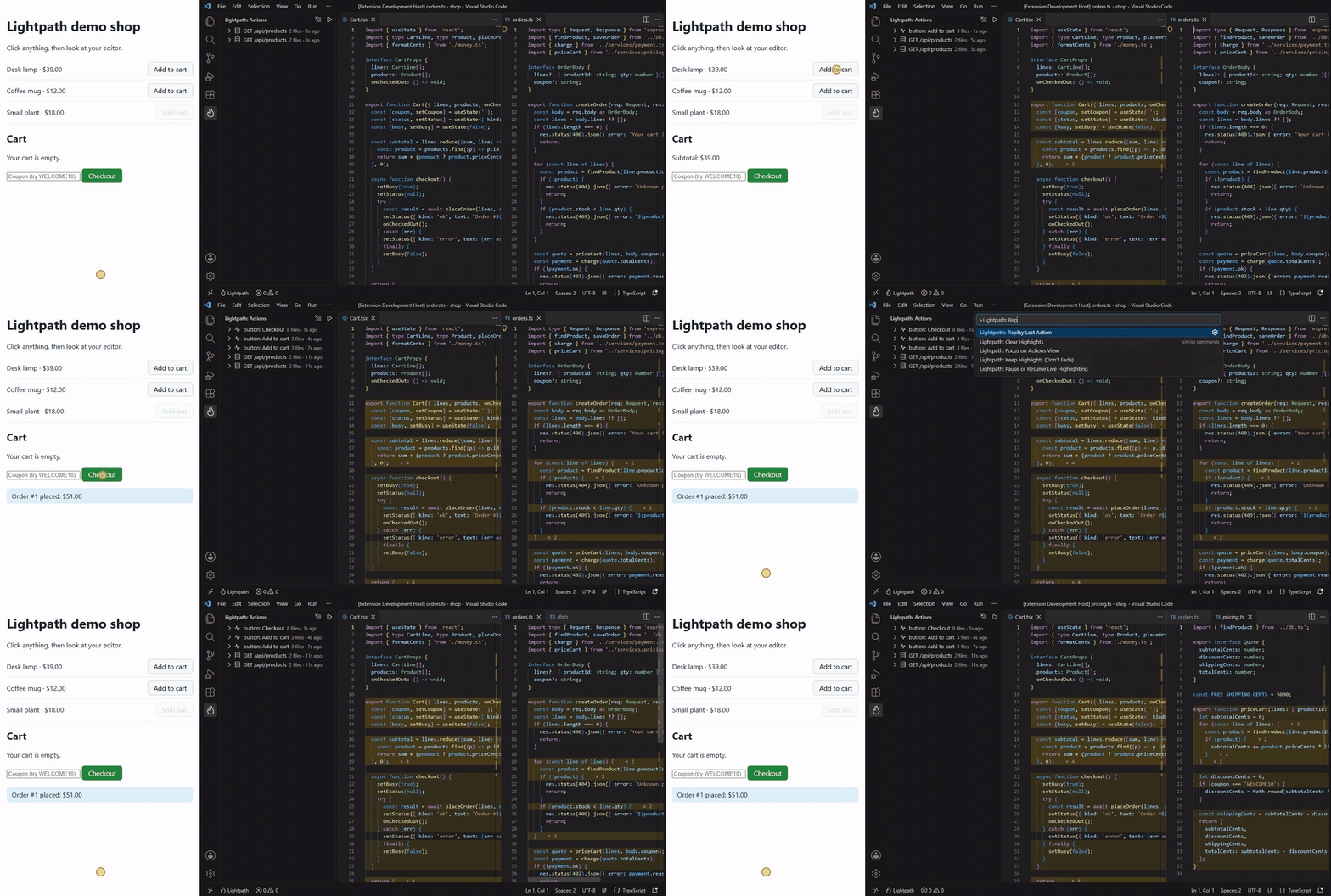
|
|
12
|
+
|
|
13
|
+
## Quick start
|
|
14
|
+
|
|
15
|
+
Requires Node.js 22.12+ and Chrome or Edge.
|
|
4
16
|
|
|
5
17
|
```sh
|
|
6
18
|
npx @lightpath-dev/cli dev -- npm run dev
|
|
7
19
|
```
|
|
8
20
|
|
|
9
|
-
Lightpath starts your dev command,
|
|
21
|
+
Lightpath starts your dev command, finds your app's URL, and opens the app in a browser. Click something, and the code path prints in your terminal:
|
|
22
|
+
|
|
23
|
+
```
|
|
24
|
+
◆ button: Checkout 335 ms
|
|
25
|
+
→ POST /api/orders 201
|
|
26
|
+
├─ src/api.ts :25-32, 35-36
|
|
27
|
+
├─ src/App.tsx :6-8, 10, 12, 24-41, 43 ×6
|
|
28
|
+
├─ src/Cart.tsx :11-14, 16-19, 21-28, 30-33, 35-44, 46-48, 50 ×4
|
|
29
|
+
├─ src/money.ts :3-5 ×9
|
|
30
|
+
├─ server/db.ts :26-28, 30-38 ×3
|
|
31
|
+
├─ server/routes/orders.ts :11-14, 19-21, 25, 29, 31-33, 38-40
|
|
32
|
+
├─ server/services/payment.ts :6-7, 10-12
|
|
33
|
+
└─ server/services/pricing.ts :12-19, 21-22, 26-33
|
|
34
|
+
```
|
|
35
|
+
|
|
36
|
+
To see the lines light up in your editor, add the [VS Code extension](https://marketplace.visualstudio.com/items?itemName=lightpath-dev.lightpath-vscode):
|
|
37
|
+
|
|
38
|
+
```sh
|
|
39
|
+
code --install-extension lightpath-dev.lightpath-vscode
|
|
40
|
+
```
|
|
41
|
+
|
|
42
|
+
To let your coding agent ask "which code handles Checkout?", add the MCP server. For Claude Code:
|
|
43
|
+
|
|
44
|
+
```sh
|
|
45
|
+
claude mcp add lightpath -- npx -y @lightpath-dev/cli mcp
|
|
46
|
+
```
|
|
47
|
+
|
|
48
|
+
Setup for Cursor, VS Code and Kiro is in [the main README](https://github.com/Unknown-333/Lightpath#ask-your-coding-agent).
|
|
49
|
+
|
|
50
|
+
## Commands
|
|
51
|
+
|
|
52
|
+
| Command | What it does |
|
|
53
|
+
| ------------------ | -------------------------------------------------------- |
|
|
54
|
+
| `lightpath dev` | Runs your dev command with Lightpath and opens your app |
|
|
55
|
+
| `lightpath mcp` | MCP server over stdio, so coding agents can ask what ran |
|
|
56
|
+
| `lightpath doctor` | Checks Node, the browser, the agent and your config file |
|
|
57
|
+
|
|
58
|
+
Everything stays on your machine: the daemon listens on `127.0.0.1` only and needs a token.
|
|
59
|
+
|
|
60
|
+
## More
|
|
10
61
|
|
|
11
|
-
|
|
12
|
-
|
|
13
|
-
|
|
14
|
-
|
|
15
|
-
| `lightpath doctor` | Checks Node, the browser, the agent, and your config file |
|
|
62
|
+
- [Config file](https://github.com/Unknown-333/Lightpath#config-file): save your flags and hide generated code.
|
|
63
|
+
- [How it works](https://github.com/Unknown-333/Lightpath#how-it-works) and [performance](https://github.com/Unknown-333/Lightpath#performance).
|
|
64
|
+
- [Known limits](https://github.com/Unknown-333/Lightpath#known-limits) and [real apps it was tested on](https://github.com/Unknown-333/Lightpath#tested-on-real-apps).
|
|
65
|
+
- [Issues](https://github.com/Unknown-333/Lightpath/issues) and the [changelog](https://github.com/Unknown-333/Lightpath/blob/main/CHANGELOG.md).
|
|
16
66
|
|
|
17
|
-
|
|
67
|
+
MIT licensed.
|
package/package.json
CHANGED
|
@@ -1,6 +1,6 @@
|
|
|
1
1
|
{
|
|
2
2
|
"name": "@lightpath-dev/cli",
|
|
3
|
-
"version": "0.0.
|
|
3
|
+
"version": "0.0.2",
|
|
4
4
|
"description": "Click anything in your running app and see which frontend and backend lines ran",
|
|
5
5
|
"keywords": [
|
|
6
6
|
"coverage",
|
|
@@ -42,7 +42,7 @@
|
|
|
42
42
|
"access": "public"
|
|
43
43
|
},
|
|
44
44
|
"dependencies": {
|
|
45
|
-
"@lightpath-dev/browser": "0.0.
|
|
45
|
+
"@lightpath-dev/browser": "0.0.2",
|
|
46
46
|
"@lightpath-dev/daemon": "0.0.1",
|
|
47
47
|
"@lightpath-dev/mcp": "0.0.1",
|
|
48
48
|
"@lightpath-dev/node-agent": "0.0.1",
|