@licium/editor-plugin-code-syntax-highlight 3.1.0
This diff represents the content of publicly available package versions that have been released to one of the supported registries. The information contained in this diff is provided for informational purposes only and reflects changes between package versions as they appear in their respective public registries.
- package/LICENSE +21 -0
- package/README.md +310 -0
- package/dist/toastui-editor-plugin-code-syntax-highlight-all.js +19547 -0
- package/dist/toastui-editor-plugin-code-syntax-highlight.css +171 -0
- package/dist/toastui-editor-plugin-code-syntax-highlight.js +1305 -0
- package/package.json +59 -0
- package/types/index.d.ts +21 -0
package/LICENSE
ADDED
|
@@ -0,0 +1,21 @@
|
|
|
1
|
+
MIT License
|
|
2
|
+
|
|
3
|
+
Copyright (c) 2020 NHN Cloud Corp.
|
|
4
|
+
|
|
5
|
+
Permission is hereby granted, free of charge, to any person obtaining a copy
|
|
6
|
+
of this software and associated documentation files (the "Software"), to deal
|
|
7
|
+
in the Software without restriction, including without limitation the rights
|
|
8
|
+
to use, copy, modify, merge, publish, distribute, sublicense, and/or sell
|
|
9
|
+
copies of the Software, and to permit persons to whom the Software is
|
|
10
|
+
furnished to do so, subject to the following conditions:
|
|
11
|
+
|
|
12
|
+
The above copyright notice and this permission notice shall be included in
|
|
13
|
+
all copies or substantial portions of the Software.
|
|
14
|
+
|
|
15
|
+
THE SOFTWARE IS PROVIDED "AS IS", WITHOUT WARRANTY OF ANY KIND, EXPRESS OR
|
|
16
|
+
IMPLIED, INCLUDING BUT NOT LIMITED TO THE WARRANTIES OF MERCHANTABILITY,
|
|
17
|
+
FITNESS FOR A PARTICULAR PURPOSE AND NONINFRINGEMENT. IN NO EVENT SHALL THE
|
|
18
|
+
AUTHORS OR COPYRIGHT HOLDERS BE LIABLE FOR ANY CLAIM, DAMAGES OR OTHER
|
|
19
|
+
LIABILITY, WHETHER IN AN ACTION OF CONTRACT, TORT OR OTHERWISE, ARISING FROM,
|
|
20
|
+
OUT OF OR IN CONNECTION WITH THE SOFTWARE OR THE USE OR OTHER DEALINGS IN
|
|
21
|
+
THE SOFTWARE.
|
package/README.md
ADDED
|
@@ -0,0 +1,310 @@
|
|
|
1
|
+
# TOAST UI Editor : Code Syntax Highlight Plugin
|
|
2
|
+
|
|
3
|
+
> This is a plugin of [TOAST UI Editor](https://github.com/nhn/tui.editor/tree/master/apps/editor) to highlight code syntax.
|
|
4
|
+
|
|
5
|
+
[](https://www.npmjs.com/package/@toast-ui/editor-plugin-code-syntax-highlight)
|
|
6
|
+
|
|
7
|
+
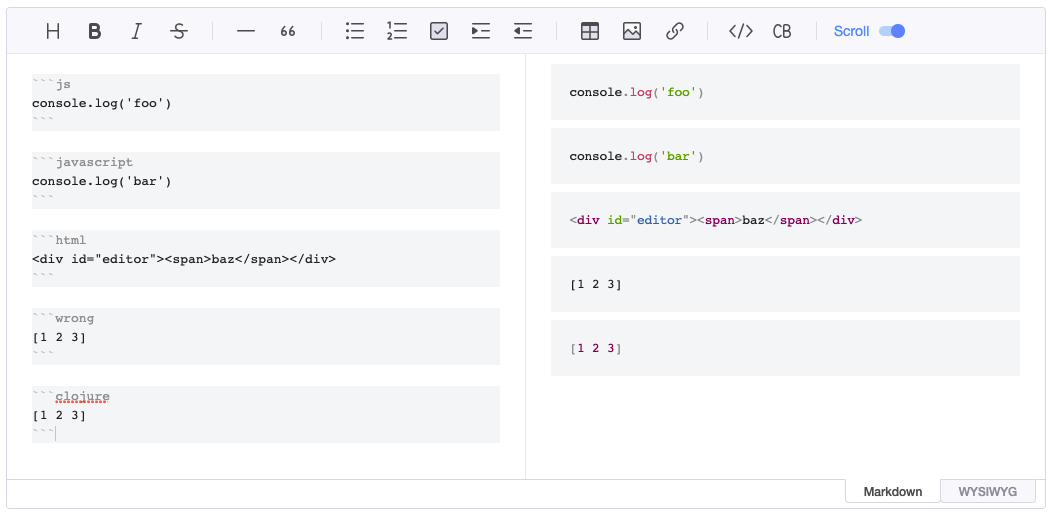
|
|
8
|
+
|
|
9
|
+
## 🚩 Table of Contents
|
|
10
|
+
|
|
11
|
+
- [Bundle File Structure](#-bundle-file-structure)
|
|
12
|
+
- [Usage npm](#-usage-npm)
|
|
13
|
+
- [Usage CDN](#-usage-cdn)
|
|
14
|
+
|
|
15
|
+
## 📁 Bundle File Structure
|
|
16
|
+
|
|
17
|
+
### Serve with npm
|
|
18
|
+
|
|
19
|
+
### Files Distributed on npm
|
|
20
|
+
|
|
21
|
+
```
|
|
22
|
+
- node_modules/
|
|
23
|
+
- @toast-ui/
|
|
24
|
+
- editor-plugin-code-syntax-highlight/
|
|
25
|
+
- dist/
|
|
26
|
+
- toastui-editor-plugin-code-syntax-highlight-all.js
|
|
27
|
+
- toastui-editor-plugin-code-syntax-highlight.js
|
|
28
|
+
- toastui-editor-plugin-code-syntax-highlight.css
|
|
29
|
+
```
|
|
30
|
+
|
|
31
|
+
### Files Distributed on CDN
|
|
32
|
+
|
|
33
|
+
```
|
|
34
|
+
- uicdn.toast.com/
|
|
35
|
+
- editor-plugin-code-syntax-highlight/
|
|
36
|
+
- latest/
|
|
37
|
+
- toastui-editor-plugin-code-syntax-highlight.js
|
|
38
|
+
- toastui-editor-plugin-code-syntax-highlight.min.js
|
|
39
|
+
- toastui-editor-plugin-code-syntax-highlight-all.js
|
|
40
|
+
- toastui-editor-plugin-code-syntax-highlight-all.min.js
|
|
41
|
+
- toastui-editor-plugin-code-syntax-highlight.css
|
|
42
|
+
- toastui-editor-plugin-code-syntax-highlight.min.css
|
|
43
|
+
```
|
|
44
|
+
|
|
45
|
+
## 📦 Usage npm
|
|
46
|
+
|
|
47
|
+
To use the plugin, [`@toast-ui/editor`](https://github.com/nhn/tui.editor/tree/master/apps/editor) must be installed.
|
|
48
|
+
|
|
49
|
+
> Ref. [Getting Started](https://github.com/nhn/tui.editor/blob/master/docs/en/getting-started.md)
|
|
50
|
+
|
|
51
|
+
### Install
|
|
52
|
+
|
|
53
|
+
```sh
|
|
54
|
+
$ npm install @toast-ui/editor-plugin-code-syntax-highlight
|
|
55
|
+
```
|
|
56
|
+
|
|
57
|
+
### Import Plugin
|
|
58
|
+
|
|
59
|
+
Along with the plugin, the plugin's dependency style must be imported.
|
|
60
|
+
The `code-syntax-highlight` plugin has [`prismjs`](https://prismjs.com/) as a dependency, and you need to add a CSS file of `prismjs`.
|
|
61
|
+
|
|
62
|
+
#### ES Modules
|
|
63
|
+
|
|
64
|
+
```js
|
|
65
|
+
import 'prismjs/themes/prism.css';
|
|
66
|
+
import '@toast-ui/editor-plugin-code-syntax-highlight/dist/toastui-editor-plugin-code-syntax-highlight.css';
|
|
67
|
+
|
|
68
|
+
import codeSyntaxHighlight from '@toast-ui/editor-plugin-code-syntax-highlight';
|
|
69
|
+
```
|
|
70
|
+
|
|
71
|
+
#### CommonJS
|
|
72
|
+
|
|
73
|
+
```js
|
|
74
|
+
require('prismjs/themes/prism.css');
|
|
75
|
+
require('@toast-ui/editor-plugin-code-syntax-highlight/dist/toastui-editor-plugin-code-syntax-highlight.css');
|
|
76
|
+
|
|
77
|
+
const codeSyntaxHighlight = require('@toast-ui/editor-plugin-code-syntax-highlight');
|
|
78
|
+
```
|
|
79
|
+
|
|
80
|
+
### Create Instance
|
|
81
|
+
|
|
82
|
+
When you set up a plugin function, you must set it with an option. The option has `highlighter`, and you need to import [`prismjs`](https://www.npmjs.com/package/prismjs) before creating an instance and set it to the value of that option.
|
|
83
|
+
|
|
84
|
+
The main bundle file of `prismjs` contains just several language pack it supports. So we provides the bundle file(`toastui-editor-plugin-code-syntax-highlight-all.js`) to import all languages you need in `prismjs`.
|
|
85
|
+
|
|
86
|
+
#### Basic
|
|
87
|
+
|
|
88
|
+
##### Import All Languages
|
|
89
|
+
|
|
90
|
+
```js
|
|
91
|
+
// ...
|
|
92
|
+
import 'prismjs/themes/prism.css';
|
|
93
|
+
import '@toast-ui/editor-plugin-code-syntax-highlight/dist/toastui-editor-plugin-code-syntax-highlight.css';
|
|
94
|
+
|
|
95
|
+
import Editor from '@toast-ui/editor';
|
|
96
|
+
import codeSyntaxHighlight from '@toast-ui/editor-plugin-code-syntax-highlight/dist/toastui-editor-plugin-code-syntax-highlight-all.js';
|
|
97
|
+
|
|
98
|
+
|
|
99
|
+
const editor = new Editor({
|
|
100
|
+
// ...
|
|
101
|
+
plugins: [codeSyntaxHighlight]
|
|
102
|
+
});
|
|
103
|
+
```
|
|
104
|
+
|
|
105
|
+
##### Import Only Languages You Need
|
|
106
|
+
|
|
107
|
+
You need to import the language files you want to use in the code block and register them in the `prismjs` object. A list of available language files can be found [here](https://github.com/PrismJS/prism/tree/master/components).
|
|
108
|
+
|
|
109
|
+
```js
|
|
110
|
+
// ...
|
|
111
|
+
import 'prismjs/themes/prism.css';
|
|
112
|
+
import '@toast-ui/editor-plugin-code-syntax-highlight/dist/toastui-editor-plugin-code-syntax-highlight.css';
|
|
113
|
+
|
|
114
|
+
// Step 1. Import prismjs
|
|
115
|
+
import Prism from 'prismjs';
|
|
116
|
+
|
|
117
|
+
// Step 2. Import language files of prismjs that you need
|
|
118
|
+
import 'prismjs/components/prism-clojure.js';
|
|
119
|
+
|
|
120
|
+
import Editor from '@toast-ui/editor';
|
|
121
|
+
import codeSyntaxHighlight from '@toast-ui/editor-plugin-code-syntax-highlight';
|
|
122
|
+
|
|
123
|
+
const editor = new Editor({
|
|
124
|
+
// ...
|
|
125
|
+
plugins: [[codeSyntaxHighlight, { highlighter: Prism }]]
|
|
126
|
+
});
|
|
127
|
+
```
|
|
128
|
+
|
|
129
|
+
#### With Viewer
|
|
130
|
+
|
|
131
|
+
As with creating an editor instance, you need to import `prismjs` and pass it to the `highlighter` option.
|
|
132
|
+
|
|
133
|
+
```js
|
|
134
|
+
// ...
|
|
135
|
+
import 'prismjs/themes/prism.css';
|
|
136
|
+
import '@toast-ui/editor-plugin-code-syntax-highlight/dist/toastui-editor-plugin-code-syntax-highlight.css';
|
|
137
|
+
|
|
138
|
+
// Import prismjs
|
|
139
|
+
import Prism from 'prismjs';
|
|
140
|
+
|
|
141
|
+
import Viewer from '@toast-ui/editor/dist/toastui-editor-viewer';
|
|
142
|
+
import codeSyntaxHighlight from '@toast-ui/editor-plugin-code-syntax-highlight';
|
|
143
|
+
|
|
144
|
+
|
|
145
|
+
const viewer = new Viewer({
|
|
146
|
+
// ...
|
|
147
|
+
plugins: [[codeSyntaxHighlight, { highlighter: Prism }]]
|
|
148
|
+
});
|
|
149
|
+
```
|
|
150
|
+
|
|
151
|
+
or
|
|
152
|
+
|
|
153
|
+
```js
|
|
154
|
+
// ...
|
|
155
|
+
import 'prismjs/themes/prism.css';
|
|
156
|
+
import '@toast-ui/editor-plugin-code-syntax-highlight/dist/toastui-editor-plugin-code-syntax-highlight.css';
|
|
157
|
+
|
|
158
|
+
// Import prismjs
|
|
159
|
+
import Prism from 'prismjs';
|
|
160
|
+
|
|
161
|
+
import Editor from '@toast-ui/editor';
|
|
162
|
+
import codeSyntaxHighlight from '@toast-ui/editor-plugin-code-syntax-highlight';
|
|
163
|
+
|
|
164
|
+
const viewer = Editor.factory({
|
|
165
|
+
// ...
|
|
166
|
+
viewer: true,
|
|
167
|
+
plugins: [[codeSyntaxHighlight, { highlighter: Prism }]]
|
|
168
|
+
});
|
|
169
|
+
```
|
|
170
|
+
|
|
171
|
+
## 🗂 Usage CDN
|
|
172
|
+
|
|
173
|
+
### Include Files
|
|
174
|
+
|
|
175
|
+
To use the plugin, the CDN files(CSS, Script) of `@toast-ui/editor` must be included.
|
|
176
|
+
|
|
177
|
+
### Create Instance
|
|
178
|
+
|
|
179
|
+
#### Basic
|
|
180
|
+
|
|
181
|
+
First, include the editor file. And include the plugin file as needed. If you want to include all language files provided by `prismjs`, see the first title(_Include All Languages_). If you want to register and use only the languages you need, see the second title(_Include Only Languages You Need_).
|
|
182
|
+
|
|
183
|
+
##### Include All Languages
|
|
184
|
+
|
|
185
|
+
By including the **all** version of the plugin, all languages of `prismjs` are available in the code block.
|
|
186
|
+
|
|
187
|
+
```html
|
|
188
|
+
...
|
|
189
|
+
<head>
|
|
190
|
+
...
|
|
191
|
+
<link
|
|
192
|
+
rel="stylesheet"
|
|
193
|
+
href="https://cdnjs.cloudflare.com/ajax/libs/prism/1.23.0/themes/prism.min.css"
|
|
194
|
+
/>
|
|
195
|
+
<link
|
|
196
|
+
rel="stylesheet"
|
|
197
|
+
href="https://uicdn.toast.com/editor-plugin-code-syntax-highlight/latest/toastui-editor-plugin-code-syntax-highlight.min.css"
|
|
198
|
+
/>
|
|
199
|
+
...
|
|
200
|
+
</head>
|
|
201
|
+
<body>
|
|
202
|
+
...
|
|
203
|
+
<!-- Editor -->
|
|
204
|
+
<script src="https://uicdn.toast.com/editor/latest/toastui-editor-all.min.js"></script>
|
|
205
|
+
<!-- Editor's Plugin -->
|
|
206
|
+
<script src="https://uicdn.toast.com/editor-plugin-code-syntax-highlight/latest/toastui-editor-plugin-code-syntax-highlight-all.min.js"></script>
|
|
207
|
+
...
|
|
208
|
+
</body>
|
|
209
|
+
...
|
|
210
|
+
```
|
|
211
|
+
|
|
212
|
+
```js
|
|
213
|
+
const { Editor } = toastui;
|
|
214
|
+
const { codeSyntaxHighlight } = Editor.plugin;
|
|
215
|
+
|
|
216
|
+
const instance = new Editor({
|
|
217
|
+
// ...
|
|
218
|
+
plugins: [codeSyntaxHighlight]
|
|
219
|
+
});
|
|
220
|
+
```
|
|
221
|
+
|
|
222
|
+
##### Include Only Languages You Need
|
|
223
|
+
|
|
224
|
+
If you include the **normal** version of the plugin, only the languages you need are available. At this time, you should also include the language files of `prismjs`, and if you only include it, the languages available to the plugin are registered.
|
|
225
|
+
|
|
226
|
+
> Note : The CDN provided by `prismjs` contains several language files. If you want to add other language files, you can use [cdnjs](https://cdnjs.com/libraries/prism) to add each language file or upload a file containing only the language you need on [this page](https://prismjs.com/download.html).
|
|
227
|
+
|
|
228
|
+
```html
|
|
229
|
+
...
|
|
230
|
+
<head>
|
|
231
|
+
...
|
|
232
|
+
<link
|
|
233
|
+
rel="stylesheet"
|
|
234
|
+
href="https://cdnjs.cloudflare.com/ajax/libs/prism/1.23.0/themes/prism.min.css"
|
|
235
|
+
/>
|
|
236
|
+
<link
|
|
237
|
+
rel="stylesheet"
|
|
238
|
+
href="https://uicdn.toast.com/editor-plugin-code-syntax-highlight/latest/toastui-editor-plugin-code-syntax-highlight.min.css"
|
|
239
|
+
/>
|
|
240
|
+
...
|
|
241
|
+
</head>
|
|
242
|
+
<body>
|
|
243
|
+
...
|
|
244
|
+
<!-- Editor -->
|
|
245
|
+
<script src="https://uicdn.toast.com/editor/latest/toastui-editor-all.min.js"></script>
|
|
246
|
+
<!-- prismjs Languages -->
|
|
247
|
+
<script src="https://cdnjs.cloudflare.com/ajax/libs/prism/1.23.0/prism.min.js"></script>
|
|
248
|
+
<script src="https://cdnjs.cloudflare.com/ajax/libs/prism/1.23.0/components/prism-clojure.min.js"></script>
|
|
249
|
+
<!-- Editor's Plugin -->
|
|
250
|
+
<script src="https://uicdn.toast.com/editor-plugin-code-syntax-highlight/latest/toastui-editor-plugin-code-syntax-highlight.min.js"></script>
|
|
251
|
+
...
|
|
252
|
+
</body>
|
|
253
|
+
...
|
|
254
|
+
```
|
|
255
|
+
|
|
256
|
+
#### With Viewer
|
|
257
|
+
|
|
258
|
+
The way to include the plugin and the language files of `prismjs` is the same as above.
|
|
259
|
+
|
|
260
|
+
##### Use Option of Editor
|
|
261
|
+
|
|
262
|
+
```js
|
|
263
|
+
const { Editor } = tosatui;
|
|
264
|
+
const { codeSyntaxHighlight } = Editor.plugin;
|
|
265
|
+
|
|
266
|
+
const editor = Editor.factory({
|
|
267
|
+
// ...
|
|
268
|
+
plugins: [codeSyntaxHighlight],
|
|
269
|
+
viewer: true
|
|
270
|
+
});
|
|
271
|
+
```
|
|
272
|
+
|
|
273
|
+
##### Use Viewer
|
|
274
|
+
|
|
275
|
+
Include the Viewer file instead of the Editor.
|
|
276
|
+
|
|
277
|
+
```html
|
|
278
|
+
...
|
|
279
|
+
<head>
|
|
280
|
+
...
|
|
281
|
+
<link
|
|
282
|
+
rel="stylesheet"
|
|
283
|
+
href="https://cdnjs.cloudflare.com/ajax/libs/prism/1.23.0/themes/prism.min.css"
|
|
284
|
+
/>
|
|
285
|
+
<link
|
|
286
|
+
rel="stylesheet"
|
|
287
|
+
href="https://uicdn.toast.com/editor-plugin-code-syntax-highlight/latest/toastui-editor-plugin-code-syntax-highlight.min.css"
|
|
288
|
+
/>
|
|
289
|
+
...
|
|
290
|
+
</head>
|
|
291
|
+
<body>
|
|
292
|
+
...
|
|
293
|
+
<!-- Viewer -->
|
|
294
|
+
<script src="https://uicdn.toast.com/editor/latest/toastui-editor-viewer.min.js"></script>
|
|
295
|
+
<!-- Viewer's Plugin -->
|
|
296
|
+
<script src="https://uicdn.toast.com/editor-plugin-code-syntax-highlight/latest/toastui-editor-plugin-code-syntax-highlight-all.min.js"></script>
|
|
297
|
+
...
|
|
298
|
+
</body>
|
|
299
|
+
...
|
|
300
|
+
```
|
|
301
|
+
|
|
302
|
+
```js
|
|
303
|
+
const Viewer = toastui.Editor;
|
|
304
|
+
const { codeSyntaxHighlight } = Viewer.plugin;
|
|
305
|
+
|
|
306
|
+
const viewer = new Viewer({
|
|
307
|
+
// ...
|
|
308
|
+
plugins: [codeSyntaxHighlight]
|
|
309
|
+
});
|
|
310
|
+
```
|