@lanegrid/agtrace 0.1.7 → 0.1.8
This diff represents the content of publicly available package versions that have been released to one of the supported registries. The information contained in this diff is provided for informational purposes only and reflects changes between package versions as they appear in their respective public registries.
- package/CHANGELOG.md +18 -0
- package/README.md +102 -62
- package/npm-shrinkwrap.json +2 -2
- package/package.json +2 -2
package/CHANGELOG.md
CHANGED
|
@@ -2,6 +2,24 @@
|
|
|
2
2
|
|
|
3
3
|
All notable changes to this project will be documented in this file.
|
|
4
4
|
|
|
5
|
+
## [0.1.8] - 2025-12-28
|
|
6
|
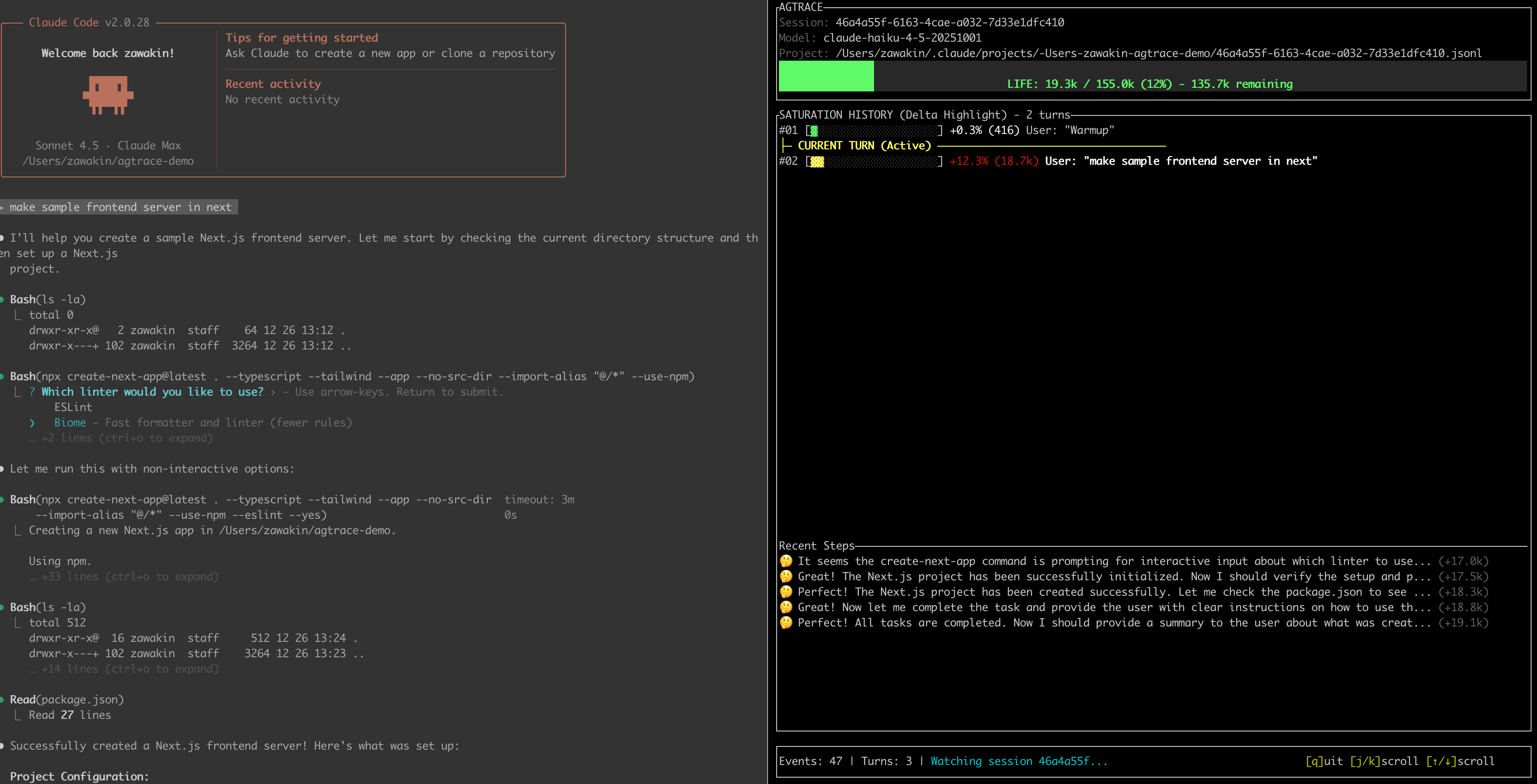
+
|
|
7
|
+
### Documentation
|
|
8
|
+
|
|
9
|
+
- Rewrite README to emphasize observability layer and compaction behavior ([c8a669f](https://github.com/lanegrid/agtrace/commit/c8a669fac6db12214febc0796f3b32b62ce5d032))
|
|
10
|
+
|
|
11
|
+
- Rewrite README to emphasize observability layer and compaction behavior ([8fafcf4](https://github.com/lanegrid/agtrace/commit/8fafcf4680ba80e93decb634ed3d348cee8034a1))
|
|
12
|
+
|
|
13
|
+
- Clarify CWD-scoped monitoring and improve Quick Start workflow ([63e5c38](https://github.com/lanegrid/agtrace/commit/63e5c38e8d2c7d4e4d56576054055615c89237c7))
|
|
14
|
+
|
|
15
|
+
- Use GitHub raw content URLs for images and move demo.gif to docs/assets ([d4dbda6](https://github.com/lanegrid/agtrace/commit/d4dbda623e32e18cb8519bcced6dd22a70ec2e2d))
|
|
16
|
+
|
|
17
|
+
|
|
18
|
+
### Miscellaneous Tasks
|
|
19
|
+
|
|
20
|
+
- Remove PROGRESS.md ([0e728f5](https://github.com/lanegrid/agtrace/commit/0e728f5c627988d64e93cd640c6a30f73153c3bd))
|
|
21
|
+
|
|
22
|
+
|
|
5
23
|
## [0.1.7] - 2025-12-28
|
|
6
24
|
|
|
7
25
|
### Features
|
package/README.md
CHANGED
|
@@ -1,8 +1,12 @@
|
|
|
1
1
|
<div align="center">
|
|
2
|
-
<img src="docs/images/agtrace-icon.png" width="96" alt="agtrace logo">
|
|
2
|
+
<img src="https://raw.githubusercontent.com/lanegrid/agtrace/main/docs/images/agtrace-icon.png" width="96" alt="agtrace logo">
|
|
3
3
|
<h1>agtrace</h1>
|
|
4
|
-
<p><strong>The
|
|
5
|
-
<p>
|
|
4
|
+
<p><strong>The Observability Layer for AI Coding Agents.</strong></p>
|
|
5
|
+
<p>
|
|
6
|
+
Real-time telemetry and session forensics for Claude Code, Codex, and Gemini.
|
|
7
|
+
Track context window usage, compaction behavior, and regressions —
|
|
8
|
+
<strong>locally</strong>, with <strong>zero overhead</strong>.
|
|
9
|
+
</p>
|
|
6
10
|
|
|
7
11
|
[](https://www.npmjs.com/package/@lanegrid/agtrace)
|
|
8
12
|
[](https://crates.io/crates/agtrace)
|
|
@@ -10,54 +14,69 @@
|
|
|
10
14
|
|
|
11
15
|
---
|
|
12
16
|
|
|
13
|
-
## 📉 The Problem:
|
|
17
|
+
## 📉 The Problem: No Observability for Context Compaction
|
|
14
18
|
|
|
15
|
-
AI
|
|
19
|
+
Modern AI coding agents rely on context window compaction by design. It is a standard mechanism across Claude Code, Codex, and Gemini.
|
|
16
20
|
|
|
17
|
-
|
|
21
|
+
The problem is not that compaction happens.
|
|
18
22
|
|
|
19
|
-
|
|
23
|
+
The problem is that you cannot:
|
|
24
|
+
- observe *when* compaction occurs
|
|
25
|
+
- measure *how much* context was discarded
|
|
26
|
+
- correlate compaction with regressions, hallucinations, or sudden behavioral shifts
|
|
27
|
+
|
|
28
|
+
In practice, we are running a lossy, stateful system without logs, metrics, or traces for its most critical state transition.
|
|
20
29
|
|
|
21
30
|
## ⚡ The Solution: agtrace
|
|
22
31
|
|
|
23
|
-
**agtrace**
|
|
32
|
+
**agtrace** adds the missing observability layer to AI coding agents.
|
|
33
|
+
|
|
34
|
+
By normalizing provider logs and exposing real-time context usage and compaction behavior, agtrace makes agent state transitions inspectable and debuggable — without sending sensitive data to the cloud.
|
|
24
35
|
|
|
25
|
-

|
|
36
|
+

|
|
26
37
|
|
|
27
|
-
*Live demo of `agtrace watch`
|
|
38
|
+
*Live demo of `agtrace watch` — real-time session monitoring*
|
|
28
39
|
|
|
29
|
-

|
|
40
|
+
|
|
30
41
|
|
|
31
|
-
*The dashboard showing
|
|
42
|
+
*The dashboard showing context usage, current turn, and token costs*
|
|
43
|
+
|
|
44
|
+
---
|
|
32
45
|
|
|
33
|
-
|
|
46
|
+
## ✨ Key Features
|
|
34
47
|
|
|
35
|
-
|
|
36
|
-
|
|
48
|
+
### 1) Live Telemetry (`watch`)
|
|
49
|
+
A TUI dashboard that visualizes the health of your active session:
|
|
50
|
+
- remaining context window (before compaction pressure)
|
|
51
|
+
- current turn and recent activity
|
|
52
|
+
- token/cost telemetry (where available)
|
|
37
53
|
|
|
38
|
-
|
|
39
|
-
|
|
54
|
+
### 2) Provider Normalization
|
|
55
|
+
Whether you use **Claude Code**, **Codex**, or **Gemini**, agtrace converts their events into a consistent internal format so you can reason about sessions the same way across providers.
|
|
40
56
|
|
|
41
|
-
|
|
42
|
-
|
|
57
|
+
### 3) Local-Only by Default
|
|
58
|
+
Agent logs often contain sensitive code and secrets. **agtrace runs 100% locally** and reads directly from local log files (e.g., `~/.claude`). No data is sent to the cloud.
|
|
43
59
|
|
|
44
|
-
|
|
45
|
-
|
|
60
|
+
### 4) Always-On Session Tracking
|
|
61
|
+
Keep `watch` running — it automatically detects new sessions and follows the latest one.
|
|
46
62
|
|
|
47
|
-
|
|
48
|
-
|
|
63
|
+
### 5) Session Forensics (“Lab”)
|
|
64
|
+
Investigate agent behavior across history:
|
|
65
|
+
- search across thousands of past sessions
|
|
66
|
+
- analyze tool usage patterns
|
|
67
|
+
- inspect raw provider events when debugging schema changes (`--raw`)
|
|
49
68
|
|
|
50
|
-
|
|
51
|
-
|
|
69
|
+
### 6) High-Performance, Minimal Footprint
|
|
70
|
+
Built in **Rust**, agtrace is designed to run continuously without slowing down your machine while you work with heavyweight AI agents.
|
|
52
71
|
|
|
53
|
-
|
|
54
|
-
|
|
72
|
+
### 7) Instant Log Analysis
|
|
73
|
+
Parse and grep through gigabytes of JSONL logs quickly. The schema-on-read approach plus Rust performance makes historical analysis fast and practical.
|
|
55
74
|
|
|
56
75
|
---
|
|
57
76
|
|
|
58
77
|
## 📦 Installation
|
|
59
78
|
|
|
60
|
-
|
|
79
|
+
For best performance and easy access to `watch`, install globally.
|
|
61
80
|
|
|
62
81
|
### via npm (Recommended)
|
|
63
82
|
|
|
@@ -67,7 +86,8 @@ npm install -g @lanegrid/agtrace
|
|
|
67
86
|
|
|
68
87
|
### via npx (no installation)
|
|
69
88
|
|
|
70
|
-
If you prefer not to install
|
|
89
|
+
If you prefer not to install globally, run via `npx`.
|
|
90
|
+
|
|
71
91
|
*Note: In the examples below, replace `agtrace` with `npx @lanegrid/agtrace`.*
|
|
72
92
|
|
|
73
93
|
```bash
|
|
@@ -80,90 +100,110 @@ npx @lanegrid/agtrace@latest init
|
|
|
80
100
|
cargo install agtrace
|
|
81
101
|
```
|
|
82
102
|
|
|
83
|
-
|
|
84
103
|
---
|
|
85
104
|
|
|
86
105
|
## 🚀 Quick Start
|
|
87
106
|
|
|
88
|
-
### 0
|
|
107
|
+
### 0) Initialize Once (Global)
|
|
89
108
|
|
|
90
|
-
|
|
109
|
+
Run `agtrace init` **once** on your machine.
|
|
110
|
+
|
|
111
|
+
This creates local configuration and caches under `~/.agtrace`.
|
|
112
|
+
It does **not** modify any project directory, and you do **not** need to run it per project.
|
|
91
113
|
|
|
92
114
|
```bash
|
|
93
|
-
agtrace
|
|
115
|
+
agtrace init
|
|
94
116
|
```
|
|
95
117
|
|
|
96
|
-
|
|
118
|
+
### 1) Open Your Project Directory (CWD matters)
|
|
97
119
|
|
|
98
|
-
|
|
120
|
+
`agtrace` scopes monitoring by the **current working directory (cwd)**.
|
|
99
121
|
|
|
100
|
-
|
|
122
|
+
To ensure `agtrace` can locate and follow the right session logs, run it from the **same working directory** where your AI coding agent is started.
|
|
101
123
|
|
|
102
124
|
```bash
|
|
103
125
|
cd /path/to/your/project
|
|
104
|
-
agtrace init
|
|
105
126
|
```
|
|
106
127
|
|
|
107
|
-
### 2
|
|
128
|
+
### 2) Start `watch` (either order works)
|
|
108
129
|
|
|
109
|
-
In one terminal
|
|
130
|
+
In one terminal pane (from the project directory), run:
|
|
110
131
|
|
|
111
132
|
```bash
|
|
112
|
-
|
|
113
|
-
claude
|
|
114
|
-
|
|
115
|
-
# Or Codex, Gemini, etc.
|
|
133
|
+
agtrace watch
|
|
116
134
|
```
|
|
117
135
|
|
|
118
|
-
|
|
136
|
+
`watch` can be started before or after your AI coding agent.
|
|
137
|
+
|
|
138
|
+
* If no active session exists yet, it stays in **waiting mode** (or opens the latest session if available).
|
|
139
|
+
* When a new session starts, agtrace detects the new logs and **automatically switches** to it.
|
|
140
|
+
* You do **not** need to restart `agtrace watch` per session.
|
|
119
141
|
|
|
120
|
-
|
|
142
|
+
### 3) Start Your AI Coding Agent (Same CWD)
|
|
143
|
+
|
|
144
|
+
In another terminal (same project directory), launch your agent:
|
|
121
145
|
|
|
122
146
|
```bash
|
|
123
|
-
|
|
147
|
+
# Example: Claude Code
|
|
148
|
+
claude
|
|
149
|
+
|
|
150
|
+
# Or Codex, Gemini, etc.
|
|
124
151
|
```
|
|
125
152
|
|
|
126
|
-
That
|
|
153
|
+
That’s it. No integration required — `watch` follows sessions by monitoring logs scoped to your current working directory.
|
|
127
154
|
|
|
128
|
-
|
|
129
|
-
* **Auto-Switch:** When you start a new session, agtrace automatically latches onto it.
|
|
155
|
+
**`watch` surfaces:**
|
|
130
156
|
|
|
131
|
-
|
|
157
|
+
* context window usage
|
|
158
|
+
* compaction pressure / behavior (where detectable)
|
|
159
|
+
* turns and recent activity
|
|
160
|
+
* token/cost telemetry (where available)
|
|
132
161
|
|
|
133
|
-
|
|
162
|
+
### 4) Analyze Past Sessions
|
|
134
163
|
|
|
135
164
|
```bash
|
|
136
165
|
# List recent sessions
|
|
137
166
|
agtrace session list
|
|
138
167
|
|
|
139
|
-
#
|
|
168
|
+
# Inspect a specific session (context usage, turns, models)
|
|
140
169
|
agtrace session show <session_id>
|
|
141
|
-
|
|
142
170
|
```
|
|
143
171
|
|
|
144
|
-
### 5
|
|
172
|
+
### 5) Advanced: The Lab
|
|
145
173
|
|
|
146
|
-
Debug agent interactions or search for specific patterns
|
|
174
|
+
Debug agent interactions or search for specific patterns, e.g. “When did the agent try to write to `package.json`?”:
|
|
147
175
|
|
|
148
176
|
```bash
|
|
149
177
|
# Find all file write operations across history
|
|
150
178
|
agtrace lab grep "write_file" --json
|
|
151
179
|
|
|
152
|
-
# Inspect raw provider event (useful for debugging schema changes)
|
|
180
|
+
# Inspect a raw provider event (useful for debugging schema changes)
|
|
153
181
|
agtrace lab grep "mcp" --raw --limit 1
|
|
154
|
-
|
|
155
182
|
```
|
|
156
183
|
|
|
157
184
|
---
|
|
158
185
|
|
|
186
|
+
## 🧭 CWD-Scoped Monitoring
|
|
187
|
+
|
|
188
|
+
agtrace uses your current working directory (cwd) as the scope boundary for log discovery and session tracking.
|
|
189
|
+
To monitor a different project, run `agtrace watch` from that project's directory.
|
|
190
|
+
|
|
191
|
+
---
|
|
192
|
+
|
|
159
193
|
## 🏗️ Architecture
|
|
160
194
|
|
|
161
|
-
agtrace is designed
|
|
195
|
+
agtrace is designed around **pointer-based indexing** and **schema-on-read**:
|
|
162
196
|
|
|
163
|
-
1. **No Data Duplication
|
|
164
|
-
|
|
165
|
-
3. **Project Isolation:** Sessions are grouped by project root hash, keeping your workspaces clean
|
|
197
|
+
1. **No Data Duplication**
|
|
198
|
+
agtrace does not copy your massive log files. It indexes metadata and points to the original logs.
|
|
166
199
|
|
|
200
|
+
2. **Resilient to Schema Drift**
|
|
201
|
+
Provider log schemas change frequently. agtrace parses logs at read time, so schema updates are less likely to corrupt or invalidate historical indexes.
|
|
202
|
+
|
|
203
|
+
3. **Project Isolation**
|
|
204
|
+
Sessions are scoped by cwd/project boundaries and grouped by a project root hash to keep workspaces clean and prevent cross-project mixing.
|
|
205
|
+
|
|
206
|
+
---
|
|
167
207
|
|
|
168
208
|
## 🤝 Supported Providers
|
|
169
209
|
|
|
@@ -175,4 +215,4 @@ agtrace is designed with **"Pointer-Based"** and **"Schema-on-Read"** philosophi
|
|
|
175
215
|
|
|
176
216
|
## 📜 License
|
|
177
217
|
|
|
178
|
-
|
|
218
|
+
Dual-licensed under the MIT and Apache 2.0 licenses.
|
package/npm-shrinkwrap.json
CHANGED
|
@@ -23,7 +23,7 @@
|
|
|
23
23
|
"hasInstallScript": true,
|
|
24
24
|
"license": "MIT OR Apache-2.0",
|
|
25
25
|
"name": "@lanegrid/agtrace",
|
|
26
|
-
"version": "0.1.
|
|
26
|
+
"version": "0.1.8"
|
|
27
27
|
},
|
|
28
28
|
"node_modules/@isaacs/balanced-match": {
|
|
29
29
|
"engines": {
|
|
@@ -515,5 +515,5 @@
|
|
|
515
515
|
}
|
|
516
516
|
},
|
|
517
517
|
"requires": true,
|
|
518
|
-
"version": "0.1.
|
|
518
|
+
"version": "0.1.8"
|
|
519
519
|
}
|
package/package.json
CHANGED
|
@@ -1,5 +1,5 @@
|
|
|
1
1
|
{
|
|
2
|
-
"artifactDownloadUrl": "https://github.com/lanegrid/agtrace/releases/download/v0.1.
|
|
2
|
+
"artifactDownloadUrl": "https://github.com/lanegrid/agtrace/releases/download/v0.1.8",
|
|
3
3
|
"bin": {
|
|
4
4
|
"agtrace": "run-agtrace.js"
|
|
5
5
|
},
|
|
@@ -93,7 +93,7 @@
|
|
|
93
93
|
"zipExt": ".tar.xz"
|
|
94
94
|
}
|
|
95
95
|
},
|
|
96
|
-
"version": "0.1.
|
|
96
|
+
"version": "0.1.8",
|
|
97
97
|
"volta": {
|
|
98
98
|
"node": "18.14.1",
|
|
99
99
|
"npm": "9.5.0"
|