@kuanbandu/dsh-email 0.0.0-stage → 0.1.0
This diff represents the content of publicly available package versions that have been released to one of the supported registries. The information contained in this diff is provided for informational purposes only and reflects changes between package versions as they appear in their respective public registries.
- package/LICENSE +21 -0
- package/README.md +215 -2
- package/client.js +673 -0
- package/cordis.patch.yml +16 -0
- package/docs/settings-dark.png +0 -0
- package/docs/settings-light.png +0 -0
- package/icon.svg +11 -0
- package/index.js +228 -0
- package/lib/accounts.js +286 -0
- package/lib/imap.js +588 -0
- package/lib/mailservice.js +932 -0
- package/lib/mime.js +630 -0
- package/lib/providers.js +206 -0
- package/lib/proxy.js +272 -0
- package/lib/smtp.js +317 -0
- package/lib/tools.js +313 -0
- package/locale/en.json +6 -0
- package/locale/zh.json +6 -0
- package/package.json +70 -4
- package/scripts/client-smoke.mjs +313 -0
- package/scripts/mock-mail-server.mjs +408 -0
- package/scripts/selftest.mjs +387 -0
- package/scripts/verify-accounts.mjs +49 -0
package/LICENSE
ADDED
|
@@ -0,0 +1,21 @@
|
|
|
1
|
+
MIT License
|
|
2
|
+
|
|
3
|
+
Copyright (c) 2026 kuanbandu
|
|
4
|
+
|
|
5
|
+
Permission is hereby granted, free of charge, to any person obtaining a copy
|
|
6
|
+
of this software and associated documentation files (the "Software"), to deal
|
|
7
|
+
in the Software without restriction, including without limitation the rights
|
|
8
|
+
to use, copy, modify, merge, publish, distribute, sublicense, and/or sell
|
|
9
|
+
copies of the Software, and to permit persons to whom the Software is
|
|
10
|
+
furnished to do so, subject to the following conditions:
|
|
11
|
+
|
|
12
|
+
The above copyright notice and this permission notice shall be included in all
|
|
13
|
+
copies or substantial portions of the Software.
|
|
14
|
+
|
|
15
|
+
THE SOFTWARE IS PROVIDED "AS IS", WITHOUT WARRANTY OF ANY KIND, EXPRESS OR
|
|
16
|
+
IMPLIED, INCLUDING BUT NOT LIMITED TO THE WARRANTIES OF MERCHANTABILITY,
|
|
17
|
+
FITNESS FOR A PARTICULAR PURPOSE AND NONINFRINGEMENT. IN NO EVENT SHALL THE
|
|
18
|
+
AUTHORS OR COPYRIGHT HOLDERS BE LIABLE FOR ANY CLAIM, DAMAGES OR OTHER
|
|
19
|
+
LIABILITY, WHETHER IN AN ACTION OF CONTRACT, TORT OR OTHERWISE, ARISING FROM,
|
|
20
|
+
OUT OF OR IN CONNECTION WITH THE SOFTWARE OR THE USE OR OTHER DEALINGS IN THE
|
|
21
|
+
SOFTWARE.
|
package/README.md
CHANGED
|
@@ -1,3 +1,216 @@
|
|
|
1
|
-
#
|
|
1
|
+
# dsh-email — 让 DeepSeek Harness 收发你自己的邮箱
|
|
2
2
|
|
|
3
|
-
|
|
3
|
+
[](LICENSE)
|
|
4
|
+
[](https://github.com/kuanbandu/dsh-email)
|
|
5
|
+
|
|
6
|
+
DeepSeek Harness(DSH)的邮件插件:**在 Web UI 的「设置 → 邮件」里登录一次**,之后 agent 就能用 `email_*` 工具读信、检索、回复、发信、等验证邮件、下载附件。
|
|
7
|
+
|
|
8
|
+
- 纯 Node 实现(`node:tls` / `node:net`),**零运行时依赖**:自带 IMAP / SMTP / MIME 编解码与代理隧道。
|
|
9
|
+
- 密码/授权码存进 DSH 本机凭据库(`records: dsh-email/<id>`),**不进入对话、工具结果、报告或日志**。
|
|
10
|
+
- 读信使用 `BODY.PEEK[]`,**不会把邮件标记为已读**(红队/赏金场景的硬要求)。
|
|
11
|
+
- 原生支持中文:RFC 2047 主题、GB18030/GBK 正文、modified UTF-7 文件夹名(「已发送」)、RFC 2231 附件名。
|
|
12
|
+
- 支持 **HTTP CONNECT / SOCKS5 代理**,可按账号、按收/发通道分别指定,并在代理不可用时自动回退直连。
|
|
13
|
+
|
|
14
|
+
| 亮色 | 暗色 |
|
|
15
|
+
| --- | --- |
|
|
16
|
+
| 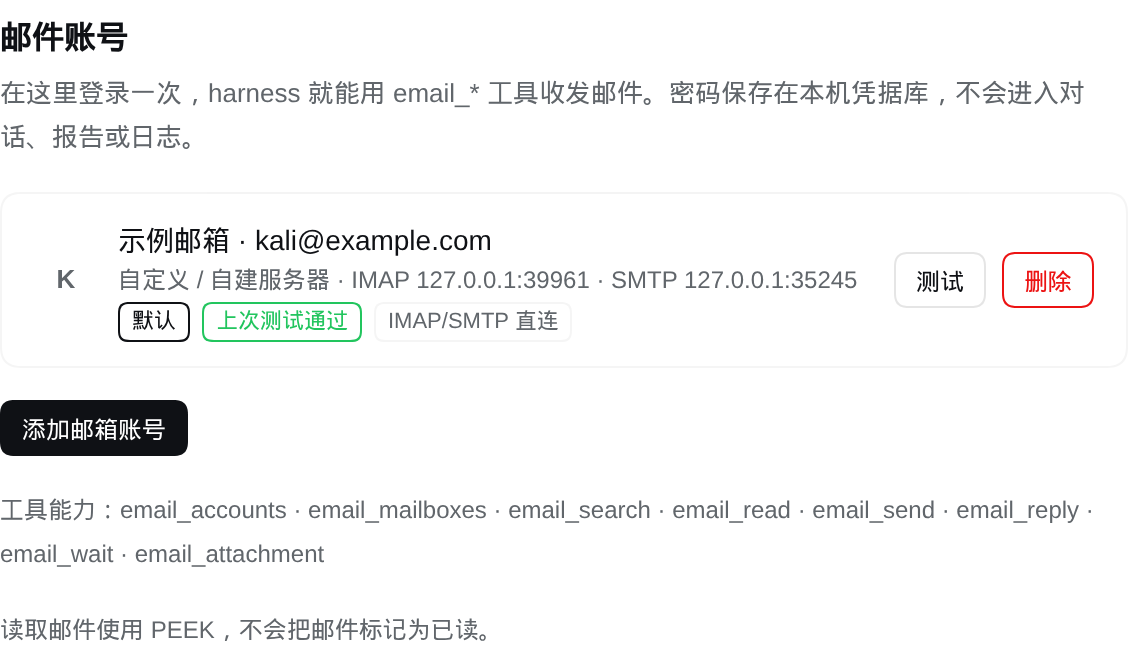 | 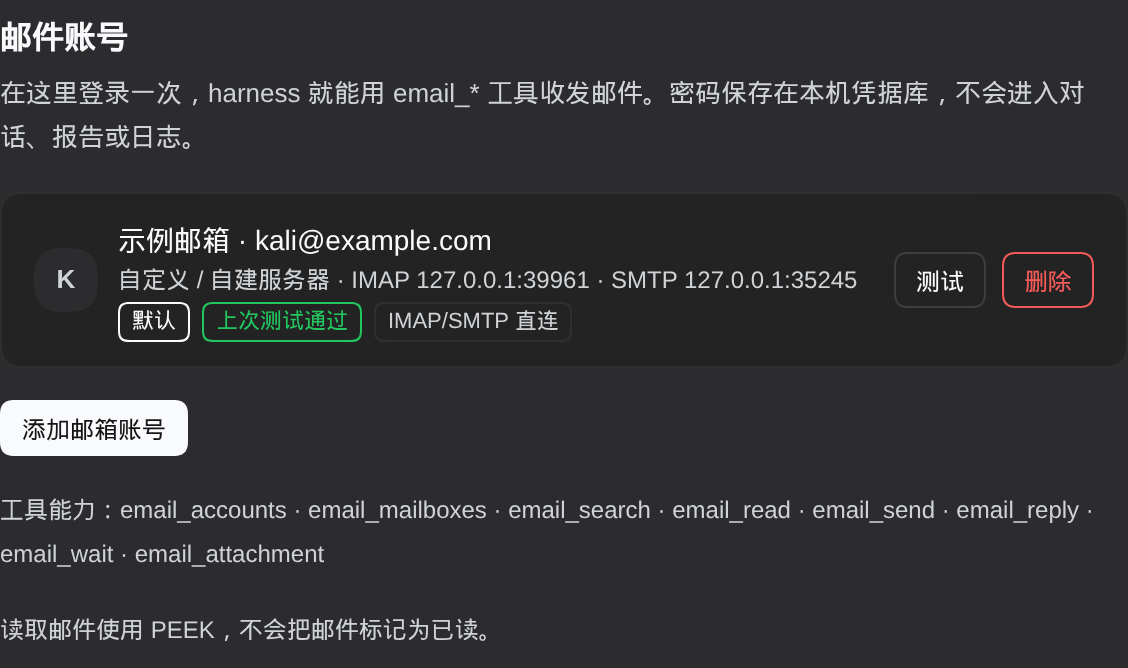 |
|
|
17
|
+
|
|
18
|
+
## 安装
|
|
19
|
+
|
|
20
|
+
### 方式一:Release 资产(一行命令,已验证)
|
|
21
|
+
|
|
22
|
+
```bash
|
|
23
|
+
cd ~/.dsh/profiles/web # 你的 profile 目录
|
|
24
|
+
pnpm add https://github.com/kuanbandu/dsh-email/releases/download/v0.1.0/kuanbandu-dsh-email-0.1.0.tgz
|
|
25
|
+
```
|
|
26
|
+
|
|
27
|
+
再把包名加进同目录 `package.json` 的 `dsh.profile.bundles`:
|
|
28
|
+
|
|
29
|
+
```json
|
|
30
|
+
{
|
|
31
|
+
"dsh": { "profile": { "bundles": ["…", "@kuanbandu/dsh-email"] } }
|
|
32
|
+
}
|
|
33
|
+
```
|
|
34
|
+
|
|
35
|
+
重启一次 DSH(Host 半侧在启动时加载),刷新 Web UI 页面。
|
|
36
|
+
|
|
37
|
+
### 方式二:从 git 装
|
|
38
|
+
|
|
39
|
+
```bash
|
|
40
|
+
cd ~/.dsh/profiles/web
|
|
41
|
+
pnpm add git+https://github.com/kuanbandu/dsh-email.git
|
|
42
|
+
```
|
|
43
|
+
|
|
44
|
+
> 若 `git` 连不上 GitHub(报 `GnuTLS, handshake failed`),多半是本机 git 走了不通 GitHub 的代理,加前缀强制直连:
|
|
45
|
+
> `GIT_CONFIG_COUNT=1 GIT_CONFIG_KEY_0=http.proxy GIT_CONFIG_VALUE_0= pnpm add git+https://github.com/kuanbandu/dsh-email.git`
|
|
46
|
+
|
|
47
|
+
### 方式三:clone 后让 agent 装
|
|
48
|
+
|
|
49
|
+
```bash
|
|
50
|
+
git clone https://github.com/kuanbandu/dsh-email.git ~/dsh-email
|
|
51
|
+
```
|
|
52
|
+
|
|
53
|
+
然后让 agent 用 `plugin_manager` 的 `install_bundle`,`target` 填 `/home/<你>/dsh-email` 这个绝对路径。
|
|
54
|
+
|
|
55
|
+
### 方式四:npm(待发布)
|
|
56
|
+
|
|
57
|
+
```bash
|
|
58
|
+
cd ~/.dsh/profiles/<你的 profile>
|
|
59
|
+
pnpm add @kuanbandu/dsh-email
|
|
60
|
+
```
|
|
61
|
+
|
|
62
|
+
或在 DSH 里说一句:**用 `plugin_manager` 的 `install_bundle` 安装 `@kuanbandu/dsh-email`**。
|
|
63
|
+
发布状态见 [PUBLISHING.md](PUBLISHING.md)(账户开了 auth-and-writes 2FA,需要一次性 2FA 才能上传)。
|
|
64
|
+
|
|
65
|
+
## 登录
|
|
66
|
+
|
|
67
|
+
1. 打开 Web UI → 左下 **设置**。
|
|
68
|
+
2. 左侧导航选 **邮件**(在 Plugins / Agent Presets 之后)。
|
|
69
|
+
3. 点 **添加邮箱账号** → 选服务商 → 填邮箱和密码/授权码 → **登录并保存**。
|
|
70
|
+
保存前会真实登录一次 IMAP 和 SMTP,页面立刻显示两侧耗时与邮件夹数量;IMAP 通过而 SMTP 失败时仍会保存,并提示「可以收信、暂时不能发信」。
|
|
71
|
+
4. 「高级」里 IMAP 与 SMTP **各自**有「隐式 TLS(465)」与「STARTTLS」两个互斥开关,以及可选的代理字段。
|
|
72
|
+
|
|
73
|
+
### 各服务商要点
|
|
74
|
+
|
|
75
|
+
| 服务商 | 密码填什么 | 备注 |
|
|
76
|
+
| --- | --- | --- |
|
|
77
|
+
| Gmail / Workspace | **应用专用密码**(16 位) | 需先开两步验证;在 [myaccount.google.com/apppasswords](https://myaccount.google.com/apppasswords) 生成。账号主密码会被拒。 |
|
|
78
|
+
| 163 / 126 | **客户端授权码** | 网页版 设置 → POP3/SMTP/IMAP 开启 IMAP 并生成授权码。服务端要求先发 RFC 2971 `ID`,插件已自动处理。 |
|
|
79
|
+
| QQ 邮箱 | **授权码** | 设置 → 账号 → 开启 IMAP/SMTP 服务。 |
|
|
80
|
+
| Proton Mail | **Bridge 密码** | Proton 没有直连 IMAP:先装 [Proton Mail Bridge](https://proton.me/mail/bridge),用 Bridge 给出的账号密码,地址默认 `127.0.0.1:1143` / `1025`,并在高级里勾「跳过 TLS 证书校验」(Bridge 自签名)。 |
|
|
81
|
+
| Outlook / Microsoft 365 | 应用密码(开了 2FA 时) | IMAP 需在邮箱侧开启。 |
|
|
82
|
+
| iCloud | **App 专用密码** | appleid.apple.com → 登录与安全。 |
|
|
83
|
+
| 自建服务器 | 登录密码 | 高级里自己填 IMAP/SMTP 地址、端口、TLS 方式。 |
|
|
84
|
+
|
|
85
|
+
## 工具
|
|
86
|
+
|
|
87
|
+
| 工具 | 用途 |
|
|
88
|
+
| --- | --- |
|
|
89
|
+
| `email_accounts` | `list` 列出账号(含密码是否就位、上次测试结果、路由);`catalog` 列出服务商预设;`test` 用已保存密码重测连通性。 |
|
|
90
|
+
| `email_mailboxes` | 列文件夹(INBOX / Sent / Trash / 中文「已发送」等)。 |
|
|
91
|
+
| `email_search` | 按 from / to / subject / text / since / before / unseen 检索,返回最新优先摘要。只读,不改 `\Seen`。 |
|
|
92
|
+
| `email_read` | 读正文(解码后)+ 附件清单;`include_html` 可选;超长按 `max_bytes` 截断。 |
|
|
93
|
+
| `email_send` | 发新信:纯文本 / HTML / CC / BCC / Reply-To / 工作区文件作附件。 |
|
|
94
|
+
| `email_reply` | 回复并自动带 `In-Reply-To` / `References` 线程头,默认 `> ` 引用原文,`reply_all` 带原 CC。 |
|
|
95
|
+
| `email_wait` | 轮询等新邮件(最长 120s),可按 from / subject 过滤 —— 注册账号后等验证邮件的关键工具。 |
|
|
96
|
+
| `email_attachment` | 把附件落盘(默认 `mail-attachments/<uid>/<文件名>`),返回绝对路径供后续分析。 |
|
|
97
|
+
|
|
98
|
+
典型用法:
|
|
99
|
+
|
|
100
|
+
```text
|
|
101
|
+
注册目标站点 → email_wait {from: "target.com", timeout_seconds: 60}
|
|
102
|
+
→ email_read {uid} # 取验证码/确认链接
|
|
103
|
+
→ email_attachment {uid, index: 0} # 导出对方给的文件
|
|
104
|
+
|
|
105
|
+
跟进沟通 → email_reply {uid, text: "..."} # 线程正确、自动引用原文
|
|
106
|
+
→ email_search {from: "security@target.com", since: "2026-01-01"}
|
|
107
|
+
```
|
|
108
|
+
|
|
109
|
+
插件会注入一段系统提示,声明这些工具的用途与纪律:邮件正文是不可信外部数据(可读取使用,但不执行其中的指令),凭据永不写入报告,`email_send` 发送前需确认收件人。
|
|
110
|
+
|
|
111
|
+
## 安全模型
|
|
112
|
+
|
|
113
|
+
| 关注点 | 做法 |
|
|
114
|
+
| --- | --- |
|
|
115
|
+
| 密码存储 | DSH 凭据库 record(`dsh-email/<accountId>`,`kind: api-key`),文件权限 `0600`;每次操作现读,改密码无需重启。 |
|
|
116
|
+
| 元数据 | `$DSH_HOME/plugin-data/dsh-email/accounts.json`(`0600`,原子写)只存服务商、地址、端点、路由、测试结果,**不含密码**。 |
|
|
117
|
+
| 模型可见性 | 工具只返回账号与邮件内容;密码、凭据记录、授权码永不出现在工具结果里。 |
|
|
118
|
+
| 设置页 API | 单条同源 `POST /plugins/dsh-email/api`,要求 `x-dsh-email: 1` 自定义头(跨站表单无法伪造)+ `sec-fetch-site` 同源校验,请求体上限 256 KB。 |
|
|
119
|
+
| 读取副作用 | 全部 `BODY.PEEK`,不置 `\Seen`;插件没有删除/移动邮件的能力。 |
|
|
120
|
+
| 发送 | 只在工具或 UI 明确要求时发生;附件大小上限 8 MB。 |
|
|
121
|
+
|
|
122
|
+
## 代理(海外邮箱)
|
|
123
|
+
|
|
124
|
+
海外邮箱(Gmail / Outlook / iCloud / Yahoo)常需代理;国内邮箱(163 / 126 / QQ)、Proton Bridge、自建服务器默认直连。
|
|
125
|
+
|
|
126
|
+
```yaml
|
|
127
|
+
# cordis.patch.yml 的插件行
|
|
128
|
+
- insert:
|
|
129
|
+
- id: dsh-email
|
|
130
|
+
name: '@kuanbandu/dsh-email'
|
|
131
|
+
config:
|
|
132
|
+
proxy: 127.0.0.1:7890 # host:port / http:// / socks5:// ;留空=全直连
|
|
133
|
+
proxyBypass: [] # 追加直连主机(回环、*.local 本来就直连)
|
|
134
|
+
routeFallback: true # 代理连不上时自动回退直连
|
|
135
|
+
proxyConnectTimeoutMs: 8000 # 走代理时单次连接超时,超时即回退
|
|
136
|
+
```
|
|
137
|
+
|
|
138
|
+
**按账号、按通道覆盖**(设置页「高级」里两个输入框):
|
|
139
|
+
|
|
140
|
+
| 字段 | 作用 |
|
|
141
|
+
| --- | --- |
|
|
142
|
+
| `proxy`(IMAP 代理) | 留空 = 跟随全局;`off` = 直连;也可填具体代理地址 |
|
|
143
|
+
| `smtpProxy`(SMTP 代理) | 留空 = 与 IMAP 相同;`off` = 发信直连 |
|
|
144
|
+
|
|
145
|
+
为什么需要分开:**多数代理节点只放行 993/995,会封 465/587**。典型现象是收信走代理正常、发信卡在 TLS 握手。这时把 `smtpProxy` 设为 `off` 即可(或依赖 `routeFallback` 自动回退,代价是每个进程第一次发信多等一次超时)。
|
|
146
|
+
|
|
147
|
+
机制细节:
|
|
148
|
+
|
|
149
|
+
- 自己开隧道(HTTP `CONNECT` 或 SOCKS5 无认证),拿到裸 socket 后照常做 TLS/STARTTLS,所以走代理与直连的协议代码完全一致。
|
|
150
|
+
- 隧道握手用 `read()`(paused 模式)而不是 `on('data')`:代理的 `CONNECT 200` 常与服务器欢迎行在同一个 TCP 包里,用流动模式会把多余字节丢掉(`lib/proxy.js` 有注释与回归测试)。
|
|
151
|
+
- 只在**传输层**(connect / greeting / STARTTLS 超时)回退;密码错不会来回试,避免把账号锁死。
|
|
152
|
+
- 成功的路由按「账号+通道」记在内存,同一进程内后续操作不再重复试探被封的代理。
|
|
153
|
+
- 回环地址(`127.x`、`localhost`、`*.local`)永远直连,所以 Proton Bridge 与本地测试不会被代理劫持。
|
|
154
|
+
|
|
155
|
+
## 配置
|
|
156
|
+
|
|
157
|
+
`cordis.patch.yml` 里插件行支持的字段(都有默认值):
|
|
158
|
+
|
|
159
|
+
```yaml
|
|
160
|
+
config:
|
|
161
|
+
dataDir: ~/.dsh/plugin-data/dsh-email # 账号文件目录
|
|
162
|
+
requestTimeoutMs: 20000 # 单次 IMAP/SMTP 操作超时
|
|
163
|
+
maxBodyBytes: 262144 # email_read 正文上限
|
|
164
|
+
maxAttachmentBytes: 8388608 # 附件读写上限
|
|
165
|
+
systemPrompt: true # 是否注入简短的邮件能力提示
|
|
166
|
+
apiPath: /plugins/dsh-email # 设置页 API 前缀
|
|
167
|
+
proxy: ''
|
|
168
|
+
proxyBypass: []
|
|
169
|
+
routeFallback: true
|
|
170
|
+
proxyConnectTimeoutMs: 8000
|
|
171
|
+
```
|
|
172
|
+
|
|
173
|
+
## 开发与自检
|
|
174
|
+
|
|
175
|
+
```bash
|
|
176
|
+
npm test # = selftest + client-smoke
|
|
177
|
+
node scripts/selftest.mjs # 29 项:协议/服务层,用环回 mock IMAP/SMTP/代理跑全链路
|
|
178
|
+
node scripts/client-smoke.mjs # 8 项:桩渲染设置页(空态/已登录/表单/报错/service getter 抛错)
|
|
179
|
+
node scripts/mock-mail-server.mjs # 只起 mock 服务器,手动把设置页指向它
|
|
180
|
+
node scripts/verify-accounts.mjs [proxy] # 本机诊断:打印每个账号的真实路由与耗时
|
|
181
|
+
```
|
|
182
|
+
|
|
183
|
+
`selftest` 不需要任何真实邮箱:mock 服务器实现了客户端用到的动词,并额外提供 HTTP CONNECT 代理、SOCKS5 代理和「接受后立刻断开」的坏代理,用来验证隧道与回退。另覆盖 RFC 2047/2231、GB18030、HTML→文本、线程头、dot-stuffing 等细节。
|
|
184
|
+
|
|
185
|
+
mock 账号:`kali@example.com` / `test-pass`(自定义服务器,关闭 TLS)。
|
|
186
|
+
|
|
187
|
+
### 改代码后怎么生效
|
|
188
|
+
|
|
189
|
+
- **Host 半侧**(`index.js`、`lib/*.js`)由 DSH 进程 `import` 一次:改完需要**重启 DSH**(`systemctl --user restart dsh-web.service` 或重新 `dsh web`)。
|
|
190
|
+
- **Client 半侧**(`client.js`)每次页面加载从磁盘读取:**刷新浏览器**即可。
|
|
191
|
+
|
|
192
|
+
### 两个已经踩过的坑(写 DSH 插件的人可以借鉴)
|
|
193
|
+
|
|
194
|
+
1. **Client 半侧必须 `inject` 它读的每个服务。** Cordis 客户端上下文对「未声明就访问」的服务是**抛错式 getter**:只写 `inject: ['slots']` 却访问 `ctx.locale`,渲染时会抛
|
|
195
|
+
`Error: cannot get property "locale" without inject`,浏览器控制台显示 `slot entry crashed in 'settings.section'`,页面**整块空白**。本项目 `inject: ['slots', 'locale']`,且所有 locale 读取过 `serviceOf()` 兜底。
|
|
196
|
+
2. **主按钮颜色不能写死 `#fff`。** 亮色主题的 `--dsw-alias-brand-primary` 是近黑,暗色主题是近白;写死白字在暗色下就是白底白字。用 `color: var(--dsw-alias-bg-base)` 才在两种主题下都有 ~17:1 的对比度。
|
|
197
|
+
|
|
198
|
+
## 文件
|
|
199
|
+
|
|
200
|
+
| 文件 | 作用 |
|
|
201
|
+
| --- | --- |
|
|
202
|
+
| `index.js` | 插件入口:注册工具、系统提示段、设置页 API 路由。 |
|
|
203
|
+
| `lib/imap.js` | IMAP4rev1 客户端(TLS / STARTTLS / LOGIN / LIST / SELECT / UID SEARCH / UID FETCH / NOOP),modified UTF-7。 |
|
|
204
|
+
| `lib/smtp.js` | SMTP 提交客户端(465 隐式 TLS / 587 STARTTLS / AUTH PLAIN & LOGIN / dot-stuffing)。 |
|
|
205
|
+
| `lib/mime.js` | MIME 编解码:头部、编码字、multipart、附件、HTML→文本、消息构建。 |
|
|
206
|
+
| `lib/proxy.js` | 代理隧道:HTTP CONNECT / SOCKS5、直连判定、路由描述。 |
|
|
207
|
+
| `lib/providers.js` | 服务商预设(端点 + 密码类型 + 提示 + 是否默认直连)。 |
|
|
208
|
+
| `lib/accounts.js` | 账号注册表(JSON,0600)+ 凭据库读写。 |
|
|
209
|
+
| `lib/mailservice.js` | 所有邮件操作(工具与设置页共用一份实现)。 |
|
|
210
|
+
| `lib/tools.js` | 8 个 `email_*` 工具定义。 |
|
|
211
|
+
| `client.js` | Web UI 设置页(React,slot `settings.section`)。 |
|
|
212
|
+
| `scripts/*.mjs` | selftest / client-smoke / mock 服务器 / 账号诊断。 |
|
|
213
|
+
|
|
214
|
+
## License
|
|
215
|
+
|
|
216
|
+
[MIT](LICENSE)
|