@konnectio/core 4.4.9 → 4.5.0
This diff represents the content of publicly available package versions that have been released to one of the supported registries. The information contained in this diff is provided for informational purposes only and reflects changes between package versions as they appear in their respective public registries.
- package/README.md +274 -274
- package/dist/ActionField-X2QEHCxM.js +148 -0
- package/dist/ActionField-X2QEHCxM.js.br +0 -0
- package/dist/ActionField-X2QEHCxM.js.gz +0 -0
- package/dist/AvailabilitySkeleton-sfPLQyx0.js +10131 -0
- package/dist/AvailabilitySkeleton-sfPLQyx0.js.br +0 -0
- package/dist/AvailabilitySkeleton-sfPLQyx0.js.gz +0 -0
- package/dist/CheckoutWindow-BRnjOTlw.js +701 -0
- package/dist/CheckoutWindow-BRnjOTlw.js.br +0 -0
- package/dist/CheckoutWindow-BRnjOTlw.js.gz +0 -0
- package/dist/ErrorMessage-4qWixsXZ.js +31 -0
- package/dist/ErrorMessage-4qWixsXZ.js.br +0 -0
- package/dist/ErrorMessage-4qWixsXZ.js.gz +0 -0
- package/dist/EventAvailabilityForm-DAeAtR3I.js +114 -0
- package/dist/EventAvailabilityForm-DAeAtR3I.js.br +0 -0
- package/dist/EventAvailabilityForm-DAeAtR3I.js.gz +0 -0
- package/dist/Field-CyDf8ah0.js +57 -0
- package/dist/Field-CyDf8ah0.js.br +0 -0
- package/dist/Field-CyDf8ah0.js.gz +0 -0
- package/dist/HotelAvailabilityForm-BPSy0THr.js +317 -0
- package/dist/HotelAvailabilityForm-BPSy0THr.js.br +0 -0
- package/dist/HotelAvailabilityForm-BPSy0THr.js.gz +0 -0
- package/dist/SelectField-CX4o6A18.js +11133 -0
- package/dist/SelectField-CX4o6A18.js.br +0 -0
- package/dist/SelectField-CX4o6A18.js.gz +0 -0
- package/dist/TermsOfService-CWjn_42W.js +17 -0
- package/dist/TermsOfService-CWjn_42W.js.br +5 -0
- package/dist/TermsOfService-CWjn_42W.js.gz +0 -0
- package/dist/_-qyWkj4S8.js +22 -0
- package/dist/_-qyWkj4S8.js.br +0 -0
- package/dist/_-qyWkj4S8.js.gz +0 -0
- package/dist/availability.js +99 -129
- package/dist/availability.js.br +0 -0
- package/dist/availability.js.gz +0 -0
- package/dist/cancel-reservation.js +155 -158
- package/dist/cancel-reservation.js.br +0 -0
- package/dist/cancel-reservation.js.gz +0 -0
- package/dist/chunk-BPfpcrXh.js +20 -0
- package/dist/chunk-BPfpcrXh.js.br +0 -0
- package/dist/chunk-BPfpcrXh.js.gz +2 -0
- package/dist/core.css +2 -1
- package/dist/core.css.br +0 -0
- package/dist/core.css.gz +0 -0
- package/dist/deep-link.js +43 -47
- package/dist/deep-link.js.br +0 -0
- package/dist/deep-link.js.gz +0 -0
- package/dist/dist-CVBZ2agG.js +944 -0
- package/dist/dist-CVBZ2agG.js.br +0 -0
- package/dist/dist-CVBZ2agG.js.gz +0 -0
- package/dist/event.js +1069 -1192
- package/dist/event.js.br +0 -0
- package/dist/event.js.gz +0 -0
- package/dist/gift-card-validation.js +114 -161
- package/dist/gift-card-validation.js.br +0 -0
- package/dist/gift-card-validation.js.gz +0 -0
- package/dist/gift-card.js +452 -451
- package/dist/gift-card.js.br +0 -0
- package/dist/gift-card.js.gz +0 -0
- package/dist/giftCard-BrTMBQuW.js +101 -0
- package/dist/giftCard-BrTMBQuW.js.br +0 -0
- package/dist/giftCard-BrTMBQuW.js.gz +0 -0
- package/dist/hotel.js +8165 -10403
- package/dist/hotel.js.br +0 -0
- package/dist/hotel.js.gz +0 -0
- package/dist/masonry.plugin-Doip-tm0.js +8747 -0
- package/dist/masonry.plugin-Doip-tm0.js.br +0 -0
- package/dist/masonry.plugin-Doip-tm0.js.gz +0 -0
- package/dist/mitt-DrOLO7f9.js +9694 -0
- package/dist/mitt-DrOLO7f9.js.br +0 -0
- package/dist/mitt-DrOLO7f9.js.gz +0 -0
- package/dist/polyfill.js +9298 -11610
- package/dist/polyfill.js.br +0 -0
- package/dist/polyfill.js.gz +0 -0
- package/dist/style-k68BwP9N.js +1709 -0
- package/dist/style-k68BwP9N.js.br +0 -0
- package/dist/style-k68BwP9N.js.gz +0 -0
- package/package.json +115 -118
- package/dist/ActionField-CjB94ywQ.js +0 -103
- package/dist/ActionField-CjB94ywQ.js.br +0 -0
- package/dist/ActionField-CjB94ywQ.js.gz +0 -0
- package/dist/AvailabilitySkeleton-GcNIEr0O.js +0 -346
- package/dist/AvailabilitySkeleton-GcNIEr0O.js.br +0 -0
- package/dist/AvailabilitySkeleton-GcNIEr0O.js.gz +0 -0
- package/dist/AvailabilitySkeleton.vue_vue_type_style_index_0_scoped_bcdabbb5_lang-r3OqaSe-.js +0 -10311
- package/dist/AvailabilitySkeleton.vue_vue_type_style_index_0_scoped_bcdabbb5_lang-r3OqaSe-.js.br +0 -0
- package/dist/AvailabilitySkeleton.vue_vue_type_style_index_0_scoped_bcdabbb5_lang-r3OqaSe-.js.gz +0 -0
- package/dist/CheckoutWindow-jLe1mUEB.js +0 -668
- package/dist/CheckoutWindow-jLe1mUEB.js.br +0 -0
- package/dist/CheckoutWindow-jLe1mUEB.js.gz +0 -0
- package/dist/ErrorMessage-uA3IcjN_.js +0 -39
- package/dist/ErrorMessage-uA3IcjN_.js.br +0 -0
- package/dist/ErrorMessage-uA3IcjN_.js.gz +0 -0
- package/dist/EventAvailabilityForm-4m-RW0Lx.js +0 -119
- package/dist/EventAvailabilityForm-4m-RW0Lx.js.br +0 -0
- package/dist/EventAvailabilityForm-4m-RW0Lx.js.gz +0 -0
- package/dist/Field-D9fOd9ca.js +0 -44
- package/dist/Field-D9fOd9ca.js.br +0 -0
- package/dist/Field-D9fOd9ca.js.gz +0 -0
- package/dist/Field.vue_vue_type_style_index_0_scoped_c072a208_lang-B1tIG39F.js +0 -21
- package/dist/Field.vue_vue_type_style_index_0_scoped_c072a208_lang-B1tIG39F.js.br +0 -5
- package/dist/Field.vue_vue_type_style_index_0_scoped_c072a208_lang-B1tIG39F.js.gz +0 -0
- package/dist/SelectField.vue_vue_type_style_index_0_lang-DH_el7cy.js +0 -11918
- package/dist/SelectField.vue_vue_type_style_index_0_lang-DH_el7cy.js.br +0 -0
- package/dist/SelectField.vue_vue_type_style_index_0_lang-DH_el7cy.js.gz +0 -0
- package/dist/TermsOfService-CD3_lM8u.js +0 -28
- package/dist/TermsOfService-CD3_lM8u.js.br +0 -0
- package/dist/TermsOfService-CD3_lM8u.js.gz +0 -0
- package/dist/_-DeLqDsjZ.js +0 -5
- package/dist/_-DeLqDsjZ.js.br +0 -0
- package/dist/_-DeLqDsjZ.js.gz +0 -2
- package/dist/_.vue_vue_type_style_index_0_lang-BdANnGTG.js +0 -25
- package/dist/_.vue_vue_type_style_index_0_lang-BdANnGTG.js.br +0 -0
- package/dist/_.vue_vue_type_style_index_0_lang-BdANnGTG.js.gz +0 -0
- package/dist/_commonjsHelpers-DaMA6jEr.js +0 -9
- package/dist/_commonjsHelpers-DaMA6jEr.js.br +0 -0
- package/dist/_commonjsHelpers-DaMA6jEr.js.gz +0 -0
- package/dist/giftCard-G-zvnJVj.js +0 -109
- package/dist/giftCard-G-zvnJVj.js.br +0 -0
- package/dist/giftCard-G-zvnJVj.js.gz +0 -0
- package/dist/index-BEOLg3OJ.js +0 -639
- package/dist/index-BEOLg3OJ.js.br +0 -0
- package/dist/index-BEOLg3OJ.js.gz +0 -0
- package/dist/masonry.plugin-gbufcPfU.js +0 -10816
- package/dist/masonry.plugin-gbufcPfU.js.br +0 -0
- package/dist/masonry.plugin-gbufcPfU.js.gz +0 -0
- package/dist/mitt-Cj---5fy.js +0 -13346
- package/dist/mitt-Cj---5fy.js.br +0 -0
- package/dist/mitt-Cj---5fy.js.gz +0 -0
- package/dist/style-n4UQjvXd.js +0 -1750
- package/dist/style-n4UQjvXd.js.br +0 -0
- package/dist/style-n4UQjvXd.js.gz +0 -0
package/README.md
CHANGED
|
@@ -1,274 +1,274 @@
|
|
|
1
|
-
# Konnectio Core Integration for Octopus PMS
|
|
2
|
-
|
|
3
|
-
<p align="center">
|
|
4
|
-
<a href="https://vuejs.org/"><img src="https://img.shields.io/badge/vue-3-brightgreen.svg"/></a>
|
|
5
|
-
</p>
|
|
6
|
-
|
|
7
|
-
## Features
|
|
8
|
-
|
|
9
|
-
- Three feature-rich shortcode modules:
|
|
10
|
-
- Hotel availability 'call-to-action'
|
|
11
|
-
- Hotel module (with support for ReePay & Dibs)
|
|
12
|
-
- Gift card module (with support for ReePay & Dibs)
|
|
13
|
-
- Gift card validation
|
|
14
|
-
- Event module
|
|
15
|
-
- The look of the modules will adapt to the existing design of the website.
|
|
16
|
-
- Multiple languages supported:
|
|
17
|
-
- Works with popular multi-language plugins such as WPML and Polylang.
|
|
18
|
-
- Language strings can be modified through an easy to use interface.
|
|
19
|
-
- Comes prepackaged with Danish and English.
|
|
20
|
-
- Various customization options.
|
|
21
|
-
- Continuous updates. See [CHANGELOG.md](CHANGELOG.md).
|
|
22
|
-
|
|
23
|
-
## Getting started
|
|
24
|
-
|
|
25
|
-
### Installation
|
|
26
|
-
Simply upload and install `FreshBooking for Octopus PMS` in the same way you'd install any other plugin.
|
|
27
|
-
|
|
28
|
-
During the installation of the plugin two database tables are created. One for containing custom translation strings (which currently comes prepackaged with translations for Danish and English) and another for storing FreshBooking credentials.
|
|
29
|
-
|
|
30
|
-
### License activation
|
|
31
|
-
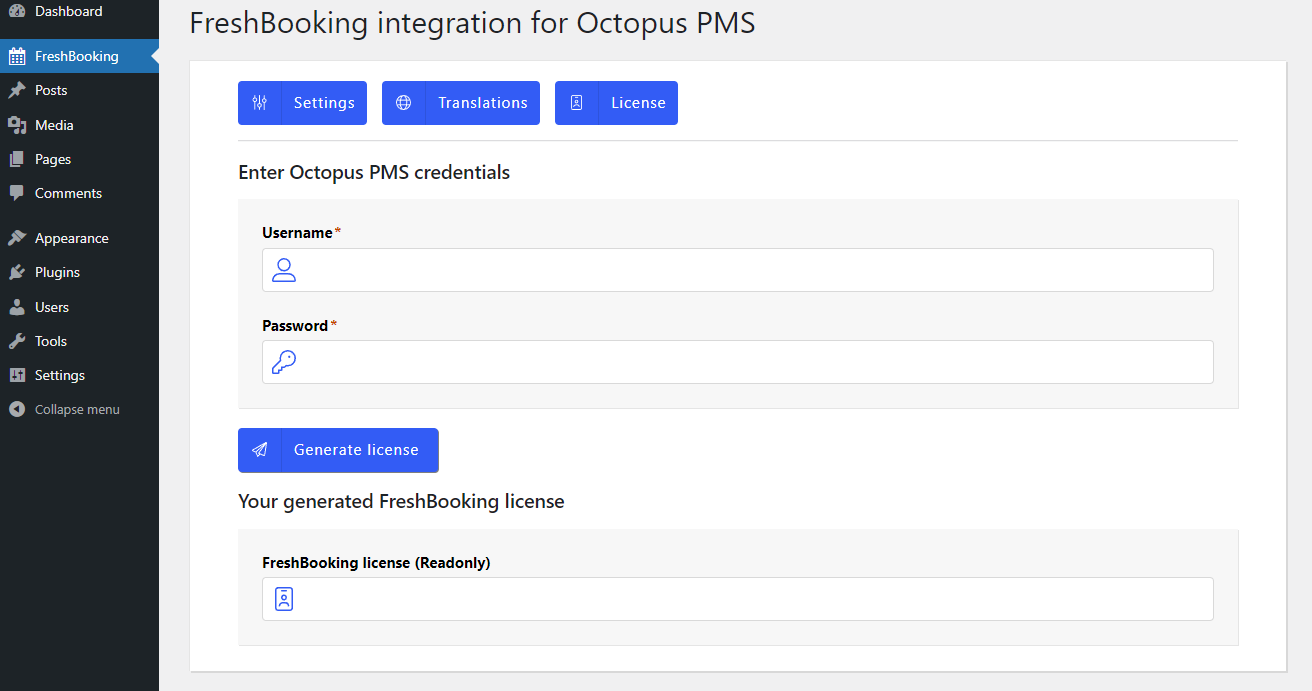
After the installation of the FreshBooking WordPress plugin it is necessary to activate the FreshBooking license. This is done by navigating to the 'FreshBooking' page in the sidebar menu within the WordPress administration panel. From there you click the tab labeled 'License'. Here you just fill out your Octopus PMS login credentials, and then click 'Generate License'. This will generate the FreshBooking token required to use the plugin.
|
|
32
|
-
|
|
33
|
-
|
|
34
|
-
|
|
35
|
-
After successfully generating the FreshBooking token, you will be able to begin setting up plugin provided shortcodes that constitute the main functionality.
|
|
36
|
-
|
|
37
|
-
## Usage
|
|
38
|
-
The FreshBooking WordPress plugin currently contains three shortcodes that require manual placement on a given page.
|
|
39
|
-
|
|
40
|
-
The shortcodes can be inserted without further configuration.
|
|
41
|
-
|
|
42
|
-
Common for all shortcodes is that they inject small [Vue.js](https://vuejs.org/) applications that work isolated from the rest of the Wordpress website.
|
|
43
|
-
|
|
44
|
-
The most optimal way to insert them are on pages with a _"full width"_ layout with about a 15-25 pixel margin in the sides.
|
|
45
|
-
|
|
46
|
-
### 'Availability' shortcode
|
|
47
|
-
|
|
48
|
-
The availability shortcode would most likely be inserted on the front page, and used as a _call to action_ to direct guests to _hotel_ module where the actual booking process happens.
|
|
49
|
-
|
|
50
|
-
The availability shortcode can be inserted anywhere on the wordpress site using the following name:
|
|
51
|
-
|
|
52
|
-
```
|
|
53
|
-
[konnectio-availability]
|
|
54
|
-
```
|
|
55
|
-
|
|
56
|
-
You can add custom properties to the availability shortcode like so:
|
|
57
|
-
|
|
58
|
-
```
|
|
59
|
-
[konnectio-availability panel-padding="24px"]
|
|
60
|
-
```
|
|
61
|
-
|
|
62
|
-
The availability shortcode supports the following properties (the default property settings are listed in the right side of the arrows):
|
|
63
|
-
|
|
64
|
-
```js
|
|
65
|
-
[
|
|
66
|
-
'accent-color' => '#e7c55e',
|
|
67
|
-
'button-background' => '#e7c55e',
|
|
68
|
-
'button-border' => null,
|
|
69
|
-
'button-border-radius' => '4px',
|
|
70
|
-
'button-color' => '#000000',
|
|
71
|
-
'button-font-family' => 'inherit',
|
|
72
|
-
'button-font-size' => '14px',
|
|
73
|
-
'button-font-weight' => '400',
|
|
74
|
-
'button-text-transform' => 'uppercase',
|
|
75
|
-
'font-color' => '#666',
|
|
76
|
-
'font-family' => 'inherit',
|
|
77
|
-
'font-size' => '18px',
|
|
78
|
-
'header-color' => '#000000',
|
|
79
|
-
'header-font-size' => '42px',
|
|
80
|
-
'input-background' => '#fff',
|
|
81
|
-
'input-border' => '1px solid rgba(0, 0, 0, 0.15)',
|
|
82
|
-
'input-border-radius' => '0px',
|
|
83
|
-
'label-font-weight' => 'bold',
|
|
84
|
-
'label-padding' => '6px',
|
|
85
|
-
'panel-background' => 'rgba(255, 255, 255, 0.8)',
|
|
86
|
-
'panel-border' => null,
|
|
87
|
-
'panel-border-radius' => '8px',
|
|
88
|
-
'panel-padding' => '24px'
|
|
89
|
-
]
|
|
90
|
-
```
|
|
91
|
-
|
|
92
|
-
|
|
93
|
-
### 'Hotel' shortcode
|
|
94
|
-
|
|
95
|
-
The hotel shortcode can be inserted anywhere on the wordpress site using the following name:
|
|
96
|
-
|
|
97
|
-
```
|
|
98
|
-
[konnectio-hotel]
|
|
99
|
-
```
|
|
100
|
-
|
|
101
|
-
The hotel shortcode supports the following properties:
|
|
102
|
-
|
|
103
|
-
```js
|
|
104
|
-
[
|
|
105
|
-
'accent-color' => '#e7c55e',
|
|
106
|
-
'button-background' => '#e7c55e',
|
|
107
|
-
'button-border-radius' => '4px',
|
|
108
|
-
'button-border' => null,
|
|
109
|
-
'button-color' => '#000000',
|
|
110
|
-
'button-font-family' => 'inherit',
|
|
111
|
-
'button-font-size' => '14px',
|
|
112
|
-
'button-font-weight' => '400',
|
|
113
|
-
'button-text-transform' => 'uppercase',
|
|
114
|
-
'danger-color' => '#afa997',
|
|
115
|
-
'font-color' => '#666',
|
|
116
|
-
'font-family' => 'inherit',
|
|
117
|
-
'font-size' => '18px',
|
|
118
|
-
'gray-color' => 'grey',
|
|
119
|
-
'header-color' => '#000000',
|
|
120
|
-
'header-layout' => 'default',
|
|
121
|
-
'input-background' => '#ffffff',
|
|
122
|
-
'input-border-radius' => '0px',
|
|
123
|
-
'input-border' => '1px solid rgba(0, 0, 0, 0.15)',
|
|
124
|
-
'label-font-weight' => 'bold',
|
|
125
|
-
'label-padding' => '6px',
|
|
126
|
-
'layout' => 'selective',
|
|
127
|
-
'loading-color' => '#666',
|
|
128
|
-
'packages-title-max-lines' => '1',
|
|
129
|
-
'panel-background' => '#ffffff',
|
|
130
|
-
'panel-border-radius' => '8px',
|
|
131
|
-
'panel-border' => null,
|
|
132
|
-
'panel-padding' => '24px',
|
|
133
|
-
'success-color' => '#e7c55e'
|
|
134
|
-
]
|
|
135
|
-
```
|
|
136
|
-
|
|
137
|
-
### 'Gift card' shortcode
|
|
138
|
-
|
|
139
|
-
The gift card shortcode can be inserted anywhere on the wordpress site using the following name:
|
|
140
|
-
|
|
141
|
-
```
|
|
142
|
-
[konnectio-gift-card]
|
|
143
|
-
```
|
|
144
|
-
|
|
145
|
-
The gift card shortcode supports the following properties:
|
|
146
|
-
|
|
147
|
-
```js
|
|
148
|
-
[
|
|
149
|
-
'accent-color' => '#e7c55e',
|
|
150
|
-
'button-background' => '#e7c55e',
|
|
151
|
-
'button-border' => null,
|
|
152
|
-
'button-border-radius' => '4px',
|
|
153
|
-
'button-color' => '#000000',
|
|
154
|
-
'button-font-family' => 'inherit',
|
|
155
|
-
'button-font-size' => '14px',
|
|
156
|
-
'button-text-transform' => 'uppercase',
|
|
157
|
-
'button-font-weight' => '400',
|
|
158
|
-
'font-color' => '#666',
|
|
159
|
-
'font-family' => 'inherit',
|
|
160
|
-
'font-size' => '18px',
|
|
161
|
-
'font-weight' => '400',
|
|
162
|
-
'gray-color' => 'grey',
|
|
163
|
-
'header-color' => '#000000',
|
|
164
|
-
'header-font-size' => '32px',
|
|
165
|
-
'input-background' => '#ffffff',
|
|
166
|
-
'input-border' => '1px solid rgba(0, 0, 0, 0.15)',
|
|
167
|
-
'input-border-radius' => '0px',
|
|
168
|
-
'label-font-weight' => 'bold',
|
|
169
|
-
'label-padding' => '6px',
|
|
170
|
-
'loading-color' => '#666',
|
|
171
|
-
'panel-background' => '#ffffff',
|
|
172
|
-
'panel-border' => null,
|
|
173
|
-
'panel-border-radius' => '8px',
|
|
174
|
-
'panel-padding' => '24px',
|
|
175
|
-
'place-type' => '0',
|
|
176
|
-
'success-color' => '#e7c55e'
|
|
177
|
-
]
|
|
178
|
-
```
|
|
179
|
-
|
|
180
|
-
### 'Gift card validation' shortcode
|
|
181
|
-
|
|
182
|
-
The gift card validation shortcode can be inserted anywhere on the wordpress site using the following name:
|
|
183
|
-
|
|
184
|
-
```
|
|
185
|
-
[konnectio-gift-card-validation]
|
|
186
|
-
```
|
|
187
|
-
|
|
188
|
-
The gift card validation shortcode supports the following properties:
|
|
189
|
-
|
|
190
|
-
```js
|
|
191
|
-
[
|
|
192
|
-
'accent-color' => '#e7c55e',
|
|
193
|
-
'button-background' => '#e7c55e',
|
|
194
|
-
'button-border' => null,
|
|
195
|
-
'button-border-radius' => '4px',
|
|
196
|
-
'button-color' => '#000000',
|
|
197
|
-
'button-font-family' => 'inherit',
|
|
198
|
-
'button-font-size' => '14px',
|
|
199
|
-
'button-text-transform' => 'uppercase',
|
|
200
|
-
'button-font-weight' => '400',
|
|
201
|
-
'font-color' => '#666',
|
|
202
|
-
'font-family' => 'inherit',
|
|
203
|
-
'font-size' => '18px',
|
|
204
|
-
'font-weight' => '400',
|
|
205
|
-
'gray-color' => 'grey',
|
|
206
|
-
'header-color' => '#000000',
|
|
207
|
-
'header-font-size' => '32px',
|
|
208
|
-
'input-background' => '#ffffff',
|
|
209
|
-
'input-border' => '1px solid rgba(0, 0, 0, 0.15)',
|
|
210
|
-
'input-border-radius' => '0px',
|
|
211
|
-
'label-font-weight' => 'bold',
|
|
212
|
-
'label-padding' => '6px',
|
|
213
|
-
'loading-color' => '#666',
|
|
214
|
-
'panel-background' => '#ffffff',
|
|
215
|
-
'panel-border' => null,
|
|
216
|
-
'panel-border-radius' => '8px',
|
|
217
|
-
'panel-padding' => '24px'
|
|
218
|
-
]
|
|
219
|
-
```
|
|
220
|
-
|
|
221
|
-
### 'Event' shortcode
|
|
222
|
-
|
|
223
|
-
The event shortcode can be inserted anywhere on the wordpress site using the following name:
|
|
224
|
-
|
|
225
|
-
```
|
|
226
|
-
[konnectio-event]
|
|
227
|
-
```
|
|
228
|
-
|
|
229
|
-
The event validation shortcode supports the following properties:
|
|
230
|
-
|
|
231
|
-
```js
|
|
232
|
-
[
|
|
233
|
-
'accent-color' => '#e7c55e',
|
|
234
|
-
'button-background' => '#e7c55e',
|
|
235
|
-
'button-border-radius' => '4px',
|
|
236
|
-
'button-border' => null,
|
|
237
|
-
'button-color' => '#000000',
|
|
238
|
-
'button-font-family' => 'inherit',
|
|
239
|
-
'button-font-size' => '14px',
|
|
240
|
-
'button-font-weight' => '400',
|
|
241
|
-
'button-text-transform' => 'uppercase',
|
|
242
|
-
'danger-color' => '#afa997',
|
|
243
|
-
'font-color' => '#666',
|
|
244
|
-
'font-family' => 'inherit',
|
|
245
|
-
'font-size' => '18px',
|
|
246
|
-
'gray-color' => 'grey',
|
|
247
|
-
'header-color' => '#000000',
|
|
248
|
-
'input-background' => '#ffffff',
|
|
249
|
-
'input-border-radius' => '0px',
|
|
250
|
-
'input-border' => '1px solid rgba(0, 0, 0, 0.15)',
|
|
251
|
-
'label-font-weight' => 'bold',
|
|
252
|
-
'label-padding' => '6px',
|
|
253
|
-
'loading-color' => '#666',
|
|
254
|
-
'panel-background' => '#ffffff',
|
|
255
|
-
'panel-border-radius' => '8px',
|
|
256
|
-
'panel-border' => null,
|
|
257
|
-
'panel-padding' => '24px',
|
|
258
|
-
'success-color' => '#e7c55e'
|
|
259
|
-
]
|
|
260
|
-
```
|
|
261
|
-
|
|
262
|
-
## Configuration
|
|
263
|
-
|
|
264
|
-
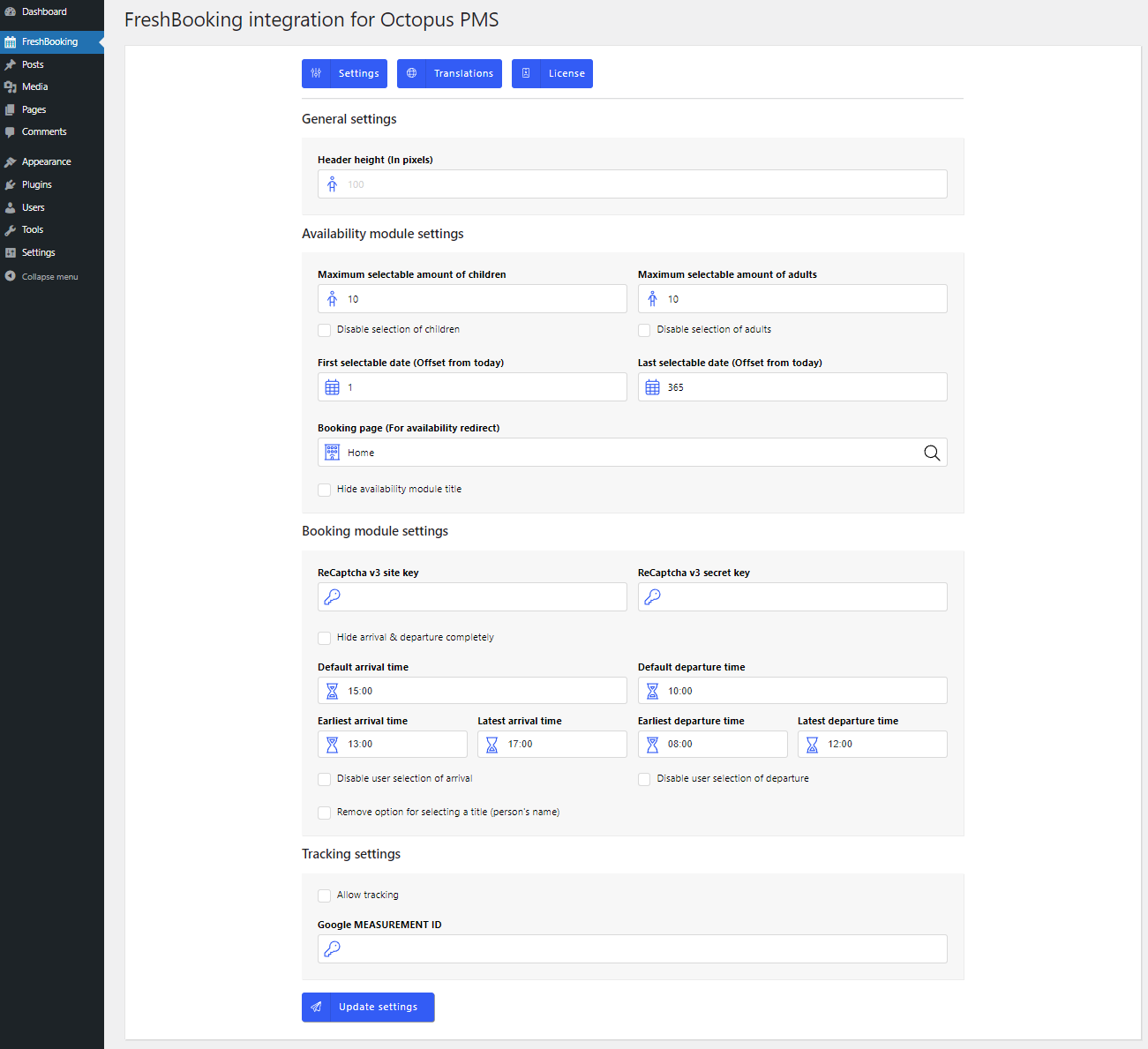
The FreshBooking WordPress plugin can be configured from the `FreshBooking` page within the WordPress administration panel.
|
|
265
|
-
|
|
266
|
-
### Settings
|
|
267
|
-
|
|
268
|
-
|
|
269
|
-
|
|
270
|
-
### Translations
|
|
271
|
-
|
|
272
|
-
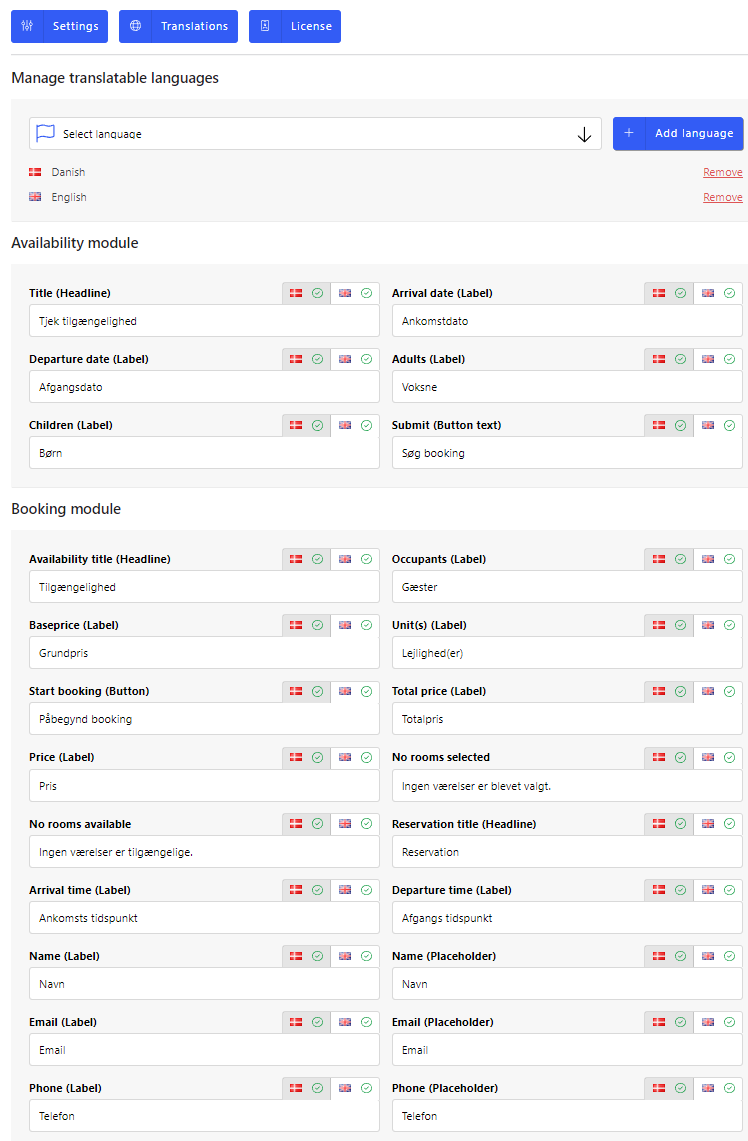
FreshBooking supports custom translations.
|
|
273
|
-
|
|
274
|
-
|
|
1
|
+
# Konnectio Core Integration for Octopus PMS
|
|
2
|
+
|
|
3
|
+
<p align="center">
|
|
4
|
+
<a href="https://vuejs.org/"><img src="https://img.shields.io/badge/vue-3-brightgreen.svg"/></a>
|
|
5
|
+
</p>
|
|
6
|
+
|
|
7
|
+
## Features
|
|
8
|
+
|
|
9
|
+
- Three feature-rich shortcode modules:
|
|
10
|
+
- Hotel availability 'call-to-action'
|
|
11
|
+
- Hotel module (with support for ReePay & Dibs)
|
|
12
|
+
- Gift card module (with support for ReePay & Dibs)
|
|
13
|
+
- Gift card validation
|
|
14
|
+
- Event module
|
|
15
|
+
- The look of the modules will adapt to the existing design of the website.
|
|
16
|
+
- Multiple languages supported:
|
|
17
|
+
- Works with popular multi-language plugins such as WPML and Polylang.
|
|
18
|
+
- Language strings can be modified through an easy to use interface.
|
|
19
|
+
- Comes prepackaged with Danish and English.
|
|
20
|
+
- Various customization options.
|
|
21
|
+
- Continuous updates. See [CHANGELOG.md](CHANGELOG.md).
|
|
22
|
+
|
|
23
|
+
## Getting started
|
|
24
|
+
|
|
25
|
+
### Installation
|
|
26
|
+
Simply upload and install `FreshBooking for Octopus PMS` in the same way you'd install any other plugin.
|
|
27
|
+
|
|
28
|
+
During the installation of the plugin two database tables are created. One for containing custom translation strings (which currently comes prepackaged with translations for Danish and English) and another for storing FreshBooking credentials.
|
|
29
|
+
|
|
30
|
+
### License activation
|
|
31
|
+
After the installation of the FreshBooking WordPress plugin it is necessary to activate the FreshBooking license. This is done by navigating to the 'FreshBooking' page in the sidebar menu within the WordPress administration panel. From there you click the tab labeled 'License'. Here you just fill out your Octopus PMS login credentials, and then click 'Generate License'. This will generate the FreshBooking token required to use the plugin.
|
|
32
|
+
|
|
33
|
+

|
|
34
|
+
|
|
35
|
+
After successfully generating the FreshBooking token, you will be able to begin setting up plugin provided shortcodes that constitute the main functionality.
|
|
36
|
+
|
|
37
|
+
## Usage
|
|
38
|
+
The FreshBooking WordPress plugin currently contains three shortcodes that require manual placement on a given page.
|
|
39
|
+
|
|
40
|
+
The shortcodes can be inserted without further configuration.
|
|
41
|
+
|
|
42
|
+
Common for all shortcodes is that they inject small [Vue.js](https://vuejs.org/) applications that work isolated from the rest of the Wordpress website.
|
|
43
|
+
|
|
44
|
+
The most optimal way to insert them are on pages with a _"full width"_ layout with about a 15-25 pixel margin in the sides.
|
|
45
|
+
|
|
46
|
+
### 'Availability' shortcode
|
|
47
|
+
|
|
48
|
+
The availability shortcode would most likely be inserted on the front page, and used as a _call to action_ to direct guests to _hotel_ module where the actual booking process happens.
|
|
49
|
+
|
|
50
|
+
The availability shortcode can be inserted anywhere on the wordpress site using the following name:
|
|
51
|
+
|
|
52
|
+
```
|
|
53
|
+
[konnectio-availability]
|
|
54
|
+
```
|
|
55
|
+
|
|
56
|
+
You can add custom properties to the availability shortcode like so:
|
|
57
|
+
|
|
58
|
+
```
|
|
59
|
+
[konnectio-availability panel-padding="24px"]
|
|
60
|
+
```
|
|
61
|
+
|
|
62
|
+
The availability shortcode supports the following properties (the default property settings are listed in the right side of the arrows):
|
|
63
|
+
|
|
64
|
+
```js
|
|
65
|
+
[
|
|
66
|
+
'accent-color' => '#e7c55e',
|
|
67
|
+
'button-background' => '#e7c55e',
|
|
68
|
+
'button-border' => null,
|
|
69
|
+
'button-border-radius' => '4px',
|
|
70
|
+
'button-color' => '#000000',
|
|
71
|
+
'button-font-family' => 'inherit',
|
|
72
|
+
'button-font-size' => '14px',
|
|
73
|
+
'button-font-weight' => '400',
|
|
74
|
+
'button-text-transform' => 'uppercase',
|
|
75
|
+
'font-color' => '#666',
|
|
76
|
+
'font-family' => 'inherit',
|
|
77
|
+
'font-size' => '18px',
|
|
78
|
+
'header-color' => '#000000',
|
|
79
|
+
'header-font-size' => '42px',
|
|
80
|
+
'input-background' => '#fff',
|
|
81
|
+
'input-border' => '1px solid rgba(0, 0, 0, 0.15)',
|
|
82
|
+
'input-border-radius' => '0px',
|
|
83
|
+
'label-font-weight' => 'bold',
|
|
84
|
+
'label-padding' => '6px',
|
|
85
|
+
'panel-background' => 'rgba(255, 255, 255, 0.8)',
|
|
86
|
+
'panel-border' => null,
|
|
87
|
+
'panel-border-radius' => '8px',
|
|
88
|
+
'panel-padding' => '24px'
|
|
89
|
+
]
|
|
90
|
+
```
|
|
91
|
+
|
|
92
|
+
|
|
93
|
+
### 'Hotel' shortcode
|
|
94
|
+
|
|
95
|
+
The hotel shortcode can be inserted anywhere on the wordpress site using the following name:
|
|
96
|
+
|
|
97
|
+
```
|
|
98
|
+
[konnectio-hotel]
|
|
99
|
+
```
|
|
100
|
+
|
|
101
|
+
The hotel shortcode supports the following properties:
|
|
102
|
+
|
|
103
|
+
```js
|
|
104
|
+
[
|
|
105
|
+
'accent-color' => '#e7c55e',
|
|
106
|
+
'button-background' => '#e7c55e',
|
|
107
|
+
'button-border-radius' => '4px',
|
|
108
|
+
'button-border' => null,
|
|
109
|
+
'button-color' => '#000000',
|
|
110
|
+
'button-font-family' => 'inherit',
|
|
111
|
+
'button-font-size' => '14px',
|
|
112
|
+
'button-font-weight' => '400',
|
|
113
|
+
'button-text-transform' => 'uppercase',
|
|
114
|
+
'danger-color' => '#afa997',
|
|
115
|
+
'font-color' => '#666',
|
|
116
|
+
'font-family' => 'inherit',
|
|
117
|
+
'font-size' => '18px',
|
|
118
|
+
'gray-color' => 'grey',
|
|
119
|
+
'header-color' => '#000000',
|
|
120
|
+
'header-layout' => 'default',
|
|
121
|
+
'input-background' => '#ffffff',
|
|
122
|
+
'input-border-radius' => '0px',
|
|
123
|
+
'input-border' => '1px solid rgba(0, 0, 0, 0.15)',
|
|
124
|
+
'label-font-weight' => 'bold',
|
|
125
|
+
'label-padding' => '6px',
|
|
126
|
+
'layout' => 'selective',
|
|
127
|
+
'loading-color' => '#666',
|
|
128
|
+
'packages-title-max-lines' => '1',
|
|
129
|
+
'panel-background' => '#ffffff',
|
|
130
|
+
'panel-border-radius' => '8px',
|
|
131
|
+
'panel-border' => null,
|
|
132
|
+
'panel-padding' => '24px',
|
|
133
|
+
'success-color' => '#e7c55e'
|
|
134
|
+
]
|
|
135
|
+
```
|
|
136
|
+
|
|
137
|
+
### 'Gift card' shortcode
|
|
138
|
+
|
|
139
|
+
The gift card shortcode can be inserted anywhere on the wordpress site using the following name:
|
|
140
|
+
|
|
141
|
+
```
|
|
142
|
+
[konnectio-gift-card]
|
|
143
|
+
```
|
|
144
|
+
|
|
145
|
+
The gift card shortcode supports the following properties:
|
|
146
|
+
|
|
147
|
+
```js
|
|
148
|
+
[
|
|
149
|
+
'accent-color' => '#e7c55e',
|
|
150
|
+
'button-background' => '#e7c55e',
|
|
151
|
+
'button-border' => null,
|
|
152
|
+
'button-border-radius' => '4px',
|
|
153
|
+
'button-color' => '#000000',
|
|
154
|
+
'button-font-family' => 'inherit',
|
|
155
|
+
'button-font-size' => '14px',
|
|
156
|
+
'button-text-transform' => 'uppercase',
|
|
157
|
+
'button-font-weight' => '400',
|
|
158
|
+
'font-color' => '#666',
|
|
159
|
+
'font-family' => 'inherit',
|
|
160
|
+
'font-size' => '18px',
|
|
161
|
+
'font-weight' => '400',
|
|
162
|
+
'gray-color' => 'grey',
|
|
163
|
+
'header-color' => '#000000',
|
|
164
|
+
'header-font-size' => '32px',
|
|
165
|
+
'input-background' => '#ffffff',
|
|
166
|
+
'input-border' => '1px solid rgba(0, 0, 0, 0.15)',
|
|
167
|
+
'input-border-radius' => '0px',
|
|
168
|
+
'label-font-weight' => 'bold',
|
|
169
|
+
'label-padding' => '6px',
|
|
170
|
+
'loading-color' => '#666',
|
|
171
|
+
'panel-background' => '#ffffff',
|
|
172
|
+
'panel-border' => null,
|
|
173
|
+
'panel-border-radius' => '8px',
|
|
174
|
+
'panel-padding' => '24px',
|
|
175
|
+
'place-type' => '0',
|
|
176
|
+
'success-color' => '#e7c55e'
|
|
177
|
+
]
|
|
178
|
+
```
|
|
179
|
+
|
|
180
|
+
### 'Gift card validation' shortcode
|
|
181
|
+
|
|
182
|
+
The gift card validation shortcode can be inserted anywhere on the wordpress site using the following name:
|
|
183
|
+
|
|
184
|
+
```
|
|
185
|
+
[konnectio-gift-card-validation]
|
|
186
|
+
```
|
|
187
|
+
|
|
188
|
+
The gift card validation shortcode supports the following properties:
|
|
189
|
+
|
|
190
|
+
```js
|
|
191
|
+
[
|
|
192
|
+
'accent-color' => '#e7c55e',
|
|
193
|
+
'button-background' => '#e7c55e',
|
|
194
|
+
'button-border' => null,
|
|
195
|
+
'button-border-radius' => '4px',
|
|
196
|
+
'button-color' => '#000000',
|
|
197
|
+
'button-font-family' => 'inherit',
|
|
198
|
+
'button-font-size' => '14px',
|
|
199
|
+
'button-text-transform' => 'uppercase',
|
|
200
|
+
'button-font-weight' => '400',
|
|
201
|
+
'font-color' => '#666',
|
|
202
|
+
'font-family' => 'inherit',
|
|
203
|
+
'font-size' => '18px',
|
|
204
|
+
'font-weight' => '400',
|
|
205
|
+
'gray-color' => 'grey',
|
|
206
|
+
'header-color' => '#000000',
|
|
207
|
+
'header-font-size' => '32px',
|
|
208
|
+
'input-background' => '#ffffff',
|
|
209
|
+
'input-border' => '1px solid rgba(0, 0, 0, 0.15)',
|
|
210
|
+
'input-border-radius' => '0px',
|
|
211
|
+
'label-font-weight' => 'bold',
|
|
212
|
+
'label-padding' => '6px',
|
|
213
|
+
'loading-color' => '#666',
|
|
214
|
+
'panel-background' => '#ffffff',
|
|
215
|
+
'panel-border' => null,
|
|
216
|
+
'panel-border-radius' => '8px',
|
|
217
|
+
'panel-padding' => '24px'
|
|
218
|
+
]
|
|
219
|
+
```
|
|
220
|
+
|
|
221
|
+
### 'Event' shortcode
|
|
222
|
+
|
|
223
|
+
The event shortcode can be inserted anywhere on the wordpress site using the following name:
|
|
224
|
+
|
|
225
|
+
```
|
|
226
|
+
[konnectio-event]
|
|
227
|
+
```
|
|
228
|
+
|
|
229
|
+
The event validation shortcode supports the following properties:
|
|
230
|
+
|
|
231
|
+
```js
|
|
232
|
+
[
|
|
233
|
+
'accent-color' => '#e7c55e',
|
|
234
|
+
'button-background' => '#e7c55e',
|
|
235
|
+
'button-border-radius' => '4px',
|
|
236
|
+
'button-border' => null,
|
|
237
|
+
'button-color' => '#000000',
|
|
238
|
+
'button-font-family' => 'inherit',
|
|
239
|
+
'button-font-size' => '14px',
|
|
240
|
+
'button-font-weight' => '400',
|
|
241
|
+
'button-text-transform' => 'uppercase',
|
|
242
|
+
'danger-color' => '#afa997',
|
|
243
|
+
'font-color' => '#666',
|
|
244
|
+
'font-family' => 'inherit',
|
|
245
|
+
'font-size' => '18px',
|
|
246
|
+
'gray-color' => 'grey',
|
|
247
|
+
'header-color' => '#000000',
|
|
248
|
+
'input-background' => '#ffffff',
|
|
249
|
+
'input-border-radius' => '0px',
|
|
250
|
+
'input-border' => '1px solid rgba(0, 0, 0, 0.15)',
|
|
251
|
+
'label-font-weight' => 'bold',
|
|
252
|
+
'label-padding' => '6px',
|
|
253
|
+
'loading-color' => '#666',
|
|
254
|
+
'panel-background' => '#ffffff',
|
|
255
|
+
'panel-border-radius' => '8px',
|
|
256
|
+
'panel-border' => null,
|
|
257
|
+
'panel-padding' => '24px',
|
|
258
|
+
'success-color' => '#e7c55e'
|
|
259
|
+
]
|
|
260
|
+
```
|
|
261
|
+
|
|
262
|
+
## Configuration
|
|
263
|
+
|
|
264
|
+
The FreshBooking WordPress plugin can be configured from the `FreshBooking` page within the WordPress administration panel.
|
|
265
|
+
|
|
266
|
+
### Settings
|
|
267
|
+
|
|
268
|
+

|
|
269
|
+
|
|
270
|
+
### Translations
|
|
271
|
+
|
|
272
|
+
FreshBooking supports custom translations.
|
|
273
|
+
|
|
274
|
+

|