@klinsmaya/zai-editor 10.0.5
This diff represents the content of publicly available package versions that have been released to one of the supported registries. The information contained in this diff is provided for informational purposes only and reflects changes between package versions as they appear in their respective public registries.
- package/LICENSE +8 -0
- package/README.md +188 -0
- package/README.zh-CN.md +198 -0
- package/dist/umo-editor.css +1 -0
- package/dist/umo-editor.js +61889 -0
- package/package.json +148 -0
package/LICENSE
ADDED
|
@@ -0,0 +1,8 @@
|
|
|
1
|
+
The MIT License (MIT)
|
|
2
|
+
Copyright © 2024 umo-team
|
|
3
|
+
|
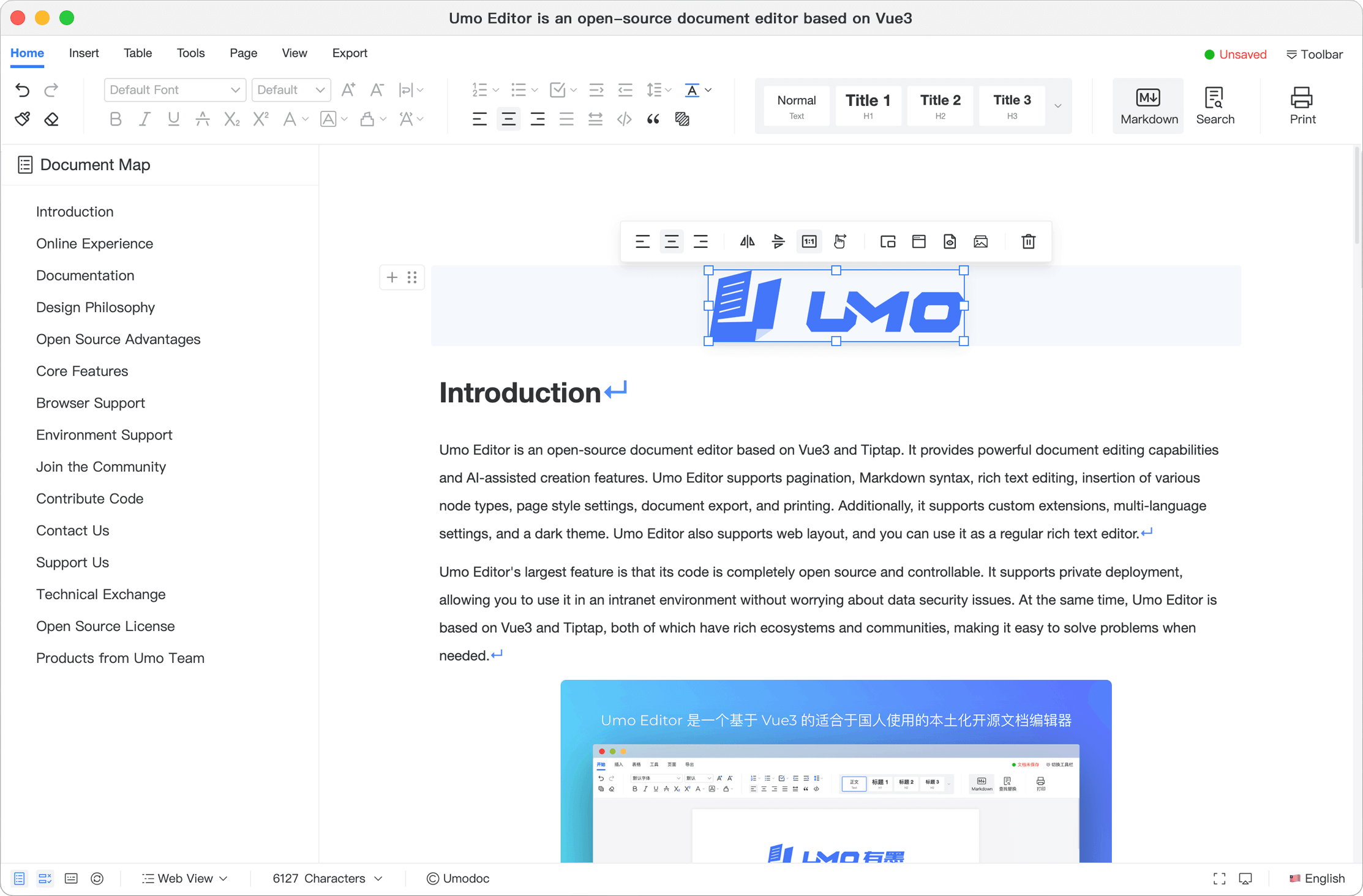
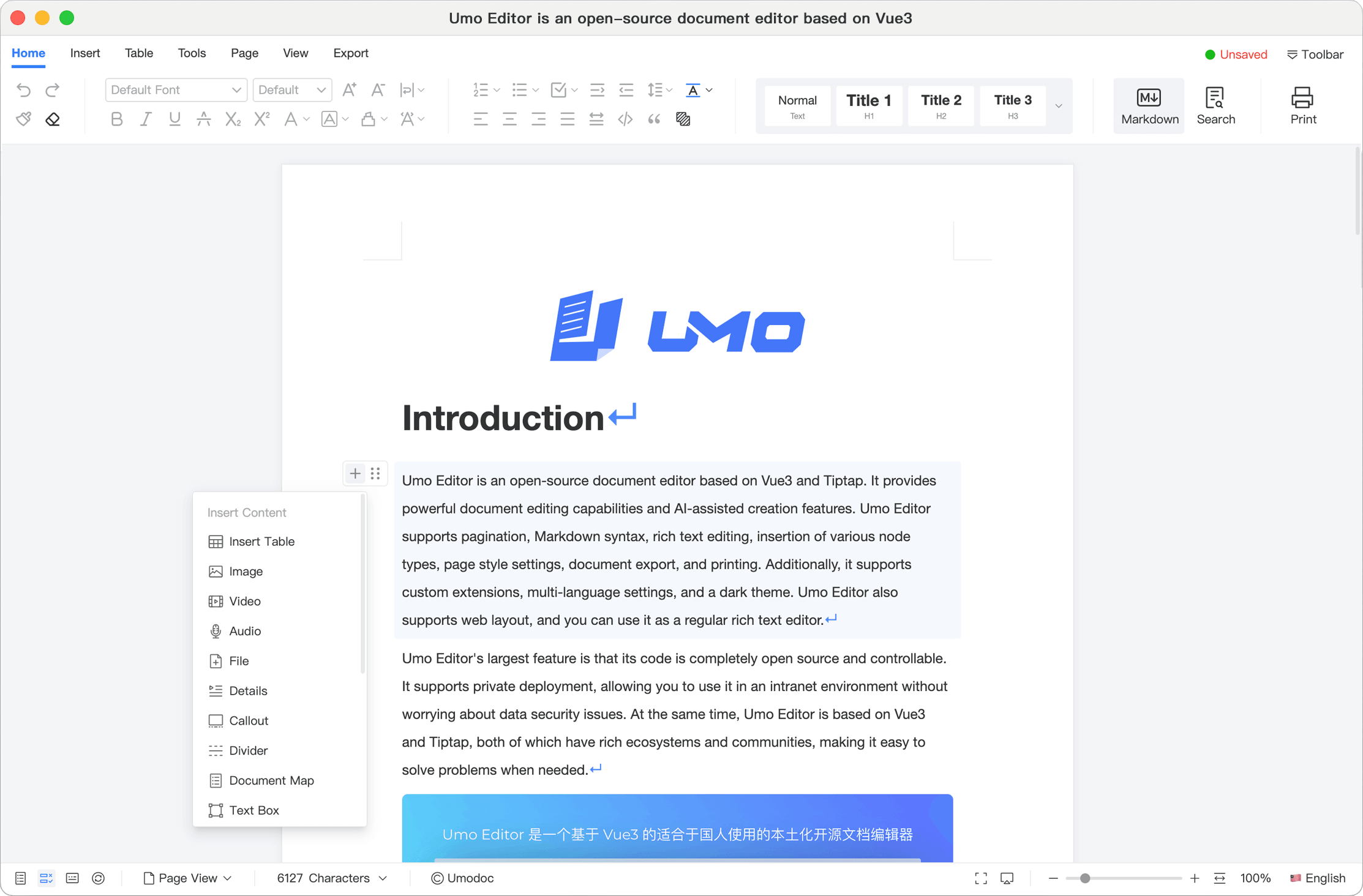
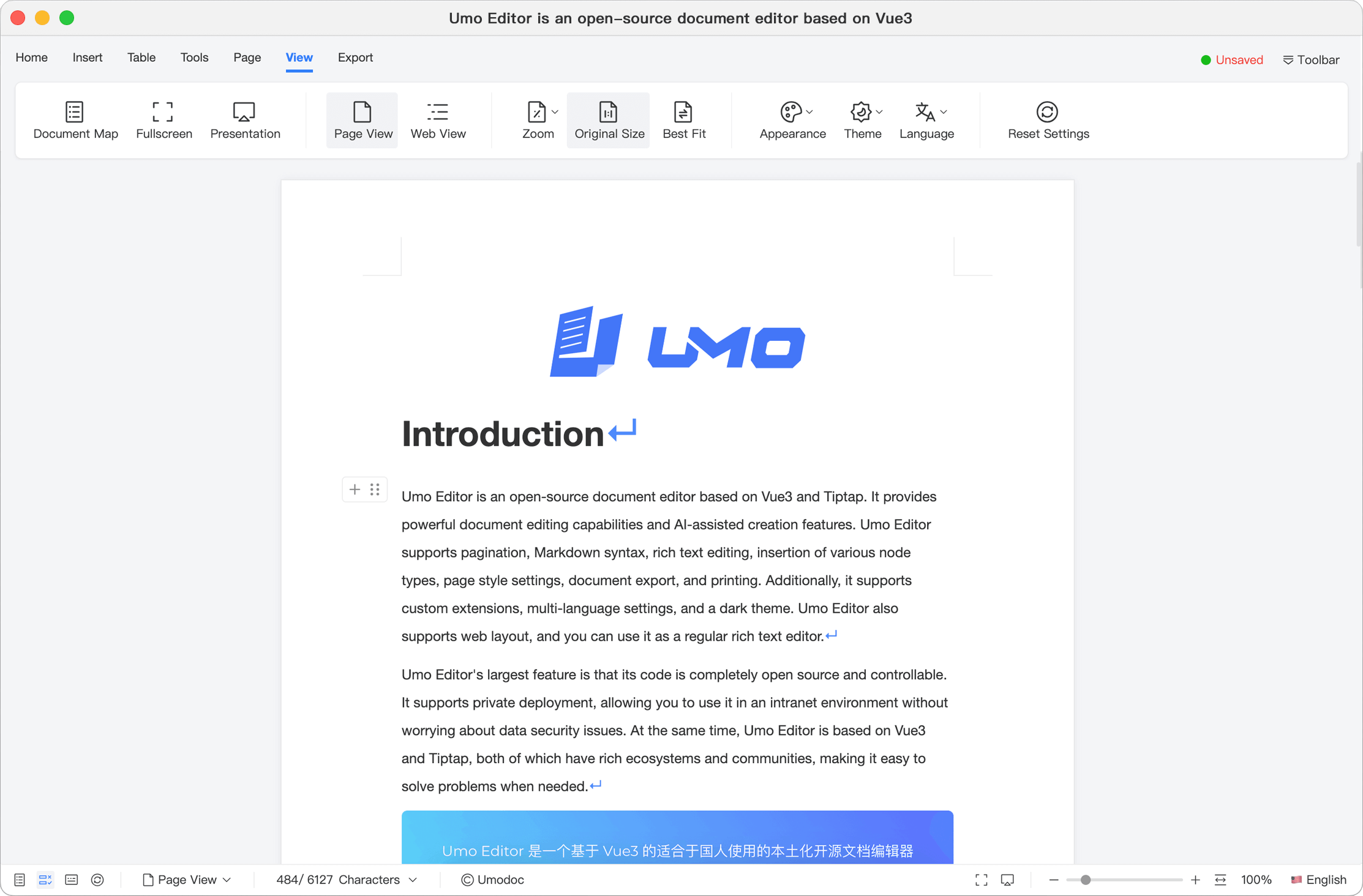
|
4
|
+
Permission is hereby granted, free of charge, to any person obtaining a copy of this software and associated documentation files (the “Software”), to deal in the Software without restriction, including without limitation the rights to use, copy, modify, merge, publish, distribute, sublicense, and/or sell copies of the Software, and to permit persons to whom the Software is furnished to do so, subject to the following conditions:
|
|
5
|
+
|
|
6
|
+
The above copyright notice and this permission notice shall be included in all copies or substantial portions of the Software.
|
|
7
|
+
|
|
8
|
+
THE SOFTWARE IS PROVIDED “AS IS”, WITHOUT WARRANTY OF ANY KIND, EXPRESS OR IMPLIED, INCLUDING BUT NOT LIMITED TO THE WARRANTIES OF MERCHANTABILITY, FITNESS FOR A PARTICULAR PURPOSE AND NONINFRINGEMENT. IN NO EVENT SHALL THE AUTHORS OR COPYRIGHT HOLDERS BE LIABLE FOR ANY CLAIM, DAMAGES OR OTHER LIABILITY, WHETHER IN AN ACTION OF CONTRACT, TORT OR OTHERWISE, ARISING FROM, OUT OF OR IN CONNECTION WITH THE SOFTWARE OR THE USE OR OTHER DEALINGS IN THE SOFTWARE.
|
package/README.md
ADDED
|
@@ -0,0 +1,188 @@
|
|
|
1
|
+
<p style="text-align: center; margin: 1rem 0 0;"><strong>Zai Editor</strong> — secondary development based on <a href="https://github.com/umodoc/editor">Umo Editor</a> (umodoc); maintained by <a href="https://github.com/klinsmaya/zai-editor">Klinsmaya</a>. Thanks to the Umo Editor authors and community.</p>
|
|
2
|
+
|
|
3
|
+
<p style="text-align: center; margin: 2rem 0;">
|
|
4
|
+
<a href="https://github.com/klinsmaya/zai-editor" target="_blank"><img src="https://unpkg.com/@umoteam/editor-external@latest/static/logo.svg" alt="Zai Editor" width="280" /></a>
|
|
5
|
+
</p>
|
|
6
|
+
|
|
7
|
+
<p style="text-align: center;">
|
|
8
|
+
<a href="https://github.com/umodoc/editor/blob/main/LICENSE" target="_blank"><img src="https://img.shields.io/npm/l/@umoteam/editor" /></a>
|
|
9
|
+
<a href="https://www.npmjs.com/package/@umoteam/editor" target="_blank"><img src="https://img.shields.io/npm/v/@umoteam/editor" /></a>
|
|
10
|
+
<a href="https://www.npmjs.com/package/@umoteam/editor" target="_blank"><img src="https://img.shields.io/npm/dm/@umoteam/editor" /></a>
|
|
11
|
+
<a href="https://www.npmjs.com/package/@umoteam/editor" target="_blank"><img src="https://img.shields.io/npm/unpacked-size/@umoteam/editor" /></a>
|
|
12
|
+
<a href="https://github.com/umodoc/editor/commits" target="_blank"><img src="https://img.shields.io/github/commit-activity/m/umodoc/editor" /></a>
|
|
13
|
+
</p>
|
|
14
|
+
|
|
15
|
+
<p style="text-align: center;">English Documentation | <a href="https://dev.umodoc.com/cn/docs/editor">[中文文档]</a></p>
|
|
16
|
+
|
|
17
|
+
## Acknowledgements
|
|
18
|
+
|
|
19
|
+
Zai Editor is built on **[Umo Editor](https://github.com/umodoc/editor)** by the **[umodoc](https://github.com/umodoc)** community. We thank the Umo Editor authors, contributors, and maintainers for open-sourcing this work under the MIT License. See also [NOTICE.md](./NOTICE.md).
|
|
20
|
+
|
|
21
|
+
## 中文介绍
|
|
22
|
+
|
|
23
|
+
Zai Editor 基于 Vue3 与 Tiptap3,在 [Umo Editor](https://github.com/umodoc/editor) 之上持续同步上游,并由本仓库维护品牌与定制。它提供类似 Microsoft Word 的在线编辑体验,支持分页与 Web 模式、Markdown、富文本、多种节点、页面样式、导出与打印等。
|
|
24
|
+
|
|
25
|
+
此外,Umo Editor 还支持自定义扩展、多语言设置和暗色主题。同时我们提供了单独的文本预览组件 [Umo Viewer](https://github.com/umodoc/viewer),用户可以在项目中使用该组件来预览文档。
|
|
26
|
+
|
|
27
|
+
Umo Editor 最大的特点是代码完全开源且自主可控,支持私有部署,您可以内网环境中使用,而无需担心数据安全问题。同时 Umo Editor 基于 Vue3 和 Tiptap3,两者都有丰富的生态系统和社区支持,在遇到问题时可以迅速得到解决。
|
|
28
|
+
|
|
29
|
+
## Introduction
|
|
30
|
+
|
|
31
|
+
Zai Editor is a document editor based on Vue3 and Tiptap3, tracking [Umo Editor](https://github.com/umodoc/editor) upstream with fork-specific branding. It provides Word-like online editing, pagination and web layout, Markdown, rich text, node insertion, page styles, export, and printing, plus custom extensions, i18n, and dark theme.
|
|
32
|
+
|
|
33
|
+
Additionally, Umo Editor supports custom extensions, multi-language settings, and dark theme. We also provide a standalone text preview component, [Umo Viewer](https://github.com/umodoc/viewer), which users can integrate into their projects to preview documents.
|
|
34
|
+
|
|
35
|
+
Umo Editor's largest feature is that its code is completely open source and controllable. It supports private deployment, allowing you to use it in an intranet environment without worrying about data security issues. At the same time, Umo Editor is based on Vue3 and Tiptap3, both of which have rich ecosystems and communities, making it easy to solve problems when needed.
|
|
36
|
+
|
|
37
|
+
As an independent Vue3 plugin, Umo Editor can be easily integrated into various Vue3 projects with zero configuration. For non-Vue3 projects, you can embed Umo Editor into your project via an iframe. see [Use in Non-Vue3 Projects](https://dev.umodoc.com/en/docs/editor/getting-started#use-in-non-vue3-projects).
|
|
38
|
+
|
|
39
|
+
[Website](https://www.umodoc.com/en) | [Documentation](https://dev.umodoc.com/en/docs/editor) | [Playground](https://www.umodoc.com/en/demo) | [GitHub](https://github.com/umodoc/editor) | [NPM](https://www.npmjs.com/package/@umoteam/editor)
|
|
40
|
+
|
|
41
|
+
## Umo Editor Mobile
|
|
42
|
+
|
|
43
|
+
Umo Editor Mobile is a mobile document editor built with Vue3 and Tiptap3. It supports the complete "preview + edit + save" workflow and can be integrated directly into business systems as a standalone editor. Rather than being a simple trimmed-down version of Umo Editor, it is an independent product redesigned for touch-first scenarios, with its own save state machine, auto-save, back-navigation guards, history, internationalization, theming, and extension capabilities. At the same time, it keeps its configuration, events, and method naming as aligned with Umo Editor as possible, helping teams achieve a more unified multi-platform integration at lower cost.
|
|
44
|
+
|
|
45
|
+
If you plan to support both desktop and mobile, we recommend abstracting a unified editor adapter layer in your business application first, so you can reuse the document model, configuration semantics, and save flow while reducing long-term maintenance costs.
|
|
46
|
+
|
|
47
|
+
- Website: [https://mobile.umodoc.com](https://mobile.umodoc.com)
|
|
48
|
+
- Mobile Playground: Visit [https://em.umodoc.com](https://em.umodoc.com) in a mobile browser
|
|
49
|
+
- Documentation: [https://dev.umodoc.com/en/docs/mobile](https://dev.umodoc.com/en/docs/mobile)
|
|
50
|
+
|
|
51
|
+
## Screenshots
|
|
52
|
+
|
|
53
|
+
|
|
54
|
+
|
|
55
|
+
|
|
56
|
+
|
|
57
|
+
|
|
58
|
+
|
|
59
|
+
## Online Experience
|
|
60
|
+
|
|
61
|
+
Visit [Playground](https://www.umodoc.com/en/demo?pane=hide) to try Umo Editor.
|
|
62
|
+
|
|
63
|
+
## Example Project
|
|
64
|
+
|
|
65
|
+
To help you get started quickly, we provide a demo project: https://github.com/umodoc/demo. You can view and run Umo Editor sample code in this project.
|
|
66
|
+
|
|
67
|
+
You can also preview and run it online with StackBlitz, CodeSandbox, or Github Pages:
|
|
68
|
+
|
|
69
|
+
- View and run on [StackBlitz](https://stackblitz.com/~/github.com/umodoc/demo?file=src/app.vue)
|
|
70
|
+
- View and run on [CodeSandbox](https://codesandbox.io/p/github/umodoc/demo/main?import=true)
|
|
71
|
+
- View and run on [Github Pages](https://umodoc.github.io/demo/)
|
|
72
|
+
|
|
73
|
+
## Documentation
|
|
74
|
+
|
|
75
|
+
Please visit [Documentation](https://dev.umodoc.com/en/docs/editor) for detailed instructions.
|
|
76
|
+
|
|
77
|
+
## Design Philosophy
|
|
78
|
+
|
|
79
|
+
Umo Editor aims to simplify document editing in web applications by providing Microsoft Word-like powerful editing capabilities and pagination mode while maintaining the convenience of web applications. Whether for government and enterprise information management systems, academic research writing, team document collaboration, knowledge base management, or personal note organization, Umo Editor is your reliable assistant.
|
|
80
|
+
|
|
81
|
+
## Open Source Advantages
|
|
82
|
+
|
|
83
|
+
- **Free to Use**: Umo Editor is free for all developers under the [MIT License](https://github.com/umo-editor/umo-editor/blob/main/LICENSE), with no copyright concerns.
|
|
84
|
+
- **Continuous Updates**: Umo Editor is continuously iterated to optimize features and enhance user experience.
|
|
85
|
+
- **Custom Development**: Open source allows developers to customize Umo Editor to meet project-specific needs.
|
|
86
|
+
|
|
87
|
+
## Key Features
|
|
88
|
+
|
|
89
|
+
- Support for Intranet Deployment
|
|
90
|
+
- Zero configuration, ready to use
|
|
91
|
+
- Pagination mode similar to Microsoft Word
|
|
92
|
+
- Lightweight
|
|
93
|
+
- Full WYSIWYG editing
|
|
94
|
+
- Rich text editing
|
|
95
|
+
- Markdown syntax support
|
|
96
|
+
- Integrated practical tools
|
|
97
|
+
- Presentation mode
|
|
98
|
+
- Document export and sharing
|
|
99
|
+
- Page settings
|
|
100
|
+
- Print and print preview support
|
|
101
|
+
- Custom extensions support
|
|
102
|
+
- Shortcut key support
|
|
103
|
+
- Theme customization
|
|
104
|
+
- Multilingual settings
|
|
105
|
+
- Dark mode
|
|
106
|
+
- Support for Web layout
|
|
107
|
+
- Standalone document preview component [Umo Viewer](https://github.com/umodoc/viewer)
|
|
108
|
+
|
|
109
|
+
For more details, see [Features](https://dev.umodoc.com/en/docs/editor/features).
|
|
110
|
+
|
|
111
|
+
## Browser Support
|
|
112
|
+
|
|
113
|
+
| Browser | Version | Support |
|
|
114
|
+
| ---------------------- | ------- | :-----: |
|
|
115
|
+
| Google Chrome | Latest | ✅ |
|
|
116
|
+
| Firefox | Latest | ✅ |
|
|
117
|
+
| Safari | Latest | ✅ |
|
|
118
|
+
| Microsoft Edge | Latest | ✅ |
|
|
119
|
+
| Internet Explorer (IE) | All | ❌ |
|
|
120
|
+
|
|
121
|
+
## Environment Support
|
|
122
|
+
|
|
123
|
+
- **Node.js** (>=v18.x)
|
|
124
|
+
- **Vue** (>=v3.x)
|
|
125
|
+
- **Tiptap** (>=v3.x)
|
|
126
|
+
|
|
127
|
+
## Join the Community
|
|
128
|
+
|
|
129
|
+
We encourage users to join the Umo Editor open-source community and participate in the development and improvement of the product. Whether it's submitting bug reports, feature requests, or code contributions, your involvement is invaluable to our community.
|
|
130
|
+
|
|
131
|
+
Submit issues or suggestions via [GitHub Discussions](https://github.com/umodoc/editor/discussions).
|
|
132
|
+
|
|
133
|
+
Report bugs via [GitHub Issues](https://github.com/umodoc/editor/issues).
|
|
134
|
+
|
|
135
|
+
## Contribute Code
|
|
136
|
+
|
|
137
|
+
The development of Umo Editor relies on community support. Below is a list of contributors who have contributed code to Umo Editor. We thank them for their efforts:
|
|
138
|
+
|
|
139
|
+
- [Umo Team](https://github.com/umodoc): 👨💻 Core developers
|
|
140
|
+
- [china-wangxu](https://github.com/china-wangxu): 💪🏻 Added many important features
|
|
141
|
+
- [Cassielxd](https://github.com/Cassielxd): 💪🏻 Added many important features
|
|
142
|
+
- [Na'aman Hirschfeld](https://github.com/Goldziher): 🛠️ Contributed code
|
|
143
|
+
- [SevenDreamYang](https://github.com/SevenDreamYang):🛠️ Contributed code
|
|
144
|
+
- [ChenErik](https://github.com/ChenErik): 🛠️ Contributed code
|
|
145
|
+
- [SerRashin](https://github.com/SerRashin): 🛠️ Added Russian language support
|
|
146
|
+
- [Sunny Wisozk](https://github.com/SunnyWisozk): 🛠️ Contributed code
|
|
147
|
+
- [Sherman Xu](https://github.com/xuzhenjun130): 🛠️ Contributed code
|
|
148
|
+
- [vace](https://github.com/vace):🛠️ Contributed code
|
|
149
|
+
- [Mikasa33](https://github.com/Mikasa33):🛠️ Contributed code
|
|
150
|
+
|
|
151
|
+
We welcome all forms of contributions, including but not limited to submitting bug reports, feature requests, and code contributions.
|
|
152
|
+
|
|
153
|
+
## Contact Us
|
|
154
|
+
|
|
155
|
+
If you have any questions or suggestions, please contact us through the following channels. Before doing so, we recommend reading this documentation thoroughly to understand how to use Umo Editor.
|
|
156
|
+
|
|
157
|
+
- Feedback: [GitHub Issues](https://github.com/umodoc/editor/issues)
|
|
158
|
+
- Community: [GitHub Discussions](https://github.com/umodoc/editor/discussions)
|
|
159
|
+
- Email: [contact@umodoc.com](mailto:contact@umodoc.com)
|
|
160
|
+
|
|
161
|
+
## Technical Exchange
|
|
162
|
+
|
|
163
|
+
- Discord:[Umo Editor](https://discord.gg/k8GjuBBhXD)
|
|
164
|
+
|
|
165
|
+
## Support Us
|
|
166
|
+
|
|
167
|
+
If you find Umo Editor useful, please consider supporting us in the following ways:
|
|
168
|
+
|
|
169
|
+
- ⭐ Star the [Umo Editor repository](https://github.com/umodoc/editor) to show your support.
|
|
170
|
+
- 🔗 If you use Umo Editor in your project, add a link to https://github.com/umodoc/editor.
|
|
171
|
+
|
|
172
|
+
## Products from Umo Team
|
|
173
|
+
|
|
174
|
+
- [Umo Editor](https://dev.umodoc.com/en/docs/editor): A localized open-source document editor based on Vue3 and Tiptap3.
|
|
175
|
+
- [Umo Viewer](https://dev.umodoc.com/en/docs/viewer): An open-source, lightweight document viewer for Umo Editor.
|
|
176
|
+
- [Umo Editor Mobile](https://mobile.umodoc.com): A mobile document editor for enterprise business scenarios, designed for standalone integration as well as collaboration with Umo Editor and Umo Editor Next.
|
|
177
|
+
- [Umo Editor Next](https://dev.umodoc.com/en/docs/next): An enhanced version of Umo Editor that includes all features of the latest Umo Editor while adding or improving support for multi-user real-time collaborative editing, document annotations (comments), document version history, AI-assisted creation, document import/export, tables, and more. It also enhances customization of toolbars and sidebars.
|
|
178
|
+
- [Umo Editor Server](https://dev.umodoc.com/en/docs/server): A companion server-side software developed to extend Umo Editor capabilities such as multi-user collaborative editing, document annotations, and document import/export.
|
|
179
|
+
- [Umo Office Viewer](https://dev.umodoc.com/en/docs/office-viewer): An Office document viewer that supports previewing over 40 mainstream office document in web pages.
|
|
180
|
+
- [Umo Office Convert](https://dev.umodoc.com/en/docs/office-convert): Converts over 40 office formats into web-viewable formats, ready to pair with Umo Office Viewer for seamless online document preview.
|
|
181
|
+
|
|
182
|
+
## Open Source License
|
|
183
|
+
|
|
184
|
+
Umo Editor is licensed under the [MIT License](https://github.com/umodoc/editor/raw/main/LICENSE). You are free to use, modify, and distribute this software, but this does **not** mean you are allowed to remove the copyright information at will. Please retain the Umo Editor copyright notice and the link displayed in the interface. Removal of these will be considered an infringement. We encourage you to support open-source projects.
|
|
185
|
+
|
|
186
|
+
If you do not wish to retain the copyright information, please contact us or consider purchasing the commercial version: [Umo Editor Next](https://dev.umodoc.com/en/docs/next).
|
|
187
|
+
|
|
188
|
+
This documentation is published under the [CC BY-NC-SA 4.0 DEED License](https://creativecommons.org/licenses/by-nc-sa/4.0/deed.en).
|
package/README.zh-CN.md
ADDED
|
@@ -0,0 +1,198 @@
|
|
|
1
|
+
<p style="text-align: center; margin: 1rem 0 0;"><strong>Zai Editor</strong> 基于 <a href="https://github.com/umodoc/editor">Umo Editor</a>(umodoc)<strong>二次开发</strong>,由 <a href="https://github.com/klinsmaya/zai-editor">Klinsmaya</a> 维护。感谢 Umo Editor 作者与社区的开源贡献。</p>
|
|
2
|
+
|
|
3
|
+
<p style="text-align: center; margin: 2rem 0;">
|
|
4
|
+
<a href="https://github.com/klinsmaya/zai-editor" target="_blank"><img src="https://unpkg.com/@umoteam/editor-external@latest/static/logo.svg" alt="Zai Editor" width="280" /></a>
|
|
5
|
+
</p>
|
|
6
|
+
|
|
7
|
+
<p style="text-align: center;">
|
|
8
|
+
<a href="https://github.com/umodoc/editor/blob/main/LICENSE" target="_blank"><img src="https://img.shields.io/npm/l/@umoteam/editor" /></a>
|
|
9
|
+
<a href="https://www.npmjs.com/package/@umoteam/editor" target="_blank"><img src="https://img.shields.io/npm/v/@umoteam/editor" /></a>
|
|
10
|
+
<a href="https://www.npmjs.com/package/@umoteam/editor" target="_blank"><img src="https://img.shields.io/npm/dm/@umoteam/editor" /></a>
|
|
11
|
+
<a href="https://www.npmjs.com/package/@umoteam/editor" target="_blank"><img src="https://img.shields.io/npm/unpacked-size/@umoteam/editor" /></a>
|
|
12
|
+
<a href="https://github.com/umodoc/editor/commits" target="_blank"><img src="https://img.shields.io/github/commit-activity/m/umodoc/editor" /></a>
|
|
13
|
+
</p>
|
|
14
|
+
<p style="text-align: center;"><a href="https://dev.umodoc.com/en/docs/editor">[English Documentation]</a> | 中文文档</p>
|
|
15
|
+
|
|
16
|
+
## 致谢
|
|
17
|
+
|
|
18
|
+
Zai Editor 基于 **[Umo Editor](https://github.com/umodoc/editor)**([umodoc](https://github.com/umodoc) 社区)进行二次开发,感谢 Umo Editor 作者、贡献者与维护者以 MIT 协议开源。详情见 [NOTICE.md](./NOTICE.md)。
|
|
19
|
+
|
|
20
|
+
## 基本介绍
|
|
21
|
+
|
|
22
|
+
Zai Editor 基于 Vue3 与 Tiptap3,在 [Umo Editor](https://github.com/umodoc/editor) 之上持续同步上游能力,并提供本仓库的品牌与定制。它提供类似于 Microsoft Word 的在线编辑体验,支持分页与 Web 模式、Markdown、富文本、多种节点、页面样式、导出与打印等。
|
|
23
|
+
|
|
24
|
+
此外,Umo Editor 还支持自定义扩展、多语言设置和暗色主题。同时我们提供了单独的文本预览组件[Umo Viewer](https://github.com/umodoc/viewer),用户可以在项目中使用该组件来预览文档。
|
|
25
|
+
|
|
26
|
+
Umo Editor 最大的特点是代码完全开源且自主可控,支持私有部署,您可以内网环境中使用,而无需担心数据安全问题。同时 Umo Editor 基于 Vue3 和 Tiptap3,两者都有丰富的生态系统和社区支持,在遇到问题时可以迅速得到解决。
|
|
27
|
+
|
|
28
|
+
作为一个独立的 Vue3 插件,Umo Editor 可以轻松集成到各类 Vue3 项目中。对于非 Vue3 项目,您可以通过 Iframe 将 Umo Editor 嵌入到您的项目中。见[在非 Vue3 项目中使用](https://dev.umodoc.com/cn/docs/editor/getting-started#在非-vue3-项目中使用)
|
|
29
|
+
|
|
30
|
+
[官网](https://www.umodoc.com) | [开发文档](https://dev.umodoc.com/cn/docs/editor) | [在线演示](https://www.umodoc.com/demo) | [GitHub](https://github.com/umodoc/editor) | [码云(国内镜像)](https://gitee.com/umodoc/editor) | [NPM](https://www.npmjs.com/package/@umoteam/editor)
|
|
31
|
+
|
|
32
|
+
## Umo Editor Mobile
|
|
33
|
+
|
|
34
|
+
Umo Editor Mobile 是基于 Vue3 和 Tiptap3 构建的移动端文档编辑器,支持“预览 + 编辑 + 保存”完整链路,可直接作为业务系统中的独立编辑器落地。它不是对 Umo Editor 的简单裁剪,而是围绕触控场景重新设计的独立产品,具备保存状态机、自动保存、回退守卫、历史记录、国际化、主题与扩展能力,并在配置、事件、方法命名上尽可能与 Umo Editor 保持一致,帮助团队以更低成本实现多端统一。
|
|
35
|
+
|
|
36
|
+
如果您计划同时接入桌面端与移动端,建议优先在业务层抽象一层统一的编辑器适配层,以便复用文档模型、配置语义和保存链路,降低后续维护成本。
|
|
37
|
+
|
|
38
|
+
- 官网:[https://mobile.umodoc.com](https://mobile.umodoc.com)
|
|
39
|
+
- 移动端示例:[https://em.umodoc.com](https://em.umodoc.com)
|
|
40
|
+
- 开发文档:[https://dev.umodoc.com/cn/docs/mobile](https://dev.umodoc.com/cn/docs/mobile)
|
|
41
|
+
|
|
42
|
+
## 部分截图
|
|
43
|
+
|
|
44
|
+
**Umo Editor**
|
|
45
|
+
|
|
46
|
+

|
|
47
|
+
|
|
48
|
+

|
|
49
|
+
|
|
50
|
+

|
|
51
|
+
|
|
52
|
+
**Umo Editor Next**
|
|
53
|
+
|
|
54
|
+

|
|
55
|
+
|
|
56
|
+

|
|
57
|
+
|
|
58
|
+

|
|
59
|
+
|
|
60
|
+
了解 Umo Editor Next 更多功能,请访问:[https://www.umodoc.com](https://www.umodoc.com)。
|
|
61
|
+
|
|
62
|
+
## 在线体验
|
|
63
|
+
|
|
64
|
+
访问[https://www.umodoc.com/demo?pane=hide](https://www.umodoc.com/demo?pane=hide)快速体验。
|
|
65
|
+
|
|
66
|
+
## 示例项目
|
|
67
|
+
|
|
68
|
+
为了方便您快速上手 Umo Editor,我们提供了一个示例项目:https://github.com/umodoc/demo ,您可以在该项目中查看和运行 Umo Editor 的示例代码。
|
|
69
|
+
|
|
70
|
+
您也可以在 StackBlitz、CodeSandbox 和 Github Pages 上快速查看和运行该项目。
|
|
71
|
+
|
|
72
|
+
- 在 [StackBlitz](https://stackblitz.com/~/github.com/umodoc/demo?file=src/app.vue) 上查看和运行该项目。
|
|
73
|
+
- 在 [CodeSandbox](https://codesandbox.io/p/github/umodoc/demo/main?import=true) 上查看和运行该项目。
|
|
74
|
+
- 在 [Github Pages](https://umodoc.github.io/demo/) 上查看和运行该项目。
|
|
75
|
+
|
|
76
|
+
## 开发文档
|
|
77
|
+
|
|
78
|
+
请访问[https://dev.umodoc.com/cn/docs/editor](https://dev.umodoc.com/cn/docs/editor)。
|
|
79
|
+
|
|
80
|
+
## 设计理念
|
|
81
|
+
|
|
82
|
+
Umo Editor 的诞生旨在解决 Web 应用中文档编辑的复杂性,为 Web 项目提供类似 Microsoft Word 的强大编辑能力,同时保持 Web 应用的便捷性。无论是政企信息管理系统、学术研究撰写、团队文档协作、知识库管理还是个人笔记整理,Umo Editor 都能成为您的得力助手。
|
|
83
|
+
|
|
84
|
+
## 开源优势
|
|
85
|
+
|
|
86
|
+
- **免费使用**:Umo Editor 基于[MIT 许可证](https://github.com/umo-editor/umo-editor/blob/main/LICENSE)对所有开发者免费开放,无需担心版权问题。
|
|
87
|
+
- **持续更新**:Umo Editor 将持续迭代,不断优化功能,提升用户体验。
|
|
88
|
+
- **定制化开发**:开源意味着更大的灵活性,开发者可根据项目需求进行定制化开发,打造专属的文档编辑器。
|
|
89
|
+
|
|
90
|
+
## 核心特性
|
|
91
|
+
|
|
92
|
+
- 支持内网部署
|
|
93
|
+
- 零配置开箱即用
|
|
94
|
+
- 类似 Microsoft Word 的分页模式
|
|
95
|
+
- 轻量级
|
|
96
|
+
- 所见即所得
|
|
97
|
+
- 富文本编辑功能
|
|
98
|
+
- Markdown 语法支持
|
|
99
|
+
- 实用工具集成
|
|
100
|
+
- 演示模式
|
|
101
|
+
- 文档导出与分享
|
|
102
|
+
- 页面设置
|
|
103
|
+
- 支持打印及打印预览
|
|
104
|
+
- 支持自定义扩展
|
|
105
|
+
- 快捷键支持
|
|
106
|
+
- 主题定制
|
|
107
|
+
- 多语言设置
|
|
108
|
+
- 暗色主题
|
|
109
|
+
- 支持 Web 版式
|
|
110
|
+
- 单独的文档预览组件[Umo Viewer](https://github.com/umodoc/viewer)
|
|
111
|
+
|
|
112
|
+
更多详细介绍见[核心特性](https://dev.umodoc.com/cn/docs/editor/features)。
|
|
113
|
+
|
|
114
|
+
## 浏览器支持
|
|
115
|
+
|
|
116
|
+
| 浏览器 | 版本 | 支持情况 |
|
|
117
|
+
| ------------------------ | :----: | :-------: |
|
|
118
|
+
| Google Chrome | 最新版 | ✅ 支持 |
|
|
119
|
+
| Firefox | 最新版 | ✅ 支持 |
|
|
120
|
+
| Safari | 最新版 | ✅ 支持 |
|
|
121
|
+
| Microsoft Edge | 最新版 | ✅ 支持 |
|
|
122
|
+
| 360 极速浏览器 | 最新版 | ✅ 支持 |
|
|
123
|
+
| 各类国产浏览器的极速模式 | 最新版 | ✅ 支持 |
|
|
124
|
+
| Internet Explorer (IE) | 所有 | ❌ 不支持 |
|
|
125
|
+
|
|
126
|
+
## 环境支持
|
|
127
|
+
|
|
128
|
+
- **Node.js** (>=v18.x)
|
|
129
|
+
- **Vue** (>=v3.x)
|
|
130
|
+
- **Tiptap** (>=v3.x)
|
|
131
|
+
|
|
132
|
+
## 加入社区
|
|
133
|
+
|
|
134
|
+
我们鼓励用户加入 Umo Editor 的开源社区,共同参与到产品的开发和改进中。无论是提交 Bug 报告、功能请求还是代码贡献,都是我们社区宝贵的一部分。
|
|
135
|
+
|
|
136
|
+
您可以通过 [GitHub Discussions](https://github.com/umodoc/editor/discussions) 提交问题或意见。
|
|
137
|
+
|
|
138
|
+
或通过 [GitHub Issues](https://github.com/umodoc/editor/issues) 提交 Bug 报告。
|
|
139
|
+
|
|
140
|
+
## 贡献代码
|
|
141
|
+
|
|
142
|
+
Umo Editor 的发展离不开社区的支持,以下是为 Umo Editor 贡献过代码的贡献者名单,向他们致谢:
|
|
143
|
+
|
|
144
|
+
- [Umo Team](https://github.com/umodoc):👨💻 核心开发者
|
|
145
|
+
- [china-wangxu](https://github.com/china-wangxu):💪🏻 添加了许多重要功能
|
|
146
|
+
- [Cassielxd](https://github.com/Cassielxd):💪🏻 添加了许多重要功能
|
|
147
|
+
- [Na'aman Hirschfeld](https://github.com/Goldziher):🛠️ 贡献了部分代码
|
|
148
|
+
- [SevenDreamYang](https://github.com/SevenDreamYang):🛠️ 贡献了部分代码
|
|
149
|
+
- [ChenErik](https://github.com/ChenErik):🛠️ 贡献了部分代码
|
|
150
|
+
- [SerRashin](https://github.com/SerRashin):🛠️ 添加了俄语支持
|
|
151
|
+
- [Sunny Wisozk](https://github.com/SunnyWisozk):🛠️ 贡献了部分代码
|
|
152
|
+
- [Sherman Xu](https://github.com/xuzhenjun130):🛠️ 贡献了部分代码
|
|
153
|
+
- [vace](https://github.com/vace):🛠️ 贡献了部分代码
|
|
154
|
+
- [Mikasa33](https://github.com/Mikasa33):🛠️ 贡献了部分代码
|
|
155
|
+
|
|
156
|
+
我们欢迎任何形式的贡献,包括但不限于提交 Bug 报告、功能请求、代码贡献等。
|
|
157
|
+
|
|
158
|
+
## 联系我们
|
|
159
|
+
|
|
160
|
+
如果您有任何疑问或建议,请通过以下方式联系我们。在此之前,建议您详细阅读本文档,以便了解如何使用 Umo Editor。
|
|
161
|
+
|
|
162
|
+
- 反馈:[GitHub Issues](https://github.com/umodoc/editor/issues)
|
|
163
|
+
- 社区:[GitHub Discussions](https://github.com/umodoc/editor/discussions)
|
|
164
|
+
- 邮件:[contact@umodoc.com](mailto:contact@umodoc.com)
|
|
165
|
+
|
|
166
|
+
## 技术交流
|
|
167
|
+
|
|
168
|
+
- Umo Editor 技术交流 1 群(即将满员):[994500039](https://qm.qq.com/q/gFsQShETqE)
|
|
169
|
+
- Umo Editor 技术交流 2 群:[455825557](https://qm.qq.com/q/rzgt2bUcAE)
|
|
170
|
+
- Discord:[Umo Editor](https://discord.gg/k8GjuBBhXD)
|
|
171
|
+
|
|
172
|
+
## 支持我们
|
|
173
|
+
|
|
174
|
+
如果您觉得 Umo Editor 有用,请考虑通过以下方式支持我们:
|
|
175
|
+
|
|
176
|
+
- ⭐ 给[Umo Editor 仓库](https://github.com/umodoc/editor)点个 Star,表示对项目的支持。
|
|
177
|
+
- 🔗 如果您在项目中使用了 Umo Editor,请添加一个链接到 https://github.com/umodoc/editor 。
|
|
178
|
+
|
|
179
|
+
## Umo Team 出品
|
|
180
|
+
|
|
181
|
+
- [Umo Editor](https://dev.umodoc.com/cn/docs/editor): 基于 Vue3 和 Tiptap3 的本土化开源文档编辑器,专为国人用户设计。
|
|
182
|
+
- [Umo Viewer](https://dev.umodoc.com/cn/docs/viewer): 开源轻量级的 Umo Editor 文档查看器。
|
|
183
|
+
- [Umo Editor Next](https://dev.umodoc.com/cn/docs/next): Umo Editor 的增强版,在包含最新版本的 Umo Editor 所有功能的基础上,重点增加或者增强了对多用户在线协作编辑、文档批注(评论)、文档历史版本管理、AI 创作、文档导入导出、表格等功能的支持,同时增强了工具栏和页边栏等区域的自定义能力。
|
|
184
|
+
- [Umo Editor Server](https://dev.umodoc.com/cn/docs/server): 为增强 Umo Editor 功能,如多用户在线协作编辑、文档批注(评论)、文档导入导出等功能而开发的配套服务器端软件。
|
|
185
|
+
- [Umo Office Viewer](https://dev.umodoc.com/cn/docs/office-viewer): Umo Office Viewer 是一款 Office 文档查看器,支持在 Web 页面中查看包括 WPS 文档在内的 40 余种主流的办公文档。
|
|
186
|
+
- [Umo Office Convert](https://dev.umodoc.com/cn/docs/office-convert): 将 Office、WPS 等 40 余种办公文档转换为可在线查看的文档格式,可与 Umo Office Viewer 结合使用实现办公文档的在线预览。
|
|
187
|
+
|
|
188
|
+
## 定制开发
|
|
189
|
+
|
|
190
|
+
如果您需要定制化开发,请联系我们,我们可以提供付费的定制化解决方案和商业支持。详细信息请访问[定制开发](https://www.umodoc.com/customization)。
|
|
191
|
+
|
|
192
|
+
## 开源协议
|
|
193
|
+
|
|
194
|
+
Umo Editor 采用 [MIT 许可证](https://gitee.com/umodoc/editor/raw/main/LICENSE),您可以免费使用、修改和分发本软件,但这不代表您可以随意删除版权信息,请保留 Umo Editor 的版权信息和界面上的链接地址,否则视为侵权,请支持开源项目。
|
|
195
|
+
|
|
196
|
+
如果您不想保留版权信息,请联系我们或者购买商业版本 [Umo Editor Next](https://dev.umodoc.com/cn/docs/next)。
|
|
197
|
+
|
|
198
|
+
本文档采用[CC BY-NC-SA 4.0 DEED 许可证](https://creativecommons.org/licenses/by-nc-sa/4.0/deed.zh-hans)发布。
|