@khanglvm/relay 0.4.2 → 0.5.0
This diff represents the content of publicly available package versions that have been released to one of the supported registries. The information contained in this diff is provided for informational purposes only and reflects changes between package versions as they appear in their respective public registries.
- package/README.md +36 -363
- package/docs/AGENT.md +57 -5
- package/docs/assets/demo.gif +0 -0
- package/package.json +1 -1
- package/skills/relay/SKILL.md +31 -4
- package/src/cli.js +26 -2
- package/src/server.js +40 -6
- package/src/spec.js +54 -5
- package/src/ui/app.js +33 -12
- package/src/ui/blocks.css +31 -14
- package/src/ui/blocks.js +57 -10
- package/src/ui/style.css +17 -0
package/README.md
CHANGED
|
@@ -1,31 +1,20 @@
|
|
|
1
1
|
# relay
|
|
2
2
|
|
|
3
|
-
**The relay between AI agents and humans — boards
|
|
3
|
+
**The relay between AI agents and humans — browser boards instead of terminal walls.**
|
|
4
4
|
|
|
5
|
-
`rly` lets
|
|
6
|
-
|
|
7
|
-
|
|
8
|
-
|
|
9
|
-
|
|
10
|
-
no more hand-rolled HTML + throwaway servers.
|
|
5
|
+
`rly` is a CLI that lets your AI agent ask questions and present work in a
|
|
6
|
+
local browser board — real forms, charts, diagrams, sortable tables, images,
|
|
7
|
+
and live prototypes instead of terminal text and ASCII art. You click, comment
|
|
8
|
+
on any element, and Submit; the agent gets your answers and comments back as
|
|
9
|
+
JSON and keeps working.
|
|
11
10
|
|
|
12
|
-
|
|
13
|
-
leave inline comments** — returned alongside answers as `result.annotations`.
|
|
14
|
-
Agents can reply to those comments and reopen the board as a conversation thread.
|
|
11
|
+
## See it
|
|
15
12
|
|
|
16
|
-
|
|
17
|
-
|
|
18
|
-
|
|
19
|
-
- Auto-closes the tab after submit and unblocks the CLI
|
|
20
|
-
- Native content blocks: markdown, mermaid diagrams, Graphviz diagrams, PlantUML, Chart.js charts, tables, code, sandboxed HTML
|
|
21
|
-
- Chart.js, Mermaid, and Graphviz are **vendored and lazy-loaded** only when a board uses them — the base board stays dependency-free and as fast as before
|
|
22
|
-
- Element-level annotations: users comment on chart points, diagram nodes, table cells, text, or custom HTML elements; returned as `result.annotations`
|
|
23
|
-
- **Threaded annotation replies**: agents can reply to user comments via `rly reopen --replies`; conversations shown inline in the board
|
|
24
|
-
- **Live board mutation**: `rly update` lets an agent push a new spec to an already-open board; the page reloads and prefills answers from draft
|
|
25
|
-
- Multiple boards at once, local history: reuse / modify / reopen / remove
|
|
26
|
-
- Agent-first: JSON on stdout, logs on stderr, `--detach` + `wait` for shell tools with execution time limits, built-in agent guide & skill
|
|
13
|
+
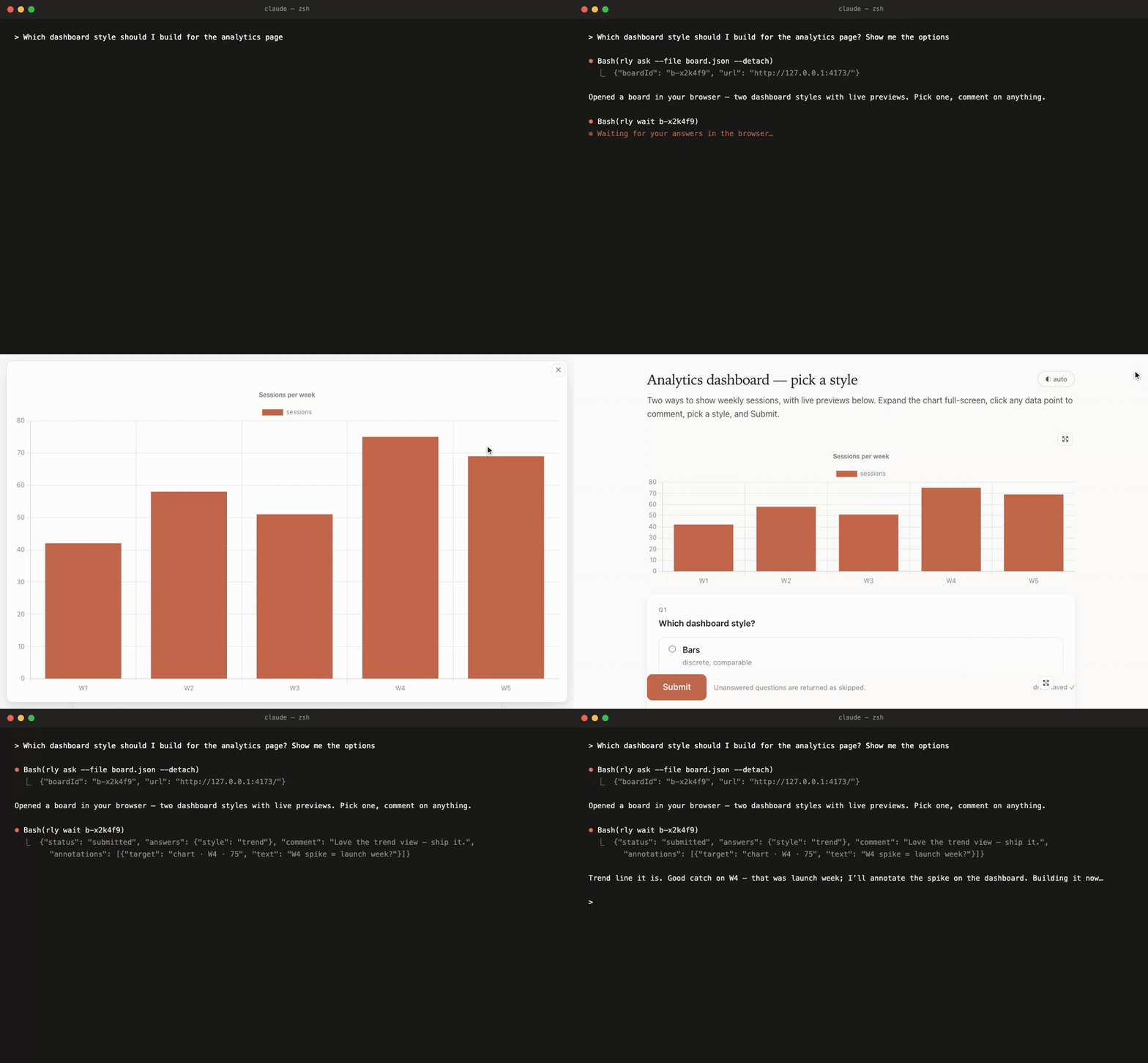
A real board from a real session — an agent presenting three animated UI
|
|
14
|
+
prototypes, asking which to build, expanding one full-screen, and getting the
|
|
15
|
+
answers on Submit:
|
|
27
16
|
|
|
28
|
-
|
|
17
|
+
|
|
29
18
|
|
|
30
19
|
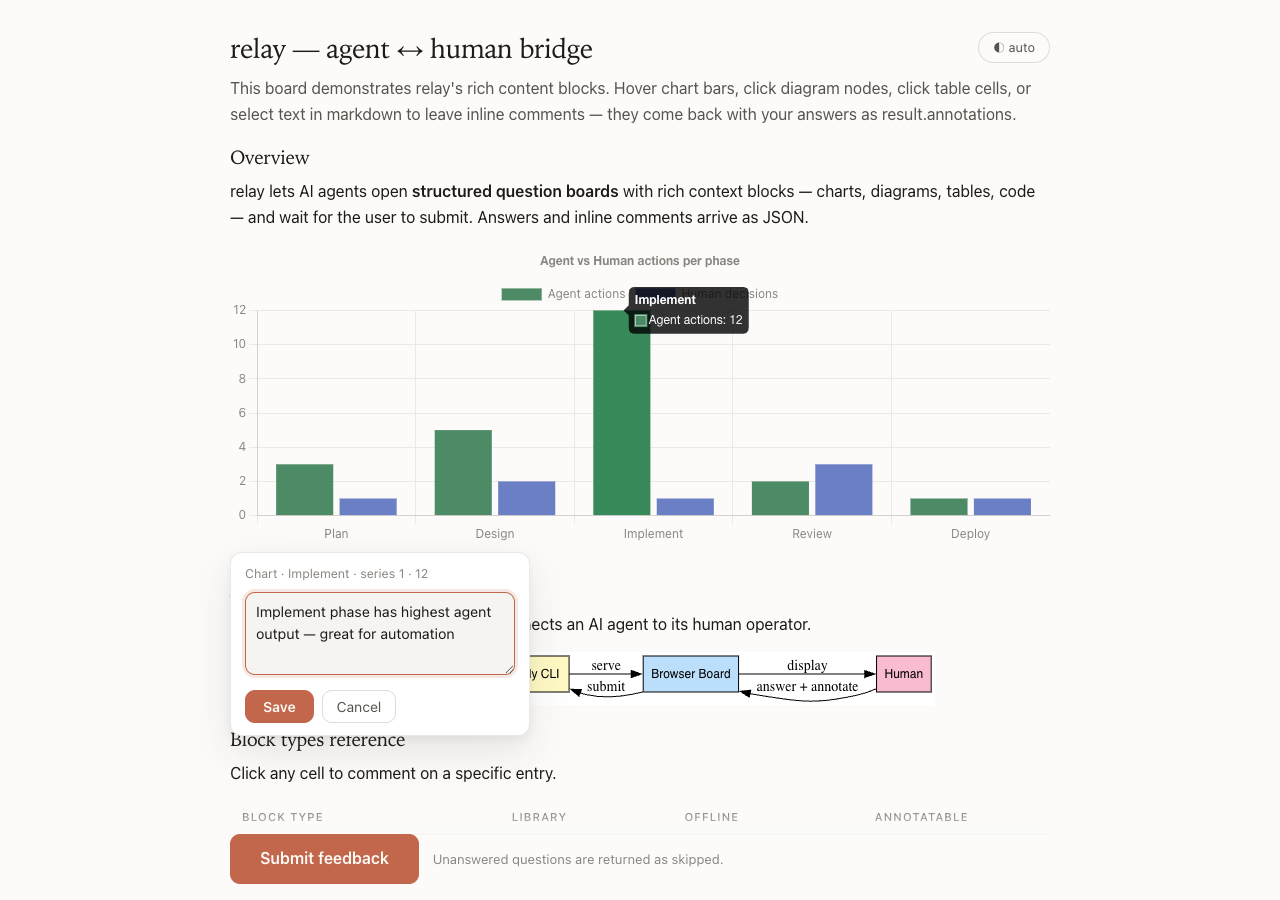
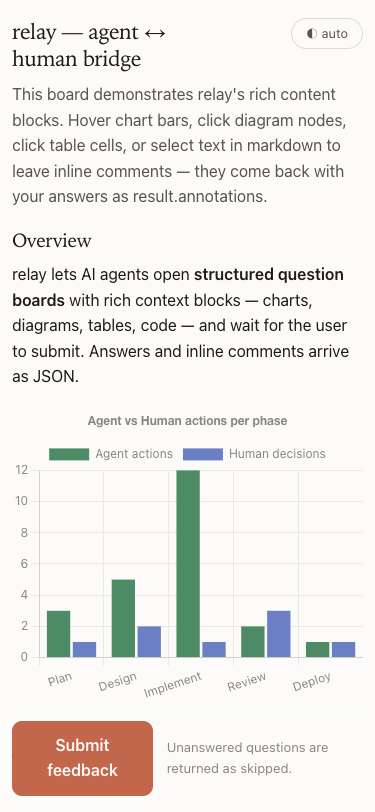
| Light theme | Dark theme |
|
|
31
20
|
|---|---|
|
|
@@ -35,350 +24,40 @@ Agents can reply to those comments and reopen the board as a conversation thread
|
|
|
35
24
|
|---|---|
|
|
36
25
|
|  |  |
|
|
37
26
|
|
|
38
|
-

|
|
39
|
-
|
|
40
|
-
## Install
|
|
41
|
-
|
|
42
|
-
```sh
|
|
43
|
-
npm i -g @khanglvm/relay # provides `rly` (and `relay`)
|
|
44
|
-
# or per-invocation:
|
|
45
|
-
npx -y @khanglvm/relay help
|
|
46
|
-
```
|
|
47
|
-
|
|
48
27
|
## Quick start
|
|
49
28
|
|
|
50
29
|
```sh
|
|
51
|
-
|
|
52
|
-
|
|
53
|
-
|
|
54
|
-
# Full board from a spec
|
|
55
|
-
rly ask --file spec.json --timeout 1800
|
|
56
|
-
|
|
57
|
-
# Visualization-only (prototype/idea); submit button = "Acknowledge"
|
|
58
|
-
rly show --html-file prototype.html --title "Dashboard concept" --height 600
|
|
59
|
-
|
|
60
|
-
# Non-blocking pattern (for agent tools with exec timeouts)
|
|
61
|
-
rly ask --file spec.json --detach # → {"boardId":"b-…","url":"http://127.0.0.1:…"}
|
|
62
|
-
rly wait b-xxxxx # blocks until submit, prints result JSON
|
|
63
|
-
```
|
|
64
|
-
|
|
65
|
-
The browser opens automatically; the user answers and clicks **Submit**; the
|
|
66
|
-
CLI prints something like:
|
|
67
|
-
|
|
68
|
-
```json
|
|
69
|
-
{
|
|
70
|
-
"status": "submitted",
|
|
71
|
-
"boardId": "b-k3x9q2",
|
|
72
|
-
"answers": { "q1": "yes", "q2": "staging" },
|
|
73
|
-
"skipped": [],
|
|
74
|
-
"comment": "ship it",
|
|
75
|
-
"annotations": [],
|
|
76
|
-
"durationMs": 23000
|
|
77
|
-
}
|
|
78
|
-
```
|
|
79
|
-
|
|
80
|
-
## Board spec
|
|
81
|
-
|
|
82
|
-
```jsonc
|
|
83
|
-
{
|
|
84
|
-
"title": "Feature direction",
|
|
85
|
-
"intro": "Context shown under the title.",
|
|
86
|
-
"blocks": [
|
|
87
|
-
{ "type": "markdown", "md": "## Background\nUse this context when deciding." }
|
|
88
|
-
],
|
|
89
|
-
"allowPartial": true, // user may submit with gaps (returned in "skipped")
|
|
90
|
-
"note": true, // optional free-text box → result "comment"
|
|
91
|
-
"autoClose": true, // tab closes itself after submit
|
|
92
|
-
"questions": [
|
|
93
|
-
{ "id": "approach", "type": "single", "label": "Which approach?", "required": true,
|
|
94
|
-
"options": [{ "value": "a", "label": "A", "description": "fast" }, "B"], "other": true },
|
|
95
|
-
{ "id": "scope", "type": "multi", "label": "Include?", "options": ["api", "ui", "docs"] },
|
|
96
|
-
{ "id": "ship", "type": "yesno", "label": "Ship this week?" },
|
|
97
|
-
{ "id": "name", "type": "text", "label": "Codename?", "placeholder": "falcon" },
|
|
98
|
-
{ "id": "notes", "type": "textarea", "label": "Constraints?" },
|
|
99
|
-
{ "id": "conf", "type": "scale", "label": "Confidence?", "min": 1, "max": 5,
|
|
100
|
-
"minLabel": "low", "maxLabel": "high",
|
|
101
|
-
"blocks": [{ "type": "markdown", "md": "Rate your confidence in the chosen approach." }] }
|
|
102
|
-
]
|
|
103
|
-
}
|
|
104
|
-
```
|
|
105
|
-
|
|
106
|
-
`rly schema` prints the full JSON Schema; `rly agent` prints the complete
|
|
107
|
-
agent-oriented guide (answer shapes, block reference, annotation shape, patterns).
|
|
108
|
-
|
|
109
|
-
## Content blocks
|
|
110
|
-
|
|
111
|
-
Blocks can appear at the board level (`"blocks": [...]` on the root) or per question
|
|
112
|
-
(`"blocks": [...]` on a question object). Legacy `"html"` / `"htmlFile"` fields are
|
|
113
|
-
still accepted and normalised into a single `html` block automatically.
|
|
114
|
-
|
|
115
|
-
### Markdown
|
|
116
|
-
|
|
117
|
-
```json
|
|
118
|
-
{ "type": "markdown", "md": "## Section\nAny **CommonMark** prose." }
|
|
119
|
-
```
|
|
120
|
-
|
|
121
|
-
Built-in mini renderer — no library loaded.
|
|
122
|
-
|
|
123
|
-
### Mermaid diagram
|
|
124
|
-
|
|
125
|
-
```json
|
|
126
|
-
{ "type": "mermaid", "code": "graph TD; A-->B; B-->C", "height": 400 }
|
|
127
|
-
```
|
|
128
|
-
|
|
129
|
-
Lazy-loads the vendored Mermaid bundle only when used. `height` clamps to
|
|
130
|
-
100–2400 px (default: natural flow, max 1200 px with scroll).
|
|
131
|
-
|
|
132
|
-
### Chart — shorthand
|
|
133
|
-
|
|
134
|
-
```json
|
|
135
|
-
{
|
|
136
|
-
"type": "chart",
|
|
137
|
-
"kind": "bar",
|
|
138
|
-
"title": "Q1 velocity",
|
|
139
|
-
"labels": ["Jan", "Feb", "Mar"],
|
|
140
|
-
"series": [
|
|
141
|
-
{ "label": "Shipped", "data": [12, 19, 14], "color": "#4d8a66" },
|
|
142
|
-
{ "label": "Planned", "data": [15, 15, 15] }
|
|
143
|
-
],
|
|
144
|
-
"height": 320
|
|
145
|
-
}
|
|
146
|
-
```
|
|
147
|
-
|
|
148
|
-
`kind`: `bar` | `line` | `pie` | `doughnut` | `radar` | `scatter`.
|
|
149
|
-
Omit `color` to use the built-in palette.
|
|
150
|
-
|
|
151
|
-
### Chart — full Chart.js config
|
|
152
|
-
|
|
153
|
-
```json
|
|
154
|
-
{
|
|
155
|
-
"type": "chart",
|
|
156
|
-
"config": {
|
|
157
|
-
"type": "bar",
|
|
158
|
-
"data": { "labels": ["A", "B"], "datasets": [{ "label": "x", "data": [1, 2] }] },
|
|
159
|
-
"options": { "plugins": { "legend": { "display": false } } }
|
|
160
|
-
},
|
|
161
|
-
"height": 280
|
|
162
|
-
}
|
|
163
|
-
```
|
|
164
|
-
|
|
165
|
-
Pass any valid Chart.js v4 config object to `config`. Lazy-loads the vendored
|
|
166
|
-
Chart.js bundle.
|
|
167
|
-
|
|
168
|
-
### Table
|
|
169
|
-
|
|
170
|
-
```json
|
|
171
|
-
{
|
|
172
|
-
"type": "table",
|
|
173
|
-
"columns": [
|
|
174
|
-
{ "key": "name", "label": "Name" },
|
|
175
|
-
{ "key": "status", "label": "Status", "align": "center" },
|
|
176
|
-
{ "key": "score", "label": "Score", "align": "right" }
|
|
177
|
-
],
|
|
178
|
-
"rows": [
|
|
179
|
-
{ "name": "Alpha", "status": "done", "score": 92 },
|
|
180
|
-
{ "name": "Beta", "status": "wip", "score": 71 }
|
|
181
|
-
],
|
|
182
|
-
"sortable": true
|
|
183
|
-
}
|
|
184
|
-
```
|
|
185
|
-
|
|
186
|
-
`columns` may also be a plain `["A", "B", "C"]` string array, with `rows` as
|
|
187
|
-
parallel arrays: `[[val, val, val], ...]`. Users can click column headers to
|
|
188
|
-
sort when `"sortable": true`.
|
|
189
|
-
|
|
190
|
-
### Code
|
|
191
|
-
|
|
192
|
-
```json
|
|
193
|
-
{ "type": "code", "lang": "js", "code": "const x = 1 + 2;" }
|
|
194
|
-
```
|
|
195
|
-
|
|
196
|
-
Rendered in a styled pre/code block. `lang` is optional.
|
|
197
|
-
|
|
198
|
-
### HTML (sandboxed iframe)
|
|
199
|
-
|
|
200
|
-
```json
|
|
201
|
-
{ "type": "html", "html": "<h1>Hello</h1>", "height": 360 }
|
|
202
|
-
```
|
|
203
|
-
|
|
204
|
-
or reference a file:
|
|
205
|
-
|
|
206
|
-
```json
|
|
207
|
-
{ "type": "html", "htmlFile": "viz.html", "height": 400 }
|
|
208
|
-
```
|
|
209
|
-
|
|
210
|
-
Rendered in a **sandboxed iframe** (`allow-scripts`, no parent access).
|
|
211
|
-
Width: always 100% of the content column — ~820 px max on desktop, ~300 px min
|
|
212
|
-
on phones. Height: 100–2400 px, default 360. Fragments (no `<html>` tag) are
|
|
213
|
-
auto-wrapped to match the current theme; full documents receive a
|
|
214
|
-
`?theme=light|dark` query param.
|
|
215
|
-
|
|
216
|
-
### Graphviz diagram
|
|
217
|
-
|
|
218
|
-
```json
|
|
219
|
-
{ "type": "graphviz", "dot": "digraph { a -> b -> c }", "height": 300 }
|
|
220
|
-
```
|
|
221
|
-
|
|
222
|
-
Rendered entirely **offline** via the vendored `viz-standalone.js` (Graphviz compiled to
|
|
223
|
-
WebAssembly). Never upscaled past the diagram's natural width; shrinks on narrow screens;
|
|
224
|
-
container max-height 1200 px with scroll. Nodes (`g.node`) and edges (`g.edge`) are
|
|
225
|
-
individually annotatable. Use Graphviz for precise dependency graphs, call graphs, or
|
|
226
|
-
state machines where Mermaid's auto-layout doesn't give enough control.
|
|
227
|
-
|
|
228
|
-
### PlantUML diagram
|
|
229
|
-
|
|
230
|
-
```json
|
|
231
|
-
{ "type": "plantuml", "code": "@startuml\nA -> B: request\n@enduml", "height": 340 }
|
|
232
|
-
```
|
|
233
|
-
|
|
234
|
-
Rendered via a **PlantUML server** (default: `https://www.plantuml.com/plantuml`). The
|
|
235
|
-
diagram source is deflate-encoded client-side and sent as a URL parameter — no server
|
|
236
|
-
round-trip for the page itself, just an `<img>` request. If the server is unreachable or
|
|
237
|
-
the browser lacks `CompressionStream`, a muted error card is shown.
|
|
238
|
-
|
|
239
|
-
**Privacy note:** diagram source is encoded and sent to the configured PlantUML server.
|
|
240
|
-
For sensitive diagrams, host your own server and pass `"server": "https://plantuml.example.com"`.
|
|
241
|
-
|
|
242
|
-
The rendered image is registered as a single annotatable element (target kind `image`).
|
|
243
|
-
Use PlantUML for UML sequence diagrams, class diagrams, and component diagrams.
|
|
244
|
-
|
|
245
|
-
## Annotations
|
|
246
|
-
|
|
247
|
-
Users can leave inline comments on any annotatable element — chart data points,
|
|
248
|
-
mermaid nodes, graphviz nodes and edges, table cells, text selections inside markdown, and labelled
|
|
249
|
-
elements inside custom HTML. A small pin icon appears on hover; clicking opens a
|
|
250
|
-
comment popover. Comments are autosaved with the draft and returned in the final
|
|
251
|
-
result.
|
|
252
|
-
|
|
253
|
-
**Threaded replies:** each annotation can have replies. Agents can read
|
|
254
|
-
`result.annotations`, compose replies, and reopen the board as a conversation:
|
|
255
|
-
|
|
256
|
-
```sh
|
|
257
|
-
# After reading result.annotations from a previous board:
|
|
258
|
-
rly reopen <id> --replies replies.json
|
|
259
|
-
# replies.json: [{"annotationId":"a1","text":"Good catch — fixed in the next sprint."}]
|
|
260
|
-
```
|
|
261
|
-
|
|
262
|
-
The board reopens with agent replies shown inline under each comment. Users can reply
|
|
263
|
-
back; the conversation grows with each `rly reopen --replies` cycle.
|
|
264
|
-
|
|
265
|
-
### result.annotations shape
|
|
266
|
-
|
|
267
|
-
```json
|
|
268
|
-
{
|
|
269
|
-
"status": "submitted",
|
|
270
|
-
"boardId": "b-k3x9q2",
|
|
271
|
-
"answers": { "approach": "a" },
|
|
272
|
-
"annotations": [
|
|
273
|
-
{
|
|
274
|
-
"id": "a1",
|
|
275
|
-
"questionId": null,
|
|
276
|
-
"blockId": "b2",
|
|
277
|
-
"target": {
|
|
278
|
-
"kind": "chart-element",
|
|
279
|
-
"datasetIndex": 0,
|
|
280
|
-
"index": 1,
|
|
281
|
-
"label": "Feb",
|
|
282
|
-
"value": 19
|
|
283
|
-
},
|
|
284
|
-
"text": "Feb spike was due to the onboarding push — not repeatable.",
|
|
285
|
-
"author": "user",
|
|
286
|
-
"createdAt": "2026-06-11T10:23:00.000Z",
|
|
287
|
-
"replies": [
|
|
288
|
-
{ "author": "agent", "text": "Confirmed — excluded from the trend line.", "createdAt": "2026-06-11T11:00:00.000Z" }
|
|
289
|
-
]
|
|
290
|
-
}
|
|
291
|
-
],
|
|
292
|
-
"durationMs": 58000
|
|
293
|
-
}
|
|
30
|
+
npm i -g @khanglvm/relay # the rly CLI
|
|
31
|
+
npx -y skills add khanglvm/relay -g -y # the agent skill (Claude Code, Codex, Cursor, …)
|
|
32
|
+
rly skill rules >> ~/.claude/CLAUDE.md # optional: skills are ignorable hints — this enforces usage (or >> AGENTS.md)
|
|
294
33
|
```
|
|
295
34
|
|
|
296
|
-
|
|
297
|
-
|
|
35
|
+
That's it. Next time your agent needs a decision or wants to show you a plan,
|
|
36
|
+
it opens a board like the ones above and waits for your Submit.
|
|
298
37
|
|
|
299
|
-
|
|
38
|
+
## What it improves
|
|
300
39
|
|
|
301
|
-
|
|
|
40
|
+
| Without relay | With relay |
|
|
302
41
|
|---|---|
|
|
303
|
-
|
|
|
304
|
-
|
|
|
305
|
-
|
|
|
306
|
-
|
|
|
307
|
-
|
|
|
308
|
-
|
|
|
309
|
-
| `image` | a PlantUML diagram image — includes `label` |
|
|
42
|
+
| Six questions asked one at a time in the terminal | One board, all questions, real form controls, optional "Other" + notes |
|
|
43
|
+
| "Option B is the one with caching (see my last message)" | Each answer option carries its own image / chart / diagram — pick by looking |
|
|
44
|
+
| ASCII architecture art | Mermaid, Graphviz, PlantUML — zoomable, full-screen, even user-editable |
|
|
45
|
+
| Numbers buried in prose | Charts and sortable tables; screenshots and HTML prototypes in a sandbox |
|
|
46
|
+
| "Type *done* when finished reviewing" | A Submit button; answers, notes, and inline comments returned as JSON |
|
|
47
|
+
| Feedback = another wall of text | Click any chart point, diagram node, table cell, or sentence to comment — the agent replies and the thread grows on the board |
|
|
310
48
|
|
|
311
|
-
|
|
49
|
+
Everything autosaves in real time (drafts survive timeouts), multiple boards
|
|
50
|
+
run at once, and the package has **zero runtime dependencies** — plain
|
|
51
|
+
Node ≥ 18; Chart.js / Mermaid / Graphviz are vendored and lazy-loaded offline.
|
|
312
52
|
|
|
313
|
-
|
|
53
|
+
## Learn more
|
|
314
54
|
|
|
315
|
-
|
|
316
|
-
<script src="/kit.js"></script>
|
|
317
|
-
<script>
|
|
318
|
-
// Make any element commentable — users see a hover outline + click to comment
|
|
319
|
-
relayKit.commentable(document.getElementById('revenue-chart'), 'Revenue chart', 'Q1 2026');
|
|
320
|
-
relayKit.commentable(document.getElementById('cta-button'), 'CTA button');
|
|
321
|
-
</script>
|
|
322
|
-
```
|
|
323
|
-
|
|
324
|
-
`relayKit.commentable(el, label, detail?)` — outlines `el` on hover; clicking
|
|
325
|
-
opens the annotation popover in the parent page anchored to that element.
|
|
326
|
-
`label` is shown in the annotation summary; `detail` is optional extra context.
|
|
327
|
-
|
|
328
|
-
## Commands
|
|
329
|
-
|
|
330
|
-
| Command | What it does |
|
|
55
|
+
| | |
|
|
331
56
|
|---|---|
|
|
332
|
-
| `rly
|
|
333
|
-
| `rly
|
|
334
|
-
| `rly
|
|
335
|
-
|
|
|
336
|
-
| `rly result <id>` | Result/status now — includes **live autosaved draft** while open |
|
|
337
|
-
| `rly list [--json]` | Running boards |
|
|
338
|
-
| `rly open [id]` | Re-open the browser tab of a running board |
|
|
339
|
-
| `rly reopen <id>` | Serve a saved board again, **prefilled with saved answers** |
|
|
340
|
-
| `rly reopen <id> --replies file.json` | Reopen with agent replies appended to matching annotations |
|
|
341
|
-
| `rly update <id> [--file spec.json \| --title T \| --intro I \| -q "…"]` | Push a new spec to a running board — page reloads, answers survive via draft |
|
|
342
|
-
| `rly reuse <id> [--dump]` | Re-run a past board as a new one (blank) |
|
|
343
|
-
| `rly stop <id> \| --all` | Stop running board(s) — draft preserved |
|
|
344
|
-
| `rly history [--limit n] [--json]` | Saved boards |
|
|
345
|
-
| `rly spec <id>` | Print a saved spec (edit → `rly ask --file`) |
|
|
346
|
-
| `rly rm <id> \| --all` | Delete saved board(s) |
|
|
347
|
-
| `rly schema` | JSON Schema of the spec |
|
|
348
|
-
| `rly agent` | Full guide for AI agents |
|
|
349
|
-
| `rly skill [install\|path]` | Bundled universal agent skill |
|
|
350
|
-
|
|
351
|
-
Common flags: `--title --intro --html-file --height --submit-label
|
|
352
|
-
--timeout <sec> --port <n> --no-open --detach`.
|
|
353
|
-
|
|
354
|
-
Exit codes: `0` submitted/acknowledged · `2` timeout · `3` cancelled ·
|
|
355
|
-
`4` usage · `5` not found.
|
|
356
|
-
|
|
357
|
-
Storage: `~/.relay` (override with `RLY_HOME`). Boards bind to `127.0.0.1` only.
|
|
358
|
-
|
|
359
|
-
## Presence, push-wake & diagram co-editing (v0.4)
|
|
360
|
-
|
|
361
|
-
While a board is open the page reports user activity; `rly result <id>`
|
|
362
|
-
includes `presence` ({visible, focused, secondsSinceActivity}) and
|
|
363
|
-
`rly wait <id> --while-active --idle-grace 180` keeps waiting while the user
|
|
364
|
-
is demonstrably engaged instead of dying on a fixed timer. For pushes,
|
|
365
|
-
`--on-result '<cmd>'` (on ask/show/reopen/reuse) and `rly wait --notify-cmd`
|
|
366
|
-
execute your command with the result JSON on stdin the moment the board
|
|
367
|
-
finishes. Mermaid blocks with `"editable": true` let the user edit the diagram
|
|
368
|
-
source with live preview — their version returns as `result.blockEdits`.
|
|
369
|
-
|
|
370
|
-
## Agent skill (Claude Code, Codex, …)
|
|
371
|
-
|
|
372
|
-
A universal [SKILL.md](skills/relay/SKILL.md) is bundled:
|
|
373
|
-
|
|
374
|
-
```sh
|
|
375
|
-
rly skill install # auto-installs into ~/.claude/skills and ~/.codex/skills
|
|
376
|
-
rly skill install --target claude # or codex | both | <custom dir>
|
|
377
|
-
npx skills add khanglvm/relay # via the skills installer, straight from this repo
|
|
378
|
-
```
|
|
379
|
-
|
|
380
|
-
`rly help` and `rly agent` also point agents at the skill, so an agent that
|
|
381
|
-
merely has the CLI installed can discover and self-install it.
|
|
57
|
+
| `rly help` | every command at a glance |
|
|
58
|
+
| `rly agent` | the full agent guide — spec format, all block types, annotations, patterns ([docs/AGENT.md](docs/AGENT.md)) |
|
|
59
|
+
| `rly schema` | board spec JSON Schema |
|
|
60
|
+
| [skills/relay/SKILL.md](skills/relay/SKILL.md) | the bundled skill |
|
|
382
61
|
|
|
383
62
|
## Development
|
|
384
63
|
|
|
@@ -388,15 +67,9 @@ npm test # zero-dep smoke tests (spawns real servers, fake-submits)
|
|
|
388
67
|
|
|
389
68
|
## Migration from quest-board
|
|
390
69
|
|
|
391
|
-
relay was formerly
|
|
392
|
-
|
|
393
|
-
|
|
394
|
-
- Storage moved from `~/.quest-board` to `~/.relay`. Override with `RLY_HOME`.
|
|
395
|
-
There is no automatic migration — copy boards manually if needed.
|
|
396
|
-
- The old `QUEST_BOARD_HOME` env var is still read as a fallback during the
|
|
397
|
-
transition period.
|
|
398
|
-
- Legacy `"html"` / `"htmlFile"` / `"htmlHeight"` fields in specs continue to
|
|
399
|
-
work and are silently normalised into an html block.
|
|
70
|
+
relay was formerly `@khanglvm/quest-board` (CLI: `qbd`) — that package is
|
|
71
|
+
deprecated. Storage moved from `~/.quest-board` to `~/.relay` (override with
|
|
72
|
+
`RLY_HOME`); legacy `"html"` / `"htmlFile"` spec fields keep working.
|
|
400
73
|
|
|
401
74
|
## License
|
|
402
75
|
|
package/docs/AGENT.md
CHANGED
|
@@ -82,7 +82,14 @@ rly show --html-file prototype.html --title "Dashboard concept" --height 600
|
|
|
82
82
|
{ "id": "confidence", "type": "scale", "label": "Confidence?", "min": 1, "max": 5,
|
|
83
83
|
"minLabel": "low", "maxLabel": "high" },
|
|
84
84
|
{ "id": "layout", "type": "single", "label": "Which layout?", "options": ["left", "right"],
|
|
85
|
-
"blocks": [{ "type": "markdown", "md": "Compare the two options above." }] }
|
|
85
|
+
"blocks": [{ "type": "markdown", "md": "Compare the two options above." }] },
|
|
86
|
+
{ "id": "variant", "type": "single", "label": "Which design variant?",
|
|
87
|
+
"options": [ // blocks INSIDE an option = visual choice
|
|
88
|
+
{ "value": "hero", "label": "Hero", "blocks": [
|
|
89
|
+
{ "type": "image", "src": "hero-mock.png", "height": 180 } ] },
|
|
90
|
+
{ "value": "split", "label": "Split", "blocks": [
|
|
91
|
+
{ "type": "html", "html": "<div style='display:flex'>…</div>", "height": 180 } ] }
|
|
92
|
+
] }
|
|
86
93
|
]
|
|
87
94
|
}
|
|
88
95
|
```
|
|
@@ -136,9 +143,45 @@ so far.
|
|
|
136
143
|
|
|
137
144
|
## Blocks
|
|
138
145
|
|
|
139
|
-
|
|
140
|
-
|
|
141
|
-
|
|
146
|
+
Every visual block (mermaid / graphviz / plantuml / chart / table / html /
|
|
147
|
+
image) automatically gets a full-screen button (4-corner expand icon, Esc
|
|
148
|
+
closes); diagrams and images also zoom with cmd/ctrl+wheel. Don't shrink large
|
|
149
|
+
diagrams to make them fit — the user can always expand and zoom; annotations
|
|
150
|
+
keep working at any zoom and inside full-screen.
|
|
151
|
+
|
|
152
|
+
Blocks can appear at the board level (`"blocks": [...]` on the root object),
|
|
153
|
+
per question (`"blocks": [...]` on a question object), or per OPTION of a
|
|
154
|
+
single/multi question (`"blocks": [...]` on an option object). Heights clamp
|
|
155
|
+
to 100–2400 px.
|
|
156
|
+
|
|
157
|
+
### Option-level visuals — show each choice
|
|
158
|
+
|
|
159
|
+
When a question's options are inherently visual — design variants, layouts,
|
|
160
|
+
screenshots, palette/chart-style alternatives, competing architectures — give
|
|
161
|
+
EACH option a compact block so the user picks by looking instead of reading a
|
|
162
|
+
description and guessing:
|
|
163
|
+
|
|
164
|
+
```jsonc
|
|
165
|
+
{ "id": "scheme", "type": "single", "label": "Color scheme?",
|
|
166
|
+
"options": [
|
|
167
|
+
{ "value": "warm", "label": "Warm", "description": "terracotta accent",
|
|
168
|
+
"blocks": [{ "type": "html", "html": "<div style='background:#C2674B;height:100%'></div>", "height": 140 }] },
|
|
169
|
+
{ "value": "cool", "label": "Cool", "description": "slate accent",
|
|
170
|
+
"blocks": [{ "type": "image", "src": "cool-preview.png", "height": 140 }] }
|
|
171
|
+
] }
|
|
172
|
+
```
|
|
173
|
+
|
|
174
|
+
Rules of thumb:
|
|
175
|
+
|
|
176
|
+
- Any block type works inside an option (image, html, chart, mermaid,
|
|
177
|
+
graphviz, plantuml, table, code, markdown).
|
|
178
|
+
- Keep option visuals **compact** — `"height"` ~140–260. They render inside the
|
|
179
|
+
option card, under the label/description.
|
|
180
|
+
- Interacting with the visual (zoom, annotate, chart hover) never toggles the
|
|
181
|
+
option; the label row is what selects. Option visuals stay fully annotatable.
|
|
182
|
+
- Use this whenever the choice has visual/example context; skip it for plainly
|
|
183
|
+
textual options. It beats one big side-by-side comparison block because the
|
|
184
|
+
selected visual is unambiguous.
|
|
142
185
|
|
|
143
186
|
### All block shapes
|
|
144
187
|
|
|
@@ -205,6 +248,11 @@ per question (`"blocks": [...]` on a question object). Heights clamp to
|
|
|
205
248
|
// HTML — sandboxed iframe; default height 360
|
|
206
249
|
{ "type": "html", "html": "<h1>Hello</h1>", "height": 360 }
|
|
207
250
|
{ "type": "html", "htmlFile": "viz.html", "height": 400 }
|
|
251
|
+
|
|
252
|
+
// Image — local file path (embedded at spec time, works offline), http(s) URL,
|
|
253
|
+
// or data URI. "height" caps the displayed height; zoom/full-screen included.
|
|
254
|
+
{ "type": "image", "src": "screenshots/variant-a.png", "alt": "Variant A", "height": 220 }
|
|
255
|
+
{ "type": "image", "src": "https://example.com/mock.png" }
|
|
208
256
|
```
|
|
209
257
|
|
|
210
258
|
### When to use which block
|
|
@@ -218,6 +266,7 @@ per question (`"blocks": [...]` on a question object). Heights clamp to
|
|
|
218
266
|
| `table` | structured comparisons, option matrices, data grids |
|
|
219
267
|
| `markdown` | prose context, background, instructions, section headings |
|
|
220
268
|
| `code` | code snippets, config examples, command output |
|
|
269
|
+
| `image` | screenshots, mockup exports, photos — local files embed and work offline |
|
|
221
270
|
| `html` | anything else — pixel-perfect mockups, custom widgets, embeds |
|
|
222
271
|
|
|
223
272
|
### Height rules
|
|
@@ -226,8 +275,11 @@ per question (`"blocks": [...]` on a question object). Heights clamp to
|
|
|
226
275
|
- `mermaid`: natural flow, max-height 1200 px with internal scroll. Override with `"height"`.
|
|
227
276
|
- `chart`: default 320 px. Override with `"height"`.
|
|
228
277
|
- `html`: default 360 px. Override with `"height"`.
|
|
278
|
+
- `image`: natural size (never upscaled), max-height 1200 px with scroll. `"height"` caps it.
|
|
229
279
|
- `table`: natural flow.
|
|
230
280
|
- All heights clamp to 100–2400 px.
|
|
281
|
+
- Inside OPTION cards, always set a compact `"height"` (~140–260) on
|
|
282
|
+
chart/html/image blocks — the per-scope defaults are tuned for full-width use.
|
|
231
283
|
|
|
232
284
|
## Custom HTML sizing contract
|
|
233
285
|
|
|
@@ -298,7 +350,7 @@ intro. Annotations are autosaved with the draft and returned in the final result
|
|
|
298
350
|
| `table-cell` | `row` (0-based), `col` (column key), `value` | clicking a table cell |
|
|
299
351
|
| `text` | `quote`, `prefix` (≤30 chars before), `suffix` (≤30 after) | selecting text in a markdown block |
|
|
300
352
|
| `html-element` | `label`, `detail?` | clicking a `relayKit.commentable()` element |
|
|
301
|
-
| `image` | `label` | clicking
|
|
353
|
+
| `image` | `label` | clicking a PlantUML diagram or an image block |
|
|
302
354
|
|
|
303
355
|
Read annotations as first-class feedback — they often carry the sharpest insight
|
|
304
356
|
(e.g. a user circling the one data point that concerns them, or quoting the exact
|
package/docs/assets/demo.gif
CHANGED
|
Binary file
|
package/package.json
CHANGED
|
@@ -1,6 +1,6 @@
|
|
|
1
1
|
{
|
|
2
2
|
"name": "@khanglvm/relay",
|
|
3
|
-
"version": "0.
|
|
3
|
+
"version": "0.5.0",
|
|
4
4
|
"description": "Browser-based question boards with rich blocks (markdown, charts, mermaid, tables, code, sandboxed HTML) and element-level annotations for AI coding agents (Claude Code, Codex, …): ask users structured questions, present interactive visuals, collect inline comments, wait for submit, read answers as JSON.",
|
|
5
5
|
"keywords": [
|
|
6
6
|
"ai-agents",
|
package/skills/relay/SKILL.md
CHANGED
|
@@ -1,6 +1,6 @@
|
|
|
1
1
|
---
|
|
2
2
|
name: relay
|
|
3
|
-
description: "
|
|
3
|
+
description: "The tool for collecting user requirements, decisions, and answers (choice, yes-no, text, scale questions) and for presenting prototypes, plans, structures, or reports with rich visuals - mermaid/graphviz/plantuml diagrams, charts, sortable tables, custom HTML - plus inline comments on any element. Opens a browser board, waits for Submit, returns JSON answers, comments, and edited diagrams. Use PROACTIVELY instead of (a) native ask-user tools for 2+ answers or options needing explanation, (b) ASCII trees/tables/diagrams in the terminal or prose descriptions of structures/designs/plans, (c) hand-rolled HTML demos. Triggers: collect requirements, ask the user, get decisions/feedback, present a prototype, plan approval, design review, show me the structure, repo/folder structure, file tree, codebase map, architecture overview, dependency graph, visualize, diagram, chart, data table, compare alternatives, survey, which do you prefer, let the user edit the diagram. Skip for a single trivial yes/no confirmation."
|
|
4
4
|
---
|
|
5
5
|
|
|
6
6
|
# relay (`rly`)
|
|
@@ -23,6 +23,7 @@ Schema).** The essentials are below.
|
|
|
23
23
|
| One trivial confirmation ("proceed?") | native tool |
|
|
24
24
|
| 2+ questions, or options that need descriptions | **rly** |
|
|
25
25
|
| Choice is easier to make visually (layouts, designs, diagrams) | **rly** (blocks per question) |
|
|
26
|
+
| Each OPTION has its own visual (design variants, screenshots, charts) | **rly** (blocks per option) |
|
|
26
27
|
| Show metrics / trends / data comparisons | **rly** (chart + table blocks) |
|
|
27
28
|
| Present a prototype / demo an idea | **rly show** — never hand-roll an HTML file + server |
|
|
28
29
|
| Gather requirements / plan approval / feedback round | **rly** |
|
|
@@ -102,7 +103,8 @@ rly ask -q "Deploy now?::yesno" -q "!Env::single::dev,staging,prod" # "!" = re
|
|
|
102
103
|
|
|
103
104
|
## Blocks cheat-sheet
|
|
104
105
|
|
|
105
|
-
Add `"blocks": [...]` to the root or to any
|
|
106
|
+
Add `"blocks": [...]` to the root, to any question, or to any OPTION of a
|
|
107
|
+
single/multi question.
|
|
106
108
|
|
|
107
109
|
```jsonc
|
|
108
110
|
{ "type": "markdown", "md": "## Section\n**prose**" }
|
|
@@ -117,8 +119,33 @@ Add `"blocks": [...]` to the root or to any question.
|
|
|
117
119
|
{ "type": "code", "lang": "js", "code": "const x = 1;" }
|
|
118
120
|
{ "type": "html", "html": "<p>hi</p>", "height": 360 }
|
|
119
121
|
{ "type": "html", "htmlFile": "viz.html", "height": 400 }
|
|
122
|
+
{ "type": "image", "src": "screenshot.png" } // local file, URL, or data URI
|
|
123
|
+
{ "type": "image", "src": "https://…/mock.png", "alt": "Mockup B", "height": 220 }
|
|
120
124
|
```
|
|
121
125
|
|
|
126
|
+
### Visual options — show each choice, don't describe it
|
|
127
|
+
|
|
128
|
+
When the options themselves are visual (design variants, layouts, color
|
|
129
|
+
schemes, chart styles, architecture alternatives, screenshots), put a compact
|
|
130
|
+
block INSIDE each option so the user compares by looking, not by reading and
|
|
131
|
+
guessing:
|
|
132
|
+
|
|
133
|
+
```jsonc
|
|
134
|
+
{ "id": "layout", "type": "single", "label": "Which landing layout?",
|
|
135
|
+
"options": [
|
|
136
|
+
{ "value": "hero", "label": "Hero", "description": "big banner",
|
|
137
|
+
"blocks": [{ "type": "image", "src": "hero.png", "height": 180 }] },
|
|
138
|
+
{ "value": "split", "label": "Split", "description": "text + visual",
|
|
139
|
+
"blocks": [{ "type": "html", "html": "<div style='display:flex'>…</div>", "height": 180 }] }
|
|
140
|
+
] }
|
|
141
|
+
```
|
|
142
|
+
|
|
143
|
+
Any block type works per option. Keep option visuals compact (`height`
|
|
144
|
+
~140–260) — they sit inside the option card. Clicking a visual never toggles
|
|
145
|
+
the option (and stays annotatable); the label row selects. Use per-option
|
|
146
|
+
blocks whenever a question's choices have visual/example context; skip them
|
|
147
|
+
for plainly textual options.
|
|
148
|
+
|
|
122
149
|
Chart.js, Mermaid, and Graphviz are **vendored and lazy-loaded** — the base board
|
|
123
150
|
stays dependency-free. PlantUML uses the public plantuml.com server by default;
|
|
124
151
|
pass `"server"` for a self-hosted instance. Legacy `"html"` / `"htmlFile"` /
|
|
@@ -172,8 +199,8 @@ one `textarea` for concerns.
|
|
|
172
199
|
(options with `description`s + `"other": true`), `multi` for scope, `scale` for
|
|
173
200
|
urgency, `textarea` for constraints.
|
|
174
201
|
|
|
175
|
-
**A/B design review** — `single` question
|
|
176
|
-
`html` block
|
|
202
|
+
**A/B design review** — `single` question where EACH option carries its own
|
|
203
|
+
`html`/`image` block rendering that variant (see Visual options above); `scale`
|
|
177
204
|
for confidence; `textarea` for what's missing from both.
|
|
178
205
|
|
|
179
206
|
**Metrics review** — board-level `chart` block (bar or line) showing the key
|
package/src/cli.js
CHANGED
|
@@ -735,8 +735,29 @@ function removeLegacySkills() {
|
|
|
735
735
|
return removed;
|
|
736
736
|
}
|
|
737
737
|
|
|
738
|
+
// Short instruction block for an agent's main instruction file (CLAUDE.md,
|
|
739
|
+
// AGENTS.md, …). A skill is only a tier-1 hint that agents can ignore; these
|
|
740
|
+
// rules, appended to the instructions the agent always reads, enforce usage.
|
|
741
|
+
// Printed to stdout so `rly skill rules >> CLAUDE.md` is the whole install.
|
|
742
|
+
const SKILL_RULES = `## relay — ask & show in the browser, not the terminal
|
|
743
|
+
|
|
744
|
+
- Need the user's decisions, feedback, requirements, or approval (anything
|
|
745
|
+
beyond one trivial yes/no)? Do NOT ask in plain terminal text. Build a board
|
|
746
|
+
spec and run: \`rly ask --file spec.json --detach\`, then \`rly wait <boardId>\`.
|
|
747
|
+
- Presenting a plan, structure, architecture, data, or a prototype? Show a
|
|
748
|
+
relay board with mermaid/graphviz/chart/table/image/html blocks — never
|
|
749
|
+
ASCII diagrams or walls of prose.
|
|
750
|
+
- When answer choices are visual (designs, layouts, variants), give each
|
|
751
|
+
option its own visual (\`options[].blocks\`) so the user picks by looking.
|
|
752
|
+
- Read the result JSON from stdout; treat \`comment\` and \`annotations\` as
|
|
753
|
+
first-class feedback. Full guide: \`rly agent\`.`;
|
|
754
|
+
|
|
738
755
|
function cmdSkill(rest) {
|
|
739
756
|
const sub = rest[0];
|
|
757
|
+
if (sub === 'rules') {
|
|
758
|
+
console.log(SKILL_RULES);
|
|
759
|
+
return 0;
|
|
760
|
+
}
|
|
740
761
|
if (sub === 'path') {
|
|
741
762
|
console.log(SKILL_SRC);
|
|
742
763
|
process.stderr.write('(bundled skill source — copy into your agent with `rly skill install`)\n');
|
|
@@ -759,9 +780,11 @@ function cmdSkill(rest) {
|
|
|
759
780
|
console.log(`relay ships a universal agent skill (Claude Code, Codex, and any SKILL.md-aware agent).
|
|
760
781
|
|
|
761
782
|
bundled at: ${SKILL_SRC}
|
|
762
|
-
install it: rly skill install # auto-detects ~/.claude
|
|
783
|
+
install it: rly skill install # auto-detects ~/.claude, ~/.codex, ~/.agents
|
|
763
784
|
rly skill install --target claude|codex|both|<dir>
|
|
764
785
|
from repo: npx skills add khanglvm/relay
|
|
786
|
+
enforce it: rly skill rules >> CLAUDE.md # or AGENTS.md — short always-read rules,
|
|
787
|
+
# because a skill alone is an ignorable hint
|
|
765
788
|
|
|
766
789
|
The skill teaches your agent the board spec format (questions + rich blocks +
|
|
767
790
|
annotations), the blocking vs --detach patterns, and visualization sizing.
|
|
@@ -816,7 +839,8 @@ USAGE
|
|
|
816
839
|
rly rm <id> | --all delete saved board(s)
|
|
817
840
|
rly schema JSON Schema of the board spec
|
|
818
841
|
rly agent FULL GUIDE for AI agents (spec format, blocks, sizing, patterns)
|
|
819
|
-
rly skill [install|path]
|
|
842
|
+
rly skill [install|rules|path] bundled universal agent skill (Claude Code, Codex, …)
|
|
843
|
+
\`rly skill rules >> CLAUDE.md\` adds always-read usage rules
|
|
820
844
|
|
|
821
845
|
COMMON FLAGS
|
|
822
846
|
--title <s> --intro <s> --html-file <f> --height <px> --submit-label <s>
|
package/src/server.js
CHANGED
|
@@ -25,19 +25,37 @@ function readUi(name) {
|
|
|
25
25
|
}
|
|
26
26
|
|
|
27
27
|
// Strips block bodies for the client payload: html blocks ship only metadata
|
|
28
|
-
// (their bodies are served via /html/b/<id>),
|
|
28
|
+
// (their bodies are served via /html/b/<id>), embedded images ship only
|
|
29
|
+
// metadata (bytes served via /img/b/<id>), everything else ships as-is.
|
|
29
30
|
function clientBlock(b) {
|
|
30
31
|
if (b && b.type === 'html') {
|
|
31
32
|
return { id: b.id, type: 'html', height: b.height, hasHtml: Boolean(b.html) };
|
|
32
33
|
}
|
|
34
|
+
if (b && b.type === 'image' && typeof b.src === 'string' && b.src.startsWith('data:')) {
|
|
35
|
+
return { id: b.id, type: 'image', alt: b.alt, height: b.height, hasData: true };
|
|
36
|
+
}
|
|
33
37
|
return b;
|
|
34
38
|
}
|
|
35
39
|
|
|
40
|
+
// One question for the client payload: strip block bodies at the question
|
|
41
|
+
// level AND inside each option's blocks.
|
|
42
|
+
function clientQuestion(q) {
|
|
43
|
+
const out = { ...q, blocks: (q.blocks || []).map(clientBlock) };
|
|
44
|
+
if (Array.isArray(q.options)) {
|
|
45
|
+
out.options = q.options.map((o) =>
|
|
46
|
+
o && Array.isArray(o.blocks) && o.blocks.length ? { ...o, blocks: o.blocks.map(clientBlock) } : o
|
|
47
|
+
);
|
|
48
|
+
}
|
|
49
|
+
return out;
|
|
50
|
+
}
|
|
51
|
+
|
|
36
52
|
// True when any block in the spec needs a given vendored library.
|
|
37
53
|
function specNeeds(spec, type) {
|
|
38
54
|
const has = (blocks) => Array.isArray(blocks) && blocks.some((b) => b && b.type === type);
|
|
39
55
|
if (has(spec.blocks)) return true;
|
|
40
|
-
return spec.questions.some(
|
|
56
|
+
return spec.questions.some(
|
|
57
|
+
(q) => has(q.blocks) || (Array.isArray(q.options) && q.options.some((o) => o && has(o.blocks)))
|
|
58
|
+
);
|
|
41
59
|
}
|
|
42
60
|
|
|
43
61
|
function vendorPresent(file) {
|
|
@@ -62,7 +80,7 @@ function buildPage(record, rev) {
|
|
|
62
80
|
const clientSpec = {
|
|
63
81
|
...spec,
|
|
64
82
|
blocks: (spec.blocks || []).map(clientBlock),
|
|
65
|
-
questions: spec.questions.map(
|
|
83
|
+
questions: spec.questions.map(clientQuestion),
|
|
66
84
|
};
|
|
67
85
|
// Tell the client which vendored libraries to lazy-load — true only when a
|
|
68
86
|
// block needs it AND the vendored asset is actually present.
|
|
@@ -150,18 +168,26 @@ function sanitizeBlockEdits(value) {
|
|
|
150
168
|
return out;
|
|
151
169
|
}
|
|
152
170
|
|
|
153
|
-
// Resolves
|
|
154
|
-
function
|
|
155
|
-
const scan = (blocks) => (Array.isArray(blocks) ? blocks.find((b) => b && b.id === blockId && b.type ===
|
|
171
|
+
// Resolves a block by id + type from the board, any question, or any option.
|
|
172
|
+
function findBlock(spec, blockId, type) {
|
|
173
|
+
const scan = (blocks) => (Array.isArray(blocks) ? blocks.find((b) => b && b.id === blockId && b.type === type) : undefined);
|
|
156
174
|
const board = scan(spec.blocks);
|
|
157
175
|
if (board) return board;
|
|
158
176
|
for (const q of spec.questions) {
|
|
159
177
|
const hit = scan(q.blocks);
|
|
160
178
|
if (hit) return hit;
|
|
179
|
+
for (const o of Array.isArray(q.options) ? q.options : []) {
|
|
180
|
+
const opt = o && scan(o.blocks);
|
|
181
|
+
if (opt) return opt;
|
|
182
|
+
}
|
|
161
183
|
}
|
|
162
184
|
return undefined;
|
|
163
185
|
}
|
|
164
186
|
|
|
187
|
+
function findHtmlBlock(spec, blockId) {
|
|
188
|
+
return findBlock(spec, blockId, 'html');
|
|
189
|
+
}
|
|
190
|
+
|
|
165
191
|
// The board's first html block (legacy /html/board alias).
|
|
166
192
|
function firstBoardHtml(spec) {
|
|
167
193
|
return (spec.blocks || []).find((b) => b && b.type === 'html');
|
|
@@ -379,6 +405,14 @@ export async function runBoard({ id, port = 0, open = true, timeoutSec = 1800, q
|
|
|
379
405
|
const block = findHtmlBlock(record.spec, blockId);
|
|
380
406
|
if (!block) return sendJson(res, 404, { error: `no html block "${blockId}"` });
|
|
381
407
|
sendHtml(res, wrapFragment(block.html || '', theme));
|
|
408
|
+
} else if (req.method === 'GET' && pathname.startsWith('/img/b/')) {
|
|
409
|
+
// Embedded image bytes (image blocks authored from local files).
|
|
410
|
+
const blockId = decodeURIComponent(pathname.slice('/img/b/'.length));
|
|
411
|
+
const block = findBlock(record.spec, blockId, 'image');
|
|
412
|
+
const m = block && typeof block.src === 'string' ? block.src.match(/^data:([^;,]+);base64,(.*)$/s) : null;
|
|
413
|
+
if (!m) return sendJson(res, 404, { error: `no embedded image block "${blockId}"` });
|
|
414
|
+
res.writeHead(200, { 'content-type': m[1], 'cache-control': 'no-store' });
|
|
415
|
+
res.end(Buffer.from(m[2], 'base64'));
|
|
382
416
|
} else if (req.method === 'GET' && pathname === '/html/board') {
|
|
383
417
|
// Legacy alias → the board's first html block.
|
|
384
418
|
const block = firstBoardHtml(record.spec);
|
package/src/spec.js
CHANGED
|
@@ -25,9 +25,17 @@ const HTML_HEIGHT = { min: 100, max: 2400, boardDefault: 400, questionDefault: 3
|
|
|
25
25
|
|
|
26
26
|
// Block heights clamp to the same window; defaults vary per block type.
|
|
27
27
|
const BLOCK_HEIGHT = { min: 100, max: 2400 };
|
|
28
|
-
export const BLOCK_TYPES = ['markdown', 'mermaid', 'graphviz', 'plantuml', 'chart', 'table', 'code', 'html'];
|
|
28
|
+
export const BLOCK_TYPES = ['markdown', 'mermaid', 'graphviz', 'plantuml', 'chart', 'table', 'code', 'html', 'image'];
|
|
29
29
|
const CHART_KINDS = ['bar', 'line', 'pie', 'doughnut', 'radar', 'scatter'];
|
|
30
30
|
|
|
31
|
+
// image blocks: local files are embedded as data URIs at spec time (the page
|
|
32
|
+
// then loads them via /img/b/<id>), so boards stay self-contained offline.
|
|
33
|
+
const IMAGE_MIMES = {
|
|
34
|
+
png: 'image/png', jpg: 'image/jpeg', jpeg: 'image/jpeg', gif: 'image/gif',
|
|
35
|
+
webp: 'image/webp', svg: 'image/svg+xml', avif: 'image/avif', bmp: 'image/bmp',
|
|
36
|
+
};
|
|
37
|
+
const IMAGE_MAX_BYTES = 8 * 1024 * 1024;
|
|
38
|
+
|
|
31
39
|
const asStr = (v) => (typeof v === 'string' ? v : v == null ? '' : String(v));
|
|
32
40
|
|
|
33
41
|
function clampInt(v, min, max, def) {
|
|
@@ -210,6 +218,35 @@ function normalizeBlock(rawBlock, id, cwd, where) {
|
|
|
210
218
|
return block;
|
|
211
219
|
}
|
|
212
220
|
|
|
221
|
+
if (type === 'image') {
|
|
222
|
+
const src = asStr(rawBlock.src ?? rawBlock.file ?? rawBlock.url).trim();
|
|
223
|
+
if (!src) throw new CliError(`${where}: image block needs a "src" (http(s)/data URL or local file path).`);
|
|
224
|
+
const block = { id, type: 'image' };
|
|
225
|
+
if (rawBlock.alt !== undefined) block.alt = asStr(rawBlock.alt);
|
|
226
|
+
if (hasHeight) block.height = clampInt(rawBlock.height, BLOCK_HEIGHT.min, BLOCK_HEIGHT.max, undefined);
|
|
227
|
+
if (/^(https?:|data:)/i.test(src)) {
|
|
228
|
+
block.src = src;
|
|
229
|
+
return block;
|
|
230
|
+
}
|
|
231
|
+
const p = path.resolve(cwd, src);
|
|
232
|
+
const ext = path.extname(p).slice(1).toLowerCase();
|
|
233
|
+
const mime = IMAGE_MIMES[ext];
|
|
234
|
+
if (!mime) {
|
|
235
|
+
throw new CliError(`${where}: unsupported image extension ".${ext}" — use ${Object.keys(IMAGE_MIMES).join('/')}, or an http(s)/data URL.`);
|
|
236
|
+
}
|
|
237
|
+
let buf;
|
|
238
|
+
try {
|
|
239
|
+
buf = fs.readFileSync(p);
|
|
240
|
+
} catch {
|
|
241
|
+
throw new CliError(`${where}: cannot read image "${src}" (resolved: ${p})`);
|
|
242
|
+
}
|
|
243
|
+
if (buf.length > IMAGE_MAX_BYTES) {
|
|
244
|
+
throw new CliError(`${where}: image "${src}" is ${(buf.length / 1024 / 1024).toFixed(1)}MB — max ${IMAGE_MAX_BYTES / 1024 / 1024}MB.`);
|
|
245
|
+
}
|
|
246
|
+
block.src = `data:${mime};base64,${buf.toString('base64')}`;
|
|
247
|
+
return block;
|
|
248
|
+
}
|
|
249
|
+
|
|
213
250
|
// type === 'html'
|
|
214
251
|
const html = readBlockHtml(rawBlock, cwd, where);
|
|
215
252
|
if (!html) {
|
|
@@ -312,9 +349,14 @@ export function normalizeSpec(raw, { cwd = process.cwd() } = {}) {
|
|
|
312
349
|
if (!value) throw new CliError(`${where}.options[${j}]: needs "value" or "label".`);
|
|
313
350
|
const out = { value, label: olabel || value };
|
|
314
351
|
if (o.description) out.description = asStr(o.description);
|
|
352
|
+
// Per-option visuals: any block type, rendered inside the option card
|
|
353
|
+
// (ids <qid>-o<n>-b<m>). Lets a choice show its example instead of
|
|
354
|
+
// making the user read-and-guess.
|
|
355
|
+
const oblocks = buildBlocks(o, cwd, `${where}.options[${j}]`, `${id}-o${j + 1}-`);
|
|
356
|
+
if (oblocks.length) out.blocks = oblocks;
|
|
315
357
|
return out;
|
|
316
358
|
}
|
|
317
|
-
throw new CliError(`${where}.options[${j}]: must be a string or {value, label, description?}.`);
|
|
359
|
+
throw new CliError(`${where}.options[${j}]: must be a string or {value, label, description?, blocks?}.`);
|
|
318
360
|
});
|
|
319
361
|
if (q.options.length < 1) {
|
|
320
362
|
throw new CliError(`${where}: type "${type}" needs at least 1 option.`);
|
|
@@ -390,7 +432,9 @@ const BLOCK_SCHEMA = {
|
|
|
390
432
|
sortable: { type: 'boolean', description: 'table: enable click-to-sort headers.' },
|
|
391
433
|
html: { type: 'string', description: 'html: custom markup rendered in a sandboxed iframe.' },
|
|
392
434
|
htmlFile: { type: 'string', description: 'html: path to an HTML file (alternative to "html").' },
|
|
393
|
-
|
|
435
|
+
src: { type: 'string', description: 'image: http(s)/data URL, or a local file path (png/jpg/gif/webp/svg/avif/bmp — embedded at spec time, served offline).' },
|
|
436
|
+
alt: { type: 'string', description: 'image: alt text / annotation label.' },
|
|
437
|
+
height: { type: 'integer', minimum: BLOCK_HEIGHT.min, maximum: BLOCK_HEIGHT.max, description: 'Block height in px. Defaults: chart 320, html 360; markdown/table/code flow naturally; mermaid/graphviz/plantuml/image natural (max 1200, scrolls).' },
|
|
394
438
|
},
|
|
395
439
|
},
|
|
396
440
|
};
|
|
@@ -425,13 +469,18 @@ export const SPEC_SCHEMA = {
|
|
|
425
469
|
required: { type: 'boolean', default: false },
|
|
426
470
|
options: {
|
|
427
471
|
type: 'array',
|
|
428
|
-
description: 'For single/multi. Strings, or {value, label, description}.',
|
|
472
|
+
description: 'For single/multi. Strings, or {value, label, description, blocks?}. An option\'s "blocks" render INSIDE that option card — use them to show each choice (image/chart/mermaid/html…) instead of describing it in words.',
|
|
429
473
|
items: {
|
|
430
474
|
anyOf: [
|
|
431
475
|
{ type: 'string' },
|
|
432
476
|
{
|
|
433
477
|
type: 'object',
|
|
434
|
-
properties: {
|
|
478
|
+
properties: {
|
|
479
|
+
value: { type: 'string' },
|
|
480
|
+
label: { type: 'string' },
|
|
481
|
+
description: { type: 'string' },
|
|
482
|
+
blocks: { ...BLOCK_SCHEMA, description: 'Visuals for THIS option, rendered inside its card. Same block types as everywhere else. Keep them compact (height ~140–260).' },
|
|
483
|
+
},
|
|
435
484
|
},
|
|
436
485
|
],
|
|
437
486
|
},
|
package/src/ui/app.js
CHANGED
|
@@ -286,9 +286,22 @@
|
|
|
286
286
|
for (const lab of group.querySelectorAll('label.opt')) {
|
|
287
287
|
const input = lab.querySelector('input');
|
|
288
288
|
lab.classList.toggle('sel', input.checked);
|
|
289
|
+
// options with visuals: the bordered card is the wrapper, not the label
|
|
290
|
+
const wrap = lab.closest('.optwrap');
|
|
291
|
+
if (wrap) wrap.classList.toggle('sel', input.checked);
|
|
289
292
|
}
|
|
290
293
|
}
|
|
291
294
|
|
|
295
|
+
// Options may carry their own blocks (visual examples of the choice). The
|
|
296
|
+
// blocks render in a wrapper card OUTSIDE the <label> so interacting with a
|
|
297
|
+
// chart/diagram/image doesn't toggle the option.
|
|
298
|
+
function withOptionBlocks(labelEl, o, questionId) {
|
|
299
|
+
if (!Array.isArray(o.blocks) || !o.blocks.length) return labelEl;
|
|
300
|
+
const wrap = el('div', { class: 'optwrap' + (labelEl.classList.contains('sel') ? ' sel' : '') }, labelEl);
|
|
301
|
+
renderBlocks(wrap, o.blocks, questionId);
|
|
302
|
+
return wrap;
|
|
303
|
+
}
|
|
304
|
+
|
|
292
305
|
function controlSingle(q) {
|
|
293
306
|
const group = el('div');
|
|
294
307
|
const entries = [];
|
|
@@ -327,12 +340,16 @@
|
|
|
327
340
|
syncSingle();
|
|
328
341
|
});
|
|
329
342
|
group.append(
|
|
330
|
-
|
|
331
|
-
input,
|
|
332
|
-
|
|
333
|
-
el('div', {
|
|
334
|
-
|
|
335
|
-
|
|
343
|
+
withOptionBlocks(
|
|
344
|
+
el('label', { class: 'opt' + (input.checked ? ' sel' : '') },
|
|
345
|
+
input,
|
|
346
|
+
el('div', {},
|
|
347
|
+
el('div', { class: 'ol' }, o.label),
|
|
348
|
+
o.description ? el('div', { class: 'od' }, o.description) : null
|
|
349
|
+
)
|
|
350
|
+
),
|
|
351
|
+
o,
|
|
352
|
+
q.id
|
|
336
353
|
)
|
|
337
354
|
);
|
|
338
355
|
}
|
|
@@ -391,12 +408,16 @@
|
|
|
391
408
|
input.checked = selected.has(o.value);
|
|
392
409
|
input.addEventListener('change', readChecked);
|
|
393
410
|
group.append(
|
|
394
|
-
|
|
395
|
-
input,
|
|
396
|
-
|
|
397
|
-
el('div', {
|
|
398
|
-
|
|
399
|
-
|
|
411
|
+
withOptionBlocks(
|
|
412
|
+
el('label', { class: 'opt' + (input.checked ? ' sel' : '') },
|
|
413
|
+
input,
|
|
414
|
+
el('div', {},
|
|
415
|
+
el('div', { class: 'ol' }, o.label),
|
|
416
|
+
o.description ? el('div', { class: 'od' }, o.description) : null
|
|
417
|
+
)
|
|
418
|
+
),
|
|
419
|
+
o,
|
|
420
|
+
q.id
|
|
400
421
|
)
|
|
401
422
|
);
|
|
402
423
|
}
|
package/src/ui/blocks.css
CHANGED
|
@@ -140,7 +140,7 @@
|
|
|
140
140
|
.blk-chart canvas { display: block; }
|
|
141
141
|
.blk-chart-badge {
|
|
142
142
|
position: absolute;
|
|
143
|
-
top:
|
|
143
|
+
top: 40px; /* below the viewer bar strip */
|
|
144
144
|
right: 6px;
|
|
145
145
|
min-width: 18px;
|
|
146
146
|
height: 18px;
|
|
@@ -266,26 +266,43 @@
|
|
|
266
266
|
height: auto;
|
|
267
267
|
}
|
|
268
268
|
|
|
269
|
-
/* ----------
|
|
270
|
-
.blk-
|
|
269
|
+
/* ---------- image ---------- */
|
|
270
|
+
.blk-imagewrap {
|
|
271
|
+
overflow: auto;
|
|
272
|
+
max-height: 1200px;
|
|
273
|
+
border: 1px solid var(--border);
|
|
274
|
+
border-radius: 10px;
|
|
275
|
+
background: var(--bg-sunken);
|
|
276
|
+
padding: 6px;
|
|
277
|
+
}
|
|
278
|
+
.blk-imagewrap .blk-img {
|
|
279
|
+
display: block;
|
|
280
|
+
max-width: 100%;
|
|
281
|
+
height: auto;
|
|
282
|
+
border-radius: 6px;
|
|
283
|
+
object-fit: contain;
|
|
284
|
+
object-position: left top;
|
|
285
|
+
}
|
|
286
|
+
|
|
287
|
+
/* ---------- viewer controls (full-screen) ---------- */
|
|
288
|
+
/* The full-screen button lives in a reserved strip ABOVE the visual (user
|
|
289
|
+
feedback: never overlay the content). padding-top reserves the strip;
|
|
290
|
+
the bar is a full-width transparent row with the button at the right. */
|
|
291
|
+
.blk-viewer { position: relative; padding-top: 34px; }
|
|
271
292
|
.blk-tools {
|
|
272
|
-
position: absolute; top:
|
|
273
|
-
display: flex; gap: 2px; align-items: center;
|
|
274
|
-
background: var(--card); border: 1px solid var(--border);
|
|
275
|
-
border-radius: 8px; padding: 2px 4px;
|
|
276
|
-
opacity: 0.35; transition: opacity 150ms var(--ease);
|
|
293
|
+
position: absolute; top: 4px; left: 4px; right: 4px; height: 26px;
|
|
294
|
+
display: flex; gap: 2px; align-items: center; justify-content: flex-end;
|
|
277
295
|
z-index: 5;
|
|
278
296
|
}
|
|
279
|
-
.blk-viewer:hover .blk-tools, .blk-full .blk-tools { opacity: 1; }
|
|
280
297
|
.blk-tools button {
|
|
281
|
-
background:
|
|
298
|
+
background: var(--card); border: 1px solid var(--border); color: var(--fg-2);
|
|
282
299
|
font: inherit; font-size: 0.8rem; line-height: 1;
|
|
283
|
-
padding:
|
|
300
|
+
padding: 5px 7px; border-radius: 7px; cursor: pointer;
|
|
301
|
+
transition: color 150ms var(--ease), border-color 150ms var(--ease);
|
|
284
302
|
}
|
|
285
|
-
.blk-tools button:hover {
|
|
303
|
+
.blk-tools button:hover { color: var(--accent); border-color: var(--accent); }
|
|
304
|
+
.blk-tools .tool-full svg { display: block; }
|
|
286
305
|
.blk-tools .tool-pct { color: var(--muted); font-size: 0.72rem; min-width: 30px; text-align: center; }
|
|
287
|
-
/* charts keep their annotation-count badge top-right; tools go top-left there */
|
|
288
|
-
.blk-chart .blk-tools { right: auto; left: 6px; }
|
|
289
306
|
|
|
290
307
|
/* full-screen = fixed overlay (NOT native fullscreen: annotation pins/badges/
|
|
291
308
|
popover live on <body> and must stay visible above the expanded block) */
|
package/src/ui/blocks.js
CHANGED
|
@@ -339,7 +339,11 @@
|
|
|
339
339
|
}
|
|
340
340
|
}
|
|
341
341
|
rebuild();
|
|
342
|
-
|
|
342
|
+
// Tables are visual too: wrap so they get the full-screen viewer like
|
|
343
|
+
// every other visual block (wide tables squeeze in the column).
|
|
344
|
+
const wrap = el('div', { class: 'blk-tablewrap' }, table);
|
|
345
|
+
attachViewer(wrap, { zoomEl: null });
|
|
346
|
+
return wrap;
|
|
343
347
|
}
|
|
344
348
|
|
|
345
349
|
// ---------- lazy vendor loaders (cached promises) ----------
|
|
@@ -908,6 +912,43 @@
|
|
|
908
912
|
return container;
|
|
909
913
|
}
|
|
910
914
|
|
|
915
|
+
// ---------- image ----------
|
|
916
|
+
// src is a remote URL, or absent for embedded local files (served by the
|
|
917
|
+
// board server at /img/b/<id>). Same sizing rule as diagrams: never upscale
|
|
918
|
+
// past natural width; zoom/full-screen viewer attached once loaded.
|
|
919
|
+
function renderImage(block, ctx, blockId) {
|
|
920
|
+
const container = el('div', { class: 'blk-imagewrap' });
|
|
921
|
+
const src = typeof block.src === 'string' && block.src
|
|
922
|
+
? block.src
|
|
923
|
+
: '/img/b/' + encodeURIComponent(blockId);
|
|
924
|
+
const img = el('img', {
|
|
925
|
+
class: 'blk-img',
|
|
926
|
+
src,
|
|
927
|
+
alt: block.alt || 'image',
|
|
928
|
+
loading: 'lazy',
|
|
929
|
+
});
|
|
930
|
+
if (block.height) img.style.maxHeight = clampHeight(block.height, 360) + 'px';
|
|
931
|
+
img.addEventListener('error', () => {
|
|
932
|
+
container.replaceChildren(el('div', { class: 'blk-error' }, 'Image failed to load'));
|
|
933
|
+
});
|
|
934
|
+
container.append(img);
|
|
935
|
+
const attachImgViewer = () =>
|
|
936
|
+
attachViewer(container, {
|
|
937
|
+
zoomEl: img,
|
|
938
|
+
natural: () => (img.naturalWidth > 0 ? { w: img.naturalWidth, h: img.naturalHeight } : null),
|
|
939
|
+
});
|
|
940
|
+
if (img.complete && img.naturalWidth > 0) attachImgViewer();
|
|
941
|
+
else img.addEventListener('load', attachImgViewer, { once: true });
|
|
942
|
+
if (ctx.annotate) {
|
|
943
|
+
ctx.annotate.register(img, {
|
|
944
|
+
blockId,
|
|
945
|
+
questionId: ctx.questionId,
|
|
946
|
+
target: { kind: 'image', label: block.alt || 'Image' },
|
|
947
|
+
});
|
|
948
|
+
}
|
|
949
|
+
return container;
|
|
950
|
+
}
|
|
951
|
+
|
|
911
952
|
// ---------- viewer controls (zoom / fit / full-screen) ----------
|
|
912
953
|
// Large diagrams get squeezed to the column width; these controls let the
|
|
913
954
|
// user zoom (buttons or cmd/ctrl+wheel) and expand any visual block into a
|
|
@@ -916,12 +957,19 @@
|
|
|
916
957
|
// <body>, which native fullscreen would hide).
|
|
917
958
|
let fullOpen = null; // container currently expanded
|
|
918
959
|
|
|
960
|
+
// 4-corner expand icon. The toolbar deliberately holds ONLY the full-screen
|
|
961
|
+
// button (user feedback: the zoom button row was noise) — zooming stays
|
|
962
|
+
// available via cmd/ctrl+wheel on zoomable blocks.
|
|
963
|
+
const ICON_EXPAND =
|
|
964
|
+
'<svg viewBox="0 0 24 24" width="13" height="13" fill="none" stroke="currentColor" stroke-width="2.2" stroke-linecap="round" stroke-linejoin="round" aria-hidden="true">' +
|
|
965
|
+
'<path d="M3 9V3h6M10 10 3 3M15 3h6v6M14 10l7-7M9 21H3v-6M10 14l-7 7M21 15v6h-6M14 14l7 7"/></svg>';
|
|
966
|
+
|
|
919
967
|
function exitFull() {
|
|
920
968
|
if (!fullOpen) return;
|
|
921
969
|
fullOpen.classList.remove('blk-full');
|
|
922
970
|
document.body.classList.remove('blk-full-open');
|
|
923
971
|
const btn = fullOpen.querySelector('.blk-tools .tool-full');
|
|
924
|
-
if (btn) btn.
|
|
972
|
+
if (btn) btn.innerHTML = ICON_EXPAND;
|
|
925
973
|
fullOpen = null;
|
|
926
974
|
window.dispatchEvent(new Event('resize'));
|
|
927
975
|
}
|
|
@@ -970,13 +1018,7 @@
|
|
|
970
1018
|
|
|
971
1019
|
const tools = el('div', { class: 'blk-tools' });
|
|
972
1020
|
if (zoomable) {
|
|
973
|
-
|
|
974
|
-
el('button', { type: 'button', title: 'Zoom out', onclick: () => setZoom(currentZ() / 1.25) }, '−'),
|
|
975
|
-
pct,
|
|
976
|
-
el('button', { type: 'button', title: 'Zoom in', onclick: () => setZoom(currentZ() * 1.25) }, '+'),
|
|
977
|
-
el('button', { type: 'button', title: 'Actual size', onclick: () => setZoom(1) }, '1:1'),
|
|
978
|
-
el('button', { type: 'button', title: 'Fit to width', onclick: () => setZoom(null) }, 'fit')
|
|
979
|
-
);
|
|
1021
|
+
// zoom lives on cmd/ctrl+wheel only — the toolbar is full-screen-only
|
|
980
1022
|
container.addEventListener(
|
|
981
1023
|
'wheel',
|
|
982
1024
|
(e) => {
|
|
@@ -987,7 +1029,8 @@
|
|
|
987
1029
|
{ passive: false }
|
|
988
1030
|
);
|
|
989
1031
|
}
|
|
990
|
-
const fullBtn = el('button', { class: 'tool-full', type: 'button', title: 'Full screen (Esc closes)' }
|
|
1032
|
+
const fullBtn = el('button', { class: 'tool-full', type: 'button', title: 'Full screen (Esc closes; cmd/ctrl+wheel zooms)' });
|
|
1033
|
+
fullBtn.innerHTML = ICON_EXPAND;
|
|
991
1034
|
fullBtn.addEventListener('click', () => {
|
|
992
1035
|
if (fullOpen === container) {
|
|
993
1036
|
exitFull();
|
|
@@ -1070,6 +1113,10 @@
|
|
|
1070
1113
|
inner = renderHtml(block, ctx, blockId);
|
|
1071
1114
|
wrapper.append(inner);
|
|
1072
1115
|
break;
|
|
1116
|
+
case 'image':
|
|
1117
|
+
inner = renderImage(block, ctx, blockId);
|
|
1118
|
+
wrapper.append(inner);
|
|
1119
|
+
break;
|
|
1073
1120
|
default:
|
|
1074
1121
|
wrapper.append(el('div', { class: 'blk-error' }, 'Unknown block type: ' + esc(String(block.type))));
|
|
1075
1122
|
}
|
package/src/ui/style.css
CHANGED
|
@@ -144,6 +144,23 @@ h1 {
|
|
|
144
144
|
.opt .od { color: var(--muted); font-size: 0.85rem; }
|
|
145
145
|
.opt .otherbox { margin-top: 6px; }
|
|
146
146
|
|
|
147
|
+
/* options carrying visual blocks: the wrapper card is the selectable unit;
|
|
148
|
+
the inner label stays clickable, the blocks below it don't toggle */
|
|
149
|
+
.optwrap {
|
|
150
|
+
border: 1px solid var(--border); border-radius: 10px;
|
|
151
|
+
margin: 8px 0;
|
|
152
|
+
transition: border-color 150ms var(--ease), background 150ms var(--ease);
|
|
153
|
+
}
|
|
154
|
+
.optwrap:hover { border-color: var(--accent); }
|
|
155
|
+
.optwrap.sel { border-color: var(--accent); background: var(--accent-soft); }
|
|
156
|
+
.optwrap > .opt { border: none; margin: 0; background: none; }
|
|
157
|
+
.optwrap > .blocks { padding: 0 14px 12px 40px; }
|
|
158
|
+
.optwrap .blk { margin-top: 10px; }
|
|
159
|
+
.optwrap .blk:first-child { margin-top: 0; }
|
|
160
|
+
@media (max-width: 600px) {
|
|
161
|
+
.optwrap > .blocks { padding-left: 14px; }
|
|
162
|
+
}
|
|
163
|
+
|
|
147
164
|
.seg { display: flex; gap: 8px; flex-wrap: wrap; }
|
|
148
165
|
.seg button, .scale button {
|
|
149
166
|
background: var(--card); color: var(--fg);
|