@kestra-io/ui-libs 0.0.1
This diff represents the content of publicly available package versions that have been released to one of the supported registries. The information contained in this diff is provided for informational purposes only and reflects changes between package versions as they appear in their respective public registries.
- package/README.md +324 -0
- package/dist/_theme-dark.scss +20 -0
- package/dist/_variables.scss +100 -0
- package/dist/kestra-ui.js +2594 -0
- package/dist/kestra-ui.umd.cjs +1 -0
- package/dist/style.css +1 -0
- package/package.json +53 -0
package/README.md
ADDED
|
@@ -0,0 +1,324 @@
|
|
|
1
|
+
<p align="center">
|
|
2
|
+
<a href="https://www.kestra.io">
|
|
3
|
+
<img width="460" src="https://kestra.io/logo.svg" alt="Kestra workflow orchestrator" />
|
|
4
|
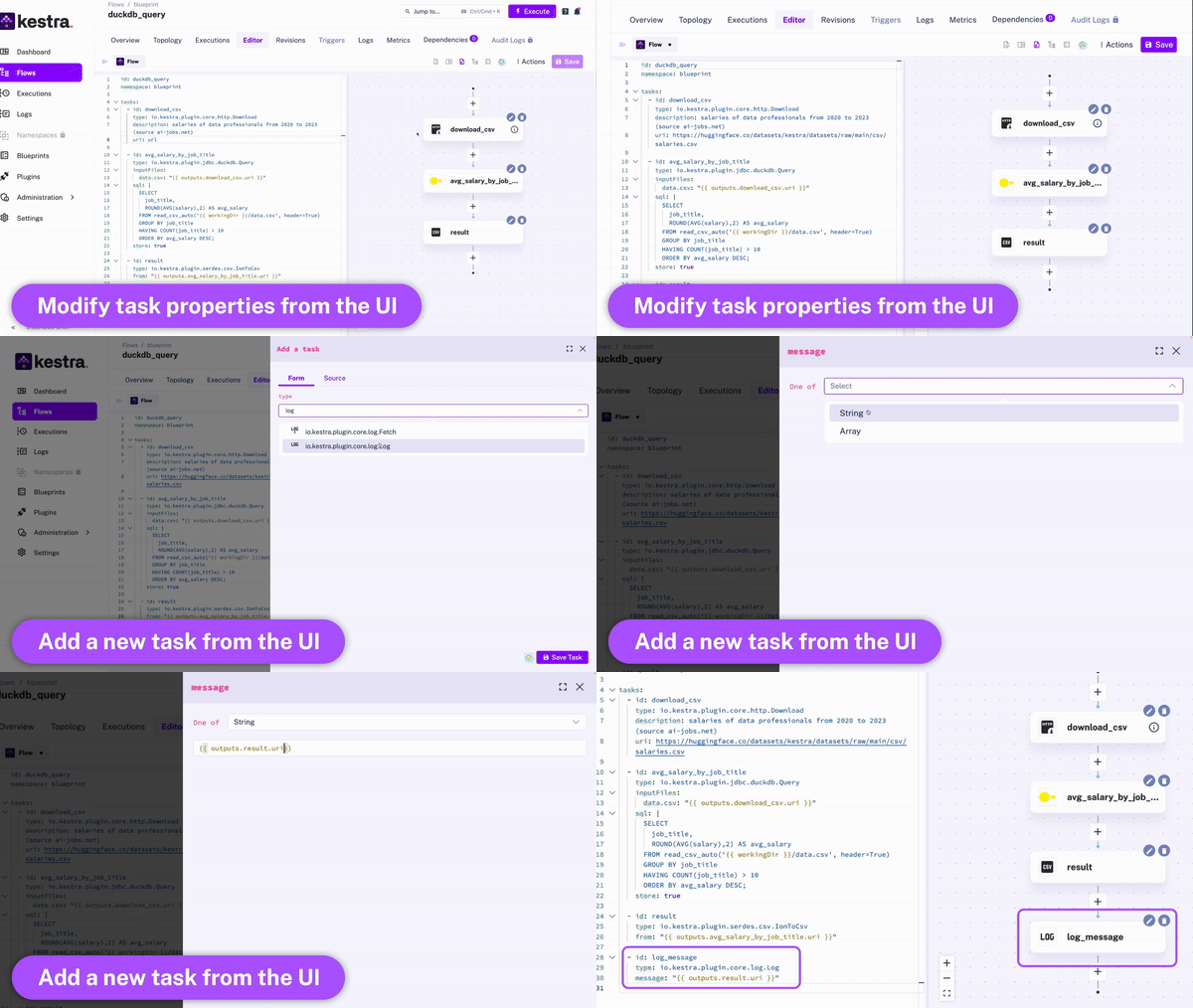
+
</a>
|
|
5
|
+
</p>
|
|
6
|
+
|
|
7
|
+
<h1 align="center" style="border-bottom: none">
|
|
8
|
+
Event-driven declarative orchestrator to simplify data operations <br>
|
|
9
|
+
</h1>
|
|
10
|
+
|
|
11
|
+
Kestra UI library implemented in both the website and the application UI.
|
|
12
|
+
|
|
13
|
+
Install with npm: `npm install @kestra-io/ui-library`
|
|
14
|
+
|
|
15
|
+
<p align="center">
|
|
16
|
+
<a href="https://kestra.io/"><b>Website</b></a> •
|
|
17
|
+
<a href="https://twitter.com/kestra_io"><b>Twitter</b></a> •
|
|
18
|
+
<a href="https://www.linkedin.com/company/kestra/"><b>Linked In</b></a> •
|
|
19
|
+
<a href="https://kestra.io/slack"><b>Slack</b></a> •
|
|
20
|
+
<a href="https://kestra.io/docs/"><b>Documentation</b></a>
|
|
21
|
+
</p>
|
|
22
|
+
|
|
23
|
+
<br />
|
|
24
|
+
|
|
25
|
+
<p align="center"><img src="https://kestra.io/video.gif" alt="modern data orchestration and scheduling platform " width="640px" /></p>
|
|
26
|
+
|
|
27
|
+
|
|
28
|
+
## Live Demo
|
|
29
|
+
|
|
30
|
+
Try Kestra using our [live demo](https://demo.kestra.io).
|
|
31
|
+
|
|
32
|
+
## What is Kestra
|
|
33
|
+
|
|
34
|
+
Kestra is an open-source, **event-driven** orchestrator that simplifies data operations and improves collaboration between engineers and business users. By bringing **Infrastructure as Code** best practices to data pipelines, Kestra allows you to build reliable workflows and manage them with confidence.
|
|
35
|
+
|
|
36
|
+
Thanks to the **declarative YAML interface** for defining orchestration logic, everyone who benefits from analytics can participate in the data pipeline creation process. The UI automatically adjusts the YAML definition any time you make changes to a workflow from the UI or via an API call. Therefore, the orchestration logic is defined declaratively in code, even if some workflow components are modified in other ways.
|
|
37
|
+
|
|
38
|
+
|
|
39
|
+
|
|
40
|
+
|
|
41
|
+
## Key concepts
|
|
42
|
+
|
|
43
|
+
1. `Flow` is the main component in Kestra. It's a container for your tasks and orchestration logic.
|
|
44
|
+
2. `Namespace` is used to provide logical isolation, e.g., to separate development and production environments. Namespaces are like folders on your file system — they organize flows into logical categories and can be nested to provide a hierarchical structure.
|
|
45
|
+
3. `Tasks` are atomic actions in a flow. By default, all tasks in the list will be executed sequentially, with additional customization options, a.o. to run tasks in parallel or allow a failure of specific tasks when needed.
|
|
46
|
+
4. `Triggers` define when a flow should run. In Kestra, flows are triggered based on events. Examples of such events include:
|
|
47
|
+
- a regular time-based **schedule**
|
|
48
|
+
- an **API** call (*webhook trigger*)
|
|
49
|
+
- ad-hoc execution from the **UI**
|
|
50
|
+
- a **flow trigger** - flows can be triggered from other flows using a [flow trigger](https://kestra.io/docs/developer-guide/triggers/flow) or a [subflow](https://kestra.io/docs/flow-examples/subflow), enabling highly modular workflows.
|
|
51
|
+
- **custom events**, including a new file arrival (*file detection event*), a new message in a message bus, query completion, and more.
|
|
52
|
+
5. `Inputs` allow you to pass runtime-specific variables to a flow. They are strongly typed, and allow additional [validation rules](https://kestra.io/docs/developer-guide/inputs#input-validation).
|
|
53
|
+
|
|
54
|
+
|
|
55
|
+
## Extensible platform via plugins
|
|
56
|
+
|
|
57
|
+
Most tasks in Kestra are available as [plugins](https://kestra.io/plugins), but many type of tasks are available in the core library, including a.o. script tasks supporting various programming languages (e.g., Python, Node, Bash) and the ability to orchestrate your business logic packaged into Docker container images.
|
|
58
|
+
|
|
59
|
+
To create your own plugins, check the [plugin developer guide](https://kestra.io/docs/plugin-developer-guide).
|
|
60
|
+
|
|
61
|
+
## Rich orchestration capabilities
|
|
62
|
+
|
|
63
|
+
Kestra provides a variety of tasks to handle both simple and complex business logic, including:
|
|
64
|
+
|
|
65
|
+
- retries
|
|
66
|
+
- timeout
|
|
67
|
+
- error handling
|
|
68
|
+
- conditional branching
|
|
69
|
+
- dynamic tasks
|
|
70
|
+
- sequential and parallel tasks
|
|
71
|
+
- skipping tasks or triggers when needed by setting the flag `disabled` to `true`.
|
|
72
|
+
- configuring dependencies between tasks, flows and triggers
|
|
73
|
+
- advanced scheduling and trigger conditions
|
|
74
|
+
- backfills
|
|
75
|
+
- documenting your flows, tasks and triggers by adding a markdown description to any component
|
|
76
|
+
- adding labels to add additional metadata to your flows such as the flow owner or team:
|
|
77
|
+
|
|
78
|
+
```yaml
|
|
79
|
+
id: hello
|
|
80
|
+
namespace: prod
|
|
81
|
+
description: Hi from `Kestra` and a **markdown** description.
|
|
82
|
+
labels:
|
|
83
|
+
owner: john-doe
|
|
84
|
+
team: data-engineering
|
|
85
|
+
tasks:
|
|
86
|
+
- id: hello
|
|
87
|
+
type: io.kestra.core.tasks.log.Log
|
|
88
|
+
message: Hello world!
|
|
89
|
+
description: a *very* important task
|
|
90
|
+
disabled: false
|
|
91
|
+
timeout: 10M
|
|
92
|
+
retry:
|
|
93
|
+
type: constant # type: string
|
|
94
|
+
interval: PT15M # type: Duration
|
|
95
|
+
maxDuration: PT1H # type: Duration
|
|
96
|
+
maxAttempt: 5 # type: int
|
|
97
|
+
warningOnRetry: true # type: boolean, default is false
|
|
98
|
+
- id: parallel
|
|
99
|
+
type: io.kestra.core.tasks.flows.Parallel
|
|
100
|
+
concurrent: 3
|
|
101
|
+
tasks:
|
|
102
|
+
- id: task1
|
|
103
|
+
type: io.kestra.plugin.scripts.shell.Commands
|
|
104
|
+
commands:
|
|
105
|
+
- 'echo "running {{task.id}}"'
|
|
106
|
+
- 'sleep 10'
|
|
107
|
+
- id: task2
|
|
108
|
+
type: io.kestra.plugin.scripts.shell.Commands
|
|
109
|
+
commands:
|
|
110
|
+
- 'echo "running {{task.id}}"'
|
|
111
|
+
- 'sleep 10'
|
|
112
|
+
- id: task3
|
|
113
|
+
type: io.kestra.plugin.scripts.shell.Commands
|
|
114
|
+
commands:
|
|
115
|
+
- 'echo "running {{task.id}}"'
|
|
116
|
+
- 'sleep 10'
|
|
117
|
+
triggers:
|
|
118
|
+
- id: schedule
|
|
119
|
+
type: io.kestra.core.models.triggers.types.Schedule
|
|
120
|
+
cron: "*/15 * * * *"
|
|
121
|
+
backfill:
|
|
122
|
+
start: 2023-06-25T14:00:00Z
|
|
123
|
+
```
|
|
124
|
+
|
|
125
|
+
|
|
126
|
+
## Built-in code editor
|
|
127
|
+
|
|
128
|
+
You can write workflows directly from the UI. When writing your workflows, the UI provides:
|
|
129
|
+
- autocompletion
|
|
130
|
+
- syntax validation
|
|
131
|
+
- embedded plugin documentation
|
|
132
|
+
- topology view (view of your dependencies in a Directed Acyclic Graph) that get updated live as you modify and add new tasks.
|
|
133
|
+
|
|
134
|
+
|
|
135
|
+
## Getting Started
|
|
136
|
+
|
|
137
|
+
To get a local copy up and running, follow the steps below.
|
|
138
|
+
|
|
139
|
+
### Prerequisites
|
|
140
|
+
|
|
141
|
+
Make sure that Docker is installed and running on your system. The default installation requires the following:
|
|
142
|
+
- [Docker](https://docs.docker.com/engine/install/)
|
|
143
|
+
- [Docker Compose](https://docs.docker.com/compose/install/)
|
|
144
|
+
|
|
145
|
+
|
|
146
|
+
### Launch Kestra
|
|
147
|
+
|
|
148
|
+
Download the Docker Compose file:
|
|
149
|
+
|
|
150
|
+
```sh
|
|
151
|
+
curl -o docker-compose.yml https://raw.githubusercontent.com/kestra-io/kestra/develop/docker-compose.yml
|
|
152
|
+
```
|
|
153
|
+
|
|
154
|
+
Alternatively, you can use `wget https://raw.githubusercontent.com/kestra-io/kestra/develop/docker-compose.yml`.
|
|
155
|
+
|
|
156
|
+
|
|
157
|
+
Start Kestra:
|
|
158
|
+
|
|
159
|
+
```sh
|
|
160
|
+
docker-compose up
|
|
161
|
+
```
|
|
162
|
+
|
|
163
|
+
|
|
164
|
+
Open `http://localhost:8080` in your browser and create your first flow.
|
|
165
|
+
|
|
166
|
+
|
|
167
|
+
### Hello-World flow
|
|
168
|
+
|
|
169
|
+
Here is a simple example logging hello world message to the terminal:
|
|
170
|
+
|
|
171
|
+
```yaml
|
|
172
|
+
id: hello
|
|
173
|
+
namespace: prod
|
|
174
|
+
tasks:
|
|
175
|
+
- id: hello-world
|
|
176
|
+
type: io.kestra.core.tasks.log.Log
|
|
177
|
+
message: Hello world!
|
|
178
|
+
```
|
|
179
|
+
|
|
180
|
+
For more information:
|
|
181
|
+
|
|
182
|
+
- Follow the [getting started tutorial](https://kestra.io/docs/getting-started/).
|
|
183
|
+
- Read the [documentation](https://kestra.io/docs/) to understand how to:
|
|
184
|
+
- [Develop your flows](https://kestra.io/docs/developer-guide/)
|
|
185
|
+
- [Deploy Kestra](https://kestra.io/docs/administrator-guide/)
|
|
186
|
+
- Use our [Terraform provider](https://kestra.io/docs/terraform/) to deploy your flows
|
|
187
|
+
- Develop your [own plugins](https://kestra.io/docs/plugin-developer-guide/).
|
|
188
|
+
|
|
189
|
+
|
|
190
|
+
|
|
191
|
+
|
|
192
|
+
## Plugins
|
|
193
|
+
Kestra is built on a [plugin system](https://kestra.io/plugins/). You can find your plugin to interact with your provider; alternatively, you can follow [these steps](https://kestra.io/docs/plugin-developer-guide/) to develop your own plugin.
|
|
194
|
+
|
|
195
|
+
|
|
196
|
+
For a full list of plugins, check the [plugins page](https://kestra.io/plugins/).
|
|
197
|
+
|
|
198
|
+
Here are some examples of the available plugins:
|
|
199
|
+
|
|
200
|
+
<table>
|
|
201
|
+
<tr>
|
|
202
|
+
<td><a href="https://kestra.io/plugins/plugin-airbyte">Airbyte</a></td>
|
|
203
|
+
<td><a href="https://kestra.io/plugins/plugin-aws#s3">Amazon S3</a></td>
|
|
204
|
+
<td><a href="https://kestra.io/plugins/plugin-serdes#avro">Avro</a></td>
|
|
205
|
+
</tr>
|
|
206
|
+
<tr>
|
|
207
|
+
<td><a href="https://kestra.io/plugins/plugin-azure/#storage-blob">Azure Blob Storage</a></td>
|
|
208
|
+
<td><a href="https://kestra.io/plugins/core/tasks/scripts/io.kestra.core.tasks.scripts.bash">Bash</a></td>
|
|
209
|
+
<td><a href="https://kestra.io/plugins/plugin-gcp#bigquery">Big Query</a></td>
|
|
210
|
+
</tr>
|
|
211
|
+
<tr>
|
|
212
|
+
<td><a href="https://kestra.io/plugins/plugin-serdes#csv">CSV</a></td>
|
|
213
|
+
<td><a href="https://kestra.io/plugins/plugin-cassandra">Cassandra</a></td>
|
|
214
|
+
<td><a href="https://kestra.io/plugins/plugin-jdbc-clickhouse">ClickHouse</a></td>
|
|
215
|
+
</tr>
|
|
216
|
+
<tr>
|
|
217
|
+
<td><a href="https://kestra.io/plugins/plugin-dbt">DBT</a></td>
|
|
218
|
+
<td><a href="https://kestra.io/plugins/plugin-debezium-mysql">Debezium MYSQL</a></td>
|
|
219
|
+
<td><a href="https://kestra.io/plugins/plugin-debezium-postgres">Debezium Postgres</a></td>
|
|
220
|
+
</tr>
|
|
221
|
+
<tr>
|
|
222
|
+
<td><a href="https://kestra.io/plugins/plugin-debezium-sqlserver">Debezium Microsoft SQL Server</a></td>
|
|
223
|
+
<td><a href="https://kestra.io/plugins/plugin-jdbc-duckdb">DuckDb</a></td>
|
|
224
|
+
<td><a href="https://kestra.io/plugins/plugin-elasticsearch">ElasticSearch</a></td>
|
|
225
|
+
</tr>
|
|
226
|
+
<tr>
|
|
227
|
+
<td><a href="https://kestra.io/plugins/plugin-fivetran">Fivetran</a></td>
|
|
228
|
+
<td><a href="https://kestra.io/plugins/plugin-notifications#mail">Email</a></td>
|
|
229
|
+
<td><a href="https://kestra.io/plugins/plugin-fs#ftp">FTP</a></td>
|
|
230
|
+
</tr>
|
|
231
|
+
<tr>
|
|
232
|
+
<td><a href="https://kestra.io/plugins/plugin-fs#ftps">FTPS</a></td>
|
|
233
|
+
<td><a href="https://kestra.io/plugins/plugin-gcp#gcs">Google Cloud Storage</a></td>
|
|
234
|
+
<td><a href="https://kestra.io/plugins/plugin-googleworkspace#drive">Google Drive</a></td>
|
|
235
|
+
</tr>
|
|
236
|
+
<tr>
|
|
237
|
+
<td><a href="https://kestra.io/plugins/plugin-googleworkspace#sheets">Google Sheets</a></td>
|
|
238
|
+
<td><a href="https://kestra.io/plugins/plugin-script-groovy">Groovy</a></td>
|
|
239
|
+
<td><a href="https://kestra.io/plugins/plugin-fs#http">Http</a></td>
|
|
240
|
+
</tr>
|
|
241
|
+
<tr>
|
|
242
|
+
<td><a href="https://kestra.io/plugins/plugin-serdes#json">JSON</a></td>
|
|
243
|
+
<td><a href="https://kestra.io/plugins/plugin-script-jython">Jython</a></td>
|
|
244
|
+
<td><a href="https://kestra.io/plugins/plugin-kafka">Kafka</a></td>
|
|
245
|
+
</tr>
|
|
246
|
+
<tr>
|
|
247
|
+
<td><a href="https://kestra.io/plugins/plugin-kubernetes">Kubernetes</a></td>
|
|
248
|
+
<td><a href="https://kestra.io/plugins/plugin-mqtt">MQTT</a></td>
|
|
249
|
+
<td><a href="https://kestra.io/plugins/plugin-jdbc-sqlserver">Microsoft SQL Server</a></td>
|
|
250
|
+
</tr>
|
|
251
|
+
<tr>
|
|
252
|
+
<td><a href="https://kestra.io/plugins/plugin-mongodb">MongoDb</a></td>
|
|
253
|
+
<td><a href="https://kestra.io/plugins/plugin-jdbc-mysql">MySQL</a></td>
|
|
254
|
+
<td><a href="https://kestra.io/plugins/plugin-script-nashorn">Nashorn</a></td>
|
|
255
|
+
</tr>
|
|
256
|
+
<tr>
|
|
257
|
+
<td><a href="https://kestra.io/plugins/core/tasks/scripts/io.kestra.core.tasks.scripts.node">Node</a></td>
|
|
258
|
+
<td><a href="https://kestra.io/plugins/plugin-crypto#openpgp">Open PGP</a></td>
|
|
259
|
+
<td><a href="https://kestra.io/plugins/plugin-jdbc-oracle">Oracle</a></td>
|
|
260
|
+
</tr>
|
|
261
|
+
<tr>
|
|
262
|
+
<td><a href="https://kestra.io/plugins/plugin-serdes#parquet">Parquet</a></td>
|
|
263
|
+
<td><a href="https://kestra.io/plugins/plugin-jdbc-pinot">Apache Pinot</a></td>
|
|
264
|
+
<td><a href="https://kestra.io/plugins/plugin-jdbc-postgres">Postgres</a></td>
|
|
265
|
+
</tr>
|
|
266
|
+
<tr>
|
|
267
|
+
<td><a href="https://kestra.io/plugins/plugin-powerbi">Power BI</a></td>
|
|
268
|
+
<td><a href="https://kestra.io/plugins/plugin-pulsar">Apache Pulsar</a></td>
|
|
269
|
+
<td><a href="https://kestra.io/plugins/core/tasks/scripts/io.kestra.core.tasks.scripts.python">Python</a></td>
|
|
270
|
+
</tr>
|
|
271
|
+
<tr>
|
|
272
|
+
<td><a href="https://kestra.io/plugins/plugin-jdbc-redshift">Redshift</a></td>
|
|
273
|
+
<td><a href="https://kestra.io/plugins/plugin-jdbc-rockset">Rockset</a></td>
|
|
274
|
+
<td><a href="https://kestra.io/plugins/plugin-fs#sftp">SFTP</a></td>
|
|
275
|
+
</tr>
|
|
276
|
+
<tr>
|
|
277
|
+
<td><a href="https://kestra.io/plugins/plugin-servicenow">ServiceNow</a></td>
|
|
278
|
+
<td><a href="https://kestra.io/plugins/plugin-singer">Singer</a></td>
|
|
279
|
+
<td><a href="https://kestra.io/plugins/plugin-notifications#slack">Slack</a></td>
|
|
280
|
+
</tr>
|
|
281
|
+
<tr>
|
|
282
|
+
<td><a href="https://kestra.io/plugins/plugin-jdbc-snowflake">Snowflake</a></td>
|
|
283
|
+
<td><a href="https://kestra.io/plugins/plugin-soda">Soda</a></td>
|
|
284
|
+
<td><a href="https://kestra.io/plugins/plugin-spark">Spark</a></td>
|
|
285
|
+
</tr>
|
|
286
|
+
<tr>
|
|
287
|
+
<td><a href="https://kestra.io/plugins/plugin-tika">Tika</a></td>
|
|
288
|
+
<td><a href="https://kestra.io/plugins/plugin-jdbc-trino">Trino</a></td>
|
|
289
|
+
<td><a href="https://kestra.io/plugins/plugin-jdbc-vectorwise">Vectorwise</a></td>
|
|
290
|
+
</tr>
|
|
291
|
+
<tr>
|
|
292
|
+
<td><a href="https://kestra.io/plugins/plugin-serdes#xml">XML</a></td>
|
|
293
|
+
<td><a href="https://kestra.io/plugins/plugin-gcp#vertexai/">Vertex AI</a></td>
|
|
294
|
+
<td><a href="https://kestra.io/plugins/plugin-jdbc-vertica">Vertica</a></td>
|
|
295
|
+
</tr>
|
|
296
|
+
</table>
|
|
297
|
+
|
|
298
|
+
|
|
299
|
+
|
|
300
|
+
This list is growing quickly and we welcome contributions.
|
|
301
|
+
|
|
302
|
+
## Community Support
|
|
303
|
+
|
|
304
|
+
If you need help or have any questions, reach out using one of the following channels:
|
|
305
|
+
|
|
306
|
+
- [GitHub discussions](https://github.com/kestra-io/kestra/discussions) - useful to start a conversation that is not a bug or feature request.
|
|
307
|
+
- [Slack](https://kestra.io/slack) - join the community and get the latest updates.
|
|
308
|
+
- [Twitter](https://twitter.com/kestra_io) - to follow up with the latest updates.
|
|
309
|
+
|
|
310
|
+
|
|
311
|
+
## Roadmap
|
|
312
|
+
|
|
313
|
+
See the [open issues](https://github.com/kestra-io/kestra/issues) for a list of proposed features (and known issues) or look at the [project board](https://github.com/orgs/kestra-io/projects/2).
|
|
314
|
+
|
|
315
|
+
|
|
316
|
+
## Contributing
|
|
317
|
+
|
|
318
|
+
We love contributions, big or small. Check out [our contributor guide](https://github.com/kestra-io/kestra/blob/develop/.github/CONTRIBUTING.md) for details on how to contribute to Kestra.
|
|
319
|
+
|
|
320
|
+
See our [Plugin Developer Guide](https://kestra.io/docs/plugin-developer-guide/) for details on developing and publishing Kestra plugins.
|
|
321
|
+
|
|
322
|
+
|
|
323
|
+
## License
|
|
324
|
+
Apache 2.0 © [Kestra Technologies](https://kestra.io)
|
|
@@ -0,0 +1,20 @@
|
|
|
1
|
+
// gray
|
|
2
|
+
$gray-900: #CAC5DA;
|
|
3
|
+
$gray-800: #A69FC1;
|
|
4
|
+
$gray-700: #918BA9;
|
|
5
|
+
$gray-600: #404559;
|
|
6
|
+
$gray-500: #2F3342;
|
|
7
|
+
$gray-400: #2C303F;
|
|
8
|
+
$gray-300: #202435;
|
|
9
|
+
$gray-200: #21242E;
|
|
10
|
+
$gray-100: #1C1E27;
|
|
11
|
+
|
|
12
|
+
$light: $gray-200;
|
|
13
|
+
$dark: $gray-100;
|
|
14
|
+
|
|
15
|
+
// body
|
|
16
|
+
$body-color: $gray-900;
|
|
17
|
+
$border-color: $gray-600;
|
|
18
|
+
$body-bg: $gray-200;
|
|
19
|
+
$card-bg: $gray-500;
|
|
20
|
+
$input-bg: $gray-100;
|
|
@@ -0,0 +1,100 @@
|
|
|
1
|
+
// color system
|
|
2
|
+
$blue: #1761FD !default;
|
|
3
|
+
$indigo: #8405FF !default;
|
|
4
|
+
$purple: #9F9DFF !default;
|
|
5
|
+
$pink: #FD3C97 !default;
|
|
6
|
+
$red: #E36065 !default;
|
|
7
|
+
$red-light: #FF9D9D !default;
|
|
8
|
+
$orange: #FCB37C !default;
|
|
9
|
+
$yellow: #FCE07C !default;
|
|
10
|
+
$green: #03DABA !default;
|
|
11
|
+
$teal: #03D87F !default;
|
|
12
|
+
$cyan: #60C5FE !default;
|
|
13
|
+
|
|
14
|
+
// primary color
|
|
15
|
+
$primary: #8405FF !default;
|
|
16
|
+
$secondary: #C182FF !default;
|
|
17
|
+
$tertiary: #2F3342 !default;
|
|
18
|
+
|
|
19
|
+
// gray
|
|
20
|
+
$white: #FFF !default;
|
|
21
|
+
$gray-100: #F5F5FF !default;
|
|
22
|
+
$gray-200: #f1f5fa !default;
|
|
23
|
+
$gray-300: #E5E4F7 !default;
|
|
24
|
+
$gray-400: #b6c2e4 !default;
|
|
25
|
+
$gray-500: #8997bd !default;
|
|
26
|
+
$gray-600: #7081b9 !default;
|
|
27
|
+
$gray-700: #303e67 !default;
|
|
28
|
+
$gray-800: #2c3652 !default;
|
|
29
|
+
$gray-900: #1d2c48 !default;
|
|
30
|
+
$black: #26282D !default;
|
|
31
|
+
|
|
32
|
+
$light: $gray-200 !default;
|
|
33
|
+
$dark: $gray-900 !default;
|
|
34
|
+
|
|
35
|
+
// fonts
|
|
36
|
+
$font-size-base: 1rem !default;
|
|
37
|
+
$font-family-sans-serif: "Public Sans", sans-serif;
|
|
38
|
+
$font-family-monospace: "Source Code Pro", monospace;
|
|
39
|
+
$font-size-xs: $font-size-base * 0.75 !default;
|
|
40
|
+
|
|
41
|
+
// border radius
|
|
42
|
+
$border-radius: 0.25rem !default;
|
|
43
|
+
$border-radius-lg: 0.5rem !default;
|
|
44
|
+
$border-radius-sm: 0.15rem !default;
|
|
45
|
+
|
|
46
|
+
// layout
|
|
47
|
+
$menu-width: 268px !default;
|
|
48
|
+
$spacer: 1rem !default;
|
|
49
|
+
|
|
50
|
+
// body
|
|
51
|
+
$body-color: $gray-800 !default;
|
|
52
|
+
$border-color: $gray-300 !default;
|
|
53
|
+
$body-bg: $gray-100 !default;
|
|
54
|
+
$card-bg: $white !default;
|
|
55
|
+
$input-bg: $white !default;
|
|
56
|
+
|
|
57
|
+
$link-color: $primary !default;
|
|
58
|
+
|
|
59
|
+
// border radius
|
|
60
|
+
$border-radius: .25rem !default;
|
|
61
|
+
$border-radius-sm: .15rem !default;
|
|
62
|
+
|
|
63
|
+
// shadow
|
|
64
|
+
$box-shadow-sm: 0 .125rem .25rem rgba($black, .075);
|
|
65
|
+
$box-shadow: 0 .5rem 1rem rgba($black, .15);
|
|
66
|
+
$box-shadow-lg: 0 1rem 3rem rgba($black, .175);
|
|
67
|
+
|
|
68
|
+
// boostrap flags
|
|
69
|
+
$enable-reduced-motion: false;
|
|
70
|
+
|
|
71
|
+
// element-plus
|
|
72
|
+
$types: primary, success, warning, danger, error, info !default;
|
|
73
|
+
$element-colors: (
|
|
74
|
+
'white': $white,
|
|
75
|
+
'black': $black,
|
|
76
|
+
'primary': (
|
|
77
|
+
'base': $primary,
|
|
78
|
+
),
|
|
79
|
+
'success': (
|
|
80
|
+
'base': $green,
|
|
81
|
+
),
|
|
82
|
+
'warning': (
|
|
83
|
+
'base': $orange,
|
|
84
|
+
),
|
|
85
|
+
'danger': (
|
|
86
|
+
'base': $red,
|
|
87
|
+
),
|
|
88
|
+
'error': (
|
|
89
|
+
'base': $red,
|
|
90
|
+
),
|
|
91
|
+
'info': (
|
|
92
|
+
'base': $cyan,
|
|
93
|
+
),
|
|
94
|
+
);
|
|
95
|
+
|
|
96
|
+
// bootstrap
|
|
97
|
+
@import "bootstrap/scss/functions";
|
|
98
|
+
@import "bootstrap/scss/mixins";
|
|
99
|
+
@import "bootstrap/scss/vendor/rfs";
|
|
100
|
+
@import 'bootstrap/scss/variables';
|