@kelceyp/caw 1.0.21 → 1.0.24
This diff represents the content of publicly available package versions that have been released to one of the supported registries. The information contained in this diff is provided for informational purposes only and reflects changes between package versions as they appear in their respective public registries.
- package/README.md +97 -45
- package/package.json +23 -3
package/README.md
CHANGED
|
@@ -1,34 +1,56 @@
|
|
|
1
1
|
# CAW
|
|
2
2
|
|
|
3
|
-
CAW helps users build software **sustainably** using AI by providing agents with **C**ontext and **A**gentic **W**orkflows (CAW).
|
|
3
|
+
CAW helps users build software **sustainably** using AI by providing agents with **C**ontext and **A**gentic **W**orkflows (CAW). CAW is free to download and runs locally as a unified web and MCP server. It provides document management, templates, stories, search and acts as the orchestration layer for your AI development tools.
|
|
4
4
|
|
|
5
|
+
## Quick Start
|
|
6
|
+
|
|
7
|
+
```bash
|
|
8
|
+
npm install -g @kelceyp/caw
|
|
9
|
+
caw start
|
|
10
|
+
```
|
|
11
|
+
Then open [http://localhost:2229](http://localhost:2229) in your browser.
|
|
12
|
+
|
|
13
|
+
First time running CAW?
|
|
14
|
+
|
|
15
|
+
Click "Get started with a sample project" on the welcome screen. CAW will provision a project with pre-configured knowledge base, templates and stories so you can build immediately.
|
|
16
|
+
|
|
17
|
+
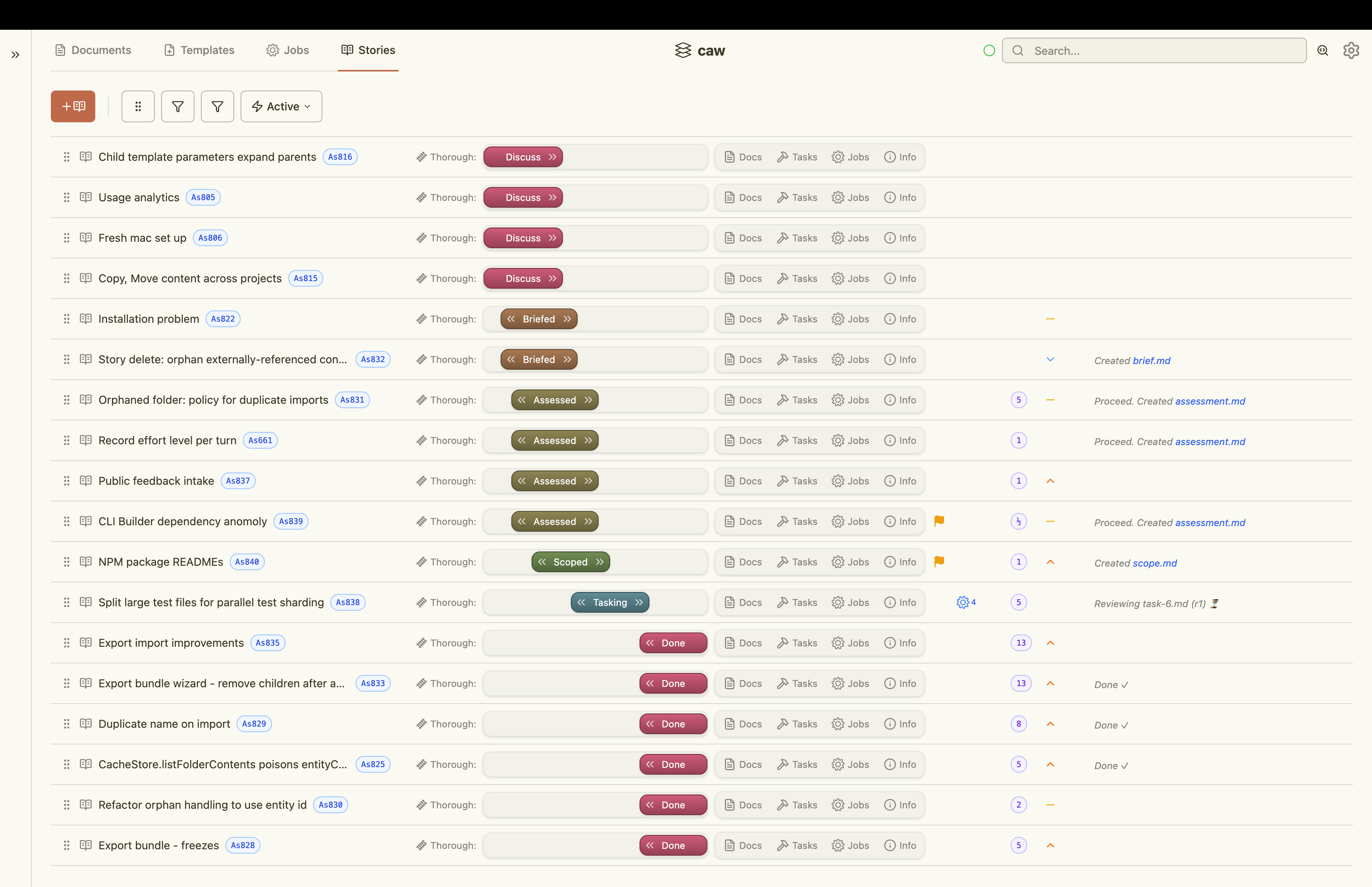
|
|
18
|
+
|
|
19
|
+
## Unlock sustainable development
|
|
5
20
|
Agents are capable coders but struggle to build software sustainably as the codebase and its complexity grow. Code reveals only so much and agents do not inherently know which parts of it to read or what the underlying intent was. Technical debt, technical mess, architectural mismatch and a host of problems creep in over time to grind progress to a halt.
|
|
6
21
|
|
|
7
|
-
|
|
22
|
+
In the agent era, engineering discipline is still needed. With CAW, it's cheap.
|
|
23
|
+
|
|
24
|
+
CAW enables users and agents to capture the architecture, intent, decisions and engineering discipline specific to a project as part of its knowledge base. Agents help build that knowledge base and keep it aligned with the codebase as the project grows. Creating content is easy. Creating content that is discoverable when needed is not. This is where CAW shines with useful information topologies and powerful search capabilities.
|
|
25
|
+
|
|
26
|
+
Using stories, CAW facilitates a thin slice, shift-left philosophy where agents can decompose the work and assist with specification, design and planning before coding. Upstream agents use CAW to provide downstream agents the 'Goldilocks' amount of context for the work they've been given. At each step of the way CAW reduces friction in human-to-agent and agent-to-agent collaboration. This enables humans to seamlessly inject themselves where most needed and get out of the way when not.
|
|
8
27
|
|
|
9
|
-
|
|
28
|
+
When multiple agents collaborate on the same piece of work, hallucinations are more likely to be caught and quality improves. This is true whether it be at the design and planning stage or at the coding and testing stage. CAW works with any agent that supports MCP and has specific integrations for Claude Code, Codex and Cursor CLI that enable agent orchestration. For humans, think of this as a browser-based reskinning of these tools. For agents, this means that any of these three agents can be used by any other as a "sub-agent". And this works recursively to a user configurable depth.
|
|
10
29
|
|
|
11
|
-
|
|
30
|
+
## Dual channel
|
|
12
31
|
|
|
13
|
-
|
|
32
|
+
Everything you can do, agents can do too.
|
|
14
33
|
|
|
15
|
-
|
|
34
|
+
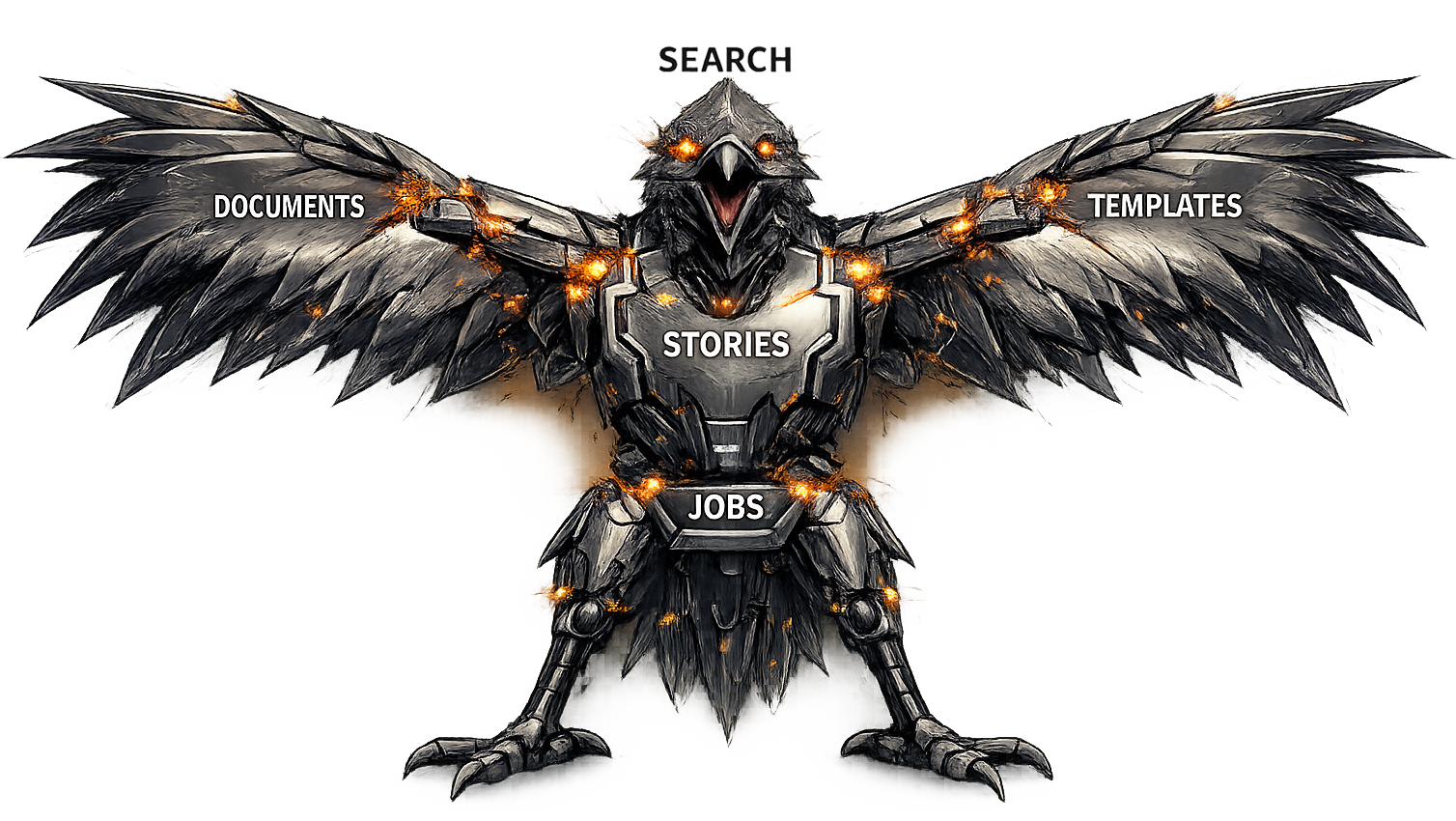
CAW combines independently useful capabilities that integrate with each other seamlessly to provide powerful higher-level functions. Every capability is available to humans through a React-based web application and to agents through rich MCP tooling. Go meta and have your agents assist with your project specific context engineering.
|
|
35
|
+
|
|
36
|
+
## Proof point
|
|
16
37
|
|
|
17
38
|
CAW was used to build CAW recursively, with version N building version N+1. In doing so, CAW was continuously dogfooded, proving the approach on a substantial software system.
|
|
18
39
|
|
|
19
|
-
|
|
40
|
+
## Content is king
|
|
20
41
|
|
|
21
|
-
|
|
42
|
+
Why start with a blank slate?
|
|
22
43
|
|
|
23
|
-
|
|
44
|
+
The prompts, templates and knowledge cartridges used to build CAW are also available as a free download from [Athena Design](https://athenadesign.com.au/). The CAW user manual can be downloaded separately and imported into the shared store, making it available to users and agents across every project. Use the 'Import Bundle' feature in project settings and shared store settings.
|
|
24
45
|
|
|
25
|
-
|
|
46
|
+
# Capabilities
|
|
47
|
+
## Documents
|
|
26
48
|
|
|
27
49
|
Build your product knowledge base in lock step with your code base.
|
|
28
50
|
|
|
29
51
|
- Extended MD capabilities including inline mermaid, inline SVG, linking and includes
|
|
30
52
|
- Monaco editor and extended marked rendering capabilities for users
|
|
31
|
-
-
|
|
53
|
+
- Real time updates using SSE
|
|
32
54
|
- Typed metadata including multivalued fields
|
|
33
55
|
- Locking, clobber protection and version control
|
|
34
56
|
- Image deduping and easy pasting/viewing
|
|
@@ -71,33 +93,63 @@ Create powerful templates for documents, prompts and saved searches.
|
|
|
71
93
|
- Rich MCP tooling so that agents can assist you with context engineering
|
|
72
94
|
|
|
73
95
|
<details>
|
|
74
|
-
<summary>Editing</summary>
|
|
96
|
+
<summary>Template Editing</summary>
|
|
75
97
|
<a href="https://athenadesign.com.au/caw/templates-editing.png">
|
|
76
98
|
<img src="https://athenadesign.com.au/caw/templates-editing.png" alt="Editing" width="900"/>
|
|
77
99
|
</a>
|
|
78
100
|
</details>
|
|
79
101
|
|
|
80
102
|
<details>
|
|
81
|
-
<summary>
|
|
103
|
+
<summary>Render Template</summary>
|
|
82
104
|
<a href="https://athenadesign.com.au/caw/templates-rendering.png">
|
|
83
105
|
<img src="https://athenadesign.com.au/caw/templates-rendering.png" alt="Form rendering" width="900"/>
|
|
84
106
|
</a>
|
|
85
107
|
</details>
|
|
86
108
|
|
|
87
|
-
##
|
|
109
|
+
## Jobs
|
|
88
110
|
|
|
89
111
|
Orchestrate your locally installed agents.
|
|
90
112
|
|
|
91
|
-
-
|
|
113
|
+
- Unified browser-based reskinning of Claude Code, Codex and Cursor CLI
|
|
92
114
|
- In chat UI wireframing using inline SVG
|
|
93
115
|
- In chat mermaid diagramming
|
|
94
|
-
- Multi-level cross
|
|
116
|
+
- Multi-level cross-vendor subagents
|
|
95
117
|
- Capture all prompts and outputs making them easily findable
|
|
96
118
|
- Act as the orchestration hub for agents to communicate with one another
|
|
97
119
|
- Seamlessly jump between REPLs and web application
|
|
98
|
-
- Use the right model for the job
|
|
99
|
-
- Unlock powerful
|
|
100
|
-
-
|
|
120
|
+
- Use the right agent, model and effort level for the job
|
|
121
|
+
- Unlock powerful, repeatable and refinable agentic workflow patterns
|
|
122
|
+
- Automatic worktree configuration
|
|
123
|
+
- Run agents in containers or host or both
|
|
124
|
+
- Disabled by default and must be explicitly enabled in Preferences \> Agents
|
|
125
|
+
|
|
126
|
+
<details>
|
|
127
|
+
<summary>Job List View - Active Jobs</summary>
|
|
128
|
+
<a href="https://athenadesign.com.au/caw/job-list-active-jobs.png">
|
|
129
|
+
<img src="https://athenadesign.com.au/caw/job-list-active-jobs.png" alt="Job List View" width="900"/>
|
|
130
|
+
</a>
|
|
131
|
+
</details>
|
|
132
|
+
|
|
133
|
+
<details>
|
|
134
|
+
<summary>Job Details - Supervisor Job</summary>
|
|
135
|
+
<a href="https://athenadesign.com.au/caw/jobs-supervisor-details.png">
|
|
136
|
+
<img src="https://athenadesign.com.au/caw/jobs-supervisor-details.png" alt="Supervisor Job" width="900"/>
|
|
137
|
+
</a>
|
|
138
|
+
</details>
|
|
139
|
+
|
|
140
|
+
<details>
|
|
141
|
+
<summary>Job Details - Chat interface</summary>
|
|
142
|
+
<a href="https://athenadesign.com.au/caw/jobs-continuing-conversations.png">
|
|
143
|
+
<img src="https://athenadesign.com.au/caw/jobs-continuing-conversations.png" alt="Supervisor Job" width="900"/>
|
|
144
|
+
</a>
|
|
145
|
+
</details>
|
|
146
|
+
|
|
147
|
+
<details>
|
|
148
|
+
<summary>Job Details - Append prompt</summary>
|
|
149
|
+
<a href="https://athenadesign.com.au/caw/job-details-append-prompt.png">
|
|
150
|
+
<img src="https://athenadesign.com.au/caw/job-details-append-prompt.png" alt="Supervisor Job" width="900"/>
|
|
151
|
+
</a>
|
|
152
|
+
</details>
|
|
101
153
|
|
|
102
154
|
## Stories
|
|
103
155
|
|
|
@@ -105,14 +157,28 @@ Use a thin slice mentality to build software incrementally.
|
|
|
105
157
|
|
|
106
158
|
- Leverage document templates for each stage of the story lifecycle
|
|
107
159
|
- Leverage prompt templates to orchestrate agents at each stage of the story lifecycle
|
|
108
|
-
-
|
|
160
|
+
- Reduce agent assumptions using acceptance criteria
|
|
109
161
|
- Define the various tracks your stories take
|
|
110
162
|
- Manage your own cognitive load as the amount of parallel work increases
|
|
111
163
|
|
|
112
164
|
<details>
|
|
113
|
-
<summary>Story
|
|
114
|
-
<a href="https://athenadesign.com.au/caw/
|
|
115
|
-
<img src="https://athenadesign.com.au/caw/
|
|
165
|
+
<summary>Story Details - Document Explorer</summary>
|
|
166
|
+
<a href="https://athenadesign.com.au/caw/story-details-docs-tab.png">
|
|
167
|
+
<img src="https://athenadesign.com.au/caw/story-details-docs-tab.png" alt="Story document explorer" width="900"/>
|
|
168
|
+
</a>
|
|
169
|
+
</details>
|
|
170
|
+
|
|
171
|
+
<details>
|
|
172
|
+
<summary>Story Details - Tasks</summary>
|
|
173
|
+
<a href="https://athenadesign.com.au/caw/story-kanban-tab.png">
|
|
174
|
+
<img src="https://athenadesign.com.au/caw/story-kanban-tab.png" alt="Story tasks" width="900"/>
|
|
175
|
+
</a>
|
|
176
|
+
</details>
|
|
177
|
+
|
|
178
|
+
<details>
|
|
179
|
+
<summary>Story Details - Jobs</summary>
|
|
180
|
+
<a href="https://athenadesign.com.au/caw/story-details-three-amigos.png">
|
|
181
|
+
<img src="https://athenadesign.com.au/caw/story-details-three-amigos.png" alt="Story jobs" width="900"/>
|
|
116
182
|
</a>
|
|
117
183
|
</details>
|
|
118
184
|
|
|
@@ -120,20 +186,13 @@ Use a thin slice mentality to build software incrementally.
|
|
|
120
186
|
|
|
121
187
|
Find what you and your agents need as the knowledge base grows.
|
|
122
188
|
|
|
123
|
-
- Metadata
|
|
124
|
-
- Full
|
|
189
|
+
- Metadata-based search with expressions
|
|
190
|
+
- Full-text search
|
|
125
191
|
- RAG (i.e. semantic) search
|
|
126
192
|
- Ancestor walks
|
|
127
193
|
- Expressive query language
|
|
128
194
|
- Supports all entities
|
|
129
195
|
|
|
130
|
-
<details>
|
|
131
|
-
<summary>Search box</summary>
|
|
132
|
-
<a href="https://athenadesign.com.au/caw/search-box.png">
|
|
133
|
-
<img src="https://athenadesign.com.au/caw/search-box.png" alt="Search box" width="900"/>
|
|
134
|
-
</a>
|
|
135
|
-
</details>
|
|
136
|
-
|
|
137
196
|
<details>
|
|
138
197
|
<summary>Query builder</summary>
|
|
139
198
|
<a href="https://athenadesign.com.au/caw/search-query-builder.png">
|
|
@@ -157,16 +216,9 @@ Find what you and your agents need as the knowledge base grows.
|
|
|
157
216
|
|
|
158
217
|
## The Voltron Effect
|
|
159
218
|
|
|
160
|
-
Unlock powerful automation by bringing these capabilities together. Define the visibility of prompt templates for each stage of each story track. Provide detailed and repeatable processes that are specific to your project that enable agents to find what they need and execute with the
|
|
161
|
-
|
|
162
|
-
# Quick Start
|
|
219
|
+
Unlock powerful automation by bringing these capabilities together. Define the visibility of prompt templates for each stage of each story track. Provide detailed and repeatable processes that are specific to your project that enable agents to find what they need and execute with the Goldilocks amount of context to build sustainably.
|
|
163
220
|
|
|
164
|
-
|
|
165
|
-
npm install -g @kelceyp/caw
|
|
166
|
-
caw start
|
|
167
|
-
```
|
|
168
|
-
|
|
169
|
-
Then open [http://localhost:2229](http://localhost:2229) in your browser.
|
|
221
|
+
|
|
170
222
|
|
|
171
223
|
## Commands
|
|
172
224
|
|
|
@@ -184,11 +236,11 @@ caw upgrade # Upgrade to the latest version
|
|
|
184
236
|
|
|
185
237
|
## Optional Integrations
|
|
186
238
|
|
|
187
|
-
All optional integrations are configured via Preferences > Infrastructure in the web UI.
|
|
239
|
+
All optional integrations are configured via Preferences > Infrastructure in the web UI. These integrations rely on 3rd party tools that require their own installation and setup outside of CAW. For detailed instructions visit [Athena Design](https://athenadesign.com.au/) or simply download and import the user manual and have agents perform the setup for you following the instructions provided.
|
|
188
240
|
|
|
189
241
|
### Caddy
|
|
190
242
|
|
|
191
|
-
- Enable HTTPS and HTTP2
|
|
243
|
+
- Enable HTTPS and HTTP2
|
|
192
244
|
- Remove browser limitations on number of concurrent connections
|
|
193
245
|
- Cleaner `caw.localhost` rather than `localhost:2229`
|
|
194
246
|
|
|
@@ -210,8 +262,8 @@ All optional integrations are configured via Preferences > Infrastructure in the
|
|
|
210
262
|
|
|
211
263
|
## Links
|
|
212
264
|
|
|
213
|
-
- [Report an
|
|
265
|
+
- [Report an issue or request a feature](https://github.com/kelceyp-mcp-servers/caw-feedback/issues)
|
|
214
266
|
|
|
215
267
|
## License
|
|
216
268
|
|
|
217
|
-
Proprietary. All rights reserved.
|
|
269
|
+
Proprietary. All rights reserved. Free for personal and commercial use. Closed source.
|
package/package.json
CHANGED
|
@@ -1,8 +1,28 @@
|
|
|
1
1
|
{
|
|
2
2
|
"name": "@kelceyp/caw",
|
|
3
|
-
"version": "1.0.
|
|
4
|
-
"description": "CAW launcher — server lifecycle management CLI",
|
|
3
|
+
"version": "1.0.24",
|
|
5
4
|
"type": "module",
|
|
5
|
+
"description": "Local-first Context & Agentic Workflows for sustainable AI-assisted software development",
|
|
6
|
+
"keywords": [
|
|
7
|
+
"caw",
|
|
8
|
+
"context-engineering",
|
|
9
|
+
"mcp",
|
|
10
|
+
"claude-code",
|
|
11
|
+
"codex",
|
|
12
|
+
"cursor",
|
|
13
|
+
"ai-agents",
|
|
14
|
+
"developer-tools",
|
|
15
|
+
"workflow",
|
|
16
|
+
"knowledge-base",
|
|
17
|
+
"local-first",
|
|
18
|
+
"rag",
|
|
19
|
+
"full-text-search",
|
|
20
|
+
"markdown",
|
|
21
|
+
"monaco-editor",
|
|
22
|
+
"vibe-coding",
|
|
23
|
+
"stories",
|
|
24
|
+
"agent-orchestration"
|
|
25
|
+
],
|
|
6
26
|
"bin": {
|
|
7
27
|
"caw": "dist/caw.js"
|
|
8
28
|
},
|
|
@@ -16,7 +36,7 @@
|
|
|
16
36
|
"scripts/postinstall.js",
|
|
17
37
|
"README.md"
|
|
18
38
|
],
|
|
19
|
-
"license": "
|
|
39
|
+
"license": "Proprietary. All rights reserved. Free for personal and commercial use. Closed source.",
|
|
20
40
|
"devDependencies": {
|
|
21
41
|
"@kelceyp/clibuilder": "^0.2.2",
|
|
22
42
|
"semver": "^7"
|