@kadaliao/dsh-bots 0.10.1 → 0.11.0
This diff represents the content of publicly available package versions that have been released to one of the supported registries. The information contained in this diff is provided for informational purposes only and reflects changes between package versions as they appear in their respective public registries.
- package/LICENSE +21 -0
- package/README.md +83 -48
- package/README.zh-CN.md +62 -34
- package/client.js +441 -100
- package/index.js +323 -50
- package/lib/channels/discord.mjs +1 -1
- package/lib/memory.mjs +39 -5
- package/lib/needs.mjs +400 -0
- package/lib/prompt.mjs +28 -8
- package/lib/settings.mjs +8 -5
- package/lib/watchdog.mjs +13 -0
- package/package.json +4 -4
package/LICENSE
ADDED
|
@@ -0,0 +1,21 @@
|
|
|
1
|
+
MIT License
|
|
2
|
+
|
|
3
|
+
Copyright (c) 2026 Kada Liao
|
|
4
|
+
|
|
5
|
+
Permission is hereby granted, free of charge, to any person obtaining a copy
|
|
6
|
+
of this software and associated documentation files (the "Software"), to deal
|
|
7
|
+
in the Software without restriction, including without limitation the rights
|
|
8
|
+
to use, copy, modify, merge, publish, distribute, sublicense, and/or sell
|
|
9
|
+
copies of the Software, and to permit persons to whom the Software is
|
|
10
|
+
furnished to do so, subject to the following conditions:
|
|
11
|
+
|
|
12
|
+
The above copyright notice and this permission notice shall be included in all
|
|
13
|
+
copies or substantial portions of the Software.
|
|
14
|
+
|
|
15
|
+
THE SOFTWARE IS PROVIDED "AS IS", WITHOUT WARRANTY OF ANY KIND, EXPRESS OR
|
|
16
|
+
IMPLIED, INCLUDING BUT NOT LIMITED TO THE WARRANTIES OF MERCHANTABILITY,
|
|
17
|
+
FITNESS FOR A PARTICULAR PURPOSE AND NONINFRINGEMENT. IN NO EVENT SHALL THE
|
|
18
|
+
AUTHORS OR COPYRIGHT HOLDERS BE LIABLE FOR ANY CLAIM, DAMAGES OR OTHER
|
|
19
|
+
LIABILITY, WHETHER IN AN ACTION OF CONTRACT, TORT OR OTHERWISE, ARISING FROM,
|
|
20
|
+
OUT OF OR IN CONNECTION WITH THE SOFTWARE OR THE USE OR OTHER DEALINGS IN THE
|
|
21
|
+
SOFTWARE.
|
package/README.md
CHANGED
|
@@ -17,7 +17,7 @@ It is built for two situations:
|
|
|
17
17
|
- **Work that is naturally split between roles**: code needs a builder, a tester and a reviewer; content
|
|
18
18
|
needs a researcher, a writer and a designer; research needs a skeptic.
|
|
19
19
|
|
|
20
|
-

|
|
20
|
+
|
|
21
21
|
|
|
22
22
|
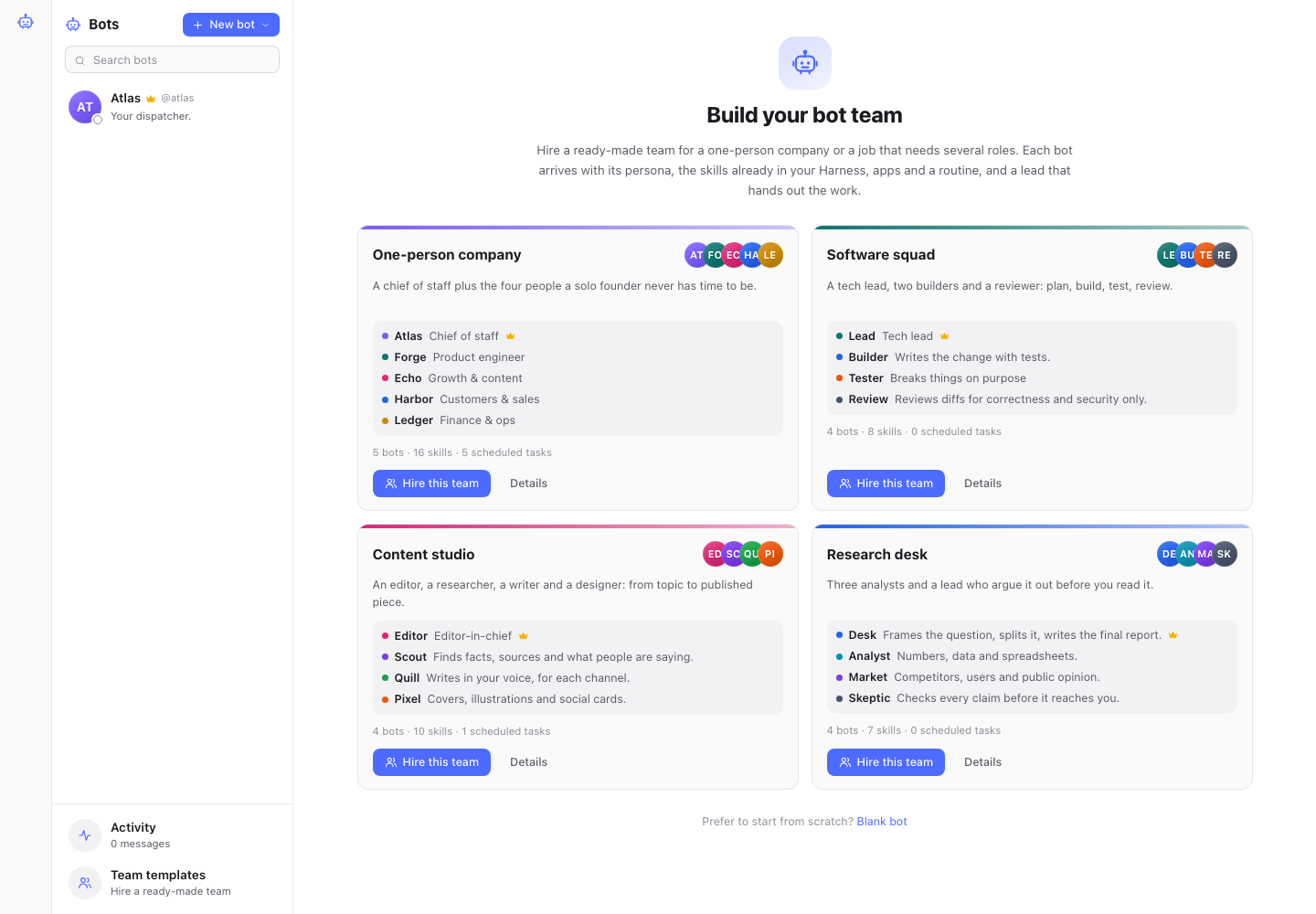
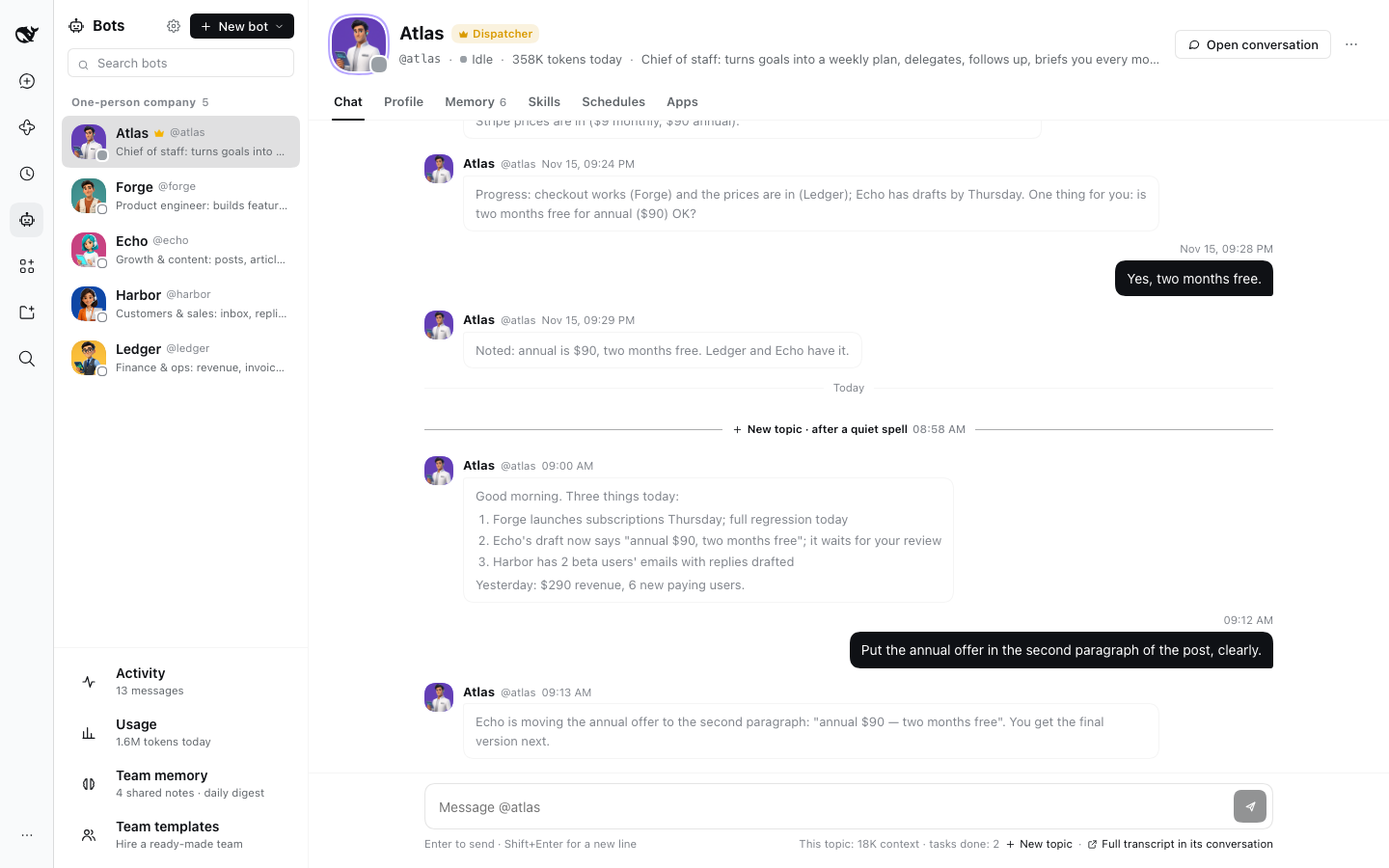
## Hire a whole team in one click
|
|
23
23
|
|
|
@@ -41,7 +41,7 @@ Hiring:
|
|
|
41
41
|
- adds the team's scheduled tasks and makes its lead the dispatcher;
|
|
42
42
|
- offers to send the lead a kickoff message, so the team starts working right away.
|
|
43
43
|
|
|
44
|
-

|
|
44
|
+
|
|
45
45
|
|
|
46
46
|
## An example (one-person company)
|
|
47
47
|
|
|
@@ -104,6 +104,27 @@ bot answers in that message's **thread**.
|
|
|
104
104
|
- A thread quiet for a day leaves the Harness sidebar; a new reply brings it back, and the thread goes on where it was.
|
|
105
105
|
- 0.9's topics read as the chat they were, with a link to each under its first message.
|
|
106
106
|
|
|
107
|
+
## Requests: everything you asked the team for
|
|
108
|
+
|
|
109
|
+
A **task** is a bot's view: one piece of work it took on. A **request** is yours: one thing you want. A request often
|
|
110
|
+
takes several tasks (the dispatcher splits research between teammates, then hands the results to one who writes them
|
|
111
|
+
up), and several messages (you ask, then add "include the UK in the Europe one", then ask how it is going).
|
|
112
|
+
|
|
113
|
+
- **The dispatcher restates it.** When it hands out the work, it names the request in one line, in your language,
|
|
114
|
+
saying what you get rather than who does it ("Q3 competitor pricing table (North America + Europe)", not "@scout
|
|
115
|
+
researches North American pricing"). Tasks for the same request count toward it, and what you add later joins it.
|
|
116
|
+
When the dispatcher did not restate one, the title is your own words, and the page says so.
|
|
117
|
+
- **Its status comes from its tasks**: **Waiting for you** (a task asks you something, or is stuck), **In progress**
|
|
118
|
+
(with how many tasks are done and the latest word), **Not done**, **Done** and **Dropped**. A follow-up reopens the
|
|
119
|
+
task, and the request is in progress again.
|
|
120
|
+
- **Requests** in the sidebar sits above **Tasks**, in three groups (**Waiting for you**, **In progress**, **Done**),
|
|
121
|
+
with dropped ones folded away and this week's numbers on top. Open one for your own words (to check the restatement),
|
|
122
|
+
the question waiting for you (**Answer** opens its task), what was delivered and the tasks behind it; **Rename** it, or
|
|
123
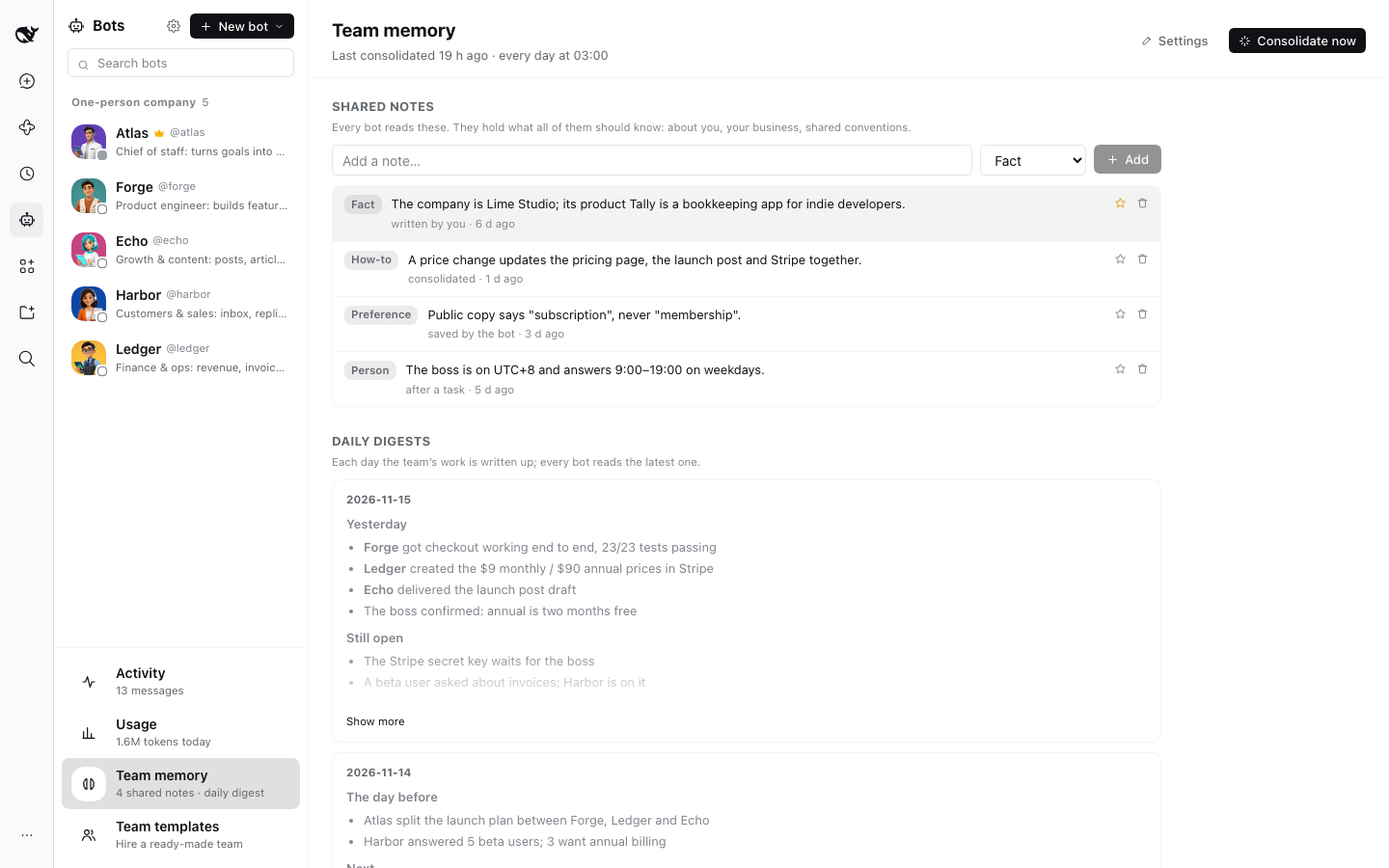
|
+
**Drop it** (its unfinished tasks stop).
|
|
124
|
+
- When you say "forget that one", the dispatcher drops the request; when two turn out to be one, it merges them.
|
|
125
|
+
- Only what you ask the dispatcher for is a request: work teammates ask each other for, and work a schedule starts,
|
|
126
|
+
is not.
|
|
127
|
+
|
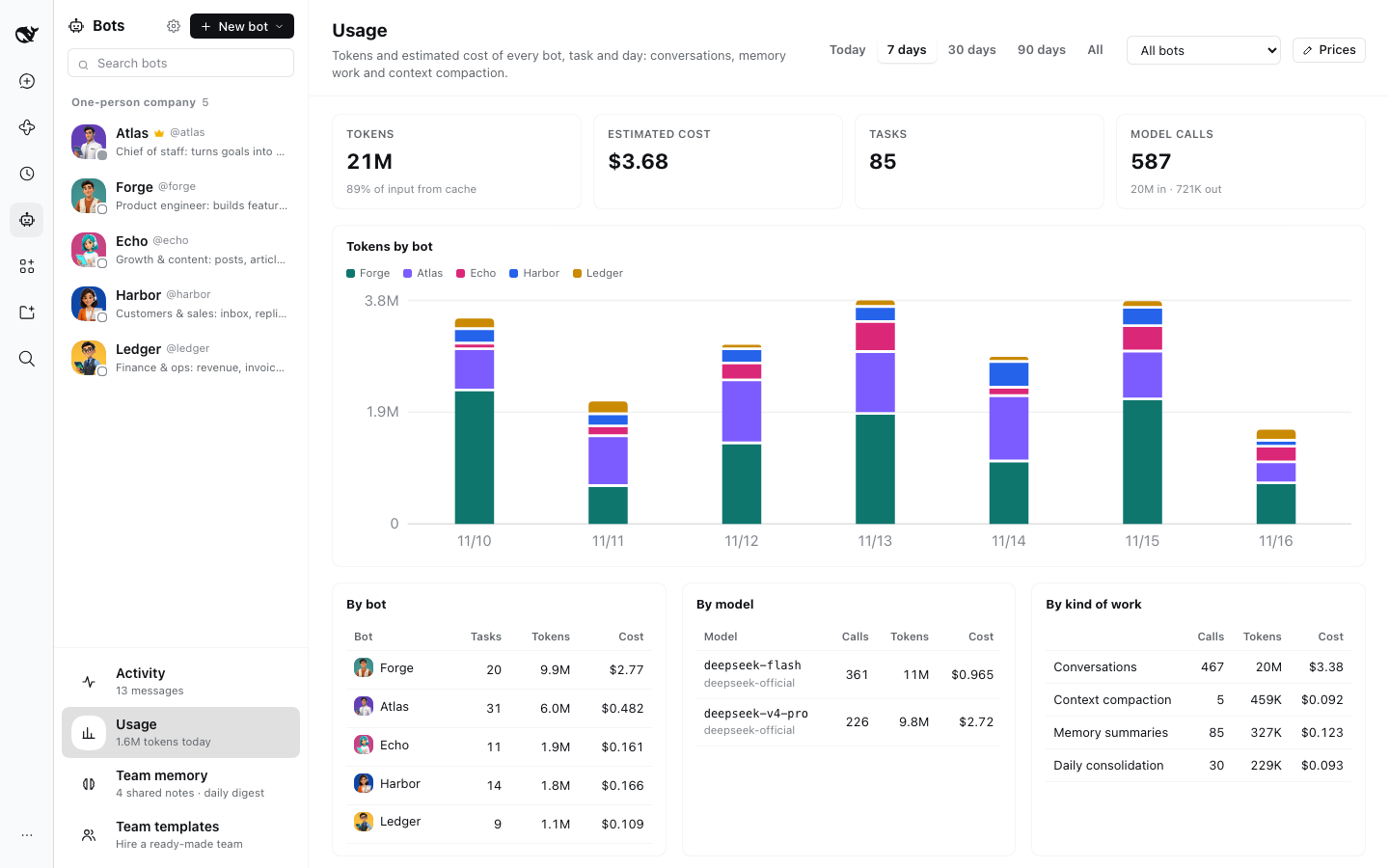
|
107
128
|
## Tasks: delegated work in conversations of their own
|
|
108
129
|
|
|
109
130
|
When a bot hands work to a teammate, the work becomes a **task**. The teammate works on each task in a conversation
|
|
@@ -154,30 +175,27 @@ for you. You don't open tasks yourself: you ask the dispatcher (or any bot), and
|
|
|
154
175
|
|
|
155
176
|
### The dispatcher as a router
|
|
156
177
|
|
|
157
|
-
The dispatcher
|
|
158
|
-
|
|
159
|
-
|
|
160
|
-
|
|
161
|
-
|
|
162
|
-
|
|
163
|
-
|
|
164
|
-
|
|
165
|
-
|
|
166
|
-
|
|
167
|
-
|
|
168
|
-
|
|
169
|
-
|
|
170
|
-
|
|
171
|
-
|
|
172
|
-
|
|
173
|
-
|
|
174
|
-
|
|
175
|
-
|
|
176
|
-
|
|
177
|
-
|
|
178
|
-
|
|
179
|
-
Router mode takes effect once the team has at least one bot besides the dispatcher; a dispatcher on its own does the
|
|
180
|
-
work itself.
|
|
178
|
+
The dispatcher understands the request, hands the work out and keeps track of it. It does not run commands, write or
|
|
179
|
+
edit files, search the web, use sub-agents and workflows, draw images, make Office files or put question cards to you
|
|
180
|
+
(a card holds every message after it until you answer); it can still read files and use its skills. Work that needs
|
|
181
|
+
any of those goes to a teammate, never to itself (0.9 handed it to itself when no teammate fit; 0.10 doesn't), while
|
|
182
|
+
its own conversation stays free for you. When you say "ask me which tone before you write", it hands the work out with
|
|
183
|
+
that request and the teammate asks you in its task; when it must know something itself before it can hand a request
|
|
184
|
+
out, it asks in one line of its reply, and your next message is the answer.
|
|
185
|
+
|
|
186
|
+
To let it do a small job itself (a quick web search, say), turn that ability on in its **Abilities** section, which
|
|
187
|
+
marks what dispatching turns off: switch a whole ability back on, or use **Turn back on** for the part of one that is
|
|
188
|
+
off (writing and editing under Files). Even then it may not `sleep`, a command must finish within 30 seconds or run in
|
|
189
|
+
the background, and with question cards back on it takes no new message until a card is answered.
|
|
190
|
+
|
|
191
|
+
It never waits for a teammate: it ends its turn and is woken when something needs it, so a new request is not stuck
|
|
192
|
+
behind work in progress, and messages that arrive while it is busy are taken together at its next step, and each one
|
|
193
|
+
gets its answer. Since it only routes, a light, fast model is enough for it; its **Model** section says so, and Bots
|
|
194
|
+
does not change the model for you. Every bot that hands work to a teammate opens a task, not only the dispatcher; but
|
|
195
|
+
nobody opens one for the dispatcher: a teammate's message to it goes into its own conversation, and it tells you what
|
|
196
|
+
you should know and hands out what is work.
|
|
197
|
+
|
|
198
|
+
It routes once the team has at least one bot besides the dispatcher; a dispatcher on its own does the work itself.
|
|
181
199
|
|
|
182
200
|
### Chats and threads
|
|
183
201
|
|
|
@@ -278,7 +296,7 @@ A bot works in ordinary Harness conversations, so everything Harness can do, a b
|
|
|
278
296
|
- **Schedules** are ordinary Harness scheduled tasks, also on the Automation page. A scheduled task missed while
|
|
279
297
|
Harness was closed runs when it starts again, once (its latest occurrence): that is Harness's rule, and Bots adds
|
|
280
298
|
no runs of its own. A team with many schedules can open several tasks at once after a start, and use many tokens.
|
|
281
|
-
- **AI avatars**: with the [Images plugin](
|
|
299
|
+
- **AI avatars**: with the [Images plugin](https://github.com/kadaliao/dsh-images), draw a bot's avatar from its persona. A bot can do it too:
|
|
282
300
|
ask the dispatcher to give the team new avatars and describe the look, or point it at an image file. A bot's
|
|
283
301
|
drawing runs in the background, so it goes on answering you: a ring turns around the avatar while the picture is
|
|
284
302
|
drawn, the new one shows when it is ready, and the bot hears that it is ready (or why it failed) and tells you. A restart of
|
|
@@ -302,7 +320,7 @@ model's thinking levels when it has them. Besides the models Harness already has
|
|
|
302
320
|
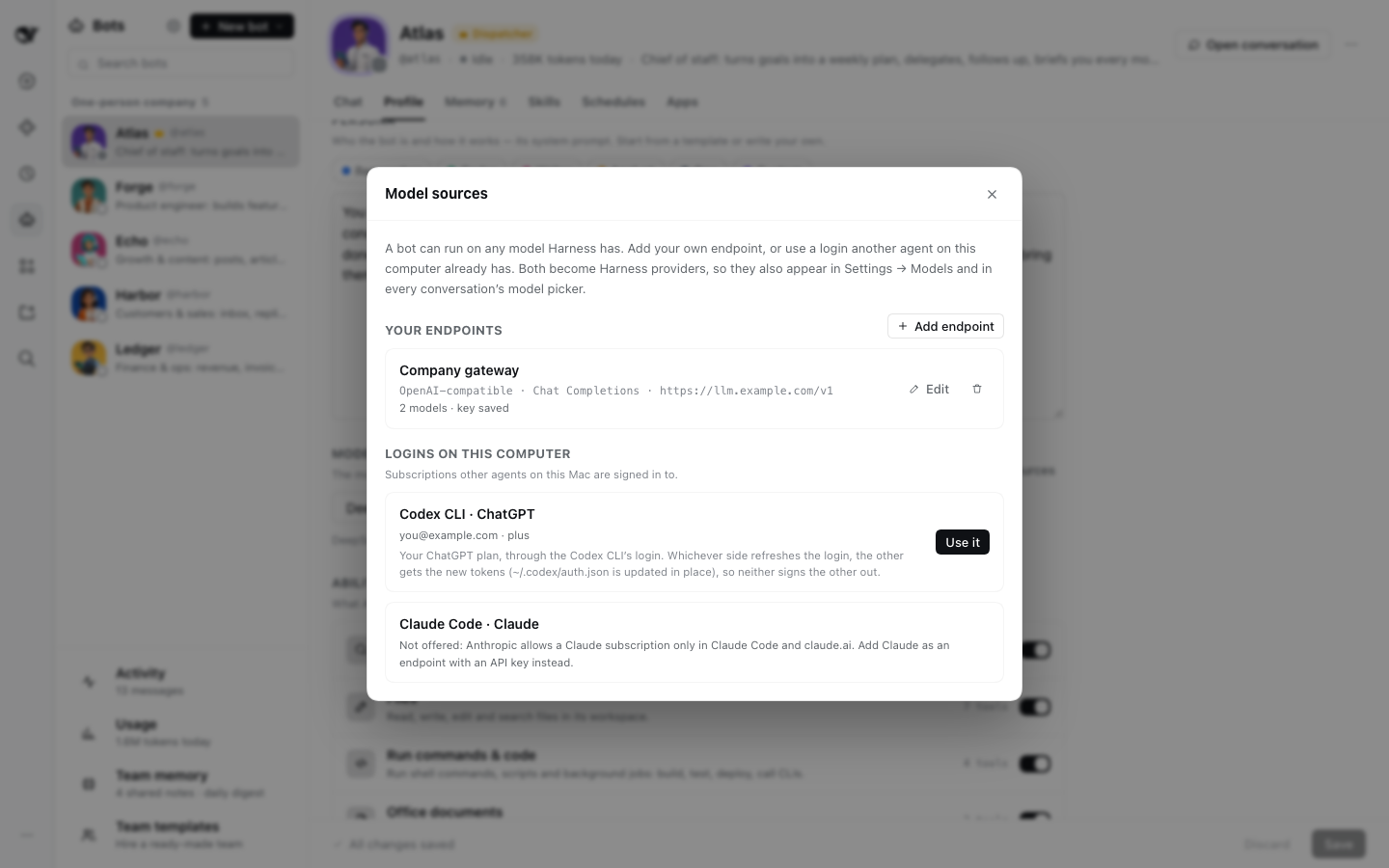
tokens, and neither signs the other out. Claude Code's login is shown but not offered: Anthropic allows a
|
|
303
321
|
Claude subscription only in Claude Code and claude.ai, so add Claude with an API key instead.
|
|
304
322
|
|
|
305
|
-

|
|
323
|
+
|
|
306
324
|
|
|
307
325
|
## Topics: conversations that don't grow forever
|
|
308
326
|
|
|
@@ -336,7 +354,9 @@ Every bot keeps **notes** that outlast its topics, and the team shares one more
|
|
|
336
354
|
lines and tasks of that task, the task that asked for it and its sub-tasks, and no digests.
|
|
337
355
|
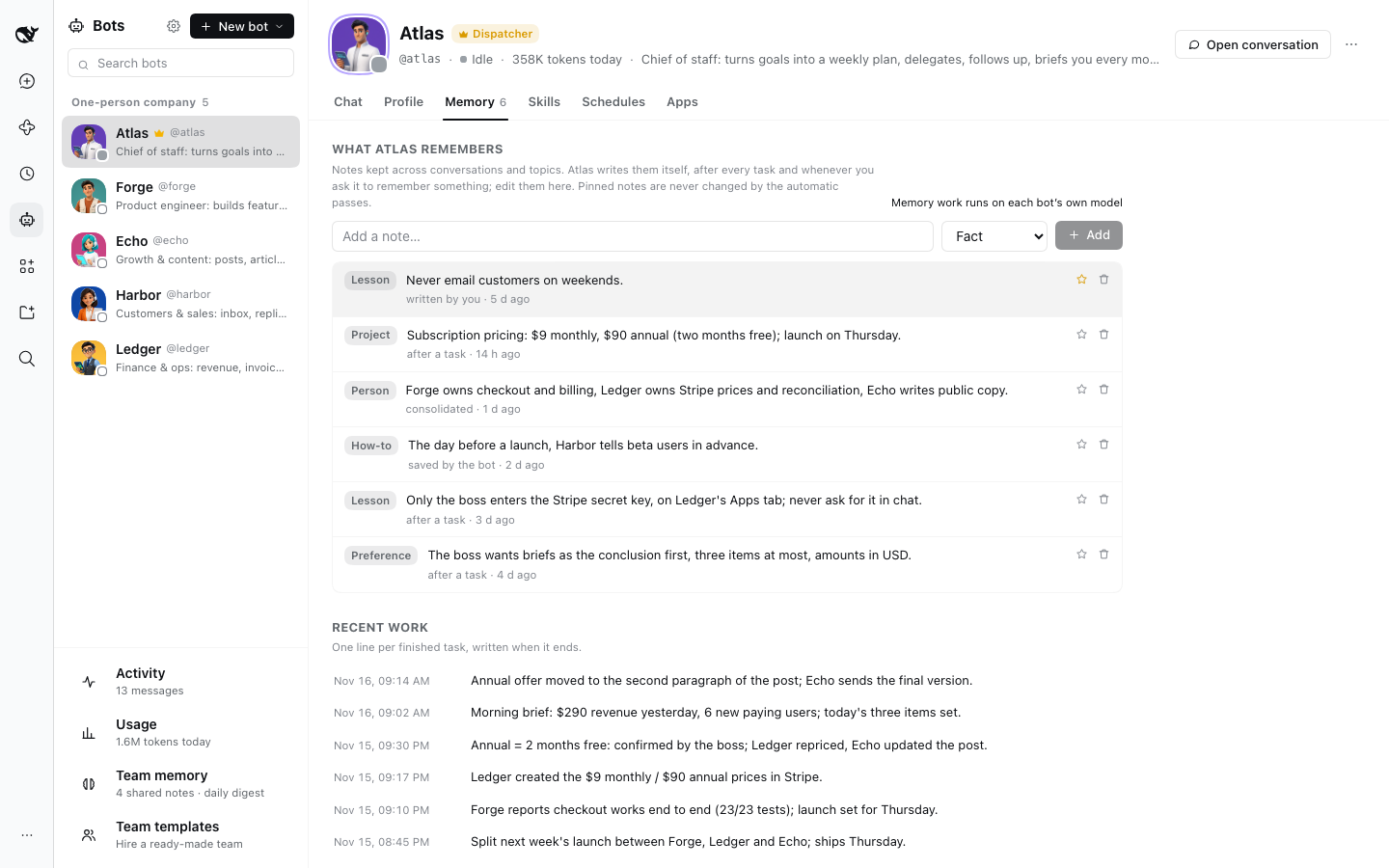
- **Every night** (03:00 by default) memory is **consolidated**: each bot's notes are merged, corrected
|
|
338
356
|
and trimmed with its recent journal, the shared notes too, and the day's work is written up as the
|
|
339
|
-
team's **daily digest**. **Consolidate now** runs it at once.
|
|
357
|
+
team's **daily digest**. **Consolidate now** runs it at once. Notes and digests are written in the
|
|
358
|
+
language you write to the bots in, judged from your recent messages; a note left in another language
|
|
359
|
+
is rewritten in it.
|
|
340
360
|
- A bot reads its notes, the team notes, its last few journal lines and the latest digest when a topic
|
|
341
361
|
or a task's conversation starts, and again at the next run after you edit memory or the nightly
|
|
342
362
|
consolidation ran. Within a topic the memory part of its prompt stays the same, so the model's prompt
|
|
@@ -348,9 +368,9 @@ Every bot keeps **notes** that outlast its topics, and the team shares one more
|
|
|
348
368
|
or token is never stored.
|
|
349
369
|
- Memory work runs on each bot's own model unless Settings names a cheaper one.
|
|
350
370
|
|
|
351
|
-

|
|
371
|
+
|
|
352
372
|
|
|
353
|
-

|
|
373
|
+
|
|
354
374
|
|
|
355
375
|
## Usage
|
|
356
376
|
|
|
@@ -362,7 +382,7 @@ takes one run or more, **By task** adds them up, and a task's own page shows its
|
|
|
362
382
|
estimates from your own prices or LiteLLM's public price list (**Prices**); a model with no price shows its
|
|
363
383
|
tokens only.
|
|
364
384
|
|
|
365
|
-

|
|
385
|
+
|
|
366
386
|
|
|
367
387
|
## Message your team from Feishu, Telegram, Slack or Discord
|
|
368
388
|
|
|
@@ -501,19 +521,22 @@ one connection. If you change scopes later, reinstall the app to the workspace a
|
|
|
501
521
|
limits and apps apply to its conversations only. In a task's conversation the prompt also says which
|
|
502
522
|
task it is, who asked, and how to report. Edits apply at once; a new or changed app connects the next
|
|
503
523
|
time the conversation starts.
|
|
504
|
-
-
|
|
505
|
-
|
|
506
|
-
|
|
507
|
-
dispatcher's answer is added to that task).
|
|
508
|
-
|
|
509
|
-
|
|
510
|
-
|
|
524
|
+
- `bot_send_message` from a bot's own conversation opens a task and returns at once; from a task's
|
|
525
|
+
conversation it reports to whoever asked (with a status) or opens a sub-task. A message to the dispatcher
|
|
526
|
+
opens no task: it goes into the dispatcher's own conversation (one sent from a task names it, and the
|
|
527
|
+
dispatcher's answer is added to that task). The dispatcher names the request a task serves with `need`
|
|
528
|
+
([Requests](#requests-everything-you-asked-the-team-for)). Two bots may exchange at most 16 messages in 10
|
|
529
|
+
minutes (new tasks and messages added to tasks count), so conversations end.
|
|
530
|
+
- A bot with nothing to say (after a report, say) answers `NO_REPLY`, which is never shown or sent to a chat app.
|
|
531
|
+
Harness counts an answer with no content as a failed model call (`returned a completed response with no
|
|
532
|
+
content`), so a bot cannot just say nothing; should a model still answer with nothing, its task does not fail
|
|
533
|
+
for it.
|
|
511
534
|
- Every conversation gets `bot_list`, `bot_create`, `bot_update`, `bot_delete`, `bot_send_message`,
|
|
512
|
-
`bot_reply`, `bot_recall`, `bot_ticket` and `bot_schedule` to manage bots and tasks, and `memory_save`,
|
|
535
|
+
`bot_reply`, `bot_recall`, `bot_ticket`, `bot_need` and `bot_schedule` to manage bots and tasks, and `memory_save`,
|
|
513
536
|
`memory_forget` and `memory_search`. `bot_reply` sends an answer to a named chat; `bot_recall` reads a
|
|
514
537
|
task, its reports or its conversation, or a chat thread, a page at a time, so a bot looks things up
|
|
515
538
|
instead of guessing; `bot_ticket` stops, closes or retries a task the bot asked for, or asks it for a
|
|
516
|
-
status report. [API.md](API.md) lists their parameters. A sub-agent started in a bot's or a task's
|
|
539
|
+
status report; `bot_need` lets the dispatcher rename, merge or drop one of your requests. [API.md](https://github.com/kadaliao/dsh-bots/blob/main/API.md) lists their parameters. A sub-agent started in a bot's or a task's
|
|
517
540
|
conversation uses them as that bot or task; one that cannot be traced back to where it started (that
|
|
518
541
|
conversation is gone) is refused.
|
|
519
542
|
- A bot's memory is a section of its system prompt, read when a topic or a task's conversation starts
|
|
@@ -557,7 +580,7 @@ permission and restart it.
|
|
|
557
580
|
|
|
558
581
|
## Install
|
|
559
582
|
|
|
560
|
-
Add
|
|
583
|
+
Add the [DSH Plugins](https://github.com/kadaliao/dsh-plugins) index in DeepSeek Harness (**Plugins → Discover → Sources**):
|
|
561
584
|
|
|
562
585
|
```
|
|
563
586
|
https://raw.githubusercontent.com/kadaliao/dsh-plugins/main/marketplace.json
|
|
@@ -566,13 +589,26 @@ https://raw.githubusercontent.com/kadaliao/dsh-plugins/main/marketplace.json
|
|
|
566
589
|
then install **Bots**. The Discover tab is part of the experimental **Custom plugin markets**
|
|
567
590
|
feature; turn it on under **Plugins → Experimental plugins** if you don't see it.
|
|
568
591
|
|
|
569
|
-
Without Discover, paste the
|
|
592
|
+
Without Discover, paste the package name into the plugin manager:
|
|
570
593
|
|
|
571
594
|
```
|
|
572
|
-
|
|
595
|
+
@kadaliao/dsh-bots
|
|
573
596
|
```
|
|
574
597
|
|
|
575
|
-
|
|
598
|
+
For the latest unreleased code, use the Git spec `git+https://github.com/kadaliao/dsh-bots.git#main` instead.
|
|
599
|
+
|
|
600
|
+
Refresh the page once after installing. For AI avatars, install [Images](https://github.com/kadaliao/dsh-images) too.
|
|
601
|
+
|
|
602
|
+
## Upgrading from 0.10
|
|
603
|
+
|
|
604
|
+
- Nothing to do: bots, tasks, memory, schedules, chat apps and pairings stay as they are; 0.11 adds `needs.json`
|
|
605
|
+
for requests. Tasks from before the upgrade belong to no request; when you follow one up in a chat, your words name
|
|
606
|
+
a request for it.
|
|
607
|
+
- Hands-on mode is gone, and there is no mode to pick: with a teammate the dispatcher routes, on its own it does the
|
|
608
|
+
work itself. A team that had picked Hands-on switches to routing and sees the notice once; turn on the small jobs
|
|
609
|
+
you want the dispatcher to do itself under its **Abilities**.
|
|
610
|
+
- With models that follow the prompt to the letter (GPT, say), the occasional `returned a completed response with no
|
|
611
|
+
content` (a bot answered with nothing after a report, and its task failed) is gone.
|
|
576
612
|
|
|
577
613
|
## Upgrading from 0.9
|
|
578
614
|
|
|
@@ -604,9 +640,8 @@ Refresh the page once after installing. For AI avatars, install [Images](../imag
|
|
|
604
640
|
tools listed under [The dispatcher as a router](#the-dispatcher-as-a-router) in its own conversation, and
|
|
605
641
|
work handed from one bot to another becomes a task. The Bots panel says so once, with **Open its profile**
|
|
606
642
|
and **Got it**; the notice waits until the team has a bot besides the dispatcher.
|
|
607
|
-
-
|
|
608
|
-
|
|
609
|
-
the notice.
|
|
643
|
+
- From 0.8 to 0.10 the dispatcher's **Profile** could switch **How it works** back to **Hands-on**; 0.11 has no such
|
|
644
|
+
choice ([Upgrading from 0.10](#upgrading-from-010)).
|
|
610
645
|
- Replies to chat apps follow the request they answer ([Chats and threads](#chats-and-threads)); in 0.7 they
|
|
611
646
|
went to the chat of the latest request.
|
|
612
647
|
- In **Usage**, what 0.7 called tasks are runs now (**Runs**, **Recent runs**), with the same numbers.
|
package/README.zh-CN.md
CHANGED
|
@@ -13,7 +13,7 @@ bot 在它的**讨论串**里回答,只看得到这条消息和它之前的内
|
|
|
13
13
|
- **一人公司(OPC)**:一个人经营业务,需要一整个「员工团队」——研发、增长、客户、财务,再加一个每天早上给你简报的幕僚长。
|
|
14
14
|
- **需要分工协作的工作**:开发要有人写、有人测、有人审;内容要有人调研、有人写、有人做图;研究要有人挑刺。
|
|
15
15
|
|
|
16
|
-

|
|
16
|
+
|
|
17
17
|
|
|
18
18
|
## 一键雇用一支团队
|
|
19
19
|
|
|
@@ -35,7 +35,7 @@ bot 在它的**讨论串**里回答,只看得到这条消息和它之前的内
|
|
|
35
35
|
- 建好定时任务,让负责人成为调度员;
|
|
36
36
|
- 最后可以一键把「开场任务」发给负责人,团队就开始干活了。
|
|
37
37
|
|
|
38
|
-

|
|
38
|
+
|
|
39
39
|
|
|
40
40
|
## 一段示例(一人公司)
|
|
41
41
|
|
|
@@ -82,6 +82,22 @@ bot 默认用你说话的语言回答;中文提问就是中文协作。
|
|
|
82
82
|
- 一天没有动静的讨论串,它的会话会从 Harness 侧栏收起来;再回复它就回来,接着原来的讨论串聊。
|
|
83
83
|
- 0.9 的话题照原来的样子显示在对话里,它第一条消息下面有讨论串的链接。
|
|
84
84
|
|
|
85
|
+
## 需求:你交给团队的每件事
|
|
86
|
+
|
|
87
|
+
**任务**是 bot 的视角:某个 bot 接下的一件活。**需求**是你的视角:你要的一件事。一个需求常常要好几个任务
|
|
88
|
+
(调度员把调研拆给几个队友同时做,再交给一个汇总),也会跨好几条消息(先提,再补充「欧洲那份加上英国」,再问进度)。
|
|
89
|
+
|
|
90
|
+
- **调度员来归纳和转述。** 它分派工作时,用你的语言把这件事写成一句话,说你会得到什么,不说谁去做
|
|
91
|
+
(「Q3 竞品定价对比表(北美 + 欧洲)」,而不是「@scout 去查北美定价」)。同一件事的几个任务归在一起;
|
|
92
|
+
你接着补充或追问时,你的话也记到原来那件事上。它没有转述时,标题取自你的原话,并注明这一点。
|
|
93
|
+
- **状态从任务推出来。** **等你处理**(有任务在问你,或者卡住了)、**进行中**(显示完成了几项和最新进展)、**没做成**、
|
|
94
|
+
**已完成**、**已取消**。你接着跟进让任务重开,需求也回到进行中。
|
|
95
|
+
- 侧栏的 **需求** 在 **任务** 上面,分 **等你处理**、**进行中**、**已完成** 三栏,已取消的折起来,顶上一行是本周的数字。
|
|
96
|
+
点开一个需求:你的原话(用来核对转述有没有走样)、在等你回答的问题(点 **去回答** 到那个任务)、交付的结果、
|
|
97
|
+
背后的任务(点开就是任务详情);还可以 **改标题**,或者 **不用做了**(它下面还没完成的任务都会停下)。
|
|
98
|
+
- 你说「这个不用做了」时,调度员会取消对应的需求;两件事原来是同一件时,它会合并起来。
|
|
99
|
+
- 只有交给调度员的事才算需求;队友之间互相请求、定时任务开出的工作不算。
|
|
100
|
+
|
|
85
101
|
## 任务:分派出去的工作各有各的会话
|
|
86
102
|
|
|
87
103
|
一个 bot 把工作交给队友,这件工作就成了一个**任务**。队友在专门的会话里做每个任务,所以同一个 bot 可以同时做好几个任务而不串台,
|
|
@@ -120,23 +136,22 @@ bot 默认用你说话的语言回答;中文提问就是中文协作。
|
|
|
120
136
|
|
|
121
137
|
### 调度员只调度
|
|
122
138
|
|
|
123
|
-
|
|
139
|
+
调度员只负责听懂需求、把工作分派出去、跟进进度,自己不动手。它不执行命令、不写不改文件、不联网搜索、
|
|
140
|
+
不用子代理和工作流、不作图、不做 Office 文档,也不弹提问卡片(一张卡片没答之前,后面的消息都得排队),但仍能读文件、使用技能。
|
|
141
|
+
需要这些能力的事都交给队友,从不派给自己(0.9 时没有合适的队友它会派给自己,0.10 起不再这样),它自己的会话始终空着等你。
|
|
142
|
+
你说「动笔前先问我」这类话,它把这个要求连同工作一起交给队友,由队友在任务里问你;它自己得先弄清楚才能分派的事,
|
|
143
|
+
就在回复里用一句话问你,你的下一条消息就是答案。
|
|
144
|
+
|
|
145
|
+
想让它顺手做些小事(比如联网查一下),在它的 **能力** 一栏把那一项打开。**能力** 会标出调度时关掉的项:整项关掉的,打开开关就放回;
|
|
146
|
+
只关掉一部分的(比如读写文件里的写和改),点 **重新打开** 放回(即使放回了命令,它也不能 `sleep`,命令要么在 30 秒内跑完,
|
|
147
|
+
要么放到后台跑;放回提问卡片的话,卡片没答之前它也接不了新消息)。
|
|
124
148
|
|
|
125
|
-
|
|
126
|
-
|
|
127
|
-
|
|
128
|
-
|
|
129
|
-
就在回复里用一句话问你,你的下一条消息就是答案。**能力** 一栏会列出只调度时关掉的项并标出来:整项关掉的,打开开关就放回;
|
|
130
|
-
只关掉一部分的(比如读写文件里的写和改),点 **重新打开** 放回(即使放回了命令,它也不能 `sleep`,命令要么在 30 秒内跑完,
|
|
131
|
-
要么放到后台跑;放回提问卡片的话,卡片没答之前它也接不了新消息)。
|
|
132
|
-
它从不等队友:分派完就结束这一轮,有事需要它时会自动唤醒,所以新请求不会被手上的活堵住;
|
|
133
|
-
它忙的时候进来的消息,会在下一步一起处理,每一条都得到回应。既然只管调度,用轻量、快速的模型就够了,
|
|
134
|
-
**模型** 一栏也会这样提示;Bots 不会替你换模型。只调度时,任何 bot 把工作交给队友都会开任务,不只调度员;
|
|
135
|
-
但没有人给调度员开任务:队友发给它的消息直接进它自己的会话,由它转告你该知道的、把该做的活分派出去。
|
|
136
|
-
- **亲自动手**:0.7 的做法。调度员小事自己顺手做掉;bot 在自己的会话里给队友发消息,消息直接进队友自己的会话,不开任务。
|
|
137
|
-
已经开出的任务照常进行、照常汇报。
|
|
149
|
+
它从不等队友:分派完就结束这一轮,有事需要它时会自动唤醒,所以新请求不会被手上的活堵住;
|
|
150
|
+
它忙的时候进来的消息,会在下一步一起处理,每一条都得到回应。既然只管调度,用轻量、快速的模型就够了,
|
|
151
|
+
**模型** 一栏也会这样提示;Bots 不会替你换模型。任何 bot 把工作交给队友都会开任务,不只调度员;
|
|
152
|
+
但没有人给调度员开任务:队友发给它的消息直接进它自己的会话,由它转告你该知道的、把该做的活分派出去。
|
|
138
153
|
|
|
139
|
-
团队里除了调度员至少还有一个 bot
|
|
154
|
+
团队里除了调度员至少还有一个 bot,它才开始只调度;只有调度员一个 bot 时,它自己干活。
|
|
140
155
|
|
|
141
156
|
### 聊天与讨论串
|
|
142
157
|
|
|
@@ -212,7 +227,7 @@ Bot 在普通的 Harness 会话里工作,所以 Harness 能做的它都能做
|
|
|
212
227
|
|
|
213
228
|
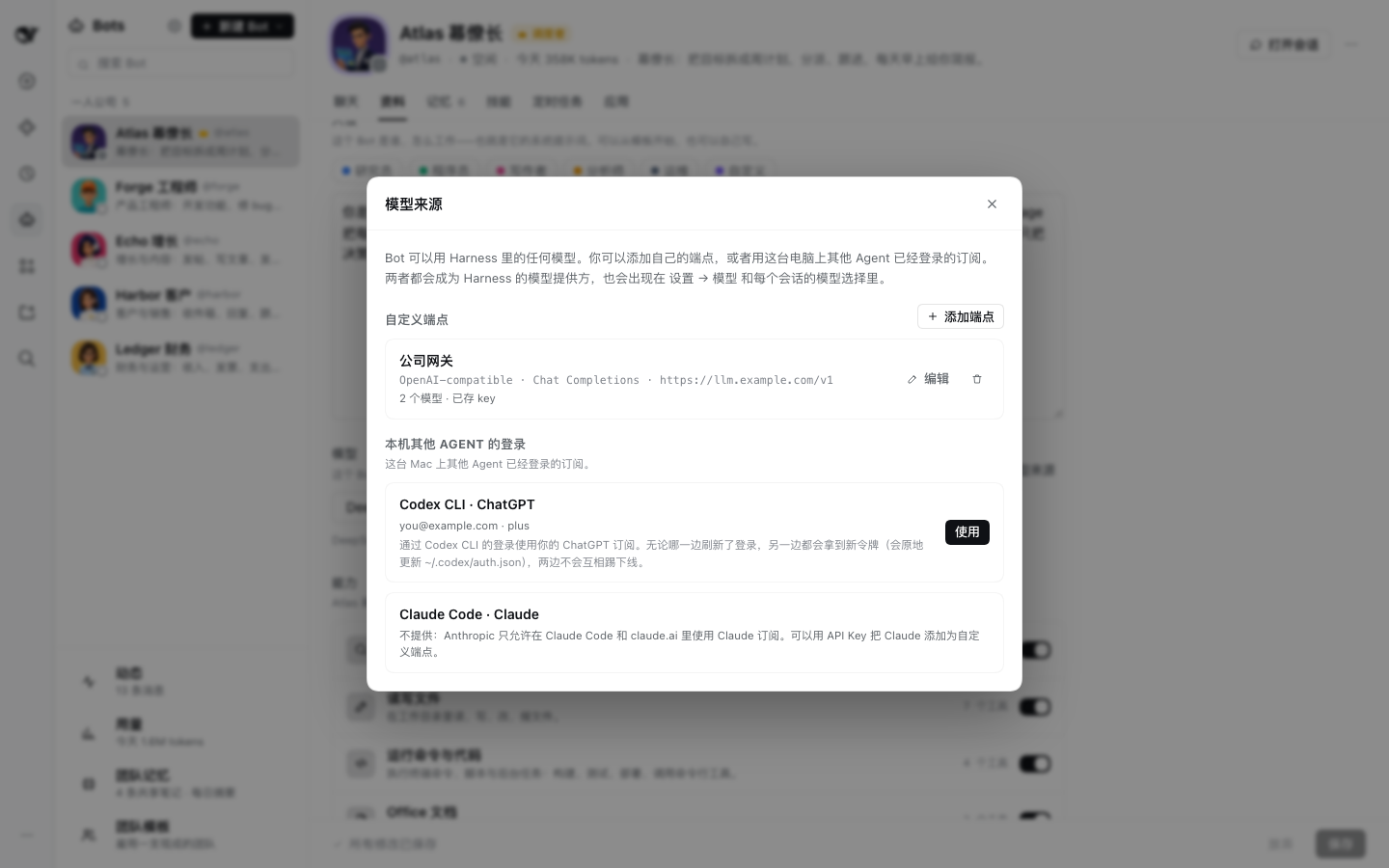
- **定时任务**:就是 Harness 的定时任务,也出现在「自动化」页面。Harness 没开着时错过的定时任务,下次启动时由 Harness 补跑,
|
|
214
229
|
每个只补最近的那一次(这是 Harness 的规则,Bots 不另外补);团队的定时任务多时,启动后会一下子开出好几个任务、用掉不少 token。
|
|
215
|
-
- **AI 头像**:装了 [图片插件](
|
|
230
|
+
- **AI 头像**:装了 [图片插件](https://github.com/kadaliao/dsh-images) 就能按 bot 的人设生成头像。bot 自己也能做:让调度员给团队换一批头像,
|
|
216
231
|
说清楚想要的样子就行,也可以指给它一张本地图片。bot 画头像是在后台进行的,不耽误它回你的话:画的时候头像上有一圈在转,
|
|
217
232
|
画好就换上;画好了(或没画成、为什么)bot 会收到通知并告诉你。Harness 重启会丢掉正在画的头像。
|
|
218
233
|
- **图标**:应用库里每个应用都用它自己的官方 logo(有 App 的用 App Store 图标,没有的用官网或官方仓库里的 logo)。
|
|
@@ -231,7 +246,7 @@ Bot 在普通的 Harness 会话里工作,所以 Harness 能做的它都能做
|
|
|
231
246
|
另一边都会拿到新令牌,谁也不会把谁踢下线。Claude Code 的登录会显示出来但不提供:Anthropic 只允许
|
|
232
247
|
在 Claude Code 和 claude.ai 里使用 Claude 订阅,请改用 API Key 添加 Claude。
|
|
233
248
|
|
|
234
|
-

|
|
249
|
+
|
|
235
250
|
|
|
236
251
|
## 话题:对话不会无限变长
|
|
237
252
|
|
|
@@ -260,7 +275,8 @@ bot 知道的事靠记忆延续。下面几种情况会开新话题:
|
|
|
260
275
|
用 `memory_search` 查笔记、团队工作日志、每日摘要和任务(标题和汇报)。在任务的会话里,除了笔记,
|
|
261
276
|
只查得到这个任务、它的所属任务和子任务的工作日志与任务,查不到每日摘要。
|
|
262
277
|
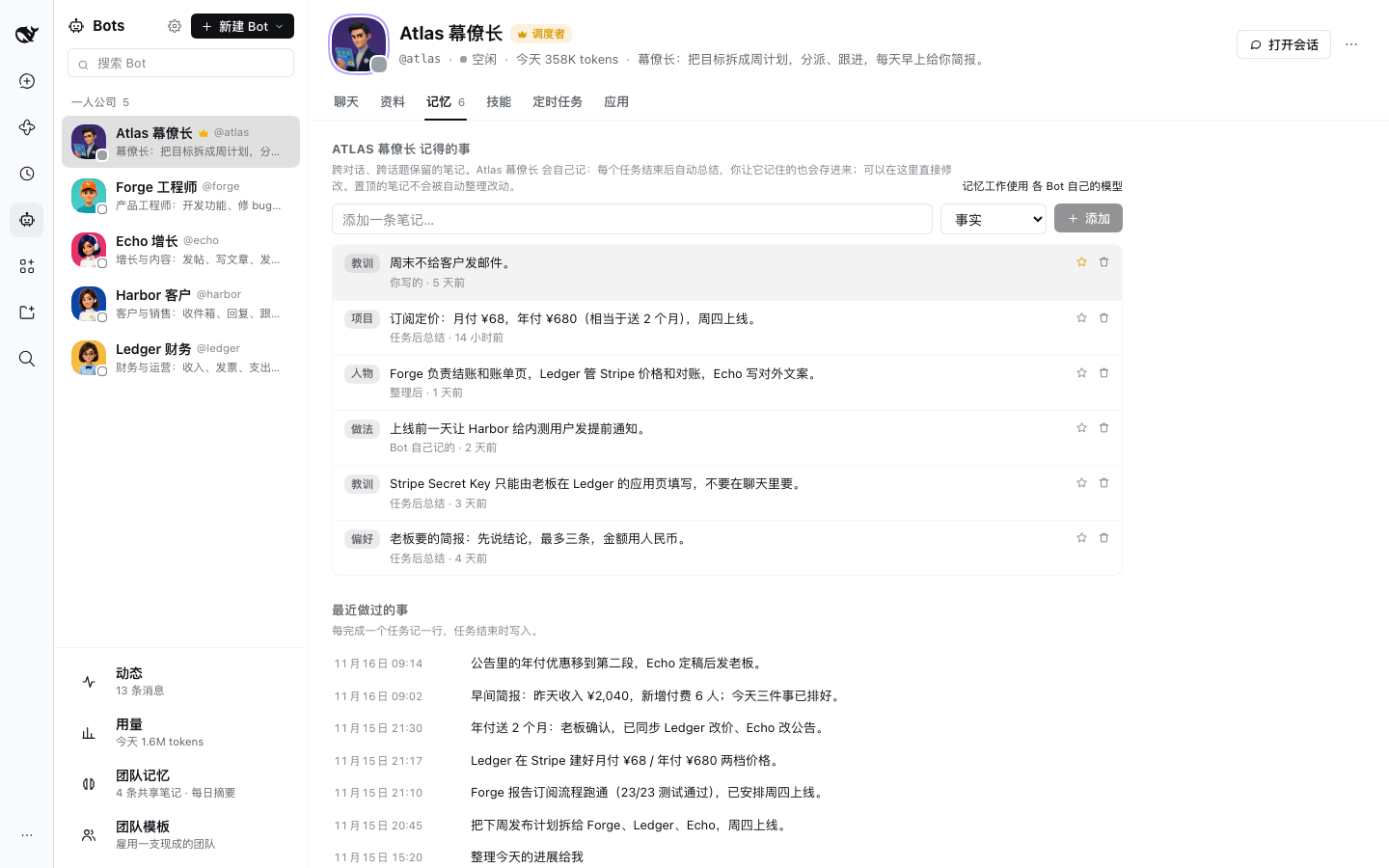
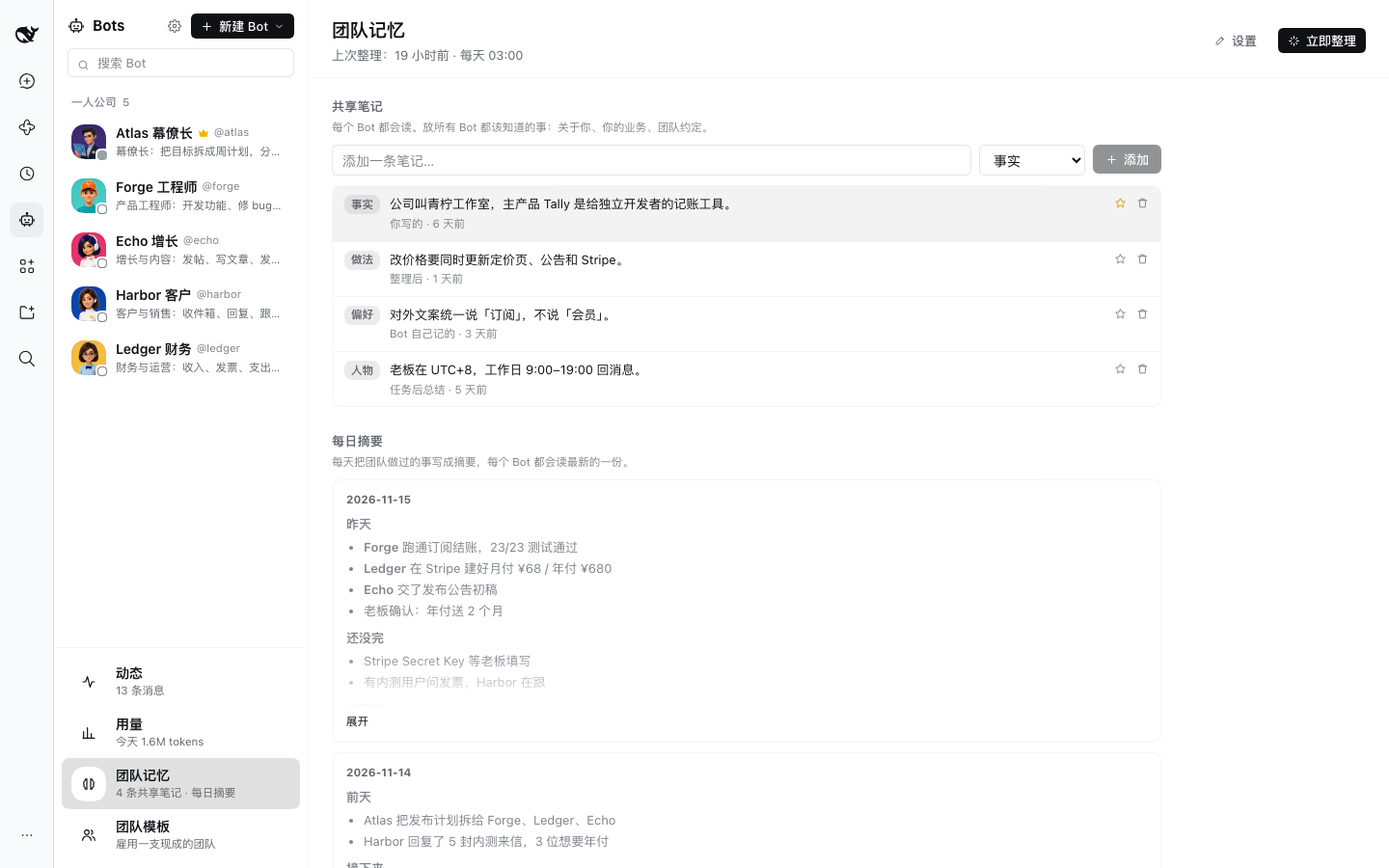
- **每天夜里**(默认 03:00)**整理**一次:结合最近的工作日志,合并、更正、精简每个 bot 的笔记和共享笔记,
|
|
263
|
-
并把当天的工作写成团队的**每日摘要**。**立即整理**
|
|
278
|
+
并把当天的工作写成团队的**每日摘要**。**立即整理** 可以马上运行。笔记和摘要用你和 bot 说话的语言写(看你最近的
|
|
279
|
+
消息判断),写成别的语言的笔记会被改写过来。
|
|
264
280
|
- 话题或任务的会话开始时,bot 会读到自己的笔记、团队笔记、最近几条工作日志和最新的每日摘要;
|
|
265
281
|
你在面板里改了记忆、或每晚整理之后,下一个回合会重新读一次。同一个话题里,提示词中的记忆部分保持不变,模型对整段对话的
|
|
266
282
|
提示缓存照常命中(话题里学到的东西本来就在这段对话里)。很短的往来(一句确认、给队友的一行回复)只记一行
|
|
@@ -269,9 +285,9 @@ bot 知道的事靠记忆延续。下面几种情况会开新话题:
|
|
|
269
285
|
置顶的笔记不会被自动整理改动;看起来像 Key 或 Token 的内容一律不存。
|
|
270
286
|
- 记忆工作默认使用各 bot 自己的模型,也可以在设置里指定一个更便宜的。
|
|
271
287
|
|
|
272
|
-

|
|
288
|
+
|
|
273
289
|
|
|
274
|
-

|
|
290
|
+
|
|
275
291
|
|
|
276
292
|
## 用量
|
|
277
293
|
|
|
@@ -281,7 +297,7 @@ bot 知道的事靠记忆延续。下面几种情况会开新话题:
|
|
|
281
297
|
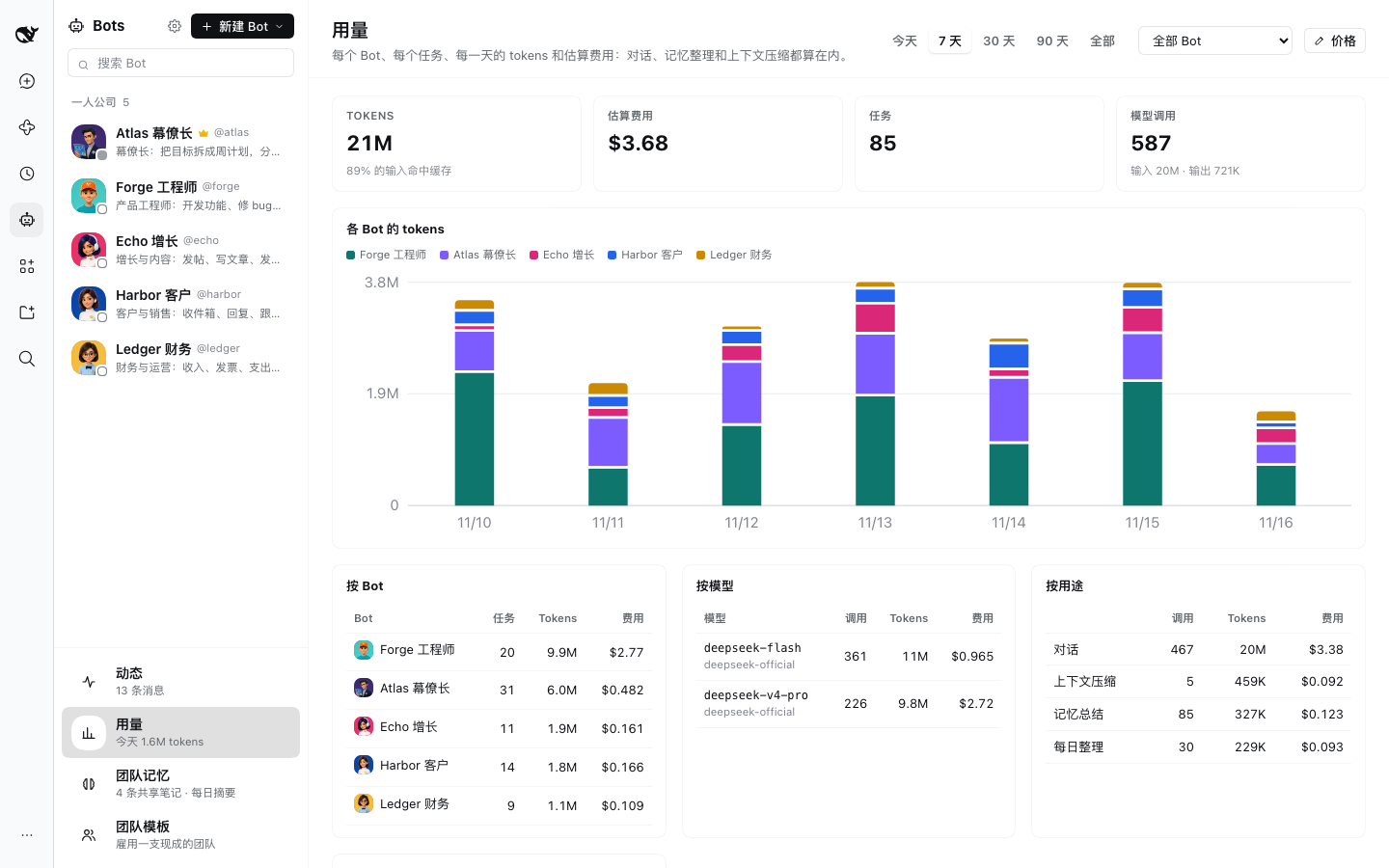
直到 bot 重新空闲);一个任务有一个或多个回合,**按任务** 把它们加在一起,任务详情页里也有它自己的用量。
|
|
282
298
|
费用是估算:用你填的价格,或 LiteLLM 公开价格表(**价格**);没有价格的模型只显示 tokens。
|
|
283
299
|
|
|
284
|
-

|
|
300
|
+
|
|
285
301
|
|
|
286
302
|
## 在飞书、Telegram、Slack 或 Discord 里给团队发消息
|
|
287
303
|
|
|
@@ -399,14 +415,16 @@ Slack 走 Socket Mode:由 Harness 主动连到 Slack,电脑不需要公网
|
|
|
399
415
|
一天没有动静就归档,再回复时取消归档接着用。
|
|
400
416
|
- 会话运行时,bot 的人设和团队名单加入系统提示词;它自己的技能、能力限制和应用只作用于它自己的会话。
|
|
401
417
|
任务的会话里,提示词还会说明这是哪个任务、谁发起的、怎么汇报。修改即时生效;新增或修改应用在下次会话启动时连接。
|
|
402
|
-
-
|
|
418
|
+
- `bot_send_message` 在 bot 自己的会话里调用就开一个任务并立刻返回;在任务的会话里调用,
|
|
403
419
|
要么带状态向发起方汇报,要么开一个子任务。发给调度员的不开任务,放进它自己的会话(从任务里发的会注明是哪个任务,
|
|
404
|
-
|
|
405
|
-
|
|
420
|
+
调度员回话时追加到那个任务)。调度员开任务时用 `need` 说明它属于你的哪件事(见[需求](#需求你交给团队的每件事))。
|
|
421
|
+
同一对 bot 10 分钟内最多互发 16 条(新开的任务和追加给任务的消息都算),防止无限对话。
|
|
422
|
+
- bot 没话可说时(比如发完汇报之后)回复 `NO_REPLY`,这句话不显示、也不发到聊天应用。Harness 把内容为空的回复当成调用失败
|
|
423
|
+
(`returned a completed response with no content`),所以 bot 不能真的什么都不说;万一模型还是回了空,任务也不会因此判失败。
|
|
406
424
|
- 所有会话都能用 `bot_list`、`bot_create`、`bot_update`、`bot_delete`、`bot_send_message`、`bot_reply`、`bot_recall`、
|
|
407
|
-
`bot_ticket`、`bot_schedule` 管理 bot 和任务,以及 `memory_save`、`memory_forget`、`memory_search`。
|
|
425
|
+
`bot_ticket`、`bot_need`、`bot_schedule` 管理 bot 和任务,以及 `memory_save`、`memory_forget`、`memory_search`。
|
|
408
426
|
`bot_reply` 把答复发到指定的聊天;`bot_recall` 分页读取任务、任务的汇报或会话,以及聊天讨论串,让 bot 去查而不是猜;
|
|
409
|
-
`bot_ticket`
|
|
427
|
+
`bot_ticket` 停止、关闭或重试自己发起的任务,或者请它汇报进度;`bot_need` 让调度员给你的需求改标题、合并或取消。参数见 [API.md](https://github.com/kadaliao/dsh-bots/blob/main/API.md)。
|
|
410
428
|
在 bot 或任务的会话里启动的子代理,以那个 bot 或任务的身份使用这些工具;追溯不到来源(启动它的会话已经不在)的子代理会被拒绝。
|
|
411
429
|
- bot 的记忆是它系统提示词里的一段,在话题或任务的会话开始时读取(面板里改了记忆或每晚整理后,在下一个回合开始时重读),
|
|
412
430
|
回合进行中不会变。bot 的 Agent 空闲时回合结束;记忆总结读的是这个回合的过程(提示、回复、工具调用和简短的工具结果),
|
|
@@ -436,7 +454,7 @@ Slack 走 Socket Mode:由 Harness 主动连到 Slack,电脑不需要公网
|
|
|
436
454
|
|
|
437
455
|
## 安装
|
|
438
456
|
|
|
439
|
-
在 DeepSeek Harness
|
|
457
|
+
在 DeepSeek Harness 里加入 [DSH Plugins](https://github.com/kadaliao/dsh-plugins) 的索引(**Plugins → Discover → Sources**):
|
|
440
458
|
|
|
441
459
|
```
|
|
442
460
|
https://raw.githubusercontent.com/kadaliao/dsh-plugins/main/marketplace.json
|
|
@@ -445,13 +463,24 @@ https://raw.githubusercontent.com/kadaliao/dsh-plugins/main/marketplace.json
|
|
|
445
463
|
然后安装 **Bots**。Discover 标签属于实验性的 **Custom plugin markets** 功能;看不到的话先在
|
|
446
464
|
**Plugins → Experimental plugins** 里打开。
|
|
447
465
|
|
|
448
|
-
不用 Discover
|
|
466
|
+
不用 Discover 的话,把包名贴进插件管理器:
|
|
449
467
|
|
|
450
468
|
```
|
|
451
|
-
|
|
469
|
+
@kadaliao/dsh-bots
|
|
452
470
|
```
|
|
453
471
|
|
|
454
|
-
|
|
472
|
+
想用还没发布的最新代码,改用 Git spec `git+https://github.com/kadaliao/dsh-bots.git#main`。
|
|
473
|
+
|
|
474
|
+
安装后刷新一次页面。想要 AI 头像,再装上[图片插件](https://github.com/kadaliao/dsh-images)。
|
|
475
|
+
|
|
476
|
+
## 从 0.10 升级
|
|
477
|
+
|
|
478
|
+
- 不用做什么:bot、任务、记忆、定时任务、聊天应用和配对都原样保留;新增 `needs.json` 存放需求。
|
|
479
|
+
升级前开出的任务不属于任何需求;你之后在聊天里跟进它们时,会按你的原话生成需求。
|
|
480
|
+
- 「亲自动手」没有了,调度方式也不再需要选:团队里有队友时调度员只调度,只有它一个时它自己干活。
|
|
481
|
+
之前选了「亲自动手」的团队会切到只调度,并看到一次提示;想让调度员顺手做的小事,在它的 **能力** 一栏单独打开。
|
|
482
|
+
- 用 GPT 之类严格照提示办事的模型时,偶尔出现的 `returned a completed response with no content`
|
|
483
|
+
(bot 发完汇报后回了空消息,任务被判失败)不会再出现。
|
|
455
484
|
|
|
456
485
|
## 从 0.9 升级
|
|
457
486
|
|
|
@@ -476,8 +505,7 @@ git+https://github.com/kadaliao/dsh-plugins.git#main&path:/plugins/bots
|
|
|
476
505
|
- 已经有 bot 的团队会切到「只调度」:调度员不再自己干活,
|
|
477
506
|
它自己的会话里也不再有[调度员只调度](#调度员只调度)里列出的那些工具,bot 之间分派的工作都变成任务。
|
|
478
507
|
Bots 面板会提示一次,带 **打开它的资料页** 和 **知道了** 两个按钮;团队里除了调度员还有别的 bot 时才会出现。
|
|
479
|
-
-
|
|
480
|
-
已经开出的任务照常进行、照常汇报。选了任何一种方式,那条提示也就不再出现。
|
|
508
|
+
- 0.8 到 0.10 可以在调度员的 **资料** 页把 **调度方式** 改回 **亲自动手**;0.11 起没有这个选项了(见[从 0.10 升级](#从-010-升级))。
|
|
481
509
|
- 发往聊天应用的回复跟着请求走(见[聊天与讨论串](#聊天与讨论串));0.7 里是发到最近一次请求来自的聊天。
|
|
482
510
|
- **用量** 里,0.7 叫「任务」的那一项现在叫「回合」(**回合**、**最近的回合**),数字不变;
|
|
483
511
|
**按任务** 从升级后的第一个任务开始统计。
|