@k8slens/window-layouts 0.2.0 → 0.2.1
This diff represents the content of publicly available package versions that have been released to one of the supported registries. The information contained in this diff is provided for informational purposes only and reflects changes between package versions as they appear in their respective public registries.
- package/CHANGELOG.md +5 -0
- package/README.md +5 -0
- package/assets/banner.svg +37 -4
- package/assets/hotbar-preview.png +0 -0
- package/assets/icon.svg +4 -2
- package/assets/window-layouts-dialog.png +0 -0
- package/dist/index.js +41 -21
- package/dist/test/tsconfig.tsbuildinfo +1 -1
- package/package.json +1 -1
package/CHANGELOG.md
CHANGED
|
@@ -2,6 +2,11 @@
|
|
|
2
2
|
|
|
3
3
|
What changed in each version of this extension, newest first.
|
|
4
4
|
|
|
5
|
+
## 0.2.1
|
|
6
|
+
|
|
7
|
+
- A cluster's pages, in the menu of an empty cell, are as tall as the pages are, rather than half the window with room left empty below them; past half the window, they scroll as before.
|
|
8
|
+
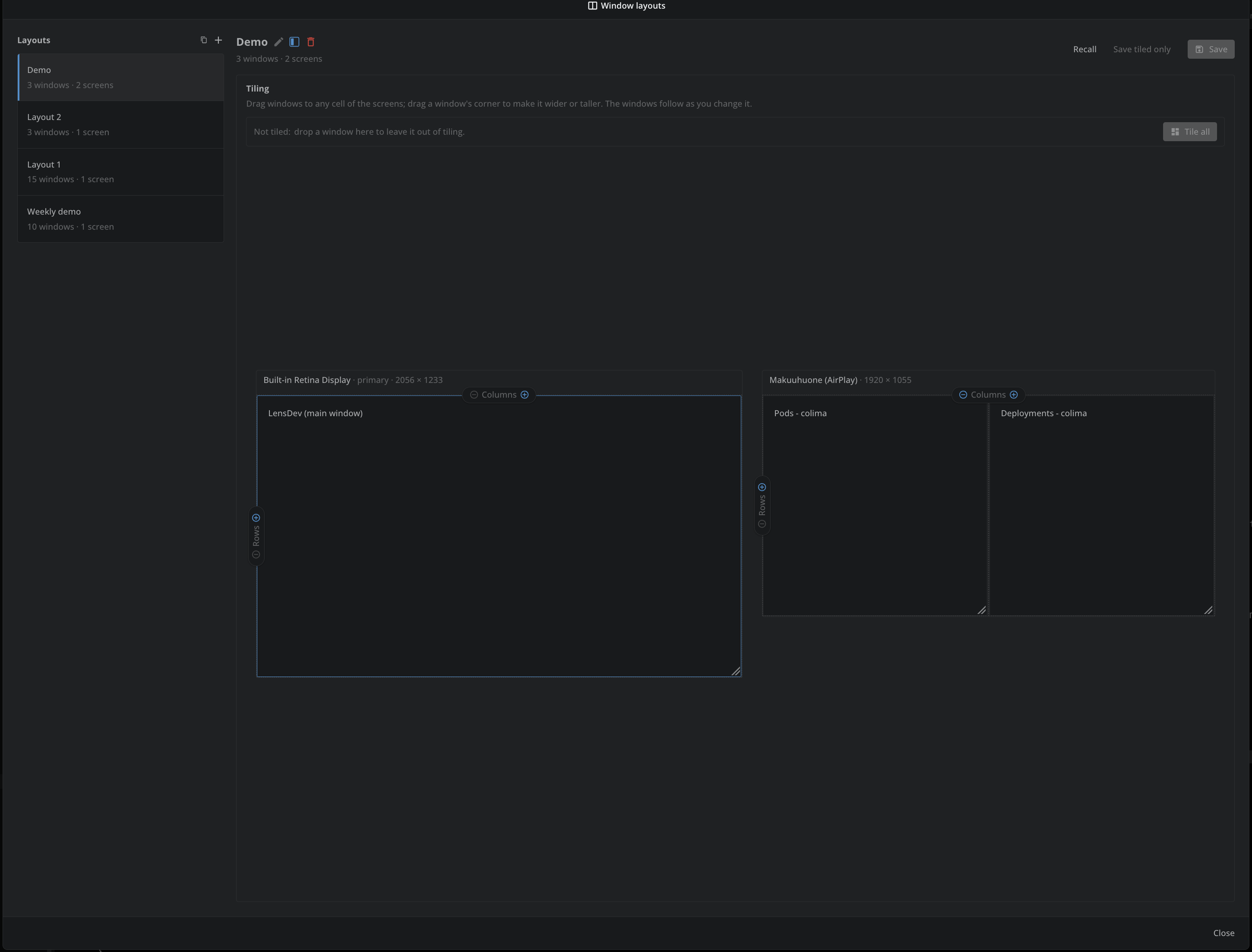
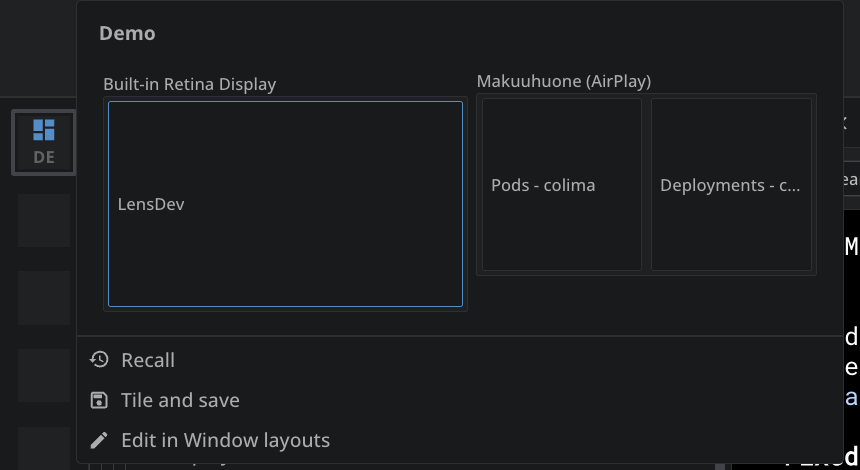
- The extension has an icon and a banner of its own, and its README shows the Window layouts dialog and the hotbar preview.
|
|
9
|
+
|
|
5
10
|
## 0.2.0
|
|
6
11
|
|
|
7
12
|
- The dialog marks a window not saved by its orange outline alone, rather than with "not saved"; a window not tiled is outlined so too, as its tile would be.
|
package/README.md
CHANGED
|
@@ -2,6 +2,8 @@
|
|
|
2
2
|
|
|
3
3
|
Save how the windows of Lens are arranged under a name, such as "Debugging" or "Two screens", and recall it whenever you like. A layout remembers where every window of Lens sits, the application window and every window opened from it, and whether it is maximized, minimized or full screen. Recalling a layout puts every window back where it was, opening again the ones closed since.
|
|
4
4
|
|
|
5
|
+
|
|
6
|
+
|
|
5
7
|
## Features
|
|
6
8
|
|
|
7
9
|
- Save the current arrangement of all Lens windows as a new layout with **+**. It is named "Layout 1", "Layout 2" and so on; click its name to rename it.
|
|
@@ -36,6 +38,9 @@ Arranging windows needs Lens Studio. Without it, the extension tells you that la
|
|
|
36
38
|
- To save over a layout: select it, then click its **Save**. It saves where the windows are now and the tiling below.
|
|
37
39
|
- To recall: point at a layout in the list, then click the recall button at the right end of its row.
|
|
38
40
|
- To recall from the hotbar: select a layout and click the hotbar button beside its name. The layout shows in the hotbar by its initials; click it to recall the layout. Point at it to see the layout's tiling, where clicking a window brings it to the front, opening it again first when it is not open, with **Recall**, **Tile and save**, which puts the windows in their tiles by the layout's own tiling and saves them so (a window it has no tile for is saved as not tiled), and **Edit in Window layouts**, which opens the dialog with the layout selected. Click that button again, or right-click the item and choose "Remove from hotbar", to take it off.
|
|
41
|
+
|
|
42
|
+
|
|
43
|
+
|
|
39
44
|
- To rename: select a layout, click its name, type the new name and press Enter.
|
|
40
45
|
- To delete: select a layout, then click **Delete**.
|
|
41
46
|
- To tile: arrange the windows under **Tiling** in the dialog. They follow every change you make there, a moment after it. **Window Layouts: Tile windows** in the command palette tiles them as arranged too.
|
package/assets/banner.svg
CHANGED
|
@@ -1,11 +1,44 @@
|
|
|
1
1
|
<svg xmlns="http://www.w3.org/2000/svg" viewBox="0 0 1200 600" width="1200" height="600">
|
|
2
|
-
<!-- A placeholder: replace it with a banner of the extension's own, twice as wide as it is tall. -->
|
|
3
2
|
<defs>
|
|
4
3
|
<linearGradient id="background" x1="0" y1="0" x2="1" y2="1">
|
|
5
|
-
<stop offset="0" stop-color="#
|
|
6
|
-
<stop offset="1" stop-color="#
|
|
4
|
+
<stop offset="0" stop-color="#2c6fa3"/>
|
|
5
|
+
<stop offset="1" stop-color="#16263d"/>
|
|
7
6
|
</linearGradient>
|
|
7
|
+
<g id="bar">
|
|
8
|
+
<circle cx="0" cy="0" r="5" fill="#ff5f57"/>
|
|
9
|
+
<circle cx="16" cy="0" r="5" fill="#febc2e"/>
|
|
10
|
+
<circle cx="32" cy="0" r="5" fill="#28c840"/>
|
|
11
|
+
</g>
|
|
8
12
|
</defs>
|
|
9
13
|
<rect width="1200" height="600" fill="url(#background)"/>
|
|
10
|
-
|
|
14
|
+
|
|
15
|
+
<!-- Two screens side by side, their windows tiled -->
|
|
16
|
+
<g transform="translate(150 150)">
|
|
17
|
+
<rect width="440" height="260" rx="14" fill="#0f1b2b" stroke="#5aa9e6" stroke-width="4"/>
|
|
18
|
+
<rect x="16" y="16" width="200" height="228" rx="8" fill="#ffffff"/>
|
|
19
|
+
<rect x="16" y="16" width="200" height="26" rx="8" fill="#dbe8f4"/>
|
|
20
|
+
<use href="#bar" x="32" y="29"/>
|
|
21
|
+
<rect x="228" y="16" width="196" height="108" rx="8" fill="#ffffff"/>
|
|
22
|
+
<rect x="228" y="16" width="196" height="26" rx="8" fill="#dbe8f4"/>
|
|
23
|
+
<use href="#bar" x="244" y="29"/>
|
|
24
|
+
<rect x="228" y="136" width="196" height="108" rx="8" fill="#ffffff" fill-opacity="0.75"/>
|
|
25
|
+
<rect x="228" y="136" width="196" height="26" rx="8" fill="#dbe8f4" fill-opacity="0.75"/>
|
|
26
|
+
<use href="#bar" x="244" y="149"/>
|
|
27
|
+
<rect x="190" y="268" width="60" height="22" fill="#5aa9e6"/>
|
|
28
|
+
<rect x="150" y="288" width="140" height="10" rx="5" fill="#5aa9e6"/>
|
|
29
|
+
</g>
|
|
30
|
+
<g transform="translate(620 150)">
|
|
31
|
+
<rect width="430" height="260" rx="14" fill="#0f1b2b" stroke="#5aa9e6" stroke-width="4"/>
|
|
32
|
+
<rect x="16" y="16" width="398" height="108" rx="8" fill="#ffffff"/>
|
|
33
|
+
<rect x="16" y="16" width="398" height="26" rx="8" fill="#dbe8f4"/>
|
|
34
|
+
<use href="#bar" x="32" y="29"/>
|
|
35
|
+
<rect x="16" y="136" width="193" height="108" rx="8" fill="#ffffff" fill-opacity="0.75"/>
|
|
36
|
+
<rect x="16" y="136" width="193" height="26" rx="8" fill="#dbe8f4" fill-opacity="0.75"/>
|
|
37
|
+
<use href="#bar" x="32" y="149"/>
|
|
38
|
+
<rect x="221" y="136" width="193" height="108" rx="8" fill="none" stroke="#ff9f43" stroke-width="4" stroke-dasharray="12 8"/>
|
|
39
|
+
<rect x="185" y="268" width="60" height="22" fill="#5aa9e6"/>
|
|
40
|
+
<rect x="145" y="288" width="140" height="10" rx="5" fill="#5aa9e6"/>
|
|
41
|
+
</g>
|
|
42
|
+
|
|
43
|
+
<text x="600" y="505" text-anchor="middle" font-family="Helvetica, Arial, sans-serif" font-size="56" font-weight="700" fill="#ffffff">Window Layouts</text>
|
|
11
44
|
</svg>
|
|
Binary file
|
package/assets/icon.svg
CHANGED
|
@@ -1,5 +1,7 @@
|
|
|
1
1
|
<svg xmlns="http://www.w3.org/2000/svg" viewBox="0 0 64 64" width="64" height="64">
|
|
2
|
-
<!--
|
|
2
|
+
<!-- Three windows tiled on a screen: one tall on the left, two stacked on the right. -->
|
|
3
3
|
<rect width="64" height="64" rx="14" fill="#3d90ce"/>
|
|
4
|
-
<
|
|
4
|
+
<rect x="11" y="11" width="19" height="42" rx="4" fill="#ffffff"/>
|
|
5
|
+
<rect x="34" y="11" width="19" height="19" rx="4" fill="#ffffff"/>
|
|
6
|
+
<rect x="34" y="34" width="19" height="19" rx="4" fill="#ffffff" fill-opacity="0.6"/>
|
|
5
7
|
</svg>
|
|
Binary file
|