@juliantanx/aiusage 1.2.1 → 1.3.1
This diff represents the content of publicly available package versions that have been released to one of the supported registries. The information contained in this diff is provided for informational purposes only and reflects changes between package versions as they appear in their respective public registries.
- package/LICENSE +21 -0
- package/README.md +259 -46
- package/dist/index.js +3432 -1450
- package/dist/web/_app/immutable/assets/0.C5PeBlns.css +1 -0
- package/dist/web/_app/immutable/assets/10.DpWloLoX.css +1 -0
- package/dist/web/_app/immutable/assets/11.BfaLSE4e.css +1 -0
- package/dist/web/_app/immutable/assets/12.D4XIqeEN.css +1 -0
- package/dist/web/_app/immutable/assets/13.CR85TxeS.css +1 -0
- package/dist/web/_app/immutable/assets/14.CxRLR3o7.css +1 -0
- package/dist/web/_app/immutable/assets/2.BLunjqo3.css +1 -0
- package/dist/web/_app/immutable/assets/3.DQh9JikT.css +1 -0
- package/dist/web/_app/immutable/assets/4.CnA4GaE5.css +1 -0
- package/dist/web/_app/immutable/assets/5.D4N7n6x9.css +1 -0
- package/dist/web/_app/immutable/assets/6.8Efnpu8u.css +1 -0
- package/dist/web/_app/immutable/assets/7.CQvfgmQf.css +1 -0
- package/dist/web/_app/immutable/assets/8.BeGOLIpG.css +1 -0
- package/dist/web/_app/immutable/assets/9.DMukHCtv.css +1 -0
- package/dist/web/_app/immutable/assets/ToolSelector.BRqFUj1Q.css +1 -0
- package/dist/web/_app/immutable/assets/ToolSelector.Bqx3ytrl.css +1 -0
- package/dist/web/_app/immutable/assets/_layout.C2s9Ry1h.css +1 -0
- package/dist/web/_app/immutable/assets/_page.8Efnpu8u.css +1 -0
- package/dist/web/_app/immutable/assets/_page.BeGOLIpG.css +1 -0
- package/dist/web/_app/immutable/assets/_page.BfaLSE4e.css +1 -0
- package/dist/web/_app/immutable/assets/_page.CQvfgmQf.css +1 -0
- package/dist/web/_app/immutable/assets/_page.CR85TxeS.css +1 -0
- package/dist/web/_app/immutable/assets/_page.CYETnzhl.css +1 -0
- package/dist/web/_app/immutable/assets/_page.CmayGpOu.css +1 -0
- package/dist/web/_app/immutable/assets/_page.CnA4GaE5.css +1 -0
- package/dist/web/_app/immutable/assets/_page.CxRLR3o7.css +1 -0
- package/dist/web/_app/immutable/assets/_page.D4N7n6x9.css +1 -0
- package/dist/web/_app/immutable/assets/_page.DDYvQrAf.css +1 -0
- package/dist/web/_app/immutable/assets/_page.DQh9JikT.css +1 -0
- package/dist/web/_app/immutable/assets/_page.DpWloLoX.css +1 -0
- package/dist/web/_app/immutable/chunks/ToolSelector.Dhbay8qR.js +2 -0
- package/dist/web/_app/immutable/chunks/api.Wak6H2JS.js +1 -0
- package/dist/web/_app/immutable/chunks/entry.CS-NDdiQ.js +3 -0
- package/dist/web/_app/immutable/chunks/i18n.BCaZpNqk.js +1 -0
- package/dist/web/_app/immutable/chunks/{index.CUfK07C5.js → index.BmCbw0jM.js} +1 -1
- package/dist/web/_app/immutable/chunks/{index.BjVwNvJa.js → index.CPsgU-fv.js} +1 -1
- package/dist/web/_app/immutable/chunks/scheduler.DFD7qxcZ.js +1 -0
- package/dist/web/_app/immutable/chunks/stores.B1g8D8DV.js +1 -0
- package/dist/web/_app/immutable/chunks/{stores.UWwZtiEq.js → stores.BjyZzXAW.js} +1 -1
- package/dist/web/_app/immutable/entry/app.27f4j9Xy.js +2 -0
- package/dist/web/_app/immutable/entry/start.bzCZowcz.js +1 -0
- package/dist/web/_app/immutable/nodes/0.CFOrMeCV.js +1 -0
- package/dist/web/_app/immutable/nodes/{1.DO29y7Dm.js → 1.DZIXtjp3.js} +1 -1
- package/dist/web/_app/immutable/nodes/10.DxJi0s_F.js +1 -0
- package/dist/web/_app/immutable/nodes/11.q1SVEyD9.js +1 -0
- package/dist/web/_app/immutable/nodes/12.CamXVWac.js +1 -0
- package/dist/web/_app/immutable/nodes/13.Bbzem3lL.js +1 -0
- package/dist/web/_app/immutable/nodes/14.BbcTrrp0.js +1 -0
- package/dist/web/_app/immutable/nodes/2.DcYQmIYj.js +3 -0
- package/dist/web/_app/immutable/nodes/3.DqJoSOZA.js +1 -0
- package/dist/web/_app/immutable/nodes/4.CoqRShfZ.js +41 -0
- package/dist/web/_app/immutable/nodes/5.BcRc8qNP.js +1 -0
- package/dist/web/_app/immutable/nodes/6.DU7MEeuP.js +1 -0
- package/dist/web/_app/immutable/nodes/7.CE7kQC3R.js +9 -0
- package/dist/web/_app/immutable/nodes/8.DzIcKP7s.js +1 -0
- package/dist/web/_app/immutable/nodes/9.4mP0VDWh.js +1 -0
- package/dist/web/_app/version.json +1 -1
- package/dist/web/index.html +12 -11
- package/package.json +11 -4
- package/dist/chunk-2DX56FB6.js +0 -522
- package/dist/dist-4I33E46P.js +0 -42
- package/dist/web/_app/immutable/assets/0.Cynllvu4.css +0 -1
- package/dist/web/_app/immutable/assets/10.Doxq00gF.css +0 -1
- package/dist/web/_app/immutable/assets/11.D5bUq0yE.css +0 -1
- package/dist/web/_app/immutable/assets/12.BA90S8v7.css +0 -1
- package/dist/web/_app/immutable/assets/2.fho1OPpm.css +0 -1
- package/dist/web/_app/immutable/assets/3.DwwXF_G1.css +0 -1
- package/dist/web/_app/immutable/assets/4.CVp0A8QV.css +0 -1
- package/dist/web/_app/immutable/assets/5.DM2hVWjt.css +0 -1
- package/dist/web/_app/immutable/assets/6.NdKfVCiG.css +0 -1
- package/dist/web/_app/immutable/assets/7.CeV8yHSX.css +0 -1
- package/dist/web/_app/immutable/assets/8.BCdjuhVX.css +0 -1
- package/dist/web/_app/immutable/assets/9.ClvwkhDe.css +0 -1
- package/dist/web/_app/immutable/assets/ToolSelector.BKgB2QVk.css +0 -1
- package/dist/web/_app/immutable/assets/ToolSelector.HSbC8-q9.css +0 -1
- package/dist/web/_app/immutable/assets/_layout.BpydV4rl.css +0 -1
- package/dist/web/_app/immutable/assets/_page.BA90S8v7.css +0 -1
- package/dist/web/_app/immutable/assets/_page.BCdjuhVX.css +0 -1
- package/dist/web/_app/immutable/assets/_page.CVp0A8QV.css +0 -1
- package/dist/web/_app/immutable/assets/_page.CeV8yHSX.css +0 -1
- package/dist/web/_app/immutable/assets/_page.ClvwkhDe.css +0 -1
- package/dist/web/_app/immutable/assets/_page.D5bUq0yE.css +0 -1
- package/dist/web/_app/immutable/assets/_page.DM2hVWjt.css +0 -1
- package/dist/web/_app/immutable/assets/_page.DTuZozBR.css +0 -1
- package/dist/web/_app/immutable/assets/_page.Doxq00gF.css +0 -1
- package/dist/web/_app/immutable/assets/_page.DwwXF_G1.css +0 -1
- package/dist/web/_app/immutable/assets/_page.NdKfVCiG.css +0 -1
- package/dist/web/_app/immutable/chunks/ToolSelector.RXWBkdpM.js +0 -2
- package/dist/web/_app/immutable/chunks/api.Cv9iCeAW.js +0 -1
- package/dist/web/_app/immutable/chunks/entry.CsncxtbZ.js +0 -3
- package/dist/web/_app/immutable/chunks/i18n.CrmYDWvg.js +0 -1
- package/dist/web/_app/immutable/chunks/scheduler.DukoKnjQ.js +0 -1
- package/dist/web/_app/immutable/entry/app.DOglqJ4_.js +0 -2
- package/dist/web/_app/immutable/entry/start.BH01iOT0.js +0 -1
- package/dist/web/_app/immutable/nodes/0.eiglG3hs.js +0 -1
- package/dist/web/_app/immutable/nodes/10.Jb_wogsG.js +0 -1
- package/dist/web/_app/immutable/nodes/11.CpuiQa6R.js +0 -1
- package/dist/web/_app/immutable/nodes/12.BiWlfD7q.js +0 -1
- package/dist/web/_app/immutable/nodes/2.CQudsTBz.js +0 -3
- package/dist/web/_app/immutable/nodes/3.Dg9c_XQX.js +0 -1
- package/dist/web/_app/immutable/nodes/4.DE3OvqSg.js +0 -11
- package/dist/web/_app/immutable/nodes/5.sGu0NOiv.js +0 -1
- package/dist/web/_app/immutable/nodes/6.BOL9Fhgv.js +0 -1
- package/dist/web/_app/immutable/nodes/7.B2wRNntO.js +0 -1
- package/dist/web/_app/immutable/nodes/8.BVACtdPg.js +0 -1
- package/dist/web/_app/immutable/nodes/9.DXxXyKe4.js +0 -1
package/LICENSE
ADDED
|
@@ -0,0 +1,21 @@
|
|
|
1
|
+
MIT License
|
|
2
|
+
|
|
3
|
+
Copyright (c) 2026 juliantanx
|
|
4
|
+
|
|
5
|
+
Permission is hereby granted, free of charge, to any person obtaining a copy
|
|
6
|
+
of this software and associated documentation files (the "Software"), to deal
|
|
7
|
+
in the Software without restriction, including without limitation the rights
|
|
8
|
+
to use, copy, modify, merge, publish, distribute, sublicense, and/or sell
|
|
9
|
+
copies of the Software, and to permit persons to whom the Software is
|
|
10
|
+
furnished to do so, subject to the following conditions:
|
|
11
|
+
|
|
12
|
+
The above copyright notice and this permission notice shall be included in all
|
|
13
|
+
copies or substantial portions of the Software.
|
|
14
|
+
|
|
15
|
+
THE SOFTWARE IS PROVIDED "AS IS", WITHOUT WARRANTY OF ANY KIND, EXPRESS OR
|
|
16
|
+
IMPLIED, INCLUDING BUT NOT LIMITED TO THE WARRANTIES OF MERCHANTABILITY,
|
|
17
|
+
FITNESS FOR A PARTICULAR PURPOSE AND NONINFRINGEMENT. IN NO EVENT SHALL THE
|
|
18
|
+
AUTHORS OR COPYRIGHT HOLDERS BE LIABLE FOR ANY CLAIM, DAMAGES OR OTHER
|
|
19
|
+
LIABILITY, WHETHER IN AN ACTION OF CONTRACT, TORT OR OTHERWISE, ARISING FROM,
|
|
20
|
+
OUT OF OR IN CONNECTION WITH THE SOFTWARE OR THE USE OR OTHER DEALINGS IN THE
|
|
21
|
+
SOFTWARE.
|
package/README.md
CHANGED
|
@@ -1,42 +1,58 @@
|
|
|
1
|
-
# aiusage
|
|
1
|
+
# aiusage — AI Coding Assistant Usage Tracker
|
|
2
2
|
|
|
3
|
-
|
|
3
|
+
**Open-source CLI and dashboard to track token usage, cost, and sessions across Claude Code, Codex, OpenCode, Hermes, Qoder, and more.** Local-first, privacy-respecting, with an optional web dashboard and multi-machine sync.
|
|
4
4
|
|
|
5
|
-
|
|
5
|
+
[](https://www.npmjs.com/package/@juliantanx/aiusage)
|
|
6
|
+
[](https://github.com/juliantanx/aiusage/actions/workflows/test.yml)
|
|
7
|
+
[](https://opensource.org/licenses/MIT)
|
|
8
|
+
[](https://nodejs.org/)
|
|
6
9
|
|
|
7
|
-
|
|
10
|
+
**aiusage** gives you one local-first place to understand how your AI coding tools are being used: tokens, cost, model mix, tool activity, projects, sessions, and multi-machine sync when you need it. Supports Claude Code, Codex, OpenClaw, OpenCode, Hermes, and Qoder.
|
|
8
11
|
|
|
9
|
-
|
|
10
|
-
- Analyze token usage, cost, model mix, and tool call activity.
|
|
11
|
-
- Explore the data through a local dashboard with overview ranges from Today to All Time.
|
|
12
|
-
- Sync usage data across multiple machines with GitHub, S3, or R2.
|
|
13
|
-
- Keep everything local-first, with optional cloud sync when you need shared visibility.
|
|
12
|
+
English | [中文](https://github.com/juliantanx/aiusage/blob/main/README_zh.md)
|
|
14
13
|
|
|
15
14
|
## Quick Start
|
|
16
15
|
|
|
17
|
-
**Prerequisites:** Node.js
|
|
16
|
+
**Prerequisites:** Node.js 18 or later
|
|
18
17
|
|
|
19
18
|
```bash
|
|
20
|
-
# Install
|
|
21
19
|
npm install -g @juliantanx/aiusage
|
|
22
|
-
|
|
23
|
-
# Parse local session logs
|
|
24
20
|
aiusage parse
|
|
25
|
-
|
|
26
|
-
# Start the dashboard
|
|
27
21
|
aiusage serve
|
|
28
|
-
# Open http://localhost:3847
|
|
29
22
|
```
|
|
30
23
|
|
|
31
|
-
|
|
24
|
+
Open `http://localhost:3847` to explore the dashboard.
|
|
32
25
|
|
|
33
|
-
|
|
34
|
-
aiusage parse
|
|
35
|
-
aiusage serve
|
|
36
|
-
```
|
|
26
|
+
If aiusage is useful, consider starring the repo to help more developers discover it.
|
|
37
27
|
|
|
38
28
|
`aiusage` does not run a built-in background parser. If you want automatic imports, schedule `aiusage parse` with cron or Task Scheduler.
|
|
39
29
|
|
|
30
|
+
### Running in Background (PM2)
|
|
31
|
+
|
|
32
|
+
`aiusage serve` runs in the foreground and stops when you close the terminal. To keep it running in the background on **Windows, macOS, and Linux**, use [PM2](https://pm2.keymetrics.io/):
|
|
33
|
+
|
|
34
|
+
```bash
|
|
35
|
+
# Install PM2 (one-time)
|
|
36
|
+
npm install -g pm2 pm2-startup
|
|
37
|
+
|
|
38
|
+
# Start aiusage serve as a background service
|
|
39
|
+
pm2 start aiusage -- serve
|
|
40
|
+
|
|
41
|
+
# Start the system tray widget as a background service (optional)
|
|
42
|
+
pm2 start aiusage-widget -- --foreground
|
|
43
|
+
|
|
44
|
+
# Set auto-start on boot (Windows / macOS / Linux)
|
|
45
|
+
pm2 save
|
|
46
|
+
pm2-startup install
|
|
47
|
+
|
|
48
|
+
# Common commands
|
|
49
|
+
pm2 list # View running status
|
|
50
|
+
pm2 logs # View logs
|
|
51
|
+
pm2 stop all # Stop all services
|
|
52
|
+
pm2 restart all # Restart all services
|
|
53
|
+
pm2 delete all # Remove all services
|
|
54
|
+
```
|
|
55
|
+
|
|
40
56
|
<details>
|
|
41
57
|
<summary>Build from source</summary>
|
|
42
58
|
|
|
@@ -65,28 +81,187 @@ pnpm rebuild:sqlite
|
|
|
65
81
|
|
|
66
82
|
</details>
|
|
67
83
|
|
|
84
|
+
## Why aiusage
|
|
85
|
+
|
|
86
|
+
AI coding assistant usage is scattered by default: different tools, different local logs, different machines, and no shared view of tokens or cost.
|
|
87
|
+
|
|
88
|
+
aiusage brings that data into one local-first dashboard so you can:
|
|
89
|
+
|
|
90
|
+
- Track token usage, cost, model mix, and tool-call activity in one place.
|
|
91
|
+
- Aggregate usage across Claude Code, Codex, OpenClaw, OpenCode, Hermes, and Qoder.
|
|
92
|
+
- Understand usage over time through overview, token, cost, model, session, and project views.
|
|
93
|
+
- Sync across multiple machines with GitHub, S3, or R2 when shared visibility matters.
|
|
94
|
+
- Keep your data local by default, with optional sync only when you choose it.
|
|
95
|
+
|
|
96
|
+
## Who is this for?
|
|
97
|
+
|
|
98
|
+
aiusage is built for:
|
|
99
|
+
|
|
100
|
+
- Developers using Claude Code, Codex, or other AI coding assistants every day.
|
|
101
|
+
- People who want visibility into token usage and spend over time.
|
|
102
|
+
- Multi-tool users who want one dashboard instead of multiple disconnected logs.
|
|
103
|
+
- Multi-machine workflows that need optional aggregation and sync.
|
|
104
|
+
|
|
105
|
+
## Supported tools
|
|
106
|
+
|
|
107
|
+
aiusage currently supports:
|
|
108
|
+
|
|
109
|
+
- Claude Code
|
|
110
|
+
- Codex
|
|
111
|
+
- OpenClaw
|
|
112
|
+
- OpenCode
|
|
113
|
+
- Hermes
|
|
114
|
+
- Qoder
|
|
115
|
+
- Cursor
|
|
116
|
+
|
|
68
117
|
## Screenshots
|
|
69
118
|
|
|
70
|
-

|
|
120
|
+
|
|
121
|
+
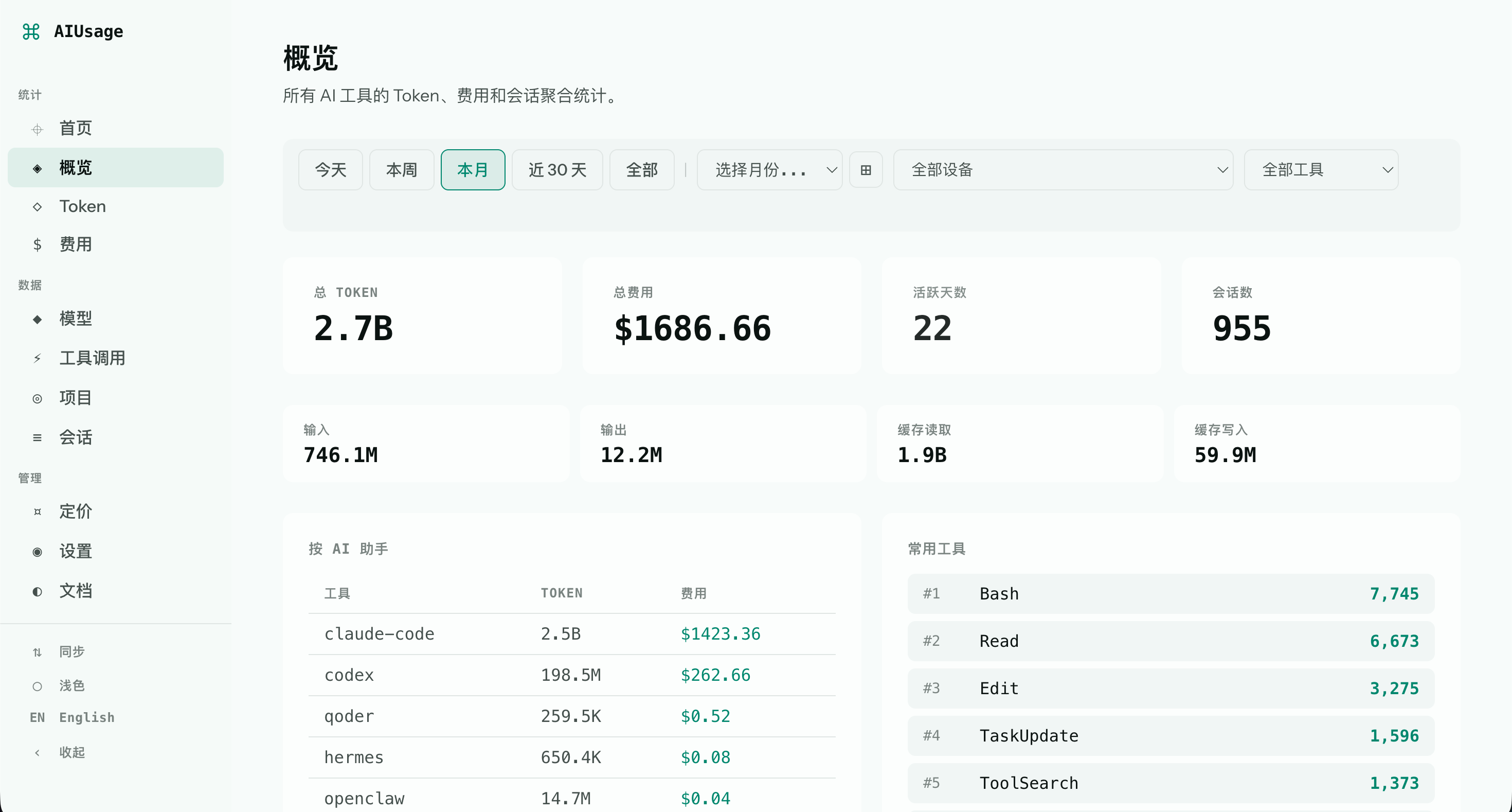
|
|
122
|
+
|
|
123
|
+
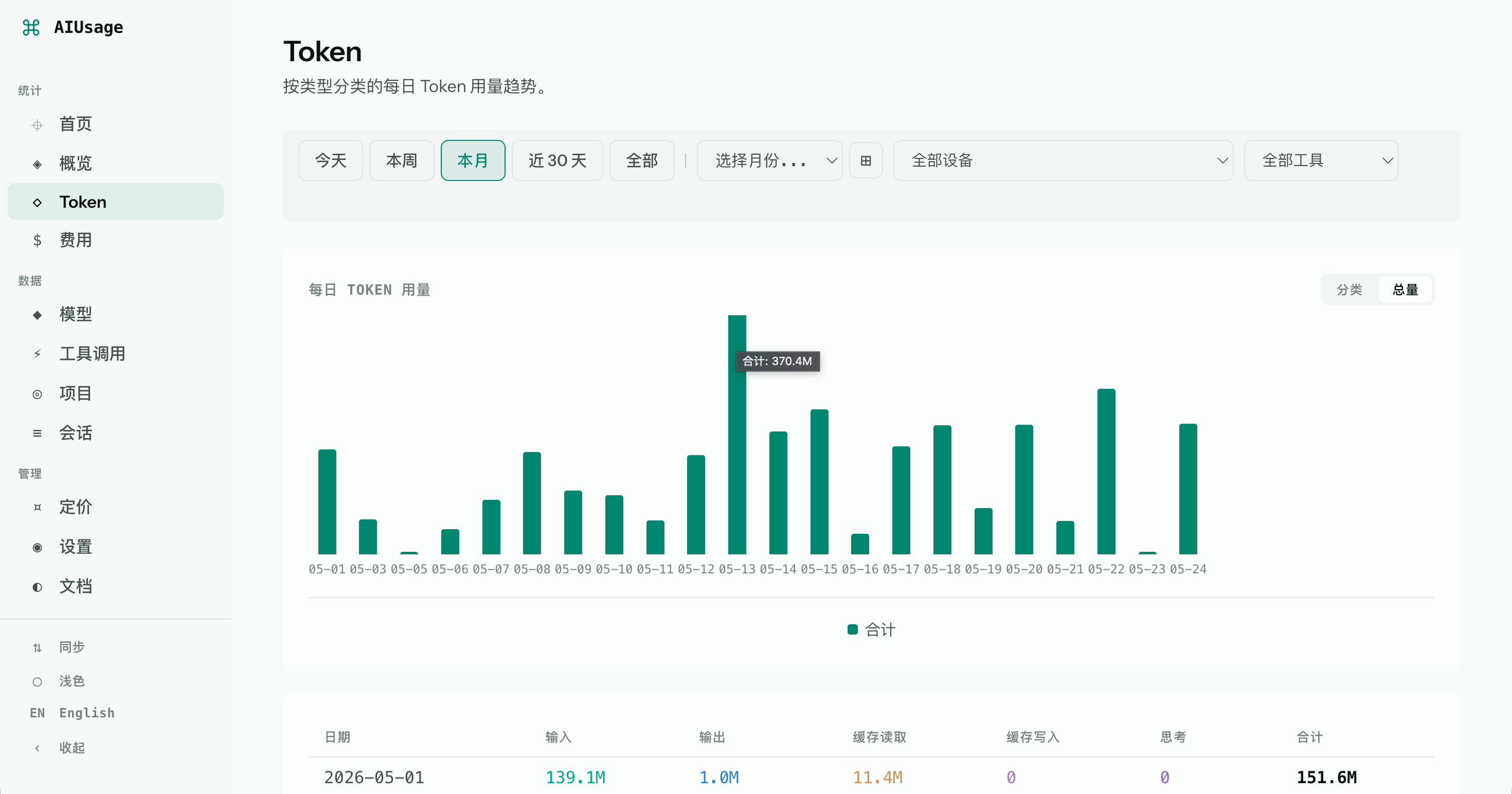
|
|
124
|
+
|
|
125
|
+
## Common use cases
|
|
126
|
+
|
|
127
|
+
Use aiusage to:
|
|
128
|
+
|
|
129
|
+
- Track token and cost trends across AI coding assistants.
|
|
130
|
+
- Compare model usage and activity over time.
|
|
131
|
+
- Inspect tool-call volume and session-level behavior.
|
|
132
|
+
- Aggregate usage across multiple machines into one view.
|
|
133
|
+
- Run a local or Docker-hosted dashboard for ongoing visibility.
|
|
134
|
+
|
|
135
|
+
## CLI Reference
|
|
136
|
+
|
|
137
|
+
### `aiusage` (default)
|
|
138
|
+
|
|
139
|
+
Print a usage summary to the terminal (same as `aiusage summary`).
|
|
140
|
+
|
|
141
|
+
### `aiusage parse`
|
|
71
142
|
|
|
72
|
-
|
|
143
|
+
Import newly appended local session data from discovered source paths.
|
|
73
144
|
|
|
74
|
-
|
|
145
|
+
| Option | Description |
|
|
146
|
+
|--------|-------------|
|
|
147
|
+
| `--tool <tool>` | Only parse a specific tool: `claude-code`, `codex`, `openclaw`, `opencode`, `hermes`, `qoder`, `cursor` |
|
|
148
|
+
| `--progress` | Show real-time progress bar on stderr (TTY only, silent in pipes/CI) |
|
|
75
149
|
|
|
76
|
-
|
|
150
|
+
```bash
|
|
151
|
+
aiusage parse # Parse all tools
|
|
152
|
+
aiusage parse --tool claude-code # Only parse Claude Code logs
|
|
153
|
+
aiusage parse --progress # Show progress bar while parsing
|
|
154
|
+
```
|
|
155
|
+
|
|
156
|
+
### `aiusage serve`
|
|
157
|
+
|
|
158
|
+
Start the local web dashboard and runtime settings controller.
|
|
77
159
|
|
|
78
|
-
|
|
|
79
|
-
|
|
80
|
-
|
|
|
81
|
-
|
|
82
|
-
|
|
83
|
-
|
|
84
|
-
|
|
85
|
-
|
|
86
|
-
|
|
87
|
-
|
|
88
|
-
|
|
89
|
-
|
|
160
|
+
| Option | Description | Default |
|
|
161
|
+
|--------|-------------|---------|
|
|
162
|
+
| `-p, --port <port>` | Port number | `3847` |
|
|
163
|
+
|
|
164
|
+
```bash
|
|
165
|
+
aiusage serve # Start on port 3847
|
|
166
|
+
aiusage serve -p 8080 # Start on port 8080
|
|
167
|
+
```
|
|
168
|
+
|
|
169
|
+
### `aiusage summary`
|
|
170
|
+
|
|
171
|
+
Print a usage summary in the terminal.
|
|
172
|
+
|
|
173
|
+
| Option | Description |
|
|
174
|
+
|--------|-------------|
|
|
175
|
+
| `--device <id>` | Filter by device instance ID |
|
|
176
|
+
| `--tool <tool>` | Filter by tool type (`claude-code`, `codex`, `openclaw`, `opencode`, `hermes`, `qoder`, `cursor`) |
|
|
177
|
+
|
|
178
|
+
```bash
|
|
179
|
+
aiusage summary # All-time summary
|
|
180
|
+
aiusage summary --tool claude-code # Single tool
|
|
181
|
+
```
|
|
182
|
+
|
|
183
|
+
### `aiusage status`
|
|
184
|
+
|
|
185
|
+
Show version, device name, DB path, schema version, table/view counts, record count, DB size, and sync status.
|
|
186
|
+
|
|
187
|
+
### `aiusage export`
|
|
188
|
+
|
|
189
|
+
Export records as CSV, JSON, or NDJSON.
|
|
190
|
+
|
|
191
|
+
| Option | Description | Required |
|
|
192
|
+
|--------|-------------|----------|
|
|
193
|
+
| `--format <format>` | Output format: `csv`, `json`, `ndjson` | Yes |
|
|
194
|
+
| `-o, --output <file>` | Output file path (default: stdout) | No |
|
|
195
|
+
|
|
196
|
+
```bash
|
|
197
|
+
aiusage export --format csv # CSV to stdout
|
|
198
|
+
aiusage export --format json -o report.json # JSON to file
|
|
199
|
+
aiusage export --format ndjson # NDJSON to stdout
|
|
200
|
+
```
|
|
201
|
+
|
|
202
|
+
### `aiusage clean`
|
|
203
|
+
|
|
204
|
+
Remove old records from the local database based on age.
|
|
205
|
+
|
|
206
|
+
| Option | Description | Default |
|
|
207
|
+
|--------|-------------|---------|
|
|
208
|
+
| `--before <duration>` | Delete data older than this duration (e.g. `30d`, `180d`) | `180d` |
|
|
209
|
+
|
|
210
|
+
```bash
|
|
211
|
+
aiusage clean # Delete records older than 180 days
|
|
212
|
+
aiusage clean --before 30d # Delete records older than 30 days
|
|
213
|
+
aiusage clean --before 90d --yes # Delete records older than 90 days, skip confirm
|
|
214
|
+
```
|
|
215
|
+
|
|
216
|
+
### `aiusage reset`
|
|
217
|
+
|
|
218
|
+
Delete all parsed records, tool calls, synced data, and the parse watermark. Source log files (`~/.claude`, `~/.codex`, etc.) are **not** affected. Use this to re-import everything from scratch.
|
|
219
|
+
|
|
220
|
+
| Option | Description |
|
|
221
|
+
|--------|-------------|
|
|
222
|
+
| `--yes` | Skip confirmation prompt (required to execute) |
|
|
223
|
+
|
|
224
|
+
```bash
|
|
225
|
+
aiusage reset --yes # Wipe all data, then run `aiusage parse` to re-import
|
|
226
|
+
```
|
|
227
|
+
|
|
228
|
+
### `aiusage recalc`
|
|
229
|
+
|
|
230
|
+
Recalculate costs using the latest pricing data.
|
|
231
|
+
|
|
232
|
+
```bash
|
|
233
|
+
aiusage recalc
|
|
234
|
+
```
|
|
235
|
+
|
|
236
|
+
### `aiusage init`
|
|
237
|
+
|
|
238
|
+
Configure a sync backend for multi-machine data aggregation.
|
|
239
|
+
|
|
240
|
+
| Option | Description |
|
|
241
|
+
|--------|-------------|
|
|
242
|
+
| `--backend <backend>` | Sync backend: `github`, `s3`, `skip` |
|
|
243
|
+
| `--repo <repo>` | GitHub repository (format: `username/repo-name`) |
|
|
244
|
+
| `--token <token>` | GitHub Personal Access Token |
|
|
245
|
+
| `--bucket <bucket>` | S3 bucket name |
|
|
246
|
+
| `--prefix <prefix>` | S3 object prefix (default: `aiusage/`) |
|
|
247
|
+
| `--endpoint <endpoint>` | S3 endpoint URL |
|
|
248
|
+
| `--region <region>` | S3 region (default: `auto`) |
|
|
249
|
+
| `--access-key-id <id>` | S3 access key ID |
|
|
250
|
+
| `--secret-access-key <key>` | S3 secret access key |
|
|
251
|
+
| `--device <alias>` | Device alias |
|
|
252
|
+
|
|
253
|
+
```bash
|
|
254
|
+
aiusage init --backend github --repo user/aiusage-data --token ghp_xxx
|
|
255
|
+
aiusage init --backend s3 --bucket my-bucket --endpoint https://xxx.r2.cloudflarestorage.com --access-key-id AKIAxxx --secret-access-key xxx
|
|
256
|
+
```
|
|
257
|
+
|
|
258
|
+
### `aiusage sync`
|
|
259
|
+
|
|
260
|
+
Push and pull data with the configured remote backend.
|
|
261
|
+
|
|
262
|
+
```bash
|
|
263
|
+
aiusage sync
|
|
264
|
+
```
|
|
90
265
|
|
|
91
266
|
## Web Dashboard
|
|
92
267
|
|
|
@@ -132,7 +307,7 @@ For single-machine usage, Quick Start is enough.
|
|
|
132
307
|
|
|
133
308
|
### Multi-Machine Sync
|
|
134
309
|
|
|
135
|
-
Use this to aggregate token usage from multiple machines into one dashboard. Works with Claude Code, Codex, OpenClaw, OpenCode, and
|
|
310
|
+
Use this to aggregate token usage from multiple machines into one dashboard. Works with Claude Code, Codex, OpenClaw, OpenCode, Hermes, and Qoder.
|
|
136
311
|
|
|
137
312
|
**Architecture:**
|
|
138
313
|
|
|
@@ -157,7 +332,7 @@ Machine C ──┘
|
|
|
157
332
|
|
|
158
333
|
**Step 2 — Install and configure on each machine**
|
|
159
334
|
|
|
160
|
-
On every machine that uses Claude Code, Codex, OpenClaw, OpenCode, or
|
|
335
|
+
On every machine that uses Claude Code, Codex, OpenClaw, OpenCode, Hermes, or Qoder:
|
|
161
336
|
|
|
162
337
|
```bash
|
|
163
338
|
# Install aiusage CLI
|
|
@@ -320,7 +495,8 @@ docker build -t aiusage .
|
|
|
320
495
|
|------|------|
|
|
321
496
|
| Local database | `~/.aiusage/cache.db` |
|
|
322
497
|
| Config | `~/.aiusage/config.json` |
|
|
323
|
-
|
|
|
498
|
+
| Sync state | `~/.aiusage/state.json` |
|
|
499
|
+
| Parse watermarks | `~/.aiusage/watermark.json` |
|
|
324
500
|
|
|
325
501
|
### Default Source Paths
|
|
326
502
|
|
|
@@ -333,6 +509,9 @@ docker build -t aiusage .
|
|
|
333
509
|
| OpenClaw | `~/.openclaw/agents/*/sessions/` | `~/.openclaw/agents/*/sessions/` | `%USERPROFILE%\.openclaw\agents\*\sessions\` |
|
|
334
510
|
| OpenCode | `~/Library/Application Support/opencode/opencode.db` | `~/.local/share/opencode/opencode.db` | `%APPDATA%\opencode\opencode.db` |
|
|
335
511
|
| Hermes | `~/.hermes/state.db` | `~/.hermes/state.db` | `%USERPROFILE%\.hermes\state.db` |
|
|
512
|
+
| Qoder (sessions) | `~/.qoder/logs/sessions/` | `~/.qoder/logs/sessions/` plus WSL-mounted Windows user homes | `%USERPROFILE%\.qoder\logs\sessions\` |
|
|
513
|
+
| Qoder (SQLite) | `~/Library/Application Support/Qoder/SharedClientCache/cache/db/local.db` | `~/.local/share/Qoder/SharedClientCache/cache/db/local.db` | `%LOCALAPPDATA%\Qoder\SharedClientCache\cache\db\local.db` |
|
|
514
|
+
| Cursor | `~/Library/Application Support/Cursor/User/globalStorage/state.vscdb` | `~/.config/Cursor/User/globalStorage/state.vscdb` | `%APPDATA%\Cursor\User\globalStorage\state.vscdb` |
|
|
336
515
|
|
|
337
516
|
Discovery behavior:
|
|
338
517
|
|
|
@@ -341,9 +520,14 @@ Discovery behavior:
|
|
|
341
520
|
- **OpenClaw** — scans each agent's `sessions/` directory under `~/.openclaw/agents/*/sessions/` and skips checkpoint files.
|
|
342
521
|
- **OpenCode** — reads the SQLite database file directly instead of `.jsonl` logs.
|
|
343
522
|
- **Hermes** — reads the SQLite database file (`state.db`) directly. Sessions without a recorded end time are still imported if they have token data (e.g. sessions from a force-quit).
|
|
523
|
+
- **Qoder (sessions)** — recursively scans structured session segment logs (`logs/sessions/**/segments/*.jsonl`) and imports `model.response.completed` token events. On WSL, aiusage also checks mounted Windows user homes such as `/mnt/c/Users/<user>`, `/mnt/d/Users/<user>`, and `/mnt/e/Users/<user>` for the same Qoder session-log layout.
|
|
524
|
+
- **Qoder (SQLite)** — reads the `local.db` SQLite database directly (`SharedClientCache/cache/db/local.db`) and imports assistant messages from the `chat_message` table, joined with `chat_record` for model information. This is the primary source on macOS and is tried alongside the sessions directory.
|
|
525
|
+
- **Cursor** — reads Cursor's `state.vscdb` SQLite database directly and imports composer conversations with token usage data.
|
|
344
526
|
|
|
345
527
|
> On Linux, OpenCode respects `$XDG_DATA_HOME` if set.
|
|
346
528
|
|
|
529
|
+
Qoder Desktop also creates installation files under `Program Files`, UI/cache data under `AppData/Roaming/Qoder` and `AppData/Local/.qoder`, and transcripts under `%USERPROFILE%\.qoder\projects` or `%USERPROFILE%\.qoder\cache`. These are not imported as token records: desktop `Context usage update` log lines are repeated context-window snapshots, and transcripts/conversation-history files do not contain per-request token usage.
|
|
530
|
+
|
|
347
531
|
### Custom Source Paths
|
|
348
532
|
|
|
349
533
|
If you installed a tool to a non-default location, override the paths in the **Settings** page of the web dashboard (`http://localhost:3847/settings` → Sources section), or edit `~/.aiusage/config.json` directly:
|
|
@@ -355,12 +539,15 @@ If you installed a tool to a non-default location, override the paths in the **S
|
|
|
355
539
|
"codex": "/custom/path/.codex/sessions",
|
|
356
540
|
"openclaw": "/custom/sessions-dir",
|
|
357
541
|
"opencode": "/custom/path/opencode.db",
|
|
358
|
-
"hermes": "/custom/path/.hermes/state.db"
|
|
542
|
+
"hermes": "/custom/path/.hermes/state.db",
|
|
543
|
+
"qoder": "/custom/path/.qoder/logs/sessions",
|
|
544
|
+
"qoder-db": "/custom/path/local.db",
|
|
545
|
+
"cursor": "/custom/path/state.vscdb"
|
|
359
546
|
}
|
|
360
547
|
}
|
|
361
548
|
```
|
|
362
549
|
|
|
363
|
-
Only the paths you specify are overridden; unspecified tools fall back to their defaults.
|
|
550
|
+
Only the paths you specify are overridden; unspecified tools fall back to their defaults. `qoder` points to the session logs directory; `qoder-db` points directly to the `local.db` SQLite file.
|
|
364
551
|
|
|
365
552
|
## Database Visualization
|
|
366
553
|
|
|
@@ -402,6 +589,28 @@ packages/
|
|
|
402
589
|
web/ - SvelteKit web dashboard (SPA)
|
|
403
590
|
```
|
|
404
591
|
|
|
592
|
+
## FAQ
|
|
593
|
+
|
|
594
|
+
### Does aiusage upload my data?
|
|
595
|
+
|
|
596
|
+
No. aiusage is local-first. Your usage data stays on your machine unless you explicitly configure a sync backend.
|
|
597
|
+
|
|
598
|
+
### Can I use aiusage across multiple machines?
|
|
599
|
+
|
|
600
|
+
Yes. You can sync usage data through GitHub, S3, or R2 and then view the combined result from any configured machine or Docker deployment.
|
|
601
|
+
|
|
602
|
+
### Does aiusage run a background parser automatically?
|
|
603
|
+
|
|
604
|
+
No. By default, you run `aiusage parse` manually. You can automate parsing and syncing with cron, Task Scheduler, or your own scheduler.
|
|
605
|
+
|
|
606
|
+
### Which assistants are supported?
|
|
607
|
+
|
|
608
|
+
aiusage currently supports Claude Code, Codex, OpenClaw, OpenCode, Hermes, and Qoder.
|
|
609
|
+
|
|
610
|
+
### Can I inspect the raw database myself?
|
|
611
|
+
|
|
612
|
+
Yes. aiusage stores data in a local SQLite database, and the README already documents how to open it in tools like DBeaver, TablePlus, DataGrip, or DB Browser for SQLite.
|
|
613
|
+
|
|
405
614
|
## Friends
|
|
406
615
|
|
|
407
616
|
[**linux.do**](https://linux.do/) — Thanks to the linux.do community for their support and inspiration during the development of this project.
|
|
@@ -410,12 +619,16 @@ packages/
|
|
|
410
619
|
|
|
411
620
|
<a href="https://www.star-history.com/?repos=juliantanx%2Faiusage&type=date&logscale=&legend=top-left">
|
|
412
621
|
<picture>
|
|
413
|
-
<source media="(prefers-color-scheme: dark)" srcset="https://api.star-history.com/chart?repos=juliantanx/aiusage&type=date&theme=dark&legend=top-left&t=
|
|
414
|
-
<source media="(prefers-color-scheme: light)" srcset="https://api.star-history.com/chart?repos=juliantanx/aiusage&type=date&legend=top-left&t=
|
|
415
|
-
<img alt="Star History Chart" src="https://api.star-history.com/chart?repos=juliantanx/aiusage&type=date&legend=top-left&t=
|
|
622
|
+
<source media="(prefers-color-scheme: dark)" srcset="https://api.star-history.com/chart?repos=juliantanx/aiusage&type=date&theme=dark&legend=top-left&t=20260526" />
|
|
623
|
+
<source media="(prefers-color-scheme: light)" srcset="https://api.star-history.com/chart?repos=juliantanx/aiusage&type=date&legend=top-left&t=20260526" />
|
|
624
|
+
<img alt="Star History Chart" src="https://api.star-history.com/chart?repos=juliantanx/aiusage&type=date&legend=top-left&t=20260526" />
|
|
416
625
|
</picture>
|
|
417
626
|
</a>
|
|
418
627
|
|
|
628
|
+
## Contributing
|
|
629
|
+
|
|
630
|
+
Contributions are welcome! See [CONTRIBUTING.md](./CONTRIBUTING.md) for how to get started.
|
|
631
|
+
|
|
419
632
|
## License
|
|
420
633
|
|
|
421
|
-
MIT
|
|
634
|
+
[MIT](./LICENSE)
|