@juicesharp/rpiv-ask-user-question 2.5.2 → 2.6.1
This diff represents the content of publicly available package versions that have been released to one of the supported registries. The information contained in this diff is provided for informational purposes only and reflects changes between package versions as they appear in their respective public registries.
- package/README.md +3 -0
- package/ask-user-question.ts +29 -7
- package/docs/configuration.md +9 -1
- package/docs/hosts.md +6 -0
- package/package.json +3 -2
package/README.md
CHANGED
|
@@ -27,6 +27,8 @@ Nothing to set up — the tool is live as soon as Pi restarts. Hand the model a
|
|
|
27
27
|
|
|
28
28
|
Rather than picking a strategy on your behalf, the model calls `ask_user_question` and a dialog takes over the bottom of your terminal. Move with `↑`/`↓`, choose with `Enter`, press `n` to attach a note, or land on the `Type something.` row to answer in your own words. While typing, `Shift+Enter` adds a line, `Ctrl+G` opens Pi's configured external editor, and `Ctrl+U` clears the draft; browsing another option and returning keeps what you wrote. `Esc` abandons the questionnaire entirely.
|
|
29
29
|
|
|
30
|
+
When the questionnaire begins waiting in an interactive TTY, it emits one standard terminal BEL (`\x07`). Your terminal configuration determines whether that appears as an audible alert, a visual alert, or nothing; redirected and non-TTY output is untouched.
|
|
31
|
+
|
|
30
32
|
|
|
31
33
|
|
|
32
34
|
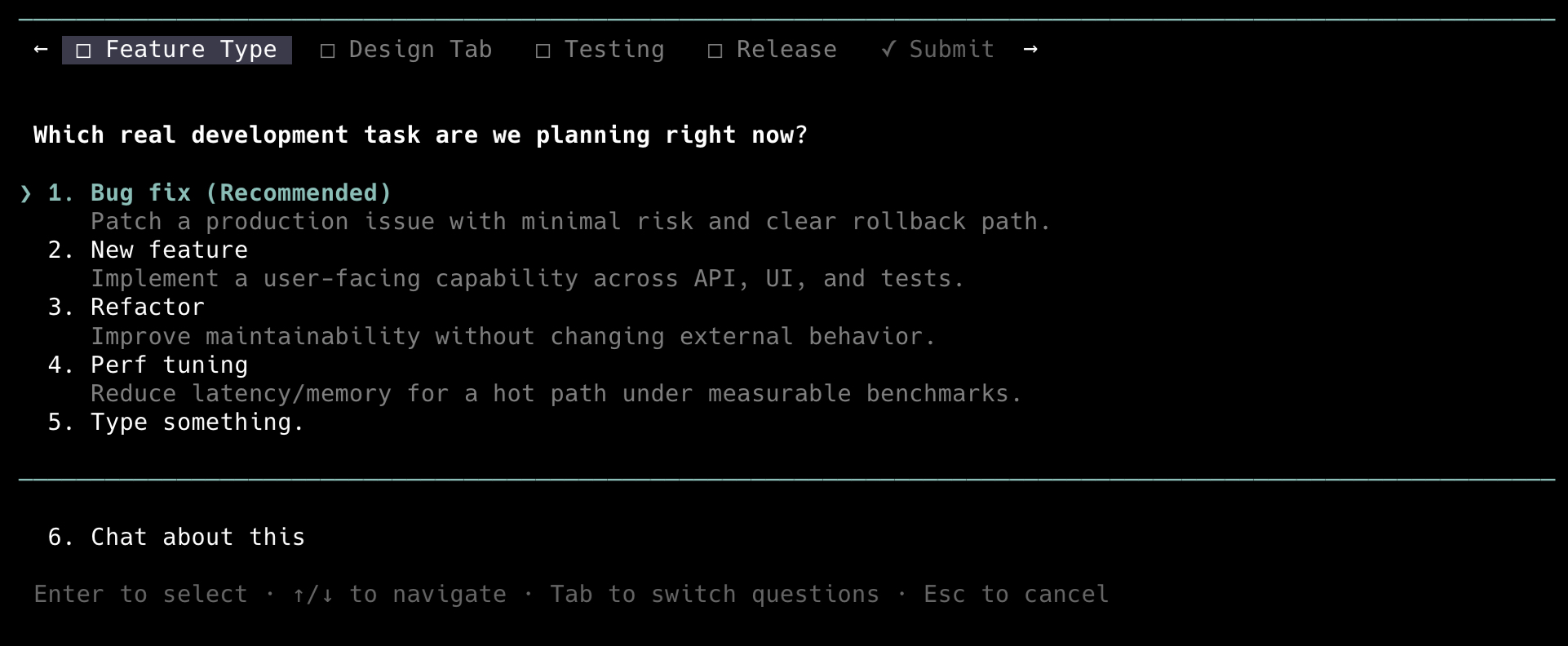
When the model asks several things at once, `Tab` moves between them and a Submit tab reviews everything before it goes back:
|
|
@@ -50,6 +52,7 @@ Optional. Settings live in `~/.config/rpiv-ask-user-question/config.json`; the f
|
|
|
50
52
|
| Setting | What it does | Default |
|
|
51
53
|
| --- | --- | --- |
|
|
52
54
|
| `collapseKey` | Key that collapses and expands the dialog. Accepts Pi keybinding ids such as `alt+o`; `"off"` disables the shortcut. | `"ctrl+]"` |
|
|
55
|
+
| `guidance.description` | Full replacement for the tool description the model sees. A non-empty string replaces the built-in text entirely — no merging. | built-in description |
|
|
53
56
|
| `guidance.promptSnippet` | One-line description of the tool in the system prompt — tune how eagerly the model asks. | built-in snippet |
|
|
54
57
|
| `guidance.promptGuidelines` | Usage guidelines given to the model, as a list of strings. | 4 built-in guidelines |
|
|
55
58
|
|
package/ask-user-question.ts
CHANGED
|
@@ -61,6 +61,24 @@ const ERROR_SESSION_LOAD_FAILED =
|
|
|
61
61
|
const ERROR_STALE_MODULE_CACHE =
|
|
62
62
|
"Error: the questionnaire UI cannot load — the host's module cache went stale after an earlier failed load (typically dependencies replaced on disk mid-session). This is unrecoverable within the current Pi process. The user never saw the questions — do NOT treat this as a decline. Ask the questions as plain chat text instead, and tell the user to restart Pi to restore this tool.";
|
|
63
63
|
|
|
64
|
+
/** Standard terminal bell — same byte rpiv-warp exports as OSC_TERMINATOR. */
|
|
65
|
+
export const BEL = "\x07";
|
|
66
|
+
|
|
67
|
+
/**
|
|
68
|
+
* Emit one portable terminal attention signal without touching redirected output.
|
|
69
|
+
* Writes to stdout rather than rpiv-warp's `/dev/tty` transport: the `isTTY` gate
|
|
70
|
+
* both proves an interactive terminal owns the coming wait and keeps the byte out
|
|
71
|
+
* of piped RPC transports (VS Code pendant, Zed) — a `/dev/tty` write would ring
|
|
72
|
+
* even when the questionnaire renders in a remote host's own UI.
|
|
73
|
+
*/
|
|
74
|
+
function emitTerminalAttention(): void {
|
|
75
|
+
try {
|
|
76
|
+
if (process.stdout.isTTY) process.stdout.write(BEL);
|
|
77
|
+
} catch {
|
|
78
|
+
// Terminal attention is best effort; the questionnaire must still proceed.
|
|
79
|
+
}
|
|
80
|
+
}
|
|
81
|
+
|
|
64
82
|
/** Delay before the background session-graph pre-warm; mirrors rpiv-workflow's /wf prewarm. */
|
|
65
83
|
export const PREWARM_DELAY_MS = 2000;
|
|
66
84
|
|
|
@@ -120,12 +138,7 @@ export const DEFAULT_PROMPT_GUIDELINES: string[] = [
|
|
|
120
138
|
"Do not stack multiple ask_user_question calls back-to-back — group all clarifying questions into one invocation.",
|
|
121
139
|
];
|
|
122
140
|
|
|
123
|
-
export
|
|
124
|
-
const guidance = validateGuidanceFields(loadConfig().guidance);
|
|
125
|
-
pi.registerTool({
|
|
126
|
-
name: ASK_USER_QUESTION_TOOL_NAME,
|
|
127
|
-
label: "Ask User Question",
|
|
128
|
-
description: `Ask the user one or more structured questions during execution. Use when you need to:
|
|
141
|
+
export const DEFAULT_TOOL_DESCRIPTION = `Ask the user one or more structured questions during execution. Use when you need to:
|
|
129
142
|
1. Gather user preferences or requirements
|
|
130
143
|
2. Clarify ambiguous instructions
|
|
131
144
|
3. Get decisions on implementation choices as you work
|
|
@@ -143,7 +156,14 @@ Use the optional \`preview\` field on options when presenting concrete artifacts
|
|
|
143
156
|
- Diagram variations
|
|
144
157
|
- Configuration examples
|
|
145
158
|
|
|
146
|
-
Preview content is rendered as markdown in a monospace box. Multi-line text with newlines is supported. When any option has a preview, the UI switches to a side-by-side layout with a vertical option list on the left and preview on the right. Do not use previews for simple preference questions where labels and descriptions suffice. Note: previews are only supported for single-select questions (not multiSelect)
|
|
159
|
+
Preview content is rendered as markdown in a monospace box. Multi-line text with newlines is supported. When any option has a preview, the UI switches to a side-by-side layout with a vertical option list on the left and preview on the right. Do not use previews for simple preference questions where labels and descriptions suffice. Note: previews are only supported for single-select questions (not multiSelect).`;
|
|
160
|
+
|
|
161
|
+
export function registerAskUserQuestionTool(pi: ExtensionAPI): void {
|
|
162
|
+
const guidance = validateGuidanceFields(loadConfig().guidance);
|
|
163
|
+
pi.registerTool({
|
|
164
|
+
name: ASK_USER_QUESTION_TOOL_NAME,
|
|
165
|
+
label: "Ask User Question",
|
|
166
|
+
description: guidance.description ?? DEFAULT_TOOL_DESCRIPTION,
|
|
147
167
|
promptSnippet: guidance.promptSnippet ?? DEFAULT_PROMPT_SNIPPET,
|
|
148
168
|
promptGuidelines: guidance.promptGuidelines ?? DEFAULT_PROMPT_GUIDELINES,
|
|
149
169
|
parameters: QuestionParamsSchema,
|
|
@@ -173,6 +193,7 @@ Preview content is rendered as markdown in a monospace box. Multi-line text with
|
|
|
173
193
|
if ((ctx as { mode?: string }).mode === "rpc" && hasDialogUI(ctx.ui)) {
|
|
174
194
|
emitAskUserBlockedEvent(pi, true);
|
|
175
195
|
try {
|
|
196
|
+
emitTerminalAttention();
|
|
176
197
|
return buildQuestionnaireResponse(await runRpcQuestionnaire(ctx.ui, typed), typed);
|
|
177
198
|
} finally {
|
|
178
199
|
emitAskUserBlockedEvent(pi, false);
|
|
@@ -232,6 +253,7 @@ Preview content is rendered as markdown in a monospace box. Multi-line text with
|
|
|
232
253
|
|
|
233
254
|
emitAskUserBlockedEvent(pi, true);
|
|
234
255
|
try {
|
|
256
|
+
emitTerminalAttention();
|
|
235
257
|
const result = await ctx.ui.custom<QuestionnaireResult>(
|
|
236
258
|
(tui, theme, keybindings, done) => {
|
|
237
259
|
const session = new QuestionnaireSession({
|
package/docs/configuration.md
CHANGED
|
@@ -19,6 +19,7 @@ A complete example:
|
|
|
19
19
|
{
|
|
20
20
|
"collapseKey": "alt+o",
|
|
21
21
|
"guidance": {
|
|
22
|
+
"description": "Ask the user structured questions whenever requirements are ambiguous.",
|
|
22
23
|
"promptSnippet": "Ask me before guessing on anything ambiguous",
|
|
23
24
|
"promptGuidelines": [
|
|
24
25
|
"Batch every clarifying question into one ask_user_question call.",
|
|
@@ -58,6 +59,7 @@ type are likewise dropped back to their default without a warning.
|
|
|
58
59
|
| Setting | What it does | Default |
|
|
59
60
|
| --- | --- | --- |
|
|
60
61
|
| `collapseKey` | Key that collapses and expands the dialog overlay. | `"ctrl+]"` |
|
|
62
|
+
| `guidance.description` | Full text of the tool description the model sees. Replaces the built-in default entirely — no merging. | built-in description |
|
|
61
63
|
| `guidance.promptSnippet` | One-line snippet describing the tool in the system prompt. | built-in snippet |
|
|
62
64
|
| `guidance.promptGuidelines` | List of usage guidelines given to the model. | 4 built-in guidelines |
|
|
63
65
|
|
|
@@ -87,7 +89,13 @@ One known rough edge: the footer hint line inside the dialog always reads `Ctrl+
|
|
|
87
89
|
collapse` and does not interpolate a custom `collapseKey`. The one-shot notification you
|
|
88
90
|
get when the dialog first collapses *does* name your configured key.
|
|
89
91
|
|
|
90
|
-
### `guidance.promptSnippet` and `guidance.promptGuidelines`
|
|
92
|
+
### `guidance.description`, `guidance.promptSnippet` and `guidance.promptGuidelines`
|
|
93
|
+
|
|
94
|
+
`guidance.description` replaces the entire built-in description Pi registers for the
|
|
95
|
+
`ask_user_question` tool — the text the model reads when deciding how to use it. There is
|
|
96
|
+
no merging: a valid value wins wholesale. It is used only when it is a non-empty string;
|
|
97
|
+
anything else falls back to the built-in default. Like the other guidance fields it is read
|
|
98
|
+
once, when the extension registers the tool, so changes take effect on the next Pi restart.
|
|
91
99
|
|
|
92
100
|
These replace the text Pi puts in the system prompt about when to reach for
|
|
93
101
|
`ask_user_question`. Use them to make the model ask more or less often, or to enforce a
|
package/docs/hosts.md
CHANGED
|
@@ -11,6 +11,12 @@ render at all.
|
|
|
11
11
|
| RPC / ACP host (VS Code pendant, Zed, Paseo) | `ask_user_question` in its tool list | A sequence of the host's own native select and input dialogs |
|
|
12
12
|
| Non-interactive run (no UI) | Nothing — the tool is removed | Nothing |
|
|
13
13
|
|
|
14
|
+
### Terminal attention
|
|
15
|
+
|
|
16
|
+
After UI availability and questionnaire validation succeed, the package emits exactly one standard terminal BEL (`\x07`) immediately before the interactive wait begins. The signal is sent to `stdout` only when `process.stdout.isTTY` is true, so redirected output and non-TTY RPC streams stay untouched. A TTY-backed RPC dialog walker receives the same signal as the TUI path.
|
|
17
|
+
|
|
18
|
+
The BEL is best effort: if the synchronous terminal write fails, the questionnaire continues and its existing prompt/blocked lifecycle and result envelope are unchanged. The terminal configuration decides whether the BEL is audible, visual, or ignored. No BEL is emitted for missing UI, invalid questionnaires, or a failed TUI session load.
|
|
19
|
+
|
|
14
20
|
### Non-interactive runs
|
|
15
21
|
|
|
16
22
|
A `before_agent_start` hook reconciles the active tool set against `ctx.hasUI` before every
|
package/package.json
CHANGED
|
@@ -1,6 +1,6 @@
|
|
|
1
1
|
{
|
|
2
2
|
"name": "@juicesharp/rpiv-ask-user-question",
|
|
3
|
-
"version": "2.
|
|
3
|
+
"version": "2.6.1",
|
|
4
4
|
"description": "Pi extension. A structured questionnaire the model can put to you when it would otherwise guess, with typed options instead of free-form replies.",
|
|
5
5
|
"keywords": [
|
|
6
6
|
"pi-package",
|
|
@@ -78,6 +78,7 @@
|
|
|
78
78
|
"view/tab-content-strategy.ts"
|
|
79
79
|
],
|
|
80
80
|
"pi": {
|
|
81
|
+
"image": "https://raw.githubusercontent.com/juicesharp/rpiv-mono/main/packages/rpiv-ask-user-question/docs/cover.png",
|
|
81
82
|
"extensions": [
|
|
82
83
|
"./index.ts"
|
|
83
84
|
]
|
|
@@ -93,7 +94,7 @@
|
|
|
93
94
|
}
|
|
94
95
|
},
|
|
95
96
|
"dependencies": {
|
|
96
|
-
"@juicesharp/rpiv-config": "^2.
|
|
97
|
+
"@juicesharp/rpiv-config": "^2.6.1",
|
|
97
98
|
"typebox": "^1.1.24"
|
|
98
99
|
}
|
|
99
100
|
}
|