@juicesharp/rpiv-ask-user-question 2.0.0 → 2.1.0
This diff represents the content of publicly available package versions that have been released to one of the supported registries. The information contained in this diff is provided for informational purposes only and reflects changes between package versions as they appear in their respective public registries.
- package/README.md +68 -86
- package/ask-user-question.ts +28 -7
- package/docs/configuration.md +112 -0
- package/docs/hosts.md +87 -0
- package/docs/keyboard.md +87 -0
- package/docs/localization.md +83 -0
- package/docs/tool-schema.md +121 -0
- package/events.ts +12 -0
- package/index.ts +4 -1
- package/package.json +6 -2
- package/state/key-router.ts +21 -2
- package/state/questionnaire-session.ts +0 -4
- package/state/selectors/derivations.ts +0 -16
- package/state/state-reducer.ts +13 -15
- package/state/state.ts +0 -2
- package/tool/types.ts +2 -2
- package/view/dialog-builder.ts +13 -8
- package/view/tab-content-strategy.ts +9 -6
package/README.md
CHANGED
|
@@ -1,109 +1,91 @@
|
|
|
1
|
-
# rpiv-ask-user-question
|
|
1
|
+
# @juicesharp/rpiv-ask-user-question
|
|
2
|
+
|
|
3
|
+
[](https://www.npmjs.com/package/@juicesharp/rpiv-ask-user-question)
|
|
4
|
+
[](https://opensource.org/licenses/MIT)
|
|
2
5
|
|
|
3
6
|
<div align="center">
|
|
4
7
|
<a href="https://github.com/juicesharp/rpiv-mono/tree/main/packages/rpiv-ask-user-question">
|
|
5
|
-
<
|
|
6
|
-
<img src="https://raw.githubusercontent.com/juicesharp/rpiv-mono/main/packages/rpiv-ask-user-question/docs/cover.png" alt="rpiv-ask-user-question cover" width="50%">
|
|
7
|
-
</picture>
|
|
8
|
+
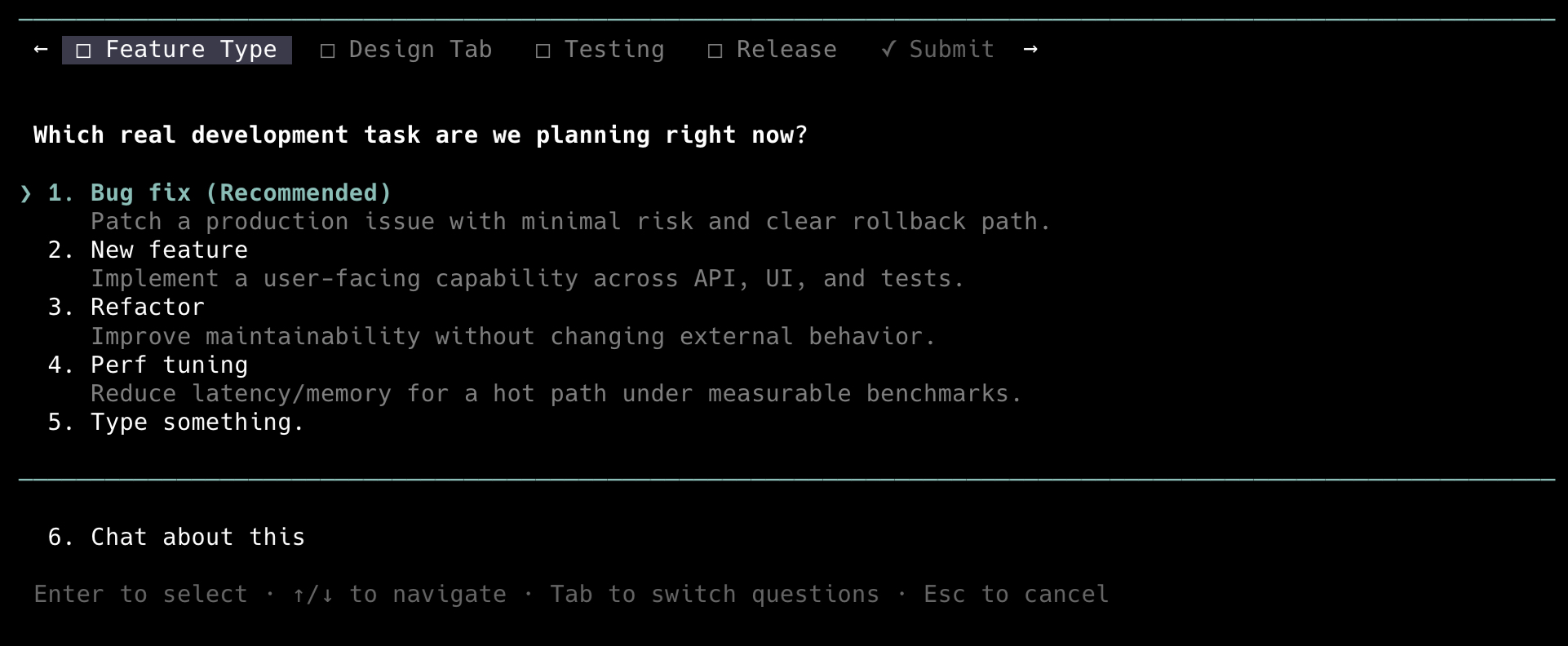
<img src="https://raw.githubusercontent.com/juicesharp/rpiv-mono/main/packages/rpiv-ask-user-question/docs/cover.png" alt="rpiv-ask-user-question cover: a tabbed terminal questionnaire asking Which real development task are we planning right now?, with numbered options — Bug fix, New feature, Refactor — each under a one-line description, and a footer of key hints" width="50%">
|
|
8
9
|
</a>
|
|
9
10
|
</div>
|
|
10
11
|
|
|
11
|
-
Let the model ask you
|
|
12
|
+
Let the model ask you instead of guessing. This extension gives [Pi Agent](https://github.com/badlogic/pi-mono) one tool — `ask_user_question` — that opens a terminal dialog of up to four questions with written-out options, and hands your choices back as structured data. Install it if you would rather spend fifteen seconds picking than an hour undoing a wrong assumption.
|
|
12
13
|
|
|
13
|
-
|
|
14
|
+
## Install
|
|
14
15
|
|
|
15
|
-
|
|
16
|
+
```sh
|
|
17
|
+
pi install npm:@juicesharp/rpiv-ask-user-question
|
|
18
|
+
```
|
|
16
19
|
|
|
17
|
-
|
|
18
|
-
- **Preview pane** - render an ASCII diagram, code snippet, or markdown next to each option, side-by-side or stacked depending on terminal width.
|
|
19
|
-
- **Per-option notes** - press `n` on a previewed option to attach a free-text note that travels back with the answer.
|
|
20
|
-
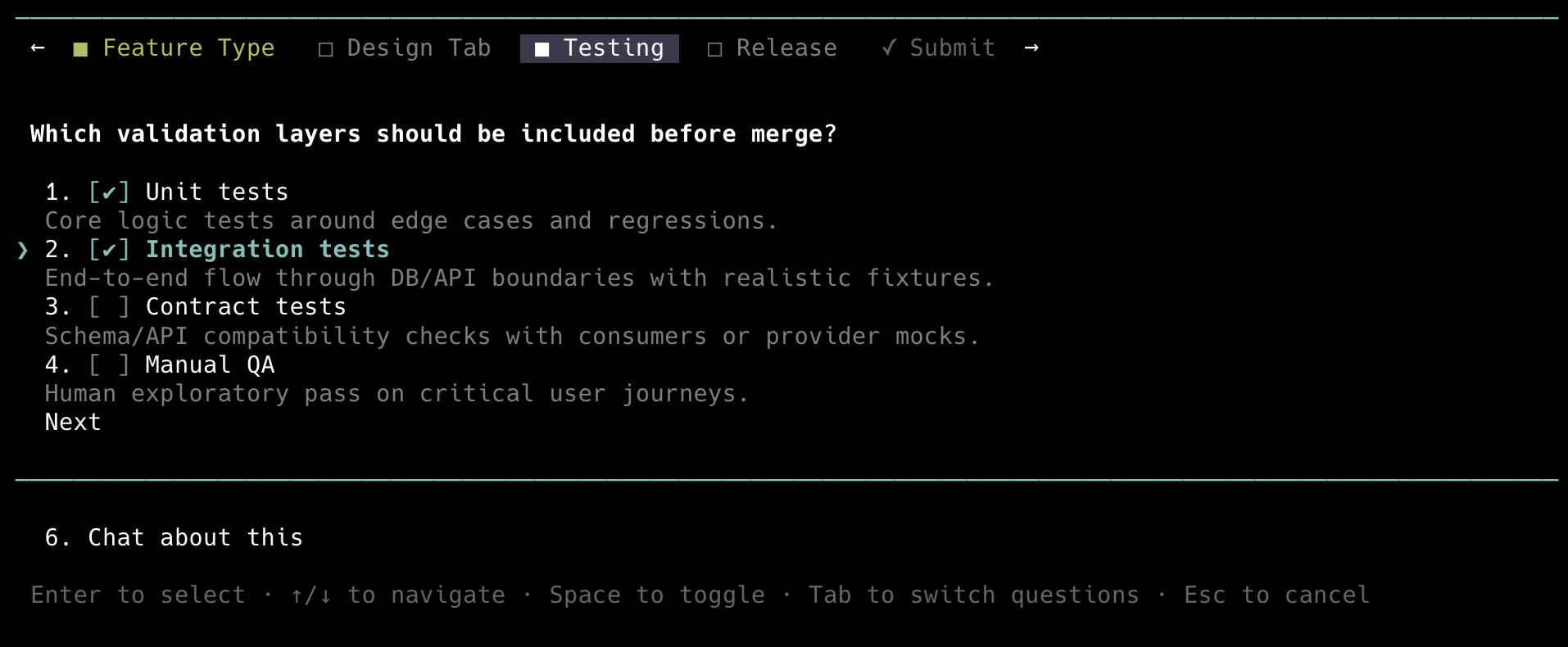
- **Multi-select questions** - checkboxes with `Space` to toggle, Enter-as-toggle on rows, a `Next` sentinel to advance, and toggles persisted across tab switches.
|
|
21
|
-
- **Submit tab** - review every answer before submitting; warns about unanswered questions and offers a Submit picker.
|
|
22
|
-
- **Chat row on every tab** - redirect the conversation without leaving the dialog.
|
|
23
|
-
- **Terminal-row-aware overflow scroll** - when the dialog is taller than the terminal, the body scrolls between a sticky heading and sticky hints/border; overflow indicators (↑ / ↓ / ↕) show what's clipped.
|
|
24
|
-
- **"Other" free-text fallback** - type a custom answer when no option fits; available on every single-select question, even in preview mode (the input expands to the full pane width while typing).
|
|
25
|
-
- **Localized UI** - sentinel rows, hints, submit/cancel labels, review pane, and notes affordance display in the user's chosen language via `@juicesharp/rpiv-i18n`. Ships Deutsch / English / Español / Français / Português (PT) / Português (BR) / Русский / Українська; switch with `/languages` or `pi --locale <code>`. LLM-facing copy (tool description, schemas, errors) stays English by design.
|
|
20
|
+
Restart your Pi session.
|
|
26
21
|
|
|
27
|
-
##
|
|
22
|
+
## Quick start
|
|
28
23
|
|
|
29
|
-
|
|
30
|
-
|---|---|
|
|
31
|
-
|  |  |
|
|
32
|
-
|  |  |
|
|
33
|
-
|  | |
|
|
24
|
+
Nothing to set up — the tool is live as soon as Pi restarts. Hand the model a task with a real decision buried in it:
|
|
34
25
|
|
|
35
|
-
|
|
26
|
+
> Add caching to the API client.
|
|
36
27
|
|
|
37
|
-
|
|
38
|
-
pi install npm:@juicesharp/rpiv-ask-user-question
|
|
39
|
-
```
|
|
28
|
+
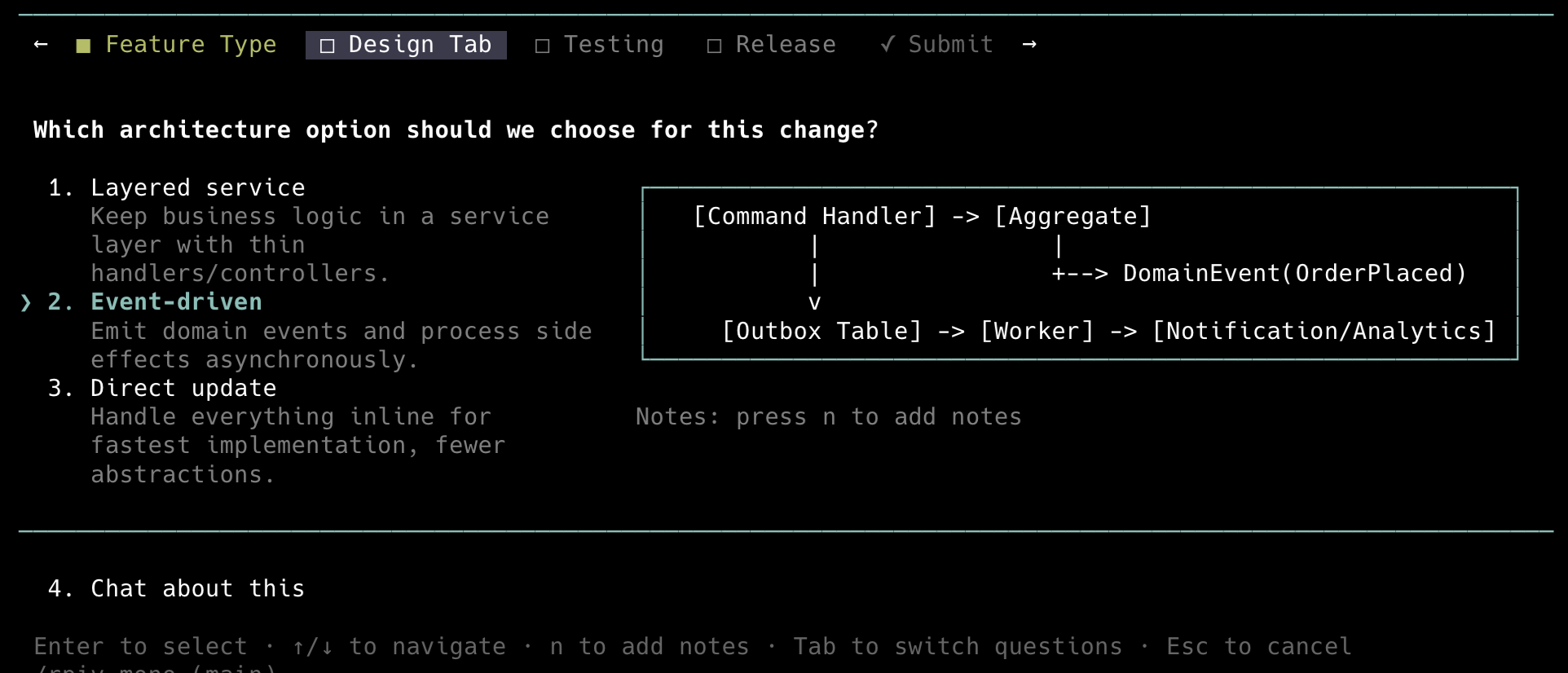
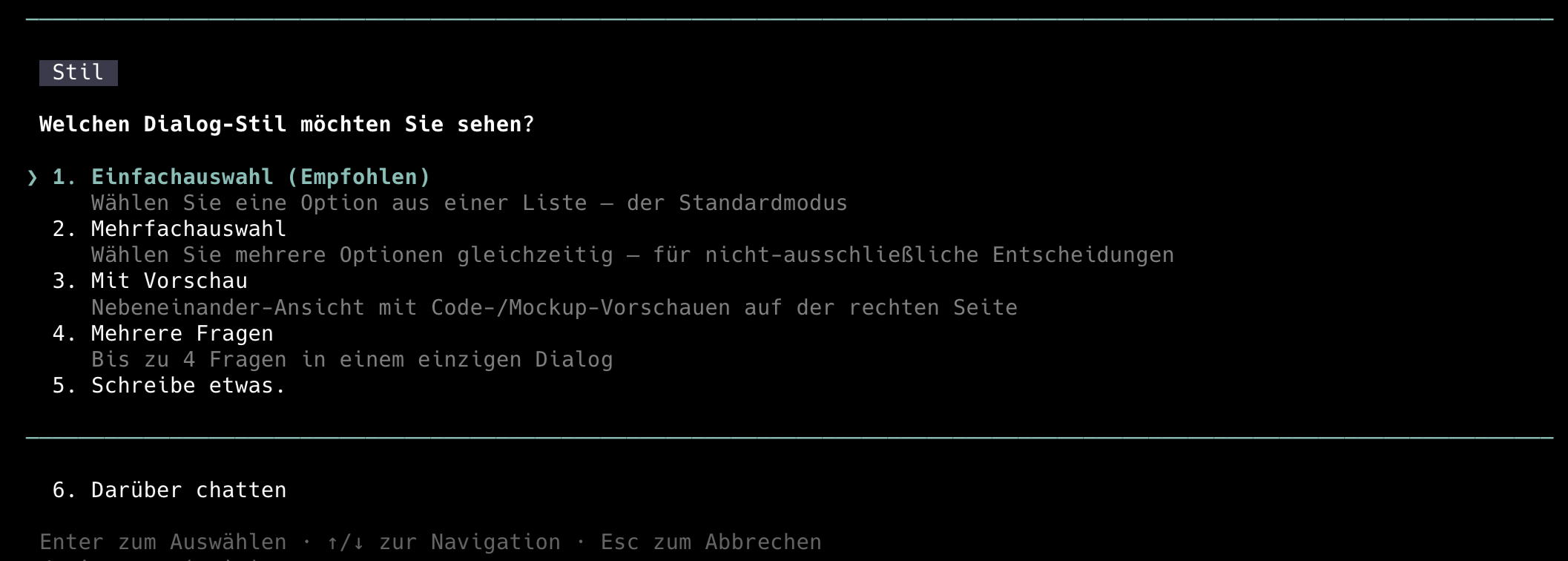
Rather than picking a strategy on your behalf, the model calls `ask_user_question` and a dialog takes over the bottom of your terminal. Move with `↑`/`↓`, choose with `Enter`, press `n` to attach a note, or land on the `Type something.` row to answer in your own words. `Esc` abandons the questionnaire entirely.
|
|
40
29
|
|
|
41
|
-
|
|
30
|
+

|
|
42
31
|
|
|
43
|
-
|
|
32
|
+
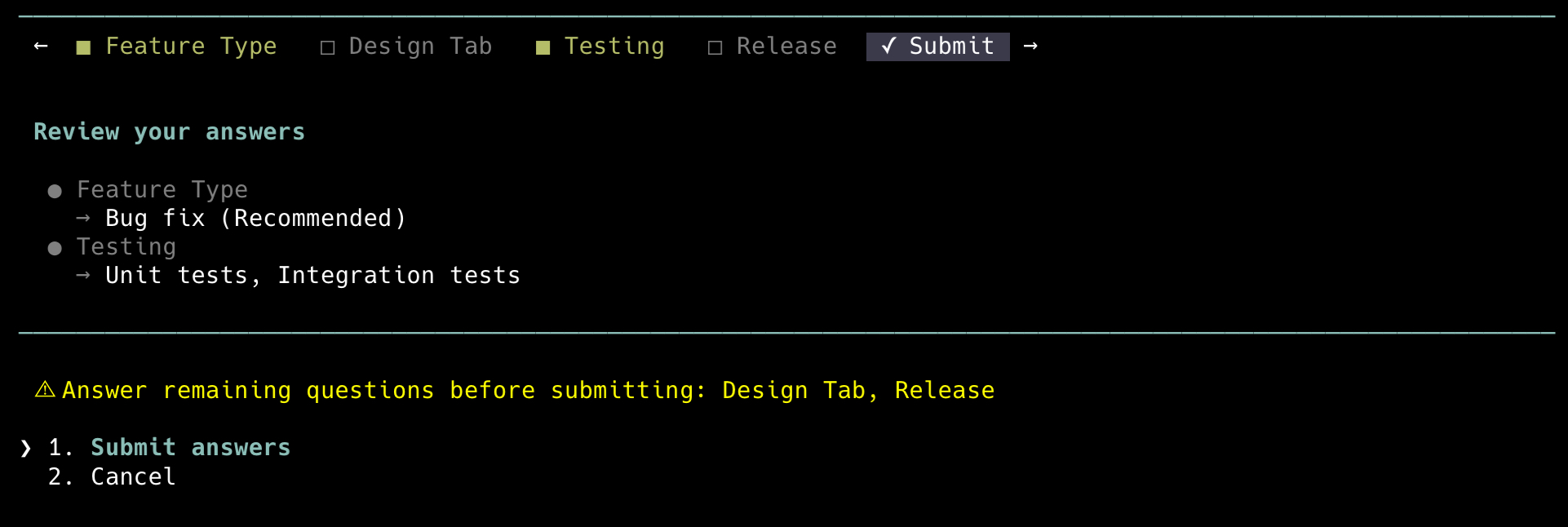
When the model asks several things at once, `Tab` moves between them and a Submit tab reviews everything before it goes back:
|
|
44
33
|
|
|
45
|
-
|
|
34
|
+

|
|
46
35
|
|
|
47
|
-
|
|
48
|
-
pi install npm:@juicesharp/rpiv-i18n
|
|
49
|
-
```
|
|
36
|
+
## What you get
|
|
50
37
|
|
|
51
|
-
|
|
52
|
-
|
|
53
|
-
|
|
54
|
-
|
|
55
|
-
-
|
|
56
|
-
|
|
57
|
-
|
|
58
|
-
|
|
59
|
-
|
|
60
|
-
|
|
61
|
-
|
|
62
|
-
|
|
63
|
-
|
|
64
|
-
|
|
65
|
-
|
|
66
|
-
|
|
67
|
-
|
|
68
|
-
description: string, // explains the choice / its trade-off
|
|
69
|
-
preview?: string, // optional markdown shown next to options
|
|
70
|
-
},
|
|
71
|
-
// … 2-4 options total
|
|
72
|
-
],
|
|
73
|
-
multiSelect?: boolean, // default false
|
|
74
|
-
},
|
|
75
|
-
// … 1-4 questions total
|
|
76
|
-
]
|
|
77
|
-
})
|
|
78
|
-
```
|
|
38
|
+
- **Typed options instead of a wall of prose** — each question carries 2-4 authored choices, and every choice comes with a description of what it means or what it costs you.
|
|
39
|
+
- **You can always answer in your own words** — a `Type something.` row is appended to every question, single- or multi-select, and widens to the full pane while you type.
|
|
40
|
+
- **Compare real artifacts, not just labels** — an option can carry a markdown `preview` (ASCII mockup, code, diagram, config) that renders in a bordered box beside the option list.
|
|
41
|
+
- **One interruption, not five** — up to four questions arrive in a single tabbed dialog, and the Submit tab lists your answers and names anything still blank before you commit.
|
|
42
|
+
- **Notes on any answer** — `n` opens a note editor on any question tab; the note travels back to the model alongside the choice without marking the question answered.
|
|
43
|
+
- **Read the transcript behind the dialog** — `Ctrl+]` collapses the overlay so you can scroll the conversation, then brings it back with your answers intact.
|
|
44
|
+
- **Works outside the terminal too** — in RPC and ACP hosts such as the VS Code pendant or Zed the questionnaire walks through the host's native dialogs, and in non-interactive runs the tool is removed from the model's tool list instead of failing every call.
|
|
45
|
+
|
|
46
|
+
## Configuration
|
|
47
|
+
|
|
48
|
+
Optional. Settings live in `~/.config/rpiv-ask-user-question/config.json`; the file is read, never written.
|
|
49
|
+
|
|
50
|
+
| Setting | What it does | Default |
|
|
51
|
+
| --- | --- | --- |
|
|
52
|
+
| `collapseKey` | Key that collapses and expands the dialog. Accepts Pi keybinding ids such as `alt+o`; `"off"` disables the shortcut. | `"ctrl+]"` |
|
|
53
|
+
| `guidance.promptSnippet` | One-line description of the tool in the system prompt — tune how eagerly the model asks. | built-in snippet |
|
|
54
|
+
| `guidance.promptGuidelines` | Usage guidelines given to the model, as a list of strings. | 4 built-in guidelines |
|
|
79
55
|
|
|
80
|
-
|
|
81
|
-
|
|
82
|
-
Returns:
|
|
83
|
-
|
|
84
|
-
```ts
|
|
85
|
-
{
|
|
86
|
-
content: [{ type: "text", text: string }], // human-readable envelope or DECLINE_MESSAGE
|
|
87
|
-
details: {
|
|
88
|
-
answers: Array<{
|
|
89
|
-
questionIndex: number,
|
|
90
|
-
question: string,
|
|
91
|
-
kind: "option" | "custom" | "chat" | "multi",
|
|
92
|
-
answer: string | null,
|
|
93
|
-
selected?: string[], // present for multi-select
|
|
94
|
-
notes?: string, // free-text note, when typed
|
|
95
|
-
preview?: string, // echoed back when option carried a preview
|
|
96
|
-
}>,
|
|
97
|
-
cancelled: boolean,
|
|
98
|
-
error?: "no_ui" | "no_questions" | "empty_options" | "too_many_questions"
|
|
99
|
-
| "duplicate_question" | "duplicate_option_label" | "reserved_label",
|
|
100
|
-
}
|
|
101
|
-
}
|
|
56
|
+
```json
|
|
57
|
+
{ "collapseKey": "alt+o" }
|
|
102
58
|
```
|
|
103
59
|
|
|
104
|
-
|
|
60
|
+
Malformed JSON falls back to the defaults with a warning; an individual unusable value is silently dropped back to its default. Never an error.
|
|
105
61
|
|
|
106
|
-
|
|
107
|
-
|
|
62
|
+
## Reference
|
|
63
|
+
|
|
64
|
+
- [Tool schema](https://github.com/juicesharp/rpiv-mono/blob/main/packages/rpiv-ask-user-question/docs/tool-schema.md) — parameters, limits, reserved labels, validation errors, the result envelope, and the `rpiv:ask-user:prompt` event.
|
|
65
|
+
- [Keyboard and layout](https://github.com/juicesharp/rpiv-mono/blob/main/packages/rpiv-ask-user-question/docs/keyboard.md) — every key, the rows the dialog appends, notes, collapse mode, and how previews and overflow adapt to terminal size.
|
|
66
|
+
- [Configuration](https://github.com/juicesharp/rpiv-mono/blob/main/packages/rpiv-ask-user-question/docs/configuration.md) — file lookup and `XDG_CONFIG_HOME`, the `collapseKey` grammar, the `guidance.*` prompt overrides, and how invalid values are handled.
|
|
67
|
+
- [Hosts and runtime behavior](https://github.com/juicesharp/rpiv-mono/blob/main/packages/rpiv-ask-user-question/docs/hosts.md) — terminal vs RPC vs non-interactive, what degrades in each, and the load-failure envelopes.
|
|
68
|
+
- [Localization](https://github.com/juicesharp/rpiv-mono/blob/main/packages/rpiv-ask-user-question/docs/localization.md) — the nine shipped languages, how the locale is chosen, and how to add one.
|
|
69
|
+
|
|
70
|
+
## Requirements
|
|
71
|
+
|
|
72
|
+
- Node.js 22 or newer.
|
|
73
|
+
- Pi Agent, with an interactive terminal or an RPC/ACP host. Non-interactive runs never see the tool.
|
|
74
|
+
- A terminal at least 100 columns wide for side-by-side previews; narrower terminals stack the preview under the options.
|
|
75
|
+
|
|
76
|
+
No native dependencies, no compiler, no API keys — the extension makes no model calls of its own.
|
|
77
|
+
|
|
78
|
+
## Troubleshooting
|
|
79
|
+
|
|
80
|
+
**The model says the questionnaire UI failed to load and asks its questions as chat text.** The dialog's modules were replaced on disk while Pi was running, usually by a package-manager install touching the store. Repair the install if it is broken, then restart Pi; the failure is not recoverable inside the running process.
|
|
81
|
+
|
|
82
|
+
**`Ctrl+]` does nothing.** On keyboard layouts where `]` sits on the shifted layer (Latin American among them) the default is unreachable. Set `collapseKey` to something you can type, for example `"alt+o"`.
|
|
83
|
+
|
|
84
|
+
## Related
|
|
85
|
+
|
|
86
|
+
- [`@juicesharp/rpiv-i18n`](https://www.npmjs.com/package/@juicesharp/rpiv-i18n) — optional; installing it renders the dialog chrome in your language and adds `/languages`.
|
|
87
|
+
- [`@juicesharp/rpiv-pi`](https://www.npmjs.com/package/@juicesharp/rpiv-pi) — the umbrella package whose workflow skills use `ask_user_question` as their developer checkpoint. `/rpiv-setup` offers to install this extension.
|
|
88
|
+
|
|
89
|
+
## License
|
|
108
90
|
|
|
109
|
-
MIT
|
|
91
|
+
MIT — see [LICENSE](https://github.com/juicesharp/rpiv-mono/blob/main/packages/rpiv-ask-user-question/LICENSE).
|
package/ask-user-question.ts
CHANGED
|
@@ -1,7 +1,12 @@
|
|
|
1
1
|
import type { ExtensionAPI } from "@earendil-works/pi-coding-agent";
|
|
2
|
-
import { matchesKey } from "@earendil-works/pi-tui";
|
|
2
|
+
import { isKeyRelease, isKeyRepeat, matchesKey } from "@earendil-works/pi-tui";
|
|
3
3
|
import { loadConfig, resolveCollapseKey, validateGuidanceFields } from "./config.js";
|
|
4
|
-
import {
|
|
4
|
+
import {
|
|
5
|
+
ASK_USER_BLOCKED_EVENT,
|
|
6
|
+
ASK_USER_PROMPT_EVENT,
|
|
7
|
+
type AskUserBlockedEventPayload,
|
|
8
|
+
type AskUserPromptEventPayload,
|
|
9
|
+
} from "./events.js";
|
|
5
10
|
// Static import is fine — rpc-fallback pulls only types + the i18n bridge,
|
|
6
11
|
// none of the ~560ms TUI render graph that QuestionnaireSession lazy-loads.
|
|
7
12
|
import { hasDialogUI, runRpcQuestionnaire } from "./rpc-fallback.js";
|
|
@@ -37,6 +42,11 @@ function emitAskUserPromptEvent(pi: ExtensionAPI, params: QuestionParams): void
|
|
|
37
42
|
pi.events.emit(ASK_USER_PROMPT_EVENT, payload);
|
|
38
43
|
}
|
|
39
44
|
|
|
45
|
+
function emitAskUserBlockedEvent(pi: ExtensionAPI, active: boolean): void {
|
|
46
|
+
const payload: AskUserBlockedEventPayload = { active };
|
|
47
|
+
pi.events.emit(ASK_USER_BLOCKED_EVENT, payload);
|
|
48
|
+
}
|
|
49
|
+
|
|
40
50
|
/** Canonical tool name — single source of truth shared with the reconcile module. */
|
|
41
51
|
export const ASK_USER_QUESTION_TOOL_NAME = "ask_user_question";
|
|
42
52
|
|
|
@@ -105,8 +115,8 @@ export function buildItemsForQuestion(question: QuestionData): WrappingSelectIte
|
|
|
105
115
|
export const DEFAULT_PROMPT_SNIPPET = `Ask the user up to ${MAX_QUESTIONS} structured questions (${MIN_OPTIONS}-${MAX_OPTIONS} options each) when requirements are ambiguous`;
|
|
106
116
|
export const DEFAULT_PROMPT_GUIDELINES: string[] = [
|
|
107
117
|
`Use ask_user_question whenever the user's request is underspecified and you cannot proceed without concrete decisions — you can ask up to ${MAX_QUESTIONS} questions per invocation.`,
|
|
108
|
-
`Each question MUST have ${MIN_OPTIONS}-${MAX_OPTIONS} options. Every option requires a concise label (1-5 words) and a description explaining what the choice means or its trade-offs. The user can additionally type a custom answer
|
|
109
|
-
`Set multiSelect: true when multiple answers are valid. Provide an options[].preview markdown string when an option benefits from richer side-by-side context (mockups, code snippets, diagrams, configs) — single-select only. The "Type something." row is appended to every
|
|
118
|
+
`Each question MUST have ${MIN_OPTIONS}-${MAX_OPTIONS} options. Every option requires a concise label (1-5 words) and a description explaining what the choice means or its trade-offs. The user can additionally type a custom answer via the automatically appended "Type something." row on every question, or press Esc to abandon the questionnaire. Do NOT author "Other" or "Type something." labels yourself — reserved labels are rejected at runtime.`,
|
|
119
|
+
`Set multiSelect: true when multiple answers are valid. Provide an options[].preview markdown string when an option benefits from richer side-by-side context (mockups, code snippets, diagrams, configs) — single-select only. The "Type something." row is appended to every question; in preview mode it expands to the full pane width while typing so the custom answer is not cramped into the narrow options column. If you recommend a specific option, make that the first option and append "(Recommended)" to its label.`,
|
|
110
120
|
"Do not stack multiple ask_user_question calls back-to-back — group all clarifying questions into one invocation.",
|
|
111
121
|
];
|
|
112
122
|
|
|
@@ -122,8 +132,8 @@ export function registerAskUserQuestionTool(pi: ExtensionAPI): void {
|
|
|
122
132
|
4. Offer choices to the user about what direction to take
|
|
123
133
|
|
|
124
134
|
Usage notes:
|
|
125
|
-
- Users
|
|
126
|
-
- Use multiSelect: true
|
|
135
|
+
- Users can type a custom answer via the automatically appended "Type something." row on every question or press Esc to abandon the questionnaire. Do NOT author "Other" or "Type something." labels yourself — reserved labels are rejected at runtime.
|
|
136
|
+
- Use multiSelect: true when multiple answers are valid. The "Type something." row is available on every question, including when options carry a \`preview\`; in preview mode it expands to the full pane width while typing so the custom answer is not cramped into the narrow options column.
|
|
127
137
|
- If you recommend a specific option, make that the first option in the list and add "(Recommended)" at the end of the label.
|
|
128
138
|
|
|
129
139
|
Preview feature:
|
|
@@ -161,7 +171,12 @@ Preview content is rendered as markdown in a monospace box. Multi-line text with
|
|
|
161
171
|
// import entirely; RPC builds that predate ctx.mode are caught by the
|
|
162
172
|
// custom()-resolved-undefined backstop below. See ./rpc-fallback.ts.
|
|
163
173
|
if ((ctx as { mode?: string }).mode === "rpc" && hasDialogUI(ctx.ui)) {
|
|
164
|
-
|
|
174
|
+
emitAskUserBlockedEvent(pi, true);
|
|
175
|
+
try {
|
|
176
|
+
return buildQuestionnaireResponse(await runRpcQuestionnaire(ctx.ui, typed), typed);
|
|
177
|
+
} finally {
|
|
178
|
+
emitAskUserBlockedEvent(pi, false);
|
|
179
|
+
}
|
|
165
180
|
}
|
|
166
181
|
|
|
167
182
|
const itemsByTab: WrappingSelectItem[][] = typed.questions.map((q) => buildItemsForQuestion(q));
|
|
@@ -202,6 +217,10 @@ Preview content is rendered as markdown in a monospace box. Multi-line text with
|
|
|
202
217
|
// toggling the questionnaire from underneath it.
|
|
203
218
|
if (!handle.isHidden() && !handle.isFocused()) return undefined;
|
|
204
219
|
if (!matchesKey(data, collapseKey as Parameters<typeof matchesKey>[1])) return undefined;
|
|
220
|
+
// Kitty-protocol terminals report press, repeat, and release separately.
|
|
221
|
+
// Toggle only on the initial press so a tap does not immediately reopen
|
|
222
|
+
// the overlay and a held key does not toggle it repeatedly.
|
|
223
|
+
if (isKeyRelease(data) || isKeyRepeat(data)) return { consume: true };
|
|
205
224
|
sessionRef.current?.toggleCollapsedExternal();
|
|
206
225
|
if (handle.isHidden() && !hasAnnouncedHide) {
|
|
207
226
|
hasAnnouncedHide = true;
|
|
@@ -211,6 +230,7 @@ Preview content is rendered as markdown in a monospace box. Multi-line text with
|
|
|
211
230
|
});
|
|
212
231
|
}
|
|
213
232
|
|
|
233
|
+
emitAskUserBlockedEvent(pi, true);
|
|
214
234
|
try {
|
|
215
235
|
const result = await ctx.ui.custom<QuestionnaireResult>(
|
|
216
236
|
(tui, theme, _kb, done) => {
|
|
@@ -256,6 +276,7 @@ Preview content is rendered as markdown in a monospace box. Multi-line text with
|
|
|
256
276
|
return buildQuestionnaireResponse(result, typed);
|
|
257
277
|
} finally {
|
|
258
278
|
removeOverlayInputListener?.();
|
|
279
|
+
emitAskUserBlockedEvent(pi, false);
|
|
259
280
|
}
|
|
260
281
|
},
|
|
261
282
|
});
|
|
@@ -0,0 +1,112 @@
|
|
|
1
|
+
# Configuration
|
|
2
|
+
|
|
3
|
+
Every setting the package reads, where the file lives, and what happens when a value is
|
|
4
|
+
wrong.
|
|
5
|
+
|
|
6
|
+
## The config file
|
|
7
|
+
|
|
8
|
+
```
|
|
9
|
+
~/.config/rpiv-ask-user-question/config.json
|
|
10
|
+
```
|
|
11
|
+
|
|
12
|
+
The file is optional — with no config at all, every setting takes its default. This
|
|
13
|
+
package only ever *reads* the file; it never creates, writes or chmods it, so its
|
|
14
|
+
permissions are whatever you give it.
|
|
15
|
+
|
|
16
|
+
A complete example:
|
|
17
|
+
|
|
18
|
+
```json
|
|
19
|
+
{
|
|
20
|
+
"collapseKey": "alt+o",
|
|
21
|
+
"guidance": {
|
|
22
|
+
"promptSnippet": "Ask me before guessing on anything ambiguous",
|
|
23
|
+
"promptGuidelines": [
|
|
24
|
+
"Batch every clarifying question into one ask_user_question call.",
|
|
25
|
+
"Put your recommended option first and suffix it with (Recommended)."
|
|
26
|
+
]
|
|
27
|
+
}
|
|
28
|
+
}
|
|
29
|
+
```
|
|
30
|
+
|
|
31
|
+
### Where the file is looked up
|
|
32
|
+
|
|
33
|
+
1. `$XDG_CONFIG_HOME/rpiv-ask-user-question/config.json`, if `XDG_CONFIG_HOME` is set,
|
|
34
|
+
non-empty and absolute. A leading `~` is expanded first; a relative value is ignored.
|
|
35
|
+
Unset or ignored, the directory falls back to `~/.config`.
|
|
36
|
+
2. If that file does not exist, the legacy path `~/.config/rpiv-ask-user-question/config.json`
|
|
37
|
+
is read. This path deliberately ignores `XDG_CONFIG_HOME`, so an existing config keeps
|
|
38
|
+
working after you set the variable.
|
|
39
|
+
3. Neither present: all defaults.
|
|
40
|
+
|
|
41
|
+
If the XDG-path file exists, its result wins even when it is malformed — there is no
|
|
42
|
+
second chance at the legacy path.
|
|
43
|
+
|
|
44
|
+
### When the file is invalid
|
|
45
|
+
|
|
46
|
+
Malformed JSON is not fatal. The loader warns on stderr and continues with defaults:
|
|
47
|
+
|
|
48
|
+
```
|
|
49
|
+
rpiv-config: invalid JSON at <path>, using default ({}) — <parser message>
|
|
50
|
+
```
|
|
51
|
+
|
|
52
|
+
Valid JSON that is not an object (a string, number, `null`, or an array) is rejected too,
|
|
53
|
+
falling back to defaults — but silently, with no warning. Individual keys with the wrong
|
|
54
|
+
type are likewise dropped back to their default without a warning.
|
|
55
|
+
|
|
56
|
+
## Settings
|
|
57
|
+
|
|
58
|
+
| Setting | What it does | Default |
|
|
59
|
+
| --- | --- | --- |
|
|
60
|
+
| `collapseKey` | Key that collapses and expands the dialog overlay. | `"ctrl+]"` |
|
|
61
|
+
| `guidance.promptSnippet` | One-line snippet describing the tool in the system prompt. | built-in snippet |
|
|
62
|
+
| `guidance.promptGuidelines` | List of usage guidelines given to the model. | 4 built-in guidelines |
|
|
63
|
+
|
|
64
|
+
### `collapseKey`
|
|
65
|
+
|
|
66
|
+
The value uses Pi's keybinding id format: zero or more distinct modifiers from `ctrl`,
|
|
67
|
+
`shift`, `alt`, `super`, joined by `+`, followed by a base key. Values are trimmed and
|
|
68
|
+
lowercased before matching.
|
|
69
|
+
|
|
70
|
+
The base key is either a single printable character from
|
|
71
|
+
`a-z 0-9 _ - ! @ # $ % ^ & * ( ) | ~ \` ' " : ; , . / < > ? [ ] { } = \`, or one of the
|
|
72
|
+
named keys `escape`, `esc`, `enter`, `return`, `tab`, `space`, `backspace`, `delete`,
|
|
73
|
+
`insert`, `clear`, `home`, `end`, `pageup`, `pagedown`, `up`, `down`, `left`, `right`,
|
|
74
|
+
`f1`–`f12`.
|
|
75
|
+
|
|
76
|
+
Examples that work: `"ctrl+]"`, `"alt+o"`, `"ctrl+shift+h"`, `"f9"`, `"ctrl+}"`.
|
|
77
|
+
|
|
78
|
+
Set `"off"` (any casing) to disable the collapse shortcut entirely — no raw terminal
|
|
79
|
+
listener is registered in that case.
|
|
80
|
+
|
|
81
|
+
A spec that does not match the grammar is rejected and the default is used. This is
|
|
82
|
+
strict on purpose: Pi's parser takes the last `+`-separated part as the key and ignores
|
|
83
|
+
unknown parts, so a typo like `"ctr+]"` would otherwise silently capture every bare `]`
|
|
84
|
+
keypress at the terminal level.
|
|
85
|
+
|
|
86
|
+
One known rough edge: the footer hint line inside the dialog always reads `Ctrl+] to
|
|
87
|
+
collapse` and does not interpolate a custom `collapseKey`. The one-shot notification you
|
|
88
|
+
get when the dialog first collapses *does* name your configured key.
|
|
89
|
+
|
|
90
|
+
### `guidance.promptSnippet` and `guidance.promptGuidelines`
|
|
91
|
+
|
|
92
|
+
These replace the text Pi puts in the system prompt about when to reach for
|
|
93
|
+
`ask_user_question`. Use them to make the model ask more or less often, or to enforce a
|
|
94
|
+
house style for options.
|
|
95
|
+
|
|
96
|
+
`promptSnippet` is used only when it is a non-empty string. `promptGuidelines` is used
|
|
97
|
+
only when it is a non-empty array whose entries are all non-empty strings. Anything else
|
|
98
|
+
falls back to the built-in defaults. Both are read once, when the extension registers the
|
|
99
|
+
tool, so changes take effect on the next Pi restart.
|
|
100
|
+
|
|
101
|
+
## Environment variables
|
|
102
|
+
|
|
103
|
+
| Variable | Effect |
|
|
104
|
+
| --- | --- |
|
|
105
|
+
| `XDG_CONFIG_HOME` | Relocates the config directory, as described above. Must be absolute. |
|
|
106
|
+
|
|
107
|
+
`LANG` and `LC_ALL` influence the dialog language, but they are read by
|
|
108
|
+
[`@juicesharp/rpiv-i18n`](https://www.npmjs.com/package/@juicesharp/rpiv-i18n) rather than
|
|
109
|
+
by this package — see [localization.md](./localization.md).
|
|
110
|
+
|
|
111
|
+
No other environment variables are read. The package makes no model calls, so it needs no
|
|
112
|
+
API keys or model settings of its own.
|
package/docs/hosts.md
ADDED
|
@@ -0,0 +1,87 @@
|
|
|
1
|
+
# Hosts and runtime behavior
|
|
2
|
+
|
|
3
|
+
Where the questionnaire renders, what it degrades to, and what happens when it cannot
|
|
4
|
+
render at all.
|
|
5
|
+
|
|
6
|
+
## Three environments
|
|
7
|
+
|
|
8
|
+
| Environment | What the model sees | What you see |
|
|
9
|
+
| --- | --- | --- |
|
|
10
|
+
| Interactive terminal | `ask_user_question` in its tool list | The full tabbed TUI overlay |
|
|
11
|
+
| RPC / ACP host (VS Code pendant, Zed, Paseo) | `ask_user_question` in its tool list | A sequence of the host's own native select and input dialogs |
|
|
12
|
+
| Non-interactive run (no UI) | Nothing — the tool is removed | Nothing |
|
|
13
|
+
|
|
14
|
+
### Non-interactive runs
|
|
15
|
+
|
|
16
|
+
A `before_agent_start` hook reconciles the active tool set against `ctx.hasUI` before every
|
|
17
|
+
turn. When there is no UI, `ask_user_question` is stripped from the list so the model never
|
|
18
|
+
sees a tool it cannot use — better than offering it and auto-declining every call. When UI
|
|
19
|
+
comes back, the tool is restored. The reconciler is idempotent and leaves sibling tools
|
|
20
|
+
untouched.
|
|
21
|
+
|
|
22
|
+
A second guard lives inside the tool handler as a one-turn backstop: if a call somehow
|
|
23
|
+
arrives without UI, it returns `error: "no_ui"` and the text
|
|
24
|
+
`Error: UI not available (running in non-interactive mode)`.
|
|
25
|
+
|
|
26
|
+
### RPC and ACP hosts
|
|
27
|
+
|
|
28
|
+
RPC hosts report `hasUI: true` because Pi's dialog sub-protocol works there, but custom
|
|
29
|
+
terminal UI does not render. The package detects this two ways: hosts that advertise
|
|
30
|
+
`ctx.mode === "rpc"` route straight to the dialog walker, skipping the TUI import
|
|
31
|
+
entirely, and older RPC builds are caught by a backstop when custom UI resolves without
|
|
32
|
+
rendering anything. Either path requires the host to expose both `select` and `input`.
|
|
33
|
+
|
|
34
|
+
The walker asks one question per dialog and returns exactly the same result envelope the
|
|
35
|
+
TUI produces. Trade-offs inherent to the native primitives:
|
|
36
|
+
|
|
37
|
+
- No side-by-side preview pane. Previews are folded into the dialog title instead,
|
|
38
|
+
truncated at 600 characters each.
|
|
39
|
+
- No tab bar and no Submit review tab — one dialog per question, in order.
|
|
40
|
+
- Multi-select is a free-text input: type the option numbers, comma-separated
|
|
41
|
+
(`1,3`). Any token that is not a valid option index is treated as a typed custom answer,
|
|
42
|
+
which is how the `Type something.` escape survives. An empty input commits an empty
|
|
43
|
+
selection, matching `Next` with nothing toggled.
|
|
44
|
+
- Dismissing any dialog cancels the whole questionnaire, mirroring `Esc` in the TUI.
|
|
45
|
+
|
|
46
|
+
If the host can render neither custom UI nor dialogs, the call returns
|
|
47
|
+
`error: "no_custom_ui"` with text telling the model the user never saw the questions and
|
|
48
|
+
that it should ask them as plain chat text instead — explicitly not a decline.
|
|
49
|
+
|
|
50
|
+
## Conditional surfaces
|
|
51
|
+
|
|
52
|
+
Some parts of the dialog exist only under the right conditions:
|
|
53
|
+
|
|
54
|
+
| Surface | Appears when |
|
|
55
|
+
| --- | --- |
|
|
56
|
+
| Tab bar and Submit tab | The call carries more than one question |
|
|
57
|
+
| `Next` row | The question is multi-select |
|
|
58
|
+
| `Type something.` row | Always |
|
|
59
|
+
| Side-by-side preview | An option carries a `preview`, and terminal and pane are both ≥ 100 columns |
|
|
60
|
+
| Preview pane at all | Single-select questions only |
|
|
61
|
+
| Collapse shortcut | `collapseKey` is not `"off"` and the host exposes raw terminal input |
|
|
62
|
+
| Localized chrome | `@juicesharp/rpiv-i18n` is installed |
|
|
63
|
+
|
|
64
|
+
## Loading and startup cost
|
|
65
|
+
|
|
66
|
+
The dialog's render graph costs roughly 560 ms to import, so it is loaded lazily — on the
|
|
67
|
+
first tool call, not when the extension registers. To keep that first call fast and safe,
|
|
68
|
+
the graph is also pre-warmed in the background two seconds after startup. The pre-warm
|
|
69
|
+
timer is unref'd, so it never holds a process open, and a failed pre-warm is swallowed:
|
|
70
|
+
the first real call re-imports and reports properly.
|
|
71
|
+
|
|
72
|
+
The pre-warm exists for a specific failure. Pi's module loader registers a module in its
|
|
73
|
+
graph cache *before* evaluating it and does not evict it if evaluation throws. If your
|
|
74
|
+
package manager replaces the dependency store while Pi is running, one failed import can
|
|
75
|
+
poison the cache for the rest of the process. Evaluating the graph early, while the paths
|
|
76
|
+
Pi resolved at boot still exist, keeps it in memory for the process lifetime and makes
|
|
77
|
+
that unreachable.
|
|
78
|
+
|
|
79
|
+
When it does happen, you get a structured envelope rather than a raw `TypeError`:
|
|
80
|
+
|
|
81
|
+
| `error` | Meaning | Fix |
|
|
82
|
+
| --- | --- | --- |
|
|
83
|
+
| `session_load_failed` | The dialog module could not be imported. | Repair the install if needed, then restart Pi. |
|
|
84
|
+
| `stale_module_cache` | The module cache went stale after an earlier failed import. | Restart Pi — this is unrecoverable in the running process. |
|
|
85
|
+
|
|
86
|
+
Both messages tell the model the questions were never shown and to ask them as plain chat
|
|
87
|
+
text instead of treating the failure as a decline.
|
package/docs/keyboard.md
ADDED
|
@@ -0,0 +1,87 @@
|
|
|
1
|
+
# Keyboard and dialog layout
|
|
2
|
+
|
|
3
|
+
Every key the questionnaire dialog reacts to, the rows it appends for you, and how it
|
|
4
|
+
adapts to the size of your terminal.
|
|
5
|
+
|
|
6
|
+
## Keys
|
|
7
|
+
|
|
8
|
+
| Key | What it does | Where it applies |
|
|
9
|
+
| --- | --- | --- |
|
|
10
|
+
| `↑` / `↓` | Move between rows. Wraps at both ends. | Option list, Submit picker |
|
|
11
|
+
| `Enter` | Confirm the focused option, commit typed text, or activate the focused Submit-picker row. | Everywhere |
|
|
12
|
+
| `Esc` | Cancel the whole questionnaire. | Everywhere except the notes editor, where it closes notes |
|
|
13
|
+
| `Tab` / `Shift+Tab` | Next / previous tab, wrapping. `→` / `←` do the same. | Multi-question dialogs only |
|
|
14
|
+
| `Space` | Toggle the focused checkbox. | Multi-select questions |
|
|
15
|
+
| `n` | Open the notes editor for the current question. | Every question tab |
|
|
16
|
+
| `Ctrl+]` | Collapse or expand the dialog. Configurable via `collapseKey`. | Everywhere, including while collapsed |
|
|
17
|
+
|
|
18
|
+
In a multi-select question, `Enter` on a regular row toggles its checkbox exactly like
|
|
19
|
+
`Space` — it does not submit. Committing the question means focusing the `Next` row and
|
|
20
|
+
pressing `Enter`. That is deliberate: it makes `Enter` a zero-cost way to flip boxes
|
|
21
|
+
without leaving the home row.
|
|
22
|
+
|
|
23
|
+
`Space` is suppressed on two rows: `Next` (it is a command, not a choice) and
|
|
24
|
+
`Type something.` (it is an inline text input, so the space character belongs to your
|
|
25
|
+
answer).
|
|
26
|
+
|
|
27
|
+
## The rows the dialog adds
|
|
28
|
+
|
|
29
|
+
| Row | Label | Appended to |
|
|
30
|
+
| --- | --- | --- |
|
|
31
|
+
| Custom answer | `Type something.` | Every question — single-select and multi-select, with or without previews |
|
|
32
|
+
| Commit | `Next` | Multi-select questions only |
|
|
33
|
+
|
|
34
|
+
Focusing `Type something.` switches the row into an inline text input. In preview mode it
|
|
35
|
+
expands to the full pane width while you type, so a long custom answer is not squeezed
|
|
36
|
+
into the narrow options column. Confirming it produces an answer of `kind: "custom"`.
|
|
37
|
+
|
|
38
|
+
Both labels are reserved — the model cannot author an option that collides with them.
|
|
39
|
+
Both localize with the rest of the UI chrome; the reserved-label check always compares
|
|
40
|
+
against the canonical English strings.
|
|
41
|
+
|
|
42
|
+
## Notes
|
|
43
|
+
|
|
44
|
+
`n` opens a notes editor on any question tab, whether the question is single- or
|
|
45
|
+
multi-select and whether or not its options carry previews. Notes are stored in a
|
|
46
|
+
side-band keyed by tab index, not inside the answer, so writing a note does not mark a
|
|
47
|
+
question as answered — the Submit tab still lists it as outstanding. The note merges into
|
|
48
|
+
the answer when you confirm it, and reaches the model as `user notes: <text>`.
|
|
49
|
+
|
|
50
|
+
Inside the editor, `Esc` and `Enter` both close it and every other keystroke goes to the
|
|
51
|
+
text buffer, so `n` types an `n`.
|
|
52
|
+
|
|
53
|
+
## Collapse mode
|
|
54
|
+
|
|
55
|
+
`Ctrl+]` gets the dialog out of the way: the overlay is marked hidden in Pi's overlay
|
|
56
|
+
stack and shrinks to a single dim hint row, so the transcript it was covering becomes
|
|
57
|
+
readable and chat scrolling resumes. Press the same key to bring the questionnaire back
|
|
58
|
+
with your answers intact. The first time you collapse, Pi notifies you with the key to
|
|
59
|
+
press — that message names your configured key.
|
|
60
|
+
|
|
61
|
+
Because Pi routes no input to a hidden overlay, the collapse key is additionally captured
|
|
62
|
+
at the raw terminal level. It only acts when the questionnaire is hidden or focused, so a
|
|
63
|
+
different overlay on top of it (for example `/btw`) keeps its keystrokes.
|
|
64
|
+
|
|
65
|
+
While collapsed, every keystroke other than cancel is ignored, so you cannot mutate
|
|
66
|
+
answers you cannot see.
|
|
67
|
+
|
|
68
|
+
The default `ctrl+]` is free in Terminal.app, iTerm2, Warp, tmux, zellij and screen. On
|
|
69
|
+
keyboard layouts where `]` sits on the shifted layer — Latin American `es-AR` / `es-MX`,
|
|
70
|
+
among others — set a different `collapseKey`, or `"off"` to disable the shortcut.
|
|
71
|
+
|
|
72
|
+
## Layout
|
|
73
|
+
|
|
74
|
+
Options render in a vertical list. When any option in a single-select question carries a
|
|
75
|
+
`preview`, the dialog splits into a side-by-side layout with the option list on the left
|
|
76
|
+
and a bordered monospace preview box on the right — but only when both the terminal and
|
|
77
|
+
the dialog pane are at least 100 columns wide. Below that, the preview stacks underneath
|
|
78
|
+
the options instead.
|
|
79
|
+
|
|
80
|
+
When the dialog is taller than the terminal, the body scrolls between a sticky heading and
|
|
81
|
+
a sticky footer, and an overflow indicator shows which direction is clipped: `↑` for
|
|
82
|
+
content above, `↓` for content below, `↕` for both.
|
|
83
|
+
|
|
84
|
+
The footer hint line adapts to context — it drops the notes hint while the notes editor or
|
|
85
|
+
the inline input has the keyboard, and adds the tab hint only in multi-question dialogs.
|
|
86
|
+
On narrow terminals the collapse hint at the end of the line clips with `…` so the core
|
|
87
|
+
hints survive.
|
|
@@ -0,0 +1,83 @@
|
|
|
1
|
+
# Localization
|
|
2
|
+
|
|
3
|
+
How the dialog picks its language, which languages ship, and how to add one.
|
|
4
|
+
|
|
5
|
+
## Enabling it
|
|
6
|
+
|
|
7
|
+
The extension works standalone: install only this package and you get the full dialog in
|
|
8
|
+
English. Localization needs one more install:
|
|
9
|
+
|
|
10
|
+
```sh
|
|
11
|
+
pi install npm:@juicesharp/rpiv-i18n
|
|
12
|
+
```
|
|
13
|
+
|
|
14
|
+
Restart your Pi session. If you installed through
|
|
15
|
+
[`@juicesharp/rpiv-pi`](https://www.npmjs.com/package/@juicesharp/rpiv-pi) and ran
|
|
16
|
+
`/rpiv-setup`, you already have it.
|
|
17
|
+
|
|
18
|
+
The dependency is a genuinely optional peer. This package loads the SDK inside a
|
|
19
|
+
`try`/`catch` at startup; when it is absent, every string falls back to its inline English
|
|
20
|
+
literal at the call site. There is no warning and no crash — the dialog simply renders in
|
|
21
|
+
English.
|
|
22
|
+
|
|
23
|
+
## Picking a language
|
|
24
|
+
|
|
25
|
+
With the SDK installed, the locale resolves in this order, first hit wins:
|
|
26
|
+
|
|
27
|
+
1. `pi --locale <code>` on the command line
|
|
28
|
+
2. `~/.config/rpiv-i18n/locale.json`
|
|
29
|
+
3. `LANG` / `LC_ALL` from the environment
|
|
30
|
+
4. English
|
|
31
|
+
|
|
32
|
+
`/languages` opens an interactive picker and flips the strings live — the dialog reads its
|
|
33
|
+
strings at render time, so an open questionnaire follows the change. Both `/languages` and
|
|
34
|
+
`--locale` are registered by `@juicesharp/rpiv-i18n`, not by this package.
|
|
35
|
+
|
|
36
|
+
## Shipped languages
|
|
37
|
+
|
|
38
|
+
Nine locale files ship in `locales/`:
|
|
39
|
+
|
|
40
|
+
| Code | Language |
|
|
41
|
+
| --- | --- |
|
|
42
|
+
| `de` | Deutsch |
|
|
43
|
+
| `en` | English |
|
|
44
|
+
| `es` | Español |
|
|
45
|
+
| `fr` | Français |
|
|
46
|
+
| `pt` | Português |
|
|
47
|
+
| `pt-BR` | Português (Brasil) |
|
|
48
|
+
| `ru` | Русский |
|
|
49
|
+
| `uk` | Українська |
|
|
50
|
+
| `zh` | 中文 |
|
|
51
|
+
|
|
52
|
+
## What is translated, and what is not
|
|
53
|
+
|
|
54
|
+
Translation covers the chrome you read: the `Type something.` and `Next` sentinel rows,
|
|
55
|
+
the footer hint segments (including the collapsed-state line), the Submit picker labels,
|
|
56
|
+
the review-tab heading with its submit-readiness prompt and incomplete-answers warning, the
|
|
57
|
+
preview pane's empty and notes-affordance lines, the notes header, and the two RPC dialog
|
|
58
|
+
prompts. Twenty keys in total, all under the namespace
|
|
59
|
+
`@juicesharp/rpiv-ask-user-question`.
|
|
60
|
+
|
|
61
|
+
Everything the *model* reads stays English by design: the tool description, the parameter
|
|
62
|
+
schema descriptions, error messages, and the reserved-label list. Those are prompt inputs,
|
|
63
|
+
not UI, and translating them would change model behavior rather than your reading
|
|
64
|
+
experience. It also means reserved-label validation compares against fixed English
|
|
65
|
+
strings, so `Type something.` is rejected as an authored option label in every locale.
|
|
66
|
+
|
|
67
|
+
## Adding a language
|
|
68
|
+
|
|
69
|
+
No code change is required.
|
|
70
|
+
|
|
71
|
+
1. Copy `locales/en.json` to `locales/<code>.json`, where `<code>` is a locale the SDK
|
|
72
|
+
supports.
|
|
73
|
+
2. Translate the values. Keep every key, and keep the placeholders and leading symbols
|
|
74
|
+
(`↑/↓`, `⚠`) intact.
|
|
75
|
+
3. Restart Pi and select the language with `/languages`.
|
|
76
|
+
|
|
77
|
+
The loader iterates the SDK's supported-locale list over this directory at startup, so a
|
|
78
|
+
new file is picked up automatically. See the
|
|
79
|
+
[`@juicesharp/rpiv-i18n`](https://www.npmjs.com/package/@juicesharp/rpiv-i18n) README,
|
|
80
|
+
section "Contributing translations", for the full convention.
|
|
81
|
+
|
|
82
|
+
Keys are looked up individually with an English fallback, so a partially translated file
|
|
83
|
+
is safe — untranslated keys render in English rather than blank.
|
|
@@ -0,0 +1,121 @@
|
|
|
1
|
+
# Tool schema
|
|
2
|
+
|
|
3
|
+
The complete programmatic surface of `ask_user_question`: what the model sends, what
|
|
4
|
+
validation rejects, what comes back, and the event other extensions can listen to.
|
|
5
|
+
|
|
6
|
+
## Parameters
|
|
7
|
+
|
|
8
|
+
```ts
|
|
9
|
+
ask_user_question({
|
|
10
|
+
questions: [
|
|
11
|
+
{
|
|
12
|
+
question: string, // full question text, ends with "?"
|
|
13
|
+
header: string, // chip label, max 16 chars
|
|
14
|
+
options: [
|
|
15
|
+
{
|
|
16
|
+
label: string, // 1-5 words, max 60 chars
|
|
17
|
+
description: string, // what the choice means / its trade-off
|
|
18
|
+
preview?: string, // markdown rendered next to the options
|
|
19
|
+
},
|
|
20
|
+
// … 2-4 options total
|
|
21
|
+
],
|
|
22
|
+
multiSelect?: boolean, // default false
|
|
23
|
+
},
|
|
24
|
+
// … 1-4 questions total
|
|
25
|
+
]
|
|
26
|
+
})
|
|
27
|
+
```
|
|
28
|
+
|
|
29
|
+
### Limits
|
|
30
|
+
|
|
31
|
+
| Field | Constraint | Enforced by |
|
|
32
|
+
| --- | --- | --- |
|
|
33
|
+
| `questions` | 1-4 entries | TypeBox schema + `validateQuestionnaire` |
|
|
34
|
+
| `questions[].header` | max 16 characters | TypeBox schema only |
|
|
35
|
+
| `questions[].options` | 2-4 entries | TypeBox schema (both bounds) + `validateQuestionnaire` (minimum only) |
|
|
36
|
+
| `options[].label` | max 60 characters | TypeBox schema only |
|
|
37
|
+
| `options[].preview` | single-select questions only | tool description (multi-select tabs render checkbox rows) |
|
|
38
|
+
|
|
39
|
+
The two `maxLength` limits are checked by the parameter schema before `execute` runs;
|
|
40
|
+
the runtime validator does not re-check them.
|
|
41
|
+
|
|
42
|
+
### Reserved option labels
|
|
43
|
+
|
|
44
|
+
Authoring any of `"Other"`, `"Type something."`, or `"Next"` as an option label is
|
|
45
|
+
rejected with `reserved_label`. The last two are the runtime sentinel rows the dialog
|
|
46
|
+
appends itself; `"Other"` is reserved because models are conditioned to reach for it.
|
|
47
|
+
Reservation is unconditional — a single-select question rejects `"Next"` even though
|
|
48
|
+
that row is never appended there.
|
|
49
|
+
|
|
50
|
+
## Validation errors
|
|
51
|
+
|
|
52
|
+
Every rejection returns `cancelled: true`, an empty `answers` array, and an `error`
|
|
53
|
+
code. The `content[0].text` string is written for the model, not for a log.
|
|
54
|
+
|
|
55
|
+
| `error` | Cause |
|
|
56
|
+
| --- | --- |
|
|
57
|
+
| `no_questions` | `questions` was empty |
|
|
58
|
+
| `too_many_questions` | more than 4 questions in one call |
|
|
59
|
+
| `duplicate_question` | two questions with identical text |
|
|
60
|
+
| `empty_options` | a question carried fewer than 2 options |
|
|
61
|
+
| `reserved_label` | an option used a reserved label |
|
|
62
|
+
| `duplicate_option_label` | two options in one question share a label |
|
|
63
|
+
| `no_ui` | the run has no UI (`ctx.hasUI === false`) |
|
|
64
|
+
| `no_custom_ui` | the host cannot render custom UI and exposes no `select`/`input` dialogs |
|
|
65
|
+
| `session_load_failed` | the dialog module failed to import (dependencies changed on disk mid-session) |
|
|
66
|
+
| `stale_module_cache` | the loader cached a broken module after an earlier failed import; needs a Pi restart |
|
|
67
|
+
|
|
68
|
+
`reserved_label` short-circuits before `duplicate_option_label`.
|
|
69
|
+
|
|
70
|
+
## Result
|
|
71
|
+
|
|
72
|
+
```ts
|
|
73
|
+
{
|
|
74
|
+
content: [{ type: "text", text: string }], // envelope prose, or the decline message
|
|
75
|
+
details: {
|
|
76
|
+
answers: Array<{
|
|
77
|
+
questionIndex: number,
|
|
78
|
+
question: string,
|
|
79
|
+
kind: "option" | "custom" | "multi",
|
|
80
|
+
answer: string | null, // option label, typed text, or null for multi
|
|
81
|
+
selected?: string[], // chosen labels, multi-select only
|
|
82
|
+
notes?: string, // free-text note, when you wrote one
|
|
83
|
+
preview?: string, // echoed back when the chosen option carried a preview
|
|
84
|
+
}>,
|
|
85
|
+
cancelled: boolean,
|
|
86
|
+
error?: QuestionnaireError, // one of the codes above
|
|
87
|
+
}
|
|
88
|
+
}
|
|
89
|
+
```
|
|
90
|
+
|
|
91
|
+
### Envelope text
|
|
92
|
+
|
|
93
|
+
On success the text reads `User has answered your questions: "<question>"="<answer>". …
|
|
94
|
+
You can now continue with the user's answers in mind.` A chosen option's `preview` is
|
|
95
|
+
appended as `selected preview: <markdown>`, and a note as `user notes: <text>`.
|
|
96
|
+
|
|
97
|
+
Cancelling, and any result that produces no answer segments, both collapse to the single
|
|
98
|
+
string `User declined to answer questions` so the model sees one canonical signal.
|
|
99
|
+
Partial submission is allowed: unanswered questions simply contribute no segment.
|
|
100
|
+
|
|
101
|
+
## Event contract
|
|
102
|
+
|
|
103
|
+
The package publishes one event on Pi's event bus, emitted after validation passes and
|
|
104
|
+
before the dialog is shown. Import it from the `/events` subpath:
|
|
105
|
+
|
|
106
|
+
```ts
|
|
107
|
+
import { ASK_USER_PROMPT_EVENT, type AskUserPromptEventPayload } from "@juicesharp/rpiv-ask-user-question/events";
|
|
108
|
+
|
|
109
|
+
pi.events.on(ASK_USER_PROMPT_EVENT, (payload: AskUserPromptEventPayload) => {
|
|
110
|
+
// payload.questions[].{ question, header, multiSelect, options[] }
|
|
111
|
+
// payload.questions[].options[].{ label, description, hasPreview }
|
|
112
|
+
});
|
|
113
|
+
```
|
|
114
|
+
|
|
115
|
+
The channel name is `rpiv:ask-user:prompt`. Preview *content* is deliberately not shipped
|
|
116
|
+
in the payload — only `hasPreview: boolean` — so listeners forwarding the event across a
|
|
117
|
+
process or network boundary stay cheap.
|
|
118
|
+
|
|
119
|
+
Stability policy for the `rpiv:*` namespace: channel names are immutable, payload changes
|
|
120
|
+
are append-only and always optional, payloads stay JSON-safe, and any breaking change ships
|
|
121
|
+
as a new channel (e.g. `rpiv:ask-user:prompt.v2`) rather than a version field.
|
package/events.ts
CHANGED
|
@@ -25,6 +25,18 @@ export interface AskUserPromptEventPayload {
|
|
|
25
25
|
questions: ReadonlyArray<AskUserPromptQuestion>;
|
|
26
26
|
}
|
|
27
27
|
|
|
28
|
+
/**
|
|
29
|
+
* Emitted while the questionnaire is awaiting user input (TUI `ui.custom` and
|
|
30
|
+
* RPC dialog walker). Cleared with `{ active: false }` in `finally` so listeners
|
|
31
|
+
* can distinguish blocked-on-human from working.
|
|
32
|
+
*/
|
|
33
|
+
export const ASK_USER_BLOCKED_EVENT = "rpiv:ask-user:blocked" as const;
|
|
34
|
+
|
|
35
|
+
export interface AskUserBlockedEventPayload {
|
|
36
|
+
/** True while input is awaited; false when the wait ends (answer, cancel, or error). */
|
|
37
|
+
active: boolean;
|
|
38
|
+
}
|
|
39
|
+
|
|
28
40
|
export interface AskUserPromptQuestion {
|
|
29
41
|
/** The full question text, exactly as the agent authored it. */
|
|
30
42
|
question: string;
|
package/index.ts
CHANGED
|
@@ -1,6 +1,7 @@
|
|
|
1
1
|
/**
|
|
2
2
|
* rpiv-ask-user-question — Pi extension. Registers the `ask_user_question`
|
|
3
|
-
* tool: a structured option selector with
|
|
3
|
+
* tool: a structured option selector with an automatically appended
|
|
4
|
+
* `Type something.` custom-answer row.
|
|
4
5
|
*
|
|
5
6
|
* Sentinel labels and TUI chrome strings localize at render time via the i18n
|
|
6
7
|
* bridge. Strings are registered with rpiv-i18n here, once, at module init —
|
|
@@ -39,7 +40,9 @@ try {
|
|
|
39
40
|
}
|
|
40
41
|
|
|
41
42
|
export {
|
|
43
|
+
ASK_USER_BLOCKED_EVENT,
|
|
42
44
|
ASK_USER_PROMPT_EVENT,
|
|
45
|
+
type AskUserBlockedEventPayload,
|
|
43
46
|
type AskUserPromptEventPayload,
|
|
44
47
|
type AskUserPromptOption,
|
|
45
48
|
type AskUserPromptQuestion,
|
package/package.json
CHANGED
|
@@ -1,6 +1,6 @@
|
|
|
1
1
|
{
|
|
2
2
|
"name": "@juicesharp/rpiv-ask-user-question",
|
|
3
|
-
"version": "2.
|
|
3
|
+
"version": "2.1.0",
|
|
4
4
|
"description": "Pi extension. A structured questionnaire the model can put to you when it would otherwise guess, with typed options instead of free-form replies.",
|
|
5
5
|
"keywords": [
|
|
6
6
|
"pi-package",
|
|
@@ -38,6 +38,10 @@
|
|
|
38
38
|
"reconcile.ts",
|
|
39
39
|
"LICENSE",
|
|
40
40
|
"locales/",
|
|
41
|
+
"docs/",
|
|
42
|
+
"!docs/*.png",
|
|
43
|
+
"!docs/*.jpg",
|
|
44
|
+
"!docs/*.svg",
|
|
41
45
|
"README.md",
|
|
42
46
|
"state/build-questionnaire.ts",
|
|
43
47
|
"state/i18n-bridge.ts",
|
|
@@ -88,7 +92,7 @@
|
|
|
88
92
|
}
|
|
89
93
|
},
|
|
90
94
|
"dependencies": {
|
|
91
|
-
"@juicesharp/rpiv-config": "^2.
|
|
95
|
+
"@juicesharp/rpiv-config": "^2.1.0",
|
|
92
96
|
"typebox": "^1.1.24"
|
|
93
97
|
}
|
|
94
98
|
}
|
package/state/key-router.ts
CHANGED
|
@@ -142,7 +142,17 @@ export function routeKey(data: string, state: QuestionnaireState, runtime: Quest
|
|
|
142
142
|
// in-process. It is, however, awkward on keyboard layouts where `]` is on the
|
|
143
143
|
// shifted layer (Latin American `es-AR`/`es-MX` require `Ctrl+Shift+}` for `Ctrl+]`)
|
|
144
144
|
// — use the `collapseKey` config field to override.
|
|
145
|
-
|
|
145
|
+
// Treat a missing/non-string key as disabled. This can occur at runtime when
|
|
146
|
+
// a long-lived Pi process retains an older outer module while a package update
|
|
147
|
+
// replaces the lazily imported QuestionnaireSession graph on disk. Passing
|
|
148
|
+
// undefined into matchesKey reaches parseKeyId().toLowerCase() and crashes the
|
|
149
|
+
// entire host process, so keep the runtime boundary defensive even though the
|
|
150
|
+
// TypeScript contract requires a string.
|
|
151
|
+
if (
|
|
152
|
+
typeof runtime.collapseKey === "string" &&
|
|
153
|
+
runtime.collapseKey !== "off" &&
|
|
154
|
+
matchesKey(data, runtime.collapseKey as Parameters<typeof matchesKey>[1])
|
|
155
|
+
) {
|
|
146
156
|
return { kind: "toggle_collapsed" };
|
|
147
157
|
}
|
|
148
158
|
|
|
@@ -200,7 +210,16 @@ export function routeKey(data: string, state: QuestionnaireState, runtime: Quest
|
|
|
200
210
|
const q = runtime.questions[state.currentTab];
|
|
201
211
|
if (!q) return { kind: "ignore" };
|
|
202
212
|
|
|
203
|
-
|
|
213
|
+
// Universal `n` activation (FR-1): the notes editor opens on every question tab
|
|
214
|
+
// (single- or multi-select, preview or no-preview). The blocks above already
|
|
215
|
+
// swallow `n` when it should NOT reach here — notesVisible forwards to the
|
|
216
|
+
// notes Input, inputMode forwards to the inline Input, the submit-tab block
|
|
217
|
+
// ignores it, and tabSwitchAction ignores it — so by the time we reach this
|
|
218
|
+
// gate, `n` is unambiguously a notes-enter request. Row intent (Next sentinel,
|
|
219
|
+
// "Type something.") is irrelevant: the gate sits ABOVE the multi-select
|
|
220
|
+
// toggle block and the Next sentinel never activates inputMode, so `n` is
|
|
221
|
+
// neither swallowed earlier nor blocked by `blocksMultiToggle`.
|
|
222
|
+
if (data === NOTES_ACTIVATE_KEY) {
|
|
204
223
|
return { kind: "notes_enter" };
|
|
205
224
|
}
|
|
206
225
|
|
|
@@ -7,7 +7,6 @@ import type { QuestionnairePropsAdapter } from "../view/props-adapter.js";
|
|
|
7
7
|
import { buildQuestionnaire } from "./build-questionnaire.js";
|
|
8
8
|
import { t } from "./i18n-bridge.js";
|
|
9
9
|
import { type QuestionnaireAction, routeKey } from "./key-router.js";
|
|
10
|
-
import { computeFocusedOptionHasPreview } from "./selectors/derivations.js";
|
|
11
10
|
import type { QuestionnaireRuntime, QuestionnaireState } from "./state.js";
|
|
12
11
|
import { type ApplyContext, type Effect, reduce } from "./state-reducer.js";
|
|
13
12
|
|
|
@@ -40,7 +39,6 @@ function initialState(): QuestionnaireState {
|
|
|
40
39
|
answers: new Map(),
|
|
41
40
|
multiSelectChecked: new Set(),
|
|
42
41
|
notesByTab: new Map(),
|
|
43
|
-
focusedOptionHasPreview: false,
|
|
44
42
|
submitChoiceIndex: 0,
|
|
45
43
|
notesDraft: "",
|
|
46
44
|
collapsed: false,
|
|
@@ -83,8 +81,6 @@ export class QuestionnaireSession {
|
|
|
83
81
|
this.isMulti = this.questions.length > 1;
|
|
84
82
|
this.itemsByTab = config.itemsByTab;
|
|
85
83
|
this.collapseKey = config.collapseKey;
|
|
86
|
-
// Seed from the focused option at start; the reducer keeps it in sync via withFocusedOptionHasPreview.
|
|
87
|
-
this.state = { ...this.state, focusedOptionHasPreview: computeFocusedOptionHasPreview(this.questions, 0, 0) };
|
|
88
84
|
|
|
89
85
|
const built = buildQuestionnaire({
|
|
90
86
|
tui: this.tui,
|
|
@@ -1,22 +1,6 @@
|
|
|
1
1
|
import type { QuestionAnswer, QuestionData } from "../../tool/types.js";
|
|
2
2
|
import type { WrappingSelectItem } from "../../view/components/wrapping-select.js";
|
|
3
3
|
|
|
4
|
-
/**
|
|
5
|
-
* Pure derivation: does the option focused by `(currentTab, optionIndex)` carry a
|
|
6
|
-
* non-empty `preview` string? Mode gates (notes mode, multiSelect) layer
|
|
7
|
-
* on top via dispatch branches; this predicate is intentionally mode-agnostic.
|
|
8
|
-
*/
|
|
9
|
-
export function computeFocusedOptionHasPreview(
|
|
10
|
-
questions: readonly QuestionData[],
|
|
11
|
-
currentTab: number,
|
|
12
|
-
optionIndex: number,
|
|
13
|
-
): boolean {
|
|
14
|
-
const q = questions[currentTab];
|
|
15
|
-
if (!q) return false;
|
|
16
|
-
const opt = q.options[optionIndex];
|
|
17
|
-
return !!opt && typeof opt.preview === "string" && opt.preview.length > 0;
|
|
18
|
-
}
|
|
19
|
-
|
|
20
4
|
/**
|
|
21
5
|
* Which row in the active tab should be marked as "previously confirmed"? Drives the
|
|
22
6
|
* `WrappingSelect` confirmed-row indicator (label + ` ✔`) when the user navigates back
|
package/state/state-reducer.ts
CHANGED
|
@@ -2,7 +2,6 @@ import type { QuestionAnswer, QuestionData, QuestionnaireResult } from "../tool/
|
|
|
2
2
|
import type { WrappingSelectItem } from "../view/components/wrapping-select.js";
|
|
3
3
|
import type { QuestionnaireAction } from "./key-router.js";
|
|
4
4
|
import { ROW_INTENT_META } from "./row-intent.js";
|
|
5
|
-
import { computeFocusedOptionHasPreview } from "./selectors/derivations.js";
|
|
6
5
|
import type { QuestionnaireState } from "./state.js";
|
|
7
6
|
|
|
8
7
|
/** Session-lifetime constants. No live-component reads — peripheral values live on canonical state. */
|
|
@@ -47,15 +46,6 @@ function orderedAnswers(state: QuestionnaireState, questions: readonly QuestionD
|
|
|
47
46
|
return out;
|
|
48
47
|
}
|
|
49
48
|
|
|
50
|
-
function withFocusedOptionHasPreview(
|
|
51
|
-
state: QuestionnaireState,
|
|
52
|
-
questions: readonly QuestionData[],
|
|
53
|
-
): QuestionnaireState {
|
|
54
|
-
const focusedOptionHasPreview = computeFocusedOptionHasPreview(questions, state.currentTab, state.optionIndex);
|
|
55
|
-
if (state.focusedOptionHasPreview === focusedOptionHasPreview) return state;
|
|
56
|
-
return { ...state, focusedOptionHasPreview };
|
|
57
|
-
}
|
|
58
|
-
|
|
59
49
|
function syncMultiSelectFromAnswers(
|
|
60
50
|
answers: ReadonlyMap<number, QuestionAnswer>,
|
|
61
51
|
questions: readonly QuestionData[],
|
|
@@ -96,8 +86,17 @@ function persistMultiSelectAnswer(state: QuestionnaireState, ctx: ApplyContext):
|
|
|
96
86
|
return out;
|
|
97
87
|
}
|
|
98
88
|
|
|
89
|
+
/**
|
|
90
|
+
* Note text to seed the editor/draft with for a tab. The in-flight side-band store
|
|
91
|
+
* (`notesByTab`) is authoritative — before an option is confirmed the note lives ONLY
|
|
92
|
+
* there; `answer.notes` is a mirror written on exit/confirm.
|
|
93
|
+
*/
|
|
94
|
+
function notesValueFor(state: QuestionnaireState, tab: number): string {
|
|
95
|
+
return state.notesByTab.get(tab) ?? state.answers.get(tab)?.notes ?? "";
|
|
96
|
+
}
|
|
97
|
+
|
|
99
98
|
function switchTabResult(state: QuestionnaireState, nextTab: number, ctx: ApplyContext): ApplyResult {
|
|
100
|
-
const notesValue = state
|
|
99
|
+
const notesValue = notesValueFor(state, nextTab);
|
|
101
100
|
const transitioned: QuestionnaireState = {
|
|
102
101
|
...state,
|
|
103
102
|
currentTab: nextTab,
|
|
@@ -108,9 +107,8 @@ function switchTabResult(state: QuestionnaireState, nextTab: number, ctx: ApplyC
|
|
|
108
107
|
multiSelectChecked: syncMultiSelectFromAnswers(state.answers, ctx.questions, nextTab),
|
|
109
108
|
notesDraft: notesValue,
|
|
110
109
|
};
|
|
111
|
-
const finalState = withFocusedOptionHasPreview(transitioned, ctx.questions);
|
|
112
110
|
return {
|
|
113
|
-
state:
|
|
111
|
+
state: transitioned,
|
|
114
112
|
effects: [
|
|
115
113
|
{ kind: "set_notes_focused", focused: false },
|
|
116
114
|
{ kind: "set_notes_value", value: notesValue },
|
|
@@ -137,7 +135,7 @@ const navHandler: Handler<"nav"> = (state, action, ctx) => {
|
|
|
137
135
|
const items = ctx.itemsByTab[state.currentTab] ?? [];
|
|
138
136
|
const item = items[action.nextIndex];
|
|
139
137
|
const inputMode = item ? ROW_INTENT_META[item.kind].activatesInputMode : false;
|
|
140
|
-
const next =
|
|
138
|
+
const next = { ...state, optionIndex: action.nextIndex, inputMode };
|
|
141
139
|
if (!inputMode) {
|
|
142
140
|
return { state: next, effects: [{ kind: "clear_input_buffer" }] };
|
|
143
141
|
}
|
|
@@ -210,7 +208,7 @@ const multiConfirmHandler: Handler<"multi_confirm"> = (state, action, ctx) => {
|
|
|
210
208
|
};
|
|
211
209
|
|
|
212
210
|
const notesEnterHandler: Handler<"notes_enter"> = (state, _action, _ctx) => {
|
|
213
|
-
const value =
|
|
211
|
+
const value = notesValueFor(state, state.currentTab);
|
|
214
212
|
return {
|
|
215
213
|
state: { ...state, notesVisible: true, notesDraft: value },
|
|
216
214
|
effects: [
|
package/state/state.ts
CHANGED
|
@@ -18,8 +18,6 @@ export interface QuestionnaireState {
|
|
|
18
18
|
* pass otherwise). Merged into the answer at confirm time.
|
|
19
19
|
*/
|
|
20
20
|
notesByTab: ReadonlyMap<number, string>;
|
|
21
|
-
/** True iff the focused option carries a non-empty `preview` string. Gates `notes_enter` and the "n to add notes" hint chip. */
|
|
22
|
-
focusedOptionHasPreview: boolean;
|
|
23
21
|
/** Focused row in the Submit-tab picker (0 = Submit, 1 = Cancel). Reset on tab switch. */
|
|
24
22
|
submitChoiceIndex: number;
|
|
25
23
|
/** Canonical mirror of the in-flight notes editor; runtime mirrors after `forward_notes_keystroke`. */
|
package/tool/types.ts
CHANGED
|
@@ -27,8 +27,8 @@ export type SentinelLabel = (typeof SENTINEL_LABELS)[SentinelKind];
|
|
|
27
27
|
* "Other" in CC; we reject it so the runtime sentinel is the single source
|
|
28
28
|
* of truth) and has no runtime kind.
|
|
29
29
|
*
|
|
30
|
-
* Reserved unconditionally —
|
|
31
|
-
*
|
|
30
|
+
* Reserved unconditionally — every question mode rejects these labels, even
|
|
31
|
+
* when a given runtime sentinel is not appended in that mode.
|
|
32
32
|
*
|
|
33
33
|
* Order is pinned by `types.test.ts:292` — keep the explicit
|
|
34
34
|
* `["Other", other, next]` literal so consumers using
|
package/view/dialog-builder.ts
CHANGED
|
@@ -17,15 +17,20 @@ export const HINT_PART_CANCEL = "Esc to cancel";
|
|
|
17
17
|
export const HINT_PART_COLLAPSE = "Ctrl+] to collapse";
|
|
18
18
|
export const HINT_PART_EXPAND = "Ctrl+] to expand";
|
|
19
19
|
/**
|
|
20
|
-
* `HINT_SINGLE` / `HINT_MULTI`
|
|
21
|
-
*
|
|
22
|
-
*
|
|
23
|
-
*
|
|
20
|
+
* `HINT_SINGLE` / `HINT_MULTI` are the resting core hint for NON-multiSelect
|
|
21
|
+
* question tabs only: `buildHintText` drops `NOTES` while the notes editor is
|
|
22
|
+
* open (`state.notesVisible`) or the "Type something." row is capturing text
|
|
23
|
+
* (`state.inputMode`), and on multiSelect tabs it interleaves `TOGGLE` between
|
|
24
|
+
* `NAV` and `NOTES`, so neither composite is a substring there — assert on
|
|
25
|
+
* `HINT_PART_*` constants in those states instead. The collapse affordance is
|
|
26
|
+
* appended AFTER cancel by `buildHintText` so the resting core stays a contiguous
|
|
27
|
+
* prefix substring of the rendered line. On narrow terminals the collapse tail
|
|
28
|
+
* clips with `…` (`OneLineClippedText`); the core is preserved.
|
|
24
29
|
*/
|
|
25
|
-
export const HINT_SINGLE = [HINT_PART_ENTER, HINT_PART_NAV, HINT_PART_CANCEL].join(" · ");
|
|
26
|
-
export const HINT_MULTI = [HINT_PART_ENTER, HINT_PART_NAV, HINT_PART_TAB, HINT_PART_CANCEL].join(
|
|
27
|
-
|
|
28
|
-
|
|
30
|
+
export const HINT_SINGLE = [HINT_PART_ENTER, HINT_PART_NAV, HINT_PART_NOTES, HINT_PART_CANCEL].join(" · ");
|
|
31
|
+
export const HINT_MULTI = [HINT_PART_ENTER, HINT_PART_NAV, HINT_PART_NOTES, HINT_PART_TAB, HINT_PART_CANCEL].join(
|
|
32
|
+
" · ",
|
|
33
|
+
);
|
|
29
34
|
/** Single-line footer shown by `QuestionnaireSession` when `state.collapsed === true`. Bypasses `buildHintText`. */
|
|
30
35
|
export const COLLAPSED_HINT = [HINT_PART_EXPAND, HINT_PART_CANCEL].join(" · ");
|
|
31
36
|
export const REVIEW_HEADING = "Review your answers";
|
|
@@ -228,16 +228,19 @@ export class SubmitTabStrategy implements TabContentStrategy {
|
|
|
228
228
|
* Build the controls hint line. Order:
|
|
229
229
|
* Enter · ↑/↓ [· Space toggle] [· n notes] [· Tab switch] · Esc · Ctrl+] collapse
|
|
230
230
|
*
|
|
231
|
-
* `
|
|
232
|
-
*
|
|
233
|
-
*
|
|
234
|
-
*
|
|
235
|
-
*
|
|
231
|
+
* `NOTES` is now part of the resting (notes-closed) core — it renders on every
|
|
232
|
+
* question tab and drops when `state.notesVisible` flips the editor open OR while
|
|
233
|
+
* `state.inputMode` has the "Type something." row capturing text (`n` would insert
|
|
234
|
+
* a literal character there, so advertising it would lie). The collapse affordance
|
|
235
|
+
* is appended last so the resting core stays a contiguous substring even when the
|
|
236
|
+
* trailing part is clipped by `OneLineClippedText` on terminals < ~95 cols. This
|
|
237
|
+
* is the trade we picked over wrapping (which would inflate `footerRowCount` and
|
|
238
|
+
* desync the height math in `DialogView.render`).
|
|
236
239
|
*/
|
|
237
240
|
export function buildHintText(question: QuestionData | undefined, isMulti: boolean, state: DialogState): string {
|
|
238
241
|
const parts: string[] = [t("hint.enter", HINT_PART_ENTER), t("hint.navigate", HINT_PART_NAV)];
|
|
239
242
|
if (question?.multiSelect === true) parts.push(t("hint.toggle", HINT_PART_TOGGLE));
|
|
240
|
-
if (question &&
|
|
243
|
+
if (question && !state.notesVisible && !state.inputMode) {
|
|
241
244
|
parts.push(t("hint.notes", HINT_PART_NOTES));
|
|
242
245
|
}
|
|
243
246
|
if (isMulti) parts.push(t("hint.tab", HINT_PART_TAB));
|