@jtalk22/slack-mcp 3.2.0 → 3.2.1
This diff represents the content of publicly available package versions that have been released to one of the supported registries. The information contained in this diff is provided for informational purposes only and reflects changes between package versions as they appear in their respective public registries.
- package/README.md +69 -445
- package/docs/API.md +134 -0
- package/lib/tools.js +4 -4
- package/package.json +1 -1
- package/scripts/setup-wizard.js +1 -1
package/README.md
CHANGED
|
@@ -5,267 +5,56 @@
|
|
|
5
5
|
[](https://registry.modelcontextprotocol.io)
|
|
6
6
|
[](https://opensource.org/licenses/MIT)
|
|
7
7
|
|
|
8
|
-
|
|
8
|
+
Give Claude your Slack. 16 tools — read channels, search messages, send replies, react, manage unreads. Self-host free or Cloud from $19/mo.
|
|
9
9
|
|
|
10
|
-
##
|
|
10
|
+
## Tools
|
|
11
11
|
|
|
12
|
-
|
|
13
|
-
|
|
14
|
-
|
|
15
|
-
|
|
16
|
-
|
|
17
|
-
|
|
18
|
-
|
|
19
|
-
|
|
20
|
-
|
|
21
|
-
|
|
22
|
-
|
|
23
|
-
|
|
12
|
+
| Tool | Description | Safety |
|
|
13
|
+
|------|-------------|--------|
|
|
14
|
+
| `slack_health_check` | Verify token validity and workspace info | read-only |
|
|
15
|
+
| `slack_token_status` | Token age, health, and cache stats | read-only |
|
|
16
|
+
| `slack_refresh_tokens` | Auto-extract fresh tokens from Chrome | read-only* |
|
|
17
|
+
| `slack_list_conversations` | List DMs and channels | read-only |
|
|
18
|
+
| `slack_conversations_history` | Get messages from a channel or DM | read-only |
|
|
19
|
+
| `slack_get_full_conversation` | Export full history with threads | read-only |
|
|
20
|
+
| `slack_search_messages` | Search across workspace | read-only |
|
|
21
|
+
| `slack_get_thread` | Get thread replies | read-only |
|
|
22
|
+
| `slack_users_info` | Get user details | read-only |
|
|
23
|
+
| `slack_list_users` | List workspace users (paginated, 500+) | read-only |
|
|
24
|
+
| `slack_users_search` | Search users by name, display name, or email | read-only |
|
|
25
|
+
| `slack_conversations_unreads` | Get channels/DMs with unread messages | read-only |
|
|
26
|
+
| `slack_send_message` | Send a message to any conversation | **destructive** |
|
|
27
|
+
| `slack_add_reaction` | Add an emoji reaction to a message | **destructive** |
|
|
28
|
+
| `slack_remove_reaction` | Remove an emoji reaction from a message | **destructive** |
|
|
29
|
+
| `slack_conversations_mark` | Mark a conversation as read | **destructive** |
|
|
24
30
|
|
|
25
|
-
|
|
31
|
+
All tools carry [MCP safety annotations](https://modelcontextprotocol.io/specification/2025-03-26/server/tools#annotations): 12 read-only (`readOnlyHint: true`), 4 write-path (`destructiveHint: true`). Only `slack_send_message` is non-idempotent.
|
|
26
32
|
|
|
27
|
-
|
|
28
|
-
Release: [`v3.2.0`](https://github.com/jtalk22/slack-mcp-server/releases/tag/v3.2.0) · Notes: [v3.2.0 notes](https://github.com/jtalk22/slack-mcp-server/blob/main/.github/v3.2.0-release-notes.md) · Support: [deployment intake](https://github.com/jtalk22/slack-mcp-server/issues/new?template=deployment-intake.md)
|
|
33
|
+
\* `slack_refresh_tokens` modifies local token file only — no external Slack state.
|
|
29
34
|
|
|
30
|
-
|
|
35
|
+
## Cloud (Recommended)
|
|
31
36
|
|
|
32
|
-
|
|
33
|
-
|
|
34
|
-
- **16 tools** — added reactions, mark-as-read, unread inbox, and user search
|
|
35
|
-
- All three transports (stdio, web, hosted HTTP) have full tool parity
|
|
36
|
-
- No MCP tool renames or removals — fully backwards compatible
|
|
37
|
-
|
|
38
|
-
## Slack MCP Cloud
|
|
39
|
-
|
|
40
|
-
**No token management. No Docker. No Chrome extensions. One URL and you're connected.**
|
|
41
|
-
|
|
42
|
-
Skip all local setup — paste one URL into Claude and get 16 Slack tools running in under 60 seconds. Encrypted token storage on Cloudflare's global edge (300+ PoPs). The only cloud-hosted session-based Slack MCP on the market.
|
|
37
|
+
Skip all local setup. Paste one URL into Claude and get 16 Slack tools in 60 seconds. Encrypted token storage on Cloudflare's edge (300+ PoPs). OAuth 2.1 with PKCE S256.
|
|
43
38
|
|
|
44
39
|
| Plan | Price | Includes |
|
|
45
40
|
|------|-------|----------|
|
|
46
41
|
| Solo | $19/mo | 16 standard tools, AES-256-GCM encrypted storage, 5K requests/mo |
|
|
47
42
|
| Team | $49/mo | 16 standard + 3 AI compound tools, 3 workspaces, 25K requests/mo |
|
|
48
43
|
|
|
49
|
-
[Get
|
|
50
|
-
|
|
51
|
-
### Cloud Usage Examples
|
|
52
|
-
|
|
53
|
-
Once configured, ask Claude naturally:
|
|
54
|
-
|
|
55
|
-
1. **Catch up on a channel** — *"Summarize what happened in #engineering this week"*
|
|
56
|
-
Uses `slack_list_conversations` → `slack_conversations_history` → Claude synthesis.
|
|
57
|
-
|
|
58
|
-
2. **Find a decision** — *"What did the team decide about the API migration?"*
|
|
59
|
-
Uses `slack_search_messages` with query `"API migration"`, then `slack_get_thread` to pull full context.
|
|
60
|
-
|
|
61
|
-
3. **Export a conversation** — *"Export my full DM history with Sarah including threads"*
|
|
62
|
-
Uses `slack_list_conversations` to resolve Sarah's DM ID → `slack_get_full_conversation` with `include_threads: true`.
|
|
63
|
-
|
|
64
|
-
4. **Send a standup update** — *"Post my standup in #daily-standup: shipped auth refactor, reviewing PR #42 today"*
|
|
65
|
-
Uses `slack_send_message` to the target channel.
|
|
66
|
-
|
|
67
|
-
5. **AI-powered action items** *(Team plan)* — *"What action items came out of #product-sync today?"*
|
|
68
|
-
Uses `slack_extract_action_items` to identify owners, deadlines, and commitments.
|
|
69
|
-
|
|
70
|
-
## 60-Second Hosted Migration
|
|
71
|
-
|
|
72
|
-
```bash
|
|
73
|
-
export SLACK_TOKEN=xoxc-...
|
|
74
|
-
export SLACK_COOKIE=xoxd-...
|
|
75
|
-
export SLACK_MCP_HTTP_AUTH_TOKEN=change-this
|
|
76
|
-
export SLACK_MCP_HTTP_ALLOWED_ORIGINS=https://claude.ai
|
|
77
|
-
node src/server-http.js
|
|
78
|
-
```
|
|
79
|
-
|
|
80
|
-
Request with:
|
|
81
|
-
|
|
82
|
-
```bash
|
|
83
|
-
Authorization: Bearer <SLACK_MCP_HTTP_AUTH_TOKEN>
|
|
84
|
-
```
|
|
85
|
-
|
|
86
|
-
Emergency local fallback only:
|
|
87
|
-
|
|
88
|
-
```bash
|
|
89
|
-
SLACK_MCP_HTTP_INSECURE=1 node src/server-http.js
|
|
90
|
-
```
|
|
91
|
-
|
|
92
|
-
For guided hosted rollout requirements, open: [deployment intake](https://github.com/jtalk22/slack-mcp-server/issues/new?template=deployment-intake.md)
|
|
93
|
-
|
|
94
|
-
### Why This Exists
|
|
95
|
-
|
|
96
|
-
I built this because I was working with someone to help me manage a complex workload, and we kept hitting walls. They needed context from my messages—"what did X say about Y?"—and standard app/OAuth flows were too constrained for that workflow.
|
|
97
|
-
|
|
98
|
-
Screenshotting messages is not a workflow.
|
|
99
|
-
|
|
100
|
-
This server bridges the gap. It creates a secure, local bridge between Claude and your Slack web session. It gives your MCP client the same access **you** already have in the browser—search history, summarize threads, and retrieve prior context—without fighting the platform.
|
|
101
|
-
|
|
102
|
-
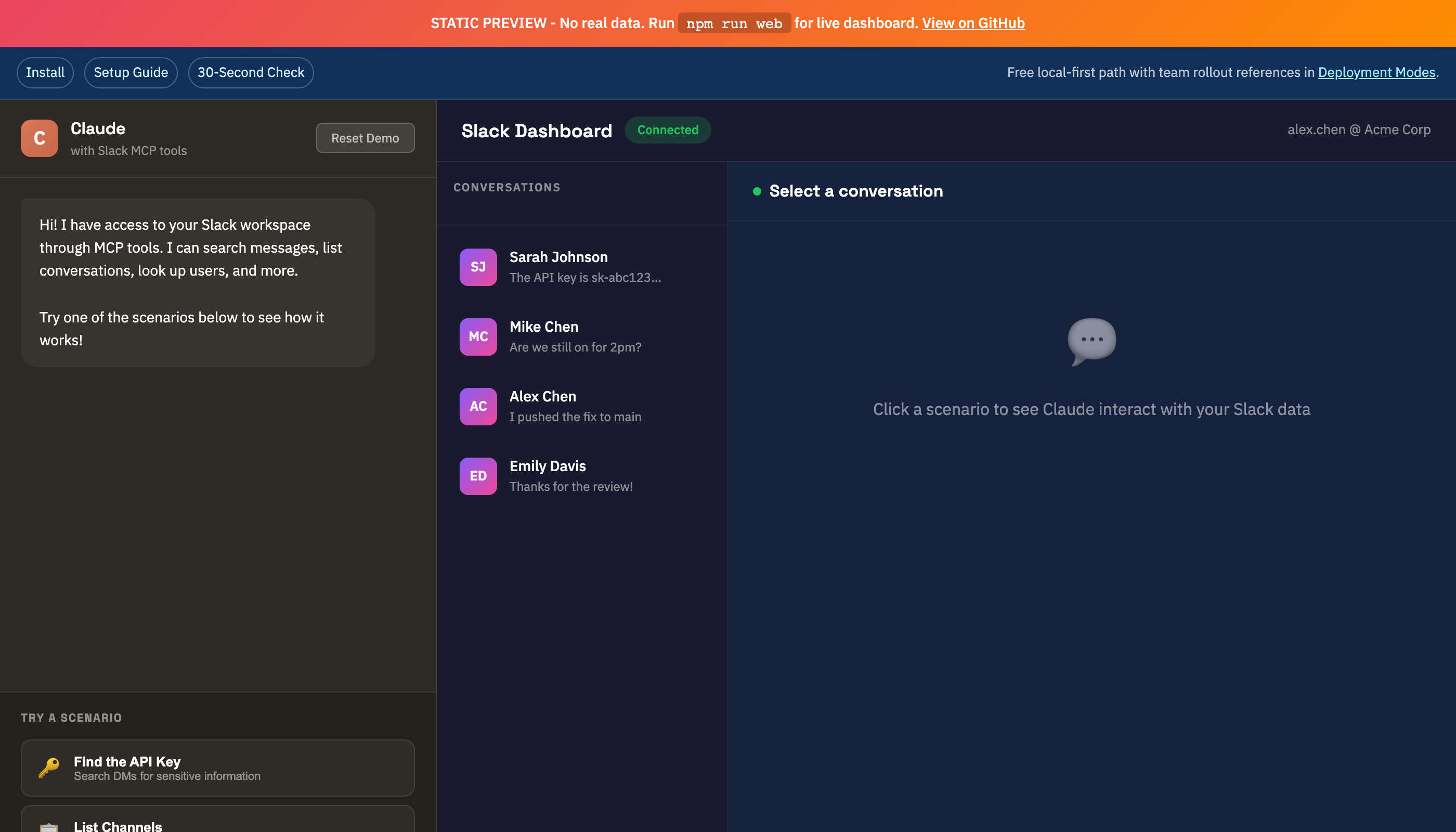
|
|
103
|
-
|
|
104
|
-
---
|
|
105
|
-
|
|
106
|
-
## Architecture: Local Session Mirroring
|
|
107
|
-
|
|
108
|
-
Instead of authenticating as a bot, this server leverages your existing Chrome session credentials (macOS) or manual token injection (Linux/Windows). It mirrors your user access exactly—if you can see it in Slack, Claude can see it too.
|
|
109
|
-
|
|
110
|
-
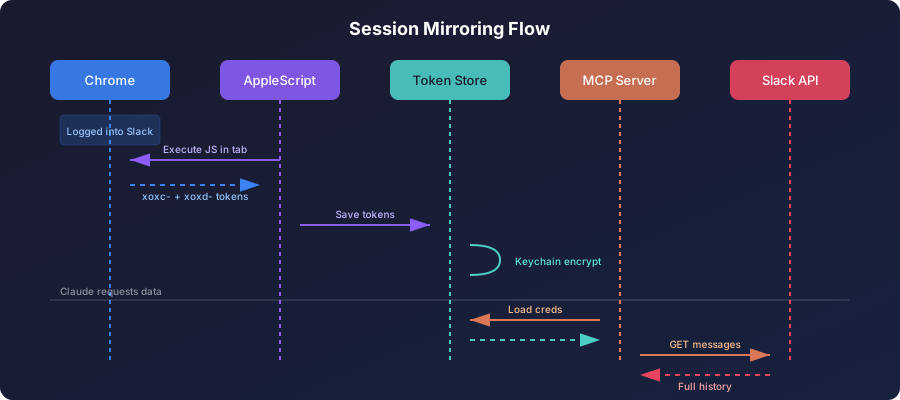
|
|
111
|
-
|
|
112
|
-
### Why Not OAuth?
|
|
44
|
+
[Get Started](https://jtalk22.github.io/slack-mcp-server/cloud.html) · [Privacy Policy](https://jtalk22.github.io/slack-mcp-server/privacy.html)
|
|
113
45
|
|
|
114
|
-
|
|
115
|
-
|
|
116
|
-
**Trade-off:** Session tokens expire every 1-2 weeks. Auto-refresh (macOS) or manual update keeps things running.
|
|
117
|
-
|
|
118
|
-
---
|
|
119
|
-
|
|
120
|
-
## Features
|
|
121
|
-
|
|
122
|
-
### Core Capabilities
|
|
123
|
-
- **Read Any Message** - DMs, private channels, public channels
|
|
124
|
-
- **Full Export** - Conversations with threads and resolved usernames
|
|
125
|
-
- **Search** - Query across your entire workspace
|
|
126
|
-
- **Send Messages** - DMs or channels, with thread support
|
|
127
|
-
- **Reactions** - Add or remove emoji reactions on any message
|
|
128
|
-
- **Unreads** - Priority-sorted unread inbox across all conversations
|
|
129
|
-
- **User Directory** - List, search, and look up 500+ users with pagination
|
|
130
|
-
|
|
131
|
-
### Stability
|
|
132
|
-
- **Auto Token Refresh** - Extracts fresh tokens from Chrome automatically *(macOS only)*
|
|
133
|
-
- **Atomic Writes** - File operations use temp-file-then-rename to prevent corruption
|
|
134
|
-
- **Zombie Protection** - Background timers use `unref()` for clean process exit
|
|
135
|
-
- **Race Condition Safety** - Mutex locks prevent concurrent token extraction
|
|
136
|
-
- **Rate Limit Handling** - Exponential backoff with jitter
|
|
137
|
-
|
|
138
|
-
### Tools
|
|
139
|
-
| Tool | Description |
|
|
140
|
-
|------|-------------|
|
|
141
|
-
| `slack_health_check` | Verify token validity and workspace info |
|
|
142
|
-
| `slack_token_status` | Detailed token age, health, and cache stats |
|
|
143
|
-
| `slack_refresh_tokens` | Auto-extract fresh tokens from Chrome |
|
|
144
|
-
| `slack_list_conversations` | List DMs/channels (with lazy discovery cache) |
|
|
145
|
-
| `slack_conversations_history` | Get messages from a channel or DM |
|
|
146
|
-
| `slack_get_full_conversation` | Export full history with threads |
|
|
147
|
-
| `slack_search_messages` | Search across workspace |
|
|
148
|
-
| `slack_send_message` | Send a message to any conversation |
|
|
149
|
-
| `slack_get_thread` | Get thread replies |
|
|
150
|
-
| `slack_users_info` | Get user details |
|
|
151
|
-
| `slack_list_users` | List workspace users (paginated, 500+ supported) |
|
|
152
|
-
| `slack_add_reaction` | Add an emoji reaction to a message |
|
|
153
|
-
| `slack_remove_reaction` | Remove an emoji reaction from a message |
|
|
154
|
-
| `slack_conversations_mark` | Mark a conversation as read up to a timestamp |
|
|
155
|
-
| `slack_conversations_unreads` | Get channels/DMs with unread messages, priority-sorted |
|
|
156
|
-
| `slack_users_search` | Search workspace users by name, display name, or email |
|
|
157
|
-
|
|
158
|
-
---
|
|
159
|
-
|
|
160
|
-
## Quick Start
|
|
46
|
+
## Install (Self-Hosted)
|
|
161
47
|
|
|
162
48
|
**Runtime:** Node.js 20+
|
|
163
49
|
|
|
164
|
-
### 30-Second Compatibility Check
|
|
165
|
-
|
|
166
|
-
```bash
|
|
167
|
-
npx -y @jtalk22/slack-mcp --setup
|
|
168
|
-
npx -y @jtalk22/slack-mcp --doctor
|
|
169
|
-
npx -y @jtalk22/slack-mcp --status
|
|
170
|
-
```
|
|
171
|
-
|
|
172
|
-
Expected:
|
|
173
|
-
- `--setup` launches the interactive wizard
|
|
174
|
-
- `--doctor` returns one clear next action with exit code:
|
|
175
|
-
- `0` ready
|
|
176
|
-
- `1` missing credentials
|
|
177
|
-
- `2` invalid/expired credentials
|
|
178
|
-
- `3` connectivity/runtime issue
|
|
179
|
-
- `--status` is read-only and non-mutating
|
|
180
|
-
|
|
181
|
-
Command reference: [HN launch kit](https://github.com/jtalk22/slack-mcp-server/blob/main/docs/HN-LAUNCH.md)
|
|
182
|
-
|
|
183
|
-
### Known Working Clients
|
|
184
|
-
|
|
185
|
-
- Claude Desktop (macOS/Windows/Linux)
|
|
186
|
-
- Claude Code CLI
|
|
187
|
-
- Local browser mode (`web`)
|
|
188
|
-
- Hosted Node runtime (`http`)
|
|
189
|
-
- Cloudflare Worker / Smithery transport
|
|
190
|
-
|
|
191
|
-
Compatibility matrix: [compatibility matrix](https://github.com/jtalk22/slack-mcp-server/blob/main/docs/COMPATIBILITY.md)
|
|
192
|
-
|
|
193
|
-
### Option A: npm (Recommended)
|
|
194
|
-
|
|
195
|
-
```bash
|
|
196
|
-
npm install -g @jtalk22/slack-mcp
|
|
197
|
-
```
|
|
198
|
-
|
|
199
|
-
### Option B: Clone Repository
|
|
200
|
-
|
|
201
|
-
```bash
|
|
202
|
-
git clone https://github.com/jtalk22/slack-mcp-server.git
|
|
203
|
-
cd slack-mcp-server
|
|
204
|
-
npm install
|
|
205
|
-
```
|
|
206
|
-
|
|
207
|
-
### Option C: Docker
|
|
208
|
-
|
|
209
|
-
```bash
|
|
210
|
-
docker pull ghcr.io/jtalk22/slack-mcp-server:latest
|
|
211
|
-
```
|
|
212
|
-
|
|
213
|
-
### Install Sanity (Clean Temp Directory)
|
|
214
|
-
|
|
215
|
-
```bash
|
|
216
|
-
tmpdir="$(mktemp -d)"
|
|
217
|
-
cd "$tmpdir"
|
|
218
|
-
npx -y @jtalk22/slack-mcp --version
|
|
219
|
-
npx -y @jtalk22/slack-mcp --help
|
|
220
|
-
npx -y @jtalk22/slack-mcp --status
|
|
221
|
-
```
|
|
222
|
-
|
|
223
|
-
Expected:
|
|
224
|
-
- `--version` and `--help` exit `0`
|
|
225
|
-
- `--status` exits non-zero until credentials are configured
|
|
226
|
-
- `--status` is read-only and never attempts Chrome extraction
|
|
227
|
-
|
|
228
|
-
---
|
|
229
|
-
|
|
230
|
-
## Configuration
|
|
231
|
-
|
|
232
|
-
### Step 1: Get Your Tokens
|
|
233
|
-
|
|
234
|
-
#### Setup Wizard (Recommended)
|
|
235
|
-
|
|
236
|
-
The interactive setup wizard handles token extraction and validation automatically:
|
|
237
|
-
|
|
238
50
|
```bash
|
|
239
51
|
npx -y @jtalk22/slack-mcp --setup
|
|
240
52
|
```
|
|
241
53
|
|
|
242
|
-
|
|
243
|
-
- **Linux/Windows**: Guides you through manual extraction step-by-step
|
|
244
|
-
- Validates tokens against Slack API before saving
|
|
245
|
-
- Stores tokens securely at `~/.slack-mcp-tokens.json`
|
|
54
|
+
The setup wizard handles token extraction and validation automatically.
|
|
246
55
|
|
|
247
|
-
|
|
248
|
-
|
|
249
|
-
```bash
|
|
250
|
-
npx -y @jtalk22/slack-mcp --status
|
|
251
|
-
```
|
|
252
|
-
|
|
253
|
-
#### Alternative: Manual Token Scripts
|
|
254
|
-
|
|
255
|
-
```bash
|
|
256
|
-
# macOS auto-extraction
|
|
257
|
-
npm run tokens:auto
|
|
258
|
-
|
|
259
|
-
# Manual entry (all platforms)
|
|
260
|
-
npm run tokens:refresh
|
|
261
|
-
|
|
262
|
-
# Check health
|
|
263
|
-
npm run tokens:status
|
|
264
|
-
```
|
|
265
|
-
|
|
266
|
-
### Step 2: Configure Claude
|
|
267
|
-
|
|
268
|
-
#### Claude Desktop (macOS)
|
|
56
|
+
<details>
|
|
57
|
+
<summary><strong>Claude Desktop (macOS)</strong></summary>
|
|
269
58
|
|
|
270
59
|
Edit `~/Library/Application Support/Claude/claude_desktop_config.json`:
|
|
271
60
|
|
|
@@ -280,7 +69,10 @@ Edit `~/Library/Application Support/Claude/claude_desktop_config.json`:
|
|
|
280
69
|
}
|
|
281
70
|
```
|
|
282
71
|
|
|
283
|
-
|
|
72
|
+
</details>
|
|
73
|
+
|
|
74
|
+
<details>
|
|
75
|
+
<summary><strong>Claude Desktop (Windows/Linux)</strong></summary>
|
|
284
76
|
|
|
285
77
|
Edit `%APPDATA%\Claude\claude_desktop_config.json`:
|
|
286
78
|
|
|
@@ -299,9 +91,12 @@ Edit `%APPDATA%\Claude\claude_desktop_config.json`:
|
|
|
299
91
|
}
|
|
300
92
|
```
|
|
301
93
|
|
|
302
|
-
>
|
|
94
|
+
> Windows/Linux users must provide tokens via `env` since auto-refresh is macOS-only.
|
|
95
|
+
|
|
96
|
+
</details>
|
|
303
97
|
|
|
304
|
-
|
|
98
|
+
<details>
|
|
99
|
+
<summary><strong>Claude Code CLI</strong></summary>
|
|
305
100
|
|
|
306
101
|
Add to `~/.claude.json`:
|
|
307
102
|
|
|
@@ -317,9 +112,14 @@ Add to `~/.claude.json`:
|
|
|
317
112
|
}
|
|
318
113
|
```
|
|
319
114
|
|
|
320
|
-
|
|
115
|
+
</details>
|
|
321
116
|
|
|
322
|
-
|
|
117
|
+
<details>
|
|
118
|
+
<summary><strong>Docker</strong></summary>
|
|
119
|
+
|
|
120
|
+
```bash
|
|
121
|
+
docker pull ghcr.io/jtalk22/slack-mcp-server:latest
|
|
122
|
+
```
|
|
323
123
|
|
|
324
124
|
```json
|
|
325
125
|
{
|
|
@@ -334,237 +134,61 @@ Claude Code reads tokens from `~/.slack-mcp-tokens.json` automatically.
|
|
|
334
134
|
}
|
|
335
135
|
```
|
|
336
136
|
|
|
337
|
-
### Step 3: Restart Claude
|
|
338
|
-
|
|
339
|
-
Fully quit and reopen Claude. The Slack tools will appear.
|
|
340
|
-
|
|
341
|
-
---
|
|
342
|
-
|
|
343
|
-
## Architecture
|
|
344
|
-
|
|
345
|
-
### Token Persistence (4 Layers)
|
|
346
|
-
|
|
347
|
-
```
|
|
348
|
-
Priority 1: Environment Variables (SLACK_TOKEN, SLACK_COOKIE)
|
|
349
|
-
↓ fallback
|
|
350
|
-
Priority 2: Token File (~/.slack-mcp-tokens.json)
|
|
351
|
-
↓ fallback
|
|
352
|
-
Priority 3: macOS Keychain (encrypted)
|
|
353
|
-
↓ fallback
|
|
354
|
-
Priority 4: Chrome Auto-Extraction (macOS only)
|
|
355
|
-
```
|
|
356
|
-
|
|
357
|
-
### Stability Features
|
|
358
|
-
|
|
359
|
-
#### Atomic Writes
|
|
360
|
-
All file operations (tokens, DM cache) use atomic writes:
|
|
361
|
-
```
|
|
362
|
-
Write to temp file → chmod 600 → rename to target
|
|
363
|
-
```
|
|
364
|
-
This prevents JSON corruption if the process is killed mid-write.
|
|
365
|
-
|
|
366
|
-
#### Zombie Process Protection
|
|
367
|
-
Background refresh timers use `unref()`:
|
|
368
|
-
```javascript
|
|
369
|
-
const timer = setInterval(refreshTokens, 4 * 60 * 60 * 1000);
|
|
370
|
-
timer.unref(); // Process can exit even if timer is pending
|
|
371
|
-
```
|
|
372
|
-
When Claude closes the MCP connection, the server exits cleanly.
|
|
373
|
-
|
|
374
|
-
#### Race Condition Prevention
|
|
375
|
-
A mutex lock prevents concurrent Chrome extractions:
|
|
376
|
-
```javascript
|
|
377
|
-
if (refreshInProgress) return null; // Skip if already refreshing
|
|
378
|
-
refreshInProgress = true;
|
|
379
|
-
try { return extractFromChromeInternal(); }
|
|
380
|
-
finally { refreshInProgress = false; }
|
|
381
|
-
```
|
|
382
|
-
|
|
383
|
-
---
|
|
384
|
-
|
|
385
|
-
## Web UI (optional browser/local fallback)
|
|
386
|
-
|
|
387
|
-
Claude now supports remote MCP connectors on paid plans. For claude.ai, the preferred path is adding a remote connector in Settings -> Connectors.
|
|
388
|
-
|
|
389
|
-
Reference:
|
|
390
|
-
- https://support.anthropic.com/en/articles/11995447-connectors-in-claude
|
|
391
|
-
- https://support.anthropic.com/en/articles/11175166-about-custom-integrations-using-remote-mcp
|
|
392
|
-
|
|
393
|
-
Use this Web UI when you want a local localhost dashboard, REST access, or a fallback workflow without remote connector hosting:
|
|
394
|
-
|
|
395
|
-
```bash
|
|
396
|
-
npm run web
|
|
397
|
-
# Or: npx -y @jtalk22/slack-mcp web
|
|
398
|
-
```
|
|
399
|
-
|
|
400
|
-
**Magic Link:** The console prints a one-click URL with the API key embedded:
|
|
401
|
-
|
|
402
|
-
```
|
|
403
|
-
════════════════════════════════════════════════════════════
|
|
404
|
-
Slack Web API Server v3.2.0
|
|
405
|
-
════════════════════════════════════════════════════════════
|
|
406
|
-
|
|
407
|
-
Dashboard: http://localhost:3000/?key=smcp_xxxxxxxxxxxx
|
|
408
|
-
```
|
|
409
|
-
|
|
410
|
-
Just click the link - no copy-paste needed. The key is saved to your browser and stripped from the URL for security.
|
|
411
|
-
|
|
412
|
-
<details>
|
|
413
|
-
<summary><strong>Screenshots</strong></summary>
|
|
414
|
-
|
|
415
|
-
| DMs View | Channels View |
|
|
416
|
-
|----------|---------------|
|
|
417
|
-
|  | 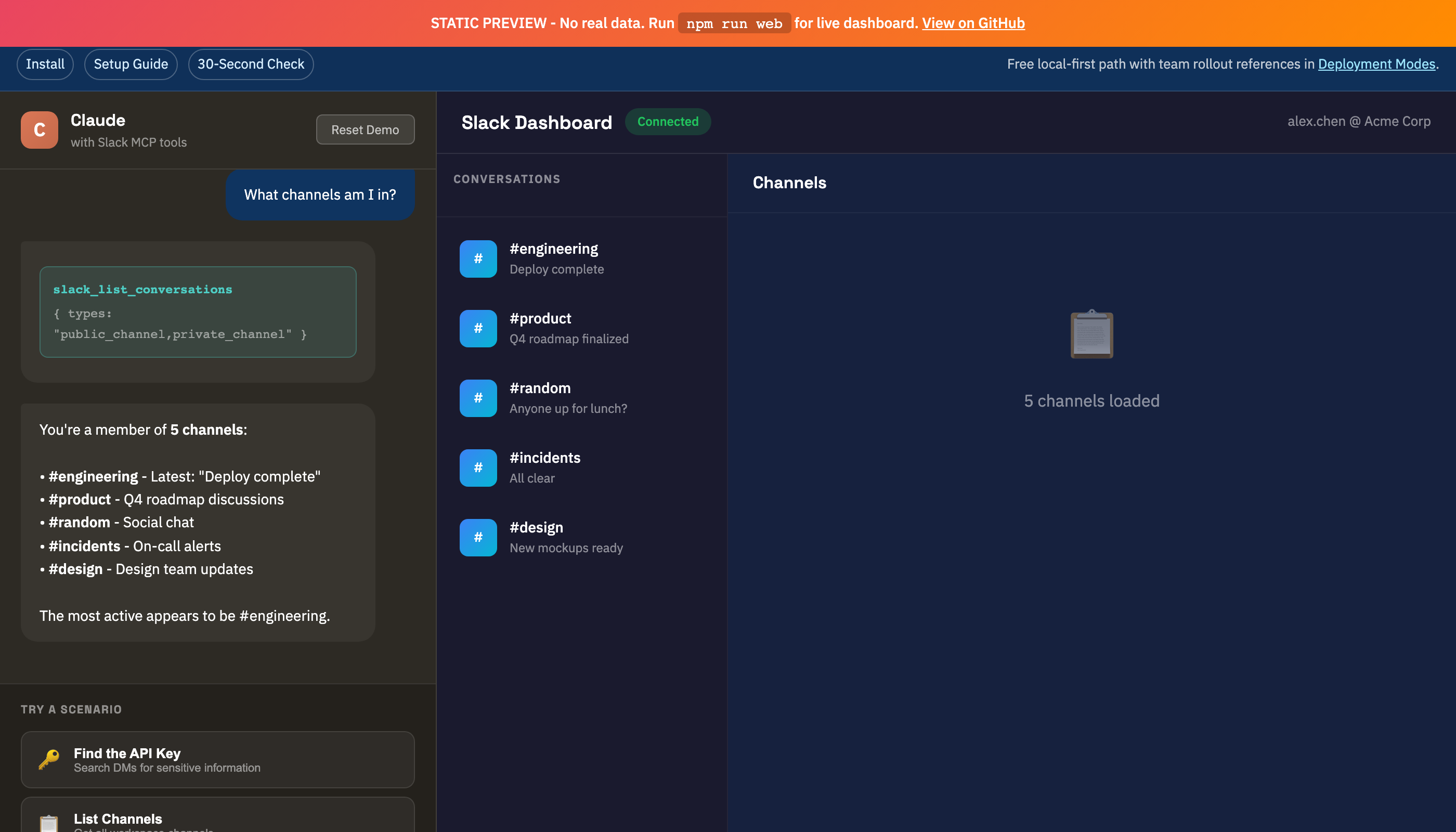 |
|
|
418
|
-
|
|
419
137
|
</details>
|
|
420
138
|
|
|
421
|
-
|
|
139
|
+
Restart Claude after configuration. Full setup guide: [docs/SETUP.md](docs/SETUP.md)
|
|
422
140
|
|
|
423
|
-
## Hosted HTTP Mode
|
|
141
|
+
## Hosted HTTP Mode
|
|
424
142
|
|
|
425
|
-
|
|
143
|
+
For remote MCP endpoints (Cloudflare Worker, VPS, etc.):
|
|
426
144
|
|
|
427
145
|
```bash
|
|
428
|
-
SLACK_TOKEN=xoxc-...
|
|
429
|
-
SLACK_COOKIE=xoxd-...
|
|
430
|
-
SLACK_MCP_HTTP_AUTH_TOKEN=change-this
|
|
431
|
-
SLACK_MCP_HTTP_ALLOWED_ORIGINS=https://claude.ai
|
|
146
|
+
SLACK_TOKEN=xoxc-... \
|
|
147
|
+
SLACK_COOKIE=xoxd-... \
|
|
148
|
+
SLACK_MCP_HTTP_AUTH_TOKEN=change-this \
|
|
149
|
+
SLACK_MCP_HTTP_ALLOWED_ORIGINS=https://claude.ai \
|
|
432
150
|
node src/server-http.js
|
|
433
151
|
```
|
|
434
152
|
|
|
435
|
-
|
|
436
|
-
- `/mcp` requires `Authorization: Bearer <SLACK_MCP_HTTP_AUTH_TOKEN>` by default.
|
|
437
|
-
- Cross-origin browser calls are denied unless origin is listed in `SLACK_MCP_HTTP_ALLOWED_ORIGINS`.
|
|
438
|
-
- For local testing only, you can opt out with `SLACK_MCP_HTTP_INSECURE=1`.
|
|
439
|
-
|
|
440
|
-
---
|
|
441
|
-
|
|
442
|
-
## Operations Guides
|
|
443
|
-
|
|
444
|
-
- [Docs Index](https://github.com/jtalk22/slack-mcp-server/blob/main/docs/INDEX.md) - One-click index for setup, API, troubleshooting, deployment, and support docs
|
|
445
|
-
- [Deployment Modes](https://github.com/jtalk22/slack-mcp-server/blob/main/docs/DEPLOYMENT-MODES.md) - Choose the right operating model (`stdio`, `web`, hosted HTTP, Smithery/Worker)
|
|
446
|
-
- [Use Case Recipes](https://github.com/jtalk22/slack-mcp-server/blob/main/docs/USE_CASE_RECIPES.md) - 12 copy/paste prompts mapped to current tool contracts
|
|
447
|
-
- [Support Boundaries](https://github.com/jtalk22/slack-mcp-server/blob/main/docs/SUPPORT-BOUNDARIES.md) - Scope, response targets, and solo-maintainer capacity limits
|
|
448
|
-
- [Release Health](https://github.com/jtalk22/slack-mcp-server/blob/main/docs/RELEASE-HEALTH.md) - Track setup reliability and support-load targets through this release cycle
|
|
449
|
-
|
|
450
|
-
If you're evaluating team rollout, start with [Deployment Modes](https://github.com/jtalk22/slack-mcp-server/blob/main/docs/DEPLOYMENT-MODES.md) before exposing remote endpoints.
|
|
451
|
-
|
|
452
|
-
---
|
|
453
|
-
|
|
454
|
-
## Getting Help Fast
|
|
455
|
-
|
|
456
|
-
1. Run:
|
|
457
|
-
```bash
|
|
458
|
-
npx -y @jtalk22/slack-mcp --version
|
|
459
|
-
npx -y @jtalk22/slack-mcp --doctor
|
|
460
|
-
```
|
|
461
|
-
2. If setup fails, run:
|
|
462
|
-
```bash
|
|
463
|
-
npx -y @jtalk22/slack-mcp --setup
|
|
464
|
-
```
|
|
465
|
-
3. Open an issue with full environment details:
|
|
466
|
-
- [Bug Report Template](https://github.com/jtalk22/slack-mcp-server/issues/new?template=bug_report.md)
|
|
467
|
-
- [Deployment Intake Template](https://github.com/jtalk22/slack-mcp-server/issues/new?template=deployment-intake.md)
|
|
468
|
-
4. For guided hosted rollout support:
|
|
469
|
-
- [GitHub Discussions](https://github.com/jtalk22/slack-mcp-server/discussions)
|
|
470
|
-
5. Check scope and response targets:
|
|
471
|
-
- [Support Boundaries](https://github.com/jtalk22/slack-mcp-server/blob/main/docs/SUPPORT-BOUNDARIES.md)
|
|
472
|
-
- [Troubleshooting Guide](https://github.com/jtalk22/slack-mcp-server/blob/main/docs/TROUBLESHOOTING.md)
|
|
473
|
-
|
|
474
|
-
---
|
|
153
|
+
Details: [docs/DEPLOYMENT-MODES.md](docs/DEPLOYMENT-MODES.md)
|
|
475
154
|
|
|
476
155
|
## Troubleshooting
|
|
477
156
|
|
|
478
|
-
|
|
479
|
-
```bash
|
|
480
|
-
# macOS: Auto-refresh from Chrome
|
|
481
|
-
slack_refresh_tokens # In Claude
|
|
482
|
-
# Or: npm run tokens:auto
|
|
483
|
-
|
|
484
|
-
# Package setup wizard
|
|
485
|
-
npx -y @jtalk22/slack-mcp --setup
|
|
486
|
-
|
|
487
|
-
# Linux/Windows: Manual update
|
|
488
|
-
# Edit ~/.slack-mcp-tokens.json with fresh values
|
|
489
|
-
```
|
|
490
|
-
|
|
491
|
-
### DMs Not Showing
|
|
492
|
-
Use `discover_dms: true` to force discovery:
|
|
493
|
-
```
|
|
494
|
-
slack_list_conversations with discover_dms=true
|
|
495
|
-
```
|
|
496
|
-
This caches DM channel IDs for 24 hours.
|
|
497
|
-
|
|
498
|
-
### Chrome Extraction Fails
|
|
499
|
-
- Chrome must be **running** (not minimized to Dock)
|
|
500
|
-
- Slack tab must be open at `app.slack.com`
|
|
501
|
-
- You must be logged in
|
|
502
|
-
- In Chrome menu, enable `View > Developer > Allow JavaScript from Apple Events`
|
|
157
|
+
**Tokens expired:** Run `npx -y @jtalk22/slack-mcp --setup` or use `slack_refresh_tokens` in Claude (macOS).
|
|
503
158
|
|
|
504
|
-
|
|
505
|
-
1. Verify JSON syntax in config file
|
|
506
|
-
2. Check logs: `~/Library/Logs/Claude/mcp*.log`
|
|
507
|
-
3. Fully restart Claude (Cmd+Q, then reopen)
|
|
159
|
+
**DMs not showing:** Use `slack_list_conversations` with `discover_dms=true` to force discovery.
|
|
508
160
|
|
|
509
|
-
|
|
161
|
+
**Claude not seeing tools:** Verify JSON syntax in config, check logs at `~/Library/Logs/Claude/mcp*.log`, fully restart Claude (Cmd+Q).
|
|
510
162
|
|
|
511
|
-
|
|
163
|
+
More: [docs/TROUBLESHOOTING.md](docs/TROUBLESHOOTING.md)
|
|
512
164
|
|
|
513
|
-
|
|
514
|
-
slack-mcp-server/
|
|
515
|
-
├── src/
|
|
516
|
-
│ ├── server.js # MCP server (stdio transport)
|
|
517
|
-
│ └── web-server.js # REST API + Web UI
|
|
518
|
-
├── lib/
|
|
519
|
-
│ ├── token-store.js # 4-layer persistence + atomic writes
|
|
520
|
-
│ ├── slack-client.js # API client, LRU cache, retry logic
|
|
521
|
-
│ ├── tools.js # MCP tool definitions
|
|
522
|
-
│ └── handlers.js # Tool implementations
|
|
523
|
-
├── public/
|
|
524
|
-
│ ├── index.html # Web UI
|
|
525
|
-
│ └── demo.html # Interactive demo
|
|
526
|
-
└── scripts/
|
|
527
|
-
└── token-cli.js # Token management CLI
|
|
528
|
-
```
|
|
165
|
+
## Docs
|
|
529
166
|
|
|
530
|
-
|
|
167
|
+
- [Setup Guide](docs/SETUP.md) — Token extraction and configuration
|
|
168
|
+
- [API Reference](docs/API.md) — All 16 tools with parameters and examples
|
|
169
|
+
- [Deployment Modes](docs/DEPLOYMENT-MODES.md) — stdio, web, hosted HTTP, Cloudflare Worker
|
|
170
|
+
- [Use Case Recipes](docs/USE_CASE_RECIPES.md) — 12 copy-paste prompts
|
|
171
|
+
- [Troubleshooting](docs/TROUBLESHOOTING.md) — Common issues and fixes
|
|
172
|
+
- [Compatibility](docs/COMPATIBILITY.md) — Client compatibility matrix
|
|
173
|
+
- [Support Boundaries](docs/SUPPORT-BOUNDARIES.md) — Scope and response targets
|
|
174
|
+
- [Docs Index](docs/INDEX.md) — Full documentation index
|
|
531
175
|
|
|
532
176
|
## Security
|
|
533
177
|
|
|
534
178
|
- Token files stored with `chmod 600` (owner-only)
|
|
535
179
|
- macOS Keychain provides encrypted backup
|
|
536
180
|
- Web server binds to localhost only
|
|
537
|
-
- Never commit tokens to version control
|
|
538
181
|
- API keys are cryptographically random (`crypto.randomBytes`)
|
|
539
|
-
|
|
540
|
-
---
|
|
541
|
-
|
|
542
|
-
## Platform Support
|
|
543
|
-
|
|
544
|
-
| Feature | macOS | Linux | Windows |
|
|
545
|
-
|---------|-------|-------|---------|
|
|
546
|
-
| MCP Server | Yes | Yes | Yes |
|
|
547
|
-
| Token File | Yes | Yes | Yes |
|
|
548
|
-
| Auto-Refresh from Chrome | Yes | No | No |
|
|
549
|
-
| Keychain Storage | Yes | No | No |
|
|
550
|
-
| Web UI | Yes | Yes | Yes |
|
|
551
|
-
|
|
552
|
-
---
|
|
182
|
+
- See [SECURITY.md](SECURITY.md) for vulnerability reporting
|
|
553
183
|
|
|
554
184
|
## Contributing
|
|
555
185
|
|
|
556
186
|
PRs welcome. Run `node --check` on modified files before submitting.
|
|
557
187
|
|
|
558
|
-
If this project saves you setup time, consider starring the repository.
|
|
559
|
-
|
|
560
|
-
---
|
|
561
|
-
|
|
562
188
|
## License
|
|
563
189
|
|
|
564
|
-
MIT
|
|
565
|
-
|
|
566
|
-
---
|
|
190
|
+
MIT — See [LICENSE](LICENSE)
|
|
567
191
|
|
|
568
192
|
## Disclaimer
|
|
569
193
|
|
|
570
|
-
This project
|
|
194
|
+
This project accesses Slack's Web API using browser session credentials. It is not affiliated with or endorsed by Slack Technologies, Inc. Slack workspace administrators should review their acceptable use policies.
|
package/docs/API.md
CHANGED
|
@@ -321,3 +321,137 @@ List all workspace users.
|
|
|
321
321
|
]
|
|
322
322
|
}
|
|
323
323
|
```
|
|
324
|
+
|
|
325
|
+
---
|
|
326
|
+
|
|
327
|
+
### slack_add_reaction
|
|
328
|
+
|
|
329
|
+
Add an emoji reaction to a message.
|
|
330
|
+
|
|
331
|
+
**Parameters:**
|
|
332
|
+
| Name | Type | Default | Description |
|
|
333
|
+
|------|------|---------|-------------|
|
|
334
|
+
| channel_id | string | *required* | Channel or DM ID |
|
|
335
|
+
| timestamp | string | *required* | Message timestamp to react to |
|
|
336
|
+
| reaction | string | *required* | Emoji name without colons (e.g. `thumbsup`, `heart`, `eyes`) |
|
|
337
|
+
|
|
338
|
+
**Returns:**
|
|
339
|
+
```json
|
|
340
|
+
{
|
|
341
|
+
"status": "added",
|
|
342
|
+
"channel": "D063M4403MW",
|
|
343
|
+
"timestamp": "1767368030.607599",
|
|
344
|
+
"reaction": "thumbsup"
|
|
345
|
+
}
|
|
346
|
+
```
|
|
347
|
+
|
|
348
|
+
---
|
|
349
|
+
|
|
350
|
+
### slack_remove_reaction
|
|
351
|
+
|
|
352
|
+
Remove an emoji reaction from a message.
|
|
353
|
+
|
|
354
|
+
**Parameters:**
|
|
355
|
+
| Name | Type | Default | Description |
|
|
356
|
+
|------|------|---------|-------------|
|
|
357
|
+
| channel_id | string | *required* | Channel or DM ID |
|
|
358
|
+
| timestamp | string | *required* | Message timestamp |
|
|
359
|
+
| reaction | string | *required* | Emoji name without colons |
|
|
360
|
+
|
|
361
|
+
**Returns:**
|
|
362
|
+
```json
|
|
363
|
+
{
|
|
364
|
+
"status": "removed",
|
|
365
|
+
"channel": "D063M4403MW",
|
|
366
|
+
"timestamp": "1767368030.607599",
|
|
367
|
+
"reaction": "thumbsup"
|
|
368
|
+
}
|
|
369
|
+
```
|
|
370
|
+
|
|
371
|
+
---
|
|
372
|
+
|
|
373
|
+
### slack_conversations_mark
|
|
374
|
+
|
|
375
|
+
Mark a conversation as read up to a specific message timestamp.
|
|
376
|
+
|
|
377
|
+
**Parameters:**
|
|
378
|
+
| Name | Type | Default | Description |
|
|
379
|
+
|------|------|---------|-------------|
|
|
380
|
+
| channel_id | string | *required* | Channel or DM ID to mark as read |
|
|
381
|
+
| timestamp | string | *required* | Message timestamp to mark as read up to |
|
|
382
|
+
|
|
383
|
+
**Returns:**
|
|
384
|
+
```json
|
|
385
|
+
{
|
|
386
|
+
"status": "marked",
|
|
387
|
+
"channel": "D063M4403MW",
|
|
388
|
+
"read_up_to": "1767368030.607599"
|
|
389
|
+
}
|
|
390
|
+
```
|
|
391
|
+
|
|
392
|
+
---
|
|
393
|
+
|
|
394
|
+
### slack_conversations_unreads
|
|
395
|
+
|
|
396
|
+
Get channels and DMs with unread messages, sorted by unread count (highest first).
|
|
397
|
+
|
|
398
|
+
**Parameters:**
|
|
399
|
+
| Name | Type | Default | Description |
|
|
400
|
+
|------|------|---------|-------------|
|
|
401
|
+
| types | string | "im,mpim,public_channel,private_channel" | Comma-separated conversation types |
|
|
402
|
+
| limit | number | 50 | Maximum conversations to return |
|
|
403
|
+
|
|
404
|
+
**Returns:**
|
|
405
|
+
```json
|
|
406
|
+
{
|
|
407
|
+
"total_unread_conversations": 3,
|
|
408
|
+
"conversations": [
|
|
409
|
+
{
|
|
410
|
+
"id": "C05GPEVH7J9",
|
|
411
|
+
"name": "engineering",
|
|
412
|
+
"type": "public_channel",
|
|
413
|
+
"unread_count": 12,
|
|
414
|
+
"latest_ts": "1767368030.607599"
|
|
415
|
+
},
|
|
416
|
+
{
|
|
417
|
+
"id": "D063M4403MW",
|
|
418
|
+
"name": "Gwen Santos",
|
|
419
|
+
"type": "dm",
|
|
420
|
+
"unread_count": 5,
|
|
421
|
+
"latest_ts": "1767368025.123456"
|
|
422
|
+
}
|
|
423
|
+
]
|
|
424
|
+
}
|
|
425
|
+
```
|
|
426
|
+
|
|
427
|
+
---
|
|
428
|
+
|
|
429
|
+
### slack_users_search
|
|
430
|
+
|
|
431
|
+
Search workspace users by name, display name, or email. Case-insensitive partial match.
|
|
432
|
+
|
|
433
|
+
**Parameters:**
|
|
434
|
+
| Name | Type | Default | Description |
|
|
435
|
+
|------|------|---------|-------------|
|
|
436
|
+
| query | string | *required* | Search term to match against name, display name, real name, or email |
|
|
437
|
+
| limit | number | 20 | Maximum results to return |
|
|
438
|
+
|
|
439
|
+
**Returns:**
|
|
440
|
+
```json
|
|
441
|
+
{
|
|
442
|
+
"query": "gwen",
|
|
443
|
+
"count": 1,
|
|
444
|
+
"total_matches": 1,
|
|
445
|
+
"users": [
|
|
446
|
+
{
|
|
447
|
+
"id": "U05GPEVH7J9",
|
|
448
|
+
"name": "gwen",
|
|
449
|
+
"real_name": "Gwen Santos",
|
|
450
|
+
"display_name": "Gwen",
|
|
451
|
+
"email": "gwen@example.com",
|
|
452
|
+
"title": "Assistant",
|
|
453
|
+
"is_admin": false
|
|
454
|
+
}
|
|
455
|
+
]
|
|
456
|
+
}
|
|
457
|
+
```
|
package/lib/tools.js
CHANGED
|
@@ -221,7 +221,7 @@ export const TOOLS = [
|
|
|
221
221
|
annotations: {
|
|
222
222
|
title: "Send Message",
|
|
223
223
|
readOnlyHint: false,
|
|
224
|
-
destructiveHint:
|
|
224
|
+
destructiveHint: true,
|
|
225
225
|
idempotentHint: false,
|
|
226
226
|
openWorldHint: true
|
|
227
227
|
}
|
|
@@ -293,7 +293,7 @@ export const TOOLS = [
|
|
|
293
293
|
annotations: {
|
|
294
294
|
title: "Add Reaction",
|
|
295
295
|
readOnlyHint: false,
|
|
296
|
-
destructiveHint:
|
|
296
|
+
destructiveHint: true,
|
|
297
297
|
idempotentHint: true,
|
|
298
298
|
openWorldHint: true
|
|
299
299
|
}
|
|
@@ -322,7 +322,7 @@ export const TOOLS = [
|
|
|
322
322
|
annotations: {
|
|
323
323
|
title: "Remove Reaction",
|
|
324
324
|
readOnlyHint: false,
|
|
325
|
-
destructiveHint:
|
|
325
|
+
destructiveHint: true,
|
|
326
326
|
idempotentHint: true,
|
|
327
327
|
openWorldHint: true
|
|
328
328
|
}
|
|
@@ -347,7 +347,7 @@ export const TOOLS = [
|
|
|
347
347
|
annotations: {
|
|
348
348
|
title: "Mark as Read",
|
|
349
349
|
readOnlyHint: false,
|
|
350
|
-
destructiveHint:
|
|
350
|
+
destructiveHint: true,
|
|
351
351
|
idempotentHint: true,
|
|
352
352
|
openWorldHint: true
|
|
353
353
|
}
|
package/package.json
CHANGED
|
@@ -1,7 +1,7 @@
|
|
|
1
1
|
{
|
|
2
2
|
"name": "@jtalk22/slack-mcp",
|
|
3
3
|
"mcpName": "io.github.jtalk22/slack-mcp-server",
|
|
4
|
-
"version": "3.2.
|
|
4
|
+
"version": "3.2.1",
|
|
5
5
|
"description": "Session-based Slack MCP for Claude and MCP clients: local-first workflows, secure-default HTTP.",
|
|
6
6
|
"type": "module",
|
|
7
7
|
"main": "src/server.js",
|
package/scripts/setup-wizard.js
CHANGED
|
@@ -392,7 +392,7 @@ async function runDoctor() {
|
|
|
392
392
|
async function showHelp() {
|
|
393
393
|
print(`${colors.bold}slack-mcp-server v${VERSION}${colors.reset}`);
|
|
394
394
|
print();
|
|
395
|
-
print("Full Slack access for Claude via MCP.
|
|
395
|
+
print("Full Slack access for Claude via MCP.");
|
|
396
396
|
print();
|
|
397
397
|
print(`${colors.bold}Usage:${colors.reset}`);
|
|
398
398
|
print(" npx -y @jtalk22/slack-mcp Start MCP server (stdio)");
|