@jtalk22/slack-mcp 1.2.4 → 3.0.0
This diff represents the content of publicly available package versions that have been released to one of the supported registries. The information contained in this diff is provided for informational purposes only and reflects changes between package versions as they appear in their respective public registries.
- package/README.md +113 -61
- package/docs/CLOUDFLARE-BROWSER-TOOLKIT.md +67 -0
- package/docs/DEPLOYMENT-MODES.md +10 -3
- package/docs/HN-LAUNCH.md +45 -36
- package/docs/INDEX.md +9 -0
- package/docs/INSTALL-PROOF.md +18 -0
- package/docs/LAUNCH-COPY-v3.0.0.md +73 -0
- package/docs/LAUNCH-MATRIX.md +22 -0
- package/docs/LAUNCH-OPS.md +71 -0
- package/docs/RELEASE-HEALTH.md +24 -0
- package/docs/TROUBLESHOOTING.md +27 -0
- package/docs/WEB-API.md +13 -4
- package/docs/images/demo-channel-messages.png +0 -0
- package/docs/images/demo-channels.png +0 -0
- package/docs/images/demo-claude-mobile-360x800.png +0 -0
- package/docs/images/demo-claude-mobile-390x844.png +0 -0
- package/docs/images/demo-main-mobile-360x800.png +0 -0
- package/docs/images/demo-main-mobile-390x844.png +0 -0
- package/docs/images/demo-main.png +0 -0
- package/docs/images/demo-poster.png +0 -0
- package/docs/images/demo-sidebar.png +0 -0
- package/docs/images/web-api-mobile-360x800.png +0 -0
- package/docs/images/web-api-mobile-390x844.png +0 -0
- package/lib/handlers.js +14 -6
- package/lib/slack-client.js +17 -1
- package/package.json +28 -12
- package/public/demo-claude.html +83 -10
- package/public/demo-video.html +33 -4
- package/public/demo.html +136 -2
- package/public/index.html +132 -69
- package/scripts/capture-screenshots.js +103 -53
- package/scripts/check-version-parity.js +176 -0
- package/scripts/cloudflare-browser-tool.js +237 -0
- package/scripts/collect-release-health.js +1 -1
- package/scripts/record-demo.js +22 -9
- package/scripts/release-preflight.js +243 -0
- package/scripts/setup-wizard.js +12 -2
- package/scripts/verify-install-flow.js +38 -2
- package/scripts/verify-web.js +49 -1
- package/server.json +47 -0
- package/smithery.yaml +34 -0
- package/src/server-http.js +123 -8
- package/src/server.js +36 -8
- package/src/web-server.js +60 -20
- package/docs/images/demo-claude-v1.2.gif +0 -0
- package/docs/images/demo-readme.gif +0 -0
- package/docs/release-health/2026-02-25.md +0 -33
- package/docs/release-health/2026-02-26.md +0 -33
- package/docs/release-health/24h-delta.md +0 -21
- package/docs/release-health/24h-end.md +0 -33
- package/docs/release-health/24h-start.md +0 -33
- package/docs/release-health/latest.md +0 -33
- package/docs/videos/.gitkeep +0 -0
- package/docs/videos/demo-claude-v1.2.webm +0 -0
package/README.md
CHANGED
|
@@ -1,42 +1,67 @@
|
|
|
1
|
-
|
|
2
|
-
<a href="https://jtalk22.github.io/slack-mcp-server/public/demo.html"><img src="docs/assets/icon-512.png" alt="Slack MCP Server" width="80"></a>
|
|
3
|
-
</p>
|
|
4
|
-
|
|
5
|
-
<h1 align="center">Slack MCP Server</h1>
|
|
6
|
-
|
|
7
|
-
<p align="center">
|
|
8
|
-
<em>Give Claude the same Slack access you have.<br>
|
|
9
|
-
DMs, threads, history—using your existing Slack session.</em>
|
|
10
|
-
</p>
|
|
11
|
-
|
|
12
|
-
<p align="center">
|
|
13
|
-
<a href="https://jtalk22.github.io/slack-mcp-server/public/demo-video.html">
|
|
14
|
-
<img src="docs/images/demo-readme.gif" alt="Slack MCP tools in action" width="640">
|
|
15
|
-
</a>
|
|
16
|
-
</p>
|
|
17
|
-
|
|
18
|
-
<p align="center">
|
|
19
|
-
<a href="https://www.npmjs.com/package/@jtalk22/slack-mcp"><img src="https://img.shields.io/badge/npm-Install-blue?style=for-the-badge&logo=npm&logoColor=white" alt="npm"></a>
|
|
20
|
-
<a href="https://github.com/jtalk22/slack-mcp-server/pkgs/container/slack-mcp-server"><img src="https://img.shields.io/badge/Docker-Pull-2496ED?style=for-the-badge&logo=docker&logoColor=white" alt="Docker"></a>
|
|
21
|
-
</p>
|
|
22
|
-
|
|
23
|
-
<p align="center">
|
|
24
|
-
<a href="https://jtalk22.github.io/slack-mcp-server/public/demo.html"><img src="https://img.shields.io/badge/LIVE%20DEMO-Try%20It%20Now-00C853?style=for-the-badge&logo=slack&logoColor=white" alt="Live Demo"></a>
|
|
25
|
-
<a href="https://jtalk22.github.io/slack-mcp-server/public/demo-claude.html"><img src="https://img.shields.io/badge/CLAUDE%20DEMO-See%20MCP%20Tools-da7756?style=for-the-badge" alt="Claude Demo"></a>
|
|
26
|
-
</p>
|
|
27
|
-
|
|
28
|
-
<br>
|
|
29
|
-
|
|
30
|
-
<p align="center">
|
|
31
|
-
<a href="https://www.npmjs.com/package/@jtalk22/slack-mcp"><img src="https://img.shields.io/npm/dm/@jtalk22/slack-mcp?label=downloads&color=CB3837" alt="npm downloads"></a>
|
|
32
|
-
<a href="https://github.com/jtalk22/slack-mcp-server/actions/workflows/ci.yml"><img src="https://img.shields.io/github/actions/workflow/status/jtalk22/slack-mcp-server/ci.yml?label=build" alt="Build Status"></a>
|
|
33
|
-
<a href="https://smithery.ai/server/jtalk22/slack-mcp-server"><img src="https://img.shields.io/badge/Smithery-Registry-4A154B" alt="Smithery"></a>
|
|
34
|
-
<a href="https://opensource.org/licenses/MIT"><img src="https://img.shields.io/badge/License-MIT-yellow.svg" alt="License: MIT"></a>
|
|
35
|
-
</p>
|
|
1
|
+
# Slack MCP Server
|
|
36
2
|
|
|
37
|
-
|
|
3
|
+
Use your existing Slack session with Claude and other MCP clients.
|
|
4
|
+
Local-first by default (`stdio`/`web`), hosted HTTP when you need a remote endpoint.
|
|
5
|
+
|
|
6
|
+
[Live demo](https://jtalk22.github.io/slack-mcp-server/public/demo-video.html) · [npm package](https://www.npmjs.com/package/@jtalk22/slack-mcp) · [Compatibility matrix](https://github.com/jtalk22/slack-mcp-server/blob/main/docs/COMPATIBILITY.md)
|
|
7
|
+
|
|
8
|
+
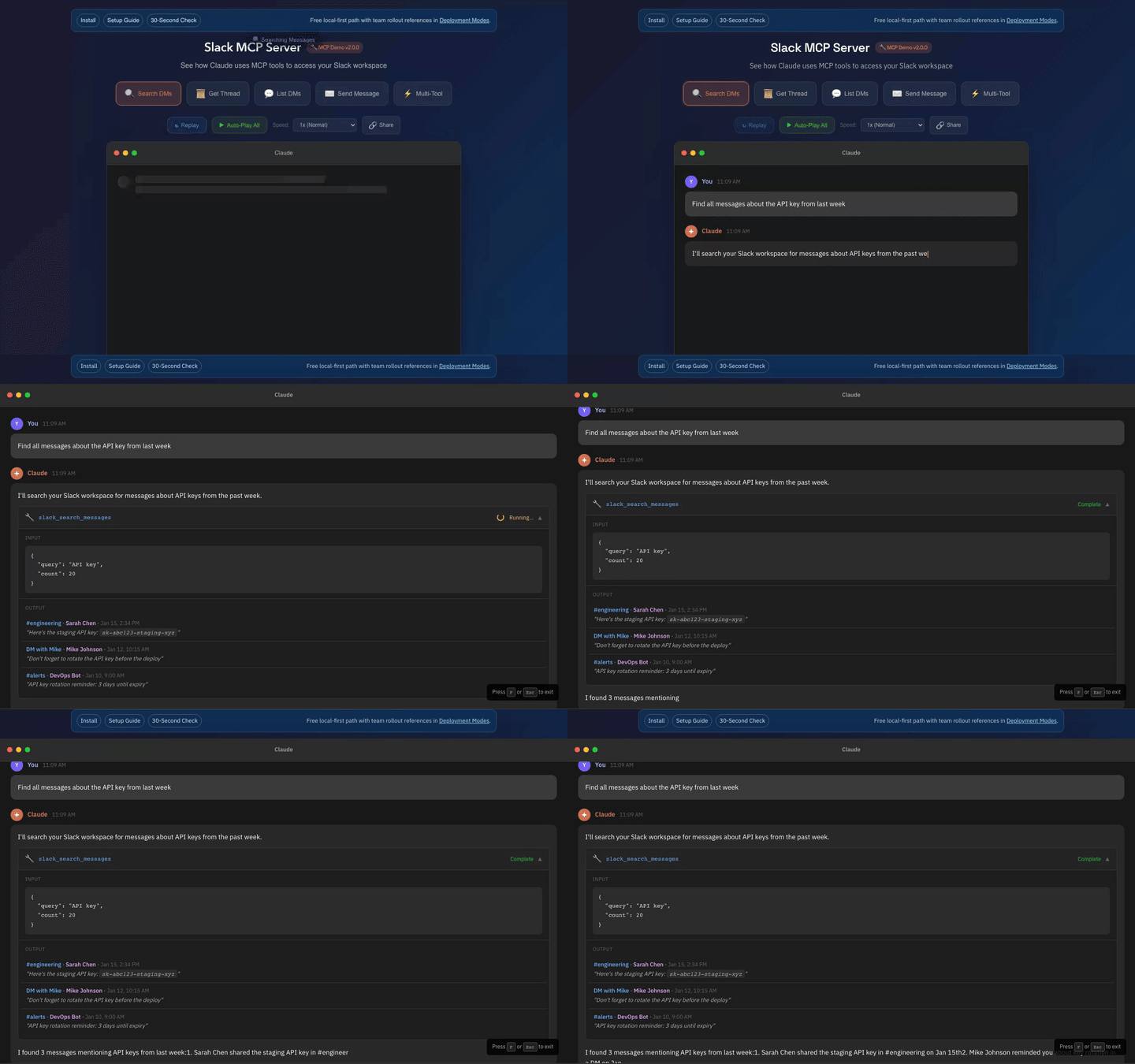
|
|
38
9
|
|
|
39
|
-
|
|
10
|
+
## 30-Second Verify
|
|
11
|
+
|
|
12
|
+
```bash
|
|
13
|
+
npx -y @jtalk22/slack-mcp@latest --version
|
|
14
|
+
npx -y @jtalk22/slack-mcp@latest --doctor
|
|
15
|
+
npx -y @jtalk22/slack-mcp@latest --status
|
|
16
|
+
```
|
|
17
|
+
|
|
18
|
+
Expected:
|
|
19
|
+
- `--version` prints `slack-mcp-server v3.0.0`
|
|
20
|
+
- `--doctor` exits with deterministic `0|1|2|3`
|
|
21
|
+
- `--status` is read-only and non-mutating
|
|
22
|
+
|
|
23
|
+
## Install
|
|
24
|
+
|
|
25
|
+
```bash
|
|
26
|
+
npm install -g @jtalk22/slack-mcp
|
|
27
|
+
npx -y @jtalk22/slack-mcp --setup
|
|
28
|
+
```
|
|
29
|
+
|
|
30
|
+
If this project saves you setup time, star the repo: https://github.com/jtalk22/slack-mcp-server
|
|
31
|
+
|
|
32
|
+
Maintainer/operator: `jtalk22` (`james@revasser.nyc`)
|
|
33
|
+
Release notes: [v3.0.0 notes](https://github.com/jtalk22/slack-mcp-server/blob/main/.github/v3.0.0-release-notes.md)
|
|
34
|
+
|
|
35
|
+
## v3.0.0 at a Glance
|
|
36
|
+
|
|
37
|
+
- Hosted HTTP `/mcp` now requires bearer auth by default (`SLACK_MCP_HTTP_AUTH_TOKEN`).
|
|
38
|
+
- Hosted HTTP CORS now uses explicit allowlisting (`SLACK_MCP_HTTP_ALLOWED_ORIGINS`).
|
|
39
|
+
- Local-first paths (`stdio`, `web`) stay compatible.
|
|
40
|
+
- MCP tool names stay stable (no renames/removals).
|
|
41
|
+
|
|
42
|
+
## 60-Second Hosted Migration
|
|
43
|
+
|
|
44
|
+
```bash
|
|
45
|
+
export SLACK_TOKEN=xoxc-...
|
|
46
|
+
export SLACK_COOKIE=xoxd-...
|
|
47
|
+
export SLACK_MCP_HTTP_AUTH_TOKEN=change-this
|
|
48
|
+
export SLACK_MCP_HTTP_ALLOWED_ORIGINS=https://claude.ai
|
|
49
|
+
node src/server-http.js
|
|
50
|
+
```
|
|
51
|
+
|
|
52
|
+
Request with:
|
|
53
|
+
|
|
54
|
+
```bash
|
|
55
|
+
Authorization: Bearer <SLACK_MCP_HTTP_AUTH_TOKEN>
|
|
56
|
+
```
|
|
57
|
+
|
|
58
|
+
Emergency local fallback only:
|
|
59
|
+
|
|
60
|
+
```bash
|
|
61
|
+
SLACK_MCP_HTTP_INSECURE=1 node src/server-http.js
|
|
62
|
+
```
|
|
63
|
+
|
|
64
|
+
For guided hosted rollout requirements, open: [deployment intake](https://github.com/jtalk22/slack-mcp-server/issues/new?template=deployment-intake.md)
|
|
40
65
|
|
|
41
66
|
### Why This Exists
|
|
42
67
|
|
|
@@ -46,7 +71,7 @@ Screenshotting messages is not a workflow.
|
|
|
46
71
|
|
|
47
72
|
This server bridges the gap. It creates a secure, local bridge between Claude and your Slack web session. It gives your MCP client the same access **you** already have in the browser—search history, summarize threads, and retrieve prior context—without fighting the platform.
|
|
48
73
|
|
|
49
|
-

|
|
74
|
+
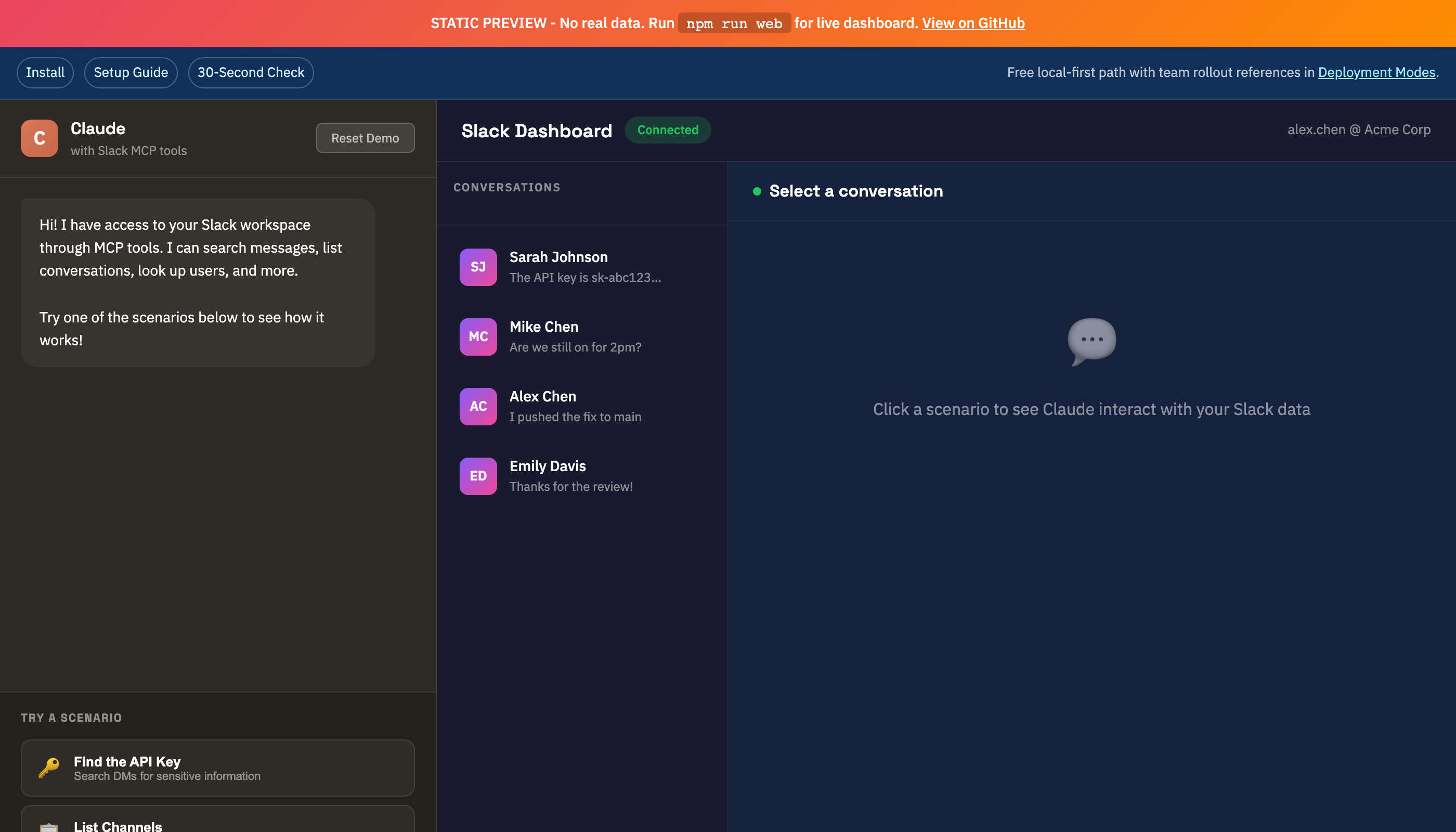
|
|
50
75
|
|
|
51
76
|
---
|
|
52
77
|
|
|
@@ -54,11 +79,11 @@ This server bridges the gap. It creates a secure, local bridge between Claude an
|
|
|
54
79
|
|
|
55
80
|
Instead of authenticating as a bot, this server leverages your existing Chrome session credentials (macOS) or manual token injection (Linux/Windows). It mirrors your user access exactly—if you can see it in Slack, Claude can see it too.
|
|
56
81
|
|
|
57
|
-

|
|
82
|
+
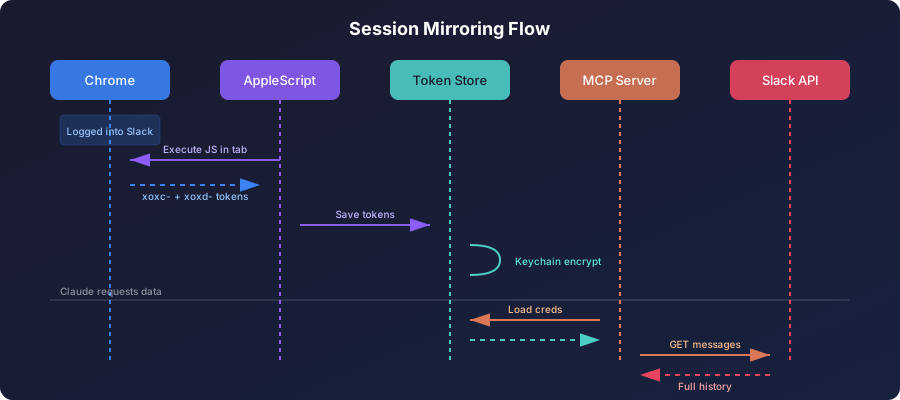
|
|
58
83
|
|
|
59
84
|
### Why Not OAuth?
|
|
60
85
|
|
|
61
|
-

|
|
86
|
+
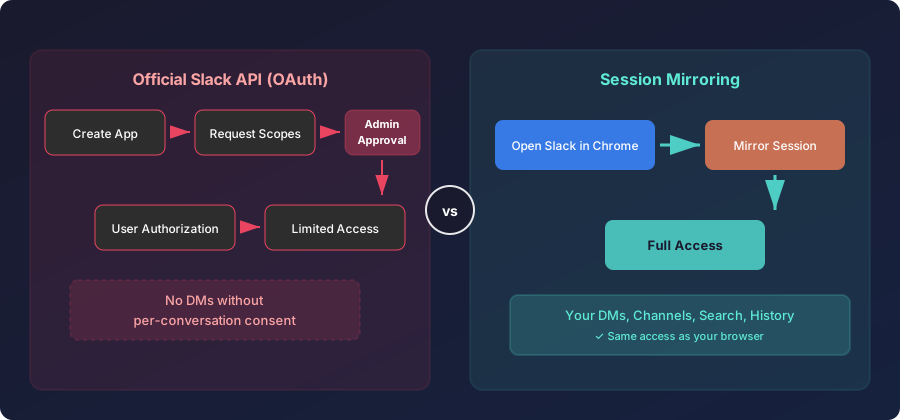
|
|
62
87
|
|
|
63
88
|
**Trade-off:** Session tokens expire every 1-2 weeks. Auto-refresh (macOS) or manual update keeps things running.
|
|
64
89
|
|
|
@@ -84,7 +109,7 @@ Instead of authenticating as a bot, this server leverages your existing Chrome s
|
|
|
84
109
|
| Tool | Description |
|
|
85
110
|
|------|-------------|
|
|
86
111
|
| `slack_health_check` | Verify token validity and workspace info |
|
|
87
|
-
| `slack_token_status` |
|
|
112
|
+
| `slack_token_status` | Detailed token age, health, and cache stats |
|
|
88
113
|
| `slack_refresh_tokens` | Auto-extract fresh tokens from Chrome |
|
|
89
114
|
| `slack_list_conversations` | List DMs/channels (with lazy discovery cache) |
|
|
90
115
|
| `slack_conversations_history` | Get messages from a channel or DM |
|
|
@@ -110,7 +135,7 @@ npx -y @jtalk22/slack-mcp --setup
|
|
|
110
135
|
```
|
|
111
136
|
|
|
112
137
|
Expected:
|
|
113
|
-
- `--version` prints `slack-mcp-server
|
|
138
|
+
- `--version` prints `slack-mcp-server v3.0.x`
|
|
114
139
|
- `--doctor` returns one clear next action with exit code:
|
|
115
140
|
- `0` ready
|
|
116
141
|
- `1` missing credentials
|
|
@@ -118,7 +143,7 @@ Expected:
|
|
|
118
143
|
- `3` connectivity/runtime issue
|
|
119
144
|
- `--setup` launches the interactive wizard
|
|
120
145
|
|
|
121
|
-
Command reference: [
|
|
146
|
+
Command reference: [HN launch kit](https://github.com/jtalk22/slack-mcp-server/blob/main/docs/HN-LAUNCH.md)
|
|
122
147
|
|
|
123
148
|
### Known Working Clients
|
|
124
149
|
|
|
@@ -128,7 +153,7 @@ Command reference: [docs/HN-LAUNCH.md](docs/HN-LAUNCH.md)
|
|
|
128
153
|
- Hosted Node runtime (`http`)
|
|
129
154
|
- Cloudflare Worker / Smithery transport
|
|
130
155
|
|
|
131
|
-
Compatibility matrix: [
|
|
156
|
+
Compatibility matrix: [compatibility matrix](https://github.com/jtalk22/slack-mcp-server/blob/main/docs/COMPATIBILITY.md)
|
|
132
157
|
|
|
133
158
|
### Option A: npm (Recommended)
|
|
134
159
|
|
|
@@ -322,9 +347,15 @@ finally { refreshInProgress = false; }
|
|
|
322
347
|
|
|
323
348
|
---
|
|
324
349
|
|
|
325
|
-
## Web UI (
|
|
350
|
+
## Web UI (optional browser/local fallback)
|
|
326
351
|
|
|
327
|
-
|
|
352
|
+
Claude now supports remote MCP connectors on paid plans. For claude.ai, the preferred path is adding a remote connector in Settings -> Connectors.
|
|
353
|
+
|
|
354
|
+
Reference:
|
|
355
|
+
- https://support.anthropic.com/en/articles/11995447-connectors-in-claude
|
|
356
|
+
- https://support.anthropic.com/en/articles/11175166-about-custom-integrations-using-remote-mcp
|
|
357
|
+
|
|
358
|
+
Use this Web UI when you want a local localhost dashboard, REST access, or a fallback workflow without remote connector hosting:
|
|
328
359
|
|
|
329
360
|
```bash
|
|
330
361
|
npm run web
|
|
@@ -335,7 +366,7 @@ npm run web
|
|
|
335
366
|
|
|
336
367
|
```
|
|
337
368
|
════════════════════════════════════════════════════════════
|
|
338
|
-
Slack Web API Server
|
|
369
|
+
Slack Web API Server v3.0.0
|
|
339
370
|
════════════════════════════════════════════════════════════
|
|
340
371
|
|
|
341
372
|
Dashboard: http://localhost:3000/?key=smcp_xxxxxxxxxxxx
|
|
@@ -348,21 +379,40 @@ Just click the link - no copy-paste needed. The key is saved to your browser and
|
|
|
348
379
|
|
|
349
380
|
| DMs View | Channels View |
|
|
350
381
|
|----------|---------------|
|
|
351
|
-
|  |  |
|
|
382
|
+
|  | 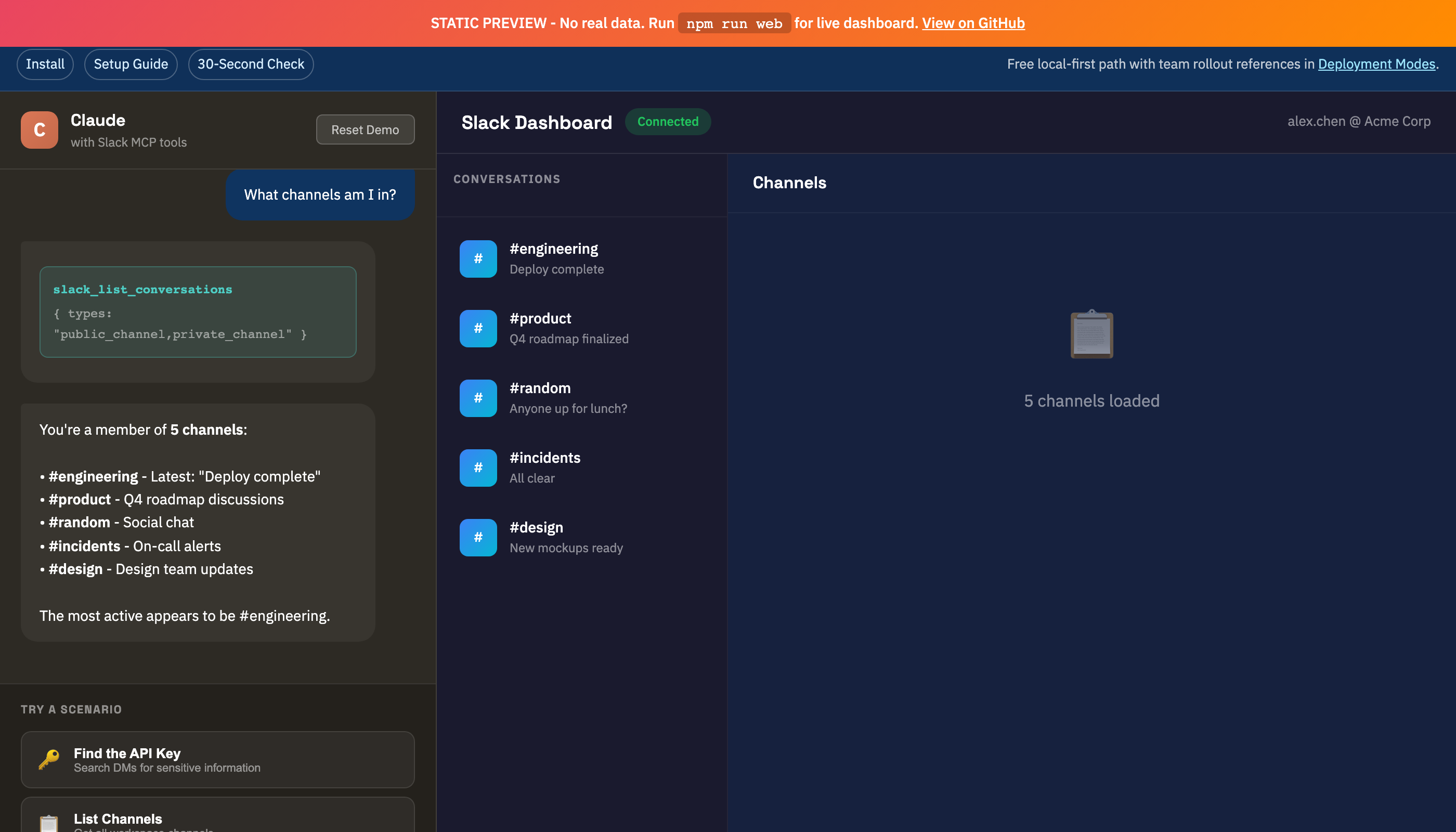 |
|
|
352
383
|
|
|
353
384
|
</details>
|
|
354
385
|
|
|
355
386
|
---
|
|
356
387
|
|
|
388
|
+
## Hosted HTTP Mode (Secure Defaults)
|
|
389
|
+
|
|
390
|
+
Use this mode only when you need a remote MCP endpoint:
|
|
391
|
+
|
|
392
|
+
```bash
|
|
393
|
+
SLACK_TOKEN=xoxc-...
|
|
394
|
+
SLACK_COOKIE=xoxd-...
|
|
395
|
+
SLACK_MCP_HTTP_AUTH_TOKEN=change-this
|
|
396
|
+
SLACK_MCP_HTTP_ALLOWED_ORIGINS=https://claude.ai
|
|
397
|
+
node src/server-http.js
|
|
398
|
+
```
|
|
399
|
+
|
|
400
|
+
Behavior:
|
|
401
|
+
- `/mcp` requires `Authorization: Bearer <SLACK_MCP_HTTP_AUTH_TOKEN>` by default.
|
|
402
|
+
- Cross-origin browser calls are denied unless origin is listed in `SLACK_MCP_HTTP_ALLOWED_ORIGINS`.
|
|
403
|
+
- For local testing only, you can opt out with `SLACK_MCP_HTTP_INSECURE=1`.
|
|
404
|
+
|
|
405
|
+
---
|
|
406
|
+
|
|
357
407
|
## Operations Guides
|
|
358
408
|
|
|
359
|
-
- [Docs Index](docs/INDEX.md) - One-click index for setup, API, troubleshooting, deployment, and support docs
|
|
360
|
-
- [Deployment Modes](docs/DEPLOYMENT-MODES.md) - Choose the right operating model (`stdio`, `web`, hosted HTTP, Smithery/Worker)
|
|
361
|
-
- [Use Case Recipes](docs/USE_CASE_RECIPES.md) - 12 copy/paste prompts mapped to current tool contracts
|
|
362
|
-
- [Support Boundaries](docs/SUPPORT-BOUNDARIES.md) - Scope, response targets, and solo-maintainer capacity limits
|
|
363
|
-
- [Release Health](docs/RELEASE-HEALTH.md) - Track setup reliability and support-load targets through this release cycle
|
|
409
|
+
- [Docs Index](https://github.com/jtalk22/slack-mcp-server/blob/main/docs/INDEX.md) - One-click index for setup, API, troubleshooting, deployment, and support docs
|
|
410
|
+
- [Deployment Modes](https://github.com/jtalk22/slack-mcp-server/blob/main/docs/DEPLOYMENT-MODES.md) - Choose the right operating model (`stdio`, `web`, hosted HTTP, Smithery/Worker)
|
|
411
|
+
- [Use Case Recipes](https://github.com/jtalk22/slack-mcp-server/blob/main/docs/USE_CASE_RECIPES.md) - 12 copy/paste prompts mapped to current tool contracts
|
|
412
|
+
- [Support Boundaries](https://github.com/jtalk22/slack-mcp-server/blob/main/docs/SUPPORT-BOUNDARIES.md) - Scope, response targets, and solo-maintainer capacity limits
|
|
413
|
+
- [Release Health](https://github.com/jtalk22/slack-mcp-server/blob/main/docs/RELEASE-HEALTH.md) - Track setup reliability and support-load targets through this release cycle
|
|
364
414
|
|
|
365
|
-
If you're evaluating team rollout, start with [Deployment Modes](docs/DEPLOYMENT-MODES.md) before exposing remote endpoints.
|
|
415
|
+
If you're evaluating team rollout, start with [Deployment Modes](https://github.com/jtalk22/slack-mcp-server/blob/main/docs/DEPLOYMENT-MODES.md) before exposing remote endpoints.
|
|
366
416
|
|
|
367
417
|
---
|
|
368
418
|
|
|
@@ -378,11 +428,13 @@ If you're evaluating team rollout, start with [Deployment Modes](docs/DEPLOYMENT
|
|
|
378
428
|
npx -y @jtalk22/slack-mcp --setup
|
|
379
429
|
```
|
|
380
430
|
3. Open an issue with full environment details:
|
|
381
|
-
- [Bug Report Template](.
|
|
382
|
-
- [Deployment Intake Template](.
|
|
383
|
-
4.
|
|
384
|
-
- [
|
|
385
|
-
|
|
431
|
+
- [Bug Report Template](https://github.com/jtalk22/slack-mcp-server/issues/new?template=bug_report.md)
|
|
432
|
+
- [Deployment Intake Template](https://github.com/jtalk22/slack-mcp-server/issues/new?template=deployment-intake.md)
|
|
433
|
+
4. For guided hosted rollout support:
|
|
434
|
+
- [GitHub Discussions](https://github.com/jtalk22/slack-mcp-server/discussions)
|
|
435
|
+
5. Check scope and response targets:
|
|
436
|
+
- [Support Boundaries](https://github.com/jtalk22/slack-mcp-server/blob/main/docs/SUPPORT-BOUNDARIES.md)
|
|
437
|
+
- [Troubleshooting Guide](https://github.com/jtalk22/slack-mcp-server/blob/main/docs/TROUBLESHOOTING.md)
|
|
386
438
|
|
|
387
439
|
---
|
|
388
440
|
|
|
@@ -468,13 +520,13 @@ slack-mcp-server/
|
|
|
468
520
|
|
|
469
521
|
PRs welcome. Run `node --check` on modified files before submitting.
|
|
470
522
|
|
|
471
|
-
If
|
|
523
|
+
If this project saves you setup time, consider starring the repository.
|
|
472
524
|
|
|
473
525
|
---
|
|
474
526
|
|
|
475
527
|
## License
|
|
476
528
|
|
|
477
|
-
MIT - See
|
|
529
|
+
MIT - See LICENSE
|
|
478
530
|
|
|
479
531
|
---
|
|
480
532
|
|
|
@@ -0,0 +1,67 @@
|
|
|
1
|
+
# Cloudflare Browser Toolkit
|
|
2
|
+
|
|
3
|
+
Use Cloudflare Browser Rendering from this repo to run resilient page checks and captures when local browser automation is blocked.
|
|
4
|
+
|
|
5
|
+
## Prerequisites
|
|
6
|
+
|
|
7
|
+
- `CLOUDFLARE_ACCOUNT_ID` set
|
|
8
|
+
- `CLOUDFLARE_API_TOKEN` **or** `CF_TERRAFORM_TOKEN` set
|
|
9
|
+
- Token needs Browser Rendering access
|
|
10
|
+
- Account API tokens are supported (recommended for this workflow)
|
|
11
|
+
|
|
12
|
+
## Verify Access
|
|
13
|
+
|
|
14
|
+
```bash
|
|
15
|
+
npm run cf:browser -- verify
|
|
16
|
+
```
|
|
17
|
+
|
|
18
|
+
The verifier checks account-token auth (`/accounts/{account_id}/tokens/verify`) first and falls back to user-token verification automatically.
|
|
19
|
+
|
|
20
|
+
## Quick Commands
|
|
21
|
+
|
|
22
|
+
Rendered HTML:
|
|
23
|
+
|
|
24
|
+
```bash
|
|
25
|
+
npm run cf:browser -- content "https://example.com"
|
|
26
|
+
```
|
|
27
|
+
|
|
28
|
+
Markdown extract:
|
|
29
|
+
|
|
30
|
+
```bash
|
|
31
|
+
npm run cf:browser -- markdown "https://example.com"
|
|
32
|
+
```
|
|
33
|
+
|
|
34
|
+
Link extraction:
|
|
35
|
+
|
|
36
|
+
```bash
|
|
37
|
+
npm run cf:browser -- links "https://example.com"
|
|
38
|
+
```
|
|
39
|
+
|
|
40
|
+
Selector scrape:
|
|
41
|
+
|
|
42
|
+
```bash
|
|
43
|
+
npm run cf:browser -- scrape "https://example.com" --selectors "h1,.card a"
|
|
44
|
+
```
|
|
45
|
+
|
|
46
|
+
Screenshot:
|
|
47
|
+
|
|
48
|
+
```bash
|
|
49
|
+
npm run cf:browser -- screenshot "https://example.com" --out ./tmp/example.png --type png
|
|
50
|
+
```
|
|
51
|
+
|
|
52
|
+
PDF:
|
|
53
|
+
|
|
54
|
+
```bash
|
|
55
|
+
npm run cf:browser -- pdf "https://example.com" --out ./tmp/example.pdf
|
|
56
|
+
```
|
|
57
|
+
|
|
58
|
+
Structured JSON:
|
|
59
|
+
|
|
60
|
+
```bash
|
|
61
|
+
npm run cf:browser -- json "https://example.com" --schema '{"title":"string","links":["string"]}'
|
|
62
|
+
```
|
|
63
|
+
|
|
64
|
+
## Notes
|
|
65
|
+
|
|
66
|
+
- This toolkit is for page rendering, extraction, and evidence capture.
|
|
67
|
+
- It does not manage third-party account logins for posting workflows.
|
package/docs/DEPLOYMENT-MODES.md
CHANGED
|
@@ -15,7 +15,7 @@ Use this guide to choose the right operating mode before rollout.
|
|
|
15
15
|
|------|---------------|----------|---------------|----------|-------|
|
|
16
16
|
| Local MCP (`stdio`) | `npx -y @jtalk22/slack-mcp` | Individual daily usage in Claude | `SLACK_TOKEN` + `SLACK_COOKIE` via token file/env | Local process | Lowest ops burden |
|
|
17
17
|
| Local Web UI (`web`) | `npx -y @jtalk22/slack-mcp web` | Browser-first usage, manual search/send | Same as above + generated API key | `localhost` by default | Useful when MCP is not available |
|
|
18
|
-
| Hosted MCP (`http`) | `node src/server-http.js` | Controlled hosted integration | Env-injected Slack token/cookie | Remote endpoint |
|
|
18
|
+
| Hosted MCP (`http`) | `node src/server-http.js` | Controlled hosted integration | Env-injected Slack token/cookie + HTTP bearer token | Remote endpoint | `/mcp` is bearer-protected by default; configure CORS allowlist |
|
|
19
19
|
| Smithery/Worker | `wrangler deploy` + Smithery publish flow | Registry distribution for hosted consumers | Query/env token handoff | Remote endpoint | Keep worker version parity with npm release |
|
|
20
20
|
|
|
21
21
|
## Team Deployment Guidance
|
|
@@ -44,5 +44,12 @@ If you are deploying for more than one operator:
|
|
|
44
44
|
### Hosted (`http` or Worker)
|
|
45
45
|
|
|
46
46
|
1. Verify `version` parity across `package.json`, server metadata, and health responses.
|
|
47
|
-
2.
|
|
48
|
-
|
|
47
|
+
2. Verify HTTP auth behavior:
|
|
48
|
+
- missing `SLACK_MCP_HTTP_AUTH_TOKEN` returns `503`
|
|
49
|
+
- bad bearer token returns `401`
|
|
50
|
+
- valid bearer token succeeds
|
|
51
|
+
3. Verify CORS behavior:
|
|
52
|
+
- denied by default
|
|
53
|
+
- allowed origins work when listed in `SLACK_MCP_HTTP_ALLOWED_ORIGINS`
|
|
54
|
+
4. Confirm `slack_get_thread`, `slack_search_messages`, and `slack_users_info` behavior.
|
|
55
|
+
5. Confirm token handling mode (ephemeral vs env persistence) is documented.
|
package/docs/HN-LAUNCH.md
CHANGED
|
@@ -1,63 +1,72 @@
|
|
|
1
|
-
# HN Launch Kit
|
|
1
|
+
# HN Launch Kit (v3.0.0)
|
|
2
2
|
|
|
3
|
-
Use this
|
|
3
|
+
Use this for Show HN and follow-up comments.
|
|
4
4
|
|
|
5
5
|
## Title Options
|
|
6
6
|
|
|
7
|
-
- `Show HN: Slack MCP Server (
|
|
8
|
-
- `Show HN: Slack MCP Server (
|
|
9
|
-
- `Show HN: Slack MCP Server (
|
|
7
|
+
- `Show HN: Slack MCP Server v3.0.0 (secure-default hosted mode, local-first unchanged)`
|
|
8
|
+
- `Show HN: Slack MCP Server v3.0.0 (session-based Slack access for MCP clients)`
|
|
9
|
+
- `Show HN: Slack MCP Server v3.0.0 (hosted HTTP now auth-by-default)`
|
|
10
10
|
|
|
11
|
-
##
|
|
11
|
+
## Main Post Draft
|
|
12
12
|
|
|
13
13
|
```md
|
|
14
|
-
|
|
14
|
+
Released `@jtalk22/slack-mcp@3.0.0`.
|
|
15
15
|
|
|
16
|
-
|
|
17
|
-
-
|
|
18
|
-
-
|
|
19
|
-
-
|
|
20
|
-
-
|
|
16
|
+
This release keeps local session-mirroring intact (`stdio`, `web`) and hardens hosted HTTP defaults:
|
|
17
|
+
- `/mcp` requires bearer auth by default
|
|
18
|
+
- CORS requires explicit origin allowlisting
|
|
19
|
+
- no MCP tool renames/removals
|
|
20
|
+
- `--doctor` stays deterministic (`0/1/2/3`)
|
|
21
|
+
- `--status` stays read-only
|
|
21
22
|
|
|
22
|
-
Verify:
|
|
23
|
-
- `npx -y @jtalk22/slack-mcp --version`
|
|
24
|
-
- `npx -y @jtalk22/slack-mcp --
|
|
25
|
-
- `npx -y @jtalk22/slack-mcp --
|
|
23
|
+
Verify in 30 seconds:
|
|
24
|
+
- `npx -y @jtalk22/slack-mcp@latest --version`
|
|
25
|
+
- `npx -y @jtalk22/slack-mcp@latest --doctor`
|
|
26
|
+
- `npx -y @jtalk22/slack-mcp@latest --status`
|
|
26
27
|
|
|
27
28
|
Repo: https://github.com/jtalk22/slack-mcp-server
|
|
28
29
|
npm: https://www.npmjs.com/package/@jtalk22/slack-mcp
|
|
30
|
+
Release notes: https://github.com/jtalk22/slack-mcp-server/blob/main/.github/v3.0.0-release-notes.md
|
|
31
|
+
Maintainer/operator: `jtalk22` (`james@revasser.nyc`)
|
|
29
32
|
```
|
|
30
33
|
|
|
31
34
|
## First Comment Draft
|
|
32
35
|
|
|
33
36
|
```md
|
|
34
|
-
|
|
35
|
-
- Local
|
|
36
|
-
-
|
|
37
|
-
-
|
|
38
|
-
|
|
39
|
-
|
|
40
|
-
|
|
37
|
+
Additional operator notes:
|
|
38
|
+
- Local users (`stdio`, `web`) do not need migration.
|
|
39
|
+
- Hosted users need `SLACK_MCP_HTTP_AUTH_TOKEN` and `SLACK_MCP_HTTP_ALLOWED_ORIGINS` configured.
|
|
40
|
+
- Emergency local fallback is available via `SLACK_MCP_HTTP_INSECURE=1`.
|
|
41
|
+
|
|
42
|
+
If something fails, include:
|
|
43
|
+
- OS + Node version
|
|
44
|
+
- runtime mode (`stdio|web|http|worker`)
|
|
45
|
+
- exact command + output
|
|
41
46
|
```
|
|
42
47
|
|
|
43
|
-
##
|
|
48
|
+
## Reply Macros
|
|
49
|
+
|
|
50
|
+
### Why not Slack OAuth?
|
|
51
|
+
|
|
52
|
+
Session mirroring uses the access already present in the signed-in Slack web session, which is useful for operator workflows where a bot scope model is too limiting.
|
|
53
|
+
|
|
54
|
+
### Is hosted required?
|
|
55
|
+
|
|
56
|
+
No. Local-first use is still the default and fully supported.
|
|
44
57
|
|
|
45
|
-
###
|
|
46
|
-
No. It uses existing signed-in session permissions.
|
|
58
|
+
### Did the tool API change?
|
|
47
59
|
|
|
48
|
-
|
|
49
|
-
Session tokens expire. `--setup` refreshes credentials, and macOS supports automatic extraction from Chrome.
|
|
60
|
+
No MCP tool names were removed or renamed in `v3.0.0`.
|
|
50
61
|
|
|
51
|
-
###
|
|
52
|
-
No. The default path is local/self-hosted first. Deployment docs describe hosted tradeoffs.
|
|
62
|
+
### Why a major version?
|
|
53
63
|
|
|
54
|
-
|
|
55
|
-
Treat as operator-managed infrastructure and validate against your own security and compliance requirements.
|
|
64
|
+
Hosted HTTP defaults changed to auth-by-default behavior, which can change existing hosted deployments.
|
|
56
65
|
|
|
57
|
-
|
|
66
|
+
### What should users run first?
|
|
58
67
|
|
|
59
68
|
```bash
|
|
60
|
-
npx -y @jtalk22/slack-mcp --version
|
|
61
|
-
npx -y @jtalk22/slack-mcp --
|
|
62
|
-
npx -y @jtalk22/slack-mcp --
|
|
69
|
+
npx -y @jtalk22/slack-mcp@latest --version
|
|
70
|
+
npx -y @jtalk22/slack-mcp@latest --doctor
|
|
71
|
+
npx -y @jtalk22/slack-mcp@latest --status
|
|
63
72
|
```
|
package/docs/INDEX.md
CHANGED
|
@@ -13,15 +13,24 @@ Start here for setup, compatibility checks, operations, and support.
|
|
|
13
13
|
## Operations
|
|
14
14
|
|
|
15
15
|
- [Deployment Modes](DEPLOYMENT-MODES.md)
|
|
16
|
+
- [Cloudflare Browser Toolkit](CLOUDFLARE-BROWSER-TOOLKIT.md)
|
|
16
17
|
- [Use Case Recipes](USE_CASE_RECIPES.md)
|
|
17
18
|
- [Support Boundaries](SUPPORT-BOUNDARIES.md)
|
|
18
19
|
|
|
19
20
|
## Launch and Communication
|
|
20
21
|
|
|
21
22
|
- [HN Launch Kit](HN-LAUNCH.md)
|
|
23
|
+
- [Launch Copy (v3.0.0)](LAUNCH-COPY-v3.0.0.md)
|
|
24
|
+
- [Launch Ops Runbook](LAUNCH-OPS.md)
|
|
25
|
+
- [Capability Matrix](LAUNCH-MATRIX.md)
|
|
26
|
+
- [Install Proof Block](INSTALL-PROOF.md)
|
|
27
|
+
- [Release Notes (v3.0.0)](../.github/v3.0.0-release-notes.md)
|
|
22
28
|
- [Communication Style](COMMUNICATION-STYLE.md)
|
|
23
29
|
- [Release Health Guide](RELEASE-HEALTH.md)
|
|
24
30
|
- [Latest Release Health Snapshot](release-health/latest.md)
|
|
31
|
+
- [Version Parity Report](release-health/version-parity.md)
|
|
32
|
+
- [Prepublish Dry Run Report](release-health/prepublish-dry-run.md)
|
|
33
|
+
- [Launch Log Template](release-health/launch-log-template.md)
|
|
25
34
|
- [Changelog](../CHANGELOG.md)
|
|
26
35
|
|
|
27
36
|
## Issue Intake
|
|
@@ -0,0 +1,18 @@
|
|
|
1
|
+
# Install Proof Block (v3.0.0)
|
|
2
|
+
|
|
3
|
+
Use this command block in release notes, HN/X/Reddit follow-ups, and issue replies.
|
|
4
|
+
|
|
5
|
+
```bash
|
|
6
|
+
npx -y @jtalk22/slack-mcp@latest --version
|
|
7
|
+
npx -y @jtalk22/slack-mcp@latest --doctor
|
|
8
|
+
npx -y @jtalk22/slack-mcp@latest --status
|
|
9
|
+
```
|
|
10
|
+
|
|
11
|
+
Expected:
|
|
12
|
+
- `--version` prints `slack-mcp-server v3.0.0`
|
|
13
|
+
- `--doctor` exits with:
|
|
14
|
+
- `0` ready
|
|
15
|
+
- `1` missing credentials
|
|
16
|
+
- `2` invalid or expired credentials
|
|
17
|
+
- `3` runtime or connectivity issue
|
|
18
|
+
- `--status` is read-only and does not trigger Chrome extraction.
|
|
@@ -0,0 +1,73 @@
|
|
|
1
|
+
# Launch Copy (v3.0.0)
|
|
2
|
+
|
|
3
|
+
Canonical text blocks for GitHub release surfaces, listings, and operator updates.
|
|
4
|
+
|
|
5
|
+
## Short Summary (Public)
|
|
6
|
+
|
|
7
|
+
`@jtalk22/slack-mcp v3.0.0` is live. This release keeps local-first operation unchanged (`stdio`, `web`) and hardens hosted HTTP mode with secure defaults. Hosted `/mcp` now requires bearer authentication using `SLACK_MCP_HTTP_AUTH_TOKEN`, and browser-origin access now uses explicit allowlisting via `SLACK_MCP_HTTP_ALLOWED_ORIGINS`. The major version reflects this hosted behavior change; local workflows and MCP tool names remain stable. Diagnostics remain deterministic (`--doctor` returns `0|1|2|3`), and `--status` remains read-only for safe checks. Public demo/media checks are now included in web verification so broken assets are caught before publish. Maintainer/operator: `jtalk22` (`james@revasser.nyc`).
|
|
8
|
+
|
|
9
|
+
## GitHub Release Block
|
|
10
|
+
|
|
11
|
+
```md
|
|
12
|
+
`v3.0.0` secures hosted HTTP defaults while keeping local-first workflows stable.
|
|
13
|
+
|
|
14
|
+
What changed:
|
|
15
|
+
- `/mcp` requires bearer auth by default
|
|
16
|
+
- CORS is origin-allowlist driven (`SLACK_MCP_HTTP_ALLOWED_ORIGINS`)
|
|
17
|
+
- no MCP tool renames/removals
|
|
18
|
+
- deterministic diagnostics are preserved
|
|
19
|
+
|
|
20
|
+
Verify:
|
|
21
|
+
`npx -y @jtalk22/slack-mcp@latest --version`
|
|
22
|
+
`npx -y @jtalk22/slack-mcp@latest --doctor`
|
|
23
|
+
`npx -y @jtalk22/slack-mcp@latest --status`
|
|
24
|
+
```
|
|
25
|
+
|
|
26
|
+
## Hosted Migration Block
|
|
27
|
+
|
|
28
|
+
```md
|
|
29
|
+
Hosted migration in under a minute:
|
|
30
|
+
`SLACK_TOKEN=xoxc-...`
|
|
31
|
+
`SLACK_COOKIE=xoxd-...`
|
|
32
|
+
`SLACK_MCP_HTTP_AUTH_TOKEN=change-this`
|
|
33
|
+
`SLACK_MCP_HTTP_ALLOWED_ORIGINS=https://claude.ai`
|
|
34
|
+
`node src/server-http.js`
|
|
35
|
+
|
|
36
|
+
Requests must include:
|
|
37
|
+
`Authorization: Bearer <SLACK_MCP_HTTP_AUTH_TOKEN>`
|
|
38
|
+
|
|
39
|
+
Emergency local fallback only:
|
|
40
|
+
`SLACK_MCP_HTTP_INSECURE=1 node src/server-http.js`
|
|
41
|
+
```
|
|
42
|
+
|
|
43
|
+
## GitHub Discussion Announcement
|
|
44
|
+
|
|
45
|
+
```md
|
|
46
|
+
`v3.0.0` is published.
|
|
47
|
+
|
|
48
|
+
- Hosted HTTP now enforces auth-by-default and explicit CORS policy.
|
|
49
|
+
- Local-first paths (`stdio`, `web`) remain unchanged.
|
|
50
|
+
- MCP tool names remain unchanged.
|
|
51
|
+
|
|
52
|
+
If you hit a deployment blocker, open deployment intake and include runtime mode + exact output.
|
|
53
|
+
```
|
|
54
|
+
|
|
55
|
+
## Listing Snippet (awesome-mcp-servers / registries)
|
|
56
|
+
|
|
57
|
+
```md
|
|
58
|
+
Session-based Slack MCP server for local-first operators. `v3.0.0` hardens hosted HTTP defaults (bearer auth + origin allowlist) while keeping local tool contracts stable.
|
|
59
|
+
```
|
|
60
|
+
|
|
61
|
+
## Support Intake Snippet
|
|
62
|
+
|
|
63
|
+
```md
|
|
64
|
+
Need guided hosted deployment help?
|
|
65
|
+
- Open deployment intake: `https://github.com/jtalk22/slack-mcp-server/issues/new?template=deployment-intake.md`
|
|
66
|
+
- Continue in Discussions: `https://github.com/jtalk22/slack-mcp-server/discussions`
|
|
67
|
+
```
|
|
68
|
+
|
|
69
|
+
## Propagation Note
|
|
70
|
+
|
|
71
|
+
Use when listing or registry caches lag:
|
|
72
|
+
|
|
73
|
+
`Release is published. Metadata propagation is in progress as of <UTC timestamp>.`
|
|
@@ -0,0 +1,22 @@
|
|
|
1
|
+
# Capability Matrix (v3.0.0)
|
|
2
|
+
|
|
3
|
+
Comparison matrix for release notes and channel posts. Keep competitor references unnamed.
|
|
4
|
+
|
|
5
|
+
| Capability | This Release (`v3.0.0`) | Typical Session-Based Alternatives |
|
|
6
|
+
|---|---|---|
|
|
7
|
+
| Read-only status checks | Enforced and verified in install flow | Often undocumented or mixed with refresh side effects |
|
|
8
|
+
| Deterministic doctor exits | Enforced (`0/1/2/3`) with install-path coverage | Often ad-hoc or text-only |
|
|
9
|
+
| Structured diagnostics | Shared fields in MCP/web error payloads | Mixed payload shapes |
|
|
10
|
+
| Hosted HTTP auth default | Bearer required on `/mcp` by default | Often permissive by default |
|
|
11
|
+
| Hosted HTTP CORS | Explicit allowlist (`SLACK_MCP_HTTP_ALLOWED_ORIGINS`) | Often wildcard/implicit |
|
|
12
|
+
| Unknown token age handling | Explicit `unknown_age` semantics | Missing timestamp may appear as stale/failing |
|
|
13
|
+
| Tool contract stability | No MCP tool rename/removal | Varies by release |
|
|
14
|
+
| Local-first operator path | First-class (`stdio`, `web`) | Varies by runtime emphasis |
|
|
15
|
+
| Version parity check | Scripted local/npm/registry report | Often manual |
|
|
16
|
+
| Smithery/registry alignment | Metadata prepared in release wave | Often delayed post-release |
|
|
17
|
+
|
|
18
|
+
## Usage Guidance
|
|
19
|
+
|
|
20
|
+
1. Use this table in release notes and social threads.
|
|
21
|
+
2. Do not name external projects.
|
|
22
|
+
3. Keep claims tied to verifiable commands and docs.
|