@jlab-enhanced/favorites 3.1.0 → 3.2.1
This diff represents the content of publicly available package versions that have been released to one of the supported registries. The information contained in this diff is provided for informational purposes only and reflects changes between package versions as they appear in their respective public registries.
- package/README.md +42 -76
- package/lib/components.d.ts +16 -3
- package/lib/components.js +28 -36
- package/lib/icons.js +2 -2
- package/lib/index.d.ts +3 -1
- package/lib/index.js +146 -95
- package/lib/manager.d.ts +9 -3
- package/lib/manager.js +40 -19
- package/lib/token.d.ts +6 -0
- package/lib/token.js +3 -0
- package/lib/utils.d.ts +6 -1
- package/lib/utils.js +8 -13
- package/package.json +206 -89
- package/schema/favorites.json +61 -26
- package/style/base.css +23 -15
- package/style/index.css +1 -1
package/README.md
CHANGED
|
@@ -1,6 +1,6 @@
|
|
|
1
1
|
# jupyterlab-favorites
|
|
2
2
|
|
|
3
|
-
[](https://jupyterlab-contrib.github.io/)
|
|
4
4
|
[](https://github.com/jupyterlab-contrib/jupyterlab-favorites/actions?query=workflow%3ABuild)
|
|
5
5
|
[](https://mybinder.org/v2/gh/jupyterlab-contrib/jupyterlab-favorites/master?urlpath=lab)
|
|
6
6
|
[](https://www.npmjs.com/package/@jlab-enhanced/favorites)
|
|
@@ -11,114 +11,80 @@ Add the ability to save favorite folders to JupyterLab for quicker browsing.
|
|
|
11
11
|
|
|
12
12
|
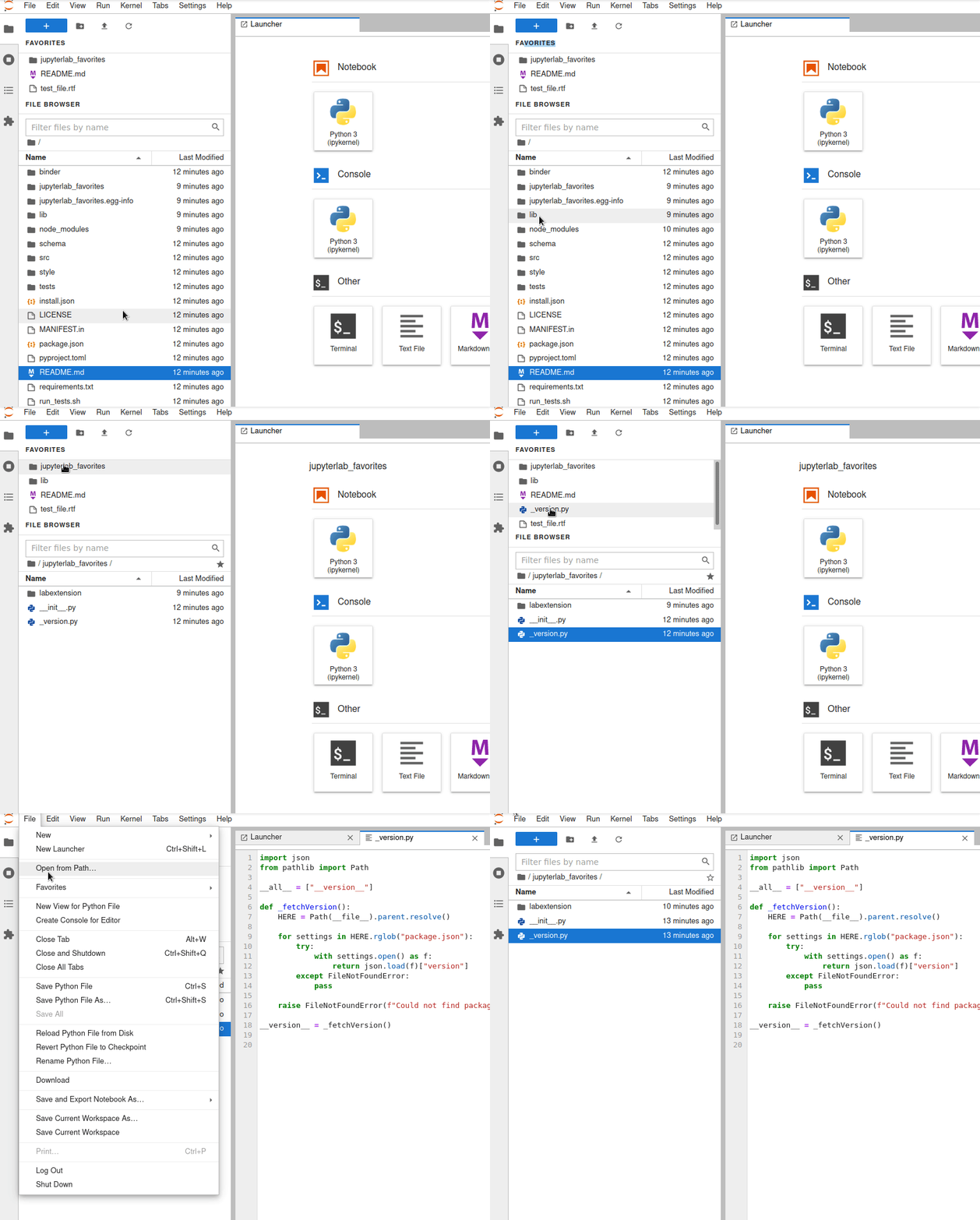
|
|
13
13
|
|
|
14
|
-
##
|
|
14
|
+
## Requirements
|
|
15
15
|
|
|
16
|
-
|
|
16
|
+
- JupyterLab >= 4.0.0 or Notebook >= 7.0.0
|
|
17
17
|
|
|
18
|
-
|
|
18
|
+
> For JupyterLab 3, you can install jupyterlab-favorites 3.1.x using pip for example:
|
|
19
19
|
|
|
20
|
-
|
|
21
|
-
|
|
22
|
-
```
|
|
23
|
-
python -m pip install jupyterlab-favorites
|
|
24
|
-
```
|
|
25
|
-
|
|
26
|
-
### Install from github
|
|
27
|
-
|
|
28
|
-
```
|
|
29
|
-
python -m pip install "git+https://github.com/jupyterlab-contrib/jupyterlab-favorites@v3.0.0#egg=jupyterlab_favorites"
|
|
20
|
+
```sh
|
|
21
|
+
pip install "jupyterlab-favorites~=3.1.1"
|
|
30
22
|
```
|
|
31
23
|
|
|
32
|
-
|
|
24
|
+
## Install
|
|
33
25
|
|
|
34
|
-
|
|
35
|
-
git clone https://github.com/jupyterlab-contrib/jupyterlab-favorites.git
|
|
36
|
-
cd jupyterlab-favorites
|
|
37
|
-
pip install .
|
|
38
|
-
```
|
|
39
|
-
|
|
40
|
-
## Development
|
|
41
|
-
|
|
42
|
-
### Prerequisites
|
|
43
|
-
|
|
44
|
-
- An active `conda` environment with JupyterLab 3.x installed
|
|
45
|
-
|
|
46
|
-
### Install locally from a git checkout
|
|
26
|
+
To install the extension, execute:
|
|
47
27
|
|
|
48
28
|
```bash
|
|
49
|
-
|
|
50
|
-
cd jupyterlab-favorites
|
|
51
|
-
pip install -ve .
|
|
29
|
+
pip install jupyterlab_favorites
|
|
52
30
|
```
|
|
53
31
|
|
|
54
|
-
|
|
32
|
+
## Uninstall
|
|
55
33
|
|
|
56
|
-
To
|
|
34
|
+
To remove the extension, execute:
|
|
57
35
|
|
|
58
36
|
```bash
|
|
59
|
-
|
|
37
|
+
pip uninstall jupyterlab_favorites
|
|
60
38
|
```
|
|
61
39
|
|
|
62
|
-
|
|
40
|
+
## Contributing
|
|
63
41
|
|
|
64
|
-
|
|
65
|
-
jlpm run build
|
|
66
|
-
```
|
|
42
|
+
### Development install
|
|
67
43
|
|
|
68
|
-
|
|
44
|
+
Note: You will need NodeJS to build the extension package.
|
|
69
45
|
|
|
70
|
-
|
|
71
|
-
|
|
72
|
-
|
|
73
|
-
|
|
74
|
-
## Older JupyterLab versions
|
|
75
|
-
|
|
76
|
-
### JupyterLab v2 Support
|
|
77
|
-
|
|
78
|
-
NPM install
|
|
46
|
+
The `jlpm` command is JupyterLab's pinned version of
|
|
47
|
+
[yarn](https://yarnpkg.com/) that is installed with JupyterLab. You may use
|
|
48
|
+
`yarn` or `npm` in lieu of `jlpm` below.
|
|
79
49
|
|
|
80
50
|
```bash
|
|
81
|
-
|
|
82
|
-
|
|
83
|
-
|
|
84
|
-
|
|
85
|
-
|
|
86
|
-
|
|
87
|
-
|
|
88
|
-
|
|
89
|
-
jupyter labextension install jupyterlab-favorites@1.0.0
|
|
51
|
+
# Clone the repo to your local environment
|
|
52
|
+
# Change directory to the jupyterlab_favorites directory
|
|
53
|
+
# Install package in development mode
|
|
54
|
+
pip install -e "."
|
|
55
|
+
# Link your development version of the extension with JupyterLab
|
|
56
|
+
jupyter labextension develop . --overwrite
|
|
57
|
+
# Rebuild extension Typescript source after making changes
|
|
58
|
+
jlpm build
|
|
90
59
|
```
|
|
91
60
|
|
|
92
|
-
|
|
93
|
-
https://github.com/jupyterlab-contrib/jupyterlab-favorites/tree/v1.0.0
|
|
94
|
-
|
|
95
|
-
## Testing
|
|
96
|
-
|
|
97
|
-
Download Firefox browser if not already installed: https://www.mozilla.org/en-US/firefox/new/
|
|
98
|
-
|
|
99
|
-
Install Selenium:
|
|
61
|
+
You can watch the source directory and run JupyterLab at the same time in different terminals to watch for changes in the extension's source and automatically rebuild the extension.
|
|
100
62
|
|
|
101
63
|
```bash
|
|
102
|
-
|
|
64
|
+
# Watch the source directory in one terminal, automatically rebuilding when needed
|
|
65
|
+
jlpm watch
|
|
66
|
+
# Run JupyterLab in another terminal
|
|
67
|
+
jupyter lab
|
|
103
68
|
```
|
|
104
69
|
|
|
105
|
-
|
|
70
|
+
With the watch command running, every saved change will immediately be built locally and available in your running JupyterLab. Refresh JupyterLab to load the change in your browser (you may need to wait several seconds for the extension to be rebuilt).
|
|
71
|
+
|
|
72
|
+
By default, the `jlpm build` command generates the source maps for this extension to make it easier to debug using the browser dev tools. To also generate source maps for the JupyterLab core extensions, you can run the following command:
|
|
106
73
|
|
|
107
74
|
```bash
|
|
108
|
-
|
|
75
|
+
jupyter lab build --minimize=False
|
|
109
76
|
```
|
|
110
77
|
|
|
111
|
-
|
|
78
|
+
### Development uninstall
|
|
112
79
|
|
|
113
80
|
```bash
|
|
114
|
-
|
|
81
|
+
pip uninstall jupyterlab_favorites
|
|
115
82
|
```
|
|
116
83
|
|
|
117
|
-
|
|
84
|
+
In development mode, you will also need to remove the symlink created by `jupyter labextension develop`
|
|
85
|
+
command. To find its location, you can run `jupyter labextension list` to figure out where the `labextensions`
|
|
86
|
+
folder is located. Then you can remove the symlink named `@jlab-enhanced/favorites` within that folder.
|
|
118
87
|
|
|
119
|
-
|
|
120
|
-
./run_tests.sh
|
|
121
|
-
```
|
|
88
|
+
### Packaging the extension
|
|
122
89
|
|
|
123
|
-
|
|
124
|
-
Note: You will need to run in a clean jupyter environment (without existing favorites files)
|
|
90
|
+
See [RELEASE](RELEASE.md)
|
package/lib/components.d.ts
CHANGED
|
@@ -1,12 +1,25 @@
|
|
|
1
|
-
/// <reference types="react" />
|
|
2
|
-
import { ReactWidget } from '@jupyterlab/apputils';
|
|
3
1
|
import { FileBrowser } from '@jupyterlab/filebrowser';
|
|
2
|
+
import { ReactWidget } from '@jupyterlab/ui-components';
|
|
3
|
+
import * as React from 'react';
|
|
4
4
|
import { FavoritesManager } from './manager';
|
|
5
|
+
import { IFavorites } from './token';
|
|
6
|
+
declare namespace types {
|
|
7
|
+
type FavoriteComponentProps = {
|
|
8
|
+
favorite: IFavorites.Favorite;
|
|
9
|
+
handleClick: (favorite: IFavorites.Favorite) => void;
|
|
10
|
+
};
|
|
11
|
+
interface IFavoritesBreadCrumbProps {
|
|
12
|
+
currentPath: string;
|
|
13
|
+
manager: FavoritesManager;
|
|
14
|
+
handleClick: (path: string) => void;
|
|
15
|
+
}
|
|
16
|
+
}
|
|
17
|
+
export declare const FavoritesBreadCrumbs: React.FunctionComponent<types.IFavoritesBreadCrumbProps>;
|
|
5
18
|
export declare class FavoritesWidget extends ReactWidget {
|
|
6
19
|
private manager;
|
|
7
20
|
private filebrowser;
|
|
8
21
|
private pathChanged;
|
|
9
22
|
constructor(manager: FavoritesManager, filebrowser: FileBrowser);
|
|
10
|
-
handlePinnerClick(path: string): void;
|
|
11
23
|
render(): JSX.Element;
|
|
12
24
|
}
|
|
25
|
+
export {};
|
package/lib/components.js
CHANGED
|
@@ -1,8 +1,7 @@
|
|
|
1
|
-
import { ReactWidget, UseSignal } from '@jupyterlab/
|
|
2
|
-
import { folderIcon, LabIcon, fileIcon } from '@jupyterlab/ui-components';
|
|
1
|
+
import { folderIcon, LabIcon, fileIcon, ReactWidget, UseSignal } from '@jupyterlab/ui-components';
|
|
3
2
|
import { Signal } from '@lumino/signaling';
|
|
4
3
|
import * as React from 'react';
|
|
5
|
-
import { getFavoritesIcon, getName, getPinnerActionDescription, mergePaths
|
|
4
|
+
import { getFavoritesIcon, getName, getPinnerActionDescription, mergePaths } from './utils';
|
|
6
5
|
/**
|
|
7
6
|
* The parent node class for Favorites content.
|
|
8
7
|
*/
|
|
@@ -34,11 +33,6 @@ const FAVORITE_ITEM_TEXT_CLASS = 'jp-Favorites-itemText';
|
|
|
34
33
|
* When there are no favorited items, this class is hidden.
|
|
35
34
|
*/
|
|
36
35
|
const FILEBROWSER_HEADER_CLASS = 'jp-FileBrowser-header';
|
|
37
|
-
/**
|
|
38
|
-
* The class name for the node containing the FileBrowser BreadCrumbs favorite icon. This node
|
|
39
|
-
* is also responsible for click actions on the icon.
|
|
40
|
-
*/
|
|
41
|
-
const FAVORITE_ITEM_PINNER_CLASS = 'jp-Favorites-pinner';
|
|
42
36
|
/**
|
|
43
37
|
* The class name for the the BreadCrumbs favorite icon.
|
|
44
38
|
* This icon is overlaid on top of the FileBrowser content via CSS.
|
|
@@ -46,9 +40,14 @@ const FAVORITE_ITEM_PINNER_CLASS = 'jp-Favorites-pinner';
|
|
|
46
40
|
const FAVORITE_BREADCRUMB_ICON_CLASS = 'jp-Favorites-BreadCrumbs-Icon';
|
|
47
41
|
const FavoriteComponent = (props) => {
|
|
48
42
|
const { favorite, handleClick } = props;
|
|
49
|
-
let displayName = getName(favorite.path);
|
|
43
|
+
let [displayName, dirname] = getName(favorite.path);
|
|
50
44
|
if (favorite.name) {
|
|
51
45
|
displayName = favorite.name;
|
|
46
|
+
// Hide path name if a display name is defined
|
|
47
|
+
dirname = '';
|
|
48
|
+
}
|
|
49
|
+
else {
|
|
50
|
+
dirname = '/' + dirname;
|
|
52
51
|
}
|
|
53
52
|
let FavoriteIcon;
|
|
54
53
|
if (favorite.iconLabel) {
|
|
@@ -63,19 +62,28 @@ const FavoriteComponent = (props) => {
|
|
|
63
62
|
FavoriteIcon = fileIcon;
|
|
64
63
|
}
|
|
65
64
|
}
|
|
66
|
-
return (React.createElement("div", { className: FAVORITE_ITEM_CLASS, title: mergePaths(favorite.root, favorite.path), onClick:
|
|
65
|
+
return (React.createElement("div", { className: FAVORITE_ITEM_CLASS, title: mergePaths(favorite.root, favorite.path), onClick: e => {
|
|
67
66
|
handleClick(favorite);
|
|
68
|
-
} },
|
|
67
|
+
}, "data-path": favorite.path },
|
|
69
68
|
React.createElement(FavoriteIcon.react, { className: FAVORITE_ITEM_ICON_CLASS, tag: "span" }),
|
|
70
|
-
React.createElement("span", { className: FAVORITE_ITEM_TEXT_CLASS },
|
|
69
|
+
React.createElement("span", { className: FAVORITE_ITEM_TEXT_CLASS },
|
|
70
|
+
displayName,
|
|
71
|
+
React.createElement("span", { className: "jp-Favorites-dirname" }, dirname))));
|
|
71
72
|
};
|
|
72
|
-
const FavoritesBreadCrumbs = (props) => {
|
|
73
|
-
|
|
74
|
-
|
|
75
|
-
return
|
|
76
|
-
React.createElement(FavoriteIcon.react, { className: FAVORITE_BREADCRUMB_ICON_CLASS, tag: "span" })));
|
|
73
|
+
export const FavoritesBreadCrumbs = (props) => {
|
|
74
|
+
const currentPath = props.currentPath;
|
|
75
|
+
if (!currentPath) {
|
|
76
|
+
return null;
|
|
77
77
|
}
|
|
78
|
-
return
|
|
78
|
+
return (React.createElement(UseSignal, { signal: props.manager.favoritesChanged, initialSender: props.manager }, manager => {
|
|
79
|
+
var _a;
|
|
80
|
+
const isFavorite = (_a = manager === null || manager === void 0 ? void 0 : manager.hasFavorite(currentPath)) !== null && _a !== void 0 ? _a : false;
|
|
81
|
+
const icon = getFavoritesIcon(isFavorite);
|
|
82
|
+
return (React.createElement("button", { className: "jp-ToolbarButtonComponent jp-Button jp-mod-minimal", title: getPinnerActionDescription(isFavorite), onClick: e => {
|
|
83
|
+
props.handleClick(currentPath);
|
|
84
|
+
} },
|
|
85
|
+
React.createElement(icon.react, { className: FAVORITE_BREADCRUMB_ICON_CLASS, tag: "span" })));
|
|
86
|
+
}));
|
|
79
87
|
};
|
|
80
88
|
export class FavoritesWidget extends ReactWidget {
|
|
81
89
|
constructor(manager, filebrowser) {
|
|
@@ -89,27 +97,11 @@ export class FavoritesWidget extends ReactWidget {
|
|
|
89
97
|
this.pathChanged.emit(path);
|
|
90
98
|
});
|
|
91
99
|
}
|
|
92
|
-
handlePinnerClick(path) {
|
|
93
|
-
const shouldRemove = this.manager.hasFavorite(path);
|
|
94
|
-
if (shouldRemove) {
|
|
95
|
-
this.manager.removeFavorite(path);
|
|
96
|
-
}
|
|
97
|
-
else {
|
|
98
|
-
const favorite = {
|
|
99
|
-
root: this.manager.serverRoot,
|
|
100
|
-
contentType: 'directory',
|
|
101
|
-
iconLabel: folderIcon.name,
|
|
102
|
-
path,
|
|
103
|
-
};
|
|
104
|
-
this.manager.addFavorite(favorite);
|
|
105
|
-
}
|
|
106
|
-
}
|
|
107
100
|
render() {
|
|
108
101
|
return (React.createElement(UseSignal, { signal: this.manager.favoritesChanged, initialSender: this.manager, initialArgs: this.manager.visibleFavorites() }, (manager, visibleFavorites) => (React.createElement("div", null,
|
|
109
102
|
React.createElement(UseSignal, { signal: manager.visibilityChanged, initialSender: manager, initialArgs: manager.isVisible() }, (manager, isVisible) => isVisible && (React.createElement(React.Fragment, null,
|
|
110
103
|
React.createElement("div", { className: FAVORITE_HEADER_CLASS }, "Favorites"),
|
|
111
|
-
React.createElement("div", { className: FAVORITE_CONTAINER_CLASS }, visibleFavorites.map(
|
|
112
|
-
React.createElement("div", { className: FILEBROWSER_HEADER_CLASS }, "File Browser"))))
|
|
113
|
-
React.createElement(UseSignal, { signal: this.pathChanged, initialSender: this, initialArgs: this.filebrowser.model.path }, (widget, currentPath) => (React.createElement(FavoritesBreadCrumbs, { currentPath: currentPath, handleClick: widget.handlePinnerClick, manager: widget.manager })))))));
|
|
104
|
+
React.createElement("div", { className: FAVORITE_CONTAINER_CLASS }, (visibleFavorites !== null && visibleFavorites !== void 0 ? visibleFavorites : []).map(f => (React.createElement(FavoriteComponent, { key: `favorites-item-${f.path}`, favorite: f, handleClick: manager.handleClick.bind(manager) })))),
|
|
105
|
+
React.createElement("div", { className: FILEBROWSER_HEADER_CLASS }, "File Browser"))))))));
|
|
114
106
|
}
|
|
115
107
|
}
|
package/lib/icons.js
CHANGED
|
@@ -3,9 +3,9 @@ import starSvgstr from '../style/icons/md/baseline-star-24px.svg';
|
|
|
3
3
|
import starBorderSvgstr from '../style/icons/md/baseline-star_border-24px.svg';
|
|
4
4
|
export const filledStarIcon = new LabIcon({
|
|
5
5
|
name: 'jupyterlab-favorites:filledStar',
|
|
6
|
-
svgstr: starSvgstr
|
|
6
|
+
svgstr: starSvgstr
|
|
7
7
|
});
|
|
8
8
|
export const starIcon = new LabIcon({
|
|
9
9
|
name: 'jupyterlab-favorites:star',
|
|
10
|
-
svgstr: starBorderSvgstr
|
|
10
|
+
svgstr: starBorderSvgstr
|
|
11
11
|
});
|
package/lib/index.d.ts
CHANGED
|
@@ -1,6 +1,8 @@
|
|
|
1
1
|
import { JupyterFrontEndPlugin } from '@jupyterlab/application';
|
|
2
|
+
import { IFavorites } from './token';
|
|
3
|
+
export { IFavorites } from './token';
|
|
2
4
|
/**
|
|
3
5
|
* Initialization data for the jupyterlab-favorites extension.
|
|
4
6
|
*/
|
|
5
|
-
declare const favorites: JupyterFrontEndPlugin<
|
|
7
|
+
declare const favorites: JupyterFrontEndPlugin<IFavorites>;
|
|
6
8
|
export default favorites;
|
package/lib/index.js
CHANGED
|
@@ -1,14 +1,26 @@
|
|
|
1
|
-
import {
|
|
1
|
+
import { PageConfig } from '@jupyterlab/coreutils';
|
|
2
|
+
import { IDefaultFileBrowser, IFileBrowserFactory } from '@jupyterlab/filebrowser';
|
|
2
3
|
import { IMainMenu } from '@jupyterlab/mainmenu';
|
|
3
4
|
import { ISettingRegistry } from '@jupyterlab/settingregistry';
|
|
4
|
-
import {
|
|
5
|
-
import {
|
|
5
|
+
import { ReactWidget, UseSignal, folderIcon } from '@jupyterlab/ui-components';
|
|
6
|
+
import { Widget } from '@lumino/widgets';
|
|
7
|
+
import React from 'react';
|
|
8
|
+
import { FavoritesBreadCrumbs, FavoritesWidget } from './components';
|
|
6
9
|
import { starIcon } from './icons';
|
|
7
10
|
import { FavoritesManager } from './manager';
|
|
8
|
-
import { PluginIDs, CommandIDs } from './token';
|
|
9
|
-
import { getFavoritesIcon, getPinnerActionDescription, mergePaths
|
|
10
|
-
import {
|
|
11
|
-
|
|
11
|
+
import { IFavorites, PluginIDs, CommandIDs } from './token';
|
|
12
|
+
import { getFavoritesIcon, getPinnerActionDescription, mergePaths } from './utils';
|
|
13
|
+
import { InputDialog } from '@jupyterlab/apputils';
|
|
14
|
+
export { IFavorites } from './token';
|
|
15
|
+
const BREADCRUMBS_CLASS = 'jp-FileBrowser-crumbs';
|
|
16
|
+
/**
|
|
17
|
+
* The class name for the node containing the FileBrowser BreadCrumbs favorite icon.
|
|
18
|
+
*/
|
|
19
|
+
const FAVORITE_ITEM_PINNER_CLASS = 'jp-Favorites-pinner';
|
|
20
|
+
/**
|
|
21
|
+
* Modifier class added to breadcrumbs to ensure the favourite icon has enough spacing.
|
|
22
|
+
*/
|
|
23
|
+
const BREADCUMBS_FAVORITES_CLASS = 'jp-Favorites-crumbs';
|
|
12
24
|
/**
|
|
13
25
|
* Initialization data for the jupyterlab-favorites extension.
|
|
14
26
|
*/
|
|
@@ -16,36 +28,61 @@ const favorites = {
|
|
|
16
28
|
id: PluginIDs.favorites,
|
|
17
29
|
autoStart: true,
|
|
18
30
|
requires: [IFileBrowserFactory, ISettingRegistry],
|
|
19
|
-
|
|
20
|
-
|
|
31
|
+
provides: IFavorites,
|
|
32
|
+
optional: [IDefaultFileBrowser, IMainMenu],
|
|
33
|
+
activate: (app, factory, settingsRegistry, filebrowser, mainMenu) => {
|
|
21
34
|
console.log('JupyterLab extension jupyterlab-favorites is activated!');
|
|
22
35
|
const docRegistry = app.docRegistry;
|
|
23
|
-
const filebrowser = factory.defaultBrowser;
|
|
24
|
-
const layout = filebrowser.layout;
|
|
25
36
|
const { commands, serviceManager } = app;
|
|
26
37
|
const favoritesManager = new FavoritesManager(PageConfig.getOption('serverRoot') || 'Jupyter Server Root', commands, settingsRegistry, serviceManager.contents);
|
|
27
38
|
favoritesManager.init();
|
|
28
|
-
|
|
29
|
-
|
|
30
|
-
|
|
31
|
-
|
|
32
|
-
|
|
33
|
-
|
|
34
|
-
|
|
39
|
+
if (filebrowser) {
|
|
40
|
+
const favoritesWidget = new FavoritesWidget(favoritesManager, filebrowser);
|
|
41
|
+
const layout = filebrowser.layout;
|
|
42
|
+
layout.insertWidget(0, favoritesWidget);
|
|
43
|
+
const breadcrumbs = filebrowser.node.querySelector(`.${BREADCRUMBS_CLASS}`);
|
|
44
|
+
if (breadcrumbs) {
|
|
45
|
+
const initializeBreadcrumbsIcon = () => {
|
|
46
|
+
if (!breadcrumbs.isConnected) {
|
|
47
|
+
return;
|
|
48
|
+
}
|
|
49
|
+
filebrowser.model.pathChanged.disconnect(initializeBreadcrumbsIcon);
|
|
50
|
+
const favoriteIcon = ReactWidget.create(React.createElement(UseSignal, { signal: filebrowser.model.pathChanged, initialSender: filebrowser.model }, model => (React.createElement(FavoritesBreadCrumbs, { currentPath: (model === null || model === void 0 ? void 0 : model.path) || '', manager: favoritesManager, handleClick: (path) => {
|
|
51
|
+
const shouldRemove = favoritesManager.hasFavorite(path);
|
|
52
|
+
if (shouldRemove) {
|
|
53
|
+
favoritesManager.removeFavorite(path);
|
|
54
|
+
}
|
|
55
|
+
else {
|
|
56
|
+
const favorite = {
|
|
57
|
+
root: favoritesManager.serverRoot,
|
|
58
|
+
contentType: 'directory',
|
|
59
|
+
iconLabel: folderIcon.name,
|
|
60
|
+
path
|
|
61
|
+
};
|
|
62
|
+
favoritesManager.addFavorite(favorite);
|
|
63
|
+
}
|
|
64
|
+
} }))));
|
|
65
|
+
favoriteIcon.addClass(FAVORITE_ITEM_PINNER_CLASS);
|
|
66
|
+
Widget.attach(favoriteIcon, breadcrumbs);
|
|
67
|
+
breadcrumbs.insertAdjacentElement('beforebegin', favoriteIcon.node);
|
|
68
|
+
breadcrumbs.classList.add(BREADCUMBS_FAVORITES_CLASS);
|
|
69
|
+
};
|
|
70
|
+
filebrowser.model.pathChanged.connect(initializeBreadcrumbsIcon);
|
|
71
|
+
initializeBreadcrumbsIcon();
|
|
35
72
|
}
|
|
36
|
-
}
|
|
37
|
-
layout.insertWidget(insertIndex, favoritesWidget);
|
|
73
|
+
}
|
|
38
74
|
// Context Menu commands
|
|
39
75
|
const getSelectedItems = () => {
|
|
40
76
|
const widget = tracker.currentWidget;
|
|
41
77
|
if (!widget) {
|
|
42
78
|
return [];
|
|
43
79
|
}
|
|
44
|
-
return
|
|
80
|
+
return Array.from(widget.selectedItems());
|
|
45
81
|
};
|
|
46
82
|
const { tracker } = factory;
|
|
47
83
|
commands.addCommand(CommandIDs.addOrRemoveFavorite, {
|
|
48
84
|
execute: () => {
|
|
85
|
+
var _a;
|
|
49
86
|
const selectedItems = getSelectedItems();
|
|
50
87
|
if (selectedItems.length > 0) {
|
|
51
88
|
const selectedItem = selectedItems[0];
|
|
@@ -59,7 +96,7 @@ const favorites = {
|
|
|
59
96
|
root: favoritesManager.serverRoot,
|
|
60
97
|
path: selectedItem.path,
|
|
61
98
|
contentType: fileType.contentType,
|
|
62
|
-
iconLabel: fileType.icon.name
|
|
99
|
+
iconLabel: (_a = fileType.icon) === null || _a === void 0 ? void 0 : _a.name
|
|
63
100
|
});
|
|
64
101
|
}
|
|
65
102
|
}
|
|
@@ -79,81 +116,44 @@ const favorites = {
|
|
|
79
116
|
const selectedItem = selectedItems[0];
|
|
80
117
|
const showRemove = favoritesManager.hasFavorite(selectedItem.path);
|
|
81
118
|
return getPinnerActionDescription(showRemove);
|
|
82
|
-
}
|
|
83
|
-
});
|
|
84
|
-
app.contextMenu.addItem({
|
|
85
|
-
command: CommandIDs.addOrRemoveFavorite,
|
|
86
|
-
selector: '.jp-DirListing-item[data-isdir]',
|
|
87
|
-
rank: 3,
|
|
119
|
+
}
|
|
88
120
|
});
|
|
89
121
|
commands.addCommand(CommandIDs.removeFavorite, {
|
|
90
122
|
execute: () => {
|
|
91
|
-
const contextNode = app.contextMenuHitTest(
|
|
92
|
-
const
|
|
93
|
-
let path = fullPath.replace(favoritesManager.serverRoot, '');
|
|
94
|
-
if (path.startsWith('/')) {
|
|
95
|
-
path = path.slice(1);
|
|
96
|
-
}
|
|
123
|
+
const contextNode = app.contextMenuHitTest(node => node.classList.contains('jp-Favorites-item'));
|
|
124
|
+
const path = contextNode.dataset['path'];
|
|
97
125
|
favoritesManager.removeFavorite(path);
|
|
98
126
|
},
|
|
99
127
|
icon: starIcon,
|
|
100
|
-
label: 'Remove Favorite'
|
|
101
|
-
});
|
|
102
|
-
app.contextMenu.addItem({
|
|
103
|
-
command: CommandIDs.removeFavorite,
|
|
104
|
-
selector: '.jp-Favorites-item',
|
|
105
|
-
rank: 0,
|
|
128
|
+
label: 'Remove Favorite'
|
|
106
129
|
});
|
|
107
|
-
|
|
108
|
-
|
|
109
|
-
|
|
110
|
-
{
|
|
111
|
-
|
|
112
|
-
|
|
113
|
-
|
|
114
|
-
], 1);
|
|
115
|
-
}
|
|
116
|
-
// Try to merge with existing Group 1
|
|
117
|
-
try {
|
|
118
|
-
const groups = mainMenu.fileMenu._groups;
|
|
119
|
-
let numRankOneGroups = 0;
|
|
120
|
-
let openGroupIndex = -1;
|
|
121
|
-
for (let i = 0; i < groups.length; i++) {
|
|
122
|
-
const group = groups[i];
|
|
123
|
-
if (group.rank === 1) {
|
|
124
|
-
numRankOneGroups += 1;
|
|
125
|
-
if (openGroupIndex < 0) {
|
|
126
|
-
openGroupIndex = i;
|
|
127
|
-
}
|
|
130
|
+
commands.addCommand(CommandIDs.renameFavorite, {
|
|
131
|
+
execute: async (args) => {
|
|
132
|
+
var _a;
|
|
133
|
+
let { path, displayName } = args;
|
|
134
|
+
if (!path) {
|
|
135
|
+
const contextNode = app.contextMenuHitTest(node => node.classList.contains('jp-Favorites-item'));
|
|
136
|
+
path = contextNode.dataset['path'];
|
|
128
137
|
}
|
|
129
|
-
|
|
130
|
-
|
|
131
|
-
const openGroup = groups[openGroupIndex];
|
|
132
|
-
openGroup.size = openGroup.size + 1;
|
|
133
|
-
groups.splice(openGroupIndex + 1, 1);
|
|
134
|
-
const fileMenu = mainMenu.fileMenu.menu;
|
|
135
|
-
const fileMenuItems = fileMenu._items;
|
|
136
|
-
let removeSeparators = false;
|
|
137
|
-
for (let i = fileMenuItems.length - 1; i > 0; i--) {
|
|
138
|
-
const fileMenuItem = fileMenuItems[i];
|
|
139
|
-
if (fileMenuItem.command === 'filebrowser:open-path') {
|
|
140
|
-
break;
|
|
141
|
-
}
|
|
142
|
-
if (removeSeparators && fileMenuItem.type === 'separator') {
|
|
143
|
-
fileMenu.removeItemAt(i);
|
|
144
|
-
}
|
|
145
|
-
else if (fileMenuItem.type === 'submenu') {
|
|
146
|
-
const label = fileMenuItem.submenu.title.label;
|
|
147
|
-
if (label === 'Favorites') {
|
|
148
|
-
removeSeparators = true;
|
|
149
|
-
}
|
|
150
|
-
}
|
|
138
|
+
if (!path) {
|
|
139
|
+
return;
|
|
151
140
|
}
|
|
152
|
-
|
|
153
|
-
|
|
154
|
-
|
|
155
|
-
|
|
156
|
-
|
|
141
|
+
if (!displayName) {
|
|
142
|
+
const result = await InputDialog.getText({
|
|
143
|
+
title: 'Rename favorite',
|
|
144
|
+
label: `Name for favorite at '${path}'`,
|
|
145
|
+
okLabel: 'Rename',
|
|
146
|
+
placeholder: 'Display name'
|
|
147
|
+
});
|
|
148
|
+
displayName = result.button.accept ? (_a = result.value) !== null && _a !== void 0 ? _a : '' : '';
|
|
149
|
+
}
|
|
150
|
+
if (!displayName) {
|
|
151
|
+
return;
|
|
152
|
+
}
|
|
153
|
+
favoritesManager.renameFavorite(path, displayName);
|
|
154
|
+
},
|
|
155
|
+
label: 'Rename Favorite'
|
|
156
|
+
});
|
|
157
157
|
// Commands
|
|
158
158
|
commands.addCommand(CommandIDs.openFavorite, {
|
|
159
159
|
execute: async (args) => {
|
|
@@ -161,30 +161,81 @@ const favorites = {
|
|
|
161
161
|
const path = favorite.path === '' ? '/' : favorite.path;
|
|
162
162
|
await commands.execute('filebrowser:open-path', { path });
|
|
163
163
|
},
|
|
164
|
-
label:
|
|
164
|
+
label: args => {
|
|
165
165
|
const favorite = args.favorite;
|
|
166
166
|
return mergePaths(favorite.root, favorite.path);
|
|
167
|
-
}
|
|
167
|
+
}
|
|
168
168
|
});
|
|
169
169
|
commands.addCommand(CommandIDs.toggleFavoritesWidget, {
|
|
170
170
|
execute: async (args) => {
|
|
171
171
|
const showWidget = args.showWidget;
|
|
172
172
|
favoritesManager.saveSettings({ showWidget: !showWidget });
|
|
173
173
|
},
|
|
174
|
-
label:
|
|
174
|
+
label: args => {
|
|
175
175
|
const showWidget = args.showWidget;
|
|
176
176
|
return `${showWidget ? 'Hide' : 'Show'} Favorites Widget`;
|
|
177
177
|
},
|
|
178
|
-
isVisible: () => favoritesManager.visibleFavorites().length > 0
|
|
178
|
+
isVisible: () => favoritesManager.visibleFavorites().length > 0
|
|
179
179
|
});
|
|
180
180
|
commands.addCommand(CommandIDs.restoreDefaults, {
|
|
181
181
|
execute: () => favoritesManager.restoreDefaults(),
|
|
182
|
-
label: 'Restore Defaults'
|
|
182
|
+
label: 'Restore Defaults'
|
|
183
183
|
});
|
|
184
184
|
commands.addCommand(CommandIDs.clearFavorites, {
|
|
185
185
|
execute: () => favoritesManager.clearFavorites(),
|
|
186
|
-
label: 'Clear Favorites'
|
|
186
|
+
label: 'Clear Favorites'
|
|
187
187
|
});
|
|
188
|
-
|
|
188
|
+
// Main Menu
|
|
189
|
+
if (mainMenu) {
|
|
190
|
+
mainMenu.fileMenu.addGroup([
|
|
191
|
+
{
|
|
192
|
+
type: 'submenu',
|
|
193
|
+
submenu: favoritesManager.favoritesMenu
|
|
194
|
+
}
|
|
195
|
+
], 1);
|
|
196
|
+
// Try to merge with existing Group 1
|
|
197
|
+
try {
|
|
198
|
+
const groups = mainMenu.fileMenu._ranks;
|
|
199
|
+
let numRankOneGroups = 0;
|
|
200
|
+
let openGroupIndex = -1;
|
|
201
|
+
for (let i = 0; i < groups.length; i++) {
|
|
202
|
+
const group = groups[i];
|
|
203
|
+
if (group.rank === 1) {
|
|
204
|
+
numRankOneGroups += 1;
|
|
205
|
+
if (openGroupIndex < 0) {
|
|
206
|
+
openGroupIndex = i;
|
|
207
|
+
}
|
|
208
|
+
}
|
|
209
|
+
}
|
|
210
|
+
if (numRankOneGroups === 2) {
|
|
211
|
+
const openGroup = groups[openGroupIndex];
|
|
212
|
+
openGroup.size = openGroup.size + 1;
|
|
213
|
+
groups.splice(openGroupIndex + 1, 1);
|
|
214
|
+
const fileMenu = mainMenu.fileMenu.menu;
|
|
215
|
+
const fileMenuItems = fileMenu._items;
|
|
216
|
+
let removeSeparators = false;
|
|
217
|
+
for (let i = fileMenuItems.length - 1; i > 0; i--) {
|
|
218
|
+
const fileMenuItem = fileMenuItems[i];
|
|
219
|
+
if (fileMenuItem.command === 'filebrowser:open-path') {
|
|
220
|
+
break;
|
|
221
|
+
}
|
|
222
|
+
if (removeSeparators && fileMenuItem.type === 'separator') {
|
|
223
|
+
fileMenu.removeItemAt(i);
|
|
224
|
+
}
|
|
225
|
+
else if (fileMenuItem.type === 'submenu') {
|
|
226
|
+
const label = fileMenuItem.submenu.title.label;
|
|
227
|
+
if (label === 'Favorites') {
|
|
228
|
+
removeSeparators = true;
|
|
229
|
+
}
|
|
230
|
+
}
|
|
231
|
+
}
|
|
232
|
+
}
|
|
233
|
+
}
|
|
234
|
+
catch (e) {
|
|
235
|
+
console.log(e);
|
|
236
|
+
}
|
|
237
|
+
}
|
|
238
|
+
return favoritesManager;
|
|
239
|
+
}
|
|
189
240
|
};
|
|
190
241
|
export default favorites;
|