@jfvilas/plugin-kwirth-fileman 0.13.5
This diff represents the content of publicly available package versions that have been released to one of the supported registries. The information contained in this diff is provided for informational purposes only and reflects changes between package versions as they appear in their respective public registries.
- package/README.md +206 -0
- package/dist/api/KwirthFilemanClient.esm.js +30 -0
- package/dist/api/KwirthFilemanClient.esm.js.map +1 -0
- package/dist/api/types.esm.js +8 -0
- package/dist/api/types.esm.js.map +1 -0
- package/dist/assets/kwirthfileman-logo.svg +8 -0
- package/dist/components/EntityKwirthFilemanContent.esm.js +585 -0
- package/dist/components/EntityKwirthFilemanContent.esm.js.map +1 -0
- package/dist/components/custom-fm.module.css.esm.js +8 -0
- package/dist/components/custom-fm.module.css.esm.js.map +1 -0
- package/dist/index.d.ts +45 -0
- package/dist/index.esm.js +4 -0
- package/dist/index.esm.js.map +1 -0
- package/dist/node_modules/style-inject/dist/style-inject.es.esm.js +29 -0
- package/dist/node_modules/style-inject/dist/style-inject.es.esm.js.map +1 -0
- package/dist/plugin.esm.js +33 -0
- package/dist/plugin.esm.js.map +1 -0
- package/dist/routes.esm.js +8 -0
- package/dist/routes.esm.js.map +1 -0
- package/dist/version.esm.js +4 -0
- package/dist/version.esm.js.map +1 -0
- package/package.json +90 -0
package/README.md
ADDED
|
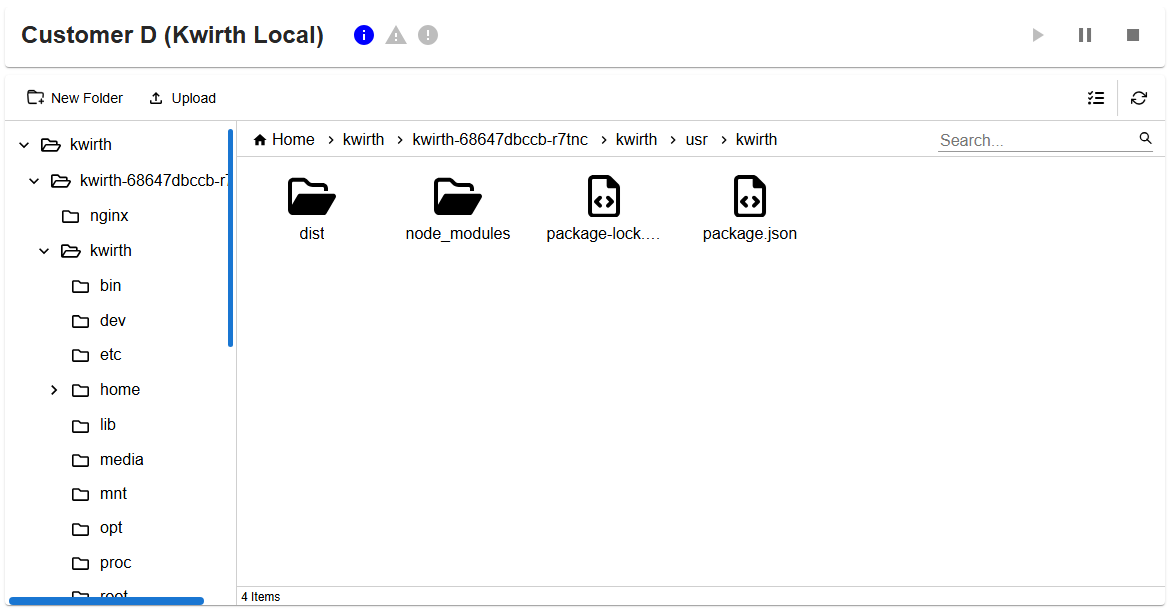
@@ -0,0 +1,206 @@
|
|
|
1
|
+
# Backstage frontend KwirthFileman plugin
|
|
2
|
+
This package is a Backstage frontend plugin for **managing Kubernetes containers' filesystems** in real-time via Kwirth.
|
|
3
|
+
|
|
4
|
+
This Backstage plugin allows you to use a file-explorer-like plugin for navigating through the filesystem, allowing users to examine the content, and also perform file operations like rename, delete, copy, move, copy/cut/paste...
|
|
5
|
+
|
|
6
|
+
In addtion users can also download files (or folders), upload files and even preview file content.
|
|
7
|
+
|
|
8
|
+
- You need to install the Kwirth [Backstage backend plugin](https://www.npmjs.com/package/@jfvilas/plugin-kwirth-backend).
|
|
9
|
+
- You need to install Kwirth on your Kubernetes cluster, that is, this plugin is just another frontend for [Kwirth](https://jfvilas.github.io/kwirth).
|
|
10
|
+
|
|
11
|
+
Kwirth is a really-easy-to-use data-exporting system for Kubernetes that runs in only one pod (*no database is needed*). Refer to Kwirth GitHub project for [info on installation](https://github.com/jfvilas/kwirth?tab=readme-ov-file#installation). Kwirth installation is *one command away* from you.
|
|
12
|
+
|
|
13
|
+
You can access [Kwirth project here](https://github.com/jfvilas/kwirth).
|
|
14
|
+
|
|
15
|
+
|
|
16
|
+
## Version compatibility
|
|
17
|
+
Following table shows version compatibility between this Kwirth Backstage plugin and Kwirth Core server.
|
|
18
|
+
|
|
19
|
+
| Plugin Kwirth version | Kwirth version |
|
|
20
|
+
|-|-|
|
|
21
|
+
|0.13.5|0.4.131|
|
|
22
|
+
|
|
23
|
+
|
|
24
|
+
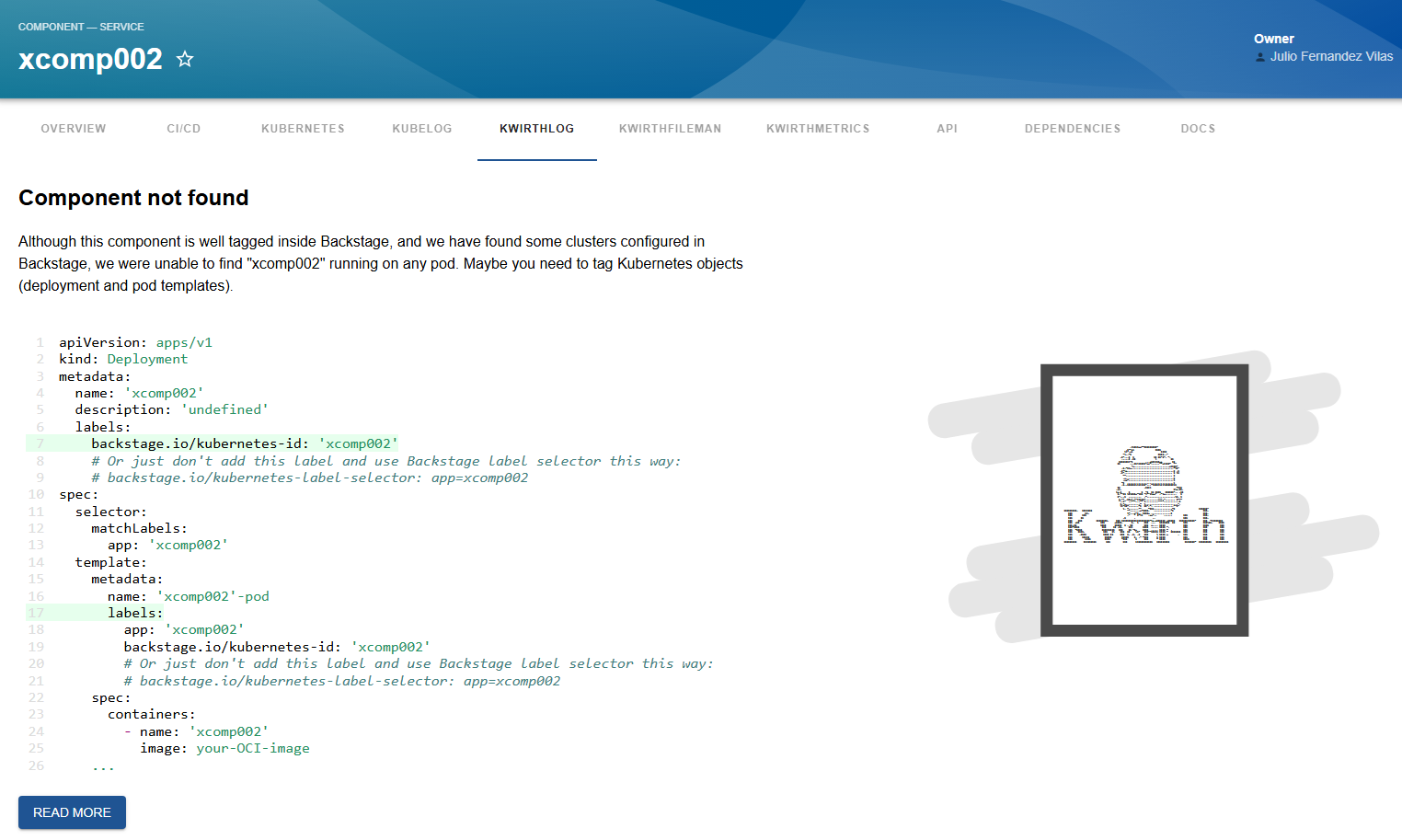
## What is this plugin for?
|
|
25
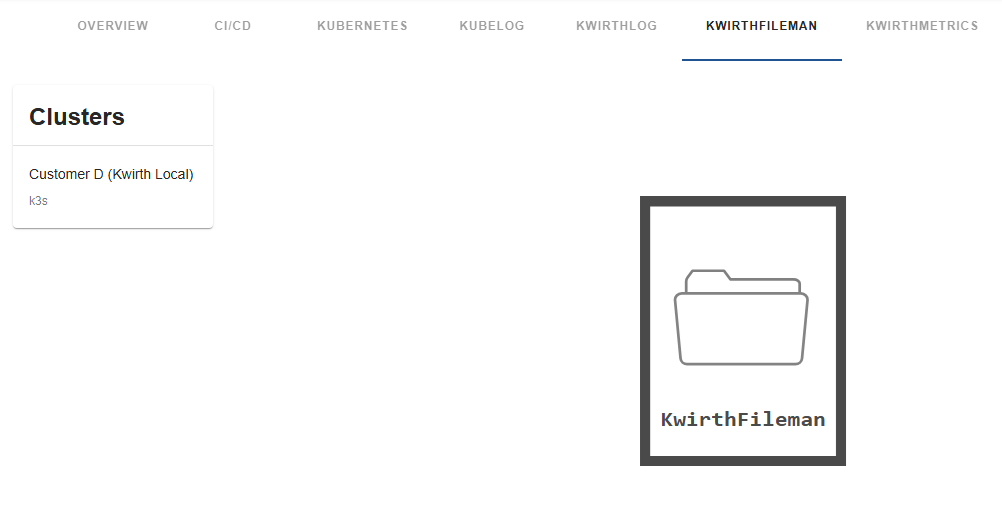
|
+
This Backstage plugin adds Backstage a feature for working with Kubernetes containers filesystems and manage container data as user would do with a Gnome, the Windows file explorer or an Apple file manager.
|
|
26
|
+
|
|
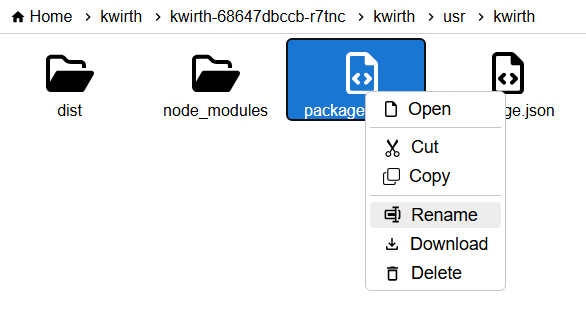
27
|
+
When KwirthFileman is correctly installed and configured, it is possible to manage Kubernetes containers filesystems like this:
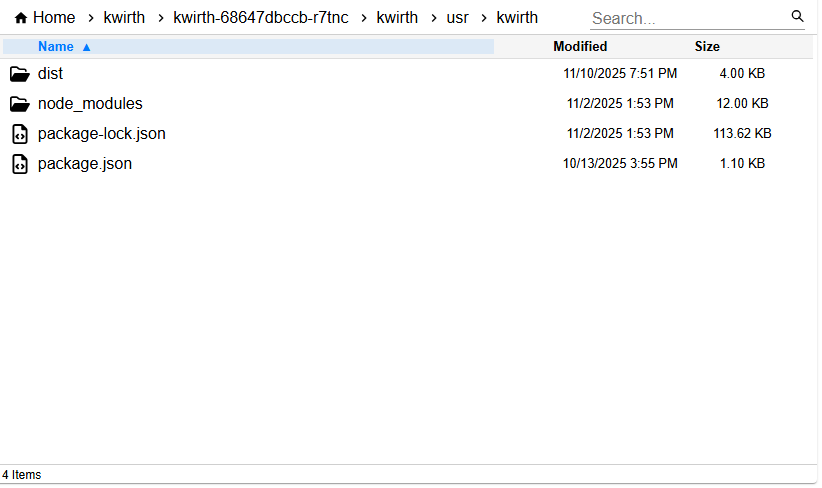
|
|
28
|
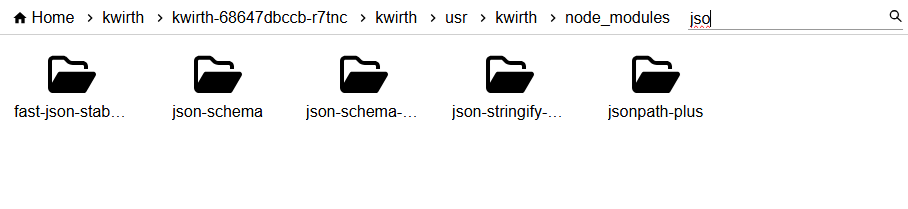
+
|
|
29
|
+
|
|
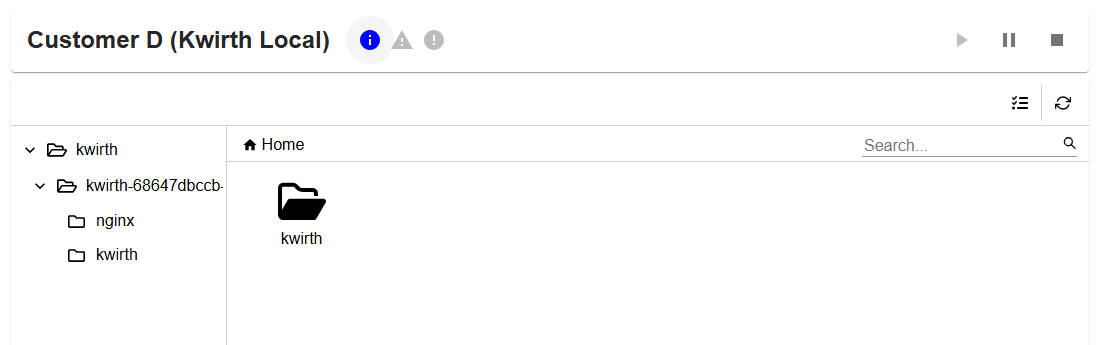
30
|
+
|
|
31
|
+
This frontend plugin includes just the visualization of filesystems. All needed configuration, and specially **permission settings**, are done in the backend plugin and the app-config.yaml. You can restrict access to pods, namespaces, clusters, etc... by configuring permissions to be applied on the backend plugin.
|
|
32
|
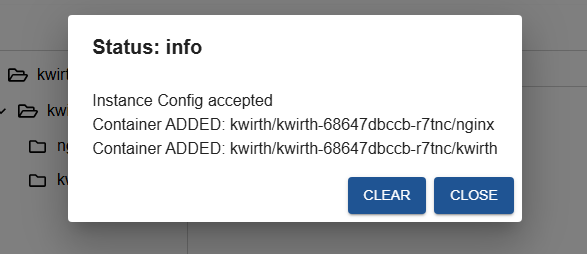
+
|
|
33
|
+
## How does it work?
|
|
34
|
+
Let's explain this by following a user working sequence:
|
|
35
|
+
|
|
36
|
+
1. A Backstage user searchs for an entity in the Backstage.
|
|
37
|
+
2. In the entity page there will be a new tab named 'KWIRTHFILEMAN'.
|
|
38
|
+
3. When the user clicks on KWIRTHFILEMAN the frontend plugin sends a request to the backend Kwirth plugin asking for containers information on all Kubernetes clusters available.
|
|
39
|
+
4. Next step is to identify the Kubernetes objects that match requested entity. As well as it occurs with other Backstage Kwirth plugins, Kwirth implements two strategies for getting the list of kubernetes objects that match:
|
|
40
|
+
- Option 1. Your catalog-info contains an annotation of this type: **backstage.io/kubernetes-id**. In this case, the Backstage Kwirth backend plugin sends requests to the Kwirth instances that are running inside all the clusters added to Backstage. These requests ask for the following: *'Tell me all the pods that are labeled with the kubernetes-id label and do correspond with the entity I'm looking for'*. In response to this query, each Kwirth instance answers with a list of pods and the namespaces where they are running.
|
|
41
|
+
- Option 2. Your catalog-info contains an annotation of this type: **backstage.io/kubernetes-label-selector**. In this case, the Backstage Kwirth backend plugin sends requests to the Kwirth instances that are running inside all the clusters added to Backstage. These requests ask for the following: *'Tell me all the pods whose labels match with the kubernetes-label-selector label selector*. In response to this query, each Kwirth instance answers with a list of pods and the namespaces where they are running.
|
|
42
|
+
5. The Kwirth backend plugin checks then the permissions of the connected user and prunes the pods list removing the ones that the user has not access to.
|
|
43
|
+
6. With the final pod list, the backend plugin sends requests to the Kwirth instances on the clusters asking for API Keys specific for accessing containers filesystems.
|
|
44
|
+
7. With all this information, the backend builds a unique response containing all the pods the user have access to, and all the API keys needed to access the filesystems.
|
|
45
|
+
|
|
46
|
+
If everyting is correctly configured and tagged, the user should see a list of clusters. When selecting a cluster, the user should see a control for starting and stoppingthe file system browser. When th euser clicks PLAY (on the right upper side), the file browser appears.
|
|
47
|
+
|
|
48
|
+
|
|
49
|
+
## Installation
|
|
50
|
+
It's very simple and straightforward, it is in fact very similar to any other frontend Backstage plugin.
|
|
51
|
+
|
|
52
|
+
1. Install corresponding Backstage backend plugin [more information here](https://www.npmjs.com/package/@jfvilas/plugin-kwirth-backend).
|
|
53
|
+
2. Install this Backstage frontend plugin:
|
|
54
|
+
|
|
55
|
+
```sh
|
|
56
|
+
# From your Backstage root directory
|
|
57
|
+
yarn --cwd packages/app add @jfvilas/plugin-kwirth-fileman @jfvilas/plugin-kwirth-frontend @jfvilas/plugin-kwirth-common @jfvilas/kwirth-common
|
|
58
|
+
```
|
|
59
|
+
|
|
60
|
+
3. Make sure the [Kwirth backend plugin](https://www.npmjs.com/package/@jfvilas/plugin-kwirth-backend#configure) is installed and configured.
|
|
61
|
+
|
|
62
|
+
4. Restart your Backstage instance.
|
|
63
|
+
|
|
64
|
+
|
|
65
|
+
## Configuration: Entity Pages
|
|
66
|
+
For Kwirth plugin to be usable on the frontend, you must tailor your Entity Page to include the Kwirth components.
|
|
67
|
+
|
|
68
|
+
#### 1. Add the plugin as a tab in your Entity pages:
|
|
69
|
+
|
|
70
|
+
Firstly, import the plugin module.
|
|
71
|
+
|
|
72
|
+
```typescript
|
|
73
|
+
// In packages/app/src/components/catalog/EntityPage.tsx
|
|
74
|
+
import { EntityKwirthFilemanContent } from '@jfvilas/plugin-kwirth-fileman';
|
|
75
|
+
import { isKwirthAvailable } from '@jfvilas/plugin-kwirth-common';
|
|
76
|
+
```
|
|
77
|
+
|
|
78
|
+
Then, add a tab to your EntityPage (the `if` is optional, you can keep the 'KwirthFileman' tab always visible if you prefer to do it that way).
|
|
79
|
+
|
|
80
|
+
```jsx
|
|
81
|
+
// Note: Add to any other Pages as well (e.g. defaultEntityPage or webSiteEntityPage, for example)
|
|
82
|
+
const serviceEntityPage = (
|
|
83
|
+
<EntityLayout>
|
|
84
|
+
{/* other tabs... */}
|
|
85
|
+
<EntityLayout.Route if={isKwirthAvailable} path="/kwirthfileman" title="KwirthFileman">
|
|
86
|
+
<EntityKwirthFilemanContent/>
|
|
87
|
+
</EntityLayout.Route>
|
|
88
|
+
</EntityLayout>
|
|
89
|
+
)
|
|
90
|
+
```
|
|
91
|
+
|
|
92
|
+
You can setup some default options on the `EntityKwirthfilemanContent` component. These options are:
|
|
93
|
+
- `hideVersion` (optional `boolean`) if set to `true`, version information updates will not be shown.
|
|
94
|
+
- `excludeContainers` (optional `string[]`), an array of container names that will be excluded file browser. For example, if you have pods that include sidecars that you want your users to not to access, you can exclude them using this property.
|
|
95
|
+
|
|
96
|
+
What follows is an example on how to use these properties:
|
|
97
|
+
|
|
98
|
+
```jsx
|
|
99
|
+
...
|
|
100
|
+
<EntityLayout.Route if={isKwirthAvailable} path="/kwirthfileman" title="KwirthFileman">
|
|
101
|
+
<EntityKwirthFilemanContent hideVersion excludeContainers={['istio-proxy']} />
|
|
102
|
+
</EntityLayout.Route>
|
|
103
|
+
...
|
|
104
|
+
```
|
|
105
|
+
|
|
106
|
+
|
|
107
|
+
#### 2. Label your catalog-info
|
|
108
|
+
Use one of these strategies:
|
|
109
|
+
|
|
110
|
+
- **Strategy 1: one-to-one**. Add `backstage.io/kubernetes-id` annotation to your `catalog-info.yaml` for the entities deployed to Kubernetes you want to work with on Backstage. This is the same annotation that the Kubernetes core plugin uses, so, maybe you already have added it to your components. Exmaple:
|
|
111
|
+
|
|
112
|
+
```yaml
|
|
113
|
+
metadata:
|
|
114
|
+
annotations:
|
|
115
|
+
backstage.io/kubernetes-id: entity001
|
|
116
|
+
```
|
|
117
|
+
|
|
118
|
+
- **Strategy 2: use selectors**. Add `backstage.io/kubernetes-label-selector` annotation to your `catalog-info.yaml` for the entities you want to work with. This is the same annotation that the Kubernetes core plugin uses, so, maybe you already have added it to your components. The label selector value follows Kubernetes [label selector semantics](https://kubernetes.io/docs/concepts/overview/working-with-objects/labels/). Example:
|
|
119
|
+
|
|
120
|
+
```yaml
|
|
121
|
+
metadata:
|
|
122
|
+
annotaations:
|
|
123
|
+
backstage.io/kubernetes-id: 'app=core,artifact=backend'
|
|
124
|
+
```
|
|
125
|
+
|
|
126
|
+
3. Add proper **labels** to your Kubernetes objects so Backstage can *link* forward and backward the Backstage entities with the Kubernetes objects. To do this, you need to add `labels` to your Kubernetes YAML objects (please, don't get confused: **annotations in Backstage YAML, labels in Kubernetes YAML**).
|
|
127
|
+
|
|
128
|
+
- ***VERY IMPORTANT NOTE:*** If you opted for using label selectors **you have nothing new to add to your pods**.
|
|
129
|
+
|
|
130
|
+
- If you use labels (no label selectors), please note that the kubernetes-id label is **on the deployment** and on the **spec pod template** also. This is an example of a typical Kubernetes deployment with the required label:
|
|
131
|
+
|
|
132
|
+
|
|
133
|
+
```yaml
|
|
134
|
+
apiVersion: apps/v1
|
|
135
|
+
kind: Deployment
|
|
136
|
+
metadata:
|
|
137
|
+
name: ijkl
|
|
138
|
+
labels:
|
|
139
|
+
backstage.io/kubernetes-id: ijkl
|
|
140
|
+
spec:
|
|
141
|
+
selector:
|
|
142
|
+
matchLabels:
|
|
143
|
+
app: ijkl
|
|
144
|
+
template:
|
|
145
|
+
metadata:
|
|
146
|
+
name: 'ijkl-pod'
|
|
147
|
+
labels:
|
|
148
|
+
app: ijkl
|
|
149
|
+
backstage.io/kubernetes-id: ijkl
|
|
150
|
+
spec:
|
|
151
|
+
containers:
|
|
152
|
+
- name: ijkl
|
|
153
|
+
image: your-OCI-image
|
|
154
|
+
...
|
|
155
|
+
```
|
|
156
|
+
|
|
157
|
+
## Ready, set, go!
|
|
158
|
+
If you followed all these steps, you would see a 'KwirthFileman' tab in your **Entity Page**, like this one:
|
|
159
|
+
|
|
160
|
+

|
|
161
|
+
|
|
162
|
+
When you access the tab, if you have not yet tagged your entities you would see a message like this one explaning how to do that:
|
|
163
|
+
|
|
164
|
+
|
|
165
|
+
|
|
166
|
+
Once you tagged your entities and your Kubernetes objects correctly, you should see something similar to this:
|
|
167
|
+
|
|
168
|
+
|
|
169
|
+
|
|
170
|
+
KwirthFileman is ready for file system works!!
|
|
171
|
+
|
|
172
|
+
First *select the cluster* on the cluster card. On the card on right, you will see a control (play, pause and stop), press PLAY and the file borser should appear. **Data is retrieved in real-time**, so the file browser will be populed as dthe data arrives.
|
|
173
|
+
|
|
174
|
+

|
|
175
|
+
|
|
176
|
+
You can right-click items for performing actions:
|
|
177
|
+
|
|
178
|
+
|
|
179
|
+
|
|
180
|
+
You can switch to list view if you want to view file details (size, date...):
|
|
181
|
+
|
|
182
|
+
|
|
183
|
+
|
|
184
|
+
You can perform loacl search for filtering file names:
|
|
185
|
+
|
|
186
|
+
|
|
187
|
+
|
|
188
|
+
Feel free to open issues and ask for more features.
|
|
189
|
+
|
|
190
|
+
|
|
191
|
+
## Status information
|
|
192
|
+
When the file browser is launched, and all along the life of the stream (until it gets stopped or the window is closed), you will receive status information regarding the Kubernetes objects you are watching. This status information is shown on the top of the card (just at the immediate right of the cluster name) including 3 kinds of information:
|
|
193
|
+
|
|
194
|
+
- **Info**. Informaiton regarding pod management at Kubernetes cluster level (new pod, pod ended or pod modified).
|
|
195
|
+
- **Warning**. Warnings related to the data streaming.
|
|
196
|
+
- **Error**. If there is an error in the stream, like invalid key use, or erroneous pod tagging, erros will be shown here.
|
|
197
|
+
|
|
198
|
+
The icons will light up in its corresponding color when a new message arrives.
|
|
199
|
+
|
|
200
|
+
**It is important to undertand taht, as it occurs with other Kwirth plugins, data is refresed in real-time, so pods will appear and disappear according to Kubernetes activities.**
|
|
201
|
+
|
|
202
|
+
This is how it feels:
|
|
203
|
+
|
|
204
|
+
|
|
205
|
+
If you click on one of the status icons when theyr are enableds (coloured), you will see the detail of the status.
|
|
206
|
+
|
|
@@ -0,0 +1,30 @@
|
|
|
1
|
+
import { getVersion, getInfo, getResources, requestAccess } from '@jfvilas/plugin-kwirth-common';
|
|
2
|
+
|
|
3
|
+
class KwirthFilemanClient {
|
|
4
|
+
discoveryApi;
|
|
5
|
+
fetchApi;
|
|
6
|
+
constructor(options) {
|
|
7
|
+
this.discoveryApi = options.discoveryApi;
|
|
8
|
+
this.fetchApi = options.fetchApi;
|
|
9
|
+
}
|
|
10
|
+
/**
|
|
11
|
+
*
|
|
12
|
+
* @param entity
|
|
13
|
+
* @returns an array of clusters (with their correpsonding info) and a pod list for each, where the entity has been dicovered
|
|
14
|
+
*/
|
|
15
|
+
async getVersion() {
|
|
16
|
+
return getVersion(this.discoveryApi, this.fetchApi);
|
|
17
|
+
}
|
|
18
|
+
async getInfo() {
|
|
19
|
+
return getInfo(this.discoveryApi, this.fetchApi);
|
|
20
|
+
}
|
|
21
|
+
async getResources(entity) {
|
|
22
|
+
return getResources(this.discoveryApi, this.fetchApi, entity);
|
|
23
|
+
}
|
|
24
|
+
async requestAccess(entity, channel, scopes) {
|
|
25
|
+
return requestAccess(this.discoveryApi, this.fetchApi, entity, channel, scopes);
|
|
26
|
+
}
|
|
27
|
+
}
|
|
28
|
+
|
|
29
|
+
export { KwirthFilemanClient };
|
|
30
|
+
//# sourceMappingURL=KwirthFilemanClient.esm.js.map
|
|
@@ -0,0 +1 @@
|
|
|
1
|
+
{"version":3,"file":"KwirthFilemanClient.esm.js","sources":["../../src/api/KwirthFilemanClient.ts"],"sourcesContent":["/*\r\nCopyright 2024 Julio Fernandez\r\n\r\nLicensed under the Apache License, Version 2.0 (the \"License\");\r\nyou may not use this file except in compliance with the License.\r\nYou may obtain a copy of the License at\r\n\r\n http://www.apache.org/licenses/LICENSE-2.0\r\n\r\nUnless required by applicable law or agreed to in writing, software\r\ndistributed under the License is distributed on an \"AS IS\" BASIS,\r\nWITHOUT WARRANTIES OR CONDITIONS OF ANY KIND, either express or implied.\r\nSee the License for the specific language governing permissions and\r\nlimitations under the License.\r\n*/\r\nimport { DiscoveryApi, FetchApi } from '@backstage/core-plugin-api'\r\nimport { KwirthFilemanApi } from './types'\r\nimport { Entity } from '@backstage/catalog-model'\r\nimport { ClusterValidPods, getInfo, getResources, getVersion, IBackendInfo, requestAccess } from '@jfvilas/plugin-kwirth-common'\r\n\r\nexport interface KwirthFilemanClientOptions {\r\n discoveryApi: DiscoveryApi\r\n fetchApi: FetchApi\r\n}\r\n\r\nexport class KwirthFilemanClient implements KwirthFilemanApi {\r\n private readonly discoveryApi: DiscoveryApi\r\n private readonly fetchApi: FetchApi\r\n\r\n constructor(options: KwirthFilemanClientOptions) {\r\n this.discoveryApi = options.discoveryApi\r\n this.fetchApi = options.fetchApi\r\n }\r\n\r\n /**\r\n * \r\n * @param entity \r\n * @returns an array of clusters (with their correpsonding info) and a pod list for each, where the entity has been dicovered\r\n */\r\n async getVersion() : Promise<string> {\r\n return getVersion(this.discoveryApi, this.fetchApi)\r\n }\r\n\r\n async getInfo() : Promise<IBackendInfo> {\r\n return getInfo(this.discoveryApi, this.fetchApi)\r\n }\r\n\r\n async getResources(entity:Entity): Promise<ClusterValidPods> {\r\n return getResources(this.discoveryApi, this.fetchApi, entity)\r\n }\r\n\r\n async requestAccess(entity:Entity, channel:string, scopes:string[]): Promise<ClusterValidPods[]> {\r\n return requestAccess(this.discoveryApi, this.fetchApi, entity, channel, scopes)\r\n }\r\n\r\n}\r\n"],"names":[],"mappings":";;AAyBO,MAAM,mBAAA,CAAgD;AAAA,EACxC,YAAA;AAAA,EACA,QAAA;AAAA,EAEjB,YAAY,OAAA,EAAqC;AAC7C,IAAA,IAAA,CAAK,eAAe,OAAA,CAAQ,YAAA;AAC5B,IAAA,IAAA,CAAK,WAAW,OAAA,CAAQ,QAAA;AAAA,EAC5B;AAAA;AAAA;AAAA;AAAA;AAAA;AAAA,EAOA,MAAM,UAAA,GAA+B;AACjC,IAAA,OAAO,UAAA,CAAW,IAAA,CAAK,YAAA,EAAc,IAAA,CAAK,QAAQ,CAAA;AAAA,EACtD;AAAA,EAEA,MAAM,OAAA,GAAkC;AACpC,IAAA,OAAO,OAAA,CAAQ,IAAA,CAAK,YAAA,EAAc,IAAA,CAAK,QAAQ,CAAA;AAAA,EACnD;AAAA,EAEA,MAAM,aAAa,MAAA,EAA0C;AACzD,IAAA,OAAO,YAAA,CAAa,IAAA,CAAK,YAAA,EAAc,IAAA,CAAK,UAAU,MAAM,CAAA;AAAA,EAChE;AAAA,EAEA,MAAM,aAAA,CAAc,MAAA,EAAe,OAAA,EAAgB,MAAA,EAA8C;AAC7F,IAAA,OAAO,cAAc,IAAA,CAAK,YAAA,EAAc,KAAK,QAAA,EAAU,MAAA,EAAQ,SAAS,MAAM,CAAA;AAAA,EAClF;AAEJ;;;;"}
|
|
@@ -0,0 +1 @@
|
|
|
1
|
+
{"version":3,"file":"types.esm.js","sources":["../../src/api/types.ts"],"sourcesContent":["/*\r\nCopyright 2024 Julio Fernandez\r\n\r\nLicensed under the Apache License, Version 2.0 (the \"License\");\r\nyou may not use this file except in compliance with the License.\r\nYou may obtain a copy of the License at\r\n\r\n http://www.apache.org/licenses/LICENSE-2.0\r\n\r\nUnless required by applicable law or agreed to in writing, software\r\ndistributed under the License is distributed on an \"AS IS\" BASIS,\r\nWITHOUT WARRANTIES OR CONDITIONS OF ANY KIND, either express or implied.\r\nSee the License for the specific language governing permissions and\r\nlimitations under the License.\r\n*/\r\nimport { Entity } from '@backstage/catalog-model'\r\nimport { createApiRef } from '@backstage/core-plugin-api'\r\nimport { ClusterValidPods } from '@jfvilas/plugin-kwirth-common'\r\n\r\nexport interface KwirthFilemanApi {\r\n getResources(entity:Entity): Promise<any>\r\n requestAccess(entity:Entity, channel:string, scopes:string[]): Promise<ClusterValidPods[]>\r\n getVersion(): Promise<any>\r\n getInfo(): any\r\n}\r\n\r\nexport const kwirthFilemanApiRef = createApiRef<KwirthFilemanApi>({\r\n id: 'plugin.kwirthfileman.api',\r\n})\r\n"],"names":[],"mappings":";;AA0BO,MAAM,sBAAsB,YAAA,CAA+B;AAAA,EAChE,EAAA,EAAI;AACN,CAAC;;;;"}
|
|
@@ -0,0 +1,8 @@
|
|
|
1
|
+
<svg viewBox="0 0 152 200" xmlns="http://www.w3.org/2000/svg">
|
|
2
|
+
<path style="color: rgb(0, 0, 0); font-style: normal; font-variant: normal; font-weight: normal; font-stretch: normal; font-size: medium; line-height: normal; font-family: sans-serif; font-feature-settings: normal; text-indent: 0px; text-align: start; text-decoration: none solid rgb(0, 0, 0); letter-spacing: normal; word-spacing: normal; text-transform: none; writing-mode: lr-tb; direction: ltr; text-orientation: mixed; dominant-baseline: auto; baseline-shift: baseline; text-anchor: start; white-space: normal; clip-rule: nonzero; display: inline; overflow: visible; visibility: visible; opacity: 1; isolation: auto; mix-blend-mode: normal; color-interpolation: srgb; color-interpolation-filters: linearrgb; vector-effect: none; fill: rgb(255, 255, 255); fill-opacity: 1; fill-rule: evenodd; stroke-linecap: butt; stroke-linejoin: miter; stroke-miterlimit: 4; stroke-dasharray: none; stroke-dashoffset: 0; stroke-opacity: 1; color-rendering: auto; image-rendering: auto; shape-rendering: auto; text-rendering: auto; paint-order: fill; stroke-width: 9px; stroke: rgb(74, 74, 74);" d="M 3.001 3.226 L 149.074 3.226 L 149.074 197.045 L 3.001 197.045 L 3.001 3.226 Z" id="path3310"></path>
|
|
3
|
+
<text style="fill: rgb(74, 74, 74); font-family: Consolas; font-size: 34px; font-weight: 700; stroke-miterlimit: 10; stroke-width: 0px; white-space: pre;" transform="matrix(0.501615, 0, 0, 0.466941, -42.254837, 101.622368)" x="114.293" y="147.365">KwirthFileman<tspan x="114.29299926757812" dy="1em"></tspan></text>
|
|
4
|
+
<g transform="matrix(1, 0, 0, 1, -3.396087, 8.773224)">
|
|
5
|
+
<path d="M 121.194 62.442 L 121.194 56.096 C 121.194 54.342 119.111 52.924 116.543 52.924 L 70.035 52.924 L 65.384 46.579 L 42.13 46.579 L 38.46 51.582 C 37.813 52.464 37.479 53.435 37.479 54.422 L 37.479 62.442" stroke-linecap="round" stroke-linejoin="round" style="fill: rgb(255, 255, 255); stroke-width: 2px; stroke: rgb(128, 128, 128);"></path>
|
|
6
|
+
<path d="M 38.217 115.829 L 118.026 115.829 C 120.578 115.829 122.709 113.944 122.941 111.486 L 126.978 68.54 C 127.245 65.75 124.964 63.34 122.063 63.34 L 34.181 63.34 C 31.274 63.34 29 65.75 29.266 68.54 L 33.302 111.486 C 33.534 113.944 35.661 115.829 38.217 115.829 Z" stroke-linecap="round" stroke-linejoin="round" style="fill: rgb(255, 255, 255); stroke-width: 2px; stroke: rgb(131, 131, 131); transform-origin: 78.122px 7.771px;"></path>
|
|
7
|
+
</g>
|
|
8
|
+
</svg>
|