@jfvilas/kwirth-plugin-tasklist 0.0.0-stage → 0.1.1
This diff represents the content of publicly available package versions that have been released to one of the supported registries. The information contained in this diff is provided for informational purposes only and reflects changes between package versions as they appear in their respective public registries.
- package/README.md +163 -2
- package/back.js +3881 -0
- package/front.js +5901 -0
- package/package.json +14 -3
package/README.md
CHANGED
|
@@ -1,3 +1,164 @@
|
|
|
1
|
-
#
|
|
1
|
+
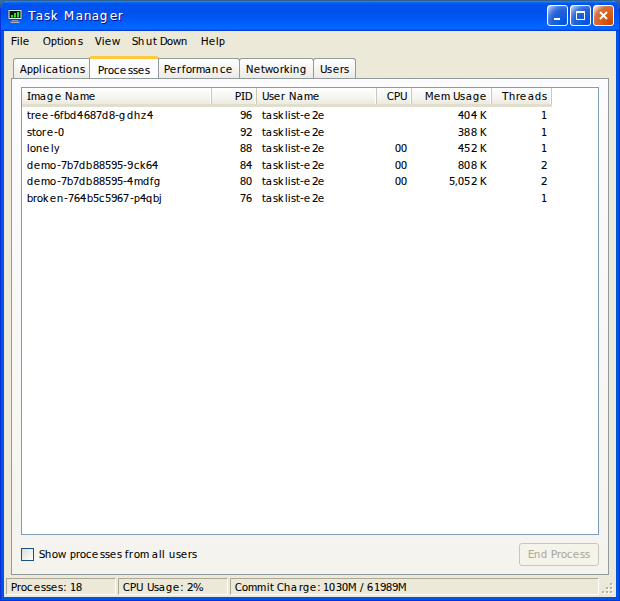
# KubernetesXP — a channel plugin for Kwirth
|
|
2
2
|
|
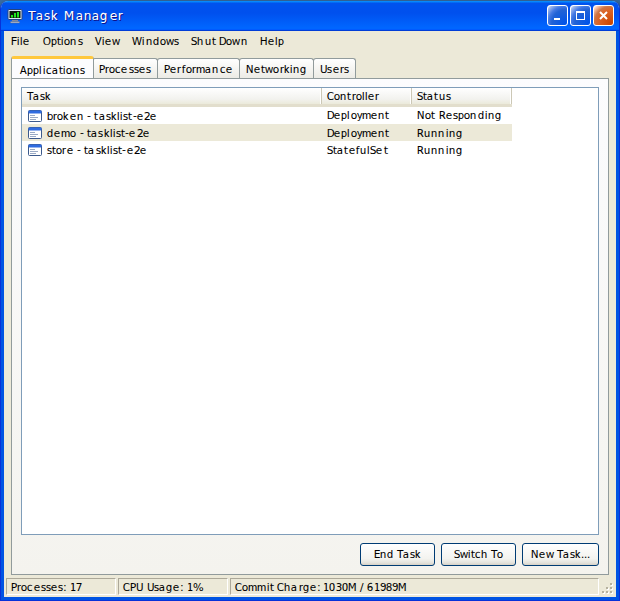
|
3
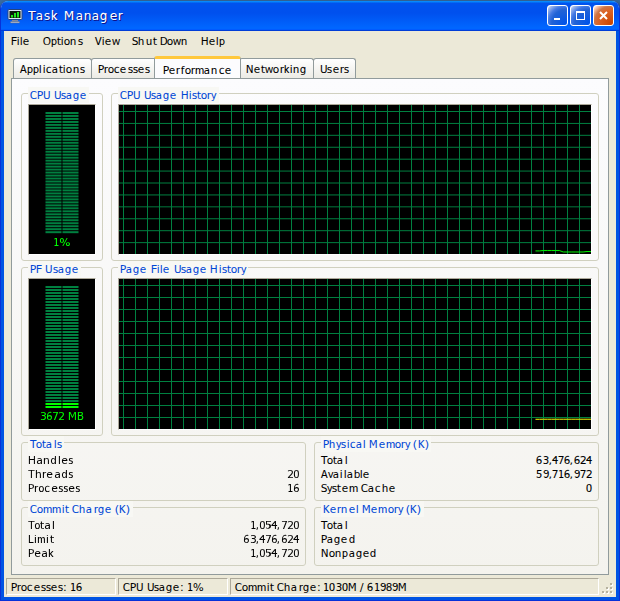
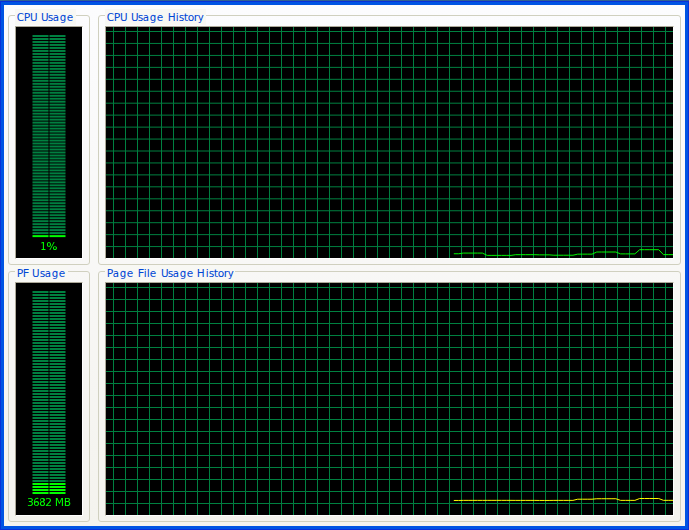
|
-
|
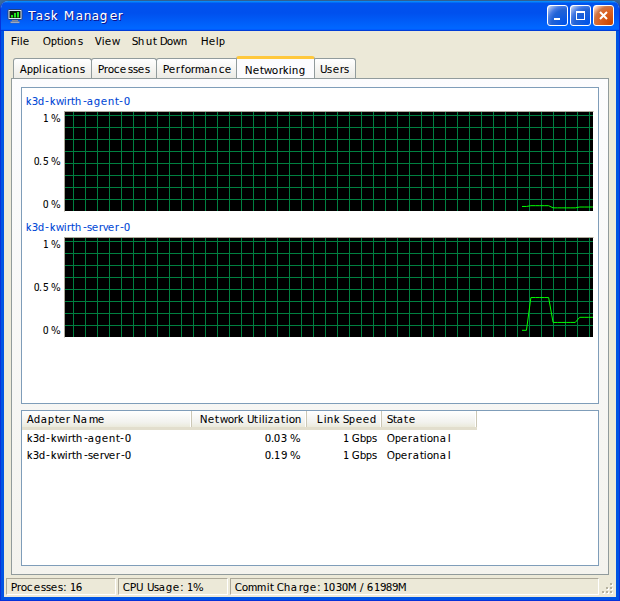
|
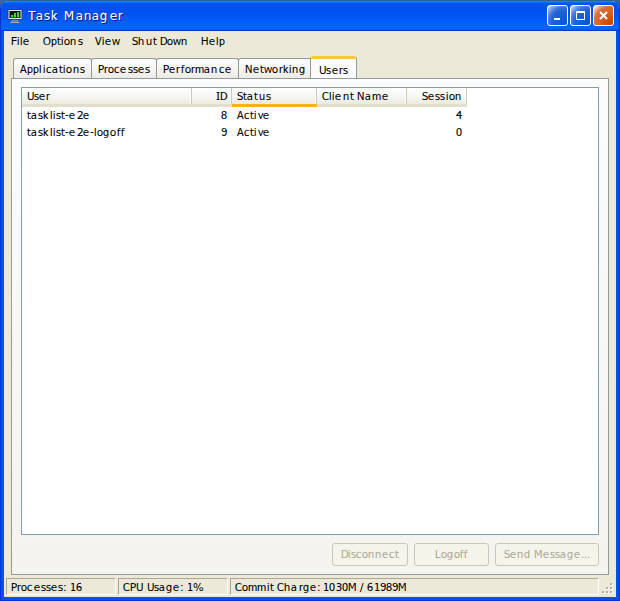
3
|
+
A small XP desktop inside a [Kwirth](https://kwirthmagnify.dev) tab — taskbar, Start menu, blue title bars and all —
|
|
4
|
+
whose computer is a **Kubernetes cluster**. Its main program is the classic **Task Manager**. Its processes are **pods**, its applications
|
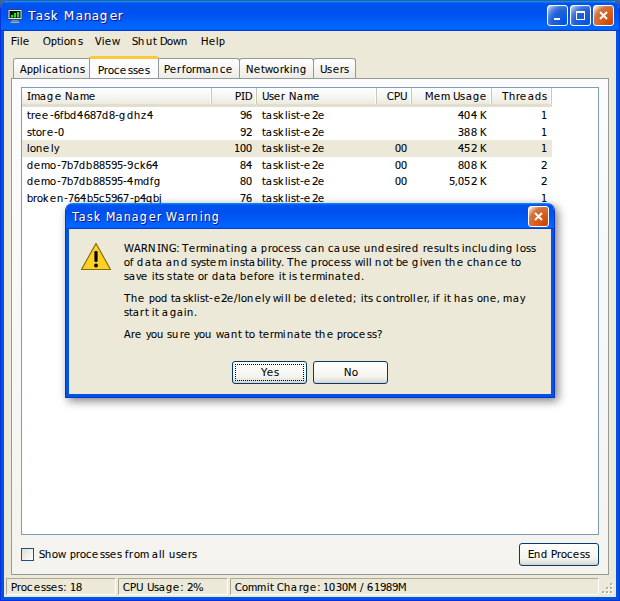
|
5
|
+
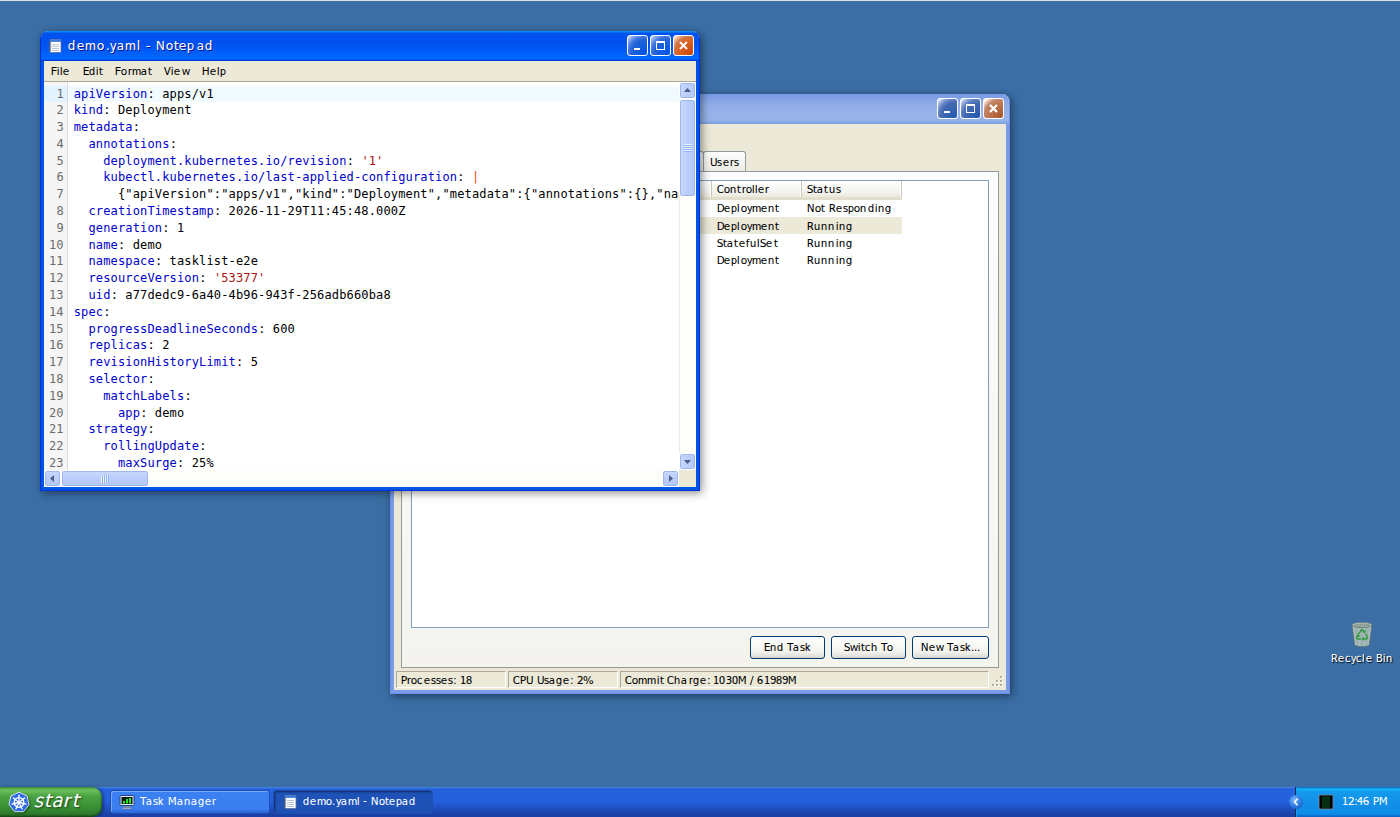
**Deployments**, its CPUs and network adapters the **nodes**, and its users the **namespaces**. Sort the processes
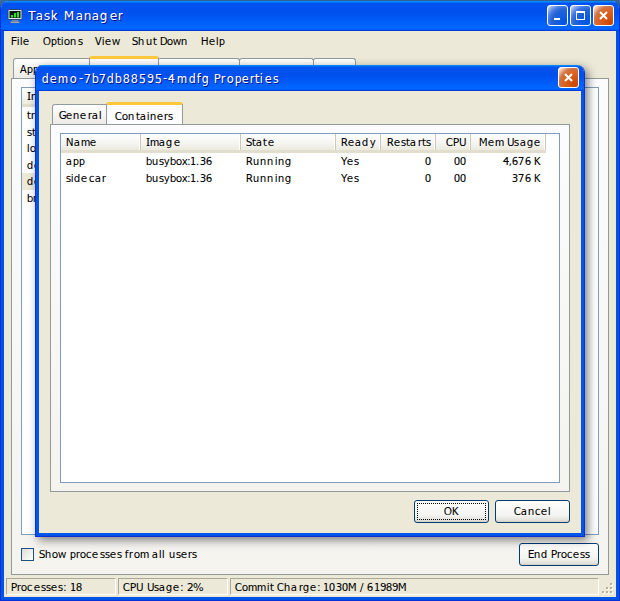
|
|
6
|
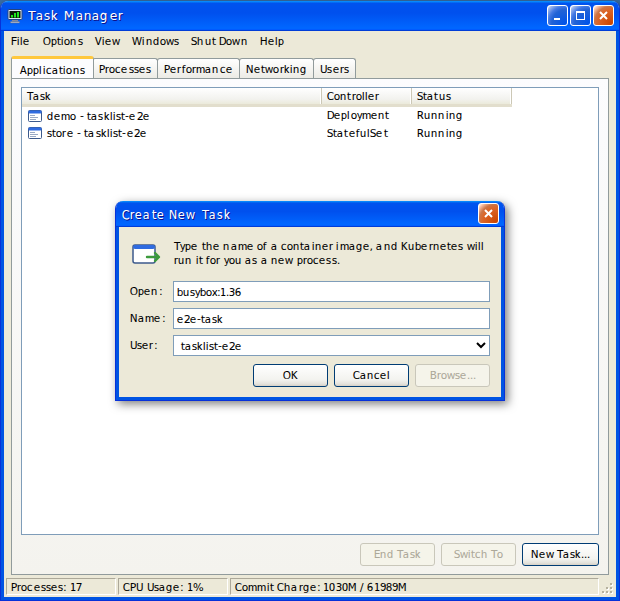
+
by CPU, select one and press `End Process`; watch the cluster breathe on the Performance tab.
|
|
7
|
+
|
|
8
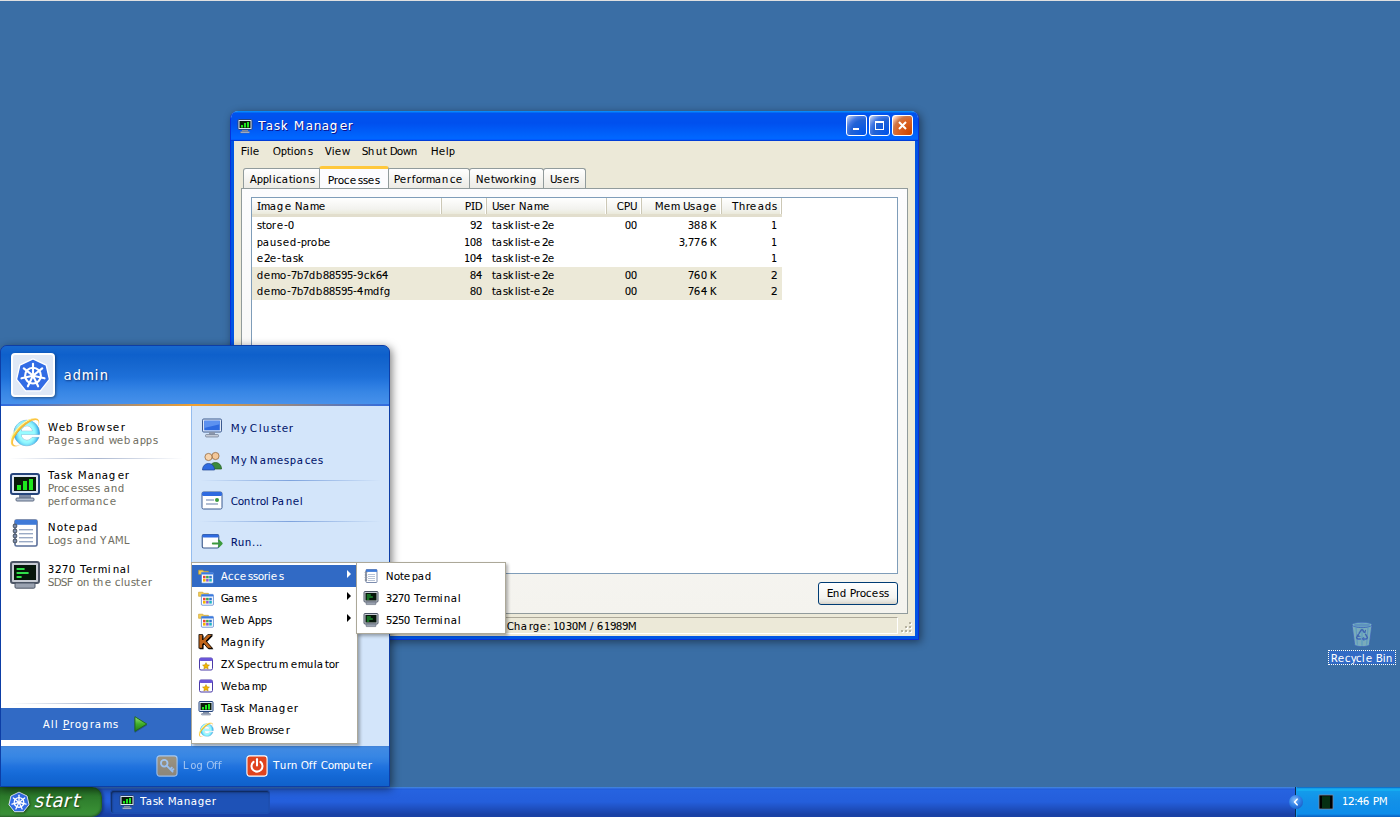
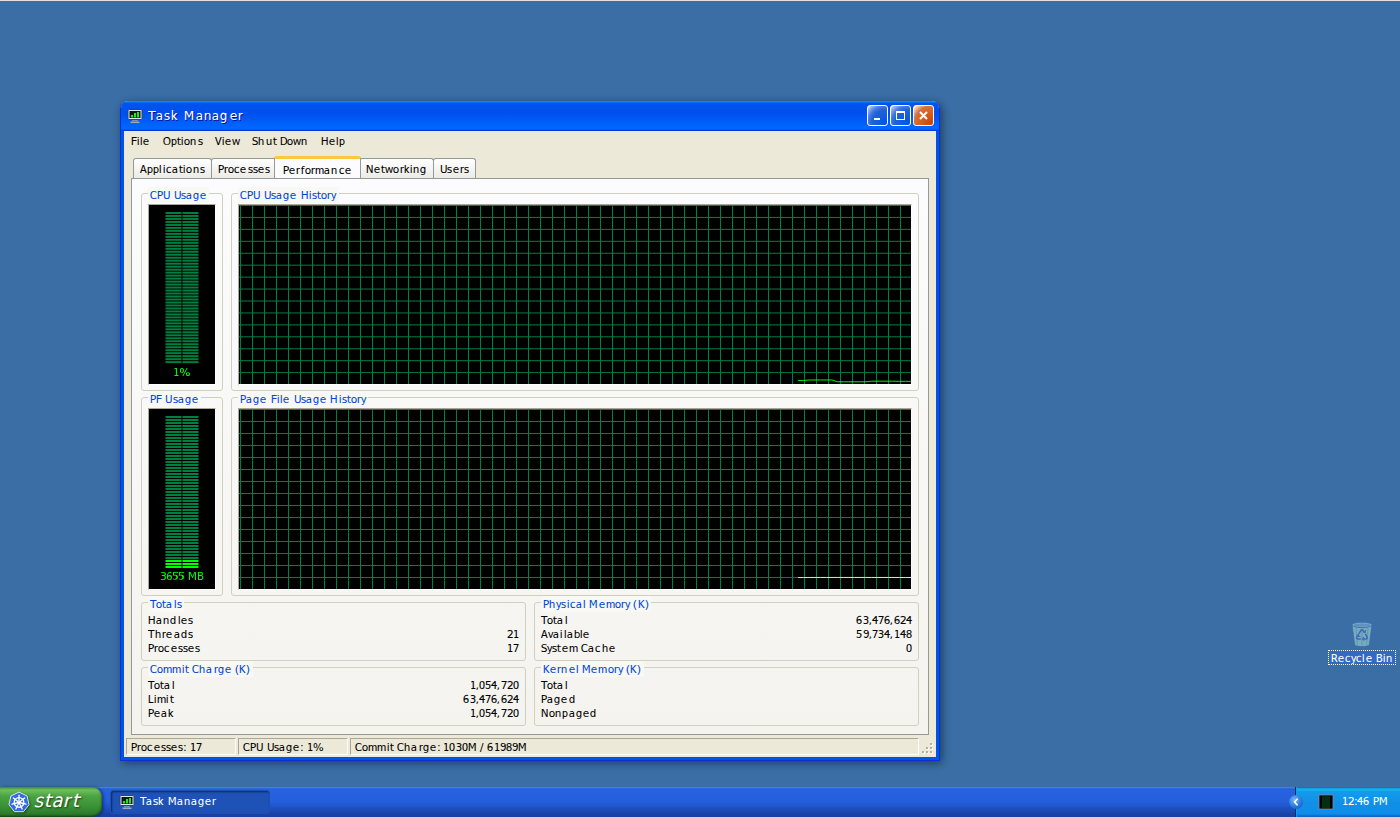
|
+
|
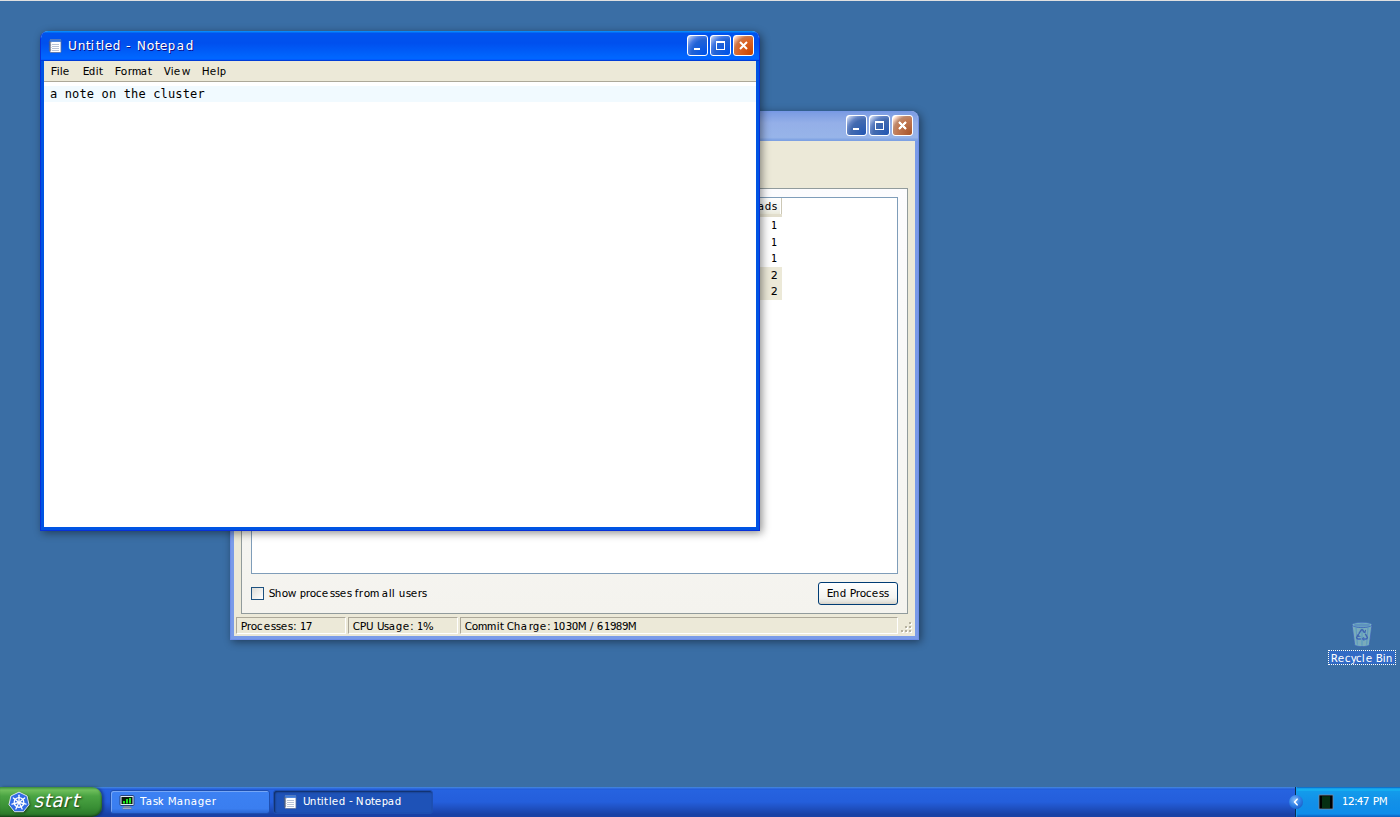
|
9
|
+
|
|
10
|
+
- Kwirth: https://kwirthmagnify.dev — source at https://github.com/kwirthmagnify/kwirth
|
|
11
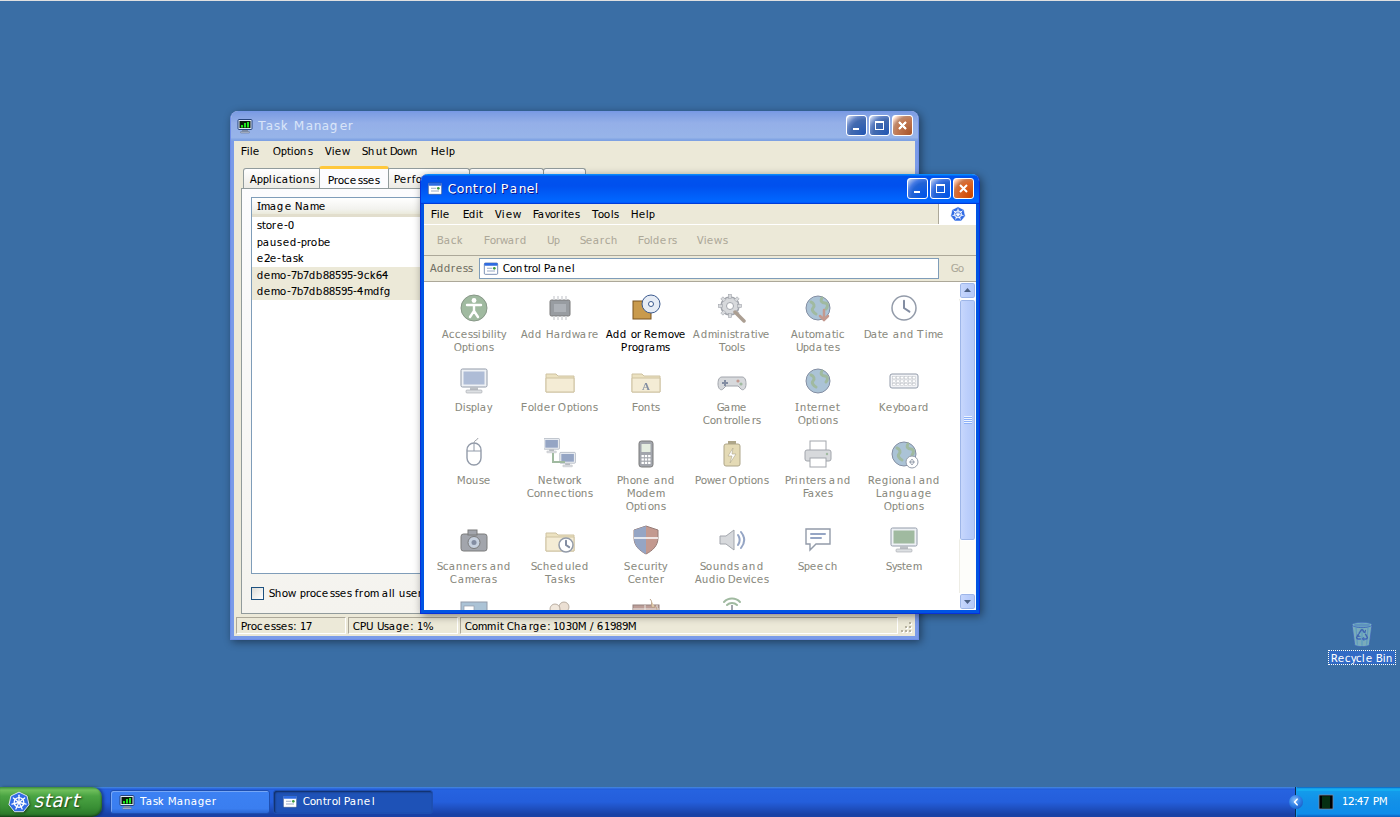
|
+
- Plugin source: https://github.com/jfvilas/kwirth (folder `plugins/tasklist`)
|
|
12
|
+
- License: MIT. The window is drawn from scratch in CSS with its own icons: no image, icon or font of Microsoft's is
|
|
13
|
+
used, and the plugin is not affiliated with Microsoft. The font is Wine's Tahoma replacement (LGPL-2.1, see
|
|
14
|
+
`src/front/fonts/LICENSE-wine-tahoma.txt`).
|
|
15
|
+
|
|
16
|
+
## XP → Kubernetes
|
|
17
|
+
|
|
18
|
+
| Task Manager | Kubernetes |
|
|
19
|
+
|---|---|
|
|
20
|
+
| The computer | The cluster picked in Kwirth's cluster list |
|
|
21
|
+
| Process (`Image Name`) | Pod |
|
|
22
|
+
| `PID` | A number given to each pod while the channel is open (a multiple of 4, as Windows does) |
|
|
23
|
+
| `User Name` | Namespace |
|
|
24
|
+
| `CPU` | The pod's share of the whole cluster's CPU |
|
|
25
|
+
| `Mem Usage` / `Peak Mem Usage` | The pod's working set / the highest seen |
|
|
26
|
+
| `Threads` | Containers |
|
|
27
|
+
| `System Idle Process` | What the cluster's CPU is not doing |
|
|
28
|
+
| `Show processes from all users` | Unchecked hides the system's users: the `kube-*` namespaces |
|
|
29
|
+
| Application (`Task`) | Deployment, StatefulSet or DaemonSet (the `Controller` column) — `Not Responding` while fewer replicas are ready than wanted |
|
|
30
|
+
| CPU (`One Graph Per CPU`) | Node |
|
|
31
|
+
| `PF Usage` / Page File history | Memory in use in the cluster |
|
|
32
|
+
| `Physical Memory` (Total / Available / System Cache) | Nodes' capacity / capacity not in use / capacity not allocatable |
|
|
33
|
+
| `Commit Charge` (Total / Limit / Peak) | Memory requested by the pods / nodes' allocatable / highest requested |
|
|
34
|
+
| Network adapter | A node's default interface, at a nominal 1 Gbps (the kubelet does not give the real speed) |
|
|
35
|
+
| User (`Users` tab) | Namespace; `Session` is how many pods it runs |
|
|
36
|
+
|
|
37
|
+
`Handles` and `Kernel Memory` have no equivalent and stay empty.
|
|
38
|
+
|
|
39
|
+
CPU, memory and network figures come from Kwirth's `metrics` provider when it is installed; without it the window
|
|
40
|
+
works the same, with no figures.
|
|
41
|
+
|
|
42
|
+
## What you can do
|
|
43
|
+
|
|
44
|
+
| Where | What | In Kubernetes |
|
|
45
|
+
|---|---|---|
|
|
46
|
+
| Processes | `End Process` (or Delete) | Deletes the pod; its controller, if it has one, starts another |
|
|
47
|
+
| Processes | `End Process Tree` | Deletes the pod's controller (its Deployment, StatefulSet, DaemonSet or Job), and its pods with it |
|
|
48
|
+
| Processes | `Restart` | Replaces the pod: its controller starts another; a pod with none is created again from its own spec |
|
|
49
|
+
| Processes | `View Log` | The container's last 1000 lines, in Notepad (a submenu picks the container when there are several) |
|
|
50
|
+
| Processes, Applications | `Edit...` | The object's YAML in Notepad; `File → Save` (or Ctrl+S) replaces it, as `kubectl edit` |
|
|
51
|
+
| Processes | `Properties` | The pod: user, computer (node), parent, and its containers |
|
|
52
|
+
| Processes | `View → Select Columns...` | PID, CPU Time, Peak Mem Usage, Threads, I/O Read and Write Bytes |
|
|
53
|
+
| Applications | `End Task` | Deletes the Deployment, StatefulSet or DaemonSet |
|
|
54
|
+
| Applications | `Switch To` / `Go To Process` | The Processes tab with the application's pods selected |
|
|
55
|
+
| Applications, File | `New Task...` | Creates a pod from an image (`kubectl run`), in the namespace you choose |
|
|
56
|
+
| Users | `Logoff` | Deletes the namespace — everything in it |
|
|
57
|
+
| Shut Down | `Stand By` / `Turn Off` / `Restart` | Cordons / drains / uncordons the node you choose |
|
|
58
|
+
| View | `Update Speed`, `Refresh Now` | Refresh every 1, 2 or 4 seconds, or paused |
|
|
59
|
+
|
|
60
|
+
Everything that ends something asks first, with XP's warning. The headers sort the lists (a second click turns the
|
|
61
|
+
order round) and resize by their edge.
|
|
62
|
+
|
|
63
|
+
## The desktop
|
|
64
|
+
|
|
65
|
+
The tab is a small XP desktop: a taskbar along the bottom with the green **start** button (Kubernetes' helm), one
|
|
66
|
+
button per window and the tray's CPU meter and clock. It starts empty, as XP did: the programs are opened from
|
|
67
|
+
**start**. Windows move by their title bar, resize by their edges, maximise, minimise to the taskbar and come to the
|
|
68
|
+
front with a click; dialogs move too. **Notepad** is a window of its own — the logs and the YAML open in it, and
|
|
69
|
+
`start → Notepad` opens a blank one. The Task Manager can be closed (it then asks the cluster nothing) and opened
|
|
70
|
+
again as it was. A double click on the Task Manager's graphs leaves only them, as XP's tiny footprint did.
|
|
71
|
+
Everything is remembered while the channel is open.
|
|
72
|
+
|
|
73
|
+
The **start** menu has your Kwirth user at the top; the programs on the left (Task Manager, Notepad, All Programs);
|
|
74
|
+
the places on the right — **My Cluster** (the Task Manager on Performance), **My Namespaces** (on Users), the
|
|
75
|
+
**Control Panel**, **Run...** (Create New Task) and About; and at the foot **Turn Off Computer**, which stops the
|
|
76
|
+
channel after asking. Log Off is there, disabled, until Kwirth lets a channel close its own tab.
|
|
77
|
+
|
|
78
|
+
|
|
79
|
+
|
|
80
|
+
The **Control Panel** is an Explorer window with XP's applets in their classic view. None of them does anything yet:
|
|
81
|
+
they are all there, disabled.
|
|
82
|
+
|
|
83
|
+
|
|
84
|
+
|
|
85
|
+
|
|
86
|
+
|
|
87
|
+
Edit, on a Deployment:
|
|
88
|
+
|
|
89
|
+
|
|
90
|
+
|
|
91
|
+
## Installing it in Kwirth
|
|
92
|
+
|
|
93
|
+
It is published on npmjs as `@jfvilas/kwirth-plugin-tasklist` and listed in the jfvilas marketplace. If your
|
|
94
|
+
Kwirth does not list it yet, add it as a marketplace with this manifest URL:
|
|
95
|
+
|
|
96
|
+
```
|
|
97
|
+
https://raw.githubusercontent.com/jfvilas/kwirth/master/manifest.json
|
|
98
|
+
```
|
|
99
|
+
|
|
100
|
+
Then install KubernetesXP (its id is `tasklist`) from the plugin manager. No restart is needed. It **uses** Kwirth's `metrics` provider for
|
|
101
|
+
the figures when it is installed.
|
|
102
|
+
|
|
103
|
+
## Permissions
|
|
104
|
+
|
|
105
|
+
| Scope | Allows |
|
|
106
|
+
|---|---|
|
|
107
|
+
| `tasklist$read` | Open the Task Manager, see everything in it and read the processes' logs |
|
|
108
|
+
| `tasklist$end` | End, restart and edit processes; end process trees; end and edit tasks; run new tasks |
|
|
109
|
+
| `admin` | `Logoff` (delete a namespace) and `Shut Down` (cordon, drain, uncordon a node) |
|
|
110
|
+
|
|
111
|
+
What a key sees is limited, as everywhere in Kwirth, by the namespaces and pods it reaches; a controller is matched
|
|
112
|
+
by its name against the key's pod patterns. The nodes are the cluster's: below the `cluster` scope, the
|
|
113
|
+
Performance tab shows the key's own processes and the Networking tab has no adapters.
|
|
114
|
+
|
|
115
|
+
## Screenshots
|
|
116
|
+
|
|
117
|
+
The desktop: the Task Manager on Performance, the taskbar under it:
|
|
118
|
+
|
|
119
|
+
|
|
120
|
+
|
|
121
|
+
Performance:
|
|
122
|
+
|
|
123
|
+
|
|
124
|
+
|
|
125
|
+
Networking, one adapter per node:
|
|
126
|
+
|
|
127
|
+
|
|
128
|
+
|
|
129
|
+
Applications, one that answers and one that does not:
|
|
130
|
+
|
|
131
|
+
|
|
132
|
+
|
|
133
|
+
End Process:
|
|
134
|
+
|
|
135
|
+
|
|
136
|
+
|
|
137
|
+
A process's containers, in its Properties:
|
|
138
|
+
|
|
139
|
+
|
|
140
|
+
|
|
141
|
+
Create New Task:
|
|
142
|
+
|
|
143
|
+
|
|
144
|
+
|
|
145
|
+
Users, the namespaces:
|
|
146
|
+
|
|
147
|
+
|
|
148
|
+
|
|
149
|
+
The tiny footprint, after a double click on the graphs:
|
|
150
|
+
|
|
151
|
+
|
|
152
|
+
|
|
153
|
+
## Building
|
|
154
|
+
|
|
155
|
+
```
|
|
156
|
+
npm install --legacy-peer-deps
|
|
157
|
+
npm run build # typecheck + dist/
|
|
158
|
+
npm test # unit tests; COVERAGE=1 npm test for c8 coverage
|
|
159
|
+
```
|
|
160
|
+
|
|
161
|
+
The e2e (`e2e/`, Playwright) runs against a live Kwirth with its own `.creds.json`; it creates the `tasklist-e2e`
|
|
162
|
+
and `tasklist-e2e-logoff` namespaces and deletes them at the end. Everything it ends, creates or logs off is its
|
|
163
|
+
own; Shut Down is only opened and cancelled. The Processes, Applications and Users captures show only the
|
|
164
|
+
fixture's rows.
|