@intlayer/docs 8.9.1 → 8.9.2
This diff represents the content of publicly available package versions that have been released to one of the supported registries. The information contained in this diff is provided for informational purposes only and reflects changes between package versions as they appear in their respective public registries.
- package/dist/cjs/generated/frequentQuestions.entry.cjs +20 -0
- package/dist/cjs/generated/frequentQuestions.entry.cjs.map +1 -1
- package/dist/esm/generated/frequentQuestions.entry.mjs +20 -0
- package/dist/esm/generated/frequentQuestions.entry.mjs.map +1 -1
- package/dist/types/generated/frequentQuestions.entry.d.ts +1 -0
- package/dist/types/generated/frequentQuestions.entry.d.ts.map +1 -1
- package/docs/ar/intlayer_with_astro_lit.md +4 -4
- package/docs/ar/intlayer_with_astro_preact.md +4 -4
- package/docs/ar/intlayer_with_astro_react.md +4 -4
- package/docs/ar/intlayer_with_astro_solid.md +4 -4
- package/docs/ar/intlayer_with_astro_svelte.md +4 -4
- package/docs/ar/intlayer_with_astro_vanilla.md +4 -4
- package/docs/ar/intlayer_with_create_react_app.md +4 -4
- package/docs/ar/intlayer_with_nextjs_14.md +4 -4
- package/docs/ar/intlayer_with_nextjs_15.md +4 -4
- package/docs/ar/intlayer_with_nextjs_16.md +4 -4
- package/docs/ar/intlayer_with_nextjs_page_router.md +4 -4
- package/docs/ar/intlayer_with_tanstack+solid.md +4 -4
- package/docs/ar/intlayer_with_tanstack.md +4 -4
- package/docs/ar/intlayer_with_vite+preact.md +4 -4
- package/docs/ar/intlayer_with_vite+react.md +4 -4
- package/docs/ar/intlayer_with_vite+solid.md +4 -4
- package/docs/de/intlayer_with_astro_lit.md +4 -4
- package/docs/de/intlayer_with_astro_preact.md +4 -4
- package/docs/de/intlayer_with_astro_react.md +4 -4
- package/docs/de/intlayer_with_astro_solid.md +4 -4
- package/docs/de/intlayer_with_astro_svelte.md +4 -4
- package/docs/de/intlayer_with_astro_vanilla.md +4 -4
- package/docs/de/intlayer_with_create_react_app.md +4 -4
- package/docs/de/intlayer_with_nextjs_14.md +4 -4
- package/docs/de/intlayer_with_nextjs_15.md +4 -4
- package/docs/de/intlayer_with_nextjs_16.md +4 -4
- package/docs/de/intlayer_with_nextjs_no_locale_path.md +4 -4
- package/docs/de/intlayer_with_nextjs_page_router.md +4 -4
- package/docs/de/intlayer_with_tanstack+solid.md +4 -4
- package/docs/de/intlayer_with_tanstack.md +4 -4
- package/docs/de/intlayer_with_vite+preact.md +4 -4
- package/docs/de/intlayer_with_vite+react.md +4 -4
- package/docs/de/intlayer_with_vite+solid.md +4 -4
- package/docs/en/intlayer_with_astro_lit.md +4 -4
- package/docs/en/intlayer_with_astro_preact.md +4 -4
- package/docs/en/intlayer_with_astro_react.md +4 -4
- package/docs/en/intlayer_with_astro_solid.md +4 -4
- package/docs/en/intlayer_with_astro_svelte.md +4 -4
- package/docs/en/intlayer_with_astro_vanilla.md +4 -4
- package/docs/en/intlayer_with_create_react_app.md +4 -4
- package/docs/en/intlayer_with_nextjs_14.md +4 -4
- package/docs/en/intlayer_with_nextjs_15.md +4 -4
- package/docs/en/intlayer_with_nextjs_16.md +4 -4
- package/docs/en/intlayer_with_nextjs_no_locale_path.md +4 -4
- package/docs/en/intlayer_with_nextjs_page_router.md +4 -4
- package/docs/en/intlayer_with_tanstack+solid.md +4 -4
- package/docs/en/intlayer_with_tanstack.md +4 -4
- package/docs/en/intlayer_with_vite+preact.md +4 -4
- package/docs/en/intlayer_with_vite+react.md +4 -4
- package/docs/en/intlayer_with_vite+solid.md +4 -4
- package/docs/en-GB/intlayer_with_astro_lit.md +4 -4
- package/docs/en-GB/intlayer_with_astro_preact.md +4 -4
- package/docs/en-GB/intlayer_with_astro_react.md +4 -4
- package/docs/en-GB/intlayer_with_astro_solid.md +4 -4
- package/docs/en-GB/intlayer_with_astro_svelte.md +4 -4
- package/docs/en-GB/intlayer_with_astro_vanilla.md +4 -4
- package/docs/en-GB/intlayer_with_create_react_app.md +4 -4
- package/docs/en-GB/intlayer_with_nextjs_14.md +4 -4
- package/docs/en-GB/intlayer_with_nextjs_15.md +4 -4
- package/docs/en-GB/intlayer_with_nextjs_16.md +4 -4
- package/docs/en-GB/intlayer_with_nextjs_no_locale_path.md +4 -4
- package/docs/en-GB/intlayer_with_nextjs_page_router.md +4 -4
- package/docs/en-GB/intlayer_with_tanstack+solid.md +4 -4
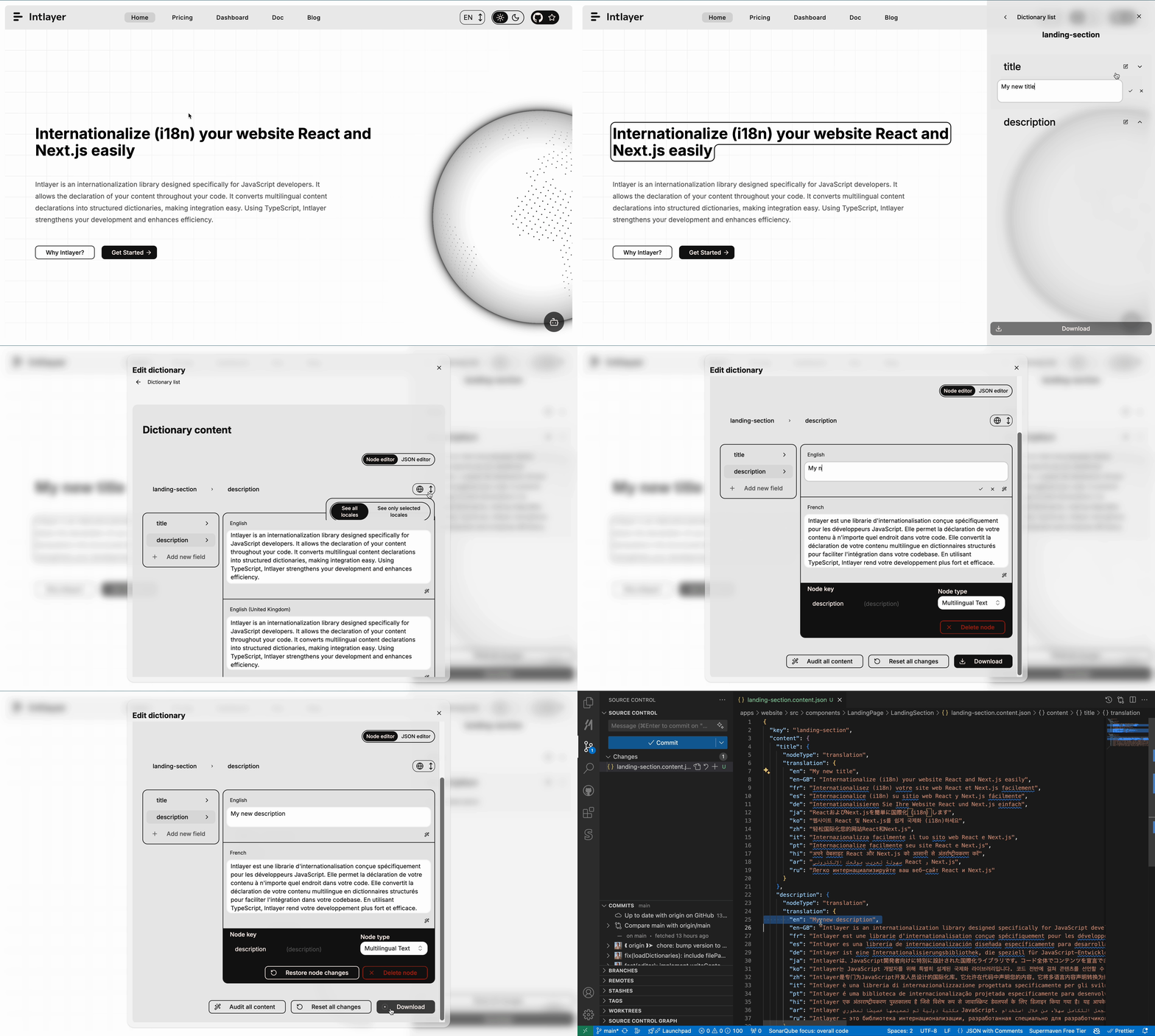
- package/docs/en-GB/intlayer_with_tanstack.md +4 -4
- package/docs/en-GB/intlayer_with_vite+preact.md +4 -4
- package/docs/en-GB/intlayer_with_vite+react.md +4 -4
- package/docs/en-GB/intlayer_with_vite+solid.md +4 -4
- package/docs/es/intlayer_with_astro_lit.md +4 -4
- package/docs/es/intlayer_with_astro_preact.md +4 -4
- package/docs/es/intlayer_with_astro_react.md +4 -4
- package/docs/es/intlayer_with_astro_solid.md +4 -4
- package/docs/es/intlayer_with_astro_svelte.md +4 -4
- package/docs/es/intlayer_with_astro_vanilla.md +4 -4
- package/docs/es/intlayer_with_create_react_app.md +4 -4
- package/docs/es/intlayer_with_nextjs_14.md +4 -4
- package/docs/es/intlayer_with_nextjs_15.md +4 -4
- package/docs/es/intlayer_with_nextjs_16.md +4 -4
- package/docs/es/intlayer_with_nextjs_no_locale_path.md +4 -4
- package/docs/es/intlayer_with_nextjs_page_router.md +4 -4
- package/docs/es/intlayer_with_tanstack+solid.md +4 -4
- package/docs/es/intlayer_with_tanstack.md +4 -4
- package/docs/es/intlayer_with_vite+preact.md +4 -4
- package/docs/es/intlayer_with_vite+react.md +4 -4
- package/docs/es/intlayer_with_vite+solid.md +4 -4
- package/docs/fr/intlayer_with_astro_lit.md +4 -4
- package/docs/fr/intlayer_with_astro_preact.md +4 -4
- package/docs/fr/intlayer_with_astro_react.md +4 -4
- package/docs/fr/intlayer_with_astro_solid.md +4 -4
- package/docs/fr/intlayer_with_astro_svelte.md +4 -4
- package/docs/fr/intlayer_with_astro_vanilla.md +4 -4
- package/docs/fr/intlayer_with_create_react_app.md +4 -4
- package/docs/fr/intlayer_with_nextjs_14.md +4 -4
- package/docs/fr/intlayer_with_nextjs_15.md +4 -4
- package/docs/fr/intlayer_with_nextjs_16.md +4 -4
- package/docs/fr/intlayer_with_nextjs_no_locale_path.md +4 -4
- package/docs/fr/intlayer_with_nextjs_page_router.md +4 -4
- package/docs/fr/intlayer_with_tanstack+solid.md +4 -4
- package/docs/fr/intlayer_with_tanstack.md +4 -4
- package/docs/fr/intlayer_with_vite+preact.md +4 -4
- package/docs/fr/intlayer_with_vite+react.md +4 -4
- package/docs/fr/intlayer_with_vite+solid.md +4 -4
- package/docs/hi/intlayer_with_astro_lit.md +4 -4
- package/docs/hi/intlayer_with_astro_preact.md +4 -4
- package/docs/hi/intlayer_with_astro_react.md +4 -4
- package/docs/hi/intlayer_with_astro_solid.md +4 -4
- package/docs/hi/intlayer_with_astro_svelte.md +4 -4
- package/docs/hi/intlayer_with_astro_vanilla.md +4 -4
- package/docs/hi/intlayer_with_create_react_app.md +4 -4
- package/docs/hi/intlayer_with_nextjs_14.md +4 -4
- package/docs/hi/intlayer_with_nextjs_15.md +4 -4
- package/docs/hi/intlayer_with_nextjs_16.md +4 -4
- package/docs/hi/intlayer_with_nextjs_no_locale_path.md +4 -4
- package/docs/hi/intlayer_with_nextjs_page_router.md +4 -4
- package/docs/hi/intlayer_with_tanstack+solid.md +4 -4
- package/docs/hi/intlayer_with_tanstack.md +4 -4
- package/docs/hi/intlayer_with_vite+preact.md +4 -4
- package/docs/hi/intlayer_with_vite+react.md +4 -4
- package/docs/hi/intlayer_with_vite+solid.md +4 -4
- package/docs/id/intlayer_with_astro_lit.md +4 -4
- package/docs/id/intlayer_with_astro_preact.md +4 -4
- package/docs/id/intlayer_with_astro_react.md +4 -4
- package/docs/id/intlayer_with_astro_solid.md +4 -4
- package/docs/id/intlayer_with_astro_svelte.md +4 -4
- package/docs/id/intlayer_with_astro_vanilla.md +4 -4
- package/docs/id/intlayer_with_create_react_app.md +4 -4
- package/docs/id/intlayer_with_nextjs_14.md +4 -4
- package/docs/id/intlayer_with_nextjs_15.md +4 -4
- package/docs/id/intlayer_with_nextjs_16.md +4 -4
- package/docs/id/intlayer_with_nextjs_no_locale_path.md +4 -4
- package/docs/id/intlayer_with_nextjs_page_router.md +4 -4
- package/docs/id/intlayer_with_tanstack+solid.md +4 -4
- package/docs/id/intlayer_with_tanstack.md +4 -4
- package/docs/id/intlayer_with_vite+preact.md +4 -4
- package/docs/id/intlayer_with_vite+react.md +4 -4
- package/docs/id/intlayer_with_vite+solid.md +4 -4
- package/docs/it/intlayer_with_astro_lit.md +4 -4
- package/docs/it/intlayer_with_astro_preact.md +4 -4
- package/docs/it/intlayer_with_astro_react.md +4 -4
- package/docs/it/intlayer_with_astro_solid.md +4 -4
- package/docs/it/intlayer_with_astro_svelte.md +4 -4
- package/docs/it/intlayer_with_astro_vanilla.md +4 -4
- package/docs/it/intlayer_with_create_react_app.md +4 -4
- package/docs/it/intlayer_with_nextjs_14.md +4 -4
- package/docs/it/intlayer_with_nextjs_15.md +4 -4
- package/docs/it/intlayer_with_nextjs_16.md +4 -4
- package/docs/it/intlayer_with_nextjs_no_locale_path.md +4 -4
- package/docs/it/intlayer_with_nextjs_page_router.md +4 -4
- package/docs/it/intlayer_with_tanstack+solid.md +4 -4
- package/docs/it/intlayer_with_tanstack.md +4 -4
- package/docs/it/intlayer_with_vite+preact.md +4 -4
- package/docs/it/intlayer_with_vite+react.md +4 -4
- package/docs/it/intlayer_with_vite+solid.md +4 -4
- package/docs/ja/intlayer_with_astro_lit.md +4 -4
- package/docs/ja/intlayer_with_astro_preact.md +4 -4
- package/docs/ja/intlayer_with_astro_react.md +4 -4
- package/docs/ja/intlayer_with_astro_solid.md +4 -4
- package/docs/ja/intlayer_with_astro_svelte.md +4 -4
- package/docs/ja/intlayer_with_astro_vanilla.md +4 -4
- package/docs/ja/intlayer_with_create_react_app.md +4 -4
- package/docs/ja/intlayer_with_nextjs_14.md +4 -4
- package/docs/ja/intlayer_with_nextjs_15.md +4 -4
- package/docs/ja/intlayer_with_nextjs_16.md +4 -4
- package/docs/ja/intlayer_with_nextjs_no_locale_path.md +4 -4
- package/docs/ja/intlayer_with_nextjs_page_router.md +4 -4
- package/docs/ja/intlayer_with_tanstack+solid.md +4 -4
- package/docs/ja/intlayer_with_tanstack.md +4 -4
- package/docs/ja/intlayer_with_vite+solid.md +4 -4
- package/docs/ko/intlayer_with_astro_lit.md +4 -4
- package/docs/ko/intlayer_with_astro_preact.md +4 -4
- package/docs/ko/intlayer_with_astro_react.md +4 -4
- package/docs/ko/intlayer_with_astro_solid.md +4 -4
- package/docs/ko/intlayer_with_astro_svelte.md +4 -4
- package/docs/ko/intlayer_with_astro_vanilla.md +4 -4
- package/docs/ko/intlayer_with_create_react_app.md +4 -4
- package/docs/ko/intlayer_with_nextjs_14.md +4 -4
- package/docs/ko/intlayer_with_nextjs_15.md +4 -4
- package/docs/ko/intlayer_with_nextjs_16.md +4 -4
- package/docs/ko/intlayer_with_nextjs_no_locale_path.md +4 -4
- package/docs/ko/intlayer_with_nextjs_page_router.md +4 -4
- package/docs/ko/intlayer_with_tanstack+solid.md +4 -4
- package/docs/ko/intlayer_with_tanstack.md +4 -4
- package/docs/ko/intlayer_with_vite+preact.md +4 -4
- package/docs/ko/intlayer_with_vite+react.md +4 -4
- package/docs/ko/intlayer_with_vite+solid.md +4 -4
- package/docs/pl/intlayer_with_astro_lit.md +4 -4
- package/docs/pl/intlayer_with_astro_preact.md +4 -4
- package/docs/pl/intlayer_with_astro_react.md +4 -4
- package/docs/pl/intlayer_with_astro_solid.md +4 -4
- package/docs/pl/intlayer_with_astro_svelte.md +4 -4
- package/docs/pl/intlayer_with_astro_vanilla.md +4 -4
- package/docs/pl/intlayer_with_create_react_app.md +4 -4
- package/docs/pl/intlayer_with_nextjs_14.md +4 -4
- package/docs/pl/intlayer_with_nextjs_15.md +4 -4
- package/docs/pl/intlayer_with_nextjs_16.md +4 -4
- package/docs/pl/intlayer_with_nextjs_no_locale_path.md +4 -4
- package/docs/pl/intlayer_with_nextjs_page_router.md +4 -4
- package/docs/pl/intlayer_with_tanstack+solid.md +4 -4
- package/docs/pl/intlayer_with_tanstack.md +4 -4
- package/docs/pl/intlayer_with_vite+preact.md +4 -4
- package/docs/pl/intlayer_with_vite+react.md +4 -4
- package/docs/pl/intlayer_with_vite+solid.md +4 -4
- package/docs/pt/intlayer_with_astro_lit.md +4 -4
- package/docs/pt/intlayer_with_astro_preact.md +4 -4
- package/docs/pt/intlayer_with_astro_react.md +4 -4
- package/docs/pt/intlayer_with_astro_solid.md +4 -4
- package/docs/pt/intlayer_with_astro_svelte.md +4 -4
- package/docs/pt/intlayer_with_astro_vanilla.md +4 -4
- package/docs/pt/intlayer_with_create_react_app.md +4 -4
- package/docs/pt/intlayer_with_nextjs_14.md +4 -4
- package/docs/pt/intlayer_with_nextjs_15.md +4 -4
- package/docs/pt/intlayer_with_nextjs_16.md +4 -4
- package/docs/pt/intlayer_with_nextjs_no_locale_path.md +4 -4
- package/docs/pt/intlayer_with_nextjs_page_router.md +4 -4
- package/docs/pt/intlayer_with_tanstack+solid.md +4 -4
- package/docs/pt/intlayer_with_tanstack.md +4 -4
- package/docs/pt/intlayer_with_vite+preact.md +4 -4
- package/docs/pt/intlayer_with_vite+react.md +4 -4
- package/docs/pt/intlayer_with_vite+solid.md +4 -4
- package/docs/ru/intlayer_with_astro_lit.md +4 -4
- package/docs/ru/intlayer_with_astro_preact.md +4 -4
- package/docs/ru/intlayer_with_astro_react.md +4 -4
- package/docs/ru/intlayer_with_astro_solid.md +4 -4
- package/docs/ru/intlayer_with_astro_svelte.md +4 -4
- package/docs/ru/intlayer_with_astro_vanilla.md +4 -4
- package/docs/ru/intlayer_with_create_react_app.md +4 -4
- package/docs/ru/intlayer_with_nextjs_14.md +4 -4
- package/docs/ru/intlayer_with_nextjs_15.md +4 -4
- package/docs/ru/intlayer_with_nextjs_16.md +4 -4
- package/docs/ru/intlayer_with_nextjs_no_locale_path.md +4 -4
- package/docs/ru/intlayer_with_nextjs_page_router.md +4 -4
- package/docs/ru/intlayer_with_tanstack+solid.md +4 -4
- package/docs/ru/intlayer_with_tanstack.md +4 -4
- package/docs/ru/intlayer_with_vite+preact.md +4 -4
- package/docs/ru/intlayer_with_vite+react.md +4 -4
- package/docs/ru/intlayer_with_vite+solid.md +4 -4
- package/docs/tr/intlayer_with_astro_lit.md +4 -4
- package/docs/tr/intlayer_with_astro_preact.md +4 -4
- package/docs/tr/intlayer_with_astro_react.md +4 -4
- package/docs/tr/intlayer_with_astro_solid.md +4 -4
- package/docs/tr/intlayer_with_astro_svelte.md +4 -4
- package/docs/tr/intlayer_with_astro_vanilla.md +4 -4
- package/docs/tr/intlayer_with_create_react_app.md +4 -4
- package/docs/tr/intlayer_with_nextjs_15.md +4 -4
- package/docs/tr/intlayer_with_nextjs_16.md +4 -4
- package/docs/tr/intlayer_with_nextjs_no_locale_path.md +4 -4
- package/docs/tr/intlayer_with_nextjs_page_router.md +4 -4
- package/docs/tr/intlayer_with_tanstack+solid.md +4 -4
- package/docs/tr/intlayer_with_tanstack.md +4 -4
- package/docs/tr/intlayer_with_vite+preact.md +4 -4
- package/docs/tr/intlayer_with_vite+react.md +4 -4
- package/docs/tr/intlayer_with_vite+solid.md +4 -4
- package/docs/uk/intlayer_with_astro_lit.md +4 -4
- package/docs/uk/intlayer_with_astro_preact.md +4 -4
- package/docs/uk/intlayer_with_astro_react.md +4 -4
- package/docs/uk/intlayer_with_astro_solid.md +4 -4
- package/docs/uk/intlayer_with_astro_svelte.md +4 -4
- package/docs/uk/intlayer_with_astro_vanilla.md +4 -4
- package/docs/uk/intlayer_with_create_react_app.md +4 -4
- package/docs/uk/intlayer_with_nextjs_14.md +4 -4
- package/docs/uk/intlayer_with_nextjs_15.md +4 -4
- package/docs/uk/intlayer_with_nextjs_16.md +4 -4
- package/docs/uk/intlayer_with_nextjs_no_locale_path.md +4 -4
- package/docs/uk/intlayer_with_nextjs_page_router.md +4 -4
- package/docs/uk/intlayer_with_tanstack+solid.md +4 -4
- package/docs/uk/intlayer_with_tanstack.md +4 -4
- package/docs/uk/intlayer_with_vite+preact.md +4 -4
- package/docs/uk/intlayer_with_vite+react.md +4 -4
- package/docs/uk/intlayer_with_vite+solid.md +4 -4
- package/docs/vi/intlayer_with_astro_lit.md +4 -4
- package/docs/vi/intlayer_with_astro_preact.md +4 -4
- package/docs/vi/intlayer_with_astro_react.md +4 -4
- package/docs/vi/intlayer_with_astro_solid.md +4 -4
- package/docs/vi/intlayer_with_astro_svelte.md +4 -4
- package/docs/vi/intlayer_with_astro_vanilla.md +4 -4
- package/docs/vi/intlayer_with_create_react_app.md +4 -4
- package/docs/vi/intlayer_with_nextjs_14.md +4 -4
- package/docs/vi/intlayer_with_nextjs_15.md +4 -4
- package/docs/vi/intlayer_with_nextjs_16.md +4 -4
- package/docs/vi/intlayer_with_nextjs_no_locale_path.md +4 -4
- package/docs/vi/intlayer_with_nextjs_page_router.md +4 -4
- package/docs/vi/intlayer_with_tanstack+solid.md +4 -4
- package/docs/vi/intlayer_with_tanstack.md +4 -4
- package/docs/vi/intlayer_with_vite+preact.md +4 -4
- package/docs/vi/intlayer_with_vite+react.md +4 -4
- package/docs/vi/intlayer_with_vite+solid.md +4 -4
- package/docs/zh/intlayer_with_astro_lit.md +4 -4
- package/docs/zh/intlayer_with_astro_preact.md +4 -4
- package/docs/zh/intlayer_with_astro_react.md +4 -4
- package/docs/zh/intlayer_with_astro_solid.md +4 -4
- package/docs/zh/intlayer_with_astro_svelte.md +4 -4
- package/docs/zh/intlayer_with_astro_vanilla.md +4 -4
- package/docs/zh/intlayer_with_create_react_app.md +4 -4
- package/docs/zh/intlayer_with_nextjs_14.md +4 -4
- package/docs/zh/intlayer_with_nextjs_15.md +4 -4
- package/docs/zh/intlayer_with_nextjs_16.md +4 -4
- package/docs/zh/intlayer_with_nextjs_no_locale_path.md +4 -4
- package/docs/zh/intlayer_with_nextjs_page_router.md +4 -4
- package/docs/zh/intlayer_with_tanstack+solid.md +4 -4
- package/docs/zh/intlayer_with_tanstack.md +4 -4
- package/docs/zh/intlayer_with_vite+preact.md +4 -4
- package/docs/zh/intlayer_with_vite+react.md +4 -4
- package/docs/zh/intlayer_with_vite+solid.md +4 -4
- package/frequent_questions/ar/intlayerNode.md +96 -0
- package/frequent_questions/de/intlayerNode.md +96 -0
- package/frequent_questions/en/intlayerNode.md +96 -0
- package/frequent_questions/en-GB/intlayerNode.md +96 -0
- package/frequent_questions/es/intlayerNode.md +96 -0
- package/frequent_questions/fr/intlayerNode.md +96 -0
- package/frequent_questions/hi/intlayerNode.md +96 -0
- package/frequent_questions/id/intlayerNode.md +96 -0
- package/frequent_questions/it/intlayerNode.md +96 -0
- package/frequent_questions/ja/intlayerNode.md +96 -0
- package/frequent_questions/ko/intlayerNode.md +96 -0
- package/frequent_questions/pl/intlayerNode.md +96 -0
- package/frequent_questions/pt/intlayerNode.md +96 -0
- package/frequent_questions/ru/intlayerNode.md +96 -0
- package/frequent_questions/tr/intlayerNode.md +96 -0
- package/frequent_questions/uk/intlayerNode.md +96 -0
- package/frequent_questions/vi/intlayerNode.md +96 -0
- package/frequent_questions/zh/intlayerNode.md +96 -0
- package/package.json +6 -6
- package/src/generated/frequentQuestions.entry.ts +20 -0
|
@@ -0,0 +1,96 @@
|
|
|
1
|
+
---
|
|
2
|
+
createdAt: 2026-05-07
|
|
3
|
+
updatedAt: 2026-05-07
|
|
4
|
+
title: IntlayerNode प्रकार। यह क्या है?
|
|
5
|
+
description: IntlayerNode प्रकार क्या है? मेरी स्ट्रिंग IntlayerNode<string> में क्यों बदल गई है?
|
|
6
|
+
keywords:
|
|
7
|
+
- परिचय
|
|
8
|
+
- शुरू करें
|
|
9
|
+
- Intlayer
|
|
10
|
+
- एप्लिकेशन
|
|
11
|
+
- पैकेज
|
|
12
|
+
slugs:
|
|
13
|
+
- frequent-questions
|
|
14
|
+
- intlayer-node
|
|
15
|
+
history:
|
|
16
|
+
- version: 8.9.0
|
|
17
|
+
date: 2026-05-07
|
|
18
|
+
changes: "दस्तावेज़ की शुरुआत"
|
|
19
|
+
---
|
|
20
|
+
|
|
21
|
+
# IntlayerNode प्रकार क्या है?
|
|
22
|
+
|
|
23
|
+
`IntlayerNode<T>` प्रकार एक विशेष प्रकार है जो intlayer के पैकेज जैसे कि `next-intlayer`, `react-intlayer`, `vue-intlayer`, `preact-intlayer`, `solid-intlayer`, `angular-intlayer`, `svelte-intlayer`, `lit-intlayer` और `vanilla-intlayer` द्वारा प्रदान किया जाता है।
|
|
24
|
+
|
|
25
|
+
## उपयोग का उदाहरण
|
|
26
|
+
|
|
27
|
+
```tsx fileName="src/app.content.tsx" contentDeclarationFormat={["typescript", "esm", "commonjs"]}
|
|
28
|
+
import { t, type Dictionary } from "intlayer";
|
|
29
|
+
import type { ComponentChildren } from "preact";
|
|
30
|
+
|
|
31
|
+
const appContent = {
|
|
32
|
+
key: "app",
|
|
33
|
+
content: {
|
|
34
|
+
title: "Vite + Preact",
|
|
35
|
+
},
|
|
36
|
+
} satisfies Dictionary;
|
|
37
|
+
|
|
38
|
+
export default appContent;
|
|
39
|
+
```
|
|
40
|
+
|
|
41
|
+
```json fileName="src/app.content.json" contentDeclarationFormat="json"
|
|
42
|
+
{
|
|
43
|
+
"$schema": "https://intlayer.org/schema.json",
|
|
44
|
+
"key": "app",
|
|
45
|
+
"content": {
|
|
46
|
+
"title": "Vite + Preact"
|
|
47
|
+
}
|
|
48
|
+
}
|
|
49
|
+
```
|
|
50
|
+
|
|
51
|
+
<Tabs group="framework">
|
|
52
|
+
<Tab label="React / Next.js" value="react">
|
|
53
|
+
|
|
54
|
+
```tsx fileName="src/App.tsx"
|
|
55
|
+
import { useIntlayer } from "react-intlayer";
|
|
56
|
+
|
|
57
|
+
const AppContent = () => {
|
|
58
|
+
const { title } = useIntlayer("app");
|
|
59
|
+
|
|
60
|
+
return title; // प्रकार लौटाता है: IntlayerNode<string>
|
|
61
|
+
};
|
|
62
|
+
```
|
|
63
|
+
|
|
64
|
+
</Tab>
|
|
65
|
+
|
|
66
|
+
// Todo docs/docs/hi/dictionary/markdown.md की तरह अन्य फ्रेमवर्क को टैब के रूप में जोड़ें
|
|
67
|
+
</Tabs>
|
|
68
|
+
|
|
69
|
+
### Intlayer एक IntlayerNode क्यों डालता है?
|
|
70
|
+
|
|
71
|
+
Intlayer CMS / विजुअल एडिटर के संदर्भ में विजुअल एडिटर सिलेक्टर्स को रेंडर करने में सक्षम होने के लिए एक IntlayerNode डालता है।
|
|
72
|
+
|
|
73
|
+
|
|
74
|
+
|
|
75
|
+
एक IntlayerNode एक समृद्ध React/Vue/Preact/Solid/Angular/Svelte/Lit/Vanilla नोड है, लेकिन बेस प्रिमिटिव नोड के गुणों तक पहुँचने के लिए भी है।
|
|
76
|
+
|
|
77
|
+
उदाहरण के लिए:
|
|
78
|
+
|
|
79
|
+
```js
|
|
80
|
+
const content = useIntlayer("app");
|
|
81
|
+
|
|
82
|
+
// स्ट्रिंग का मामला
|
|
83
|
+
content.title; // IntlayerNode<string> लौटाता है
|
|
84
|
+
content.title.value; // बेस कंटेंट लौटाता है, यहाँ एक स्ट्रिंग
|
|
85
|
+
|
|
86
|
+
content.title.toString(); // स्ट्रिंग लौटाता है
|
|
87
|
+
content.title.toLowerCase(); // स्ट्रिंग लौटाता है
|
|
88
|
+
String(content.title); // स्ट्रिंग लौटाता है
|
|
89
|
+
content.title.toUpperCase(); // अपरकेस स्ट्रिंग लौटाता है
|
|
90
|
+
content.title.replace("a", "b"); // संशोधित स्ट्रिंग लौटाता है
|
|
91
|
+
// ...
|
|
92
|
+
```
|
|
93
|
+
|
|
94
|
+
> IntlayerNode के गुणों तक पहुँचना काम करेगा, लेकिन विजुअल एडिटर में सिलेक्टर्स को प्रदर्शित करने की क्षमता को तोड़ देगा।
|
|
95
|
+
|
|
96
|
+
> IntlayerNode नंबर, या अन्य प्रकार जैसे कि `IntlayerNode<number>` को भी लपेट सकता है
|
|
@@ -0,0 +1,96 @@
|
|
|
1
|
+
---
|
|
2
|
+
createdAt: 2026-05-07
|
|
3
|
+
updatedAt: 2026-05-07
|
|
4
|
+
title: Tipe IntlayerNode. Apa itu?
|
|
5
|
+
description: Apa itu tipe IntlayerNode? Mengapa string saya diubah menjadi IntlayerNode<string>?
|
|
6
|
+
keywords:
|
|
7
|
+
- Pendahuluan
|
|
8
|
+
- Memulai
|
|
9
|
+
- Intlayer
|
|
10
|
+
- Aplikasi
|
|
11
|
+
- Paket
|
|
12
|
+
slugs:
|
|
13
|
+
- frequent-questions
|
|
14
|
+
- intlayer-node
|
|
15
|
+
history:
|
|
16
|
+
- version: 8.9.0
|
|
17
|
+
date: 2026-05-07
|
|
18
|
+
changes: "Inisialisasi dokumen"
|
|
19
|
+
---
|
|
20
|
+
|
|
21
|
+
# Apa itu tipe IntlayerNode?
|
|
22
|
+
|
|
23
|
+
Tipe `IntlayerNode<T>` adalah tipe khusus yang disediakan oleh paket-paket intlayer seperti `next-intlayer`, `react-intlayer`, `vue-intlayer`, `preact-intlayer`, `solid-intlayer`, `angular-intlayer`, `svelte-intlayer`, `lit-intlayer`, dan `vanilla-intlayer`.
|
|
24
|
+
|
|
25
|
+
## Contoh penggunaan
|
|
26
|
+
|
|
27
|
+
```tsx fileName="src/app.content.tsx" contentDeclarationFormat={["typescript", "esm", "commonjs"]}
|
|
28
|
+
import { t, type Dictionary } from "intlayer";
|
|
29
|
+
import type { ComponentChildren } from "preact";
|
|
30
|
+
|
|
31
|
+
const appContent = {
|
|
32
|
+
key: "app",
|
|
33
|
+
content: {
|
|
34
|
+
title: "Vite + Preact",
|
|
35
|
+
},
|
|
36
|
+
} satisfies Dictionary;
|
|
37
|
+
|
|
38
|
+
export default appContent;
|
|
39
|
+
```
|
|
40
|
+
|
|
41
|
+
```json fileName="src/app.content.json" contentDeclarationFormat="json"
|
|
42
|
+
{
|
|
43
|
+
"$schema": "https://intlayer.org/schema.json",
|
|
44
|
+
"key": "app",
|
|
45
|
+
"content": {
|
|
46
|
+
"title": "Vite + Preact"
|
|
47
|
+
}
|
|
48
|
+
}
|
|
49
|
+
```
|
|
50
|
+
|
|
51
|
+
<Tabs group="framework">
|
|
52
|
+
<Tab label="React / Next.js" value="react">
|
|
53
|
+
|
|
54
|
+
```tsx fileName="src/App.tsx"
|
|
55
|
+
import { useIntlayer } from "react-intlayer";
|
|
56
|
+
|
|
57
|
+
const AppContent = () => {
|
|
58
|
+
const { title } = useIntlayer("app");
|
|
59
|
+
|
|
60
|
+
return title; // mengembalikan tipe: IntlayerNode<string>
|
|
61
|
+
};
|
|
62
|
+
```
|
|
63
|
+
|
|
64
|
+
</Tab>
|
|
65
|
+
|
|
66
|
+
// Todo tambahkan framework lain sebagai tab seperti pada docs/docs/id/dictionary/markdown.md
|
|
67
|
+
</Tabs>
|
|
68
|
+
|
|
69
|
+
### Mengapa Intlayer menyisipkan IntlayerNode?
|
|
70
|
+
|
|
71
|
+
Intlayer menyisipkan IntlayerNode agar dapat merender Selektor Editor Visual dalam konteks CMS / Editor Visual.
|
|
72
|
+
|
|
73
|
+

|
|
74
|
+
|
|
75
|
+
IntlayerNode adalah node React/Vue/Preact/Solid/Angular/Svelte/Lit/Vanilla yang diperkaya, tetapi juga memungkinkan akses ke properti dari node primitif dasar.
|
|
76
|
+
|
|
77
|
+
Sebagai contoh:
|
|
78
|
+
|
|
79
|
+
```js
|
|
80
|
+
const content = useIntlayer("app");
|
|
81
|
+
|
|
82
|
+
// Kasus String
|
|
83
|
+
content.title; // Mengembalikan IntlayerNode<string>
|
|
84
|
+
content.title.value; // Mengembalikan konten dasar, dalam hal ini sebuah string
|
|
85
|
+
|
|
86
|
+
content.title.toString(); // Mengembalikan string
|
|
87
|
+
content.title.toLowerCase(); // Mengembalikan string
|
|
88
|
+
String(content.title); // Mengembalikan string
|
|
89
|
+
content.title.toUpperCase(); // Mengembalikan string huruf besar
|
|
90
|
+
content.title.replace("a", "b"); // Mengembalikan string yang dimodifikasi
|
|
91
|
+
// ...
|
|
92
|
+
```
|
|
93
|
+
|
|
94
|
+
> Mengakses properti dari IntlayerNode akan berfungsi, tetapi akan mematahkan kemampuan untuk menampilkan selektor di Editor Visual.
|
|
95
|
+
|
|
96
|
+
> IntlayerNode juga dapat membungkus angka, atau tipe lain seperti `IntlayerNode<number>`
|
|
@@ -0,0 +1,96 @@
|
|
|
1
|
+
---
|
|
2
|
+
createdAt: 2026-05-07
|
|
3
|
+
updatedAt: 2026-05-07
|
|
4
|
+
title: Tipo IntlayerNode. Cos'è?
|
|
5
|
+
description: Cos'è il tipo IntlayerNode? Perché la mia stringa viene trasformata in un IntlayerNode<string>?
|
|
6
|
+
keywords:
|
|
7
|
+
- Introduzione
|
|
8
|
+
- Iniziare
|
|
9
|
+
- Intlayer
|
|
10
|
+
- Applicazione
|
|
11
|
+
- Pacchetti
|
|
12
|
+
slugs:
|
|
13
|
+
- frequent-questions
|
|
14
|
+
- intlayer-node
|
|
15
|
+
history:
|
|
16
|
+
- version: 8.9.0
|
|
17
|
+
date: 2026-05-07
|
|
18
|
+
changes: "Inizializzazione documento"
|
|
19
|
+
---
|
|
20
|
+
|
|
21
|
+
# Cos'è il tipo IntlayerNode?
|
|
22
|
+
|
|
23
|
+
Il tipo `IntlayerNode<T>` è un tipo speciale fornito dai pacchetti di intlayer come `next-intlayer`, `react-intlayer`, `vue-intlayer`, `preact-intlayer`, `solid-intlayer`, `angular-intlayer`, `svelte-intlayer`, `lit-intlayer` e `vanilla-intlayer`.
|
|
24
|
+
|
|
25
|
+
## Esempio di utilizzo
|
|
26
|
+
|
|
27
|
+
```tsx fileName="src/app.content.tsx" contentDeclarationFormat={["typescript", "esm", "commonjs"]}
|
|
28
|
+
import { t, type Dictionary } from "intlayer";
|
|
29
|
+
import type { ComponentChildren } from "preact";
|
|
30
|
+
|
|
31
|
+
const appContent = {
|
|
32
|
+
key: "app",
|
|
33
|
+
content: {
|
|
34
|
+
title: "Vite + Preact",
|
|
35
|
+
},
|
|
36
|
+
} satisfies Dictionary;
|
|
37
|
+
|
|
38
|
+
export default appContent;
|
|
39
|
+
```
|
|
40
|
+
|
|
41
|
+
```json fileName="src/app.content.json" contentDeclarationFormat="json"
|
|
42
|
+
{
|
|
43
|
+
"$schema": "https://intlayer.org/schema.json",
|
|
44
|
+
"key": "app",
|
|
45
|
+
"content": {
|
|
46
|
+
"title": "Vite + Preact"
|
|
47
|
+
}
|
|
48
|
+
}
|
|
49
|
+
```
|
|
50
|
+
|
|
51
|
+
<Tabs group="framework">
|
|
52
|
+
<Tab label="React / Next.js" value="react">
|
|
53
|
+
|
|
54
|
+
```tsx fileName="src/App.tsx"
|
|
55
|
+
import { useIntlayer } from "react-intlayer";
|
|
56
|
+
|
|
57
|
+
const AppContent = () => {
|
|
58
|
+
const { title } = useIntlayer("app");
|
|
59
|
+
|
|
60
|
+
return title; // restituisce il tipo: IntlayerNode<string>
|
|
61
|
+
};
|
|
62
|
+
```
|
|
63
|
+
|
|
64
|
+
</Tab>
|
|
65
|
+
|
|
66
|
+
// Todo aggiungere altri framework come tab come per docs/docs/it/dictionary/markdown.md
|
|
67
|
+
</Tabs>
|
|
68
|
+
|
|
69
|
+
### Perché Intlayer inserisce un IntlayerNode?
|
|
70
|
+
|
|
71
|
+
Intlayer inserisce un IntlayerNode per poter renderizzare i Selettori dell'editor visuale nel contesto del CMS / Editor Visuale.
|
|
72
|
+
|
|
73
|
+

|
|
74
|
+
|
|
75
|
+
Un IntlayerNode è un nodo React/Vue/Preact/Solid/Angular/Svelte/Lit/Vanilla arricchito, ma permette anche di accedere alle proprietà del nodo primitivo di base.
|
|
76
|
+
|
|
77
|
+
Per esempio:
|
|
78
|
+
|
|
79
|
+
```js
|
|
80
|
+
const content = useIntlayer("app");
|
|
81
|
+
|
|
82
|
+
// Caso di una stringa
|
|
83
|
+
content.title; // Restituisce IntlayerNode<string>
|
|
84
|
+
content.title.value; // Restituisce il contenuto di base, in questo caso una stringa
|
|
85
|
+
|
|
86
|
+
content.title.toString(); // Restituisce una stringa
|
|
87
|
+
content.title.toLowerCase(); // Restituisce una stringa
|
|
88
|
+
String(content.title); // Restituisce una stringa
|
|
89
|
+
content.title.toUpperCase(); // Restituisce una stringa in maiuscolo
|
|
90
|
+
content.title.replace("a", "b"); // Restituisce una stringa modificata
|
|
91
|
+
// ...
|
|
92
|
+
```
|
|
93
|
+
|
|
94
|
+
> Accedere alle proprietà di un IntlayerNode funzionerà, ma interromperà la capacità di visualizzare i selettori nell'Editor Visuale.
|
|
95
|
+
|
|
96
|
+
> L'IntlayerNode può anche avvolgere numeri o altri tipi come `IntlayerNode<number>`
|
|
@@ -0,0 +1,96 @@
|
|
|
1
|
+
---
|
|
2
|
+
createdAt: 2026-05-07
|
|
3
|
+
updatedAt: 2026-05-07
|
|
4
|
+
title: IntlayerNode 型。これは何ですか?
|
|
5
|
+
description: IntlayerNode 型とは何ですか?なぜ私の文字列が IntlayerNode<string> に変換されるのですか?
|
|
6
|
+
keywords:
|
|
7
|
+
- 導入
|
|
8
|
+
- はじめる
|
|
9
|
+
- Intlayer
|
|
10
|
+
- アプリケーション
|
|
11
|
+
- パッケージ
|
|
12
|
+
slugs:
|
|
13
|
+
- frequent-questions
|
|
14
|
+
- intlayer-node
|
|
15
|
+
history:
|
|
16
|
+
- version: 8.9.0
|
|
17
|
+
date: 2026-05-07
|
|
18
|
+
changes: "ドキュメントの初期化"
|
|
19
|
+
---
|
|
20
|
+
|
|
21
|
+
# IntlayerNode 型とは何ですか?
|
|
22
|
+
|
|
23
|
+
`IntlayerNode<T>` 型は、`next-intlayer`、`react-intlayer`、`vue-intlayer`、`preact-intlayer`、`solid-intlayer`、`angular-intlayer`、`svelte-intlayer`、`lit-intlayer`、`vanilla-intlayer` などの intlayer パッケージによって提供される特別な型です。
|
|
24
|
+
|
|
25
|
+
## 使用例
|
|
26
|
+
|
|
27
|
+
```tsx fileName="src/app.content.tsx" contentDeclarationFormat={["typescript", "esm", "commonjs"]}
|
|
28
|
+
import { t, type Dictionary } from "intlayer";
|
|
29
|
+
import type { ComponentChildren } from "preact";
|
|
30
|
+
|
|
31
|
+
const appContent = {
|
|
32
|
+
key: "app",
|
|
33
|
+
content: {
|
|
34
|
+
title: "Vite + Preact",
|
|
35
|
+
},
|
|
36
|
+
} satisfies Dictionary;
|
|
37
|
+
|
|
38
|
+
export default appContent;
|
|
39
|
+
```
|
|
40
|
+
|
|
41
|
+
```json fileName="src/app.content.json" contentDeclarationFormat="json"
|
|
42
|
+
{
|
|
43
|
+
"$schema": "https://intlayer.org/schema.json",
|
|
44
|
+
"key": "app",
|
|
45
|
+
"content": {
|
|
46
|
+
"title": "Vite + Preact"
|
|
47
|
+
}
|
|
48
|
+
}
|
|
49
|
+
```
|
|
50
|
+
|
|
51
|
+
<Tabs group="framework">
|
|
52
|
+
<Tab label="React / Next.js" value="react">
|
|
53
|
+
|
|
54
|
+
```tsx fileName="src/App.tsx"
|
|
55
|
+
import { useIntlayer } from "react-intlayer";
|
|
56
|
+
|
|
57
|
+
const AppContent = () => {
|
|
58
|
+
const { title } = useIntlayer("app");
|
|
59
|
+
|
|
60
|
+
return title; // 型: IntlayerNode<string> を返します
|
|
61
|
+
};
|
|
62
|
+
```
|
|
63
|
+
|
|
64
|
+
</Tab>
|
|
65
|
+
|
|
66
|
+
// Todo docs/docs/ja/dictionary/markdown.md のように他のフレームワークをタブとして追加する
|
|
67
|
+
</Tabs>
|
|
68
|
+
|
|
69
|
+
### なぜ Intlayer は IntlayerNode を挿入するのですか?
|
|
70
|
+
|
|
71
|
+
Intlayer は、CMS / ビジュアルエディタのコンテキストでビジュアルエディタのセレクタをレンダリングできるようにするために、IntlayerNode を挿入します。
|
|
72
|
+
|
|
73
|
+

|
|
74
|
+
|
|
75
|
+
IntlayerNode は、拡張された React/Vue/Preact/Solid/Angular/Svelte/Lit/Vanilla ノードですが、ベースとなるプリミティブノードのプロパティにアクセスすることも可能です。
|
|
76
|
+
|
|
77
|
+
例えば:
|
|
78
|
+
|
|
79
|
+
```js
|
|
80
|
+
const content = useIntlayer("app");
|
|
81
|
+
|
|
82
|
+
// 文字列の場合
|
|
83
|
+
content.title; // IntlayerNode<string> を返す
|
|
84
|
+
content.title.value; // ベースとなるコンテンツ(ここでは文字列)を返す
|
|
85
|
+
|
|
86
|
+
content.title.toString(); // 文字列を返す
|
|
87
|
+
content.title.toLowerCase(); // 文字列を返す
|
|
88
|
+
String(content.title); // 文字列を返す
|
|
89
|
+
content.title.toUpperCase(); // 大文字に変換された文字列を返す
|
|
90
|
+
content.title.replace("a", "b"); // 変更された文字列を返す
|
|
91
|
+
// ...
|
|
92
|
+
```
|
|
93
|
+
|
|
94
|
+
> IntlayerNode のプロパティへのアクセスは機能しますが、ビジュアルエディタでセレクタを表示する機能が損なわれます。
|
|
95
|
+
|
|
96
|
+
> IntlayerNode は、数値や `IntlayerNode<number>` などの他の型をラップすることもできます。
|
|
@@ -0,0 +1,96 @@
|
|
|
1
|
+
---
|
|
2
|
+
createdAt: 2026-05-07
|
|
3
|
+
updatedAt: 2026-05-07
|
|
4
|
+
title: IntlayerNode 타입. 무엇인가요?
|
|
5
|
+
description: IntlayerNode 타입은 무엇인가요? 왜 내 문자열이 IntlayerNode<string>으로 변환되나요?
|
|
6
|
+
keywords:
|
|
7
|
+
- 소개
|
|
8
|
+
- 시작하기
|
|
9
|
+
- Intlayer
|
|
10
|
+
- 애플리케이션
|
|
11
|
+
- 패키지
|
|
12
|
+
slugs:
|
|
13
|
+
- frequent-questions
|
|
14
|
+
- intlayer-node
|
|
15
|
+
history:
|
|
16
|
+
- version: 8.9.0
|
|
17
|
+
date: 2026-05-07
|
|
18
|
+
changes: "문서 초기화"
|
|
19
|
+
---
|
|
20
|
+
|
|
21
|
+
# IntlayerNode 타입은 무엇인가요?
|
|
22
|
+
|
|
23
|
+
`IntlayerNode<T>` 타입은 `next-intlayer`, `react-intlayer`, `vue-intlayer`, `preact-intlayer`, `solid-intlayer`, `angular-intlayer`, `svelte-intlayer`, `lit-intlayer` 및 `vanilla-intlayer`와 같은 intlayer 패키지에서 제공하는 특별한 타입입니다.
|
|
24
|
+
|
|
25
|
+
## 사용 예시
|
|
26
|
+
|
|
27
|
+
```tsx fileName="src/app.content.tsx" contentDeclarationFormat={["typescript", "esm", "commonjs"]}
|
|
28
|
+
import { t, type Dictionary } from "intlayer";
|
|
29
|
+
import type { ComponentChildren } from "preact";
|
|
30
|
+
|
|
31
|
+
const appContent = {
|
|
32
|
+
key: "app",
|
|
33
|
+
content: {
|
|
34
|
+
title: "Vite + Preact",
|
|
35
|
+
},
|
|
36
|
+
} satisfies Dictionary;
|
|
37
|
+
|
|
38
|
+
export default appContent;
|
|
39
|
+
```
|
|
40
|
+
|
|
41
|
+
```json fileName="src/app.content.json" contentDeclarationFormat="json"
|
|
42
|
+
{
|
|
43
|
+
"$schema": "https://intlayer.org/schema.json",
|
|
44
|
+
"key": "app",
|
|
45
|
+
"content": {
|
|
46
|
+
"title": "Vite + Preact"
|
|
47
|
+
}
|
|
48
|
+
}
|
|
49
|
+
```
|
|
50
|
+
|
|
51
|
+
<Tabs group="framework">
|
|
52
|
+
<Tab label="React / Next.js" value="react">
|
|
53
|
+
|
|
54
|
+
```tsx fileName="src/App.tsx"
|
|
55
|
+
import { useIntlayer } from "react-intlayer";
|
|
56
|
+
|
|
57
|
+
const AppContent = () => {
|
|
58
|
+
const { title } = useIntlayer("app");
|
|
59
|
+
|
|
60
|
+
return title; // 타입 반환: IntlayerNode<string>
|
|
61
|
+
};
|
|
62
|
+
```
|
|
63
|
+
|
|
64
|
+
</Tab>
|
|
65
|
+
|
|
66
|
+
// Todo docs/docs/ko/dictionary/markdown.md처럼 다른 프레임워크를 탭으로 추가
|
|
67
|
+
</Tabs>
|
|
68
|
+
|
|
69
|
+
### 왜 Intlayer는 IntlayerNode를 삽입하나요?
|
|
70
|
+
|
|
71
|
+
Intlayer는 CMS / 비주얼 에디터의 컨텍스트에서 비주얼 에디터 셀렉터(Selectors)를 렌더링할 수 있도록 IntlayerNode를 삽입합니다.
|
|
72
|
+
|
|
73
|
+

|
|
74
|
+
|
|
75
|
+
IntlayerNode는 강화된 React/Vue/Preact/Solid/Angular/Svelte/Lit/Vanilla 노드이지만, 기본 원시 노드의 속성에도 접근할 수 있게 해줍니다.
|
|
76
|
+
|
|
77
|
+
예를 들어:
|
|
78
|
+
|
|
79
|
+
```js
|
|
80
|
+
const content = useIntlayer("app");
|
|
81
|
+
|
|
82
|
+
// 문자열의 경우
|
|
83
|
+
content.title; // IntlayerNode<string> 반환
|
|
84
|
+
content.title.value; // 기본 콘텐츠 반환, 여기서는 문자열
|
|
85
|
+
|
|
86
|
+
content.title.toString(); // 문자열 반환
|
|
87
|
+
content.title.toLowerCase(); // 문자열 반환
|
|
88
|
+
String(content.title); // 문자열 반환
|
|
89
|
+
content.title.toUpperCase(); // 대문자로 변환된 문자열 반환
|
|
90
|
+
content.title.replace("a", "b"); // 수정된 문자열 반환
|
|
91
|
+
// ...
|
|
92
|
+
```
|
|
93
|
+
|
|
94
|
+
> IntlayerNode의 속성에 접근하는 것은 작동하지만, 비주얼 에디터에서 셀렉터를 표시하는 기능을 손상시킵니다.
|
|
95
|
+
|
|
96
|
+
> IntlayerNode는 숫자나 `IntlayerNode<number>`와 같은 다른 타입도 감쌀 수 있습니다.
|
|
@@ -0,0 +1,96 @@
|
|
|
1
|
+
---
|
|
2
|
+
createdAt: 2026-05-07
|
|
3
|
+
updatedAt: 2026-05-07
|
|
4
|
+
title: Typ IntlayerNode. Co to jest?
|
|
5
|
+
description: Czym jest typ IntlayerNode? Dlaczego mój ciąg znaków jest przekształcany w IntlayerNode<string>?
|
|
6
|
+
keywords:
|
|
7
|
+
- Wprowadzenie
|
|
8
|
+
- Rozpoczęcie pracy
|
|
9
|
+
- Intlayer
|
|
10
|
+
- Aplikacja
|
|
11
|
+
- Pakiety
|
|
12
|
+
slugs:
|
|
13
|
+
- frequent-questions
|
|
14
|
+
- intlayer-node
|
|
15
|
+
history:
|
|
16
|
+
- version: 8.9.0
|
|
17
|
+
date: 2026-05-07
|
|
18
|
+
changes: "Inicjalizacja dokumentu"
|
|
19
|
+
---
|
|
20
|
+
|
|
21
|
+
# Czym jest typ IntlayerNode?
|
|
22
|
+
|
|
23
|
+
Typ `IntlayerNode<T>` to specjalny typ dostarczany przez pakiety intlayer, takie jak `next-intlayer`, `react-intlayer`, `vue-intlayer`, `preact-intlayer`, `solid-intlayer`, `angular-intlayer`, `svelte-intlayer`, `lit-intlayer` i `vanilla-intlayer`.
|
|
24
|
+
|
|
25
|
+
## Przykład użycia
|
|
26
|
+
|
|
27
|
+
```tsx fileName="src/app.content.tsx" contentDeclarationFormat={["typescript", "esm", "commonjs"]}
|
|
28
|
+
import { t, type Dictionary } from "intlayer";
|
|
29
|
+
import type { ComponentChildren } from "preact";
|
|
30
|
+
|
|
31
|
+
const appContent = {
|
|
32
|
+
key: "app",
|
|
33
|
+
content: {
|
|
34
|
+
title: "Vite + Preact",
|
|
35
|
+
},
|
|
36
|
+
} satisfies Dictionary;
|
|
37
|
+
|
|
38
|
+
export default appContent;
|
|
39
|
+
```
|
|
40
|
+
|
|
41
|
+
```json fileName="src/app.content.json" contentDeclarationFormat="json"
|
|
42
|
+
{
|
|
43
|
+
"$schema": "https://intlayer.org/schema.json",
|
|
44
|
+
"key": "app",
|
|
45
|
+
"content": {
|
|
46
|
+
"title": "Vite + Preact"
|
|
47
|
+
}
|
|
48
|
+
}
|
|
49
|
+
```
|
|
50
|
+
|
|
51
|
+
<Tabs group="framework">
|
|
52
|
+
<Tab label="React / Next.js" value="react">
|
|
53
|
+
|
|
54
|
+
```tsx fileName="src/App.tsx"
|
|
55
|
+
import { useIntlayer } from "react-intlayer";
|
|
56
|
+
|
|
57
|
+
const AppContent = () => {
|
|
58
|
+
const { title } = useIntlayer("app");
|
|
59
|
+
|
|
60
|
+
return title; // zwraca typ: IntlayerNode<string>
|
|
61
|
+
};
|
|
62
|
+
```
|
|
63
|
+
|
|
64
|
+
</Tab>
|
|
65
|
+
|
|
66
|
+
// Todo dodać inne frameworki jako karty, podobnie jak w docs/docs/pl/dictionary/markdown.md
|
|
67
|
+
</Tabs>
|
|
68
|
+
|
|
69
|
+
### Dlaczego Intlayer wstawia IntlayerNode?
|
|
70
|
+
|
|
71
|
+
Intlayer wstawia IntlayerNode, aby umożliwić renderowanie selektorów Edytora Wizualnego w kontekście CMS / Edytora Wizualnego.
|
|
72
|
+
|
|
73
|
+

|
|
74
|
+
|
|
75
|
+
IntlayerNode to wzbogacony węzeł React/Vue/Preact/Solid/Angular/Svelte/Lit/Vanilla, który pozwala również na dostęp do właściwości bazowego węzła prymitywnego.
|
|
76
|
+
|
|
77
|
+
Na przykład:
|
|
78
|
+
|
|
79
|
+
```js
|
|
80
|
+
const content = useIntlayer("app");
|
|
81
|
+
|
|
82
|
+
// Przypadek ciągu znaków (String)
|
|
83
|
+
content.title; // Zwraca IntlayerNode<string>
|
|
84
|
+
content.title.value; // Zwraca bazową treść, tutaj ciąg znaków
|
|
85
|
+
|
|
86
|
+
content.title.toString(); // Zwraca ciąg znaków
|
|
87
|
+
content.title.toLowerCase(); // Zwraca ciąg znaków
|
|
88
|
+
String(content.title); // Zwraca ciąg znaków
|
|
89
|
+
content.title.toUpperCase(); // Zwraca ciąg znaków zamieniony na wielkie litery
|
|
90
|
+
content.title.replace("a", "b"); // Zwraca zmodyfikowany ciąg znaków
|
|
91
|
+
// ...
|
|
92
|
+
```
|
|
93
|
+
|
|
94
|
+
> Dostęp do właściwości IntlayerNode będzie działać, ale uniemożliwi wyświetlanie selektorów w Edytorze Wizualnym.
|
|
95
|
+
|
|
96
|
+
> IntlayerNode może również opakowywać liczby lub inne typy, takie jak `IntlayerNode<number>`.
|
|
@@ -0,0 +1,96 @@
|
|
|
1
|
+
---
|
|
2
|
+
createdAt: 2026-05-07
|
|
3
|
+
updatedAt: 2026-05-07
|
|
4
|
+
title: Tipo IntlayerNode. O que é?
|
|
5
|
+
description: O que é o tipo IntlayerNode? Por que minha string é transformada em um IntlayerNode<string>?
|
|
6
|
+
keywords:
|
|
7
|
+
- Introdução
|
|
8
|
+
- Primeiros passos
|
|
9
|
+
- Intlayer
|
|
10
|
+
- Aplicação
|
|
11
|
+
- Pacotes
|
|
12
|
+
slugs:
|
|
13
|
+
- frequent-questions
|
|
14
|
+
- intlayer-node
|
|
15
|
+
history:
|
|
16
|
+
- version: 8.9.0
|
|
17
|
+
date: 2026-05-07
|
|
18
|
+
changes: "Iniciação do doc"
|
|
19
|
+
---
|
|
20
|
+
|
|
21
|
+
# O que é o tipo IntlayerNode?
|
|
22
|
+
|
|
23
|
+
O tipo `IntlayerNode<T>` é un tipo especial fornecido pelos pacotes do intlayer, como `next-intlayer`, `react-intlayer`, `vue-intlayer`, `preact-intlayer`, `solid-intlayer`, `angular-intlayer`, `svelte-intlayer`, `lit-intlayer` e `vanilla-intlayer`.
|
|
24
|
+
|
|
25
|
+
## Exemplo de uso
|
|
26
|
+
|
|
27
|
+
```tsx fileName="src/app.content.tsx" contentDeclarationFormat={["typescript", "esm", "commonjs"]}
|
|
28
|
+
import { t, type Dictionary } from "intlayer";
|
|
29
|
+
import type { ComponentChildren } from "preact";
|
|
30
|
+
|
|
31
|
+
const appContent = {
|
|
32
|
+
key: "app",
|
|
33
|
+
content: {
|
|
34
|
+
title: "Vite + Preact",
|
|
35
|
+
},
|
|
36
|
+
} satisfies Dictionary;
|
|
37
|
+
|
|
38
|
+
export default appContent;
|
|
39
|
+
```
|
|
40
|
+
|
|
41
|
+
```json fileName="src/app.content.json" contentDeclarationFormat="json"
|
|
42
|
+
{
|
|
43
|
+
"$schema": "https://intlayer.org/schema.json",
|
|
44
|
+
"key": "app",
|
|
45
|
+
"content": {
|
|
46
|
+
"title": "Vite + Preact"
|
|
47
|
+
}
|
|
48
|
+
}
|
|
49
|
+
```
|
|
50
|
+
|
|
51
|
+
<Tabs group="framework">
|
|
52
|
+
<Tab label="React / Next.js" value="react">
|
|
53
|
+
|
|
54
|
+
```tsx fileName="src/App.tsx"
|
|
55
|
+
import { useIntlayer } from "react-intlayer";
|
|
56
|
+
|
|
57
|
+
const AppContent = () => {
|
|
58
|
+
const { title } = useIntlayer("app");
|
|
59
|
+
|
|
60
|
+
return title; // retorna o tipo: IntlayerNode<string>
|
|
61
|
+
};
|
|
62
|
+
```
|
|
63
|
+
|
|
64
|
+
</Tab>
|
|
65
|
+
|
|
66
|
+
// Todo adicionar outros frameworks como abas como em docs/docs/pt/dictionary/markdown.md
|
|
67
|
+
</Tabs>
|
|
68
|
+
|
|
69
|
+
### Por que o Intlayer insere um IntlayerNode?
|
|
70
|
+
|
|
71
|
+
O Intlayer insere um IntlayerNode para poder renderizar os Seletores do editor visual no contexto do CMS / Editor Visual.
|
|
72
|
+
|
|
73
|
+

|
|
74
|
+
|
|
75
|
+
Um IntlayerNode é um nó React/Vue/Preact/Solid/Angular/Svelte/Lit/Vanilla enriquecido, mas também permite acessar as propriedades do nó primitivo base.
|
|
76
|
+
|
|
77
|
+
Por exemplo:
|
|
78
|
+
|
|
79
|
+
```js
|
|
80
|
+
const content = useIntlayer("app");
|
|
81
|
+
|
|
82
|
+
// Caso de String
|
|
83
|
+
content.title; // Retorna IntlayerNode<string>
|
|
84
|
+
content.title.value; // Retorna o conteúdo base, aqui uma string
|
|
85
|
+
|
|
86
|
+
content.title.toString(); // Retorna string
|
|
87
|
+
content.title.toLowerCase(); // Retorna string
|
|
88
|
+
String(content.title); // Retorna string
|
|
89
|
+
content.title.toUpperCase(); // Retorna string em maiúsculas
|
|
90
|
+
content.title.replace("a", "b"); // Retorna string modificada
|
|
91
|
+
// ...
|
|
92
|
+
```
|
|
93
|
+
|
|
94
|
+
> Acessar as propriedades de um IntlayerNode funcionará, mas quebrará a capacidade de exibir os seletores no Editor Visual.
|
|
95
|
+
|
|
96
|
+
> O IntlayerNode também pode envolver números ou outros tipos, como `IntlayerNode<number>`
|