@intlayer/docs 8.9.0 → 8.9.2
This diff represents the content of publicly available package versions that have been released to one of the supported registries. The information contained in this diff is provided for informational purposes only and reflects changes between package versions as they appear in their respective public registries.
- package/dist/cjs/generated/frequentQuestions.entry.cjs +20 -0
- package/dist/cjs/generated/frequentQuestions.entry.cjs.map +1 -1
- package/dist/esm/generated/frequentQuestions.entry.mjs +20 -0
- package/dist/esm/generated/frequentQuestions.entry.mjs.map +1 -1
- package/dist/types/generated/frequentQuestions.entry.d.ts +1 -0
- package/dist/types/generated/frequentQuestions.entry.d.ts.map +1 -1
- package/docs/ar/intlayer_with_astro_lit.md +4 -4
- package/docs/ar/intlayer_with_astro_preact.md +4 -4
- package/docs/ar/intlayer_with_astro_react.md +4 -4
- package/docs/ar/intlayer_with_astro_solid.md +4 -4
- package/docs/ar/intlayer_with_astro_svelte.md +4 -4
- package/docs/ar/intlayer_with_astro_vanilla.md +4 -4
- package/docs/ar/intlayer_with_create_react_app.md +4 -4
- package/docs/ar/intlayer_with_nextjs_14.md +4 -4
- package/docs/ar/intlayer_with_nextjs_15.md +4 -4
- package/docs/ar/intlayer_with_nextjs_16.md +4 -4
- package/docs/ar/intlayer_with_nextjs_page_router.md +4 -4
- package/docs/ar/intlayer_with_tanstack+solid.md +4 -4
- package/docs/ar/intlayer_with_tanstack.md +4 -4
- package/docs/ar/intlayer_with_vite+preact.md +4 -4
- package/docs/ar/intlayer_with_vite+react.md +4 -4
- package/docs/ar/intlayer_with_vite+solid.md +4 -4
- package/docs/de/intlayer_with_astro_lit.md +4 -4
- package/docs/de/intlayer_with_astro_preact.md +4 -4
- package/docs/de/intlayer_with_astro_react.md +4 -4
- package/docs/de/intlayer_with_astro_solid.md +4 -4
- package/docs/de/intlayer_with_astro_svelte.md +4 -4
- package/docs/de/intlayer_with_astro_vanilla.md +4 -4
- package/docs/de/intlayer_with_create_react_app.md +4 -4
- package/docs/de/intlayer_with_nextjs_14.md +4 -4
- package/docs/de/intlayer_with_nextjs_15.md +4 -4
- package/docs/de/intlayer_with_nextjs_16.md +4 -4
- package/docs/de/intlayer_with_nextjs_no_locale_path.md +4 -4
- package/docs/de/intlayer_with_nextjs_page_router.md +4 -4
- package/docs/de/intlayer_with_tanstack+solid.md +4 -4
- package/docs/de/intlayer_with_tanstack.md +4 -4
- package/docs/de/intlayer_with_vite+preact.md +4 -4
- package/docs/de/intlayer_with_vite+react.md +4 -4
- package/docs/de/intlayer_with_vite+solid.md +4 -4
- package/docs/en/intlayer_with_astro_lit.md +4 -4
- package/docs/en/intlayer_with_astro_preact.md +4 -4
- package/docs/en/intlayer_with_astro_react.md +4 -4
- package/docs/en/intlayer_with_astro_solid.md +4 -4
- package/docs/en/intlayer_with_astro_svelte.md +4 -4
- package/docs/en/intlayer_with_astro_vanilla.md +4 -4
- package/docs/en/intlayer_with_create_react_app.md +4 -4
- package/docs/en/intlayer_with_nextjs_14.md +4 -4
- package/docs/en/intlayer_with_nextjs_15.md +4 -4
- package/docs/en/intlayer_with_nextjs_16.md +4 -4
- package/docs/en/intlayer_with_nextjs_no_locale_path.md +4 -4
- package/docs/en/intlayer_with_nextjs_page_router.md +4 -4
- package/docs/en/intlayer_with_tanstack+solid.md +4 -4
- package/docs/en/intlayer_with_tanstack.md +4 -4
- package/docs/en/intlayer_with_vite+preact.md +4 -4
- package/docs/en/intlayer_with_vite+react.md +4 -4
- package/docs/en/intlayer_with_vite+solid.md +4 -4
- package/docs/en-GB/intlayer_with_astro_lit.md +4 -4
- package/docs/en-GB/intlayer_with_astro_preact.md +4 -4
- package/docs/en-GB/intlayer_with_astro_react.md +4 -4
- package/docs/en-GB/intlayer_with_astro_solid.md +4 -4
- package/docs/en-GB/intlayer_with_astro_svelte.md +4 -4
- package/docs/en-GB/intlayer_with_astro_vanilla.md +4 -4
- package/docs/en-GB/intlayer_with_create_react_app.md +4 -4
- package/docs/en-GB/intlayer_with_nextjs_14.md +4 -4
- package/docs/en-GB/intlayer_with_nextjs_15.md +4 -4
- package/docs/en-GB/intlayer_with_nextjs_16.md +4 -4
- package/docs/en-GB/intlayer_with_nextjs_no_locale_path.md +4 -4
- package/docs/en-GB/intlayer_with_nextjs_page_router.md +4 -4
- package/docs/en-GB/intlayer_with_tanstack+solid.md +4 -4
- package/docs/en-GB/intlayer_with_tanstack.md +4 -4
- package/docs/en-GB/intlayer_with_vite+preact.md +4 -4
- package/docs/en-GB/intlayer_with_vite+react.md +4 -4
- package/docs/en-GB/intlayer_with_vite+solid.md +4 -4
- package/docs/es/intlayer_with_astro_lit.md +4 -4
- package/docs/es/intlayer_with_astro_preact.md +4 -4
- package/docs/es/intlayer_with_astro_react.md +4 -4
- package/docs/es/intlayer_with_astro_solid.md +4 -4
- package/docs/es/intlayer_with_astro_svelte.md +4 -4
- package/docs/es/intlayer_with_astro_vanilla.md +4 -4
- package/docs/es/intlayer_with_create_react_app.md +4 -4
- package/docs/es/intlayer_with_nextjs_14.md +4 -4
- package/docs/es/intlayer_with_nextjs_15.md +4 -4
- package/docs/es/intlayer_with_nextjs_16.md +4 -4
- package/docs/es/intlayer_with_nextjs_no_locale_path.md +4 -4
- package/docs/es/intlayer_with_nextjs_page_router.md +4 -4
- package/docs/es/intlayer_with_tanstack+solid.md +4 -4
- package/docs/es/intlayer_with_tanstack.md +4 -4
- package/docs/es/intlayer_with_vite+preact.md +4 -4
- package/docs/es/intlayer_with_vite+react.md +4 -4
- package/docs/es/intlayer_with_vite+solid.md +4 -4
- package/docs/fr/intlayer_with_astro_lit.md +4 -4
- package/docs/fr/intlayer_with_astro_preact.md +4 -4
- package/docs/fr/intlayer_with_astro_react.md +4 -4
- package/docs/fr/intlayer_with_astro_solid.md +4 -4
- package/docs/fr/intlayer_with_astro_svelte.md +4 -4
- package/docs/fr/intlayer_with_astro_vanilla.md +4 -4
- package/docs/fr/intlayer_with_create_react_app.md +4 -4
- package/docs/fr/intlayer_with_nextjs_14.md +4 -4
- package/docs/fr/intlayer_with_nextjs_15.md +4 -4
- package/docs/fr/intlayer_with_nextjs_16.md +4 -4
- package/docs/fr/intlayer_with_nextjs_no_locale_path.md +4 -4
- package/docs/fr/intlayer_with_nextjs_page_router.md +4 -4
- package/docs/fr/intlayer_with_tanstack+solid.md +4 -4
- package/docs/fr/intlayer_with_tanstack.md +4 -4
- package/docs/fr/intlayer_with_vite+preact.md +4 -4
- package/docs/fr/intlayer_with_vite+react.md +4 -4
- package/docs/fr/intlayer_with_vite+solid.md +4 -4
- package/docs/hi/intlayer_with_astro_lit.md +4 -4
- package/docs/hi/intlayer_with_astro_preact.md +4 -4
- package/docs/hi/intlayer_with_astro_react.md +4 -4
- package/docs/hi/intlayer_with_astro_solid.md +4 -4
- package/docs/hi/intlayer_with_astro_svelte.md +4 -4
- package/docs/hi/intlayer_with_astro_vanilla.md +4 -4
- package/docs/hi/intlayer_with_create_react_app.md +4 -4
- package/docs/hi/intlayer_with_nextjs_14.md +4 -4
- package/docs/hi/intlayer_with_nextjs_15.md +4 -4
- package/docs/hi/intlayer_with_nextjs_16.md +4 -4
- package/docs/hi/intlayer_with_nextjs_no_locale_path.md +4 -4
- package/docs/hi/intlayer_with_nextjs_page_router.md +4 -4
- package/docs/hi/intlayer_with_tanstack+solid.md +4 -4
- package/docs/hi/intlayer_with_tanstack.md +4 -4
- package/docs/hi/intlayer_with_vite+preact.md +4 -4
- package/docs/hi/intlayer_with_vite+react.md +4 -4
- package/docs/hi/intlayer_with_vite+solid.md +4 -4
- package/docs/id/intlayer_with_astro_lit.md +4 -4
- package/docs/id/intlayer_with_astro_preact.md +4 -4
- package/docs/id/intlayer_with_astro_react.md +4 -4
- package/docs/id/intlayer_with_astro_solid.md +4 -4
- package/docs/id/intlayer_with_astro_svelte.md +4 -4
- package/docs/id/intlayer_with_astro_vanilla.md +4 -4
- package/docs/id/intlayer_with_create_react_app.md +4 -4
- package/docs/id/intlayer_with_nextjs_14.md +4 -4
- package/docs/id/intlayer_with_nextjs_15.md +4 -4
- package/docs/id/intlayer_with_nextjs_16.md +4 -4
- package/docs/id/intlayer_with_nextjs_no_locale_path.md +4 -4
- package/docs/id/intlayer_with_nextjs_page_router.md +4 -4
- package/docs/id/intlayer_with_tanstack+solid.md +4 -4
- package/docs/id/intlayer_with_tanstack.md +4 -4
- package/docs/id/intlayer_with_vite+preact.md +4 -4
- package/docs/id/intlayer_with_vite+react.md +4 -4
- package/docs/id/intlayer_with_vite+solid.md +4 -4
- package/docs/it/intlayer_with_astro_lit.md +4 -4
- package/docs/it/intlayer_with_astro_preact.md +4 -4
- package/docs/it/intlayer_with_astro_react.md +4 -4
- package/docs/it/intlayer_with_astro_solid.md +4 -4
- package/docs/it/intlayer_with_astro_svelte.md +4 -4
- package/docs/it/intlayer_with_astro_vanilla.md +4 -4
- package/docs/it/intlayer_with_create_react_app.md +4 -4
- package/docs/it/intlayer_with_nextjs_14.md +4 -4
- package/docs/it/intlayer_with_nextjs_15.md +4 -4
- package/docs/it/intlayer_with_nextjs_16.md +4 -4
- package/docs/it/intlayer_with_nextjs_no_locale_path.md +4 -4
- package/docs/it/intlayer_with_nextjs_page_router.md +4 -4
- package/docs/it/intlayer_with_tanstack+solid.md +4 -4
- package/docs/it/intlayer_with_tanstack.md +4 -4
- package/docs/it/intlayer_with_vite+preact.md +4 -4
- package/docs/it/intlayer_with_vite+react.md +4 -4
- package/docs/it/intlayer_with_vite+solid.md +4 -4
- package/docs/ja/intlayer_with_astro_lit.md +4 -4
- package/docs/ja/intlayer_with_astro_preact.md +4 -4
- package/docs/ja/intlayer_with_astro_react.md +4 -4
- package/docs/ja/intlayer_with_astro_solid.md +4 -4
- package/docs/ja/intlayer_with_astro_svelte.md +4 -4
- package/docs/ja/intlayer_with_astro_vanilla.md +4 -4
- package/docs/ja/intlayer_with_create_react_app.md +4 -4
- package/docs/ja/intlayer_with_nextjs_14.md +4 -4
- package/docs/ja/intlayer_with_nextjs_15.md +4 -4
- package/docs/ja/intlayer_with_nextjs_16.md +4 -4
- package/docs/ja/intlayer_with_nextjs_no_locale_path.md +4 -4
- package/docs/ja/intlayer_with_nextjs_page_router.md +4 -4
- package/docs/ja/intlayer_with_tanstack+solid.md +4 -4
- package/docs/ja/intlayer_with_tanstack.md +4 -4
- package/docs/ja/intlayer_with_vite+solid.md +4 -4
- package/docs/ko/intlayer_with_astro_lit.md +4 -4
- package/docs/ko/intlayer_with_astro_preact.md +4 -4
- package/docs/ko/intlayer_with_astro_react.md +4 -4
- package/docs/ko/intlayer_with_astro_solid.md +4 -4
- package/docs/ko/intlayer_with_astro_svelte.md +4 -4
- package/docs/ko/intlayer_with_astro_vanilla.md +4 -4
- package/docs/ko/intlayer_with_create_react_app.md +4 -4
- package/docs/ko/intlayer_with_nextjs_14.md +4 -4
- package/docs/ko/intlayer_with_nextjs_15.md +4 -4
- package/docs/ko/intlayer_with_nextjs_16.md +4 -4
- package/docs/ko/intlayer_with_nextjs_no_locale_path.md +4 -4
- package/docs/ko/intlayer_with_nextjs_page_router.md +4 -4
- package/docs/ko/intlayer_with_tanstack+solid.md +4 -4
- package/docs/ko/intlayer_with_tanstack.md +4 -4
- package/docs/ko/intlayer_with_vite+preact.md +4 -4
- package/docs/ko/intlayer_with_vite+react.md +4 -4
- package/docs/ko/intlayer_with_vite+solid.md +4 -4
- package/docs/pl/intlayer_with_astro_lit.md +4 -4
- package/docs/pl/intlayer_with_astro_preact.md +4 -4
- package/docs/pl/intlayer_with_astro_react.md +4 -4
- package/docs/pl/intlayer_with_astro_solid.md +4 -4
- package/docs/pl/intlayer_with_astro_svelte.md +4 -4
- package/docs/pl/intlayer_with_astro_vanilla.md +4 -4
- package/docs/pl/intlayer_with_create_react_app.md +4 -4
- package/docs/pl/intlayer_with_nextjs_14.md +4 -4
- package/docs/pl/intlayer_with_nextjs_15.md +4 -4
- package/docs/pl/intlayer_with_nextjs_16.md +4 -4
- package/docs/pl/intlayer_with_nextjs_no_locale_path.md +4 -4
- package/docs/pl/intlayer_with_nextjs_page_router.md +4 -4
- package/docs/pl/intlayer_with_tanstack+solid.md +4 -4
- package/docs/pl/intlayer_with_tanstack.md +4 -4
- package/docs/pl/intlayer_with_vite+preact.md +4 -4
- package/docs/pl/intlayer_with_vite+react.md +4 -4
- package/docs/pl/intlayer_with_vite+solid.md +4 -4
- package/docs/pt/intlayer_with_astro_lit.md +4 -4
- package/docs/pt/intlayer_with_astro_preact.md +4 -4
- package/docs/pt/intlayer_with_astro_react.md +4 -4
- package/docs/pt/intlayer_with_astro_solid.md +4 -4
- package/docs/pt/intlayer_with_astro_svelte.md +4 -4
- package/docs/pt/intlayer_with_astro_vanilla.md +4 -4
- package/docs/pt/intlayer_with_create_react_app.md +4 -4
- package/docs/pt/intlayer_with_nextjs_14.md +4 -4
- package/docs/pt/intlayer_with_nextjs_15.md +4 -4
- package/docs/pt/intlayer_with_nextjs_16.md +4 -4
- package/docs/pt/intlayer_with_nextjs_no_locale_path.md +4 -4
- package/docs/pt/intlayer_with_nextjs_page_router.md +4 -4
- package/docs/pt/intlayer_with_tanstack+solid.md +4 -4
- package/docs/pt/intlayer_with_tanstack.md +4 -4
- package/docs/pt/intlayer_with_vite+preact.md +4 -4
- package/docs/pt/intlayer_with_vite+react.md +4 -4
- package/docs/pt/intlayer_with_vite+solid.md +4 -4
- package/docs/ru/intlayer_with_astro_lit.md +4 -4
- package/docs/ru/intlayer_with_astro_preact.md +4 -4
- package/docs/ru/intlayer_with_astro_react.md +4 -4
- package/docs/ru/intlayer_with_astro_solid.md +4 -4
- package/docs/ru/intlayer_with_astro_svelte.md +4 -4
- package/docs/ru/intlayer_with_astro_vanilla.md +4 -4
- package/docs/ru/intlayer_with_create_react_app.md +4 -4
- package/docs/ru/intlayer_with_nextjs_14.md +4 -4
- package/docs/ru/intlayer_with_nextjs_15.md +4 -4
- package/docs/ru/intlayer_with_nextjs_16.md +4 -4
- package/docs/ru/intlayer_with_nextjs_no_locale_path.md +4 -4
- package/docs/ru/intlayer_with_nextjs_page_router.md +4 -4
- package/docs/ru/intlayer_with_tanstack+solid.md +4 -4
- package/docs/ru/intlayer_with_tanstack.md +4 -4
- package/docs/ru/intlayer_with_vite+preact.md +4 -4
- package/docs/ru/intlayer_with_vite+react.md +4 -4
- package/docs/ru/intlayer_with_vite+solid.md +4 -4
- package/docs/tr/intlayer_with_astro_lit.md +4 -4
- package/docs/tr/intlayer_with_astro_preact.md +4 -4
- package/docs/tr/intlayer_with_astro_react.md +4 -4
- package/docs/tr/intlayer_with_astro_solid.md +4 -4
- package/docs/tr/intlayer_with_astro_svelte.md +4 -4
- package/docs/tr/intlayer_with_astro_vanilla.md +4 -4
- package/docs/tr/intlayer_with_create_react_app.md +4 -4
- package/docs/tr/intlayer_with_nextjs_15.md +4 -4
- package/docs/tr/intlayer_with_nextjs_16.md +4 -4
- package/docs/tr/intlayer_with_nextjs_no_locale_path.md +4 -4
- package/docs/tr/intlayer_with_nextjs_page_router.md +4 -4
- package/docs/tr/intlayer_with_tanstack+solid.md +4 -4
- package/docs/tr/intlayer_with_tanstack.md +4 -4
- package/docs/tr/intlayer_with_vite+preact.md +4 -4
- package/docs/tr/intlayer_with_vite+react.md +4 -4
- package/docs/tr/intlayer_with_vite+solid.md +4 -4
- package/docs/uk/intlayer_with_astro_lit.md +4 -4
- package/docs/uk/intlayer_with_astro_preact.md +4 -4
- package/docs/uk/intlayer_with_astro_react.md +4 -4
- package/docs/uk/intlayer_with_astro_solid.md +4 -4
- package/docs/uk/intlayer_with_astro_svelte.md +4 -4
- package/docs/uk/intlayer_with_astro_vanilla.md +4 -4
- package/docs/uk/intlayer_with_create_react_app.md +4 -4
- package/docs/uk/intlayer_with_nextjs_14.md +4 -4
- package/docs/uk/intlayer_with_nextjs_15.md +4 -4
- package/docs/uk/intlayer_with_nextjs_16.md +4 -4
- package/docs/uk/intlayer_with_nextjs_no_locale_path.md +4 -4
- package/docs/uk/intlayer_with_nextjs_page_router.md +4 -4
- package/docs/uk/intlayer_with_tanstack+solid.md +4 -4
- package/docs/uk/intlayer_with_tanstack.md +4 -4
- package/docs/uk/intlayer_with_vite+preact.md +4 -4
- package/docs/uk/intlayer_with_vite+react.md +4 -4
- package/docs/uk/intlayer_with_vite+solid.md +4 -4
- package/docs/vi/intlayer_with_astro_lit.md +4 -4
- package/docs/vi/intlayer_with_astro_preact.md +4 -4
- package/docs/vi/intlayer_with_astro_react.md +4 -4
- package/docs/vi/intlayer_with_astro_solid.md +4 -4
- package/docs/vi/intlayer_with_astro_svelte.md +4 -4
- package/docs/vi/intlayer_with_astro_vanilla.md +4 -4
- package/docs/vi/intlayer_with_create_react_app.md +4 -4
- package/docs/vi/intlayer_with_nextjs_14.md +4 -4
- package/docs/vi/intlayer_with_nextjs_15.md +4 -4
- package/docs/vi/intlayer_with_nextjs_16.md +4 -4
- package/docs/vi/intlayer_with_nextjs_no_locale_path.md +4 -4
- package/docs/vi/intlayer_with_nextjs_page_router.md +4 -4
- package/docs/vi/intlayer_with_tanstack+solid.md +4 -4
- package/docs/vi/intlayer_with_tanstack.md +4 -4
- package/docs/vi/intlayer_with_vite+preact.md +4 -4
- package/docs/vi/intlayer_with_vite+react.md +4 -4
- package/docs/vi/intlayer_with_vite+solid.md +4 -4
- package/docs/zh/intlayer_with_astro_lit.md +4 -4
- package/docs/zh/intlayer_with_astro_preact.md +4 -4
- package/docs/zh/intlayer_with_astro_react.md +4 -4
- package/docs/zh/intlayer_with_astro_solid.md +4 -4
- package/docs/zh/intlayer_with_astro_svelte.md +4 -4
- package/docs/zh/intlayer_with_astro_vanilla.md +4 -4
- package/docs/zh/intlayer_with_create_react_app.md +4 -4
- package/docs/zh/intlayer_with_nextjs_14.md +4 -4
- package/docs/zh/intlayer_with_nextjs_15.md +4 -4
- package/docs/zh/intlayer_with_nextjs_16.md +4 -4
- package/docs/zh/intlayer_with_nextjs_no_locale_path.md +4 -4
- package/docs/zh/intlayer_with_nextjs_page_router.md +4 -4
- package/docs/zh/intlayer_with_tanstack+solid.md +4 -4
- package/docs/zh/intlayer_with_tanstack.md +4 -4
- package/docs/zh/intlayer_with_vite+preact.md +4 -4
- package/docs/zh/intlayer_with_vite+react.md +4 -4
- package/docs/zh/intlayer_with_vite+solid.md +4 -4
- package/frequent_questions/ar/intlayerNode.md +96 -0
- package/frequent_questions/de/intlayerNode.md +96 -0
- package/frequent_questions/en/intlayerNode.md +96 -0
- package/frequent_questions/en-GB/intlayerNode.md +96 -0
- package/frequent_questions/es/intlayerNode.md +96 -0
- package/frequent_questions/fr/intlayerNode.md +96 -0
- package/frequent_questions/hi/intlayerNode.md +96 -0
- package/frequent_questions/id/intlayerNode.md +96 -0
- package/frequent_questions/it/intlayerNode.md +96 -0
- package/frequent_questions/ja/intlayerNode.md +96 -0
- package/frequent_questions/ko/intlayerNode.md +96 -0
- package/frequent_questions/pl/intlayerNode.md +96 -0
- package/frequent_questions/pt/intlayerNode.md +96 -0
- package/frequent_questions/ru/intlayerNode.md +96 -0
- package/frequent_questions/tr/intlayerNode.md +96 -0
- package/frequent_questions/uk/intlayerNode.md +96 -0
- package/frequent_questions/vi/intlayerNode.md +96 -0
- package/frequent_questions/zh/intlayerNode.md +96 -0
- package/package.json +6 -6
- package/src/generated/frequentQuestions.entry.ts +20 -0
|
@@ -348,10 +348,10 @@ export default App;
|
|
|
348
348
|
|
|
349
349
|
> 如果您想在字符串属性中使用您的内容,例如 `alt`、`title`、`href`、`aria-label` 等,您必须调用该函数的值,例如:
|
|
350
350
|
|
|
351
|
-
> ```
|
|
352
|
-
> <img src={content.image.src.value} alt={content.image.value} />
|
|
353
|
-
> <img src={content.image.src.toString()} alt={content.image.toString()} />
|
|
354
|
-
> <img src={String(content.image.src)} alt={String(content.image)} />
|
|
351
|
+
> ```html
|
|
352
|
+
> <img src="{content.image.src.value}" alt="{content.image.value}" />
|
|
353
|
+
> <img src="{content.image.src.toString()}" alt="{content.image.toString()}" />
|
|
354
|
+
> <img src="{String(content.image.src)}" alt="{String(content.image)}" />
|
|
355
355
|
> ```
|
|
356
356
|
|
|
357
357
|
> 注意:在 Preact 中,`className` 通常写作 `class`。
|
|
@@ -342,10 +342,10 @@ export default App;
|
|
|
342
342
|
|
|
343
343
|
> 如果您想在字符串属性中使用内容,例如 `alt`、`title`、`href`、`aria-label` 等,必须调用函数的值,如下所示:
|
|
344
344
|
|
|
345
|
-
> ```
|
|
346
|
-
> <img src={content.image.src.value} alt={content.image.value} />
|
|
347
|
-
> <img src={content.image.src.toString()} alt={content.image.toString()} />
|
|
348
|
-
> <img src={String(content.image.src)} alt={String(content.image)} />
|
|
345
|
+
> ```html
|
|
346
|
+
> <img src="{content.image.src.value}" alt="{content.image.value}" />
|
|
347
|
+
> <img src="{content.image.src.toString()}" alt="{content.image.toString()}" />
|
|
348
|
+
> <img src="{String(content.image.src)}" alt="{String(content.image)}" />
|
|
349
349
|
> ```
|
|
350
350
|
|
|
351
351
|
> 要了解有关 `useIntlayer` 钩子的更多信息,请参阅[文档](https://github.com/aymericzip/intlayer/blob/main/docs/docs/zh/packages/react-intlayer/useIntlayer.md)。
|
|
@@ -234,10 +234,10 @@ export default App;
|
|
|
234
234
|
|
|
235
235
|
> 如果您想在 `string` 属性(如 `alt`、`title`、`href`、`aria-label` 等)中使用您的内容,可以使用函数的值,例如:
|
|
236
236
|
>
|
|
237
|
-
> ```
|
|
238
|
-
> <img src={content.image.src.value} alt={content.image.value} />
|
|
239
|
-
> <img src={content.image.src.toString()} alt={content.image.toString()} />
|
|
240
|
-
> <img src={String(content.image.src)} alt={String(content.image)} />
|
|
237
|
+
> ```html
|
|
238
|
+
> <img src="{content.image.src.value}" alt="{content.image.value}" />
|
|
239
|
+
> <img src="{content.image.src.toString()}" alt="{content.image.toString()}" />
|
|
240
|
+
> <img src="{String(content.image.src)}" alt="{String(content.image)}" />
|
|
241
241
|
> ```
|
|
242
242
|
|
|
243
243
|
### (可选)第6步:更改内容语言
|
|
@@ -0,0 +1,96 @@
|
|
|
1
|
+
---
|
|
2
|
+
createdAt: 2026-05-07
|
|
3
|
+
updatedAt: 2026-05-07
|
|
4
|
+
title: نوع IntlayerNode. ما هو؟
|
|
5
|
+
description: ما هو نوع IntlayerNode؟ لماذا يتم تحويل سلسلتي النصية إلى IntlayerNode<string>؟
|
|
6
|
+
keywords:
|
|
7
|
+
- مقدمة
|
|
8
|
+
- ابدأ الآن
|
|
9
|
+
- Intlayer
|
|
10
|
+
- تطبيق
|
|
11
|
+
- حزم
|
|
12
|
+
slugs:
|
|
13
|
+
- frequent-questions
|
|
14
|
+
- intlayer-node
|
|
15
|
+
history:
|
|
16
|
+
- version: 8.9.0
|
|
17
|
+
date: 2026-05-07
|
|
18
|
+
changes: "بدء التوثيق"
|
|
19
|
+
---
|
|
20
|
+
|
|
21
|
+
# ما هو نوع IntlayerNode؟
|
|
22
|
+
|
|
23
|
+
نوع `IntlayerNode<T>` هو نوع خاص توفره حزم intlayer مثل `next-intlayer` و `react-intlayer` و `vue-intlayer` و `preact-intlayer` و `solid-intlayer` و `angular-intlayer` و `svelte-intlayer` و `lit-intlayer` و `vanilla-intlayer`.
|
|
24
|
+
|
|
25
|
+
## مثال على الاستخدام
|
|
26
|
+
|
|
27
|
+
```tsx fileName="src/app.content.tsx" contentDeclarationFormat={["typescript", "esm", "commonjs"]}
|
|
28
|
+
import { t, type Dictionary } from "intlayer";
|
|
29
|
+
import type { ComponentChildren } from "preact";
|
|
30
|
+
|
|
31
|
+
const appContent = {
|
|
32
|
+
key: "app",
|
|
33
|
+
content: {
|
|
34
|
+
title: "Vite + Preact",
|
|
35
|
+
},
|
|
36
|
+
} satisfies Dictionary;
|
|
37
|
+
|
|
38
|
+
export default appContent;
|
|
39
|
+
```
|
|
40
|
+
|
|
41
|
+
```json fileName="src/app.content.json" contentDeclarationFormat="json"
|
|
42
|
+
{
|
|
43
|
+
"$schema": "https://intlayer.org/schema.json",
|
|
44
|
+
"key": "app",
|
|
45
|
+
"content": {
|
|
46
|
+
"title": "Vite + Preact"
|
|
47
|
+
}
|
|
48
|
+
}
|
|
49
|
+
```
|
|
50
|
+
|
|
51
|
+
<Tabs group="framework">
|
|
52
|
+
<Tab label="React / Next.js" value="react">
|
|
53
|
+
|
|
54
|
+
```tsx fileName="src/App.tsx"
|
|
55
|
+
import { useIntlayer } from "react-intlayer";
|
|
56
|
+
|
|
57
|
+
const AppContent = () => {
|
|
58
|
+
const { title } = useIntlayer("app");
|
|
59
|
+
|
|
60
|
+
return title; // يرجع النوع: IntlayerNode<string>
|
|
61
|
+
};
|
|
62
|
+
```
|
|
63
|
+
|
|
64
|
+
</Tab>
|
|
65
|
+
|
|
66
|
+
// Todo إضافة أطر عمل أخرى كعلامات تبويب كما في docs/docs/ar/dictionary/markdown.md
|
|
67
|
+
</Tabs>
|
|
68
|
+
|
|
69
|
+
### لماذا يقوم Intlayer بإدراج IntlayerNode؟
|
|
70
|
+
|
|
71
|
+
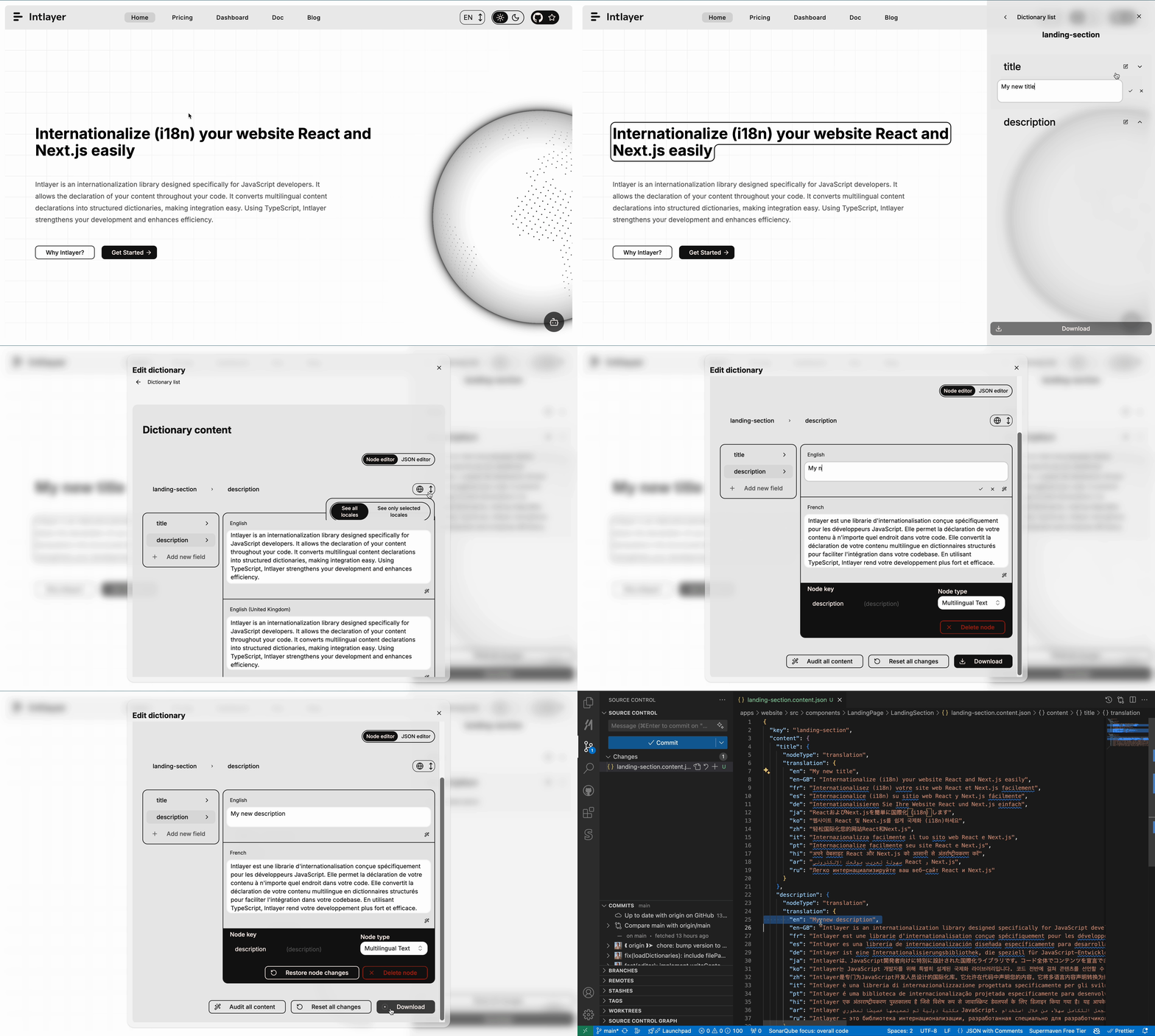
يقوم Intlayer بإدراج IntlayerNode ليتمكن من عرض محددات المحرر المرئي في سياق نظام إدارة المحتوى (CMS) / المحرر المرئي.
|
|
72
|
+
|
|
73
|
+
|
|
74
|
+
|
|
75
|
+
إن IntlayerNode عبارة عن عقدة React/Vue/Preact/Solid/Angular/Svelte/Lit/Vanilla غنية، ولكنها تتيح أيضاً الوصول إلى خصائص العقدة البدائية الأساسية.
|
|
76
|
+
|
|
77
|
+
على سبيل المثال:
|
|
78
|
+
|
|
79
|
+
```js
|
|
80
|
+
const content = useIntlayer("app");
|
|
81
|
+
|
|
82
|
+
// حالة السلسلة النصية (String)
|
|
83
|
+
content.title; // يرجع IntlayerNode<string>
|
|
84
|
+
content.title.value; // يرجع المحتوى الأساسي، هنا سلسلة نصية
|
|
85
|
+
|
|
86
|
+
content.title.toString(); // يرجع سلسلة نصية
|
|
87
|
+
content.title.toLowerCase(); // يرجع سلسلة نصية
|
|
88
|
+
String(content.title); // يرجع سلسلة نصية
|
|
89
|
+
content.title.toUpperCase(); // يرجع سلسلة نصية بأحرف كبيرة
|
|
90
|
+
content.title.replace("a", "b"); // يرجع سلسلة نصية معدلة
|
|
91
|
+
// ...
|
|
92
|
+
```
|
|
93
|
+
|
|
94
|
+
> الوصول إلى خصائص IntlayerNode سيعمل، ولكنه سيعطل القدرة على عرض المحددات في المحرر المرئي.
|
|
95
|
+
|
|
96
|
+
> يمكن لـ IntlayerNode أيضاً تغليف الأرقام، أو أنواع أخرى مثل `IntlayerNode<number>`
|
|
@@ -0,0 +1,96 @@
|
|
|
1
|
+
---
|
|
2
|
+
createdAt: 2026-05-07
|
|
3
|
+
updatedAt: 2026-05-07
|
|
4
|
+
title: IntlayerNode Typ. Was ist das?
|
|
5
|
+
description: Was ist der IntlayerNode-Typ? Warum wird mein String in einen IntlayerNode<string> umgewandelt?
|
|
6
|
+
keywords:
|
|
7
|
+
- Einführung
|
|
8
|
+
- Erste Schritte
|
|
9
|
+
- Intlayer
|
|
10
|
+
- Anwendung
|
|
11
|
+
- Pakete
|
|
12
|
+
slugs:
|
|
13
|
+
- frequent-questions
|
|
14
|
+
- intlayer-node
|
|
15
|
+
history:
|
|
16
|
+
- version: 8.9.0
|
|
17
|
+
date: 2026-05-07
|
|
18
|
+
changes: "Initialisierung der Dokumentation"
|
|
19
|
+
---
|
|
20
|
+
|
|
21
|
+
# Was ist der IntlayerNode-Typ?
|
|
22
|
+
|
|
23
|
+
Der Typ `IntlayerNode<T>` ist ein spezieller Typ, der von intlayers Paketen wie `next-intlayer`, `react-intlayer`, `vue-intlayer`, `preact-intlayer`, `solid-intlayer`, `angular-intlayer`, `svelte-intlayer`, `lit-intlayer` und `vanilla-intlayer` bereitgestellt wird.
|
|
24
|
+
|
|
25
|
+
## Anwendungsbeispiel
|
|
26
|
+
|
|
27
|
+
```tsx fileName="src/app.content.tsx" contentDeclarationFormat={["typescript", "esm", "commonjs"]}
|
|
28
|
+
import { t, type Dictionary } from "intlayer";
|
|
29
|
+
import type { ComponentChildren } from "preact";
|
|
30
|
+
|
|
31
|
+
const appContent = {
|
|
32
|
+
key: "app",
|
|
33
|
+
content: {
|
|
34
|
+
title: "Vite + Preact",
|
|
35
|
+
},
|
|
36
|
+
} satisfies Dictionary;
|
|
37
|
+
|
|
38
|
+
export default appContent;
|
|
39
|
+
```
|
|
40
|
+
|
|
41
|
+
```json fileName="src/app.content.json" contentDeclarationFormat="json"
|
|
42
|
+
{
|
|
43
|
+
"$schema": "https://intlayer.org/schema.json",
|
|
44
|
+
"key": "app",
|
|
45
|
+
"content": {
|
|
46
|
+
"title": "Vite + Preact"
|
|
47
|
+
}
|
|
48
|
+
}
|
|
49
|
+
```
|
|
50
|
+
|
|
51
|
+
<Tabs group="framework">
|
|
52
|
+
<Tab label="React / Next.js" value="react">
|
|
53
|
+
|
|
54
|
+
```tsx fileName="src/App.tsx"
|
|
55
|
+
import { useIntlayer } from "react-intlayer";
|
|
56
|
+
|
|
57
|
+
const AppContent = () => {
|
|
58
|
+
const { title } = useIntlayer("app");
|
|
59
|
+
|
|
60
|
+
return title; // gibt Typ zurück: IntlayerNode<string>
|
|
61
|
+
};
|
|
62
|
+
```
|
|
63
|
+
|
|
64
|
+
</Tab>
|
|
65
|
+
|
|
66
|
+
// Todo weitere Frameworks als Tabs hinzufügen, wie in docs/docs/de/dictionary/markdown.md
|
|
67
|
+
</Tabs>
|
|
68
|
+
|
|
69
|
+
### Warum fügt Intlayer einen IntlayerNode ein?
|
|
70
|
+
|
|
71
|
+
Intlayer fügt einen IntlayerNode ein, um die Selektoren des visuellen Editors im Kontext des CMS / visuellen Editors rendern zu können.
|
|
72
|
+
|
|
73
|
+

|
|
74
|
+
|
|
75
|
+
Ein IntlayerNode ist ein angereicherter React/Vue/Preact/Solid/Angular/Svelte/Lit/Vanilla-Node, der aber auch den Zugriff auf die Eigenschaften des Basis-Primitiv-Nodes ermöglicht.
|
|
76
|
+
|
|
77
|
+
Zum Beispiel:
|
|
78
|
+
|
|
79
|
+
```js
|
|
80
|
+
const content = useIntlayer("app");
|
|
81
|
+
|
|
82
|
+
// Fall von String
|
|
83
|
+
content.title; // Gibt IntlayerNode<string> zurück
|
|
84
|
+
content.title.value; // Gibt den Basisinhalt zurück, hier ein String
|
|
85
|
+
|
|
86
|
+
content.title.toString(); // Gibt String zurück
|
|
87
|
+
content.title.toLowerCase(); // Gibt String zurück
|
|
88
|
+
String(content.title); // Gibt String zurück
|
|
89
|
+
content.title.toUpperCase(); // Gibt String in Großbuchstaben zurück
|
|
90
|
+
content.title.replace("a", "b"); // Gibt geänderten String zurück
|
|
91
|
+
// ...
|
|
92
|
+
```
|
|
93
|
+
|
|
94
|
+
> Der Zugriff auf die Eigenschaften eines IntlayerNode funktioniert zwar, macht aber die Anzeige der Selektoren im visuellen Editor unmöglich.
|
|
95
|
+
|
|
96
|
+
> Der IntlayerNode kann auch Zahlen oder andere Typen wie `IntlayerNode<number>` umschließen.
|
|
@@ -0,0 +1,96 @@
|
|
|
1
|
+
---
|
|
2
|
+
createdAt: 2026-05-07
|
|
3
|
+
updatedAt: 2026-05-07
|
|
4
|
+
title: IntlayerNode type. What is it?
|
|
5
|
+
description: What is it the IntlayerNode type? Why my string is transformed as an IntlayerNode<string>?
|
|
6
|
+
keywords:
|
|
7
|
+
- Introduction
|
|
8
|
+
- Get started
|
|
9
|
+
- Intlayer
|
|
10
|
+
- Application
|
|
11
|
+
- Packages
|
|
12
|
+
slugs:
|
|
13
|
+
- frequent-questions
|
|
14
|
+
- intlayer-node
|
|
15
|
+
history:
|
|
16
|
+
- version: 8.9.0
|
|
17
|
+
date: 2026-05-07
|
|
18
|
+
changes: "Init doc"
|
|
19
|
+
---
|
|
20
|
+
|
|
21
|
+
# What is the IntlayerNode type?
|
|
22
|
+
|
|
23
|
+
The `IntlayerNode<T>` type is a special type provided by intlayer's packages such as `next-intlayer`, `react-intlayer`, `vue-intlayer`, `preact-intlayer`, `solid-intlayer`, `angular-intlayer`, `svelte-intlayer`, `lit-intlayer` and `vanilla-intlayer`.
|
|
24
|
+
|
|
25
|
+
## Example of usage
|
|
26
|
+
|
|
27
|
+
```tsx fileName="src/app.content.tsx" contentDeclarationFormat={["typescript", "esm", "commonjs"]}
|
|
28
|
+
import { t, type Dictionary } from "intlayer";
|
|
29
|
+
import type { ComponentChildren } from "preact";
|
|
30
|
+
|
|
31
|
+
const appContent = {
|
|
32
|
+
key: "app",
|
|
33
|
+
content: {
|
|
34
|
+
title: "Vite + Preact",
|
|
35
|
+
},
|
|
36
|
+
} satisfies Dictionary;
|
|
37
|
+
|
|
38
|
+
export default appContent;
|
|
39
|
+
```
|
|
40
|
+
|
|
41
|
+
```json fileName="src/app.content.json" contentDeclarationFormat="json"
|
|
42
|
+
{
|
|
43
|
+
"$schema": "https://intlayer.org/schema.json",
|
|
44
|
+
"key": "app",
|
|
45
|
+
"content": {
|
|
46
|
+
"title": "Vite + Preact"
|
|
47
|
+
}
|
|
48
|
+
}
|
|
49
|
+
```
|
|
50
|
+
|
|
51
|
+
<Tabs group="framework">
|
|
52
|
+
<Tab label="React / Next.js" value="react">
|
|
53
|
+
|
|
54
|
+
```tsx fileName="src/App.tsx"
|
|
55
|
+
import { useIntlayer } from "react-intlayer";
|
|
56
|
+
|
|
57
|
+
const AppContent = () => {
|
|
58
|
+
const { title } = useIntlayer("app");
|
|
59
|
+
|
|
60
|
+
return title; // returns type: IntlayerNode<string>
|
|
61
|
+
};
|
|
62
|
+
```
|
|
63
|
+
|
|
64
|
+
</Tab>
|
|
65
|
+
|
|
66
|
+
// Todo add other framworks as tabs as for docs/docs/en/dictionary/markdown.md
|
|
67
|
+
</Tabs>
|
|
68
|
+
|
|
69
|
+
### Why Intlayer insert an IntlayerNode?
|
|
70
|
+
|
|
71
|
+
Intlayer insert an IntlayerNode to be able to render the visual editor Selectors in the context of the CMS / Visual Editor.
|
|
72
|
+
|
|
73
|
+

|
|
74
|
+
|
|
75
|
+
An IntlayerNode is an enriched React/Vue/Preact/Solid/Angular/Svelte/Lit/Vanilla Node, but also to access the properties of the base primitive node.
|
|
76
|
+
|
|
77
|
+
For instance:
|
|
78
|
+
|
|
79
|
+
```js
|
|
80
|
+
const content = useIntlayer("app");
|
|
81
|
+
|
|
82
|
+
// Case of String
|
|
83
|
+
content.title; // Returns IntlayerNode<string>
|
|
84
|
+
content.title.value; // Returns the base content, here a string
|
|
85
|
+
|
|
86
|
+
content.title.toString(); // Returns string
|
|
87
|
+
content.title.toLowerCase(); // Returns string
|
|
88
|
+
String(content.title); // Returns string
|
|
89
|
+
content.title.toUpperCase(); // Returns uppercased string
|
|
90
|
+
content.title.replace("a", "b"); // Returns modified string
|
|
91
|
+
// ...
|
|
92
|
+
```
|
|
93
|
+
|
|
94
|
+
> Accessing the properties of an IntlayerNode will work, but will break the ability to display the selectors in the Visual Editor.
|
|
95
|
+
|
|
96
|
+
> The IntlayerNode can also wrap and number, or other types such as `IntlayerNode<number>`
|
|
@@ -0,0 +1,96 @@
|
|
|
1
|
+
---
|
|
2
|
+
createdAt: 2026-05-07
|
|
3
|
+
updatedAt: 2026-05-07
|
|
4
|
+
title: IntlayerNode type. What is it?
|
|
5
|
+
description: What is it the IntlayerNode type? Why my string is transformed as an IntlayerNode<string>?
|
|
6
|
+
keywords:
|
|
7
|
+
- Introduction
|
|
8
|
+
- Get started
|
|
9
|
+
- Intlayer
|
|
10
|
+
- Application
|
|
11
|
+
- Packages
|
|
12
|
+
slugs:
|
|
13
|
+
- frequent-questions
|
|
14
|
+
- intlayer-node
|
|
15
|
+
history:
|
|
16
|
+
- version: 8.9.0
|
|
17
|
+
date: 2026-05-07
|
|
18
|
+
changes: "Init doc"
|
|
19
|
+
---
|
|
20
|
+
|
|
21
|
+
# What is the IntlayerNode type?
|
|
22
|
+
|
|
23
|
+
The `IntlayerNode<T>` type is a special type provided by intlayer's packages such as `next-intlayer`, `react-intlayer`, `vue-intlayer`, `preact-intlayer`, `solid-intlayer`, `angular-intlayer`, `svelte-intlayer`, `lit-intlayer` and `vanilla-intlayer`.
|
|
24
|
+
|
|
25
|
+
## Example of usage
|
|
26
|
+
|
|
27
|
+
```tsx fileName="src/app.content.tsx" contentDeclarationFormat={["typescript", "esm", "commonjs"]}
|
|
28
|
+
import { t, type Dictionary } from "intlayer";
|
|
29
|
+
import type { ComponentChildren } from "preact";
|
|
30
|
+
|
|
31
|
+
const appContent = {
|
|
32
|
+
key: "app",
|
|
33
|
+
content: {
|
|
34
|
+
title: "Vite + Preact",
|
|
35
|
+
},
|
|
36
|
+
} satisfies Dictionary;
|
|
37
|
+
|
|
38
|
+
export default appContent;
|
|
39
|
+
```
|
|
40
|
+
|
|
41
|
+
```json fileName="src/app.content.json" contentDeclarationFormat="json"
|
|
42
|
+
{
|
|
43
|
+
"$schema": "https://intlayer.org/schema.json",
|
|
44
|
+
"key": "app",
|
|
45
|
+
"content": {
|
|
46
|
+
"title": "Vite + Preact"
|
|
47
|
+
}
|
|
48
|
+
}
|
|
49
|
+
```
|
|
50
|
+
|
|
51
|
+
<Tabs group="framework">
|
|
52
|
+
<Tab label="React / Next.js" value="react">
|
|
53
|
+
|
|
54
|
+
```tsx fileName="src/App.tsx"
|
|
55
|
+
import { useIntlayer } from "react-intlayer";
|
|
56
|
+
|
|
57
|
+
const AppContent = () => {
|
|
58
|
+
const { title } = useIntlayer("app");
|
|
59
|
+
|
|
60
|
+
return title; // returns type: IntlayerNode<string>
|
|
61
|
+
};
|
|
62
|
+
```
|
|
63
|
+
|
|
64
|
+
</Tab>
|
|
65
|
+
|
|
66
|
+
// Todo add other frameworks as tabs as for docs/docs/en-GB/dictionary/markdown.md
|
|
67
|
+
</Tabs>
|
|
68
|
+
|
|
69
|
+
### Why Intlayer insert an IntlayerNode?
|
|
70
|
+
|
|
71
|
+
Intlayer insert an IntlayerNode to be able to render the visual editor Selectors in the context of the CMS / Visual Editor.
|
|
72
|
+
|
|
73
|
+

|
|
74
|
+
|
|
75
|
+
An IntlayerNode is an enriched React/Vue/Preact/Solid/Angular/Svelte/Lit/Vanilla Node, but also to access the properties of the base primitive node.
|
|
76
|
+
|
|
77
|
+
For instance:
|
|
78
|
+
|
|
79
|
+
```js
|
|
80
|
+
const content = useIntlayer("app");
|
|
81
|
+
|
|
82
|
+
// Case of String
|
|
83
|
+
content.title; // Returns IntlayerNode<string>
|
|
84
|
+
content.title.value; // Returns the base content, here a string
|
|
85
|
+
|
|
86
|
+
content.title.toString(); // Returns string
|
|
87
|
+
content.title.toLowerCase(); // Returns string
|
|
88
|
+
String(content.title); // Returns string
|
|
89
|
+
content.title.toUpperCase(); // Returns uppercased string
|
|
90
|
+
content.title.replace("a", "b"); // Returns modified string
|
|
91
|
+
// ...
|
|
92
|
+
```
|
|
93
|
+
|
|
94
|
+
> Accessing the properties of an IntlayerNode will work, but will break the ability to display the selectors in the Visual Editor.
|
|
95
|
+
|
|
96
|
+
> The IntlayerNode can also wrap and number, or other types such as `IntlayerNode<number>`
|
|
@@ -0,0 +1,96 @@
|
|
|
1
|
+
---
|
|
2
|
+
createdAt: 2026-05-07
|
|
3
|
+
updatedAt: 2026-05-07
|
|
4
|
+
title: Tipo IntlayerNode. ¿Qué es?
|
|
5
|
+
description: ¿Qué es el tipo IntlayerNode? ¿Por qué mi cadena se transforma en un IntlayerNode<string>?
|
|
6
|
+
keywords:
|
|
7
|
+
- Introducción
|
|
8
|
+
- Empezar
|
|
9
|
+
- Intlayer
|
|
10
|
+
- Aplicación
|
|
11
|
+
- Paquetes
|
|
12
|
+
slugs:
|
|
13
|
+
- frequent-questions
|
|
14
|
+
- intlayer-node
|
|
15
|
+
history:
|
|
16
|
+
- version: 8.9.0
|
|
17
|
+
date: 2026-05-07
|
|
18
|
+
changes: "Doc de inicio"
|
|
19
|
+
---
|
|
20
|
+
|
|
21
|
+
# ¿Qué es el tipo IntlayerNode?
|
|
22
|
+
|
|
23
|
+
El tipo `IntlayerNode<T>` es un tipo especial proporcionado por los paquetes de intlayer como `next-intlayer`, `react-intlayer`, `vue-intlayer`, `preact-intlayer`, `solid-intlayer`, `angular-intlayer`, `svelte-intlayer`, `lit-intlayer` y `vanilla-intlayer`.
|
|
24
|
+
|
|
25
|
+
## Ejemplo de uso
|
|
26
|
+
|
|
27
|
+
```tsx fileName="src/app.content.tsx" contentDeclarationFormat={["typescript", "esm", "commonjs"]}
|
|
28
|
+
import { t, type Dictionary } from "intlayer";
|
|
29
|
+
import type { ComponentChildren } from "preact";
|
|
30
|
+
|
|
31
|
+
const appContent = {
|
|
32
|
+
key: "app",
|
|
33
|
+
content: {
|
|
34
|
+
title: "Vite + Preact",
|
|
35
|
+
},
|
|
36
|
+
} satisfies Dictionary;
|
|
37
|
+
|
|
38
|
+
export default appContent;
|
|
39
|
+
```
|
|
40
|
+
|
|
41
|
+
```json fileName="src/app.content.json" contentDeclarationFormat="json"
|
|
42
|
+
{
|
|
43
|
+
"$schema": "https://intlayer.org/schema.json",
|
|
44
|
+
"key": "app",
|
|
45
|
+
"content": {
|
|
46
|
+
"title": "Vite + Preact"
|
|
47
|
+
}
|
|
48
|
+
}
|
|
49
|
+
```
|
|
50
|
+
|
|
51
|
+
<Tabs group="framework">
|
|
52
|
+
<Tab label="React / Next.js" value="react">
|
|
53
|
+
|
|
54
|
+
```tsx fileName="src/App.tsx"
|
|
55
|
+
import { useIntlayer } from "react-intlayer";
|
|
56
|
+
|
|
57
|
+
const AppContent = () => {
|
|
58
|
+
const { title } = useIntlayer("app");
|
|
59
|
+
|
|
60
|
+
return title; // devuelve tipo: IntlayerNode<string>
|
|
61
|
+
};
|
|
62
|
+
```
|
|
63
|
+
|
|
64
|
+
</Tab>
|
|
65
|
+
|
|
66
|
+
// Todo agregar otros frameworks como pestañas como en docs/docs/es/dictionary/markdown.md
|
|
67
|
+
</Tabs>
|
|
68
|
+
|
|
69
|
+
### ¿Por qué Intlayer inserta un IntlayerNode?
|
|
70
|
+
|
|
71
|
+
Intlayer inserta un IntlayerNode para poder renderizar los Selectores del editor visual en el contexto del CMS / Editor Visual.
|
|
72
|
+
|
|
73
|
+

|
|
74
|
+
|
|
75
|
+
Un IntlayerNode es un nodo enriquecido de React/Vue/Preact/Solid/Angular/Svelte/Lit/Vanilla, pero también permite acceder a las propiedades del nodo primitivo base.
|
|
76
|
+
|
|
77
|
+
Por ejemplo:
|
|
78
|
+
|
|
79
|
+
```js
|
|
80
|
+
const content = useIntlayer("app");
|
|
81
|
+
|
|
82
|
+
// Caso de cadena (String)
|
|
83
|
+
content.title; // Devuelve IntlayerNode<string>
|
|
84
|
+
content.title.value; // Devuelve el contenido base, aquí una cadena
|
|
85
|
+
|
|
86
|
+
content.title.toString(); // Devuelve cadena
|
|
87
|
+
content.title.toLowerCase(); // Devuelve cadena
|
|
88
|
+
String(content.title); // Devuelve cadena
|
|
89
|
+
content.title.toUpperCase(); // Devuelve cadena en mayúsculas
|
|
90
|
+
content.title.replace("a", "b"); // Devuelve cadena modificada
|
|
91
|
+
// ...
|
|
92
|
+
```
|
|
93
|
+
|
|
94
|
+
> Acceder a las propiedades de un IntlayerNode funcionará, pero romperá la capacidad de mostrar los selectores en el Editor Visual.
|
|
95
|
+
|
|
96
|
+
> El IntlayerNode también puede envolver un número u otros tipos como `IntlayerNode<number>`
|
|
@@ -0,0 +1,96 @@
|
|
|
1
|
+
---
|
|
2
|
+
createdAt: 2026-05-07
|
|
3
|
+
updatedAt: 2026-05-07
|
|
4
|
+
title: Type IntlayerNode. Qu'est-ce que c'est ?
|
|
5
|
+
description: Qu'est-ce que le type IntlayerNode ? Pourquoi ma chaîne est-elle transformée en IntlayerNode<string> ?
|
|
6
|
+
keywords:
|
|
7
|
+
- Introduction
|
|
8
|
+
- Commencer
|
|
9
|
+
- Intlayer
|
|
10
|
+
- Application
|
|
11
|
+
- Packages
|
|
12
|
+
slugs:
|
|
13
|
+
- frequent-questions
|
|
14
|
+
- intlayer-node
|
|
15
|
+
history:
|
|
16
|
+
- version: 8.9.0
|
|
17
|
+
date: 2026-05-07
|
|
18
|
+
changes: "Initialisation de la documentation"
|
|
19
|
+
---
|
|
20
|
+
|
|
21
|
+
# Qu'est-ce que le type IntlayerNode ?
|
|
22
|
+
|
|
23
|
+
Le type `IntlayerNode<T>` est un type spécial fourni par les packages d'intlayer tels que `next-intlayer`, `react-intlayer`, `vue-intlayer`, `preact-intlayer`, `solid-intlayer`, `angular-intlayer`, `svelte-intlayer`, `lit-intlayer` et `vanilla-intlayer`.
|
|
24
|
+
|
|
25
|
+
## Exemple d'utilisation
|
|
26
|
+
|
|
27
|
+
```tsx fileName="src/app.content.tsx" contentDeclarationFormat={["typescript", "esm", "commonjs"]}
|
|
28
|
+
import { t, type Dictionary } from "intlayer";
|
|
29
|
+
import type { ComponentChildren } from "preact";
|
|
30
|
+
|
|
31
|
+
const appContent = {
|
|
32
|
+
key: "app",
|
|
33
|
+
content: {
|
|
34
|
+
title: "Vite + Preact",
|
|
35
|
+
},
|
|
36
|
+
} satisfies Dictionary;
|
|
37
|
+
|
|
38
|
+
export default appContent;
|
|
39
|
+
```
|
|
40
|
+
|
|
41
|
+
```json fileName="src/app.content.json" contentDeclarationFormat="json"
|
|
42
|
+
{
|
|
43
|
+
"$schema": "https://intlayer.org/schema.json",
|
|
44
|
+
"key": "app",
|
|
45
|
+
"content": {
|
|
46
|
+
"title": "Vite + Preact"
|
|
47
|
+
}
|
|
48
|
+
}
|
|
49
|
+
```
|
|
50
|
+
|
|
51
|
+
<Tabs group="framework">
|
|
52
|
+
<Tab label="React / Next.js" value="react">
|
|
53
|
+
|
|
54
|
+
```tsx fileName="src/App.tsx"
|
|
55
|
+
import { useIntlayer } from "react-intlayer";
|
|
56
|
+
|
|
57
|
+
const AppContent = () => {
|
|
58
|
+
const { title } = useIntlayer("app");
|
|
59
|
+
|
|
60
|
+
return title; // retourne le type : IntlayerNode<string>
|
|
61
|
+
};
|
|
62
|
+
```
|
|
63
|
+
|
|
64
|
+
</Tab>
|
|
65
|
+
|
|
66
|
+
// Todo ajouter d'autres frameworks comme onglets comme pour docs/docs/fr/dictionary/markdown.md
|
|
67
|
+
</Tabs>
|
|
68
|
+
|
|
69
|
+
### Pourquoi Intlayer insère-t-il un IntlayerNode ?
|
|
70
|
+
|
|
71
|
+
Intlayer insère un IntlayerNode pour pouvoir afficher les sélecteurs de l'éditeur visuel dans le contexte du CMS / Éditeur Visuel.
|
|
72
|
+
|
|
73
|
+

|
|
74
|
+
|
|
75
|
+
Un IntlayerNode est un nœud React/Vue/Preact/Solid/Angular/Svelte/Lit/Vanilla enrichi, mais il permet aussi d'accéder aux propriétés du nœud primitif de base.
|
|
76
|
+
|
|
77
|
+
Par exemple :
|
|
78
|
+
|
|
79
|
+
```js
|
|
80
|
+
const content = useIntlayer("app");
|
|
81
|
+
|
|
82
|
+
// Cas d'une chaîne (String)
|
|
83
|
+
content.title; // Retourne IntlayerNode<string>
|
|
84
|
+
content.title.value; // Retourne le contenu de base, ici une chaîne
|
|
85
|
+
|
|
86
|
+
content.title.toString(); // Retourne une chaîne
|
|
87
|
+
content.title.toLowerCase(); // Retourne une chaîne
|
|
88
|
+
String(content.title); // Retourne une chaîne
|
|
89
|
+
content.title.toUpperCase(); // Retourne une chaîne en majuscules
|
|
90
|
+
content.title.replace("a", "b"); // Retourne une chaîne modifiée
|
|
91
|
+
// ...
|
|
92
|
+
```
|
|
93
|
+
|
|
94
|
+
> Accéder aux propriétés d'un IntlayerNode fonctionnera, mais cassera la possibilité d'afficher les sélecteurs dans l'Éditeur Visuel.
|
|
95
|
+
|
|
96
|
+
> L'IntlayerNode peut également envelopper un nombre, ou d'autres types tels que `IntlayerNode<number>`
|