@intlayer/docs 7.5.9 → 7.5.11
This diff represents the content of publicly available package versions that have been released to one of the supported registries. The information contained in this diff is provided for informational purposes only and reflects changes between package versions as they appear in their respective public registries.
- package/README.md +9 -2
- package/dist/cjs/generated/docs.entry.cjs +57 -0
- package/dist/cjs/generated/docs.entry.cjs.map +1 -1
- package/dist/esm/generated/docs.entry.mjs +57 -0
- package/dist/esm/generated/docs.entry.mjs.map +1 -1
- package/dist/types/generated/docs.entry.d.ts +3 -0
- package/dist/types/generated/docs.entry.d.ts.map +1 -1
- package/docs/ar/cli/ci.md +137 -0
- package/docs/ar/cli/index.md +7 -1
- package/docs/ar/cli/list.md +39 -2
- package/docs/ar/cli/list_projects.md +131 -0
- package/docs/ar/cli/push.md +1 -1
- package/docs/ar/configuration.md +3 -3
- package/docs/ar/interest_of_intlayer.md +1 -1
- package/docs/ar/intlayer_CMS.md +25 -5
- package/docs/ar/intlayer_with_express.md +1 -0
- package/docs/ar/intlayer_with_fastify.md +516 -0
- package/docs/ar/readme.md +1 -1
- package/docs/de/cli/ci.md +137 -0
- package/docs/de/cli/index.md +7 -1
- package/docs/de/cli/list.md +39 -2
- package/docs/de/cli/list_projects.md +130 -0
- package/docs/de/cli/push.md +1 -1
- package/docs/de/configuration.md +3 -3
- package/docs/de/interest_of_intlayer.md +1 -1
- package/docs/de/intlayer_CMS.md +25 -5
- package/docs/de/intlayer_with_express.md +1 -0
- package/docs/de/intlayer_with_fastify.md +449 -0
- package/docs/de/readme.md +1 -1
- package/docs/en/cli/ci.md +137 -0
- package/docs/en/cli/index.md +14 -1
- package/docs/en/cli/list.md +39 -2
- package/docs/en/cli/list_projects.md +128 -0
- package/docs/en/cli/push.md +1 -1
- package/docs/en/configuration.md +3 -3
- package/docs/en/interest_of_intlayer.md +2 -2
- package/docs/en/intlayer_CMS.md +25 -5
- package/docs/en/intlayer_with_express.md +1 -0
- package/docs/en/intlayer_with_fastify.md +439 -0
- package/docs/en/readme.md +3 -1
- package/docs/en-GB/cli/ci.md +137 -0
- package/docs/en-GB/cli/index.md +7 -1
- package/docs/en-GB/cli/list.md +39 -2
- package/docs/en-GB/cli/list_projects.md +130 -0
- package/docs/en-GB/cli/push.md +1 -1
- package/docs/en-GB/configuration.md +3 -3
- package/docs/en-GB/interest_of_intlayer.md +1 -1
- package/docs/en-GB/intlayer_CMS.md +25 -5
- package/docs/en-GB/intlayer_with_express.md +1 -0
- package/docs/en-GB/intlayer_with_fastify.md +445 -0
- package/docs/en-GB/readme.md +3 -1
- package/docs/es/cli/ci.md +137 -0
- package/docs/es/cli/index.md +7 -1
- package/docs/es/cli/list.md +39 -2
- package/docs/es/cli/list_projects.md +130 -0
- package/docs/es/cli/push.md +1 -1
- package/docs/es/configuration.md +3 -3
- package/docs/es/interest_of_intlayer.md +1 -1
- package/docs/es/intlayer_CMS.md +25 -5
- package/docs/es/intlayer_with_express.md +1 -0
- package/docs/es/intlayer_with_fastify.md +480 -0
- package/docs/es/readme.md +1 -1
- package/docs/fr/cli/ci.md +137 -0
- package/docs/fr/cli/index.md +7 -1
- package/docs/fr/cli/list.md +39 -2
- package/docs/fr/cli/list_projects.md +131 -0
- package/docs/fr/cli/push.md +1 -1
- package/docs/fr/configuration.md +3 -3
- package/docs/fr/interest_of_intlayer.md +1 -1
- package/docs/fr/intlayer_CMS.md +25 -5
- package/docs/fr/intlayer_with_express.md +1 -0
- package/docs/fr/intlayer_with_fastify.md +439 -0
- package/docs/fr/readme.md +1 -1
- package/docs/hi/cli/ci.md +137 -0
- package/docs/hi/cli/index.md +7 -1
- package/docs/hi/cli/list.md +38 -1
- package/docs/hi/cli/list_projects.md +130 -0
- package/docs/hi/cli/push.md +1 -1
- package/docs/hi/configuration.md +3 -3
- package/docs/hi/interest_of_intlayer.md +1 -1
- package/docs/hi/intlayer_CMS.md +25 -5
- package/docs/hi/intlayer_with_express.md +1 -0
- package/docs/hi/intlayer_with_fastify.md +540 -0
- package/docs/hi/readme.md +1 -1
- package/docs/id/cli/ci.md +137 -0
- package/docs/id/cli/index.md +7 -1
- package/docs/id/cli/list.md +38 -1
- package/docs/id/cli/list_projects.md +128 -0
- package/docs/id/cli/push.md +1 -1
- package/docs/id/configuration.md +3 -3
- package/docs/id/interest_of_intlayer.md +1 -1
- package/docs/id/intlayer_CMS.md +25 -5
- package/docs/id/intlayer_with_express.md +1 -0
- package/docs/id/intlayer_with_fastify.md +470 -0
- package/docs/id/readme.md +1 -1
- package/docs/it/cli/ci.md +137 -0
- package/docs/it/cli/index.md +7 -1
- package/docs/it/cli/list.md +39 -2
- package/docs/it/cli/list_projects.md +130 -0
- package/docs/it/cli/push.md +1 -1
- package/docs/it/configuration.md +3 -3
- package/docs/it/interest_of_intlayer.md +1 -1
- package/docs/it/intlayer_CMS.md +25 -5
- package/docs/it/intlayer_with_express.md +1 -0
- package/docs/it/intlayer_with_fastify.md +445 -0
- package/docs/it/readme.md +1 -1
- package/docs/ja/cli/ci.md +137 -0
- package/docs/ja/cli/index.md +7 -1
- package/docs/ja/cli/list.md +38 -1
- package/docs/ja/cli/list_projects.md +136 -0
- package/docs/ja/cli/push.md +1 -1
- package/docs/ja/configuration.md +3 -3
- package/docs/ja/interest_of_intlayer.md +1 -1
- package/docs/ja/intlayer_CMS.md +25 -5
- package/docs/ja/intlayer_with_express.md +1 -0
- package/docs/ja/intlayer_with_fastify.md +516 -0
- package/docs/ja/readme.md +1 -1
- package/docs/ko/cli/ci.md +137 -0
- package/docs/ko/cli/index.md +7 -1
- package/docs/ko/cli/list.md +38 -1
- package/docs/ko/cli/list_projects.md +128 -0
- package/docs/ko/cli/push.md +1 -1
- package/docs/ko/configuration.md +3 -3
- package/docs/ko/interest_of_intlayer.md +1 -1
- package/docs/ko/intlayer_CMS.md +25 -5
- package/docs/ko/intlayer_with_express.md +1 -0
- package/docs/ko/intlayer_with_fastify.md +463 -0
- package/docs/ko/readme.md +1 -1
- package/docs/pl/cli/ci.md +137 -0
- package/docs/pl/cli/index.md +7 -1
- package/docs/pl/cli/list.md +39 -2
- package/docs/pl/cli/list_projects.md +130 -0
- package/docs/pl/cli/push.md +1 -1
- package/docs/pl/configuration.md +3 -3
- package/docs/pl/interest_of_intlayer.md +1 -1
- package/docs/pl/intlayer_CMS.md +25 -5
- package/docs/pl/intlayer_with_express.md +1 -0
- package/docs/pl/intlayer_with_fastify.md +457 -0
- package/docs/pl/readme.md +1 -1
- package/docs/pt/cli/ci.md +137 -0
- package/docs/pt/cli/index.md +7 -1
- package/docs/pt/cli/list.md +39 -2
- package/docs/pt/cli/list_projects.md +134 -0
- package/docs/pt/cli/push.md +1 -1
- package/docs/pt/configuration.md +3 -3
- package/docs/pt/interest_of_intlayer.md +1 -1
- package/docs/pt/intlayer_CMS.md +25 -5
- package/docs/pt/intlayer_with_express.md +1 -0
- package/docs/pt/intlayer_with_fastify.md +502 -0
- package/docs/pt/readme.md +1 -1
- package/docs/ru/cli/ci.md +137 -0
- package/docs/ru/cli/index.md +7 -1
- package/docs/ru/cli/list.md +39 -2
- package/docs/ru/cli/list_projects.md +130 -0
- package/docs/ru/cli/push.md +1 -1
- package/docs/ru/configuration.md +3 -3
- package/docs/ru/interest_of_intlayer.md +1 -1
- package/docs/ru/intlayer_CMS.md +25 -5
- package/docs/ru/intlayer_with_express.md +1 -0
- package/docs/ru/intlayer_with_fastify.md +468 -0
- package/docs/ru/readme.md +1 -1
- package/docs/tr/cli/ci.md +137 -0
- package/docs/tr/cli/index.md +7 -1
- package/docs/tr/cli/list.md +39 -2
- package/docs/tr/cli/list_projects.md +134 -0
- package/docs/tr/cli/push.md +1 -1
- package/docs/tr/configuration.md +3 -3
- package/docs/tr/interest_of_intlayer.md +1 -1
- package/docs/tr/intlayer_CMS.md +25 -5
- package/docs/tr/intlayer_with_express.md +1 -0
- package/docs/tr/intlayer_with_fastify.md +471 -0
- package/docs/tr/readme.md +1 -1
- package/docs/vi/cli/ci.md +137 -0
- package/docs/vi/cli/index.md +7 -1
- package/docs/vi/cli/list.md +38 -1
- package/docs/vi/cli/list_projects.md +130 -0
- package/docs/vi/cli/push.md +1 -1
- package/docs/vi/configuration.md +3 -3
- package/docs/vi/interest_of_intlayer.md +1 -1
- package/docs/vi/intlayer_CMS.md +25 -5
- package/docs/vi/intlayer_with_express.md +1 -0
- package/docs/vi/intlayer_with_fastify.md +490 -0
- package/docs/vi/readme.md +1 -1
- package/docs/zh/cli/ci.md +137 -0
- package/docs/zh/cli/index.md +7 -1
- package/docs/zh/cli/list.md +38 -1
- package/docs/zh/cli/list_projects.md +130 -0
- package/docs/zh/cli/push.md +1 -1
- package/docs/zh/configuration.md +3 -3
- package/docs/zh/interest_of_intlayer.md +1 -1
- package/docs/zh/intlayer_CMS.md +25 -5
- package/docs/zh/intlayer_with_express.md +1 -0
- package/docs/zh/intlayer_with_fastify.md +451 -0
- package/docs/zh/readme.md +1 -1
- package/package.json +6 -6
- package/src/generated/docs.entry.ts +57 -0
package/docs/en/cli/list.md
CHANGED
|
@@ -1,6 +1,6 @@
|
|
|
1
1
|
---
|
|
2
2
|
createdAt: 2024-08-11
|
|
3
|
-
updatedAt:
|
|
3
|
+
updatedAt: 2026-01-06
|
|
4
4
|
title: List Content Declaration Files
|
|
5
5
|
description: Learn how to list all content declaration files in your project.
|
|
6
6
|
keywords:
|
|
@@ -13,6 +13,13 @@ slugs:
|
|
|
13
13
|
- concept
|
|
14
14
|
- cli
|
|
15
15
|
- list
|
|
16
|
+
history:
|
|
17
|
+
- version: 7.5.12
|
|
18
|
+
date: 2026-01-06
|
|
19
|
+
changes: Add absolute output option to list command
|
|
20
|
+
- version: 7.5.11
|
|
21
|
+
date: 2026-01-06
|
|
22
|
+
changes: Add JSON output option to list command
|
|
16
23
|
---
|
|
17
24
|
|
|
18
25
|
# List content declaration files
|
|
@@ -27,14 +34,36 @@ npx intlayer content list
|
|
|
27
34
|
|
|
28
35
|
This command displays all content declaration files in your project, showing their dictionary keys and file paths. It's useful for getting an overview of all your content files and verifying that they are properly discovered by Intlayer.
|
|
29
36
|
|
|
30
|
-
##
|
|
37
|
+
## Arguments:
|
|
38
|
+
|
|
39
|
+
- **`--json`**: Output the results as JSON instead of formatted text. Useful for scripting and programmatic access.
|
|
40
|
+
|
|
41
|
+
> Example: `npx intlayer content list --json`
|
|
42
|
+
|
|
43
|
+
## Examples:
|
|
44
|
+
|
|
45
|
+
### List content declaration files:
|
|
31
46
|
|
|
32
47
|
```bash
|
|
33
48
|
npx intlayer content list
|
|
34
49
|
```
|
|
35
50
|
|
|
51
|
+
### Output as JSON:
|
|
52
|
+
|
|
53
|
+
```bash
|
|
54
|
+
npx intlayer content list --json
|
|
55
|
+
```
|
|
56
|
+
|
|
57
|
+
### Output as absolute paths:
|
|
58
|
+
|
|
59
|
+
```bash
|
|
60
|
+
npx intlayer content list --absolute
|
|
61
|
+
```
|
|
62
|
+
|
|
36
63
|
## Example output:
|
|
37
64
|
|
|
65
|
+
### Formatted output:
|
|
66
|
+
|
|
38
67
|
```bash
|
|
39
68
|
npx intlayer content list
|
|
40
69
|
Content declaration files:
|
|
@@ -45,6 +74,14 @@ Content declaration files:
|
|
|
45
74
|
Total content declaration files: 3
|
|
46
75
|
```
|
|
47
76
|
|
|
77
|
+
### JSON output:
|
|
78
|
+
|
|
79
|
+
```bash
|
|
80
|
+
$ npx intlayer content list --json
|
|
81
|
+
|
|
82
|
+
[{"key":"home-page","path":"src/components/HomePage/homePage.content.ts"},{"key":"server-component","path":"src/components/ServerComponent/serverComponent.content.ts"},{"key":"client-component","path":"src/components/ClientComponent/clientComponent.content.ts"}]
|
|
83
|
+
```
|
|
84
|
+
|
|
48
85
|
This command will output:
|
|
49
86
|
|
|
50
87
|
- A formatted list of all content declaration files with their keys and relative file paths
|
|
@@ -0,0 +1,128 @@
|
|
|
1
|
+
---
|
|
2
|
+
createdAt: 2025-12-30
|
|
3
|
+
updatedAt: 2025-12-30
|
|
4
|
+
title: List Intlayer Projects
|
|
5
|
+
description: Learn how to list all Intlayer projects in a directory or git repository.
|
|
6
|
+
keywords:
|
|
7
|
+
- List
|
|
8
|
+
- Projects
|
|
9
|
+
- CLI
|
|
10
|
+
- Intlayer
|
|
11
|
+
- Git
|
|
12
|
+
slugs:
|
|
13
|
+
- doc
|
|
14
|
+
- concept
|
|
15
|
+
- cli
|
|
16
|
+
- list-projects
|
|
17
|
+
history:
|
|
18
|
+
- version: 7.5.12
|
|
19
|
+
date: 2026-01-06
|
|
20
|
+
changes: Add absolute output option to list projects command
|
|
21
|
+
---
|
|
22
|
+
|
|
23
|
+
# List Intlayer Projects
|
|
24
|
+
|
|
25
|
+
```bash
|
|
26
|
+
npx intlayer projects list
|
|
27
|
+
```
|
|
28
|
+
|
|
29
|
+
This command searches for and lists all Intlayer projects by finding directories that contain Intlayer configuration files. It's useful for discovering all Intlayer projects in a monorepo, workspace, or git repository.
|
|
30
|
+
|
|
31
|
+
## Aliases:
|
|
32
|
+
|
|
33
|
+
- `npx intlayer projects-list`
|
|
34
|
+
- `npx intlayer pl`
|
|
35
|
+
|
|
36
|
+
## Arguments:
|
|
37
|
+
|
|
38
|
+
- **`--base-dir [path]`**: Specify the base directory to search from. Defaults to the current working directory.
|
|
39
|
+
|
|
40
|
+
> Example: `npx intlayer projects list --base-dir /path/to/workspace`
|
|
41
|
+
|
|
42
|
+
- **`--git-root`**: Search from the git root directory instead of the base directory. This is useful for finding all Intlayer projects in a monorepo or git repository.
|
|
43
|
+
|
|
44
|
+
> Example: `npx intlayer projects list --git-root`
|
|
45
|
+
|
|
46
|
+
- **`--json`**: Output the results as JSON instead of formatted text. Useful for scripting and programmatic access.
|
|
47
|
+
|
|
48
|
+
> Example: `npx intlayer projects list --json`
|
|
49
|
+
|
|
50
|
+
- **`--absolute`**: Output the results as absolute paths instead of relative paths.
|
|
51
|
+
|
|
52
|
+
> Example: `npx intlayer projects list --absolute`
|
|
53
|
+
|
|
54
|
+
## How it works:
|
|
55
|
+
|
|
56
|
+
The command searches for Intlayer configuration files in the specified directory (or git root if `--git-root` is used). It looks for the following configuration file patterns:
|
|
57
|
+
|
|
58
|
+
- `intlayer.config.ts`
|
|
59
|
+
- `intlayer.config.js`
|
|
60
|
+
- `intlayer.config.json`
|
|
61
|
+
- `intlayer.config.cjs`
|
|
62
|
+
- `intlayer.config.mjs`
|
|
63
|
+
- `.intlayerrc`
|
|
64
|
+
|
|
65
|
+
Each directory containing one of these files is considered an Intlayer project and will be listed in the output.
|
|
66
|
+
|
|
67
|
+
## Examples:
|
|
68
|
+
|
|
69
|
+
### List projects in current directory:
|
|
70
|
+
|
|
71
|
+
```bash
|
|
72
|
+
npx intlayer projects list
|
|
73
|
+
```
|
|
74
|
+
|
|
75
|
+
### List projects in a specific directory:
|
|
76
|
+
|
|
77
|
+
```bash
|
|
78
|
+
npx intlayer projects list --base-dir ./packages
|
|
79
|
+
```
|
|
80
|
+
|
|
81
|
+
### List all projects in the git repository:
|
|
82
|
+
|
|
83
|
+
```bash
|
|
84
|
+
npx intlayer projects list --git-root
|
|
85
|
+
```
|
|
86
|
+
|
|
87
|
+
### Using the shortcut alias:
|
|
88
|
+
|
|
89
|
+
```bash
|
|
90
|
+
npx intlayer pl --git-root
|
|
91
|
+
```
|
|
92
|
+
|
|
93
|
+
### Output as JSON:
|
|
94
|
+
|
|
95
|
+
```bash
|
|
96
|
+
npx intlayer projects list --json
|
|
97
|
+
```
|
|
98
|
+
|
|
99
|
+
## Example output:
|
|
100
|
+
|
|
101
|
+
### Formatted output:
|
|
102
|
+
|
|
103
|
+
```bash
|
|
104
|
+
$ npx intlayer projects list --git-root
|
|
105
|
+
|
|
106
|
+
Found 3 Intlayer project(s):
|
|
107
|
+
|
|
108
|
+
- /Users/user/workspace/packages/app
|
|
109
|
+
- /Users/user/workspace/packages/admin
|
|
110
|
+
- /Users/user/workspace/packages/shared
|
|
111
|
+
```
|
|
112
|
+
|
|
113
|
+
### JSON output:
|
|
114
|
+
|
|
115
|
+
```bash
|
|
116
|
+
$ npx intlayer projects list --json
|
|
117
|
+
|
|
118
|
+
["/Users/user/workspace/packages/app","/Users/user/workspace/packages/admin","/Users/user/workspace/packages/shared"]
|
|
119
|
+
```
|
|
120
|
+
|
|
121
|
+
## Use cases:
|
|
122
|
+
|
|
123
|
+
- **Monorepo management**: Discover all Intlayer projects in a monorepo structure
|
|
124
|
+
- **Project discovery**: Find all Intlayer-enabled projects in a workspace
|
|
125
|
+
- **CI/CD**: Verify Intlayer projects in automated workflows
|
|
126
|
+
- **Documentation**: Generate documentation listing all projects using Intlayer
|
|
127
|
+
|
|
128
|
+
The output provides absolute paths to each project directory, making it easy to navigate to or script operations on multiple Intlayer projects.
|
package/docs/en/cli/push.md
CHANGED
|
@@ -23,7 +23,7 @@ slugs:
|
|
|
23
23
|
npx intlayer dictionary push
|
|
24
24
|
```
|
|
25
25
|
|
|
26
|
-
If [intlayer editor](https://github.com/aymericzip/intlayer/blob/main/docs/docs/en/intlayer_visual_editor.md) is installed, you can also push dictionaries to the editor. This command will allow to make the dictionaries available to [the editor](https://intlayer.org/
|
|
26
|
+
If [intlayer editor](https://github.com/aymericzip/intlayer/blob/main/docs/docs/en/intlayer_visual_editor.md) is installed, you can also push dictionaries to the editor. This command will allow to make the dictionaries available to [the editor](https://app.intlayer.org/). By this way, you can share your dictionaries with your team and edit your content without editing the code of your application.
|
|
27
27
|
|
|
28
28
|
## Aliases:
|
|
29
29
|
|
package/docs/en/configuration.md
CHANGED
|
@@ -269,14 +269,14 @@ Defines settings related to the integrated editor, including server port and act
|
|
|
269
269
|
- **clientId**:
|
|
270
270
|
- _Type_: `string` | `undefined`
|
|
271
271
|
- _Default_: `undefined`
|
|
272
|
-
- _Description_: clientId and clientSecret allow the intlayer packages to authenticate with the backend using oAuth2 authentication. An access token is used to authenticate the user related to the project. To get an access token, go to https://intlayer.org/
|
|
272
|
+
- _Description_: clientId and clientSecret allow the intlayer packages to authenticate with the backend using oAuth2 authentication. An access token is used to authenticate the user related to the project. To get an access token, go to https://app.intlayer.org/project and create an account.
|
|
273
273
|
- _Example_: `true`
|
|
274
274
|
- _Note_: Important: The clientId and clientSecret should be kept secret and not shared publicly. Please ensure to keep them in a secure location, such as environment variables.
|
|
275
275
|
|
|
276
276
|
- **clientSecret**:
|
|
277
277
|
- _Type_: `string` | `undefined`
|
|
278
278
|
- _Default_: `undefined`
|
|
279
|
-
- _Description_: clientId and clientSecret allow the intlayer packages to authenticate with the backend using oAuth2 authentication. An access token is used to authenticate the user related to the project. To get an access token, go to https://intlayer.org/
|
|
279
|
+
- _Description_: clientId and clientSecret allow the intlayer packages to authenticate with the backend using oAuth2 authentication. An access token is used to authenticate the user related to the project. To get an access token, go to https://app.intlayer.org/project and create an account.
|
|
280
280
|
- _Example_: `true`
|
|
281
281
|
- _Note_: Important: The clientId and clientSecret should be kept secret and not shared publicly. Please ensure to keep them in a secure location, such as environment variables.
|
|
282
282
|
|
|
@@ -608,7 +608,7 @@ Settings that control the logger, including the prefix to use.
|
|
|
608
608
|
|
|
609
609
|
Settings that control the AI features of Intlayer, including the provider, model, and API key.
|
|
610
610
|
|
|
611
|
-
This configuration is optional if you're registered on the [Intlayer Dashboard](https://intlayer.org/
|
|
611
|
+
This configuration is optional if you're registered on the [Intlayer Dashboard](https://app.intlayer.org/project) using an access key. Intlayer will automatically manage the most efficient and cost-effective AI solution for your needs. Using the default options ensures better long-term maintainability as Intlayer continuously updates to use the most relevant models.
|
|
612
612
|
|
|
613
613
|
If you prefer to use your own API key or specific model, you can define your custom AI configuration.
|
|
614
614
|
This AI configuration will be used globally across your Intlayer environment. CLI commands will use these settings as defaults for the commands (e.g. `fill`), as well as the SDK, Visual Editor, and CMS. You can override these default values for specific use cases using command parameters.
|
|
@@ -231,7 +231,7 @@ This approach allows you to:
|
|
|
231
231
|
| Feature | Description |
|
|
232
232
|
| ------------------------------------------------------------------------------------------------------------------------- | -------------------------------------------------------------------------------------------------------------------------------------------------------------------------------------------------------------------------------------------------------------------------------------------------------------------------------------------------------------------------------------------- |
|
|
233
233
|
|  | **Cross-Frameworks Support**<br><br>Intlayer is compatible with all major frameworks and libraries, including Next.js, React, Vite, Vue.js, Nuxt, Preact, Express, and more. |
|
|
234
|
-
|  | **JavaScript-Powered Content Management**<br><br>Harness the flexibility of JavaScript to define and manage your content efficiently. <br><br> - [Content declaration](https://intlayer.org/doc/concept/content) |
|
|
235
235
|
| <img src="https://github.com/aymericzip/intlayer/blob/main/docs/assets/compiler.jpg?raw=true" alt="Feature" width="700"> | **Compiler**<br><br>The Intlayer Compiler extract automatically the content from the components and generate the dictionary files.<br><br> - [Compiler](https://intlayer.org/doc/compiler) |
|
|
236
236
|
|  | **Per-Locale Content Declaration File**<br><br>Speed up your development by declaring your content once, before auto generation.<br><br> - [Per-Locale Content Declaration File](https://intlayer.org/doc/concept/per-locale-file) |
|
|
237
237
|
|  | **Type-Safe Environment**<br><br>Leverage TypeScript to ensure your content definitions and code are error-free, while also benefiting from IDE autocompletion.<br><br> - [TypeScript configuration](https://intlayer.org/doc/environment/vite-and-react#configure-typescript) |
|
|
@@ -280,7 +280,7 @@ This approach allows you to:
|
|
|
280
280
|
|
|
281
281
|
GitHub stars are a strong indicator of a project's popularity, community trust, and long-term relevance. While not a direct measure of technical quality, they reflect how many developers find the project useful, follow its progress, and are likely to adopt it. For estimating the value of a project, stars help compare traction across alternatives and provide insights into ecosystem growth.
|
|
282
282
|
|
|
283
|
-
[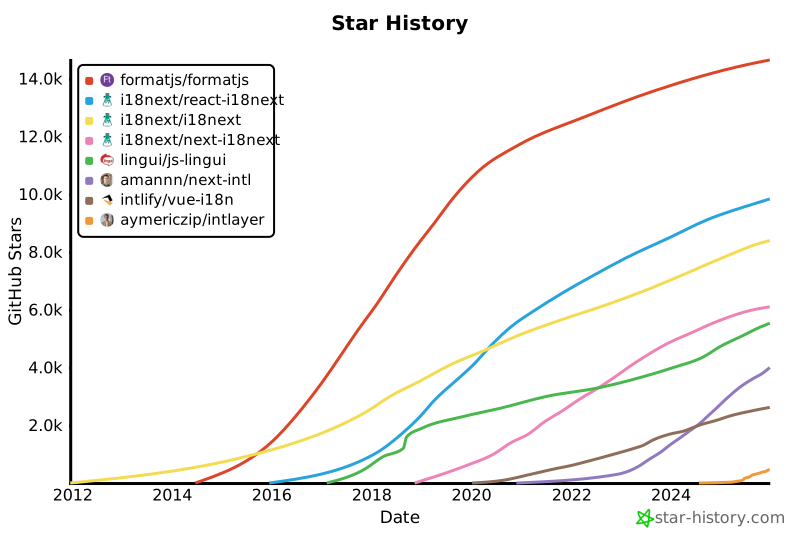](https://www.star-history.com/#formatjs/formatjs&i18next/react-i18next&i18next/i18next&i18next/next-i18next&lingui/js-lingui&amannn/next-intl&intlify/vue-i18n&opral/
|
|
283
|
+
[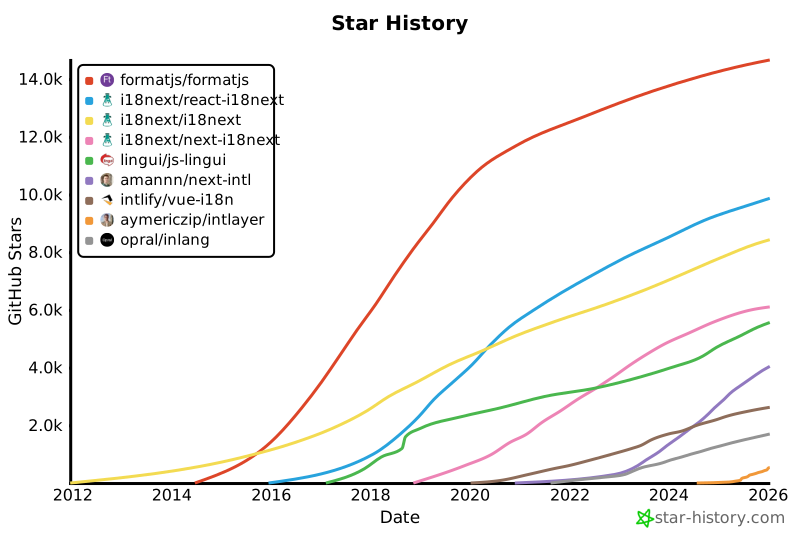](https://www.star-history.com/#formatjs/formatjs&i18next/react-i18next&i18next/i18next&i18next/next-i18next&lingui/js-lingui&amannn/next-intl&intlify/vue-i18n&aymericzip/intlayer&opral/inlang&type=date&legend=top-left)
|
|
284
284
|
|
|
285
285
|
---
|
|
286
286
|
|
package/docs/en/intlayer_CMS.md
CHANGED
|
@@ -77,6 +77,26 @@ For integration with Vite + React, refer to the [setup guide](https://github.com
|
|
|
77
77
|
|
|
78
78
|
## Configuration
|
|
79
79
|
|
|
80
|
+
Run the following command to login to the Intlayer CMS:
|
|
81
|
+
|
|
82
|
+
```bash packageManager="npm"
|
|
83
|
+
npx intlayer login
|
|
84
|
+
```
|
|
85
|
+
|
|
86
|
+
```bash packageManager="yarn"
|
|
87
|
+
yarn intlayer login
|
|
88
|
+
```
|
|
89
|
+
|
|
90
|
+
```bash packageManager="pnpm"
|
|
91
|
+
pnpm intlayer login
|
|
92
|
+
```
|
|
93
|
+
|
|
94
|
+
```bash packageManager="bun"
|
|
95
|
+
bunx intlayer login
|
|
96
|
+
```
|
|
97
|
+
|
|
98
|
+
This will open your default browser to complete the authentication process and receive the necessary credentials (Client ID and Client Secret) to use Intlayer services.
|
|
99
|
+
|
|
80
100
|
In your Intlayer configuration file, you can customize the CMS settings:
|
|
81
101
|
|
|
82
102
|
```typescript fileName="intlayer.config.ts" codeFormat="typescript"
|
|
@@ -98,7 +118,7 @@ const config: IntlayerConfig = {
|
|
|
98
118
|
*
|
|
99
119
|
* Client ID and client secret are required to enable the editor.
|
|
100
120
|
* They allow the identify the user who is editing the content.
|
|
101
|
-
* They can be obtained by creating a new client in the Intlayer Dashboard - Projects (https://intlayer.org/
|
|
121
|
+
* They can be obtained by creating a new client in the Intlayer Dashboard - Projects (https://app.intlayer.org/projects).
|
|
102
122
|
* clientId: process.env.INTLAYER_CLIENT_ID,
|
|
103
123
|
* clientSecret: process.env.INTLAYER_CLIENT_SECRET,
|
|
104
124
|
*/
|
|
@@ -148,7 +168,7 @@ const config = {
|
|
|
148
168
|
*
|
|
149
169
|
* Client ID and client secret are required to enable the editor.
|
|
150
170
|
* They allow the identify the user who is editing the content.
|
|
151
|
-
* They can be obtained by creating a new client in the Intlayer Dashboard - Projects (https://intlayer.org/
|
|
171
|
+
* They can be obtained by creating a new client in the Intlayer Dashboard - Projects (https://app.intlayer.org/projects).
|
|
152
172
|
* clientId: process.env.INTLAYER_CLIENT_ID,
|
|
153
173
|
* clientSecret: process.env.INTLAYER_CLIENT_SECRET,
|
|
154
174
|
*/
|
|
@@ -198,7 +218,7 @@ const config = {
|
|
|
198
218
|
*
|
|
199
219
|
* Client ID and client secret are required to enable the editor.
|
|
200
220
|
* They allow the identify the user who is editing the content.
|
|
201
|
-
* They can be obtained by creating a new client in the Intlayer Dashboard - Projects (https://intlayer.org/
|
|
221
|
+
* They can be obtained by creating a new client in the Intlayer Dashboard - Projects (https://app.intlayer.org/projects).
|
|
202
222
|
* clientId: process.env.INTLAYER_CLIENT_ID,
|
|
203
223
|
* clientSecret: process.env.INTLAYER_CLIENT_SECRET,
|
|
204
224
|
*/
|
|
@@ -230,7 +250,7 @@ const config = {
|
|
|
230
250
|
module.exports = config;
|
|
231
251
|
```
|
|
232
252
|
|
|
233
|
-
> If you don't have a client ID and client secret, you can obtain them by creating a new client in the [Intlayer Dashboard - Projects](https://intlayer.org/
|
|
253
|
+
> If you don't have a client ID and client secret, you can obtain them by creating a new client in the [Intlayer Dashboard - Projects](https://app.intlayer.org/projects).
|
|
234
254
|
|
|
235
255
|
> To see all available parameters, refer to the [configuration documentation](https://github.com/aymericzip/intlayer/blob/main/docs/docs/en/configuration.md).
|
|
236
256
|
|
|
@@ -270,7 +290,7 @@ This command uploads your initial content dictionaries, making them available fo
|
|
|
270
290
|
|
|
271
291
|
### Edit the dictionary
|
|
272
292
|
|
|
273
|
-
Then you will be able to see and manage your dictionary in the [Intlayer CMS](https://intlayer.org/
|
|
293
|
+
Then you will be able to see and manage your dictionary in the [Intlayer CMS](https://app.intlayer.org/content).
|
|
274
294
|
|
|
275
295
|
## Live sync
|
|
276
296
|
|