@intlayer/docs 7.5.10 → 7.5.11
This diff represents the content of publicly available package versions that have been released to one of the supported registries. The information contained in this diff is provided for informational purposes only and reflects changes between package versions as they appear in their respective public registries.
- package/dist/cjs/generated/docs.entry.cjs +38 -0
- package/dist/cjs/generated/docs.entry.cjs.map +1 -1
- package/dist/esm/generated/docs.entry.mjs +38 -0
- package/dist/esm/generated/docs.entry.mjs.map +1 -1
- package/dist/types/generated/docs.entry.d.ts +2 -0
- package/dist/types/generated/docs.entry.d.ts.map +1 -1
- package/docs/ar/cli/ci.md +137 -0
- package/docs/ar/cli/index.md +7 -1
- package/docs/ar/cli/list.md +39 -2
- package/docs/ar/cli/list_projects.md +131 -0
- package/docs/ar/intlayer_CMS.md +20 -0
- package/docs/de/cli/ci.md +137 -0
- package/docs/de/cli/index.md +7 -1
- package/docs/de/cli/list.md +39 -2
- package/docs/de/cli/list_projects.md +130 -0
- package/docs/de/intlayer_CMS.md +20 -0
- package/docs/en/cli/ci.md +137 -0
- package/docs/en/cli/index.md +14 -1
- package/docs/en/cli/list.md +39 -2
- package/docs/en/cli/list_projects.md +128 -0
- package/docs/en/interest_of_intlayer.md +1 -1
- package/docs/en/intlayer_CMS.md +20 -0
- package/docs/en-GB/cli/ci.md +137 -0
- package/docs/en-GB/cli/index.md +7 -1
- package/docs/en-GB/cli/list.md +39 -2
- package/docs/en-GB/cli/list_projects.md +130 -0
- package/docs/en-GB/intlayer_CMS.md +20 -0
- package/docs/es/cli/ci.md +137 -0
- package/docs/es/cli/index.md +7 -1
- package/docs/es/cli/list.md +39 -2
- package/docs/es/cli/list_projects.md +130 -0
- package/docs/es/intlayer_CMS.md +20 -0
- package/docs/fr/cli/ci.md +137 -0
- package/docs/fr/cli/index.md +7 -1
- package/docs/fr/cli/list.md +39 -2
- package/docs/fr/cli/list_projects.md +131 -0
- package/docs/fr/intlayer_CMS.md +20 -0
- package/docs/hi/cli/ci.md +137 -0
- package/docs/hi/cli/index.md +7 -1
- package/docs/hi/cli/list.md +38 -1
- package/docs/hi/cli/list_projects.md +130 -0
- package/docs/hi/intlayer_CMS.md +20 -0
- package/docs/id/cli/ci.md +137 -0
- package/docs/id/cli/index.md +7 -1
- package/docs/id/cli/list.md +38 -1
- package/docs/id/cli/list_projects.md +128 -0
- package/docs/id/intlayer_CMS.md +20 -0
- package/docs/it/cli/ci.md +137 -0
- package/docs/it/cli/index.md +7 -1
- package/docs/it/cli/list.md +39 -2
- package/docs/it/cli/list_projects.md +130 -0
- package/docs/it/intlayer_CMS.md +20 -0
- package/docs/ja/cli/ci.md +137 -0
- package/docs/ja/cli/index.md +7 -1
- package/docs/ja/cli/list.md +38 -1
- package/docs/ja/cli/list_projects.md +136 -0
- package/docs/ja/intlayer_CMS.md +20 -0
- package/docs/ko/cli/ci.md +137 -0
- package/docs/ko/cli/index.md +7 -1
- package/docs/ko/cli/list.md +38 -1
- package/docs/ko/cli/list_projects.md +128 -0
- package/docs/ko/intlayer_CMS.md +20 -0
- package/docs/pl/cli/ci.md +137 -0
- package/docs/pl/cli/index.md +7 -1
- package/docs/pl/cli/list.md +39 -2
- package/docs/pl/cli/list_projects.md +130 -0
- package/docs/pl/intlayer_CMS.md +20 -0
- package/docs/pt/cli/ci.md +137 -0
- package/docs/pt/cli/index.md +7 -1
- package/docs/pt/cli/list.md +39 -2
- package/docs/pt/cli/list_projects.md +134 -0
- package/docs/pt/intlayer_CMS.md +20 -0
- package/docs/ru/cli/ci.md +137 -0
- package/docs/ru/cli/index.md +7 -1
- package/docs/ru/cli/list.md +39 -2
- package/docs/ru/cli/list_projects.md +130 -0
- package/docs/ru/intlayer_CMS.md +20 -0
- package/docs/tr/cli/ci.md +137 -0
- package/docs/tr/cli/index.md +7 -1
- package/docs/tr/cli/list.md +39 -2
- package/docs/tr/cli/list_projects.md +134 -0
- package/docs/tr/intlayer_CMS.md +20 -0
- package/docs/vi/cli/ci.md +137 -0
- package/docs/vi/cli/index.md +7 -1
- package/docs/vi/cli/list.md +38 -1
- package/docs/vi/cli/list_projects.md +130 -0
- package/docs/vi/intlayer_CMS.md +20 -0
- package/docs/zh/cli/ci.md +137 -0
- package/docs/zh/cli/index.md +7 -1
- package/docs/zh/cli/list.md +38 -1
- package/docs/zh/cli/list_projects.md +130 -0
- package/docs/zh/intlayer_CMS.md +20 -0
- package/package.json +6 -6
- package/src/generated/docs.entry.ts +38 -0
package/docs/de/cli/list.md
CHANGED
|
@@ -1,6 +1,6 @@
|
|
|
1
1
|
---
|
|
2
2
|
createdAt: 2024-08-11
|
|
3
|
-
updatedAt:
|
|
3
|
+
updatedAt: 2026-01-06
|
|
4
4
|
title: Inhaltsdeklarationsdateien auflisten
|
|
5
5
|
description: Erfahren Sie, wie Sie alle Inhaltsdeklarationsdateien in Ihrem Projekt auflisten können.
|
|
6
6
|
keywords:
|
|
@@ -13,6 +13,13 @@ slugs:
|
|
|
13
13
|
- concept
|
|
14
14
|
- cli
|
|
15
15
|
- list
|
|
16
|
+
history:
|
|
17
|
+
- version: 7.5.12
|
|
18
|
+
date: 2026-01-06
|
|
19
|
+
changes: Absolute Ausgabeoption zum Listen-Befehl hinzugefügt
|
|
20
|
+
- version: 7.5.11
|
|
21
|
+
date: 2026-01-06
|
|
22
|
+
changes: JSON-Ausgabeoption zum Listen-Befehl hinzugefügt
|
|
16
23
|
---
|
|
17
24
|
|
|
18
25
|
# Inhaltsdeklarationsdateien auflisten
|
|
@@ -27,14 +34,36 @@ npx intlayer content list
|
|
|
27
34
|
|
|
28
35
|
Dieser Befehl zeigt alle Inhaltsdeklarationsdateien in Ihrem Projekt an, einschließlich ihrer Wörterbuchschlüssel und Dateipfade. Er ist nützlich, um einen Überblick über alle Ihre Inhaltsdateien zu erhalten und zu überprüfen, ob sie von Intlayer korrekt erkannt werden.
|
|
29
36
|
|
|
30
|
-
##
|
|
37
|
+
## Argumente:
|
|
38
|
+
|
|
39
|
+
- **`--json`**: Gibt die Ergebnisse als JSON statt als formatierten Text aus. Nützlich für Skripte und programmatischen Zugriff.
|
|
40
|
+
|
|
41
|
+
> Beispiel: `npx intlayer content list --json`
|
|
42
|
+
|
|
43
|
+
## Beispiele:
|
|
44
|
+
|
|
45
|
+
### Inhaltsdeklarationsdateien auflisten:
|
|
31
46
|
|
|
32
47
|
```bash
|
|
33
48
|
npx intlayer content list
|
|
34
49
|
```
|
|
35
50
|
|
|
51
|
+
### Ausgabe als JSON:
|
|
52
|
+
|
|
53
|
+
```bash
|
|
54
|
+
npx intlayer content list --json
|
|
55
|
+
```
|
|
56
|
+
|
|
57
|
+
### Ausgabe als absolute Pfade:
|
|
58
|
+
|
|
59
|
+
```bash
|
|
60
|
+
npx intlayer content list --absolute
|
|
61
|
+
```
|
|
62
|
+
|
|
36
63
|
## Beispielausgabe:
|
|
37
64
|
|
|
65
|
+
### Formatierte Ausgabe:
|
|
66
|
+
|
|
38
67
|
```bash
|
|
39
68
|
npx intlayer content list
|
|
40
69
|
Inhaltsdeklarationsdateien:
|
|
@@ -45,6 +74,14 @@ Inhaltsdeklarationsdateien:
|
|
|
45
74
|
Gesamtanzahl der Inhaltsdeklarationsdateien: 3
|
|
46
75
|
```
|
|
47
76
|
|
|
77
|
+
### JSON-Ausgabe:
|
|
78
|
+
|
|
79
|
+
```bash
|
|
80
|
+
$ npx intlayer content list --json
|
|
81
|
+
|
|
82
|
+
[{"key":"home-page","path":"src/components/HomePage/homePage.content.ts"},{"key":"server-component","path":"src/components/ServerComponent/serverComponent.content.ts"},{"key":"client-component","path":"src/components/ClientComponent/clientComponent.content.ts"}]
|
|
83
|
+
```
|
|
84
|
+
|
|
48
85
|
Dieser Befehl gibt aus:
|
|
49
86
|
|
|
50
87
|
- Eine formatierte Liste aller Inhaltsdeklarationsdateien mit ihren Schlüsseln und relativen Dateipfaden
|
|
@@ -0,0 +1,130 @@
|
|
|
1
|
+
---
|
|
2
|
+
createdAt: 2025-12-30
|
|
3
|
+
updatedAt: 2026-01-06
|
|
4
|
+
title: Intlayer-Projekte auflisten
|
|
5
|
+
description: Erfahre, wie du alle Intlayer-Projekte in einem Verzeichnis oder Git-Repository auflistest.
|
|
6
|
+
keywords:
|
|
7
|
+
- List
|
|
8
|
+
- Projects
|
|
9
|
+
- CLI
|
|
10
|
+
- Intlayer
|
|
11
|
+
- Git
|
|
12
|
+
slugs:
|
|
13
|
+
- doc
|
|
14
|
+
- concept
|
|
15
|
+
- cli
|
|
16
|
+
- list-projects
|
|
17
|
+
history:
|
|
18
|
+
- version: 7.5.12
|
|
19
|
+
date: 2026-01-06
|
|
20
|
+
changes: Absolute Ausgabeoption zum Befehl list projects hinzufügen
|
|
21
|
+
---
|
|
22
|
+
|
|
23
|
+
# Intlayer-Projekte auflisten
|
|
24
|
+
|
|
25
|
+
```bash
|
|
26
|
+
npx intlayer projects list
|
|
27
|
+
```
|
|
28
|
+
|
|
29
|
+
Dieser Befehl sucht nach und listet alle Intlayer-Projekte, indem er Verzeichnisse findet, die Intlayer-Konfigurationsdateien enthalten. Er ist nützlich, um alle Intlayer-Projekte in einem Monorepo, Workspace oder Git-Repository zu entdecken.
|
|
30
|
+
|
|
31
|
+
## Aliase:
|
|
32
|
+
|
|
33
|
+
- `npx intlayer projects-list`
|
|
34
|
+
- `npx intlayer pl`
|
|
35
|
+
|
|
36
|
+
## Argumente:
|
|
37
|
+
|
|
38
|
+
- **`--base-dir [path]`**: Gibt das Basisverzeichnis an, in dem gesucht werden soll. Standard ist das aktuelle Arbeitsverzeichnis.
|
|
39
|
+
|
|
40
|
+
> Beispiel: `npx intlayer projects list --base-dir /path/to/workspace`
|
|
41
|
+
|
|
42
|
+
> Beispiel: `npx intlayer projects list --base-dir /path/to/workspace`
|
|
43
|
+
|
|
44
|
+
- **`--git-root`**: Suche vom Git-Root-Verzeichnis aus statt vom Basisverzeichnis. Das ist nützlich, um alle Intlayer-Projekte in einem Monorepo oder Git-Repository zu finden.
|
|
45
|
+
|
|
46
|
+
> Beispiel: `npx intlayer projects list --git-root`
|
|
47
|
+
|
|
48
|
+
- **`--json`**: Gibt die Ergebnisse als JSON statt als formatierten Text aus. Nützlich für Skripte und programmatischen Zugriff.
|
|
49
|
+
|
|
50
|
+
> Beispiel: `npx intlayer projects list --json`
|
|
51
|
+
|
|
52
|
+
- **`--absolute`**: Gibt die Ergebnisse als absolute Pfade statt als relative Pfade aus.
|
|
53
|
+
|
|
54
|
+
> Beispiel: `npx intlayer projects list --absolute`
|
|
55
|
+
|
|
56
|
+
## Funktionsweise:
|
|
57
|
+
|
|
58
|
+
Der Befehl durchsucht das angegebene Verzeichnis (oder das Git-Root, wenn `--git-root` verwendet wird) nach Intlayer-Konfigurationsdateien. Es wird nach den folgenden Konfigurationsdateinamensmustern gesucht:
|
|
59
|
+
|
|
60
|
+
- `intlayer.config.ts`
|
|
61
|
+
- `intlayer.config.js`
|
|
62
|
+
- `intlayer.config.json`
|
|
63
|
+
- `intlayer.config.cjs`
|
|
64
|
+
- `intlayer.config.mjs`
|
|
65
|
+
- `.intlayerrc`
|
|
66
|
+
|
|
67
|
+
Jedes Verzeichnis, das eine dieser Dateien enthält, gilt als Intlayer-Projekt und wird in der Ausgabe aufgeführt.
|
|
68
|
+
|
|
69
|
+
## Beispiele:
|
|
70
|
+
|
|
71
|
+
### Projekte im aktuellen Verzeichnis auflisten:
|
|
72
|
+
|
|
73
|
+
```bash
|
|
74
|
+
npx intlayer projects list
|
|
75
|
+
```
|
|
76
|
+
|
|
77
|
+
### Projekte in einem bestimmten Verzeichnis auflisten:
|
|
78
|
+
|
|
79
|
+
```bash
|
|
80
|
+
npx intlayer projects list --base-dir ./packages
|
|
81
|
+
```
|
|
82
|
+
|
|
83
|
+
### Alle Projekte im Git-Repository auflisten:
|
|
84
|
+
|
|
85
|
+
```bash
|
|
86
|
+
npx intlayer projects list --git-root
|
|
87
|
+
```
|
|
88
|
+
|
|
89
|
+
### Verwendung des Kurzbefehls (Alias):
|
|
90
|
+
|
|
91
|
+
```bash
|
|
92
|
+
npx intlayer pl --git-root
|
|
93
|
+
```
|
|
94
|
+
|
|
95
|
+
### Ausgabe als JSON:
|
|
96
|
+
|
|
97
|
+
```bash
|
|
98
|
+
npx intlayer projects list --json
|
|
99
|
+
```
|
|
100
|
+
|
|
101
|
+
## Beispielausgabe:
|
|
102
|
+
|
|
103
|
+
### Formatierte Ausgabe:
|
|
104
|
+
|
|
105
|
+
```bash
|
|
106
|
+
$ npx intlayer projects list --git-root
|
|
107
|
+
|
|
108
|
+
Found 3 Intlayer project(s):
|
|
109
|
+
|
|
110
|
+
- /Users/user/workspace/packages/app
|
|
111
|
+
- /Users/user/workspace/packages/admin
|
|
112
|
+
- /Users/user/workspace/packages/shared
|
|
113
|
+
```
|
|
114
|
+
|
|
115
|
+
### JSON-Ausgabe:
|
|
116
|
+
|
|
117
|
+
```bash
|
|
118
|
+
$ npx intlayer projects list --json
|
|
119
|
+
|
|
120
|
+
["/Users/user/workspace/packages/app","/Users/user/workspace/packages/admin","/Users/user/workspace/packages/shared"]
|
|
121
|
+
```
|
|
122
|
+
|
|
123
|
+
## Anwendungsfälle:
|
|
124
|
+
|
|
125
|
+
- **Monorepo-Management**: Entdecke alle Intlayer-Projekte in einer Monorepo-Struktur
|
|
126
|
+
- **Projekterkennung**: Finde alle Intlayer-aktivierten Projekte in einem Workspace
|
|
127
|
+
- **CI/CD**: Überprüfe Intlayer-Projekte in automatisierten Workflows
|
|
128
|
+
- **Dokumentation**: Dokumentation erstellen, die alle mit Intlayer verwendeten Projekte auflistet
|
|
129
|
+
|
|
130
|
+
Die Ausgabe liefert absolute Pfade zu jedem Projektverzeichnis, wodurch das Navigieren zu oder das Automatisieren von Vorgängen für mehrere Intlayer-Projekte erleichtert wird.
|
package/docs/de/intlayer_CMS.md
CHANGED
|
@@ -71,6 +71,26 @@ Für die Integration mit Vite + React siehe die [Installationsanleitung](https:/
|
|
|
71
71
|
|
|
72
72
|
## Konfiguration
|
|
73
73
|
|
|
74
|
+
Führen Sie den folgenden Befehl aus, um sich beim Intlayer CMS anzumelden:
|
|
75
|
+
|
|
76
|
+
```bash packageManager="npm"
|
|
77
|
+
npx intlayer login
|
|
78
|
+
```
|
|
79
|
+
|
|
80
|
+
```bash packageManager="yarn"
|
|
81
|
+
yarn intlayer login
|
|
82
|
+
```
|
|
83
|
+
|
|
84
|
+
```bash packageManager="pnpm"
|
|
85
|
+
pnpm intlayer login
|
|
86
|
+
```
|
|
87
|
+
|
|
88
|
+
```bash packageManager="bun"
|
|
89
|
+
bunx intlayer login
|
|
90
|
+
```
|
|
91
|
+
|
|
92
|
+
Dies öffnet Ihren Standardbrowser, um den Authentifizierungsprozess abzuschließen und die erforderlichen Anmeldedaten (Client ID und Client Secret) zu erhalten, um Intlayer-Dienste zu verwenden.
|
|
93
|
+
|
|
74
94
|
In Ihrer Intlayer-Konfigurationsdatei können Sie die CMS-Einstellungen anpassen:
|
|
75
95
|
|
|
76
96
|
```typescript fileName="intlayer.config.ts" codeFormat="typescript"
|
|
@@ -0,0 +1,137 @@
|
|
|
1
|
+
---
|
|
2
|
+
createdAt: 2026-01-06
|
|
3
|
+
updatedAt: 2026-01-06
|
|
4
|
+
title: CI Command
|
|
5
|
+
description: Learn how to use the Intlayer CI command to run Intlayer commands with auto-injected credentials in CI/CD pipelines and monorepos.
|
|
6
|
+
keywords:
|
|
7
|
+
- CI
|
|
8
|
+
- CI/CD
|
|
9
|
+
- Automation
|
|
10
|
+
- Monorepo
|
|
11
|
+
- Credentials
|
|
12
|
+
- CLI
|
|
13
|
+
- Intlayer
|
|
14
|
+
slugs:
|
|
15
|
+
- doc
|
|
16
|
+
- concept
|
|
17
|
+
- cli
|
|
18
|
+
- ci
|
|
19
|
+
history:
|
|
20
|
+
- version: 7.5.11
|
|
21
|
+
date: 2026-01-06
|
|
22
|
+
changes: Add CI command
|
|
23
|
+
---
|
|
24
|
+
|
|
25
|
+
# CI Command
|
|
26
|
+
|
|
27
|
+
```bash
|
|
28
|
+
npx intlayer ci <command...>
|
|
29
|
+
```
|
|
30
|
+
|
|
31
|
+
The CI command is designed for automation and CI/CD pipelines. It automatically injects credentials from the `INTLAYER_PROJECT_CREDENTIALS` environment variable and can run Intlayer commands across multiple projects in a monorepo.
|
|
32
|
+
|
|
33
|
+
## How it works
|
|
34
|
+
|
|
35
|
+
The CI command operates in two modes:
|
|
36
|
+
|
|
37
|
+
1. **Single Project Mode**: If the current working directory matches one of the project paths in `INTLAYER_PROJECT_CREDENTIALS`, it runs the command for that specific project only.
|
|
38
|
+
|
|
39
|
+
2. **Iteration Mode**: If no specific project context is detected, it iterates over all configured projects and runs the command for each one.
|
|
40
|
+
|
|
41
|
+
## Environment Variable
|
|
42
|
+
|
|
43
|
+
The command requires the `INTLAYER_PROJECT_CREDENTIALS` environment variable to be set. This variable should contain a JSON object mapping project paths to their credentials:
|
|
44
|
+
|
|
45
|
+
```json
|
|
46
|
+
{
|
|
47
|
+
"packages/app": {
|
|
48
|
+
"clientId": "your-client-id-1",
|
|
49
|
+
"clientSecret": "your-client-secret-1"
|
|
50
|
+
},
|
|
51
|
+
"packages/admin": {
|
|
52
|
+
"clientId": "your-client-id-2",
|
|
53
|
+
"clientSecret": "your-client-secret-2"
|
|
54
|
+
}
|
|
55
|
+
}
|
|
56
|
+
```
|
|
57
|
+
|
|
58
|
+
## Package Manager Detection
|
|
59
|
+
|
|
60
|
+
The CI command automatically detects which package manager is being used (npm, yarn, pnpm, or bun) based on the `npm_config_user_agent` environment variable and uses the appropriate command to execute Intlayer.
|
|
61
|
+
|
|
62
|
+
## Arguments
|
|
63
|
+
|
|
64
|
+
- **`<command...>`**: The Intlayer command to execute (e.g., `fill`, `push`, `build`). You can pass any Intlayer command and its arguments.
|
|
65
|
+
|
|
66
|
+
> Example: `npx intlayer ci fill --verbose`
|
|
67
|
+
>
|
|
68
|
+
> Example: `npx intlayer ci push`
|
|
69
|
+
>
|
|
70
|
+
> Example: `npx intlayer ci build`
|
|
71
|
+
|
|
72
|
+
## Examples
|
|
73
|
+
|
|
74
|
+
### Run a command in single project mode
|
|
75
|
+
|
|
76
|
+
If you're in a project directory that matches one of the paths in `INTLAYER_PROJECT_CREDENTIALS`:
|
|
77
|
+
|
|
78
|
+
```bash
|
|
79
|
+
cd packages/app
|
|
80
|
+
npx intlayer ci fill
|
|
81
|
+
```
|
|
82
|
+
|
|
83
|
+
This will run the `fill` command with credentials automatically injected for the `packages/app` project.
|
|
84
|
+
|
|
85
|
+
### Run a command across all projects
|
|
86
|
+
|
|
87
|
+
If you're in a directory that doesn't match any project path, the command will iterate over all configured projects:
|
|
88
|
+
|
|
89
|
+
```bash
|
|
90
|
+
cd /path/to/monorepo
|
|
91
|
+
npx intlayer ci push
|
|
92
|
+
```
|
|
93
|
+
|
|
94
|
+
This will run the `push` command for each project configured in `INTLAYER_PROJECT_CREDENTIALS`.
|
|
95
|
+
|
|
96
|
+
### Pass additional flags
|
|
97
|
+
|
|
98
|
+
You can pass any flags to the underlying Intlayer command:
|
|
99
|
+
|
|
100
|
+
```bash
|
|
101
|
+
npx intlayer ci fill --verbose --mode complete
|
|
102
|
+
```
|
|
103
|
+
|
|
104
|
+
### Use in CI/CD pipelines
|
|
105
|
+
|
|
106
|
+
In your CI/CD configuration (e.g., GitHub Actions, GitLab CI), set the `INTLAYER_PROJECT_CREDENTIALS` as a secret:
|
|
107
|
+
|
|
108
|
+
```yaml
|
|
109
|
+
# GitHub Actions example
|
|
110
|
+
env:
|
|
111
|
+
INTLAYER_PROJECT_CREDENTIALS: ${{ secrets.INTLAYER_PROJECT_CREDENTIALS }}
|
|
112
|
+
|
|
113
|
+
steps:
|
|
114
|
+
- name: Fill dictionaries
|
|
115
|
+
run: npx intlayer ci fill
|
|
116
|
+
```
|
|
117
|
+
|
|
118
|
+
## Error Handling
|
|
119
|
+
|
|
120
|
+
- If `INTLAYER_PROJECT_CREDENTIALS` is not set, the command will exit with an error.
|
|
121
|
+
- If `INTLAYER_PROJECT_CREDENTIALS` is not valid JSON, the command will exit with an error.
|
|
122
|
+
- If a project path doesn't exist, it will be skipped with a warning.
|
|
123
|
+
- If any project fails, the command will exit with a non-zero status code.
|
|
124
|
+
|
|
125
|
+
## Use Cases
|
|
126
|
+
|
|
127
|
+
- **Monorepo automation**: Run Intlayer commands across multiple projects in a monorepo
|
|
128
|
+
- **CI/CD pipelines**: Automate dictionary management in continuous integration workflows
|
|
129
|
+
- **Bulk operations**: Perform the same operation on multiple Intlayer projects at once
|
|
130
|
+
- **Secret management**: Securely manage credentials for multiple projects using environment variables
|
|
131
|
+
|
|
132
|
+
## Security Best Practices
|
|
133
|
+
|
|
134
|
+
- Store `INTLAYER_PROJECT_CREDENTIALS` as encrypted secrets in your CI/CD platform
|
|
135
|
+
- Never commit credentials to version control
|
|
136
|
+
- Use environment-specific credentials for different deployment environments
|
|
137
|
+
- Rotate credentials regularly
|
package/docs/en/cli/index.md
CHANGED
|
@@ -1,6 +1,6 @@
|
|
|
1
1
|
---
|
|
2
2
|
createdAt: 2024-08-11
|
|
3
|
-
updatedAt:
|
|
3
|
+
updatedAt: 2026-01-06
|
|
4
4
|
title: CLI - All Intlayer CLI commands for your multilingual website
|
|
5
5
|
description: Discover how to use the Intlayer CLI to manage your multilingual website. Follow the steps in this online documentation to set up your project in a few minutes.
|
|
6
6
|
keywords:
|
|
@@ -17,6 +17,12 @@ slugs:
|
|
|
17
17
|
- concept
|
|
18
18
|
- cli
|
|
19
19
|
history:
|
|
20
|
+
- version: 7.5.11
|
|
21
|
+
date: 2026-01-06
|
|
22
|
+
changes: Add CI command
|
|
23
|
+
- version: 7.5.11
|
|
24
|
+
date: 2026-01-06
|
|
25
|
+
changes: Add projects list command
|
|
20
26
|
- version: 7.5.9
|
|
21
27
|
date: 2025-12-30
|
|
22
28
|
changes: Add init command
|
|
@@ -119,6 +125,7 @@ To see how to configure available locales, or other parameters, refer to the [co
|
|
|
119
125
|
- **[Build Dictionaries](https://github.com/aymericzip/intlayer/blob/main/docs/docs/en/cli/build.md)** - Build your dictionaries from content declaration files
|
|
120
126
|
- **[Watch Dictionaries](https://github.com/aymericzip/intlayer/blob/main/docs/docs/en/cli/watch.md)** - Watch for changes and automatically build dictionaries
|
|
121
127
|
- **[Check CLI Version](https://github.com/aymericzip/intlayer/blob/main/docs/docs/en/cli/version.md)** - Check the installed Intlayer CLI version
|
|
128
|
+
- **[List Projects](https://github.com/aymericzip/intlayer/blob/main/docs/docs/en/cli/list_projects.md)** - List all Intlayer projects in a directory or git repository
|
|
122
129
|
|
|
123
130
|
### Dictionary Management
|
|
124
131
|
|
|
@@ -147,6 +154,10 @@ To see how to configure available locales, or other parameters, refer to the [co
|
|
|
147
154
|
- **[Editor Commands](https://github.com/aymericzip/intlayer/blob/main/docs/docs/en/cli/editor.md)** - Use the Intlayer editor commands
|
|
148
155
|
- **[Live Sync Commands](https://github.com/aymericzip/intlayer/blob/main/docs/docs/en/cli/live.md)** - Use Live Sync to reflect CMS content changes at runtime
|
|
149
156
|
|
|
157
|
+
### CI/CD & Automation
|
|
158
|
+
|
|
159
|
+
- **[CI Command](https://github.com/aymericzip/intlayer/blob/main/docs/docs/en/cli/ci.md)** - Run Intlayer commands with auto-injected credentials for CI/CD pipelines
|
|
160
|
+
|
|
150
161
|
### Development Tools
|
|
151
162
|
|
|
152
163
|
- **[CLI SDK](https://github.com/aymericzip/intlayer/blob/main/docs/docs/en/cli/sdk.md)** - Use the Intlayer CLI SDK in your own code
|
|
@@ -166,6 +177,7 @@ To see how to configure available locales, or other parameters, refer to the [co
|
|
|
166
177
|
"intlayer:list": "npx intlayer content list",
|
|
167
178
|
"intlayer:test": "npx intlayer content test",
|
|
168
179
|
"intlayer:transform": "npx intlayer transform",
|
|
180
|
+
"intlayer:projects": "npx intlayer projects list",
|
|
169
181
|
"intlayer:doc:translate": "npx intlayer doc translate",
|
|
170
182
|
"intlayer:doc:review": "npx intlayer doc review"
|
|
171
183
|
}
|
|
@@ -175,3 +187,4 @@ To see how to configure available locales, or other parameters, refer to the [co
|
|
|
175
187
|
>
|
|
176
188
|
> - `npx intlayer list` instead of `npx intlayer content list`
|
|
177
189
|
> - `npx intlayer test` instead of `npx intlayer content test`
|
|
190
|
+
> - `npx intlayer projects-list` or `npx intlayer pl` instead of `npx intlayer projects list`
|
package/docs/en/cli/list.md
CHANGED
|
@@ -1,6 +1,6 @@
|
|
|
1
1
|
---
|
|
2
2
|
createdAt: 2024-08-11
|
|
3
|
-
updatedAt:
|
|
3
|
+
updatedAt: 2026-01-06
|
|
4
4
|
title: List Content Declaration Files
|
|
5
5
|
description: Learn how to list all content declaration files in your project.
|
|
6
6
|
keywords:
|
|
@@ -13,6 +13,13 @@ slugs:
|
|
|
13
13
|
- concept
|
|
14
14
|
- cli
|
|
15
15
|
- list
|
|
16
|
+
history:
|
|
17
|
+
- version: 7.5.12
|
|
18
|
+
date: 2026-01-06
|
|
19
|
+
changes: Add absolute output option to list command
|
|
20
|
+
- version: 7.5.11
|
|
21
|
+
date: 2026-01-06
|
|
22
|
+
changes: Add JSON output option to list command
|
|
16
23
|
---
|
|
17
24
|
|
|
18
25
|
# List content declaration files
|
|
@@ -27,14 +34,36 @@ npx intlayer content list
|
|
|
27
34
|
|
|
28
35
|
This command displays all content declaration files in your project, showing their dictionary keys and file paths. It's useful for getting an overview of all your content files and verifying that they are properly discovered by Intlayer.
|
|
29
36
|
|
|
30
|
-
##
|
|
37
|
+
## Arguments:
|
|
38
|
+
|
|
39
|
+
- **`--json`**: Output the results as JSON instead of formatted text. Useful for scripting and programmatic access.
|
|
40
|
+
|
|
41
|
+
> Example: `npx intlayer content list --json`
|
|
42
|
+
|
|
43
|
+
## Examples:
|
|
44
|
+
|
|
45
|
+
### List content declaration files:
|
|
31
46
|
|
|
32
47
|
```bash
|
|
33
48
|
npx intlayer content list
|
|
34
49
|
```
|
|
35
50
|
|
|
51
|
+
### Output as JSON:
|
|
52
|
+
|
|
53
|
+
```bash
|
|
54
|
+
npx intlayer content list --json
|
|
55
|
+
```
|
|
56
|
+
|
|
57
|
+
### Output as absolute paths:
|
|
58
|
+
|
|
59
|
+
```bash
|
|
60
|
+
npx intlayer content list --absolute
|
|
61
|
+
```
|
|
62
|
+
|
|
36
63
|
## Example output:
|
|
37
64
|
|
|
65
|
+
### Formatted output:
|
|
66
|
+
|
|
38
67
|
```bash
|
|
39
68
|
npx intlayer content list
|
|
40
69
|
Content declaration files:
|
|
@@ -45,6 +74,14 @@ Content declaration files:
|
|
|
45
74
|
Total content declaration files: 3
|
|
46
75
|
```
|
|
47
76
|
|
|
77
|
+
### JSON output:
|
|
78
|
+
|
|
79
|
+
```bash
|
|
80
|
+
$ npx intlayer content list --json
|
|
81
|
+
|
|
82
|
+
[{"key":"home-page","path":"src/components/HomePage/homePage.content.ts"},{"key":"server-component","path":"src/components/ServerComponent/serverComponent.content.ts"},{"key":"client-component","path":"src/components/ClientComponent/clientComponent.content.ts"}]
|
|
83
|
+
```
|
|
84
|
+
|
|
48
85
|
This command will output:
|
|
49
86
|
|
|
50
87
|
- A formatted list of all content declaration files with their keys and relative file paths
|
|
@@ -0,0 +1,128 @@
|
|
|
1
|
+
---
|
|
2
|
+
createdAt: 2025-12-30
|
|
3
|
+
updatedAt: 2025-12-30
|
|
4
|
+
title: List Intlayer Projects
|
|
5
|
+
description: Learn how to list all Intlayer projects in a directory or git repository.
|
|
6
|
+
keywords:
|
|
7
|
+
- List
|
|
8
|
+
- Projects
|
|
9
|
+
- CLI
|
|
10
|
+
- Intlayer
|
|
11
|
+
- Git
|
|
12
|
+
slugs:
|
|
13
|
+
- doc
|
|
14
|
+
- concept
|
|
15
|
+
- cli
|
|
16
|
+
- list-projects
|
|
17
|
+
history:
|
|
18
|
+
- version: 7.5.12
|
|
19
|
+
date: 2026-01-06
|
|
20
|
+
changes: Add absolute output option to list projects command
|
|
21
|
+
---
|
|
22
|
+
|
|
23
|
+
# List Intlayer Projects
|
|
24
|
+
|
|
25
|
+
```bash
|
|
26
|
+
npx intlayer projects list
|
|
27
|
+
```
|
|
28
|
+
|
|
29
|
+
This command searches for and lists all Intlayer projects by finding directories that contain Intlayer configuration files. It's useful for discovering all Intlayer projects in a monorepo, workspace, or git repository.
|
|
30
|
+
|
|
31
|
+
## Aliases:
|
|
32
|
+
|
|
33
|
+
- `npx intlayer projects-list`
|
|
34
|
+
- `npx intlayer pl`
|
|
35
|
+
|
|
36
|
+
## Arguments:
|
|
37
|
+
|
|
38
|
+
- **`--base-dir [path]`**: Specify the base directory to search from. Defaults to the current working directory.
|
|
39
|
+
|
|
40
|
+
> Example: `npx intlayer projects list --base-dir /path/to/workspace`
|
|
41
|
+
|
|
42
|
+
- **`--git-root`**: Search from the git root directory instead of the base directory. This is useful for finding all Intlayer projects in a monorepo or git repository.
|
|
43
|
+
|
|
44
|
+
> Example: `npx intlayer projects list --git-root`
|
|
45
|
+
|
|
46
|
+
- **`--json`**: Output the results as JSON instead of formatted text. Useful for scripting and programmatic access.
|
|
47
|
+
|
|
48
|
+
> Example: `npx intlayer projects list --json`
|
|
49
|
+
|
|
50
|
+
- **`--absolute`**: Output the results as absolute paths instead of relative paths.
|
|
51
|
+
|
|
52
|
+
> Example: `npx intlayer projects list --absolute`
|
|
53
|
+
|
|
54
|
+
## How it works:
|
|
55
|
+
|
|
56
|
+
The command searches for Intlayer configuration files in the specified directory (or git root if `--git-root` is used). It looks for the following configuration file patterns:
|
|
57
|
+
|
|
58
|
+
- `intlayer.config.ts`
|
|
59
|
+
- `intlayer.config.js`
|
|
60
|
+
- `intlayer.config.json`
|
|
61
|
+
- `intlayer.config.cjs`
|
|
62
|
+
- `intlayer.config.mjs`
|
|
63
|
+
- `.intlayerrc`
|
|
64
|
+
|
|
65
|
+
Each directory containing one of these files is considered an Intlayer project and will be listed in the output.
|
|
66
|
+
|
|
67
|
+
## Examples:
|
|
68
|
+
|
|
69
|
+
### List projects in current directory:
|
|
70
|
+
|
|
71
|
+
```bash
|
|
72
|
+
npx intlayer projects list
|
|
73
|
+
```
|
|
74
|
+
|
|
75
|
+
### List projects in a specific directory:
|
|
76
|
+
|
|
77
|
+
```bash
|
|
78
|
+
npx intlayer projects list --base-dir ./packages
|
|
79
|
+
```
|
|
80
|
+
|
|
81
|
+
### List all projects in the git repository:
|
|
82
|
+
|
|
83
|
+
```bash
|
|
84
|
+
npx intlayer projects list --git-root
|
|
85
|
+
```
|
|
86
|
+
|
|
87
|
+
### Using the shortcut alias:
|
|
88
|
+
|
|
89
|
+
```bash
|
|
90
|
+
npx intlayer pl --git-root
|
|
91
|
+
```
|
|
92
|
+
|
|
93
|
+
### Output as JSON:
|
|
94
|
+
|
|
95
|
+
```bash
|
|
96
|
+
npx intlayer projects list --json
|
|
97
|
+
```
|
|
98
|
+
|
|
99
|
+
## Example output:
|
|
100
|
+
|
|
101
|
+
### Formatted output:
|
|
102
|
+
|
|
103
|
+
```bash
|
|
104
|
+
$ npx intlayer projects list --git-root
|
|
105
|
+
|
|
106
|
+
Found 3 Intlayer project(s):
|
|
107
|
+
|
|
108
|
+
- /Users/user/workspace/packages/app
|
|
109
|
+
- /Users/user/workspace/packages/admin
|
|
110
|
+
- /Users/user/workspace/packages/shared
|
|
111
|
+
```
|
|
112
|
+
|
|
113
|
+
### JSON output:
|
|
114
|
+
|
|
115
|
+
```bash
|
|
116
|
+
$ npx intlayer projects list --json
|
|
117
|
+
|
|
118
|
+
["/Users/user/workspace/packages/app","/Users/user/workspace/packages/admin","/Users/user/workspace/packages/shared"]
|
|
119
|
+
```
|
|
120
|
+
|
|
121
|
+
## Use cases:
|
|
122
|
+
|
|
123
|
+
- **Monorepo management**: Discover all Intlayer projects in a monorepo structure
|
|
124
|
+
- **Project discovery**: Find all Intlayer-enabled projects in a workspace
|
|
125
|
+
- **CI/CD**: Verify Intlayer projects in automated workflows
|
|
126
|
+
- **Documentation**: Generate documentation listing all projects using Intlayer
|
|
127
|
+
|
|
128
|
+
The output provides absolute paths to each project directory, making it easy to navigate to or script operations on multiple Intlayer projects.
|
|
@@ -280,7 +280,7 @@ This approach allows you to:
|
|
|
280
280
|
|
|
281
281
|
GitHub stars are a strong indicator of a project's popularity, community trust, and long-term relevance. While not a direct measure of technical quality, they reflect how many developers find the project useful, follow its progress, and are likely to adopt it. For estimating the value of a project, stars help compare traction across alternatives and provide insights into ecosystem growth.
|
|
282
282
|
|
|
283
|
-
[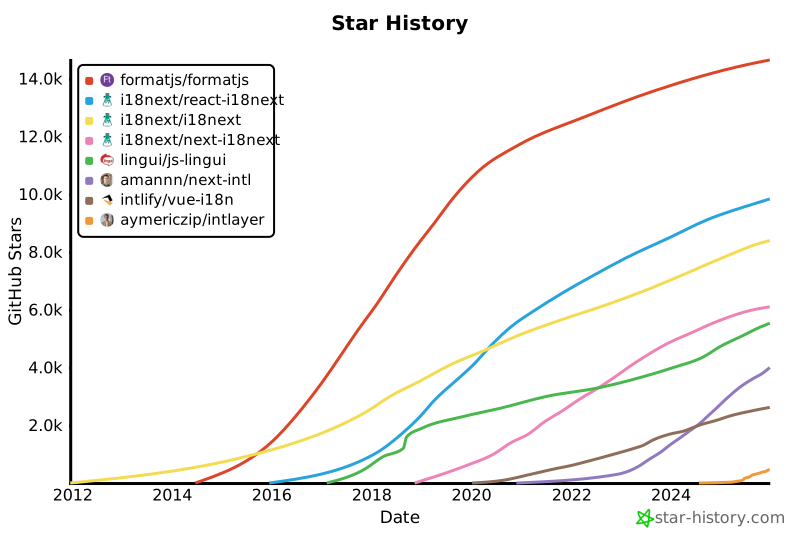](https://www.star-history.com/#formatjs/formatjs&i18next/react-i18next&i18next/i18next&i18next/next-i18next&lingui/js-lingui&amannn/next-intl&intlify/vue-i18n&opral/
|
|
283
|
+
[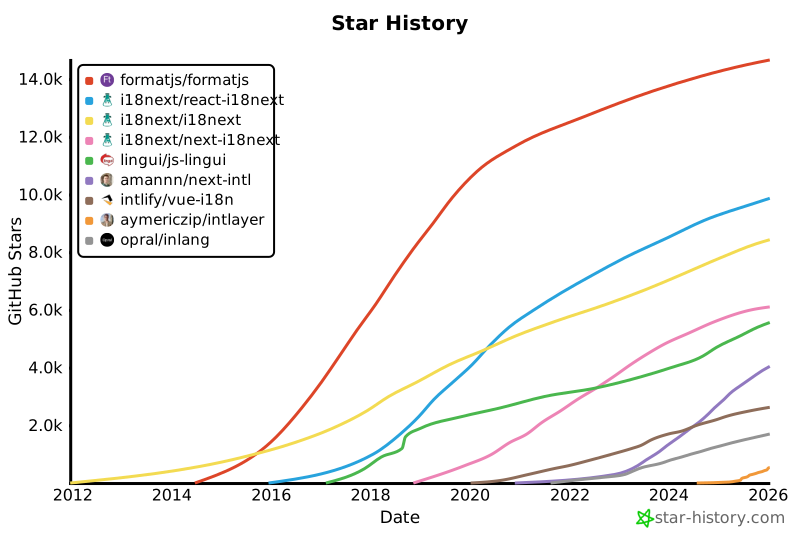](https://www.star-history.com/#formatjs/formatjs&i18next/react-i18next&i18next/i18next&i18next/next-i18next&lingui/js-lingui&amannn/next-intl&intlify/vue-i18n&aymericzip/intlayer&opral/inlang&type=date&legend=top-left)
|
|
284
284
|
|
|
285
285
|
---
|
|
286
286
|
|
package/docs/en/intlayer_CMS.md
CHANGED
|
@@ -77,6 +77,26 @@ For integration with Vite + React, refer to the [setup guide](https://github.com
|
|
|
77
77
|
|
|
78
78
|
## Configuration
|
|
79
79
|
|
|
80
|
+
Run the following command to login to the Intlayer CMS:
|
|
81
|
+
|
|
82
|
+
```bash packageManager="npm"
|
|
83
|
+
npx intlayer login
|
|
84
|
+
```
|
|
85
|
+
|
|
86
|
+
```bash packageManager="yarn"
|
|
87
|
+
yarn intlayer login
|
|
88
|
+
```
|
|
89
|
+
|
|
90
|
+
```bash packageManager="pnpm"
|
|
91
|
+
pnpm intlayer login
|
|
92
|
+
```
|
|
93
|
+
|
|
94
|
+
```bash packageManager="bun"
|
|
95
|
+
bunx intlayer login
|
|
96
|
+
```
|
|
97
|
+
|
|
98
|
+
This will open your default browser to complete the authentication process and receive the necessary credentials (Client ID and Client Secret) to use Intlayer services.
|
|
99
|
+
|
|
80
100
|
In your Intlayer configuration file, you can customize the CMS settings:
|
|
81
101
|
|
|
82
102
|
```typescript fileName="intlayer.config.ts" codeFormat="typescript"
|