@interopio/home-ui-react 1.2.6 → 1.2.8
This diff represents the content of publicly available package versions that have been released to one of the supported registries. The information contained in this diff is provided for informational purposes only and reflects changes between package versions as they appear in their respective public registries.
- package/README.md +57 -308
- package/constants/storageKeys.d.ts +1 -0
- package/decoders/validation.d.ts +3 -0
- package/index.css +1 -1
- package/index.d.ts +4 -1
- package/index.js +11 -13
- package/index.js.map +1 -1
- package/index.mjs +2045 -2021
- package/index.mjs.map +1 -1
- package/lib/home-app-workspace/launchpad-access.d.ts +6 -0
- package/lib/home-app-workspace/workspace-components-context.d.ts +8 -5
- package/lib/io-connect-home/types.d.ts +13 -2
- package/lib/io-connect-home/useUser.d.ts +8 -0
- package/lib/login/auth0/auth0-login-page.d.ts +3 -1
- package/lib/login/index.d.ts +0 -1
- package/package.json +1 -1
- package/images/initial-setup.gif +0 -0
- package/images/manual-permissions.gif +0 -0
- package/lib/home-app-workspace/home-app-workspace-logo-area.d.ts +0 -1
- package/lib/login/auth0/auth0-login-form.d.ts +0 -4
package/README.md
CHANGED
|
@@ -1,308 +1,57 @@
|
|
|
1
|
-
|
|
2
|
-
|
|
3
|
-
The
|
|
4
|
-
|
|
5
|
-
|
|
6
|
-
|
|
7
|
-
##
|
|
8
|
-
|
|
9
|
-
|
|
10
|
-
|
|
11
|
-
|
|
12
|
-
|
|
13
|
-
|
|
14
|
-
|
|
15
|
-
|
|
16
|
-
|
|
17
|
-
|
|
18
|
-
|
|
19
|
-
|
|
20
|
-
|
|
21
|
-
|
|
22
|
-
|
|
23
|
-
|
|
24
|
-
|
|
25
|
-
|
|
26
|
-
|
|
27
|
-
|
|
28
|
-
|
|
29
|
-
|
|
30
|
-
|
|
31
|
-
|
|
32
|
-
|
|
33
|
-
|
|
34
|
-
|
|
35
|
-
|
|
36
|
-
|
|
37
|
-
|
|
38
|
-
|
|
39
|
-
|
|
40
|
-
|
|
41
|
-
|
|
42
|
-
|
|
43
|
-
|
|
44
|
-
|
|
45
|
-
|
|
46
|
-
|
|
47
|
-
|
|
48
|
-
|
|
49
|
-
|
|
50
|
-
|
|
51
|
-
|
|
52
|
-
|
|
53
|
-
|
|
54
|
-
|
|
55
|
-
|
|
56
|
-
|
|
57
|
-
|
|
58
|
-
|
|
59
|
-
### Components
|
|
60
|
-
|
|
61
|
-
The following lists the more important default components exported by the library:
|
|
62
|
-
|
|
63
|
-
| Component | Description |
|
|
64
|
-
|-----------|-------------|
|
|
65
|
-
| `<IOConnectHomeProvider />` | Context provider component containing information about the current state of the required browser permissions. |
|
|
66
|
-
| `<Launchpad />` | The main component containing the Launchpad. |
|
|
67
|
-
| `<LaunchpadSlidePanel />` | Wrapper component around the `<Launchpad />` component allowing it to open as a sliding panel. |
|
|
68
|
-
| `<PermissionsSetup />` | Component providing a setup flow for obtaining the required browser permissions from the user. |
|
|
69
|
-
| `<LoginAuth0 />` | Component for handling the integrated Auth0 authentication and authorization process. |
|
|
70
|
-
|
|
71
|
-
The following lists the main components comprising the `<Launchpad />` component and exported by the library:
|
|
72
|
-
|
|
73
|
-
| Component | Description |
|
|
74
|
-
|-----------|-------------|
|
|
75
|
-
| `<ApplicationsSection />` | Component containing a section in the Launchpad with the available io.Connect apps. |
|
|
76
|
-
| `<FavoritesSection />` | Component containing a section in the Launchpad with favorite items. |
|
|
77
|
-
| `<LayoutSettingsContainer />` | Component containing a section in the Launchpad with Global Layout settings. |
|
|
78
|
-
| `<NotificationsPanel />` | Component containing the notifications panel shown when the user clicks on the notifications icon in the Launchpad. |
|
|
79
|
-
| `<ProfileSettings />` | Component containing a profile and settings section shown when the user clicks on the profile icon in the Launchpad. |
|
|
80
|
-
| `<SearchBar />` | Component containing the search bar providing the Global Search functionality. |
|
|
81
|
-
| `<SearchResultsSection />` | Component containing the search results and shown when the user starts typing in the search bar. |
|
|
82
|
-
| `<WorkspacesSection />` | Component containing a section in the Launchpad with Workspace Layouts. |
|
|
83
|
-
|
|
84
|
-
#### Launchpad Slide Panel Component
|
|
85
|
-
|
|
86
|
-
The following demonstrates the default structure of the `<LaunchpadSlidePanel />` component:
|
|
87
|
-
|
|
88
|
-
```javascript
|
|
89
|
-
<LaunchpadSlidePanel>
|
|
90
|
-
<SlidePanel>
|
|
91
|
-
<Launchpad />
|
|
92
|
-
</SlidePanel>
|
|
93
|
-
</LaunchpadSlidePanel>
|
|
94
|
-
```
|
|
95
|
-
|
|
96
|
-
#### Launchpad Component
|
|
97
|
-
|
|
98
|
-
The following demonstrates the default structure of the `<Launchpad />` component:
|
|
99
|
-
|
|
100
|
-
```javascript
|
|
101
|
-
<Launchpad>
|
|
102
|
-
<LaunchpadAPIProvider>
|
|
103
|
-
<div>
|
|
104
|
-
<header>
|
|
105
|
-
<SearchBar />
|
|
106
|
-
<div>
|
|
107
|
-
<NotificationsIcon />
|
|
108
|
-
<ProfileIcon />
|
|
109
|
-
</div>
|
|
110
|
-
<Icon />
|
|
111
|
-
</header>
|
|
112
|
-
<main>
|
|
113
|
-
{searchTerm.trim().length < 3 ?
|
|
114
|
-
<SectionProvider>
|
|
115
|
-
<ul>
|
|
116
|
-
<>
|
|
117
|
-
<FavoritesSection />
|
|
118
|
-
<WorkspacesSection />
|
|
119
|
-
<ApplicationsSection />
|
|
120
|
-
</>
|
|
121
|
-
</ul>
|
|
122
|
-
</SectionProvider> :
|
|
123
|
-
<SearchResultsSection searchTerm={searchTerm} />
|
|
124
|
-
}
|
|
125
|
-
</main>
|
|
126
|
-
<LayoutSettingsContainer />
|
|
127
|
-
</div>
|
|
128
|
-
<Dialog>
|
|
129
|
-
<NotificationsPanel />
|
|
130
|
-
</Dialog>
|
|
131
|
-
<Dialog>
|
|
132
|
-
<ProfileSettings />
|
|
133
|
-
</Dialog>
|
|
134
|
-
</LaunchpadAPIProvider>
|
|
135
|
-
</Launchpad>
|
|
136
|
-
```
|
|
137
|
-
|
|
138
|
-
The `<Launchpad />` component has the following properties:
|
|
139
|
-
|
|
140
|
-
```javascript
|
|
141
|
-
<Launchpad
|
|
142
|
-
components={{
|
|
143
|
-
sections: <></>
|
|
144
|
-
}}
|
|
145
|
-
|
|
146
|
-
onLogout={() => {}}
|
|
147
|
-
|
|
148
|
-
open={false}
|
|
149
|
-
|
|
150
|
-
setOpen={() => {}}
|
|
151
|
-
|
|
152
|
-
user={{
|
|
153
|
-
name: "N A"
|
|
154
|
-
}}
|
|
155
|
-
/>
|
|
156
|
-
```
|
|
157
|
-
|
|
158
|
-
### Authentication & Authorization
|
|
159
|
-
|
|
160
|
-
The Home App provides a process for authentication and authorization using Auth0 integration. If your organization uses other authentication and authorization mechanisms, you can substitute the default implementation with your custom one when building your Home App.
|
|
161
|
-
|
|
162
|
-
### Examples
|
|
163
|
-
|
|
164
|
-
The following examples demonstrate a basic implementations of a Home App with authentication and browser permission flows, using the default library hooks and components.
|
|
165
|
-
|
|
166
|
-
Wrapping the `<App />` component in the `<IOConnectHomeProvider />` and the `<Auth0Provider />` context provider components in order to obtain the necessary data related to authentication and browser permissions:
|
|
167
|
-
|
|
168
|
-
```javascript
|
|
169
|
-
import { StrictMode } from "react";
|
|
170
|
-
import * as ReactDOM from "react-dom/client";
|
|
171
|
-
import { Auth0Provider } from "@auth0/auth0-react";
|
|
172
|
-
import { IOConnectHomeProvider } from "@interopio/home-ui-react";
|
|
173
|
-
import App from "./app/App";
|
|
174
|
-
|
|
175
|
-
const root = ReactDOM.createRoot(
|
|
176
|
-
document.getElementById("root") as HTMLElement
|
|
177
|
-
);
|
|
178
|
-
|
|
179
|
-
root.render(
|
|
180
|
-
<StrictMode>
|
|
181
|
-
<Auth0Provider
|
|
182
|
-
domain={"platform-auth-domain"}
|
|
183
|
-
clientId={"client-id"}
|
|
184
|
-
authorizationParams={{
|
|
185
|
-
redirect_uri: window.location.origin,
|
|
186
|
-
}}
|
|
187
|
-
>
|
|
188
|
-
<IOConnectHomeProvider>
|
|
189
|
-
<App />
|
|
190
|
-
</IOConnectHomeProvider>
|
|
191
|
-
</Auth0Provider>
|
|
192
|
-
</StrictMode>
|
|
193
|
-
);
|
|
194
|
-
```
|
|
195
|
-
|
|
196
|
-
Creating a Workspaces App that will act as a Main App for the **io.Connect Browser** project:
|
|
197
|
-
|
|
198
|
-
```javascript
|
|
199
|
-
import { useAuth0 } from "@auth0/auth0-react";
|
|
200
|
-
import IOBrowserPlatform from "@interopio/browser-platform";
|
|
201
|
-
import { IOConnectProvider } from "@interopio/react-hooks";
|
|
202
|
-
import IOWorkspaces from "@interopio/workspaces-api";
|
|
203
|
-
import Workspaces from "@interopio/workspaces-ui-react";
|
|
204
|
-
import { PermissionsSetup, useIOConnectHome } from "@interopio/home-ui-react";
|
|
205
|
-
import LoginPage from "../login/LoginPage";
|
|
206
|
-
import LaunchpadButton from "../LaunchpadButton";
|
|
207
|
-
import "@interopio/workspaces-ui-react/dist/styles/workspaces.css";
|
|
208
|
-
|
|
209
|
-
const App = () => {
|
|
210
|
-
const { isAuthenticated } = useAuth0();
|
|
211
|
-
const { permission } = useIOConnectHome();
|
|
212
|
-
|
|
213
|
-
// Settings for initializing the io.Connect Browser platform.
|
|
214
|
-
const ioConnectSettings = {
|
|
215
|
-
browserPlatform: {
|
|
216
|
-
factory: IOBrowserPlatform,
|
|
217
|
-
config: {
|
|
218
|
-
workspaces: {
|
|
219
|
-
src: "/",
|
|
220
|
-
isFrame: true
|
|
221
|
-
},
|
|
222
|
-
layouts: {
|
|
223
|
-
mode: "idb"
|
|
224
|
-
},
|
|
225
|
-
browser: {
|
|
226
|
-
libraries: [IOWorkspaces]
|
|
227
|
-
},
|
|
228
|
-
licenseKey: "my-license-key"
|
|
229
|
-
}
|
|
230
|
-
}
|
|
231
|
-
};
|
|
232
|
-
|
|
233
|
-
// Initiate the authentication flow.
|
|
234
|
-
if (!isAuthenticated) {
|
|
235
|
-
return <LoginPage />;
|
|
236
|
-
};
|
|
237
|
-
|
|
238
|
-
// Initiate the flow for acquiring browser permissions.
|
|
239
|
-
if (!permission.isSetupCompleted) {
|
|
240
|
-
return <PermissionsSetup />;
|
|
241
|
-
};
|
|
242
|
-
|
|
243
|
-
return (
|
|
244
|
-
<IOConnectProvider settings={platformSettings}>
|
|
245
|
-
<Workspaces
|
|
246
|
-
components={{
|
|
247
|
-
// Replace the default Workspaces App logo
|
|
248
|
-
// with a button that will open the Launchpad.
|
|
249
|
-
header: { LogoComponent: LaunchpadButton }
|
|
250
|
-
}}
|
|
251
|
-
/>
|
|
252
|
-
</IOConnectProvider>
|
|
253
|
-
);
|
|
254
|
-
};
|
|
255
|
-
|
|
256
|
-
export default App;
|
|
257
|
-
```
|
|
258
|
-
|
|
259
|
-
Implementing a login page:
|
|
260
|
-
|
|
261
|
-
```javascript
|
|
262
|
-
import { useAuth0 } from "@auth0/auth0-react";
|
|
263
|
-
import { LoginLoader, LoginAuth0 } from "@interopio/home-ui-react";
|
|
264
|
-
import { LoginLoaderHeading } from "./LoginLoaderHeading";
|
|
265
|
-
|
|
266
|
-
const LoginPage = () => {
|
|
267
|
-
const { loginWithPopup, isLoading } = useAuth0();
|
|
268
|
-
|
|
269
|
-
return (
|
|
270
|
-
<div>
|
|
271
|
-
{isLoading ?
|
|
272
|
-
<LoginLoader components={{ Heading: LoginLoaderHeading }} /> :
|
|
273
|
-
<LoginAuth0 onLogin={loginWithPopup} />
|
|
274
|
-
}
|
|
275
|
-
</div>
|
|
276
|
-
);
|
|
277
|
-
};
|
|
278
|
-
|
|
279
|
-
export default LoginPage;
|
|
280
|
-
```
|
|
281
|
-
|
|
282
|
-
Implementing the button that will open the Launchpad:
|
|
283
|
-
|
|
284
|
-
```javascript
|
|
285
|
-
import { useContext } from "react";
|
|
286
|
-
import { useAuth0 } from "@auth0/auth0-react";
|
|
287
|
-
import { IOConnectContext } from "@interopio/react-hooks";
|
|
288
|
-
import { Logo } from "@interopio/workspaces-ui-react";
|
|
289
|
-
import { LaunchPadSlidePanel } from "@interopio/home-ui-react";
|
|
290
|
-
|
|
291
|
-
const LaunchpadButton = () => {
|
|
292
|
-
const { logout, user } = useAuth0();
|
|
293
|
-
const io = useContext(IOConnectContext);
|
|
294
|
-
|
|
295
|
-
// Logout handler.
|
|
296
|
-
const handleLogout = async () => {
|
|
297
|
-
// Shutting down the io.Connect Browser platform.
|
|
298
|
-
await io.webPlatform?.system.shutdown();
|
|
299
|
-
|
|
300
|
-
logout();
|
|
301
|
-
};
|
|
302
|
-
|
|
303
|
-
// Slide panel that contains the `<Launchpad />` component with its default structure.
|
|
304
|
-
return <LaunchPadSlidePanel user={user} onLogout={handleLogout} icon={<Logo />} />
|
|
305
|
-
};
|
|
306
|
-
|
|
307
|
-
export default LaunchpadButton;
|
|
308
|
-
```
|
|
1
|
+
# @interopio/home-ui-react
|
|
2
|
+
|
|
3
|
+
The `@interopio/home-ui-react` library offers React components and hooks for building a [Home App](https://docs.interop.io/browser/capabilities/home-app/overview/index.html) for **io.Connect Browser** projects.
|
|
4
|
+
|
|
5
|
+
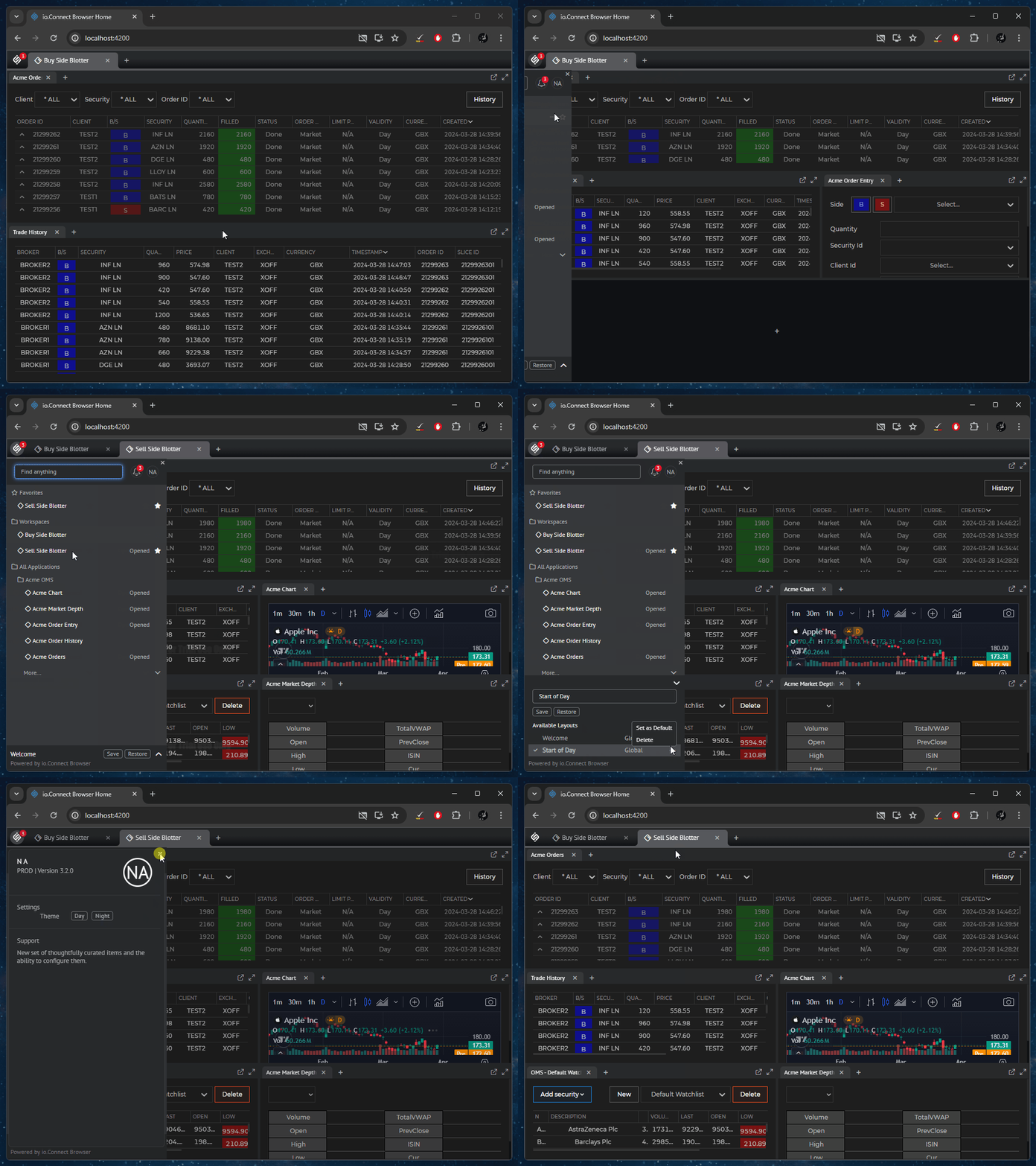
|
|
6
|
+
|
|
7
|
+
## Installation
|
|
8
|
+
|
|
9
|
+
To install the `@interopio/home-ui-react` library in your project, execute the following command:
|
|
10
|
+
|
|
11
|
+
```cmd
|
|
12
|
+
npm install @interopio/home-ui-react
|
|
13
|
+
```
|
|
14
|
+
|
|
15
|
+
## Usage
|
|
16
|
+
|
|
17
|
+
The following example demonstrates initializing the `@interopio/home-ui-react` library with basic configuration:
|
|
18
|
+
|
|
19
|
+
```javascript
|
|
20
|
+
import { IOConnectHome } from "@interopio/home-ui-react";
|
|
21
|
+
import "@interopio/workspaces-ui-react/dist/styles/workspaces.css";
|
|
22
|
+
import "@interopio/home-ui-react/src/index.css";
|
|
23
|
+
|
|
24
|
+
const getConfig = () => {
|
|
25
|
+
// Platform configuration.
|
|
26
|
+
const platformConfig = {
|
|
27
|
+
browserPlatform: {
|
|
28
|
+
factory: IOBrowserPlatform,
|
|
29
|
+
config: {
|
|
30
|
+
// Required license key.
|
|
31
|
+
licenseKey: "my-license-key",
|
|
32
|
+
// Workspaces App configuration.
|
|
33
|
+
workspaces: {
|
|
34
|
+
src: "/",
|
|
35
|
+
isFrame: true
|
|
36
|
+
}
|
|
37
|
+
}
|
|
38
|
+
}
|
|
39
|
+
};
|
|
40
|
+
|
|
41
|
+
return platformConfig;
|
|
42
|
+
};
|
|
43
|
+
|
|
44
|
+
// Configuration for the `<IOConnectHome />` component.
|
|
45
|
+
const config = {
|
|
46
|
+
// Retrieve the platform configuration.
|
|
47
|
+
getIOConnectConfig: getConfig
|
|
48
|
+
};
|
|
49
|
+
|
|
50
|
+
export function App() {
|
|
51
|
+
return <IOConnectHome config={config} />
|
|
52
|
+
};
|
|
53
|
+
|
|
54
|
+
export default App;
|
|
55
|
+
```
|
|
56
|
+
|
|
57
|
+
For more details on using the library, see the [official documentation](https://docs.interop.io/browser/capabilities/home-app/library-features/index.html) of **io.Connect Browser**.
|
|
@@ -1,3 +1,4 @@
|
|
|
1
1
|
export declare const SELECTED_LAYOUT_SESSION_STORAGE_KEY = "interopio_home_ui_selected_layout";
|
|
2
|
+
export declare const AUTH0_VALIDATION_ERROR_SESSION_STORAGE_KEY = "interopio_home_ui_auth0_validation_error";
|
|
2
3
|
export declare const FAVORITE_ENTITIES_LOCAL_STORAGE_KEY = "interopio_home_ui_favorite_entities";
|
|
3
4
|
export declare const USER_LOCAL_STORAGE_KEY = "interopio_home_ui_user";
|