@inkeep/create-agents 0.39.1 → 0.39.3
This diff represents the content of publicly available package versions that have been released to one of the supported registries. The information contained in this diff is provided for informational purposes only and reflects changes between package versions as they appear in their respective public registries.
- package/README.md +38 -117
- package/dist/__tests__/utils.test.js +20 -14
- package/package.json +2 -2
package/README.md
CHANGED
|
@@ -1,149 +1,70 @@
|
|
|
1
|
-
|
|
1
|
+
## Launch your first agent
|
|
2
2
|
|
|
3
|
-
|
|
3
|
+
### Prerequisites
|
|
4
4
|
|
|
5
|
-
|
|
5
|
+
Before getting started, ensure you have the following installed on your system:
|
|
6
6
|
|
|
7
|
-
|
|
8
|
-
|
|
9
|
-
|
|
7
|
+
- [Node.js](https://nodejs.org/en/download/) version 22 or higher
|
|
8
|
+
- [Docker](https://docs.docker.com/get-docker/)
|
|
9
|
+
- [pnpm](https://pnpm.io/installation) version 10 or higher
|
|
10
10
|
|
|
11
|
-
|
|
12
|
-
npx create-agents my-agent-directory
|
|
11
|
+
You can verify by running:
|
|
13
12
|
|
|
14
|
-
|
|
15
|
-
|
|
13
|
+
```bash
|
|
14
|
+
node --version
|
|
15
|
+
pnpm --version
|
|
16
|
+
docker --version
|
|
16
17
|
```
|
|
17
18
|
|
|
18
|
-
|
|
19
|
+
### Step 1: Create a new agents project
|
|
19
20
|
|
|
20
|
-
|
|
21
|
+
Run the quickstart script on a target folder:
|
|
21
22
|
|
|
22
|
-
### Interactive Mode
|
|
23
|
-
Run without arguments for an interactive setup experience:
|
|
24
23
|
```bash
|
|
25
|
-
npx create-agents
|
|
24
|
+
npx @inkeep/create-agents my-agents
|
|
26
25
|
```
|
|
27
26
|
|
|
28
|
-
|
|
29
|
-
- Directory name
|
|
30
|
-
- Tenant ID
|
|
31
|
-
- Project ID
|
|
32
|
-
- Anthropic API key (recommended)
|
|
33
|
-
- OpenAI API key (optional)
|
|
27
|
+
Navigate to the folder
|
|
34
28
|
|
|
35
|
-
### Direct Mode
|
|
36
|
-
Specify options directly:
|
|
37
29
|
```bash
|
|
38
|
-
|
|
30
|
+
cd my-agents
|
|
39
31
|
```
|
|
40
32
|
|
|
41
|
-
|
|
42
|
-
|
|
43
|
-
- `--project-id <project-id>` - Project identifier for your agents
|
|
44
|
-
- `--openai-key <openai-key>` - OpenAI API key (optional)
|
|
45
|
-
- `--anthropic-key <anthropic-key>` - Anthropic API key (recommended)
|
|
33
|
+
Open the folder using your coding editor. To open with Cursor, you can run `cursor .`
|
|
46
34
|
|
|
47
|
-
|
|
35
|
+
### Step 2: Run the setup script
|
|
48
36
|
|
|
49
|
-
|
|
37
|
+
Ensure Docker Desktop (or Docker daemon) is running before running the setup script.
|
|
50
38
|
|
|
39
|
+
```bash
|
|
40
|
+
pnpm setup-dev
|
|
51
41
|
```
|
|
52
|
-
my-agent-directory/
|
|
53
|
-
├── src/
|
|
54
|
-
│ └── <project-id>/ # Agent configurations
|
|
55
|
-
│ ├── hello-agent.ts # Example agent configuration
|
|
56
|
-
│ ├── inkeep.config.ts # Inkeep CLI configuration
|
|
57
|
-
│ └── .env # CLI environment variables
|
|
58
|
-
├── apps/
|
|
59
|
-
│ ├── manage-api/ # Manage API service
|
|
60
|
-
│ │ ├── src/index.ts # API server entry point
|
|
61
|
-
│ │ ├── package.json # Service dependencies
|
|
62
|
-
│ │ ├── tsconfig.json # TypeScript config
|
|
63
|
-
│ │ └── .env # Service environment
|
|
64
|
-
│ ├── run-api/ # Run API service
|
|
65
|
-
│ │ ├── src/index.ts # API server entry point
|
|
66
|
-
│ │ ├── package.json # Service dependencies
|
|
67
|
-
│ │ ├── tsconfig.json # TypeScript config
|
|
68
|
-
│ │ └── .env # Service environment
|
|
69
|
-
│ └── shared/ # Shared code
|
|
70
|
-
│ └── credential-stores.ts # Credential store config
|
|
71
|
-
├── package.json # Root package with workspaces
|
|
72
|
-
├── turbo.json # Turbo build configuration
|
|
73
|
-
├── drizzle.config.ts # Database configuration
|
|
74
|
-
├── biome.json # Linting and formatting
|
|
75
|
-
├── .env # Root environment variables
|
|
76
|
-
├── .env.example # Environment template
|
|
77
|
-
├── .gitignore # Git ignore rules
|
|
78
|
-
└── README.md # Project documentation
|
|
79
|
-
```
|
|
80
|
-
|
|
81
|
-
## Next Steps
|
|
82
|
-
|
|
83
|
-
1. **Navigate to your directory:**
|
|
84
|
-
```bash
|
|
85
|
-
cd my-agent-directory
|
|
86
|
-
```
|
|
87
|
-
|
|
88
|
-
2. **Start the services:**
|
|
89
|
-
```bash
|
|
90
|
-
# Start both Manage API and Run API
|
|
91
|
-
pnpm dev
|
|
92
|
-
```
|
|
93
|
-
|
|
94
|
-
3. **In a new terminal, start the Manage UI:**
|
|
95
|
-
```bash
|
|
96
|
-
inkeep dev
|
|
97
|
-
```
|
|
98
42
|
|
|
99
|
-
|
|
100
|
-
```bash
|
|
101
|
-
cd src/<project-id>/
|
|
102
|
-
pnpm inkeep push
|
|
103
|
-
```
|
|
43
|
+
Or if you are using a cloud database, you can skip the docker database startup by running:
|
|
104
44
|
|
|
105
|
-
|
|
106
|
-
|
|
107
|
-
|
|
108
|
-
|
|
109
|
-
- **Manage API** (Port 3002): Agent configuration and management
|
|
110
|
-
- **Run API** (Port 3003): Agent execution and chat processing
|
|
111
|
-
- **Manage UI** (Port 3000): Visual agent builder (via `npx inkeep dev`)
|
|
112
|
-
|
|
113
|
-
## Commands Available in Your Directory
|
|
114
|
-
|
|
115
|
-
- `pnpm dev` - Start both API services with hot reload
|
|
116
|
-
- `pnpm db:migrate` - Apply database migrations
|
|
117
|
-
- `inkeep dev` - Start the Manage UI
|
|
118
|
-
- `inkeep push` - Deploy project configurations
|
|
45
|
+
```bash
|
|
46
|
+
pnpm setup-dev --skip-docker
|
|
47
|
+
```
|
|
119
48
|
|
|
120
|
-
|
|
49
|
+
Make sure your DATABASE_URL environment variable is configured for your cloud database.
|
|
121
50
|
|
|
122
|
-
|
|
51
|
+
### Step 3: Launch the dev environment
|
|
123
52
|
|
|
124
|
-
### Root `.env` (shared configuration)
|
|
125
53
|
```bash
|
|
126
|
-
|
|
127
|
-
|
|
128
|
-
OPENAI_API_KEY=your-openai-key-here
|
|
54
|
+
pnpm dev
|
|
55
|
+
```
|
|
129
56
|
|
|
130
|
-
|
|
131
|
-
MANAGE_API_PORT=3002
|
|
132
|
-
RUN_API_PORT=3003
|
|
57
|
+
The Visual Builder will auto-open at http://localhost:3000.
|
|
133
58
|
|
|
134
|
-
|
|
135
|
-
DATABASE_URL=your-pg-database-url-here
|
|
59
|
+
### Step 4: Chat with your agent
|
|
136
60
|
|
|
137
|
-
|
|
138
|
-
ENVIRONMENT=development
|
|
139
|
-
LOG_LEVEL=debug
|
|
140
|
-
```
|
|
61
|
+
Navigate to the **Activities Planner** agent at http://localhost:3000 and ask about fun activities at a location of your choice:
|
|
141
62
|
|
|
142
|
-
|
|
143
|
-
- `apps/manage-api/.env` - Manage API configuration
|
|
144
|
-
- `apps/run-api/.env` - Run API configuration
|
|
145
|
-
- `src/<project-id>/.env` - CLI configuration
|
|
63
|
+
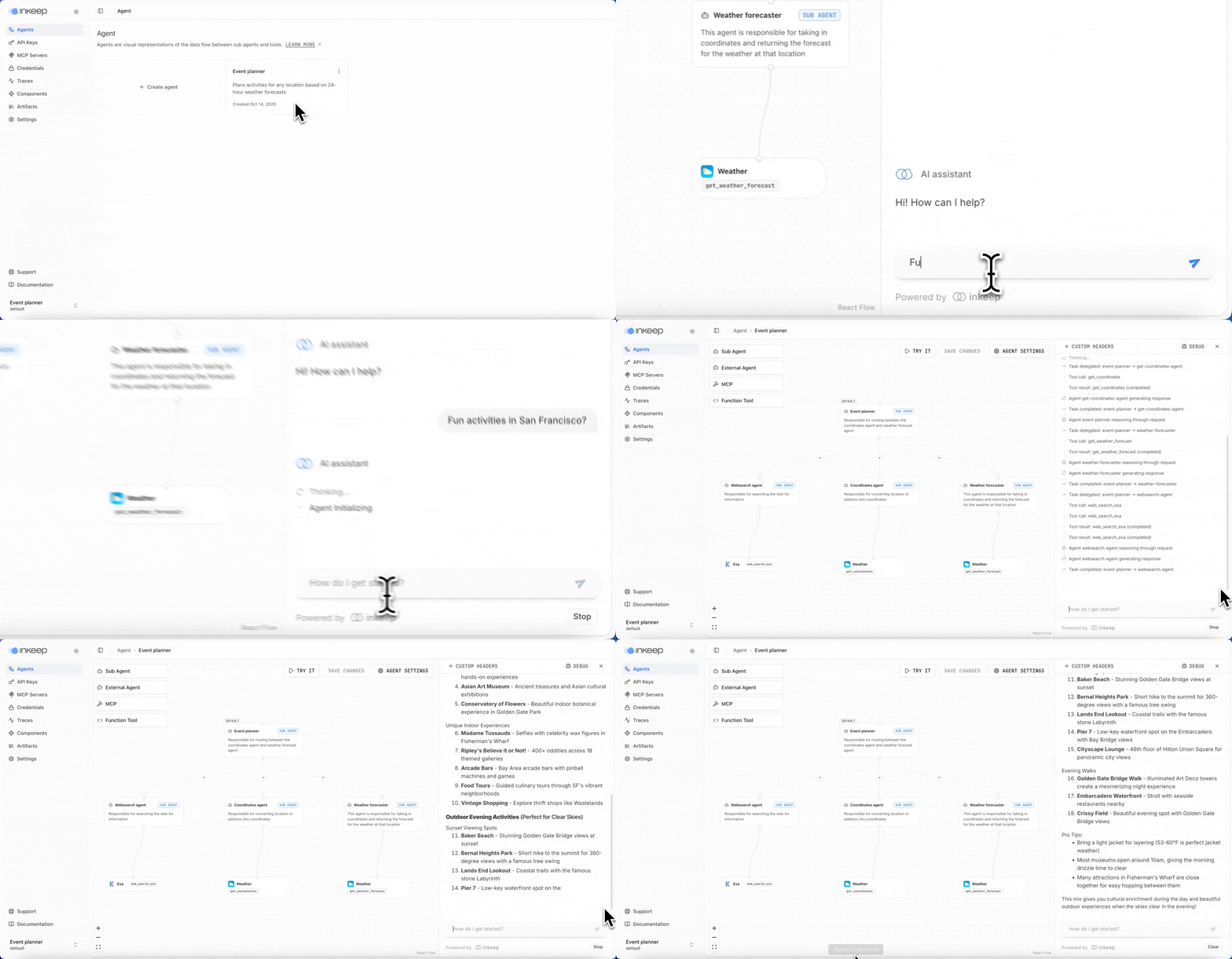
|
|
146
64
|
|
|
147
|
-
|
|
65
|
+
### Next steps
|
|
148
66
|
|
|
149
|
-
-
|
|
67
|
+
- Learn about [inkeep push / pull](https://docs.inkeep.com/get-started/push-pull) so you can go from `SDK -> Visual Builder` and `Visual Builder -> SDK`.
|
|
68
|
+
- Follow our [meeting prep agent tutorial](https://docs.inkeep.com/tutorials/agents/meeting-prep-assistant) to create an agent using the Visual Builder.
|
|
69
|
+
- Follow our [fact finder agent tutorial](https://docs.inkeep.com/tutorials/agents/fact-finder) to create an agent using the TypeScript SDK.
|
|
70
|
+
- Install the [Inkeep MCP](https://docs.inkeep.com/get-started/inkeep-mcp) in your IDE to enable AI coding assistants to "vibe code" your Inkeep agents.
|
|
@@ -3,12 +3,26 @@ import fs from 'fs-extra';
|
|
|
3
3
|
import { afterEach, beforeEach, describe, expect, it, vi } from 'vitest';
|
|
4
4
|
import { cloneTemplate, cloneTemplateLocal, getAvailableTemplates } from '../templates';
|
|
5
5
|
import { createAgents } from '../utils';
|
|
6
|
+
// Create the mock execAsync function that will be used by promisify - hoisted so it's available in mocks
|
|
7
|
+
const { mockExecAsync } = vi.hoisted(() => ({
|
|
8
|
+
mockExecAsync: vi.fn().mockResolvedValue({ stdout: '', stderr: '' }),
|
|
9
|
+
}));
|
|
6
10
|
// Mock all dependencies
|
|
7
11
|
vi.mock('fs-extra');
|
|
8
12
|
vi.mock('../templates');
|
|
9
13
|
vi.mock('@clack/prompts');
|
|
10
|
-
vi.mock('child_process')
|
|
11
|
-
vi.
|
|
14
|
+
vi.mock('node:child_process', () => ({
|
|
15
|
+
exec: vi.fn(),
|
|
16
|
+
spawn: vi.fn(() => ({
|
|
17
|
+
pid: 12345,
|
|
18
|
+
stdio: ['pipe', 'pipe', 'pipe'],
|
|
19
|
+
on: vi.fn(),
|
|
20
|
+
kill: vi.fn(),
|
|
21
|
+
})),
|
|
22
|
+
}));
|
|
23
|
+
vi.mock('node:util', () => ({
|
|
24
|
+
promisify: vi.fn(() => mockExecAsync),
|
|
25
|
+
}));
|
|
12
26
|
// Setup default mocks
|
|
13
27
|
const mockSpinner = {
|
|
14
28
|
start: vi.fn().mockReturnThis(),
|
|
@@ -20,6 +34,8 @@ describe('createAgents - Template and Project ID Logic', () => {
|
|
|
20
34
|
let processChdirSpy;
|
|
21
35
|
beforeEach(() => {
|
|
22
36
|
vi.clearAllMocks();
|
|
37
|
+
// Reset the mockExecAsync to default behavior
|
|
38
|
+
mockExecAsync.mockResolvedValue({ stdout: '', stderr: '' });
|
|
23
39
|
// Mock process methods
|
|
24
40
|
processExitSpy = vi.spyOn(process, 'exit').mockImplementation((code) => {
|
|
25
41
|
// Only throw for exit(0) which is expected behavior in some tests
|
|
@@ -58,18 +74,6 @@ describe('createAgents - Template and Project ID Logic', () => {
|
|
|
58
74
|
]);
|
|
59
75
|
vi.mocked(cloneTemplate).mockResolvedValue(undefined);
|
|
60
76
|
vi.mocked(cloneTemplateLocal).mockResolvedValue(undefined);
|
|
61
|
-
// Mock util.promisify to return a mock exec function
|
|
62
|
-
const mockExecAsync = vi.fn().mockResolvedValue({ stdout: '', stderr: '' });
|
|
63
|
-
const util = require('node:util');
|
|
64
|
-
util.promisify = vi.fn(() => mockExecAsync);
|
|
65
|
-
// Mock child_process.spawn
|
|
66
|
-
const childProcess = require('node:child_process');
|
|
67
|
-
childProcess.spawn = vi.fn(() => ({
|
|
68
|
-
pid: 12345,
|
|
69
|
-
stdio: ['pipe', 'pipe', 'pipe'],
|
|
70
|
-
on: vi.fn(),
|
|
71
|
-
kill: vi.fn(),
|
|
72
|
-
}));
|
|
73
77
|
});
|
|
74
78
|
afterEach(() => {
|
|
75
79
|
processExitSpy.mockRestore();
|
|
@@ -334,4 +338,6 @@ function setupDefaultMocks() {
|
|
|
334
338
|
vi.mocked(getAvailableTemplates).mockResolvedValue(['event-planner', 'chatbot', 'data-analysis']);
|
|
335
339
|
vi.mocked(cloneTemplate).mockResolvedValue(undefined);
|
|
336
340
|
vi.mocked(cloneTemplateLocal).mockResolvedValue(undefined);
|
|
341
|
+
// Reset mockExecAsync for tests that clear mocks
|
|
342
|
+
mockExecAsync.mockResolvedValue({ stdout: '', stderr: '' });
|
|
337
343
|
}
|
package/package.json
CHANGED
|
@@ -1,6 +1,6 @@
|
|
|
1
1
|
{
|
|
2
2
|
"name": "@inkeep/create-agents",
|
|
3
|
-
"version": "0.39.
|
|
3
|
+
"version": "0.39.3",
|
|
4
4
|
"description": "Create an Inkeep Agent Framework project",
|
|
5
5
|
"type": "module",
|
|
6
6
|
"bin": {
|
|
@@ -34,7 +34,7 @@
|
|
|
34
34
|
"drizzle-kit": "^0.31.5",
|
|
35
35
|
"fs-extra": "^11.0.0",
|
|
36
36
|
"picocolors": "^1.0.0",
|
|
37
|
-
"@inkeep/agents-core": "0.39.
|
|
37
|
+
"@inkeep/agents-core": "0.39.3"
|
|
38
38
|
},
|
|
39
39
|
"devDependencies": {
|
|
40
40
|
"@types/degit": "^2.8.6",
|