@imengyu/vue3-context-menu 1.0.9 → 1.1.0
This diff represents the content of publicly available package versions that have been released to one of the supported registries. The information contained in this diff is provided for informational purposes only and reflects changes between package versions as they appear in their respective public registries.
- package/README.CN.md +169 -27
- package/README.md +178 -23
- package/examples/App.vue +73 -272
- package/examples/main.js +2 -0
- package/examples/router/index.ts +41 -0
- package/examples/shims-vue.d.ts +6 -0
- package/examples/views/BasicComponent.vue +119 -0
- package/examples/views/BasicCustomize.vue +107 -0
- package/examples/views/BasicUseage.vue +208 -0
- package/examples/views/ComponentCustomize.vue +185 -0
- package/examples/views/Theme.vue +185 -0
- package/index.d.ts +43 -5
- package/lib/demo.html +1 -10
- package/lib/vue3-context-menu.common.js +2843 -1467
- package/lib/vue3-context-menu.common.js.map +1 -1
- package/lib/vue3-context-menu.css +1 -1
- package/lib/vue3-context-menu.umd.js +2843 -1458
- package/lib/vue3-context-menu.umd.js.map +1 -1
- package/lib/vue3-context-menu.umd.min.js +1 -1
- package/lib/vue3-context-menu.umd.min.js.map +1 -1
- package/package.json +16 -13
- package/src/ContextMenu.vue +106 -42
- package/src/ContextMenuDefine.ts +9 -9
- package/src/ContextMenuGroup.vue +98 -0
- package/src/ContextMenuInstance.ts +16 -7
- package/src/ContextMenuItem.vue +181 -0
- package/src/ContextMenuSperator.vue +11 -0
- package/src/ContextMenuUtils.ts +39 -0
- package/src/ContextSubMenu.vue +356 -300
package/README.CN.md
CHANGED
|
@@ -1,45 +1,54 @@
|
|
|
1
1
|
|
|
2
|
-
vue3-context-menu
|
|
3
|
-
|
|
2
|
+
# vue3-context-menu
|
|
3
|
+
|
|
4
4
|
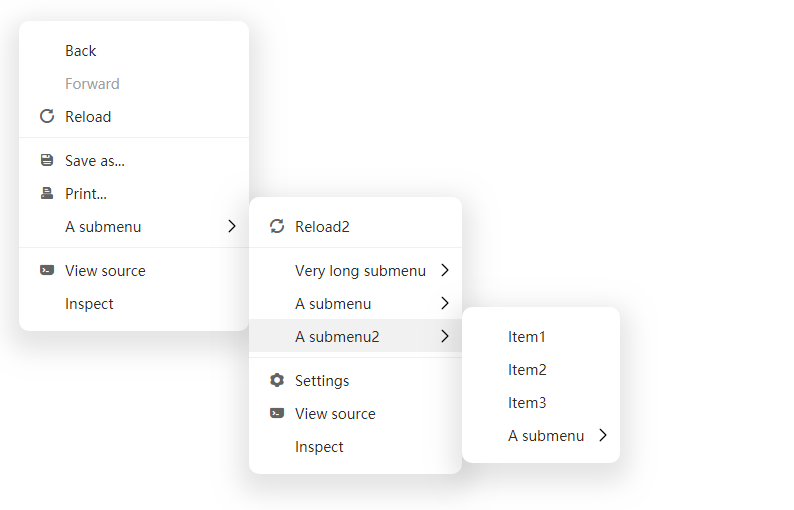
一个使用 Vue3 制作的简洁美观简单的右键菜单组件
|
|
5
5
|
|
|
6
6
|
|
|
7
7
|
|
|
8
8
|
---
|
|
9
9
|
|
|
10
|
-
[
|
|
10
|
+
[查看在线演示](https://imengyu.top/pages/vue3-context-menu-demo/)
|
|
11
11
|
|
|
12
|
-
|
|
12
|
+
## 特性
|
|
13
13
|
|
|
14
|
-
|
|
14
|
+
* 简洁易用,体积小
|
|
15
|
+
* 提供组件模式和函数模式,调用方便
|
|
16
|
+
* 可自定义
|
|
15
17
|
|
|
16
|
-
|
|
18
|
+
### ❗ 重大升级
|
|
19
|
+
|
|
20
|
+
版本 1.1.0 做了很大升级,可能会存在与之前版本不兼容的情况,如果出现问题,请安装 1.0.9 版本。
|
|
21
|
+
|
|
22
|
+
## 安装
|
|
23
|
+
|
|
24
|
+
```shell
|
|
17
25
|
npm install -save @imengyu/vue3-context-menu
|
|
18
26
|
```
|
|
19
27
|
|
|
20
|
-
|
|
28
|
+
## 使用
|
|
29
|
+
|
|
30
|
+
使用前建议您查看 [examples](examples/) 源码,它提供了多种详细的使用方法,可能会对您的使用很有帮助 😀.
|
|
31
|
+
|
|
32
|
+
### 导入组件
|
|
21
33
|
|
|
22
|
-
导入组件:
|
|
23
34
|
```js
|
|
24
35
|
import '@imengyu/vue3-context-menu/lib/vue3-context-menu.css'
|
|
25
36
|
import ContextMenu from '@imengyu/vue3-context-menu'
|
|
26
37
|
|
|
27
|
-
createApp(App)
|
|
28
|
-
.use(ContextMenu)
|
|
38
|
+
createApp(App).use(ContextMenu)
|
|
29
39
|
```
|
|
30
40
|
|
|
31
|
-
|
|
32
|
-
|
|
33
|
-
|
|
34
|
-
|
|
35
|
-
|
|
41
|
+
### 显示菜单
|
|
42
|
+
|
|
43
|
+
显示菜单有两种方式:
|
|
44
|
+
|
|
45
|
+
第一种是函数模式,可以使用 `this.$contextmenu` 通过菜单数据显示一个右键菜单:
|
|
36
46
|
|
|
37
|
-
显示菜单:
|
|
38
47
|
```js
|
|
39
48
|
onContextMenu(e : MouseEvent) {
|
|
40
49
|
//prevent the browser's default menu
|
|
41
50
|
e.preventDefault();
|
|
42
|
-
//shou
|
|
51
|
+
//shou your menu
|
|
43
52
|
this.$contextmenu({
|
|
44
53
|
x: e.x,
|
|
45
54
|
y: e.y,
|
|
@@ -63,16 +72,30 @@ onContextMenu(e : MouseEvent) {
|
|
|
63
72
|
}
|
|
64
73
|
```
|
|
65
74
|
|
|
66
|
-
|
|
75
|
+
第二种是组件模式,可以使用vue组件显示菜单:
|
|
67
76
|
|
|
68
77
|
```html
|
|
69
|
-
<context-menu
|
|
78
|
+
<context-menu
|
|
79
|
+
v-model:show="show"
|
|
80
|
+
:options="optionsComopnent"
|
|
81
|
+
>
|
|
82
|
+
<context-menu-item label="Simple item" @click="onMenuClick(1)" />
|
|
83
|
+
<context-menu-sperator /><!--use this to add sperator-->
|
|
84
|
+
<context-menu-group label="Menu with child">
|
|
85
|
+
<context-menu-item label="Item1" @click="onMenuClick(2)" />
|
|
86
|
+
<context-menu-item label="Item2" @click="onMenuClick(3)" />
|
|
87
|
+
<context-menu-group label="Child with v-for 50">
|
|
88
|
+
<context-menu-item v-for="index of 50" :key="index" :label="'Item3-'+index" @click="onLoopMenuClick(index)" />
|
|
89
|
+
</context-menu-group>
|
|
90
|
+
</context-menu-group>
|
|
91
|
+
</context-menu>
|
|
70
92
|
```
|
|
71
93
|
|
|
72
94
|
```js
|
|
73
95
|
data() {
|
|
74
96
|
return {
|
|
75
97
|
show: false,
|
|
98
|
+
//For $contextmenu
|
|
76
99
|
options: {
|
|
77
100
|
items:[
|
|
78
101
|
{
|
|
@@ -95,25 +118,33 @@ data() {
|
|
|
95
118
|
minWidth: 230,
|
|
96
119
|
x: 0,
|
|
97
120
|
y: 0
|
|
98
|
-
}
|
|
121
|
+
},
|
|
122
|
+
//For component
|
|
123
|
+
optionsComopnent: {
|
|
124
|
+
zIndex: 3,
|
|
125
|
+
minWidth: 230,
|
|
126
|
+
x: 500,
|
|
127
|
+
y: 200
|
|
128
|
+
},
|
|
99
129
|
}
|
|
100
130
|
},
|
|
101
131
|
methods: {
|
|
102
132
|
onButtonClick(e : MouseEvent) {
|
|
103
|
-
|
|
133
|
+
//显示组件菜单
|
|
104
134
|
this.show = true;
|
|
105
135
|
this.options.x = e.x;
|
|
106
136
|
this.options.y = e.y;
|
|
107
137
|
},
|
|
108
138
|
}
|
|
109
139
|
```
|
|
110
|
-
|
|
140
|
+
|
|
141
|
+
## 菜单图标
|
|
111
142
|
|
|
112
143
|
菜单组件不提供任何图标,如果您想添加图标,推荐使用 [iconfont](http://iconfont.cn) 图标库,导入后填写 MenuItem 的 icon 属性,即可在菜单项前面显示图标。
|
|
113
144
|
|
|
114
145
|
*默认使用 `<i>` 元素来显示图标。*
|
|
115
146
|
|
|
116
|
-
|
|
147
|
+
## 自定义样式
|
|
117
148
|
|
|
118
149
|
如果觉得菜单样式不好看,可以重写css样式,所有的css样式定义都在 `/src/ContextSubMenu.vue` 中。你可以将所有样式复制出来,按需修改,存放在你的文件中。然后在导入的地方覆盖默认样式:
|
|
119
150
|
|
|
@@ -122,7 +153,113 @@ import '@imengyu/vue3-context-menu/lib/vue3-context-menu.css'
|
|
|
122
153
|
import '你的样式css文件路径.css'
|
|
123
154
|
```
|
|
124
155
|
|
|
125
|
-
|
|
156
|
+
## 自定义渲染
|
|
157
|
+
|
|
158
|
+
菜单提供了一些插槽,允许你自定义渲染某些部分,具体您可以参考案例源码 [examples\views\BasicCustomize.vue](examples\views\BasicCustomize.vue) [examples\views\ComponentCustomize.vue](examples\views\ComponentCustomize.vue)。
|
|
159
|
+
|
|
160
|
+
## API 参考
|
|
161
|
+
|
|
162
|
+
### 组件模式:组件属性与说明
|
|
163
|
+
|
|
164
|
+
#### ContextMenu
|
|
165
|
+
|
|
166
|
+
菜单主体组件。
|
|
167
|
+
|
|
168
|
+
##### Props
|
|
169
|
+
|
|
170
|
+
| 属性 | 描述 | 类型 | 默认值 |
|
|
171
|
+
| :----: | :----: | :----: | :----: |
|
|
172
|
+
| show(v-model) | 是否显示菜单 | `boolean` | — |
|
|
173
|
+
| options | 菜单相关定义 | `MenuOptions` | — |
|
|
174
|
+
|
|
175
|
+
##### Events
|
|
176
|
+
|
|
177
|
+
| 事件名 | 描述 | 参数 |
|
|
178
|
+
| :----: | :----: | :----: |
|
|
179
|
+
| close | 菜单关闭时触发此事件 | - |
|
|
180
|
+
|
|
181
|
+
##### Slots
|
|
182
|
+
|
|
183
|
+
| 插槽名 | 描述 | 参数 |
|
|
184
|
+
| :----: | :----: | :----: |
|
|
185
|
+
| itemRender | 当前菜单全局条目渲染插槽 | MenuItemRenderData |
|
|
186
|
+
| itemIconRender | 当前菜单全局图标渲染插槽 | MenuItemRenderData |
|
|
187
|
+
| itemLabelRender | 当前菜单全局文字渲染插槽 | MenuItemRenderData |
|
|
188
|
+
| itemRightArrowRender | 当前菜单全局右侧箭头渲染插槽 | MenuItemRenderData |
|
|
189
|
+
| speratorRender | 当前菜单分隔符渲染插槽 | - |
|
|
190
|
+
|
|
191
|
+
##### MenuItemRenderData 结构
|
|
192
|
+
|
|
193
|
+
| 属性名 | 描述 | 类型 |
|
|
194
|
+
| :----: | :----: | :----: |
|
|
195
|
+
| theme | 菜单主题 | `'light' 'dark'` |
|
|
196
|
+
| onClick | 自定义元素的点击事件回调,它用于菜单内部事件处理,当自定义渲染时,请回调此函数,否则菜单无法正常响应事件 | - |
|
|
197
|
+
| onMouseEnter | 自定义元素的鼠标移入事件回调,它用于菜单内部事件处理,当自定义渲染时,请回调此函数,否则菜单无法正常响应事件 | - |
|
|
198
|
+
| ... | 其他参数与 `MenuItem` 一致 | - |
|
|
199
|
+
|
|
200
|
+
#### ContextMenuItem
|
|
201
|
+
|
|
202
|
+
菜单条目组件。
|
|
203
|
+
|
|
204
|
+
##### Props
|
|
205
|
+
|
|
206
|
+
| 属性 | 描述 | 类型 | 默认值 |
|
|
207
|
+
| :----: | :----: | :----: | :----: |
|
|
208
|
+
| label | 菜单项名称 | `string` | — |
|
|
209
|
+
| icon | 菜单项图标 | `string` | — |
|
|
210
|
+
| disabled | 是否禁用菜单项 | `boolean` | `false` |
|
|
211
|
+
| clickableWhenHasChildren | 指定当本菜单下有子菜单时,点击当前菜单是否触发点击事件 | `boolean` | `false` |
|
|
212
|
+
| clickClose | 点击当前菜单项是否自动关闭整个菜单 | `boolean` | `true` |
|
|
213
|
+
| divided | 是否显示分割线 | `boolean` | `false` |
|
|
214
|
+
| customClass | 自定义子菜单class | `string` | — |
|
|
215
|
+
| onClick | 菜单项点击事件 | `Function()` | — |
|
|
216
|
+
|
|
217
|
+
##### Slots
|
|
218
|
+
|
|
219
|
+
| 插槽名 | 描述 | 参数 |
|
|
220
|
+
| :----: | :----: | :----: |
|
|
221
|
+
| default | 当前条目整体渲染插槽 | - |
|
|
222
|
+
| icon | 图标渲染插槽 | - |
|
|
223
|
+
| label | 文字渲染插槽 | - |
|
|
224
|
+
| rightArrow | 右侧箭头渲染插槽 | - |
|
|
225
|
+
|
|
226
|
+
##### Click
|
|
227
|
+
|
|
228
|
+
| 事件名 | 描述 | 参数 |
|
|
229
|
+
| :----: | :----: | :----: |
|
|
230
|
+
| click | 点击菜单时触发此事件 | - |
|
|
231
|
+
|
|
232
|
+
#### ContextMenuGroup
|
|
233
|
+
|
|
234
|
+
子菜单组件。
|
|
235
|
+
|
|
236
|
+
##### Props
|
|
237
|
+
|
|
238
|
+
| 属性 | 描述 | 类型 | 默认值 |
|
|
239
|
+
| :----: | :----: | :----: | :----: |
|
|
240
|
+
| label | 菜单项名称 | `string` | — |
|
|
241
|
+
| icon | 菜单项图标 | `string` | — |
|
|
242
|
+
| disabled | 是否禁用菜单项 | `boolean` | `false` |
|
|
243
|
+
| clickableWhenHasChildren | 指定当本菜单下有子菜单时,点击当前菜单是否触发点击事件 | `boolean` | `false` |
|
|
244
|
+
| adjustSubMenuPosition | 是否在子菜单超出屏幕后进行自动调整 | `boolean` | `true` |
|
|
245
|
+
| clickClose | 点击当前菜单项是否自动关闭整个菜单 | `boolean` | `true` |
|
|
246
|
+
| divided | 是否显示分割线 | `boolean` | `false` |
|
|
247
|
+
| customClass | 自定义子菜单class | `string` | — |
|
|
248
|
+
| minWidth | 子菜单最小宽度 | `number` | `100` |
|
|
249
|
+
| maxWidth | 子菜单最大宽度 | `number` | `600` |
|
|
250
|
+
| onClick | 菜单项点击事件 | `Function()` | — |
|
|
251
|
+
|
|
252
|
+
##### Slots
|
|
253
|
+
|
|
254
|
+
| 插槽名 | 描述 | 参数 |
|
|
255
|
+
| :----: | :----: | :----: |
|
|
256
|
+
| default | 子菜单渲染插槽 | - |
|
|
257
|
+
|
|
258
|
+
#### ContextMenuSperator
|
|
259
|
+
|
|
260
|
+
菜单分隔符组件。
|
|
261
|
+
|
|
262
|
+
### 函数模式:参数说明
|
|
126
263
|
|
|
127
264
|
#### MenuOptions
|
|
128
265
|
|
|
@@ -138,17 +275,22 @@ import '你的样式css文件路径.css'
|
|
|
138
275
|
| customClass | 自定义菜单类名 | `string` | — | — |
|
|
139
276
|
| minWidth | 主菜单最小宽度 | `number` | — | `100` |
|
|
140
277
|
| maxWidth | 主菜单最大宽度 | `number` | — | `600` |
|
|
278
|
+
| theme | 菜单的主题 | `string` | `'light' 'dark'` | `light` |
|
|
141
279
|
|
|
142
280
|
#### MenuItem
|
|
143
281
|
|
|
144
282
|
| 属性 | 描述 | 类型 | 可选值 | 默认值 |
|
|
145
283
|
| :----: | :----: | :----: | :----: | :----: |
|
|
146
|
-
| label |
|
|
147
|
-
| icon |
|
|
284
|
+
| label | 菜单项名称,可传入VNode | `string|VNode|((label: string) => VNode)` | — | — |
|
|
285
|
+
| icon | 菜单项图标,可传入VNode | `string|VNode|((icon: string) => VNode)` | — | — |
|
|
148
286
|
| disabled | 是否禁用菜单项 | `boolean` | — | `false` |
|
|
287
|
+
| adjustSubMenuPosition | 是否在子菜单超出屏幕后进行自动调整 | `boolean` | — | `true` |
|
|
288
|
+
| clickableWhenHasChildren | 指定当本菜单下有子菜单时,点击当前菜单是否触发点击事件 | `boolean` | — | `false` |
|
|
289
|
+
| clickClose | 点击当前菜单项是否自动关闭整个菜单 | `boolean` | — | `true` |
|
|
149
290
|
| divided | 是否显示分割线 | `boolean` | — | `false` |
|
|
150
291
|
| customClass | 自定义子菜单class | `string` | — | — |
|
|
151
292
|
| minWidth | 子菜单最小宽度 | `number` | — | `100` |
|
|
152
293
|
| maxWidth | 子菜单最大宽度 | `number` | — | `600` |
|
|
153
294
|
| onClick | 菜单项点击事件 | `Function()` | — | — |
|
|
154
|
-
|
|
|
295
|
+
| customRender | 菜单项整体自定义渲染回调 | `VNode|((item: MenuItemRenderData) => VNode)` | — | — |
|
|
296
|
+
| children | 子菜单结构信息 | `MenuItem[]` | — | — |
|
package/README.md
CHANGED
|
@@ -9,9 +9,17 @@ A context menu component for Vue3
|
|
|
9
9
|
|
|
10
10
|
---
|
|
11
11
|
|
|
12
|
-
[View Demo](https://imengyu.top/pages/vue3-context-menu-demo/)
|
|
12
|
+
[Click here View online Demo](https://imengyu.top/pages/vue3-context-menu-demo/)
|
|
13
13
|
|
|
14
|
-
|
|
14
|
+
## features
|
|
15
|
+
|
|
16
|
+
* Simple and easy to use, small size
|
|
17
|
+
* Provide component mode and function mode
|
|
18
|
+
* Customizable
|
|
19
|
+
|
|
20
|
+
### ❗ Upgrade Note
|
|
21
|
+
|
|
22
|
+
Version 1.1.0 has been greatly upgraded and may be incompatible with the previous version. If there is a problem, please install version 1.0.9.
|
|
15
23
|
|
|
16
24
|
### Install
|
|
17
25
|
|
|
@@ -19,30 +27,30 @@ A context menu component for Vue3
|
|
|
19
27
|
npm install -save @imengyu/vue3-context-menu
|
|
20
28
|
```
|
|
21
29
|
|
|
22
|
-
|
|
30
|
+
## Useage
|
|
31
|
+
|
|
32
|
+
It is recommended that you check the [examples source code](examples/) before use. It provides a variety of detailed usage methods, which may be very helpful to you. 😀
|
|
33
|
+
|
|
34
|
+
### Import
|
|
23
35
|
|
|
24
|
-
Import vue3-context-menu in main.js:
|
|
25
36
|
```js
|
|
26
37
|
import '@imengyu/vue3-context-menu/lib/vue3-context-menu.css'
|
|
27
38
|
import ContextMenu from '@imengyu/vue3-context-menu'
|
|
28
39
|
|
|
29
|
-
createApp(App)
|
|
30
|
-
.use(ContextMenu)
|
|
40
|
+
createApp(App).use(ContextMenu)
|
|
31
41
|
```
|
|
32
42
|
|
|
33
|
-
|
|
34
|
-
|
|
35
|
-
|
|
36
|
-
|
|
37
|
-
|
|
38
|
-
```
|
|
43
|
+
### Show menu
|
|
44
|
+
|
|
45
|
+
There are two ways to display menus:
|
|
46
|
+
|
|
47
|
+
The first is the function mode. You can use `this.$contextmenu` displays a menu through menu data:
|
|
39
48
|
|
|
40
|
-
Then show your menu:
|
|
41
49
|
```js
|
|
42
50
|
onContextMenu(e : MouseEvent) {
|
|
43
51
|
//prevent the browser's default menu
|
|
44
52
|
e.preventDefault();
|
|
45
|
-
//shou
|
|
53
|
+
//shou your menu
|
|
46
54
|
this.$contextmenu({
|
|
47
55
|
x: e.x,
|
|
48
56
|
y: e.y,
|
|
@@ -66,16 +74,30 @@ onContextMenu(e : MouseEvent) {
|
|
|
66
74
|
}
|
|
67
75
|
```
|
|
68
76
|
|
|
69
|
-
|
|
77
|
+
The second is the component mode. You can use the component and template to display the menu:
|
|
70
78
|
|
|
71
79
|
```html
|
|
72
|
-
<context-menu
|
|
80
|
+
<context-menu
|
|
81
|
+
v-model:show="show"
|
|
82
|
+
:options="optionsComopnent"
|
|
83
|
+
>
|
|
84
|
+
<context-menu-item label="Simple item" @click="onMenuClick(1)" />
|
|
85
|
+
<context-menu-sperator /><!--use this to add sperator-->
|
|
86
|
+
<context-menu-group label="Menu with child">
|
|
87
|
+
<context-menu-item label="Item1" @click="onMenuClick(2)" />
|
|
88
|
+
<context-menu-item label="Item2" @click="onMenuClick(3)" />
|
|
89
|
+
<context-menu-group label="Child with v-for 50">
|
|
90
|
+
<context-menu-item v-for="index of 50" :key="index" :label="'Item3-'+index" @click="onLoopMenuClick(index)" />
|
|
91
|
+
</context-menu-group>
|
|
92
|
+
</context-menu-group>
|
|
93
|
+
</context-menu>
|
|
73
94
|
```
|
|
74
95
|
|
|
75
96
|
```js
|
|
76
97
|
data() {
|
|
77
98
|
return {
|
|
78
99
|
show: false,
|
|
100
|
+
//For $contextmenu
|
|
79
101
|
options: {
|
|
80
102
|
items:[
|
|
81
103
|
{
|
|
@@ -98,12 +120,19 @@ data() {
|
|
|
98
120
|
minWidth: 230,
|
|
99
121
|
x: 0,
|
|
100
122
|
y: 0
|
|
101
|
-
}
|
|
123
|
+
},
|
|
124
|
+
//For component
|
|
125
|
+
optionsComopnent: {
|
|
126
|
+
zIndex: 3,
|
|
127
|
+
minWidth: 230,
|
|
128
|
+
x: 500,
|
|
129
|
+
y: 200
|
|
130
|
+
},
|
|
102
131
|
}
|
|
103
132
|
},
|
|
104
133
|
methods: {
|
|
105
134
|
onButtonClick(e : MouseEvent) {
|
|
106
|
-
|
|
135
|
+
//显示组件菜单
|
|
107
136
|
this.show = true;
|
|
108
137
|
this.options.x = e.x;
|
|
109
138
|
this.options.y = e.y;
|
|
@@ -111,11 +140,132 @@ methods: {
|
|
|
111
140
|
}
|
|
112
141
|
```
|
|
113
142
|
|
|
114
|
-
|
|
143
|
+
## Menu icon
|
|
144
|
+
|
|
145
|
+
The menu component does not provide any icons. If you want to add an icon, it is recommended to use [iconfont](http://iconfont.cn) Icon library. After importing, fill in the `icon` attribute of MenuItem to display the icon in front of the menu item.
|
|
146
|
+
|
|
147
|
+
*By default, the `<i>` element is used to display icons*
|
|
148
|
+
|
|
149
|
+
## Custom style
|
|
150
|
+
|
|
151
|
+
If you think the menu style is not good-looking, you can rewrite the CSS style. All CSS style definitions are in `/src/ContextSubMenu.vue`. You can copy all the styles, modify them as needed, and store them in your file. Then overwrite the default style where you import:
|
|
152
|
+
|
|
153
|
+
```js
|
|
154
|
+
import '@imengyu/vue3-context-menu/lib/vue3-context-menu.css'
|
|
155
|
+
import 'your-style-file-path.css'
|
|
156
|
+
```
|
|
157
|
+
|
|
158
|
+
## Customize
|
|
159
|
+
|
|
160
|
+
The menu provides some slots that allow you to customize some parts of the rendering. For details, please refer to the example source code [examples\views\BasicCustomize.vue](examples\views\BasicCustomize.vue) [examples\views\ComponentCustomize.vue](examples\views\ComponentCustomize.vue)。
|
|
161
|
+
|
|
162
|
+
## API reference
|
|
163
|
+
|
|
164
|
+
### Component mode: component properties and description
|
|
165
|
+
|
|
166
|
+
#### ContextMenu
|
|
167
|
+
|
|
168
|
+
Menu component.
|
|
169
|
+
|
|
170
|
+
##### Props
|
|
171
|
+
|
|
172
|
+
| Attribute | Description | Type | Default |
|
|
173
|
+
| :----: | :----: | :----: | :----: |
|
|
174
|
+
| show(v-model) | Controls whether the menu is displayed | `boolean` | — |
|
|
175
|
+
| options | Menu options, See [MenuOptions](#MenuOptions) | `MenuOptions` | — |
|
|
176
|
+
|
|
177
|
+
##### Events
|
|
178
|
+
|
|
179
|
+
| Event name | Description | Arguments |
|
|
180
|
+
| :----: | :----: | :----: |
|
|
181
|
+
| close | This event is triggered when the menu is closed | - |
|
|
182
|
+
|
|
183
|
+
##### Slots
|
|
184
|
+
|
|
185
|
+
| Slot name | Description | Arguments |
|
|
186
|
+
| :----: | :----: | :----: |
|
|
187
|
+
| itemRender | Global menu item render slot | MenuItemRenderData |
|
|
188
|
+
| itemIconRender | Global menu item icon render slot | MenuItemRenderData |
|
|
189
|
+
| itemLabelRender | Global menu item label render slot | MenuItemRenderData |
|
|
190
|
+
| itemRightArrowRender | Global menu item right arrow render slot | MenuItemRenderData |
|
|
191
|
+
| speratorRender | Global menu sperator render slot | - |
|
|
192
|
+
|
|
193
|
+
##### `MenuItemRenderData`
|
|
194
|
+
|
|
195
|
+
| Property | Description | Type |
|
|
196
|
+
| :----: | :----: | :----: |
|
|
197
|
+
| theme | Menu theme | `'light' 'dark'` |
|
|
198
|
+
| onClick | Define the click event callback of the element, which is used for the internal event processing of the menu. When rendering item with slot, please call this function back, otherwise the menu cannot respond to the event normally | - |
|
|
199
|
+
| onMouseEnter | Mouse in event callback of custom element. When rendering item with slot, please call this function back, otherwise the menu cannot respond to the event normally | - |
|
|
200
|
+
| ... | Other arguments are same with `MenuItem` | - |
|
|
201
|
+
|
|
202
|
+
#### ContextMenuItem
|
|
203
|
+
|
|
204
|
+
Menu item component.
|
|
205
|
+
|
|
206
|
+
##### Props
|
|
207
|
+
|
|
208
|
+
| Property | Description | Type | Default |
|
|
209
|
+
| :----: | :----: | :----: | :----: |
|
|
210
|
+
| label | The label of menu. | `string` | — |
|
|
211
|
+
| icon | The icon for menu item. | `string` | — |
|
|
212
|
+
| disabled | Disable menu item? | `boolean` | `false` |
|
|
213
|
+
| clickableWhenHasChildren | When there are subitems in this item, is it allowed to trigger its own click event? | `boolean` | `false` |
|
|
214
|
+
| clickClose | Should close menu when Click this menu item ? | `boolean` | `true` |
|
|
215
|
+
| divided | Is this menu item separated from the menu item below? | `boolean` | `false` |
|
|
216
|
+
| customClass | Custom submenu class. | `string` | — |
|
|
217
|
+
| onClick | Menu item click event handler. | `Function()` | — |
|
|
218
|
+
|
|
219
|
+
##### Slots
|
|
220
|
+
|
|
221
|
+
| Slot name | Description | Arguments |
|
|
222
|
+
| :----: | :----: | :----: |
|
|
223
|
+
| default | Rendering slot for the current menu | - |
|
|
224
|
+
| icon | Icon rendering slot | - |
|
|
225
|
+
| label | Label rendering slot | - |
|
|
226
|
+
| rightArrow | Right Arrow rendering slot | - |
|
|
227
|
+
|
|
228
|
+
##### Click
|
|
229
|
+
|
|
230
|
+
| Event name | Description | Arguments |
|
|
231
|
+
| :----: | :----: | :----: |
|
|
232
|
+
| click | This event is triggered when the click this menu item | - |
|
|
233
|
+
|
|
234
|
+
#### ContextMenuGroup
|
|
235
|
+
|
|
236
|
+
Submenu component.
|
|
237
|
+
|
|
238
|
+
##### Props
|
|
239
|
+
|
|
240
|
+
| Property | Description | Type | Default |
|
|
241
|
+
| :----: | :----: | :----: | :----: |
|
|
242
|
+
| label | The label of menu. | `string` | — |
|
|
243
|
+
| icon | The icon for menu item. | `string` | — |
|
|
244
|
+
| disabled | Disable menu item? | `boolean` | `false` |
|
|
245
|
+
| clickableWhenHasChildren | When there are subitems in this item, is it allowed to trigger its own click event? | `boolean` | `false` |
|
|
246
|
+
| adjustSubMenuPosition | Specifies should submenu adjust it position when the menu exceeds the screen.| `boolean` | `true` |
|
|
247
|
+
| clickClose | Should close menu when Click this menu item ? | `boolean` | `true` |
|
|
248
|
+
| divided | Is this menu item separated from the menu item below? | `boolean` | `false` |
|
|
249
|
+
| customClass | Custom submenu class. | `string` | — |
|
|
250
|
+
| minWidth | Submenu minimum width (in pixels). | `number` | `100` |
|
|
251
|
+
| maxWidth | Submenu maximum width (in pixels). | `number` | `600` |
|
|
252
|
+
| onClick | Menu item click event handler. | `Function()` | — |
|
|
253
|
+
|
|
254
|
+
##### Slots
|
|
255
|
+
|
|
256
|
+
| Slot name | Description | Arguments |
|
|
257
|
+
| :----: | :----: | :----: |
|
|
258
|
+
| default | Submenu render slot | - |
|
|
259
|
+
|
|
260
|
+
#### ContextMenuSperator
|
|
261
|
+
|
|
262
|
+
Menu separator component.
|
|
263
|
+
|
|
264
|
+
### Function mode
|
|
115
265
|
|
|
116
266
|
#### MenuOptions
|
|
117
267
|
|
|
118
|
-
|
|
|
268
|
+
| Property | Description | Type | Optional value | Default |
|
|
119
269
|
| :----: | :----: | :----: | :----: | :----: |
|
|
120
270
|
| items | The items for this menu. | `MenuItem[]` | — | — |
|
|
121
271
|
| x | Menu display x position. | `number` | — | `0` |
|
|
@@ -127,17 +277,22 @@ methods: {
|
|
|
127
277
|
| customClass | Custom menu class. | `string` | — | — |
|
|
128
278
|
| minWidth | Minimum width of main menu (in pixels) | `number` | — | `100` |
|
|
129
279
|
| maxWidth | Maximum width of main menu (in pixels) | `number` | — | `600` |
|
|
280
|
+
| theme | Menu theme | `string` | `'light' 'dark'` | `light` |
|
|
130
281
|
|
|
131
282
|
#### MenuItem
|
|
132
283
|
|
|
133
|
-
|
|
|
284
|
+
| Property | Description | Type | Optional value | Default |
|
|
134
285
|
| :----: | :----: | :----: | :----: | :----: |
|
|
135
|
-
| label | The label of menu. | `string` | — | — |
|
|
136
|
-
| icon | The icon for menu item. | `string` | — | — |
|
|
286
|
+
| label | The label of menu. | `string|VNode|((label: string) => VNode)` | — | — |
|
|
287
|
+
| icon | The icon for menu item. | `string|VNode|((icon: string) => VNode)` | — | — |
|
|
137
288
|
| disabled | Disable menu item? | `boolean` | — | `false` |
|
|
289
|
+
| adjustSubMenuPosition | Specifies should submenu adjust it position when the menu exceeds the screen. | `boolean` | — | `true` |
|
|
290
|
+
| clickableWhenHasChildren | When there are subitems in this item, is it allowed to trigger its own click event? | `boolean` | — | `false` |
|
|
291
|
+
| clickClose | Should close menu when Click this menu item ? | `boolean` | — | `true` |
|
|
138
292
|
| divided | Is this menu item separated from the menu item below? | `boolean` | — | `false` |
|
|
139
293
|
| customClass | Custom submenu class. | `string` | — | — |
|
|
140
294
|
| minWidth | Submenu minimum width (in pixels). | `number` | — | `100` |
|
|
141
295
|
| maxWidth | Submenu maximum width (in pixels). | `number` | — | `600` |
|
|
142
296
|
| onClick | Menu item click event handler. | `Function()` | — | — |
|
|
297
|
+
| customRender | A custom render callback that allows you to customize the rendering of the current item. | `VNode|((item: MenuItemRenderData) => VNode)` | — | — |
|
|
143
298
|
| children | Submenu items. | `MenuItem[]` | — | — |
|