@imengyu/vue3-context-menu 1.0.5 → 1.0.9
This diff represents the content of publicly available package versions that have been released to one of the supported registries. The information contained in this diff is provided for informational purposes only and reflects changes between package versions as they appear in their respective public registries.
- package/LICENSE +1 -1
- package/README.CN.md +16 -1
- package/README.md +143 -142
- package/examples/App.vue +317 -301
- package/examples/css/iconfont.css +43 -43
- package/index.d.ts +5 -0
- package/lib/demo.html +10 -0
- package/lib/vue3-context-menu.common.js +2031 -0
- package/lib/vue3-context-menu.common.js.map +1 -0
- package/lib/vue3-context-menu.css +1 -0
- package/lib/vue3-context-menu.umd.js +2041 -0
- package/lib/vue3-context-menu.umd.js.map +1 -0
- package/lib/vue3-context-menu.umd.min.js +2 -0
- package/lib/vue3-context-menu.umd.min.js.map +1 -0
- package/package.json +59 -58
- package/src/ContextMenu.vue +36 -48
- package/src/ContextMenuInstance.ts +5 -3
- package/src/ContextSubMenu.vue +41 -32
- package/index.js +0 -3
- package/src/ContextMenuRightArrow.svg +0 -1
package/LICENSE
CHANGED
|
@@ -18,4 +18,4 @@ FITNESS FOR A PARTICULAR PURPOSE AND NONINFRINGEMENT. IN NO EVENT SHALL THE
|
|
|
18
18
|
AUTHORS OR COPYRIGHT HOLDERS BE LIABLE FOR ANY CLAIM, DAMAGES OR OTHER
|
|
19
19
|
LIABILITY, WHETHER IN AN ACTION OF CONTRACT, TORT OR OTHERWISE, ARISING FROM,
|
|
20
20
|
OUT OF OR IN CONNECTION WITH THE SOFTWARE OR THE USE OR OTHER DEALINGS IN THE
|
|
21
|
-
SOFTWARE.
|
|
21
|
+
SOFTWARE.
|
package/README.CN.md
CHANGED
|
@@ -1,7 +1,7 @@
|
|
|
1
1
|
|
|
2
2
|
vue3-context-menu
|
|
3
3
|
---
|
|
4
|
-
一个使用 Vue3
|
|
4
|
+
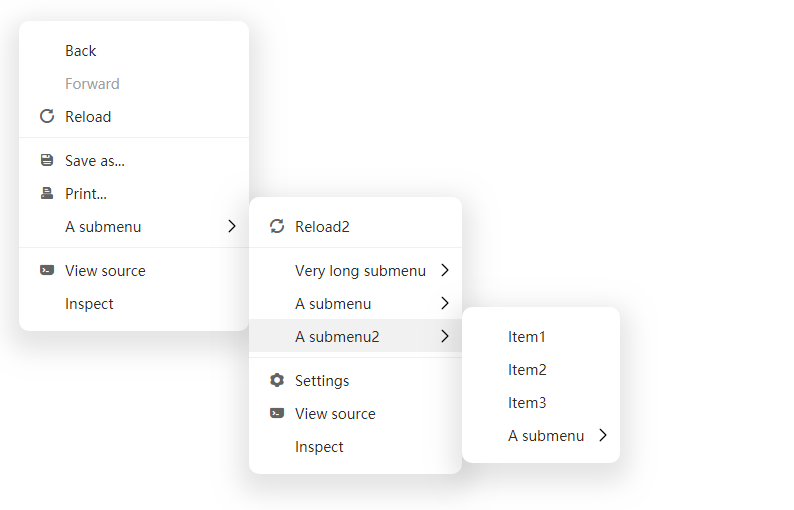
一个使用 Vue3 制作的简洁美观简单的右键菜单组件
|
|
5
5
|
|
|
6
6
|
|
|
7
7
|
|
|
@@ -21,6 +21,7 @@ npm install -save @imengyu/vue3-context-menu
|
|
|
21
21
|
|
|
22
22
|
导入组件:
|
|
23
23
|
```js
|
|
24
|
+
import '@imengyu/vue3-context-menu/lib/vue3-context-menu.css'
|
|
24
25
|
import ContextMenu from '@imengyu/vue3-context-menu'
|
|
25
26
|
|
|
26
27
|
createApp(App)
|
|
@@ -106,6 +107,20 @@ methods: {
|
|
|
106
107
|
},
|
|
107
108
|
}
|
|
108
109
|
```
|
|
110
|
+
### 菜单图标
|
|
111
|
+
|
|
112
|
+
菜单组件不提供任何图标,如果您想添加图标,推荐使用 [iconfont](http://iconfont.cn) 图标库,导入后填写 MenuItem 的 icon 属性,即可在菜单项前面显示图标。
|
|
113
|
+
|
|
114
|
+
*默认使用 `<i>` 元素来显示图标。*
|
|
115
|
+
|
|
116
|
+
### 自定义样式
|
|
117
|
+
|
|
118
|
+
如果觉得菜单样式不好看,可以重写css样式,所有的css样式定义都在 `/src/ContextSubMenu.vue` 中。你可以将所有样式复制出来,按需修改,存放在你的文件中。然后在导入的地方覆盖默认样式:
|
|
119
|
+
|
|
120
|
+
```js
|
|
121
|
+
import '@imengyu/vue3-context-menu/lib/vue3-context-menu.css'
|
|
122
|
+
import '你的样式css文件路径.css'
|
|
123
|
+
```
|
|
109
124
|
|
|
110
125
|
### 参数说明
|
|
111
126
|
|
package/README.md
CHANGED
|
@@ -1,142 +1,143 @@
|
|
|
1
|
-
|
|
2
|
-
vue3-context-menu
|
|
3
|
-
---
|
|
4
|
-
A context menu component for Vue3
|
|
5
|
-
|
|
6
|
-

|
|
7
|
-
|
|
8
|
-
[中文说明](https://github.com/imengyu/vue3-context-menu/blob/main/README.CN.md)
|
|
9
|
-
|
|
10
|
-
---
|
|
11
|
-
|
|
12
|
-
[View Demo](https://imengyu.top/pages/vue3-context-menu-demo/)
|
|
13
|
-
|
|
14
|
-
---
|
|
15
|
-
|
|
16
|
-
### Install
|
|
17
|
-
|
|
18
|
-
```
|
|
19
|
-
npm install -save @imengyu/vue3-context-menu
|
|
20
|
-
```
|
|
21
|
-
|
|
22
|
-
### Useage
|
|
23
|
-
|
|
24
|
-
Import vue3-context-menu in main.js:
|
|
25
|
-
```js
|
|
26
|
-
import
|
|
27
|
-
|
|
28
|
-
|
|
29
|
-
|
|
30
|
-
|
|
31
|
-
|
|
32
|
-
|
|
33
|
-
|
|
34
|
-
|
|
35
|
-
|
|
36
|
-
|
|
37
|
-
|
|
38
|
-
|
|
39
|
-
|
|
40
|
-
|
|
41
|
-
|
|
42
|
-
|
|
43
|
-
|
|
44
|
-
|
|
45
|
-
|
|
46
|
-
|
|
47
|
-
|
|
48
|
-
|
|
49
|
-
|
|
50
|
-
|
|
51
|
-
|
|
52
|
-
|
|
53
|
-
|
|
54
|
-
|
|
55
|
-
|
|
56
|
-
|
|
57
|
-
|
|
58
|
-
|
|
59
|
-
{ label: "
|
|
60
|
-
{ label: "
|
|
61
|
-
|
|
62
|
-
|
|
63
|
-
|
|
64
|
-
|
|
65
|
-
}
|
|
66
|
-
|
|
67
|
-
|
|
68
|
-
|
|
69
|
-
|
|
70
|
-
|
|
71
|
-
|
|
72
|
-
|
|
73
|
-
|
|
74
|
-
|
|
75
|
-
|
|
76
|
-
|
|
77
|
-
|
|
78
|
-
|
|
79
|
-
|
|
80
|
-
|
|
81
|
-
|
|
82
|
-
|
|
83
|
-
|
|
84
|
-
|
|
85
|
-
|
|
86
|
-
|
|
87
|
-
{
|
|
88
|
-
|
|
89
|
-
|
|
90
|
-
|
|
91
|
-
|
|
92
|
-
|
|
93
|
-
|
|
94
|
-
|
|
95
|
-
|
|
96
|
-
|
|
97
|
-
|
|
98
|
-
|
|
99
|
-
|
|
100
|
-
|
|
101
|
-
|
|
102
|
-
}
|
|
103
|
-
|
|
104
|
-
|
|
105
|
-
|
|
106
|
-
|
|
107
|
-
this.
|
|
108
|
-
this.options.
|
|
109
|
-
|
|
110
|
-
}
|
|
111
|
-
|
|
112
|
-
|
|
113
|
-
|
|
114
|
-
|
|
115
|
-
|
|
116
|
-
|
|
117
|
-
|
|
118
|
-
|
|
|
119
|
-
|
|
|
120
|
-
|
|
|
121
|
-
|
|
|
122
|
-
|
|
|
123
|
-
|
|
|
124
|
-
|
|
|
125
|
-
|
|
|
126
|
-
|
|
|
127
|
-
|
|
|
128
|
-
|
|
|
129
|
-
|
|
130
|
-
|
|
131
|
-
|
|
132
|
-
|
|
133
|
-
|
|
|
134
|
-
|
|
|
135
|
-
|
|
|
136
|
-
|
|
|
137
|
-
|
|
|
138
|
-
|
|
|
139
|
-
|
|
|
140
|
-
|
|
|
141
|
-
|
|
|
142
|
-
|
|
|
1
|
+
|
|
2
|
+
vue3-context-menu
|
|
3
|
+
---
|
|
4
|
+
A context menu component for Vue3
|
|
5
|
+
|
|
6
|
+

|
|
7
|
+
|
|
8
|
+
[中文说明](https://github.com/imengyu/vue3-context-menu/blob/main/README.CN.md)
|
|
9
|
+
|
|
10
|
+
---
|
|
11
|
+
|
|
12
|
+
[View Demo](https://imengyu.top/pages/vue3-context-menu-demo/)
|
|
13
|
+
|
|
14
|
+
---
|
|
15
|
+
|
|
16
|
+
### Install
|
|
17
|
+
|
|
18
|
+
```
|
|
19
|
+
npm install -save @imengyu/vue3-context-menu
|
|
20
|
+
```
|
|
21
|
+
|
|
22
|
+
### Useage
|
|
23
|
+
|
|
24
|
+
Import vue3-context-menu in main.js:
|
|
25
|
+
```js
|
|
26
|
+
import '@imengyu/vue3-context-menu/lib/vue3-context-menu.css'
|
|
27
|
+
import ContextMenu from '@imengyu/vue3-context-menu'
|
|
28
|
+
|
|
29
|
+
createApp(App)
|
|
30
|
+
.use(ContextMenu)
|
|
31
|
+
```
|
|
32
|
+
|
|
33
|
+
Add events to the elements that you want show contextmenu:
|
|
34
|
+
```html
|
|
35
|
+
<div class="box" @contextmenu="onContextMenu($event)">
|
|
36
|
+
Right click to show contextmenu.
|
|
37
|
+
</div>
|
|
38
|
+
```
|
|
39
|
+
|
|
40
|
+
Then show your menu:
|
|
41
|
+
```js
|
|
42
|
+
onContextMenu(e : MouseEvent) {
|
|
43
|
+
//prevent the browser's default menu
|
|
44
|
+
e.preventDefault();
|
|
45
|
+
//shou our menu
|
|
46
|
+
this.$contextmenu({
|
|
47
|
+
x: e.x,
|
|
48
|
+
y: e.y,
|
|
49
|
+
items: [
|
|
50
|
+
{
|
|
51
|
+
label: "A menu item",
|
|
52
|
+
onClick: () => {
|
|
53
|
+
alert("You click a menu item");
|
|
54
|
+
}
|
|
55
|
+
},
|
|
56
|
+
{
|
|
57
|
+
label: "A submenu",
|
|
58
|
+
children: [
|
|
59
|
+
{ label: "Item1" },
|
|
60
|
+
{ label: "Item2" },
|
|
61
|
+
{ label: "Item3" },
|
|
62
|
+
]
|
|
63
|
+
},
|
|
64
|
+
]
|
|
65
|
+
});
|
|
66
|
+
}
|
|
67
|
+
```
|
|
68
|
+
|
|
69
|
+
Similarly, you can use component to display the menu:
|
|
70
|
+
|
|
71
|
+
```html
|
|
72
|
+
<context-menu v-model:show="show" :options="options" />
|
|
73
|
+
```
|
|
74
|
+
|
|
75
|
+
```js
|
|
76
|
+
data() {
|
|
77
|
+
return {
|
|
78
|
+
show: false,
|
|
79
|
+
options: {
|
|
80
|
+
items:[
|
|
81
|
+
{
|
|
82
|
+
label: "Copy",
|
|
83
|
+
onClick: () => {
|
|
84
|
+
document.execCommand('copy');
|
|
85
|
+
}
|
|
86
|
+
},
|
|
87
|
+
{ label: "Paste", disabled: true },
|
|
88
|
+
{
|
|
89
|
+
label: "Print",
|
|
90
|
+
icon: 'icon-print',
|
|
91
|
+
onClick: () => {
|
|
92
|
+
document.execCommand('print');
|
|
93
|
+
}
|
|
94
|
+
},
|
|
95
|
+
],
|
|
96
|
+
iconFontClass: 'iconfont',
|
|
97
|
+
customClass: "class-a",
|
|
98
|
+
minWidth: 230,
|
|
99
|
+
x: 0,
|
|
100
|
+
y: 0
|
|
101
|
+
}
|
|
102
|
+
}
|
|
103
|
+
},
|
|
104
|
+
methods: {
|
|
105
|
+
onButtonClick(e : MouseEvent) {
|
|
106
|
+
//Show menu
|
|
107
|
+
this.show = true;
|
|
108
|
+
this.options.x = e.x;
|
|
109
|
+
this.options.y = e.y;
|
|
110
|
+
},
|
|
111
|
+
}
|
|
112
|
+
```
|
|
113
|
+
|
|
114
|
+
### Parameter description
|
|
115
|
+
|
|
116
|
+
#### MenuOptions
|
|
117
|
+
|
|
118
|
+
| Attribute | description | type | optional value | default value|
|
|
119
|
+
| :----: | :----: | :----: | :----: | :----: |
|
|
120
|
+
| items | The items for this menu. | `MenuItem[]` | — | — |
|
|
121
|
+
| x | Menu display x position. | `number` | — | `0` |
|
|
122
|
+
| y | Menu display y position. | `number` | — | `0` |
|
|
123
|
+
| xOffset | X-coordinate offset of submenu and parent menu. | `number` | — | `0` |
|
|
124
|
+
| yOffset | Y-coordinate offset of submenu and parent menu. | `number` | — | `0` |
|
|
125
|
+
| iconFontClass | Custom icon library font class name. | `string` | — | `iconfont` |
|
|
126
|
+
| zIndex | The z-index of this menu. | `number` | — | `2` |
|
|
127
|
+
| customClass | Custom menu class. | `string` | — | — |
|
|
128
|
+
| minWidth | Minimum width of main menu (in pixels) | `number` | — | `100` |
|
|
129
|
+
| maxWidth | Maximum width of main menu (in pixels) | `number` | — | `600` |
|
|
130
|
+
|
|
131
|
+
#### MenuItem
|
|
132
|
+
|
|
133
|
+
| Attribute | description | type | optional value | default value|
|
|
134
|
+
| :----: | :----: | :----: | :----: | :----: |
|
|
135
|
+
| label | The label of menu. | `string` | — | — |
|
|
136
|
+
| icon | The icon for menu item. | `string` | — | — |
|
|
137
|
+
| disabled | Disable menu item? | `boolean` | — | `false` |
|
|
138
|
+
| divided | Is this menu item separated from the menu item below? | `boolean` | — | `false` |
|
|
139
|
+
| customClass | Custom submenu class. | `string` | — | — |
|
|
140
|
+
| minWidth | Submenu minimum width (in pixels). | `number` | — | `100` |
|
|
141
|
+
| maxWidth | Submenu maximum width (in pixels). | `number` | — | `600` |
|
|
142
|
+
| onClick | Menu item click event handler. | `Function()` | — | — |
|
|
143
|
+
| children | Submenu items. | `MenuItem[]` | — | — |
|