@hyzyn/dsh-tty 0.18.2 → 0.19.0
This diff represents the content of publicly available package versions that have been released to one of the supported registries. The information contained in this diff is provided for informational purposes only and reflects changes between package versions as they appear in their respective public registries.
- package/README.en.md +85 -34
- package/README.md +65 -29
- package/client.js +51 -37
- package/lib/index.d.ts +367 -1
- package/lib/index.js +420 -138
- package/lib/index.js.map +1 -1
- package/lib/known-hosts.d.ts +7 -1
- package/lib/known-hosts.js +26 -12
- package/lib/known-hosts.js.map +1 -1
- package/lib/probe.d.ts +2 -2
- package/lib/probe.js +8 -36
- package/lib/probe.js.map +1 -1
- package/lib/sftp.d.ts +63 -10
- package/lib/sftp.js +244 -44
- package/lib/sftp.js.map +1 -1
- package/lib/shell-integration.js +33 -13
- package/lib/shell-integration.js.map +1 -1
- package/lib/ssh.d.ts +21 -7
- package/lib/ssh.js +114 -19
- package/lib/ssh.js.map +1 -1
- package/lib/tunnels.js +67 -13
- package/lib/tunnels.js.map +1 -1
- package/package.json +7 -2
- package/scripts/build-client.mjs +30 -0
- package/scripts/integration.mjs +1691 -0
- package/scripts/lib/test-sshd.mjs +314 -0
- package/scripts/live.mjs +68 -0
- package/scripts/preview/harness.html +75 -0
- package/scripts/preview/harness.js +875 -0
- package/scripts/preview/mock-host.js +365 -0
- package/scripts/preview.mjs +502 -0
- package/scripts/probe-route-smoke.mjs +111 -0
- package/scripts/probe-smoke.mjs +143 -0
- package/scripts/probe.mjs +240 -0
- package/scripts/sftplimits-smoke.mjs +92 -0
- package/scripts/ssh-smoke.mjs +593 -0
- package/scripts/tui-smoke.mjs +112 -0
- package/scripts/windows-smoke.mjs +179 -0
package/README.en.md
CHANGED
|
@@ -31,7 +31,10 @@ After installing, restart `dsh web`; a “Terminal” entry appears in the sideb
|
|
|
31
31
|
a tab; **double-clicking a tab renames it** (the name is persisted with the tab and survives a reconnect);
|
|
32
32
|
each tab is an independent session (local PTY or SSH channel);
|
|
33
33
|
- **The working directory follows the current DSH session**: new tabs open in the current session’s
|
|
34
|
-
working directory (the host `cwd` configuration is the fallback)
|
|
34
|
+
working directory (the host `cwd` configuration is the fallback). Since 0.1.6 the session list
|
|
35
|
+
snapshot no longer carries `current` (view selection moved to the workspace domain), so the client
|
|
36
|
+
reads `retainedBy.mainView > 0` to find the current session — trusting only the legacy field leaves
|
|
37
|
+
the cwd empty and new tabs fall back to the host’s start directory;
|
|
35
38
|
- Supports TUIs such as vim / htop / less (TERM is injected as `xterm-256color`);
|
|
36
39
|
- Panel size changes are resized automatically (xterm fit → native PTY resize);
|
|
37
40
|
- **Ctrl+F searches inside the terminal** (Enter next / Shift+Enter previous / Esc closes only the search
|
|
@@ -84,8 +87,9 @@ Both were reproduced on **Windows 11 ARM (24H2) + Node 22 ARM64**. The fix:
|
|
|
84
87
|
throughput / temperature show “无” (remote **Windows** hosts go through the PowerShell hop — see the
|
|
85
88
|
status-bar section);
|
|
86
89
|
- **How far this was verified**: on Windows 11 ARM a full install (`dsh plugin add @hyzyn/dsh-all`), all nine
|
|
87
|
-
plugins mounting, `dsh web` serving, and the browser half being delivered (the same artifact macOS serves
|
|
88
|
-
|
|
90
|
+
plugins mounting, `dsh web` serving, and the browser half being delivered (the same artifact macOS serves;
|
|
91
|
+
size and new-code markers compared after a build rather than pinning a byte count, which changes on every
|
|
92
|
+
rebuild), plus `[dsh-tty] mounted (shell=C:\WINDOWS\system32\cmd.exe)`.
|
|
89
93
|
x64 Windows is covered by the CI matrix (build / typecheck / test, see Development).
|
|
90
94
|
|
|
91
95
|
## Agent tools (P1)
|
|
@@ -241,17 +245,25 @@ slot (`ssh2`’s sftp subsystem, host half in `src/sftp.ts`):
|
|
|
241
245
|
|
|
242
246
|
|
|
243
247
|
|
|
244
|
-
- **Placement (0.16.0)**: when the terminal panel is open and
|
|
248
|
+
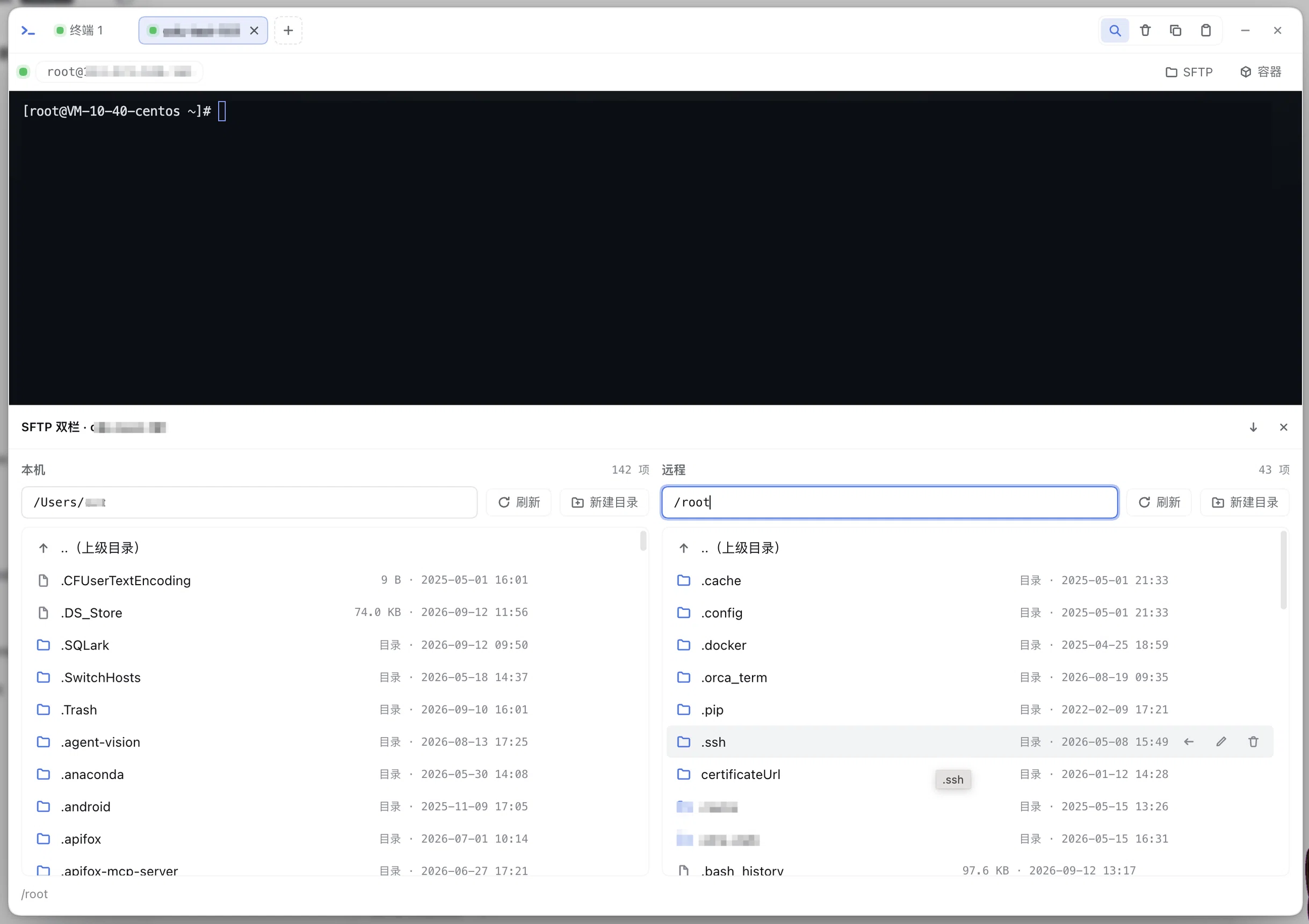
- **Placement (0.16.0)**: when the terminal panel is open and **this tab’s** mount slot is free, the File Browser
|
|
245
249
|
**docks below the terminal** — the path bar / list / transfer progress take the full width (a file list is
|
|
246
250
|
a wide table, so full width below beats a narrow column on the right, and the terminal also keeps its width
|
|
247
251
|
without wrapping; a dual pane side by side needs that width even more), and the terminal stays visible and
|
|
248
252
|
usable. The height is draggable and can collapse into a single title bar (collapsing neither closes the
|
|
249
|
-
panel nor interrupts browsing); when
|
|
250
|
-
|
|
251
|
-
|
|
253
|
+
panel nor interrupts browsing); when another panel (such as the containers panel) already holds the slot on
|
|
254
|
+
the same tab, or the panel is not open, it falls back to the original centered dialog, **without pushing
|
|
255
|
+
anyone else’s panel out**. The title / collapse / ✕ come from tty’s mount slot;
|
|
256
|
+
- **Follows the tab (0.19.0)**: the File Browser talks to the host of the tab that opened it, so it belongs to
|
|
257
|
+
that tab: switching away hides it (in-flight transfers keep running and the scene is restored when you come
|
|
258
|
+
back), and closing the tab tears it down. **Every entry follows the same rule** — the connection bar’s
|
|
259
|
+
“SFTP”, the 📂 on a connection-book entry and “File Browser” in the SSH dialog / settings card all become
|
|
260
|
+
owned by whatever tab was active when they were opened; only “panel open with no tabs at all” counts as
|
|
261
|
+
owned by no tab (always visible). Before this, the pane stayed put across a tab switch — title reading host
|
|
262
|
+
A while the active tab was B, worst case uploading to the wrong host;
|
|
252
263
|
- **Entries**: ① connection-book entries in the tab bar “+” menu carry a 📂 (open the File Browser for that
|
|
253
264
|
entry); ② fill in host/authentication in the SSH connection dialog and click “File Browser” (you can
|
|
254
|
-
browse without saving to the connection book);
|
|
265
|
+
browse without saving to the connection book); ③ the “SFTP” button in an SSH tab’s connection bar (owned by
|
|
266
|
+
that tab, see the previous bullet);
|
|
255
267
|
- **Operations**: directory browsing (Enter in the path box to jump, `.. (parent directory)`, a single click
|
|
256
268
|
on a file downloads it), **upload** (multi-select files, XHR streaming + percentage progress; since 0.8.0
|
|
257
269
|
**drag & drop** is supported — files and folders can be dropped straight into the dialog, folders are
|
|
@@ -384,7 +396,13 @@ and the agent tools all reuse the same scheduling.
|
|
|
384
396
|
“Terminal N”); while connecting it first echoes a grey `Connecting user@host …`, and once ready the status
|
|
385
397
|
bar shows `SSH user@host connected`; a failed connection (connection timeout / authentication rejected /
|
|
386
398
|
host unreachable) comes back in an `error` frame with the reason, and since the tab spec was saved with the
|
|
387
|
-
tab, clicking the terminal area reopens it from the original spec;
|
|
399
|
+
tab, clicking the terminal area reopens it from the original spec; the status bar describes the **currently
|
|
400
|
+
active tab** — switching or closing a tab immediately swaps in that tab’s own state (the failure reason and
|
|
401
|
+
the exit code are kept on the tab itself), so the red text no longer stays on screen after you close the tab
|
|
402
|
+
that could not connect (host-level messages such as “connection lost — reconnecting” belong to no tab and
|
|
403
|
+
are not wiped by a tab switch); conversely, **a background tab’s own failure is only recorded on that tab**
|
|
404
|
+
(its tab-bar status dot turns red and the terminal overlay carries the full text) and never takes over the
|
|
405
|
+
active tab’s status;
|
|
388
406
|
- **Agent forwarding (0.4.0)**: with “agent forwarding” ticked in the SSH dialog, the remote side can use the
|
|
389
407
|
local ssh-agent’s keys (such as `git clone` of a private repository remotely). It can be enabled with any
|
|
390
408
|
authentication method (credentials still never touch disk); if no ssh-agent is running locally the
|
|
@@ -419,14 +437,17 @@ and the agent tools all reuse the same scheduling.
|
|
|
419
437
|
box takes focus); the only difference is presentation — there it is an **inline** list rather than an overlay,
|
|
420
438
|
because that card is a long scrollable form where an overlay would be clipped;
|
|
421
439
|
- **Host-key TOFU pinning (0.3.0)**: after the first successful connection the host’s (host:port) sha256
|
|
422
|
-
fingerprint is recorded in `hostKeys` (persisted with settings); every later connection is verified,
|
|
423
|
-
|
|
424
|
-
against impersonation), with a reset pointer in the error message.
|
|
440
|
+
fingerprint is recorded in `hostKeys` (persisted with settings); every later connection is verified, any
|
|
441
|
+
fingerprint in the set matches, and **a changed fingerprint rejects the connection outright** (defense
|
|
442
|
+
against impersonation), with a reset pointer in the error message. A host’s multiple keys (0.19.0, e.g.
|
|
443
|
+
rsa + ed25519) are each recorded and merged into one record — algorithm negotiation changes no longer
|
|
444
|
+
cause false alarms. After a host reinstall or key change,
|
|
425
445
|
delete the record under Settings → Plugins → Terminal Panel → “SSH host key
|
|
426
446
|
records” and reconnect (the record list supports deletion). **“Import from known_hosts”
|
|
427
|
-
(0.4.1)**: parses `~/.ssh/known_hosts` in one click to pre-fill existing host fingerprints in bulk
|
|
447
|
+
(0.4.1)**: parses `~/.ssh/known_hosts` in one click to pre-fill existing host fingerprints in bulk, keeping
|
|
448
|
+
all of a host’s rsa/ed25519 entries (no longer first-entry-only); host
|
|
428
449
|
names from the connection book are also used to restore `|1|` hashed entries, and non-default ports are
|
|
429
|
-
parsed as `[host]:port
|
|
450
|
+
parsed as `[host]:port`;
|
|
430
451
|
- **Connection test (0.11.0)**: a “Test” button on each connection-book row of the settings card, plus a
|
|
431
452
|
“Test connection” button in the SSH connection dialog — both perform **link diagnostics only** (no session,
|
|
432
453
|
no `maxSessions` slot, no shell): first a TCP pre-check (DNS + connect, failures classified as
|
|
@@ -485,7 +506,7 @@ session belongs to (visually aligned with FinalShell’s session monitor bar):
|
|
|
485
506
|
| `cwd` | host startup directory | Fallback working directory (the client’s current session cwd wins) |
|
|
486
507
|
| `reconnectGraceSec` | 120 | Seconds a session is kept alive after an abnormal disconnect (0~3600): the session survives a page refresh/network blip waiting for a reconnect, and the reaper ends it on timeout; `0` = the old behavior, end immediately on disconnect |
|
|
487
508
|
| `sshHosts` | `[]` | SSH connection book (selectable in the panel “+” menu): entries `{name, host, port=22, username, auth=agent\|key\|password, keyPath, passphrase, password, agentForward, persist=false}`; saved as a whole-set replacement, the same name overwrites; `password` / `passphrase` support `env:VAR` references so no plaintext is stored; with persistence on, clicking an entry opens a tmux persistent session by default, and `persist=false` is an **opt-out** |
|
|
488
|
-
| `hostKeys` | `[]` | SSH host key records (TOFU, maintained automatically): entries `{host, port,
|
|
509
|
+
| `hostKeys` | `[]` | SSH host key records (TOFU, maintained automatically): entries `{host, port, fingerprints[]}` (the legacy single `fingerprint` field is migrated and merged on read); unique by host:port, one record holds all of a host’s keys, appended automatically on the first connection, any matching fingerprint is allowed, and a full mismatch rejects the connection; the settings card can delete them to reset |
|
|
489
510
|
| `shellIntegration` | true | Injects the OSC 133/7 shell integration (command boundary markers + cwd reporting; `tty_capture{last}` depends on it); zsh/bash supported, other shells skipped automatically; can be turned off when compatibility problems appear |
|
|
490
511
|
| `tunnels` | `[]` | Port-forwarding tunnels: entries `{name, bookName, direction=local\|remote, localPort?, remoteHost?, remotePort?, localTargetHost?, localTargetPort?, enabled}`; `bookName` references a connection-book entry for host and authentication; maintained graphically in the “Port forwarding” block of the card |
|
|
491
512
|
| `sftpStyle` | `dialog` | SFTP File Browser UI style: `dialog` single pane (remote directory + upload/download/drag & drop) / `dual` two panes (local left / remote right, inline `⇨/⇦` server-side direct transfer); reopen SFTP for it to take effect |
|
|
@@ -589,8 +610,8 @@ ctx.inject(['ttyTerminal'], (c) => {
|
|
|
589
610
|
|
|
590
611
|
### In-panel mount slots (client service `ttyPanel`, 0.16.0)
|
|
591
612
|
|
|
592
|
-
> tty’s own SFTP File Browser goes through this channel too (0.16.0): when the mount slot is free it docks
|
|
593
|
-
>
|
|
613
|
+
> tty’s own SFTP File Browser goes through this channel too (0.16.0): when the mount slot is free it docks
|
|
614
|
+
> below, and when another panel on the same tab has taken it, it falls back to the dialog.
|
|
594
615
|
|
|
595
616
|
`mount` solves “a consumer gives the host and tty puts a terminal in it”; `ttyPanel` is its **mirror** — tty
|
|
596
617
|
gives consumers a slot inside the terminal panel to mount their own UI into. A typical case: dsh-docker opens
|
|
@@ -598,6 +619,16 @@ gives consumers a slot inside the terminal panel to mount their own UI into. A t
|
|
|
598
619
|
which stays visible, clickable and typable instead of being covered by a full-screen modal (which was exactly
|
|
599
620
|
the pain before 0.15).
|
|
600
621
|
|
|
622
|
+
A mount slot is **connection-scoped**: its credentials / target come from the terminal tab that opened it.
|
|
623
|
+
So since 0.19.0 every pane records its **owner tab** (`options.ownerSid`, defaulting to the active tab at
|
|
624
|
+
mount time): switching to another tab **hides** the pane (`data-dock-hidden`; its DOM and your rendered tree
|
|
625
|
+
survive, in-flight transfers keep running) and switching back restores the scene; closing the owner tab tears
|
|
626
|
+
the pane down. Without this, the pane stayed put across a tab switch — its title read `SFTP · cdc-test-161`
|
|
627
|
+
while the active tab was `192.168.80.248`, leaving **another host**’s file listing on screen (worst case:
|
|
628
|
+
uploading to the wrong host). Passing `ownerSid: null` means “owned by no tab” (always visible); that is what
|
|
629
|
+
happens automatically when the panel is open with no tabs at all, and a consumer can use it to declare “this
|
|
630
|
+
pane has nothing to do with tabs, do not hide it on a switch”.
|
|
631
|
+
|
|
601
632
|
```js
|
|
602
633
|
ctx.inject(['ttyPanel'], (c) => {
|
|
603
634
|
// Use your own modal when the panel is not open (or tty < 0.16)
|
|
@@ -608,6 +639,7 @@ ctx.inject(['ttyPanel'], (c) => {
|
|
|
608
639
|
side: 'right', // 'right' (default, vertical list / list+detail) | 'bottom' (wide horizontal table)
|
|
609
640
|
size: 520, // initial size in px: right = width (default 460), bottom = height (default 320)
|
|
610
641
|
min: 360, // minimum size in px (optional, default 280 / 160)
|
|
642
|
+
ownerSid: tab.sid, // owner tab (optional): omitted = current active tab, null = owned by no tab
|
|
611
643
|
onClose: () => { /* called when tty tears the panel down: unmount your React root here */ },
|
|
612
644
|
})
|
|
613
645
|
createRoot(pane.element).render(<MyPanel />)
|
|
@@ -618,7 +650,7 @@ ctx.inject(['ttyPanel'], (c) => {
|
|
|
618
650
|
| Member | Description |
|
|
619
651
|
| --- | --- |
|
|
620
652
|
| `isOpen()` | Whether the terminal panel is currently open (minimized does not count). Consumers use it to decide “mount in here” or “use my own modal” |
|
|
621
|
-
| `mountPane(options)` | Mounts a slot on the right / at the bottom of the panel and returns a handle; **only one at a time**, and a later `mountPane` first tears the previous one down (calling its `onClose`). With `side:'bottom'` it spans the full width and is sized by height (drag the top edge), collapsing into a title bar |
|
|
653
|
+
| `mountPane(options)` | Mounts a slot on the right / at the bottom of the panel and returns a handle; **only one at a time**, and a later `mountPane` first tears the previous one down (calling its `onClose`). With `side:'bottom'` it spans the full width and is sized by height (drag the top edge), collapsing into a title bar. `ownerSid` records the owner tab (default: the active one); panes owned by another tab are **hidden** on tab switch (DOM and your React tree survive, restored when you switch back — see “connection-scoped” above) |
|
|
622
654
|
| `handle.element` | The host the consumer renders into (flex column, already `overflow:hidden`, filling the body area) |
|
|
623
655
|
| `handle.setTitle(text)` / `setHint(text)` | Change the title / the grey hint |
|
|
624
656
|
| `handle.expand() / collapse() / toggle() / isCollapsed()` | Collapse into a 32px strip (vertical title + expand/close buttons), and the terminal immediately gets its width back |
|
|
@@ -641,10 +673,11 @@ ctx.inject(['ttyPanel'], (c) => {
|
|
|
641
673
|
- The title bar (title / collapse / ✕) is provided by tty, and consumers only own their own body; a throwing
|
|
642
674
|
`onClose` is only logged with `console.warn`, without affecting closing the panel.
|
|
643
675
|
|
|
644
|
-
> Contract versions: `ttyConnbar.version === 1`, `ttyTerminal.version ===
|
|
645
|
-
> 2 = adds `mount
|
|
646
|
-
>
|
|
647
|
-
>
|
|
676
|
+
> Contract versions: `ttyConnbar.version === 1`, `ttyTerminal.version === 3` (1 = `open` only,
|
|
677
|
+
> 2 = adds `mount`, 3 = `open` reuses an existing live tab for the same connection + command by default),
|
|
678
|
+
> `ttyPanel.version === 2` (1 = `mountPane` + `isOpen`, 2 = adds `minimize`). Consumers **decide capabilities
|
|
679
|
+
> by version number**; do not rely on assumptions beyond `typeof fn === 'function'`; on an older tty the
|
|
680
|
+
> `inject` still fires, but the corresponding fields are absent.
|
|
648
681
|
|
|
649
682
|
## Frame protocol (/api/dsh-tty/ws, JSON text frames; v3 = one connection with many sessions + reconnect)
|
|
650
683
|
|
|
@@ -683,8 +716,8 @@ pnpm --filter @hyzyn/dsh-tty build # tsc host + esbuild browser half (cli
|
|
|
683
716
|
pnpm --filter @hyzyn/dsh-tty typecheck
|
|
684
717
|
pnpm --filter @hyzyn/dsh-tty probe # M0 probe: PTY primitive verification (needs a real PTY)
|
|
685
718
|
pnpm --filter @hyzyn/dsh-tty integration # integration tests: real plugin × real DSH service composition
|
|
686
|
-
pnpm --filter @hyzyn/dsh-tty live # liveness smoke
|
|
687
|
-
pnpm --filter @hyzyn/dsh-tty tui # TUI smoke: vim/
|
|
719
|
+
pnpm --filter @hyzyn/dsh-tty live # liveness smoke: start dsh web first (default ws://127.0.0.1:3080; DSH_TTY_WS_URL overrides)
|
|
720
|
+
pnpm --filter @hyzyn/dsh-tty tui # TUI smoke: vim/htop full-screen rendering (start dsh web first, default :3090; DSH_TTY_WS_URL overrides)
|
|
688
721
|
pnpm --filter @hyzyn/dsh-tty ssh-smoke # SSH smoke: in-memory SSH server (ssh2.Server) × real spawnSsh end to end (build first)
|
|
689
722
|
pnpm --filter @hyzyn/dsh-tty preview # visual preview: headless Chrome screenshots per scene (see below)
|
|
690
723
|
```
|
|
@@ -698,7 +731,7 @@ client-side changes.
|
|
|
698
731
|
|
|
699
732
|
Styles should not be changed by “refresh the page and take a look”: the script loads `client.js` into a pure
|
|
700
733
|
static fixture page (`scripts/preview/harness.html` + a fake DSH host from `mock-host.js`: module
|
|
701
|
-
loader / fetch / WebSocket) and renders
|
|
734
|
+
loader / fetch / WebSocket) and renders 29 UI states one by one with headless Chrome, screenshotting them to
|
|
702
735
|
`packages/tty/.preview/shots/`:
|
|
703
736
|
|
|
704
737
|
```bash
|
|
@@ -708,9 +741,20 @@ node scripts/preview.mjs --list # list scenes
|
|
|
708
741
|
node scripts/preview.mjs --theme=light # light theme
|
|
709
742
|
```
|
|
710
743
|
|
|
711
|
-
Coverage: local terminal / multi-tab + SSH connection bar / the “+” menu / SSH dialog (new, edit)/
|
|
712
|
-
settings card / SFTP (single pane, dual pane
|
|
713
|
-
|
|
744
|
+
Coverage: local terminal / multi-tab + SSH connection bar / the “+” menu / SSH dialog (new, edit, probe)/
|
|
745
|
+
settings card (also side by side with docker)/ SFTP (single pane, dual pane, placement fallback)/
|
|
746
|
+
**mount slot follows the tab** (`dock-pane-tab`, the 0.19.0 regression)/ minimized badge / exit and error
|
|
747
|
+
overlays / tunnel popover / search box / toast / embedded terminals (alone and alongside the panel)/
|
|
748
|
+
docker panel and “containers → terminal drawer”.
|
|
749
|
+
|
|
750
|
+
A scene may attach a **function-shaped** assertion to `window.__previewAssert` (returning `null` means pass,
|
|
751
|
+
a string / array means fail); the script runs it and folds the result into `✓/✗`. An assertion that only
|
|
752
|
+
lives in the fixture, seen by nobody unless someone pulls `diag` by hand, is a regression that is not really
|
|
753
|
+
pinned — which is exactly what bit the 0.19.0 “panel does not follow the tab” fix: the assertion was written
|
|
754
|
+
already, but because it was mixed into a `diag` object containing a function, the whole evaluation failed
|
|
755
|
+
silently and everything reported ✓.
|
|
756
|
+
|
|
757
|
+
The fixture also renders the `--dsw-*` skin variables together with the real UI, so it can
|
|
714
758
|
verify things like “is there still a white panel after switching light/dark themes”. The output directory
|
|
715
759
|
`.preview/` is gitignored.
|
|
716
760
|
|
|
@@ -785,15 +829,22 @@ verify things like “is there still a white panel after switching light/dark th
|
|
|
785
829
|
sandbox/chroot); downloads go through browser memory (for very large files prefer `scp`/`rsync` in the
|
|
786
830
|
terminal); the agent tool `sftp_read` is ≤1MB and rejects binaries, and `sftp_write` is ≤1MB per call (use
|
|
787
831
|
panel upload or the terminal for larger content); the `sftp_*` tools accept only connection-book entry
|
|
788
|
-
names, and inline credentials are for the panel dialog only
|
|
832
|
+
names, and inline credentials are for the panel dialog only; overwrite writes go through a same-directory
|
|
833
|
+
temp part `.dsh-part-<uuid>` + rename (atomic) — if the host process crashes / loses power, a part orphan
|
|
834
|
+
may remain, and the next overwrite upload to the same directory automatically cleans parts older than 24h.
|
|
789
835
|
- **SSH host keys are TOFU-pinned**: the first connection records the sha256 fingerprint automatically
|
|
790
|
-
(trust on first use), after which
|
|
836
|
+
(trust on first use), after which any recorded fingerprint matching is allowed and a full mismatch is
|
|
837
|
+
rejected — no longer an
|
|
791
838
|
unconditional accept-and-log. Note TOFU’s inherent boundary: if the first connection already met a MITM,
|
|
792
839
|
what was recorded is a fake fingerprint; `hostKeys` is persisted with settings, and a fingerprint change
|
|
793
|
-
requires a human to confirm in the settings card and delete the record;
|
|
794
|
-
|
|
795
|
-
|
|
796
|
-
|
|
840
|
+
requires a human to confirm in the settings card and delete the record; a host’s multiple key types
|
|
841
|
+
(rsa/ed25519/ecdsa) are merged into one record’s fingerprint set (0.19.0), so algorithm negotiation
|
|
842
|
+
changes no longer report a false “fingerprint changed”; known_hosts import likewise keeps every
|
|
843
|
+
fingerprint of a host.
|
|
844
|
+
- **Browser tab persistence contains no plaintext credentials** (0.19.0): the spec copies that SSH tabs
|
|
845
|
+
write into sessionStorage / localStorage have plaintext `password` / `passphrase` stripped (`env:`
|
|
846
|
+
references are kept) and are flagged with `credsStripped` — on restore/respawn the terminal asks for
|
|
847
|
+
re-entry. The in-memory spec of the live session is unaffected.
|
|
797
848
|
- **SSH passwords / passphrases should use `env:VAR` references**: the connection book is persisted in the
|
|
798
849
|
settings file, so plaintext `password` / `passphrase` is an exposure surface; prefer `env:VAR` +
|
|
799
850
|
dsh-env-manager, or `agent` authentication outright (credentials never touch disk).
|
package/README.md
CHANGED
|
@@ -32,7 +32,9 @@ dsh plugin --profile web add link:$(pwd)/packages/tty # 仓库开发调试
|
|
|
32
32
|
**双击标签可重命名**(重命名随标签持久化,断线恢复后保留);每个标签
|
|
33
33
|
独立会话(本地 PTY 或 SSH channel);
|
|
34
34
|
- **工作目录跟随当前 DSH 会话**:新标签默认在当前会话工作目录打开
|
|
35
|
-
(宿主配置 `cwd`
|
|
35
|
+
(宿主配置 `cwd` 作兜底)。0.1.6 起会话列表快照不再带 `current`(视图选中项搬到了
|
|
36
|
+
workspace 域),客户端改看 `retainedBy.mainView > 0` 认当前会话——只认老字段会让
|
|
37
|
+
cwd 恒为空、新标签回落宿主启动目录;
|
|
36
38
|
- 支持 vim / htop / less 等 TUI(TERM 已注入为 `xterm-256color`);
|
|
37
39
|
- 面板大小变化自动 resize(xterm fit → PTY 原生 resize);
|
|
38
40
|
- **Ctrl+F 终端内搜索**(Enter 下一个 / Shift+Enter 上一个 / Esc 只关搜索框),
|
|
@@ -81,8 +83,8 @@ dsh plugin --profile web add link:$(pwd)/packages/tty # 仓库开发调试
|
|
|
81
83
|
- **服务器状态条**:本地只拿得到 CPU / 内存 / 在线时长(`node:os`),磁盘 / TCP / 网速 / 温度
|
|
82
84
|
显示「无」(**远端** Windows 主机走 PowerShell 那一跳,见「服务器状态条」一节);
|
|
83
85
|
- **验证到什么程度**:Windows 11 ARM 上跑过完整安装(`dsh plugin add @hyzyn/dsh-all`)、九个插件
|
|
84
|
-
装载、`dsh web` 起服务与浏览器半体交付(与 macOS
|
|
85
|
-
|
|
86
|
+
装载、`dsh web` 起服务与浏览器半体交付(与 macOS 上服务的是同一份产物,构建后比对大小与
|
|
87
|
+
内容标记一致;不写死字节数——每次重建都会变)、`[dsh-tty] mounted (shell=C:\WINDOWS\system32\cmd.exe)`;x64 Windows 由 CI
|
|
86
88
|
的三平台矩阵覆盖(build / typecheck / test,见「开发」)。
|
|
87
89
|
|
|
88
90
|
## agent 工具(P1)
|
|
@@ -220,14 +222,20 @@ subsystem,宿主半体 `src/sftp.ts`):
|
|
|
220
222
|
|
|
221
223
|

|
|
222
224
|
|
|
223
|
-
- **落点(0.16.0
|
|
225
|
+
- **落点(0.16.0)**:终端面板开着且**本标签**的挂载位空着时,文件浏览**挂在终端下方**——路径栏 /
|
|
224
226
|
列表 / 传输进度占满整宽(文件列表是横向宽表,下方全宽比右侧窄栏好用,终端也保住
|
|
225
227
|
宽度不会折行;双栏两栏并排更需要这个宽度),终端继续可见可用。高度可拖、可折叠成
|
|
226
|
-
|
|
227
|
-
|
|
228
|
+
一条标题栏(折叠不关面板、不中断浏览);同一标签的挂载位已被别的面板(如容器面板)
|
|
229
|
+
占用、或面板没开时,退回原来的居中对话框,**不会把别人的面板挤掉**。标题 / 折叠 / ✕ 由
|
|
228
230
|
tty 的挂载位提供;
|
|
231
|
+
- **跟着标签切(0.19.0)**:文件浏览连的是**打开它的那个标签**那台主机,所以它归属该标签:
|
|
232
|
+
切到别的标签时整块收起(在途传输照跑,切回来还在原地),标签关掉时一并收掉。**所有入口
|
|
233
|
+
用同一条规则**——连接栏「SFTP」、连接簿条目的 📂、SSH 对话框 / 设置卡片的「文件浏览」都
|
|
234
|
+
归属打开那一刻的活动标签;只有「面板开着但一个标签都没有」才算不隶属任何标签(永远可见)。
|
|
235
|
+
此前不认归属,切完标签面板还停在原处——标题写着 A 主机、底下活动标签是 B,最坏会往错主机上传;
|
|
229
236
|
- **入口**:① 标签栏「+」菜单的连接簿条目带 📂(按该条目打开文件浏览);
|
|
230
237
|
② SSH 连接对话框填好主机/认证后点「文件浏览」(不落连接簿也能浏览);
|
|
238
|
+
③ SSH 标签的连接栏「SFTP」按钮(归属该标签,见上一条);
|
|
231
239
|
- **操作**:目录浏览(路径框回车跳转、`..(上级目录)`、单击文件即下载)、
|
|
232
240
|
**上传**(多选文件,XHR 流式 + 进度百分比;0.8.0 起支持**拖拽**——文件与
|
|
233
241
|
文件夹直接拖入对话框,文件夹经 `webkitGetAsEntry` 递归展开逐个上传,目录
|
|
@@ -346,7 +354,11 @@ tmux server(专用 socket `dsh-tty`,与用户自己的 tmux 完全隔离)
|
|
|
346
354
|
「终端 N」);连接中先回显灰字 `Connecting user@host …`,就绪后状态栏
|
|
347
355
|
显示 `SSH user@host 已连接`;连接失败(连接超时 / 认证被拒 / 主机
|
|
348
356
|
不可达)以 `error` 帧带回原因,标签规格已随标签保存,点终端区域可按
|
|
349
|
-
|
|
357
|
+
原规格重开;状态栏描述的是**当前活动标签**——切标签 / 关标签立刻换成
|
|
358
|
+
该标签自己的状态(失败原因、退出码都记在标签身上),所以关掉那个连不上
|
|
359
|
+
的标签后,红字不会继续挂在头上(宿主级消息如「连接断开 — 自动重连中」
|
|
360
|
+
不属于任何标签,不会被切标签抹掉);反过来说,**后台标签自己的失败只记在
|
|
361
|
+
它身上**(标签栏状态点转红、终端区浮层带原文),不会顶掉活动标签的显示;
|
|
350
362
|
- **agent forwarding(0.4.0)**:SSH 对话框勾选「agent forwarding」后远程
|
|
351
363
|
可用本地 ssh-agent 的钥匙(远程 `git clone` 私有仓库等)。任意认证方式下
|
|
352
364
|
都可开(凭证仍不落盘);本机未运行 ssh-agent 时连接会明确报错而非静默
|
|
@@ -376,12 +388,14 @@ tmux server(专用 socket `dsh-tty`,与用户自己的 tmux 完全隔离)
|
|
|
376
388
|
可滚动的长表单,浮层在那边会被裁掉;
|
|
377
389
|
- **主机指纹 TOFU 钉扎(0.3.0)**:首次连接成功后把该主机(host:port)的
|
|
378
390
|
sha256 指纹记录进 `hostKeys`(随 settings 持久化);之后每次连接校验,
|
|
379
|
-
|
|
380
|
-
|
|
381
|
-
|
|
382
|
-
|
|
383
|
-
|
|
384
|
-
`
|
|
391
|
+
集合内任一指纹匹配即放行,**指纹变更直接拒绝连接**(防中间人冒充),错误
|
|
392
|
+
信息带重置指引。同一主机的多把钥匙(0.19.0,如 rsa + ed25519)各记一条
|
|
393
|
+
指纹、合并存于同一记录——算法协商变化不再误报变更。主机重装/换钥匙后,
|
|
394
|
+
到 设置 → 插件 → 终端面板 → 「SSH 主机密钥记录」删除对应记录再重连即可
|
|
395
|
+
(记录列表支持删除)。**「从 known_hosts 导入」(0.4.1)**:一键解析
|
|
396
|
+
`~/.ssh/known_hosts` 把已有主机指纹批量预填充,同主机的 rsa/ed25519 等多条
|
|
397
|
+
记录全部保留(不再只留首条);连接簿里的主机名还会用于还原 `|1|` hashed
|
|
398
|
+
条目,非默认端口按 `[host]:port` 解析;
|
|
385
399
|
- **连接测试(0.11.0)**:设置卡片连接簿条目行内「测试」按钮,SSH 连接
|
|
386
400
|
对话框另有「试连」按钮——两者都只做**链路诊断**(不建会话、不占
|
|
387
401
|
`maxSessions` 名额、不开 shell):先 TCP 预检(DNS + 建连,失败分类为
|
|
@@ -436,7 +450,7 @@ tmux server(专用 socket `dsh-tty`,与用户自己的 tmux 完全隔离)
|
|
|
436
450
|
| `cwd` | 宿主启动目录 | 兜底工作目录(客户端当前会话 cwd 优先) |
|
|
437
451
|
| `reconnectGraceSec` | 120 | 异常断开后会话保活秒数(0~3600):刷新页面/网络抖动后会话存活等待重连,超时由回收器结束;`0` = 旧行为,断开立即结束 |
|
|
438
452
|
| `sshHosts` | `[]` | SSH 连接簿(面板「+」菜单可选):条目 `{name, host, port=22, username, auth=agent\|key\|password, keyPath, passphrase, password, agentForward, persist=false}`;保存时整体替换、同名覆盖;`password` / `passphrase` 支持 `env:VAR` 引用,避免明文入库;持久化开启时条目点击默认以 tmux 持久会话打开,`persist=false` 是**取消项** |
|
|
439
|
-
| `hostKeys` | `[]` | SSH 主机指纹记录(TOFU,自动维护):条目 `{host, port,
|
|
453
|
+
| `hostKeys` | `[]` | SSH 主机指纹记录(TOFU,自动维护):条目 `{host, port, fingerprints[]}`(旧版单 `fingerprint` 字段读取时自动迁移合并);按 host:port 唯一,一机多把钥匙共用一条记录,首次连接自动追加、任一指纹匹配放行、全部不匹配拒绝连接;设置卡片可删除重置 |
|
|
440
454
|
| `shellIntegration` | true | 注入 OSC 133/7 shell 集成(命令边界标记 + cwd 上报;`tty_capture{last}` 依赖它);zsh/bash 支持,其他 shell 自动跳过;出兼容问题时可关闭 |
|
|
441
455
|
| `tunnels` | `[]` | 端口转发隧道:条目 `{name, bookName, direction=local\|remote, localPort?, remoteHost?, remotePort?, localTargetHost?, localTargetPort?, enabled}`;`bookName` 引用连接簿条目提供主机与认证;卡片「端口转发」区块可视化维护 |
|
|
442
456
|
| `sftpStyle` | `dialog` | SFTP 文件浏览界面风格:`dialog` 单窗体(远程目录 + 上传/下载/拖拽)/ `dual` 双栏(左本机 / 右远程,行内 `⇨/⇦` 宿主服务端直传);重新打开 SFTP 生效 |
|
|
@@ -548,14 +562,23 @@ ctx.inject(['ttyTerminal'], (c) => {
|
|
|
548
562
|
|
|
549
563
|
### 面板内挂载位(客户端服务 `ttyPanel`,0.16.0)
|
|
550
564
|
|
|
551
|
-
> tty 自己的 SFTP 文件浏览也走这条通道(0.16.0
|
|
552
|
-
>
|
|
565
|
+
> tty 自己的 SFTP 文件浏览也走这条通道(0.16.0):挂载位空着时挂在下方,
|
|
566
|
+
> 被同标签的别的面板占用时退回对话框。
|
|
553
567
|
|
|
554
568
|
`mount` 解决的是「消费方给宿主,tty 往里塞终端」;`ttyPanel` 是它的**镜像**——tty 在
|
|
555
569
|
终端面板里给消费方一块位置,让消费方把自己的界面挂进来。典型场景:dsh-docker 从 SSH
|
|
556
570
|
连接栏点「容器」,容器面板挂在终端**右侧**,终端继续可见、可点、可输入,而不是被整屏
|
|
557
571
|
弹窗盖住(0.15 之前那正是用户的痛点)。
|
|
558
572
|
|
|
573
|
+
挂载位是**连接级**的:它的凭证 / 目标来自**打开它的那个终端标签**。所以 0.19.0 起每块
|
|
574
|
+
pane 记一个「归属标签」(`options.ownerSid`,默认 = 挂载那一刻的活动标签):切到别的
|
|
575
|
+
标签时整块**收起**(`data-dock-hidden`,DOM 与你 render 的树都保活,在途传输继续跑),
|
|
576
|
+
切回来恢复现场;归属标签被关掉时 pane 一并收掉。不这么做的话,切完标签面板还停在原处
|
|
577
|
+
——标题写着 `SFTP · cdc-test-161`、底下活动标签却是 `192.168.80.248`,面板里躺着**另一台
|
|
578
|
+
主机**的文件列表(最坏的情况是往错主机上传)。显式传 `ownerSid: null` 表示「不隶属任何
|
|
579
|
+
标签」(一直可见)——面板开着但一个标签都没有时自动落进这一档;消费方也可以用它声明
|
|
580
|
+
「这块与标签无关,别跟着切」。
|
|
581
|
+
|
|
559
582
|
```js
|
|
560
583
|
ctx.inject(['ttyPanel'], (c) => {
|
|
561
584
|
// 面板没开(或 tty < 0.16)时走自己的弹窗
|
|
@@ -566,6 +589,7 @@ ctx.inject(['ttyPanel'], (c) => {
|
|
|
566
589
|
side: 'right', // 'right'(默认,竖向列表 / 列表+详情)| 'bottom'(横向宽表)
|
|
567
590
|
size: 520, // 初始尺寸 px:right = 宽度(默认 460)、bottom = 高度(默认 320)
|
|
568
591
|
min: 360, // 最小尺寸 px(可选,默认 280 / 160)
|
|
592
|
+
ownerSid: tab.sid, // 归属标签(可选):省略 = 当前活动标签,null = 不隶属任何标签
|
|
569
593
|
onClose: () => { /* tty 收掉面板时回调:在这里 unmount 自己的 React root */ },
|
|
570
594
|
})
|
|
571
595
|
createRoot(pane.element).render(<MyPanel />)
|
|
@@ -576,7 +600,7 @@ ctx.inject(['ttyPanel'], (c) => {
|
|
|
576
600
|
| 成员 | 说明 |
|
|
577
601
|
| --- | --- |
|
|
578
602
|
| `isOpen()` | 终端面板是否正开着(最小化不算)。消费方据此决定「挂进来」还是「走自己的弹窗」 |
|
|
579
|
-
| `mountPane(options)` | 在面板右侧 / 下方挂一块位置并返回 handle;**同时只挂一个**,后来的 `mountPane` 会先收掉前一个(并回调它的 `onClose`)。`side:'bottom'`
|
|
603
|
+
| `mountPane(options)` | 在面板右侧 / 下方挂一块位置并返回 handle;**同时只挂一个**,后来的 `mountPane` 会先收掉前一个(并回调它的 `onClose`)。`side:'bottom'` 时占满宽度、由高度定尺寸(拖上边缘),折叠成一条标题栏。`ownerSid` 记归属标签(默认当前活动标签),切换标签时归属别的标签的 pane 会被**收起**(DOM 与你的 React 树保活,切回来恢复;见上文「连接级」那段) |
|
|
580
604
|
| `handle.element` | 消费方 render 的宿主(flex 纵向、已 `overflow:hidden`,撑满正文区) |
|
|
581
605
|
| `handle.setTitle(text)` / `setHint(text)` | 改标题 / 灰字 |
|
|
582
606
|
| `handle.expand() / collapse() / toggle() / isCollapsed()` | 折叠成 32px 窄条(竖排标题 + 展开/关闭按钮),终端立刻拿回宽度 |
|
|
@@ -609,7 +633,7 @@ ctx.inject(['ttyPanel'], (c) => {
|
|
|
609
633
|
})
|
|
610
634
|
```
|
|
611
635
|
|
|
612
|
-
> 契约版本:`ttyConnbar.version === 1`、`ttyTerminal.version ===
|
|
636
|
+
> 契约版本:`ttyConnbar.version === 1`、`ttyTerminal.version === 3`(1 = 只有 `open`,
|
|
613
637
|
> 2 = 增加 `mount`,3 = `open` 默认复用同「连接 + 命令」的活标签)、`ttyPanel.version === 2`(1 = `mountPane` + `isOpen`,2 = 增加
|
|
614
638
|
> `minimize`)。消费方**按版本号判断能力**,不要用
|
|
615
639
|
> `typeof fn === 'function'` 之外的假设;老版本 tty 上 `inject` 依然会触发,但没有
|
|
@@ -651,8 +675,8 @@ pnpm --filter @hyzyn/dsh-tty build # tsc 宿主 + esbuild 浏览器半体
|
|
|
651
675
|
pnpm --filter @hyzyn/dsh-tty typecheck
|
|
652
676
|
pnpm --filter @hyzyn/dsh-tty probe # M0 探针:PTY 原语验证(需真实 PTY)
|
|
653
677
|
pnpm --filter @hyzyn/dsh-tty integration # 集成测试:真实插件 × 真实 DSH 服务组合
|
|
654
|
-
pnpm --filter @hyzyn/dsh-tty live #
|
|
655
|
-
pnpm --filter @hyzyn/dsh-tty tui # TUI 冒烟:vim/
|
|
678
|
+
pnpm --filter @hyzyn/dsh-tty live # 存活冒烟:需先起 dsh web(默认连 ws://127.0.0.1:3080,DSH_TTY_WS_URL 可覆盖)
|
|
679
|
+
pnpm --filter @hyzyn/dsh-tty tui # TUI 冒烟:vim/htop 全屏渲染(需先起 dsh web,默认连 :3090,DSH_TTY_WS_URL 可覆盖)
|
|
656
680
|
pnpm --filter @hyzyn/dsh-tty ssh-smoke # SSH 冒烟:内存 SSH server(ssh2.Server)× 真实 spawnSsh 端到端(需先 build)
|
|
657
681
|
pnpm --filter @hyzyn/dsh-tty preview # 视觉预览:headless Chrome 逐场景截图(见下)
|
|
658
682
|
```
|
|
@@ -665,7 +689,7 @@ esbuild 的 text loader 内联进 `client.js`)。构建产物 `client.js`(
|
|
|
665
689
|
|
|
666
690
|
改样式不该靠「刷新页面看一眼」:脚本把 `client.js` 装进一个纯静态夹具页
|
|
667
691
|
(`scripts/preview/harness.html` + `mock-host.js` 伪造的 DSH 宿主:module
|
|
668
|
-
loader / fetch / WebSocket),用 headless Chrome 把
|
|
692
|
+
loader / fetch / WebSocket),用 headless Chrome 把 29 个界面状态逐个渲染并
|
|
669
693
|
截图到 `packages/tty/.preview/shots/`:
|
|
670
694
|
|
|
671
695
|
```bash
|
|
@@ -675,9 +699,17 @@ node scripts/preview.mjs --list # 列出场景
|
|
|
675
699
|
node scripts/preview.mjs --theme=light # 浅色主题
|
|
676
700
|
```
|
|
677
701
|
|
|
678
|
-
覆盖:本地终端 / 多标签 + SSH 连接栏 / 「+」菜单 / SSH
|
|
679
|
-
|
|
680
|
-
|
|
702
|
+
覆盖:本地终端 / 多标签 + SSH 连接栏 / 「+」菜单 / SSH 对话框(新建、编辑、试连)/
|
|
703
|
+
设置卡片(含与 docker 并排对照)/ SFTP(单窗体、双栏、落点回退)/
|
|
704
|
+
**挂载位跟着标签切**(`dock-pane-tab`,0.19.0 的回归)/ 最小化徽标 / 退出与错误遮罩 /
|
|
705
|
+
隧道弹层 / 搜索框 / toast / 嵌入式终端(单独与面板共存)/ docker 面板与「容器 → 终端抽屉」。
|
|
706
|
+
|
|
707
|
+
场景可以把**函数形态**的断言挂到 `window.__previewAssert`(返回 `null` = 通过,返回
|
|
708
|
+
字符串 / 数组 = 失败),脚本会跑掉它并把结果计入 `✓/✗`。断言光挂在夹具里、只有手工
|
|
709
|
+
取 `diag` 时才有人看,回归等于没钉——0.19.0 修「面板不跟标签切」时就吃到这个亏:断言
|
|
710
|
+
早写好了,但因为混在带函数的 `diag` 对象里,整条求值静默失败,一路都是 ✓。
|
|
711
|
+
|
|
712
|
+
夹具还会把 `--dsw-*` 皮肤变量与真实界面一并渲染,因此能验
|
|
681
713
|
「明暗主题切换后是否还有白色面板」这类问题。产物目录 `.preview/` 已 gitignore。
|
|
682
714
|
|
|
683
715
|
> 夹具里的 `ctx.inject` 与真实 cordis 同语义:**依赖里有一个服务不存在就不触发回调**,
|
|
@@ -722,14 +754,18 @@ node scripts/preview.mjs --theme=light # 浅色主题
|
|
|
722
754
|
反馈补丁兼容。
|
|
723
755
|
- **端口转发边界**:本地监听固定 127.0.0.1(不暴露局域网);remote 方向服务端监听还受服务端 sshd `GatewayPorts` 限制;隧道的 SSH 连接与终端会话独立,均走 TOFU 钉扎与连接簿认证;隧道规格变更(端口/目标/启停)经「保存」热生效,热改连接簿凭证则在下次重连时生效。
|
|
724
756
|
- **会话持久化(tmux)边界**:持久标签由 tmux server(专用 socket `dsh-tty`)托管——宿主被硬杀 / 保活回收 / 浏览器丢失标签规格时,tmux 会话会**留存**(这正是恢复能力的前提),直到机器重启或手动 `tmux -L dsh-tty kill-server`;agent 命令粒度工具(capture{last}/expect)依赖 tmux ≥3.3 的 DCS `allow-passthrough`,更低版本持久化可用但该能力降级(SSH 远程会话不注入 shell 集成钩子,capture{last} 本就不可用,与持久化无关);恢复接回重画的是当前可见屏,断线前的滚动历史在 tmux 自己的 history buffer(copy-mode)里,不在外层 xterm 滚动区;持久标签的 `exit` 帧退出码是 tmux 客户端的(0),shell 退出码经 OSC 133;D 标记照常可用;`tmux.conf` 只在 tmux server 首启时读取(改配置后需 `tmux -L dsh-tty kill-server` 让下次 spawn 重建 server);`grace=0` 的「断开立即结束」对持久标签同样会 kill-session(tmux 会话不存活);持久 SSH 会话要求远程装有 tmux(未装自动降级普通会话,连接栏常驻「未持久化」标记),且远程 `~/.tmux.conf` 不影响专用 socket 的独立 conf(`-f /dev/null`);SSH 持久会话名随 settings 留存;**两个窗口同时接回同一持久会话**时共享同一个宿主 PTY(0.10.1,单客户端扇出,名额不翻倍),两侧行数以最近调整尺寸的窗口为准(尺寸不一致时较大一侧由 onResize 自愈重画)。
|
|
725
|
-
- **SFTP 边界**:文件权限 = 对应 SSH 账号的终端权限(无额外沙箱/chroot);下载经浏览器内存(超大文件建议终端 `scp`/`rsync`);agent 工具 `sftp_read` ≤1MB 且拒绝二进制、`sftp_write` 单次 ≤1MB(大内容走面板上传或终端);`sftp_*`
|
|
757
|
+
- **SFTP 边界**:文件权限 = 对应 SSH 账号的终端权限(无额外沙箱/chroot);下载经浏览器内存(超大文件建议终端 `scp`/`rsync`);agent 工具 `sftp_read` ≤1MB 且拒绝二进制、`sftp_write` 单次 ≤1MB(大内容走面板上传或终端);`sftp_*` 工具只收连接簿条目名,内联凭证仅供面板对话框使用;覆盖写走同目录临时分片 `.dsh-part-<uuid>` + rename 原子落盘——宿主进程崩溃 / 断电时可能留下分片孤儿(下次向同目录覆盖上传时会自动清理超过 24h 的残留)。
|
|
726
758
|
- **SSH host key 为 TOFU 钉扎**:首次连接自动记录 sha256 指纹(trust on
|
|
727
|
-
first use
|
|
759
|
+
first use),之后任一记录指纹匹配放行、全部不匹配拒绝——不再是无条件放行的
|
|
728
760
|
accept-and-log。注意 TOFU 的固有边界:首次连接若已遭遇 MITM 则记录的
|
|
729
761
|
就是伪指纹;`hostKeys` 随 settings 落盘,指纹变更需人工在设置卡片确认
|
|
730
|
-
|
|
731
|
-
|
|
732
|
-
|
|
762
|
+
并删除记录;同一主机的多把钥匙(rsa/ed25519/ecdsa)合并为一条记录的多
|
|
763
|
+
指纹集合(0.19.0),算法协商变化不再误报「指纹变更」;known_hosts 导入
|
|
764
|
+
同样保留同主机的全部指纹。
|
|
765
|
+
- **浏览器标签持久化不含明文凭证**(0.19.0):SSH 标签写入
|
|
766
|
+
sessionStorage / localStorage 的规格副本会剥掉明文 `password` / `passphrase`
|
|
767
|
+
(`env:` 引用保留),并打 `credsStripped` 标记——恢复/重开时终端里提示
|
|
768
|
+
重新输入。本会话内存里的规格不受影响。
|
|
733
769
|
- **SSH 密码 / 口令建议 `env:VAR` 引用**:连接簿随 settings 文件落盘,
|
|
734
770
|
`password` / `passphrase` 明文入库有泄露面;建议 `env:VAR` +
|
|
735
771
|
dsh-env-manager 托管,或直接用 `agent` 认证(凭证不落盘)。
|