@hyzyn/dsh-tty 0.17.2 → 0.18.1
This diff represents the content of publicly available package versions that have been released to one of the supported registries. The information contained in this diff is provided for informational purposes only and reflects changes between package versions as they appear in their respective public registries.
- package/README.en.md +171 -15
- package/README.md +170 -15
- package/client.js +115 -34
- package/lib/index.d.ts +2 -1
- package/lib/index.js +131 -25
- package/lib/index.js.map +1 -1
- package/lib/probe.js +1 -1
- package/lib/probe.js.map +1 -1
- package/lib/sftp.js +1 -1
- package/lib/sftp.js.map +1 -1
- package/lib/shell-integration.d.ts +20 -2
- package/lib/shell-integration.js +52 -2
- package/lib/shell-integration.js.map +1 -1
- package/lib/ssh.d.ts +39 -2
- package/lib/ssh.js +54 -12
- package/lib/ssh.js.map +1 -1
- package/lib/tunnels.d.ts +4 -0
- package/lib/tunnels.js +9 -5
- package/lib/tunnels.js.map +1 -1
- package/package.json +5 -4
package/README.en.md
CHANGED
|
@@ -53,6 +53,41 @@ After installing, restart `dsh web`; a “Terminal” entry appears in the sideb
|
|
|
53
53
|
|
|
54
54
|
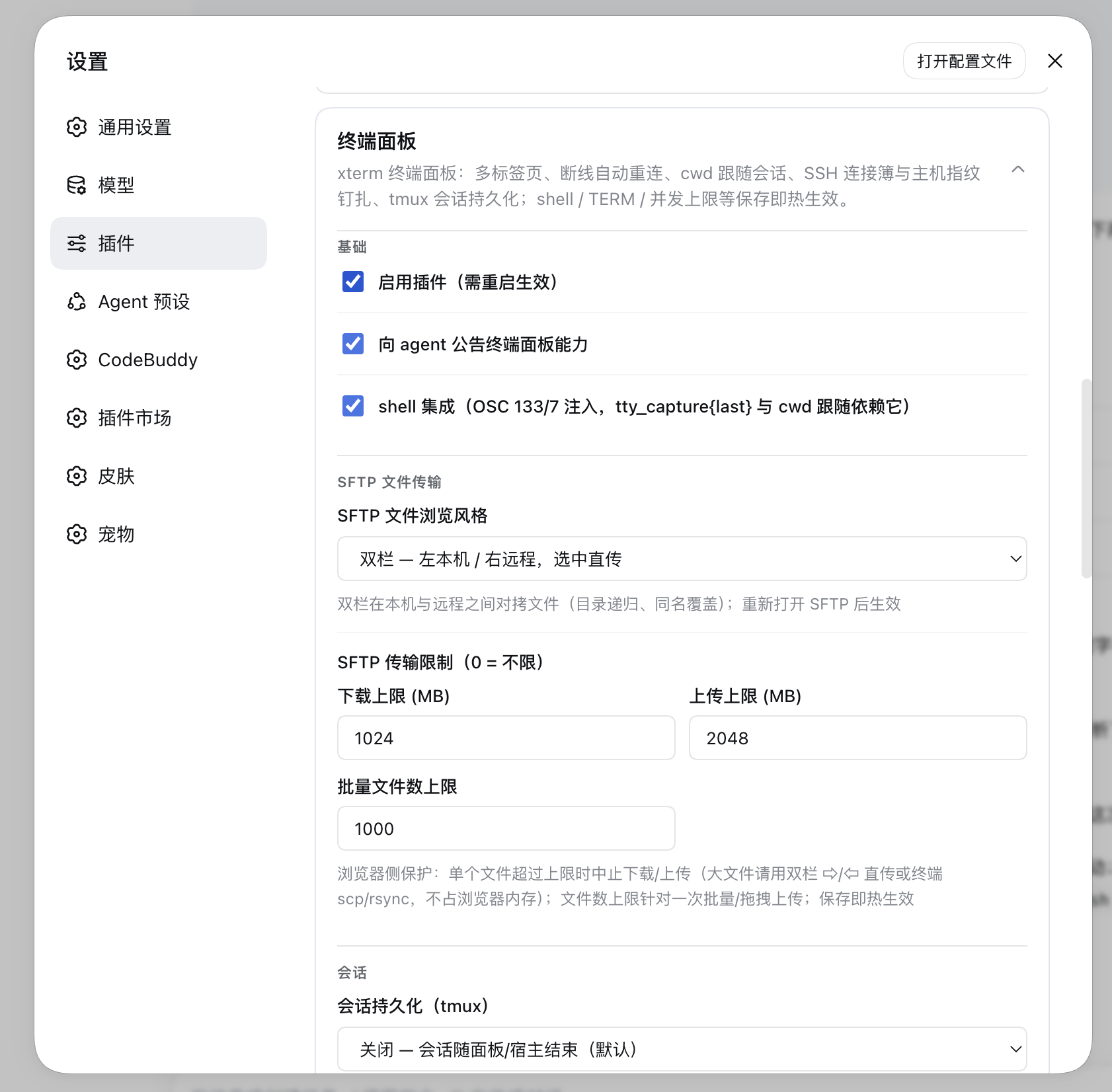
|
|
55
55
|
|
|
56
|
+
## Windows hosts (0.18.1, best-effort)
|
|
57
|
+
|
|
58
|
+
**Before 0.18.1 a Windows host could not open a single local terminal**, for two reasons on the same path:
|
|
59
|
+
|
|
60
|
+
1. `$SHELL` **does not exist on Windows**, and the default shell fell back to `/bin/zsh` unconditionally →
|
|
61
|
+
`spawn` fails with ENOENT (measured: `spawn /bin/zsh -> ENOENT`, while `%COMSPEC%` works);
|
|
62
|
+
2. the spawn plan was POSIX-shaped (`-c 'export TERM=…; export COLORTERM=…; exec "$shell"'`) — cmd.exe does
|
|
63
|
+
not understand `-c` (it ignores the whole line, runs an empty session and exits, so the tab appears and
|
|
64
|
+
vanishes), and PowerShell understands `-c` but rejects `export` as an unknown cmdlet.
|
|
65
|
+
|
|
66
|
+
Both were reproduced on **Windows 11 ARM (24H2) + Node 22 ARM64**. The fix:
|
|
67
|
+
|
|
68
|
+
- **Default shell is `%COMSPEC%`** (guaranteed to exist); for PowerShell put the full path to
|
|
69
|
+
`powershell.exe` / `pwsh.exe` in the settings card’s “Shell path”. On Windows the candidate list offers
|
|
70
|
+
`%COMSPEC%` + Windows PowerShell 5.1 + PowerShell 7 (when installed), with the default first;
|
|
71
|
+
- **No wrapper layer on Windows**: plain `[shell]`; the PowerShell family gets `-NoLogo` (drops the copyright
|
|
72
|
+
banner) but deliberately **not `-NoProfile`** — the user’s profile is where aliases and functions come from.
|
|
73
|
+
TERM / COLORTERM are meaningless for ConPTY and are no longer injected;
|
|
74
|
+
- **“Run one command” tabs** (docker exec, command tabs opened by the agent) use `cmd /c` or
|
|
75
|
+
`PowerShell -Command`;
|
|
76
|
+
- **Three things are not supported** (the host turns them off and the settings card explains why):
|
|
77
|
+
- **Shell integration (OSC 133/7)**: injection relies on POSIX rc stubs plus the `-c` wrapper, neither of
|
|
78
|
+
which exists for cmd / PowerShell, so it is permanently off — **local** tabs therefore lose cwd tracking
|
|
79
|
+
(`tty_list.cwd` following `cd`), `tty_capture{last}` and command-granular `tty_expect` (remote Linux /
|
|
80
|
+
macOS hosts are unaffected);
|
|
81
|
+
- **tmux persistence**: there is no tmux on Windows, so local tabs open normally but are not managed
|
|
82
|
+
(SSH into a Linux host still works);
|
|
83
|
+
- **Server status bar**: locally only CPU / memory / uptime are available (`node:os`); disk / TCP / network
|
|
84
|
+
throughput / temperature show “无” (remote **Windows** hosts go through the PowerShell hop — see the
|
|
85
|
+
status-bar section);
|
|
86
|
+
- **How far this was verified**: on Windows 11 ARM a full install (`dsh plugin add @hyzyn/dsh-all`), all nine
|
|
87
|
+
plugins mounting, `dsh web` serving, and the browser half being delivered (the same artifact macOS serves:
|
|
88
|
+
12,312,246 bytes, identical new-code markers), plus `[dsh-tty] mounted (shell=C:\WINDOWS\system32\cmd.exe)`.
|
|
89
|
+
x64 Windows is covered by the CI matrix (build / typecheck / test, see Development).
|
|
90
|
+
|
|
56
91
|
## Agent tools (P1)
|
|
57
92
|
|
|
58
93
|
The plugin injects thirteen tools into the agent (with the same power as the bash tool; operations show up live in the user’s terminal):
|
|
@@ -100,6 +135,83 @@ SSH sessions are scheduled on the same table: entries with `kind: 'ssh'` in `tty
|
|
|
100
135
|
`target` (user@host[:port]), and `tty_capture` / `tty_expect` / `tty_send` are used exactly as for local
|
|
101
136
|
sessions — dev server logs and key interactions on the remote machine remain available as usual.
|
|
102
137
|
|
|
138
|
+
### Credential storage (a connection password need not stay plaintext)
|
|
139
|
+
|
|
140
|
+
Under **Password** in the connection dialog sits a **credential storage** row: tick "store when saving" and the
|
|
141
|
+
password is written to the **official credential store**, leaving only an `env:NAME` reference in the field (the value
|
|
142
|
+
lives in `~/.dsh/.credentials.yaml`, never materialized into the environment and never sent back to the browser).
|
|
143
|
+
**That checkbox is ticked by default** (whenever the host provides `remote.credentials`): type a plaintext password,
|
|
144
|
+
save, and the value goes to the store while the settings keep only a reference — better than writing the password
|
|
145
|
+
plaintext into the settings file, which *is* shipped to the browser while the store's values never are. When the host
|
|
146
|
+
lacks that service the box is switched back off and disabled, with a note that only plaintext saving is available.
|
|
147
|
+
|
|
148
|
+
- **It rides along with saving — no extra click**: the tick is executed by "save changes" / "connect (and save)", so
|
|
149
|
+
there is no dangling reference from "stored but not saved". **Without "save to the connection book" it never touches
|
|
150
|
+
the store** — there would be no configuration to reference the value, only an orphan. **The settings card's inline
|
|
151
|
+
editor is the same row with the same default**, except that its commit entry point is "apply" (that card's
|
|
152
|
+
row-level commit, followed by the card's "save"), so the checkbox reads "store into credential storage on apply";
|
|
153
|
+
the same caveat applies there: the value lands in the store first, and abandoning "save" afterwards leaves a name
|
|
154
|
+
that is not referenced yet (visible and clearable in the reference picker).
|
|
155
|
+
- **Two side effects of the default (so neither is a surprise)**: (1) editing an older connection whose password is
|
|
156
|
+
**plaintext** and hitting "save changes" for an unrelated field also moves the password into the store (the settings
|
|
157
|
+
keep a reference instead) — untick the box if you do not want that; (2) when the store refuses the write (typically a
|
|
158
|
+
read-only source shadowing the reference) **saving is aborted** and the official verbatim error is shown, rather than
|
|
159
|
+
quietly falling back to plaintext (the derived name carries a `DSH_TTY_` prefix plus a hash, so shadowing is
|
|
160
|
+
practically impossible).
|
|
161
|
+
- **Deliberately compact**: in plaintext mode the row is a single checkbox; only once the field holds a reference does
|
|
162
|
+
it swap in "clear stored credential" and the status (`already stored (source file) · reference name`). The full
|
|
163
|
+
security boundary lives in the checkbox's tooltip instead of taking up dialog space.
|
|
164
|
+
|
|
165
|
+
- **Model**: configuration holds a **reference**, the store owns the value — the same family as SecureCRT's
|
|
166
|
+
"credential set referenced by title" and iTerm2's "pick a named entry from the password manager". The
|
|
167
|
+
implementation goes through DSH's official `ctx.remote.credentials` (`describe` / `set` / `unset`, where
|
|
168
|
+
**values cross in one direction only — no read path exists**), exactly as the official settings cards do.
|
|
169
|
+
- **Name** (the rule is fixed): `DSH_TTY_<username>_<host>[_<port>]_<field>`, where the port is **omitted when
|
|
170
|
+
empty or 22 (the default)** — matching the connecting side's `spec.port ?? 22` (empty means 22), so
|
|
171
|
+
“empty / `22` / `" 22 "`” all collapse into one key and the same account never ends up with two names or one
|
|
172
|
+
password stored twice; a non-default port does take part (the same host on another port is often a different
|
|
173
|
+
box behind NAT). `field` is `PASSWORD` / `PASSPHRASE`; e.g. `hsadmin@192.168.80.248:22` →
|
|
174
|
+
`DSH_TTY_HSADMIN_192_168_80_248_PASSWORD`. It is **derived from the resource identity and carries no hash** — the
|
|
175
|
+
same school as git-credential-store's `protocol://username@host` and docker credential helpers'
|
|
176
|
+
`ServerURL` + `Username`: host and username **are ASCII identifiers already**, so nothing needs sanitizing and
|
|
177
|
+
nothing needs a hash to disambiguate. The old hash-based version was patching over "sanitize a human label into a
|
|
178
|
+
key": the reference grammar accepts ASCII only, so `HS 248` / `HS-248` / `HS_248` collapse to exactly the same
|
|
179
|
+
string and only a hash could stop them silently overwriting each other. A resource identity has no such trap — a
|
|
180
|
+
collision can only happen for **the same host, the same user, the same port**, which is the same password by
|
|
181
|
+
definition (sharing it is correct behaviour). **The connection name never takes part in the key**, so renaming a
|
|
182
|
+
connection or rewriting its label never changes the key. An empty host or username is refused (they are the key's
|
|
183
|
+
entire source; drop either and the derivation degenerates into a constant). The trade-off is readability: this
|
|
184
|
+
dialog's "store" **names it by the rule above and offers no custom name** ✗ — to reuse a custom name, type
|
|
185
|
+
`env:name` into the field directly (the name must already resolve in the credential layer, e.g. managed by the
|
|
186
|
+
official settings or env card).
|
|
187
|
+
- **Derivation happens only at store time**: afterwards the `env:NAME` in the configuration is the single source of
|
|
188
|
+
truth and nothing re-derives it — so renaming a connection does **not** invalidate a stored value and no longer
|
|
189
|
+
leaves an orphan (only the old hash-based rule did: with the name in the key, storing again after a rename left the
|
|
190
|
+
previous name behind; clear it with "clear stored credential", which acts on the reference in the field).
|
|
191
|
+
- **Shared**: references live in one flat namespace, so any consumer resolving the same way can use it — put
|
|
192
|
+
the same name in a dsh-docker target's `password` and one secret serves both.
|
|
193
|
+
- **Visibility**: the dialog's reference picker lists **the names the store already holds** — the host-side
|
|
194
|
+
`/api/dsh-tty/credential-refs` reads back only the `refs:` keys (names only; values never leave the host).
|
|
195
|
+
Why read it ourselves: the reference half is **not enumerable** over the protocol (rationale in the picker
|
|
196
|
+
section), yet “which names have I stored” is exactly the question this picker answers. It also makes
|
|
197
|
+
**orphan references** (old names left behind by a naming-rule change) visible, selectable and
|
|
198
|
+
clearable again.
|
|
199
|
+
- **Resolution path (what makes a stored value actually usable when connecting)**: connecting, the probe, SFTP
|
|
200
|
+
and port tunnels all funnel through one `buildConnectConfig`, whose `env:NAME` is resolved by the **official
|
|
201
|
+
credential provider** (`resolve`, re-resolved per operation — a change lands on the next operation, no host
|
|
202
|
+
restart). Only when the provider has no such reference, or the host has no such service, does it fall back to
|
|
203
|
+
`process.env`. **Why the provider is mandatory here**: values in the credential store are **never materialized
|
|
204
|
+
into the environment** (the provider README's own words: “a store the harness owns and never materializes into
|
|
205
|
+
the environment”), so reading `process.env` alone means “a stored password is unreadable at connect time”. A
|
|
206
|
+
provider error is never swallowed — when the environment lacks it too, the error names both sources (otherwise
|
|
207
|
+
“the credential service is broken” masquerades as “you did not configure it”).
|
|
208
|
+
- **The conservative boundary (know this)**: `~/.credentials.yaml` is a **0600 plain file with no master
|
|
209
|
+
password and no OS keychain** — it keeps out **other OS users**, not processes running as you, and not the
|
|
210
|
+
agent; and it is **machine-local**, so a new machine means storing again. The industry consensus still
|
|
211
|
+
stands: **prefer keys / agent over stored passwords** (this plugin supports both).
|
|
212
|
+
- **Degradation**: without `remote.credentials` (older host) the buttons disable with a reason and plaintext
|
|
213
|
+
saving still works.
|
|
214
|
+
|
|
103
215
|
## Port forwarding (0.5.0)
|
|
104
216
|
|
|
105
217
|
Maintain tunnels in the “Port forwarding” block of the Settings → Plugins → Terminal Panel card; each tunnel
|
|
@@ -190,7 +302,13 @@ tmux), so it survives the keep-alive timeout and can even be reattached after a
|
|
|
190
302
|
only switch — once it is on, **every newly opened tab is persistent by default**: “Local terminal” in the
|
|
191
303
|
“+” menu, clicking a connection-book entry, and the SSH connection dialog (“persistent session” is checked
|
|
192
304
|
by default and can be unchecked for a single connection). There is no longer a separate “persistent
|
|
193
|
-
terminal” menu item
|
|
305
|
+
terminal” menu item;
|
|
306
|
+
- **Per-entry opt-out (`sshHosts[].persist`)**: the “persistent session” checkbox on a connection-book entry
|
|
307
|
+
stores an **opt-out** — entries explicitly unchecked (`persist: false`) are no longer tmux-backed when
|
|
308
|
+
clicked, everything else (`true` or never written, e.g. entries imported from `~/.ssh/config`) follows the
|
|
309
|
+
global switch. Both the settings card and the connection dialog show that checkbox only while the global
|
|
310
|
+
switch is on, and **editing an entry in the settings card no longer drops it** (before 0.17.x, renaming a
|
|
311
|
+
single field silently reset it to `false`);
|
|
194
312
|
- **Mechanism**: spawn/ssh frames carry `persist` plus a stable `persistName` generated by the client and
|
|
195
313
|
saved with the tab spec — locally the `-c` wrapper layer becomes `exec tmux -L dsh-tty -f
|
|
196
314
|
<conf> new-session -A -s dsh-<name>` (cwd is inherited from the node-pty spawn); over SSH the remote runs
|
|
@@ -246,15 +364,21 @@ and the agent tools all reuse the same scheduling.
|
|
|
246
364
|
the bottom of the dialog to open SFTP with the current information, skipping the terminal);
|
|
247
365
|
- **Connection book**: ticking “save to connection book” in the SSH connection dialog stores an entry (the
|
|
248
366
|
same name overwrites; an empty name uses the hostname); the ✎ on a “+” menu entry and the **edit** in the
|
|
249
|
-
settings card
|
|
250
|
-
|
|
367
|
+
settings card use the **same form** — three grouped sections (connection / authentication / options) plus
|
|
368
|
+
credential storage, the credential-reference picker, “test connection” and “File Browser”, renaming
|
|
369
|
+
supported and duplicate names rejected. The only difference is **how it is submitted**: the menu dialog
|
|
370
|
+
(“save changes” / “connect (and save)”) writes through immediately, while the settings card commits into the
|
|
371
|
+
card's form with “apply” and persists with the card's “save”;
|
|
251
372
|
- **Authentication (auth), one of three**:
|
|
252
373
|
- `agent` (default) — uses ssh-agent (`SSH_AUTH_SOCK`), credentials never touch disk, most recommended;
|
|
253
374
|
- `key` — `keyPath` private key file (a leading `~` may omit home), `passphrase` optional;
|
|
254
375
|
- `password` — password authentication, with keyboard-interactive attached as well (many servers only offer that);
|
|
255
|
-
- **Passwords / passphrases support `env:VAR`**: when `password` / `passphrase` is `env:MY_SECRET`,
|
|
256
|
-
|
|
257
|
-
|
|
376
|
+
- **Passwords / passphrases support `env:VAR`**: when `password` / `passphrase` is `env:MY_SECRET`, the value
|
|
377
|
+
is resolved through the **credential layer** — the official credential provider first (layering
|
|
378
|
+
`$DSH_HOME/.credentials.yaml`, the process environment, `project-env` and `user-env`, re-resolved on every
|
|
379
|
+
connection), falling back to the host process environment only when the provider has no such reference
|
|
380
|
+
(pair it with the dsh-env-manager plugin to hold secrets, keeping plaintext out of the settings file). A
|
|
381
|
+
failed resolution names both the reference and the fact that neither source had it;
|
|
258
382
|
- **Port**: 22 by default; a non-22 port shows in the target as `user@host:port`;
|
|
259
383
|
- **Tabs and status**: an SSH tab title uses the connection name or `user@host` (local tabs are
|
|
260
384
|
“Terminal N”); while connecting it first echoes a grey `Connecting user@host …`, and once ready the status
|
|
@@ -269,11 +393,31 @@ and the agent tools all reuse the same scheduling.
|
|
|
269
393
|
- **`~/.ssh/config` import (0.4.0)**: “Import from ~/.ssh/config” in the connection-book area of the settings
|
|
270
394
|
card — parses `HostName/User/Port/IdentityFile` into candidate entries (skipping wildcard blocks and
|
|
271
395
|
entries without a User; `Include` is not expanded), skips same names, and writes them on “save”;
|
|
272
|
-
- **
|
|
273
|
-
|
|
274
|
-
|
|
275
|
-
|
|
276
|
-
|
|
396
|
+
- **Credential-reference picker (0.4.0; decoupled from the env plugin since 0.17)**: next to the password /
|
|
397
|
+
passphrase fields in the SSH dialog there is a filter box plus a height-limited list whose candidates are
|
|
398
|
+
**the reference names the credential store already knows** (the host reads the `refs:` keys of
|
|
399
|
+
`.credentials.yaml` — **names only, never values**) ∪ **the reference names this machine's connection book
|
|
400
|
+
already uses**; clicking one fills in `env:NAME`, and any `env:NAME` can still be typed by hand (resolution at
|
|
401
|
+
connect time goes through the **credential layer**: the provider first, `process.env` as the fallback).
|
|
402
|
+
**Why read the file / why not the env plugin's managed list**: the official discovery path for references is
|
|
403
|
+
"a configuration surface learns which references exist **from its own settings schema**" — the reference half is
|
|
404
|
+
**deliberately not enumerable** (the wording in `@deepseek-ai/dsh-credentials`'s `listRecords` docs: “the
|
|
405
|
+
reference half, which has no enumeration because configuration surfaces learn which references exist from
|
|
406
|
+
settings schemas”), and the browser-side `ctx.remote.credentials` opens only `describe` / `set` / `unset` — not
|
|
407
|
+
even `listRecords`. So “what names does this store actually hold” is unanswerable in the browser, while the
|
|
408
|
+
picker's whole purpose is exactly that question. The host therefore exposes a **read-only** route,
|
|
409
|
+
`/api/dsh-tty/credential-refs` (behind the loopback fence; it parses `refs:` keys and never returns values —
|
|
410
|
+
see `readCredentialRefNames`). This is a **deliberate departure** from the official “references are not
|
|
411
|
+
enumerable” design (cost: reference names reach the browser, values never do); to stay strictly on the official
|
|
412
|
+
route, use only the connection-book half. Boundaries: references behind a custom provider `path` / `dshHome` are
|
|
413
|
+
invisible here, and when the host read fails (or an older host lacks the route) the candidates quietly fall back
|
|
414
|
+
to the connection-book half.
|
|
415
|
+
When there are no candidates at all, the row **degrades to a single explanatory line** (rather than an input
|
|
416
|
+
that can never open, which just looks broken): it says either to tick “store on save” above, or to type
|
|
417
|
+
`env:NAME` into the field. The passphrase row has no checkbox above it, so its wording only mentions typing.
|
|
418
|
+
**The settings card's edit form has the same row with the same candidates** (also opening only when the filter
|
|
419
|
+
box takes focus); the only difference is presentation — there it is an **inline** list rather than an overlay,
|
|
420
|
+
because that card is a long scrollable form where an overlay would be clipped;
|
|
277
421
|
- **Host-key TOFU pinning (0.3.0)**: after the first successful connection the host’s (host:port) sha256
|
|
278
422
|
fingerprint is recorded in `hostKeys` (persisted with settings); every later connection is verified, a
|
|
279
423
|
matching fingerprint is allowed, and **a changed fingerprint rejects the connection outright** (defense
|
|
@@ -340,7 +484,7 @@ session belongs to (visually aligned with FinalShell’s session monitor bar):
|
|
|
340
484
|
| `colorTerm` | `truecolor` | COLORTERM value |
|
|
341
485
|
| `cwd` | host startup directory | Fallback working directory (the client’s current session cwd wins) |
|
|
342
486
|
| `reconnectGraceSec` | 120 | Seconds a session is kept alive after an abnormal disconnect (0~3600): the session survives a page refresh/network blip waiting for a reconnect, and the reaper ends it on timeout; `0` = the old behavior, end immediately on disconnect |
|
|
343
|
-
| `sshHosts` | `[]` | SSH connection book (selectable in the panel “+” menu): entries `{name, host, port=22, username, auth=agent\|key\|password, keyPath, passphrase, password, agentForward}`; saved as a whole-set replacement, the same name overwrites; `password` / `passphrase` support `env:VAR` references so no plaintext is stored; with persistence on, clicking an entry opens a tmux persistent session by default |
|
|
487
|
+
| `sshHosts` | `[]` | SSH connection book (selectable in the panel “+” menu): entries `{name, host, port=22, username, auth=agent\|key\|password, keyPath, passphrase, password, agentForward, persist=false}`; saved as a whole-set replacement, the same name overwrites; `password` / `passphrase` support `env:VAR` references so no plaintext is stored; with persistence on, clicking an entry opens a tmux persistent session by default, and `persist=false` is an **opt-out** |
|
|
344
488
|
| `hostKeys` | `[]` | SSH host key records (TOFU, maintained automatically): entries `{host, port, fingerprint}`; unique by host:port, appended automatically on the first connection, and a changed fingerprint rejects the connection; the settings card can delete them to reset |
|
|
345
489
|
| `shellIntegration` | true | Injects the OSC 133/7 shell integration (command boundary markers + cwd reporting; `tty_capture{last}` depends on it); zsh/bash supported, other shells skipped automatically; can be turned off when compatibility problems appear |
|
|
346
490
|
| `tunnels` | `[]` | Port-forwarding tunnels: entries `{name, bookName, direction=local\|remote, localPort?, remoteHost?, remotePort?, localTargetHost?, localTargetPort?, enabled}`; `bookName` references a connection-book entry for host and authentication; maintained graphically in the “Port forwarding” block of the card |
|
|
@@ -570,6 +714,12 @@ search box / toast. The fixture also renders the `--dsw-*` skin variables togeth
|
|
|
570
714
|
verify things like “is there still a white panel after switching light/dark themes”. The output directory
|
|
571
715
|
`.preview/` is gitignored.
|
|
572
716
|
|
|
717
|
+
> The fixture’s `ctx.inject` mirrors real cordis: **if any requested service is missing the callback is not
|
|
718
|
+
> invoked** instead of receiving `undefined` in the scope. Filling in `undefined` means one optional
|
|
719
|
+
> dependency (for example the `sidebarRight` / `sidebarRightTabs` branch of dsh-docker) makes **every** scene
|
|
720
|
+
> blow up during mount (`Cannot read properties of undefined (reading 'register')`) — when the fixture does
|
|
721
|
+
> not provide a host-side sidebar service, that branch should simply stay unregistered.
|
|
722
|
+
|
|
573
723
|
> The fixture needs Chrome/Chromium (it looks for playwright’s cached Chrome for Testing by default, or use
|
|
574
724
|
> `CHROME_PATH`). If the host environment restricts Chrome’s sandbox (child processes denied), it must be
|
|
575
725
|
> loosened before running, otherwise the browser cannot start.
|
|
@@ -580,10 +730,15 @@ verify things like “is there still a white panel after switching light/dark th
|
|
|
580
730
|
passes through `(handle).terminal.resize(cols, rows)` directly (node-pty’s native API, reachable in the
|
|
581
731
|
same process). If a DSH upgrade changes the internals, since 0.3.0 it warns once and degrades to a fixed
|
|
582
732
|
size instead of throwing on every frame.
|
|
583
|
-
- **TERM is injected through a `-c` wrapper layer**: DSH hardcodes node-pty `name:"dumb"`, and in
|
|
733
|
+
- **TERM is injected through a `-c` wrapper layer (POSIX only)**: DSH hardcodes node-pty `name:"dumb"`, and in
|
|
584
734
|
node-pty name takes precedence over env.TERM, so the shell is started as
|
|
585
735
|
`sh -c 'export TERM=...; exec "$shell"'` (transparent to the user; the TERM /
|
|
586
|
-
COLORTERM values are whitelisted to avoid breaking the wrapper command).
|
|
736
|
+
COLORTERM values are whitelisted to avoid breaking the wrapper command). **There is no such layer on
|
|
737
|
+
Windows** — neither cmd nor PowerShell understands that syntax, and ConPTY does not need TERM (see the
|
|
738
|
+
“Windows hosts” section).
|
|
739
|
+
- **Windows hosts**: local terminals work (default `%COMSPEC%`), but shell integration, tmux persistence and
|
|
740
|
+
disk / TCP / throughput / temperature are unsupported or unavailable — the full boundary and verification
|
|
741
|
+
scope are in the “Windows hosts” section.
|
|
587
742
|
- **terminate() has a “survivor” race**: DSH’s tree-level cleanup occasionally reports
|
|
588
743
|
`terminal cleanup failed; surviving pids`, which the plugin handles best-effort
|
|
589
744
|
(on failure it degrades to SIGKILL on the top-level shell), and the exit code/signal may be null.
|
|
@@ -690,7 +845,8 @@ Host half (src/index.ts)
|
|
|
690
845
|
│ does not recognize, so the shell-integration hook detects $TMUX and wraps OSC 133/7 in a DCS
|
|
691
846
|
│ passthrough envelope, tmux ≥3.3 unwraps and forwards it, and the host parser needs no change)
|
|
692
847
|
├─ auxiliary routes: /api/dsh-tty/ssh-config (~/.ssh/config import candidates),
|
|
693
|
-
│ /api/dsh-tty/
|
|
848
|
+
│ /api/dsh-tty/credential-refs (reference names known to the credential store — names only, see
|
|
849
|
+
│ “Credential storage”), /api/dsh-tty/env-vars (variable names managed by the env plugin), /api/dsh-tty/known-hosts
|
|
694
850
|
│ (TOFU fingerprint prefill, src/known-hosts.ts parses hashed entries too),
|
|
695
851
|
│ /api/dsh-tty/shells (shell path candidates) — all behind the loopback fence
|
|
696
852
|
├─ SFTP (src/sftp.ts, 0.7.0): lazy connection pool (reclaimed after 120s idle, reconnected on
|
package/README.md
CHANGED
|
@@ -53,6 +53,38 @@ dsh plugin --profile web add link:$(pwd)/packages/tty # 仓库开发调试
|
|
|
53
53
|
|
|
54
54
|

|
|
55
55
|
|
|
56
|
+
## Windows 宿主(0.18.1,best-effort)
|
|
57
|
+
|
|
58
|
+
**0.18.1 之前,Windows 宿主上的本地终端一条都开不起来**,两处都在同一条路径上:
|
|
59
|
+
|
|
60
|
+
1. `$SHELL` 在 Windows 上**根本不存在**,默认 shell 无条件回落 `/bin/zsh` → `spawn` 直接
|
|
61
|
+
ENOENT(实测:`spawn /bin/zsh -> ENOENT`,而 `%COMSPEC%` 可用);
|
|
62
|
+
2. 启动计划是 POSIX 形状的 `-c 'export TERM=…; export COLORTERM=…; exec "$shell"'` ——
|
|
63
|
+
cmd.exe 不认 `-c`(忽略整行、空跑一场就退出,标签开了就消失),PowerShell 认 `-c` 但把
|
|
64
|
+
`export` 当不存在的 cmdlet 报错。
|
|
65
|
+
|
|
66
|
+
两条都在 **Windows 11 ARM(24H2)+ Node 22 ARM64** 上实测复现,修法:
|
|
67
|
+
|
|
68
|
+
- **默认 shell = `%COMSPEC%`**(系统保证存在);要 PowerShell 就在设置卡片把「Shell 路径」
|
|
69
|
+
填成 `powershell.exe` / `pwsh.exe` 的完整路径。Windows 上候选列表给的是 `%COMSPEC%` +
|
|
70
|
+
Windows PowerShell 5.1 + PowerShell 7(装了才有),默认项排最前;
|
|
71
|
+
- **Windows 上不做包装层**:直接 `[shell]`;PowerShell 家族补 `-NoLogo`(去掉版权横幅),
|
|
72
|
+
**不补 `-NoProfile`** —— 用户的 profile 正是别名与函数的来源。TERM / COLORTERM 对 ConPTY
|
|
73
|
+
没有意义,也不再注入;
|
|
74
|
+
- **「跑一条命令」的标签**(docker exec、agent 起的命令标签)走 `cmd /c` 或
|
|
75
|
+
`PowerShell -Command`;
|
|
76
|
+
- **不支持的三项(宿主侧自动关掉,设置卡片里写明原因)**:
|
|
77
|
+
- **shell 集成(OSC 133/7)**:注入靠 POSIX rc 桩 + `-c` 包装层,cmd / PowerShell 上都不成立,
|
|
78
|
+
因此恒关 —— **本地标签**的 `tty_list.cwd` 跟随 `cd`、`tty_capture{last}` 与 `tty_expect`
|
|
79
|
+
的命令粒度不可用(远程 Linux / macOS 主机照旧支持);
|
|
80
|
+
- **tmux 持久化**:Windows 上没有 tmux,本地标签照常打开但不受托管(SSH 到 Linux 主机仍可用);
|
|
81
|
+
- **服务器状态条**:本地只拿得到 CPU / 内存 / 在线时长(`node:os`),磁盘 / TCP / 网速 / 温度
|
|
82
|
+
显示「无」(**远端** Windows 主机走 PowerShell 那一跳,见「服务器状态条」一节);
|
|
83
|
+
- **验证到什么程度**:Windows 11 ARM 上跑过完整安装(`dsh plugin add @hyzyn/dsh-all`)、九个插件
|
|
84
|
+
装载、`dsh web` 起服务与浏览器半体交付(与 macOS 上服务的是同一份产物:12 312 246 字节、
|
|
85
|
+
新代码标记一致)、`[dsh-tty] mounted (shell=C:\WINDOWS\system32\cmd.exe)`;x64 Windows 由 CI
|
|
86
|
+
的三平台矩阵覆盖(build / typecheck / test,见「开发」)。
|
|
87
|
+
|
|
56
88
|
## agent 工具(P1)
|
|
57
89
|
|
|
58
90
|
插件向 agent 注入十三个工具(与 bash 工具同权,操作实时显示在用户终端里):
|
|
@@ -101,6 +133,65 @@ SSH 会话同表调度:`tty_list` 里 `kind: 'ssh'` 的条目按 `target`
|
|
|
101
133
|
(user@host[:port])识别,`tty_capture` / `tty_expect` / `tty_send` 用法与
|
|
102
134
|
本地会话完全一致——远程机器上的 dev server 日志与按键交互照常可用。
|
|
103
135
|
|
|
136
|
+
### 凭据存储(连接密码不必只落明文)
|
|
137
|
+
|
|
138
|
+
连接对话框的「密码」下面有一行 **凭据存储**:勾上「保存时存入凭据存储」,密码就写进
|
|
139
|
+
**官方凭据存储**,字段里只留 `env:NAME` 引用(值在 `~/.dsh/.credentials.yaml`,不进环境、
|
|
140
|
+
不回传浏览器)。**这个勾选框默认就是勾上的**(宿主提供了 `remote.credentials` 时):输明文
|
|
141
|
+
再保存 → 值进存储、设置里只留引用,比把密码明文写进设置文件更好(设置会被送到浏览器,凭据
|
|
142
|
+
存储的值永不回传);宿主没有这个服务时它会被拨回未勾 + 禁用,并说明只能明文保存。
|
|
143
|
+
|
|
144
|
+
- **跟着保存走,不额外点一次**:勾选后由「保存修改」/「连接(并保存)」执行写入——没有
|
|
145
|
+
"存了但没保存"的悬空引用。**没勾「保存到连接簿」时不会动存储**(那时没有配置可依附,
|
|
146
|
+
只会留下一个没人引用的孤儿)。**设置卡片的行内编辑是同一行、同一个默认值**,只是提交入口
|
|
147
|
+
叫「应用」(那张卡片的行级提交就是「应用」,随后随卡片「保存」落盘),所以勾选框文案是
|
|
148
|
+
「应用时存入凭据存储」;代价同一个:值先落存储,若此后放弃「保存」,存储里会留下一个
|
|
149
|
+
尚未被引用的名字(引用选择器里可见、可清)。
|
|
150
|
+
- **默认勾选的两个副作用(知道就不会意外)**:① 编辑一条**明文密码**的老连接、只改别的字段
|
|
151
|
+
再点「保存修改」,密码也会被搬进存储(设置里换成引用)——不想搬就取消勾选;② 存储拒绝
|
|
152
|
+
写入时(典型是引用被只读源遮蔽)**保存会被中止**并把官方的原文错误显示出来,而不是偷偷
|
|
153
|
+
改成明文落盘(那个引用名带 `DSH_TTY_` 前缀 + 哈希,实际几乎不可能被遮蔽)。
|
|
154
|
+
- **布局克制**:明文态这一行只有一个勾选框;字段已是引用时才换上「清除已存凭据」与状态
|
|
155
|
+
(`已存入(来源 file)· 引用名`)。完整的安全边界写在勾选框的悬停说明里,不铺在对话框里。
|
|
156
|
+
|
|
157
|
+
- **模型**:配置持**引用**、值归存储。与 SecureCRT 的「命名凭据集按标题引用」、iTerm2 的
|
|
158
|
+
「按名从密码管理器取」是同一派;实现走 DSH 官方的 `ctx.remote.credentials`
|
|
159
|
+
(`describe` / `set` / `unset`,**值单向写入、没有任何读路径**),与官方设置卡片同款。
|
|
160
|
+
- **名字**(规则恒定):`DSH_TTY_<用户名>_<主机>[_<端口>]_<字段>`,**端口留空或 22(默认)时省略**
|
|
161
|
+
—— 与连接侧的 `spec.port ?? 22` 一致(留空即 22),所以"留空 / `22` / `" 22 "`"三种写法归成同一个键,
|
|
162
|
+
同一个账号不会有两个名字、同一个密码不会存两份;非默认端口进键(同一主机不同端口常是 NAT 后面的
|
|
163
|
+
不同盒子)。字段 = `PASSWORD` / `PASSPHRASE`;例 `hsadmin@192.168.80.248:22` →
|
|
164
|
+
`DSH_TTY_HSADMIN_192_168_80_248_PASSWORD`。**按资源身份派生、不带哈希**——与
|
|
165
|
+
git-credential-store 的 `protocol://username@host`、docker credential helpers 的
|
|
166
|
+
`ServerURL` + `Username` 同一派:host 与 username **本来就是 ASCII 标识符**,不需要清洗、
|
|
167
|
+
也就不需要哈希兜底。曾经的哈希版是在补救"把人类标签清洗成键":引用文法只认 ASCII,
|
|
168
|
+
`HS 248` / `HS-248` / `HS_248` 折出来完全一样,只能靠哈希避免静默覆盖 ✗。资源身份没有这个
|
|
169
|
+
死结——撞名只可能发生在**同一主机、同一用户、同一端口**,而那本来就该是同一个密码(共享是
|
|
170
|
+
正确行为)。**连接名完全不参与键**,所以改连接名/改备注都不会换键。空主机或空用户名则拒绝
|
|
171
|
+
存入(键的全部来源,缺一就退化成常量)。代价是可读性弱于人类标签:本对话框的「存入」**只按
|
|
172
|
+
上面的规则命名**,不接受自定名字 ✗;要复用一个自定义名字,就在字段里直接手输 `env:名字`
|
|
173
|
+
(前提是那个名字已在凭据层有值——例如由官方设置卡片 / env 卡片托管)。
|
|
174
|
+
- **派生只发生在「存入」那一刻**:存完以后配置里那个 `env:NAME` 就是唯一事实来源,没有任何地方
|
|
175
|
+
会再派生一次——所以改连接名**不会**让已存的值失效,也不会留下孤儿(旧哈希版才会:连接名一进
|
|
176
|
+
键,改名后重新存入就会留下旧名字。要清就按字段里的引用用「清除已存凭据」清掉)。
|
|
177
|
+
- **共享**:引用是扁平命名空间,任何按同一套解析的消费方都能用——例如填进 dsh-docker 目标的
|
|
178
|
+
`password`,同一个密码两处复用。
|
|
179
|
+
- **可见性**:对话框的引用选择器会列出**存储里已有的名字**——宿主侧
|
|
180
|
+
`/api/dsh-tty/credential-refs` 只读 `refs:` 的键名回来(只要名字,值永远不出宿主)。为什么要自己
|
|
181
|
+
读:引用半边在协议上**不可枚举**(原因写在选择器那节),而"我存过哪些名字"正是这个选择器要回答
|
|
182
|
+
的问题。这也让**孤儿引用**(例如改过命名规则后留下的旧名字)重新可见、可选、可清。
|
|
183
|
+
- **解析路径(连接能真正用上存储里的值的关键)**:连接 / 试连 / SFTP / 端口转发都走同一个
|
|
184
|
+
`buildConnectConfig`,其中的 `env:NAME` 经**官方凭据 provider** 解析(`resolve`,每操作重解析,
|
|
185
|
+
改完下一个操作即生效、不必重启宿主);provider 没有这个引用、或宿主没有该服务时才退回
|
|
186
|
+
`process.env`。**为什么必须走 provider**:凭据存储里的值**永远不会被 materialize 进环境**
|
|
187
|
+
(provider README 原话:"a store the harness owns and never materializes into the environment"),
|
|
188
|
+
所以只读 `process.env` 等于"存进去的密码连接时读不到"。provider 抛错不吞 —— 环境变量也没有时,
|
|
189
|
+
错误里会把两个来源一起写出来(否则"凭据服务坏了"会伪装成"你没配")。
|
|
190
|
+
- **保守的边界(务必知道)**:`~/.credentials.yaml` 是 **0600 的普通文件,没有主密码、没有 OS
|
|
191
|
+
keychain** —— 它挡的是**别的 OS 用户**,挡不住以你身份运行的进程与 agent;而且它**机器本地**,
|
|
192
|
+
换机器要重存。所以业界共识仍然是:**能用密钥 / agent 就别存密码**(本插件两者都支持)。
|
|
193
|
+
- **降级**:宿主没有 `remote.credentials`(老版本)时按钮禁用并说明原因,对话框仍可明文保存。
|
|
194
|
+
|
|
104
195
|
## 端口转发(0.5.0)
|
|
105
196
|
|
|
106
197
|
设置 → 插件 → 终端面板 卡片的「端口转发」区块维护隧道;每条隧道引用一条
|
|
@@ -183,7 +274,12 @@ tmux server(专用 socket `dsh-tty`,与用户自己的 tmux 完全隔离)
|
|
|
183
274
|
- **入口(0.10.1 简化)**:设置卡片「会话持久化」选 `tmux` 即唯一开关——开启后
|
|
184
275
|
**所有新开的标签默认持久化**:「+」菜单的「本地终端」、连接簿条目点击、
|
|
185
276
|
SSH 连接对话框(「持久会话」默认勾选,单次连接可取消)。不再有单独的
|
|
186
|
-
|
|
277
|
+
「持久终端」菜单项;
|
|
278
|
+
- **条目级取消(`sshHosts[].persist`)**:连接簿条目上的「持久会话」勾选框存的是**取消项**
|
|
279
|
+
——显式取消过(`persist: false`)的条目点开时不再 tmux 托管,其余条目(`true` /
|
|
280
|
+
没写过)跟随全局开关(所以 `~/.ssh/config` 导入的条目不受影响)。设置卡片与连接对话框
|
|
281
|
+
都只有全局开关开着时才显示这个勾选框;**在设置里编辑条目不再丢掉它**(0.17.x 之前只改
|
|
282
|
+
一个用户名就会静默把它清成 `false`);
|
|
187
283
|
- **机制**:spawn/ssh 帧带 `persist` + 客户端生成、随标签规格保存的稳定
|
|
188
284
|
`persistName`——本地把 `-c` 包装层换成 `exec tmux -L dsh-tty -f
|
|
189
285
|
<conf> new-session -A -s dsh-<名>`(cwd 由 node-pty spawn 继承);SSH 则
|
|
@@ -233,16 +329,18 @@ tmux server(专用 socket `dsh-tty`,与用户自己的 tmux 完全隔离)
|
|
|
233
329
|
(表单手填 host / port / username / auth,连接前可勾选保存,对话框底部
|
|
234
330
|
「文件浏览」可跳过终端直接以当前信息打开 SFTP);
|
|
235
331
|
- **连接簿**:SSH 连接对话框勾选「保存到连接簿」即存为条目(同名覆盖,
|
|
236
|
-
名称留空用主机名);「+」菜单条目的 ✎ 与设置卡片里的 **编辑**
|
|
237
|
-
|
|
238
|
-
|
|
332
|
+
名称留空用主机名);「+」菜单条目的 ✎ 与设置卡片里的 **编辑** 走的是**同一套表单**——
|
|
333
|
+
连接 / 认证 / 选项 三段分组 + 凭据存储 + 凭据引用选择器 + 试连 + 文件浏览,
|
|
334
|
+
支持改名、同名冲突校验。两者只差**提交方式**:菜单对话框是「保存修改 / 连接(并保存)」
|
|
335
|
+
立即落盘,设置卡片是「应用」进卡片表单、再随卡片「保存」写入配置;
|
|
239
336
|
- **认证方式(auth)三选一**:
|
|
240
337
|
- `agent`(默认)——走 ssh-agent(`SSH_AUTH_SOCK`),凭证不落盘,最推荐;
|
|
241
338
|
- `key`——`keyPath` 私钥文件(`~` 开头可省略 home),`passphrase` 可选;
|
|
242
339
|
- `password`——密码认证,同时挂 keyboard-interactive(不少服务端只开这个);
|
|
243
|
-
- **密码 / 口令支持 `env:VAR`**:`password` / `passphrase` 填 `env:MY_SECRET`
|
|
244
|
-
|
|
245
|
-
|
|
340
|
+
- **密码 / 口令支持 `env:VAR`**:`password` / `passphrase` 填 `env:MY_SECRET` 时按**凭据层**解析 ——
|
|
341
|
+
官方凭据 provider 优先(叠 `$DSH_HOME/.credentials.yaml` / 进程环境 / `project-env` /
|
|
342
|
+
`user-env`,每次连接重新解析),它没有才退回宿主进程环境变量(配合 dsh-env-manager 插件托管
|
|
343
|
+
密钥,避免明文写进 settings 文件);解析不到时报错会同时点到"引用名"与"两处都没有";
|
|
246
344
|
- **端口**:默认 22,非 22 端口在 target 里显示为 `user@host:port`;
|
|
247
345
|
- **标签与状态**:SSH 标签标题用连接名或 `user@host`(本地标签是
|
|
248
346
|
「终端 N」);连接中先回显灰字 `Connecting user@host …`,就绪后状态栏
|
|
@@ -256,10 +354,26 @@ tmux server(专用 socket `dsh-tty`,与用户自己的 tmux 完全隔离)
|
|
|
256
354
|
- **`~/.ssh/config` 导入(0.4.0)**:设置卡片连接簿区「从 ~/.ssh/config
|
|
257
355
|
导入」——解析 `HostName/User/Port/IdentityFile` 生成候选条目(跳过通配符
|
|
258
356
|
块与无 User 条目,`Include` 不展开),同名跳过,随「保存」写入;
|
|
259
|
-
-
|
|
260
|
-
|
|
261
|
-
|
|
262
|
-
|
|
357
|
+
- **凭据引用选择器(0.4.0,0.17 起与 env 插件解耦)**:SSH 对话框的密码/口令字段旁有筛选框 +
|
|
358
|
+
限高列表,候选 = **凭据存储里已有的引用名**(宿主读 `.credentials.yaml` 的 `refs:` 键,
|
|
359
|
+
**只回名字、绝不含值**)∪ **本机连接簿里已经在用的引用名**;点击即填 `env:NAME`,也可手输
|
|
360
|
+
任意 `env:NAME`(连接时按**凭据层**解析:provider 优先、`process.env` 兜底)。
|
|
361
|
+
**为什么读文件 / 为什么不用 env 插件的托管清单**:引用的发现路径官方定的是"配置界面从**自己的
|
|
362
|
+
settings schema** 得知有哪些引用"——引用半边**故意不可枚举**(`@deepseek-ai/dsh-credentials`
|
|
363
|
+
的 `listRecords` 注释原话:"the reference half, which has no enumeration because configuration
|
|
364
|
+
surfaces learn which references exist from settings schemas"),浏览器侧的
|
|
365
|
+
`ctx.remote.credentials` 也只开 `describe` / `set` / `unset`,连 `listRecords` 都没开。于是
|
|
366
|
+
"这本存储里到底存过哪些名字"在浏览器侧根本问不到 ✗ —— 而选择器的用途恰恰就是"我存过什么、
|
|
367
|
+
能不能复用"。所以宿主侧开了一条**只读**通路 `/api/dsh-tty/credential-refs`(loopback 围栏,
|
|
368
|
+
只解析 `refs:` 的键名、不返回值,见 `readCredentialRefNames`)。这是**有意偏离**官方"引用不可
|
|
369
|
+
枚举"设计的一处(代价:引用名会进浏览器,值不会);若要完全守官方口径,就只用连接簿那一半。
|
|
370
|
+
边界:本地 provider 若被配了自定义 `path` / `dshHome`,那些引用这里看不到;宿主读取失败或旧
|
|
371
|
+
宿主没有这条路由时,候选安静退回连接簿那一半。
|
|
372
|
+
候选一个都没有时,这一行**整体退化成一行说明**(不再摆一个永远点不开的下拉——那看着就像坏
|
|
373
|
+
了):文案点明要么勾上面「保存时存入凭据存储」新建一个,要么在字段里直接手输 `env:NAME`;
|
|
374
|
+
口令那行上方没有勾选框,文案相应改成只提手输。**设置卡片的编辑表单里有同一行、同一份候选**
|
|
375
|
+
(同样只在筛选框获得焦点时展开),差别只在呈现:卡片里是**内联**列表而非浮层——卡片本身是
|
|
376
|
+
可滚动的长表单,浮层在那边会被裁掉;
|
|
263
377
|
- **主机指纹 TOFU 钉扎(0.3.0)**:首次连接成功后把该主机(host:port)的
|
|
264
378
|
sha256 指纹记录进 `hostKeys`(随 settings 持久化);之后每次连接校验,
|
|
265
379
|
指纹一致放行,**指纹变更直接拒绝连接**(防中间人冒充),错误信息带重置
|
|
@@ -321,7 +435,7 @@ tmux server(专用 socket `dsh-tty`,与用户自己的 tmux 完全隔离)
|
|
|
321
435
|
| `colorTerm` | `truecolor` | COLORTERM 值 |
|
|
322
436
|
| `cwd` | 宿主启动目录 | 兜底工作目录(客户端当前会话 cwd 优先) |
|
|
323
437
|
| `reconnectGraceSec` | 120 | 异常断开后会话保活秒数(0~3600):刷新页面/网络抖动后会话存活等待重连,超时由回收器结束;`0` = 旧行为,断开立即结束 |
|
|
324
|
-
| `sshHosts` | `[]` | SSH 连接簿(面板「+」菜单可选):条目 `{name, host, port=22, username, auth=agent\|key\|password, keyPath, passphrase, password, agentForward}`;保存时整体替换、同名覆盖;`password` / `passphrase` 支持 `env:VAR` 引用,避免明文入库;持久化开启时条目点击默认以 tmux
|
|
438
|
+
| `sshHosts` | `[]` | SSH 连接簿(面板「+」菜单可选):条目 `{name, host, port=22, username, auth=agent\|key\|password, keyPath, passphrase, password, agentForward, persist=false}`;保存时整体替换、同名覆盖;`password` / `passphrase` 支持 `env:VAR` 引用,避免明文入库;持久化开启时条目点击默认以 tmux 持久会话打开,`persist=false` 是**取消项** |
|
|
325
439
|
| `hostKeys` | `[]` | SSH 主机指纹记录(TOFU,自动维护):条目 `{host, port, fingerprint}`;按 host:port 唯一,首次连接自动追加,指纹变更拒绝连接;设置卡片可删除重置 |
|
|
326
440
|
| `shellIntegration` | true | 注入 OSC 133/7 shell 集成(命令边界标记 + cwd 上报;`tty_capture{last}` 依赖它);zsh/bash 支持,其他 shell 自动跳过;出兼容问题时可关闭 |
|
|
327
441
|
| `tunnels` | `[]` | 端口转发隧道:条目 `{name, bookName, direction=local\|remote, localPort?, remoteHost?, remotePort?, localTargetHost?, localTargetPort?, enabled}`;`bookName` 引用连接簿条目提供主机与认证;卡片「端口转发」区块可视化维护 |
|
|
@@ -355,12 +469,28 @@ ctx.inject(['ttyConnbar'], (c) => {
|
|
|
355
469
|
| `requestRender()` | 请 tty 重新渲染连接栏(消费方异步拿到新数据后需要按钮立刻出现时用) |
|
|
356
470
|
|
|
357
471
|
- 只在 **SSH 标签**上触发;本地标签的连接栏本身是隐藏的。
|
|
472
|
+
- **命令标签不触发**(`spawnSpec.command` 非空,即经 `ttyTerminal.open` 跑一条命令的标签,
|
|
473
|
+
如 dsh-docker 的 `docker exec -it …`):连接栏那几个扩展都作用于**连接本身**,挂在命令
|
|
474
|
+
标签上会误导(SFTP 浏览的是宿主机,不是用户以为的容器内)。内置与第三方动作一起隐藏;
|
|
475
|
+
退出态的重开入口不在此列——终端体内浮层本来就有「点击重新打开」。
|
|
358
476
|
- 工厂抛错只记 `console.warn`,不影响连接栏与内置按钮。
|
|
359
477
|
- 服务名 `ttyConnbar` 未声明在 tty 的 `Context` 类型面上,消费方用字符串注入即可;
|
|
360
478
|
tty 未安装或版本 < 0.13.0 时注入不会触发,消费方需按可选依赖处理。
|
|
361
479
|
|
|
480
|
+
> `open()` 与 `ttyPanel.mountPane()` 都会**让面板可见**:没开就开,**最小化中则恢复**。
|
|
481
|
+
> (曾经只判「弹窗是否存在」,于是面板最小化时新标签被加进一个隐藏的弹窗,消费方看到的是
|
|
482
|
+
> 「点了没反应」——`minimize()` 是隐藏而不是关闭,这一条对调用方是硬保证。)
|
|
483
|
+
|
|
362
484
|
### 终端命令标签(客户端服务 `ttyTerminal`,0.14.0)
|
|
363
485
|
|
|
486
|
+
> **`open()` 默认复用**(契约 v3):同一个「连接 + 命令」已经有活标签时,聚焦它而**不再新开**,
|
|
487
|
+
> 返回被复用的那个标签。动机是实测——容器卡片「终端」按钮连点几下就是三个一模一样的
|
|
488
|
+
> `docker exec` 标签,而**每个标签各占一个会话名额**,并发上限被白白吃光,接着满屏都是
|
|
489
|
+
> 「会话数已达上限」。想要并列两个同样的会话,传 `reuse: false`。
|
|
490
|
+
> (复用键按固定字段列表构造,不直接 `JSON.stringify`——从 sessionStorage 恢复的 spec 与现场
|
|
491
|
+
> 构造的键顺序未必一致,用字符串化会漏判。)
|
|
492
|
+
|
|
493
|
+
|
|
364
494
|
比连接栏按钮更进一步的扩展点:让其他插件**开一个标签直接跑一条命令**(典型用途
|
|
365
495
|
是 dsh-docker 的卡片「终端」按钮 → `docker exec -it <容器> sh`)。
|
|
366
496
|
|
|
@@ -465,8 +595,23 @@ ctx.inject(['ttyPanel'], (c) => {
|
|
|
465
595
|
- 标题栏(标题 / 折叠 / ✕)由 tty 提供,消费方只管自己的正文;`onClose` 抛错只记
|
|
466
596
|
`console.warn`,不影响面板关闭。
|
|
467
597
|
|
|
598
|
+
**`minimize()`(契约 v2)** 把整个终端面板折进去:弹窗藏起来,但 DOM / WebSocket / xterm
|
|
599
|
+
缓冲全保留、**会话继续跑**;恢复靠侧边栏「终端」入口上的徽标。消费方用它「把舞台让出去」
|
|
600
|
+
——典型是 dsh-docker 把日志交给会话之后自动折起终端,让用户直接看到会话,而不是对着一个
|
|
601
|
+
盖住会话的弹窗猜「点了没有反应」。返回值是调用后的最小化态,调用方据此决定提示文案里还要
|
|
602
|
+
不要写「会话在面板后面」。
|
|
603
|
+
|
|
604
|
+
```js
|
|
605
|
+
ctx.inject(['ttyPanel'], (c) => {
|
|
606
|
+
if (Number(c.ttyPanel.version ?? 0) < 2 || typeof c.ttyPanel.minimize !== 'function') return false
|
|
607
|
+
if (c.ttyPanel.isOpen() !== true) return false
|
|
608
|
+
return c.ttyPanel.minimize() // 折起终端,让会话露出来
|
|
609
|
+
})
|
|
610
|
+
```
|
|
611
|
+
|
|
468
612
|
> 契约版本:`ttyConnbar.version === 1`、`ttyTerminal.version === 2`(1 = 只有 `open`,
|
|
469
|
-
> 2 = 增加 `mount
|
|
613
|
+
> 2 = 增加 `mount`,3 = `open` 默认复用同「连接 + 命令」的活标签)、`ttyPanel.version === 2`(1 = `mountPane` + `isOpen`,2 = 增加
|
|
614
|
+
> `minimize`)。消费方**按版本号判断能力**,不要用
|
|
470
615
|
> `typeof fn === 'function'` 之外的假设;老版本 tty 上 `inject` 依然会触发,但没有
|
|
471
616
|
> 对应字段。
|
|
472
617
|
|
|
@@ -535,6 +680,12 @@ node scripts/preview.mjs --theme=light # 浅色主题
|
|
|
535
680
|
搜索框 / toast。夹具还会把 `--dsw-*` 皮肤变量与真实界面一并渲染,因此能验
|
|
536
681
|
「明暗主题切换后是否还有白色面板」这类问题。产物目录 `.preview/` 已 gitignore。
|
|
537
682
|
|
|
683
|
+
> 夹具里的 `ctx.inject` 与真实 cordis 同语义:**依赖里有一个服务不存在就不触发回调**,
|
|
684
|
+
> 而不是把 `undefined` 塞进 scope。塞 `undefined` 的后果是一个可选依赖(例如 dsh-docker
|
|
685
|
+
> 那条 `sidebarRight`/`sidebarRightTabs` 支路)就能让**所有**场景在挂载阶段炸掉
|
|
686
|
+
> (`Cannot read properties of undefined (reading 'register')`)——夹具不提供宿主侧的
|
|
687
|
+
> 侧栏服务时,那一支就该安静地不注册。
|
|
688
|
+
|
|
538
689
|
> 夹具需要 Chrome/Chromium(默认找 playwright 缓存的 Chrome for Testing,
|
|
539
690
|
> 也可用 `CHROME_PATH` 指定)。若宿主环境限制了 Chrome 的沙箱(子进程被
|
|
540
691
|
> 拒),需要放开后运行,否则浏览器起不来。
|
|
@@ -545,10 +696,13 @@ node scripts/preview.mjs --theme=light # 浅色主题
|
|
|
545
696
|
插件直接透传 `(handle).terminal.resize(cols, rows)`(node-pty 原生 API,
|
|
546
697
|
同进程可达)。DSH 升级若改内部结构,0.3.0 起会警告一次并退化为固定尺寸,
|
|
547
698
|
不再逐帧抛错。
|
|
548
|
-
- **TERM 注入用 `-c`
|
|
699
|
+
- **TERM 注入用 `-c` 包装层(仅 POSIX)**:DSH 硬编码 node-pty `name:"dumb"`,而
|
|
549
700
|
node-pty 里 name 优先于 env.TERM,因此 shell 以
|
|
550
701
|
`sh -c 'export TERM=...; exec "$shell"'` 方式启动(对用户透明;TERM /
|
|
551
|
-
COLORTERM
|
|
702
|
+
COLORTERM 值做白名单校验,防止破坏包装层命令)。**Windows 上没有这一层** —— cmd /
|
|
703
|
+
PowerShell 都不认这套语法,ConPTY 也不需要 TERM(见「Windows 宿主」一节)。
|
|
704
|
+
- **Windows 宿主**:本地终端可用(默认 `%COMSPEC%`),但 shell 集成 / tmux 持久化 /
|
|
705
|
+
磁盘·TCP·网速·温度这几项不适用或拿不到 —— 完整边界与验证范围见「Windows 宿主」一节。
|
|
552
706
|
- **terminate() 有「幸存者」竞态**:DSH 树级清理偶发报
|
|
553
707
|
`terminal cleanup failed; surviving pids`,插件按 best-effort 处理
|
|
554
708
|
(失败降级对顶层 shell 直接 SIGKILL),退出码/信号可能为 null。
|
|
@@ -612,6 +766,7 @@ node scripts/preview.mjs --theme=light # 浅色主题
|
|
|
612
766
|
│ 不认识的序列,shell 集成钩子检测 $TMUX 把 OSC 133/7 包 DCS passthrough
|
|
613
767
|
│ 信封,tmux ≥3.3 解包转发,宿主解析器零改动)
|
|
614
768
|
├─ 辅助路由:/api/dsh-tty/ssh-config(~/.ssh/config 导入候选)、
|
|
769
|
+
│ /api/dsh-tty/credential-refs(凭据存储里已知的引用名 —— 只要名字,见「凭据存储」)、
|
|
615
770
|
│ /api/dsh-tty/env-vars(env 插件托管变量名)、/api/dsh-tty/known-hosts
|
|
616
771
|
│ (TOFU 指纹预填充,src/known-hosts.ts 解析含 hashed 条目)、
|
|
617
772
|
│ /api/dsh-tty/shells(Shell 路径候选)——均 loopback 围栏
|