@hyzyn/dsh-tty 0.17.0 → 0.17.2
This diff represents the content of publicly available package versions that have been released to one of the supported registries. The information contained in this diff is provided for informational purposes only and reflects changes between package versions as they appear in their respective public registries.
- package/README.en.md +739 -0
- package/README.md +11 -33
- package/package.json +4 -1
package/README.en.md
ADDED
|
@@ -0,0 +1,739 @@
|
|
|
1
|
+
# @hyzyn/dsh-tty
|
|
2
|
+
|
|
3
|
+
[中文](README.md) | English
|
|
4
|
+
|
|
5
|
+
> The DSH sidebar “Terminal” panel: a complete terminal built on xterm.js + a **real PTY**, treating local and SSH alike, with sessions kept alive across disconnects for long-running work.
|
|
6
|
+
|
|
7
|
+
## Features
|
|
8
|
+
|
|
9
|
+
- **Real PTY + WebGL rendering**: node-pty real PTY, so TUIs such as vim / htop / a dev server all run; multi-tab.
|
|
10
|
+
- **Optional tmux session persistence**: reopen after a host restart / network blip and the scene is back; “command tabs” such as docker exec reopen automatically.
|
|
11
|
+
- **Native ssh2 connections**: agent forwarding + host-key TOFU pinning, managed uniformly through the connection book; plus **SFTP** upload/download and **port forwarding** (-L / -R, reconnecting automatically after a drop).
|
|
12
|
+
- **The agent reads the terminal at “command” granularity**: shell integration (OSC 133/7) lets `tty_capture{last}` / `tty_expect` read the output and exit code of “the previous command” instead of capturing the screen and guessing.
|
|
13
|
+
- **Two client services exposed to other plugins**: `ttyConnbar` (connection-bar actions) and `ttyTerminal` (open a terminal in place); dsh-docker’s “Containers / Terminal” buttons go through them.
|
|
14
|
+
|
|
15
|
+
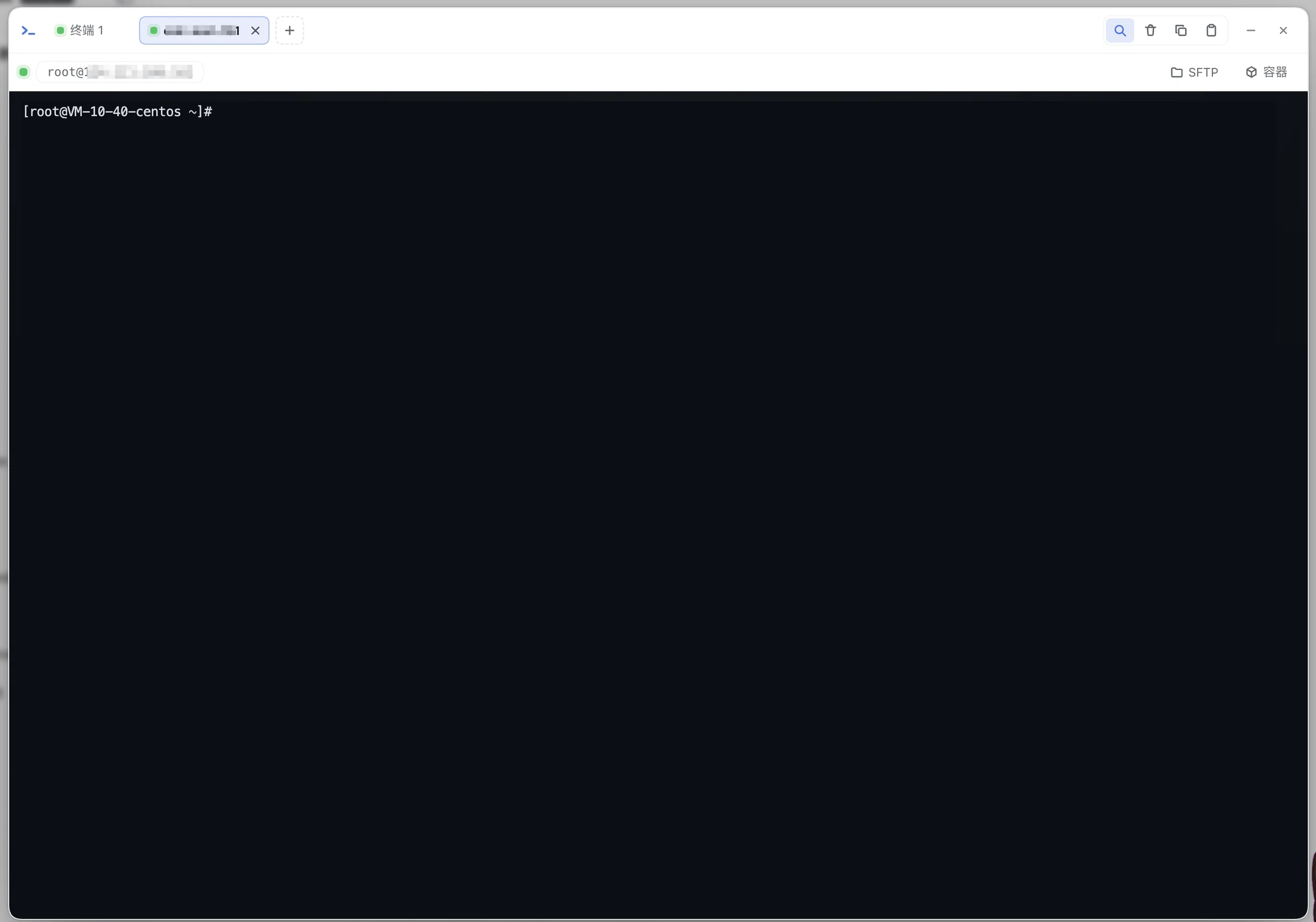
|
|
16
|
+
|
|
17
|
+
## Installation
|
|
18
|
+
|
|
19
|
+
```bash
|
|
20
|
+
dsh plugin --profile web add @hyzyn/dsh-tty # npm install (after release)
|
|
21
|
+
dsh plugin --profile web add link:$(pwd)/packages/tty # repo development/debugging
|
|
22
|
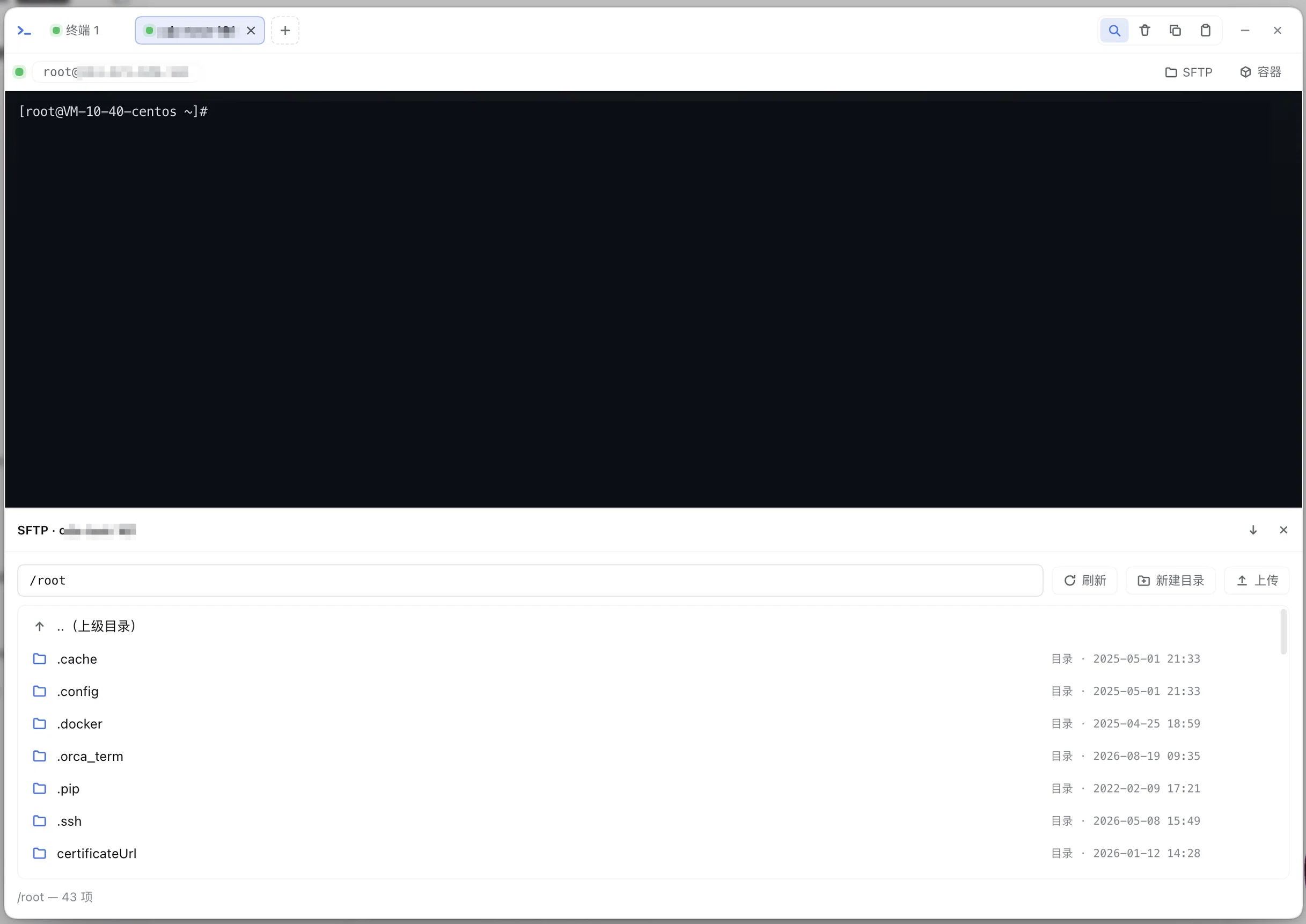
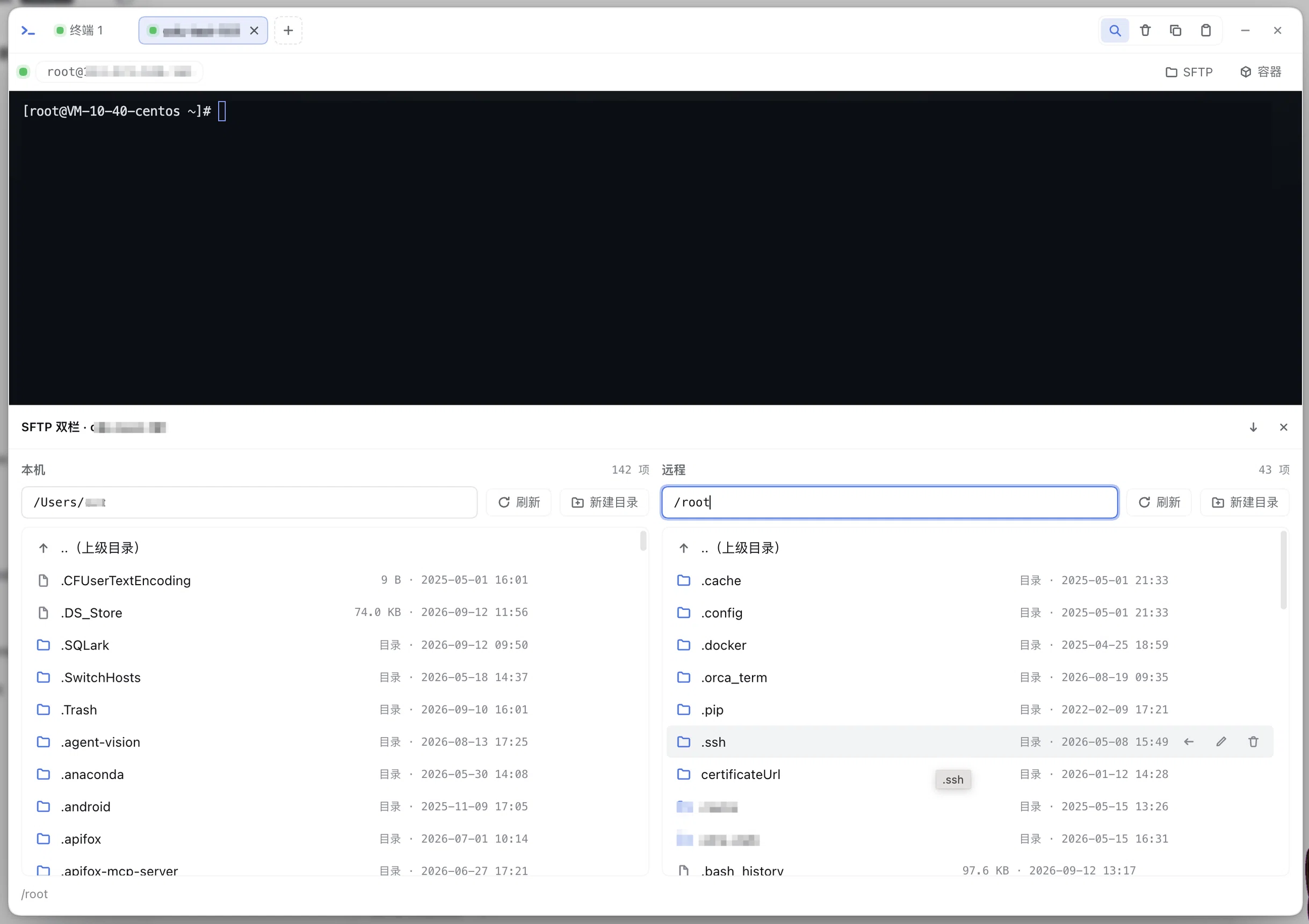
+
```
|
|
23
|
+
|
|
24
|
+
After installing, restart `dsh web`; a “Terminal” entry appears in the sidebar — click it to open the panel; the Settings → Plugins → “Terminal Panel” card lets you change the configuration (**saving takes effect immediately**, no restart needed).
|
|
25
|
+
|
|
26
|
+
## How to use
|
|
27
|
+
|
|
28
|
+
- Opening the panel automatically creates the first terminal (default `$SHELL`, usually zsh on macOS);
|
|
29
|
+
- **Multi-tab**: “+” in the tab bar creates a new terminal (since 0.2.0 “+” is a menu: local terminal /
|
|
30
|
+
SSH connection book (entries have ✎ to edit) / SSH connection…, see the next section for SSH), and ✕ closes
|
|
31
|
+
a tab; **double-clicking a tab renames it** (the name is persisted with the tab and survives a reconnect);
|
|
32
|
+
each tab is an independent session (local PTY or SSH channel);
|
|
33
|
+
- **The working directory follows the current DSH session**: new tabs open in the current session’s
|
|
34
|
+
working directory (the host `cwd` configuration is the fallback);
|
|
35
|
+
- Supports TUIs such as vim / htop / less (TERM is injected as `xterm-256color`);
|
|
36
|
+
- Panel size changes are resized automatically (xterm fit → native PTY resize);
|
|
37
|
+
- **Ctrl+F searches inside the terminal** (Enter next / Shift+Enter previous / Esc closes only the search
|
|
38
|
+
box), links in the output are clickable, and the toolbar offers clear / copy selection / paste;
|
|
39
|
+
- **Reconnect on disconnect (0.3.0)**: after an abnormal disconnect such as a page refresh or a network
|
|
40
|
+
blip, the session is kept alive on the host for `reconnectGraceSec` (120 seconds by default) and the
|
|
41
|
+
client reconnects automatically with exponential backoff (capped at 5s); after reconnecting it
|
|
42
|
+
**attaches back to the original session by sid and replays the output buffered during the disconnect**;
|
|
43
|
+
after a page refresh the tab list is restored from sessionStorage (sessions already finished on the host are dropped);
|
|
44
|
+
- **WebGL renderer (0.3.0)**: high-throughput output (build logs) renders dramatically faster; on WebGL
|
|
45
|
+
context loss (e.g. too many tabs exceeding the browser quota) it automatically falls back to the DOM renderer;
|
|
46
|
+
- **Minimize (state folded into the sidebar entry)**: clicking outside the modal, pressing Esc or the
|
|
47
|
+
title-bar “—” collapses the panel — PTY sessions and output buffers stay alive, the sidebar “Terminal”
|
|
48
|
+
entry shows a “running / total” badge and a status dot (pulsing when there is output), and clicking the
|
|
49
|
+
entry restores it; only the floating bar’s ✕ / the title-bar ✕ really closes it and ends every session;
|
|
50
|
+
- The title-bar ✕ closes the panel and ends every session (PTY tree-level cleanup; tmux persistent tabs also
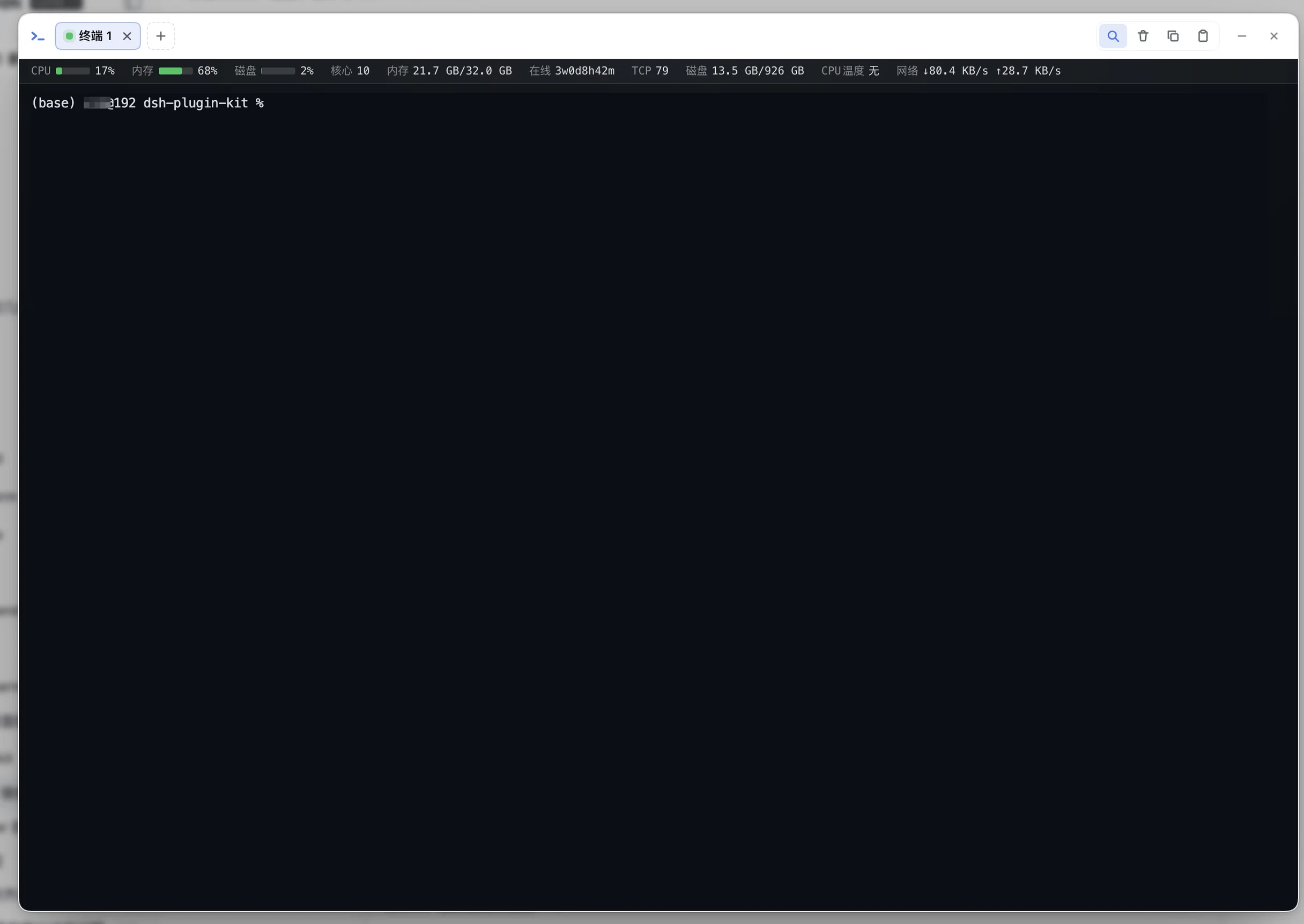
|
|
51
|
+
get kill-session); after a session exits, clicking the terminal area reopens it;
|
|
52
|
+
- The concurrency limit defaults to 4 (`maxSessions` configuration, 1~16).
|
|
53
|
+
|
|
54
|
+
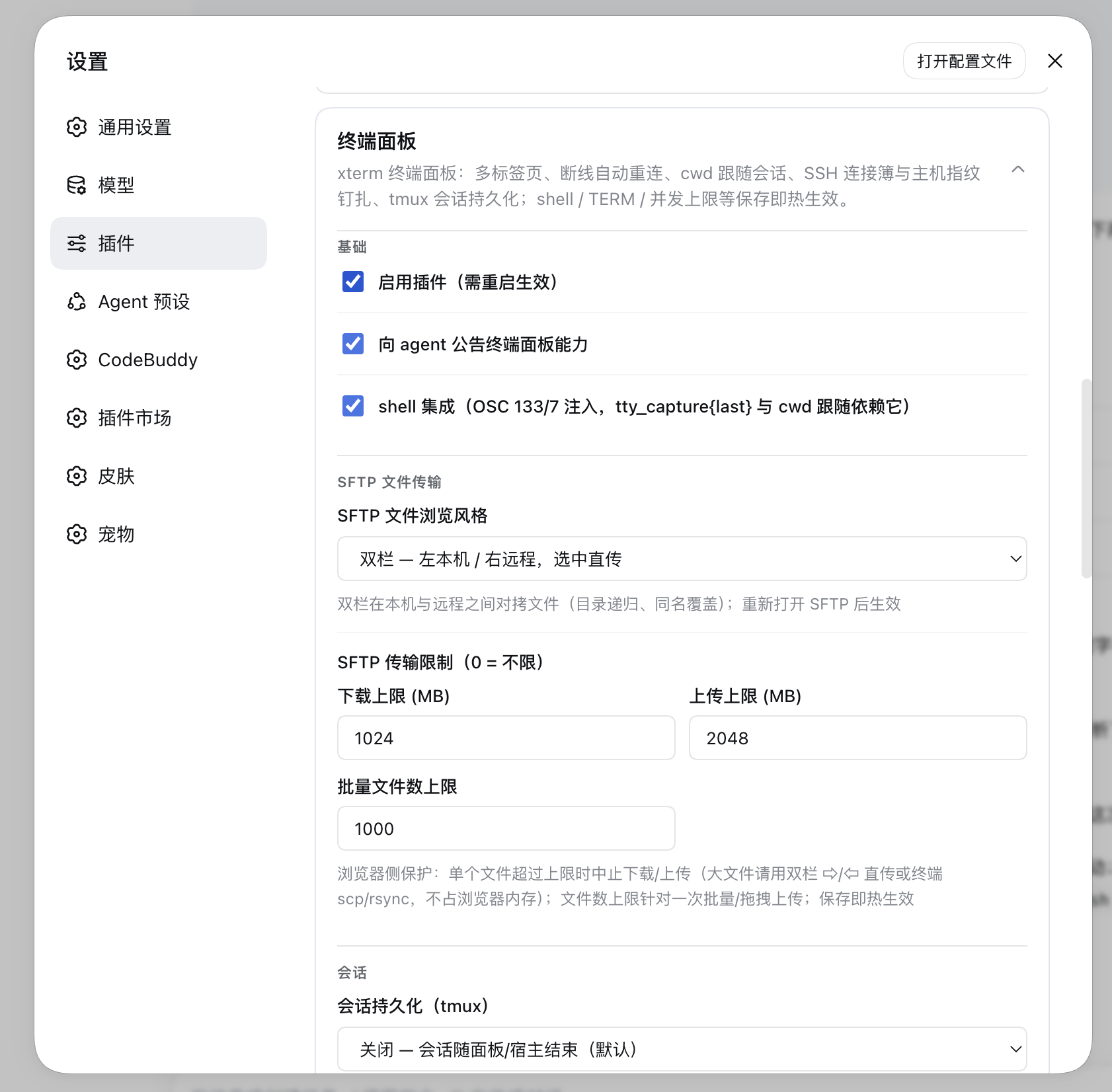
|
|
55
|
+
|
|
56
|
+
## Agent tools (P1)
|
|
57
|
+
|
|
58
|
+
The plugin injects thirteen tools into the agent (with the same power as the bash tool; operations show up live in the user’s terminal):
|
|
59
|
+
|
|
60
|
+
| Tool | Purpose |
|
|
61
|
+
| --- | --- |
|
|
62
|
+
| `tty_list` | List active terminal sessions (sid / kind (`local\|ssh`) / target / pid / **cwd tracked live as you `cd`** / activity time; tmux persistent sessions carry a `persist` marker) |
|
|
63
|
+
| `tty_capture` | Read recent output (last N lines, ANSI stripped by default, `raw:true` for the raw stream); **`last:true` returns only the output + exit code of the previous completed command** (shell integration markers, see the next section) |
|
|
64
|
+
| `tty_screen` | Read the **currently visible screen** as rendered (xterm-headless virtual screen, plain text) — it can genuinely read TUI interfaces such as vim / htop / menus |
|
|
65
|
+
| `tty_expect` | Wait with a regex for a readiness signal in **subsequent output** (dev server URL, build finished, …); a timeout does not throw (`matched:false` + tail output), and a command that ends early also returns early with its exit code |
|
|
66
|
+
| `tty_send` | Send keys/text to a given session (such as `q` to a dev server, or a menu selection) |
|
|
67
|
+
| `sftp_list` | List a remote SSH directory (name/type/size/mtime, directories first); `book` is the connection-book entry name and `path` defaults to the login home |
|
|
68
|
+
| `sftp_read` | Read a remote **text** file (≤256KB by default, adjustable to 1MB, truncated beyond that; files with NUL bytes are rejected as binary) |
|
|
69
|
+
| `sftp_write` | Write a remote text file (overwrite by default, `append:true` appends; ≤1MB per call) |
|
|
70
|
+
| `sftp_mkdir` | Create a remote directory; `parents:true` fills in missing parents level by level (equivalent to `mkdir -p`, created bottom-up, existing directories skipped idempotently) |
|
|
71
|
+
| `sftp_rename` | Rename/move a remote file or directory (a `to` in a different directory means a move; never overwrites an existing target) |
|
|
72
|
+
| `sftp_remove` | Delete a remote file/directory; a directory uses rmdir by default (a non-empty one errors explicitly), and `recursive:true` deletes the whole tree (irrecoverable) |
|
|
73
|
+
| `sftp_tree` | Recursively list a remote directory structure (depth-first, directories first; `maxDepth` 1~8 / `maxEntries` 1~2000 cap it, `truncated:true` when exceeded; symlinks are not followed, to avoid cycles) |
|
|
74
|
+
| `tunnel_list` | List port-forwarding tunnels and their live state (active/connecting/error/stopped, rules, connection counts) |
|
|
75
|
+
|
|
76
|
+
Typical agent flow (recommended): `tty_send` starts a long-running task → `tty_expect` waits for the
|
|
77
|
+
readiness marker → `tty_capture{last:true}` gets the result of that single command. In addition, a dynamic
|
|
78
|
+
context is registered in `systemPrompt` so that every turn automatically carries a snapshot of active
|
|
79
|
+
terminals (sid / kind / cwd) — you have context without calling `tty_list` first.
|
|
80
|
+
|
|
81
|
+
### Shell integration (OSC 133/7, 0.4.0)
|
|
82
|
+
|
|
83
|
+
At spawn time hooks are injected through the existing `-c` wrapper layer according to the shell type (transparent to the user, no rc changes):
|
|
84
|
+
|
|
85
|
+
- **zsh**: `ZDOTDIR` points at a temporary stub directory (the same approach VS Code uses); the stub sources
|
|
86
|
+
the user’s original rc first and then appends `precmd`/`preexec` hooks;
|
|
87
|
+
- **bash**: an `--rcfile` stub (sources `~/.bashrc` first); the command-start marker has two variants by
|
|
88
|
+
version: bash ≥ 4.4 uses `PS0`; bash < 4.4 (the 3.2 shipped with macOS) has no PS0 and falls back to a
|
|
89
|
+
**DEBUG trap** (the handler filters by `$BASH_COMMAND` to drop fires caused by the PROMPT_COMMAND
|
|
90
|
+
machinery itself, so phantom markers do not cut the user’s output out of the capture window; on bash 3.2
|
|
91
|
+
`trap - DEBUG` inside the handler does not take effect, hence the “permanently armed + filtered” design).
|
|
92
|
+
Side effect: internal commands of compound commands such as loops emit extra B markers, which only affects
|
|
93
|
+
where `tty_capture{last}` starts capturing for those commands — D/exit-code and `tty_expect` are
|
|
94
|
+
unaffected; the PROMPT_COMMAND hook supports both the string and the array (bash 5.1+) forms;
|
|
95
|
+
- Marker semantics: `133;A` prompt start / `133;B` command start / `133;D;<exit>` command end with exit
|
|
96
|
+
code / `OSC 7 file://…` cwd reporting (`tty_list.cwd` follows `cd`, and SSH sessions report the remote path);
|
|
97
|
+
- Other shells are silently disabled; `shellIntegration: false` turns the whole thing off (escape hatch).
|
|
98
|
+
|
|
99
|
+
SSH sessions are scheduled on the same table: entries with `kind: 'ssh'` in `tty_list` are identified by
|
|
100
|
+
`target` (user@host[:port]), and `tty_capture` / `tty_expect` / `tty_send` are used exactly as for local
|
|
101
|
+
sessions — dev server logs and key interactions on the remote machine remain available as usual.
|
|
102
|
+
|
|
103
|
+
## Port forwarding (0.5.0)
|
|
104
|
+
|
|
105
|
+
Maintain tunnels in the “Port forwarding” block of the Settings → Plugins → Terminal Panel card; each tunnel
|
|
106
|
+
references one connection-book entry (host and authentication come with it), in two directions:
|
|
107
|
+
|
|
108
|
+
- **Local forwarding (-L)**: listen on local `127.0.0.1:localPort` → connect through SSH on the server side
|
|
109
|
+
to `remoteHost:remotePort` — maps a remote database/internal service to the local machine (the most
|
|
110
|
+
frequent use: `localPort=5432 → db.internal:5432`);
|
|
111
|
+
- **Remote forwarding (-R)**: the server listens on `remoteHost:remotePort` (default
|
|
112
|
+
127.0.0.1) → inbound connections are dialed back to local `localTargetHost:localTargetPort` — exposes a
|
|
113
|
+
local dev server to a remote network/intranet;
|
|
114
|
+
- **The host owns the lifecycle**: tunnels and terminal tabs are independent of each other (each has its own
|
|
115
|
+
SSH connection), and tunnels keep running with the panel closed; SSH disconnects reconnect automatically
|
|
116
|
+
with exponential backoff (1s→15s cap), and the remote direction re-runs forwardIn after a reconnect; after
|
|
117
|
+
the connection-book password changes, a reconnect uses the new credentials automatically;
|
|
118
|
+
- **Status badges**: while the card is expanded it polls live status every 2s (active green/connecting
|
|
119
|
+
blue/error red/stopped grey + last error); connection-book entries in the “+” menu show a `⇄N` tunnel
|
|
120
|
+
badge; the agent can query status with the `tunnel_list` tool;
|
|
121
|
+
- TOFU shares the same `hostKeys` pinning as terminal sessions; ports do not consume `maxSessions` slots.
|
|
122
|
+
|
|
123
|
+
## SFTP file transfer (0.7.0, enhanced in 0.8.0/0.9.0)
|
|
124
|
+
|
|
125
|
+
Remote file operations go straight over the SSH connection without touching the terminal or using a session
|
|
126
|
+
slot (`ssh2`’s sftp subsystem, host half in `src/sftp.ts`):
|
|
127
|
+
|
|
128
|
+
|
|
129
|
+
|
|
130
|
+
|
|
131
|
+
|
|
132
|
+
- **Placement (0.16.0)**: when the terminal panel is open and the mount slot is free, the File Browser
|
|
133
|
+
**docks below the terminal** — the path bar / list / transfer progress take the full width (a file list is
|
|
134
|
+
a wide table, so full width below beats a narrow column on the right, and the terminal also keeps its width
|
|
135
|
+
without wrapping; a dual pane side by side needs that width even more), and the terminal stays visible and
|
|
136
|
+
usable. The height is draggable and can collapse into a single title bar (collapsing neither closes the
|
|
137
|
+
panel nor interrupts browsing); when the mount slot is already taken by another panel (such as the
|
|
138
|
+
containers panel) or the panel is not open, it falls back to the original centered dialog, **without
|
|
139
|
+
pushing anyone else’s panel out**. The title / collapse / ✕ come from tty’s mount slot;
|
|
140
|
+
- **Entries**: ① connection-book entries in the tab bar “+” menu carry a 📂 (open the File Browser for that
|
|
141
|
+
entry); ② fill in host/authentication in the SSH connection dialog and click “File Browser” (you can
|
|
142
|
+
browse without saving to the connection book);
|
|
143
|
+
- **Operations**: directory browsing (Enter in the path box to jump, `.. (parent directory)`, a single click
|
|
144
|
+
on a file downloads it), **upload** (multi-select files, XHR streaming + percentage progress; since 0.8.0
|
|
145
|
+
**drag & drop** is supported — files and folders can be dropped straight into the dialog, folders are
|
|
146
|
+
expanded recursively through `webkitGetAsEntry` and uploaded one by one, and directories are filled in
|
|
147
|
+
level by level with mkdir parents), **download** (POST → browser Blob
|
|
148
|
+
→ `<a download>`), **new directory**, **rename** (inline editor), **delete**
|
|
149
|
+
(🗑 with a second click to confirm, directories deleted with `recursive`);
|
|
150
|
+
- **Transfer progress bar (0.11.0)**: a thin progress bar + percentage was added on the right of the bottom
|
|
151
|
+
status line — uploads use XHR streaming progress (multi-file shows an `i/n · filename` label); downloads
|
|
152
|
+
now stream `response.body` and compute the percentage live from the response `content-length` (with no
|
|
153
|
+
length it degrades to a transferred-bytes text);
|
|
154
|
+
- **Cancelling a transfer (0.12.0)**: the ✕ on the right of the progress bar — **upload** aborts the
|
|
155
|
+
in-flight XHR (remaining files in the batch are skipped too); **download** uses `AbortController` to break
|
|
156
|
+
off the streaming read; **dual-pane ⇨/⇦ direct transfer** became a server-side job (start returns a jobId
|
|
157
|
+
→ 400ms polling of real byte progress → ✕ sends cancel to abort), no longer an unbreakable synchronous
|
|
158
|
+
HTTP request. After a cancel the **half-written file is deleted automatically** (the leftover remote file
|
|
159
|
+
of an upload / the leftover local file of a download; a failed cleanup is only logged), the status line
|
|
160
|
+
reads “cancelled” instead of a red failure state; closing the File Browser dialog also collects in-flight
|
|
161
|
+
transfers, leaving no background copying that is “invisible but still writing to the remote”;
|
|
162
|
+
- **Connection management**: a lazy connection pool — the SSH connection is created on the first operation,
|
|
163
|
+
recycled after 120 seconds idle, and reconnected automatically on the next operation after a drop;
|
|
164
|
+
connection-book entries are resolved live on every (re)connect (a changed password takes effect
|
|
165
|
+
automatically); TOFU shares the same `hostKeys` pinning with terminal sessions/tunnels, and a changed
|
|
166
|
+
fingerprint is rejected the same way; SFTP does not count against `maxSessions`;
|
|
167
|
+
- **Transfer channel**: `POST /api/dsh-tty/sftp/list|mkdir|rename|remove|download|
|
|
168
|
+
upload` (all loopback-fenced). The connection spec travels in the JSON body (connection-book name or
|
|
169
|
+
inline fields, with the same semantics as WS ssh frames: “entry as the base + inline per-field overrides”)
|
|
170
|
+
or, for upload, in the `x-dsh-sftp-meta` header (base64url) — **credentials never enter the URL/query
|
|
171
|
+
string**; uploads and downloads are streamed pipes, and a whole file never enters memory;
|
|
172
|
+
- **Agent tools**: `sftp_list` / `sftp_read` / `sftp_write` / `sftp_mkdir` /
|
|
173
|
+
`sftp_rename` / `sftp_remove` / `sftp_tree` (see the table above) — they accept only a
|
|
174
|
+
`book` connection-book entry name and **take no inline credentials** (agent context never carries plaintext secrets);
|
|
175
|
+
- **Dual-pane style (0.9.0, optional, `sftpStyle` configuration)**: local left / remote right — browsing and
|
|
176
|
+
file operations on the local side go through the new `/api/dsh-tty/local-fs` route (list/mkdir/rename/
|
|
177
|
+
remove, loopback-fenced); the inline `⇨ / ⇦` copies an entry to the current directory of the opposite pane
|
|
178
|
+
(`/api/dsh-tty/local-fs/transfer` streams the two paths server-side, recursing into directories and
|
|
179
|
+
overwriting same-named files, **with bytes never passing through the browser**); the single-pane style is
|
|
180
|
+
unchanged; switch it in the settings card and reopen SFTP for it to take effect.
|
|
181
|
+
|
|
182
|
+
## Session persistence (tmux, 0.10.0)
|
|
183
|
+
|
|
184
|
+
The default safety model is unchanged: sessions live and die with the host (kernel-level PTY cleanup). For
|
|
185
|
+
work that must “outlive the host” (dev servers, builds, training jobs), turn on a **persistent terminal** —
|
|
186
|
+
session state is delegated to a tmux server (dedicated socket `dsh-tty`, fully isolated from the user’s own
|
|
187
|
+
tmux), so it survives the keep-alive timeout and can even be reattached after a host restart:
|
|
188
|
+
|
|
189
|
+
- **Entry (simplified in 0.10.1)**: choosing `tmux` for “Session persistence” in the settings card is the
|
|
190
|
+
only switch — once it is on, **every newly opened tab is persistent by default**: “Local terminal” in the
|
|
191
|
+
“+” menu, clicking a connection-book entry, and the SSH connection dialog (“persistent session” is checked
|
|
192
|
+
by default and can be unchecked for a single connection). There is no longer a separate “persistent
|
|
193
|
+
terminal” menu item or per-entry checkbox;
|
|
194
|
+
- **Mechanism**: spawn/ssh frames carry `persist` plus a stable `persistName` generated by the client and
|
|
195
|
+
saved with the tab spec — locally the `-c` wrapper layer becomes `exec tmux -L dsh-tty -f
|
|
196
|
+
<conf> new-session -A -s dsh-<name>` (cwd is inherited from the node-pty spawn); over SSH the remote runs
|
|
197
|
+
`exec tmux -L dsh-tty -f /dev/null new-session -A -s dsh-<name>` to open the pty channel. `-A` is
|
|
198
|
+
attach-or-create: after a host restart, reopening a tab reattaches to the same tmux session by name,
|
|
199
|
+
restoring running programs and pane state exactly;
|
|
200
|
+
- **Recovery chain**: after the browser reconnects it queries `sessions` — persistent tabs whose sid is gone
|
|
201
|
+
are respawned automatically by the client with the original persistName (non-persistent tabs keep the drop
|
|
202
|
+
semantics); when the keep-alive reaper times out it kills only the PTY (the tmux client) and **not the tmux
|
|
203
|
+
session**, so it can still be reattached afterwards; a reconnect (attach) within the same host does **not
|
|
204
|
+
replay the host buffer** for a tmux session — replaying would first write the visible screen into a
|
|
205
|
+
brand-new xterm (ghost scrollbar) and then the tmux full-screen redraw would paint it again (double image)
|
|
206
|
+
— instead it forces exactly one `tmux refresh-client` redraw;
|
|
207
|
+
persistent tab specs are also written to **localStorage** (sessionStorage is visible only to the same
|
|
208
|
+
browser tab, so a new window that dsh opens automatically after a restart could not read it and recovery
|
|
209
|
+
broke exactly there) — when a brand-new window opens the panel it respawns straight from the spec: if the
|
|
210
|
+
tmux session is alive it reattaches to the original scene, and if it is gone (remote reinstall/lost) it
|
|
211
|
+
starts a new shell; specs are only dropped when “the tab is actively closed/exited”, with no up-front
|
|
212
|
+
liveness check (once the retained state such a check relies on drifts, recovery would fail silently);
|
|
213
|
+
- **Close semantics**: for a tmux-backed session the kill frame (tab ✕ / closing the panel) runs
|
|
214
|
+
`tmux kill-session` before killing the client — a real end, not a detach that leaves a live session
|
|
215
|
+
behind; closing the whole page **retains** by default (recoverable after the keep-alive window), while
|
|
216
|
+
`endOnPageClose: true` also ends the tmux session when the keep-alive window expires;
|
|
217
|
+
- **Shell integration compatibility**: tmux swallows escape sequences it does not recognize — the hooks
|
|
218
|
+
detect `$TMUX` and wrap OSC 133/7 in a DCS passthrough envelope (ESC inside the payload is doubled), and
|
|
219
|
+
with tmux ≥3.3 + `allow-passthrough on` (written into the stub conf by the host automatically) it is
|
|
220
|
+
unwrapped and forwarded, so the host parser still sees bare markers: `tty_expect` / OSC 7 cwd tracking keep
|
|
221
|
+
working inside persistent tabs; `tty_capture{last}` has one further correction — tmux pane redraws are
|
|
222
|
+
asynchronous and batched, so command output can land after the D marker and escape the capture window, so
|
|
223
|
+
the hook runs `capture-pane` before emitting D and sends the pane content inline as `OSC 133;T` (base64,
|
|
224
|
+
last 200 lines), and the host prefers the T snapshot as the command output (output beyond 200 lines is
|
|
225
|
+
truncated at the head, consistent with the ring-buffer semantics);
|
|
226
|
+
- **Runtime assets**: a stable stub directory under `<DSH_HOME|~/.dsh>/tty/` (the tmux server outlives the
|
|
227
|
+
host process, so a temporary directory will not do): `tmux.conf` (status off to keep redraws from
|
|
228
|
+
polluting captures, true-color overrides, `default-command` pointing at the inner launcher) and `inner.sh`
|
|
229
|
+
(execs the inner shell from the current configuration, with the zsh ZDOTDIR / bash --rcfile stubs injected
|
|
230
|
+
as usual); configuration changes apply hot to newly opened panes, while `tmux.conf` itself is read only
|
|
231
|
+
when the tmux server first starts;
|
|
232
|
+
- **Degradation**: with no tmux installed locally/remotely, a persistent spawn falls back to a normal session
|
|
233
|
+
automatically and the terminal prints a grey one-line hint; everything works fine without installing
|
|
234
|
+
anything, just without persistence.
|
|
235
|
+
|
|
236
|
+
## SSH connections
|
|
237
|
+
|
|
238
|
+
Since 0.2.0 the tab bar “+” is a one-click menu that, besides local terminals, also opens **SSH tabs**: the
|
|
239
|
+
host half connects natively with `ssh2` and opens a shell channel (no local ssh process and no node-pty),
|
|
240
|
+
wrapped into a session object identical to a local PTY — input, resize, close, output buffer, backpressure
|
|
241
|
+
and the agent tools all reuse the same scheduling.
|
|
242
|
+
|
|
243
|
+
- **Three entries in the “+” menu**: local terminal / **SSH connection book** (entries saved in the
|
|
244
|
+
configuration, shown as `user@host[:port] · auth`, **entries carry 📂 File Browser and ✎ edit**) / SSH connection…
|
|
245
|
+
(a form for host / port / username / auth with an option to save before connecting, and a “File Browser” at
|
|
246
|
+
the bottom of the dialog to open SFTP with the current information, skipping the terminal);
|
|
247
|
+
- **Connection book**: ticking “save to connection book” in the SSH connection dialog stores an entry (the
|
|
248
|
+
same name overwrites; an empty name uses the hostname); the ✎ on a “+” menu entry and the **edit** in the
|
|
249
|
+
settings card both use the same editor form (edit host/port/username/auth/private key/password/agent
|
|
250
|
+
forwarding inline, renaming supported, duplicate-name validation, written to the configuration on “save”);
|
|
251
|
+
- **Authentication (auth), one of three**:
|
|
252
|
+
- `agent` (default) — uses ssh-agent (`SSH_AUTH_SOCK`), credentials never touch disk, most recommended;
|
|
253
|
+
- `key` — `keyPath` private key file (a leading `~` may omit home), `passphrase` optional;
|
|
254
|
+
- `password` — password authentication, with keyboard-interactive attached as well (many servers only offer that);
|
|
255
|
+
- **Passwords / passphrases support `env:VAR`**: when `password` / `passphrase` is `env:MY_SECRET`,
|
|
256
|
+
the value is read from the host process environment (pair it with the dsh-env-manager plugin to hold
|
|
257
|
+
secrets, keeping plaintext out of the settings file);
|
|
258
|
+
- **Port**: 22 by default; a non-22 port shows in the target as `user@host:port`;
|
|
259
|
+
- **Tabs and status**: an SSH tab title uses the connection name or `user@host` (local tabs are
|
|
260
|
+
“Terminal N”); while connecting it first echoes a grey `Connecting user@host …`, and once ready the status
|
|
261
|
+
bar shows `SSH user@host connected`; a failed connection (connection timeout / authentication rejected /
|
|
262
|
+
host unreachable) comes back in an `error` frame with the reason, and since the tab spec was saved with the
|
|
263
|
+
tab, clicking the terminal area reopens it from the original spec;
|
|
264
|
+
- **Agent forwarding (0.4.0)**: with “agent forwarding” ticked in the SSH dialog, the remote side can use the
|
|
265
|
+
local ssh-agent’s keys (such as `git clone` of a private repository remotely). It can be enabled with any
|
|
266
|
+
authentication method (credentials still never touch disk); if no ssh-agent is running locally the
|
|
267
|
+
connection fails with an explicit error instead of silently doing nothing. Connection-book entries save
|
|
268
|
+
`agentForward` and show `· fwd` in the list;
|
|
269
|
+
- **`~/.ssh/config` import (0.4.0)**: “Import from ~/.ssh/config” in the connection-book area of the settings
|
|
270
|
+
card — parses `HostName/User/Port/IdentityFile` into candidate entries (skipping wildcard blocks and
|
|
271
|
+
entries without a User; `Include` is not expanded), skips same names, and writes them on “save”;
|
|
272
|
+
- **env:VAR picker (0.4.0)**: next to the password/passphrase fields in the SSH dialog there is a filter box
|
|
273
|
+
+ a height-limited list, fed by **the variable names in the env plugin’s managed file** (the managed block
|
|
274
|
+
of `~/.dsh/env.yml`; the host returns only names and never values); clicking fills in `env:NAME`. With no
|
|
275
|
+
managed variables it shows a hint, and any `env:VAR` can still be typed by hand (existence is validated at
|
|
276
|
+
connect time);
|
|
277
|
+
- **Host-key TOFU pinning (0.3.0)**: after the first successful connection the host’s (host:port) sha256
|
|
278
|
+
fingerprint is recorded in `hostKeys` (persisted with settings); every later connection is verified, a
|
|
279
|
+
matching fingerprint is allowed, and **a changed fingerprint rejects the connection outright** (defense
|
|
280
|
+
against impersonation), with a reset pointer in the error message. After a host reinstall or key change,
|
|
281
|
+
delete the record under Settings → Plugins → Terminal Panel → “SSH host key
|
|
282
|
+
records” and reconnect (the record list supports deletion). **“Import from known_hosts”
|
|
283
|
+
(0.4.1)**: parses `~/.ssh/known_hosts` in one click to pre-fill existing host fingerprints in bulk (host
|
|
284
|
+
names from the connection book are also used to restore `|1|` hashed entries, and non-default ports are
|
|
285
|
+
parsed as `[host]:port`);
|
|
286
|
+
- **Connection test (0.11.0)**: a “Test” button on each connection-book row of the settings card, plus a
|
|
287
|
+
“Test connection” button in the SSH connection dialog — both perform **link diagnostics only** (no session,
|
|
288
|
+
no `maxSessions` slot, no shell): first a TCP pre-check (DNS + connect, failures classified as
|
|
289
|
+
refused/timeout/DNS/unreachable), then the ssh2 handshake for a host-key TOFU comparison, and finally
|
|
290
|
+
authentication. The result is shown stage by stage: on success the elapsed time and “host key matched /
|
|
291
|
+
recorded”; on failure the exact stage reason (such as “authentication rejected: all methods failed” or
|
|
292
|
+
“host key mismatch” with the recorded and current fingerprints plus a reset pointer). **The connection-book
|
|
293
|
+
“Test”** does full TOFU: the first test records the new fingerprint into `hostKeys` (the same semantics as a
|
|
294
|
+
real connection); **the dialog “Test connection”** only compares without persisting (a draft not yet stored
|
|
295
|
+
establishes no pinning).
|
|
296
|
+
- **Counts against the `maxSessions` concurrency limit**; closing matches local sessions: the tab ✕ / the
|
|
297
|
+
`kill` frame closes the ssh2 channel, and the `exit` frame brings back the exit code / signal as usual.
|
|
298
|
+
|
|
299
|
+
## Server status bar (0.17.0)
|
|
300
|
+
|
|
301
|
+
|
|
302
|
+
|
|
303
|
+
(The screenshot shows a **local session**; an SSH session’s status bar is the same bar with the same fields — see the single-pane SFTP screenshot below, where the bar above the terminal shows the remote host’s metrics.)
|
|
304
|
+
|
|
305
|
+
Every **visible** tab gets a thin status bar above the terminal showing the resource metrics of the host the
|
|
306
|
+
session belongs to (visually aligned with FinalShell’s session monitor bar):
|
|
307
|
+
|
|
308
|
+
CPU ▮▮▯▯ 6% │ Mem ▮▮▮▮ 78% │ Disk ▮▮▮ 63% │ Cores 16 │ Mem 49.6G/62.3G │
|
|
309
|
+
Uptime 2w4d7h16m │ TCP 570 │ Disk 40.8G/68.8G │ CPU Temp n/a │ Network ↓92.3K/s ↑93.1K/s
|
|
310
|
+
|
|
311
|
+
- **Two collection paths, one frame shape**: for an SSH session a second **non-PTY exec channel** is opened
|
|
312
|
+
on **the same ssh2 connection**, running a resident loop on the remote that emits one line of JSON per
|
|
313
|
+
second (rates such as CPU%/network speed are computed remotely); local sessions are sampled by the host
|
|
314
|
+
itself (Linux reads /proc directly, macOS uses os/netstat/vm_stat). Neither path touches the PTY data stream.
|
|
315
|
+
- **Remote platform coverage: Linux / Windows**: a POSIX sh + awk script runs by default; if the channel ends
|
|
316
|
+
**before a single frame of data has been read** (cmd.exe / PowerShell on Windows cannot parse the script),
|
|
317
|
+
it automatically retries once with the PowerShell version (`-EncodedCommand` delivery, same field shape),
|
|
318
|
+
and only fails when both hops fail — macOS/BSD remotes are exactly this path (no /proc and no PowerShell).
|
|
319
|
+
- **Subscription-based, lazy start**: the client sends `{t:'statsOn'}` / `{t:'statsOff'}` according to tab
|
|
320
|
+
visibility, and the host starts collecting only on the first subscription; unsubscribing clears it, and
|
|
321
|
+
session exit, orphan reaping, plugin disable and configuration off all stop the meter and close the remote
|
|
322
|
+
channel, leaving no timers or remote loops.
|
|
323
|
+
- **Best-effort**: a field that cannot be obtained is omitted (the frontend shows “n/a”); a collection
|
|
324
|
+
failure silently stops the meter and hides the whole status bar (it collapses after 3s without a new
|
|
325
|
+
frame) — it never writes to the PTY and never raises an error. Progress-bar thresholds:
|
|
326
|
+
<70 normal / 70~90 yellow / >90 red.
|
|
327
|
+
- **Hot effect**: turning `statsEnabled` off stops collection at once (the status bar disappears and no more
|
|
328
|
+
stats frames go over the WS), and turning it back on restores automatically from the subscriptions still in
|
|
329
|
+
place — no restart and no need to reopen tabs.
|
|
330
|
+
|
|
331
|
+
## Configuration (Settings → Plugins → “Terminal Panel”, saving takes effect immediately)
|
|
332
|
+
|
|
333
|
+
| Item | Default | Description |
|
|
334
|
+
| --- | --- | --- |
|
|
335
|
+
| `enabled` | true | Disables the whole plugin (needs a restart) |
|
|
336
|
+
| `announceToAgent` | true | Whether to announce the terminal panel capability to the agent (systemPrompt injection) |
|
|
337
|
+
| `maxSessions` | 4 | Concurrent PTY session limit (1~16) |
|
|
338
|
+
| `shell` | `$SHELL` | Shell path; the settings card offers a picker and free input (candidates come from `/etc/shells` + `$SHELL` + common install paths, listing only existing and executable ones, with `$SHELL` first), and any path can also be typed |
|
|
339
|
+
| `term` | `xterm-256color` | TERM value |
|
|
340
|
+
| `colorTerm` | `truecolor` | COLORTERM value |
|
|
341
|
+
| `cwd` | host startup directory | Fallback working directory (the client’s current session cwd wins) |
|
|
342
|
+
| `reconnectGraceSec` | 120 | Seconds a session is kept alive after an abnormal disconnect (0~3600): the session survives a page refresh/network blip waiting for a reconnect, and the reaper ends it on timeout; `0` = the old behavior, end immediately on disconnect |
|
|
343
|
+
| `sshHosts` | `[]` | SSH connection book (selectable in the panel “+” menu): entries `{name, host, port=22, username, auth=agent\|key\|password, keyPath, passphrase, password, agentForward}`; saved as a whole-set replacement, the same name overwrites; `password` / `passphrase` support `env:VAR` references so no plaintext is stored; with persistence on, clicking an entry opens a tmux persistent session by default |
|
|
344
|
+
| `hostKeys` | `[]` | SSH host key records (TOFU, maintained automatically): entries `{host, port, fingerprint}`; unique by host:port, appended automatically on the first connection, and a changed fingerprint rejects the connection; the settings card can delete them to reset |
|
|
345
|
+
| `shellIntegration` | true | Injects the OSC 133/7 shell integration (command boundary markers + cwd reporting; `tty_capture{last}` depends on it); zsh/bash supported, other shells skipped automatically; can be turned off when compatibility problems appear |
|
|
346
|
+
| `tunnels` | `[]` | Port-forwarding tunnels: entries `{name, bookName, direction=local\|remote, localPort?, remoteHost?, remotePort?, localTargetHost?, localTargetPort?, enabled}`; `bookName` references a connection-book entry for host and authentication; maintained graphically in the “Port forwarding” block of the card |
|
|
347
|
+
| `sftpStyle` | `dialog` | SFTP File Browser UI style: `dialog` single pane (remote directory + upload/download/drag & drop) / `dual` two panes (local left / remote right, inline `⇨/⇦` server-side direct transfer); reopen SFTP for it to take effect |
|
|
348
|
+
| `persistence` | `off` | Session persistence: `off` sessions live and die with the host (default); `tmux` makes **every newly opened tab hosted by the tmux server by default**, recoverable across a host restart (requires tmux locally/remotely); the SSH dialog can opt out for a single connection |
|
|
349
|
+
| `endOnPageClose` | `false` | Whether to end the tmux persistent session as well when the page (the last connection) disconnects and the keep-alive window ends. `false` by default = retained and recoverable; `true` = nothing is kept alive once the page is closed (a refresh within the keep-alive window still reattaches seamlessly) |
|
|
350
|
+
| `sftpLimits` | `{maxDownloadMb: 1024, maxUploadMb: 2048, maxUploadFiles: 1000}` | SFTP transfer limits (browser-side guardrails, all **0 = unlimited**): `maxDownloadMb` per-file download limit (over the limit it aborts and suggests the dual-pane `⇦`/terminal scp), `maxUploadMb` per-file upload limit, `maxUploadFiles` files per batch/drag & drop upload; for large files use dual-pane `⇨/⇦` server-side direct transfer (bytes never pass through the browser, no memory cost) |
|
|
351
|
+
| `statsEnabled` | true | Server status bar (0.17.0): collects and pushes CPU / memory / disk / uptime / TCP connections / network speed / CPU temperature by tab visibility; turning it off stops the meter at once (the remote exec channel is closed too), and saving takes effect immediately |
|
|
352
|
+
|
|
353
|
+
## Connection-bar extension point (client service `ttyConnbar`, 0.13.0)
|
|
354
|
+
|
|
355
|
+
Other plugins can append their own contextual buttons to the SSH connection bar (the row with the SFTP /
|
|
356
|
+
tunnel buttons) without tty knowing about them — tty only exposes one generic client service. **The built-in
|
|
357
|
+
actions (reopen / SFTP / tunnel) go through the same registration channel**, and display order = registration
|
|
358
|
+
order; with no extension registered the behavior is exactly as before.
|
|
359
|
+
|
|
360
|
+
```js
|
|
361
|
+
// Optional injection in a consumer's own client half (e.g. dsh-docker): it never fires when tty is absent
|
|
362
|
+
ctx.inject(['ttyConnbar'], (c) => {
|
|
363
|
+
const dispose = c.ttyConnbar.addAction(({ tab, spec, bookName, addAction }) => {
|
|
364
|
+
// Called once per renderConnbar; decide for yourself whether to add a button this time
|
|
365
|
+
if (spec.t !== 'ssh') return
|
|
366
|
+
addAction(iconSvg, 'Containers', 'Open the Docker container panel for this host', () => { /* open your own panel */ })
|
|
367
|
+
})
|
|
368
|
+
// Call dispose() on unload
|
|
369
|
+
})
|
|
370
|
+
```
|
|
371
|
+
|
|
372
|
+
| Member | Description |
|
|
373
|
+
| --- | --- |
|
|
374
|
+
| `addAction(factory)` | Registers a button factory; returns a deregister function. `factory` receives `{tab, spec, bookName, addAction}`: `spec` is the session’s spawnSpec (`{t:'ssh', name?, host, port, username, ...}`), `bookName` is the connection-book entry name (`''` for an inline connection), and `addAction(icon, label, title, onClick)` appends a button using tty’s button style |
|
|
375
|
+
| `requestRender()` | Asks tty to re-render the connection bar (for when a consumer has new data asynchronously and needs the button to appear immediately) |
|
|
376
|
+
|
|
377
|
+
- It only fires on **SSH tabs**; the connection bar of a local tab is hidden anyway.
|
|
378
|
+
- A throwing factory is only logged with `console.warn`, without affecting the connection bar or the built-in buttons.
|
|
379
|
+
- The service name `ttyConnbar` is not declared on tty’s `Context` type surface, so consumers can inject it by
|
|
380
|
+
string; when tty is not installed or is older than 0.13.0 the injection never fires, so consumers must treat
|
|
381
|
+
it as an optional dependency.
|
|
382
|
+
|
|
383
|
+
### Terminal command tabs (client service `ttyTerminal`, 0.14.0)
|
|
384
|
+
|
|
385
|
+
An extension point one step beyond connection-bar buttons: it lets other plugins **open a tab that runs a
|
|
386
|
+
single command** (the typical use is dsh-docker’s card “Terminal” button → `docker exec -it <container> sh`).
|
|
387
|
+
|
|
388
|
+
```js
|
|
389
|
+
ctx.inject(['ttyTerminal'], (c) => {
|
|
390
|
+
c.ttyTerminal.open({
|
|
391
|
+
command: "docker exec -it 'ems-consumer-test' sh", // required, single line, ≤2000 characters
|
|
392
|
+
book: 'HS-248', // one of the two: connection-book entry name → SSH tab
|
|
393
|
+
// spec: { host, port, username, auth, agentForward }, // inline SSH fields
|
|
394
|
+
// (neither = local tab, with cwd giving the working directory)
|
|
395
|
+
label: 'ems-consumer-test · exec',
|
|
396
|
+
cwd: '/optional/local/cwd',
|
|
397
|
+
})
|
|
398
|
+
})
|
|
399
|
+
```
|
|
400
|
+
|
|
401
|
+
- Command tabs are **not persisted in tmux** (commands are short-lived and attaching is meaningless) and do
|
|
402
|
+
not go through a login shell; the SSH side uses `conn.exec(command, {pty})`, and the local side uses
|
|
403
|
+
`sh -c 'export TERM=…; exec <command>'`.
|
|
404
|
+
- **Command tabs reopen automatically**: after a host restart / reconnect the sid is gone, and the client
|
|
405
|
+
re-runs the command from the original spec for tabs with `spawnSpec.command` (ordinary non-persistent tabs
|
|
406
|
+
keep the old “click to retry” behavior). After a page refresh they are restored by the original command too.
|
|
407
|
+
- The command comes from a **host-side plugin** (not from remote user input), so its trust level equals the
|
|
408
|
+
plugin’s own; tty only validates the shape: non-empty, single line, length ≤2000 (a newline would break the
|
|
409
|
+
local `-c` wrapper layer).
|
|
410
|
+
- The service name `ttyTerminal` is likewise not declared on the `Context` type surface; inject it as an
|
|
411
|
+
optional dependency; when tty is not installed or is older than 0.14.0 it never fires (dsh-docker degrades
|
|
412
|
+
to “copy command”).
|
|
413
|
+
|
|
414
|
+
### Embedded in-place terminal (`ttyTerminal.mount`, 0.15.0)
|
|
415
|
+
|
|
416
|
+
`open` is “borrow tty’s modal to open a tab” — the user’s panel gets covered or pushed behind by the modal; if
|
|
417
|
+
a consumer would rather **place a terminal inside its own panel** (typically dsh-docker’s terminal drawer:
|
|
418
|
+
watch container logs and drop into the container to type commands without losing context), use `mount`:
|
|
419
|
+
|
|
420
|
+
```js
|
|
421
|
+
ctx.inject(['ttyTerminal'], (c) => {
|
|
422
|
+
if (Number(c.ttyTerminal.version ?? 0) < 2) { /* older version: fall back to open */ }
|
|
423
|
+
const dispose = c.ttyTerminal.mount(hostEl, {
|
|
424
|
+
command: "docker exec -it 'ems-consumer-test' sh", // the same set of options as open
|
|
425
|
+
book: 'HS-248', // book > spec > local
|
|
426
|
+
label: 'ems-consumer-test · exec',
|
|
427
|
+
})
|
|
428
|
+
// When collapsing your own drawer:
|
|
429
|
+
// dispose()
|
|
430
|
+
})
|
|
431
|
+
```
|
|
432
|
+
|
|
433
|
+
- `hostEl` must be an `HTMLElement`: tty inserts an absolutely positioned `.tt_term` into it, so the mount
|
|
434
|
+
point needs `position: relative` and a definite size (size changes are caught by a ResizeObserver and
|
|
435
|
+
synced to the PTY).
|
|
436
|
+
- An embedded terminal **shares the same WebSocket and session table** as tabs, but its semantics are “a piece
|
|
437
|
+
of terminal inside someone else’s panel”: it does not enter the tab bar, does not write sessionStorage, and
|
|
438
|
+
does not take part in showing/hiding the tty panel; **closing the tty panel does not affect it** (and
|
|
439
|
+
conversely: while an embedded session is running, tty’s connection is not closed).
|
|
440
|
+
- Reconnect on disconnect, re-running by the original command after a host restart, and clicking the overlay
|
|
441
|
+
to reopen after exit all reuse the existing logic; `dispose()` ends the session and unmounts the DOM.
|
|
442
|
+
Mounting is **cold-start safe** — with the tty panel closed and no connection yet, `mount` still brings the
|
|
443
|
+
connection up (creation frames are queued first and sent after `onopen`).
|
|
444
|
+
- An embedded terminal has no search/clear/copy toolbar from the tty panel header, and Ctrl+F is handed back to the browser.
|
|
445
|
+
|
|
446
|
+
### In-panel mount slots (client service `ttyPanel`, 0.16.0)
|
|
447
|
+
|
|
448
|
+
> tty’s own SFTP File Browser goes through this channel too (0.16.0): when the mount slot is free it docks on
|
|
449
|
+
> the right, and when another panel has taken it, it falls back to the dialog.
|
|
450
|
+
|
|
451
|
+
`mount` solves “a consumer gives the host and tty puts a terminal in it”; `ttyPanel` is its **mirror** — tty
|
|
452
|
+
gives consumers a slot inside the terminal panel to mount their own UI into. A typical case: dsh-docker opens
|
|
453
|
+
“Containers” from the SSH connection bar and the containers panel docks to the **right** of the terminal,
|
|
454
|
+
which stays visible, clickable and typable instead of being covered by a full-screen modal (which was exactly
|
|
455
|
+
the pain before 0.15).
|
|
456
|
+
|
|
457
|
+
```js
|
|
458
|
+
ctx.inject(['ttyPanel'], (c) => {
|
|
459
|
+
// Use your own modal when the panel is not open (or tty < 0.16)
|
|
460
|
+
if (Number(c.ttyPanel.version ?? 0) < 1 || c.ttyPanel.isOpen() !== true) { /* fallback */ }
|
|
461
|
+
const pane = c.ttyPanel.mountPane({
|
|
462
|
+
title: 'Docker Containers', // panel title
|
|
463
|
+
hint: 'prod-web-01', // grey text right of the title (optional)
|
|
464
|
+
side: 'right', // 'right' (default, vertical list / list+detail) | 'bottom' (wide horizontal table)
|
|
465
|
+
size: 520, // initial size in px: right = width (default 460), bottom = height (default 320)
|
|
466
|
+
min: 360, // minimum size in px (optional, default 280 / 160)
|
|
467
|
+
onClose: () => { /* called when tty tears the panel down: unmount your React root here */ },
|
|
468
|
+
})
|
|
469
|
+
createRoot(pane.element).render(<MyPanel />)
|
|
470
|
+
// When collapsing it yourself: pane.dispose()
|
|
471
|
+
})
|
|
472
|
+
```
|
|
473
|
+
|
|
474
|
+
| Member | Description |
|
|
475
|
+
| --- | --- |
|
|
476
|
+
| `isOpen()` | Whether the terminal panel is currently open (minimized does not count). Consumers use it to decide “mount in here” or “use my own modal” |
|
|
477
|
+
| `mountPane(options)` | Mounts a slot on the right / at the bottom of the panel and returns a handle; **only one at a time**, and a later `mountPane` first tears the previous one down (calling its `onClose`). With `side:'bottom'` it spans the full width and is sized by height (drag the top edge), collapsing into a title bar |
|
|
478
|
+
| `handle.element` | The host the consumer renders into (flex column, already `overflow:hidden`, filling the body area) |
|
|
479
|
+
| `handle.setTitle(text)` / `setHint(text)` | Change the title / the grey hint |
|
|
480
|
+
| `handle.expand() / collapse() / toggle() / isCollapsed()` | Collapse into a 32px strip (vertical title + expand/close buttons), and the terminal immediately gets its width back |
|
|
481
|
+
| `handle.dispose()` | The consumer tears it down itself (idempotent, does not fire `onClose` again) |
|
|
482
|
+
|
|
483
|
+
- **Lifecycle**: the side panel’s DOM lives inside the terminal modal — minimize / restore follow the panel,
|
|
484
|
+
and consumers need not care; when the panel is closed (✕ / host unload) tty **calls `onClose` first**
|
|
485
|
+
(consumers unmount there) and only then detaches the DOM.
|
|
486
|
+
- **Resizing**: a right pane drags its left edge, a bottom pane drags its top edge (the cap is 72% of the
|
|
487
|
+
panel card’s long side, leaving room for the terminal), and the size is remembered per direction within the
|
|
488
|
+
same page session. Terminal-area size changes are caught by the existing ResizeObserver, which refits
|
|
489
|
+
automatically and syncs the new rows/cols to the PTY.
|
|
490
|
+
- **Viewport anchoring**: opening/closing a pane or dragging its size changes the terminal area’s height, and
|
|
491
|
+
xterm moving its viewport by itself would “push the content up”. Refit anchors to what the user was doing —
|
|
492
|
+
if they were at the bottom (watching the newest output) it stays at the bottom, and if they had scrolled
|
|
493
|
+
back through history it locks to the same lines, so nothing jumps away.
|
|
494
|
+
- **Choosing a direction**: vertical lists / list+detail (such as the containers panel) use `right`; wide
|
|
495
|
+
tables (such as the SFTP file list or the local↔remote dual pane) use `bottom` — the full width fits more
|
|
496
|
+
columns and does not squeeze the terminal’s width.
|
|
497
|
+
- The title bar (title / collapse / ✕) is provided by tty, and consumers only own their own body; a throwing
|
|
498
|
+
`onClose` is only logged with `console.warn`, without affecting closing the panel.
|
|
499
|
+
|
|
500
|
+
> Contract versions: `ttyConnbar.version === 1`, `ttyTerminal.version === 2` (1 = `open` only,
|
|
501
|
+
> 2 = adds `mount`), `ttyPanel.version === 1`. Consumers **decide capabilities by version number**; do not
|
|
502
|
+
> rely on assumptions beyond `typeof fn === 'function'`; on an older tty the `inject` still fires, but the
|
|
503
|
+
> corresponding fields are absent.
|
|
504
|
+
|
|
505
|
+
## Frame protocol (/api/dsh-tty/ws, JSON text frames; v3 = one connection with many sessions + reconnect)
|
|
506
|
+
|
|
507
|
+
| Direction | Frame | Description |
|
|
508
|
+
| --- | --- | --- |
|
|
509
|
+
| C→S | `{t:'spawn', sid?, cols?, rows?, cwd?, persist?, persistName?, command?}` | Create a session; sid defaults to one generated by the host and cwd to the configured fallback; `persist` + a stable `persistName` (0.10.0) = tmux persistent session (`dsh-<name>`, requires persistence=tmux); `command` (0.14.0) = run a single command directly (no persistence) |
|
|
510
|
+
| C→S | `{t:'ssh', sid?, cols?, rows?, name? \| host, username, …, persist?, persistName?}` | Create an SSH session (native ssh2); `name` references a connection-book entry as the base, and inline `host/port/username/auth/keyPath/passphrase/password/agentForward` can override it field by field; `persist` has the same semantics as spawn (remote tmux hosting) |
|
|
511
|
+
| C→S | `{t:'input', sid?, d}` | Key/paste data |
|
|
512
|
+
| C→S | `{t:'resize', sid?, cols, rows}` | Panel size change |
|
|
513
|
+
| C→S | `{t:'refresh', sid?}` | Force a redraw (0.10.1): the host runs `refresh-client` on a tmux session (the client resets to clear stale scrollback and then asks for a fresh redraw; a no-op for non-tmux sessions) |
|
|
514
|
+
| C→S | `{t:'kill', sid?}` | Close a session (orphan sessions can also be killed across connections, to prevent leaks) |
|
|
515
|
+
| C→S | `{t:'sessions'}` | List a global session snapshot (`attachable` marks the reattachable ones) |
|
|
516
|
+
| C→S | `{t:'attach', sid}` | Reattach an orphan session (inside the keep-alive window): after `ready(reattached:true)` a single `data` frame replays the output buffer |
|
|
517
|
+
| C→S | `{t:'statsOn' \| 'statsOff', sid}` | Subscribe/unsubscribe that session’s server status bar (0.17.0): driven by tab visibility, and the host collects only while a subscription exists (lazy start + unsubscribing stops the meter and closes the remote channel) |
|
|
518
|
+
| S→C | `{t:'ready', sid, pid, kind, target?, persist?, reattached?}` | Session ready; `kind:'local'` carries a pid, while `kind:'ssh'` has pid=null and target=user@host[:port]; attach reuses this frame with `reattached:true`; `persist:true` means a tmux persistent session (0.10.0) |
|
|
519
|
+
| S→C | `{t:'data', sid, d}` | Terminal output (utf8 text, StringDecoder covers multi-byte sequences split across frames); **coalesced into frames over a 12ms window / 64KB threshold** (0.4.1), with a forced flush before exit/kill to guarantee frame order |
|
|
520
|
+
| S→C | `{t:'stats', sid, stats}` | Resource metric frame (0.17.0): `{cpuPct, cores, memUsed, memTotal, memPct, diskUsed, diskTotal, diskPct, uptimeSec, tcpConns, rxRate, txRate, tempC?}`; missing fields are omitted (best-effort, the frontend shows “n/a”), byte fields are bytes and rates are B/s |
|
|
521
|
+
| S→C | `{t:'exit', sid, code, signal}` | The PTY exit fact (exactly once; after attach moves to a new connection it is still delivered over the current connection) |
|
|
522
|
+
| S→C | `{t:'error', sid?, m}` | Error |
|
|
523
|
+
| S→C | `{t:'sessions', list, tmux?}` | Session snapshot (`{sid, kind, target, pid?, cwd, startedAt, lastOutputAt, attachable, persist?}`); `tmux` = the persistent session names alive on the dedicated socket + retained SSH persistent session names (0.10.1, an observable field) |
|
|
524
|
+
|
|
525
|
+
Disconnect keep-alive semantics: when the client closes the panel normally it sends `kill` for each session
|
|
526
|
+
before disconnecting; therefore “WS closed with sessions still alive” is treated as an abnormal disconnect —
|
|
527
|
+
sessions become orphans (output keeps accumulating into the ring buffer and is sent to no connection), and
|
|
528
|
+
after `reconnectGraceSec` of keep-alive the reaper cleans them up; during that window a new connection can
|
|
529
|
+
query `{t:'sessions'}` and `{t:'attach', sid}` to reconnect and replay.
|
|
530
|
+
|
|
531
|
+
When sid is omitted the frame is routed to “the connection’s only session”; with 0 or multiple sessions on the
|
|
532
|
+
connection, omitting sid errors out. The upgrade route carries a loopback trust fence (remoteAddress + Host +
|
|
533
|
+
Origin checks), so only the local Web GUI can connect.
|
|
534
|
+
|
|
535
|
+
## Development
|
|
536
|
+
|
|
537
|
+
```bash
|
|
538
|
+
pnpm --filter @hyzyn/dsh-tty build # tsc host + esbuild browser half (client.js)
|
|
539
|
+
pnpm --filter @hyzyn/dsh-tty typecheck
|
|
540
|
+
pnpm --filter @hyzyn/dsh-tty probe # M0 probe: PTY primitive verification (needs a real PTY)
|
|
541
|
+
pnpm --filter @hyzyn/dsh-tty integration # integration tests: real plugin × real DSH service composition
|
|
542
|
+
pnpm --filter @hyzyn/dsh-tty live # liveness smoke against a running dsh web
|
|
543
|
+
pnpm --filter @hyzyn/dsh-tty tui # TUI smoke: vim/nano full-screen rendering
|
|
544
|
+
pnpm --filter @hyzyn/dsh-tty ssh-smoke # SSH smoke: in-memory SSH server (ssh2.Server) × real spawnSsh end to end (build first)
|
|
545
|
+
pnpm --filter @hyzyn/dsh-tty preview # visual preview: headless Chrome screenshots per scene (see below)
|
|
546
|
+
```
|
|
547
|
+
|
|
548
|
+
The browser half’s source is `client-src/index.js`, with the stylesheet living separately in
|
|
549
|
+
`client-src/tty.css` (inlined into `client.js` by esbuild’s text loader). The build output `client.js`
|
|
550
|
+
(including the xterm core) needs another `pnpm build` and a page refresh (possibly a hard refresh) after
|
|
551
|
+
client-side changes.
|
|
552
|
+
|
|
553
|
+
### Visual preview / screenshot regression (`scripts/preview.mjs`)
|
|
554
|
+
|
|
555
|
+
Styles should not be changed by “refresh the page and take a look”: the script loads `client.js` into a pure
|
|
556
|
+
static fixture page (`scripts/preview/harness.html` + a fake DSH host from `mock-host.js`: module
|
|
557
|
+
loader / fetch / WebSocket) and renders 14 UI states one by one with headless Chrome, screenshotting them to
|
|
558
|
+
`packages/tty/.preview/shots/`:
|
|
559
|
+
|
|
560
|
+
```bash
|
|
561
|
+
node scripts/preview.mjs # all scenes
|
|
562
|
+
node scripts/preview.mjs local menu ssh # specific scenes
|
|
563
|
+
node scripts/preview.mjs --list # list scenes
|
|
564
|
+
node scripts/preview.mjs --theme=light # light theme
|
|
565
|
+
```
|
|
566
|
+
|
|
567
|
+
Coverage: local terminal / multi-tab + SSH connection bar / the “+” menu / SSH dialog (new, edit)/
|
|
568
|
+
settings card / SFTP (single pane, dual pane) / minimized badge / exit and error overlays / tunnel popover /
|
|
569
|
+
search box / toast. The fixture also renders the `--dsw-*` skin variables together with the real UI, so it can
|
|
570
|
+
verify things like “is there still a white panel after switching light/dark themes”. The output directory
|
|
571
|
+
`.preview/` is gitignored.
|
|
572
|
+
|
|
573
|
+
> The fixture needs Chrome/Chromium (it looks for playwright’s cached Chrome for Testing by default, or use
|
|
574
|
+
> `CHROME_PATH`). If the host environment restricts Chrome’s sandbox (child processes denied), it must be
|
|
575
|
+
> loosened before running, otherwise the browser cannot start.
|
|
576
|
+
|
|
577
|
+
## Known limitations
|
|
578
|
+
|
|
579
|
+
- **Resize is an internal coupling**: DSH’s `spawnTerminal` handle does not expose resize, so the plugin
|
|
580
|
+
passes through `(handle).terminal.resize(cols, rows)` directly (node-pty’s native API, reachable in the
|
|
581
|
+
same process). If a DSH upgrade changes the internals, since 0.3.0 it warns once and degrades to a fixed
|
|
582
|
+
size instead of throwing on every frame.
|
|
583
|
+
- **TERM is injected through a `-c` wrapper layer**: DSH hardcodes node-pty `name:"dumb"`, and in
|
|
584
|
+
node-pty name takes precedence over env.TERM, so the shell is started as
|
|
585
|
+
`sh -c 'export TERM=...; exec "$shell"'` (transparent to the user; the TERM /
|
|
586
|
+
COLORTERM values are whitelisted to avoid breaking the wrapper command).
|
|
587
|
+
- **terminate() has a “survivor” race**: DSH’s tree-level cleanup occasionally reports
|
|
588
|
+
`terminal cleanup failed; surviving pids`, which the plugin handles best-effort
|
|
589
|
+
(on failure it degrades to SIGKILL on the top-level shell), and the exit code/signal may be null.
|
|
590
|
+
- **Output is a utf8 text stream**: node-pty data is transported by DSH as utf8, so non-UTF-8
|
|
591
|
+
bytes get eaten by replacement characters (such as `cat` on a binary file) — expected behavior; multi-byte
|
|
592
|
+
UTF-8 sequences split across chunks are covered by StringDecoder (0.3.0), so fast Chinese output no longer garbles.
|
|
593
|
+
- The browser half depends on the official `dsh-web-app` sidebar structure (`[data-pane="sidebar"]`), so an
|
|
594
|
+
unofficial Web GUI may not show the entry.
|
|
595
|
+
- **The keep-alive window is limited**: after an abnormal disconnect a session is kept alive and reattachable
|
|
596
|
+
only for `reconnectGraceSec` (120s by default), and a host process restart ends all sessions; sessions not
|
|
597
|
+
reconnected before the deadline are ended by the reaper, and scroll history beyond the output buffer
|
|
598
|
+
(last 256KB) cannot be recovered.
|
|
599
|
+
- **Shell integration is zsh / bash only**: other shells are skipped automatically (`tty_capture{last}`
|
|
600
|
+
reports a clear error rather than a wrong one). bash < 4.4 uses the DEBUG trap fallback: internal commands
|
|
601
|
+
of compound commands such as loops emit extra B markers, and `tty_capture{last}` captures only the output
|
|
602
|
+
after the last internal command for those commands (exit codes and `tty_expect` are unaffected). If the
|
|
603
|
+
user’s rc overrides `PROMPT_COMMAND`/the hook array, the integration may stop working — turn off
|
|
604
|
+
`shellIntegration` or report a patch for compatibility.
|
|
605
|
+
- **Port-forwarding boundaries**: local listeners are fixed to 127.0.0.1 (never exposed to the LAN); listening
|
|
606
|
+
on the server side for the remote direction is also limited by the server sshd’s `GatewayPorts`; a tunnel’s
|
|
607
|
+
SSH connection is independent of terminal sessions and both use TOFU pinning and connection-book
|
|
608
|
+
authentication; tunnel spec changes (port/target/start-stop) take effect hot on “save”, while hot-changing
|
|
609
|
+
connection-book credentials takes effect on the next reconnect.
|
|
610
|
+
- **Session persistence (tmux) boundaries**: persistent tabs are hosted by the tmux server (dedicated socket
|
|
611
|
+
`dsh-tty`) — when the host is hard-killed / the keep-alive reaper fires / the browser loses the tab spec,
|
|
612
|
+
the tmux session is **retained** (which is exactly what makes recovery possible) until the machine restarts
|
|
613
|
+
or `tmux -L dsh-tty kill-server` is run manually; the agent’s command-granularity tools
|
|
614
|
+
(capture{last}/expect) depend on DCS `allow-passthrough` in tmux ≥3.3, and on older versions persistence
|
|
615
|
+
works but that capability degrades (SSH remote sessions do not inject shell integration hooks, so
|
|
616
|
+
capture{last} was never available there, independently of persistence); recovery redraws the currently
|
|
617
|
+
visible screen, while pre-disconnect scroll history lives in tmux’s own history buffer (copy-mode), not in
|
|
618
|
+
the outer xterm scrollback; a persistent tab’s `exit` frame exit code is the tmux client’s (0), while the
|
|
619
|
+
shell’s exit code remains available through the OSC 133;D marker as usual; `tmux.conf` is read only when the
|
|
620
|
+
tmux server first starts (after changing the configuration, run `tmux -L dsh-tty kill-server` so the next
|
|
621
|
+
spawn rebuilds the server); with `grace=0`, “end immediately on disconnect” also kill-sessions persistent
|
|
622
|
+
tabs (the tmux session does not survive); persistent SSH sessions require tmux on the remote (without it
|
|
623
|
+
they degrade to a normal session automatically, and the connection bar shows a permanent “not persistent”
|
|
624
|
+
marker), and the remote `~/.tmux.conf` does not affect the dedicated socket’s independent conf
|
|
625
|
+
(`-f /dev/null`); SSH persistent session names are retained with settings; when **two windows reattach to
|
|
626
|
+
the same persistent session at the same time** they share one host PTY (0.10.1, single-client fan-out, slots
|
|
627
|
+
do not double), and the row/column count follows the most recently resized window (when the sizes differ,
|
|
628
|
+
the larger side self-heals with a redraw through onResize).
|
|
629
|
+
- **SFTP boundaries**: file permissions = the terminal permissions of the corresponding SSH account (no extra
|
|
630
|
+
sandbox/chroot); downloads go through browser memory (for very large files prefer `scp`/`rsync` in the
|
|
631
|
+
terminal); the agent tool `sftp_read` is ≤1MB and rejects binaries, and `sftp_write` is ≤1MB per call (use
|
|
632
|
+
panel upload or the terminal for larger content); the `sftp_*` tools accept only connection-book entry
|
|
633
|
+
names, and inline credentials are for the panel dialog only.
|
|
634
|
+
- **SSH host keys are TOFU-pinned**: the first connection records the sha256 fingerprint automatically
|
|
635
|
+
(trust on first use), after which a matching fingerprint is allowed and a change is rejected — no longer an
|
|
636
|
+
unconditional accept-and-log. Note TOFU’s inherent boundary: if the first connection already met a MITM,
|
|
637
|
+
what was recorded is a fake fingerprint; `hostKeys` is persisted with settings, and a fingerprint change
|
|
638
|
+
requires a human to confirm in the settings card and delete the record; `hostKeys` stores only **one**
|
|
639
|
+
fingerprint per host:port — when a host offers several key types (rsa/ed25519/ecdsa) and algorithm
|
|
640
|
+
negotiation changes, it may report a false change, and deleting the record and reconnecting recalibrates
|
|
641
|
+
it; known_hosts import likewise takes the first entry per host.
|
|
642
|
+
- **SSH passwords / passphrases should use `env:VAR` references**: the connection book is persisted in the
|
|
643
|
+
settings file, so plaintext `password` / `passphrase` is an exposure surface; prefer `env:VAR` +
|
|
644
|
+
dsh-env-manager, or `agent` authentication outright (credentials never touch disk).
|
|
645
|
+
- **Server status bar (0.17.0) boundaries**: the remote side relies on two fallback hops: POSIX first (needs
|
|
646
|
+
`/proc` + `awk`), and if not a single frame appears it falls back to PowerShell — this is what covers
|
|
647
|
+
**Windows remotes** (most components have no temperature and show “n/a”, the disk is the system drive
|
|
648
|
+
`%SystemDrive%`, TCP comes from `netstat -an`, and network speed from `Get-NetAdapterStatistics` deltas;
|
|
649
|
+
integers only, which avoids locale decimal points and scientific notation at the root), while **macOS/BSD
|
|
650
|
+
remotes** satisfy neither hop, get not a single field, and hide the whole status bar; on non-Linux remotes
|
|
651
|
+
every (re)subscription costs one extra doomed exec (about a hundred milliseconds, without affecting frame
|
|
652
|
+
latency); on Linux CPU temperature exists only on machines that expose `/sys/class/thermal` (most cloud
|
|
653
|
+
hosts/VMs do not, showing “n/a”); the disk is always the filesystem holding `/` (the system drive on
|
|
654
|
+
Windows) (no multi-mount support); the remote script is single-quoted through `sh -c` (so it runs even when
|
|
655
|
+
the login shell is fish/csh); local-session metrics belong to the **host machine** (several local tabs share
|
|
656
|
+
one sampling, with a continuous CPU/network delta window), and since macOS has no /proc, `ss` or sysfs it
|
|
657
|
+
uses os/netstat/vm_stat instead, so the temperature is always “n/a” and memory is active+wired+compressed
|
|
658
|
+
from vm_stat (os.freemem counts file cache as used and sits at 99% long-term); the metrics are
|
|
659
|
+
**instantaneous values** with no history curves, and there is no agent tool for them (the agent keeps using
|
|
660
|
+
the command-granularity tty_* capabilities).
|
|
661
|
+
- **SSH sessions have no local pid**: an ssh2 shell channel is not a local process, so `ready.pid`
|
|
662
|
+
is `null` and `tty_list` shows `target` instead of a pid; local `ps` / `kill` do not work on remote
|
|
663
|
+
processes — close with the tab ✕ or the `kill` frame (which closes the ssh2 channel).
|
|
664
|
+
|
|
665
|
+
## How it works
|
|
666
|
+
|
|
667
|
+
```
|
|
668
|
+
Browser half (client.js, esbuild bundle)
|
|
669
|
+
├─ sidebar “Terminal” entry → large modal
|
|
670
|
+
├─ tab bar: one xterm.js instance per tab (independent sid; WebGL renderer, DOM fallback on loss)
|
|
671
|
+
├─ reconnect: exponential-backoff auto-reconnect + sessions query + attach restore;
|
|
672
|
+
│ the tab list lives in sessionStorage (after a refresh, reconnect by sid and keep sessions alive)
|
|
673
|
+
├─ sessions client service: a new tab carries the current session cwd
|
|
674
|
+
└─ WebSocket ──→ /api/dsh-tty/ws (webServer.registerUpgrade)
|
|
675
|
+
│
|
|
676
|
+
Host half (src/index.ts)
|
|
677
|
+
├─ per-connection session table (sid → local PTY / SSH channel, many sessions per connection)
|
|
678
|
+
├─ SessionManager (maxSessions cap, hot-adjustable; SSH sessions scheduled from the same table;
|
|
679
|
+
│ the orphan reaper cleans up abnormally disconnected sessions per reconnectGraceSec)
|
|
680
|
+
├─ per-session 256KB ring buffer (tty_capture / disconnect replay) + xterm-headless
|
|
681
|
+
│ virtual screen (tty_screen) + StringDecoder (utf8 split-frame fallback)
|
|
682
|
+
├─ shell integration (src/shell-integration.ts): zsh ZDOTDIR / bash --rcfile
|
|
683
|
+
│ stub injection of OSC 133/7 hooks; output stream parsing (feedShellIntegration, carrying
|
|
684
|
+
│ truncated packets across chunks) → command boundary capture (tty_capture{last} / tty_expect
|
|
685
|
+
│ early stop) and cwd tracking (tty_list)
|
|
686
|
+
├─ local path: ctx.get('subprocess').spawnTerminal({ argv: shell -c wrapper, cwd })
|
|
687
|
+
│ persistent tabs (0.10.0): the wrapper becomes `exec tmux -L dsh-tty -f <conf> new -A -s dsh-<name>`
|
|
688
|
+
│ (src/tmux.ts: probing / asset generation / spawn planning / kill-session; stable assets under
|
|
689
|
+
│ <DSH_HOME|~/.dsh>/tty/ — tmux.conf + inner.sh + zsh/bash stubs; tmux swallows sequences it
|
|
690
|
+
│ does not recognize, so the shell-integration hook detects $TMUX and wraps OSC 133/7 in a DCS
|
|
691
|
+
│ passthrough envelope, tmux ≥3.3 unwraps and forwards it, and the host parser needs no change)
|
|
692
|
+
├─ auxiliary routes: /api/dsh-tty/ssh-config (~/.ssh/config import candidates),
|
|
693
|
+
│ /api/dsh-tty/env-vars (variable names managed by the env plugin), /api/dsh-tty/known-hosts
|
|
694
|
+
│ (TOFU fingerprint prefill, src/known-hosts.ts parses hashed entries too),
|
|
695
|
+
│ /api/dsh-tty/shells (shell path candidates) — all behind the loopback fence
|
|
696
|
+
├─ SFTP (src/sftp.ts, 0.7.0): lazy connection pool (reclaimed after 120s idle, reconnected on
|
|
697
|
+
│ demand when dropped, TOFU shared) → POST /api/dsh-tty/sftp/list|mkdir|rename|remove|download|
|
|
698
|
+
│ upload (spec in body/headers, credentials never in the URL; uploads/downloads streamed via pipe) +
|
|
699
|
+
│ sftp_list/read/write/mkdir/rename/remove/tree tools (accept only a connection-book name;
|
|
700
|
+
│ mkdir supports parents, filling levels bottom-up, tree recurses with depth/count limits)
|
|
701
|
+
├─ port forwarding (src/tunnels.ts): host-owned tunnels (-L/-R both ways), backoff reconnect on
|
|
702
|
+
│ drop, TOFU shared, connection counters; GET /api/dsh-tty/tunnels live status + tunnel_list tool
|
|
703
|
+
└─ frame protocol: spawn|ssh / input / resize / kill / sessions / attach
|
|
704
|
+
↔ ready/data/exit/error/sessions + backpressure
|
|
705
|
+
|
|
706
|
+
SSH path (src/ssh.ts)
|
|
707
|
+
└─ {t:'ssh'} → spawnSsh: native ssh2 Client connection (agent / key / password,
|
|
708
|
+
password·passphrase support taking secrets from env:VAR; the host key is TOFU-pinned
|
|
709
|
+
through HostKeyStore), opening a shell channel wrapped into a TermHandle shaped like a PTY
|
|
710
|
+
(pid=null, kind='ssh', target=user@host[:port]),
|
|
711
|
+
backpressure is passed through to the channel as well — after that it is scheduled just like a local PTY;
|
|
712
|
+
with persist on it first probes `command -v tmux` and then `exec tmux -L dsh-tty -f /dev/null
|
|
713
|
+
new -A -s dsh-<name>` to open a pty channel (remote tmux hosting; without tmux it degrades to a plain
|
|
714
|
+
shell channel + a grey-text hint; kill is finished off by `tmux kill-session` inside the connection)
|
|
715
|
+
```
|
|
716
|
+
|
|
717
|
+
The M0 probe, the integration tests (B1~B24, 58 assertions in total) and real-instance smoke tests
|
|
718
|
+
(live / TUI) were verified on a real DSH service composition: TERM injection, resize passthrough, sid
|
|
719
|
+
conflicts, the concurrency limit, the loopback fence, multi-session data isolation, cwd tracking and
|
|
720
|
+
validation, hot configuration reload (settings/updated), the full kill→exit chain, disconnect keep-alive +
|
|
721
|
+
sessions/attach reconnect replay, the tty_screen virtual screen, tty_capture ANSI cleanup, shell integration
|
|
722
|
+
(capture{last} + exitCode, OSC 7 cwd tracking), tty_expect matching and timeout, the ~/.ssh/config parser,
|
|
723
|
+
port forwarding (two active tunnels + forwardOut round trip + reconcile cleanup),
|
|
724
|
+
the shells candidate route, bash 3.2 shell integration (DEBUG trap fallback: capture{last} +
|
|
725
|
+
exitCode, tty_expect early stop when the command ends), SFTP file transfer (list/mkdir/upload/
|
|
726
|
+
download/remove routes + sftp_* tools, test-sshd in-memory sshd end to end), the SFTP management
|
|
727
|
+
loop (agent sftp_mkdir/-rename/-remove/-tree: parents creation, tree depth truncation,
|
|
728
|
+
cross-directory moves, non-empty delete rejection and recursive delete); session persistence (B25/B26: persistence
|
|
729
|
+
gating, tmux session hosting and kill-session cleanup, the no-tmux degradation hint, capture{last} under DCS
|
|
730
|
+
passthrough, keep-alive reaping that kills only the PTY and not the tmux session, reattaching to the same
|
|
731
|
+
persistName — with no local tmux it automatically runs only the degraded path). The SSH path is verified by `ssh-smoke`
|
|
732
|
+
(in-memory SSH server × real `spawnSsh`): password authentication and prompt,
|
|
733
|
+
command round trip, pty-req initial size and resize (window-change), the full terminate /
|
|
734
|
+
exit-status chain, plus TOFU fingerprint recording (S7) and fingerprint-change connection rejection (S8);
|
|
735
|
+
SFTP is covered by ssh-smoke S9 (test-sshd’s sftp subsystem × the real SftpManager):
|
|
736
|
+
directory listing and realpath home, upload overwrite+append, download (stat size as content-length),
|
|
737
|
+
mkdir/rename/non-recursive delete rejection/recursive delete, TOFU fingerprint-change rejection; S9g covers mkdir
|
|
738
|
+
`parents` creation level by level (idempotent) and `tree` depth truncation/full output.
|
|
739
|
+
|
package/README.md
CHANGED
|
@@ -1,37 +1,16 @@
|
|
|
1
1
|
# @hyzyn/dsh-tty
|
|
2
2
|
|
|
3
|
-
|
|
4
|
-
|
|
5
|
-
|
|
6
|
-
|
|
7
|
-
|
|
8
|
-
|
|
9
|
-
|
|
10
|
-
|
|
11
|
-
|
|
12
|
-
|
|
13
|
-
|
|
14
|
-
`tty_expect` 早停恢复可用),设置卡片 **Shell 路径可选可输入**;0.7.0 起内置
|
|
15
|
-
**SFTP 文件传输**——SSH 连接的远程目录浏览与上传/下载/新建目录/重命名/删除
|
|
16
|
-
(面板「文件浏览」对话框 + agent `sftp_*` 工具,见下文);0.8.0 起面板支持
|
|
17
|
-
**拖拽上传**(文件与文件夹直接拖入,递归展开目录结构逐级上传),agent 侧
|
|
18
|
-
补齐**管理闭环**:`sftp_mkdir`(parents 逐级补齐)/ `sftp_rename`(跨目录
|
|
19
|
-
移动)/ `sftp_remove`(递归删除)/ `sftp_tree`(限深递归列举);0.9.0 起
|
|
20
|
-
**SFTP 界面可选双栏风格**(左本机 / 右远程、行内直传,宿主服务端对拷),
|
|
21
|
-
面板头部压缩为「标签行 + SSH 连接栏」两行;0.10.0 起支持**会话持久化
|
|
22
|
-
(tmux)**——「持久终端」标签由 tmux server(专用 socket)托管,断线保活
|
|
23
|
-
超时、甚至宿主重启后重开标签即按名接回原现场(正在跑的程序原样存活),
|
|
24
|
-
SSH 侧同理(远程 tmux);0.12.0 起做了一轮**界面视觉 overhaul**——样式表
|
|
25
|
-
独立成 `client-src/tty.css` 并引入 `--tt-*` 令牌层(圆角/控件高度/间距/
|
|
26
|
-
动效统一,颜色全部派生自 DSH 皮肤 token,明暗主题自动跟随)、图标全面矢量
|
|
27
|
-
化、遮罩/toast/SFTP/连接栏等交互面重排,并新增 `pnpm preview` 截图回归
|
|
28
|
-
工具(见「开发」);0.11.0 起支持 **SSH 连接测试**——设置卡片连接簿
|
|
29
|
-
条目行内「测试」与 SSH 连接对话框「试连」,按 TCP → 主机密钥(TOFU)→
|
|
30
|
-
认证 逐段诊断连接(见下文 SSH 连接);SFTP 传输增加**可视化进度条**
|
|
31
|
-
(上传/下载百分比,服务端直传为不定进度脉冲,见下文 SFTP);0.13.0 / 0.14.0 /
|
|
32
|
-
0.15.0 / 0.16.0 依次开放客户端服务扩展点——连接栏按钮 `ttyConnbar`、命令标签
|
|
33
|
-
`ttyTerminal.open`、就地嵌入终端 `ttyTerminal.mount`、面板内挂载位 `ttyPanel`
|
|
34
|
-
(其他插件把自己的界面挂在终端右侧,终端保持可见,见下文「客户端服务」);0.17.0 起内置**服务器状态条**——按标签可见性采集/推送所属主机资源(SSH 走同一条连接的非 PTY exec channel,本地走宿主采样),best-effort 展示 CPU / 内存 / 磁盘 / 在线时长 / TCP / 网速 / CPU 温度(见下文)。
|
|
3
|
+
中文 | [English](README.en.md)
|
|
4
|
+
|
|
5
|
+
> DSH 侧边栏「终端」面板:xterm.js + **真实 PTY** 的完整终端,本地与 SSH 一视同仁,长任务可断线保活。
|
|
6
|
+
|
|
7
|
+
## 特性
|
|
8
|
+
|
|
9
|
+
- **真 PTY + WebGL 渲染**:node-pty 真实 PTY,vim / htop / dev server 等 TUI 均可运行;多标签页。
|
|
10
|
+
- **可选 tmux 会话持久化**:宿主重启 / 网络抖动后重开即恢复现场;docker exec 这类「命令标签」自动重开。
|
|
11
|
+
- **ssh2 原生连接**:agent forwarding + 主机指纹 TOFU 钉扎,连接簿统一管理;另有 **SFTP** 上传下载与 **端口转发**(-L / -R,断线自动重连)。
|
|
12
|
+
- **agent 侧按「命令」粒度取数**:shell 集成(OSC 133/7)让 `tty_capture{last}` / `tty_expect` 拿到「上一条命令」的输出与退出码,而不是抓屏猜。
|
|
13
|
+
- **对其它插件开放两个客户端服务**:`ttyConnbar`(连接栏动作)与 `ttyTerminal`(就地开终端);dsh-docker 的「容器 / 终端」按钮即走这两个扩展点。
|
|
35
14
|
|
|
36
15
|

|
|
37
16
|
|
|
@@ -408,7 +387,6 @@ ctx.inject(['ttyTerminal'], (c) => {
|
|
|
408
387
|
- 服务名 `ttyTerminal` 同样未声明在 `Context` 类型面上,按可选依赖注入;tty 未安装
|
|
409
388
|
或版本 < 0.14.0 时不会触发(dsh-docker 会退化为「复制命令」)。
|
|
410
389
|
|
|
411
|
-
|
|
412
390
|
### 就地嵌入终端(`ttyTerminal.mount`,0.15.0)
|
|
413
391
|
|
|
414
392
|
`open` 是「借 tty 的弹窗开一个标签」——用户的面板会被弹窗盖住/被顶到后面;如果消费方
|
package/package.json
CHANGED
|
@@ -1,6 +1,6 @@
|
|
|
1
1
|
{
|
|
2
2
|
"name": "@hyzyn/dsh-tty",
|
|
3
|
-
"version": "0.17.
|
|
3
|
+
"version": "0.17.2",
|
|
4
4
|
"description": "DSH Web GUI 的终端面板插件:侧边栏「终端」大弹窗,xterm.js + PTY 全交互终端(路线1),ssh2 原生 SSH 远程连接(方案 C),tmux 会话持久化(0.10.0),连接栏扩展点 ttyConnbar(0.13.0)、终端服务 ttyTerminal(0.14.0 open / 0.15.0 mount 就地嵌入)、面板内挂载位 ttyPanel(0.16.0 右侧 dock)、服务器状态条(0.17.0:按标签可见性采端主机 CPU / 内存 / 磁盘 / 在线时长 / TCP / 网速 / 温度,SSH 走同连接的非 PTY exec channel、本地走 os/proc,best-effort、不碰 PTY 流)。",
|
|
5
5
|
"keywords": [
|
|
6
6
|
"dsh",
|
|
@@ -36,6 +36,9 @@
|
|
|
36
36
|
"bundle": {
|
|
37
37
|
"patch": "./cordis.patch.yml"
|
|
38
38
|
},
|
|
39
|
+
"engines": {
|
|
40
|
+
"dsh": ">=0.1.2-rc.1"
|
|
41
|
+
},
|
|
39
42
|
"client": {
|
|
40
43
|
"platform": "web"
|
|
41
44
|
}
|