@hyzyn/dsh-plugin-kit 0.1.37 → 0.1.39
This diff represents the content of publicly available package versions that have been released to one of the supported registries. The information contained in this diff is provided for informational purposes only and reflects changes between package versions as they appear in their respective public registries.
- package/README.en.md +126 -273
- package/README.md +82 -253
- package/package.json +5 -5
package/README.en.md
CHANGED
|
@@ -11,344 +11,197 @@
|
|
|
11
11
|
|
|
12
12
|
<img src="https://img.shields.io/npm/v/@hyzyn%2Fdsh-all?style=flat-square&label=npm" alt="npm">
|
|
13
13
|
|
|
14
|
+
<img src="https://img.shields.io/npm/dt/@hyzyn%2Fdsh-all?style=flat-square&label=downloads" alt="Downloads">
|
|
15
|
+
|
|
14
16
|
<img src="https://img.shields.io/badge/license-Apache--2.0-blue?style=flat-square" alt="License">
|
|
15
17
|
</p>
|
|
16
18
|
|
|
17
19
|
Repo gates: `pnpm typecheck` / `pnpm build` / `pnpm test` / `pnpm aggregate`.
|
|
18
20
|
|
|
19
21
|
<p align="center">
|
|
20
|
-
<strong>
|
|
21
|
-
<em>Environment
|
|
22
|
+
<strong>A plugin family for the DeepSeek Harness (DSH) Web GUI</strong><br>
|
|
23
|
+
<em>Environment · MCP servers · Prompt · Profile · RSS · Global search · Codegraph · Terminal panel · Container panel · Scaffolding</em>
|
|
22
24
|
</p>
|
|
23
25
|
|
|
24
26
|
<p align="center">
|
|
25
27
|
|
|
26
|
-
[What
|
|
28
|
+
[What it is](#what-it-is) · [Packages](#packages) · [Quick start](#quick-start) · [Writing a new plugin](#writing-a-new-plugin) · [Documentation map](#documentation-map) · [Contributing](#contributing)
|
|
27
29
|
|
|
28
30
|
</p>
|
|
29
31
|
|
|
30
|
-
## What
|
|
32
|
+
## What it is
|
|
31
33
|
|
|
32
|
-
dsh-plugin-kit is a general-purpose plugin collection for the DeepSeek Harness (DSH) Web GUI
|
|
34
|
+
dsh-plugin-kit is a general-purpose plugin collection for the DeepSeek Harness (DSH) Web GUI.
|
|
35
|
+
Every plugin mounts through the official profile mechanism — **DSH itself is never patched** —
|
|
36
|
+
and you can install them one by one or all at once with the aggregate package.
|
|
33
37
|
|
|
34
|
-
|
|
35
39
|
|
|
36
|
-
|
|
37
41
|
|
|
38
|
-
| Capability |
|
|
42
|
+
| Capability | Plain `dsh web` | The dsh-plugin-kit family |
|
|
39
43
|
| --- | --- | --- |
|
|
40
|
-
| MCP servers |
|
|
41
|
-
| Profile management | CLI |
|
|
42
|
-
| RSS aggregation |
|
|
43
|
-
| Global search |
|
|
44
|
-
| Codegraph integration |
|
|
45
|
-
| Terminal panel |
|
|
46
|
-
| Docker container panel |
|
|
47
|
-
| Environment variables | CLI /
|
|
48
|
-
| Prompt management |
|
|
49
|
-
| Plugin development |
|
|
50
|
-
|
|
51
|
-
|
|
52
|
-
|
|
53
|
-
|
|
54
|
-
|
|
55
|
-
|
|
56
|
-
|
|
57
|
-
|
|
58
|
-
|
|
59
|
-
|
|
60
|
-
|
|
61
|
-
|
|
62
|
-
|
|
63
|
-
|
|
64
|
-
|
|
65
|
-
-
|
|
66
|
-
-
|
|
67
|
-
-
|
|
68
|
-
-
|
|
69
|
-
|
|
70
|
-
|
|
71
|
-
|
|
72
|
-
|
|
73
|
-
|
|
74
|
-
|
|
75
|
-
|
|
76
|
-
|
|
77
|
-
|
|
78
|
-
-
|
|
79
|
-
|
|
80
|
-
|
|
81
|
-
|
|
82
|
-
-
|
|
83
|
-
|
|
84
|
-
|
|
85
|
-
|
|
86
|
-
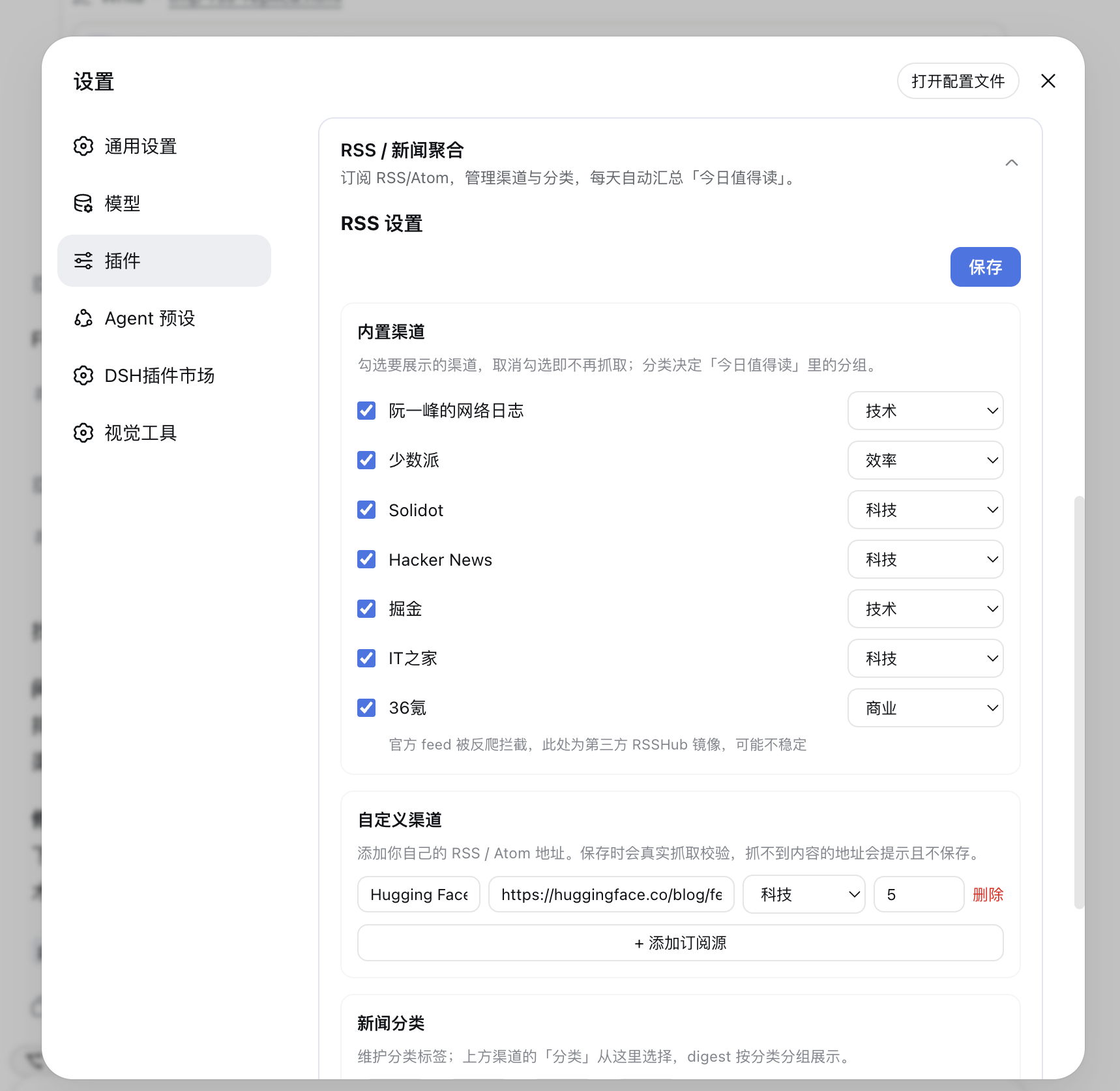
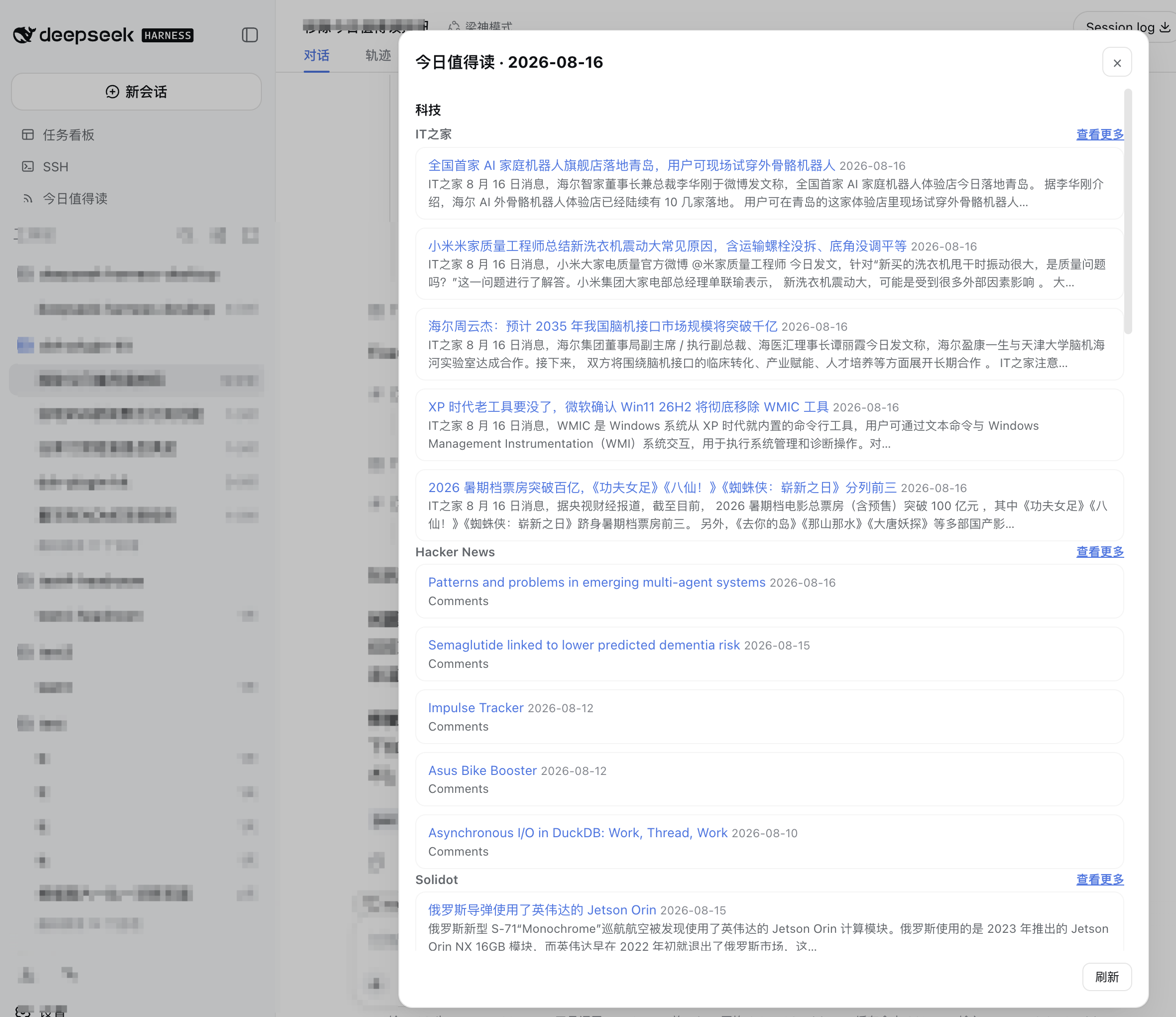
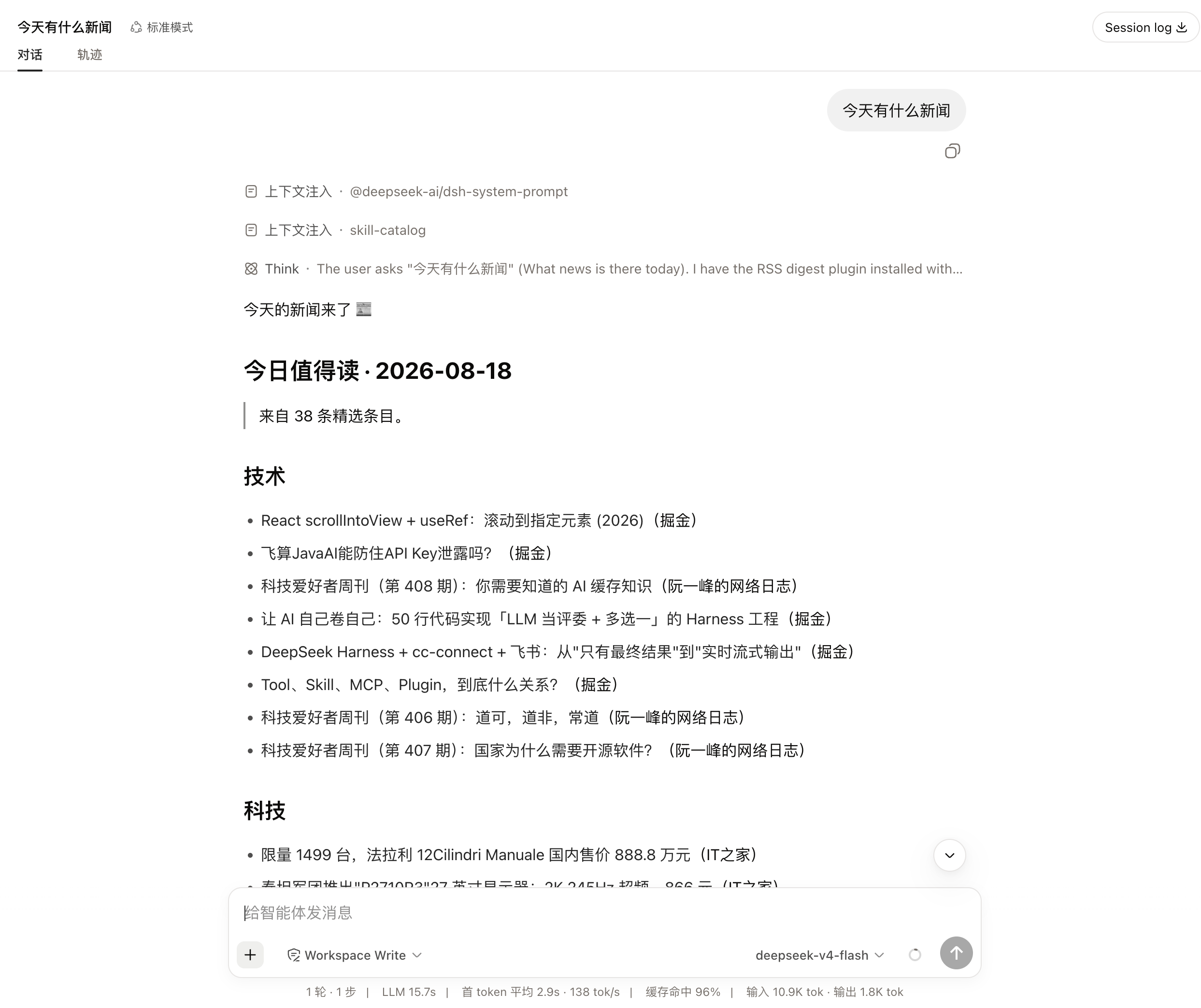
- **Note**: the first startup will fetch feeds over the network; unreachable sources are listed in the digest’s “fetch failed” section and do not block the remaining sources. With AI summaries enabled, generation time depends on model responses (failed items fall back instead of blocking).
|
|
87
|
-
|
|
88
|
-
|
|
89
|
-
|
|
90
|
-
|
|
91
|
-
|
|
92
|
-
|
|
93
|
-
|
|
94
|
-
### Global Search (@hyzyn/dsh-search)
|
|
95
|
-
|
|
96
|
-
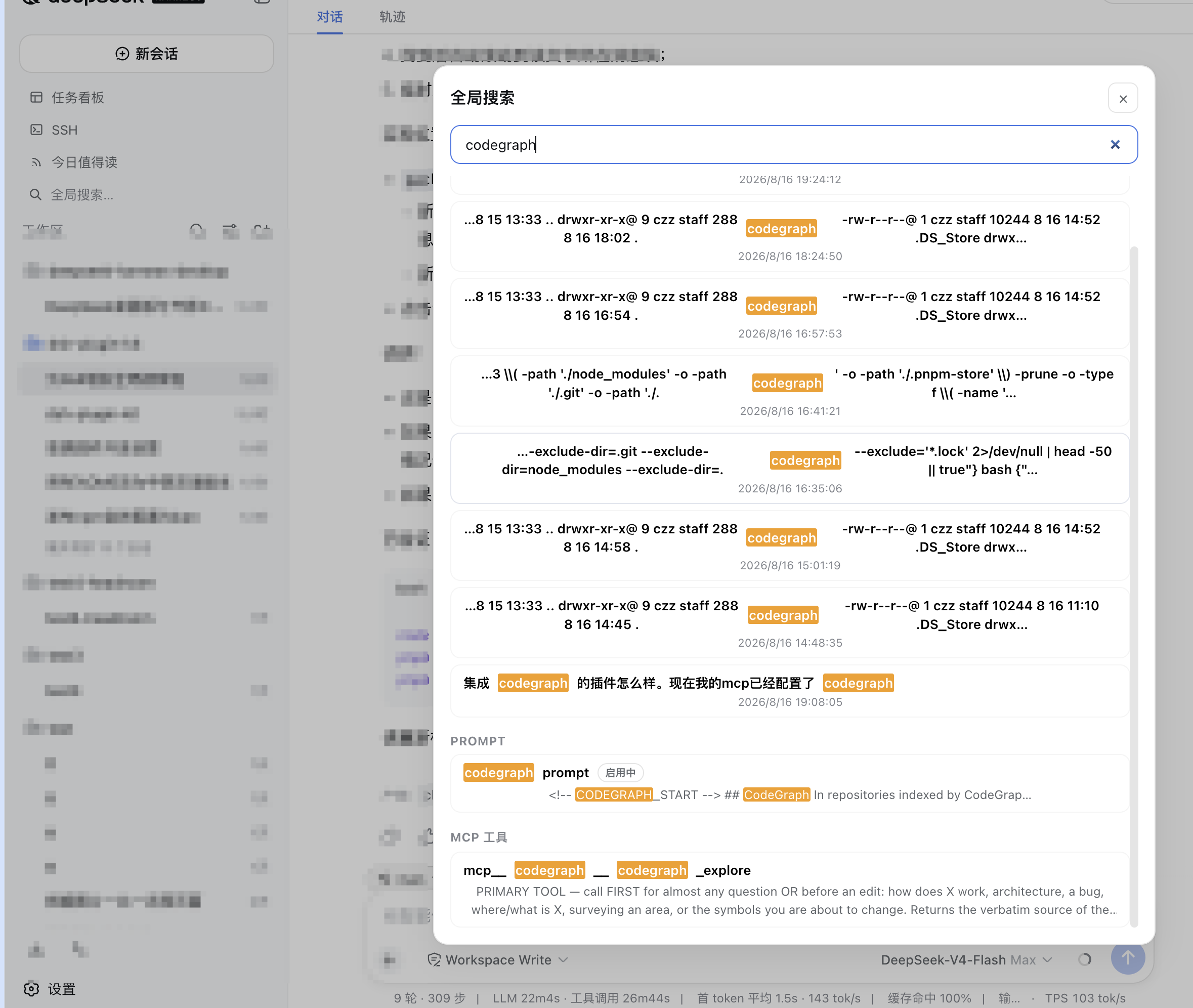
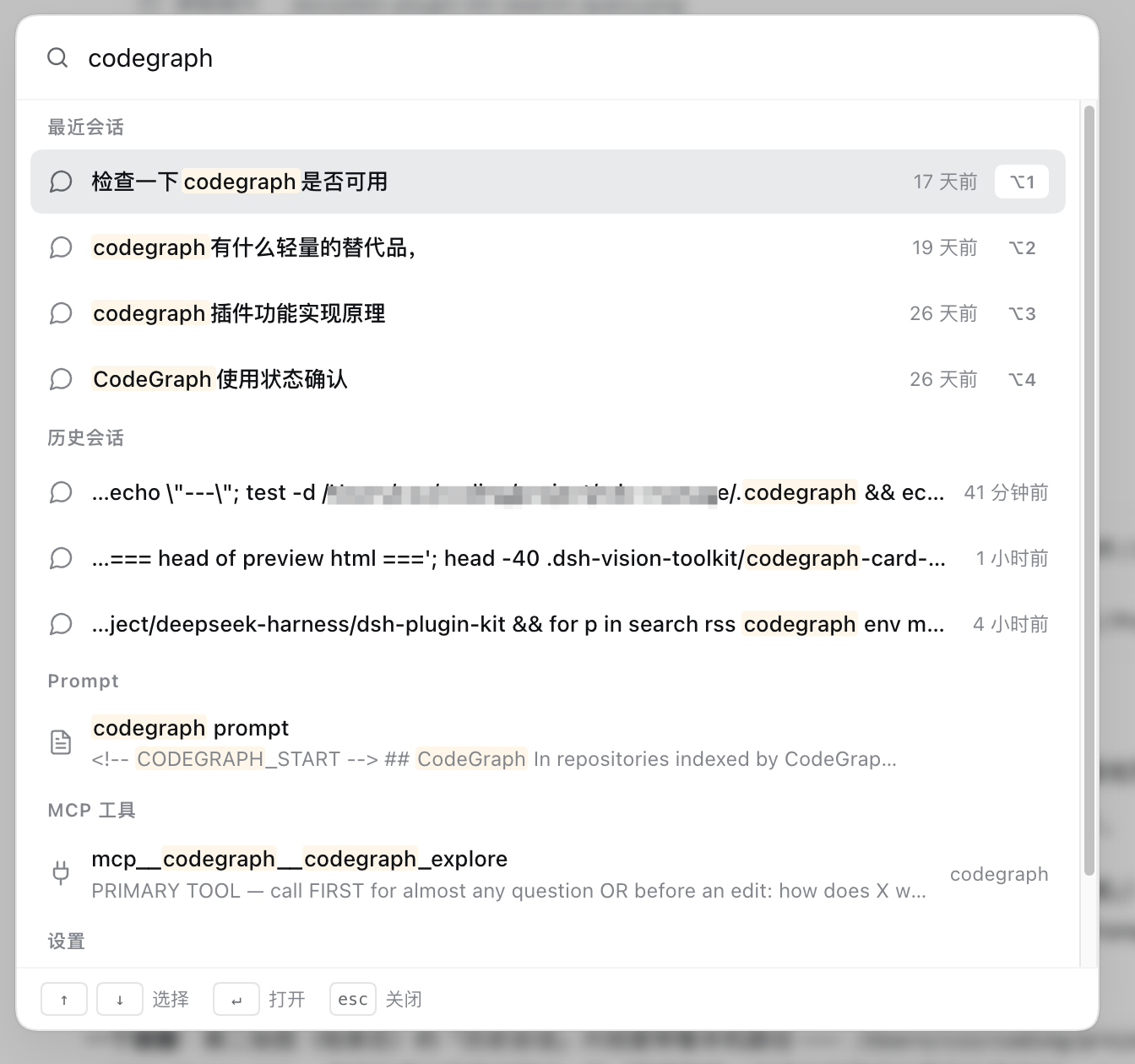
- **What it does**: adds a “Global Search” entry to the Web GUI sidebar (⌘/Ctrl+K also opens it) that presents a command-palette window: grouped rows for recent sessions, full-text session hits, Prompts, MCP tools, quick actions, and settings sections.
|
|
97
|
-
- **How to use**: click the sidebar search box or press ⌘/Ctrl+K — the palette **opens with content already in it** (recent sessions + quick actions + settings sections, rendered locally with no request); typing filters local candidates instantly while host full-text hits stream in. ↑/↓ select, ↵ opens, esc closes; ⌥1-9 opens the Nth recent session, and ⌥N / ⌥O / ⌥, trigger New session / Open folder / Open settings. Clicking a session result opens it and tries to locate the matching text; Prompt and MCP tool rows jump to their settings cards; settings sections jump to the corresponding section of the settings dialog.
|
|
98
|
-
- **Supports**: full-text session search via DSH’s built-in `sessionQuery` plus instant title candidates from the client session list; settings sections enumerated live from the client slot registry (`settings.section`, so third-party sections such as “Skins” or “Pets” are listed too, in the same order as the settings navigation); Prompts read from the `~/.dsh/prompts.yml` managed block; MCP tools enumerated by the `mcp__` prefix with their server shown; keyword highlighting; configurable result limits.
|
|
99
|
-
- **Where it is stored**: no separate config.
|
|
100
|
-
- **Note**: requires the host `sessionQuery` service; if absent, session search returns an empty list. If the `session-query` full-text index is configured with `openAt: "never"`, session search automatically degrades to per-session scanning; session results are filtered to currently visible/jumpable sessions. “New session” reuses the GUI’s own `uiWorkspace.startSession()`; “Open folder” is hidden when no directory-picker plugin is installed.
|
|
101
|
-
|
|
102
|
-
|
|
103
|
-
|
|
104
|
-
|
|
105
|
-
|
|
106
|
-
### Codegraph Integration (@hyzyn/dsh-codegraph)
|
|
107
|
-
|
|
108
|
-
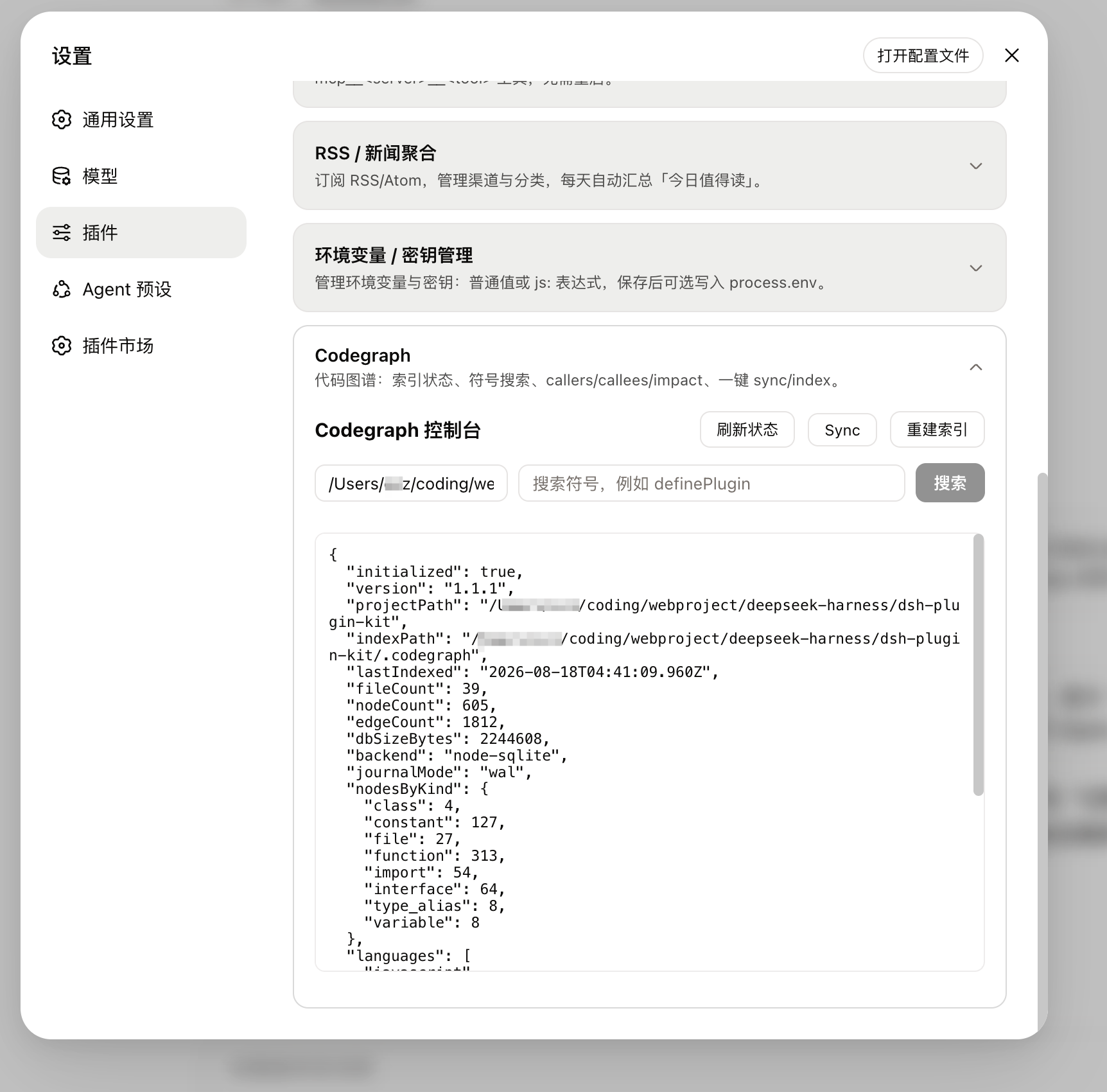
- **What it does**: code-graph integration — the “Codegraph” card under Settings → Plugins shows index status, symbol search, callers / callees / impact, and one-click sync / index. On install it automatically injects a CodeGraph usage guideline into systemPrompt so the model prefers `codegraph_explore` / `codegraph explore` over grep / read in indexed projects.
|
|
109
|
-
- **How to use**: open Settings → Plugins → “Codegraph” → view index status, search symbols, click a result to inspect source and call chains / impact, or run Sync / rebuild index manually.
|
|
110
|
-
- **Supports**: index status (version, file / symbol / edge counts, last indexed time, pending changes); symbol search with node / callers / callees / impact details; **the default path follows the active session’s workspace directory** (switches when you switch projects; a manual input temporarily overrides it); one-click incremental sync and full rebuild.
|
|
111
|
-
- **MCP integration (on by default)**: DSH’s MCP client does not declare roots, so `codegraph serve --mcp` can only look upward from its working directory for `.codegraph/` — when the host starts in the home directory, `mcp__codegraph__*` calls fail with “No CodeGraph project is loaded”. This plugin manages the codegraph MCP server row in `~/.dsh/cordis.patch.yml` and aligns its cwd with the default project path (the card’s “Set as default project” switches it in one click and the MCP server hot-restarts on save); a row already configured in the MCP card only gets its cwd filled in, other fields are left untouched. Disable with `mcpIntegration: false`.
|
|
112
|
-
- **Where it is stored**: the index lives in the project’s `.codegraph/` directory (created by `codegraph index`); the default path and the switches persist in this plugin entry’s profile configuration, written into the current profile’s `cordis.patch.yml` user layer.
|
|
113
|
-
- **Note**: the target project needs a Codegraph index first; unindexed projects return guidance to fall back to regular tools. Indexing / rebuilding are local CLI operations that consume real disk and CPU.
|
|
114
|
-
- **Compatibility and tuning**: current baseline DSH `0.1.7-rc.1` (declares `peerDependencies: @deepseek-ai/dsh ^0.1.7-rc.1`) + codegraph CLI `1.5.0`; the CLI commands and flags used are listed in the package README. For large repositories, raise `indexTimeoutMs` (default 600s; `cliTimeoutMs` covers query commands, default 60s), and enable `indexForce` when the CLI refuses to index a home directory / filesystem root.
|
|
115
|
-
|
|
116
|
-
|
|
117
|
-
|
|
118
|
-
### Terminal Panel (@hyzyn/dsh-tty)
|
|
119
|
-
|
|
120
|
-
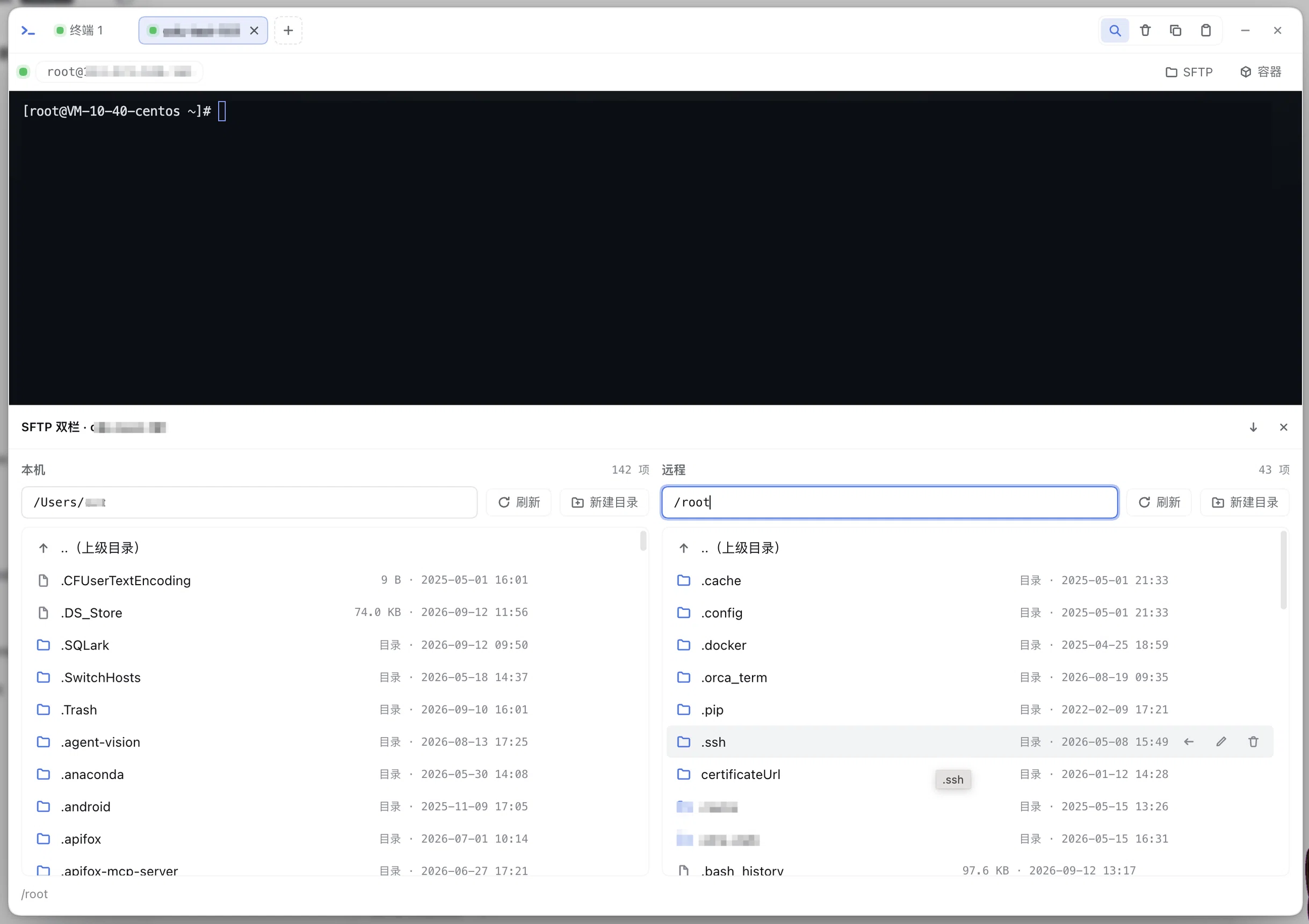
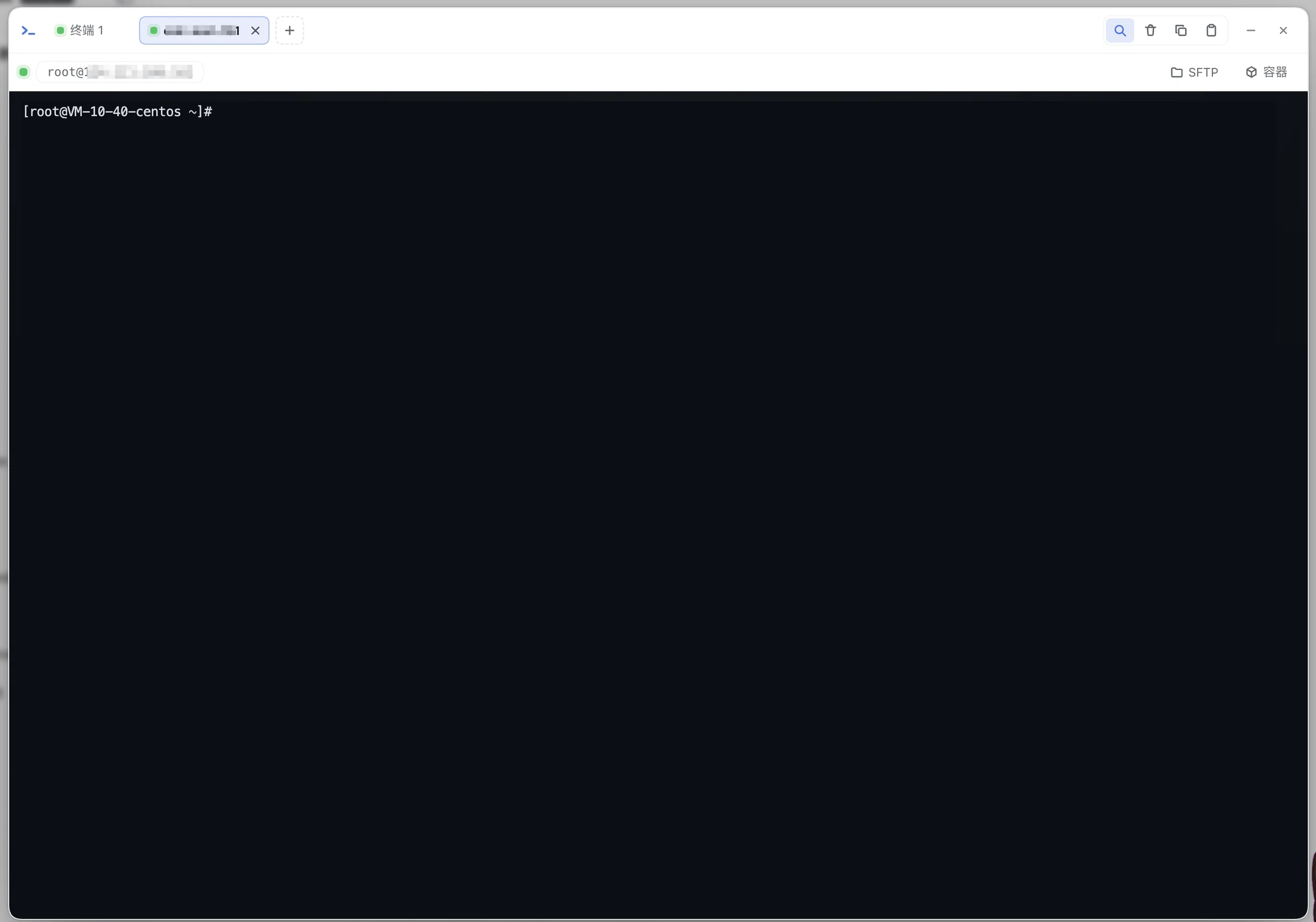
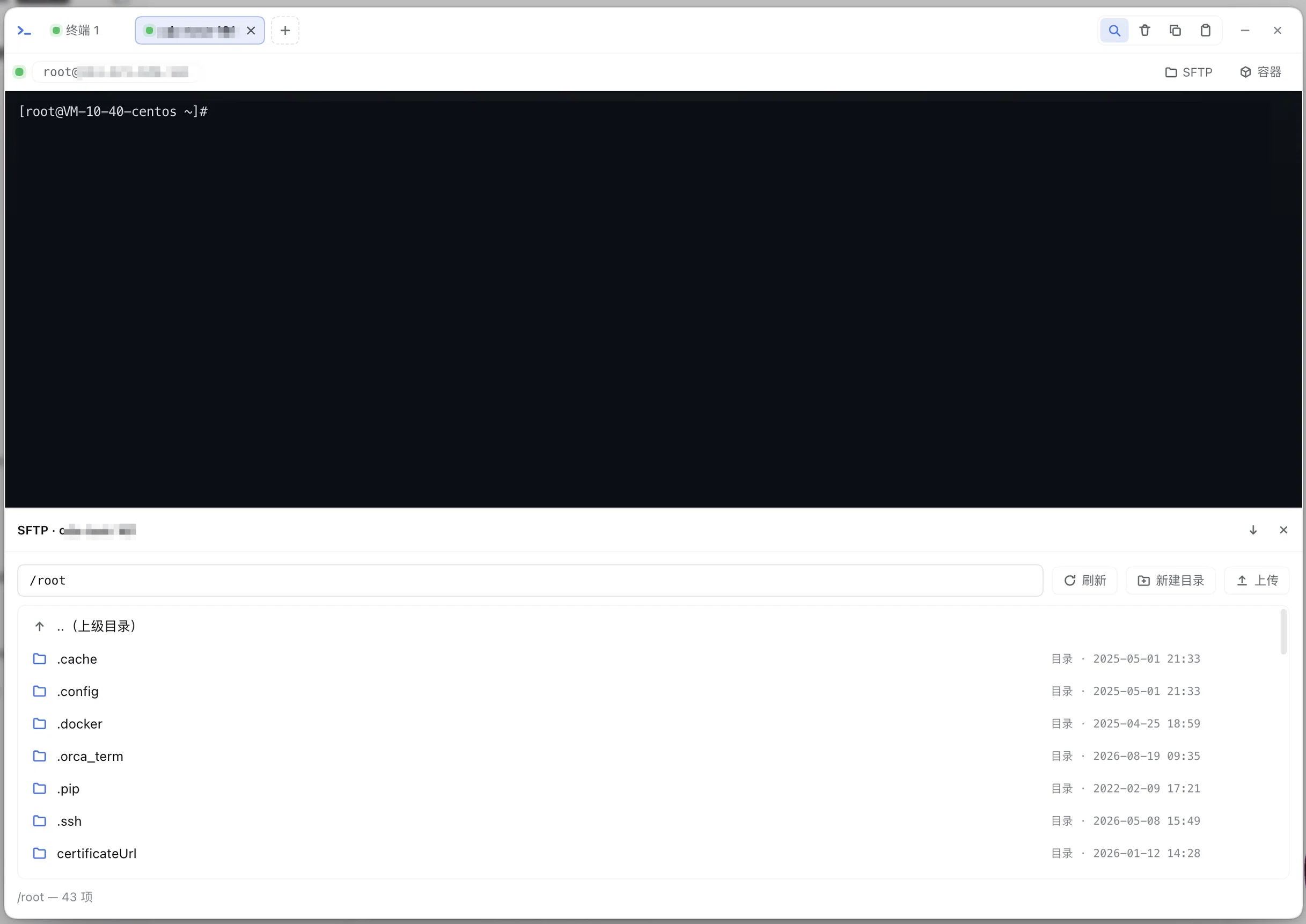
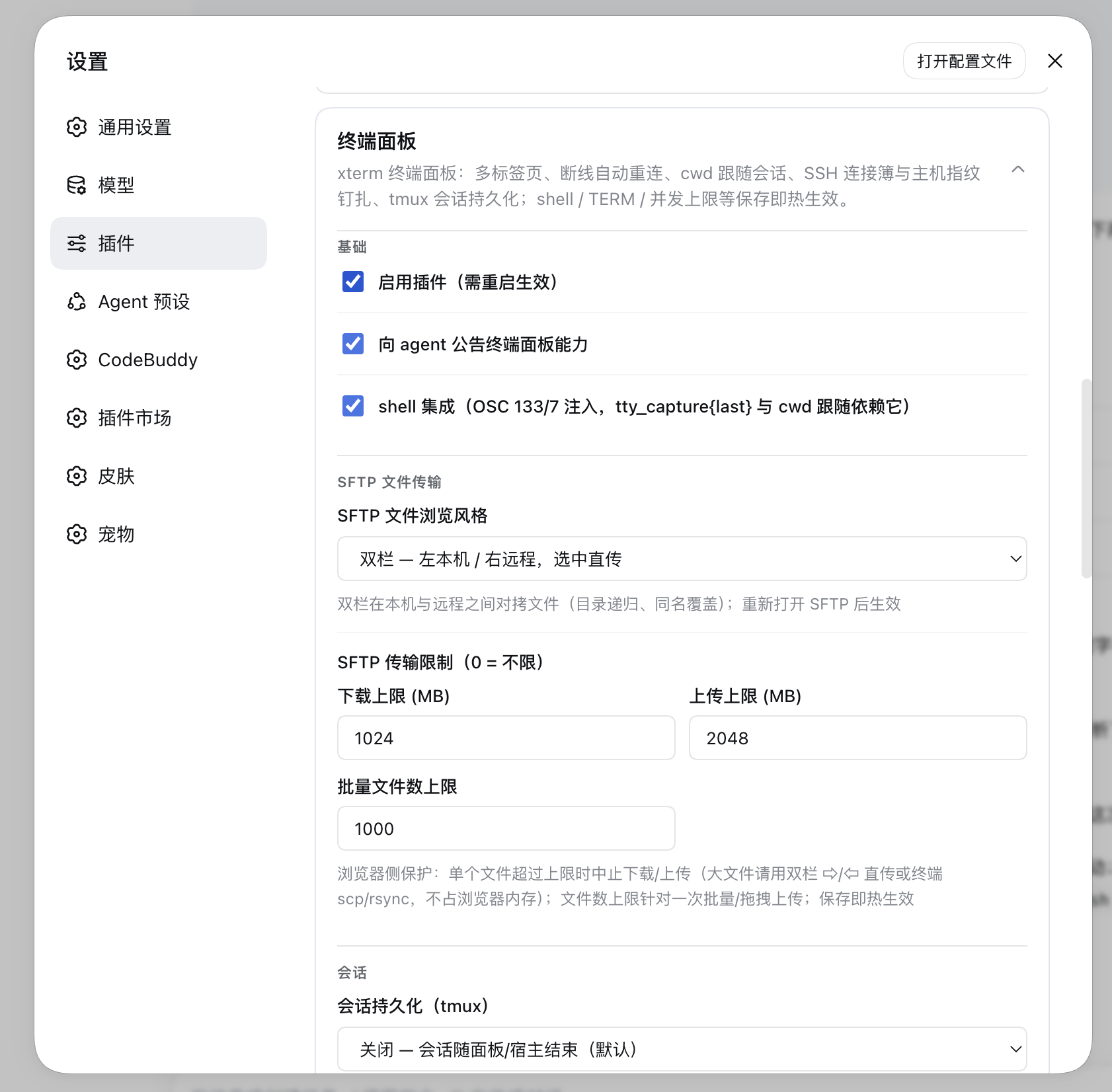
- **What it does**: adds a “Terminal” entry to the Web GUI sidebar that opens a large modal with an embedded xterm.js interactive terminal (real PTY via node-pty) and multi-tab support, capable of running arbitrary commands and TUI programs (vim / htop / dev servers). It also does **direct SSH to remote hosts** (connection book / host-key pinning / automatic reconnect / port-forward tunnels) and **SFTP file transfer** — either the single-pane dialog or the “local left / remote right” dual pane, with upload / download / rename / delete.
|
|
121
|
-
- **How to use**: install, then restart `dsh web`; click “Terminal” in the sidebar → the first terminal is created automatically (default `$SHELL`) → use “+” in the tab bar for a new tab (local terminal / SSH connection book / SSH connection…) and ✕ to close; new tabs default to the current DSH session’s working directory; SSH tabs expose SFTP and tunnel entries in their connection bar; Ctrl+F searches inside the terminal, and the toolbar offers clear / copy / paste.
|
|
122
|
-
- **Two SFTP layouts (configurable)**: `dialog` — a single pane with remote directory browsing, multi-select / drag-and-drop upload (recursive folders), download, rename, delete; `dual` — local pane on the left, remote on the right, where the inline `⇨ / ⇦` buttons stream both paths through the host server (recursive folders, same-name overwrite, bytes never pass through the browser).
|
|
123
|
-
- **Minimize (state folded into the sidebar entry)**: clicking outside the modal, pressing Esc, or the title-bar “—” collapses the panel while PTY sessions and their output buffers stay alive; the sidebar “Terminal” entry then shows a session-count badge and a status dot, and clicking it brings the panel back. Only the floating bar’s ✕ or the title-bar ✕ really closes it and ends every session.
|
|
124
|
-
- **Supports**: multi-tab sessions (multiple sessions per connection); working directory follows the current session; TERM=xterm-256color injection (TUI apps don’t degrade); automatic reconnect after a drop (session keep-alive + output-buffer replay); SSH agent / key / password auth with `env:VAR` secret references that never touch disk; port-forward tunnels (-L / -R, kept alive by the host); downstream backpressure protection; loopback trust fence; concurrency cap (default 4); settings hot-reload; agent tools (`tty_list` / `tty_capture` / `tty_screen` / `tty_expect` / `tty_send` / `sftp_*` / `tunnel_list`).
|
|
125
|
-
- **Where it is stored**: this plugin entry’s profile configuration, written into the current profile’s `cordis.patch.yml` user layer — the “Settings → Plugins → Terminal Panel” card reads and writes it.
|
|
126
|
-
- **What 0.19.0 fixed**: 48 audited defects — SFTP overwrites now go through a temp part + atomic rename (a failed upload no longer destroys the target), in-flight spawns no longer leave zombie sessions, importing known_hosts no longer raises a false “man-in-the-middle”, plaintext passwords never reach browser storage, force-killing a local PTY no longer crashes the host on Windows, and `tty_capture{last}` / `tty_expect` work again on modern Linux (bash ≥4.4). See `packages/tty/DEFECTS.md` for the list and index.
|
|
127
|
-
- **Note**: resize relies on DSH’s internal terminal-handle shape (known limitation); output is a UTF-8 text stream, so `cat`-ing binary files shows replacement characters. See `packages/tty/README.md` for details.
|
|
128
|
-
|
|
129
|
-
|
|
130
|
-
|
|
131
|
-

|
|
132
|
-
|
|
133
|
-
|
|
134
|
-
|
|
135
|
-
|
|
136
|
-
|
|
137
|
-
### Docker Container Panel (@hyzyn/dsh-docker)
|
|
138
|
-
|
|
139
|
-
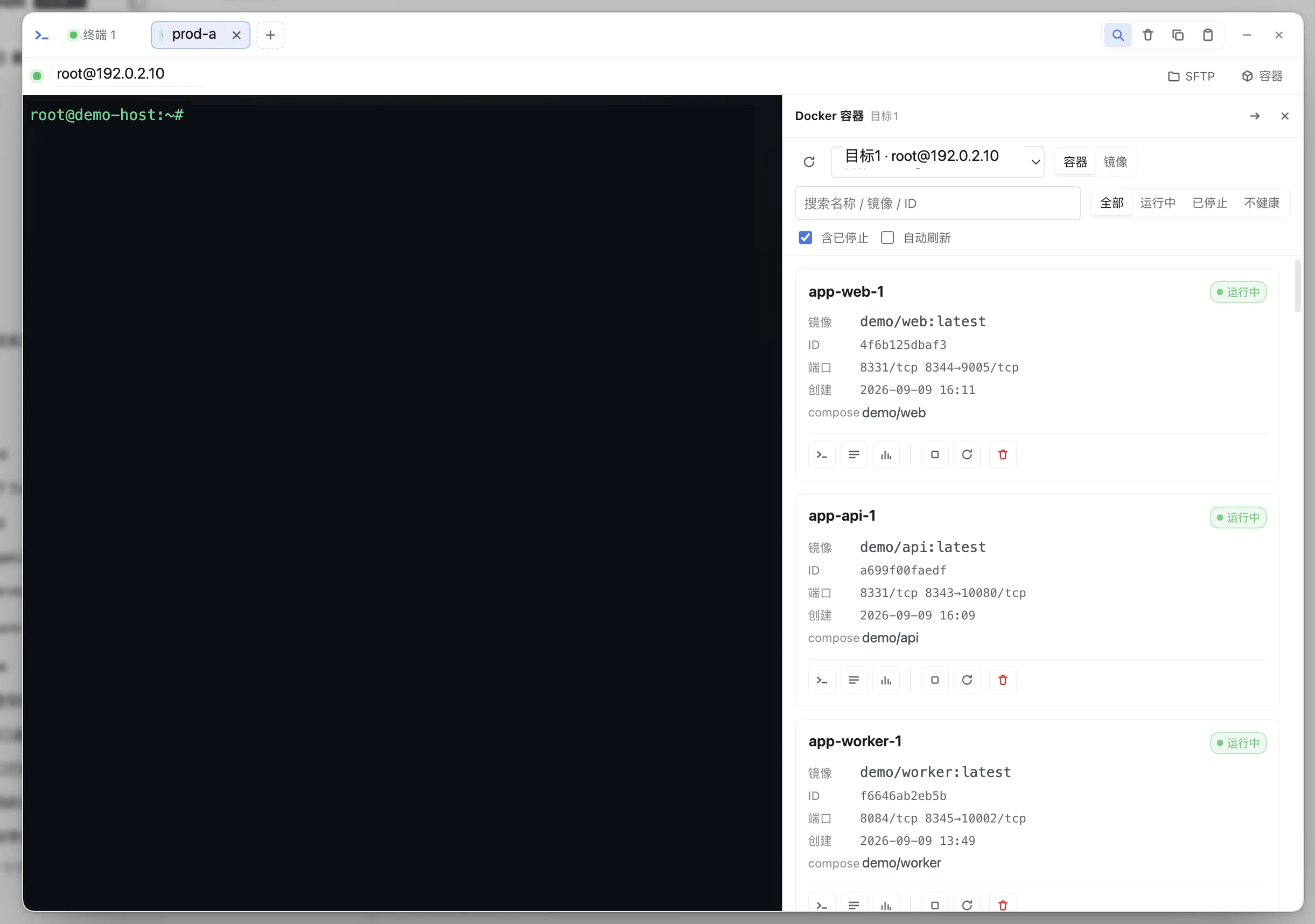
- **What it does**: adds a “Containers” entry to the Web GUI sidebar for inspecting containers on the **local machine or an SSH host** — list with state / health / ports / compose project, a **read-only multi-target overview**, a **Compose project view (project → service → containers, plus project-level merged logs)**, container details, log tails, resource usage (**live follow + mini sparklines**), and images (list plus details: layers / build history). Once you explicitly enable the switches, it can also start / stop / remove containers, pull / remove / prune images, and run a one-shot `docker exec`.
|
|
140
|
-
- **How to use**: install, restart `dsh web`, then click “Containers” in the sidebar → pick a target (local / SSH) → the container list supports search and state filtering → open a card for details / logs / stats, or start / stop / remove (requires “allow mutations”); manage targets and switches under Settings → Plugins → “Docker Container Panel”, saved and applied hot.
|
|
141
|
-
- **Terminal button**: with tty ≥ 0.15.0 installed, the first icon on a card opens an **in-panel terminal drawer** (tty's `ttyTerminal.mount` embeds the terminal in place, so the panel stays open); with tty 0.14.0 it falls back to opening a new terminal tab and closing the panel, and without tty it copies the command `docker exec -it '<container>' sh` (falls back to copying the command when tty's terminal capability is unavailable).
|
|
142
|
-
- **Contextual entry**: with tty ≥ 0.13.0 installed, the SSH tab’s connection bar (next to SFTP) shows a “Containers” button — it opens the panel straight for the host you are connected to (shown whenever the plugin is loaded; the target is resolved at click time by connection-book name or `host:port`, and a missing target shows how to configure it).
|
|
143
|
-
- **Targets**: `kind=local` runs the host machine’s docker CLI; `kind=ssh` can **reference a tty connection-book entry by name** (data-level reuse, tty unchanged; inline host/username when tty is not installed) and runs docker on the remote host over an ssh2 exec channel, with TOFU host-key pinning seeded from tty’s existing records.
|
|
144
|
-
- **Supports**: container list (`all` includes stopped containers), `docker inspect` details, logs (tail / timestamps / since), **live log streaming** (a FOLLOW toggle backed by SSE `docker logs --follow`, for both local and SSH targets, with auto-scroll and the same filtering/coloring as the snapshot; switches back to snapshot automatically when the container exits), `docker stats` **snapshots and a live stream** (SSE with a 60-point CPU / memory sparkline; this stream never ends on its own, so the front end closes it), a **Compose project view** (grouped by `composeProject` / `composeService`, with project-level logs merged client-side behind a `[service]` prefix), a **container event activity stream** (SSE `docker events` feeding an "Activity" bar in the list plus a 500 ms debounced list refresh), a **read-only multi-target overview** (one screen for every configured target: count cards plus a table of unhealthy / restarting containers, fetched in parallel with per-target failure tolerance and no cross-target actions), **networks and volumes** (lists plus details: subnets / gateways / attached containers, mountpoints / options / labels; removal and prune require `allowMutations`), plus **ephemeral multi-select merged logs from the container list** (2–8 containers), image list plus **image details** (`docker image inspect` layers / size and `docker history` build steps), a **`docker pull` progress stream** (per-layer, over SSE), image remove / dangling prune (requires `allowMutations`), and one-shot exec (exit code plus stdout/stderr); `dockerBin` can be set to `podman`; oversized output is truncated. All four SSE streams (logs / stats / events / pull) share one `openSseStream` foundation (heartbeat, active-stream registry, disconnect cleanup).
|
|
145
|
-
- **Security model (important)**: the docker socket is equivalent to root on the target host, so the plugin is **read-only by default** — with `allowMutations` off, start / stop / remove are rejected (HTTP 403 and no agent tool registered); with `allowExec` off, exec is rejected. Container names/IDs pass a whitelist check, commands are always built as argv arrays with single-quote escaping, and passwords / passphrases should use `env:VAR` and are never sent back to the browser.
|
|
146
|
-
- **Where it is stored**: this plugin entry’s profile configuration, written into the current profile’s `cordis.patch.yml` user layer (legacy `~/.dsh/settings.yaml` sections were imported once by DSH).
|
|
147
|
-
- **Note**: there is no interactive TTY (exec is a one-shot command; use the terminal panel for `docker exec -it`), streaming exists only in the browser panel (the `docker_logs` / `docker_stats` / `docker_image_pull` agent tools keep snapshot semantics), there is no `docker build` / `save` / `load` / `push`, Compose is a read-only view (no `compose up/down`), and the multi-target overview is a **read-only** summary (there are no cross-target actions; start / stop / remove stay per-target); `docker rm` and `docker image rm` are issued without `-f`, so a running container or a referenced image fails with an explanatory hint. See `packages/docker/README.md` for details.
|
|
148
|
-
|
|
149
|
-
### Environment Variables / Secrets Management (@hyzyn/dsh-env)
|
|
150
|
-
|
|
151
|
-
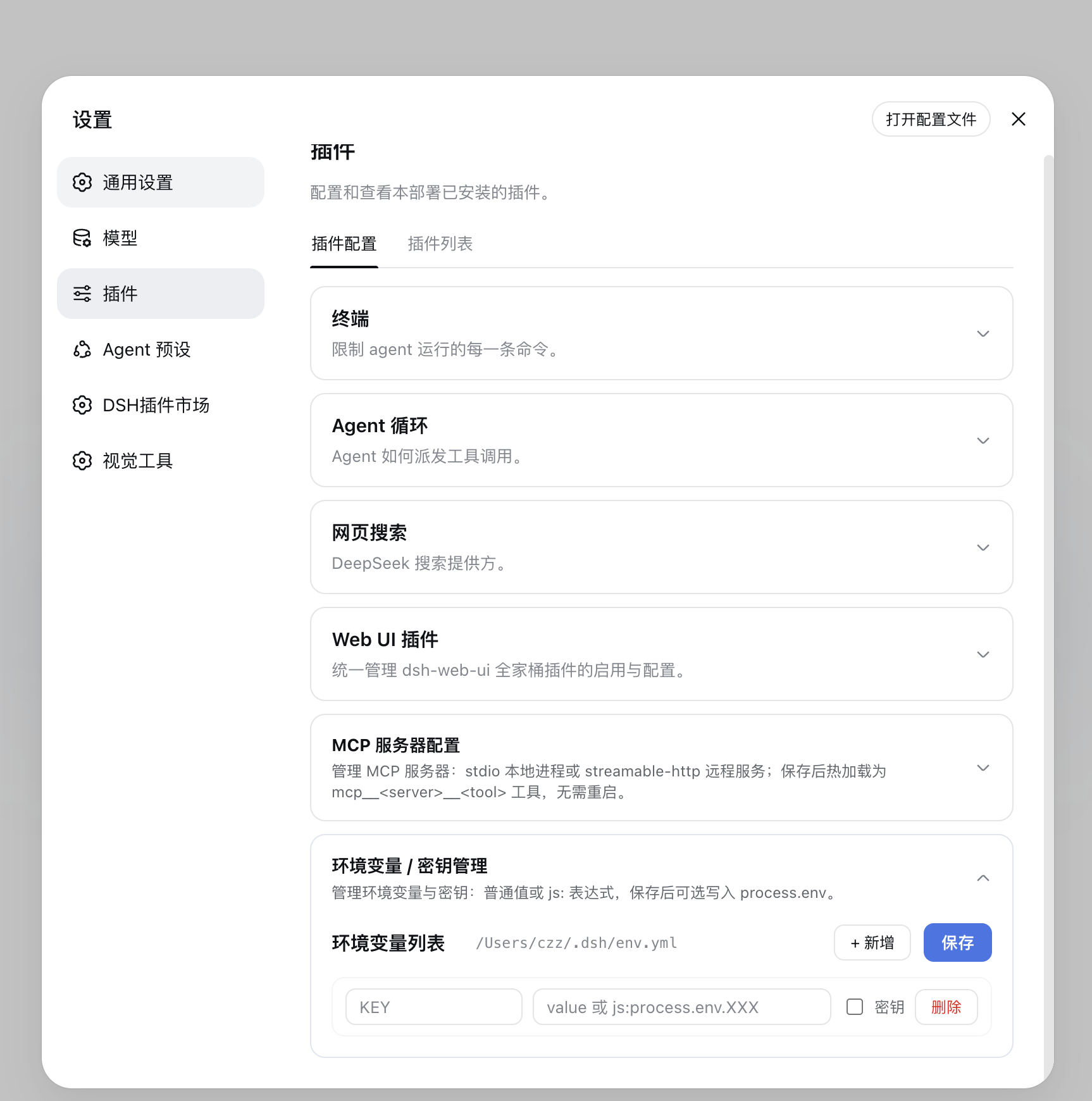
- **What it does**: add, edit, or delete environment variables and secrets in the Web GUI. After saving, they are immediately written into the current process’s `process.env`, so both the host and subsequently started child processes can read them without restarting.
|
|
152
|
-
- **How to use**: open Settings → Plugins → “Environment Variables / Secrets Management” → add a key-value pair → (check “Secret” for sensitive entries; secret values are never sent back to the browser, and saving with an empty field keeps the stored value) → save.
|
|
153
|
-
- **Supports**: plain strings; `js:` prefixed expressions (e.g. `js:process.env.API_KEY`); secret values migrate automatically into the official credentials store `.credentials.yaml` (write-only: the API never sends secrets back, env file keeps only the manifest; existing refs are never overwritten — conflicting entries stay in the env file with a warning).
|
|
154
|
-
- **Where it is stored**: the managed block of `~/.dsh/env.yml` (auto-generated; do not edit by hand).
|
|
155
|
-
- **Note**: key names may only contain letters, digits, and underscores, and must not be duplicated.
|
|
156
|
-
|
|
157
|
-
|
|
158
|
-
|
|
159
|
-
### Prompt Management (@hyzyn/dsh-prompt)
|
|
160
|
-
|
|
161
|
-
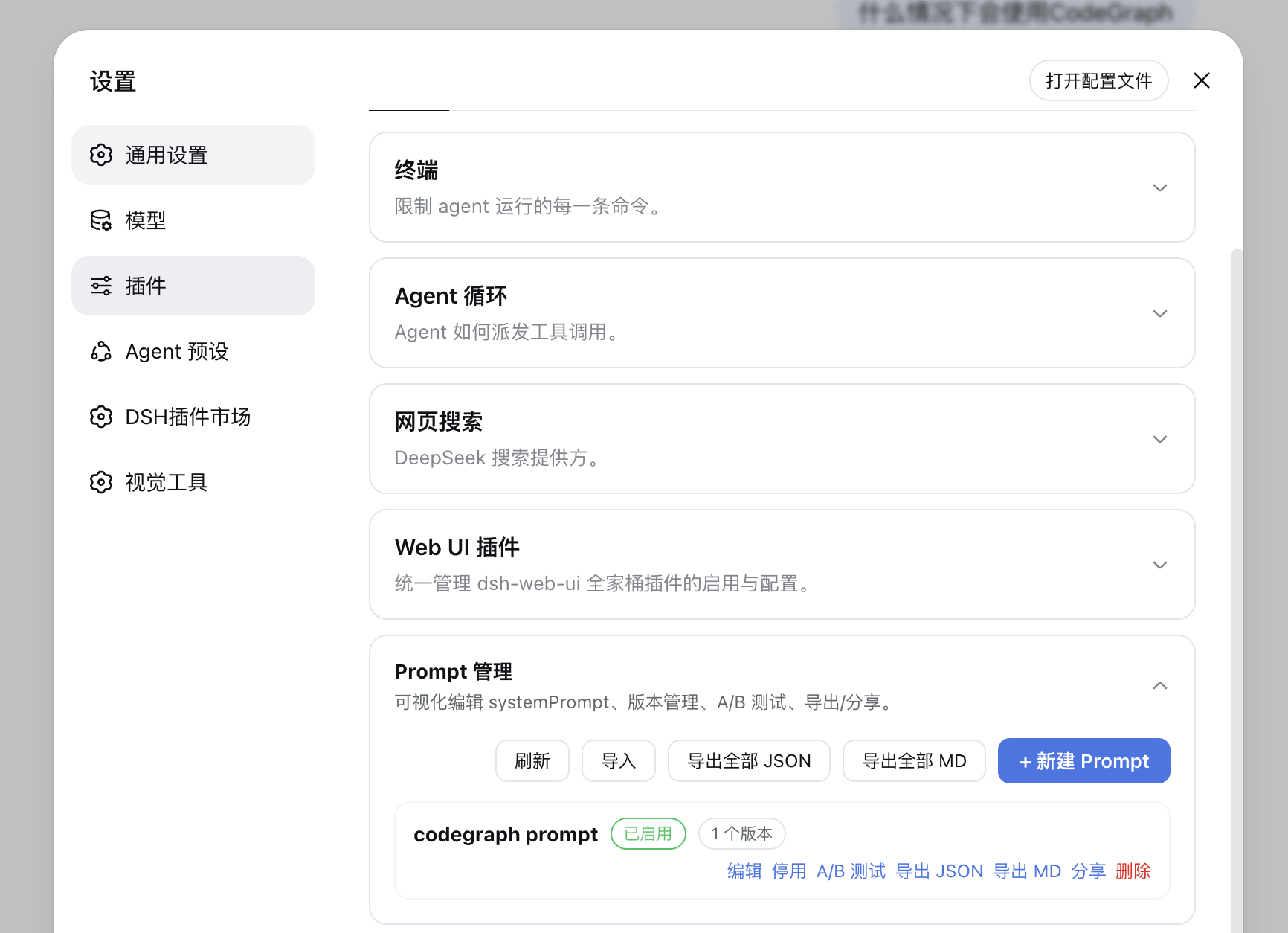
- **What it does**: visually edit systemPrompt. When enabled, its content is injected as a systemPrompt section and takes effect immediately after saving.
|
|
162
|
-
- **How to use**: open Settings → Plugins → “Prompt Management” → create/edit a Prompt (multiple versions can be saved) → enable.
|
|
163
|
-
- **Supports**: version switching/rollback; A/B testing (choose A/B versions for the same Prompt and randomly match them by weight); export JSON/Markdown, one-click copy & share, import from JSON.
|
|
164
|
-
- **Where it is stored**: the managed block of `~/.dsh/prompts.yml`.
|
|
165
|
-
- **Note**: each Prompt must have at least one version, and a single version’s content must be ≤ 500KB.
|
|
166
|
-
|
|
167
|
-
|
|
168
|
-
|
|
169
|
-
## Quick Start
|
|
170
|
-
|
|
171
|
-
### System Requirements
|
|
172
|
-
|
|
173
|
-
- DeepSeek Harness installed and `dsh web` starts normally. **The current baseline is DSH `0.1.7-rc.1`**: settings now live in the current profile’s plugin-entry configuration, and compatibility is enforced from `peerDependencies` both before install and at startup; `0.1.6-alpha.2` and earlier are no longer supported.
|
|
174
|
-
- Every installable plugin declares `@deepseek-ai/dsh: ^0.1.7-rc.1` in `peerDependencies`. Since DSH 0.1.7-rc.1 that declaration is enforced **before install** (`incompatible-version`) and **at startup** (the row becomes `disabled`), with prereleases participating in range matching. The plugins also keep `dsh.engines.dsh: ">=0.1.7-rc.1"` as a **marketplace display field**: the rc.1 host does not read it (app-boot README: “these checks use peer declarations, not `engines.dsh`”), but the plugin market / community listings still display compatibility from it — it must match the peer floor, otherwise it states something untrue. To admit one exact version combination, write an exemption into the profile’s own `compatibility.json`: `dsh plugin --profile <p> allow-version <pkg@ver> --dsh-version <ver> --accept-risk`. CI enforces this with `node scripts/check-dsh-peers.mjs`, which checks the peer floor, the engines floor and `dsh.manifestVersion`, and can additionally run DSH’s own evaluator via `--app-boot <path>`.
|
|
44
|
+
| MCP servers | edit the patch file / CLI | visual card + connection test + hot reload after saving |
|
|
45
|
+
| Profile management | CLI | visual create / copy / rename / delete |
|
|
46
|
+
| RSS aggregation | none | multi-source subscriptions + a daily digest + optional AI summaries (uses the host’s default model, zero config) |
|
|
47
|
+
| Global search | session titles/content only | one full-text search over past sessions, Prompts, MCP tools and settings panels |
|
|
48
|
+
| Codegraph integration | none | code graph card: index status / symbol search / call chain / impact / one-click sync-index |
|
|
49
|
+
| Terminal panel | none | real xterm.js multi-tab PTY (vim/htop/dev server); native SSH (connection book, host-key pinning, auto reconnect); SFTP single-dialog / dual-pane transfer; `tty_*` / `sftp_*` agent tools |
|
|
50
|
+
| Docker container panel | none | containers / images / Compose / live logs and stats / multi-target overview; **read-only by default**, mutations and exec behind explicit switches; `docker_*` agent tools |
|
|
51
|
+
| Environment variables | CLI / hand-edited config | Web GUI card, written into `process.env` on save |
|
|
52
|
+
| Prompt management | hand-edited config | visual editing + versioning / A/B testing / export & share |
|
|
53
|
+
| Plugin development | boilerplate by hand | `pnpm create-plugin` scaffolding + the `@hyzyn/dsh-kit` shared library |
|
|
54
|
+
|
|
55
|
+
> **Each plugin’s full feature set, screenshots and caveats live in its own README** (table below).
|
|
56
|
+
> This file only covers *what it is* and *what to install*.
|
|
57
|
+
|
|
58
|
+
## Packages
|
|
59
|
+
|
|
60
|
+
**1 shared library + 10 feature plugins + 1 aggregate package.** How they relate, their dependency
|
|
61
|
+
direction and how they cooperate: [docs/architecture.md](docs/architecture.md) (Chinese).
|
|
62
|
+
|
|
63
|
+
| Package | What it does | Docs |
|
|
64
|
+
|---|---|---|
|
|
65
|
+
| `@hyzyn/dsh-kit` | **Library** (not a plugin): shared host-half utilities — HTTP loopback fence, managed blocks, `!!js` expressions, service access | [README](packages/kit/README.md) · [DEFECTS](packages/kit/DEFECTS.md) |
|
|
66
|
+
| `@hyzyn/dsh-mcp` | MCP server configuration card, hot-reloaded on save | [README](packages/mcp/README.md) |
|
|
67
|
+
| `@hyzyn/dsh-env` | Environment variables / secrets management | [README](packages/env/README.md) |
|
|
68
|
+
| `@hyzyn/dsh-prompt` | systemPrompt editing / versions / A-B testing | [README](packages/prompt/README.md) |
|
|
69
|
+
| `@hyzyn/dsh-profile` | Graphical management of `~/.dsh/profiles` | [README](packages/profile/README.md) |
|
|
70
|
+
| `@hyzyn/dsh-rss` | RSS aggregation → a daily digest | [README](packages/rss/README.md) |
|
|
71
|
+
| `@hyzyn/dsh-search` | Sidebar global search | [README](packages/search/README.md) |
|
|
72
|
+
| `@hyzyn/dsh-codegraph` | Code graph card + MCP management + adoption measurement | [README](packages/codegraph/README.md) · [DEFECTS](packages/codegraph/DEFECTS.md) · [ROADMAP](packages/codegraph/ROADMAP.md) |
|
|
73
|
+
| `@hyzyn/dsh-tty` | Terminal panel (PTY / SSH / SFTP / tunnels) | [README](packages/tty/README.md) · [DEFECTS](packages/tty/DEFECTS.md) · [ROADMAP](packages/tty/ROADMAP.md) |
|
|
74
|
+
| `@hyzyn/dsh-docker` | Docker container panel (local / SSH), read-only by default | [README](packages/docker/README.md) · [DEFECTS](packages/docker/DEFECTS.md) · [ROADMAP](packages/docker/ROADMAP.md) |
|
|
75
|
+
| `@hyzyn/dsh-kit-settings` | Adds a “Plugin configuration” row next to “General settings” | [README](packages/kit-settings/README.md) |
|
|
76
|
+
| `@hyzyn/dsh-all` | Aggregate package: one bundle patch that mounts the 10 plugins above | [README](packages/all/README.md) |
|
|
77
|
+
|
|
78
|
+
## Quick start
|
|
79
|
+
|
|
80
|
+
### System requirements
|
|
81
|
+
|
|
82
|
+
- DeepSeek Harness installed and `dsh web` starts normally. **The current baseline is DSH `0.1.7-rc.2`**:
|
|
83
|
+
settings now live in the current profile’s plugin-entry configuration, and compatibility is enforced
|
|
84
|
+
from `peerDependencies` both before install and at startup; `0.1.6-alpha.2` and earlier are no longer
|
|
85
|
+
supported.
|
|
86
|
+
- Every installable plugin declares `@deepseek-ai/dsh: ^0.1.7-rc.2` in `peerDependencies`, enforced
|
|
87
|
+
both **before install** and **at startup**; `dsh.engines.dsh` is kept as a **marketplace display
|
|
88
|
+
field** (it must match the peer floor). Mechanics, what to do when a version is rejected, and how to
|
|
89
|
+
admit an exact combination → [docs/troubleshooting.md § Compatibility](docs/troubleshooting.md#兼容性校验).
|
|
175
90
|
- No extra requirements for npm installs; installing from this repository requires Node.js >= 22.19 and pnpm 10.
|
|
176
91
|
|
|
177
|
-
### Three-Step Setup
|
|
178
|
-
|
|
179
|
-
1. Install the aggregate package: `dsh plugin --profile web add @hyzyn/dsh-all`
|
|
180
|
-
2. Restart `dsh web`; all management cards appear under Settings → Plugins
|
|
181
|
-
3. Open “Settings > Plugins” and use the cards as needed; changes take effect immediately after saving
|
|
182
|
-
|
|
183
92
|
### Install from npm (recommended)
|
|
184
93
|
|
|
185
|
-
The plugins are published to npm (under the `@hyzyn` scope). Install everything with one command — either of these two equivalent options:
|
|
186
|
-
|
|
187
94
|
```sh
|
|
188
95
|
dsh plugin --profile web add @hyzyn/dsh-all # aggregate package
|
|
189
96
|
dsh plugin --profile web add @hyzyn/dsh-plugin-kit # repo root bundle (mounts the whole family too)
|
|
190
97
|
```
|
|
191
98
|
|
|
192
|
-
|
|
99
|
+
**Restart `dsh web`** afterwards; all cards appearing under Settings → Plugins means it worked.
|
|
100
|
+
If a card does not appear, you probably forgot to restart. You can also use
|
|
101
|
+
`dsh --profile web --dump-config` to confirm the plugin configuration layer is mounted.
|
|
102
|
+
For one plugin only, see “Install a single plugin” below.
|
|
103
|
+
Uninstall: `dsh plugin --profile web remove @hyzyn/dsh-all` (or the matching subpackage), then restart.
|
|
193
104
|
|
|
194
|
-
|
|
105
|
+
> **Which configuration entry exists in which version**: DSH ≥ `0.1.6-alpha.2` has **two** entries
|
|
106
|
+
> pointing at the same configuration — the sidebar **“Plugins”** → pick a plugin → its row’s
|
|
107
|
+
> “Configure” (the official two-pane page), and **Settings → “Plugin configuration”** (a row next to
|
|
108
|
+
> “General settings”, provided by `@hyzyn/dsh-kit-settings`).
|
|
109
|
+
> DSH ≤ `0.1.5` uses the cards inside **Settings → Plugins → “Plugin configuration”**.
|
|
110
|
+
> Client halves register all three slot generations (`plugins.row.config`, `settings.kit.item`,
|
|
111
|
+
> `settings.plugin.item`), so one build works on every generation.
|
|
195
112
|
|
|
196
|
-
|
|
197
|
-
|
|
198
|
-
|
|
113
|
+
### Install from the GitHub repository (development / debugging)
|
|
114
|
+
|
|
115
|
+
Requires Node.js >= 22.19 and pnpm 10. The repository root is itself a DSH bundle
|
|
116
|
+
(`package.json#dsh.bundle.patch`, generated by `pnpm aggregate`):
|
|
199
117
|
|
|
200
118
|
```sh
|
|
201
|
-
# 1. Clone the repository
|
|
202
119
|
git clone https://github.com/hyzyn/dsh-plugin-kit.git
|
|
203
120
|
cd dsh-plugin-kit
|
|
204
|
-
|
|
205
|
-
# 2. Install dependencies and build
|
|
206
121
|
pnpm install
|
|
207
122
|
pnpm build
|
|
208
123
|
|
|
209
|
-
|
|
210
|
-
dsh plugin --profile web add link:$(pwd)
|
|
211
|
-
|
|
212
|
-
# 4. Restart dsh web
|
|
124
|
+
dsh plugin --profile web add link:$(pwd) # the root bundle is equivalent to installing @hyzyn/dsh-all
|
|
213
125
|
dsh web
|
|
214
126
|
```
|
|
215
127
|
|
|
216
128
|
> ⚠️ If the web profile already has `@hyzyn/dsh-all` or any `@hyzyn/dsh-<pkg>` installed, do **not**
|
|
217
129
|
> add the root bundle (or `packages/all`) again — duplicate plugin rows cause a
|
|
218
|
-
> `duplicate loader entry id` error at startup.
|
|
219
|
-
|
|
220
|
-
>
|
|
221
|
-
|
|
222
|
-
>
|
|
223
|
-
> (e.g. DSH-Plugins-Marketplace, which detects plugins by the `dsh` field or
|
|
224
|
-
> `@deepseek-ai/*` dependencies) now classify this repository as a DSH plugin
|
|
225
|
-
> (cordis-plugin) instead of flagging it as "non-plugin".
|
|
130
|
+
> `duplicate loader entry id` error at startup. For one subpackage only, replace the add step with
|
|
131
|
+
> `dsh plugin --profile web add link:$(pwd)/packages/<name>`.
|
|
132
|
+
>
|
|
133
|
+
> With the `dsh` field on the root package, GitHub DSH marketplaces classify this repository as a DSH
|
|
134
|
+
> plugin (cordis-plugin) instead of flagging it as “non-plugin”.
|
|
226
135
|
|
|
227
|
-
### Install a
|
|
136
|
+
### Install a single plugin
|
|
228
137
|
|
|
229
|
-
|
|
138
|
+
Swap the package name for any entry in the table above (`@hyzyn/dsh-all` → `@hyzyn/dsh-<pkg>`):
|
|
230
139
|
|
|
231
140
|
```sh
|
|
232
|
-
dsh plugin --profile web add @hyzyn/dsh-env
|
|
233
|
-
dsh plugin --profile web add @hyzyn/dsh-
|
|
234
|
-
dsh plugin --profile web add @hyzyn/dsh-
|
|
235
|
-
dsh plugin --profile web add @hyzyn/dsh-profile # Profile management
|
|
236
|
-
dsh plugin --profile web add @hyzyn/dsh-rss # RSS / news aggregation
|
|
237
|
-
dsh plugin --profile web add @hyzyn/dsh-search # Global search
|
|
238
|
-
dsh plugin --profile web add @hyzyn/dsh-codegraph # Codegraph integration
|
|
239
|
-
dsh plugin --profile web add @hyzyn/dsh-tty # Terminal panel
|
|
240
|
-
dsh plugin --profile web add @hyzyn/dsh-docker # Docker container panel
|
|
141
|
+
dsh plugin --profile web add @hyzyn/dsh-env # Environment variables / secrets management
|
|
142
|
+
dsh plugin --profile web add @hyzyn/dsh-tty # Terminal panel
|
|
143
|
+
dsh plugin --profile web add @hyzyn/dsh-docker # Docker container panel
|
|
241
144
|
```
|
|
242
145
|
|
|
243
|
-
|
|
244
|
-
|
|
245
|
-
After installing, restart `dsh web`; the corresponding card appearing under Settings → Plugins means it worked. You can also use `dsh --profile web --dump-config` to confirm the plugin configuration layer is mounted. If a card does not appear, you probably forgot to restart `dsh web`.
|
|
246
|
-
|
|
247
|
-
Uninstall: `dsh plugin --profile web remove @hyzyn/dsh-all` (or the corresponding `@hyzyn/dsh-<package>`), then restart `dsh web`.
|
|
146
|
+
Install failures / missing cards / HTTP 401 or 403 → [docs/troubleshooting.md](docs/troubleshooting.md).
|
|
248
147
|
|
|
249
|
-
|
|
148
|
+
Install failures / missing cards / HTTP 401 or 403 → [docs/troubleshooting.md](docs/troubleshooting.md) (Chinese).
|
|
250
149
|
|
|
251
|
-
|
|
252
|
-
<summary><strong>Expand for common installation problems</strong></summary>
|
|
253
|
-
|
|
254
|
-
<br>
|
|
255
|
-
|
|
256
|
-
> **Card does not appear?** Restart `dsh web`; make sure you are using the official `dsh-web-app` settings panel (the browser half depends on the core slots service).
|
|
257
|
-
|
|
258
|
-
> **No tools appear after saving an MCP server?** Wait 1–2 seconds for HMR; check the status badge and conflict hints in the card; click “Connection Test” before saving.
|
|
259
|
-
|
|
260
|
-
> **Getting `duplicate loader entry id`?** Most likely you manually added plugin lines to `~/.dsh/cordis.patch.yml`. Remove the duplicate lines — plugin lines should only be mounted by bundle patches; the managed block is only for server configuration.
|
|
261
|
-
|
|
262
|
-
> **`npm install` / `npm view` reports EPERM?** There may be root-owned files in the local `~/.npm` cache (a historical npm bug). Run `sudo chown -R $(id -u):$(id -g) ~/.npm` to fix it. pnpm is not affected.
|
|
263
|
-
|
|
264
|
-
</details>
|
|
265
|
-
|
|
266
|
-
## Developing a New Plugin
|
|
150
|
+
## Writing a new plugin
|
|
267
151
|
|
|
268
152
|
```sh
|
|
269
153
|
pnpm create-plugin <name> [id]
|
|
270
|
-
#
|
|
271
|
-
#
|
|
154
|
+
# e.g. pnpm create-plugin timer → packages/timer (@hyzyn/dsh-timer, plugin id: timer)
|
|
155
|
+
# e.g. pnpm create-plugin pet-tracker pt → packages/pet-tracker (plugin id: pt)
|
|
272
156
|
```
|
|
273
157
|
|
|
274
|
-
The script copies the `templates/hello` template,
|
|
275
|
-
|
|
276
|
-
1. Edit `packages/<name>/src/index.ts` to write your plugin logic;
|
|
277
|
-
2. Build and install locally for debugging:
|
|
158
|
+
The script copies the `templates/hello` template, substitutes the package name and plugin id, and
|
|
159
|
+
updates the aggregate package. Then edit `packages/<name>/src/index.ts` and build for local debugging:
|
|
278
160
|
|
|
279
161
|
```sh
|
|
280
162
|
pnpm --filter @hyzyn/dsh-<name> build
|
|
281
163
|
dsh plugin --profile web add link:$(pwd)/packages/<name>
|
|
282
164
|
```
|
|
283
165
|
|
|
284
|
-
|
|
285
|
-
|
|
286
|
-
|
|
287
|
-
|
|
288
|
-
|
|
289
|
-
|
|
290
|
-
|
|
291
|
-
|
|
292
|
-
|
|
293
|
-
|
|
294
|
-
|
|
295
|
-
|
|
296
|
-
|
|
297
|
-
|
|
298
|
-
|
|
299
|
-
|
|
300
|
-
|
|
301
|
-
|
|
302
|
-
|
|
303
|
-
|
|
304
|
-
|
|
305
|
-
|
|
306
|
-
|
|
307
|
-
|
|
308
|
-
|
|
309
|
-
|
|
310
|
-
|
|
311
|
-
<details>
|
|
312
|
-
<summary><strong>No tools appear after saving an MCP server?</strong></summary>
|
|
313
|
-
|
|
314
|
-
A: Wait 1–2 seconds for HMR; check the status badge and conflict hints in the card; click “Connection Test” before saving. If it still fails, check whether the server process can actually start and whether the address is reachable.
|
|
315
|
-
|
|
316
|
-
</details>
|
|
317
|
-
|
|
318
|
-
<details>
|
|
319
|
-
<summary><strong>Getting `duplicate loader entry id`?</strong></summary>
|
|
320
|
-
|
|
321
|
-
A: Most likely you manually added plugin lines to `~/.dsh/cordis.patch.yml`. Remove the duplicate lines — plugin lines should only be mounted by bundle patches; the managed block is only for server configuration.
|
|
322
|
-
|
|
323
|
-
</details>
|
|
324
|
-
|
|
325
|
-
<details>
|
|
326
|
-
<summary><strong>`npm install` / `npm view` reports EPERM?</strong></summary>
|
|
327
|
-
|
|
328
|
-
A: There may be root-owned files in the local `~/.npm` cache (a historical npm bug). Run `sudo chown -R $(id -u):$(id -g) ~/.npm` to fix it. pnpm is not affected.
|
|
329
|
-
|
|
330
|
-
</details>
|
|
331
|
-
|
|
332
|
-
## Known Limitations
|
|
333
|
-
|
|
334
|
-
- The managed block in `~/.dsh/cordis.patch.yml` is only for MCP server configuration; manually adding plugin lines can cause `duplicate loader entry id` at startup.
|
|
335
|
-
- Codegraph’s MCP integration only aligns the working directory of the single `codegraph` server; DSH’s MCP client does not declare roots yet, so switching projects means using the card’s “Set as default project” or passing `projectPath` on the tool call.
|
|
336
|
-
- Profile deletion is recursive and irreversible after the in-panel confirmation. The built-in `web` profile is protected; `headless` can be deleted.
|
|
337
|
-
- RSS needs network access on first startup. An unreachable source does not block other sources, but that source may be missing from the day’s digest. AI summaries require a model configured on the host (`agent-default-model`, or a provider/model pair set in the card); when none is configured or a call fails, items fall back to the truncated original text.
|
|
338
|
-
- The browser half depends on the official `dsh-web-app` settings panel slots service; non-official Web GUIs may not show the management cards.
|
|
339
|
-
- The terminal panel (dsh-tty) resize passthrough relies on DSH’s internal terminal-handle shape, and TERM injection needs the `-c` wrapper layer (DSH hard-codes node-pty `name:"dumb"`); see `packages/tty/README.md`.
|
|
340
|
-
- Installing from the repository requires Node.js >= 22.19 and pnpm 10; it is for development/debugging only. npm installs are not affected.
|
|
166
|
+
**Which docs a new package needs, how long they may be, and where its numbering starts** →
|
|
167
|
+
[docs/conventions.md](docs/conventions.md) (Chinese).
|
|
168
|
+
**The anatomy of a plugin package** (`dsh.bundle.patch` / `cordis.patch.yml` / `src/index.ts` /
|
|
169
|
+
`dsh.client`) → [docs/conventions.md § Package anatomy](docs/conventions.md#插件包解剖).
|
|
170
|
+
**Two rules that are easy to trip over** (where a client half may derive its host address; extracting
|
|
171
|
+
pure logic into modules) → [docs/conventions.md § Client half](docs/conventions.md#客户端半体两条硬规矩).
|
|
172
|
+
|
|
173
|
+
## Documentation map
|
|
174
|
+
|
|
175
|
+
| You want to know | Read |
|
|
176
|
+
|---|---|
|
|
177
|
+
| What this is, what to install | this file |
|
|
178
|
+
| How the 12 packages cooperate, dependency direction, who writes which config file | [docs/architecture.md](docs/architecture.md) |
|
|
179
|
+
| Naming / commits / doc layers / numbering / package anatomy | [docs/conventions.md](docs/conventions.md) |
|
|
180
|
+
| Terminology (host half, managed block, TOFU, slot generations…) | [docs/glossary.md](docs/glossary.md) |
|
|
181
|
+
| Install failures, missing cards, HTTP 401/403, known limits | [docs/troubleshooting.md](docs/troubleshooting.md) |
|
|
182
|
+
| How to run real-machine tests, and what counts as passing | [docs/agent-real-test.md](docs/agent-real-test.md) |
|
|
183
|
+
| Windows 11 test environment setup | [scripts/windows/README.md](scripts/windows/README.md) |
|
|
184
|
+
| Cross-package backlog | [ROADMAP.md](ROADMAP.md) |
|
|
185
|
+
| Release process | [RELEASING.md](RELEASING.md) |
|
|
186
|
+
| Runtime linking between plugins and the host in a dev checkout | [docs/link-dsh-runtime.md](docs/link-dsh-runtime.md) |
|
|
187
|
+
| How one package is used | `packages/<pkg>/README.md` |
|
|
188
|
+
| What a defect number means | `packages/<pkg>/DEFECTS.md` |
|
|
189
|
+
|
|
190
|
+
> The L0 documents under `docs/` are currently Chinese-only. Each package’s `README.md` is bilingual
|
|
191
|
+
> (see `README.en.md` next to it).
|
|
341
192
|
|
|
342
193
|
## Contributing
|
|
343
194
|
|
|
344
|
-
- Generate new plugins with the scaffolding
|
|
345
|
-
-
|
|
346
|
-
|
|
347
|
-
-
|
|
195
|
+
- Generate new plugins with the scaffolding: `pnpm create-plugin <name> [id]`.
|
|
196
|
+
- Commits follow Conventional Commits (e.g. `fix(mcp): …`); user-visible changes should come with
|
|
197
|
+
screenshots or verification evidence.
|
|
198
|
+
- Run the gates before committing: `pnpm typecheck && pnpm build && pnpm test && pnpm aggregate`.
|
|
199
|
+
- After adding or removing a plugin, re-run `pnpm aggregate` to regenerate the `packages/all` manifest.
|
|
200
|
+
- Full conventions: [docs/conventions.md](docs/conventions.md).
|
|
348
201
|
|
|
349
202
|
## License
|
|
350
203
|
|
|
351
|
-
|
|
204
|
+
Licensed under the [Apache License 2.0](LICENSE).
|
|
352
205
|
|
|
353
206
|
## Contributors
|
|
354
207
|
|
|
@@ -356,6 +209,6 @@ This repository is licensed under the [Apache License 2.0](LICENSE).
|
|
|
356
209
|
|
|
357
210
|
**Like this project? Give it a star.**
|
|
358
211
|
|
|
359
|
-
[Report
|
|
212
|
+
[Report a bug](https://github.com/hyzyn/dsh-plugin-kit/issues) · [Request a feature](https://github.com/hyzyn/dsh-plugin-kit/issues) · [See releases](https://github.com/hyzyn/dsh-plugin-kit/releases)
|
|
360
213
|
|
|
361
214
|
</div>
|
package/README.md
CHANGED
|
@@ -25,17 +25,18 @@
|
|
|
25
25
|
|
|
26
26
|
<p align="center">
|
|
27
27
|
|
|
28
|
-
[是什么](#是什么) · [
|
|
28
|
+
[是什么](#是什么) · [包索引](#包索引) · [快速开始](#快速开始) · [开发新插件](#开发新插件) · [文档地图](#文档地图) · [参与贡献](#参与贡献)
|
|
29
29
|
|
|
30
30
|
</p>
|
|
31
31
|
|
|
32
32
|
## 是什么
|
|
33
33
|
|
|
34
|
-
dsh-plugin-kit 是给 DeepSeek Harness(DSH)Web GUI
|
|
34
|
+
dsh-plugin-kit 是给 DeepSeek Harness(DSH)Web GUI 用的通用插件集合。所有插件都走官方 profile
|
|
35
|
+
机制挂载到 `dsh web`,**不改 DSH 源码**;可以逐个安装,也可以用聚合包一次装齐。
|
|
35
36
|
|
|
36
37
|

|
|
37
38
|
|
|
38
|
-

|
|
39
40
|
|
|
40
41
|
| 能力 | 原生 dsh web | dsh-plugin-kit 全家桶 |
|
|
41
42
|
| --- | --- | --- |
|
|
@@ -44,182 +45,76 @@ dsh-plugin-kit 是给 DeepSeek Harness(DSH)Web GUI 用的通用插件集合
|
|
|
44
45
|
| RSS 聚合 | 无 | 多源订阅 + 每日「今日值得读」+ 可选 AI 摘要(跟随宿主默认模型,零配置) |
|
|
45
46
|
| 全局搜索 | 仅会话标题/内容 | 侧边栏统一全文搜索历史会话、Prompt、MCP 工具与设置面板 |
|
|
46
47
|
| Codegraph 集成 | 无 | 代码图谱卡片:索引状态 / 符号搜索 / 调用链 / 影响面 / 一键 sync-index |
|
|
47
|
-
| 终端面板 | 无 |
|
|
48
|
-
| Docker 容器面板 | 无 |
|
|
48
|
+
| 终端面板 | 无 | xterm.js 多标签真实 PTY(vim/htop/dev server);SSH 直连(连接簿、指纹钉扎、断线重连);SFTP 单窗体 / 双栏直传;`tty_*` / `sftp_*` 工具 |
|
|
49
|
+
| Docker 容器面板 | 无 | 容器 / 镜像 / Compose / 实时日志与统计 / 多目标总览;**默认只读**,变更与 exec 需显式开关;`docker_*` 工具 |
|
|
49
50
|
| 环境变量管理 | 命令行 / 手改配置 | Web GUI 卡片,保存即写入 `process.env` |
|
|
50
51
|
| Prompt 管理 | 手改配置 | 可视化编辑 + 版本管理 / A/B 测试 / 导出分享 |
|
|
51
|
-
| 插件开发 | 手写样板 | `pnpm create-plugin` 脚手架 + `@hyzyn/dsh-kit`
|
|
52
|
-
|
|
53
|
-
|
|
54
|
-
|
|
55
|
-
|
|
56
|
-
|
|
57
|
-
|
|
58
|
-
|
|
59
|
-
|
|
60
|
-
|
|
61
|
-
|
|
62
|
-
|
|
63
|
-
|
|
64
|
-
|
|
65
|
-
|
|
66
|
-
|
|
67
|
-
|
|
68
|
-
-
|
|
69
|
-
-
|
|
70
|
-
-
|
|
71
|
-
-
|
|
72
|
-
|
|
73
|
-
|
|
74
|
-
|
|
75
|
-
|
|
76
|
-
|
|
77
|
-
### RSS / 新闻聚合(@hyzyn/dsh-rss)
|
|
78
|
-
|
|
79
|
-
- **做什么**:订阅多个 RSS / Atom 源,每天自动汇总成一篇「今日值得读」Markdown,并注入 systemPrompt 供模型直接引用。
|
|
80
|
-
- **怎么用**:安装后可在侧边栏「新建会话」下方点击「今日值得读」直接查看新闻;也可打开 插件配置里的「RSS / 新闻聚合」勾选内置渠道、添加自定义渠道(保存时即时校验地址)、从 [awesome-rsshub-routes](https://jackyst0.github.io/awesome-rsshub-routes/) 订阅源目录搜索并一键添加,维护新闻分类与聚合设置,保存后自动刷新。
|
|
81
|
-
- **内置渠道**:阮一峰、少数派、Solidot、Hacker News、掘金、IT之家、36氪(36氪官方 feed 被反爬拦截,内置为第三方 RSSHub 镜像),勾选即展示、取消勾选即不抓取。
|
|
82
|
-
- **自定义渠道**:填写任意 RSS / Atom 地址,保存时真实抓取校验——官网首页、非 feed、抓不到内容的地址会报错且不保存。
|
|
83
|
-
- **订阅源目录**:内置 awesome-rsshub-routes 精选目录(官方 RSS 与 RSSHub 路由,98 条 / 12 分类),可搜索 / 按分类筛选并一键加入自定义渠道;快照随插件内置,运行时每 12 小时从上游 OPML 静默刷新。
|
|
84
|
-
- **新闻分类**:渠道的分类从「新闻分类」列表里选择;digest(Markdown、systemPrompt、弹窗)按分类分组展示,保存时自动把使用中的分类合并进列表。
|
|
85
|
-
- **AI 摘要(可选)**:卡片里开启后,每天 digest 的条目由宿主已配置的默认模型各生成一句中文摘要(无需填 API key;也可在卡片里成对指定 provider/model 用别的模型)。结果按条目缓存 30 天,重复生成不重复计费;单条失败自动回落原文截断,不影响其它条目。摘要同时进 Markdown、弹窗、搜索与 systemPrompt。
|
|
86
|
-
- **支持**:RSS 2.0 / Atom 解析、按来源去重、每源条数限制、每日定时生成、启动补生成、自定义输出目录、内置渠道库。
|
|
87
|
-
- **存哪里**:`~/.dsh/rss-digest/YYYY-MM-DD.md`(可用 `DSH_RSS_DIGEST_DIR` 覆盖)。
|
|
88
|
-
- **注意**:首次安装启动时会联网抓取一次;某个源不可达时会在 digest 的「抓取失败」里列出,不影响其它源。AI 摘要开启时生成耗时取决于模型响应(失败条目回落,不会卡死生成)。
|
|
89
|
-
|
|
90
|
-

|
|
91
|
-
|
|
92
|
-

|
|
93
|
-
|
|
94
|
-

|
|
95
|
-
|
|
96
|
-
### 全局搜索(@hyzyn/dsh-search)
|
|
97
|
-
|
|
98
|
-
- **做什么**:在 Web GUI 侧边栏加一个「全局搜索」入口(⌘/Ctrl+K 同样唤出),打开的是命令面板式搜索窗:分组列出最近会话、历史会话全文命中、Prompt、MCP 工具、快捷操作与设置大类。
|
|
99
|
-
- **怎么用**:点侧边栏搜索框或按 ⌘/Ctrl+K 打开——**打开即出内容**(最近会话 + 快捷操作 + 设置大类,零延迟,不发请求);输入关键词后本地候选即时过滤、宿主全文命中异步补齐。↑↓ 选择、↵ 打开、esc 关闭;⌥1-9 直接打开第 N 条最近会话,⌥N / ⌥O / ⌥, 触发新会话 / 打开文件夹 / 打开设置。点会话会打开并尝试定位到匹配文字;点 Prompt / MCP 工具跳对应设置卡片;点设置大类跳到设置窗对应分区。
|
|
100
|
-
- **支持**:历史会话全文搜索(走 DSH 自带的 sessionQuery 索引)+ 会话标题即时候选;设置大类实时读客户端 slots 注册表(第三方插件注册的「皮肤」「宠物」「侧边卡片」等同样在列,顺序与设置窗导航一致);Prompt 读 `~/.dsh/prompts.yml` 托管区块;MCP 工具按 `mcp__` 前缀枚举并标注所属 server;结果关键词高亮;结果数量可配置。
|
|
101
|
-
- **存哪里**:无独立配置。
|
|
102
|
-
- **注意**:需要宿主已安装 `sessionQuery` 服务;缺失时会话搜索返回空列表。若 `session-query` 全文索引配置为 `openAt: "never"`,历史会话会自动降级为逐会话扫描;会话结果会过滤为当前可跳转的可见会话。「新会话」复用 GUI 自己的 `uiWorkspace.startSession()`;「打开文件夹」在未安装目录选择器插件时不出现。
|
|
103
|
-
|
|
104
|
-

|
|
105
|
-
|
|
106
|
-

|
|
107
|
-
|
|
108
|
-
### Codegraph 集成(@hyzyn/dsh-codegraph)
|
|
109
|
-
|
|
110
|
-
- **做什么**:代码图谱集成——插件配置里的「Codegraph」卡片提供索引状态、符号搜索、callers / callees / impact 查看和一键 sync / index;安装后自动向 systemPrompt 注入 CodeGraph 使用指引,模型在已索引项目里优先用 `codegraph_explore` / `codegraph explore` 查询代码而不是 grep / read。
|
|
111
|
-
- **怎么用**:打开 插件配置里的「Codegraph」→ 查看索引状态、搜索符号、点击结果查看源码与调用链 / 影响面、手动 Sync / 重建索引。
|
|
112
|
-
- **支持**:索引状态(版本、文件 / 符号 / 边数量、最后索引时间、待同步变更);符号搜索与 node / callers / callees / impact 详情;**默认路径跟随当前活动会话的工作目录**(切换项目会话自动切换,手动输入可临时覆盖);一键增量 sync 与全量重建。
|
|
113
|
-
- **MCP 托管(默认开)**:DSH 的 MCP 客户端不声明 roots,`codegraph serve --mcp` 只能从工作目录向上找 `.codegraph/`——宿主若从家目录启动,模型调用 `mcp__codegraph__*` 会拿到 "No CodeGraph project is loaded"。本插件自动在 `~/.dsh/cordis.patch.yml` 托管 codegraph MCP 服务器行并把 cwd 对齐默认项目路径(卡片「设为默认项目」一键切换,保存即热重启 MCP 服务器);已在 MCP 卡片配置过的行只补 cwd 不动其它字段。可用 `mcpIntegration: false` 关闭。
|
|
114
|
-
- **存哪里**:索引在项目 `.codegraph/` 目录(由 `codegraph index` 生成);默认项目路径与各开关持久化在本插件 entry 的 profile 配置(写进当前 profile 的 `cordis.patch.yml` 用户层)。
|
|
115
|
-
- **注意**:查询目标项目需要先有 Codegraph 索引;未索引项目会返回指引改用常规工具。索引 / 重建为本地 CLI 操作,消耗真实磁盘与 CPU。一台 codegraph MCP 服务器同一时刻只挂载一个默认项目,其它已索引项目可在工具调用里传 `projectPath` 查询。
|
|
116
|
-
- **兼容与调优**:当前适配基线 DSH `0.1.7-rc.1`(声明 `peerDependencies: @deepseek-ai/dsh ^0.1.7-rc.1`)+ codegraph CLI `1.5.0`;CLI 命令与旗标见包内 README。大仓库全量重建可调 `indexTimeoutMs`(默认 600s,查询档 `cliTimeoutMs` 默认 60s),CLI 拒绝索引家目录 / 文件系统根时开 `indexForce`。
|
|
117
|
-
|
|
118
|
-

|
|
119
|
-
|
|
120
|
-
### 终端面板(@hyzyn/dsh-tty)
|
|
121
|
-
|
|
122
|
-
- **做什么**:在 Web GUI 侧边栏加一个「终端」入口,点击打开大弹窗,内嵌 xterm.js 全交互终端(node-pty 真实 PTY),支持多标签页,可运行任意命令与 TUI 程序(vim / htop / dev server 等);还能 **SSH 直连远程主机**(连接簿 / 主机指纹钉扎 / 断线自动重连 / 端口转发隧道),以及 **SFTP 文件传输**——单窗体或「左本机 / 右远程」双栏两种界面,上传 / 下载 / 重命名 / 删除一应俱全。
|
|
123
|
-
- **怎么用**:安装后重启 `dsh web`,侧边栏点击「终端」→ 自动创建第一个终端(默认 `$SHELL`)→ 标签栏「+」新建(本地终端 / SSH 连接簿 / SSH 连接…)、✕ 关闭;新标签默认在当前 DSH 会话工作目录打开;SSH 标签的连接栏提供 SFTP / 隧道入口;Ctrl+F 终端内搜索,工具栏清屏/复制/粘贴。
|
|
124
|
-
- **SFTP 两种界面(设置可选)**:`dialog` 单窗体——远程目录浏览、多选/拖拽上传(文件夹递归)、下载、重命名、删除;`dual` 双栏——左本机 / 右远程,行内 `⇨ / ⇦` 由宿主服务端把两个路径流式直传(目录递归、同名覆盖,字节不经过浏览器)。
|
|
125
|
-
- **最小化(状态并入侧边栏入口)**:点弹窗外空白处、按 Esc 或标题栏「—」把面板收起,PTY 会话与输出缓冲保持存活;侧边栏「终端」入口显示会话数徽标与状态点,点击入口恢复;悬浮条 ✕ / 标题栏 ✕ 才真正关闭并结束全部会话。
|
|
126
|
-
- **支持**:多标签页(单连接多会话);cwd 跟随当前会话;TERM=xterm-256color 注入(TUI 应用不退化);断线自动重连(会话保活 + 输出缓冲回放);SSH agent / 密钥 / 密码认证,`env:VAR` 密钥引用不落盘;端口转发隧道(-L/-R,宿主自持重连);下行背压保护;loopback 信任围栏;并发上限(默认 4);配置保存即热生效;agent 工具集(`tty_list` / `tty_capture` / `tty_screen` / `tty_expect` / `tty_send` / `sftp_*` / `tunnel_list`)。
|
|
127
|
-
- **存哪里**:本插件 entry 的 profile 配置,写进当前 profile 的 `cordis.patch.yml` 用户层——「插件配置 → 终端面板」卡片读写的就是它。
|
|
128
|
-
- **0.19.0 修了什么**:48 项审计修复——SFTP 覆盖上传改为临时分片 + 原子 rename(失败不再毁原文件)、断线在途 spawn 不再留僵尸会话、known_hosts 导入不再误报「中间人」、明文口令不再落浏览器存储、Windows 强杀本地 PTY 不再崩宿主、现代 Linux(bash ≥4.4)的 `tty_capture{last}` / `tty_expect` 恢复可用。清单与索引见 `packages/tty/DEFECTS.md`。
|
|
129
|
-
- **注意**:resize 依赖 DSH 内部 terminal handle 结构(已知限制);输出为 utf8 文本流,`cat` 二进制文件会有替换字符。详细见 `packages/tty/README.md`。
|
|
130
|
-
|
|
131
|
-

|
|
132
|
-
|
|
133
|
-

|
|
134
|
-
|
|
135
|
-

|
|
136
|
-
|
|
137
|
-

|
|
138
|
-
|
|
139
|
-
### Docker 容器面板(@hyzyn/dsh-docker)
|
|
140
|
-
|
|
141
|
-
- **做什么**:在 Web GUI 侧边栏加一个「容器」入口,面板**作为会话右侧栏标签与对话同屏**(老宿主自动退回 dock / 模态),查看**本机或 SSH 主机**上的容器列表(状态 / 健康 / 端口 / compose 项目)、**Compose 项目视图(项目 → 服务 → 容器 + 项目级聚合日志)**、容器详情、日志尾部、资源占用(**实时跟随 + 迷你趋势图**)、**多目标总览**(一屏汇总全部目标的容器计数与异常容器)与镜像(列表 + 详情:层 / 构建历史);显式打开开关后可启停删容器、拉取 / 删除 / 清理镜像、执行一次性 `docker exec`。
|
|
142
|
-
- **怎么用**:安装后重启 `dsh web`,侧边栏点击「容器」→ 选择目标(本机 / SSH)→ 工具条三段切换「容器 / 镜像 / Compose」:容器卡片(镜像 / ID / 端口 / 创建 + 图标操作条)支持搜索与状态筛选,点卡片进整栏详情(概览 / 日志 / 统计,统计页有 **FOLLOW 实时跟随 + 迷你趋势图**),日志页有 LINES / TIMESTAMPS / AUTO REFRESH / **FOLLOW(实时跟随)** 工具条与过滤行;镜像页每行可看**详情(层 / 构建历史)**、删除,工具条有**拉取镜像(图标,SSE 逐层进度)**与「清理 dangling」;Compose 页按项目分组,点进项目看服务表或**项目级聚合日志**(客户端按 `[service]` 前缀混流)。插件配置里的「Docker 容器面板」维护目标与开关,保存即热生效。
|
|
143
|
-
- **终端按钮**:装了 tty ≥ 0.15.0 时,卡片第一个图标是「终端」——点击在**面板底部弹出终端抽屉**(tty 的 `ttyTerminal.mount` 就地嵌入),看着日志直接进容器敲命令,面板不收起;tty 为 0.14.0 时退回「新开终端标签 + 收面板」,更旧或未装则退化为复制命令。
|
|
144
|
-
- **上下文入口**:装了 tty ≥ 0.13.0 时,SSH 标签的连接栏(SFTP 旁)会出现「容器」按钮——点击直接用当前会话那台主机打开面板(插件加载期间一直显示;目标在点击时按连接簿名 / `host:port` 解析,没配目标会提示怎么配)。
|
|
145
|
-
- **目标**:`kind=local` 走宿主所在机器的 docker CLI;`kind=ssh` 可直接**引用 tty 连接簿条目名**(数据级复用,tty 零改动;未装 tty 时用内联 host/username),经 ssh2 exec channel 在远端执行,主机指纹 TOFU 钉扎并以 tty 已有记录作种子。
|
|
146
|
-
- **跨目标与需关注**:总览页一屏汇总全部目标(计数卡 + 跨目标异常表,单目标失败不影响其余);「需关注」口径覆盖不健康 / 反复重启 / **被 OOM 杀** / 非零退出 / 僵死,agent 侧 `docker_attention` 与 `docker_ps target:'*'` 同样支持跨目标聚合。
|
|
147
|
-
- **支持**:容器列表(`all` 含已停止)、`docker inspect` 详情、日志(tail / 时间戳 / since)、**实时日志流**(FOLLOW 开关走 SSE `docker logs --follow`,本地与 SSH 目标都支持,自动滚动 / 过滤着色与快照共用,容器退出自动切回快照)、`docker stats` **快照 + 实时流**(SSE,60 点 sparkline 看 CPU / 内存趋势;这条流不会自然结束,前端主动断)、**Compose 项目视图**(按 `composeProject` / `composeService` 分组,项目级聚合日志在客户端按 `[service]` 前缀混流)、**容器事件活动流**(SSE `docker events` → 列表头部「活动」条 + 500ms 防抖刷新容器列表)、**网络与卷**(列表 + 详情:子网 / 网关 / 接入容器、挂载点 / 选项 / 标签;删除与 prune 需 `allowMutations`)、**多目标总览**(不选目标一屏看全部主机:计数卡 + 异常容器置顶表;并行取数、单目标失败只影响自己那一格;只读、无跨目标操作)、以及**容器列表多选的临时聚合日志**(勾 2~8 个容器即开混流;**SSH 目标上限 6**——一条连接要同时装下实时流与「刷新列表」这类短命令)、镜像列表 + **镜像详情**(`docker image inspect` 的层 / 大小 + `docker history` 构建历史)、**`docker pull` 进度流**(SSE 逐层)、镜像删除 / dangling 清理(需 `allowMutations`)、一次性 exec(返回退出码与 stdout/stderr);`dockerBin` 可填 `podman`;输出超限自动截断。四条 SSE 长流(日志 / 统计 / 事件 / 拉取)共用同一份 `openSseStream` 基建(心跳 / 活跃流登记 / 断开清理)。
|
|
148
|
-
- **安全模型(重点)**:docker socket ≈ 目标主机 root 权限,因此**默认只读**——`allowMutations` 未开启时启停删被拒(HTTP 403,工具不注册),`allowExec` 未开启时 exec 被拒;容器名 / ID 过白名单校验,命令一律 argv 构造 + 单引号转义;密码 / 口令建议 `env:VAR` 引用且永不回传浏览器。
|
|
149
|
-
- **存哪里**:本插件 entry 的 profile 配置,写进当前 profile 的 `cordis.patch.yml` 用户层(旧的 `~/.dsh/settings.yaml` section 已由 DSH 一次性导入)。
|
|
150
|
-
- **注意**:没有交互式 TTY(exec 是一次性命令,交互排障请到终端面板跑 `docker exec -it`),流式能力只在浏览器面板里(agent 的 `docker_logs` / `docker_stats` / `docker_image_pull` 保持快照语义),没有 `docker build` / `save` / `load` / `push`,Compose 是只读视图(不提供 `compose up/down`),多目标总览是**只读**汇总(没有跨目标操作,启停删仍需逐目标);`docker rm` 与 `docker image rm` 都不带 `-f`,运行中容器 / 被引用的镜像会报错并给出提示。详细见 `packages/docker/README.md`。
|
|
151
|
-
|
|
152
|
-
### 环境变量 / 密钥管理(@hyzyn/dsh-env)
|
|
153
|
-
|
|
154
|
-
- **做什么**:在 Web GUI 里增删改环境变量和密钥,保存后立即写入当前进程的 `process.env`,宿主和之后启动的子进程都能读到,无需重启。
|
|
155
|
-
- **怎么用**:打开 插件配置里的「环境变量 / 密钥管理」→ 添加键值 →(敏感条目勾选「密钥」,值不回传浏览器,留空保存=保持已存值)→ 保存。
|
|
156
|
-
- **支持**:普通字符串;`js:` 前缀表达式(如 `js:process.env.API_KEY`);密钥值自动迁入官方凭据存储 `.credentials.yaml`(write-only:接口不回明文,env 文件只留清单;refs 已有同名键不覆盖,留文件并提示)。
|
|
157
|
-
- **存哪里**:`~/.dsh/env.yml` 的托管区块(自动生成,请勿手改)。
|
|
158
|
-
- **注意**:键名只允许字母 / 数字 / 下划线,且不能重复。
|
|
159
|
-
|
|
160
|
-

|
|
161
|
-
|
|
162
|
-
### Prompt 管理(@hyzyn/dsh-prompt)
|
|
163
|
-
|
|
164
|
-
- **做什么**:可视化编辑 systemPrompt,启用后其内容作为 systemPrompt section 注入,保存即生效。
|
|
165
|
-
- **怎么用**:打开 插件配置里的「Prompt 管理」→ 新建 / 编辑 Prompt(可保存多个版本)→ 启用。
|
|
166
|
-
- **支持**:版本切换 / 回滚;A/B 测试(为同一 Prompt 选 A/B 两版并按权重随机命中);导出 JSON / Markdown、一键复制分享、从 JSON 导入。
|
|
167
|
-
- **存哪里**:`~/.dsh/prompts.yml` 的托管区块。
|
|
168
|
-
- **注意**:每个 Prompt 至少一个版本,单版本内容 ≤ 500KB。
|
|
169
|
-
|
|
170
|
-

|
|
52
|
+
| 插件开发 | 手写样板 | `pnpm create-plugin` 脚手架 + `@hyzyn/dsh-kit` 共享工具库 |
|
|
53
|
+
|
|
54
|
+
> **每个插件的完整功能、截图与注意事项在它自己的 README 里**(见下表)。本文件只讲「是什么 + 装哪个」。
|
|
55
|
+
|
|
56
|
+
## 包索引
|
|
57
|
+
|
|
58
|
+
**1 个共享库 + 10 个功能插件 + 1 个聚合包**;包之间的关系、依赖方向与跨插件协作见
|
|
59
|
+
[docs/architecture.md](docs/architecture.md)。
|
|
60
|
+
|
|
61
|
+
| 包 | 干什么 | 文档 |
|
|
62
|
+
|---|---|---|
|
|
63
|
+
| `@hyzyn/dsh-kit` | **库**(非插件):宿主半体共享工具——HTTP 回环围栏、托管区块、`!!js` 表达式、服务读取 | [README](packages/kit/README.md) · [DEFECTS](packages/kit/DEFECTS.md) |
|
|
64
|
+
| `@hyzyn/dsh-mcp` | MCP 服务器配置卡片,保存后热加载 | [README](packages/mcp/README.md) |
|
|
65
|
+
| `@hyzyn/dsh-env` | 环境变量 / 密钥管理 | [README](packages/env/README.md) |
|
|
66
|
+
| `@hyzyn/dsh-prompt` | systemPrompt 编辑 / 版本 / A/B | [README](packages/prompt/README.md) |
|
|
67
|
+
| `@hyzyn/dsh-profile` | `~/.dsh/profiles` 图形化管理 | [README](packages/profile/README.md) |
|
|
68
|
+
| `@hyzyn/dsh-rss` | RSS 聚合 → 每日「今日值得读」 | [README](packages/rss/README.md) |
|
|
69
|
+
| `@hyzyn/dsh-search` | 侧边栏全局搜索 | [README](packages/search/README.md) |
|
|
70
|
+
| `@hyzyn/dsh-codegraph` | 代码图谱卡片 + MCP 托管 + 采纳率测量 | [README](packages/codegraph/README.md) · [DEFECTS](packages/codegraph/DEFECTS.md) · [ROADMAP](packages/codegraph/ROADMAP.md) |
|
|
71
|
+
| `@hyzyn/dsh-tty` | 终端面板(PTY / SSH / SFTP / 隧道) | [README](packages/tty/README.md) · [DEFECTS](packages/tty/DEFECTS.md) · [ROADMAP](packages/tty/ROADMAP.md) |
|
|
72
|
+
| `@hyzyn/dsh-docker` | Docker 容器面板(本机 / SSH),默认只读 | [README](packages/docker/README.md) · [DEFECTS](packages/docker/DEFECTS.md) · [ROADMAP](packages/docker/ROADMAP.md) |
|
|
73
|
+
| `@hyzyn/dsh-kit-settings` | 在官方「设置」里补一行「插件配置」入口 | [README](packages/kit-settings/README.md) |
|
|
74
|
+
| `@hyzyn/dsh-all` | 聚合安装包:一条 bundle patch 挂载上面 10 个插件 | [README](packages/all/README.md) |
|
|
171
75
|
|
|
172
76
|
## 快速开始
|
|
173
77
|
|
|
174
78
|
### 系统要求
|
|
175
79
|
|
|
176
|
-
- 已安装 DeepSeek Harness,`dsh web` 可正常启动。**当前适配基线为 DSH `0.1.7-rc.
|
|
177
|
-
|
|
80
|
+
- 已安装 DeepSeek Harness,`dsh web` 可正常启动。**当前适配基线为 DSH `0.1.7-rc.2`**:
|
|
81
|
+
settings 存储改为「当前 profile 的插件 entry 配置」,兼容性改由 `peerDependencies`
|
|
82
|
+
在安装前与启动时强制校验;`0.1.6-alpha.2` 及更早不再支持。
|
|
83
|
+
- 每个可安装插件都在 `peerDependencies` 声明 `@deepseek-ai/dsh: ^0.1.7-rc.2`,DSH 在**安装前**与
|
|
84
|
+
**启动时**都用它判定兼容性;同时保留 `dsh.engines.dsh` 作**市场展示位**(值必须与 peer 下限一致)。
|
|
85
|
+
机制细节、被拦下怎么办、怎么临时放行 → [docs/troubleshooting.md § 兼容性校验](docs/troubleshooting.md#兼容性校验)。
|
|
178
86
|
- npm 安装方式无额外要求;从仓库安装需要 Node.js >= 22.19 与 pnpm 10。
|
|
179
87
|
|
|
180
|
-
### 三步上手
|
|
181
|
-
|
|
182
|
-
1. 安装聚合包:`dsh plugin --profile web add @hyzyn/dsh-all`
|
|
183
|
-
2. 重启 `dsh web`,插件配置页里出现全部管理条目
|
|
184
|
-
3. 打开插件配置页按需使用各条目,保存后即时生效
|
|
185
|
-
|
|
186
|
-
> **配置入口在哪一版**:DSH ≥ `0.1.6-alpha.2` 有**两个**入口,指向同一份配置——侧边栏
|
|
187
|
-
> **「插件」**→ 选插件 → 该行的「配置」(官方新版两视图页面),以及**设置 →「插件配置」**
|
|
188
|
-
> (与「通用设置」平级的一行,由 `@hyzyn/dsh-kit-settings` 提供,0.1.5 时代那种可折叠卡片)。
|
|
189
|
-
> DSH ≤ `0.1.5` 是**设置 → 插件 →「插件配置」**标签页里的卡片。
|
|
190
|
-
> 客户端半体同时注册三代插槽(`plugins.row.config`、`settings.kit.item`、`settings.plugin.item`),
|
|
191
|
-
> 一份产物在各代上都能用。
|
|
192
|
-
|
|
193
88
|
### 从 npm 安装(推荐)
|
|
194
89
|
|
|
195
|
-
插件已发布到 npm(`@hyzyn` scope),一条命令装齐——两种等价方式任选:
|
|
196
|
-
|
|
197
90
|
```sh
|
|
198
91
|
dsh plugin --profile web add @hyzyn/dsh-all # 聚合安装包
|
|
199
92
|
dsh plugin --profile web add @hyzyn/dsh-plugin-kit # 仓库根 bundle(同样挂载全家桶)
|
|
200
93
|
```
|
|
201
94
|
|
|
202
|
-
|
|
95
|
+
装完**重启** `dsh web`,插件配置页里出现全部条目即生效。只想用某一个插件,见下方「单独安装某个插件」。
|
|
96
|
+
条目没出现多半是没重启;也可以用 `dsh --profile web --dump-config` 确认插件配置层已挂载。
|
|
97
|
+
卸载:`dsh plugin --profile web remove @hyzyn/dsh-all`(或对应子包名),再重启。
|
|
98
|
+
|
|
99
|
+
> **配置入口在哪一版**:DSH ≥ `0.1.6-alpha.2` 有**两个**入口,指向同一份配置——侧边栏
|
|
100
|
+
> **「插件」**→ 选插件 → 该行的「配置」(官方新版两视图页面),以及**设置 →「插件配置」**
|
|
101
|
+
> (与「通用设置」平级的一行,由 `@hyzyn/dsh-kit-settings` 提供)。
|
|
102
|
+
> DSH ≤ `0.1.5` 是**设置 → 插件 →「插件配置」**标签页里的卡片。
|
|
103
|
+
> 客户端半体同时注册三代插槽(`plugins.row.config`、`settings.kit.item`、`settings.plugin.item`),
|
|
104
|
+
> 一份产物在各代上都能用。
|
|
203
105
|
|
|
204
106
|
### 从 GitHub 仓库安装(开发调试)
|
|
205
107
|
|
|
206
|
-
|
|
207
|
-
|
|
208
|
-
`dsh plugin add link:$(pwd)` 即可把整个全家桶识别并挂载为一个插件:
|
|
108
|
+
需要 Node.js >= 22.19 与 pnpm 10。仓库根目录本身也是一个 DSH bundle
|
|
109
|
+
(`package.json#dsh.bundle.patch`,由 `pnpm aggregate` 生成):
|
|
209
110
|
|
|
210
111
|
```sh
|
|
211
|
-
# 1. 克隆仓库
|
|
212
112
|
git clone https://github.com/hyzyn/dsh-plugin-kit.git
|
|
213
113
|
cd dsh-plugin-kit
|
|
214
|
-
|
|
215
|
-
# 2. 安装依赖并构建
|
|
216
114
|
pnpm install
|
|
217
115
|
pnpm build
|
|
218
116
|
|
|
219
|
-
|
|
220
|
-
dsh plugin --profile web add link:$(pwd)
|
|
221
|
-
|
|
222
|
-
# 4. 重启 dsh web
|
|
117
|
+
dsh plugin --profile web add link:$(pwd) # 根包即 bundle,等价于安装 @hyzyn/dsh-all
|
|
223
118
|
dsh web
|
|
224
119
|
```
|
|
225
120
|
|
|
@@ -227,50 +122,21 @@ dsh web
|
|
|
227
122
|
> 不要再 add 根包(或 `packages/all`),否则插件行重复挂载会在启动时报
|
|
228
123
|
> `duplicate loader entry id`。
|
|
229
124
|
|
|
230
|
-
> 只想用某个子包:第 3 步改为 `dsh plugin --profile web add link:$(pwd)/packages/<name
|
|
125
|
+
> 只想用某个子包:第 3 步改为 `dsh plugin --profile web add link:$(pwd)/packages/<name>`。
|
|
231
126
|
|
|
232
|
-
> 根包声明了 `dsh` 字段后,GitHub 的 DSH
|
|
233
|
-
> 按 `dsh.bundle` / `@deepseek-ai/*` 依赖识别)会把本仓库识别为 DSH 插件
|
|
234
|
-
> (cordis-plugin),不再标记「非 DSH 插件」。
|
|
127
|
+
> 根包声明了 `dsh` 字段后,GitHub 的 DSH 插件市场会把本仓库识别为 DSH 插件(cordis-plugin)。
|
|
235
128
|
|
|
236
129
|
### 单独安装某个插件
|
|
237
130
|
|
|
238
|
-
|
|
131
|
+
不想装全家桶时,把包名换成上表里的任意一个即可(`@hyzyn/dsh-all` → `@hyzyn/dsh-<包名>`):
|
|
239
132
|
|
|
240
133
|
```sh
|
|
241
|
-
dsh plugin --profile web add @hyzyn/dsh-env
|
|
242
|
-
dsh plugin --profile web add @hyzyn/dsh-
|
|
243
|
-
dsh plugin --profile web add @hyzyn/dsh-
|
|
244
|
-
dsh plugin --profile web add @hyzyn/dsh-profile # Profile 管理
|
|
245
|
-
dsh plugin --profile web add @hyzyn/dsh-rss # RSS / 新闻聚合
|
|
246
|
-
dsh plugin --profile web add @hyzyn/dsh-search # 全局搜索
|
|
247
|
-
dsh plugin --profile web add @hyzyn/dsh-codegraph # Codegraph 集成
|
|
248
|
-
dsh plugin --profile web add @hyzyn/dsh-tty # 终端面板
|
|
249
|
-
dsh plugin --profile web add @hyzyn/dsh-docker # Docker 容器面板
|
|
134
|
+
dsh plugin --profile web add @hyzyn/dsh-env # 环境变量 / 密钥管理
|
|
135
|
+
dsh plugin --profile web add @hyzyn/dsh-tty # 终端面板
|
|
136
|
+
dsh plugin --profile web add @hyzyn/dsh-docker # Docker 容器面板
|
|
250
137
|
```
|
|
251
138
|
|
|
252
|
-
|
|
253
|
-
|
|
254
|
-
装好重启 `dsh web`,插件配置页里出现对应条目就是生效了;也可以用 `dsh --profile web --dump-config` 确认插件配置层已挂载。条目没出现,多半是装完没重启 `dsh web`。
|
|
255
|
-
|
|
256
|
-
卸载:`dsh plugin --profile web remove @hyzyn/dsh-all`(或对应的 `@hyzyn/dsh-<包名>`),然后重启 `dsh web`。
|
|
257
|
-
|
|
258
|
-
### 安装排障
|
|
259
|
-
|
|
260
|
-
<details>
|
|
261
|
-
<summary><strong>展开查看常见安装问题</strong></summary>
|
|
262
|
-
|
|
263
|
-
<br>
|
|
264
|
-
|
|
265
|
-
> **卡片没出现?** 重启 `dsh web`;确认用的是官方 `dsh-web-app` 设置面板(浏览器半体依赖核心 slots 服务)。
|
|
266
|
-
|
|
267
|
-
> **MCP 服务器保存后没有工具?** 等 1~2 秒 HMR;在卡片里看状态徽章与冲突提示;保存前先点「连接测试」。
|
|
268
|
-
|
|
269
|
-
> **报 `duplicate loader entry id`?** 多半是手工往 `~/.dsh/cordis.patch.yml` 加了插件行。删掉重复行——插件行只由 bundle 补丁挂载,托管区块只放服务器配置。
|
|
270
|
-
|
|
271
|
-
> **`npm install` / `npm view` 报 EPERM?** 本机 `~/.npm` 缓存存在 root-owned 文件(历史 npm bug),执行 `sudo chown -R $(id -u):$(id -g) ~/.npm` 修复。pnpm 不受影响。
|
|
272
|
-
|
|
273
|
-
</details>
|
|
139
|
+
装不上 / 卡片不出现 / 接口报 401、403 → [docs/troubleshooting.md](docs/troubleshooting.md)。
|
|
274
140
|
|
|
275
141
|
## 开发新插件
|
|
276
142
|
|
|
@@ -280,80 +146,43 @@ pnpm create-plugin <name> [id]
|
|
|
280
146
|
# 例:pnpm create-plugin pet-tracker pt → packages/pet-tracker(插件 id: pt)
|
|
281
147
|
```
|
|
282
148
|
|
|
283
|
-
脚本会复制 `templates/hello` 模板、替换包名与插件 id
|
|
284
|
-
|
|
285
|
-
1. 编辑 `packages/<name>/src/index.ts` 写插件逻辑;
|
|
286
|
-
2. 构建并本地安装调试:
|
|
149
|
+
脚本会复制 `templates/hello` 模板、替换包名与插件 id,并自动更新聚合包。然后编辑
|
|
150
|
+
`packages/<name>/src/index.ts`,构建后本地调试:
|
|
287
151
|
|
|
288
152
|
```sh
|
|
289
153
|
pnpm --filter @hyzyn/dsh-<name> build
|
|
290
154
|
dsh plugin --profile web add link:$(pwd)/packages/<name>
|
|
291
155
|
```
|
|
292
156
|
|
|
293
|
-
|
|
294
|
-
|
|
295
|
-
|
|
296
|
-
|
|
297
|
-
|
|
298
|
-
|
|
299
|
-
|
|
|
300
|
-
|
|
301
|
-
|
|
302
|
-
|
|
303
|
-
|
|
304
|
-
|
|
305
|
-
|
|
306
|
-
|
|
307
|
-
|
|
308
|
-
|
|
309
|
-
|
|
310
|
-
|
|
311
|
-
|
|
312
|
-
|
|
313
|
-
<details>
|
|
314
|
-
<summary><strong>改了插件代码不生效?</strong></summary>
|
|
315
|
-
|
|
316
|
-
A: 重新 `pnpm build` 后重启 `dsh web`。如果改的是浏览器半体,可能还需要清一下浏览器缓存或硬刷新。
|
|
317
|
-
|
|
318
|
-
</details>
|
|
319
|
-
|
|
320
|
-
<details>
|
|
321
|
-
<summary><strong>MCP 服务器保存后没有工具?</strong></summary>
|
|
322
|
-
|
|
323
|
-
A: 等 1~2 秒 HMR;在卡片里看状态徽章与冲突提示;保存前先点「连接测试」。仍不行就检查服务器进程是否真的能启动、地址是否可达。
|
|
324
|
-
|
|
325
|
-
</details>
|
|
326
|
-
|
|
327
|
-
<details>
|
|
328
|
-
<summary><strong>报 `duplicate loader entry id`?</strong></summary>
|
|
329
|
-
|
|
330
|
-
A: 多半是手工往 `~/.dsh/cordis.patch.yml` 加了插件行。删掉重复行——插件行只由 bundle 补丁挂载,托管区块只放服务器配置。
|
|
331
|
-
|
|
332
|
-
</details>
|
|
333
|
-
|
|
334
|
-
<details>
|
|
335
|
-
<summary><strong>`npm install` / `npm view` 报 EPERM?</strong></summary>
|
|
336
|
-
|
|
337
|
-
A: 本机 `~/.npm` 缓存存在 root-owned 文件(历史 npm bug),执行 `sudo chown -R $(id -u):$(id -g) ~/.npm` 修复。pnpm 不受影响。
|
|
338
|
-
|
|
339
|
-
</details>
|
|
340
|
-
|
|
341
|
-
## 已知限制
|
|
342
|
-
|
|
343
|
-
- MCP 的 `~/.dsh/cordis.patch.yml` 里托管区块只应放服务器配置;手工追加插件行会导致 `duplicate loader entry id` 启动失败。
|
|
344
|
-
- Codegraph 的 MCP 托管只对齐 codegraph 一个服务器的工作目录;DSH 的 MCP 客户端暂不声明 roots,切换项目需在 Codegraph 卡片「设为默认项目」或调用工具时传 `projectPath`。
|
|
345
|
-
- Profile 删除为递归删除,面板内会二次确认,但一旦执行不可撤销;内置 `web` profile 受保护,`headless` 可删。
|
|
346
|
-
- RSS 首次启动需要联网抓取;某个源不可达不会阻塞其它源,但当天 digest 可能缺少该源内容。AI 摘要依赖宿主已配置的模型(`agent-default-model` 或卡片里成对指定的 provider/model),未配置或调用失败时条目回落原文截断。
|
|
347
|
-
- 浏览器半体依赖官方 `dsh-web-app` 的设置面板 slots 服务,非官方 Web GUI 可能不显示管理卡片。
|
|
348
|
-
- 终端面板(dsh-tty)的 resize 透传依赖 DSH 内部 terminal handle 结构,TERM 注入需经 `-c` 包装层(DSH 硬编码 node-pty name:"dumb");详见 `packages/tty/README.md`。
|
|
349
|
-
- 仓库安装需要 Node.js >= 22.19 与 pnpm 10,仅供开发调试;npm 安装不受影响。
|
|
157
|
+
**新包要建哪些文档、多长、编号怎么起**,**插件包的解剖**(`dsh.bundle.patch` / `cordis.patch.yml` /
|
|
158
|
+
`src/index.ts` / `dsh.client`),以及**两条容易踩的硬规矩**(客户端半体的地址来源、纯逻辑抽模块)
|
|
159
|
+
→ [docs/conventions.md](docs/conventions.md)。
|
|
160
|
+
|
|
161
|
+
## 文档地图
|
|
162
|
+
|
|
163
|
+
| 想知道 | 看 |
|
|
164
|
+
|---|---|
|
|
165
|
+
| 项目是什么、装哪个 | 本文件 |
|
|
166
|
+
| 12 个包怎么协作、依赖方向、谁写哪个配置文件 | [docs/architecture.md](docs/architecture.md) |
|
|
167
|
+
| 命名 / 提交 / 文档分层 / 编号规范 / 插件解剖 | [docs/conventions.md](docs/conventions.md) |
|
|
168
|
+
| 术语(宿主半体、托管区块、TOFU、三代插槽…) | [docs/glossary.md](docs/glossary.md) |
|
|
169
|
+
| 装不上、卡片不出现、接口 401/403、已知限制 | [docs/troubleshooting.md](docs/troubleshooting.md) |
|
|
170
|
+
| 真机测试怎么跑、什么算通过 | [docs/agent-real-test.md](docs/agent-real-test.md) |
|
|
171
|
+
| Windows 11 真机环境搭建 | [scripts/windows/README.md](scripts/windows/README.md) |
|
|
172
|
+
| 跨包待办 | [ROADMAP.md](ROADMAP.md) |
|
|
173
|
+
| 发版流程 | [RELEASING.md](RELEASING.md) |
|
|
174
|
+
| 开发环境里插件与宿主的 runtime 链接 | [docs/link-dsh-runtime.md](docs/link-dsh-runtime.md) |
|
|
175
|
+
| 某个包怎么用 | `packages/<pkg>/README.md` |
|
|
176
|
+
| 某个编号是什么意思 | `packages/<pkg>/DEFECTS.md` |
|
|
350
177
|
|
|
351
178
|
## 参与贡献
|
|
352
179
|
|
|
353
180
|
- 新插件用脚手架生成:`pnpm create-plugin <name> [id]`,避免手写样板。
|
|
354
|
-
- 提交信息遵循 Conventional Commits(如 `fix(mcp):
|
|
355
|
-
|
|
356
|
-
-
|
|
181
|
+
- 提交信息遵循 Conventional Commits(如 `fix(mcp): 修复连接测试超时`),
|
|
182
|
+
用户可见变更请附截图或验证证据。
|
|
183
|
+
- 提交前过门禁:`pnpm typecheck && pnpm build && pnpm test && pnpm aggregate`;
|
|
184
|
+
增删插件后必须跑 `pnpm aggregate` 重新生成 `packages/all` 聚合清单。
|
|
185
|
+
- 命名 / 编号 / 文档分层等完整规范见 [docs/conventions.md](docs/conventions.md)。
|
|
357
186
|
|
|
358
187
|
## 许可证
|
|
359
188
|
|
package/package.json
CHANGED
|
@@ -1,6 +1,6 @@
|
|
|
1
1
|
{
|
|
2
2
|
"name": "@hyzyn/dsh-plugin-kit",
|
|
3
|
-
"version": "0.1.
|
|
3
|
+
"version": "0.1.39",
|
|
4
4
|
"type": "module",
|
|
5
5
|
"description": "通用 DSH 插件库(pnpm monorepo):模板插件、插件开发工具包、一键聚合安装包。根包同时是全家桶 bundle(dsh.bundle.patch),DSH 与插件市场可直接识别安装。",
|
|
6
6
|
"main": "lib/index.js",
|
|
@@ -14,7 +14,7 @@
|
|
|
14
14
|
"patch": "./cordis.patch.yml"
|
|
15
15
|
},
|
|
16
16
|
"engines": {
|
|
17
|
-
"dsh": ">=0.1.7-rc.
|
|
17
|
+
"dsh": ">=0.1.7-rc.2"
|
|
18
18
|
}
|
|
19
19
|
},
|
|
20
20
|
"devDependencies": {
|
|
@@ -40,7 +40,7 @@
|
|
|
40
40
|
},
|
|
41
41
|
"dependencies": {
|
|
42
42
|
"@hyzyn/dsh-codegraph": "0.5.2",
|
|
43
|
-
"@hyzyn/dsh-docker": "0.
|
|
43
|
+
"@hyzyn/dsh-docker": "0.8.1",
|
|
44
44
|
"@hyzyn/dsh-env": "0.2.7",
|
|
45
45
|
"@hyzyn/dsh-kit-settings": "0.1.1",
|
|
46
46
|
"@hyzyn/dsh-mcp": "0.1.15",
|
|
@@ -48,10 +48,10 @@
|
|
|
48
48
|
"@hyzyn/dsh-prompt": "0.1.13",
|
|
49
49
|
"@hyzyn/dsh-rss": "0.3.6",
|
|
50
50
|
"@hyzyn/dsh-search": "0.3.6",
|
|
51
|
-
"@hyzyn/dsh-tty": "0.
|
|
51
|
+
"@hyzyn/dsh-tty": "0.21.0"
|
|
52
52
|
},
|
|
53
53
|
"peerDependencies": {
|
|
54
|
-
"@deepseek-ai/dsh": "^0.1.7-rc.
|
|
54
|
+
"@deepseek-ai/dsh": "^0.1.7-rc.2"
|
|
55
55
|
},
|
|
56
56
|
"peerDependenciesMeta": {
|
|
57
57
|
"@deepseek-ai/dsh": {
|