@hyzyn/dsh-docker 0.8.1 → 0.9.0-rc.2
This diff represents the content of publicly available package versions that have been released to one of the supported registries. The information contained in this diff is provided for informational purposes only and reflects changes between package versions as they appear in their respective public registries.
- package/README.en.md +1 -0
- package/README.md +15 -1
- package/client-src/docker.css +119 -1
- package/client-src/index.js +1892 -534
- package/client-src/log-stream.js +7 -1
- package/client.js +143 -25
- package/lib/docker.d.ts +9 -2
- package/lib/docker.js +8 -3
- package/lib/docker.js.map +1 -1
- package/lib/index.d.ts +18 -0
- package/lib/index.js +299 -195
- package/lib/index.js.map +1 -1
- package/lib/ssh-exec.d.ts +142 -2
- package/lib/ssh-exec.js +549 -12
- package/lib/ssh-exec.js.map +1 -1
- package/package.json +2 -2
- package/scripts/client-smoke.mjs +8 -2
- package/scripts/route-smoke.mjs +15 -0
package/README.en.md
CHANGED
|
@@ -440,6 +440,7 @@ return 400).
|
|
|
440
440
|
| `dockerBin` | `docker` | the docker CLI executable name or path (`podman` works here); only letters, digits and `_ . / \ : -` plus interior spaces are allowed, and it may not start with `-` (**Windows drive letters and `\` must be allowed**, otherwise no absolute path can be entered at all) |
|
|
441
441
|
| `allowMutations` | false | allows **mutating operations**: container start / stop / restart / remove, image removal / dangling pruning / pulling (the panel buttons and the `docker_action`, `docker_image_remove`, `docker_image_prune`, `docker_image_pull` tools; while off, `/action`, `/images/remove`, `/images/prune`, `/images/pull/stream` return 403 and the corresponding tools are not registered) |
|
|
442
442
|
| `allowExec` | false | allows a one-shot `docker exec` (the panel's exec input and the `docker_exec` tool; while off, `/exec` returns 403) |
|
|
443
|
+
| — (capability grant) | not granted | `allowMutations` / `allowExec` have **two out-of-band channels**: ① **launch environment variables** (`DSH_DOCKER_ALLOW_MUTATIONS` / `DSH_DOCKER_ALLOW_EXEC`, values `1` / `true` / `yes` / `on`) — resolved from the host's **launch snapshot**, inherited `process` layer only, so writing project `.env` or `~/.dsh/env.yml` does **not** count as a grant; ② **grant in place** (no restart): click the switch in the settings card and run the command it shows in a terminal on the host — effective within seconds, on its own row (one row per capability — the grants are per capability, so side-by-side revoke buttons would not say which one belongs to which), next to a `Granted · YYYY-MM-DD HH:mm:ss` line and a `Revoke host grant` button (a launch-environment grant has no timestamp and cannot be revoked from the UI). In-place grants are **persistent**: they live in `<DSH home>/dsh-kit/capability-grants.json` (0600; the confirmation dir is `<DSH home>/dsh-kit/grant-confirm/`, 0700 — kept inside the kit's own subdirectory, because mechanism names dropped into the shared home root can collide with the harness or another plugin), are read at the next boot, and then **take effect with no further confirmation** — so every boot logs one `elevation: load capability=… via=file grantedAt=…` line per loaded grant. Over HTTP they can always be **turned off** (the emergency brake must not depend on a restart), but setting `true` without a grant is rejected with 400 and both routes spelled out. A `true` in the config is **not** a grant (it lives in the same store HTTP writes to, so the source is indistinguishable). **Upgrade note**: switches opened through the UI before this change become off — set the variable and restart, or grant in place. **Why**: neither the loopback fence nor the same-origin proof stops cross-site pages or in-page scripts (they can just set `Sec-Fetch-Site: same-origin`), and the docker socket is root on the target host; details (including whom this does *not* stop) in [architecture.md § 7](../../docs/architecture.md#7-一条请求经过什么) |
|
|
443
444
|
| `execTimeoutSec` | 30 | default exec timeout in seconds (1–120) |
|
|
444
445
|
| `pollIntervalSec` | 5 | stats refresh interval for the panel, in seconds (1–60) |
|
|
445
446
|
| `logTailDefault` | 200 | default log tail line count (1–5000) |
|
package/README.md
CHANGED
|
@@ -11,7 +11,7 @@
|
|
|
11
11
|
- **多目标聚合取数**:总览页对全部 `targets[]` 并行请求,单个目标不可达只污染自己那一格;agent 侧同一口径由 `docker_ps target:"*"` / `docker_attention target:"*"` 暴露,跨目标不互相阻塞。
|
|
12
12
|
- **「需关注」读权威字段**:不健康 / 反复重启 / OOM 被杀 / 非零退出 / 僵死;OOM 与真实退出码由一次 `docker inspect` 补齐——`docker ps` 摘要里的 137 分不出 OOM 与手动 kill,只按摘要筛必然误报。
|
|
13
13
|
- **四条 SSE 长流共用一套基建**:日志 FOLLOW、`docker stats`、`docker events`、`docker pull` 走同一个 `openSseStream`(心跳 / 活跃流登记 / 断开清理),差异只在收尾语义——日志与拉取自然结束,统计与事件由前端主动断。多选聚合日志按 `--timestamps` 前缀还原跨容器真实时序,「暂停」只冻结渲染(流继续接收,恢复时一次性补齐)。
|
|
14
|
-
- **默认只读,能力开关分三级**:启停删 / exec / 镜像变更各自独立开关,未开启时 agent 工具**不注册**、HTTP 路由 403
|
|
14
|
+
- **默认只读,能力开关分三级**:启停删 / exec / 镜像变更各自独立开关,未开启时 agent 工具**不注册**、HTTP 路由 403(能力不存在,而非调用后报错);开关的**提权走两条带外通道**(启动环境变量 / 卡片里就地确认,见下条);容器名与 ID 过白名单,命令一律 argv 构造 + 单引号转义,密码 / 口令以 `env:NAME` **凭据引用**(官方凭据层解析,缺失时退回环境变量)且永不回传浏览器。
|
|
15
15
|
- **与 dsh-tty 数据级复用、代码级不耦合**:不 import 任何 tty 代码,tty 也无需改一行源码,两者可各自安装与升级;装了 tty 则消费三个可选扩展点——连接栏动作(`ttyConnbar`)、终端承载(`ttyTerminal`:标签 / dock 承载下经 `open` 新开标签,模态下经 `mount` 就地嵌入抽屉)、以及只在兜底路径用到的终端右侧 dock(`ttyPanel.mountPane`);未装或版本不足逐项静默降级。
|
|
16
16
|
|
|
17
17
|
## 与 dsh-tty 的关系
|
|
@@ -382,6 +382,19 @@ add。装完重启 `dsh web`,侧边栏出现「容器」入口;设置 →
|
|
|
382
382
|
|
|
383
383
|
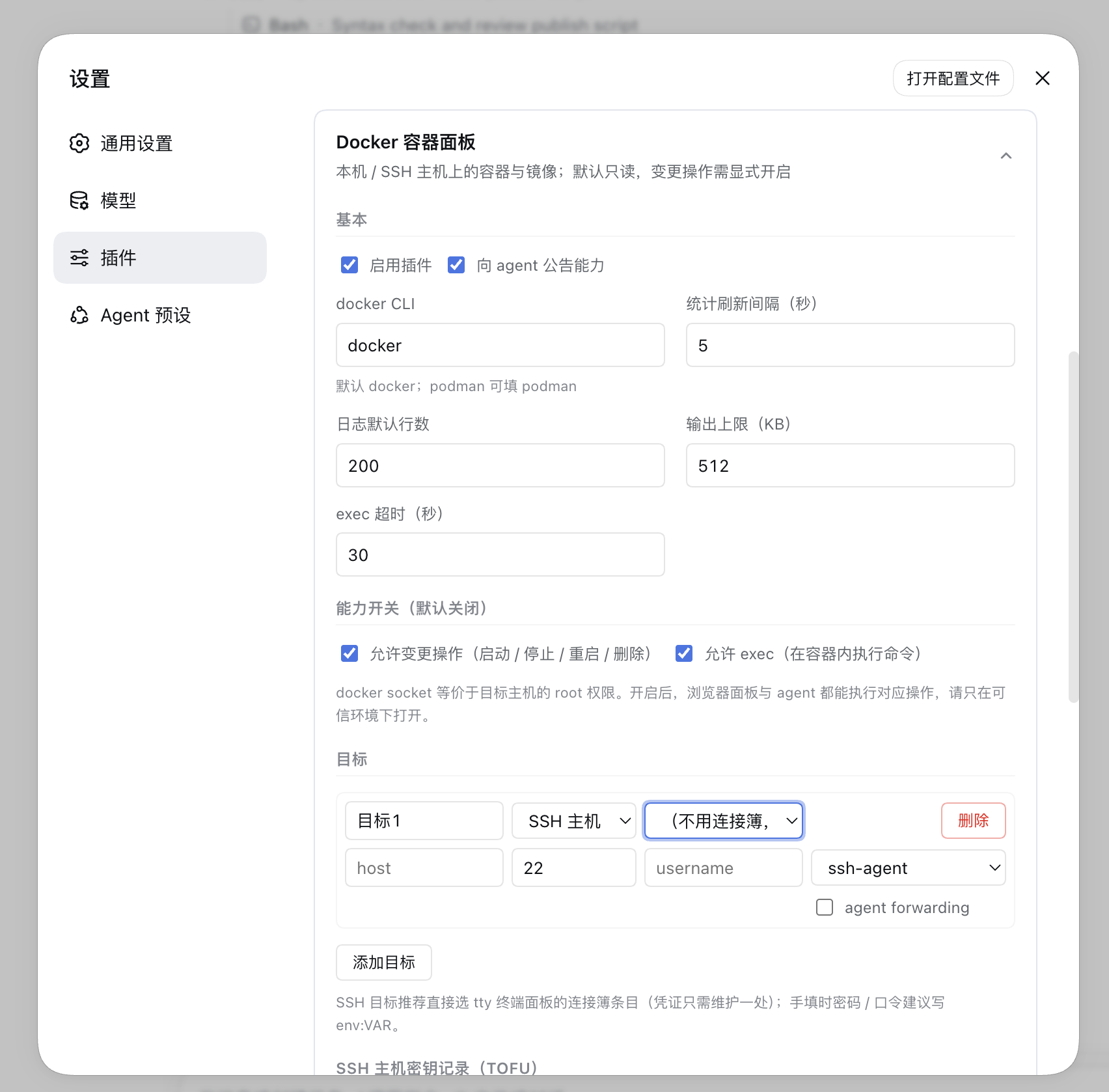
## 配置(设置 → 插件 → Docker 容器面板,保存即热生效)
|
|
384
384
|
|
|
385
|
+
未获宿主授权时,设置卡片里那两个开关**点它会就地发起一次授权**:面板给出一条「在宿主终端执行」
|
|
386
|
+
的命令,执行完十秒内自动解锁并替你打开开关(免重启);面板里另有「另一种方式(最强)」说明
|
|
387
|
+
启动环境变量的做法。已授权时它们就是普通开关,**关掉**永远可用(宿主侧不拦降权)。
|
|
388
|
+
「配置开着但没授权」会显示「未生效:未获宿主授权」徽标——这个状态最容易被当成插件坏了,
|
|
389
|
+
所以必须有个名字。**一个能力一行**:开关后面跟这个能力自己的授权状态与**授权时刻**(`已授权 · 2026-09-26 22:31:08`),
|
|
390
|
+
撤销按钮右对齐——两个能力的授权是分开的,并排放会看不出哪个撤销管哪个能力。
|
|
391
|
+
|
|
392
|
+
为什么显示时刻:带外授权是**持久**的——宿主重启后它**直接生效、不再有任何一次确认**。也就是说
|
|
393
|
+
「上个月授权的能力今天一开机就开着」这件事不会有任何提示,除非界面与日志说出来。所以宿主启动时会
|
|
394
|
+
逐条打一行 `[dsh-docker] elevation: load capability=… via=file grantedAt=…`(不含 nonce 与路径),
|
|
395
|
+
卡片上也把它显示出来。启动环境变量授权**没有**时刻(它就是启动环境的一部分,编一个假时间更糟),
|
|
396
|
+
那一行显示的是「由启动环境变量授权;要撤销需在启动环境里去掉它并重启宿主」。
|
|
397
|
+
|
|
385
398
|
|
|
386
399
|
|
|
387
400
|
配置落在 settings 命名空间 `docker`,即 `~/.dsh/settings.yaml` 的 `docker:`
|
|
@@ -396,6 +409,7 @@ add。装完重启 `dsh web`,侧边栏出现「容器」入口;设置 →
|
|
|
396
409
|
| `announceToAgent` | true | 是否向 agent 注入能力公告(systemPrompt section `plugin:dsh-docker`) |
|
|
397
410
|
| `dockerBin` | `docker` | docker CLI 可执行名或路径(podman 可填 `podman`);只允许字母、数字与 `_ . / \ : -` 及内部空格,且不能以 `-` 开头(**Windows 盘符与 `\` 必须放行**,否则任何绝对路径都填不进来) |
|
|
398
411
|
| `allowMutations` | false | 允许**变更操作**:容器 start / stop / restart / remove、镜像删除 / dangling 清理 / 拉取(面板按钮与 `docker_action`、`docker_image_remove`、`docker_image_prune`、`docker_image_pull` 工具;关闭时 `/action`、`/images/remove`、`/images/prune`、`/images/pull/stream` 返回 403,对应工具不注册) |
|
|
412
|
+
| —(能力授权) | 未授权 | `allowMutations` / `allowExec` 有**两条提权通道**:① **启动环境变量**(`DSH_DOCKER_ALLOW_MUTATIONS` / `DSH_DOCKER_ALLOW_EXEC`,值为 `1` / `true` / `yes` / `on`)——判定源是宿主的**启动环境快照**,只认继承来的 `process` 层:写项目 `.env` 或 `~/.dsh/env.yml` **不算**授权;② **就地提权**(免重启):在设置卡片点开关 → 面板给出一条「在宿主终端执行」的命令 → 执行后十秒内生效。HTTP 侧永远可以**关掉**它们(紧急刹车不能依赖重启),但给 `true` 而无授权会被 400 拒绝并说清两条路。配置里的 `true` **不算授权**(它与 HTTP 写进去的值存在同一个存储里,分不出来源)。**升级影响**:升级前靠界面打开的开关会变成关——设环境变量重启,或在卡片里就地确认。**为什么**:回环围栏与同源证明都拦不住跨站页面与页内脚本(它们能自己填 `Sec-Fetch-Site: same-origin`),而 docker socket 等价目标主机 root;细节(含拦不住谁)见 [architecture.md § 7](../../docs/architecture.md#7-一条请求经过什么) |
|
|
399
413
|
| `allowExec` | false | 允许一次性 `docker exec`(面板 exec 输入与 `docker_exec` 工具;关闭时 `/exec` 返回 403) |
|
|
400
414
|
| `execTimeoutSec` | 30 | exec 默认超时秒数(1~120) |
|
|
401
415
|
| `pollIntervalSec` | 5 | 面板统计刷新间隔秒数(1~60) |
|
package/client-src/docker.css
CHANGED
|
@@ -501,6 +501,9 @@
|
|
|
501
501
|
}
|
|
502
502
|
|
|
503
503
|
.dk_check input { accent-color: var(--dk-accent); }
|
|
504
|
+
/* 同上:复选框的 cursor 不随 label 继承(UA 样式),要单独写 */
|
|
505
|
+
.dk_check input[type="checkbox"],
|
|
506
|
+
.dk_capRow input[type="checkbox"] { cursor: pointer; }
|
|
504
507
|
|
|
505
508
|
/*
|
|
506
509
|
* 工具条末尾的两个开关(含已停止 / 自动刷新)成组:它们是一个「开关簇」,工具条在宽面板里
|
|
@@ -1978,7 +1981,14 @@
|
|
|
1978
1981
|
background: var(--dk-surface-2);
|
|
1979
1982
|
}
|
|
1980
1983
|
|
|
1981
|
-
/*
|
|
1984
|
+
/*
|
|
1985
|
+
* 操作列的按钮:靠右、按内容宽度(不跟着 150px 的列宽被拉长)。
|
|
1986
|
+
*
|
|
1987
|
+
* 两种类都要写:TOFU 指纹行那一处的删除按钮早先只写了 `.dk_btn`(D146),于是它既不吃这条
|
|
1988
|
+
* `justify-self`(被拉满整列)又不是危险色——同一个卡片里出现两种「删除」外观。规则按**位置**
|
|
1989
|
+
* (操作列的直接子按钮)而不是按**类名**生效,后来人换类名也不会掉出去。
|
|
1990
|
+
*/
|
|
1991
|
+
.dk_targetRow > .dk_btn,
|
|
1982
1992
|
.dk_targetRow > .dk_btnDanger { justify-self: end; }
|
|
1983
1993
|
|
|
1984
1994
|
/*
|
|
@@ -1994,6 +2004,114 @@
|
|
|
1994
2004
|
color: var(--dk-warn);
|
|
1995
2005
|
}
|
|
1996
2006
|
|
|
2007
|
+
/*
|
|
2008
|
+
* 能力开关区:**一个能力一块**(复选框 | 文字,第二行是它自己的授权状态)。
|
|
2009
|
+
*
|
|
2010
|
+
* 为什么不做成「两个开关并排 + 底下一行授权状态」:授权是**逐能力**的(`file` 通道一条一个),
|
|
2011
|
+
* 并排时两个「撤销宿主授权」按钮挨在一起,没人看得出哪个撤的是哪个能力——界面说了,但没说清。
|
|
2012
|
+
*
|
|
2013
|
+
* 为什么是两列网格(而不是一行 flex + 换行):状态行要左对齐到**文字**(不是复选框),并且
|
|
2014
|
+
* 撤销按钮要落在同一竖线上。flex 换行的实现实测在这两点上都不成立——标签长度随语言变,
|
|
2015
|
+
* 长标签那行会把状态整组挤到下一行、按钮右缘也和短标签那行差 200px(见 client-src 里的注释)。
|
|
2016
|
+
* 网格的两列是确定写法:第一列是复选框,第二列同时放「文字」与「状态」。
|
|
2017
|
+
*/
|
|
2018
|
+
.dk_capList {
|
|
2019
|
+
display: grid;
|
|
2020
|
+
gap: var(--dk-gap-sm);
|
|
2021
|
+
}
|
|
2022
|
+
.dk_capRow {
|
|
2023
|
+
display: grid;
|
|
2024
|
+
grid-template-columns: auto minmax(0, 1fr);
|
|
2025
|
+
align-items: center;
|
|
2026
|
+
gap: var(--dk-gap-xs) var(--dk-gap-sm);
|
|
2027
|
+
}
|
|
2028
|
+
.dk_capLabel {
|
|
2029
|
+
font-size: 12px;
|
|
2030
|
+
color: var(--dk-label-2);
|
|
2031
|
+
cursor: pointer;
|
|
2032
|
+
user-select: none;
|
|
2033
|
+
}
|
|
2034
|
+
.dk_capRow input[type="checkbox"] { accent-color: var(--dk-accent); }
|
|
2035
|
+
.dk_capState {
|
|
2036
|
+
/* 显式落在第二列:它跟的是「文字」那一列的左缘,而不是行左缘 */
|
|
2037
|
+
grid-column: 2;
|
|
2038
|
+
display: flex;
|
|
2039
|
+
align-items: center;
|
|
2040
|
+
gap: var(--dk-gap-sm);
|
|
2041
|
+
/* 与 .dk_hint 同档:它是说明性文字,不该跟开关抢注意力 */
|
|
2042
|
+
font-size: 11px;
|
|
2043
|
+
color: var(--dk-label-3);
|
|
2044
|
+
line-height: 1.6;
|
|
2045
|
+
}
|
|
2046
|
+
/* 撤销按钮推到第二列右缘:两个能力的按钮落在同一条竖线上,不会跟着标签长度左右跳 */
|
|
2047
|
+
.dk_capRevoke {
|
|
2048
|
+
margin-left: auto;
|
|
2049
|
+
}
|
|
2050
|
+
|
|
2051
|
+
/*
|
|
2052
|
+
* 就地授权面板:一段「带外确认」的说明 + 一条要复制到宿主终端的命令。
|
|
2053
|
+
* 左侧色条把它与普通设置项区分开——它不是配置项,是一个**动作区**。
|
|
2054
|
+
*/
|
|
2055
|
+
.dk_elevPanel {
|
|
2056
|
+
display: grid;
|
|
2057
|
+
/*
|
|
2058
|
+
* 单列,且**允许轨道被压到比内容窄**(`minmax(0, 1fr)` 而不是默认的 auto)。
|
|
2059
|
+
* 为什么必须有:面板里最宽的东西是那条等宽命令串,而 auto 轨道按 max-content 撑开——
|
|
2060
|
+
* 命令一长,整块面板就顶出卡片右边界(窄栏 + Windows 常见的 125%~150% 缩放最明显)。
|
|
2061
|
+
* 0 的下限让 `code` 的 `max-width: 100%` 真正生效,命令改成在框内横向滚动。
|
|
2062
|
+
*/
|
|
2063
|
+
grid-template-columns: minmax(0, 1fr);
|
|
2064
|
+
min-width: 0;
|
|
2065
|
+
gap: var(--dk-gap-sm);
|
|
2066
|
+
padding: var(--dk-gap-md) var(--dk-gap-lg);
|
|
2067
|
+
border: 1px solid color-mix(in srgb, var(--dk-accent) 34%, transparent);
|
|
2068
|
+
border-left: 3px solid var(--dk-accent);
|
|
2069
|
+
border-radius: var(--dk-r-md);
|
|
2070
|
+
background: color-mix(in srgb, var(--dk-accent) 6%, transparent);
|
|
2071
|
+
}
|
|
2072
|
+
|
|
2073
|
+
.dk_elevSteps {
|
|
2074
|
+
display: grid;
|
|
2075
|
+
grid-template-columns: minmax(0, 1fr);
|
|
2076
|
+
min-width: 0;
|
|
2077
|
+
gap: var(--dk-gap-sm);
|
|
2078
|
+
justify-items: start;
|
|
2079
|
+
}
|
|
2080
|
+
|
|
2081
|
+
/* 命令要能整条读出来并三击选中:等宽、可横向滚动、不换行折断命令本身 */
|
|
2082
|
+
.dk_elevCommand {
|
|
2083
|
+
max-width: 100%;
|
|
2084
|
+
min-width: 0;
|
|
2085
|
+
overflow-x: auto;
|
|
2086
|
+
padding: 6px 8px;
|
|
2087
|
+
border: 1px solid var(--dk-border);
|
|
2088
|
+
border-radius: 4px;
|
|
2089
|
+
background: var(--dk-surface-2);
|
|
2090
|
+
font-family: var(--dk-mono);
|
|
2091
|
+
font-size: 12px;
|
|
2092
|
+
white-space: pre;
|
|
2093
|
+
user-select: all;
|
|
2094
|
+
}
|
|
2095
|
+
|
|
2096
|
+
/*
|
|
2097
|
+
* 命令的动作行:复制 / 重新生成 / 倒计时并排,紧贴命令(见 index.js 里那段注释)。
|
|
2098
|
+
* 窄栏下允许换行,但**永远整行属于命令**,不与说明文字混排。
|
|
2099
|
+
*/
|
|
2100
|
+
.dk_elevActions {
|
|
2101
|
+
display: flex;
|
|
2102
|
+
flex-wrap: wrap;
|
|
2103
|
+
align-items: center;
|
|
2104
|
+
gap: var(--dk-gap-sm);
|
|
2105
|
+
max-width: 100%;
|
|
2106
|
+
min-width: 0;
|
|
2107
|
+
}
|
|
2108
|
+
|
|
2109
|
+
.dk_elevOther > summary {
|
|
2110
|
+
cursor: pointer;
|
|
2111
|
+
color: var(--dk-label-2);
|
|
2112
|
+
font-size: 12px;
|
|
2113
|
+
}
|
|
2114
|
+
|
|
1997
2115
|
.dk_targetInline {
|
|
1998
2116
|
display: grid;
|
|
1999
2117
|
grid-column: 1 / -1;
|