@hyzyn/dsh-docker 0.5.1 → 0.6.1
This diff represents the content of publicly available package versions that have been released to one of the supported registries. The information contained in this diff is provided for informational purposes only and reflects changes between package versions as they appear in their respective public registries.
- package/README.en.md +109 -33
- package/README.md +124 -31
- package/client.js +128 -26
- package/lib/docker.d.ts +1 -1
- package/lib/docker.js +15 -3
- package/lib/docker.js.map +1 -1
- package/lib/index.js +68 -29
- package/lib/index.js.map +1 -1
- package/lib/ssh-exec.d.ts +61 -3
- package/lib/ssh-exec.js +142 -45
- package/lib/ssh-exec.js.map +1 -1
- package/package.json +5 -4
package/README.en.md
CHANGED
|
@@ -6,11 +6,13 @@
|
|
|
6
6
|
|
|
7
7
|
## Features
|
|
8
8
|
|
|
9
|
+
- **A resident session right-sidebar tab**: the panel lives as a session right-sidebar tab (`sidebar.right.pane.tab`) **side by side** with the conversation — after handing an error to the agent the logs stay on the right, without getting in the way of watching it work; collapsing it leaves the viewport. Panel-level state (target / view / filter text / selected container and its tab) is kept **across sessions**, and collapsing drops the live streams to hand the SSH channels back. Hosts without the right-sidebar services fall back to the original dock / modal, behaving exactly as before.
|
|
9
10
|
- **Aggregated fetches across targets**: the Overview page fans out over every `targets[]` entry in parallel, and an unreachable target only spoils its own cell; the agent side exposes the same shape through `docker_ps target:"*"` / `docker_attention target:"*"`, so targets never block one another.
|
|
10
11
|
- **"Needs attention" reads authoritative fields**: unhealthy / repeatedly restarting / OOM-killed / non-zero exit / dead; OOM and the real exit code come from one `docker inspect` — the 137 in a `docker ps` summary cannot separate an OOM kill from a manual kill, so filtering on the summary alone must misreport.
|
|
11
12
|
- **Four long-lived SSE streams on one substrate**: log FOLLOW, `docker stats`, `docker events` and `docker pull` all run through the same `openSseStream` (heartbeat / active-stream registry / teardown on disconnect) and differ only in how they end — logs and pulls finish on their own, stats and events are aborted by the browser. Multi-select merged logs recover true cross-container ordering from the `--timestamps` prefix; "pause" freezes rendering only (the stream keeps receiving and flushes in one batch on resume).
|
|
12
|
-
- **Read-only by default, capability switches in three tiers**: start / stop / remove, exec and image mutations are independent switches; while one is off the agent tools are **not registered** and the HTTP routes return 403 (the capability does not exist, rather than failing when called). Container names and IDs pass a whitelist, every command is built as argv with single-quote escaping, and passwords / passphrases are referenced as `env:
|
|
13
|
-
- **
|
|
13
|
+
- **Read-only by default, capability switches in three tiers**: start / stop / remove, exec and image mutations are independent switches; while one is off the agent tools are **not registered** and the HTTP routes return 403 (the capability does not exist, rather than failing when called). Container names and IDs pass a whitelist, every command is built as argv with single-quote escaping, and passwords / passphrases are referenced as `env:NAME` (resolved through the official credential layer, falling back to the environment) and never sent back to the browser.
|
|
14
|
+
- **Right-click a log into the agent**: select the failing lines in the log view, then right-click for "send to the current session / fill the input box so I can edit first" — the selection travels with its target, container, time window and 20 lines of context on each side (the menu states plainly that the content enters the model context and may carry credentials). Delivery reports itself twice: a **viewport-level toast** (attached to `body`, above the panel and the terminal modal), and — when the terminal panel is open — an **automatic fold of the terminal** (`minimize()` on the `ttyPanel` v2 contract; sessions keep running and the sidebar "Terminal" entry's badge restores it), so the conversation is simply there. On older tty without that call it degrades to the toast's "the conversation is behind the panel" hint. To edit first, use the draft action — **the session input box is the only editing surface** (multi-line, with the full context in view, and exactly what the agent receives), instead of a second, weaker card editor.
|
|
15
|
+
- **Data-level reuse of dsh-tty, no code coupling**: no tty code is imported and tty needs no source change, so the two install and upgrade independently; with tty present three optional extension points are consumed — connection-bar actions (`ttyConnbar`), the terminal host (`ttyTerminal`: a new tab under the tab/dock carriers, an in-place drawer under the modal) and the terminal-side dock (`ttyPanel.mountPane`, used only by the fallback path) — and each degrades silently without tty or below the required version.
|
|
14
16
|
|
|
15
17
|
## Relationship with dsh-tty
|
|
16
18
|
|
|
@@ -22,9 +24,9 @@ This plugin stands on its own: it imports no tty code, and tty needs no source c
|
|
|
22
24
|
| Connection book | SSH targets can **reference a tty connection-book entry name** (read-only access to `sshHosts` through `ctx.settings.get('tty')`); when tty is not installed this degrades to "inline host/username" or a local target |
|
|
23
25
|
| Host fingerprints | This plugin keeps its own `hostKeys` (TOFU) and **prefers tty's already-recorded fingerprints as the seed** — the same host does not have to be confirmed in two places |
|
|
24
26
|
| Execution channel | Its own pooled SSH exec (`src/ssh-exec.ts`), fully independent of tty's PTY sessions; neither takes the other's slots |
|
|
25
|
-
| Context entry point | With tty ≥ 0.13.0 it can optionally consume tty's client service `ttyConnbar` and insert a "Containers" button in the SSH connection bar (next to SFTP) (**shown as soon as it is registered**), with the target resolved from the current session at click time; if tty is missing or too old this is skipped silently |
|
|
26
|
-
| Panel hosting |
|
|
27
|
-
| Terminal hosting | Interactive terminals are hosted by tty (it owns the PTY)
|
|
27
|
+
| Context entry point | With tty ≥ 0.13.0 it can optionally consume tty's client service `ttyConnbar` and insert a "Containers" button in the SSH connection bar (next to SFTP) (**shown as soon as it is registered**), with the target resolved from the current session at click time; **except in exec tabs this plugin opened itself** — those tabs are where the user just came from, so offering a way back to the very same panel is a loop (recognised via `spawnSpec.command`; a `docker exec -it` the user typed by hand does not count); if tty is missing or too old this is skipped silently |
|
|
28
|
+
| Panel hosting | **The default is a session right-sidebar tab** (`sidebar.right.pane.tab`): the panel and the conversation share the screen, so logs stay visible while the agent works; collapsing it leaves the viewport without leaving the session. The **frame sidebar** entry only opens or focuses it, and **a page type deduplicates inside one column**, so clicking twice never opens a second tab. The **terminal connection bar** entry is the opposite — it sits on the viewport-covering tty modal, where a tab would be hidden, so that path docks to the right of the terminal via `ttyPanel.mountPane` (**the entry decides the carrier**). Without the right-sidebar services (older DSH), or with `localStorage['dsh-docker:carrier'] = 'modal'`, the sidebar entry also falls back to the dock (when tty is open) or to a full-screen modal with its own backdrop. All three carriers are **one component**, differing only in shell and geometry |
|
|
29
|
+
| Terminal hosting | Interactive terminals are hosted by tty (it owns the PTY). **Right-sidebar tab**: when the panel is fullscreen (`sidebar.fullscreen`) the terminal is embedded in place via `ttyTerminal.mount` (enough width, logs and shell on one screen); otherwise a tab is opened in the terminal panel via `ttyTerminal.open` (re-clicking the same container **focuses the existing tab** instead of stacking duplicates — tty contract v3 `reuse`); (too narrow to squeeze both). **Dock** carrier (the panel already lives inside tty) always opens a tab; **modal** embeds in place. Those command tabs (non-empty `spawnSpec.command`) show **no connection-bar extension area** on the tty side — SFTP / tunnels / third-party panes all act on the connection itself, which misleads on a `docker exec` tab (SFTP browses the host, not what the user believes is inside the container); this plugin adds a version-independent fallback that withholds the "Containers" entry in exec tabs it opened itself (matched by the `spawnSpec.command` prefix). Without tty, or below the required version, copying the command is the fallback. This plugin implements no PTY / xterm / reconnect stack |
|
|
28
30
|
| Division of labour | **Interactive troubleshooting** (`docker exec -it`, a shell inside the container, TUIs) is hosted by tty (embedded drawer or tab); **read-only inspection and agent automation** use this plugin's own exec channel |
|
|
29
31
|
|
|
30
32
|
Reuse at the data level without coupling at the code level: the connection book and the fingerprint seed are "reading the same settings", and the connection-bar button is "consuming a generic extension point" — neither is "depending on tty's modules", so upgrading or uninstalling tty does not break this plugin along with it.
|
|
@@ -47,29 +49,69 @@ triggers re-resolution, with no restart needed).
|
|
|
47
49
|
|
|
48
50
|
## Usage
|
|
49
51
|
|
|
50
|
-
Two entry points, one panel
|
|
52
|
+
Two entry points, one panel. **The default carrier is a session right-sidebar tab** — the entries only open or
|
|
53
|
+
focus it, and the panel sits side by side with the conversation: after handing an error to the agent the logs stay
|
|
54
|
+
on the right, without getting in the way of watching it work.
|
|
51
55
|
|
|
52
|
-
-
|
|
56
|
+
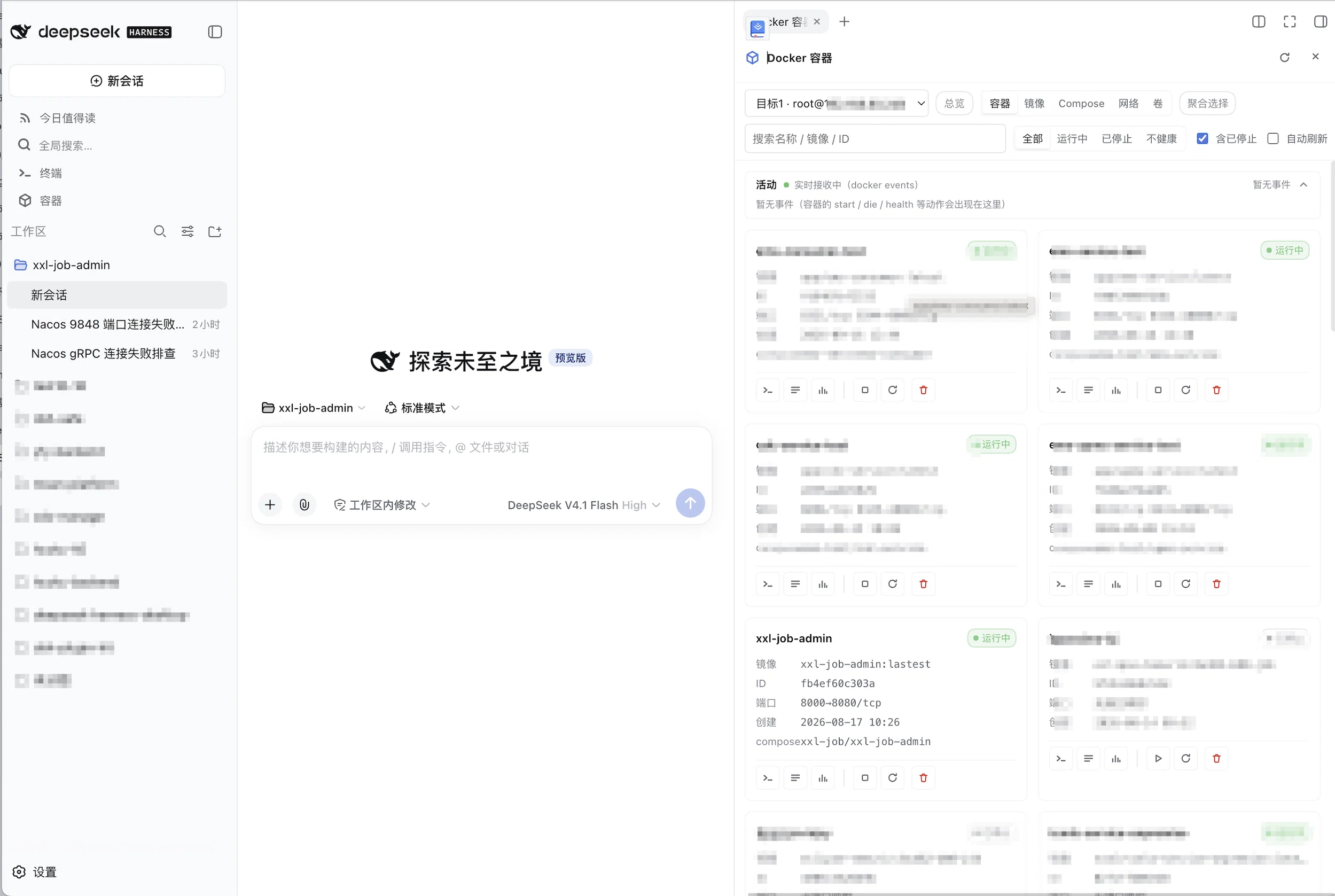
|
|
57
|
+
|
|
58
|
+
- **Sidebar "Containers"** (the main entry point): works for any target, including local docker and switching
|
|
59
|
+
between multiple targets. If it is already open it focuses (a page type deduplicates inside one column), so
|
|
60
|
+
clicking twice never opens a second "Docker containers" tab.
|
|
61
|
+
- **Where to look after delivering**: under the right-sidebar tab the conversation is right beside
|
|
62
|
+
you; under the docked / modal carriers a successful send **folds the terminal automatically** (it keeps
|
|
63
|
+
running — click the sidebar "Terminal" entry's badge to restore), so you land in the conversation instead
|
|
64
|
+
of guessing whether a viewport-covering modal reacted at all.
|
|
53
65
|
- **SSH connection bar "Containers" button** (a contextual shortcut, tty ≥ 0.13.0): in an SSH tab of the tty
|
|
54
66
|
terminal panel a "Containers" button appears next to the connection bar's SFTP button — **shown as soon as it is
|
|
55
67
|
registered**, and clicking it opens the panel directly on **the host of the current session**, with no target to
|
|
56
68
|
pick. The target is resolved at click time: when the session comes from the connection book it matches by entry
|
|
57
69
|
name, otherwise it matches a resolved target by `host:port`; **no matching target does not hide the
|
|
58
70
|
button** — the panel carries a hint naming the session host (including the connection-book name) and how to
|
|
59
|
-
configure it in the settings card.
|
|
71
|
+
configure it in the settings card. This path goes to the **dock right of the terminal** rather than the tab —
|
|
72
|
+
the button lives on the tty modal, which covers the viewport, so a tab would be hidden behind it and feel like
|
|
73
|
+
"clicking did nothing". The target still travels into the panel and remounts it on that host. The rule is
|
|
74
|
+
therefore **"the entry decides the carrier"**: from the frame's sidebar → the right-sidebar tab (side by side
|
|
75
|
+
with the conversation); from inside the terminal modal → the dock right of the terminal (side by side with the
|
|
76
|
+
terminal).
|
|
60
77
|
|
|
61
|
-
|
|
78
|
+
### Carriers
|
|
62
79
|
|
|
63
|
-
|
|
64
|
-
|
|
65
|
-
|
|
66
|
-
|
|
67
|
-
|
|
68
|
-
|
|
69
|
-
|
|
70
|
-
|
|
71
|
-
|
|
72
|
-
|
|
80
|
+
| Carrier | When | Behaviour |
|
|
81
|
+
| --- | --- | --- |
|
|
82
|
+
| **Session right-sidebar tab** (default) | the host provides `sidebarRight` / `sidebarRightTabs` | side by side with the conversation; collapsing hides it without losing state (panel-level state lives in a module store, see below); the right sidebar's fullscreen mode gives it the whole viewport |
|
|
83
|
+
| **Dock right of the terminal** | arriving from the **terminal connection bar's** "Containers" button (that button sits on the tty modal, which would hide a tab), or no right-sidebar service / `localStorage['dsh-docker:carrier'] = 'modal'` with tty ≥ 0.16 and its panel open | docked to the right of the terminal panel (resize / collapse / ✕ provided by tty, the terminal stays usable); one dock at a time — docking this plugin takes down the previous occupant (for example tty's own SFTP) |
|
|
84
|
+
| **Full-screen modal** (fallback) | neither of the above | its own backdrop, closes on outside click; the panel sits above tty's modal in z-order |
|
|
85
|
+
|
|
86
|
+
Rolling back to the old shape is one console line: `localStorage.setItem('dsh-docker:carrier', 'modal')`
|
|
87
|
+
(`removeItem` restores the default). That switch is a temporary grey-release knob, so it deliberately stays out of
|
|
88
|
+
settings — not worth changing the host config schema, the settings card and the docs for it.
|
|
89
|
+
|
|
90
|
+
**State retention**: the panel inspects hosts, not workspaces, so view / filter text / selected container
|
|
91
|
+
(including its overview-logs-stats tab) / target are kept **across sessions**; the log filter and LINES switch
|
|
92
|
+
inside a container detail belong to that container and are not kept. **Collapsing the tab drops every live
|
|
93
|
+
stream** (handing the SSH channels back) and expanding reconnects — single-container and merged log streams
|
|
94
|
+
already open with `tail`, so history refills itself.
|
|
95
|
+
|
|
96
|
+
**Stickiness across sessions**: DSH's right-sidebar tab records are **session-scoped** (`sidebar.right.pane.tab`
|
|
97
|
+
and `rightbar.session` both declare `scope: 'session'`), so a tab opened in session A does not exist in session B.
|
|
98
|
+
The panel inspects hosts, though, and losing it on a session switch is pure loss — so the plugin additionally
|
|
99
|
+
keeps a "the user wants this open" intent: **switching sessions reopens the tab in the new session**, and only
|
|
100
|
+
clicking the tab's ✕ stops that. The panel follows the person, not the session.
|
|
101
|
+
|
|
102
|
+
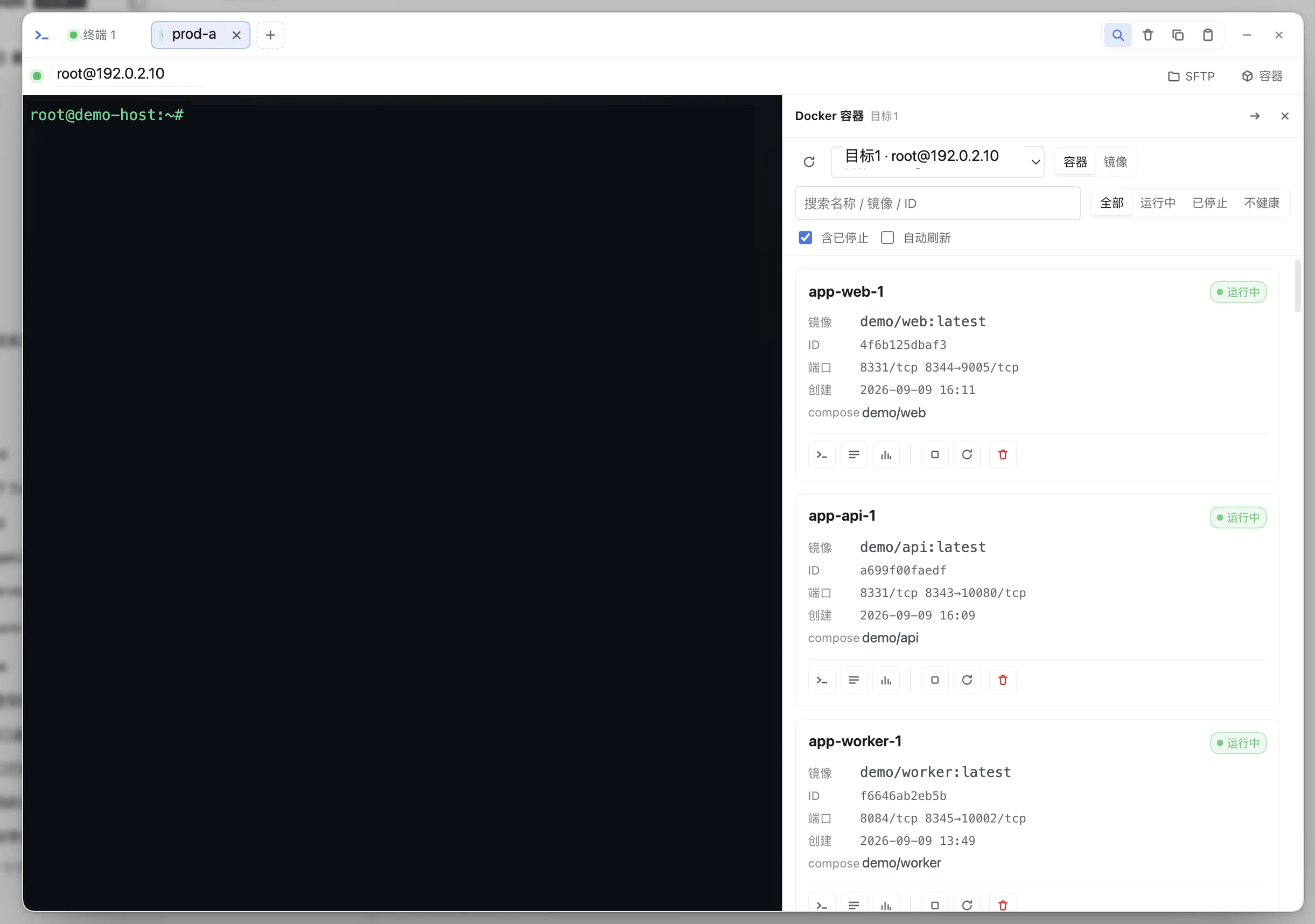
**Dock fallback carrier** (right of the terminal):
|
|
103
|
+
|
|
104
|
+
|
|
105
|
+
|
|
106
|
+
A panel opened this way **never covers the terminal**: with tty ≥ 0.16 it docks to the right of the terminal
|
|
107
|
+
panel (draggable width, collapsible into a narrow strip, ✕ to tuck away) while you keep typing in the terminal.
|
|
108
|
+
In dock mode the card's "Terminal" button **opens a new tab in the same terminal panel** running
|
|
109
|
+
`docker exec -it` (the panel is already inside a terminal, so nesting one more layer makes no sense); it also
|
|
110
|
+
**stops rendering the panel's own header** — the title and ✕ are handled by the sidebar title bar, and the
|
|
111
|
+
refresh control and read-only badge move to the
|
|
112
|
+
**end of the toolbar, right-aligned** (while refreshing the icon spins itself, with no extra spinner): the left
|
|
113
|
+
end stays for the target / view / search / filter controls, so refresh is not mistaken for the first filter and
|
|
114
|
+
sits where it does in the non-dock header; a 520px narrow column does not leave a blank line behind.
|
|
73
115
|
|
|
74
116
|
Inside the panel:
|
|
75
117
|
|
|
@@ -154,7 +196,10 @@ Inside the panel:
|
|
|
154
196
|
(browsers limit same-origin concurrent long connections), and above **8** the button is greyed out with a hint
|
|
155
197
|
about the cap. Clicking `merged logs` opens the merged view: it reuses exactly the merged logs of the Compose
|
|
156
198
|
project view (one `/logs/stream` per container, mixed by the `[service]` / container-name prefix, with filtering
|
|
157
|
-
and auto-scroll), and going back exits selection mode and clears it.
|
|
199
|
+
and auto-scroll), and going back exits selection mode and clears it. The merged view's **content controls are
|
|
200
|
+
fully aligned with the single-container log view** (text filter + level threshold + `⬇ .log` / `⬇ .md` exporting
|
|
201
|
+
what is displayed + line count), plus two merged-only controls: **by time / by arrival** ordering and a **pause**
|
|
202
|
+
that freezes the view while the streams keep receiving (restoring flushes them in one go).
|
|
158
203
|
Clicking `Select for merging` again or pressing **Esc** likewise exits and clears. Selection is **temporary**:
|
|
159
204
|
not persisted, not named into groups, not written to settings; it is dropped when switching targets / switching
|
|
160
205
|
the "Containers · Images · Compose" segment / closing the panel, and containers that disappeared after a list
|
|
@@ -185,10 +230,15 @@ Inside the panel:
|
|
|
185
230
|
stats. The log / stats icons on a card land directly on the corresponding tab.
|
|
186
231
|
- **Log view (a compact two-row layout)**: the first row = back + container name + status + target host +
|
|
187
232
|
`LINES` (tail line count) / `TIMESTAMPS` / **`FOLLOW` (live follow, see below)** /
|
|
188
|
-
`AUTO REFRESH` (a switch plus 2/3/5/10s intervals, polling on the log page only) + refresh /
|
|
189
|
-
the second row = the tabs + an **always-present** "filter logs"
|
|
190
|
-
|
|
191
|
-
|
|
233
|
+
`AUTO REFRESH` (a switch plus 2/3/5/10s intervals, polling on the log page only) + refresh / close;
|
|
234
|
+
the second row = the tabs + an **always-present** "filter logs" input (an ✕ floats inside to clear when it has
|
|
235
|
+
content, and Esc clears too) + a **level threshold** (`all / INFO+ / WARN+ / ERROR+` — `INFO+` is the "quiet but keep what matters" step: the noise is almost always DEBUG and below, and `WARN+` would drop INFO along with it) + **export**
|
|
236
|
+
(`⬇ .log` / `⬇ .md`, exporting **what is currently displayed**) + the line count in a fixed slot on the right.
|
|
237
|
+
**The split between the rows is deliberate**: the first row is *transport and display* (snapshot / stream /
|
|
238
|
+
polling), the second is *content* — and the second row is **exactly the same as the merged log view**: one level
|
|
239
|
+
kernel, one export builder, one count wording (`N lines`, or `N / M lines` while filtered). The level threshold
|
|
240
|
+
treats a line without a level prefix as a **continuation of the previous entry and follows its level** — otherwise
|
|
241
|
+
`ERROR+` would cut a stack trace in half. The input's width and position never change, so typing or clearing never nudges
|
|
192
242
|
this row. The log body is coloured by level (both common prefixes, `[INFO]` and `|INFO`,
|
|
193
243
|
are recognised), timestamps are dimmed, and filter hits are highlighted; beyond 2000 lines only the tail is
|
|
194
244
|
coloured, with a hint. In the details view the list toolbar and panel header are no longer layered on top, so
|
|
@@ -379,7 +429,7 @@ return 400).
|
|
|
379
429
|
| --- | --- | --- |
|
|
380
430
|
| `enabled` | true | disables the whole plugin (**takes effect after restarting `dsh web`**, same semantics as tty) |
|
|
381
431
|
| `announceToAgent` | true | whether to inject a capability announcement into the agent (systemPrompt section `plugin:dsh-docker`) |
|
|
382
|
-
| `dockerBin` | `docker` | the docker CLI executable name or path (`podman` works here); only letters, digits and `_ . / -` are allowed |
|
|
432
|
+
| `dockerBin` | `docker` | the docker CLI executable name or path (`podman` works here); only letters, digits and `_ . / \ : -` plus interior spaces are allowed, and it may not start with `-` (**Windows drive letters and `\` must be allowed**, otherwise no absolute path can be entered at all) |
|
|
383
433
|
| `allowMutations` | false | allows **mutating operations**: container start / stop / restart / remove, image removal / dangling pruning / pulling (the panel buttons and the `docker_action`, `docker_image_remove`, `docker_image_prune`, `docker_image_pull` tools; while off, `/action`, `/images/remove`, `/images/prune`, `/images/pull/stream` return 403 and the corresponding tools are not registered) |
|
|
384
434
|
| `allowExec` | false | allows a one-shot `docker exec` (the panel's exec input and the `docker_exec` tool; while off, `/exec` returns 403) |
|
|
385
435
|
| `execTimeoutSec` | 30 | default exec timeout in seconds (1–120) |
|
|
@@ -403,12 +453,20 @@ Out-of-range numbers are clamped to the boundary, and a value of the wrong type
|
|
|
403
453
|
| `username` | `''` | inline SSH username (required when there is no `book`) |
|
|
404
454
|
| `auth` | `agent` | `agent` (uses `SSH_AUTH_SOCK`) / `key` (uses `keyPath`) / `password` (uses `password` and also attaches keyboard-interactive) |
|
|
405
455
|
| `keyPath` | `''` | private key path for `auth=key` (a leading `~` expands to home) |
|
|
406
|
-
| `password` | `''` | password for `auth=password`; **prefer `env:
|
|
407
|
-
| `passphrase` | `''` | private key passphrase; **prefer `env:
|
|
456
|
+
| `password` | `''` | password for `auth=password`; **prefer `env:NAME`**, a credential reference |
|
|
457
|
+
| `passphrase` | `''` | private key passphrase; **prefer `env:NAME`**, a credential reference |
|
|
408
458
|
| `agentForward` | false | whether to forward the local ssh-agent (takes effect when `SSH_AUTH_SOCK` exists) |
|
|
409
459
|
|
|
410
|
-
An `env:
|
|
411
|
-
|
|
460
|
+
An `env:NAME` inside `password` / `passphrase` is a **credential reference** — exactly the official shape, where
|
|
461
|
+
configuration holds only the reference and a provider owns the value. It is resolved **only when connecting**, in this order:
|
|
462
|
+
|
|
463
|
+
1. the **official credential layer** (`ctx.credentials`, from `@deepseek-ai/dsh-credentials`), which layers
|
|
464
|
+
`file` (`$DSH_HOME/.credentials.yaml`) / `env` / `project-env` / `user-env` and re-resolves per operation — so a
|
|
465
|
+
changed credential reaches the next operation **without a host restart**;
|
|
466
|
+
2. when that service is unavailable (older host, bundle not installed) or holds no such reference, `process.env[NAME]`.
|
|
467
|
+
|
|
468
|
+
With neither, the error names **both** sources and carries the credential service's own error too — otherwise a broken
|
|
469
|
+
credential service would masquerade as "you did not configure it", which is the hardest kind to diagnose. These two values are **never sent back to the browser**:
|
|
412
470
|
the config snapshot only provides the two booleans `passwordSet` / `passphraseSet`.
|
|
413
471
|
|
|
414
472
|
### `hostKeys[]` (SSH host fingerprints, TOFU)
|
|
@@ -549,9 +607,10 @@ read-only first:
|
|
|
549
607
|
2. **Destructive operations restate their consequences**. `remove` maps to `docker rm` (**without `-f`**), and the
|
|
550
608
|
agent announcement requires confirming the target container with the user before running; a running container
|
|
551
609
|
errors with a hint that "the container is still running: stop it before removing", never a silent force-delete.
|
|
552
|
-
3. **Credentials do not land in plaintext (recommended)**. `password` / `passphrase` support `env:
|
|
553
|
-
|
|
554
|
-
|
|
610
|
+
3. **Credentials do not land in plaintext (recommended)**. `password` / `passphrase` support `env:NAME` credential
|
|
611
|
+
references; the value lives in the **official credential store** (`$DSH_HOME/.credentials.yaml`, owned by the
|
|
612
|
+
credential layer's provider), so no plaintext reaches `settings.yaml` — and no env-plugin middleman is required.
|
|
613
|
+
`agent` auth (`SSH_AUTH_SOCK`) is not written to disk at all. The config snapshot only answers "is it set".
|
|
555
614
|
4. **Host fingerprint TOFU pinning**. The first connection records the sha256 fingerprint; every later one must
|
|
556
615
|
match, and a change rejects the connection (MITM protection); a host tty has already confirmed is trusted directly
|
|
557
616
|
as a seed and copied into this plugin's records. TOFU's inherent limits are that "if the first connection already
|
|
@@ -606,7 +665,24 @@ read-only first:
|
|
|
606
665
|
error which the panel and the tools pass through verbatim, without attempting automatic sudo escalation.
|
|
607
666
|
- **Docker not installed on the remote**: `probe` fails (`command not found` / exit code 127) and the panel shows
|
|
608
667
|
the error; when PATH differs, fill `dockerBin` with an absolute path.
|
|
609
|
-
-
|
|
668
|
+
- **`dockerBin` is validated before it is persisted**: an illegal value returns 400 with a reason and is never
|
|
669
|
+
written to `settings.yaml` (the earlier implementation validated after `scope.update`, so the illegal value was
|
|
670
|
+
stored anyway and the user only received a bodyless 400; the next start silently reverted the entire docker
|
|
671
|
+
section to defaults).
|
|
672
|
+
- **A `dockerBin` pointing at a `.cmd` / `.bat` cannot start the local channel**: local execution goes through the
|
|
673
|
+
bare `spawn` in `runLocal` / `runLocalStream`, and Node refuses to execute `.cmd` directly on Windows
|
|
674
|
+
(`EINVAL`). Docker ships `docker.exe`, so this is not hit in practice; with a hand-written `.cmd` wrapper, use
|
|
675
|
+
an `.exe` instead, or wait for the local channel to move to kit's `spawnPortable` as well.
|
|
676
|
+
- **The Compose project view only knows `com.docker.compose.project`**: a service deployed with
|
|
677
|
+
`docker stack deploy` carries `com.docker.stack.namespace` / `com.docker.swarm.service.name` instead, so its
|
|
678
|
+
containers show up as ungrouped (measured on a real three-node swarm, Ubuntu 24.04 + Docker 29.3.1, where every
|
|
679
|
+
stack container reported `composeProject: null`). Supporting it needs a separate stack-grouping notion rather
|
|
680
|
+
than being folded into the compose one.
|
|
681
|
+
- **`volume prune` only reclaims anonymous unused volumes on Docker 29**: a named volume stays even while it
|
|
682
|
+
appears in `docker volume ls -f dangling=true`, and `docker volume prune -f` reports `Total reclaimed space: 0B`
|
|
683
|
+
(measured; an anonymous volume, by contrast, is deleted and named in the output). That matches this plugin's
|
|
684
|
+
deliberate refusal to pass `--all`; use `/volumes/remove` (the panel's volume delete) for named volumes.
|
|
685
|
+
- **Podman compatibility through `dockerBin`**: filling in `podman` runs, but the fields and output formats of- **Podman compatibility through `dockerBin`**: filling in `podman` runs, but the fields and output formats of
|
|
610
686
|
`stats` and `--format '{{json .}}'` differ from docker's, so only the parser's degradation paths are relied on;
|
|
611
687
|
this has not been verified item by item.
|
|
612
688
|
- **No image builds / Compose orchestration changes**: images support pulling / removal / dangling pruning, but there
|
package/README.md
CHANGED
|
@@ -6,11 +6,13 @@
|
|
|
6
6
|
|
|
7
7
|
## 特性
|
|
8
8
|
|
|
9
|
+
- **常驻会话右侧栏**:面板作为会话右侧栏标签(`sidebar.right.pane.tab`)与对话**同屏**——发完错误交给 Agent 后日志留在右边,不影响看它干活;折叠即退出视野、不占屏。面板级状态(目标 / 视图 / 过滤词 / 选中容器及它的页签)**跨会话保留**,而折叠会主动断流、把 SSH 通道还回去。拿不到右侧栏服务的老宿主自动退回原有的 dock / 模态,行为与旧版一致。
|
|
10
|
+
- **日志右键交给 Agent**:日志页拖选报错行 → 右键「直接发送到当前会话 / 填入输入框,我先改改」,把「选中的行 + 目标 / 容器 / 时间窗 + 前后各 20 行上下文」交给会话(内容会进模型上下文,菜单里明写了留意凭证)。投递成功有两处回执:**视口级 toast**(挂 `body`,盖过面板与终端弹窗),以及——终端面板正开着时——**自动折起终端**(`ttyPanel` 契约 v2 的 `minimize()`;会话继续跑,恢复靠侧边栏「终端」入口的徽标),让会话直接露出来。老版本 tty 没有这个能力时退化成 toast 里「会话在面板后面」的指引。需要改稿就先「填入输入框」——**编辑面只有会话输入框一个**(它多行、能看到完整上下文,Agent 收到的就是它),不再另开一张更弱的卡片编辑器。
|
|
9
11
|
- **多目标聚合取数**:总览页对全部 `targets[]` 并行请求,单个目标不可达只污染自己那一格;agent 侧同一口径由 `docker_ps target:"*"` / `docker_attention target:"*"` 暴露,跨目标不互相阻塞。
|
|
10
12
|
- **「需关注」读权威字段**:不健康 / 反复重启 / OOM 被杀 / 非零退出 / 僵死;OOM 与真实退出码由一次 `docker inspect` 补齐——`docker ps` 摘要里的 137 分不出 OOM 与手动 kill,只按摘要筛必然误报。
|
|
11
13
|
- **四条 SSE 长流共用一套基建**:日志 FOLLOW、`docker stats`、`docker events`、`docker pull` 走同一个 `openSseStream`(心跳 / 活跃流登记 / 断开清理),差异只在收尾语义——日志与拉取自然结束,统计与事件由前端主动断。多选聚合日志按 `--timestamps` 前缀还原跨容器真实时序,「暂停」只冻结渲染(流继续接收,恢复时一次性补齐)。
|
|
12
|
-
- **默认只读,能力开关分三级**:启停删 / exec / 镜像变更各自独立开关,未开启时 agent 工具**不注册**、HTTP 路由 403(能力不存在,而非调用后报错);容器名与 ID 过白名单,命令一律 argv 构造 + 单引号转义,密码 / 口令以 `env:
|
|
13
|
-
- **与 dsh-tty 数据级复用、代码级不耦合**:不 import 任何 tty 代码,tty 也无需改一行源码,两者可各自安装与升级;装了 tty 则消费三个可选扩展点——连接栏动作(`ttyConnbar
|
|
14
|
+
- **默认只读,能力开关分三级**:启停删 / exec / 镜像变更各自独立开关,未开启时 agent 工具**不注册**、HTTP 路由 403(能力不存在,而非调用后报错);容器名与 ID 过白名单,命令一律 argv 构造 + 单引号转义,密码 / 口令以 `env:NAME` **凭据引用**(官方凭据层解析,缺失时退回环境变量)且永不回传浏览器。
|
|
15
|
+
- **与 dsh-tty 数据级复用、代码级不耦合**:不 import 任何 tty 代码,tty 也无需改一行源码,两者可各自安装与升级;装了 tty 则消费三个可选扩展点——连接栏动作(`ttyConnbar`)、终端承载(`ttyTerminal`:标签 / dock 承载下经 `open` 新开标签,模态下经 `mount` 就地嵌入抽屉)、以及只在兜底路径用到的终端右侧 dock(`ttyPanel.mountPane`);未装或版本不足逐项静默降级。
|
|
14
16
|
|
|
15
17
|
## 与 dsh-tty 的关系
|
|
16
18
|
|
|
@@ -23,9 +25,9 @@
|
|
|
23
25
|
| 连接簿 | SSH 目标可**引用 tty 连接簿条目名**(只读 `ctx.settings.get('tty')` 的 `sshHosts`);tty 未安装时退化为「内联 host/username」或本机目标 |
|
|
24
26
|
| 主机指纹 | 本插件自持一份 `hostKeys`(TOFU),并**优先以 tty 已记录的指纹作种子**——同一主机不必在两处各确认一次 |
|
|
25
27
|
| 执行通道 | 自持池化 SSH exec(`src/ssh-exec.ts`),与 tty 的 PTY 会话完全独立,互不占名额 |
|
|
26
|
-
| 上下文入口 | tty ≥ 0.13.0 时可选消费其客户端服务 `ttyConnbar`,在 SSH 连接栏(SFTP
|
|
27
|
-
| 面板承载 | tty
|
|
28
|
-
| 终端承载 | 交互式终端由 tty 承载(它才是 PTY
|
|
28
|
+
| 上下文入口 | tty ≥ 0.13.0 时可选消费其客户端服务 `ttyConnbar`,在 SSH 连接栏(SFTP 旁)插入「容器」按钮(**注册即显示**),目标在点击时按当前会话解析;**本插件自己开的 exec 标签除外**——那种标签正是从容器面板点进来的,再给一个回去的入口等于绕回原地(判定走 `spawnSpec.command`,用户手敲的 `docker exec -it` 不算);tty 未装 / 版本过旧则静默跳过 |
|
|
29
|
+
| 面板承载 | **默认走会话右侧栏标签**(`sidebar.right.pane.tab`):面板与对话同屏,折叠即退出视野、不占屏;**框架侧边栏**的入口只负责打开或聚焦它,**页类型在同一栏内去重**,反复点不会开出第二个。**终端连接栏**的入口相反——它长在盖满视口的 tty 弹窗上,开标签会被挡住,所以那条走 `ttyPanel.mountPane` 停靠到终端右侧(**入口决定承载**);投递日志给会话后经 `ttyPanel.minimize()`(契约 v2)折起终端,把舞台让给会话。拿不到右侧栏服务(老版本 DSH)、或把 `localStorage['dsh-docker:carrier']` 置成 `modal` 时,侧边栏入口也回退到 dock(tty 开着时)或自带 backdrop 的全屏模态。三种承载是**同一个组件**,只是外壳与几何不同 |
|
|
30
|
+
| 终端承载 | 交互式终端由 tty 承载(它才是 PTY 的所有者)。**右侧栏标签**:面板全屏(`sidebar.fullscreen`)时经 `ttyTerminal.mount` **就地嵌入**面板底部(宽度够、日志与 shell 同屏),否则经 `ttyTerminal.open` **在终端面板新开标签**(同一容器重复点会**聚焦已有标签**,不再堆重复——tty 契约 v3 的 `reuse`)(栏太窄,硬塞两头难受);**dock** 承载(面板已经长在 tty 里)一律开标签;**模态**承载就地嵌入。那两类命令标签(`spawnSpec.command` 非空)在 tty 侧**不显示连接栏的扩展按钮区**(SFTP / 隧道 / 第三方面板都作用于连接本身,挂在 `docker exec` 标签上会误导——SFTP 浏览的是宿主机,不是用户以为的容器内);本插件另有一道版本无关的兜底:自己开的 exec 标签不给「容器」入口(按 `spawnSpec.command` 前缀判定)。未装 tty 或版本不足时复制命令兜底。本插件不实现 PTY / xterm / 重连栈 |
|
|
29
31
|
| 分工 | **交互式排障**(`docker exec -it`、容器内 shell、TUI)由 tty 承载(抽屉内嵌或标签);**只读巡检与 agent 自动化**用本插件自己的 exec 通道 |
|
|
30
32
|
|
|
31
33
|
数据级复用、代码级不耦合:连接簿与指纹种子是「读同一份 settings」,连接栏按钮是
|
|
@@ -49,25 +51,60 @@ add。装完重启 `dsh web`,侧边栏出现「容器」入口;设置 →
|
|
|
49
51
|
|
|
50
52
|
## 使用
|
|
51
53
|
|
|
52
|
-
|
|
54
|
+
两个入口,同一个面板。**默认承载是会话右侧栏标签**——入口只负责打开或聚焦它,
|
|
55
|
+
面板与对话同屏:发完错误交给 Agent 后,日志留在右边、不影响看它干活。
|
|
56
|
+
|
|
57
|
+

|
|
53
58
|
|
|
54
59
|
- **侧边栏「容器」**(总入口):任何目标都能用,包括本机 docker 与多目标切换。
|
|
60
|
+
已打开则聚焦(页类型在同一栏内去重),不会开出第二个「Docker 容器」标签。
|
|
61
|
+
- **投递后去哪儿看**:右侧栏标签承载下会话就在旁边;docked / 模态下发送成功后**终端会自动
|
|
62
|
+
折起**(会话照旧跑着,点侧边栏「终端」入口的徽标恢复),于是你直接落在会话里——不必对着
|
|
63
|
+
一个盖住会话的弹窗猜「点了没有反应」。
|
|
55
64
|
- **SSH 连接栏「容器」按钮**(上下文快捷方式,tty ≥ 0.13.0):在 tty 终端面板的
|
|
56
65
|
SSH 标签里,连接栏 SFTP 按钮旁会出现「容器」——**注册即显示**,点击直接用
|
|
57
66
|
**当前会话那台主机**打开面板,不用再选目标。目标解析发生在点击时:会话来自
|
|
58
67
|
连接簿时按条目名匹配,否则按 `host:port` 匹配已解析的目标;**没配到目标也不会
|
|
59
68
|
藏按钮**——面板会带一条提示告诉你会话主机(含连接簿名)该去设置卡片怎么配。
|
|
69
|
+
这条路径走**终端右侧的 dock**,不开右侧栏标签——按钮长在 tty 弹窗上,而弹窗盖满
|
|
70
|
+
视口,开标签会被整个挡住、看着像「点了没反应」。目标照旧带进面板并重挂到那台主机。
|
|
71
|
+
于是规则是「**入口决定承载**」:框架侧边栏点 → 右侧栏标签(与对话同屏);
|
|
72
|
+
终端弹窗里点 → 终端右侧 dock(与终端同屏)。
|
|
73
|
+
|
|
74
|
+
### 承载形态
|
|
75
|
+
|
|
76
|
+
| 承载 | 何时用 | 行为 |
|
|
77
|
+
| --- | --- | --- |
|
|
78
|
+
| **会话右侧栏标签**(默认) | 宿主提供 `sidebarRight` / `sidebarRightTabs` | 与会话同屏;折叠=退出视野但不丢状态(面板级状态按模块保留,见下);支持右侧栏的 fullscreen 铺满 |
|
|
79
|
+
| **终端右侧 dock** | 从**终端连接栏**的「容器」按钮进来(按钮就在 tty 弹窗上,标签会被它挡住),或拿不到右侧栏服务 / `localStorage['dsh-docker:carrier'] = 'modal'` 且 tty ≥ 0.16 面板开着 | 挂在终端面板右侧(拖宽 / 折叠 / ✕ 由 tty 提供,终端继续可用);同一时刻只挂一个,挂上去会收掉前一个(例如 tty 自己的 SFTP) |
|
|
80
|
+
| **全屏模态**(兜底) | 上面两条都不成立 | 自带 backdrop、点击外部关闭;面板 z-index 高于 tty 弹窗 |
|
|
81
|
+
|
|
82
|
+
回滚到旧形态只要在控制台执行 `localStorage.setItem('dsh-docker:carrier', 'modal')`
|
|
83
|
+
(`removeItem` 恢复默认)。这个开关是临时灰度用的,所以刻意没进 settings——不值得为
|
|
84
|
+
它连带改宿主配置结构、设置卡片与文档。
|
|
60
85
|
|
|
61
|
-
|
|
86
|
+
**状态保留**:面板看的是主机、不是工作区,所以 view / 过滤词 / 选中容器(含概览-
|
|
87
|
+
日志-统计页签)/ 目标都是**跨会话保留**的;容器详情内部的日志过滤与 LINES 开关跟具体
|
|
88
|
+
容器绑定,不保留。**折叠标签会断开全部实时流**(把 SSH 通道还回去),展开时重连——
|
|
89
|
+
单容器与聚合建流本来就带 `tail`,历史会自己补回来。
|
|
62
90
|
|
|
63
|
-
|
|
64
|
-
|
|
65
|
-
|
|
66
|
-
|
|
67
|
-
|
|
68
|
-
|
|
69
|
-
|
|
70
|
-
|
|
91
|
+
**跨会话粘性**:DSH 右侧栏的标签记录本身是**会话作用域**的(`sidebar.right.pane.tab` 与
|
|
92
|
+
`rightbar.session` 都声明 `scope: 'session'`),A 会话开的标签在 B 会话里并不存在。可
|
|
93
|
+
容器面板看的是主机,「切个会话它就没了」是纯损失,所以插件额外记了一个「用户希望它开着」
|
|
94
|
+
的意图:**切会话时自动在新会话里把标签重开**,只有你点了标签的 ✕ 才停止——也就是
|
|
95
|
+
「面板跟人走,而不是跟会话走」。
|
|
96
|
+
|
|
97
|
+
**dock 兜底形态**(终端右侧栏):
|
|
98
|
+
|
|
99
|
+

|
|
100
|
+
|
|
101
|
+
这条路径打开的面板**不会盖住终端**:tty ≥ 0.16 时它挂在终端面板右侧的 dock 里
|
|
102
|
+
(可拖宽、可折叠成窄条、✕ 收起),终端照常敲命令。dock 模式下卡片「终端」按钮改为
|
|
103
|
+
**在同一终端面板新开标签**执行 `docker exec -it`(面板已经在一个终端里了,再嵌一层
|
|
104
|
+
没有意义);同时**不再渲染面板自己的头部**——标题与 ✕ 由侧栏标题栏承担,刷新与只读
|
|
105
|
+
徽标并到工具条**末尾并靠右**(刷新中图标自己转,不再另挂 spinner):左端留给目标 /
|
|
106
|
+
视图 / 搜索 / 筛选这些「过滤类」控件,刷新不会被当成第一个筛选项,位置也与非 dock
|
|
107
|
+
模式头部里一致;520px 窄栏里不会白留一条空行。
|
|
71
108
|
|
|
72
109
|
面板内:
|
|
73
110
|
|
|
@@ -137,6 +174,9 @@ add。装完重启 `dsh web`,侧边栏出现「容器」入口;设置 →
|
|
|
137
174
|
(浏览器同源并发长连接有限制),超过 **8 个**按钮置灰并提示上限。点 `聚合日志`
|
|
138
175
|
进入聚合视图:直接复用 Compose 项目视图那套聚合日志(每容器一条 `/logs/stream`,
|
|
139
176
|
按 `[service]` / 容器名前缀混流,带过滤与自动滚动),返回即退出选择态并清空。
|
|
177
|
+
聚合视图的内容控制与**单容器日志完全对齐**(文本过滤 + 级别门槛 + `⬇ .log` / `⬇ .md`
|
|
178
|
+
导出当前显示内容 + 行数统计),另有聚合独有的两项:**按时间 / 按到达**排序、**暂停**冻结
|
|
179
|
+
(暂停时流继续接收、恢复一次性补齐)。
|
|
140
180
|
再点 `聚合选择` 或按 **Esc** 同样退出并清空。勾选是**临时的**:不持久化、不命名
|
|
141
181
|
组合、不进 settings;切目标 / 切「容器 · 镜像 · Compose」分段 / 关面板即失效,
|
|
142
182
|
列表刷新后已消失的容器按 id 自动剔除。
|
|
@@ -163,10 +203,14 @@ add。装完重启 `dsh web`,侧边栏出现「容器」入口;设置 →
|
|
|
163
203
|
统计。从卡片的日志 / 统计图标可直接落到对应标签页。
|
|
164
204
|
- **日志视图(紧凑两行)**:第一行 = 返回 + 容器名 + 状态 + 目标主机 +
|
|
165
205
|
`LINES`(尾部行数)/ `TIMESTAMPS` / **`FOLLOW`(实时跟随,见下)** /
|
|
166
|
-
`AUTO REFRESH`(开关 + 2/3/5/10s 间隔,仅日志页轮询)+ 刷新 /
|
|
206
|
+
`AUTO REFRESH`(开关 + 2/3/5/10s 间隔,仅日志页轮询)+ 刷新 / 关闭;
|
|
167
207
|
第二行 = 标签页 + **常驻**的「过滤日志」
|
|
168
|
-
|
|
169
|
-
|
|
208
|
+
输入框(有内容时框内浮出 ✕ 清空,Esc 也能清空)+ **级别门槛**
|
|
209
|
+
(`全部级别 / INFO+ / WARN+ / ERROR+`(`INFO+` 就是「清静但别丢关键信息」那档:噪音几乎都在 DEBUG 及以下,而只有 `WARN+` 会把 INFO 一起滤掉))+ **导出**(`⬇ .log` / `⬇ .md`,导出的是**当前显示内容**)
|
|
210
|
+
+ 右侧固定槽的行数统计。**两行的分工是刻意的**:第一行管**传输与显示**(快照 / 流 / 轮询),
|
|
211
|
+
第二行管**内容**——而第二行与聚合日志**完全同一套**:同一个级别内核、同一个导出构建器、
|
|
212
|
+
同一份计数文案(`N 行`,有过滤时 `N / M 行`)。级别门槛的语义是「无级别前缀的行是上一条的
|
|
213
|
+
续行,跟随其级别」,否则 `ERROR+` 会把堆栈拦腰截断。输入框宽度与位置恒定,输入 / 清空都不会挤动这一行。日志正文按级别着色(`[INFO]` 与 `|INFO` 两种常见前缀
|
|
170
214
|
都能识别),时间戳压暗,过滤命中高亮;超过 2000 行只对尾部着色并提示。
|
|
171
215
|
详情视图下不再叠加列表工具条与面板头,每屏只有一个刷新入口。
|
|
172
216
|
- **FOLLOW 实时日志流**:日志页 `FOLLOW` 开关打开后,界面从「定时拉快照」切换
|
|
@@ -337,7 +381,7 @@ add。装完重启 `dsh web`,侧边栏出现「容器」入口;设置 →
|
|
|
337
381
|
| --- | --- | --- |
|
|
338
382
|
| `enabled` | true | 关闭整个插件(**需重启 `dsh web` 生效**,与 tty 同语义) |
|
|
339
383
|
| `announceToAgent` | true | 是否向 agent 注入能力公告(systemPrompt section `plugin:dsh-docker`) |
|
|
340
|
-
| `dockerBin` | `docker` | docker CLI 可执行名或路径(podman 可填 `podman`);只允许字母、数字与 `_ . / -` |
|
|
384
|
+
| `dockerBin` | `docker` | docker CLI 可执行名或路径(podman 可填 `podman`);只允许字母、数字与 `_ . / \ : -` 及内部空格,且不能以 `-` 开头(**Windows 盘符与 `\` 必须放行**,否则任何绝对路径都填不进来) |
|
|
341
385
|
| `allowMutations` | false | 允许**变更操作**:容器 start / stop / restart / remove、镜像删除 / dangling 清理 / 拉取(面板按钮与 `docker_action`、`docker_image_remove`、`docker_image_prune`、`docker_image_pull` 工具;关闭时 `/action`、`/images/remove`、`/images/prune`、`/images/pull/stream` 返回 403,对应工具不注册) |
|
|
342
386
|
| `allowExec` | false | 允许一次性 `docker exec`(面板 exec 输入与 `docker_exec` 工具;关闭时 `/exec` 返回 403) |
|
|
343
387
|
| `execTimeoutSec` | 30 | exec 默认超时秒数(1~120) |
|
|
@@ -361,12 +405,20 @@ add。装完重启 `dsh web`,侧边栏出现「容器」入口;设置 →
|
|
|
361
405
|
| `username` | `''` | 内联 SSH 用户名(无 `book` 时必填) |
|
|
362
406
|
| `auth` | `agent` | `agent`(走 `SSH_AUTH_SOCK`)/ `key`(用 `keyPath`)/ `password`(用 `password`,同时挂 keyboard-interactive) |
|
|
363
407
|
| `keyPath` | `''` | `auth=key` 的私钥路径(`~` 开头会展开为 home) |
|
|
364
|
-
| `password` | `''` | `auth=password` 的密码;**建议填 `env:
|
|
365
|
-
| `passphrase` | `''` | 私钥口令;**建议填 `env:
|
|
408
|
+
| `password` | `''` | `auth=password` 的密码;**建议填 `env:NAME`** 凭据引用 |
|
|
409
|
+
| `passphrase` | `''` | 私钥口令;**建议填 `env:NAME`** 凭据引用 |
|
|
366
410
|
| `agentForward` | false | 是否转发本机 ssh-agent(`SSH_AUTH_SOCK` 存在时生效) |
|
|
367
411
|
|
|
368
|
-
`password` / `passphrase` 里的 `env:
|
|
369
|
-
|
|
412
|
+
`password` / `passphrase` 里的 `env:NAME` 是一个**凭据引用**(这正是官方模式:配置只持引用、
|
|
413
|
+
值归 provider),**连接时才解析**,顺序是:
|
|
414
|
+
|
|
415
|
+
1. **官方凭据层**(`ctx.credentials`,由 `@deepseek-ai/dsh-credentials` 提供)——它会叠
|
|
416
|
+
`file`(`$DSH_HOME/.credentials.yaml`)/ `env` / `project-env` / `user-env` 各层,且
|
|
417
|
+
「每次操作重新解析」,所以**改完下一个操作即生效、不必重启宿主**;
|
|
418
|
+
2. 服务不可用(老宿主 / 未装该 bundle)或它没有这个引用时,退回 `process.env[NAME]`。
|
|
419
|
+
|
|
420
|
+
两边都没有会明确报错并**点名两个来源**(服务报错也一并带上——否则"凭据服务坏了"会伪装成
|
|
421
|
+
"你没配",那是最难查的一类)。这两个值**永不回传浏览器**:
|
|
370
422
|
配置快照里只给 `passwordSet` / `passphraseSet` 两个布尔位。
|
|
371
423
|
|
|
372
424
|
### `hostKeys[]`(SSH 主机指纹,TOFU)
|
|
@@ -502,8 +554,9 @@ abort)、客户端断开静默中止。各自只差执行器与结束原因:
|
|
|
502
554
|
2. **破坏性操作要复述后果**。`remove` 映射为 `docker rm`(**不带 `-f`**),
|
|
503
555
|
agent 公告要求执行前向用户确认目标容器;运行中容器会报错并附
|
|
504
556
|
「容器仍在运行:先停止再删除」的提示,不会静默强删。
|
|
505
|
-
3. **凭证不落明文(建议)**。`password` / `passphrase` 支持 `env:
|
|
506
|
-
|
|
557
|
+
3. **凭证不落明文(建议)**。`password` / `passphrase` 支持 `env:NAME` 凭据引用,
|
|
558
|
+
值存在**官方凭据存储**(`$DSH_HOME/.credentials.yaml`,由凭据层的 provider 托管)里,
|
|
559
|
+
避免明文写进 `settings.yaml`;不必依赖 env 插件当中间人。`agent`
|
|
507
560
|
认证(`SSH_AUTH_SOCK`)则完全不落盘。配置快照只回「是否已设置」。
|
|
508
561
|
4. **主机指纹 TOFU 钉扎**。首次连接记录 sha256 指纹,之后必须一致,变更即
|
|
509
562
|
拒绝连接(防中间人);tty 已确认过的主机会被当作种子直接信任并复制进
|
|
@@ -539,8 +592,19 @@ abort)、客户端断开静默中止。各自只差执行器与结束原因:
|
|
|
539
592
|
(SSE + `docker pull`);但 agent 工具 `docker_logs` / `docker_stats` /
|
|
540
593
|
`docker_image_pull` 一律保持**快照语义**(单值返回模型不适合无界流)。流式
|
|
541
594
|
日志在浏览器侧只保留最近 5000 行(丢最旧并提示),统计只保留 60 个采样点。
|
|
542
|
-
SSH 长流会占住连接池中的该连接(busy
|
|
543
|
-
|
|
595
|
+
SSH 长流会占住连接池中的该连接(busy),同一主机上的其它命令复用同一条连接——
|
|
596
|
+
但**不是互不影响**:通道额度是共享的,见下一条。**统计流不会自然结束**,关闭必须
|
|
597
|
+
由前端主动断 `EventSource`。
|
|
598
|
+
- **SSH 目标上的通道额度是共享的(`MaxSessions`)**:一个目标只维持**一条** TCP 连接,
|
|
599
|
+
所有长流与短命令共用这条连接上的通道,而 OpenSSH 的 `MaxSessions` 默认只有 10。
|
|
600
|
+
长流(日志 / 统计 / 事件)会一直占到用户关掉面板为止,聚合日志还能一次占 8 条——
|
|
601
|
+
正好把额度用光,于是紧接着一次「刷新列表」(短命令)就被远端拒绝,报的是
|
|
602
|
+
`(SSH) Channel open failure: open failed`。所以插件对每个 SSH 目标限制**同时最多
|
|
603
|
+
8 条长流**(= 10 − 2,留两条给刷新 / inspect 这类短命令),聚合日志在 **SSH 目标**
|
|
604
|
+
上的可选上限也从 8 收到 6(本地目标走子进程,不受影响)。超限与远端拒通道时给出的
|
|
605
|
+
都是带指向性的提示,而不是 ssh2 的原始文案。若你的 sshd 调过 `MaxSessions`
|
|
606
|
+
(`sshd -T | grep maxsessions`),当前上限是编译期常量,需要跟着改就提 issue。
|
|
607
|
+
折叠右侧栏标签会主动断流、把通道还回去。
|
|
544
608
|
- **docker CLI 版本差异**:解析走 `--format '{{json .}}'`,字段随版本增减,
|
|
545
609
|
解析器一律降级而不抛异常(例如 `State` 缺失就从 `Status` 推导状态,健康态
|
|
546
610
|
从 `(healthy)` / `(unhealthy)` 提取);缺字段时对应列可能为空,需要权威
|
|
@@ -552,7 +616,24 @@ abort)、客户端断开静默中止。各自只差执行器与结束原因:
|
|
|
552
616
|
面板与工具原样透出,不做自动 sudo 提权。
|
|
553
617
|
- **远端未安装 docker**:`probe` 失败(`command not found` / 退出码 127),
|
|
554
618
|
面板显示错误;PATH 不一致时可把 `dockerBin` 填成绝对路径。
|
|
555
|
-
-
|
|
619
|
+
- **`dockerBin` 的校验发生在落盘之前**:非法值直接 400 并带上原因,不会被写进
|
|
620
|
+
`settings.yaml`(早先的实现在 `scope.update` 之后才校验,于是非法值照样写盘、
|
|
621
|
+
用户只拿到一个没有正文的 400;下次启动整段 docker 配置会静默退回默认)。
|
|
622
|
+
- **`dockerBin` 指向 `.cmd` / `.bat` 时本机通道起不来**:本机执行走
|
|
623
|
+
`runLocal` / `runLocalStream` 的裸 `spawn`,Windows 上 Node 会拒绝对 `.cmd` 的
|
|
624
|
+
直接执行(`EINVAL`)。docker 官方发行的是 `docker.exe`,日常不受影响;手写
|
|
625
|
+
`.cmd` 包装脚本时请改用 `.exe`,或等待本机通道也切到 kit 的 `spawnPortable`。
|
|
626
|
+
- **Compose 项目视图只认 `com.docker.compose.project`**:`docker stack deploy` 起的
|
|
627
|
+
swarm 服务带的是 `com.docker.stack.namespace` / `com.docker.swarm.service.name`,
|
|
628
|
+
于是它们的容器在面板里显示为「未分组」(真机实测:Ubuntu 24.04 + Docker 29.3.1 的
|
|
629
|
+
三节点 swarm,stack 容器 `composeProject` 全为 `null`)。要支持得另立一套 stack
|
|
630
|
+
分组语义,不能直接塞进 compose 口径。
|
|
631
|
+
- **`volume prune` 在 Docker 29 只回收匿名未用卷**:命名卷即使在
|
|
632
|
+
`docker volume ls -f dangling=true` 里,`docker volume prune -f` 也不会删它
|
|
633
|
+
(真机实测:命名卷留着,回 `Total reclaimed space: 0B`;匿名卷被删并列出名字)。
|
|
634
|
+
这与本插件「刻意不加 `--all`、避免误删」的取向一致 —— 要删命名卷请用
|
|
635
|
+
`/volumes/remove`(面板的卷删除)。
|
|
636
|
+
- **podman 兼容靠 `dockerBin`**:填 `podman` 即可跑,但 `stats` 与- **podman 兼容靠 `dockerBin`**:填 `podman` 即可跑,但 `stats` 与
|
|
556
637
|
`--format '{{json .}}'` 的字段和输出格式与 docker 有差异,只能依赖解析器
|
|
557
638
|
的降级路径,未逐项验证。
|
|
558
639
|
- **没有镜像构建 / Compose 编排变更**:镜像支持拉取 / 删除 / 清理 dangling,
|
|
@@ -627,7 +708,7 @@ abort)、客户端断开静默中止。各自只差执行器与结束原因:
|
|
|
627
708
|
│ │ (每 30s 扫一次,连接超时 20s,keepalive 10s;busy>0 的长流跳过回收)
|
|
628
709
|
│ ├─ 非 PTY exec channel:一命令一 channel,收完 stdout/stderr 即关;
|
|
629
710
|
│ │ 长流(run()/stream())不设总超时与输出上限,靠 AbortSignal 停止
|
|
630
|
-
│ ├─ shJoin 单引号转义(远端 shell 解析);env:
|
|
711
|
+
│ ├─ shJoin 单引号转义(远端 shell 解析);env:NAME 凭据解析(provider 优先 → 退回 env)
|
|
631
712
|
│ └─ hostVerifier TOFU 钉扎(首次记录、变更拒绝)
|
|
632
713
|
├─ runLocal / runLocalStream:spawn(dockerBin, args)(不经 shell,本机目标)
|
|
633
714
|
│ 停止阶梯:SIGTERM → 2s 未退出 SIGKILL
|
|
@@ -657,10 +738,22 @@ abort)、客户端断开静默中止。各自只差执行器与结束原因:
|
|
|
657
738
|
pnpm --filter @hyzyn/dsh-docker build # tsc → lib/(宿主半体)+ esbuild → client.js(浏览器半体)
|
|
658
739
|
pnpm --filter @hyzyn/dsh-docker typecheck
|
|
659
740
|
pnpm --filter @hyzyn/dsh-docker smoke # 三套离线回归,都不需要 docker daemon
|
|
660
|
-
pnpm test # 仓库级 vitest(含本包 logs-stream / streams
|
|
741
|
+
pnpm test # 仓库级 vitest(含本包 logs-stream / streams / ssh-stream-budget 三套)
|
|
661
742
|
```
|
|
662
743
|
|
|
663
|
-
|
|
744
|
+
> **改了哪一半、怎么才生效**(踩过两次的坑):
|
|
745
|
+
>
|
|
746
|
+
> - `client-src/*`(浏览器半体)→ esbuild 出 `client.js`。宿主有 client HMR 轮询各插件的
|
|
747
|
+
> client bundle,**热更**,刷新页面即见;
|
|
748
|
+
> - `src/*.ts`(宿主半体)→ tsc 出 `lib/`。**必须是新进程才生效**:运行中的 `dsh web`
|
|
749
|
+
> 在启动时就把 `lib/` 载进内存,之后 `lib/` 再变它也不会重载。改完 `pnpm build` 记得
|
|
750
|
+
> 重启:`dsh web --profile <name>`。
|
|
751
|
+
>
|
|
752
|
+
> 忘了重启的症状很迷惑:**客户端是对的、宿主是旧的**,于是错误文案、重试、配额这类宿主侧
|
|
753
|
+
> 逻辑全都不生效,看起来像「改了没用」。判断依据是**文案**——宿主侧新增的提示语如果没出现,
|
|
754
|
+
> 那就是旧进程。
|
|
755
|
+
|
|
756
|
+
`scripts/smoke.mjs`(35 项,读取 `lib/` 构建产物)覆盖纯逻辑:ps 解析(字段映射 /
|
|
664
757
|
compose 标签 / 端口 / `State` 缺失推导 / 噪声行 / JSON 数组)、端口串解析与去重、
|
|
665
758
|
stats 解析(百分比 / 内存 / IO / PIDs)、size 与 percent 的异常输入、images 解析
|
|
666
759
|
(dangling)、**image inspect / history(JSON 与纯文本表格两条路径)解析**、
|