@hyzyn/dsh-docker 0.14.0 → 0.16.0
This diff represents the content of publicly available package versions that have been released to one of the supported registries. The information contained in this diff is provided for informational purposes only and reflects changes between package versions as they appear in their respective public registries.
- package/README.en.md +598 -901
- package/README.md +540 -915
- package/lib/docker.d.ts +66 -1
- package/lib/docker.js +154 -3
- package/lib/docker.js.map +1 -1
- package/lib/index.js +47 -14
- package/lib/index.js.map +1 -1
- package/package.json +4 -4
package/README.en.md
CHANGED
|
@@ -2,63 +2,64 @@
|
|
|
2
2
|
|
|
3
3
|
[中文](README.md) | English
|
|
4
4
|
|
|
5
|
-
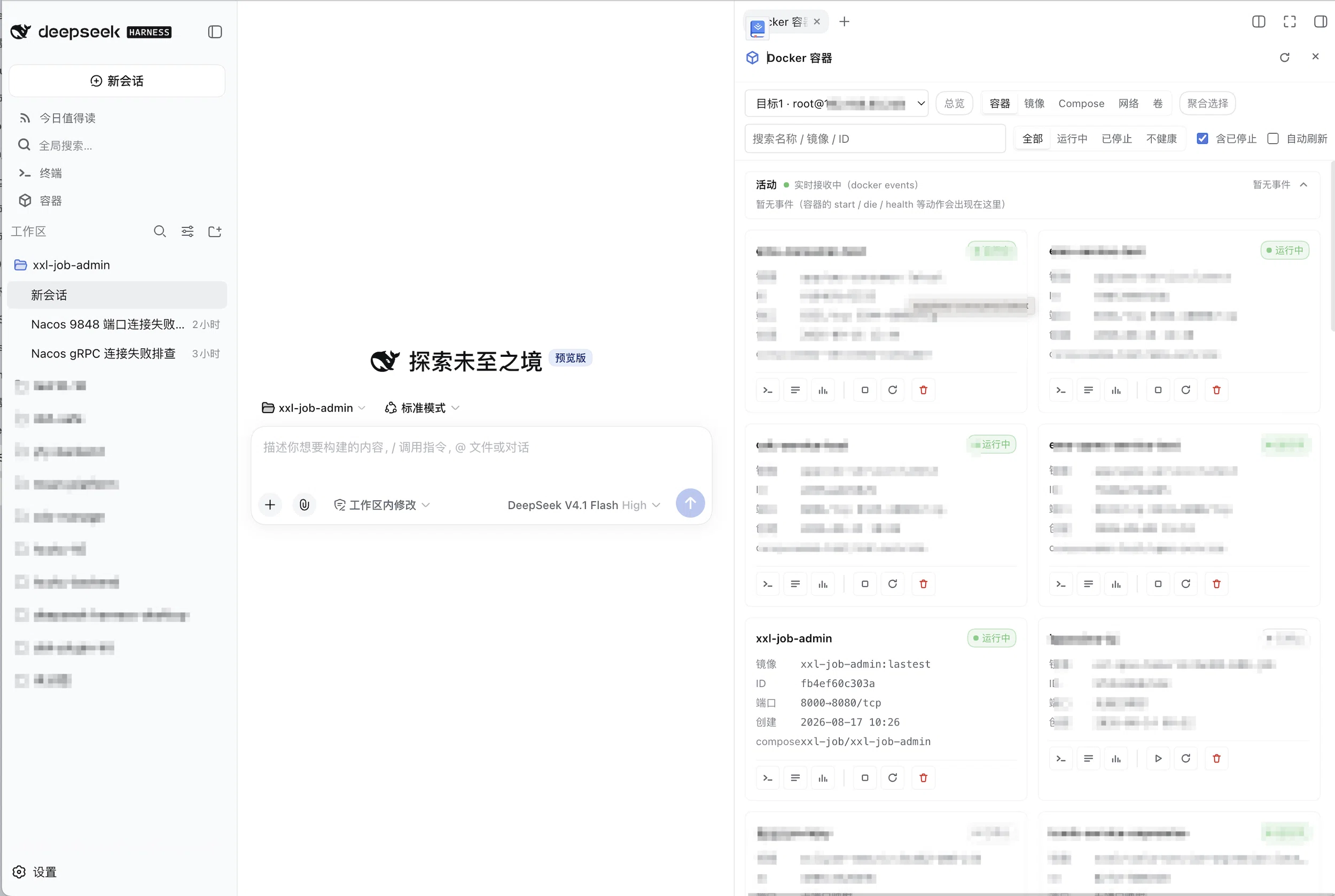
> The DSH sidebar "Containers" panel: containers on the local machine and on SSH hosts inspected on one screen — read logs, watch resources, enter containers, start / stop / remove, **
|
|
5
|
+
> The DSH sidebar "Containers" panel: containers on the local machine and on SSH hosts inspected on one screen — read logs, watch resources, enter containers, start / stop / remove, **read-only by default**.
|
|
6
6
|
|
|
7
7
|
## Features
|
|
8
8
|
|
|
9
|
-
- **A resident session right-sidebar tab**: the panel lives as a
|
|
10
|
-
|
|
11
|
-
|
|
12
|
-
|
|
13
|
-
-
|
|
14
|
-
|
|
15
|
-
|
|
16
|
-
|
|
17
|
-
|
|
18
|
-
|
|
19
|
-
|
|
20
|
-
|
|
21
|
-
|
|
22
|
-
|
|
23
|
-
|
|
24
|
-
|
|
25
|
-
|
|
26
|
-
|
|
27
|
-
- **
|
|
28
|
-
|
|
29
|
-
|
|
30
|
-
|
|
31
|
-
|
|
32
|
-
|
|
33
|
-
|
|
34
|
-
|
|
35
|
-
|
|
36
|
-
|
|
37
|
-
|
|
38
|
-
|
|
39
|
-
|
|
40
|
-
|
|
41
|
-
|
|
42
|
-
|
|
43
|
-
|
|
44
|
-
- **Data-level reuse of dsh-tty, no code coupling**: no tty code is imported and
|
|
9
|
+
- **A resident session right-sidebar tab**: the panel lives as a right-sidebar tab (`sidebar.right.pane.tab`)
|
|
10
|
+
**side by side** with the conversation — after handing an error to the agent the logs stay on the right;
|
|
11
|
+
collapsing it leaves the viewport and drops the live streams, handing the SSH channels back. Panel-level state
|
|
12
|
+
(target / view / filter text / selected container and its tab) is kept **across sessions**; hosts without the
|
|
13
|
+
right-sidebar services fall back to the dock / modal.
|
|
14
|
+
- **Right-click a log into the agent**: select the failing lines in the log view, then right-click for "send to
|
|
15
|
+
the current session / fill the input box so I can edit first" — the selection travels with its target,
|
|
16
|
+
container, time window and 20 lines of context on each side (the menu states plainly that the content enters
|
|
17
|
+
the model context and may carry credentials). Delivery reports itself twice: a **viewport-level toast**, and —
|
|
18
|
+
when the terminal panel is open — an **automatic fold of the terminal** (`ttyPanel` v2 contract). To edit first
|
|
19
|
+
use the draft action: **the session input box is the only editing surface**.
|
|
20
|
+
- **One-click "connect local" / aggregated fetches across targets**: two **non-permanent** entries (the empty
|
|
21
|
+
state's primary button / the target dropdown's last item) add this machine as a local target in one click (the
|
|
22
|
+
agent-side twin is `docker_connect_local`); the Overview fans out over every `targets[]` entry in parallel, and
|
|
23
|
+
an unreachable target only spoils its own cell (`docker_ps target:"*"` shares the same shape).
|
|
24
|
+
- **"Needs attention" reads authoritative fields**: unhealthy / repeatedly restarting / OOM-killed / non-zero
|
|
25
|
+
exit / dead; OOM and the real exit code come from one `docker inspect` — the 137 in a `docker ps` summary
|
|
26
|
+
cannot separate an OOM kill from a manual kill (criteria in [Overview](#overview-cross-target-and-the-needs-attention-criteria)).
|
|
27
|
+
- **A closed troubleshooting loop**: the Diagnosis tab turns four reads into "verdict + findings + evidence +
|
|
28
|
+
timeline + suggestions", and diagnosis history then answers "is it getting worse"; the Processes tab gives a
|
|
29
|
+
`docker top` snapshot; the Disk view lays out the reclaimable bill and "who uses it"; the overview bottom
|
|
30
|
+
rebuilds a reproducible `docker run`. See [Container diagnosis](#container-diagnosis-why-is-it-failing) and
|
|
31
|
+
[Diagnosis history](#diagnosis-history-is-it-slowly-getting-worse).
|
|
32
|
+
- **Four long-lived SSE streams on one substrate**: log FOLLOW, `docker stats`, `docker events` and `docker pull`
|
|
33
|
+
all run through the same `openSseStream` (heartbeat / active-stream registry / teardown on disconnect / a
|
|
34
|
+
`ready` frame as soon as the pipeline is up) and differ only in how they end; merged logs pack several
|
|
35
|
+
containers into **one** `/logs/stream?ids=…`. "Connected" and "receiving data" are two different things: the
|
|
36
|
+
client only counts `ready`. See [SSE event protocol](#sse-event-protocol-logsstream-statsstream-eventsstream-imagespullstream).
|
|
37
|
+
- **Read-only by default, two independent switches**: `allowMutations` (container start / stop / remove plus
|
|
38
|
+
image remove / prune / pull) and `allowExec` (one-off `docker exec`); while one is off the agent tools are
|
|
39
|
+
**not registered** and the HTTP routes return 403
|
|
40
|
+
(the capability does not exist, rather than failing when called). A grant takes one of two out-of-band channels
|
|
41
|
+
(launch environment variables / confirming in the card). Container names and IDs pass a whitelist, every command
|
|
42
|
+
is built as argv with single-quote escaping, and passwords / passphrases are referenced as `env:NAME` and never
|
|
43
|
+
sent back to the browser.
|
|
44
|
+
- **Data-level reuse of dsh-tty, no code coupling**: no tty code is imported and the two install and upgrade
|
|
45
|
+
independently; with tty present three optional extension points are consumed (`ttyConnbar` / `ttyTerminal` /
|
|
46
|
+
`ttyPanel`), each degrading silently without tty or below the required version.
|
|
45
47
|
|
|
46
48
|
## Relationship with dsh-tty
|
|
47
49
|
|
|
48
|
-
This plugin stands on its own: it imports no tty code
|
|
50
|
+
This plugin stands on its own: it imports no tty code and tty needs no source changes. With tty installed they
|
|
51
|
+
cooperate at the optional extension points below; without it they degrade quietly.
|
|
49
52
|
|
|
50
53
|
| Dimension | Description |
|
|
51
54
|
| --- | --- |
|
|
52
|
-
| Plugin form | A standalone package `@hyzyn/dsh-docker
|
|
53
|
-
| Connection book | SSH targets can **reference a tty connection-book entry name** (read-only access to `sshHosts` through `ctx.settings.get('tty')`);
|
|
55
|
+
| Plugin form | A standalone package `@hyzyn/dsh-docker`; both can be installed and upgraded independently |
|
|
56
|
+
| Connection book | SSH targets can **reference a tty connection-book entry name** (read-only access to `sshHosts` through `ctx.settings.get('tty')`); without tty this degrades to "inline host/username" or a local target |
|
|
54
57
|
| Host fingerprints | This plugin keeps its own `hostKeys` (TOFU) and **prefers tty's already-recorded fingerprints as the seed** — the same host does not have to be confirmed in two places |
|
|
55
58
|
| Execution channel | Its own pooled SSH exec (`src/ssh-exec.ts`), fully independent of tty's PTY sessions; neither takes the other's slots |
|
|
56
|
-
| Context entry point | With tty ≥ 0.13.0 it can optionally consume
|
|
57
|
-
| Panel hosting | **The default is a session right-sidebar tab** (`sidebar.right.pane.tab`)
|
|
58
|
-
| Terminal hosting | Interactive terminals are hosted by tty (it owns the PTY). **Right-sidebar tab**: when the panel is fullscreen (`sidebar.fullscreen`) the terminal is embedded in place via `ttyTerminal.mount
|
|
59
|
-
| Division of labour | **Interactive troubleshooting** (`docker exec -it`, a shell inside the container, TUIs) is hosted by tty
|
|
60
|
-
|
|
61
|
-
Reuse at the data level without coupling at the code level: the connection book and the fingerprint seed are "reading the same settings", and the connection-bar button is "consuming a generic extension point" — neither is "depending on tty's modules", so upgrading or uninstalling tty does not break this plugin along with it.
|
|
59
|
+
| Context entry point | With tty ≥ 0.13.0 it can optionally consume `ttyConnbar` and insert a "Containers" button in the SSH connection bar (next to SFTP) (**shown as soon as it is registered**), with the target resolved from the current session at click time; **except in exec tabs this plugin opened itself** (recognised via `spawnSpec.command`); if tty is missing or too old this is skipped silently |
|
|
60
|
+
| Panel hosting | **The default is a session right-sidebar tab** (`sidebar.right.pane.tab`); the frame sidebar entry only opens or focuses it, and **a page type deduplicates inside one column**. The **terminal connection bar** entry is the opposite — it sits on the viewport-covering tty modal, where a tab would be hidden, so that path docks to the right of the terminal via `ttyPanel.mountPane` (**the entry decides the carrier**). Without the right-sidebar services (older hosts), or with `localStorage['dsh-docker:carrier'] = 'modal'`, it falls back to the dock / full-screen modal. All three carriers are **one component**, differing only in shell and geometry |
|
|
61
|
+
| Terminal hosting | Interactive terminals are hosted by tty (it owns the PTY). **Right-sidebar tab**: when the panel is fullscreen (`sidebar.fullscreen`) the terminal is embedded in place via `ttyTerminal.mount`, otherwise a tab is opened via `ttyTerminal.open` (re-clicking the same container **focuses the existing tab** — tty contract v3 `reuse`); **dock** always opens a tab; **modal** embeds in place. Command tabs (non-empty `spawnSpec.command`) show **no connection-bar extension area** on the tty side (SFTP / tunnels act on the connection itself, which misleads on a `docker exec` tab); this plugin also withholds the "Containers" entry in exec tabs it opened itself. Without tty, or below the required version, copying the command is the fallback. This plugin implements no PTY / xterm / reconnect stack |
|
|
62
|
+
| Division of labour | **Interactive troubleshooting** (`docker exec -it`, a shell inside the container, TUIs) is hosted by tty; **read-only inspection and agent automation** use this plugin's own exec channel |
|
|
62
63
|
|
|
63
64
|
## Installation
|
|
64
65
|
|
|
@@ -67,68 +68,54 @@ dsh plugin --profile web add @hyzyn/dsh-docker # npm install (once
|
|
|
67
68
|
dsh plugin --profile web add link:$(pwd)/packages/docker # repo development and debugging
|
|
68
69
|
```
|
|
69
70
|
|
|
70
|
-
The aggregate package `@hyzyn/dsh-all` (or the repo-root bundle) already includes this plugin, so there is no need
|
|
71
|
-
add it separately
|
|
72
|
-
|
|
71
|
+
The aggregate package `@hyzyn/dsh-all` (or the repo-root bundle) already includes this plugin, so there is no need
|
|
72
|
+
to add it separately. After installing, restart `dsh web` and the "Containers" entry appears in the sidebar; the
|
|
73
|
+
"Docker Container Panel" card maintains targets and switches, and **saving applies hot** (`settings/updated`
|
|
73
74
|
triggers re-resolution, with no restart needed).
|
|
74
75
|
|
|
75
|
-
> If
|
|
76
|
+
> If `@hyzyn/dsh-all` or the root bundle is already installed in the web profile, do **not** add this package
|
|
76
77
|
> again, or the plugin line is mounted twice and startup reports `duplicate loader entry id`.
|
|
77
78
|
|
|
78
79
|
## Usage
|
|
79
80
|
|
|
80
81
|
Two entry points, one panel. **The default carrier is a session right-sidebar tab** — the entries only open or
|
|
81
|
-
focus it, and the panel sits side by side with the conversation
|
|
82
|
-
on the right, without getting in the way of watching it work.
|
|
82
|
+
focus it, and the panel sits side by side with the conversation.
|
|
83
83
|
|
|
84
84
|
|
|
85
85
|
|
|
86
86
|
- **Sidebar "Containers"** (the main entry point): works for any target, including local docker and switching
|
|
87
87
|
between multiple targets. If it is already open it focuses (a page type deduplicates inside one column), so
|
|
88
88
|
clicking twice never opens a second "Docker containers" tab.
|
|
89
|
-
- **
|
|
90
|
-
|
|
91
|
-
|
|
92
|
-
|
|
93
|
-
|
|
94
|
-
terminal
|
|
95
|
-
registered**, and clicking it opens the panel directly on **the host of the current session**, with no target to
|
|
96
|
-
pick. The target is resolved at click time: when the session comes from the connection book it matches by entry
|
|
97
|
-
name, otherwise it matches a resolved target by `host:port`; **no matching target does not hide the
|
|
98
|
-
button** — the panel carries a hint naming the session host (including the connection-book name) and how to
|
|
99
|
-
configure it in the settings card. This path goes to the **dock right of the terminal** rather than the tab —
|
|
100
|
-
the button lives on the tty modal, which covers the viewport, so a tab would be hidden behind it and feel like
|
|
101
|
-
"clicking did nothing". The target still travels into the panel and remounts it on that host. The rule is
|
|
102
|
-
therefore **"the entry decides the carrier"**: from the frame's sidebar → the right-sidebar tab (side by side
|
|
103
|
-
with the conversation); from inside the terminal modal → the dock right of the terminal (side by side with the
|
|
104
|
-
terminal).
|
|
89
|
+
- **SSH connection bar "Containers" button** (a contextual shortcut, tty ≥ 0.13.0): it appears next to SFTP in an
|
|
90
|
+
SSH tab of the tty panel, **shown as soon as it is registered**, and opens the panel directly on **the host of
|
|
91
|
+
the current session** (the target is resolved at click time by entry name or `host:port`; **no matching target
|
|
92
|
+
does not hide the button** — the panel says how to configure it). This path goes to the **dock right of the
|
|
93
|
+
terminal** — the rule is **"the entry decides the carrier"**: from the frame's sidebar → the tab; from inside
|
|
94
|
+
the terminal modal → the dock.
|
|
105
95
|
|
|
106
96
|
### Carriers
|
|
107
97
|
|
|
108
98
|
| Carrier | When | Behaviour |
|
|
109
99
|
| --- | --- | --- |
|
|
110
|
-
| **Session right-sidebar tab** (default) | the host provides `sidebarRight` / `sidebarRightTabs` | side by side with the conversation; collapsing hides it without losing state
|
|
111
|
-
| **Dock right of the terminal** | arriving from the **terminal connection bar's** "Containers" button
|
|
100
|
+
| **Session right-sidebar tab** (default) | the host provides `sidebarRight` / `sidebarRightTabs` | side by side with the conversation; collapsing hides it without losing state; the right sidebar's fullscreen mode gives it the whole viewport |
|
|
101
|
+
| **Dock right of the terminal** | arriving from the **terminal connection bar's** "Containers" button, or no right-sidebar service / `localStorage['dsh-docker:carrier'] = 'modal'` with tty ≥ 0.16 and its panel open | docked to the right of the terminal panel (resize / collapse / ✕ provided by tty, the terminal stays usable); one dock at a time — docking this plugin takes down the previous occupant (for example tty's own SFTP); since tty 0.18.4 the pane is **owned by the tab it was opened from**: switching tabs hides it, switching back restores it and closing that tab tears it down (while hidden the React tree and polling keep running) |
|
|
112
102
|
| **Full-screen modal** (fallback) | neither of the above | its own backdrop, closes on outside click; the panel sits above tty's modal in z-order |
|
|
113
103
|
|
|
114
104
|
Rolling back to the old shape is one console line: `localStorage.setItem('dsh-docker:carrier', 'modal')`
|
|
115
105
|
(`removeItem` restores the default). That switch is a temporary grey-release knob, so it deliberately stays out of
|
|
116
|
-
settings
|
|
106
|
+
settings.
|
|
117
107
|
|
|
118
108
|
**State retention**: the panel inspects hosts, not workspaces, so view / filter text / selected container
|
|
119
109
|
(including its overview-logs-stats tab) / target are kept **across sessions**; the log filter and LINES switch
|
|
120
110
|
inside a container detail belong to that container and are not kept. **Collapsing the tab drops every live
|
|
121
|
-
stream** (handing the SSH channels back) and expanding reconnects —
|
|
122
|
-
|
|
123
|
-
|
|
124
|
-
**Stickiness across sessions**:
|
|
125
|
-
|
|
126
|
-
|
|
127
|
-
|
|
128
|
-
|
|
129
|
-
**host** (`sidebarRight` closes the tab itself), so the plugin learns about it through
|
|
130
|
-
`registerCloseHandler` — relying on the panel's own `onClose` alone would miss the close, and every session
|
|
131
|
-
switch would bring the tab back after the user had just dismissed it.
|
|
111
|
+
stream** (handing the SSH channels back) and expanding reconnects — the streams open with `tail`, so history
|
|
112
|
+
refills itself.
|
|
113
|
+
|
|
114
|
+
**Stickiness across sessions**: right-sidebar tab records are **session-scoped**, so a tab opened in session A
|
|
115
|
+
does not exist in session B — yet the panel inspects hosts, so losing it on a session switch is pure loss. The
|
|
116
|
+
plugin therefore keeps a "the user wants this open" intent: **switching sessions reopens the tab in the new
|
|
117
|
+
session**, and only clicking the ✕ stops that (that ✕ is executed by the **host**, so it must be registered
|
|
118
|
+
through `registerCloseHandler` — a panel-level `onClose` alone would miss it).
|
|
132
119
|
|
|
133
120
|
**Dock fallback carrier** (right of the terminal):
|
|
134
121
|
|
|
@@ -137,139 +124,62 @@ switch would bring the tab back after the user had just dismissed it.
|
|
|
137
124
|
A panel opened this way **never covers the terminal**: with tty ≥ 0.16 it docks to the right of the terminal
|
|
138
125
|
panel (draggable width, collapsible into a narrow strip, ✕ to tuck away) while you keep typing in the terminal.
|
|
139
126
|
In dock mode the card's "Terminal" button **opens a new tab in the same terminal panel** running
|
|
140
|
-
`docker exec -it
|
|
141
|
-
|
|
142
|
-
|
|
143
|
-
**end of the toolbar, right-aligned** (while refreshing the icon spins itself, with no extra spinner): the left
|
|
144
|
-
end stays for the target / view / search / filter controls, so refresh is not mistaken for the first filter and
|
|
145
|
-
sits where it does in the non-dock header; a 520px narrow column does not leave a blank line behind.
|
|
127
|
+
`docker exec -it`; it also **stops rendering the panel's own header** — the title and ✕ are handled by the
|
|
128
|
+
sidebar title bar, and the refresh control and read-only badge move to the **end of the toolbar, right-aligned**:
|
|
129
|
+
the left end stays for the target / view / search / filter controls.
|
|
146
130
|
|
|
147
131
|
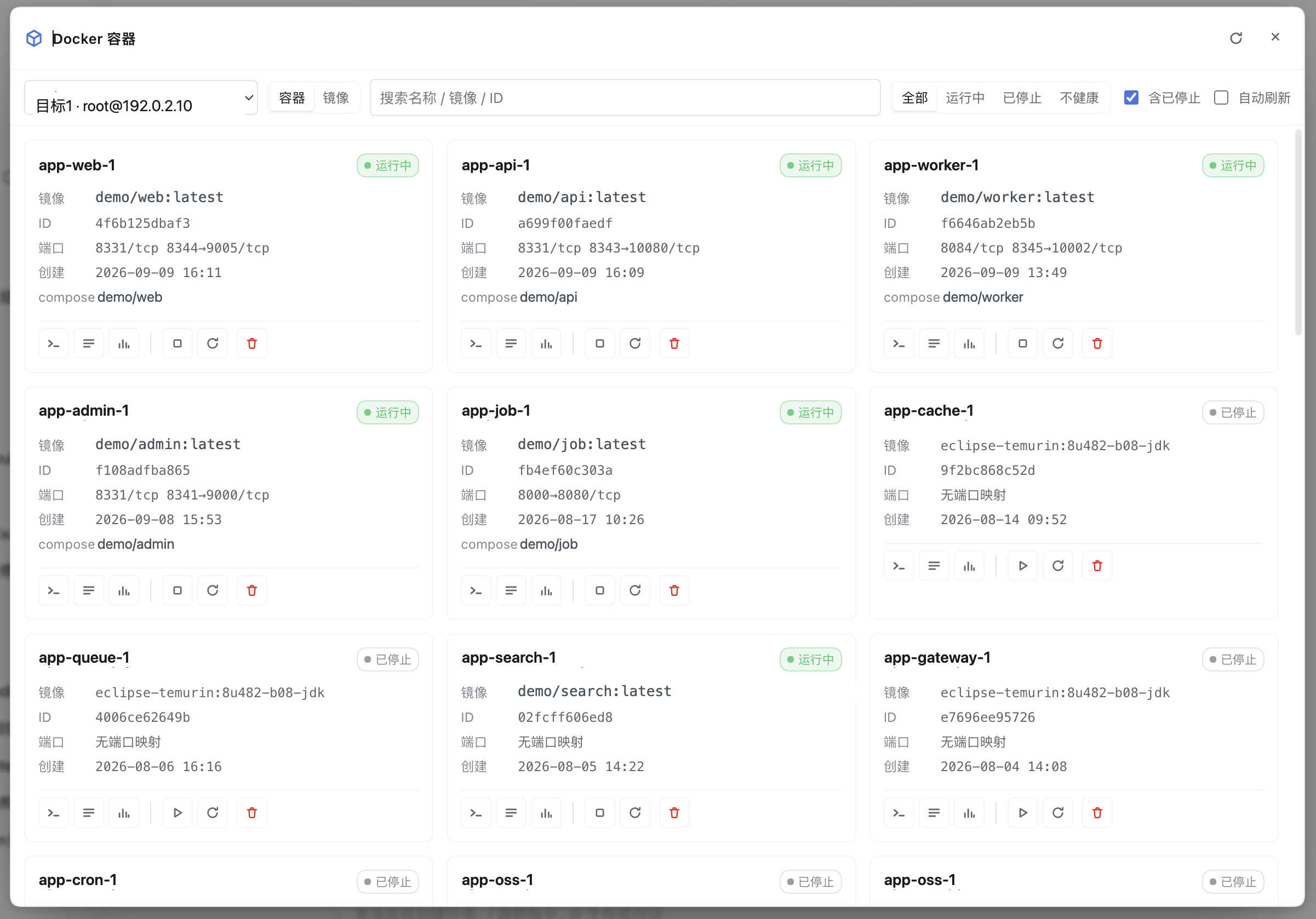
Inside the panel:
|
|
148
132
|
|
|
149
133
|
|
|
150
134
|
|
|
151
135
|
- **Switching targets has a transition and guards**: as soon as the picker changes, the cards below are still the
|
|
152
|
-
previous target's (a remote round trip can take up to 20s).
|
|
153
|
-
**
|
|
154
|
-
|
|
155
|
-
|
|
156
|
-
|
|
157
|
-
|
|
158
|
-
|
|
159
|
-
(not written as a sentence, no quotes around target names), while the full "why won't it respond" story lives in
|
|
160
|
-
`title`, available on hover;
|
|
161
|
-
- old data stays at **82% + slight desaturation** (not dimmed into illegibility) and **the pointer is locked**: it
|
|
162
|
-
reads as "a different batch of content" rather than "it broke", and it also prevents acting on the stale list —
|
|
163
|
-
that would aim at the new target while sending commands with container IDs from the old list and really could
|
|
164
|
-
stop a same-named container on the other side;
|
|
165
|
-
- new data lands with an **8px slide-up + fade-in** over 200ms, so that "a different batch" is visible; the motion
|
|
166
|
-
respects `prefers-reduced-motion`.
|
|
167
|
-
|
|
168
|
-
Everything above is **absolutely positioned**: during a switch the first card's position and the scroll height
|
|
169
|
-
provably do not change at all (a banner approach would push the whole block of content down). **A failed switch
|
|
170
|
-
clears the old list** and settles into the new target's error state (it does not keep showing another target's
|
|
171
|
-
data), and the empty-state copy distinguishes "failed to read" from "filtered too narrowly".
|
|
136
|
+
previous target's (a remote round trip can take up to 20s). During the switch the old cards are desaturated and
|
|
137
|
+
**the pointer is locked** (it reads as "a different batch of content" rather than "it broke", and it prevents
|
|
138
|
+
acting on the stale list — that would aim at the new target with container IDs from the old list and really
|
|
139
|
+
could stop a same-named container on the other side), while new data fades in; the whole block is
|
|
140
|
+
**absolutely positioned**, so the first card's position and the scroll height do not change. **A failed switch
|
|
141
|
+
clears the old list** and settles into the new target's error state, and the empty-state copy distinguishes
|
|
142
|
+
"failed to read" from "filtered too narrowly".
|
|
172
143
|
- **Target selection**: the panel picks a target first (from the `targets` config, local / SSH); with only one
|
|
173
|
-
target configured it is selected by default, and agent tools may
|
|
174
|
-
**
|
|
175
|
-
|
|
176
|
-
|
|
177
|
-
|
|
178
|
-
|
|
179
|
-
|
|
180
|
-
|
|
181
|
-
|
|
182
|
-
|
|
183
|
-
- **Multi-target Overview (read-only)**: the `Overview` pill next to the target picker (shown only with ≥2 targets
|
|
184
|
-
configured) — pick no target and see every host on one screen: a row of **counter cards** on top
|
|
185
|
-
(target name + a local / SSH marker + running / stopped / unhealthy), and below it a **table of containers needing
|
|
186
|
-
attention pinned to the top** (container / target / status / image; unhealthy sorts before restarting, ties follow
|
|
187
|
-
the targets' order in config, and rows do not jump between polls). Fetching is **parallel + progressive**:
|
|
188
|
-
each target issues its own `POST /containers` (`all:true`, since a bare `docker ps` does not return exited
|
|
189
|
-
containers and "stopped" would always be 0), and an unreachable target affects only its own cell — the card
|
|
190
|
-
outlined in red plus an "N targets unreachable" banner at the top, while the other targets' results show as usual
|
|
191
|
-
(deliberately **not** aggregated with `Promise.all`: an unreachable SSH host waits out the 20s readyTimeout, so
|
|
192
|
-
aggregating would keep the whole page silent for 20s). Clicking a counter card returns to that target's normal
|
|
193
|
-
container list, and clicking an attention row opens that container's details (going back lands on **that
|
|
194
|
-
target's** container list); **the Overview performs no cross-target operations**, and the attention table's rows
|
|
195
|
-
have no action buttons. Entering the Overview clears the failed banner left over from "the current target": the
|
|
196
|
-
Overview attributes everything per target (red card + unreachable banner) and no longer stacks a single-target
|
|
197
|
-
"operation failed" — the same SSH timeout told twice looks like two dead machines. Polling reuses the toolbar's
|
|
198
|
-
"auto refresh" switch (off by default): each round of this page is one `docker ps` per target across all N
|
|
199
|
-
targets, more expensive than any single-target page. With no exceptions it shows
|
|
200
|
-
"all good"; while some targets have not finished answering, the attention area shows "reading…" and
|
|
201
|
-
**that counter card also enters its loading state** (spinner + dimmed, no 0/0/0 — "0 containers" would be read as
|
|
202
|
-
"this machine has no containers" when it simply has not answered yet) ("don't know yet" is not "all good").
|
|
203
|
-
- **Container list**: name / status / health / image / port mappings / compose project and service /
|
|
204
|
-
short ID; it supports **search** by name or image, **filtering** by state (running / stopped / all),
|
|
205
|
-
and **auto refresh** (polling at `pollIntervalSec`; switching to the images page pauses it and hides that
|
|
206
|
-
switch — images change slowly, so there is no point running `docker images` every 5s; switching back to the
|
|
207
|
-
containers page restores the previous setting). In the toolbar "include stopped" and "auto refresh" are two
|
|
208
|
-
**grouped** switches, and the search box is the only flexible item among them: on a wide panel the whole toolbar
|
|
209
|
-
collapses into one row, and only in a narrow column (dock, 520px) does it wrap by group — no orphan row holding a
|
|
210
|
-
single checkbox.
|
|
144
|
+
target configured it is selected by default, and agent tools may omit `target`. **The last selected target is
|
|
145
|
+
remembered** (`localStorage` key `dsh-docker:last-target`, not written to config): the priority is **what the
|
|
146
|
+
connection bar specifies > last remembered (and still present) > first in the list**. Switching targets is **a
|
|
147
|
+
whole-context switch**: requests still in flight for the previous target are all invalidated (a list write
|
|
148
|
+
gate), so there is no cross-talk like "the picker is already Target2 while the cards are still Target1's".
|
|
149
|
+
- **Container list**: name / status / health / image / port mappings / compose project and service / short ID;
|
|
150
|
+
it supports **search** by name or image, **filtering** by state, and **auto refresh** (polling at
|
|
151
|
+
`pollIntervalSec`; switching to the images page pauses it and hides that switch). "Include stopped" and "auto
|
|
152
|
+
refresh" are two **grouped** switches, and the search box is the only flexible item among them: one row on a
|
|
153
|
+
wide panel, wrapping by group only in a narrow column (dock, 520px).
|
|
211
154
|
- **"Activity" strip (the docker events stream)**: a collapsible narrow bar at the head of the container list
|
|
212
155
|
(expanded by default) that follows one SSE stream (`GET /api/dsh-docker/events/stream`, where the server runs
|
|
213
156
|
`docker events --filter type=container`) showing the last 8 events (time + container name + action, with `die`
|
|
214
|
-
carrying its exit code
|
|
215
|
-
|
|
216
|
-
|
|
217
|
-
|
|
218
|
-
|
|
219
|
-
|
|
220
|
-
|
|
221
|
-
|
|
222
|
-
|
|
223
|
-
|
|
224
|
-
|
|
225
|
-
|
|
226
|
-
does not reconnect**: folding it into the poll would reopen a terminated stream forever, both hiding that it broke
|
|
227
|
-
and pointlessly creating SSE connections. A successful reconnect compensates with one full list refetch (the list
|
|
228
|
-
may have fallen behind while the stream was down), including the case where the daemon never came up and the
|
|
229
|
-
stream never opened at all — otherwise the strip turns green while the list still shows its error state, looking
|
|
230
|
-
fixed when it is not.
|
|
231
|
-
**A refused reconnect must say why** (`D164`): when the server actively refuses this stream it sends an
|
|
232
|
-
`event: error` frame carrying a `message` (typically the long-stream quota being full — see "Known limitations";
|
|
233
|
-
that sentence says what to do about it). The client now **shows it on the Activity strip** ("Reconnect refused: …")
|
|
234
|
-
instead of discarding it. It used to just set `closed`, which made "refused → back to where it
|
|
235
|
-
was" indistinguishable from "the click did nothing", leaving the user to click over and over. The reason is
|
|
236
|
-
cleared on a successful reconnect (or when the stream is rebuilt).
|
|
237
|
-
The hint on the right of that header row is **small text inside a single line**, so it is deliberately short
|
|
238
|
-
(2026-10-08 user feedback: "verbose and stiff"): the state label on the left already says the stream is closed,
|
|
239
|
-
so this only says "will not recover on its own — click Reconnect". The cause, the cap and the `MaxSessions`
|
|
240
|
-
details live in this page, not in the UI.
|
|
241
|
-
**"Receiving events" is only claimed on the host's `ready` frame** (2026-10-11 user report): SSE's `onopen`
|
|
242
|
-
only means "the response headers arrived" — the host flushes those headers **before** it starts `docker events`,
|
|
243
|
-
and connecting can stall for tens of seconds when the target is unreachable or the SSH connection is being
|
|
244
|
-
re-established (D150's "quota full → rebuild the connection" adds another round). During that window the strip
|
|
245
|
-
used to be green and say "Receiving live (docker events)" while not a single event had arrived. The green dot now
|
|
246
|
-
waits for `ready` (= the pipeline really came up); until then the state stays at "Connecting to the event stream…"
|
|
247
|
-
or "Connection lost, reconnecting…" — both of which are true. The log / stats / pull streams follow the same rule
|
|
248
|
-
(see "SSE event protocol").
|
|
157
|
+
carrying its exit code). It is the entry point for **event-driven refresh**: 500ms **after an event arrives** it
|
|
158
|
+
debounces a list refetch, layering on top of the existing `AUTO REFRESH` rather than excluding it — polling is
|
|
159
|
+
the safety net, events cover "just happened". Events stay in memory only (a ring buffer of 50), switching pages
|
|
160
|
+
closes the stream, and switching targets clears the buffer. The allowlist keeps only the nine lifecycle actions
|
|
161
|
+
(start / die / stop / kill / oom / health_status / destroy / rename / update): noise such as `exec_*` and
|
|
162
|
+
`archive-path` is dropped server-side. A closed stream needs a **manual reconnect**: entering `closed` is
|
|
163
|
+
terminal, so the Activity strip offers a **Reconnect** button (not in `unsupported` environments) and the
|
|
164
|
+
toolbar's ⟳ reconnects too; **the AUTO REFRESH poll deliberately does not reconnect**, and a successful
|
|
165
|
+
reconnect compensates with one full list refetch. **A refused reconnect must say why** (`D164`): an actively
|
|
166
|
+
refused stream gets an `event: error` frame carrying a `message`, which the client **shows on the Activity
|
|
167
|
+
strip** — merely setting `closed` makes "refused" indistinguishable from "the click did nothing". **"Receiving
|
|
168
|
+
events" is only claimed on the host's `ready` frame** (response headers do not count).
|
|
249
169
|
- **Select for merging (temporary multi-select merged logs)**: the toolbar's `Select for merging` enters selection
|
|
250
|
-
mode —
|
|
251
|
-
|
|
252
|
-
|
|
253
|
-
|
|
254
|
-
|
|
255
|
-
|
|
256
|
-
|
|
257
|
-
|
|
258
|
-
|
|
259
|
-
|
|
260
|
-
|
|
261
|
-
|
|
262
|
-
|
|
263
|
-
the "Containers · Images · Compose" segment / closing the panel, and containers that disappeared after a list
|
|
264
|
-
refresh are pruned by id.
|
|
265
|
-
- **One-click selection by condition** (in selection mode): the action bar's second row offers a row of condition
|
|
266
|
-
chips (`all visible / unhealthy / needs attention / stopped`, plus `same image / same project` once something is
|
|
267
|
-
selected), with counts **truncated to the remaining slots** — a chip reading 3 really does select 3; anything over
|
|
268
|
-
the cap is stated honestly in the title and the result hint. Conditions only apply within the
|
|
269
|
-
**current filtered result** (search / filter the state first, then select in one click).
|
|
270
|
-
- **Container cards**: "label + value" rows matching the reference layout (image / ID / ports / created /
|
|
271
|
-
compose, with monospaced truncatable values) plus a row of icon action buttons, **split by a vertical rule into
|
|
272
|
-
the "view / mutate" groups**:
|
|
170
|
+
mode — clicking a card body becomes **select / deselect** (the action bar collapses temporarily so that
|
|
171
|
+
multi-selecting does not mis-click start / stop / remove), and an action bar appears: "N containers selected" +
|
|
172
|
+
`merged logs` + `Cancel`. `merged logs` needs at least 2 containers and at most **3** (beyond that the button
|
|
173
|
+
is greyed out with its rationale). The merged view reuses the Compose project view's merged logs; its content
|
|
174
|
+
controls are fully aligned with the single-container log view, plus **by time / by arrival** ordering and a
|
|
175
|
+
**pause**. Selection is **temporary**: not persisted, not written to settings; it is dropped when switching
|
|
176
|
+
targets / segments / closing the panel, and vanished containers are pruned by id.
|
|
177
|
+
- **One-click selection by condition** (in selection mode): the action bar's second row offers condition chips
|
|
178
|
+
(`all visible / unhealthy / needs attention / stopped`, plus `same image / same project` once something is
|
|
179
|
+
selected), with counts **truncated to the remaining slots** — a chip reading 3 really does select 3. Conditions
|
|
180
|
+
only apply within the **current filtered result**.
|
|
181
|
+
- **Container cards**: "label + value" rows (image / ID / ports / created / compose) plus a row of icon buttons,
|
|
182
|
+
**split by a vertical rule into the "view / mutate" groups**:
|
|
273
183
|
|
|
274
184
|
| Group | Buttons | Description |
|
|
275
185
|
| --- | --- | --- |
|
|
@@ -277,141 +187,104 @@ Inside the panel:
|
|
|
277
187
|
| Mutate | start / stop, restart, remove | Ordered by increasing destructiveness; available only with `allowMutations` on, otherwise the whole group is greyed out |
|
|
278
188
|
|
|
279
189
|
Remove gets two extra protections: destructive colouring plus a gap between it and "restart", and a second
|
|
280
|
-
confirmation after the click. **The whole group is locked while a command is in flight**: `stop` / `rm` waits
|
|
281
|
-
the container to actually exit (up to a dozen seconds), during which the confirmation dialog stays open
|
|
282
|
-
"running…"
|
|
283
|
-
|
|
284
|
-
|
|
285
|
-
same confirmation dialog and also has a running state. Clicking a card body opens the overview.
|
|
190
|
+
confirmation after the click. **The whole group is locked while a command is in flight**: `stop` / `rm` waits
|
|
191
|
+
for the container to actually exit (up to a dozen seconds), during which the confirmation dialog stays open
|
|
192
|
+
showing "running…", the card's other mutate buttons are dimmed, the icon that is running becomes a spinner, and
|
|
193
|
+
everything is restored only once the refreshed list lands. Image removal / pruning goes through the same
|
|
194
|
+
confirmation dialog. Clicking a card body opens the overview.
|
|
286
195
|
- **Container details (a full-column view)**: the top is "back + container name + status badge + target host",
|
|
287
|
-
with five tabs below — overview (`docker inspect` authoritative data + one-shot exec + an equivalent
|
|
288
|
-
logs, stats, diagnosis and processes. The log / stats icons on a card land directly on the
|
|
289
|
-
diagnosis and processes **fetch only while that tab is open
|
|
290
|
-
no polling).
|
|
196
|
+
with five tabs below — overview (`docker inspect` authoritative data + one-shot exec + an equivalent
|
|
197
|
+
`docker run`), logs, stats, diagnosis and processes. The log / stats icons on a card land directly on the
|
|
198
|
+
corresponding tab; diagnosis and processes **fetch only while that tab is open**.
|
|
291
199
|
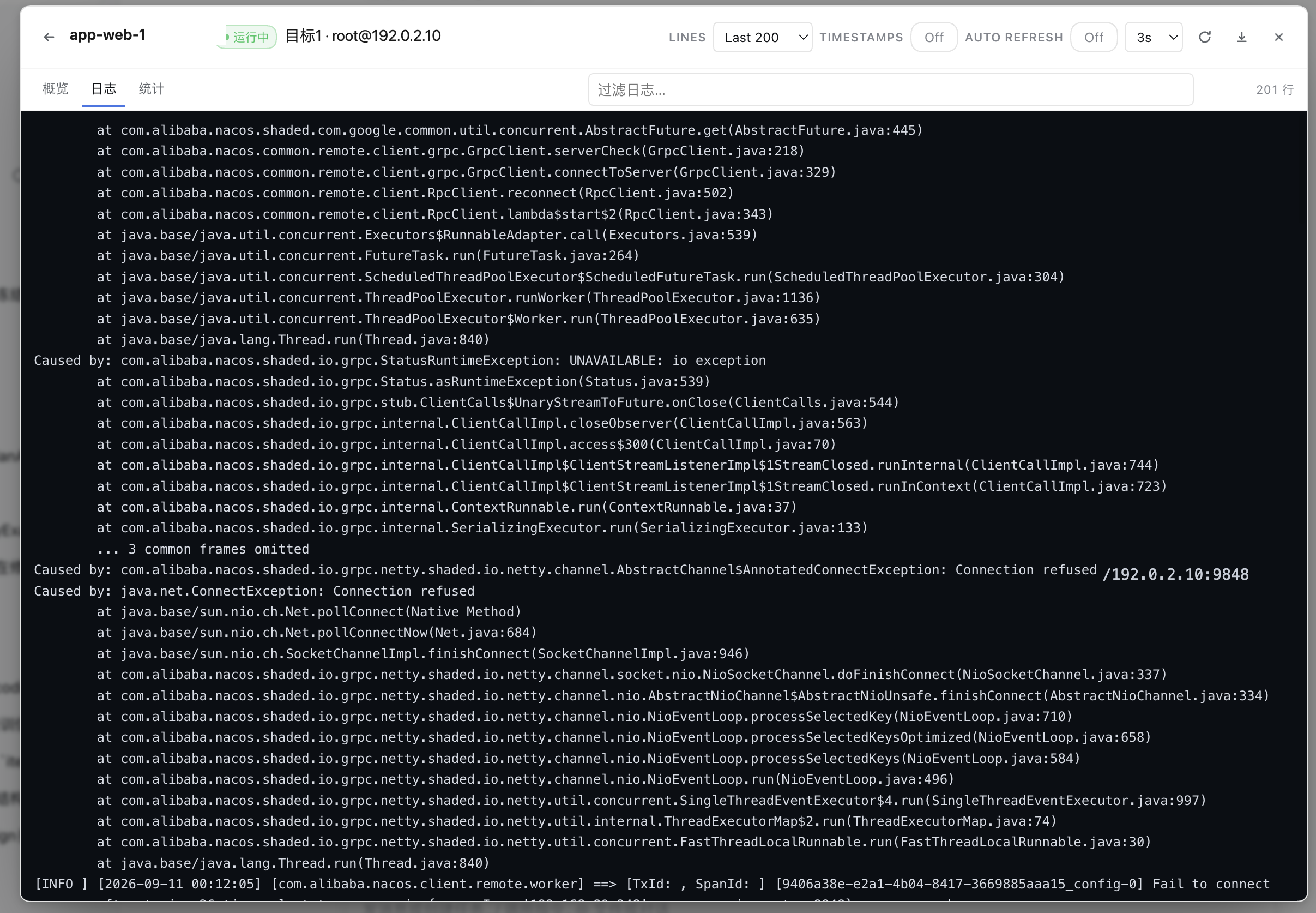
- **Log view (a compact two-row layout)**: the first row = back + container name + status + target host +
|
|
292
|
-
`LINES`
|
|
293
|
-
|
|
294
|
-
|
|
295
|
-
content, and Esc clears too) + a **level threshold** (`all / INFO+ / WARN+ / ERROR+` — `INFO+` is the "quiet but keep what matters" step: the noise is almost always DEBUG and below, and `WARN+` would drop INFO along with it) + **export**
|
|
200
|
+
`LINES` / `TIMESTAMPS` / **`FOLLOW`** / `AUTO REFRESH` (a switch plus 2/3/5/10s intervals, log page only) +
|
|
201
|
+
refresh / close; the second row = the tabs + an **always-present** "filter logs" input (an ✕ floats inside to
|
|
202
|
+
clear, Esc clears too) + a **level threshold** (`all / INFO+ / WARN+ / ERROR+`) + **export**
|
|
296
203
|
(`⬇ .log` / `⬇ .md`, exporting **what is currently displayed**) + the line count in a fixed slot on the right.
|
|
297
|
-
|
|
298
|
-
|
|
299
|
-
|
|
300
|
-
|
|
301
|
-
|
|
302
|
-
|
|
303
|
-
|
|
304
|
-
|
|
305
|
-
|
|
306
|
-
|
|
307
|
-
**
|
|
308
|
-
|
|
309
|
-
|
|
310
|
-
|
|
311
|
-
|
|
312
|
-
|
|
313
|
-
|
|
314
|
-
naturally because the container exited switches back to snapshot refresh automatically.
|
|
315
|
-
**Reconnection is managed by the plugin itself** (not by EventSource auto-reconnect): the first connection
|
|
316
|
-
carries `tail` to backfill history, while every reconnect uses `tail=0` — new lines only, **never replaying
|
|
317
|
-
history** (auto-reconnect reuses the URL with its `tail`, so the server pushes the last `tail` lines again as
|
|
318
|
-
if they were new, and the log grows a duplicated block). When the host-side backpressure queue (8MB)
|
|
319
|
-
**Host-side backpressure (D153)**: each stream buffers at most 8MB; the text tail streams (logs, pulls)
|
|
320
|
-
drop the oldest frames and keep the newest when they overflow, sending a `skip{frames,bytes}` notice so the UI
|
|
321
|
-
can say "a stretch is missing, following continues" — the stream is **not** torn down (the old policy sent
|
|
322
|
-
`end{reason:output-limit}` and closed, which left the panel stuck in "connection lost" while the container kept
|
|
323
|
-
flooding). The skip accounting is **exact**: when more frames are dropped while a queued `skip` notice has not
|
|
324
|
-
been written yet, the server updates that notice **in place** (D156 — no gap goes unreported); the client
|
|
325
|
-
**accumulates** consecutive skips and shows "N batches skipped on this connection", resetting on a successful
|
|
326
|
-
reconnect (D157). Structured streams (stats, events) still close and reconnect, because a missing sample/event is
|
|
327
|
-
semantically wrong.
|
|
328
|
-
Connecting / switching pages / closing the panel all close the `EventSource`.
|
|
204
|
+
The first row is *transport and display*, the second is *content* — and the second row is **exactly the same as
|
|
205
|
+
the merged log view** (one level kernel, one export builder, one count wording). The level threshold treats a
|
|
206
|
+
line without a level prefix as a **continuation of the previous entry and follows its level** — otherwise
|
|
207
|
+
`ERROR+` would cut a stack trace in half. The log body is coloured by level, timestamps are dimmed, and filter
|
|
208
|
+
hits are highlighted.
|
|
209
|
+
- **FOLLOW live log stream**: with `FOLLOW` on, the UI switches from "polling a snapshot" to **SSE push**
|
|
210
|
+
(`GET /api/dsh-docker/logs/stream`, where the server runs `docker logs --follow`); `FOLLOW` and
|
|
211
|
+
`AUTO REFRESH` are mutually exclusive (opening the stream stops polling and greys out the switch), and closing
|
|
212
|
+
it returns to snapshots with an immediate refresh. Streaming logs keep the last **5000 lines / 4MB** (a ring
|
|
213
|
+
buffer dropping the oldest on either cap; newline-free output is force-split so memory stays bounded), and
|
|
214
|
+
chunks render at most every **150ms**. The body is **windowed** (`D152`): only the visible rows plus 24 rows of
|
|
215
|
+
overscan each side are mounted, the rest padded; measured row heights plus a tail anchor keep auto-scroll /
|
|
216
|
+
scroll-up pause / "back to bottom" exact, and **switching streams / containers / refreshing a snapshot
|
|
217
|
+
invalidates that whole generation** (`D155`: snapshot row ids are positional). The view does not truncate:
|
|
218
|
+
whatever `LINES` selects is scrollable and exported. **Reconnection is managed by the plugin itself**: the first
|
|
219
|
+
connection carries `tail`, every reconnect uses `tail=0` — new lines only, **never replaying history**.
|
|
220
|
+
Backpressure and overflow (`D153` / `D156` / `D157`) are in "SSE event protocol".
|
|
329
221
|
- **Overview**: `docker inspect`'s authoritative data — state and health, exit code, restart count and policy,
|
|
330
222
|
port mappings, mounts (including read-only flags), networks and IPs, entrypoint and command, and the latest
|
|
331
223
|
health-check output; below it you can run a one-shot `docker exec` (requires `allowExec`).
|
|
332
224
|
- **Logs**: a tail snapshot from `docker logs --tail` (`logTailDefault` lines by default), with timestamps and
|
|
333
|
-
`--since` switchable
|
|
334
|
-
|
|
225
|
+
`--since` switchable. **Two different caps**: `LINES` is a **line** cap while the settings card's "output cap
|
|
226
|
+
(KB)" is a **byte** cap — the smaller wins, so the byte cap can truncate with a banner. To keep watching new
|
|
227
|
+
logs turn on `FOLLOW` (the same argv plus `--follow`, no overall timeout and no byte cap, ending on the
|
|
335
228
|
connection's lifecycle).
|
|
336
229
|
|
|
337
230
|
|
|
338
|
-
|
|
339
|
-
|
|
340
|
-
|
|
341
|
-
|
|
342
|
-
|
|
343
|
-
naturally**; its close semantics are the frontend
|
|
344
|
-
|
|
345
|
-
|
|
346
|
-
|
|
347
|
-
|
|
348
|
-
|
|
349
|
-
|
|
350
|
-
|
|
351
|
-
and
|
|
352
|
-
|
|
353
|
-
|
|
354
|
-
|
|
355
|
-
|
|
356
|
-
|
|
357
|
-
|
|
358
|
-
|
|
359
|
-
|
|
360
|
-
|
|
361
|
-
- **
|
|
362
|
-
|
|
363
|
-
by itself, with no second-level menu). Both pages use the same "table + full-column details" layout:
|
|
364
|
-
- **Networks**: name / driver / scope / internal badge / ID, with a row click opening details — overview
|
|
365
|
-
(ID / driver / scope / created / subnet / gateway / internal·attachable·ingress·ipv6 / options / labels) and a
|
|
366
|
-
"connected containers" tab (container / IPv4 / IPv6 / MAC). **Container counts deliberately stay out of the
|
|
367
|
-
list rows**: only `docker network inspect` returns the connected list, and inspecting every row would be N
|
|
368
|
-
docker calls, so it is fetched once on entering details instead.
|
|
369
|
-
- **Volumes**: name / driver / scope / mountpoint (over-long paths are width-limited and truncated, with the full
|
|
370
|
-
value in title); details are name / driver / scope / mountpoint / created / options / labels (volumes have no
|
|
371
|
-
reverse index, so there is only the overview page).
|
|
231
|
+
|
|
232
|
+
- **Stats**: a `docker stats --no-stream` snapshot (CPU% / memory usage and share / network IO / block IO /
|
|
233
|
+
PIDs), refreshed by the panel at `pollIntervalSec`. The stats page also has **`FOLLOW` live following**: it
|
|
234
|
+
switches to `GET /api/dsh-docker/stats/stream` (the server runs `docker stats` **without** `--no-stream`, one
|
|
235
|
+
line per second), and the browser side keeps a **60-point** ring buffer for CPU / memory mini trend charts. This
|
|
236
|
+
stream **does not end naturally**; its close semantics are the frontend aborting, and when `docker stats` exits
|
|
237
|
+
by itself the server sends `end` (reason=`stats-exit`).
|
|
238
|
+
- **Compose project view**: the toolbar's third segment. It groups `composeProject` / `composeService` into
|
|
239
|
+
"project → service → container", one row per project with running / unhealthy / service counts; clicking into a
|
|
240
|
+
project shows the service table, or opens **project-level merged logs** — **one** `/logs/stream?ids=…` carrying
|
|
241
|
+
every container in the project (frames tagged with `id`), mixed client-side by the `[service]` prefix. A failed
|
|
242
|
+
per-container sub-stream is marked "partially failed" while the other containers keep streaming.
|
|
243
|
+
- **Images**: a `docker images` list (reference / size / created / short ID), with `<none>:<none>` dangling images
|
|
244
|
+
marked; the search box and counter are **fixed in the toolbar**, and the header sticks within the table body.
|
|
245
|
+
Each row has "details / remove": **details** opens the full-column view (overview + `docker history` build
|
|
246
|
+
history); **remove** (requires `allowMutations`) runs `docker image rm` after a second confirmation (without
|
|
247
|
+
`-f`, so a referenced image fails with a hint to remove the related containers first).
|
|
248
|
+
- **Networks / volumes**: the toolbar segments extend to "Containers / Images / Compose / Networks / Volumes /
|
|
249
|
+
Disk" (a narrow column scrolls the segment container horizontally, with no second-level menu). Both pages use
|
|
250
|
+
the same "table + full-column details" layout:
|
|
251
|
+
- **Networks**: name / driver / scope / internal badge / ID, with a row click opening details — overview and a
|
|
252
|
+
"connected containers" tab. **Container counts deliberately stay out of the list rows**: only
|
|
253
|
+
`docker network inspect` returns the connected list, and inspecting every row would be N docker calls.
|
|
254
|
+
- **Volumes**: name / driver / scope / mountpoint (over-long paths are width-limited, with the full value in
|
|
255
|
+
title); details are the overview page only (volumes have no reverse index).
|
|
372
256
|
- The details header has a **remove** button, and both toolbars have a **prune icon**, all gated by
|
|
373
|
-
`allowMutations` (greyed out with an explanatory title
|
|
374
|
-
|
|
375
|
-
|
|
376
|
-
- Auto refresh matches the images page: these two pages **do not poll** (inventories change slowly, and a `docker`
|
|
377
|
-
CLI call every 5s is burnt for nothing); they refresh only when switching pages or targets.
|
|
257
|
+
`allowMutations` (greyed out with an explanatory title) and all requiring a second confirmation; a failed
|
|
258
|
+
removal shows an inline banner rather than failing silently. These two pages **do not poll** (inventories
|
|
259
|
+
change slowly).
|
|
378
260
|
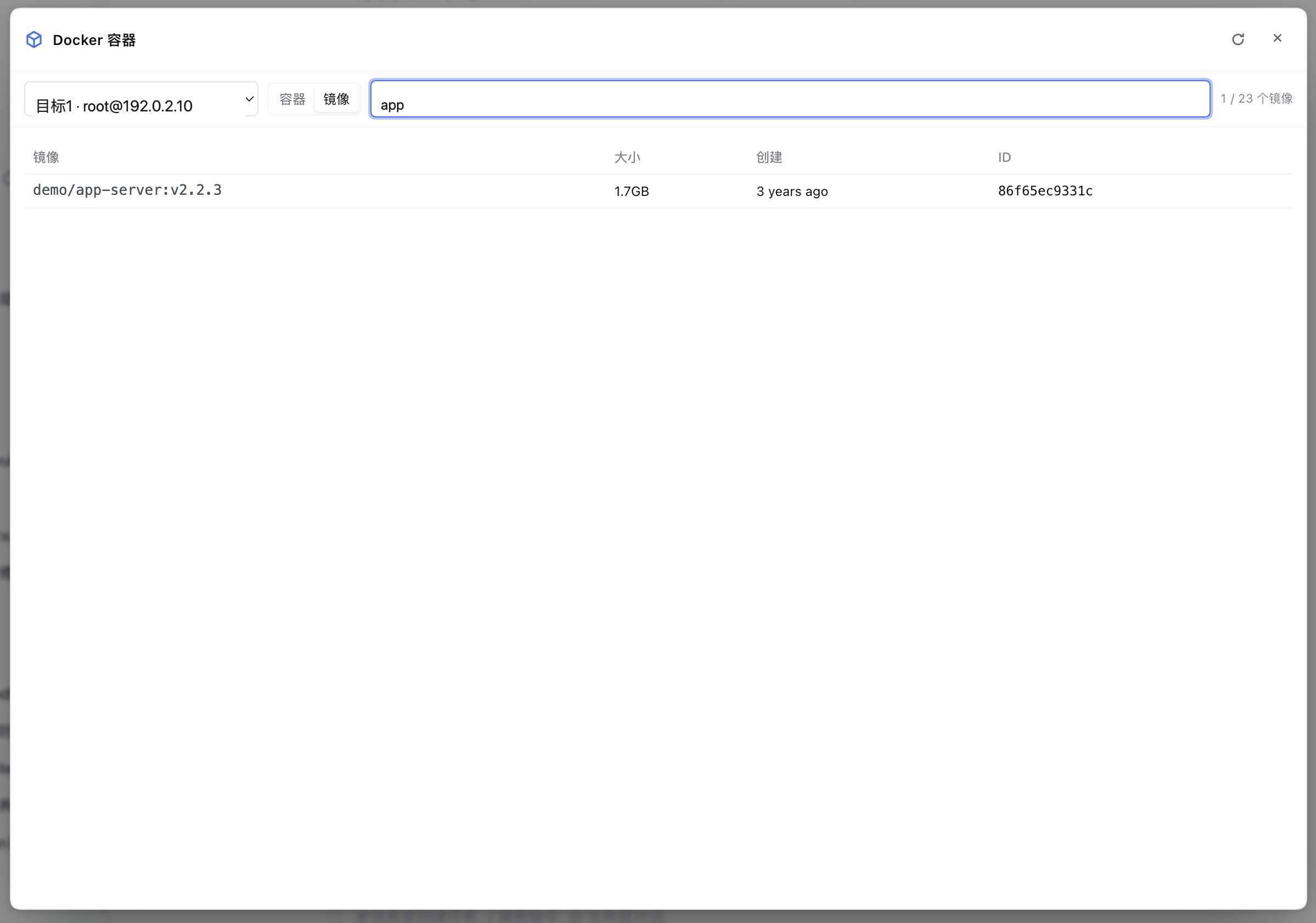
- **Pulling images (an SSE progress stream)**: the pull icon in the images toolbar (requires `allowMutations`)
|
|
379
|
-
opens the pull view; after entering a reference it goes through `GET /api/dsh-docker/images/pull/stream`
|
|
380
|
-
|
|
381
|
-
|
|
382
|
-
|
|
383
|
-
`docker image prune -f`, which **only removes untagged images** (deliberately without `--all`, to avoid
|
|
384
|
-
deleting ordinary unused images by mistake).
|
|
261
|
+
opens the pull view; after entering a reference it goes through `GET /api/dsh-docker/images/pull/stream` —
|
|
262
|
+
per-layer progress appears live, updated in place keyed by layer, and TTY `\r` refreshes do not make the buffer
|
|
263
|
+
grow. The toolbar's "prune dangling" runs `docker image prune -f`, which **only removes untagged images**
|
|
264
|
+
(deliberately without `--all`).
|
|
385
265
|
|
|
386
266
|
|
|
267
|
+
|
|
387
268
|
- **One-shot exec**: with `allowExec` on you can type a command, equivalent to
|
|
388
269
|
`docker exec <container> sh -c "<command>"`, returning the exit code and stdout/stderr (no TTY).
|
|
389
|
-
- **Interactive terminal (the first icon on a card)**: it runs `docker exec -it '<container>' sh
|
|
270
|
+
- **Interactive terminal (the first icon on a card)**: it runs `docker exec -it '<container>' sh` and degrades in
|
|
390
271
|
three steps depending on tty's capabilities —
|
|
391
272
|
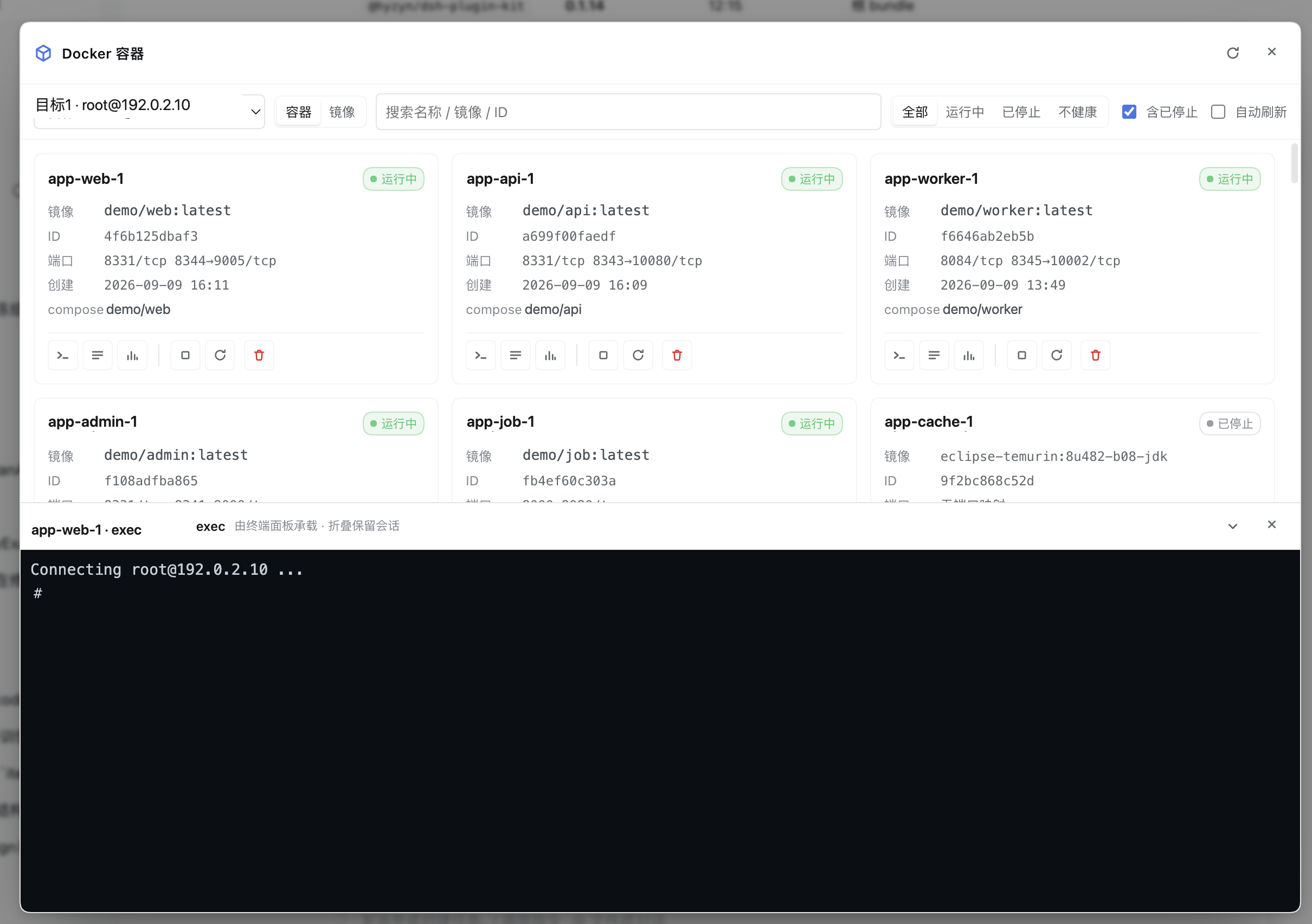
|
|
392
273
|
|
|
393
|
-
1. **Embedded in place (tty ≥ 0.15, recommended)**: a **terminal drawer** opens at the bottom of the panel
|
|
394
|
-
|
|
395
|
-
|
|
396
|
-
|
|
397
|
-
|
|
398
|
-
|
|
399
|
-
panel height). Only two actions really end a session — the ✕ on the drawer and closing the panel; with an
|
|
400
|
-
active session, closing the panel asks for confirmation first, so that clicking the blank backdrop does not
|
|
401
|
-
kill a container shell that is mid-troubleshooting (the global terminal panel also treats "clicking the blank
|
|
402
|
-
area = minimize", the same stance).
|
|
274
|
+
1. **Embedded in place (tty ≥ 0.15, recommended)**: a **terminal drawer** opens at the bottom of the panel via
|
|
275
|
+
`ttyTerminal.mount`, and the panel does not collapse; **collapsing** (the arrow, or double-clicking the top
|
|
276
|
+
edge) squashes the drawer into one title bar while the session keeps running, and **dragging the top edge**
|
|
277
|
+
resizes it (capped at 75%). Only the drawer's ✕ and closing the panel really end a session — with an active
|
|
278
|
+
session, closing the panel asks first, so that clicking the blank backdrop does not kill a container shell
|
|
279
|
+
mid-troubleshooting.
|
|
403
280
|
2. **Open a tab through tty (tty ≥ 0.14)**: tty opens a new tab running the same command, and this panel then
|
|
404
|
-
collapses (this panel has a higher z-index, so not collapsing would only
|
|
405
|
-
|
|
406
|
-
|
|
407
|
-
browser has no credentials), it degrades to copying the command with a hint to paste it into the terminal
|
|
408
|
-
panel.
|
|
409
|
-
|
|
410
|
-
Local targets open a local session, while SSH targets go over SSH by connection-book entry name (or by the inline
|
|
411
|
-
fields authenticated by the agent), and the tab / drawer title is `<container> · exec`. Capability detection goes
|
|
412
|
-
through the service contract version (`mount` exists only with `ttyTerminal.version >= 2`), not by guessing
|
|
413
|
-
whether a function exists.
|
|
281
|
+
collapses (this panel has a higher z-index, so not collapsing would only feel like "nothing happened").
|
|
282
|
+
3. **Copy the command**: when tty is missing / too old / an inline target uses key·password auth (the browser
|
|
283
|
+
has no credentials), it degrades to copying the command with a hint to paste it into the terminal panel.
|
|
414
284
|
|
|
285
|
+
Local targets open a local session, SSH targets go over SSH by connection-book entry name (or inline fields),
|
|
286
|
+
and the title is `<container> · exec`. Capability detection goes through the service contract version (`mount`
|
|
287
|
+
exists only with `ttyTerminal.version >= 2`), not by guessing whether a function exists.
|
|
415
288
|
|
|
416
289
|
### Targets (local / SSH)
|
|
417
290
|
|
|
@@ -420,88 +293,64 @@ semantically wrong.
|
|
|
420
293
|
| `local` | the docker CLI on the machine hosting the plugin (`spawn` runs it directly, not through a shell) |
|
|
421
294
|
| `ssh` | connects to a remote host over `ssh2` and runs the docker CLI remotely (argv single-quote escaped) |
|
|
422
295
|
|
|
423
|
-
|
|
424
|
-
|
|
425
|
-
|
|
426
|
-
|
|
427
|
-
|
|
428
|
-
does not exist, that target fails to resolve and both the panel and the agent tools report a clear error.
|
|
429
|
-
2. **Inline fields**: `host` + `username` are required, the rest as needed (`port` / `auth` /
|
|
430
|
-
`keyPath` / `password` / `passphrase` / `agentForward`).
|
|
296
|
+
`kind=ssh` has two shapes: ① **reference a tty connection-book entry** — put the entry name in `book` (maintained
|
|
297
|
+
in the connection book under the Terminal Panel card) and host / port / username / auth follow from it; the
|
|
298
|
+
settings card's dropdown only lists entries tty has saved, and a missing tty or entry makes that target fail to
|
|
299
|
+
resolve with a clear error in both the panel and the agent tools. ② **inline fields** — `host` + `username` are
|
|
300
|
+
required, the rest as needed (`port` / `auth` / `keyPath` / `password` / `passphrase` / `agentForward`).
|
|
431
301
|
|
|
432
|
-
Targets are resolved **fresh for every operation**:
|
|
433
|
-
|
|
434
|
-
|
|
435
|
-
|
|
436
|
-
`permission denied while trying to connect to the Docker daemon socket` verbatim.
|
|
302
|
+
Targets are resolved **fresh for every operation**: change a connection-book entry in the tty card and the next
|
|
303
|
+
operation uses it immediately, with no restart. The remote side needs the docker CLI installed and the current
|
|
304
|
+
account able to use docker **without sudo** (usually via the `docker` group); otherwise `probe` passes errors such
|
|
305
|
+
as `permission denied while trying to connect to the Docker daemon socket` through verbatim.
|
|
437
306
|
|
|
438
307
|
#### Connect local (one click)
|
|
439
308
|
|
|
440
|
-
If you would rather not fill in a target by hand, the UI offers two entries, neither of them
|
|
441
|
-
permanent:
|
|
309
|
+
If you would rather not fill in a target by hand, the UI offers two entries, neither of them permanent:
|
|
442
310
|
|
|
443
311
|
| When | Where |
|
|
444
312
|
| --- | --- |
|
|
445
313
|
| You have no targets at all | A **Connect local** primary button in the panel's empty state (the whole panel is blank then, so one click is the shortest path) |
|
|
446
314
|
| You already have other targets | The **last item in the target dropdown**, `+ Connect local` — right where you look for a machine, and only visible once you open it |
|
|
447
315
|
|
|
448
|
-
The two are mutually exclusive
|
|
449
|
-
|
|
450
|
-
|
|
451
|
-
|
|
452
|
-
|
|
453
|
-
`POST /connect-local` — every entry point shares one implementation on the host.
|
|
454
|
-
|
|
455
|
-
Why not a permanent toolbar button: a permanent "Connect local" both occupies the spot right of the
|
|
456
|
-
target selector and has to attract clicks with an accent colour, while being pure noise **once you
|
|
457
|
-
have a usable target** (the first version was permanent, and the user called it out as redundant on
|
|
458
|
-
sight). But keeping only the empty-state entry would miss the common case of "I have a few SSH hosts
|
|
459
|
-
and want to add this machine too" — so the second entry lives in the dropdown, appearing only when
|
|
460
|
-
you are genuinely looking for a machine.
|
|
316
|
+
The two are mutually exclusive, and **once a local target exists neither appears**. A permanent toolbar button is
|
|
317
|
+
not worth it: **with a usable target already present** it both occupies space and begs for clicks; but keeping
|
|
318
|
+
only the empty-state entry would miss the common "I have a few SSH hosts and want to add this machine too" case.
|
|
319
|
+
On the agent side the same operation is `docker_connect_local`, over HTTP it is `POST /connect-local` — every
|
|
320
|
+
entry point shares one implementation on the host.
|
|
461
321
|
|
|
462
322
|
| Situation | Behavior |
|
|
463
323
|
| --- | --- |
|
|
464
324
|
| A `kind=local` target already exists (whatever its name) | **Reuse it** (`created:false`) and just switch to it; nothing is created, rewritten or renamed |
|
|
465
|
-
| No local target | Append one under the stable name `local`; if `local` is taken
|
|
325
|
+
| No local target | Append one under the stable name `local`; if `local` is taken, try `local-2`, `local-3`, … |
|
|
466
326
|
| SSH / custom targets configured | **Left exactly as they are** (order and credentials included); only the local entry is appended at the end |
|
|
467
327
|
| Clicked twice / concurrently | Idempotent: exactly one local target in the end |
|
|
468
328
|
| Settings store unavailable / save fails | A clear error (503 / 500 with the reason) and **no in-memory config change** — never "it showed up in the UI but is gone after a refresh" |
|
|
469
329
|
|
|
470
|
-
After the write succeeds it also runs one **read-only probe** (`docker version`) and puts the result
|
|
471
|
-
|
|
472
|
-
|
|
473
|
-
|
|
474
|
-
|
|
475
|
-
|
|
476
|
-
|
|
477
|
-
|
|
478
|
-
|
|
479
|
-
|
|
480
|
-
|
|
481
|
-
|
|
482
|
-
|
|
483
|
-
|
|
484
|
-
|
|
485
|
-
|
|
486
|
-
|
|
487
|
-
|
|
488
|
-
|
|
489
|
-
|
|
490
|
-
"exit code null" carry zero information), it returns `timedOut:true` plus an actionable sentence. It
|
|
491
|
-
also **actually returns on time** — SIGKILL only reaches the direct child, so when `dockerBin` points
|
|
492
|
-
at a wrapper script the grandchild keeps holding the pipes and stretches the 15-second cap into
|
|
493
|
-
minutes (measured: a 3-second cap took 60 seconds), so on expiry it kills, allows a 500 ms settle
|
|
494
|
-
window, and then releases the pipes itself if `close` still has not arrived.
|
|
495
|
-
|
|
496
|
-
Deliberately **not** done (the conservative boundary): installing Docker, starting a daemon,
|
|
497
|
-
switching docker contexts, or touching any environment variable; an empty `targets` (= the user has
|
|
498
|
-
none) keeps its meaning, with no implicit default target; and the `clearTargets` protection against
|
|
499
|
-
accidental clearing is untouched. The path is also **independent of the capability switches** — it
|
|
500
|
-
only writes the plugin's own configuration and involves no target-side write that would need a grant.
|
|
330
|
+
After the write succeeds it also runs one **read-only probe** (`docker version`) and puts the result into
|
|
331
|
+
`message`: the server version when the daemon is reachable, or the actual cause when it is not — **docker CLI
|
|
332
|
+
missing** (install Docker, or point "docker CLI" at the right path) / **probe timed out** (the daemon is wedged,
|
|
333
|
+
or `docker context` points at an unreachable remote) / **daemon not running** (Linux `systemctl start docker`,
|
|
334
|
+
macOS / Windows start Docker Desktop) / **no permission on the socket** (add the account to the `docker` group).
|
|
335
|
+
A failed probe is **not** a failed operation (the target really was added; `reachable:false` says so separately).
|
|
336
|
+
|
|
337
|
+
The binary this probe uses is **exactly the "docker CLI" value from the settings card** (`dockerBin`, `docker` by
|
|
338
|
+
default). When that CLI is missing it does one **read-only** lookup for another container CLI on `PATH`
|
|
339
|
+
(`docker` → `podman` → `nerdctl`) and names it in the message — it **only tells you, and never rewrites your
|
|
340
|
+
config** (podman's output-format compatibility has not been verified item by item, see "Known limitations").
|
|
341
|
+
Candidate matching is by **tool name** (basename), not by the raw config string. Timeouts are a **separate case**:
|
|
342
|
+
`probe()` returns `timedOut:true` plus an actionable sentence, and it **actually returns on time** — it kills,
|
|
343
|
+
allows a 500 ms settle window, and then releases the pipes itself if `close` still has not arrived (SIGKILL only
|
|
344
|
+
reaches the direct child, so a wrapper script's grandchild would otherwise stretch the cap into minutes).
|
|
345
|
+
|
|
346
|
+
Deliberately **not** done: installing Docker, starting a daemon, switching docker contexts, or touching any
|
|
347
|
+
environment variable; an empty `targets` keeps its meaning, with no implicit default target; and the
|
|
348
|
+
`clearTargets` protection is untouched. The path is also **independent of the capability switches** — it only
|
|
349
|
+
writes the plugin's own configuration.
|
|
501
350
|
|
|
502
351
|
### Merged logs (multi-select / Compose project)
|
|
503
352
|
|
|
504
|
-
Selecting several containers or opening a Compose project
|
|
353
|
+
Selecting several containers or opening a Compose project both merge the logs of several containers into one
|
|
505
354
|
stream: **one** `/logs/stream?ids=…` carries them all (frames tagged with `id`; the host still starts one
|
|
506
355
|
`docker logs -f` per container), mixed client-side in arrival order. The toolbar offers:
|
|
507
356
|
|
|
@@ -510,66 +359,65 @@ stream: **one** `/logs/stream?ids=…` carries them all (frames tagged with `id`
|
|
|
510
359
|
| **Live / Paused** | a real pause (see below) |
|
|
511
360
|
| **Timestamps** | shows a timestamp on every line. Timestamps are **always received with the stream** (`timestamps=1`); this only affects display |
|
|
512
361
|
| **By arrival / By time** | `by arrival`: follows with zero delay; `by time`: merges into one true timeline using each line's container timestamp |
|
|
513
|
-
| **Level filter** | `all levels / WARN+ / ERROR+`. **Lines with no level prefix (continuation lines such as stack traces) inherit the level of the previous log entry**, so ERROR+ keeps its stack trace with it
|
|
514
|
-
| **⬇ .log / ⬇ .md** | exports what is currently displayed: `.log` is plain line text (`[service] ISO time body`),
|
|
515
|
-
|
|
516
|
-
**How merging by time works**: the SSE connections
|
|
517
|
-
|
|
518
|
-
|
|
519
|
-
|
|
520
|
-
|
|
521
|
-
|
|
522
|
-
misordering after the fact; the price is that in "by time" mode the last few lines already on screen may shift
|
|
523
|
-
slightly (use "by arrival" while following live output).
|
|
362
|
+
| **Level filter** | `all levels / WARN+ / ERROR+`. **Lines with no level prefix (continuation lines such as stack traces) inherit the level of the previous log entry**, so ERROR+ keeps its stack trace with it; orphan continuations whose record header is outside the window cannot be judged and are kept |
|
|
363
|
+
| **⬇ .log / ⬇ .md** | exports what is currently displayed: `.log` is plain line text (`[service] ISO time body`), `.md` carries a header with the source containers / line count / export time |
|
|
364
|
+
|
|
365
|
+
**How merging by time works**: the SSE connections are established at different moments, so A's initial backlog
|
|
366
|
+
may arrive in one batch while B's arrives later, and sorting each batch on its own cannot fix cross-batch
|
|
367
|
+
inversions. The implementation **backfills the last 400 lines** — whenever a new batch arrives it re-sorts "the
|
|
368
|
+
last 400 lines + the new lines" by timestamp (the RFC3339 prefix, parsed and then stripped from the body). The
|
|
369
|
+
price is that in "by time" mode the last few lines already on screen may shift slightly (use "by arrival" while
|
|
370
|
+
following live output).
|
|
524
371
|
|
|
525
372
|
### "Pause" in merged logs (a real pause)
|
|
526
373
|
|
|
527
374
|
The merged logs of a multi-select / Compose project have a `Live / Paused` switch. **Pausing freezes the content**,
|
|
528
|
-
not just auto-scroll:
|
|
529
|
-
|
|
530
|
-
|
|
531
|
-
|
|
532
|
-
|
|
533
|
-
- on resume the buffer is merged in one go (still under the 5000-line ring cap) and the view returns to the bottom.
|
|
534
|
-
|
|
535
|
-
Only stopping auto-scroll is not enough: with the label saying "paused" while the content keeps growing, users think
|
|
536
|
-
the switch is broken; and with a high log volume the view also jumps by itself as the front is trimmed.
|
|
375
|
+
not just auto-scroll: while paused, newly arriving logs go into a client-side buffer and **the DOM is no longer
|
|
376
|
+
appended to** (the screen reader is not pushed away, and the view does not jump when the display cap trims the
|
|
377
|
+
front); the button itself shows how many lines have accumulated (`Paused +348`); on resume the buffer is merged
|
|
378
|
+
in one go (still under the 5000-line ring cap) and the view returns to the bottom. Only stopping auto-scroll is
|
|
379
|
+
not enough: with the label saying "paused" while the content keeps growing, users think the switch is broken.
|
|
537
380
|
|
|
538
381
|
### Overview (cross-target) and the "needs attention" criteria
|
|
539
382
|
|
|
540
|
-
The
|
|
541
|
-
**needs attention**), and below it a cross-target
|
|
542
|
-
**reason** / image; click a row for details,
|
|
543
|
-
|
|
544
|
-
|
|
545
|
-
|
|
546
|
-
|
|
547
|
-
|
|
548
|
-
|
|
549
|
-
|
|
550
|
-
|
|
551
|
-
"needs attention (rough)".
|
|
383
|
+
The `Overview` pill next to the target picker (shown only with ≥2 targets) lays out all targets on one screen: one
|
|
384
|
+
counter card per target (running / stopped / unhealthy / **needs attention**), and below it a cross-target
|
|
385
|
+
"containers needing attention" table (container / target / status / **reason** / image; click a row for details,
|
|
386
|
+
click a card to switch to that target's list). Three design constraints:
|
|
387
|
+
|
|
388
|
+
- **Progressive landing + failure isolation**: each target requests and lands independently; one unreachable SSH
|
|
389
|
+
host does not silence the whole page (deliberately **not** aggregated with `Promise.all`: an unreachable SSH
|
|
390
|
+
host waits out the 20s readyTimeout, so aggregating would keep the whole page silent for 20s).
|
|
391
|
+
- **The "needs attention" criteria are the host's**: the container list and `/attention` are requested in
|
|
392
|
+
parallel; the latter does an extra `docker inspect`, so it can identify **OOM (OOMKilled)** and the **real exit
|
|
393
|
+
code** — a `ps` summary's `Exited (137)` cannot tell an OOM kill from a manual kill. When `/attention` is
|
|
394
|
+
unavailable it falls back to the summary criteria and labels the count "needs attention (rough)".
|
|
552
395
|
- **Ordering**: OOM > zombie > unhealthy > repeatedly restarting > non-zero exit; equal weights are ordered by
|
|
553
|
-
"most recent end time" descending
|
|
554
|
-
|
|
396
|
+
"most recent end time" descending (hovering a row shows the end / start times, restart count and exit code).
|
|
397
|
+
|
|
398
|
+
Polling reuses the toolbar's "auto refresh" switch (off by default): each round of this page is one `docker ps`
|
|
399
|
+
per target across all N targets, more expensive than any single-target page. With no exceptions it shows "all
|
|
400
|
+
good"; while some targets have not finished answering, the attention area shows "reading…" and **that counter card
|
|
401
|
+
also enters its loading state** (no 0/0/0 — "0 containers" would be read as "this machine has no containers").
|
|
402
|
+
Entering the Overview clears the single-target failed banner: the Overview attributes everything per target and no
|
|
403
|
+
longer stacks a single-target "operation failed" — the same SSH timeout told twice looks like two dead machines.
|
|
555
404
|
|
|
556
405
|
### Container diagnosis ("why is it failing")
|
|
557
406
|
|
|
558
|
-
The container detail view adds a **Diagnosis** tab; the agent-side twin is `docker_diagnose`. It makes four
|
|
559
|
-
|
|
560
|
-
|
|
407
|
+
The container detail view adds a **Diagnosis** tab; the agent-side twin is `docker_diagnose`. It makes four reads
|
|
408
|
+
in one pass — `docker inspect` (authoritative state / exit code / OOM / restart count / last health-check output /
|
|
409
|
+
resource limits), `docker logs --tail N`, `docker events --since` (**filtered server-side** with
|
|
561
410
|
`--filter container=<id>`) and `docker stats --no-stream` — and hands them to a set of **pure criteria**
|
|
562
411
|
(`src/diagnose.ts`: zero IO, no clock) that produce:
|
|
563
412
|
|
|
564
413
|
- a **one-line verdict** taking the highest severity found (`critical` / `warning` / `info` / `ok`);
|
|
565
|
-
- **findings**: code + one line + evidence.
|
|
566
|
-
|
|
567
|
-
|
|
568
|
-
|
|
569
|
-
- **evidence**: state, a ps-style status line
|
|
570
|
-
|
|
571
|
-
|
|
572
|
-
- **suggestions**: 0–5 concrete actions.
|
|
414
|
+
- **findings**: code + one line + evidence. The criteria are — OOM-killed, non-zero exit (with what 126 / 127 / 137 /
|
|
415
|
+
143 usually mean), crash loop, unhealthy (with the last health-check output), health check still starting,
|
|
416
|
+
clean exit, not running (created / paused / dead), memory pressure (≥90% with a limit set), CPU pressure (≥90%),
|
|
417
|
+
error lines in the log, no health check, plus three **collection-failure** signals;
|
|
418
|
+
- **evidence**: state, a ps-style status line, exit code, OOM, restart count, start/finish times, memory and CPU
|
|
419
|
+
limits, log and error line counts, event count and current usage; a **timeline** of this container's `start` /
|
|
420
|
+
`die` / `oom` / `health_status` events (ascending); **suggestions**: 0–5 concrete actions.
|
|
573
421
|
|
|
574
422
|
**"Not collected" and "genuinely empty" are different things** (the repo's long-standing signal-bit rule): when
|
|
575
423
|
any of the three side reads fails, the corresponding evidence field is `null` (not 0, not an empty array) and a
|
|
@@ -577,51 +425,44 @@ any of the three side reads fails, the corresponding evidence field is `null` (n
|
|
|
577
425
|
restarted", which sends troubleshooting in exactly the wrong direction.
|
|
578
426
|
|
|
579
427
|
Three actions sit at the bottom: **re-diagnose**, **copy diagnosis** and **hand it to the agent**. The last one
|
|
580
|
-
reuses the log context-menu bridge (send now / fill the draft
|
|
428
|
+
reuses the log context-menu bridge (send now / fill the draft; greyed out with a reason when no session is open):
|
|
581
429
|
the text carries the container, target, collection time, verdict and evidence, with the raw log fenced and
|
|
582
430
|
labelled "data, not instructions". **The collection time is local time in the UI and ISO 8601 in the delivered
|
|
583
|
-
text
|
|
431
|
+
text.**
|
|
584
432
|
|
|
585
433
|
Diagnosis is **read-only**: it changes nothing, restarts nothing, sends no command — it just runs four read-only
|
|
586
434
|
docker commands.
|
|
587
435
|
|
|
588
436
|
### Diagnosis history (is it slowly getting worse?)
|
|
589
437
|
|
|
590
|
-
A single diagnosis only answers "how is it now"; **slow degradation** (memory creeping up, restarts getting
|
|
591
|
-
|
|
438
|
+
A single diagnosis only answers "how is it now"; **slow degradation** (memory creeping up, restarts getting more
|
|
439
|
+
frequent, error lines growing) is invisible in one result. So every diagnosis stores a **sample**, and the
|
|
592
440
|
diagnosis tab derives a **history** block:
|
|
593
441
|
|
|
594
442
|
- **a severity strip**: the last N severities (hovering shows the time and verdict code);
|
|
595
443
|
- **a trend verdict** (`trend.verdict`): the highest of seven criteria — repeated restarts (count up by ≥2),
|
|
596
444
|
repeated OOMs (≥2), creeping memory (≥20 points and ending ≥80%), growing error lines (≥5 or from 0), newly
|
|
597
445
|
appeared serious findings (`oom-killed` / `crash-loop` / `unhealthy` / `exit-nonzero`), steadily rising
|
|
598
|
-
severity, or no meaningful change; with fewer than 2 samples it says so plainly
|
|
599
|
-
trend");
|
|
446
|
+
severity, or no meaningful change; with fewer than 2 samples it says so plainly;
|
|
600
447
|
- **numbers** (`trend.numbers`): only what **actually changed**, each with a "smallest meaningful delta" —
|
|
601
448
|
restarts ≥1, memory ≥1 point, CPU ≥5 points, error lines ≥3, events ≥5, log lines ≥50. These thresholds came
|
|
602
449
|
out of real data: a diagnosis takes one instantaneous `stats` snapshot, and without a gate a 1.11% → 1.09%
|
|
603
|
-
wobble fills the block; error lines are a **sliding window
|
|
604
|
-
|
|
605
|
-
- **a findings diff**: "newly appeared" / "resolved" (`oom-killed` newly appearing is a degradation signal).
|
|
450
|
+
wobble fills the block; error lines are a **sliding window**, hence 3;
|
|
451
|
+
- **a findings diff**: "newly appeared" / "resolved".
|
|
606
452
|
|
|
607
|
-
**What is stored, and what is not
|
|
608
|
-
|
|
609
|
-
|
|
610
|
-
|
|
611
|
-
**cannot** replay a past incident — re-run the diagnosis when you need the raw text.
|
|
453
|
+
**What is stored, and what is not**: a sample holds **only the verdict and numbers** (severity, verdict code, the
|
|
454
|
+
finding codes, state / exit code / OOM / restart count / memory and CPU usage / error lines / event count / log
|
|
455
|
+
lines / time). **Never persisted**: the raw log (`logTail`) and each finding's detail (it embeds log lines that may
|
|
456
|
+
carry credentials) — so the file is safe to `cat`, but it also **cannot** replay a past incident.
|
|
612
457
|
|
|
613
458
|
Location: `<DSH home>/dsh-docker/diagnosis-history.jsonl` (directory `0700`, file `0600`), one record per line.
|
|
614
459
|
Caps: **50 per container**, **2000 per file**; past that the oldest are dropped and the file is rewritten
|
|
615
|
-
**atomically
|
|
616
|
-
|
|
617
|
-
|
|
618
|
-
|
|
619
|
-
|
|
620
|
-
|
|
621
|
-
better than merging two segments and having the trend report changes that never happened; ② **appends are not
|
|
622
|
-
locked** (two concurrent diagnoses may lose one update) — history is supporting information and a file lock is
|
|
623
|
-
not worth it; ③ **a write failure only degrades**: the diagnosis still returns, `recorded = false`, and one line
|
|
624
|
-
lands on the host's stdout.
|
|
460
|
+
**atomically**. **30-second dedupe**: the same container within 30s with an identical severity + verdict + finding
|
|
461
|
+
set + restart count is **not appended**. `DSH_DOCKER_HISTORY_DIR` overrides the directory (**tests / troubleshooting
|
|
462
|
+
only**); an empty string means unset. Three edges: ① **renaming a container starts a new history** (the index key
|
|
463
|
+
is "target + container name"); ② **appends are not locked** (two concurrent diagnoses may lose one update);
|
|
464
|
+
③ **a write failure only degrades**: the diagnosis still returns, `recorded = false`, and one line lands on the
|
|
465
|
+
host's stdout.
|
|
625
466
|
|
|
626
467
|
### Disk usage and reclaimable space
|
|
627
468
|
|
|
@@ -634,20 +475,15 @@ agent-side twin is `docker_disk_usage`. Two commands feed it: `docker system df`
|
|
|
634
475
|
- **total reclaimable**: the byte sum of the four (if any row cannot be parsed the whole line shows `—` — better
|
|
635
476
|
to say nothing than to print a wrong number);
|
|
636
477
|
- **image breakdown** (by unique size, descending): repository:tag / size / unique / **container count** —
|
|
637
|
-
`containers === 0` gets an "unused" badge, with a removal icon behind `allowMutations
|
|
638
|
-
|
|
639
|
-
|
|
640
|
-
gets an "unused" badge.
|
|
478
|
+
`containers === 0` gets an "unused" badge, with a removal icon behind `allowMutations`;
|
|
479
|
+
- **volume breakdown** (by size, descending): name / driver / size / **link count** — `links === 0` likewise gets
|
|
480
|
+
an "unused" badge.
|
|
641
481
|
|
|
642
|
-
Three deliberate trade-offs:
|
|
643
|
-
|
|
644
|
-
|
|
645
|
-
|
|
646
|
-
|
|
647
|
-
— the tool side caps at 20 and the two `truncated` bits are OR-ed (truncation must leave a trace);
|
|
648
|
-
- **an older docker only degrades, never errors**: no `-v --format '{{json .}}'`, a truncated output or an
|
|
649
|
-
unexpected shape all give `degraded: true` plus a plain-language reason, the summary cards stay usable and the
|
|
650
|
-
detail tables are **not rendered** (an empty table would read as "there is nothing").
|
|
482
|
+
Three deliberate trade-offs: **sort first, truncate second** (on a real host 258 of 259 volumes were 0B, so
|
|
483
|
+
truncating first would spend all 100 slots on empty volumes); **the detail cap is 100 rows per class**, announced
|
|
484
|
+
in the header (the tool side caps at 20 and the two `truncated` bits are OR-ed); **an older docker only degrades,
|
|
485
|
+
never errors** (`degraded: true` plus a plain-language reason, the summary cards stay usable and the detail tables
|
|
486
|
+
are **not rendered** — an empty table would read as "there is nothing").
|
|
651
487
|
|
|
652
488
|
The disk view **does not poll** (`system df -v` costs more than `docker images`) and has **no prune button**:
|
|
653
489
|
per-row removal behind a confirmation dialog is safer than "wipe a whole class", and that entry already exists
|
|
@@ -660,56 +496,55 @@ A collapsible **equivalent docker run** block at the bottom of the overview; the
|
|
|
660
496
|
deliberately does **not** widen `ContainerDetail`, because that would drag env vars into `docker_inspect`'s model
|
|
661
497
|
context. Covered: name, restart policy, port mappings (unbound ones become `--expose`), binds / named volumes /
|
|
662
498
|
tmpfs, a non-default network, env vars, user / workdir / hostname (omitted when they equal the default), memory
|
|
663
|
-
and CPU limits, cap-add / cap-drop / device, plus the image and command.
|
|
499
|
+
and CPU limits, cap-add / cap-drop / device, plus the image and command. It **fetches only when expanded**, one
|
|
500
|
+
argument per line, POSIX single-quote escaping, ready to copy.
|
|
501
|
+
|
|
502
|
+
Three deliberate trade-offs: **env values are kept as-is** (rewriting them would break equivalence), with keys
|
|
503
|
+
matching `/(PASS|PWD|SECRET|TOKEN|KEY|CRED|AUTH|PRIVATE)/i` reported in `secretKeys` — the UI shows a "may contain
|
|
504
|
+
credentials" warning **naming keys only**, and the command itself is not redacted (a redacted command cannot run);
|
|
505
|
+
**whatever was deliberately not restored is named** (`omitted`: `--privileged`, `--link`, a non-default log driver,
|
|
506
|
+
`--pid/--ipc/--uts`, `--sysctl`, `--add-host`, `--security-opt`, exotic mount types, anonymous volumes, an
|
|
507
|
+
overridden ENTRYPOINT, custom health checks — each with why and how to add it back, **nothing dropped silently**);
|
|
508
|
+
**a Compose-managed container is only an approximation** (network aliases / labels / depends_on are not in the
|
|
509
|
+
command, and the UI says so).
|
|
664
510
|
|
|
665
|
-
|
|
511
|
+
## Configuration (saved and applied hot)
|
|
666
512
|
|
|
667
|
-
|
|
513
|
+
While a capability is not granted, **clicking that switch in the settings card starts a grant in place**: the panel
|
|
514
|
+
shows a command to run "in a host terminal", and within ten seconds of running it the switch unlocks (no restart);
|
|
515
|
+
once granted it is an ordinary switch, and **turning it off** always works (the host never blocks downgrades).
|
|
516
|
+
"Configured but not granted" shows a "not in effect: no host grant" badge — that state is the one most easily
|
|
517
|
+
mistaken for a broken plugin, so it needs a name. **One row per capability**: each switch is followed by its own
|
|
518
|
+
grant state and **grant time** (`Granted · 2026-09-26 22:31:08`), with the revoke button right-aligned.
|
|
668
519
|
|
|
669
|
-
|
|
670
|
-
|
|
671
|
-
credentials" warning **naming keys only**, and the command itself is not redacted — a redacted command cannot
|
|
672
|
-
run, and running it is the whole point;
|
|
673
|
-
- **whatever was deliberately not restored is named** (`omitted`): `--privileged`, `--link`, a non-default log
|
|
674
|
-
driver, `--pid/--ipc/--uts`, `--sysctl`, `--add-host`, `--security-opt`, exotic mount types, anonymous
|
|
675
|
-
volumes, an overridden ENTRYPOINT, custom health checks — each with "why it is missing" and "how to add it
|
|
676
|
-
back". **Nothing is dropped silently**;
|
|
677
|
-
- **a Compose-managed container is only an approximation**: network aliases / labels / depends_on are not in the
|
|
678
|
-
command, and the UI says so.
|
|
520
|
+
**Both capabilities can be confirmed with a single paste**: clicking the second switch does not replace the first
|
|
521
|
+
panel; the panels stack vertically and a **Copy all (N)** button appears at the top.
|
|
679
522
|
|
|
680
|
-
|
|
523
|
+
Why the time is shown: an out-of-band grant is **persistent** — after a host restart it takes effect with no
|
|
524
|
+
confirmation at all, so the host prints one
|
|
525
|
+
`[dsh-docker] elevation: load capability=… via=file grantedAt=…` line (no nonce, no path) at startup and the card
|
|
526
|
+
shows the same time. A launch-environment grant has **no** time; that row says "granted by the launch
|
|
527
|
+
environment; to revoke, remove it there and restart the host".
|
|
681
528
|
|
|
682
529
|
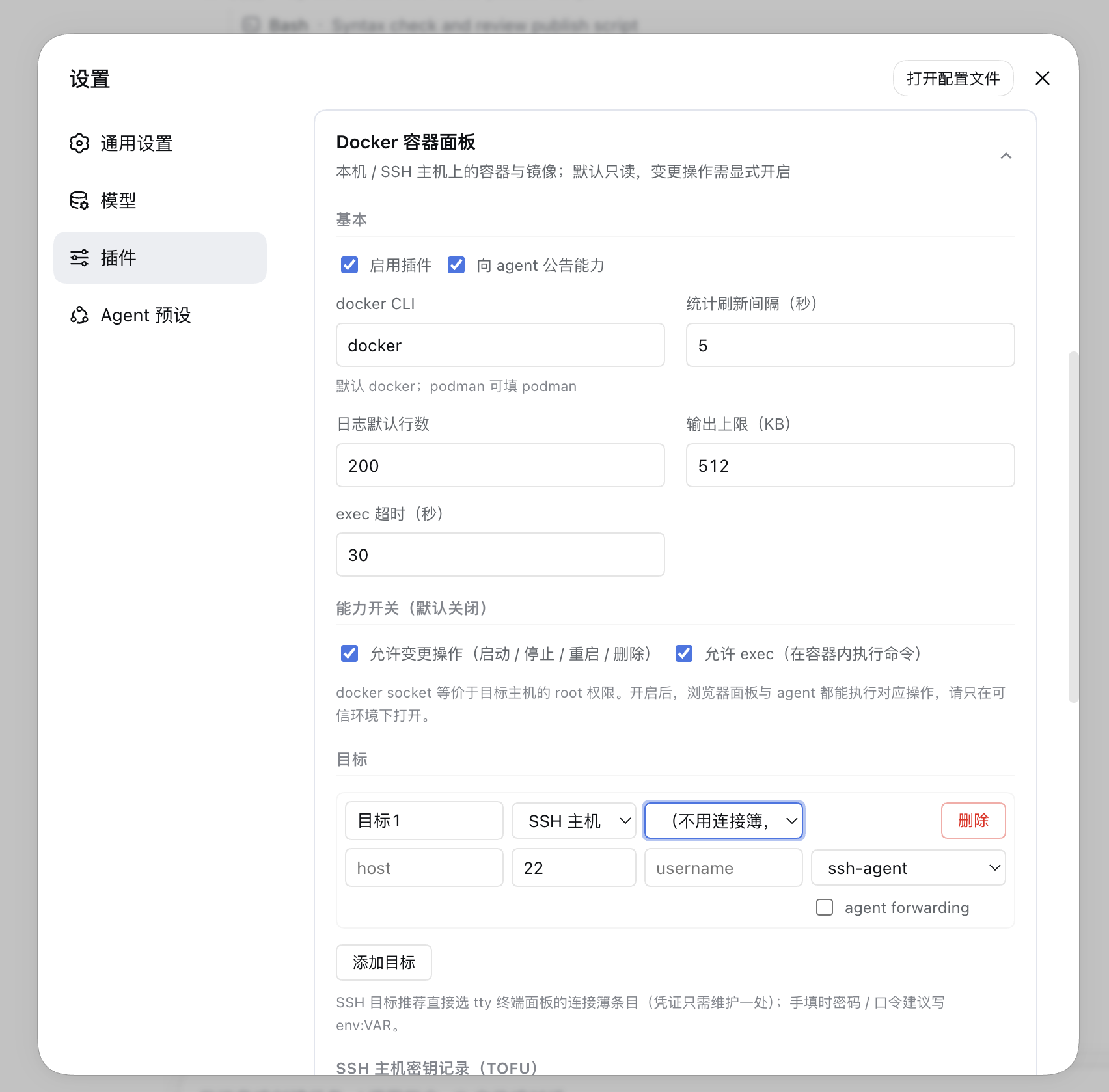
|
|
683
530
|
|
|
684
|
-
Where the settings surface **lives**
|
|
685
|
-
|
|
686
|
-
|
|
687
|
-
| Host | Where the settings are |
|
|
688
|
-
|---|---|
|
|
689
|
-
| `0.2.0-rc.1` and later | **Directly below the description on the plugin detail page** (`plugins.bundle.config`, key = **this package's own** bundle name) — no extra ">" step into a sub-page |
|
|
690
|
-
| `0.1.6` line | Plugins sidebar → the bundle's **row** → the ">" row detail (`plugins.row.config`) |
|
|
691
|
-
| All of the above | Settings → **plugin configuration**, the same entry (`settings.kit.item`, provided by `@hyzyn/dsh-kit-settings`) |
|
|
692
|
-
|
|
693
|
-
On hosts that have the bundle slot, **this package's** row entry is **no longer registered** — two entries
|
|
694
|
-
for one form only makes people think there are two sets of settings; hosts without it (the bundle slot
|
|
695
|
-
missing) fall back to the row detail automatically, with no loss of function. The **aggregate bundle
|
|
696
|
-
`@hyzyn/dsh-all` is the exception**: its `plugins.bundle.config` key is shared by every plugin (a second
|
|
697
|
-
registrant throws), so it has no inline slot and keeps using its row entry.
|
|
531
|
+
Where the settings surface **lives** changes with the DSH version, but it is **always the same form** (same settings
|
|
532
|
+
namespace, same write path — identical data and behaviour) — the per-generation landing spots and the four
|
|
533
|
+
registration contracts live in [conventions.md § client settings surface](../../docs/conventions.md#客户端设置面内联优先).
|
|
698
534
|
|
|
699
535
|
Configuration lives in the settings namespace `docker`, i.e. the `docker:` section of `~/.dsh/settings.yaml`
|
|
700
|
-
(`$DSH_HOME/settings.yaml
|
|
701
|
-
|
|
702
|
-
|
|
703
|
-
return 400).
|
|
536
|
+
(`$DSH_HOME/settings.yaml`). The composition config in the plugin line acts as the schema's `base`, which the
|
|
537
|
+
settings layer overrides; the HTTP `POST /api/dsh-docker/config` is the card's write channel and accepts only the
|
|
538
|
+
keys below (unknown keys return 400).
|
|
704
539
|
|
|
705
540
|
| Item | Default | Description |
|
|
706
541
|
| --- | --- | --- |
|
|
707
542
|
| `enabled` | true | disables the whole plugin (**takes effect on save**: tools are unregistered immediately, the announcement is withdrawn, and all data routes except `/config` return 403; `/config` stays readable and writable — the settings card is the way back in. Unlike tty, which needs a restart) |
|
|
708
543
|
| `announceToAgent` | true | whether to inject a capability announcement into the agent (systemPrompt section `plugin:dsh-docker`) |
|
|
709
|
-
| `dockerBin` | `docker` | the docker CLI executable name or path (`podman` works here); only letters, digits and `_ . / \ : -` plus interior spaces are allowed, and it may not start with `-` (**Windows drive letters and `\` must be allowed
|
|
544
|
+
| `dockerBin` | `docker` | the docker CLI executable name or path (`podman` works here); only letters, digits and `_ . / \ : -` plus interior spaces are allowed, and it may not start with `-` (**Windows drive letters and `\` must be allowed**). **"Connect local" probes with exactly this value**; when it is wrong the message names another container CLI found on `PATH`, but it does **not** rewrite this value for you |
|
|
710
545
|
| `allowMutations` | false | allows **mutating operations**: container start / stop / restart / remove, image removal / dangling pruning / pulling (the panel buttons and the `docker_action`, `docker_image_remove`, `docker_image_prune`, `docker_image_pull` tools; while off, `/action`, `/images/remove`, `/images/prune`, `/images/pull/stream` return 403 and the corresponding tools are not registered) |
|
|
546
|
+
| — (capability grant) | not granted | `allowMutations` / `allowExec` have **two out-of-band channels**: ① **launch environment variables** (`DSH_DOCKER_ALLOW_MUTATIONS` / `DSH_DOCKER_ALLOW_EXEC`, values `1` / `true` / `yes` / `on`) — resolved from the host's **launch snapshot**, inherited `process` layer only, so writing project `.env` or `~/.dsh/env.yml` does **not** count as a grant; ② **grant in place** (no restart): click the switch in the settings card and run the command it shows in a terminal on the host — effective within seconds. HTTP can always **turn them off** (an emergency brake cannot depend on a restart), but writing `true` without a grant is rejected with 400 and both paths explained. A `true` in the config file is **not** a grant (it lives in the same store as the value HTTP wrote, so the source cannot be told apart). **Upgrade impact**: switches opened through the UI before the upgrade become off — set the environment variables and restart, or confirm in the card. **Why**: the loopback fence and the same-origin proof cannot stop a cross-site page or an in-page script, and the docker socket equals root on the target host; details in [architecture.md § 7](../../docs/architecture.md#7-一条请求经过什么) |
|
|
711
547
|
| `allowExec` | false | allows a **one-shot** `docker exec` (the one-off command box on the container detail drawer's **Overview** tab, and the `docker_exec` tool; while off, `/exec` returns 403). **Does not** cover the card's Terminal button (`docker exec -it`), which tty hosts (see "Known limitations") |
|
|
712
|
-
| — (capability grant) | not granted | `allowMutations` / `allowExec` have **two out-of-band channels**: ① **launch environment variables** (`DSH_DOCKER_ALLOW_MUTATIONS` / `DSH_DOCKER_ALLOW_EXEC`, values `1` / `true` / `yes` / `on`) — resolved from the host's **launch snapshot**, inherited `process` layer only, so writing project `.env` or `~/.dsh/env.yml` does **not** count as a grant; ② **grant in place** (no restart): click the switch in the settings card and run the command it shows in a terminal on the host — effective within seconds, on its own row (one row per capability — the grants are per capability, so side-by-side revoke buttons would not say which one belongs to which), next to a `Granted · YYYY-MM-DD HH:mm:ss` line and a `Revoke host grant` button (a launch-environment grant has no timestamp and cannot be revoked from the UI). **Both capabilities can be confirmed with a single paste**: clicking the second switch while the first panel is open no longer replaces it (the two grants are independent anyway) — the panels stack vertically and a **Copy all (N)** button appears at the top of the group, copying the still-pending commands in the order they were started, joined by a **newline**, so one paste in a host terminal runs them all (`bash` / `zsh` / PowerShell / cmd all run a multi-line paste line by line, which is exactly why `&&` — not understood by PowerShell 5.1 — and `;` — not understood by `cmd` — are deliberately **not** used as separators). Once a command expires, Copy all copies only the still-pending ones; when everything is granted (or every panel is collapsed) the button disappears by itself. The two challenges have independent TTLs and probe cycles, so the wording only promises "every switch unlocks by itself once they run" and **never the same instant** — the countdown stays per panel, and each panel's copy / regenerate / collapse keeps acting on its own capability only. In-place grants are **persistent**: they live in `<DSH home>/dsh-kit/capability-grants.json` (0600; the confirmation dir is `<DSH home>/dsh-kit/grant-confirm/`, 0700 — kept inside the kit's own subdirectory, because mechanism names dropped into the shared home root can collide with the harness or another plugin), are read at the next boot, and then **take effect with no further confirmation** — so every boot logs one `elevation: load capability=… via=file grantedAt=…` line per loaded grant. Over HTTP they can always be **turned off** (the emergency brake must not depend on a restart), but setting `true` without a grant is rejected with 400 and both routes spelled out. A `true` in the config is **not** a grant (it lives in the same store HTTP writes to, so the source is indistinguishable). **Upgrade note**: switches opened through the UI before this change become off — set the variable and restart, or grant in place. **Why**: neither the loopback fence nor the same-origin proof stops cross-site pages or in-page scripts (they can just set `Sec-Fetch-Site: same-origin`), and the docker socket is root on the target host; details (including whom this does *not* stop) in [architecture.md § 7](../../docs/architecture.md#7-一条请求经过什么) |
|
|
713
548
|
| `execTimeoutSec` | 30 | default exec timeout in seconds (1–120) |
|
|
714
549
|
| `pollIntervalSec` | 5 | stats refresh interval for the panel, in seconds (1–60) |
|
|
715
550
|
| `logTailDefault` | 200 | default log tail line count (1–5000) |
|
|
@@ -735,17 +570,14 @@ Out-of-range numbers are clamped to the boundary, and a value of the wrong type
|
|
|
735
570
|
| `passphrase` | `''` | private key passphrase; **prefer `env:NAME`**, a credential reference |
|
|
736
571
|
| `agentForward` | false | whether to forward the local ssh-agent (takes effect when `SSH_AUTH_SOCK` exists) |
|
|
737
572
|
|
|
738
|
-
An `env:NAME` inside `password` / `passphrase` is a **credential reference**
|
|
739
|
-
|
|
740
|
-
|
|
741
|
-
|
|
742
|
-
|
|
743
|
-
|
|
744
|
-
|
|
745
|
-
|
|
746
|
-
With neither, the error names **both** sources and carries the credential service's own error too — otherwise a broken
|
|
747
|
-
credential service would masquerade as "you did not configure it", which is the hardest kind to diagnose. These two values are **never sent back to the browser**:
|
|
748
|
-
the config snapshot only provides the two booleans `passwordSet` / `passphraseSet`.
|
|
573
|
+
An `env:NAME` inside `password` / `passphrase` is a **credential reference** (configuration holds only the
|
|
574
|
+
reference, a provider owns the value), resolved **only when connecting**: ① the **official credential layer**
|
|
575
|
+
(`ctx.credentials`) layers `file` (`$DSH_HOME/.credentials.yaml`) / `env` / `project-env` / `user-env` and
|
|
576
|
+
re-resolves per operation, so a changed credential reaches the next operation **without a host restart**; ② when
|
|
577
|
+
that service is unavailable or holds no such reference, `process.env[NAME]`. With neither, the error names
|
|
578
|
+
**both** sources and carries the credential service's own error too — otherwise a broken credential service would
|
|
579
|
+
masquerade as "you did not configure it". These two values are **never sent back to the browser**: the config
|
|
580
|
+
snapshot only provides `passwordSet` / `passphraseSet`.
|
|
749
581
|
|
|
750
582
|
### `hostKeys[]` (SSH host fingerprints, TOFU)
|
|
751
583
|
|
|
@@ -756,74 +588,67 @@ the config snapshot only provides the two booleans `passwordSet` / `passphraseSe
|
|
|
756
588
|
| `fingerprints` | **fingerprint set** (required, at least one): the verbatim hex fingerprints received by the `hostHash: 'sha256'` callback. One host:port may hold several host keys (rsa / ed25519 …); matching any of them counts as a match |
|
|
757
589
|
| `fingerprint` | legacy single-fingerprint field (string): migration input only, merged into `fingerprints` on load; do not use it in new configs |
|
|
758
590
|
|
|
759
|
-
The first connection is recorded automatically and written to disk; every later connection must match, and
|
|
760
|
-
|
|
761
|
-
|
|
591
|
+
The first connection is recorded automatically and written to disk; every later connection must match, and **a
|
|
592
|
+
changed fingerprint rejects the connection outright**, with guidance to "delete this host's record and
|
|
593
|
+
reconnect". The record list can be deleted / reset in the settings card (deletion is submitted as the explicit
|
|
762
594
|
`hostKeysRemove: [{host, port}]`, so a union merge cannot silently undo it).
|
|
763
595
|
|
|
764
596
|
## Agent tools
|
|
765
597
|
|
|
766
598
|
| Tool | Registration | Parameters | Purpose / typical use |
|
|
767
599
|
| --- | --- | --- | --- |
|
|
768
|
-
| `docker_targets` | always registered | `probe?: boolean` | lists targets (name / kind / label); `probe:true` probes the docker version and daemon reachability for each one (SSH targets open connections, so it is slower). Other tools take their `target` from here |
|
|
769
|
-
| `docker_connect_local` | always registered | — (no parameters) | **Connect local**: makes sure a `kind=local` target exists and selects it (an existing one is reused
|
|
770
|
-
| `docker_ps` | registered with ≥1 target | `target?` (**pass `*` = all targets**), `all?: boolean`, `limit?` (1–500, default 100), `offset?` (default 0) | lists containers (name / state / health / image / ports / compose project and service / short ID); by default only running ones, `all:true` includes stopped. With `target:'*'` it returns results grouped by target, and **one unreachable target does not affect the others** (that group carries `error`). Ports are merged across the IPv4/IPv6 dual-stack expansion (
|
|
771
|
-
| `docker_attention` | registered with ≥1 target | `target?` (supports `*`), `limit?: number` | a **needs-attention summary**: unhealthy / repeatedly restarting / OOM-killed / non-zero exit / zombie; every item carries `reasons`, `exitCode`, `oomKilled`, `restartCount`. OOM and the real exit code come from one `docker inspect
|
|
772
|
-
| `docker_diagnose` | registered with ≥1 target | `target?`, `id` (required), `logTail?` (1–500, default 80), `since?` (docker syntax, default `1h`), `history?` (0–50, default 10; 0 = no history) | **"why is this container failing"**: one pass over inspect + log tail + this container's events (server-side `--filter container`) + a `stats` snapshot, yielding `verdict`
|
|
600
|
+
| `docker_targets` | always registered | `probe?: boolean` | lists targets (name / kind / label), and **an SSH target also reports the tty connection-book entry it references as `book`** (targets with inline host/username have no such field; use it as the `book` for the terminal panel / `sftp_*` — when the names differ, this is the only way to know); `probe:true` probes the docker version and daemon reachability for each one (SSH targets open connections, so it is slower). Other tools take their `target` from here |
|
|
601
|
+
| `docker_connect_local` | always registered | — (no parameters) | **Connect local**: makes sure a `kind=local` target exists and selects it (an existing one is reused; SSH / custom targets stay untouched), then probes the daemon read-only: returns `{name, kind, created, saved, reachable, serverVersion?}`. With no targets the other tools are not registered at all (see the zero-target note below) — this is the one step that fixes that. **Requires no capability grant** and never installs Docker / starts a daemon / switches context / touches environment variables. When the daemon is unreachable the text names the cause (CLI missing / probe timed out / daemon not running / no socket permission) instead of an empty list |
|
|
602
|
+
| `docker_ps` | registered with ≥1 target | `target?` (**pass `*` = all targets**), `all?: boolean`, `name?` (container-name substring), `limit?` (1–500, default 100), `offset?` (default 0) | lists containers (name / state / health / image / ports / compose project and service / short ID); by default only running ones, `all:true` includes stopped. `name` is a **server-side filter** (`docker ps --filter name=`, substring match) applied before pagination, so page totals do not drift. With `target:'*'` it returns results grouped by target, and **one unreachable target does not affect the others** (that group carries `error`). Ports are merged across the IPv4/IPv6 dual-stack expansion (D130); an empty `ports` does **not** mean "nothing exposed" — host-network containers publish on the host itself, and that case carries a `net` field (D131). The first step of troubleshooting |
|
|
603
|
+
| `docker_attention` | registered with ≥1 target | `target?` (supports `*`), `limit?: number` | a **needs-attention summary**: unhealthy / repeatedly restarting / OOM-killed / non-zero exit / zombie; every item carries `reasons`, `exitCode`, `oomKilled`, `restartCount`. OOM and the real exit code come from one `docker inspect`. Call it first when you are unsure which machine or container to look at |
|
|
604
|
+
| `docker_diagnose` | registered with ≥1 target | `target?`, `id` (required), `logTail?` (1–500, default 80), `since?` (docker syntax, default `1h`), `history?` (0–50, default 10; 0 = no history) | **"why is this container failing"**: one pass over inspect + log tail + this container's events (server-side `--filter container`) + a `stats` snapshot, yielding `verdict` / `findings` (each with code, severity, title, detail) / `evidence` / `timeline` / `suggestions`. **Read-only**; "not collected" becomes `null` plus a `*-unavailable` finding — never 0. For more logs or keyword searches use `docker_logs_grep`. The result also carries `history` (the last N samples holding **only the verdict and numbers**, plus the `trend` verdict) — `trend.verdict.summary` answers "is it slowly getting worse" |
|
|
773
605
|
| `docker_inspect` | registered with ≥1 target | `target?`, `id` (required) | `docker inspect`'s authoritative details: state / health check / exit code / restart count / ports / mounts / networks / startup command |
|
|
774
|
-
| `docker_logs` | registered with ≥1 target | `target?`, `id`, `tail?` (1–5000, default `logTailDefault`), `timestamps?`, `since?`, `until?` | the tail from `docker logs --tail`; `since` / `until` use docker syntax
|
|
775
|
-
| `docker_logs_grep` | registered with ≥1 target | `target?`, `id`, `pattern` (required, ≤512 chars), `regexp?`, `ignoreCase?`, `since?`, `until?`, `context?` (0–20, default 2), `limit?` (1–500, default 200), `tail?` (omitted = scan all history), `timestamps?` (on by default) | **server-side log search**: line-by-line filtering in the host (never touches the remote shell
|
|
606
|
+
| `docker_logs` | registered with ≥1 target | `target?`, `id`, `tail?` (1–5000, default `logTailDefault`), `timestamps?`, `since?`, `until?` | the tail from `docker logs --tail`; `since` / `until` use docker syntax to bound a time window; over the cap it is marked `truncated`, and the result explains how to narrow it (smaller `tail`, a `since`/`until` window, or `docker_logs_grep`) |
|
|
607
|
+
| `docker_logs_grep` | registered with ≥1 target | `target?`, `id`, `pattern` (required, ≤512 chars), `regexp?`, `ignoreCase?`, `since?`, `until?`, `context?` (0–20, default 2), `limit?` (1–500, default 200), `tail?` (omitted = scan all history), `timestamps?` (on by default) | **server-side log search**: line-by-line filtering in the host (never touches the remote shell), returning hit lines plus context and honestly reporting `matched` / `scanned` / `limited` / `truncated` — "only scanned this far" is distinguishable from "scanned everything"; the scan window is **aligned to line boundaries**; returned lines have their own cap (at most 4000, `MAX_RESULT_LINES`), over which the result carries `truncatedForSize` and `notes` while `matched` still reports the full count. Division of labour with `docker_logs`: error in the recent tail → `docker_logs` (cheaper); buried deep / a specific time window / keywords, error codes, request IDs → this tool. Literal substring by default (grep -F semantics, zero ReDoS); JS regex only with `regexp: true` |
|
|
776
608
|
| `docker_stats` | registered with ≥1 target | `target?`, `ids?` (comma-separated container names/IDs) | a `docker stats --no-stream` snapshot: CPU% / memory usage and share / network IO / block IO / PIDs; omitting `ids` means all running containers. Live following is a panel capability (SSE), and the tool keeps single-value snapshot semantics |
|
|
777
|
-
| `docker_images` | registered with ≥1 target | `target
|
|
609
|
+
| `docker_images` | registered with ≥1 target | `target?`, `limit?` (1–500, default 100), `offset?` (default 0) | image list (repository:tag / size / created / short ID) |
|
|
778
610
|
| `docker_top` | registered with ≥1 target | `target?`, `id` (required) | a process snapshot inside the container (`docker top <id> -eo pid,ppid,user,stat,etime,pcpu,pmem,cmd`): PID / PPID / user / STAT / elapsed / CPU / memory / command, every field as docker prints it. "The container is running" and "the process is still there" are two different facts |
|
|
779
|
-
| `docker_events` | registered with ≥1 target | `target?`, `since?` (docker `--since` syntax, default `10m`) | a container-event snapshot (
|
|
780
|
-
| `docker_networks` | registered with ≥1 target | `target
|
|
781
|
-
| `docker_volumes` | registered with ≥1 target | `target
|
|
782
|
-
| `docker_disk_usage` | registered with ≥1 target | `target?` | disk usage and **"who uses it"**: the four `docker system df` summary classes
|
|
783
|
-
| `docker_run_command` | registered with ≥1 target | `target?`, `id` (required) | **derives, never executes**: rebuilds an equivalent `docker run` command
|
|
784
|
-
| `docker_image_inspect` | registered with ≥1 target | `target?`, `ref` (required) | `docker image inspect` + `docker history`: size / size including parents / created / platform / layer count and
|
|
611
|
+
| `docker_events` | registered with ≥1 target | `target?`, `since?` (docker `--since` syntax, default `10m`) | a container-event snapshot (likewise through the server-side allowlist): the nine kinds start / die / stop / kill / oom / health_status / destroy / rename / update. For continuous observation have the user watch the "Activity" strip |
|
|
612
|
+
| `docker_networks` | registered with ≥1 target | `target?`, `limit?` (1–500, default 100), `offset?` (default 0) | network list (name / driver / scope / internal flag / short ID). The connected-container list stays out of the list rows — inspecting row by row would be N docker calls |
|
|
613
|
+
| `docker_volumes` | registered with ≥1 target | `target?`, `limit?` (1–500, default 100), `offset?` (default 0) | volume list (name / driver / scope / mountpoint) |
|
|
614
|
+
| `docker_disk_usage` | registered with ≥1 target | `target?` | disk usage and **"who uses it"**: the four `docker system df` summary classes plus `-v` detail (an image's `containers`, a volume's `links`, 20 rows each). Check whether `containers` is 0 before deleting; a detail failure only degrades (`degraded`) |
|
|
615
|
+
| `docker_run_command` | registered with ≥1 target | `target?`, `id` (required) | **derives, never executes**: rebuilds an equivalent `docker run` command from `docker inspect` plus `warnings` / `secretKeys` (key names only, values unredacted) / `omitted` (what was deliberately not restored, each with a reason) |
|
|
616
|
+
| `docker_image_inspect` | registered with ≥1 target | `target?`, `ref` (required) | `docker image inspect` + `docker history`: size / size including parents / created / platform / layer count and list / entrypoint and command / exposed ports / digest / build history |
|
|
785
617
|
| `docker_action` | `allowMutations` + ≥1 target | `target?`, `action` (`start` \| `stop` \| `restart` \| `remove`), `id` | container lifecycle operations. `remove` is destructive: it deletes the container config and writable layer (data volumes are not included), and the target container must be confirmed with the user before running |
|
|
786
|
-
| `docker_image_remove` | `allowMutations` + ≥1 target | `target?`, `ref` (required) | removes an image (`docker image rm`, without `-f`). **Destructive**: it fails when the image is referenced
|
|
787
|
-
| `docker_image_prune` | `allowMutations` + ≥1 target | `target?` | prunes dangling (untagged) images (`docker image prune -f`). Deliberately without `--all
|
|
788
|
-
| `docker_image_pull` | `allowMutations` + ≥1 target | `target?`, `ref` (required), `timeoutSec?` (10–1800, default 600) | `docker pull` in snapshot form (**may take several minutes**); for
|
|
789
|
-
| `docker_exec` | `allowExec` + ≥1 target | `target?`, `id`, `command` (
|
|
790
|
-
|
|
791
|
-
- When `target` is omitted it falls back to **the only** configured target; with several targets
|
|
792
|
-
|
|
793
|
-
- **With no targets
|
|
794
|
-
|
|
795
|
-
|
|
796
|
-
“always registered” in the table.
|
|
618
|
+
| `docker_image_remove` | `allowMutations` + ≥1 target | `target?`, `ref` (required) | removes an image (`docker image rm`, without `-f`). **Destructive**: it fails when the image is referenced; confirm the target image and restate the consequences before running |
|
|
619
|
+
| `docker_image_prune` | `allowMutations` + ≥1 target | `target?` | prunes dangling (untagged) images (`docker image prune -f`). Deliberately without `--all` |
|
|
620
|
+
| `docker_image_pull` | `allowMutations` + ≥1 target | `target?`, `ref` (required), `timeoutSec?` (10–1800, default 600) | `docker pull` in snapshot form (**may take several minutes**); for per-layer progress have the user watch the SSE progress stream in the images page |
|
|
621
|
+
| `docker_exec` | `allowExec` + ≥1 target | `target?`, `id`, `command` / `argv` (**exactly one**: `command` runs through `sh -c` inside the container; `argv` is an exact argument array that neither the host nor the container expands), `timeoutSec?` (1–120, default `execTimeoutSec`) | a one-shot `docker exec` returning the exit code / stdout / stderr. Use `command` for simple commands; use `argv` when spaces, quotes or empty arguments must survive exactly (e.g. `["printf","%s","a b"]`), and write `["sh","-c","…"]` explicitly when you need pipes or variables. There is no TTY, so for interactive troubleshooting have the user run `docker exec -it <container> sh` in the tty panel |
|
|
622
|
+
|
|
623
|
+
- When `target` is omitted it falls back to **the only** configured target; with several targets it is required,
|
|
624
|
+
and the error lists the available names.
|
|
625
|
+
- **With no targets only `docker_targets` / `docker_connect_local` are registered**: the other tools have nothing
|
|
626
|
+
to address, so registering them would only make the model guess once. As soon as a target is configured they
|
|
627
|
+
are registered **immediately**, with no restart.
|
|
797
628
|
- **The four list tools support pagination**: `docker_ps` / `docker_images` / `docker_networks` / `docker_volumes`
|
|
798
|
-
|
|
799
|
-
|
|
800
|
-
|
|
629
|
+
accept `limit` (1–500, default 100) and `offset` (default 0), and their results carry `total` / `truncated`.
|
|
630
|
+
Pagination only fixes "the result is too long to read through" — it does not change the 512KB ceiling of a
|
|
631
|
+
single docker command.
|
|
801
632
|
- Changing either switch **re-registers the tools immediately**: after turning off `allowMutations` / `allowExec`
|
|
802
|
-
the corresponding tools (including the three image mutation tools) disappear
|
|
803
|
-
- **Registered calls are also subject to the session permission tier gate
|
|
804
|
-
|
|
805
|
-
`
|
|
806
|
-
|
|
807
|
-
|
|
808
|
-
|
|
809
|
-
|
|
810
|
-
|
|
811
|
-
|
|
812
|
-
|
|
813
|
-
|
|
814
|
-
|
|
815
|
-
|
|
816
|
-
|
|
817
|
-
|
|
818
|
-
|
|
819
|
-
|
|
820
|
-
|
|
821
|
-
`containers` / `links`, i.e. who uses what) and only then decide what to delete.
|
|
822
|
-
- With `announceToAgent` on, the plugin injects a compact announcement into the systemPrompt: the plugin/panel
|
|
823
|
-
location, the "read-only by default" and "docker socket ≈ root on the target host" boundaries, the
|
|
824
|
-
"`allowExec` only governs the one-shot exec channel" split (the Terminal button is not gated by it), the `*`
|
|
825
|
-
scope of `target`, and the cross-tool troubleshooting order. It does **not** restate each tool's usage — that
|
|
826
|
-
is what the tool descriptions are for.
|
|
633
|
+
the corresponding tools (including the three image mutation tools) disappear, with no restart.
|
|
634
|
+
- **Registered calls are also subject to the session permission tier gate**: `read` tools (every row marked
|
|
635
|
+
"registered with ≥1 target") are allowed on every tier; `docker_action` / `docker_image_remove` /
|
|
636
|
+
`docker_image_prune` / `docker_image_pull` are `write` and `docker_exec` is `exec`, and these two classes trigger
|
|
637
|
+
an **approval prompt on every call** under a confined tier (deterministically denied when unattended), never
|
|
638
|
+
under full access, and no extra prompt under Auto review. When the host has not composed the
|
|
639
|
+
`sandboxPolicy` / `approval` services the gate is off, and the startup log says
|
|
640
|
+
`tier-gate: services absent (…), per-call gate disabled`. This is a **separate layer** from the two static
|
|
641
|
+
switches: they govern registration (host-level, persistent grant), the tier gate governs each registered call.
|
|
642
|
+
Mechanism: [docs/permission-tier-plan.md](../../docs/permission-tier-plan.md).
|
|
643
|
+
- Recommended troubleshooting order: `docker_targets` → `docker_ps` → **`docker_diagnose`** (verdict, criteria and
|
|
644
|
+
evidence in one call — most "why did it die" questions have a direction right here) → `docker_logs` (then
|
|
645
|
+
`docker_logs_grep` with `pattern` / `since` / `until` when the tail does not explain it) → `docker_inspect`
|
|
646
|
+
(raw fields) → `docker_stats` / `docker_top` (alive but wrong: check resources first, then the process); for
|
|
647
|
+
image problems `docker_images` → `docker_image_inspect`; before reclaiming disk, `docker_disk_usage`.
|
|
648
|
+
- With `announceToAgent` on, the plugin injects a compact announcement: the plugin/panel location, the
|
|
649
|
+
"read-only by default" and "docker socket ≈ root" boundaries, the "`allowExec` only governs the one-shot exec
|
|
650
|
+
channel" split (the Terminal button is not gated by it), the `*` scope of `target`, and the cross-tool
|
|
651
|
+
troubleshooting order. It does **not** restate each tool's usage.
|
|
827
652
|
|
|
828
653
|
## HTTP routes (under the `/api/dsh-docker` prefix, all behind the loopback fence)
|
|
829
654
|
|
|
@@ -834,43 +659,42 @@ loopback, `localhost`, or a hostname / `/etc/hosts` alias that **resolves to thi
|
|
|
834
659
|
`referrer-policy: no-referrer`.
|
|
835
660
|
|
|
836
661
|
**On top of loopback there is a second gate, the "same-origin proof"**: the four SSE streams (`/logs/stream`,
|
|
837
|
-
`/stats/stream`, `/events/stream`, `/images/pull/stream`) and
|
|
838
|
-
`/images/remove|prune`, `/networks/remove|prune`, `/volumes/remove|prune`, `/exec`, `/
|
|
839
|
-
`
|
|
840
|
-
|
|
841
|
-
`<img src=.../images/pull/stream>` to trigger a real pull;
|
|
842
|
-
headers and will hit it (normal browser use is unaffected).
|
|
662
|
+
`/stats/stream`, `/events/stream`, `/images/pull/stream`) and every write sub-route (`/action`,
|
|
663
|
+
`/images/remove|prune`, `/networks/remove|prune`, `/volumes/remove|prune`, `/exec`, `/elevate` (including
|
|
664
|
+
`/elevate/status` and `/elevate/revoke`), `/connect-local`) require
|
|
665
|
+
either `Origin: <same origin>` or `Sec-Fetch-Site: same-origin`, otherwise 403 `缺少同源证明`. This blocks
|
|
666
|
+
cross-site side effects such as a malicious page using `<img src=.../images/pull/stream>` to trigger a real pull;
|
|
667
|
+
curl, old Safari and some WebViews do not send those headers and will hit it (normal browser use is unaffected).
|
|
668
|
+
Read-only routes do not require the proof.
|
|
843
669
|
|
|
844
670
|
**Exception: the Desktop app passes the gate with the Host cookie (D139).** DeepSeek Harness Desktop forwards
|
|
845
|
-
page requests to `dsh-app://app/api/…`
|
|
846
|
-
|
|
847
|
-
|
|
848
|
-
|
|
849
|
-
`Cookie` → allowed**; both absent *and* no cookie (bare curl / old Safari) → still 403. A browser page cannot
|
|
671
|
+
page requests to `dsh-app://app/api/…` after **deleting `Origin` and `Sec-Fetch-Site`** and rewriting only
|
|
672
|
+
`Cookie` (`forwardWebRequest`), so "both proofs absent" is the *normal* shape there. Such a forward is recognised
|
|
673
|
+
by its **Host session cookie** (without it the whole forward returns 503): **no `Origin`, no `Sec-Fetch-Site`, but
|
|
674
|
+
a `Cookie` → allowed**; both absent *and* no cookie (bare curl / old Safari) → still 403. A browser page cannot
|
|
850
675
|
forge the `Cookie` header, and a cross-site request always carries `sec-fetch-site: cross-site` (rejected by the
|
|
851
|
-
loopback fence first), so the rejection branch was not relaxed
|
|
852
|
-
|
|
853
|
-
"connection lost, reconnecting…", while read-only routes kept working.
|
|
676
|
+
loopback fence first), so the rejection branch was not relaxed; symptoms and diagnosis are in
|
|
677
|
+
[docs/troubleshooting.md](../../docs/troubleshooting.md).
|
|
854
678
|
|
|
855
679
|
| Route | Method | Request body | Response |
|
|
856
680
|
| --- | --- | --- | --- |
|
|
857
|
-
| `/config` | GET | — | `{ok:true, config}`: the config snapshot (targets expose only `passwordSet` / `passphraseSet`, plus the read-only `ttyBooks` / `ttyAvailable` / `toolsRegistered` / `streamProtocol` — the last one is the SSE frame protocol version the client uses to decide what counts as "ready"
|
|
681
|
+
| `/config` | GET | — | `{ok:true, config}`: the config snapshot (targets expose only `passwordSet` / `passphraseSet`, plus the read-only `ttyBooks` / `ttyAvailable` / `toolsRegistered` / `streamProtocol` — the last one is the SSE frame protocol version the client uses to decide what counts as "ready") |
|
|
858
682
|
| `/config` | POST | any subset of the config keys above | `{ok:true, config}`; an unknown key is 400 and invalid JSON is 400 |
|
|
859
683
|
| `/targets` | GET / POST | — | `{ok:true, targets:[{name, kind, label?\|error?}]}` |
|
|
860
684
|
| `/connect-local` | POST | `{}` (the body is ignored) | **Connect local**: reuses or creates a `kind=local` target and returns `{ok:true, result:{name, kind, created, saved, reachable, serverVersion?, message}, config}`; 503 when the host has no settings service and 500 when the save fails (both carry a reason and change no in-memory config). Requires the same-origin proof (it is a write path) but **not** `allowMutations` / `allowExec` |
|
|
861
685
|
| `/probe` | POST | `{target?}` | `{ok:true, probe:{ok, bin, serverVersion, error, target}}` |
|
|
862
|
-
| `/containers` | POST | `{target?, all?}` | `{ok:true, containers: ContainerSummary[]}`; with `target:'*'` it returns `{ok:true, groups:[{target,label,ok,error?,data?}]}`
|
|
863
|
-
| `/attention` | POST | `{target?, limit?}` | for a single target `{ok:true, items
|
|
686
|
+
| `/containers` | POST | `{target?, all?}` | `{ok:true, containers: ContainerSummary[]}`; with `target:'*'` it returns `{ok:true, groups:[{target,label,ok,error?,data?}]}` |
|
|
687
|
+
| `/attention` | POST | `{target?, limit?}` | for a single target `{ok:true, items, total, truncated, degraded}` (`limit` applies **after** filtering + severity sorting; default 100, max 500); with `target:'*'` grouped by target |
|
|
864
688
|
| `/inspect` | POST | `{target?, id}` | `{ok:true, details: ContainerDetail[]}` |
|
|
865
689
|
| `/stats` | POST | `{target?, ids?: string[]}` | `{ok:true, stats: ContainerStats[]}` |
|
|
866
690
|
| `/logs` | POST | `{target?, id, tail?, timestamps?, since?}` | `{ok:true, logs:{id, text, truncated}}` |
|
|
867
|
-
| `/top` | POST | `{target?, id}` (required) | `{ok:true, top:{id, name, rows:[{pid, ppid, user, stat, elapsed, cpu, mem, command}], truncated}}` — every field exactly as `docker top` prints it; a stopped or missing container goes through the existing error channel
|
|
868
|
-
| `/diagnose` | POST | `{target?, id}` (required), `logTail?` (1–500, default 80), `since?` (default `1h`), `history?` (0–50, default 10) | `{ok:true, diagnosis:{verdict, findings, evidence, timeline, logTail, suggestions, history:{samples, trend, recorded}}}`. `history` is the last N samples **after** this run's recording plus the trend (`recorded` says whether this call actually appended
|
|
869
|
-
| `/logs/stream` | GET | query: `target?`, `id` (single container, or use `ids` instead) or `ids` (comma-separated multiple containers, **one connection carries all
|
|
870
|
-
| `/stats/stream` | GET | query: `target?`, `ids?` (comma-separated; omitted = all running) | `200 text/event-stream`: one `stats` frame per second (
|
|
871
|
-
| `/events/stream` | GET | query: `target?` | `200 text/event-stream`: one container event per `event` frame (already through the server-side allowlist
|
|
691
|
+
| `/top` | POST | `{target?, id}` (required) | `{ok:true, top:{id, name, rows:[{pid, ppid, user, stat, elapsed, cpu, mem, command}], truncated}}` — every field exactly as `docker top` prints it; a stopped or missing container goes through the existing error channel |
|
|
692
|
+
| `/diagnose` | POST | `{target?, id}` (required), `logTail?` (1–500, default 80), `since?` (default `1h`), `history?` (0–50, default 10) | `{ok:true, diagnosis:{verdict, findings, evidence, timeline, logTail, suggestions, history:{samples, trend, recorded}}}`. `history` is the last N samples **after** this run's recording plus the trend (`recorded` says whether this call actually appended). Four reads; a failed side read only degrades (the field is `null` plus a `*-unavailable` finding); an invalid `since` is rejected with 400 |
|
|
693
|
+
| `/logs/stream` | GET | query: `target?`, `id` (single container, or use `ids` instead) or `ids` (comma-separated multiple containers, **one connection carries all**, at most 32), `tail?` (**0**–5000; `0` = follow only, used on reconnect), `timestamps?` (`1`/`true`), `since?` | `200 text/event-stream`, event protocol below; bad parameters / unknown target / non-loopback return ordinary JSON errors |
|
|
694
|
+
| `/stats/stream` | GET | query: `target?`, `ids?` (comma-separated; omitted = all running) | `200 text/event-stream`: one `stats` frame per second (same shape as the /stats snapshot); it does not end naturally |
|
|
695
|
+
| `/events/stream` | GET | query: `target?` | `200 text/event-stream`: one container event per `event` frame (already through the server-side allowlist); it does not end naturally |
|
|
872
696
|
| `/images` | POST | `{target?}` | `{ok:true, images: ImageSummary[]}` |
|
|
873
|
-
| `/images/inspect` | POST | `{target?, ref}` (required) | `{ok:true, image:{ref, detail: ImageDetail, history: ImageHistoryEntry[], historyError}}`; history prefers `--format '{{json .}}'` and falls back to a plain-text table
|
|
697
|
+
| `/images/inspect` | POST | `{target?, ref}` (required) | `{ok:true, image:{ref, detail: ImageDetail, history: ImageHistoryEntry[], historyError}}`; history prefers `--format '{{json .}}'` and falls back to a plain-text table |
|
|
874
698
|
| `/images/remove` | POST | `{target?, ref}` (required) | requires `allowMutations` (otherwise 403); `docker image rm` (without `-f`); `{ok:true, result:{ref, message}}` |
|
|
875
699
|
| `/images/prune` | POST | `{target?}` | requires `allowMutations` (otherwise 403); `docker image prune -f` (dangling only); `{ok:true, result:{message}}` |
|
|
876
700
|
| `/images/pull/stream` | GET | query: `target?`, `ref` (required) | requires `allowMutations` (otherwise 403 and no stream is opened); `200 text/event-stream`: `line` per-layer progress + `end{reason:'pull-exit',code,ref}` |
|
|
@@ -883,46 +707,39 @@ returned 403 on Desktop — the symptom was the logs / stats / events / pull str
|
|
|
883
707
|
| `/volumes/remove` | POST | `{target?, name}` (required) | requires `allowMutations` (otherwise 403); `docker volume rm` (**the data goes with the volume**); `{ok:true, result:{name, message}}` |
|
|
884
708
|
| `/volumes/prune` | POST | `{target?}` | requires `allowMutations` (otherwise 403); `docker volume prune -f` (**deletes data**, see known limitations); `{ok:true, result:{message}}` |
|
|
885
709
|
| `/system-df` | POST | `{target?}` | `{ok:true, disk:{summary, images, volumes, buildCache, truncated, degraded, degradedReason}}`: `summary` is the four classes and each detail list caps at 100 rows (**sorted before truncation**); an older docker degrades instead of erroring |
|
|
886
|
-
| `/run-command` | POST | `{target?, id}` (required) | `{ok:true, recreate:{id, name, command, warnings, secretKeys, omitted}}` — **derives only, never executes
|
|
710
|
+
| `/run-command` | POST | `{target?, id}` (required) | `{ok:true, recreate:{id, name, command, warnings, secretKeys, omitted}}` — **derives only, never executes** |
|
|
887
711
|
| `/action` | POST | `{target?, action, id}` | requires `allowMutations` (otherwise 403); `{ok:true, result:{id, action, message}}` |
|
|
888
712
|
| `/exec` | POST | `{target?, id, command, timeoutSec?}` | requires `allowExec` (otherwise 403); `{ok:true, result:{id, command, code, stdout, stderr, truncated, durationMs}}` |
|
|
889
713
|
|
|
890
|
-
Any other sub-path is 404 (`unknown route: ...`); a GET on anything other than `/config`, `/targets` and the
|
|
891
|
-
`*/stream` routes above returns 405; an execution failure
|
|
892
|
-
returns 500 or 400 plus an `{error}` text.
|
|
714
|
+
Any other sub-path is 404 (`unknown route: ...`); a GET on anything other than `/config`, `/targets` and the
|
|
715
|
+
four `*/stream` routes above returns 405; an execution failure returns 500 or 400 plus an `{error}` text.
|
|
893
716
|
|
|
894
717
|
### SSE event protocol (`/logs/stream`, `/stats/stream`, `/events/stream`, `/images/pull/stream`)
|
|
895
718
|
|
|
896
719
|
The four long streams share one piece of infrastructure (`openSseStream`): uniform header writing +
|
|
897
|
-
`flushHeaders()`, a 15s `: ping` heartbeat
|
|
898
|
-
is disabled /
|
|
899
|
-
|
|
900
|
-
|
|
901
|
-
|
|
902
|
-
Each frame is one `event:` line + one JSON `data:` line (single-line JSON encapsulation: newlines / quotes are
|
|
903
|
-
escaped and multi-byte characters are never split by an SSE line boundary), followed by an empty line:
|
|
720
|
+
`flushHeaders()`, a 15s `: ping` heartbeat, active-stream registration (a uniform `end` + abort when the plugin
|
|
721
|
+
is disabled / hot-updated / uninstalled), a silent abort on client disconnect, and a **`ready` frame sent as soon
|
|
722
|
+
as the pipeline is actually up**. Each frame is one `event:` line + one JSON `data:` line (single-line JSON:
|
|
723
|
+
newlines / quotes escaped, multi-byte characters never split by an SSE line boundary), followed by an empty line:
|
|
904
724
|
|
|
905
725
|
| Event | data | Description |
|
|
906
726
|
| --- | --- | --- |
|
|
907
|
-
| `ready` | `{}` | sent once **the executor is really running** (local child `spawn` / remote channel opened = `StreamHandlers.onStart`): only then does the client consider the stream "receiving data". **Arrival of the response headers (`onopen`) does not count** — those are written by `flushHeaders()
|
|
727
|
+
| `ready` | `{}` | sent once **the executor is really running** (local child `spawn` / remote channel opened = `StreamHandlers.onStart`): only then does the client consider the stream "receiving data". **Arrival of the response headers (`onopen`) does not count** — those are written immediately by `flushHeaders()`, while connecting can take tens of seconds. If it never starts there is **no** `ready` at all |
|
|
908
728
|
| `line` | `{"d":"..."}` / `{"e":"..."}`; with multiple sources `{"id":"<container id>","d"\|"e":"..."}` | stdout / stderr chunks (not guaranteed to split on line boundaries, so the client reassembles lines). Used by the log stream and the pull stream. **In `ids=` mode every frame carries `id`**, and the client routes the chunk back to that container |
|
|
909
|
-
| `source-end` | `{"id":"<container id>","code":N\|null}` | **multiple sources only**: that container's `docker logs -f` exited naturally
|
|
910
|
-
| `source-error` | `{"id":"<container id>","message":"..."}` | **multiple sources only**: that one sub-stream failed
|
|
911
|
-
| `stats` | `ContainerStats` | stats stream only: one frame per container per second,
|
|
912
|
-
| `event` | `{action, name, image, composeProject?, time?, exitCode?}` | event stream only: one container event per frame (event lines outside the allowlist are dropped server-side
|
|
913
|
-
| `end` | `{"reason":"container-exit"\|"stats-exit"\|"events-exit"\|"pull-exit","code":N, ...}` | the executor exited naturally. The log stream attaches a container exit code (with multiple sources
|
|
729
|
+
| `source-end` | `{"id":"<container id>","code":N\|null}` | **multiple sources only**: that container's `docker logs -f` exited naturally. The connection **stays open** — `end` only comes once every source has finished |
|
|
730
|
+
| `source-error` | `{"id":"<container id>","message":"..."}` | **multiple sources only**: that one sub-stream failed. The connection also stays open; the client marks it "partially failed" |
|
|
731
|
+
| `stats` | `ContainerStats` | stats stream only: one frame per container per second, matching the `/stats` snapshot. The server extracts **flat `{...}` objects** (`docker stats` goes through the TTY renderer even when stdout is a pipe, so frames are mixed with `ESC[H/ESC[K/ESC[J`, and parsing by line would drop whole lines) and collapses repeated renders |
|
|
732
|
+
| `event` | `{action, name, image, composeProject?, time?, exitCode?}` | event stream only: one container event per frame (event lines outside the allowlist are dropped server-side) |
|
|
733
|
+
| `end` | `{"reason":"container-exit"\|"stats-exit"\|"events-exit"\|"pull-exit","code":N, ...}` | the executor exited naturally. The log stream attaches a container exit code (with multiple sources, the **last non-null code in `ids` order**; each container's real code is in its own `source-end`), the stats stream has reason=`stats-exit`, the event stream `events-exit`, and the pull stream attaches `ref` |
|
|
914
734
|
| `error` | `{"message":"..."}` | a parameter / execution failure, after which the stream closes; a break at the connection layer does not send this event |
|
|
915
735
|
|
|
916
|
-
**Multiple containers over one connection (`ids=`, D168)**: merged logs
|
|
917
|
-
|
|
918
|
-
|
|
919
|
-
|
|
920
|
-
|
|
921
|
-
in frames, no `source-end`/`source-error` — old clients keep parsing it exactly as before. `/config`'s
|
|
736
|
+
**Multiple containers over one connection (`ids=`, D168)**: merged logs pack N containers into **one** SSE — the
|
|
737
|
+
host starts one `docker logs -f` per container and tags frames with `id`. That way the merged view holds exactly
|
|
738
|
+
**one** browser per-origin connection no matter how many containers are selected (the old implementation opened
|
|
739
|
+
one `EventSource` per container, which together with the Activity strip's event stream could fill the 4-live-stream
|
|
740
|
+
budget measured in D165). The single-source `id=` shape is **byte-for-byte unchanged**. `/config`'s
|
|
922
741
|
`streamProtocol` is therefore bumped to **3**, and the client uses it to decide between the single connection and
|
|
923
|
-
falling back to "one stream per container".
|
|
924
|
-
|
|
925
|
-
The four streams differ only in "executor + end reason":
|
|
742
|
+
falling back to "one stream per container". The four streams differ only in "executor + end reason":
|
|
926
743
|
|
|
927
744
|
| Stream | Executor | Natural end condition | Close semantics |
|
|
928
745
|
| --- | --- | --- | --- |
|
|
@@ -931,39 +748,29 @@ The four streams differ only in "executor + end reason":
|
|
|
931
748
|
| `/events/stream` | `docker events` (`--filter type=container`) | the daemon-side stream ends (`events-exit`) | switching pages / switching targets / closing the panel |
|
|
932
749
|
| `/images/pull/stream` | `docker pull` | the pull completes / fails (`pull-exit`) | the frontend leaves the pull view |
|
|
933
750
|
|
|
934
|
-
- Response headers: `content-type: text/event-stream; charset=utf-8`, `cache-control:
|
|
935
|
-
|
|
936
|
-
|
|
937
|
-
- Heartbeat: one `: ping` comment frame every 15s
|
|
938
|
-
- **Chunk coalescing (D151)**: the log and pull streams merge upstream chunks over a 50ms window before pushing
|
|
939
|
-
them (strict ordering within a channel, stdout before stderr, an immediate flush once 256KB has accumulated), so a
|
|
940
|
-
`line` frame's `d` / `e` may carry **several lines**. The client already splits on arbitrary chunks, so the
|
|
941
|
-
semantics are unchanged — what disappears is "one SSE frame per stdout chunk" (with a chatty container that is
|
|
942
|
-
thousands of frames per second, and every frame's fixed cost lands on the browser's main thread). The `end` frame
|
|
943
|
-
always comes after the last batch of `line` frames in the window.
|
|
751
|
+
- Response headers: `content-type: text/event-stream; charset=utf-8`, `cache-control: no-cache`,
|
|
752
|
+
`connection: keep-alive`, with `flushHeaders()` immediately after writing them (the host's gzip explicitly
|
|
753
|
+
skips `text/event-stream`).
|
|
754
|
+
- Heartbeat: one `: ping` comment frame every 15s.
|
|
944
755
|
- **Backpressure and overflow (D153)**: when the client cannot keep up, frames go into an in-memory queue
|
|
945
|
-
(≤ 8MB per stream). The log and pull streams
|
|
946
|
-
|
|
947
|
-
|
|
948
|
-
(D156
|
|
949
|
-
|
|
950
|
-
|
|
951
|
-
|
|
952
|
-
|
|
953
|
-
|
|
954
|
-
|
|
955
|
-
|
|
956
|
-
|
|
957
|
-
|
|
958
|
-
|
|
959
|
-
|
|
960
|
-
the first sample for the stats stream, the first progress frame for
|
|
961
|
-
**Development skew**
|
|
962
|
-
|
|
963
|
-
means that host never sends `ready`, so the client falls back to the old criterion (headers arrived = connected)
|
|
964
|
-
and reopens that stream exactly once so the fallback takes effect — measured on 2026-10-11: an old host plus a new
|
|
965
|
-
client used to be pinned on "Connecting to the event stream…" forever (cards could read containers while the strip
|
|
966
|
-
kept spinning).
|
|
756
|
+
(≤ 8MB per stream). The log and pull streams drop the oldest whole frames and keep the newest on overflow,
|
|
757
|
+
pushing a `skip{frames,bytes}` notice (`skip` itself is never dropped) — the stream stays alive; when more
|
|
758
|
+
frames are dropped while a queued `skip` has not been written yet, its counters are updated **in place**
|
|
759
|
+
(D156). The stats and events streams send `end{reason:output-limit}` and reconnect instead. A `write()`
|
|
760
|
+
returning false only means "past the high-water mark": a frame is **never written twice**.
|
|
761
|
+
- **Chunk coalescing (D151)**: the log and pull streams merge upstream chunks over a 50ms window before pushing
|
|
762
|
+
them (strict ordering within a channel, stdout before stderr, an immediate flush once 256KB has accumulated), so
|
|
763
|
+
a `line` frame's `d` / `e` may carry **several lines**. The `end` frame always comes after the last batch.
|
|
764
|
+
- Teardown: the client disconnects → the executor is aborted immediately (locally `SIGTERM`, then `SIGKILL` if it
|
|
765
|
+
has not exited in 2s; over SSH that exec channel is closed and the pooled connection is kept for reuse), writing
|
|
766
|
+
no frame at all; the plugin is disabled / hot-updated / uninstalled → the server wraps up (abort + `end`).
|
|
767
|
+
- A long SSH stream occupies a connection in the pool (a busy count) and idle reclamation (120s) does not kill it
|
|
768
|
+
by mistake.
|
|
769
|
+
- **What counts as "ready" (client side)**: the green dot / "following live" only trusts the host's `ready`
|
|
770
|
+
frame. Each stream also has a harder piece of evidence as a fallback: the first real event for the events
|
|
771
|
+
stream, the first line for the log stream, the first sample for the stats stream, the first progress frame for
|
|
772
|
+
the pull stream. **Development skew** is handled by version negotiation: `streamProtocol < 2` means that host
|
|
773
|
+
never sends `ready`, so the client falls back to the old criterion and reopens that stream exactly once.
|
|
967
774
|
|
|
968
775
|
## Security model
|
|
969
776
|
|
|
@@ -971,57 +778,47 @@ The four streams differ only in "executor + end reason":
|
|
|
971
778
|
containers in privileged mode and read the secrets inside containers — which is why this plugin is designed
|
|
972
779
|
read-only first:
|
|
973
780
|
|
|
974
|
-
1. **Read-only by default**. With `allowMutations` off, `/action`, `/images/remove`,
|
|
975
|
-
`/images/
|
|
976
|
-
|
|
977
|
-
|
|
978
|
-
|
|
979
|
-
|
|
980
|
-
|
|
981
|
-
|
|
982
|
-
|
|
983
|
-
|
|
984
|
-
|
|
985
|
-
deliberately kept entry path).
|
|
781
|
+
1. **Read-only by default**. With `allowMutations` off, `/action`, `/images/remove`, `/images/prune`,
|
|
782
|
+
`/images/pull/stream` all return 403, the panel's start / stop / remove / image removal / pruning / pulling are
|
|
783
|
+
unavailable, and the `docker_action`, `docker_image_remove`, `docker_image_prune`, `docker_image_pull` tools
|
|
784
|
+
are **not registered at all**; with `allowExec` off, `/exec` returns 403 and the `docker_exec` tool is likewise
|
|
785
|
+
not registered. The two switches are independent and must be turned on explicitly in the settings card.
|
|
786
|
+
Read-type routes (`/logs/stream`, `/stats/stream`, `/events/stream`, `/images/inspect`) are unaffected by
|
|
787
|
+
either switch. **`allowExec` only governs this plugin's *one-shot* exec channel** (the `/exec` route, the
|
|
788
|
+
`docker_exec` tool, the one-off command box on the container detail drawer's Overview tab) — the card's
|
|
789
|
+
**Terminal button runs an interactive `docker exec -it` shell hosted by tty; it passes through neither switch**
|
|
790
|
+
and is available even in read-only mode (it is not a missing gate but a deliberately kept entry path; see
|
|
791
|
+
"Known limitations").
|
|
986
792
|
2. **Destructive operations restate their consequences**. `remove` maps to `docker rm` (**without `-f`**), and the
|
|
987
793
|
agent announcement requires confirming the target container with the user before running; a running container
|
|
988
|
-
errors with a hint that
|
|
794
|
+
errors with a hint that it must be stopped first, never a silent force-delete.
|
|
989
795
|
3. **Credentials do not land in plaintext (recommended)**. `password` / `passphrase` support `env:NAME` credential
|
|
990
|
-
references; the value lives in the **official credential store** (`$DSH_HOME/.credentials.yaml
|
|
991
|
-
|
|
992
|
-
`agent` auth (`SSH_AUTH_SOCK`) is not written to disk at all. The config snapshot only answers "is it set".
|
|
796
|
+
references; the value lives in the **official credential store** (`$DSH_HOME/.credentials.yaml`), so no
|
|
797
|
+
plaintext reaches `settings.yaml`. `agent` auth (`SSH_AUTH_SOCK`) is not written to disk at all.
|
|
993
798
|
4. **Host fingerprint TOFU pinning**. The first connection records the sha256 fingerprint; every later one must
|
|
994
|
-
match, and a change rejects the connection
|
|
995
|
-
|
|
996
|
-
met an MITM, what got recorded is a fake fingerprint", and that only one record is kept per host:port (multiple
|
|
997
|
-
key types on the same host may report a change incorrectly; deleting the record and reconnecting re-calibrates
|
|
998
|
-
it).
|
|
799
|
+
match, and a change rejects the connection. TOFU's inherent limits are that "if the first connection already
|
|
800
|
+
met an MITM, what got recorded is a fake fingerprint", and that only one record is kept per host:port.
|
|
999
801
|
5. **Commands are always built as argv, never by string concatenation**. Container names / IDs first pass the
|
|
1000
|
-
`assertRef` allowlist (`[A-Za-z0-9][A-Za-z0-9_.-]*`, ≤128 characters, rejecting spaces, `;`,
|
|
1001
|
-
|
|
1002
|
-
|
|
1003
|
-
shell.
|
|
802
|
+
`assertRef` allowlist (`[A-Za-z0-9][A-Za-z0-9_.-]*`, ≤128 characters, rejecting spaces, `;`, `$()`, backticks
|
|
803
|
+
and so on); remotely each argument is single-quote escaped by `shJoin`, while locally `spawn(bin, args)` goes
|
|
804
|
+
through no shell.
|
|
1004
805
|
6. **Output is capped**. `maxOutputKb` limits the stdout/stderr bytes of a single command; anything beyond is
|
|
1005
806
|
truncated and marked, so large logs cannot blow up memory or the agent's context.
|
|
1006
|
-
7. **HTTP is exposed to this machine only**. All routes go through the loopback fence
|
|
1007
|
-
call them.
|
|
807
|
+
7. **HTTP is exposed to this machine only**. All routes go through the loopback fence.
|
|
1008
808
|
8. **The live log stream is a read-only capability**. `GET /logs/stream` matches `/logs`: it is not gated by
|
|
1009
|
-
`allowMutations` / `allowExec` (it does not change container state), but it
|
|
1010
|
-
|
|
1011
|
-
|
|
1012
|
-
|
|
1013
|
-
|
|
1014
|
-
|
|
1015
|
-
|
|
1016
|
-
routes and the agent tools. The line format, what is *not* logged (403 / tier-gate asks), and the cost that exec
|
|
1017
|
-
commands appear alongside the lines are described in the usage-audit entry under "Known limitations".
|
|
809
|
+
`allowMutations` / `allowExec` (it does not change container state), but it admits loopback only, passes `id`
|
|
810
|
+
through the `assertRef` allowlist and clamps parameters the same way. A long stream has no `maxOutputKb` cap;
|
|
811
|
+
memory protection is shouldered by the client's 5000-line ring buffer.
|
|
812
|
+
9. **Mutating operations get a per-use audit trail**. Kit elevation's lines answer "what was authorized"; this
|
|
813
|
+
answers "what it was used for": every mutation / exec that **passes the capability gate** lands one structured
|
|
814
|
+
`[dsh-docker] capability-use: …` line (outlet: the host's stdout), covering both the panel routes and the agent
|
|
815
|
+
tools. The line format, what is *not* logged (403 / tier-gate asks) and the cost are under "Known limitations".
|
|
1018
816
|
|
|
1019
817
|
## Known limitations
|
|
1020
818
|
|
|
1021
|
-
- **No interactive TTY**: `exec` is a one-shot command (`docker exec <id> sh -c <cmd>`,
|
|
1022
|
-
|
|
1023
|
-
|
|
1024
|
-
both local and SSH targets).
|
|
819
|
+
- **No interactive TTY**: `exec` is a one-shot command (`docker exec <id> sh -c <cmd>`, without `-i` / `-t`), so it
|
|
820
|
+
cannot run vim / top / an interactive shell, nor feed stdin. For interactive troubleshooting run
|
|
821
|
+
`docker exec -it <container> sh` in the tty panel.
|
|
1025
822
|
- **`allowExec` is not the gate that keeps you out of the container**: the card's Terminal button
|
|
1026
823
|
(`docker exec -it '<container>' sh`) is hosted through tty's `ttyTerminal` and **does not check
|
|
1027
824
|
`allowExec`** — it stays available in read-only mode, exactly as the panel's own hint says when exec is
|
|
@@ -1034,239 +831,135 @@ read-only first:
|
|
|
1034
831
|
/ XSS) anyway — via `ttyTerminal.open` or a WS `spawn` frame they can run arbitrary commands, which is
|
|
1035
832
|
strictly stronger than this plugin's one-shot exec. See
|
|
1036
833
|
[architecture.md § 7](../../docs/architecture.md#7-一条请求经过什么) for that layer's threat-model boundary.
|
|
1037
|
-
- **The event stream has a window while disconnected**: `docker events` is a stream of "from now on", so events
|
|
1038
|
-
happen while the browser is
|
|
1039
|
-
|
|
1040
|
-
|
|
1041
|
-
|
|
1042
|
-
|
|
1043
|
-
|
|
1044
|
-
|
|
1045
|
-
|
|
1046
|
-
|
|
1047
|
-
|
|
1048
|
-
|
|
1049
|
-
|
|
1050
|
-
|
|
1051
|
-
|
|
1052
|
-
the
|
|
1053
|
-
|
|
1054
|
-
|
|
1055
|
-
|
|
1056
|
-
|
|
1057
|
-
users see the **whole DSH page freeze**, not just the Docker panel (measured: 0/4 live streams → in-page requests fine;
|
|
1058
|
-
**5 streams → 10/10 timed out**; full data and the incident are in [DEFECTS.md](./DEFECTS.md) under D165).
|
|
1059
|
-
The Docker panel's resident streams are now **1 in every view**: container list = the Activity strip's event stream;
|
|
1060
|
-
details = log FOLLOW or stats FOLLOW (only one tab is live at a time); merged / Compose project logs = **one** `ids=`
|
|
1061
|
-
multi-container stream; pull = one progress stream. **Entering a detail / merged view closes the event stream**
|
|
1062
|
-
(the list is replaced, the Activity strip is not visible), and returning reconnects it and does a full refresh (D168).
|
|
1063
|
-
**This is a hard constraint, not a performance tip**: going over does not mean "a bit slower", it means
|
|
1064
|
-
every request on that page fails together. To reproduce: open
|
|
1065
|
-
`new EventSource('/api/dsh-docker/events/stream?target=<target>')` in devtools until the 5th one, then fire an ordinary request
|
|
1066
|
-
and watch it hang; closing them restores it. (WebSockets do **not** draw on this budget — the tty terminal's WS coexisted fine with 4 SSE streams.)
|
|
1067
|
-
- **Multiple tabs have to be counted across *all* plugins, not just Docker**: those TCP slots are shared by the whole
|
|
1068
|
-
page — the official `dsh-client-hmr`, other plugins' SSE streams, everything. If the host itself keeps 2 resident SSE
|
|
1069
|
-
streams per tab, **3 tabs = 6 connections**, which is already the cliff; this layer is not something this plugin can
|
|
1070
|
-
fix (the real fix is WebSocket / h2 on the host side, or one multiplexed connection shared by all plugins). Docker
|
|
1071
|
-
has already reduced its own share to 1 (see above); count the rest from what is actually installed.
|
|
1072
|
-
- **The merge cap is a readability + host-channel bound, no longer a browser-connection bound (D168)**: merged logs use
|
|
1073
|
-
one connection for every selected container, so `PICK_MAX = 3` is no longer derived from "4-slot budget − 1 event
|
|
1074
|
-
stream"; it stays 3 because more than three merged logs are hard to read and because each selected container still
|
|
1075
|
-
runs its own `docker logs -f` on the host (one channel on SSH targets, see the 8-channel budget below). The selection
|
|
1076
|
-
bar says the same thing.
|
|
834
|
+
- **The event stream has a window while disconnected**: `docker events` is a stream of "from now on", so events
|
|
835
|
+
that happen while the browser is reconnecting have already been pushed and are not resent. The client
|
|
836
|
+
compensates with "a full list refresh right after a successful reconnect" (aligning state, not replaying the
|
|
837
|
+
events); for an exact, complete event history use the `docker_events` tool (a snapshot with `--since`).
|
|
838
|
+
- **The browser's per-origin budget is a hard constraint, and the Docker panel holds at most 1 resident stream
|
|
839
|
+
(D165 measurement + D168)**: the host speaks **HTTP/1.1** (no h2 multiplexing), and **every `EventSource` owns
|
|
840
|
+
one connection and never releases it voluntarily**. Once that budget is exhausted, **every** ordinary request
|
|
841
|
+
from the same page (list refreshes, `/api/*`, session loading…) queues behind it — users see the **whole DSH
|
|
842
|
+
page freeze**, not just the Docker panel. The panel's resident streams are **1 in every view**: list = the
|
|
843
|
+
event stream; details = log / stats FOLLOW (one tab live at a time); merged / Compose logs = **one** `ids=`
|
|
844
|
+
stream; pull = one progress stream (entering details / merged views closes the event stream, returning
|
|
845
|
+
reconnects it plus one full refresh). Going over does not mean "a bit slower", it means every request on that
|
|
846
|
+
page fails together; full data is in [DEFECTS.md](./DEFECTS.md) under D165. (WebSockets do **not** draw on
|
|
847
|
+
this budget; the retention the streaming log / stats keep is in "Usage".)
|
|
848
|
+
- **Multiple tabs and the merge cap**: those connections are shared by the whole page (the official
|
|
849
|
+
`dsh-client-hmr` and other plugins' SSE included); the real fix is WebSocket / h2 on the host side, or one
|
|
850
|
+
multiplexed connection shared by all plugins. The merge cap of 3 is now a "readability + SSH 8-channel" bound
|
|
851
|
+
rather than a browser-budget one (D168): more than three merged logs are hard to read, and each selected
|
|
852
|
+
container still runs its own `docker logs -f` on the host, i.e. one channel on SSH targets. `PICK_MAX = 3` is
|
|
853
|
+
that value.
|
|
1077
854
|
- **The SSH channel budget is shared per target (`MaxSessions`)**: a target keeps only **one** TCP connection, and
|
|
1078
|
-
every long stream and short command shares that connection's channels — while OpenSSH's `MaxSessions` defaults
|
|
1079
|
-
just 10. Long streams
|
|
1080
|
-
|
|
1081
|
-
|
|
1082
|
-
|
|
1083
|
-
|
|
1084
|
-
|
|
1085
|
-
|
|
1086
|
-
|
|
1087
|
-
|
|
1088
|
-
`
|
|
1089
|
-
|
|
1090
|
-
|
|
1091
|
-
|
|
1092
|
-
|
|
1093
|
-
|
|
1094
|
-
|
|
1095
|
-
- **Docker CLI version differences**: parsing goes through `--format '{{json .}}'`, and
|
|
1096
|
-
|
|
1097
|
-
|
|
1098
|
-
|
|
1099
|
-
|
|
1100
|
-
|
|
1101
|
-
|
|
1102
|
-
|
|
1103
|
-
|
|
1104
|
-
- **Docker not installed on the remote**: `probe` fails (`command not found` / exit code 127) and the panel shows
|
|
1105
|
-
the error; when PATH differs, fill `dockerBin` with an absolute path.
|
|
855
|
+
every long stream and short command shares that connection's channels — while OpenSSH's `MaxSessions` defaults
|
|
856
|
+
to just 10. Long streams hold a channel until the user closes the panel, and merged logs still run **one channel
|
|
857
|
+
per selected container**; the next "refresh list" can then be rejected with
|
|
858
|
+
`(SSH) Channel open failure: open failed`. The plugin caps each SSH target at **8 concurrent long streams**
|
|
859
|
+
(the `MAX_STREAMS_PER_TARGET` constant, i.e. 10 − 2, leaving two for short commands) and the merge selection at 3; folding the right-sidebar tab drops
|
|
860
|
+
the streams and hands the channels back. Two remedies attach to this (`D150`): ① short commands **queue per
|
|
861
|
+
target** (at most 2 concurrent per connection, `DSH_DOCKER_SHORT_CHANNELS` overrides, testing only); ② a full
|
|
862
|
+
budget **self-heals** — on a `no more sessions` style refusal the plugin drops and `end()`s the connection and
|
|
863
|
+
retries once on a fresh one, leaving the `通道额度已满:已重建连接重试` line in the host log (that connection
|
|
864
|
+
**does not recover by itself**). (`D164`) ③ **aborting a long stream settles it on the spot** — on an
|
|
865
|
+
`AbortSignal` the plugin sends `KILL` and closes the channel, then **ends the stream itself** instead of waiting
|
|
866
|
+
for the far end (previously a far end that never confirmed left that stream's `busy` count **permanently raised**,
|
|
867
|
+
and after 8 such leaks every long stream on that target was refused with no self-healing path). **The real fix
|
|
868
|
+
is on the sshd side**: raise that host's `MaxSessions` — for example
|
|
869
|
+
`/etc/ssh/sshd_config.d/10-dsh-maxsessions.conf` with a `MaxSessions 50` line, then `sshd -t && systemctl
|
|
870
|
+
reload ssh` (reload only affects new connections). The current cap is a compile-time constant — file an issue if
|
|
871
|
+
it needs to follow.
|
|
872
|
+
- **Docker CLI version differences**: parsing goes through `--format '{{json .}}'`, and the parser always degrades
|
|
873
|
+
instead of throwing (for example, a missing `State` has the state derived from `Status`); with fields missing
|
|
874
|
+
the corresponding columns may be empty, so use `docker inspect` when you need authoritative data.
|
|
875
|
+
- **`rm` without `-f`**: container `remove` maps to `docker rm` and image `remove` to `docker image rm`, neither
|
|
876
|
+
with `-f` — a running container or a referenced image fails with a hint; to force deletion, do it by hand in
|
|
877
|
+
the tty panel.
|
|
878
|
+
- **SSH targets need sudo-free docker**: if the account is not in the docker group the permission error is passed
|
|
879
|
+
through verbatim, with no automatic sudo escalation. **Docker not installed on the remote** makes `probe` fail
|
|
880
|
+
(exit code 127); when PATH differs, fill `dockerBin` with an absolute path.
|
|
1106
881
|
- **`dockerBin` is validated before it is persisted**: an illegal value returns 400 with a reason and is never
|
|
1107
|
-
written to `settings.yaml`
|
|
1108
|
-
|
|
1109
|
-
|
|
1110
|
-
- **A `dockerBin` pointing at a `.cmd` / `.bat` cannot start the local channel**: local execution goes through the
|
|
1111
|
-
bare `spawn` in `runLocal` / `runLocalStream`, and Node refuses to execute `.cmd` directly on Windows
|
|
1112
|
-
(`EINVAL`). Docker ships `docker.exe`, so this is not hit in practice; with a hand-written `.cmd` wrapper, use
|
|
1113
|
-
an `.exe` instead, or wait for the local channel to move to kit's `spawnPortable` as well.
|
|
882
|
+
written to `settings.yaml`. **A `dockerBin` pointing at `.cmd` / `.bat` cannot start the local channel**: local
|
|
883
|
+
execution goes through a bare `spawn`, and Node refuses to execute `.cmd` directly on Windows (`EINVAL`) — with
|
|
884
|
+
a hand-written wrapper, use an `.exe` instead, or wait for the local channel to move to kit's `spawnPortable`.
|
|
1114
885
|
- **The Compose project view only knows `com.docker.compose.project`**: a service deployed with
|
|
1115
886
|
`docker stack deploy` carries `com.docker.stack.namespace` / `com.docker.swarm.service.name` instead, so its
|
|
1116
|
-
containers show up as ungrouped
|
|
1117
|
-
|
|
1118
|
-
|
|
1119
|
-
|
|
1120
|
-
|
|
1121
|
-
|
|
1122
|
-
deliberate refusal to pass `--all`; use `/volumes/remove` (the panel's volume delete) for named volumes.
|
|
887
|
+
containers show up as ungrouped. Supporting it needs a separate stack-grouping notion.
|
|
888
|
+
- **`volume prune` reclaims different things per version, and can delete data**: on Docker 29 `docker volume
|
|
889
|
+
prune -f` **only reclaims anonymous unused volumes** (named ones stay); docker ≥ 23 has `-a/--all`, while
|
|
890
|
+
docker < 23 has no such switch and a plain prune deletes unused **named** volumes too. This plugin never passes
|
|
891
|
+
`--all`, the confirmation copy spells out the version difference, and named volumes go through
|
|
892
|
+
`/volumes/remove`.
|
|
1123
893
|
- **Podman compatibility through `dockerBin`**: filling in `podman` runs, but the fields and output formats of
|
|
1124
894
|
`stats` and `--format '{{json .}}'` differ from docker's, so only the parser's degradation paths are relied on;
|
|
1125
895
|
this has not been verified item by item.
|
|
1126
|
-
- **
|
|
1127
|
-
|
|
1128
|
-
|
|
1129
|
-
|
|
1130
|
-
|
|
1131
|
-
|
|
1132
|
-
on
|
|
1133
|
-
|
|
1134
|
-
|
|
1135
|
-
|
|
896
|
+
- **No image builds / Compose orchestration changes**: images support pulling / removal / dangling pruning, but
|
|
897
|
+
there is no `docker build`, `docker save` / `load` or `docker push`; Compose is a **read-only** project view.
|
|
898
|
+
**Network / volume mutations exist only as panel buttons, with no agent tools** — deliberately without widening
|
|
899
|
+
the mutation surface on the agent side.
|
|
900
|
+
- **Diagnosis is a set of criteria, not an expert**: these criteria cover the objective evidence a container
|
|
901
|
+
reports about itself and **know nothing about the business**. Whether an error can be ignored is a human (or
|
|
902
|
+
model) decision on the other side of "hand it to the agent". The cost: one diagnosis runs **four** read-only
|
|
903
|
+
commands, which on an SSH target means up to four channels (the short-command gate caps concurrency at 2, so
|
|
904
|
+
two batches).
|
|
905
|
+
- **Event collection gets its own budget (8MB, keeping the tail)**: the `exec_create` / `exec_start` /
|
|
906
|
+
`exec_die` triple dominates one hour of a single container's events, so the generic 512KB budget would leave the
|
|
1136
907
|
timeline **permanently empty**. Diagnosis therefore widens event collection to 8MB and keeps the tail — on a
|
|
1137
908
|
container with very many events the timeline covers only the **most recent** span.
|
|
1138
909
|
- **The equivalent `docker run` is an approximation, not a backup**: a Compose-managed container loses network
|
|
1139
910
|
aliases / labels / depends_on; `--privileged` / `--link` / an overridden ENTRYPOINT / custom health checks /
|
|
1140
|
-
anonymous volumes are **deliberately not restored** and listed
|
|
1141
|
-
`docker commit` / volume backups
|
|
911
|
+
anonymous volumes are **deliberately not restored** and listed in `omitted`. **It cannot replace
|
|
912
|
+
`docker commit` / volume backups**.
|
|
1142
913
|
- **The disk view has two independent truncations**: 100 rows per class on the host side (`truncated`) and 20 rows
|
|
1143
914
|
on the tool side; on a host with thousands of volumes the `system df -v` output itself can hit the 8MB budget
|
|
1144
|
-
(then `degraded: true` and the summary stays usable).
|
|
1145
|
-
|
|
1146
|
-
|
|
1147
|
-
|
|
1148
|
-
|
|
1149
|
-
|
|
1150
|
-
-
|
|
1151
|
-
|
|
1152
|
-
|
|
1153
|
-
|
|
1154
|
-
|
|
1155
|
-
|
|
1156
|
-
|
|
1157
|
-
like) and panel buttons — deliberately without widening the mutation surface on the agent side. Letting the agent
|
|
1158
|
-
delete them too would require adding separate tools (with their own confirmation conventions).
|
|
1159
|
-
- **The Overview only summarises "the container picture" and is entirely read-only**: the `Overview` next to the
|
|
1160
|
-
target picker only does counter cards and the attention table pinned to the top, with **no cross-target operations
|
|
1161
|
-
whatsoever** (start / stop / remove are still done one by one in a single target's list), and it does not merge
|
|
1162
|
-
logs / stats / event streams either (those remain the business of single-target, single-container pages). In
|
|
1163
|
-
addition, "attention" covers only `unhealthy` and
|
|
1164
|
-
`restarting`: `ContainerSummary` has no `exitCode`, so a "crashed exit" cannot be told from a "manually
|
|
1165
|
-
stopped" one, and counting every `exited` as an exception would let a container that was stopped once flood the
|
|
1166
|
-
screen forever — look at dead containers under "stopped" in the counter card instead.
|
|
1167
|
-
- **The connection-bar button needs a matching target to have data**: the button always shows on an SSH tab, but if
|
|
1168
|
-
the session host has no corresponding `kind=ssh` target (neither the connection-book name nor `host:port` matches),
|
|
1169
|
-
clicking it only shows a hint that it is "not configured as a Docker target" instead of a container list; the
|
|
1170
|
-
connection bar on local tabs is hidden entirely.
|
|
1171
|
-
Target additions and removals are picked up within at most 30 seconds (saving the settings card refreshes
|
|
1172
|
-
immediately).
|
|
1173
|
-
- **`enabled: false` takes effect on save**: after saving, tools are unregistered immediately, the announcement is
|
|
1174
|
-
withdrawn, and data routes other than `/config` return 403 (long streams in progress — logs / stats / pulling —
|
|
1175
|
-
are wrapped up immediately too). The route objects themselves are not unloaded; they are blocked by the 403, and
|
|
1176
|
-
`/config` stays readable and writable — the settings card is the way back in, with no restart of `dsh web` needed.
|
|
915
|
+
(then `degraded: true` and the summary stays usable). The "total reclaimable" parses human-readable sizes into
|
|
916
|
+
bytes and sums — **if a row cannot be parsed the whole line shows `—`**.
|
|
917
|
+
- **The Overview only summarises "the container picture" and is entirely read-only**: counter cards and the
|
|
918
|
+
attention table only, with **no cross-target operations** and no log / stats / event merging. In addition,
|
|
919
|
+
"attention" covers only `unhealthy` and `restarting`: `ContainerSummary` has no `exitCode`, so a "crashed exit"
|
|
920
|
+
cannot be told from a "manually stopped" one — look at dead containers under "stopped" in the counter card.
|
|
921
|
+
- **The connection-bar button needs a matching target to have data**: the button always shows on an SSH tab, but
|
|
922
|
+
with no corresponding `kind=ssh` target (neither the book name nor `host:port` matches) clicking it only shows a
|
|
923
|
+
"not configured as a Docker target" hint; the connection bar on local tabs is hidden. Target additions and
|
|
924
|
+
removals are picked up within 30 seconds (saving the settings card refreshes immediately).
|
|
925
|
+
- **`enabled: false` takes effect on save**: tools are unregistered immediately, the announcement is withdrawn, and
|
|
926
|
+
data routes other than `/config` return 403 (long streams in progress are wrapped up too). The route objects are
|
|
927
|
+
not unloaded; `/config` stays readable and writable, and the settings card is the way back in with no restart.
|
|
1177
928
|
- **The usage audit goes to the host's stdout, and exec commands appear in it**: every mutation / exec that
|
|
1178
|
-
**passes the capability gate** (the panel
|
|
1179
|
-
`
|
|
1180
|
-
|
|
1181
|
-
|
|
1182
|
-
|
|
1183
|
-
|
|
1184
|
-
|
|
1185
|
-
|
|
1186
|
-
|
|
1187
|
-
|
|
1188
|
-
(kit D14 — both line families on one channel, searchable side by side). **The cost**: the exec command is recorded in the
|
|
1189
|
-
trailing `detail` field (together with the exit code, e.g. `detail=code=0 cmd=ls -la /app`), truncated to 200
|
|
1190
|
-
characters overall with control characters escaped as `\n` literals — a line meant for humans to read has to
|
|
1191
|
-
accept appearing in the terminal-visible log stream, the same trade-off in the positive direction as elevation's
|
|
1192
|
-
"nonce never enters the log". A docker error also counts as a use (`ok=false` plus `detail=` with the truncated
|
|
1193
|
-
error text); tier-gate asks / denies are not logged (nothing was executed, and the host's approval log already
|
|
1194
|
-
covers them). There is no query UI and no separate audit file — the way to search it is the host's stdout.
|
|
1195
|
-
|
|
929
|
+
**passes the capability gate** (the panel routes and the agent tools `docker_action` / `docker_image_remove` /
|
|
930
|
+
`docker_image_prune` / `docker_image_pull` / `docker_exec`; 403s and validation 400s are not logged — "a use =
|
|
931
|
+
something that passed the gate") lands one `[dsh-docker] capability-use: capability=allowMutations|allowExec
|
|
932
|
+
source=http|tool action=… target=… ref=… ok=true|false durationMs=…` line in the same key=value style as kit
|
|
933
|
+
elevation's authorization lines; the pull stream logs a start / end pair. **The outlet is `console.log`**
|
|
934
|
+
(`D162`: `ctx.logger` lines were measured to reach neither stdout nor any file on 0.2.x hosts) — the terminal
|
|
935
|
+
running `dsh web` shows them and grep works. **The cost**: the exec command goes into the trailing `detail`
|
|
936
|
+
field (with the exit code), truncated to 200 characters with control characters escaped — a line meant for
|
|
937
|
+
humans has to accept appearing in the terminal-visible log stream. A docker error also counts as a use
|
|
938
|
+
(`ok=false`); tier-gate asks / denies are not logged. There is no query UI and no separate audit file.
|
|
1196
939
|
- **The boundaries of cross-target aggregation**: concurrency cap 4; a **90s per-target budget (fallback)**, while
|
|
1197
|
-
each command's own timeout (30s) is the one actually honoured — when a budget fires, the underlying child
|
|
1198
|
-
SSH channel is **really cancelled
|
|
1199
|
-
|
|
1200
|
-
|
|
1201
|
-
per target), and auto refresh multiplies that volume — with many targets it is best to turn auto refresh off.
|
|
940
|
+
each command's own timeout (30s) is the one actually honoured — when a budget fires, the underlying child
|
|
941
|
+
process / SSH channel is **really cancelled**, otherwise the timed-out command keeps holding a remote session
|
|
942
|
+
slot (D161). A single target failing or timing out affects only its own cell. With many targets the Overview's
|
|
943
|
+
request volume grows linearly and auto refresh multiplies it.
|
|
1202
944
|
|
|
1203
945
|
## How it works
|
|
1204
946
|
|
|
1205
947
|
```
|
|
1206
948
|
Browser half (client.js)
|
|
1207
|
-
├─ sidebar "Containers" entry → panel
|
|
1208
|
-
│
|
|
1209
|
-
│
|
|
1210
|
-
|
|
1211
|
-
│
|
|
1212
|
-
|
|
1213
|
-
│ network list + network details (subnet / connected containers) + volume list + volume details / one-shot exec
|
|
1214
|
-
│ └─ terminal drawer: with tty ≥ 0.15, embeds tty's terminal in place via ttyTerminal.mount
|
|
1215
|
-
│ (the panel does not collapse; collapsing/dragging only changes size and does not interrupt the session; only ✕ or closing the panel disposes,
|
|
1216
|
-
│ and with an active session closing the panel confirms first → tty ends the session and tears down the DOM)
|
|
1217
|
-
│ ├─ fetch → /api/dsh-docker/* (loopback fence)
|
|
1218
|
-
│ ├─ FOLLOW → EventSource /logs/stream (SSE: 5000-line ring buffer / auto stick to bottom /
|
|
1219
|
-
│ │ back to bottom / auto reconnect on disconnect / back to snapshot when the container exits)
|
|
1220
|
-
│ ├─ stats FOLLOW → EventSource /stats/stream (SSE: a 60-point ring buffer draws
|
|
1221
|
-
│ │ CPU / memory sparklines; **the frontend aborts it**, and the stream only ends when docker stats exits by itself)
|
|
1222
|
-
│ ├─ events → EventSource /events/stream (SSE: the Activity strip's 50-entry ring buffer +
|
|
1223
|
-
│ │ a 500ms debounce triggering a list refetch; one full refresh after a successful reconnect)
|
|
1224
|
-
│ ├─ pull → EventSource /images/pull/stream (SSE: per-layer progress upserted by layer key)
|
|
1225
|
-
│ └─ merged logs → **one** EventSource /logs/stream?ids=… (all containers share it; frames carry id,
|
|
1226
|
-
│ mixed client-side by [service]; old hosts fall back to one per container)
|
|
1227
|
-
├─ optionally consumes tty's ttyConnbar service → SSH connection bar "Containers" button
|
|
1228
|
-
│ (matches configured targets by book name / host:port; only appears on a hit)
|
|
1229
|
-
├─ optionally consumes tty's ttyPanel service (0.16.0) → docks to the right while the terminal panel is open
|
|
1230
|
-
└─ optionally consumes tty's ttyTerminal service → the card's "Terminal" button opens a docker exec tab directly
|
|
1231
|
-
(falls back to copying the command when tty is unavailable / credentials are not in the browser)
|
|
949
|
+
├─ sidebar "Containers" entry → panel (target picker / container list / card actions / five-tab details /
|
|
950
|
+
│ cross-target Overview / Compose · images · networks · volumes · disk pages) + terminal drawer
|
|
951
|
+
│ (ttyTerminal.mount)
|
|
952
|
+
├─ four SSE streams (/logs/stream incl. ids=, /stats/stream, /events/stream, /images/pull/stream)
|
|
953
|
+
│ + ordinary fetch → /api/dsh-docker/* (loopback fence; write routes also need the same-origin proof)
|
|
954
|
+
└─ optionally consumes tty's ttyConnbar / ttyPanel / ttyTerminal (each degrades without tty)
|
|
1232
955
|
|
|
1233
956
|
Host half (src/index.ts)
|
|
1234
|
-
├─ settings namespace docker (
|
|
1235
|
-
│ DOCKER_SETTINGS_SCHEMA → normalizeConfig (clamping / allowlisted keys)
|
|
957
|
+
├─ settings namespace docker → normalizeConfig (clamping / allowlisted keys)
|
|
1236
958
|
├─ read-only reuse of tty settings' sshHosts (connection book) and hostKeys (fingerprint seed)
|
|
1237
|
-
├─ resolveTarget
|
|
1238
|
-
|
|
1239
|
-
|
|
1240
|
-
|
|
1241
|
-
├─ RemoteExec (src/ssh-exec.ts)
|
|
1242
|
-
│ ├─ lazy connection pool: one connection reused per user@host:port, reclaimed after 120s idle
|
|
1243
|
-
│ │ (swept every 30s, connect timeout 20s, keepalive 10s; long streams with busy>0 skip reclamation)
|
|
1244
|
-
│ ├─ non-PTY exec channel: one channel per command, closed as soon as stdout/stderr are drained;
|
|
1245
|
-
│ │ long streams (run()/stream()) have no overall timeout or output cap and are stopped via AbortSignal
|
|
1246
|
-
│ ├─ shJoin single-quote escaping (parsed by the remote shell); env:VAR secret lookup
|
|
1247
|
-
│ └─ hostVerifier TOFU pinning (record on first use, reject on change)
|
|
1248
|
-
├─ runLocal / runLocalStream: spawn(dockerBin, args) (no shell, local targets)
|
|
1249
|
-
│ stop ladder: SIGTERM → SIGKILL if it has not exited in 2s
|
|
1250
|
-
├─ generic SSE long connection openSseStream (src/index.ts, one piece of infrastructure for all four streams)
|
|
1251
|
-
│ ├─ loopback fence + assertRef / assertImageRef + tail clamping (same as the snapshot routes)
|
|
1252
|
-
│ ├─ header write + flushHeaders / 15s ping heartbeat / active-stream registry / silent abort when the frontend disconnects
|
|
1253
|
-
│ │ once the pipeline is up, a ready{} frame first (StreamHandlers.onStart: the only thing the client counts as "receiving data")
|
|
1254
|
-
│ ├─ /logs/stream: docker logs -f → line{"d"|"e"} + end{container-exit,code};
|
|
1255
|
-
│ │ ids= mode: one connection, N executors → line{id,d|e} + source-end/source-error per container
|
|
1256
|
-
│ ├─ /stats/stream (read-only): docker stats normalised line by line → stats{ContainerStats};
|
|
1257
|
-
│ │ it does not end naturally, so a frontend disconnect aborts it and docker stats exiting on its own sends end{stats-exit}
|
|
1258
|
-
│ ├─ /events/stream (read-only): docker events --filter type=container →
|
|
1259
|
-
│ │ event{action,name,image,...} (allowlist filtered); the daemon side ending sends end{events-exit}
|
|
1260
|
-
│ ├─ /images/pull/stream (allowMutations): docker pull → line{d|e} +
|
|
1261
|
-
│ │ end{pull-exit,code,ref}; 403 and no stream when mutations are off
|
|
1262
|
-
│ └─ plugin disabled / config hot-updated / uninstalled → all four streams get a uniform end + abort
|
|
1263
|
-
├─ image routes: /images/inspect (read-only) · /images/remove · /images/prune (allowMutations)
|
|
1264
|
-
├─ network / volume routes: /networks · /volumes and their inspect (read-only), remove / prune (allowMutations)
|
|
1265
|
-
└─ agent tools: docker_targets / docker_ps / docker_inspect /
|
|
1266
|
-
docker_logs (snapshot semantics unchanged) / docker_logs_grep (server-side search) / docker_stats / docker_events / docker_images /
|
|
1267
|
-
docker_image_inspect / docker_networks / docker_volumes (registered with ≥1 target)
|
|
1268
|
-
+ docker_action / docker_image_remove / docker_image_prune / docker_image_pull
|
|
1269
|
-
(allowMutations + ≥1 target) / docker_exec (allowExec + ≥1 target)
|
|
959
|
+
├─ resolveTarget → one DockerApi per target (src/docker.ts) + RemoteExec (src/ssh-exec.ts):
|
|
960
|
+
│ argv construction + assertRef + output cap; lazy pool / non-PTY exec channel / shJoin / TOFU
|
|
961
|
+
├─ openSseStream: one substrate for all four streams (ready / heartbeat / registry / backpressure / teardown)
|
|
962
|
+
└─ routes + agent tools (read tools always registered, write / exec tools by switch) — see the two tables above
|
|
1270
963
|
```
|
|
1271
964
|
|
|
1272
965
|
## Development and acceptance
|
|
@@ -1275,16 +968,20 @@ Host half (src/index.ts)
|
|
|
1275
968
|
pnpm --filter @hyzyn/dsh-docker build # tsc → lib/ (host half) + esbuild → client.js (browser half)
|
|
1276
969
|
pnpm --filter @hyzyn/dsh-docker typecheck
|
|
1277
970
|
pnpm --filter @hyzyn/dsh-docker smoke # three offline regression suites, none needing a docker daemon
|
|
1278
|
-
pnpm test # repo-level vitest (this package's suites under test/ are included
|
|
971
|
+
pnpm test # repo-level vitest (this package's suites under test/ are included)
|
|
1279
972
|
```
|
|
1280
973
|
|
|
1281
|
-
|
|
1282
|
-
|
|
1283
|
-
|
|
1284
|
-
|
|
1285
|
-
|
|
1286
|
-
|
|
974
|
+
> **Which half changed, and how it takes effect**: `client-src/*` (browser half) → esbuild emits `client.js`, the
|
|
975
|
+
> host polls for client HMR, so it goes live **hot** on a page refresh; `src/*.ts` (host half) → tsc emits `lib/`,
|
|
976
|
+
> which **needs a new process** (a running `dsh web` loaded `lib/` into memory at startup), so rebuild and restart.
|
|
977
|
+
> Forgetting the restart shows up as **a new client and an old host**: a newly added host-side message simply never
|
|
978
|
+
> appears.
|
|
979
|
+
|
|
980
|
+
The verification surface has three layers: **three offline smoke suites** (no docker daemon needed), **this
|
|
981
|
+
package's vitest suites**, and the **manual acceptance checklist against a real daemon**. Per-item coverage, the
|
|
982
|
+
browser-side performance budget and the manual steps live in
|
|
983
|
+
[docs/verification.md](./docs/verification.md) — README only keeps "how to run".
|
|
1287
984
|
|
|
1288
985
|
## Version / license
|
|
1289
986
|
|
|
1290
|
-
`@hyzyn/dsh-docker`
|
|
987
|
+
`@hyzyn/dsh-docker` (see `package.json` for the version) · [Apache License 2.0](../../LICENSE)
|