@huyuan-ai/cli 1.0.3 → 1.0.4
This diff represents the content of publicly available package versions that have been released to one of the supported registries. The information contained in this diff is provided for informational purposes only and reflects changes between package versions as they appear in their respective public registries.
- package/package.json +1 -1
- package/vendor/opencli/README.md +0 -288
package/package.json
CHANGED
package/vendor/opencli/README.md
DELETED
|
@@ -1,288 +0,0 @@
|
|
|
1
|
-
# OpenCLI
|
|
2
|
-
|
|
3
|
-
> **Make any website, Electron App, or Local Tool your CLI.**
|
|
4
|
-
> Zero risk · Reuse Chrome/Chromium login · AI-powered discovery · Universal CLI Hub
|
|
5
|
-
|
|
6
|
-
[](./README.zh-CN.md)
|
|
7
|
-
[](https://www.npmjs.com/package/@jackwener/opencli)
|
|
8
|
-
[](https://nodejs.org)
|
|
9
|
-
[](./LICENSE)
|
|
10
|
-
|
|
11
|
-
A CLI tool that turns **any website**, **Electron app**, or **local CLI tool** into a command-line interface — Bilibili, Zhihu, 小红书, Twitter/X, Reddit, YouTube, Antigravity, `gh`, `docker`, and [many more](#built-in-commands) — powered by browser session reuse and AI-native discovery.
|
|
12
|
-
|
|
13
|
-
**Built for AI Agents** — Load the [`opencli-operate` skill](./skills/opencli-operate/SKILL.md) to give any AI agent (Claude Code, Cursor) direct browser control. Operate any website, then crystallize those interactions into reusable CLI commands. Configure `opencli list` in your `AGENT.md` or `.cursorrules` so the AI auto-discovers all available tools.
|
|
14
|
-
|
|
15
|
-
**CLI Hub** — Register any local CLI (`opencli register mycli`) so AI agents can discover and call it alongside built-in commands. Auto-installs missing tools via your package manager (e.g. if `gh` isn't installed, `opencli gh ...` runs `brew install gh` first then re-executes seamlessly).
|
|
16
|
-
|
|
17
|
-
**CLI for Electron Apps** — Turn any Electron application into a CLI tool. Recombine, script, and extend apps like Antigravity Ultra from the terminal. AI agents can now control other AI apps natively.
|
|
18
|
-
|
|
19
|
-
---
|
|
20
|
-
|
|
21
|
-
## Highlights
|
|
22
|
-
|
|
23
|
-
- **CLI All Electron** — CLI-ify apps like Antigravity Ultra! Now AI can control itself natively.
|
|
24
|
-
- **Browser Automation** — `operate` gives AI agents direct browser control: click, type, extract, screenshot — any interaction, fully scriptable.
|
|
25
|
-
- **Website → CLI** — Turn any website into a deterministic CLI: 70+ pre-built adapters, or crystallize your own with `opencli record`.
|
|
26
|
-
- **Account-safe** — Reuses Chrome/Chromium logged-in state; your credentials never leave the browser.
|
|
27
|
-
- **Anti-detection built-in** — Patches `navigator.webdriver`, stubs `window.chrome`, fakes plugin lists, cleans ChromeDriver/Playwright globals, and strips CDP frames from Error stack traces. Extensive anti-fingerprinting and risk-control evasion measures baked in at every layer.
|
|
28
|
-
- **AI Agent ready** — `explore` discovers APIs, `synthesize` generates adapters, `cascade` finds auth strategies, `operate` controls the browser directly.
|
|
29
|
-
- **External CLI Hub** — Discover, auto-install, and passthrough commands to any external CLI (gh, obsidian, docker, etc). Zero setup.
|
|
30
|
-
- **Self-healing setup** — `opencli doctor` diagnoses and auto-starts the daemon, extension, and live browser connectivity.
|
|
31
|
-
- **Dynamic Loader** — Simply drop `.ts` or `.yaml` adapters into the `clis/` folder for auto-registration.
|
|
32
|
-
- **Zero LLM cost** — No tokens consumed at runtime. Run 10,000 times and pay nothing.
|
|
33
|
-
- **Deterministic** — Same command, same output schema, every time. Pipeable, scriptable, CI-friendly.
|
|
34
|
-
- **Broad coverage** — 73+ sites across global and Chinese platforms (Bilibili, Zhihu, Xiaohongshu, Reddit, HackerNews, and more), plus desktop Electron apps via CDP.
|
|
35
|
-
|
|
36
|
-
---
|
|
37
|
-
|
|
38
|
-
## Quick Start
|
|
39
|
-
|
|
40
|
-
### 1. Install Browser Bridge Extension
|
|
41
|
-
|
|
42
|
-
> OpenCLI connects to your browser through a lightweight **Browser Bridge** Chrome/Chromium extension + micro-daemon (zero config, auto-start).
|
|
43
|
-
|
|
44
|
-
1. Go to the GitHub [Releases page](https://github.com/jackwener/opencli/releases) and download the latest `opencli-extension.zip`.
|
|
45
|
-
2. Unzip the file and open `chrome://extensions`, enable **Developer mode** (top-right toggle).
|
|
46
|
-
3. Click **Load unpacked** and select the unzipped folder.
|
|
47
|
-
|
|
48
|
-
### 2. Install OpenCLI
|
|
49
|
-
|
|
50
|
-
**Install via npm (recommended)**
|
|
51
|
-
|
|
52
|
-
```bash
|
|
53
|
-
npm install -g @jackwener/opencli
|
|
54
|
-
|
|
55
|
-
# Install AI skills for Claude Code / Cursor
|
|
56
|
-
npx skills add jackwener/opencli
|
|
57
|
-
```
|
|
58
|
-
|
|
59
|
-
### 3. Verify & Try
|
|
60
|
-
|
|
61
|
-
```bash
|
|
62
|
-
opencli doctor # Check extension + daemon connectivity
|
|
63
|
-
opencli daemon status # Check daemon state (PID, uptime, memory)
|
|
64
|
-
```
|
|
65
|
-
|
|
66
|
-
**Try it out:**
|
|
67
|
-
|
|
68
|
-
```bash
|
|
69
|
-
opencli list # See all commands
|
|
70
|
-
opencli hackernews top --limit 5 # Public API, no browser needed
|
|
71
|
-
opencli bilibili hot --limit 5 # Browser command (requires Extension)
|
|
72
|
-
```
|
|
73
|
-
|
|
74
|
-
### 4. Browser Automation — Make Websites Accessible for AI Agents
|
|
75
|
-
|
|
76
|
-
Point your AI agent (Claude Code, Cursor) to [`skills/opencli-operate/SKILL.md`](./skills/opencli-operate/SKILL.md). It has everything needed — full command reference, examples, and workflow.
|
|
77
|
-
|
|
78
|
-
Available commands: `open`, `state`, `click`, `type`, `select`, `keys`, `wait`, `get`, `screenshot`, `scroll`, `back`, `eval`, `network`, `init`, `verify`, `close`.
|
|
79
|
-
|
|
80
|
-
### Update
|
|
81
|
-
|
|
82
|
-
```bash
|
|
83
|
-
npm install -g @jackwener/opencli@latest
|
|
84
|
-
```
|
|
85
|
-
|
|
86
|
-
### Install AI Skills
|
|
87
|
-
|
|
88
|
-
OpenCLI provides [skills](./skills/) for AI agents (Claude Code, etc.):
|
|
89
|
-
|
|
90
|
-
```bash
|
|
91
|
-
# Install all OpenCLI skills
|
|
92
|
-
npx skills add jackwener/opencli
|
|
93
|
-
|
|
94
|
-
# Or install specific skills
|
|
95
|
-
npx skills add jackwener/opencli --skill opencli-usage # Command reference
|
|
96
|
-
npx skills add jackwener/opencli --skill opencli-operate # Browser automation for AI agents
|
|
97
|
-
npx skills add jackwener/opencli --skill opencli-explorer # Adapter development guide
|
|
98
|
-
npx skills add jackwener/opencli --skill opencli-oneshot # Quick command reference
|
|
99
|
-
```
|
|
100
|
-
|
|
101
|
-
---
|
|
102
|
-
|
|
103
|
-
### For Developers
|
|
104
|
-
|
|
105
|
-
**Install from source**
|
|
106
|
-
|
|
107
|
-
```bash
|
|
108
|
-
git clone git@github.com:jackwener/opencli.git && cd opencli && npm install && npm run build && npm link
|
|
109
|
-
```
|
|
110
|
-
|
|
111
|
-
**Load Source Browser Bridge Extension**
|
|
112
|
-
|
|
113
|
-
1. Open `chrome://extensions` and enable **Developer mode** (top-right toggle).
|
|
114
|
-
2. Click **Load unpacked** and select the `extension/` directory from this repository.
|
|
115
|
-
|
|
116
|
-
---
|
|
117
|
-
|
|
118
|
-
## Prerequisites
|
|
119
|
-
|
|
120
|
-
- **Node.js**: >= 20.0.0 (or **Bun** >= 1.0)
|
|
121
|
-
- **Chrome or Chromium** running **and logged into the target site** (e.g. bilibili.com, zhihu.com, xiaohongshu.com, goofish.com).
|
|
122
|
-
|
|
123
|
-
> **⚠️ Important**: Browser commands reuse your Chrome/Chromium login session. You must be logged into the target website in Chrome or Chromium before running commands. If you get empty data or errors, check your login status first.
|
|
124
|
-
|
|
125
|
-
## Built-in Commands
|
|
126
|
-
|
|
127
|
-
| Site | Commands |
|
|
128
|
-
|------|----------|
|
|
129
|
-
| **xiaohongshu** | `search` `note` `comments` `feed` `user` `download` `publish` `notifications` `creator-notes` `creator-notes-summary` `creator-note-detail` `creator-profile` `creator-stats` |
|
|
130
|
-
| **bilibili** | `hot` `search` `history` `feed` `ranking` `download` `comments` `dynamic` `favorite` `following` `me` `subtitle` `user-videos` |
|
|
131
|
-
| **tieba** | `hot` `posts` `search` `read` |
|
|
132
|
-
| **hupu** | `hot` `search` `detail` `reply` `like` `unlike` |
|
|
133
|
-
| **twitter** | `trending` `search` `timeline` `bookmarks` `post` `download` `profile` `article` `like` `likes` `notifications` `reply` `reply-dm` `thread` `follow` `unfollow` `followers` `following` `block` `unblock` `bookmark` `unbookmark` `delete` `hide-reply` `accept` |
|
|
134
|
-
| **reddit** | `hot` `frontpage` `popular` `search` `subreddit` `user` `user-posts` `user-comments` `read` `save` `saved` `subscribe` `upvote` `upvoted` `comment` |
|
|
135
|
-
| **amazon** | `bestsellers` `search` `product` `offer` `discussion` |
|
|
136
|
-
| **1688** | `search` `item` `store` |
|
|
137
|
-
| **gemini** | `new` `ask` `image` |
|
|
138
|
-
| **yuanbao** | `new` `ask` |
|
|
139
|
-
| **notebooklm** | `status` `list` `open` `select` `current` `get` `metadata` `source-list` `source-get` `source-fulltext` `source-guide` `history` `note-list` `notes-list` `notes-get` `summary` |
|
|
140
|
-
| **spotify** | `auth` `status` `play` `pause` `next` `prev` `volume` `search` `queue` `shuffle` `repeat` |
|
|
141
|
-
| **xianyu** | `search` `item` `chat` |
|
|
142
|
-
| **xiaoe** | `courses` `detail` `catalog` `play-url` `content` |
|
|
143
|
-
|
|
144
|
-
73+ adapters in total — **[→ see all supported sites & commands](./docs/adapters/index.md)**
|
|
145
|
-
|
|
146
|
-
## CLI Hub
|
|
147
|
-
|
|
148
|
-
OpenCLI acts as a universal hub for your existing command-line tools — unified discovery, pure passthrough execution, and auto-install (if a tool isn't installed, OpenCLI runs `brew install <tool>` automatically before re-running the command).
|
|
149
|
-
|
|
150
|
-
| External CLI | Description | Example |
|
|
151
|
-
|--------------|-------------|---------|
|
|
152
|
-
| **gh** | GitHub CLI | `opencli gh pr list --limit 5` |
|
|
153
|
-
| **obsidian** | Obsidian vault management | `opencli obsidian search query="AI"` |
|
|
154
|
-
| **docker** | Docker | `opencli docker ps` |
|
|
155
|
-
| **lark-cli** | Lark/Feishu — messages, docs, calendar, tasks, 200+ commands | `opencli lark-cli calendar +agenda` |
|
|
156
|
-
| **dingtalk** | DingTalk — cross-platform CLI for DingTalk's full suite, designed for humans and AI agents | `opencli dingtalk msg send --to user "hello"` |
|
|
157
|
-
| **wecom** | WeCom/企业微信 — CLI for WeCom open platform, for humans and AI agents | `opencli wecom msg send --to user "hello"` |
|
|
158
|
-
| **vercel** | Vercel — deploy projects, manage domains, env vars, logs | `opencli vercel deploy --prod` |
|
|
159
|
-
|
|
160
|
-
**Register your own** — add any local CLI so AI agents can discover it via `opencli list`:
|
|
161
|
-
|
|
162
|
-
```bash
|
|
163
|
-
opencli register mycli
|
|
164
|
-
```
|
|
165
|
-
|
|
166
|
-
### Desktop App Adapters
|
|
167
|
-
|
|
168
|
-
Control Electron desktop apps directly from the terminal. Each adapter has its own detailed documentation:
|
|
169
|
-
|
|
170
|
-
| App | Description | Doc |
|
|
171
|
-
|-----|-------------|-----|
|
|
172
|
-
| **Cursor** | Control Cursor IDE — Composer, chat, code extraction | [Doc](./docs/adapters/desktop/cursor.md) |
|
|
173
|
-
| **Codex** | Drive OpenAI Codex CLI agent headlessly | [Doc](./docs/adapters/desktop/codex.md) |
|
|
174
|
-
| **Antigravity** | Control Antigravity Ultra from terminal | [Doc](./docs/adapters/desktop/antigravity.md) |
|
|
175
|
-
| **ChatGPT** | Automate ChatGPT macOS desktop app | [Doc](./docs/adapters/desktop/chatgpt.md) |
|
|
176
|
-
| **ChatWise** | Multi-LLM client (GPT-4, Claude, Gemini) | [Doc](./docs/adapters/desktop/chatwise.md) |
|
|
177
|
-
| **Notion** | Search, read, write Notion pages | [Doc](./docs/adapters/desktop/notion.md) |
|
|
178
|
-
| **Discord** | Discord Desktop — messages, channels, servers | [Doc](./docs/adapters/desktop/discord.md) |
|
|
179
|
-
| **Doubao** | Control Doubao AI desktop app via CDP | [Doc](./docs/adapters/desktop/doubao-app.md) |
|
|
180
|
-
|
|
181
|
-
To add a new Electron app, start with [docs/guide/electron-app-cli.md](./docs/guide/electron-app-cli.md).
|
|
182
|
-
|
|
183
|
-
## Download Support
|
|
184
|
-
|
|
185
|
-
OpenCLI supports downloading images, videos, and articles from supported platforms.
|
|
186
|
-
|
|
187
|
-
| Platform | Content Types | Notes |
|
|
188
|
-
|----------|---------------|-------|
|
|
189
|
-
| **xiaohongshu** | Images, Videos | Downloads all media from a note |
|
|
190
|
-
| **bilibili** | Videos | Requires `yt-dlp` installed |
|
|
191
|
-
| **twitter** | Images, Videos | From user media tab or single tweet |
|
|
192
|
-
| **douban** | Images | Poster / still image lists |
|
|
193
|
-
| **pixiv** | Images | Original-quality illustrations, multi-page |
|
|
194
|
-
| **zhihu** | Articles (Markdown) | Exports with optional image download |
|
|
195
|
-
| **weixin** | Articles (Markdown) | WeChat Official Account articles |
|
|
196
|
-
|
|
197
|
-
For video downloads, install `yt-dlp` first: `brew install yt-dlp`
|
|
198
|
-
|
|
199
|
-
```bash
|
|
200
|
-
opencli xiaohongshu download abc123 --output ./xhs
|
|
201
|
-
opencli bilibili download BV1xxx --output ./bilibili
|
|
202
|
-
opencli twitter download elonmusk --limit 20 --output ./twitter
|
|
203
|
-
```
|
|
204
|
-
|
|
205
|
-
## Output Formats
|
|
206
|
-
|
|
207
|
-
All built-in commands support `--format` / `-f` with `table` (default), `json`, `yaml`, `md`, and `csv`.
|
|
208
|
-
|
|
209
|
-
```bash
|
|
210
|
-
opencli bilibili hot -f json # Pipe to jq or LLMs
|
|
211
|
-
opencli bilibili hot -f csv # Spreadsheet-friendly
|
|
212
|
-
opencli bilibili hot -v # Verbose: show pipeline debug steps
|
|
213
|
-
```
|
|
214
|
-
|
|
215
|
-
## Exit Codes
|
|
216
|
-
|
|
217
|
-
opencli follows Unix `sysexits.h` conventions so it integrates naturally with shell pipelines and CI scripts:
|
|
218
|
-
|
|
219
|
-
| Code | Meaning | When |
|
|
220
|
-
|------|---------|------|
|
|
221
|
-
| `0` | Success | Command completed normally |
|
|
222
|
-
| `1` | Generic error | Unexpected / unclassified failure |
|
|
223
|
-
| `2` | Usage error | Bad arguments or unknown command |
|
|
224
|
-
| `66` | Empty result | No data returned (`EX_NOINPUT`) |
|
|
225
|
-
| `69` | Service unavailable | Browser Bridge not connected (`EX_UNAVAILABLE`) |
|
|
226
|
-
| `75` | Temporary failure | Command timed out — retry (`EX_TEMPFAIL`) |
|
|
227
|
-
| `77` | Auth required | Not logged in to target site (`EX_NOPERM`) |
|
|
228
|
-
| `78` | Config error | Missing credentials or bad config (`EX_CONFIG`) |
|
|
229
|
-
| `130` | Interrupted | Ctrl-C / SIGINT |
|
|
230
|
-
|
|
231
|
-
```bash
|
|
232
|
-
opencli spotify status || echo "exit $?" # 69 if browser not running
|
|
233
|
-
opencli github issues 2>/dev/null
|
|
234
|
-
[ $? -eq 77 ] && opencli github auth # auto-auth if not logged in
|
|
235
|
-
```
|
|
236
|
-
|
|
237
|
-
## Plugins
|
|
238
|
-
|
|
239
|
-
Extend OpenCLI with community-contributed adapters:
|
|
240
|
-
|
|
241
|
-
```bash
|
|
242
|
-
opencli plugin install github:user/opencli-plugin-my-tool
|
|
243
|
-
opencli plugin list
|
|
244
|
-
opencli plugin update --all
|
|
245
|
-
opencli plugin uninstall my-tool
|
|
246
|
-
```
|
|
247
|
-
|
|
248
|
-
| Plugin | Type | Description |
|
|
249
|
-
|--------|------|-------------|
|
|
250
|
-
| [opencli-plugin-github-trending](https://github.com/ByteYue/opencli-plugin-github-trending) | YAML | GitHub Trending repositories |
|
|
251
|
-
| [opencli-plugin-hot-digest](https://github.com/ByteYue/opencli-plugin-hot-digest) | TS | Multi-platform trending aggregator |
|
|
252
|
-
| [opencli-plugin-juejin](https://github.com/Astro-Han/opencli-plugin-juejin) | YAML | 稀土掘金 (Juejin) hot articles |
|
|
253
|
-
| [opencli-plugin-vk](https://github.com/flobo3/opencli-plugin-vk) | TS | VK (VKontakte) wall, feed, and search |
|
|
254
|
-
|
|
255
|
-
See [Plugins Guide](./docs/guide/plugins.md) for creating your own plugin.
|
|
256
|
-
|
|
257
|
-
## For AI Agents (Developer Guide)
|
|
258
|
-
|
|
259
|
-
> **Quick mode**: To generate a single command for a specific page URL, see [opencli-oneshot skill](./skills/opencli-oneshot/SKILL.md) — just a URL + one-line goal, 4 steps done.
|
|
260
|
-
|
|
261
|
-
> **Full mode**: Before writing any adapter code, read [opencli-explorer skill](./skills/opencli-explorer/SKILL.md). It contains the complete browser exploration workflow, the 5-tier authentication strategy decision tree, and debugging guide.
|
|
262
|
-
|
|
263
|
-
```bash
|
|
264
|
-
opencli explore https://example.com --site mysite # Discover APIs + capabilities
|
|
265
|
-
opencli synthesize mysite # Generate YAML adapters
|
|
266
|
-
opencli generate https://example.com --goal "hot" # One-shot: explore → synthesize → register
|
|
267
|
-
opencli cascade https://api.example.com/data # Auto-probe: PUBLIC → COOKIE → HEADER
|
|
268
|
-
```
|
|
269
|
-
|
|
270
|
-
## Testing
|
|
271
|
-
|
|
272
|
-
See **[TESTING.md](./TESTING.md)** for how to run and write tests.
|
|
273
|
-
|
|
274
|
-
## Troubleshooting
|
|
275
|
-
|
|
276
|
-
- **"Extension not connected"** — Ensure the Browser Bridge extension is installed and **enabled** in `chrome://extensions` in Chrome or Chromium.
|
|
277
|
-
- **"attach failed: Cannot access a chrome-extension:// URL"** — Another extension may be interfering. Try disabling other extensions temporarily.
|
|
278
|
-
- **Empty data or 'Unauthorized' error** — Your Chrome/Chromium login session may have expired. Navigate to the target site and log in again.
|
|
279
|
-
- **Node API errors** — Ensure Node.js >= 20. Some dependencies require modern Node APIs.
|
|
280
|
-
- **Daemon issues** — Check status: `curl localhost:19825/status` · View logs: `curl localhost:19825/logs`
|
|
281
|
-
|
|
282
|
-
## Star History
|
|
283
|
-
|
|
284
|
-
[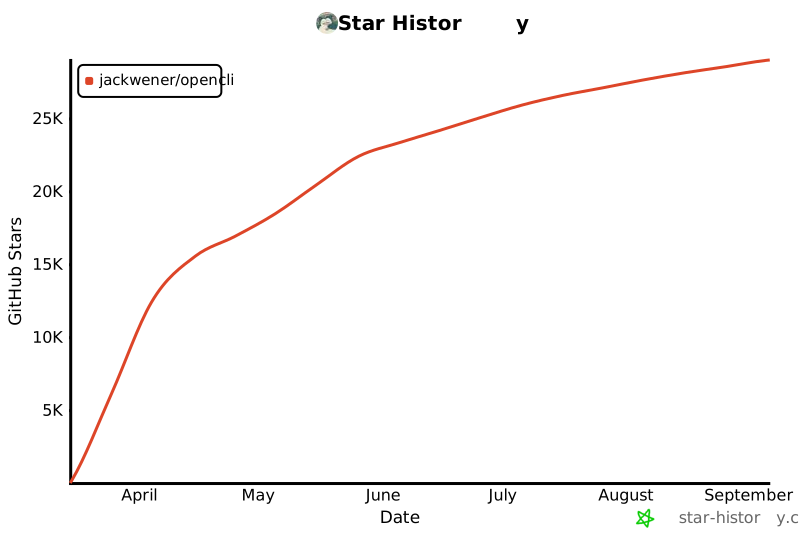](https://star-history.com/#jackwener/opencli&Date)
|
|
285
|
-
|
|
286
|
-
## License
|
|
287
|
-
|
|
288
|
-
[Apache-2.0](./LICENSE)
|