@huggingface/tasks 0.10.15 → 0.10.16
This diff represents the content of publicly available package versions that have been released to one of the supported registries. The information contained in this diff is provided for informational purposes only and reflects changes between package versions as they appear in their respective public registries.
- package/dist/index.cjs +188 -78
- package/dist/index.js +188 -78
- package/dist/src/model-libraries-snippets.d.ts +1 -0
- package/dist/src/model-libraries-snippets.d.ts.map +1 -1
- package/dist/src/model-libraries.d.ts +24 -2
- package/dist/src/model-libraries.d.ts.map +1 -1
- package/dist/src/tasks/image-text-to-text/data.d.ts +4 -0
- package/dist/src/tasks/image-text-to-text/data.d.ts.map +1 -0
- package/dist/src/tasks/index.d.ts.map +1 -1
- package/package.json +1 -1
- package/src/model-libraries-snippets.ts +6 -0
- package/src/model-libraries.ts +18 -0
- package/src/tasks/image-text-to-text/about.md +74 -0
- package/src/tasks/image-text-to-text/data.ts +90 -0
- package/src/tasks/image-to-text/about.md +2 -19
- package/src/tasks/index.ts +2 -1
- package/src/tasks/text-generation/about.md +7 -7
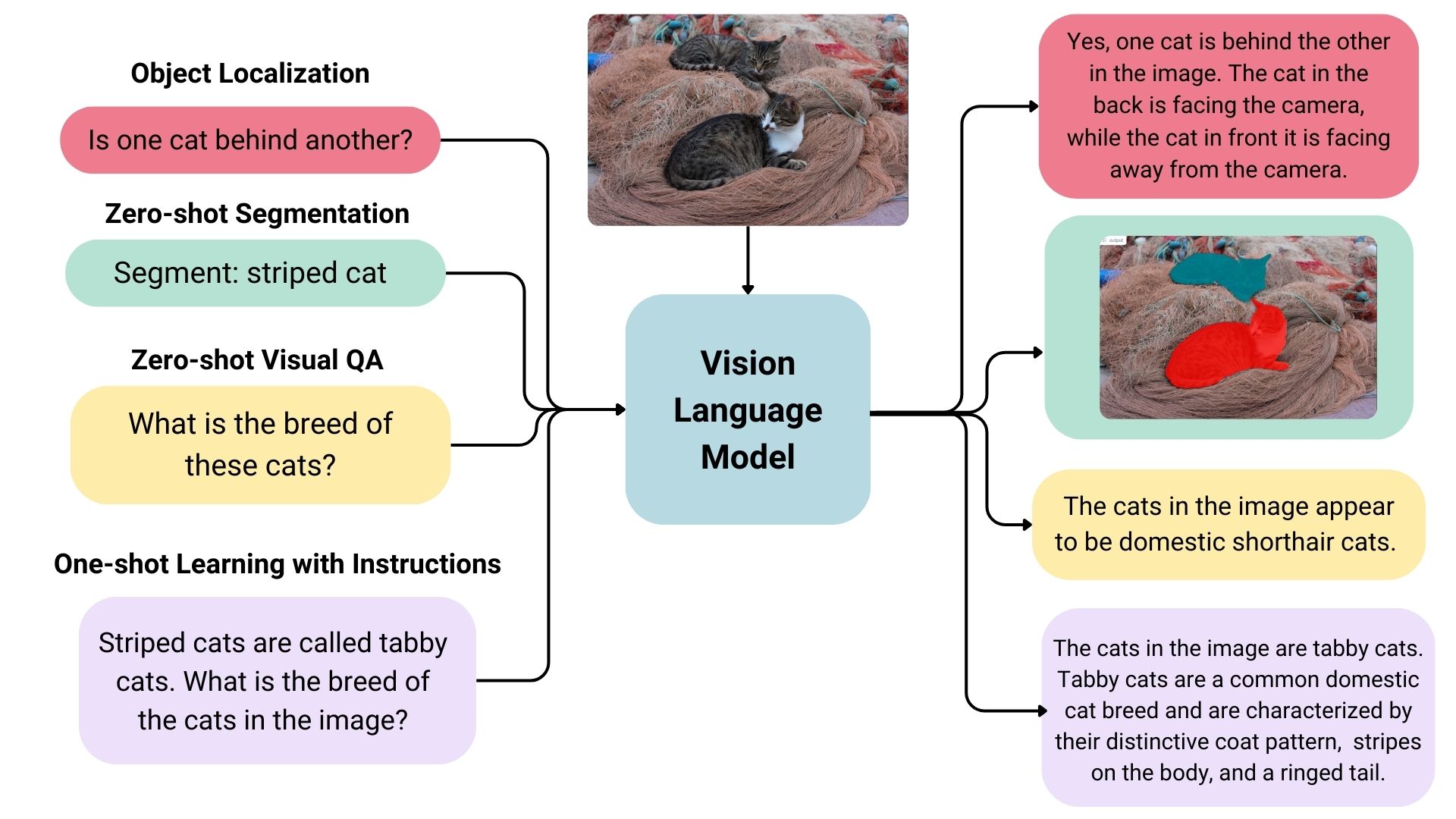
|
@@ -56,6 +56,12 @@ export const bertopic = (model: ModelData): string[] => [
|
|
|
56
56
|
model = BERTopic.load("${model.id}")`,
|
|
57
57
|
];
|
|
58
58
|
|
|
59
|
+
export const bm25s = (model: ModelData): string[] => [
|
|
60
|
+
`from bm25s.hf import BM25HF
|
|
61
|
+
|
|
62
|
+
retriever = BM25HF.load_from_hub("${model.id}")`,
|
|
63
|
+
];
|
|
64
|
+
|
|
59
65
|
const diffusers_default = (model: ModelData) => [
|
|
60
66
|
`from diffusers import DiffusionPipeline
|
|
61
67
|
|
package/src/model-libraries.ts
CHANGED
|
@@ -111,6 +111,16 @@ export const MODEL_LIBRARIES_UI_ELEMENTS = {
|
|
|
111
111
|
wildcard: { path: "*.npz" },
|
|
112
112
|
},
|
|
113
113
|
},
|
|
114
|
+
bm25s: {
|
|
115
|
+
prettyLabel: "BM25S",
|
|
116
|
+
repoName: "bm25s",
|
|
117
|
+
repoUrl: "https://github.com/xhluca/bm25s",
|
|
118
|
+
snippets: snippets.bm25s,
|
|
119
|
+
filter: false,
|
|
120
|
+
countDownloads: {
|
|
121
|
+
term: { path: "params.index.json" },
|
|
122
|
+
},
|
|
123
|
+
},
|
|
114
124
|
chat_tts: {
|
|
115
125
|
prettyLabel: "ChatTTS",
|
|
116
126
|
repoName: "ChatTTS",
|
|
@@ -223,6 +233,14 @@ export const MODEL_LIBRARIES_UI_ELEMENTS = {
|
|
|
223
233
|
terms: { path: ["ckpt/tensor00000_000", "ckpt-0/tensor00000_000"] },
|
|
224
234
|
},
|
|
225
235
|
},
|
|
236
|
+
"hunyuan-dit": {
|
|
237
|
+
prettyLabel: "HunyuanDiT",
|
|
238
|
+
repoName: "HunyuanDiT",
|
|
239
|
+
repoUrl: "https://github.com/Tencent/HunyuanDiT",
|
|
240
|
+
countDownloads: {
|
|
241
|
+
terms: { path: ["pytorch_model_ema.pt", "pytorch_model_distill.pt"] },
|
|
242
|
+
},
|
|
243
|
+
},
|
|
226
244
|
keras: {
|
|
227
245
|
prettyLabel: "Keras",
|
|
228
246
|
repoName: "Keras",
|
|
@@ -0,0 +1,74 @@
|
|
|
1
|
+
## Different Types of Vision Language Models
|
|
2
|
+
|
|
3
|
+
Vision language models come in three types:
|
|
4
|
+
|
|
5
|
+
- **Base:** Pre-trained models that can be fine-tuned. A good example of base models is the [PaliGemma models family](https://huggingface.co/models?sort=trending&search=google%2Fpaligemma-3b-pt) by Google.
|
|
6
|
+
- **Instruction:** Base models fine-tuned on instruction datasets. A good example of instruction fine-tuned models is [idefics2-8b](https://huggingface.co/HuggingFaceM4/idefics2-8b).
|
|
7
|
+
- **Chatty/Conversational:** Base models fine-tuned on conversation datasets. A good example of chatty models is [deepseek-vl-7b-chat](https://huggingface.co/deepseek-ai/deepseek-vl-7b-chat).
|
|
8
|
+
|
|
9
|
+
|
|
10
|
+
|
|
11
|
+
## Use Cases
|
|
12
|
+
|
|
13
|
+
### Multimodal Dialogue
|
|
14
|
+
|
|
15
|
+
Vision language models can be used as multimodal assistants, keeping context about the conversation and keeping the image to have multiple-turn dialogues.
|
|
16
|
+
|
|
17
|
+
### Zero-shot Object Detection, Image Segmentation and Localization
|
|
18
|
+
|
|
19
|
+
Some vision language models can detect or segment a set of objects or describe the positions or relative positions of the objects. For example, one could prompt such a model to ask if one object is behind another. Such a model can also output bounding box coordination or segmentation masks directly in the text output, unlike the traditional models explicitly trained on only object detection or image segmentation.
|
|
20
|
+
|
|
21
|
+
### Visual Question Answering
|
|
22
|
+
|
|
23
|
+
Vision language models trained on image-text pairs can be used for visual question answering and generating captions for images.
|
|
24
|
+
|
|
25
|
+
### Document Question Answering and Retrieval
|
|
26
|
+
|
|
27
|
+
Documents often consist of different layouts, charts, tables, images, and more. Vision language models trained on formatted documents can extract information from them. This is an OCR-free approach; the inputs skip OCR, and documents are directly fed to vision language models.
|
|
28
|
+
|
|
29
|
+
### Image Recognition with Instructions
|
|
30
|
+
|
|
31
|
+
Vision language models can recognize images through descriptions. When given detailed descriptions of specific entities, it can classify the entities in an image.
|
|
32
|
+
|
|
33
|
+
## Inference
|
|
34
|
+
|
|
35
|
+
You can use the Transformers library to interact with vision-language models. You can load the model like below.
|
|
36
|
+
|
|
37
|
+
```python
|
|
38
|
+
from transformers import LlavaNextProcessor, LlavaNextForConditionalGeneration
|
|
39
|
+
import torch
|
|
40
|
+
|
|
41
|
+
device = torch.device('cuda' if torch.cuda.is_available() else 'cpu')
|
|
42
|
+
processor = LlavaNextProcessor.from_pretrained("llava-hf/llava-v1.6-mistral-7b-hf")
|
|
43
|
+
model = LlavaNextForConditionalGeneration.from_pretrained(
|
|
44
|
+
"llava-hf/llava-v1.6-mistral-7b-hf",
|
|
45
|
+
torch_dtype=torch.float16
|
|
46
|
+
)
|
|
47
|
+
model.to(device)
|
|
48
|
+
```
|
|
49
|
+
|
|
50
|
+
We can infer by passing image and text dialogues.
|
|
51
|
+
|
|
52
|
+
```python
|
|
53
|
+
from PIL import Image
|
|
54
|
+
import requests
|
|
55
|
+
|
|
56
|
+
# image of a radar chart
|
|
57
|
+
url = "https://github.com/haotian-liu/LLaVA/blob/1a91fc274d7c35a9b50b3cb29c4247ae5837ce39/images/llava_v1_5_radar.jpg?raw=true"
|
|
58
|
+
image = Image.open(requests.get(url, stream=True).raw)
|
|
59
|
+
prompt = "[INST] <image>\nWhat is shown in this image? [/INST]"
|
|
60
|
+
|
|
61
|
+
inputs = processor(prompt, image, return_tensors="pt").to(device)
|
|
62
|
+
output = model.generate(**inputs, max_new_tokens=100)
|
|
63
|
+
|
|
64
|
+
print(processor.decode(output[0], skip_special_tokens=True))
|
|
65
|
+
# The image appears to be a radar chart, which is a type of multivariate chart that displays values for multiple variables represented on axes
|
|
66
|
+
# starting from the same point. This particular radar chart is showing the performance of different models or systems across various metrics.
|
|
67
|
+
# The axes represent different metrics or benchmarks, such as MM-Vet, MM-Vet, MM-Vet, MM-Vet, MM-Vet, MM-V
|
|
68
|
+
```
|
|
69
|
+
|
|
70
|
+
## Useful Resources
|
|
71
|
+
|
|
72
|
+
- [Vision Language Models Explained](https://huggingface.co/blog/vlms)
|
|
73
|
+
- [Open-source Multimodality and How to Achieve it using Hugging Face](https://www.youtube.com/watch?v=IoGaGfU1CIg&t=601s)
|
|
74
|
+
- [Introducing Idefics2: A Powerful 8B Vision-Language Model for the community](https://huggingface.co/blog/idefics2)
|
|
@@ -0,0 +1,90 @@
|
|
|
1
|
+
import type { TaskDataCustom } from "..";
|
|
2
|
+
|
|
3
|
+
const taskData: TaskDataCustom = {
|
|
4
|
+
datasets: [
|
|
5
|
+
{
|
|
6
|
+
description: "Instructions composed of image and text.",
|
|
7
|
+
id: "liuhaotian/LLaVA-Instruct-150K",
|
|
8
|
+
},
|
|
9
|
+
{
|
|
10
|
+
description: "Conversation turns where questions involve image and text.",
|
|
11
|
+
id: "liuhaotian/LLaVA-Pretrain",
|
|
12
|
+
},
|
|
13
|
+
{
|
|
14
|
+
description: "A collection of datasets made for model fine-tuning.",
|
|
15
|
+
id: "HuggingFaceM4/the_cauldron",
|
|
16
|
+
},
|
|
17
|
+
{
|
|
18
|
+
description: "Screenshots of websites with their HTML/CSS codes.",
|
|
19
|
+
id: "HuggingFaceM4/WebSight",
|
|
20
|
+
},
|
|
21
|
+
],
|
|
22
|
+
demo: {
|
|
23
|
+
inputs: [
|
|
24
|
+
{
|
|
25
|
+
filename: "mask-generation-input.png",
|
|
26
|
+
type: "img",
|
|
27
|
+
},
|
|
28
|
+
{
|
|
29
|
+
label: "Text Prompt",
|
|
30
|
+
content: "Describe the position of the bee in detail.",
|
|
31
|
+
type: "text",
|
|
32
|
+
},
|
|
33
|
+
],
|
|
34
|
+
outputs: [
|
|
35
|
+
{
|
|
36
|
+
label: "Answer",
|
|
37
|
+
content:
|
|
38
|
+
"The bee is sitting on a pink flower, surrounded by other flowers. The bee is positioned in the center of the flower, with its head and front legs sticking out.",
|
|
39
|
+
type: "text",
|
|
40
|
+
},
|
|
41
|
+
],
|
|
42
|
+
},
|
|
43
|
+
metrics: [],
|
|
44
|
+
models: [
|
|
45
|
+
{
|
|
46
|
+
description: "Cutting-edge vision language model that can also localize texts in images.",
|
|
47
|
+
id: "liuhaotian/llava-v1.6-34b",
|
|
48
|
+
},
|
|
49
|
+
{
|
|
50
|
+
description: "Cutting-edge conversational vision language model that can take multiple image inputs.",
|
|
51
|
+
id: "HuggingFaceM4/idefics2-8b-chatty",
|
|
52
|
+
},
|
|
53
|
+
{
|
|
54
|
+
description: "Small yet powerful model.",
|
|
55
|
+
id: "vikhyatk/moondream2",
|
|
56
|
+
},
|
|
57
|
+
{
|
|
58
|
+
description: "Strong image-text-to-text model made to understand documents.",
|
|
59
|
+
id: "mPLUG/DocOwl1.5",
|
|
60
|
+
},
|
|
61
|
+
],
|
|
62
|
+
spaces: [
|
|
63
|
+
{
|
|
64
|
+
description: "Leaderboard to evaluate vision language models.",
|
|
65
|
+
id: "opencompass/open_vlm_leaderboard",
|
|
66
|
+
},
|
|
67
|
+
{
|
|
68
|
+
description: "Vision language models arena, where models are ranked by votes of users.",
|
|
69
|
+
id: "WildVision/vision-arena",
|
|
70
|
+
},
|
|
71
|
+
{
|
|
72
|
+
description: "Powerful vision-language model assistant.",
|
|
73
|
+
id: "liuhaotian/LLaVA-1.6",
|
|
74
|
+
},
|
|
75
|
+
{
|
|
76
|
+
description: "An application to compare outputs of different vision language models.",
|
|
77
|
+
id: "merve/compare_VLMs",
|
|
78
|
+
},
|
|
79
|
+
{
|
|
80
|
+
description: "An application for document vision language tasks.",
|
|
81
|
+
id: "mPLUG/DocOwl",
|
|
82
|
+
},
|
|
83
|
+
],
|
|
84
|
+
summary:
|
|
85
|
+
"Image-text-to-text models take in an image and text prompt and output text. These models are also called vision-language models, or VLMs. The difference from image-to-text models is that these models take an additional text input, not restricting the model to certain use cases like image captioning, and may also be trained to accept a conversation as input.",
|
|
86
|
+
widgetModels: ["microsoft/kosmos-2-patch14-224"],
|
|
87
|
+
youtubeId: "",
|
|
88
|
+
};
|
|
89
|
+
|
|
90
|
+
export default taskData;
|
|
@@ -9,10 +9,6 @@ This can help the visually impaired people to understand what's happening in the
|
|
|
9
9
|
|
|
10
10
|
OCR models convert the text present in an image, e.g. a scanned document, to text.
|
|
11
11
|
|
|
12
|
-
## Pix2Struct
|
|
13
|
-
|
|
14
|
-
Pix2Struct is a state-of-the-art model built and released by Google AI. The model itself has to be trained on a downstream task to be used. These tasks include, captioning UI components, images including text, visual questioning infographics, charts, scientific diagrams and more. You can find these models on recommended models of this page.
|
|
15
|
-
|
|
16
12
|
## Inference
|
|
17
13
|
|
|
18
14
|
### Image Captioning
|
|
@@ -22,24 +18,11 @@ You can use the 🤗 Transformers library's `image-to-text` pipeline to generate
|
|
|
22
18
|
```python
|
|
23
19
|
from transformers import pipeline
|
|
24
20
|
|
|
25
|
-
captioner = pipeline("image-to-text",model="Salesforce/blip-image-captioning-base")
|
|
21
|
+
captioner = pipeline("image-to-text", model="Salesforce/blip-image-captioning-base")
|
|
26
22
|
captioner("https://huggingface.co/datasets/Narsil/image_dummy/resolve/main/parrots.png")
|
|
27
23
|
## [{'generated_text': 'two birds are standing next to each other '}]
|
|
28
24
|
```
|
|
29
25
|
|
|
30
|
-
### Conversation about the Image
|
|
31
|
-
|
|
32
|
-
Some text generation models also take image inputs. These are called vision language models. You can use `image-to-text` pipeline to use these models like below.
|
|
33
|
-
|
|
34
|
-
```python
|
|
35
|
-
from transformers import pipeline
|
|
36
|
-
|
|
37
|
-
mm_pipeline = pipeline("image-to-text",model="llava-hf/llava-1.5-7b-hf")
|
|
38
|
-
mm_pipeline("https://huggingface.co/spaces/llava-hf/llava-4bit/resolve/main/examples/baklava.png", "How to make this pastry?")
|
|
39
|
-
|
|
40
|
-
## [{'generated_text': 'To create these pastries, you will need a few key ingredients and tools. Firstly, gather the dough by combining flour with water in your mixing bowl until it forms into an elastic ball that can be easily rolled out on top of another surface or table without breaking apart (like pizza).'}]
|
|
41
|
-
```
|
|
42
|
-
|
|
43
26
|
### OCR
|
|
44
27
|
|
|
45
28
|
This code snippet uses Microsoft’s TrOCR, an encoder-decoder model consisting of an image Transformer encoder and a text Transformer decoder for state-of-the-art optical character recognition (OCR) on single-text line images.
|
|
@@ -71,7 +54,7 @@ await inference.imageToText({
|
|
|
71
54
|
## Useful Resources
|
|
72
55
|
|
|
73
56
|
- [Image Captioning](https://huggingface.co/docs/transformers/main/en/tasks/image_captioning)
|
|
74
|
-
- [Image
|
|
57
|
+
- [Image Captioning Use Case](https://blog.google/outreach-initiatives/accessibility/get-image-descriptions/)
|
|
75
58
|
- [Train Image Captioning model on your dataset](https://github.com/NielsRogge/Transformers-Tutorials/blob/master/GIT/Fine_tune_GIT_on_an_image_captioning_dataset.ipynb)
|
|
76
59
|
- [Train OCR model on your dataset ](https://github.com/NielsRogge/Transformers-Tutorials/tree/master/TrOCR)
|
|
77
60
|
|
package/src/tasks/index.ts
CHANGED
|
@@ -11,6 +11,7 @@ import imageClassification from "./image-classification/data";
|
|
|
11
11
|
import imageFeatureExtraction from "./image-feature-extraction/data";
|
|
12
12
|
import imageToImage from "./image-to-image/data";
|
|
13
13
|
import imageToText from "./image-to-text/data";
|
|
14
|
+
import imageTextToText from "./image-text-to-text/data";
|
|
14
15
|
import imageSegmentation from "./image-segmentation/data";
|
|
15
16
|
import maskGeneration from "./mask-generation/data";
|
|
16
17
|
import objectDetection from "./object-detection/data";
|
|
@@ -202,8 +203,8 @@ export const TASKS_DATA: Record<PipelineType, TaskData | undefined> = {
|
|
|
202
203
|
"image-classification": getData("image-classification", imageClassification),
|
|
203
204
|
"image-feature-extraction": getData("image-feature-extraction", imageFeatureExtraction),
|
|
204
205
|
"image-segmentation": getData("image-segmentation", imageSegmentation),
|
|
205
|
-
"image-text-to-text": undefined,
|
|
206
206
|
"image-to-image": getData("image-to-image", imageToImage),
|
|
207
|
+
"image-text-to-text": getData("image-text-to-text", imageTextToText),
|
|
207
208
|
"image-to-text": getData("image-to-text", imageToText),
|
|
208
209
|
"image-to-video": undefined,
|
|
209
210
|
"mask-generation": getData("mask-generation", maskGeneration),
|
|
@@ -1,10 +1,10 @@
|
|
|
1
|
-
This task covers guides on both [text-generation](https://huggingface.co/models?pipeline_tag=text-generation&sort=downloads) and [text-to-text generation](https://huggingface.co/models?pipeline_tag=text2text-generation&sort=downloads) models. Popular large language models that are used for chats or following instructions are also covered in this task. You can find the list of selected open-source large language models [here](https://huggingface.co/spaces/
|
|
1
|
+
This task covers guides on both [text-generation](https://huggingface.co/models?pipeline_tag=text-generation&sort=downloads) and [text-to-text generation](https://huggingface.co/models?pipeline_tag=text2text-generation&sort=downloads) models. Popular large language models that are used for chats or following instructions are also covered in this task. You can find the list of selected open-source large language models [here](https://huggingface.co/spaces/open-llm-leaderboard/open_llm_leaderboard), ranked by their performance scores.
|
|
2
2
|
|
|
3
3
|
## Use Cases
|
|
4
4
|
|
|
5
5
|
### Instruction Models
|
|
6
6
|
|
|
7
|
-
A model trained for text generation can be later adapted to follow instructions.
|
|
7
|
+
A model trained for text generation can be later adapted to follow instructions. You can try some of the most powerful instruction-tuned open-access models like Mixtral 8x7B, Cohere Command R+, and Meta Llama3 70B [at Hugging Chat](https://huggingface.co/chat).
|
|
8
8
|
|
|
9
9
|
### Code Generation
|
|
10
10
|
|
|
@@ -36,15 +36,15 @@ These models are trained to learn the mapping between a pair of texts (e.g. tran
|
|
|
36
36
|
|
|
37
37
|
When it comes to text generation, the underlying language model can come in several types:
|
|
38
38
|
|
|
39
|
-
- **Base models:** refers to plain language models like [Mistral 7B](mistralai/Mistral-7B-v0.
|
|
39
|
+
- **Base models:** refers to plain language models like [Mistral 7B](https://huggingface.co/mistralai/Mistral-7B-v0.3) and [Meta Llama-3-70b](https://huggingface.co/meta-llama/Meta-Llama-3-70B). These models are good for fine-tuning and few-shot prompting.
|
|
40
40
|
|
|
41
|
-
- **Instruction-trained models:** these models are trained in a multi-task manner to follow a broad range of instructions like "Write me a recipe for chocolate cake". Models like [
|
|
41
|
+
- **Instruction-trained models:** these models are trained in a multi-task manner to follow a broad range of instructions like "Write me a recipe for chocolate cake". Models like [Qwen 2 7B](https://huggingface.co/Qwen/Qwen2-7B-Instruct), [Yi 1.5 34B Chat](https://huggingface.co/01-ai/Yi-1.5-34B-Chat), and [Meta Llama 70B Instruct](https://huggingface.co/meta-llama/Meta-Llama-3-70B-Instruct) are examples of instruction-trained models. In general, instruction-trained models will produce better responses to instructions than base models.
|
|
42
42
|
|
|
43
|
-
- **Human feedback models:** these models extend base and instruction-trained models by incorporating human feedback that rates the quality of the generated text according to criteria like [helpfulness, honesty, and harmlessness](https://arxiv.org/abs/2112.00861). The human feedback is then combined with an optimization technique like reinforcement learning to align the original model to be closer with human preferences. The overall methodology is often called [Reinforcement Learning from Human Feedback](https://huggingface.co/blog/rlhf), or RLHF for short. [
|
|
43
|
+
- **Human feedback models:** these models extend base and instruction-trained models by incorporating human feedback that rates the quality of the generated text according to criteria like [helpfulness, honesty, and harmlessness](https://arxiv.org/abs/2112.00861). The human feedback is then combined with an optimization technique like reinforcement learning to align the original model to be closer with human preferences. The overall methodology is often called [Reinforcement Learning from Human Feedback](https://huggingface.co/blog/rlhf), or RLHF for short. [Zephyr ORPO 141B A35B](https://huggingface.co/HuggingFaceH4/zephyr-orpo-141b-A35b-v0.1) is an open-source model aligned through human feedback.
|
|
44
44
|
|
|
45
45
|
## Text Generation from Image and Text
|
|
46
46
|
|
|
47
|
-
There are language models that can input both text and image and output text, called vision language models. [
|
|
47
|
+
There are language models that can input both text and image and output text, called vision language models. [IDEFICS 2](https://huggingface.co/HuggingFaceM4/idefics2-8b) and [MiniCPM Llama3 V](https://huggingface.co/openbmb/MiniCPM-Llama3-V-2_5) are good examples. They accept the same generation parameters as other language models. However, since they also take images as input, you have to use them with the `image-to-text` pipeline. You can find more information about this in the [image-to-text task page](https://huggingface.co/tasks/image-to-text).
|
|
48
48
|
|
|
49
49
|
## Inference
|
|
50
50
|
|
|
@@ -102,7 +102,7 @@ Would you like to learn more about the topic? Awesome! Here you can find some cu
|
|
|
102
102
|
- You can use [PEFT](https://github.com/huggingface/peft) to adapt large language models in efficient way.
|
|
103
103
|
- [ChatUI](https://github.com/huggingface/chat-ui) is the open-source interface to conversate with Large Language Models.
|
|
104
104
|
- [text-generation-inferface](https://github.com/huggingface/text-generation-inference)
|
|
105
|
-
- [HuggingChat](https://huggingface.co/chat/) is a chat interface powered by Hugging Face to chat with powerful models like Llama
|
|
105
|
+
- [HuggingChat](https://huggingface.co/chat/) is a chat interface powered by Hugging Face to chat with powerful models like Meta Llama 3 70B, Mixtral 8x7B, etc.
|
|
106
106
|
|
|
107
107
|
### Documentation
|
|
108
108
|
|