@hicccc77/electron-liquid-glass 0.2.0 → 0.2.1
This diff represents the content of publicly available package versions that have been released to one of the supported registries. The information contained in this diff is provided for informational purposes only and reflects changes between package versions as they appear in their respective public registries.
- package/README.md +82 -92
- package/README.zh-CN.md +157 -0
- package/index.d.ts +29 -25
- package/index.js +12 -9
- package/package.json +2 -1
- package/prebuilds/win32-x64/@hicccc77+electron-liquid-glass.node +0 -0
- package/scripts/install-guard.cjs +6 -5
package/README.md
CHANGED
|
@@ -1,70 +1,70 @@
|
|
|
1
1
|
# Electron-Liquid-Glass
|
|
2
2
|
|
|
3
|
-
|
|
3
|
+
English | [简体中文](README.zh-CN.md)
|
|
4
4
|
|
|
5
|
-
Low-latency native liquid glass backdrop panels for Electron apps, powered by DXGI Desktop Duplication + D3D11 + DirectComposition.
|
|
5
|
+
Low-latency native "liquid glass" backdrop panels for Electron apps on Windows, powered by DXGI Desktop Duplication + D3D11 + DirectComposition.
|
|
6
6
|
|
|
7
|
-
|
|
7
|
+
The liquid glass effect is rendered as a standalone native window pinned right below your Electron window, acting as a live refractive background layer.
|
|
8
8
|
|
|
9
|
-
|
|
10
10
|
|
|
11
|
-
>
|
|
11
|
+
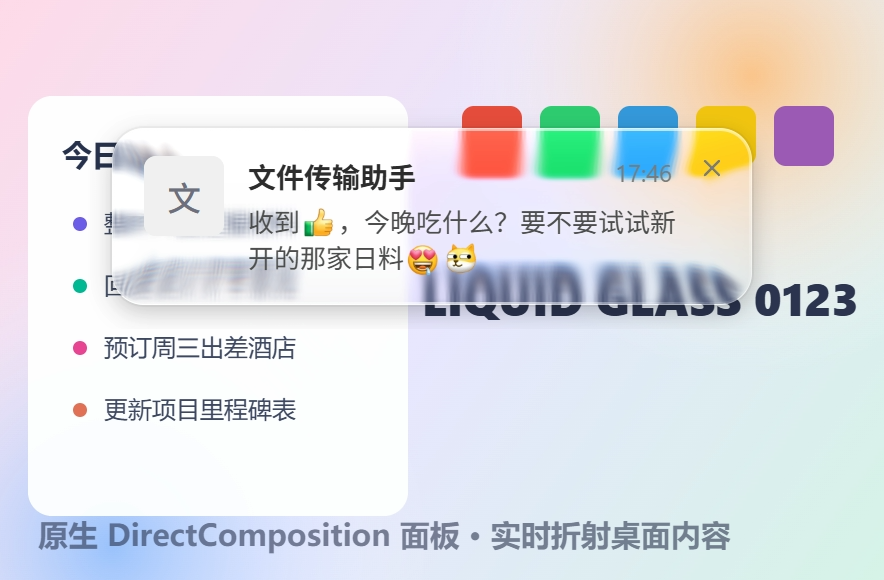
> Real screenshot, not a mockup: the notification card is a transparent Electron window; the refraction, blur, chromatic aberration behind it — and the luminance sampling that drives the adaptive text color — all come from this module's native panel.
|
|
12
12
|
|
|
13
|
-
##
|
|
13
|
+
## Features
|
|
14
14
|
|
|
15
|
-
-
|
|
16
|
-
-
|
|
17
|
-
-
|
|
18
|
-
-
|
|
19
|
-
- **
|
|
20
|
-
-
|
|
21
|
-
-
|
|
15
|
+
- **True refraction, not frosted glass**: rounded-rect SDF lens displacement with visible edge refraction and chromatic aberration, crystal-clear center
|
|
16
|
+
- **~6ms response**: zero-copy GPU desktop texture via DXGI, D3D11 shading, DirectComposition presentation — pixels never touch the CPU
|
|
17
|
+
- **Deeply energy-efficient**: fully event-driven and incremental — no repaint when the desktop is static, no repaint when dirty regions don't intersect the panel, the desktop mirror is maintained incrementally from dirty rects (GPU copy volume proportional to actual changed area, not full screen), DWM "echo" dirty rects caused by the panel's own Present are detected and dropped (no self-sustained repaint loop), and the capture session is released when no panel is visible
|
|
18
|
+
- **Adaptive contrast support**: built-in luminance band sampling (mean color + luma p15/p85), repaint-driven and pushed in the same frame as the visual change (capped at ~60Hz), for driving light/dark adaptive text above the glass
|
|
19
|
+
- **Z-order anchoring**: the panel pins itself directly below a given Electron window and periodically re-asserts the order (defends against other topmost windows cutting in)
|
|
20
|
+
- **Self-capture loop prevention**: `WDA_EXCLUDEFROMCAPTURE` excludes the panel from all screen capture
|
|
21
|
+
- **Zero Electron intrusion**: pure N-API native module + command queue, ABI-stable across Electron versions, drops into any Electron app
|
|
22
22
|
|
|
23
|
-
##
|
|
23
|
+
## How it works
|
|
24
24
|
|
|
25
25
|
```
|
|
26
|
-
DXGI Desktop Duplication
|
|
27
|
-
→ D3D11
|
|
28
|
-
→ DirectComposition
|
|
26
|
+
DXGI Desktop Duplication (zero-copy GPU desktop texture; frames arrive only when the screen changes)
|
|
27
|
+
→ D3D11 three-pass shading (half-res separable Gaussian blur ×2 → rounded-rect SDF lens displacement + RGB dispersion + saturation + rounded-corner AA)
|
|
28
|
+
→ DirectComposition premultiplied-alpha swapchain presentation (bypasses the DWM redirection bitmap)
|
|
29
29
|
```
|
|
30
30
|
|
|
31
|
-
-
|
|
32
|
-
-
|
|
33
|
-
- JS
|
|
34
|
-
-
|
|
31
|
+
- The whole chain runs on one dedicated worker thread + the GPU; no pixels cross processes or threads
|
|
32
|
+
- Panel window uses `WS_EX_NOREDIRECTIONBITMAP + WS_EX_TRANSPARENT + WS_EX_NOACTIVATE` (click-through, never steals focus, not in the taskbar)
|
|
33
|
+
- Every JS call is posted asynchronously to the worker thread via a command queue — inherently thread-safe
|
|
34
|
+
- Layered collaboration: this panel renders "the world behind the glass" (refraction/blur/dispersion); your transparent Electron window renders "the glass surface" (text, highlights, borders, tint)
|
|
35
35
|
|
|
36
36
|
```
|
|
37
|
-
┌─ Electron
|
|
38
|
-
│ ┌─
|
|
39
|
-
│ │
|
|
40
|
-
|
|
37
|
+
┌─ Electron transparent window (content: text / highlight / border) ─┐ ← your app
|
|
38
|
+
│ ┌─ Native glass panel (refraction layer, pinned right below) ──┐ │ ← this module
|
|
39
|
+
│ │ live refracted desktop background │ │
|
|
40
|
+
└──┴──────────────────────────────────────────────────────────────┴──┘
|
|
41
41
|
```
|
|
42
42
|
|
|
43
|
-
##
|
|
43
|
+
## Requirements
|
|
44
44
|
|
|
45
|
-
|
|
|
45
|
+
| Platform | Status |
|
|
46
46
|
|---|---|
|
|
47
|
-
| Windows 10 2004 (build 19041)+ |
|
|
48
|
-
| Windows
|
|
49
|
-
| macOS / Linux |
|
|
47
|
+
| Windows 10 2004 (build 19041)+ | Fully supported |
|
|
48
|
+
| Older Windows | `isSupported()` returns `false` (no `WDA_EXCLUDEFROMCAPTURE`) |
|
|
49
|
+
| macOS / Linux | Installs and loads fine, `isSupported()` returns `false` — fall back to your own approach (e.g. Chromium desktop capture + WebGL); a native macOS backend (ScreenCaptureKit + Metal) is on the roadmap |
|
|
50
50
|
|
|
51
|
-
##
|
|
51
|
+
## Install
|
|
52
52
|
|
|
53
53
|
```bash
|
|
54
54
|
npm install @hicccc77/electron-liquid-glass
|
|
55
55
|
```
|
|
56
56
|
|
|
57
|
-
npm
|
|
57
|
+
The npm package ships a prebuilt win32-x64 binary (N-API 8, ABI-stable across Electron / Node versions) — **zero compilation on install, no build toolchain required**. On platforms without a prebuild (macOS/Linux) the module degrades gracefully (`isSupported()` returns `false`) and still never triggers a compile.
|
|
58
58
|
|
|
59
|
-
|
|
59
|
+
When packaging with electron-builder, unpack the `.node` binary from asar:
|
|
60
60
|
|
|
61
61
|
```jsonc
|
|
62
62
|
"build": { "asarUnpack": ["node_modules/@hicccc77/electron-liquid-glass/**/*"] }
|
|
63
63
|
```
|
|
64
64
|
|
|
65
|
-
|
|
65
|
+
Building from source (repo checkout, Windows): Node.js 18+, VS Build Tools (C++ desktop workload) + Python. `npm run build` produces `build/Release`; `npm run prebuilds` produces the distributable `prebuilds/win32-x64`.
|
|
66
66
|
|
|
67
|
-
##
|
|
67
|
+
## Quick start (Electron main process)
|
|
68
68
|
|
|
69
69
|
```js
|
|
70
70
|
const { screen } = require('electron')
|
|
@@ -73,95 +73,85 @@ const glass = require('@hicccc77/electron-liquid-glass')
|
|
|
73
73
|
if (glass.isSupported()) {
|
|
74
74
|
const dpr = screen.getPrimaryDisplay().scaleFactor
|
|
75
75
|
const panel = glass.createPanel({
|
|
76
|
-
//
|
|
76
|
+
// screen physical pixels
|
|
77
77
|
x: 1560, y: 40, width: 344, height: 96,
|
|
78
78
|
cornerRadius: 20, blurSigma: 5,
|
|
79
79
|
displacementScale: 70, aberrationIntensity: 2, saturation: 1.4,
|
|
80
80
|
dpr,
|
|
81
|
-
anchorWindow: myToastWindow, //
|
|
82
|
-
lumaBands: [ //
|
|
81
|
+
anchorWindow: myToastWindow, // pin the panel right below this BrowserWindow
|
|
82
|
+
lumaBands: [ // luminance bands for adaptive text contrast (panel-local physical px)
|
|
83
83
|
{ id: 0, x: 0, y: 0, width: 344, height: 48 },
|
|
84
84
|
{ id: 1, x: 0, y: 48, width: 344, height: 48 }
|
|
85
85
|
],
|
|
86
86
|
onLuma: bands => {
|
|
87
87
|
// bands = { '0': { r, g, b, darkTail, lightTail }, '1': ... }
|
|
88
|
-
//
|
|
89
|
-
//
|
|
90
|
-
//
|
|
88
|
+
// Mean RGB + luma p15/p85 (gamma domain, 0-255). Repaint-driven:
|
|
89
|
+
// pushed in the same frame the background changes (capped ~60Hz),
|
|
90
|
+
// nothing is pushed while the desktop is static.
|
|
91
|
+
// Use it to switch your text between light/dark styles.
|
|
91
92
|
}
|
|
92
93
|
})
|
|
93
94
|
|
|
94
|
-
panel.show(120) //
|
|
95
|
-
panel.setBounds({ x, y, width, height }) //
|
|
96
|
-
panel.hide(240) //
|
|
95
|
+
panel.show(120) // fade in over 120ms
|
|
96
|
+
panel.setBounds({ x, y, width, height }) // follow window moves/resizes
|
|
97
|
+
panel.hide(240) // fade out
|
|
97
98
|
panel.destroy()
|
|
98
99
|
} else {
|
|
99
|
-
//
|
|
100
|
+
// Fallback: Chromium desktop stream + WebGL refraction pipeline, or a static backdrop-filter
|
|
100
101
|
}
|
|
101
102
|
```
|
|
102
103
|
|
|
103
|
-
|
|
104
|
+
Your top window only needs to keep the glass area transparent (Electron `transparent: true` already does) and draw the content layer — text, borders, highlights, tint. The refracted background comes from this panel.
|
|
104
105
|
|
|
105
106
|
## API
|
|
106
107
|
|
|
107
|
-
|
|
108
|
+
Full types in [`index.d.ts`](index.d.ts). All panel methods are thread-safe.
|
|
108
109
|
|
|
109
|
-
|
|
|
110
|
+
| Method | Description |
|
|
110
111
|
|---|---|
|
|
111
|
-
| `isSupported()` |
|
|
112
|
-
| `createPanel(options)` |
|
|
113
|
-
| `panel.show(fadeMs?)` / `panel.hide(fadeMs?)` |
|
|
114
|
-
| `panel.setBounds(bounds)` |
|
|
115
|
-
| `panel.setParams(params)` |
|
|
116
|
-
| `panel.anchor(windowOrHwnd)` |
|
|
117
|
-
| `panel.setLumaBands(bands)` / `panel.onLuma(cb)` |
|
|
118
|
-
| `panel.destroy()` |
|
|
119
|
-
| `shutdown()` |
|
|
120
|
-
|
|
121
|
-
##
|
|
122
|
-
|
|
123
|
-
|
|
|
112
|
+
| `isSupported()` | Whether the current environment is supported (Windows 10 2004+ with a native binary available) |
|
|
113
|
+
| `createPanel(options)` | Create a panel, returns a handle; returns `null` when unsupported |
|
|
114
|
+
| `panel.show(fadeMs?)` / `panel.hide(fadeMs?)` | Fade in / out (`0` = immediate) |
|
|
115
|
+
| `panel.setBounds(bounds)` | Move / resize (physical pixels) |
|
|
116
|
+
| `panel.setParams(params)` | Update visual params (corner radius, blur, displacement, aberration, saturation) |
|
|
117
|
+
| `panel.anchor(windowOrHwnd)` | Re-pin below a window (accepts `BrowserWindow` or an HWND Buffer) |
|
|
118
|
+
| `panel.setLumaBands(bands)` / `panel.onLuma(cb)` | Update luminance bands / callback |
|
|
119
|
+
| `panel.destroy()` | Destroy the panel |
|
|
120
|
+
| `shutdown()` | Stop the worker thread and destroy all panels |
|
|
121
|
+
|
|
122
|
+
## Measured results (1080p, animated background, Windows 11)
|
|
123
|
+
|
|
124
|
+
| Metric | Chromium stream approach (getUserMedia + WebGL) | This module |
|
|
124
125
|
|---|---|---|
|
|
125
|
-
|
|
|
126
|
-
|
|
|
127
|
-
|
|
|
128
|
-
|
|
|
129
|
-
| 40
|
|
126
|
+
| Perceived position lag (median / p90) | 77ms / 89ms | **6ms / 6ms** |
|
|
127
|
+
| CPU delta under load (main + GPU + renderer processes) | ~1.5% | **~0.3%** |
|
|
128
|
+
| Static desktop overhead | continuous capture frames | **0 renders / 0 copies** (event-driven) |
|
|
129
|
+
| First-frame startup | ~80-300ms (getUserMedia negotiation) | **<150ms** (0 when a persistent panel is reused) |
|
|
130
|
+
| 40-round notification stress | — | 1 panel created, 81 reuses, zero memory growth, zero errors |
|
|
130
131
|
|
|
131
|
-
|
|
132
|
+
Measurement method: same-frame differencing — within a single captured frame, compare the counter stripes shown through the glass against the ground-truth stripes in the background; both timestamps come from draw time, so probe latency cancels out.
|
|
132
133
|
|
|
133
|
-
### v0.2.0 能耗优化(内部计数器实测,1080p@180Hz 压力场景)
|
|
134
134
|
|
|
135
|
-
|
|
136
|
-
|---|---|---|
|
|
137
|
-
| 桌面静止时的面板重绘 | 178 次/秒(Present 回声自激) | **0** |
|
|
138
|
-
| 桌面静止时的镜像拷贝带宽 | 1421 MB/s(每帧全屏) | **3.5 MB/s**(406×) |
|
|
139
|
-
| 无关区域动画时的面板重绘 | 179 次/秒 | **0**(脏区不相交不画) |
|
|
140
|
-
| 无关区域动画时的拷贝带宽 | 1423 MB/s | **350 MB/s**(正比脏区面积) |
|
|
141
|
-
| 亮度采样 GPU 同步停顿 | 458 µs/次 | **2.3 µs/次**(延后一拍读取) |
|
|
142
|
-
|
|
143
|
-
三项根因修复:① 被 `WDA_EXCLUDEFROMCAPTURE` 排除的面板自身 Present 后,DWM 仍会把面板矩形报告为 DDA 脏区(内容实际未变),形成「重绘→报脏→再重绘」自激循环,现按矩形近似相等识别并丢弃回声脏区;② 桌面镜像从每帧全屏 `CopyResource` 改为脏区包围盒增量拷贝;③ 亮度带 staging 回读从渲染同 tick 的立即 `Map`(强制等 GPU 跑完整条管线)改为下一 tick 读取上帧拷贝,等待归零且时效不变(≤8ms)。
|
|
144
|
-
|
|
145
|
-
## 源码结构
|
|
135
|
+
## Source layout
|
|
146
136
|
|
|
147
137
|
```
|
|
148
138
|
src/
|
|
149
|
-
├── addon.cc N-API
|
|
150
|
-
├── session.cc/h
|
|
151
|
-
├── capture.cc/h DXGI Desktop Duplication
|
|
152
|
-
├── renderer.cc/h D3D11
|
|
153
|
-
├── panel.cc/h DirectComposition
|
|
154
|
-
├── d3d_utils.cc/h
|
|
155
|
-
├── stats.h
|
|
156
|
-
└── addon_stub.cc
|
|
139
|
+
├── addon.cc N-API binding layer (argument parsing, thread-safe luma callback dispatch)
|
|
140
|
+
├── session.cc/h Scheduler: dedicated worker thread running the capture→render→present loop, command queue, energy policies
|
|
141
|
+
├── capture.cc/h DXGI Desktop Duplication capture (zero-copy GPU texture + dirty regions + self-echo filtering)
|
|
142
|
+
├── renderer.cc/h D3D11 three-pass glass pipeline + luminance band histogram sampling
|
|
143
|
+
├── panel.cc/h DirectComposition no-redirection-bitmap window, fades, z-order anchoring, capture exclusion
|
|
144
|
+
├── d3d_utils.cc/h Device creation helper
|
|
145
|
+
├── stats.h Internal performance counters (`_stats` diagnostic export, used by benchmarks)
|
|
146
|
+
└── addon_stub.cc Non-Windows stub (isSupported() = false)
|
|
157
147
|
```
|
|
158
148
|
|
|
159
|
-
##
|
|
149
|
+
## Known limitations
|
|
160
150
|
|
|
161
|
-
-
|
|
162
|
-
-
|
|
163
|
-
-
|
|
164
|
-
-
|
|
151
|
+
- Native implementation is Windows-only for now (macOS ScreenCaptureKit + Metal backend is on the roadmap; the API is designed for pluggable per-platform backends)
|
|
152
|
+
- The panel is excluded from screenshots/recordings (the semantics of `WDA_EXCLUDEFROMCAPTURE`, same as content-protected windows)
|
|
153
|
+
- Capture pauses during secure desktop (UAC / lock screen) and resumes automatically afterwards
|
|
154
|
+
- Multi-monitor: the capture session follows the display of the first visible panel; moving a panel across displays rebuilds the session automatically
|
|
165
155
|
|
|
166
156
|
## License
|
|
167
157
|
|
package/README.zh-CN.md
ADDED
|
@@ -0,0 +1,157 @@
|
|
|
1
|
+
# Electron-Liquid-Glass
|
|
2
|
+
|
|
3
|
+
[English](README.md) | 简体中文
|
|
4
|
+
|
|
5
|
+
Windows 全局原生低延迟「液态玻璃」背景面板,for Electron。基于 DXGI Desktop Duplication + D3D11 + DirectComposition。
|
|
6
|
+
|
|
7
|
+
把液态玻璃渲染为一个全局独立的原生窗口,放在你的 Electron 窗口正下方作为实时背景层。
|
|
8
|
+
|
|
9
|
+

|
|
10
|
+
|
|
11
|
+
> 真实渲染截图:通知卡片为 Electron 透明窗口,卡片背后的折射、模糊、色散与驱动文字反色的亮度采样全部来自本模块的原生面板。
|
|
12
|
+
|
|
13
|
+
## 特性
|
|
14
|
+
|
|
15
|
+
- **物理折射效果**:圆角矩形 SDF 透镜位移,边缘可见清晰的背景折射与色散,中心通透
|
|
16
|
+
- **6ms 级响应**:DXGI 零拷贝拿 GPU 桌面纹理,D3D11 渲染,DirectComposition 直接渲染上屏幕
|
|
17
|
+
- **深度节能**:全链路事件驱动 + 增量——桌面不动不画、脏区与面板不相交不画、桌面镜像按脏区增量维护(GPU 拷贝量正比实际变化面积而非全屏)、自家面板 Present 产生的 DWM 回声脏区被识别丢弃(不会自激重绘)、无面板自动休眠释放采集会话
|
|
18
|
+
- **自适应反色支持**:内置亮度带采样(均值色 + luma p15/p85),重绘驱动、与画面同帧推送(上限 ~60Hz),驱动上层文字明暗自适应
|
|
19
|
+
- **z 序锚定**:面板自动钉在指定 Electron 窗口正下方,并周期性重申(防其他置顶窗口插队)
|
|
20
|
+
- **防自采集回环**:`WDA_EXCLUDEFROMCAPTURE` 把面板从一切屏幕捕获中排除
|
|
21
|
+
- **零 Electron 侵入**:纯 N-API 原生模块 + 命令队列,跨 Electron 版本 ABI 稳定,任何 Electron 应用可直接接入
|
|
22
|
+
|
|
23
|
+
## 原理
|
|
24
|
+
|
|
25
|
+
```
|
|
26
|
+
DXGI Desktop Duplication(零拷贝 GPU 桌面纹理,仅画面变化时出帧)
|
|
27
|
+
→ D3D11 三趟着色(半分辨率可分离高斯模糊 ×2 → 圆角 SDF 透镜位移 + RGB 色散 + 饱和度 + 圆角 AA)
|
|
28
|
+
→ DirectComposition 预乘 alpha 交换链直接上屏(不经过 DWM 重定向位图)
|
|
29
|
+
```
|
|
30
|
+
|
|
31
|
+
- 全链路在一个独立工作线程 + GPU 上完成,无像素跨进程/跨线程拷贝
|
|
32
|
+
- 面板窗口 `WS_EX_NOREDIRECTIONBITMAP + WS_EX_TRANSPARENT + WS_EX_NOACTIVATE`(鼠标穿透、不抢焦点、不进任务栏)
|
|
33
|
+
- JS 侧所有调用经命令队列异步投递到工作线程,天然线程安全
|
|
34
|
+
- 分层协作:本面板负责「玻璃背后的世界」(折射/模糊/色散),你的 Electron 透明窗口负责「玻璃表面」(文字、高光、描边、tint)
|
|
35
|
+
|
|
36
|
+
```
|
|
37
|
+
┌─ Electron 透明窗口(内容层:文字 / 高光 / 边框)─┐ ← 你的应用
|
|
38
|
+
│ ┌─ 原生玻璃面板(折射层,钉在正下方)────────┐ │ ← 本模块
|
|
39
|
+
│ │ 实时折射的桌面背景 │ │
|
|
40
|
+
└──┴────────────────────────────────────────────┴──┘
|
|
41
|
+
```
|
|
42
|
+
|
|
43
|
+
## 系统要求
|
|
44
|
+
|
|
45
|
+
| 平台 | 支持状态 |
|
|
46
|
+
|---|---|
|
|
47
|
+
| Windows 10 2004 (build 19041)+ | 完整支持 |
|
|
48
|
+
| Windows 更旧版本 | `isSupported()` 返回 `false`(缺少 `WDA_EXCLUDEFROMCAPTURE`) |
|
|
49
|
+
| macOS / Linux | 模块可正常安装加载,`isSupported()` 返回 `false`,请回退到你自己的方案(如 Chromium 桌面流 + WebGL);macOS 原生后端(ScreenCaptureKit + Metal)在路线图中 |
|
|
50
|
+
|
|
51
|
+
## 安装
|
|
52
|
+
|
|
53
|
+
```bash
|
|
54
|
+
npm install @hicccc77/electron-liquid-glass
|
|
55
|
+
```
|
|
56
|
+
|
|
57
|
+
npm 包内置 win32-x64 预编译二进制(N-API 8,跨 Electron / Node 版本 ABI 稳定),**安装零编译、无需任何构建工具链**;非 Windows 平台上没有预编译产物时模块自动降级(`isSupported()` 返回 `false`),同样不触发编译。
|
|
58
|
+
|
|
59
|
+
Electron 打包(electron-builder)注意把 `.node` 解包出 asar:
|
|
60
|
+
|
|
61
|
+
```jsonc
|
|
62
|
+
"build": { "asarUnpack": ["node_modules/@hicccc77/electron-liquid-glass/**/*"] }
|
|
63
|
+
```
|
|
64
|
+
|
|
65
|
+
从源码构建(仓库检出,Windows):需要 Node.js 18+、VS Build Tools(C++ 桌面工作负载)+ Python,`npm run build` 产出 `build/Release`,`npm run prebuilds` 产出随包分发的 `prebuilds/win32-x64`。
|
|
66
|
+
|
|
67
|
+
## 快速上手(Electron 主进程)
|
|
68
|
+
|
|
69
|
+
```js
|
|
70
|
+
const { screen } = require('electron')
|
|
71
|
+
const glass = require('@hicccc77/electron-liquid-glass')
|
|
72
|
+
|
|
73
|
+
if (glass.isSupported()) {
|
|
74
|
+
const dpr = screen.getPrimaryDisplay().scaleFactor
|
|
75
|
+
const panel = glass.createPanel({
|
|
76
|
+
// 屏幕物理像素
|
|
77
|
+
x: 1560, y: 40, width: 344, height: 96,
|
|
78
|
+
cornerRadius: 20, blurSigma: 5,
|
|
79
|
+
displacementScale: 70, aberrationIntensity: 2, saturation: 1.4,
|
|
80
|
+
dpr,
|
|
81
|
+
anchorWindow: myToastWindow, // 面板钉在该 BrowserWindow 正下方
|
|
82
|
+
lumaBands: [ // 自适应反色的亮度采样带(面板本地物理像素)
|
|
83
|
+
{ id: 0, x: 0, y: 0, width: 344, height: 48 },
|
|
84
|
+
{ id: 1, x: 0, y: 48, width: 344, height: 48 }
|
|
85
|
+
],
|
|
86
|
+
onLuma: bands => {
|
|
87
|
+
// bands = { '0': { r, g, b, darkTail, lightTail }, '1': ... }
|
|
88
|
+
// 均值 RGB + luma p15/p85(gamma 域 0~255)。重绘驱动:
|
|
89
|
+
// 背景变化的同一帧推送(上限 ~60Hz),桌面静止时不推送
|
|
90
|
+
// 据此切换上层文字的明暗配色
|
|
91
|
+
}
|
|
92
|
+
})
|
|
93
|
+
|
|
94
|
+
panel.show(120) // 淡入 120ms
|
|
95
|
+
panel.setBounds({ x, y, width, height }) // 跟随窗口移动/改尺寸
|
|
96
|
+
panel.hide(240) // 淡出
|
|
97
|
+
panel.destroy()
|
|
98
|
+
} else {
|
|
99
|
+
// 回退:Chromium 桌面流 + WebGL 折射管线,或静态 backdrop-filter
|
|
100
|
+
}
|
|
101
|
+
```
|
|
102
|
+
|
|
103
|
+
上层窗口只需把玻璃区域留透明(Electron `transparent: true` 天然满足),自己绘制文字/描边/高光/tint 等内容层,折射背景由本面板提供。
|
|
104
|
+
|
|
105
|
+
## API
|
|
106
|
+
|
|
107
|
+
完整类型见 [`index.d.ts`](index.d.ts)。所有面板方法线程安全。
|
|
108
|
+
|
|
109
|
+
| 方法 | 说明 |
|
|
110
|
+
|---|---|
|
|
111
|
+
| `isSupported()` | 当前环境是否可用(Windows 10 2004+ 且原生二进制已构建) |
|
|
112
|
+
| `createPanel(options)` | 创建面板,返回句柄;不可用时返回 `null` |
|
|
113
|
+
| `panel.show(fadeMs?)` / `panel.hide(fadeMs?)` | 淡入 / 淡出(`0` = 立即) |
|
|
114
|
+
| `panel.setBounds(bounds)` | 移动 / 改尺寸(物理像素) |
|
|
115
|
+
| `panel.setParams(params)` | 更新视觉参数(圆角、模糊、位移、色散、饱和度) |
|
|
116
|
+
| `panel.anchor(windowOrHwnd)` | 重新钉到某窗口正下方(接受 `BrowserWindow` 或 HWND Buffer) |
|
|
117
|
+
| `panel.setLumaBands(bands)` / `panel.onLuma(cb)` | 更新亮度采样带 / 回调 |
|
|
118
|
+
| `panel.destroy()` | 销毁面板 |
|
|
119
|
+
| `shutdown()` | 停止工作线程并销毁所有面板 |
|
|
120
|
+
|
|
121
|
+
## 实测(1080p,动态背景,Windows 11)
|
|
122
|
+
|
|
123
|
+
| 指标 | Chromium 流方案(getUserMedia + WebGL) | 本模块 |
|
|
124
|
+
|---|---|---|
|
|
125
|
+
| 感知位置滞后(中位 / p90) | 77ms / 89ms | **6ms / 6ms** |
|
|
126
|
+
| 满载 CPU 增量(主+GPU+渲染进程合计) | ~1.5% | **~0.3%** |
|
|
127
|
+
| 静止桌面开销 | 持续采集出帧 | **0 渲染 / 0 拷贝**(事件驱动) |
|
|
128
|
+
| 首帧启动 | ~80-300ms(getUserMedia 协商) | **<150ms**(面板常驻复用后为 0) |
|
|
129
|
+
| 40 轮通知压测 | — | 面板 1 建 81 复用,内存零增长,零异常 |
|
|
130
|
+
|
|
131
|
+
测量方法:同帧差分法——同一帧屏幕采集内对比玻璃呈现内容与背景真值条纹的计数差,两个时间戳均来自绘制时刻,结果与探针自身延迟无关。
|
|
132
|
+
|
|
133
|
+
|
|
134
|
+
## 源码结构
|
|
135
|
+
|
|
136
|
+
```
|
|
137
|
+
src/
|
|
138
|
+
├── addon.cc N-API 绑定层(参数解析、亮度回调线程安全投递)
|
|
139
|
+
├── session.cc/h 调度中枢:独占工作线程跑「采集→渲染→上屏」闭环、命令队列、节能策略
|
|
140
|
+
├── capture.cc/h DXGI Desktop Duplication 采集(零拷贝 GPU 纹理 + 脏区 + 自回声过滤)
|
|
141
|
+
├── renderer.cc/h D3D11 三趟玻璃管线 + 亮度带直方图采样
|
|
142
|
+
├── panel.cc/h DirectComposition 无重定向位图窗口、淡入淡出、z 序锚定、捕获排除
|
|
143
|
+
├── d3d_utils.cc/h 设备创建辅助
|
|
144
|
+
├── stats.h 内部性能计数器(`_stats` 诊断导出,基准测试用)
|
|
145
|
+
└── addon_stub.cc 非 Windows 桩(isSupported() = false)
|
|
146
|
+
```
|
|
147
|
+
|
|
148
|
+
## 已知限制
|
|
149
|
+
|
|
150
|
+
- 目前仅 Windows 有原生实现(macOS ScreenCaptureKit + Metal 后端在路线图中,API 已按平台后端可插拔设计)
|
|
151
|
+
- 面板排除于截屏/录屏(`WDA_EXCLUDEFROMCAPTURE` 的语义,与内容保护窗口一致)
|
|
152
|
+
- 安全桌面(UAC / 锁屏)期间采集暂停,返回后自动恢复
|
|
153
|
+
- 多显示器:采集会话跟随首个可见面板所在显示器;跨屏移动面板会自动重建会话
|
|
154
|
+
|
|
155
|
+
## License
|
|
156
|
+
|
|
157
|
+
[MIT](LICENSE)
|
package/index.d.ts
CHANGED
|
@@ -1,31 +1,33 @@
|
|
|
1
1
|
/**
|
|
2
2
|
* electron-liquid-glass
|
|
3
|
-
*
|
|
3
|
+
* Low-latency native liquid glass backdrop panels for Windows
|
|
4
|
+
* (DXGI Desktop Duplication + D3D11 + DirectComposition).
|
|
4
5
|
*
|
|
5
|
-
*
|
|
6
|
+
* All coordinates and sizes are screen physical pixels.
|
|
6
7
|
*/
|
|
7
8
|
|
|
8
|
-
/**
|
|
9
|
+
/** Glass visual parameters (lengths in physical pixels) */
|
|
9
10
|
export interface GlassEffectParams {
|
|
10
|
-
/**
|
|
11
|
+
/** Corner radius, default 20 */
|
|
11
12
|
cornerRadius?: number
|
|
12
|
-
/**
|
|
13
|
+
/** Gaussian blur sigma, default 5 */
|
|
13
14
|
blurSigma?: number
|
|
14
|
-
/**
|
|
15
|
+
/** Edge displacement strength (70 = standard), default 70 */
|
|
15
16
|
displacementScale?: number
|
|
16
|
-
/** RGB
|
|
17
|
+
/** RGB chromatic aberration strength (0-3), default 2 */
|
|
17
18
|
aberrationIntensity?: number
|
|
18
|
-
/**
|
|
19
|
+
/** Saturation gain, default 1.4 */
|
|
19
20
|
saturation?: number
|
|
20
21
|
/**
|
|
21
|
-
*
|
|
22
|
-
*
|
|
22
|
+
* Offset of the sampled area relative to the panel. Keep 0 for regular
|
|
23
|
+
* glass; non-zero makes the panel refract content from elsewhere
|
|
24
|
+
* (measurement / special-effect scenarios).
|
|
23
25
|
*/
|
|
24
26
|
sourceOffsetX?: number
|
|
25
27
|
sourceOffsetY?: number
|
|
26
28
|
}
|
|
27
29
|
|
|
28
|
-
/**
|
|
30
|
+
/** Luminance sampling band (rect in panel-local physical pixels) */
|
|
29
31
|
export interface LumaBand {
|
|
30
32
|
id: number
|
|
31
33
|
x: number
|
|
@@ -34,7 +36,7 @@ export interface LumaBand {
|
|
|
34
36
|
height: number
|
|
35
37
|
}
|
|
36
38
|
|
|
37
|
-
/**
|
|
39
|
+
/** Band statistics: mean color of the blurred glass layer + luma p15/p85 (0-255) */
|
|
38
40
|
export interface LumaBandStats {
|
|
39
41
|
r: number
|
|
40
42
|
g: number
|
|
@@ -48,44 +50,46 @@ export interface CreatePanelOptions extends GlassEffectParams {
|
|
|
48
50
|
y: number
|
|
49
51
|
width: number
|
|
50
52
|
height: number
|
|
51
|
-
/**
|
|
53
|
+
/** Display scale factor (internal geometry constants scale by it), default 1 */
|
|
52
54
|
dpr?: number
|
|
53
55
|
/**
|
|
54
|
-
*
|
|
55
|
-
*
|
|
56
|
+
* Exclude the panel from screen capture (screenshots/recording/DDA/WGC),
|
|
57
|
+
* default true. Must stay true to avoid self-capture feedback loops;
|
|
58
|
+
* disable only for testing.
|
|
56
59
|
*/
|
|
57
60
|
excludeFromCapture?: boolean
|
|
58
|
-
/**
|
|
61
|
+
/** Pin the panel's z-order right below this window (Electron BrowserWindow or HWND Buffer) */
|
|
59
62
|
anchorWindow?: unknown
|
|
60
|
-
/**
|
|
63
|
+
/** Luminance sampling bands (pair with onLuma for adaptive text contrast) */
|
|
61
64
|
lumaBands?: LumaBand[]
|
|
62
65
|
/**
|
|
63
|
-
*
|
|
64
|
-
*
|
|
66
|
+
* Luminance callback: bands is { [bandId]: LumaBandStats }.
|
|
67
|
+
* Repaint-driven: pushed in the same frame the content under the panel
|
|
68
|
+
* changes (capped at ~60Hz); nothing is pushed while the desktop is static.
|
|
65
69
|
*/
|
|
66
70
|
onLuma?: (bands: Record<string, LumaBandStats>) => void
|
|
67
71
|
}
|
|
68
72
|
|
|
69
73
|
export interface GlassPanel {
|
|
70
74
|
readonly id: number
|
|
71
|
-
/**
|
|
75
|
+
/** Show with fade-in (default 120ms) */
|
|
72
76
|
show(fadeMs?: number): void
|
|
73
|
-
/**
|
|
77
|
+
/** Fade out and hide (default 100ms; 0 = immediate) */
|
|
74
78
|
hide(fadeMs?: number): void
|
|
75
79
|
destroy(): void
|
|
76
80
|
setBounds(bounds: { x: number; y: number; width: number; height: number }): void
|
|
77
|
-
/**
|
|
81
|
+
/** Update visual parameters (pass the full object; omitted fields fall back to defaults) */
|
|
78
82
|
setParams(params: GlassEffectParams): void
|
|
79
83
|
anchor(windowOrHwnd: unknown): void
|
|
80
84
|
setLumaBands(bands: LumaBand[]): void
|
|
81
85
|
onLuma(cb: (bands: Record<string, LumaBandStats>) => void): void
|
|
82
86
|
}
|
|
83
87
|
|
|
84
|
-
/**
|
|
88
|
+
/** Whether native glass is supported here (Windows 10 2004+ with a native binary available) */
|
|
85
89
|
export function isSupported(): boolean
|
|
86
90
|
|
|
87
|
-
/**
|
|
91
|
+
/** Create a glass panel; returns null when the native backend is unavailable (callers should fall back) */
|
|
88
92
|
export function createPanel(options: CreatePanelOptions): GlassPanel | null
|
|
89
93
|
|
|
90
|
-
/**
|
|
94
|
+
/** Stop the worker thread and destroy all panels (called automatically before process exit) */
|
|
91
95
|
export function shutdown(): void
|
package/index.js
CHANGED
|
@@ -1,8 +1,10 @@
|
|
|
1
|
-
// electron-liquid-glass JS
|
|
2
|
-
// node-gyp-build
|
|
3
|
-
// N-API 8
|
|
4
|
-
//
|
|
5
|
-
//
|
|
1
|
+
// electron-liquid-glass JS entry: guarded native module loading + panel handle wrapper.
|
|
2
|
+
// node-gyp-build tries prebuilds/<platform>-<arch> first (prebuilt binaries shipped
|
|
3
|
+
// on npm, N-API 8, no local compilation for consumers), then build/Release
|
|
4
|
+
// (in-repo development builds).
|
|
5
|
+
// When the native side is unavailable (non-Windows, OS too old, no prebuild),
|
|
6
|
+
// isSupported() returns false and callers should fall back to their own approach
|
|
7
|
+
// (e.g. a Chromium screen-capture pipeline).
|
|
6
8
|
let native = null
|
|
7
9
|
try {
|
|
8
10
|
native = require('node-gyp-build')(__dirname)
|
|
@@ -27,8 +29,9 @@ function isSupported() {
|
|
|
27
29
|
}
|
|
28
30
|
|
|
29
31
|
/**
|
|
30
|
-
*
|
|
31
|
-
*
|
|
32
|
+
* Create a glass panel (all lengths are physical pixels; dpr scales internal
|
|
33
|
+
* geometry constants). Returns a panel handle object, or null when the native
|
|
34
|
+
* backend is unavailable.
|
|
32
35
|
*/
|
|
33
36
|
function createPanel(options) {
|
|
34
37
|
if (!isSupported()) return null
|
|
@@ -57,7 +60,7 @@ function createPanel(options) {
|
|
|
57
60
|
return panel
|
|
58
61
|
}
|
|
59
62
|
|
|
60
|
-
//
|
|
63
|
+
// Accepts an Electron BrowserWindow or a Buffer from getNativeWindowHandle()
|
|
61
64
|
function resolveHwnd(windowOrHwnd) {
|
|
62
65
|
if (!windowOrHwnd) return null
|
|
63
66
|
if (Buffer.isBuffer(windowOrHwnd)) return windowOrHwnd
|
|
@@ -68,7 +71,7 @@ function resolveHwnd(windowOrHwnd) {
|
|
|
68
71
|
}
|
|
69
72
|
|
|
70
73
|
function shutdown() {
|
|
71
|
-
//
|
|
74
|
+
// The non-Windows stub only exports isSupported/osBuild; guard everything else
|
|
72
75
|
if (native && typeof native.shutdown === 'function') native.shutdown()
|
|
73
76
|
panels.clear()
|
|
74
77
|
lumaHooked = false
|
package/package.json
CHANGED
|
@@ -1,6 +1,6 @@
|
|
|
1
1
|
{
|
|
2
2
|
"name": "@hicccc77/electron-liquid-glass",
|
|
3
|
-
"version": "0.2.
|
|
3
|
+
"version": "0.2.1",
|
|
4
4
|
"description": "Low-latency native liquid glass backdrop panels for Electron apps (Windows: DXGI Desktop Duplication + D3D11 + DirectComposition)",
|
|
5
5
|
"main": "index.js",
|
|
6
6
|
"types": "index.d.ts",
|
|
@@ -48,6 +48,7 @@
|
|
|
48
48
|
"prebuilds/",
|
|
49
49
|
"scripts/install-guard.cjs",
|
|
50
50
|
"README.md",
|
|
51
|
+
"README.zh-CN.md",
|
|
51
52
|
"LICENSE"
|
|
52
53
|
]
|
|
53
54
|
}
|
|
Binary file
|
|
@@ -1,8 +1,9 @@
|
|
|
1
|
-
//
|
|
2
|
-
//
|
|
3
|
-
//
|
|
4
|
-
// -
|
|
5
|
-
//
|
|
1
|
+
// Explicit install script: overrides npm's implicit "node-gyp rebuild"
|
|
2
|
+
// injection for repos containing a binding.gyp. The published tarball ships
|
|
3
|
+
// prebuilt binaries only (prebuilds/), no sources and no binding.gyp:
|
|
4
|
+
// - Prebuild matches the current platform: pass through (zero compilation)
|
|
5
|
+
// - No match (e.g. macOS/Linux): degrade quietly; isSupported() returns false at runtime
|
|
6
|
+
// Always exits 0 — never fails or triggers a compile during a consumer's npm install.
|
|
6
7
|
try {
|
|
7
8
|
const resolved = require('node-gyp-build').path(require('path').join(__dirname, '..'))
|
|
8
9
|
console.log('[electron-liquid-glass] prebuild ready:', resolved)
|