@hibira-io/mcp-approval-gate 0.1.0 → 0.4.0
This diff represents the content of publicly available package versions that have been released to one of the supported registries. The information contained in this diff is provided for informational purposes only and reflects changes between package versions as they appear in their respective public registries.
- package/CHANGELOG.md +40 -1
- package/README.md +190 -33
- package/bin.js +8 -3
- package/package.json +10 -3
- package/src/cli.js +66 -12
- package/src/connect.js +220 -0
- package/src/gate.js +48 -14
- package/src/hook.js +359 -0
- package/src/policy.js +12 -3
- package/src/presets.js +85 -0
- package/src/shell.js +748 -0
package/CHANGELOG.md
CHANGED
|
@@ -1,6 +1,45 @@
|
|
|
1
1
|
# Changelog
|
|
2
2
|
|
|
3
|
-
## 0.
|
|
3
|
+
## 0.4.0
|
|
4
|
+
|
|
5
|
+
- `mcp-approval-gate hook claude|codex|cursor|hermes`: a hook for coding agents
|
|
6
|
+
(Hermes Agent: the `terminal` tool through a `pre_tool_call` shell hook).
|
|
7
|
+
Shell commands that delete files, rewrite git history, deploy, change
|
|
8
|
+
infrastructure, publish packages or write to a database wait for a second
|
|
9
|
+
person in the Hibira Approvals workspace; everything else runs as usual.
|
|
10
|
+
Uses the same sign-in as the gate. `hook check -- <command>` shows whether
|
|
11
|
+
a command would wait.
|
|
12
|
+
- Settings in `~/.config/hibira/approval-hook.json` (`always`, `never`,
|
|
13
|
+
`approvers`, `wait`, `expires`), `GATE_HOOK_*` and `GATE_APPROVERS`; a
|
|
14
|
+
project can add `always` rules and approvers in `.hibira/approval-hook.json`.
|
|
15
|
+
|
|
16
|
+
## 0.3.0
|
|
17
|
+
|
|
18
|
+
- No keys to copy: the gate connects to a Hibira Approvals workspace by
|
|
19
|
+
sign-in. The first change that needs approval answers with a link and a
|
|
20
|
+
code; a workspace admin connects it, and the gate keeps a workspace token
|
|
21
|
+
(`~/.config/hibira/approval-gate.json`) that can only ask for and read that
|
|
22
|
+
workspace's approvals. Requests go to the workspace's members, who decide
|
|
23
|
+
signed in.
|
|
24
|
+
- `--approvers` / `GATE_APPROVERS`: limit who may decide to approver groups
|
|
25
|
+
or members, and the answer names who approved ("Approved by Mei Lin").
|
|
26
|
+
- `mcp-approval-gate login | status | logout`, `--profile` / `GATE_PROFILE`,
|
|
27
|
+
and `HIBIRA_APPROVALS_TOKEN` for servers and containers.
|
|
28
|
+
- `--preset stripe|github|gmail|shopify`: which tools of those servers only
|
|
29
|
+
read, which wait, and plain approval titles. Patterns may now be `*suffix`.
|
|
30
|
+
- A Hibira app's `HIBIRA_APP_ID` / `HIBIRA_KEY` / `HIBIRA_SECRET` still work.
|
|
31
|
+
|
|
32
|
+
## 0.2.0
|
|
33
|
+
|
|
34
|
+
- The assistant no longer gets the approval link when the request reaches a
|
|
35
|
+
supervisor by push (`--push-interests`, `--push-users`) or a channel
|
|
36
|
+
(`--channel`), so the person in the chat cannot approve their own change.
|
|
37
|
+
Without either, the link is still shown so you can forward it.
|
|
38
|
+
`--show-link auto|always|never` (`GATE_SHOW_LINK`) controls this.
|
|
39
|
+
- New demo and screenshots: the request reaches the store manager's phone and
|
|
40
|
+
the assistant continues once she approves.
|
|
41
|
+
|
|
42
|
+
## 0.1.0
|
|
4
43
|
|
|
5
44
|
- First release: an MCP proxy that puts supervisor approval in front of any
|
|
6
45
|
database MCP server. Reads pass through; writes, schema changes and other
|
package/README.md
CHANGED
|
@@ -8,7 +8,7 @@ as approved.
|
|
|
8
8
|
|
|
9
9
|
|
|
10
10
|
|
|
11
|
-
<sub>A real session: Claude Code asks to mark order 1042 as refunded through DBHub. The `UPDATE` waits
|
|
11
|
+
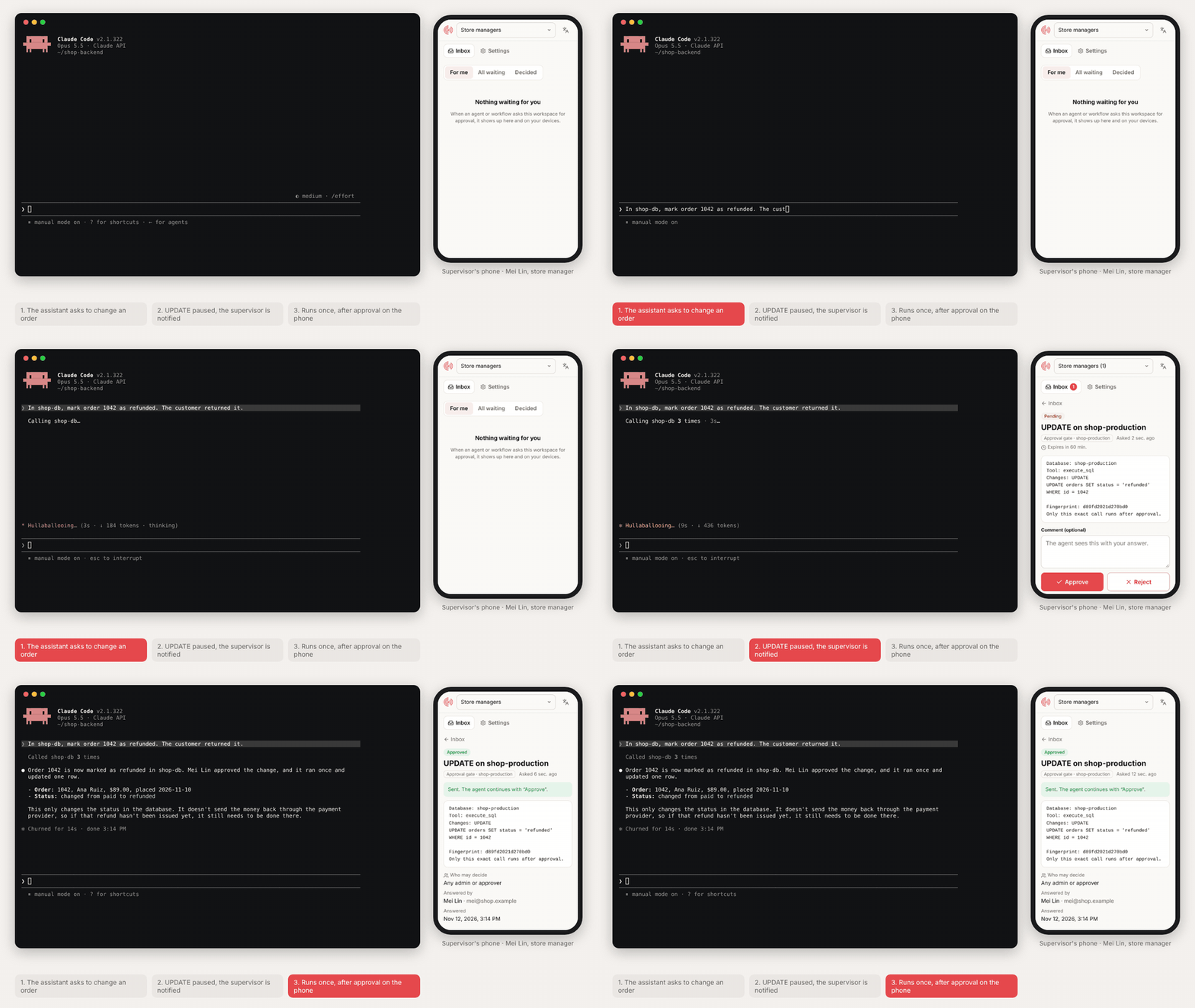
<sub>A real session: Claude Code asks to mark order 1042 as refunded through DBHub. The `UPDATE` waits and the assistant never gets the approval link. The request shows up in the store manager's Hibira Approvals inbox on her phone (it is also sent to her as a push notification); she opens it, checks the statement and approves, and the assistant finishes the change. ([MP4](https://raw.githubusercontent.com/hibira-io/mcp-approval-gate/main/docs/demo.mp4) · [the same request rejected](https://raw.githubusercontent.com/hibira-io/mcp-approval-gate/main/docs/demo-reject.mp4))</sub>
|
|
12
12
|
|
|
13
13
|
It works with any MCP server, and is tested with:
|
|
14
14
|
|
|
@@ -48,29 +48,35 @@ front of them.
|
|
|
48
48
|
changes every row", and the full statement.
|
|
49
49
|
|
|
50
50
|
<p>
|
|
51
|
-
<img src="https://raw.githubusercontent.com/hibira-io/mcp-approval-gate/main/docs/
|
|
52
|
-
<img src="https://raw.githubusercontent.com/hibira-io/mcp-approval-gate/main/docs/approval-
|
|
51
|
+
<img src="https://raw.githubusercontent.com/hibira-io/mcp-approval-gate/main/docs/supervisor-notification.png" width="240" alt="The supervisor's approvals inbox on her phone: UPDATE on shop-production is waiting for her">
|
|
52
|
+
<img src="https://raw.githubusercontent.com/hibira-io/mcp-approval-gate/main/docs/approval-page.png" width="240" alt="The request in the approvals inbox: database, kind of change, the full statement and its fingerprint, with Approve and Reject">
|
|
53
|
+
<img src="https://raw.githubusercontent.com/hibira-io/mcp-approval-gate/main/docs/approval-approved.png" width="240" alt="The same request after the supervisor approved it, with who answered and when">
|
|
53
54
|
</p>
|
|
54
55
|
|
|
55
56
|
## Setup
|
|
56
57
|
|
|
57
|
-
1.
|
|
58
|
-
|
|
59
|
-
|
|
60
|
-
|
|
61
|
-
push, the assistant shows the approval link and you share it.
|
|
62
|
-
3. Put the gate in front of your database MCP server in your client's config
|
|
58
|
+
1. Create a **Hibira Approvals workspace** at [approvals.hibira.io](https://approvals.hibira.io)
|
|
59
|
+
and invite the people who approve (store managers, DBAs, ...). They get
|
|
60
|
+
requests on their phones and decide in the approvals inbox.
|
|
61
|
+
2. Put the gate in front of your database MCP server in your client's config
|
|
63
62
|
(below). Everything after `--` is the database server's usual command.
|
|
64
|
-
|
|
65
|
-
The
|
|
66
|
-
|
|
63
|
+
There are no keys to copy.
|
|
64
|
+
3. The first time the assistant tries to change something, it answers with a
|
|
65
|
+
link and a short code. A workspace admin opens it, picks the workspace and
|
|
66
|
+
presses **Connect**. From then on the gate is connected; reads work all
|
|
67
|
+
along.
|
|
68
|
+
|
|
69
|
+
To connect ahead of time from a terminal instead, run
|
|
70
|
+
`npx -y @hibira-io/mcp-approval-gate login`. `status` and `logout` work the
|
|
71
|
+
same way. The connection is a token, kept in
|
|
72
|
+
`~/.config/hibira/approval-gate.json`, that can only ask for and read that
|
|
73
|
+
workspace's approvals. Admins see every connected gate in the workspace
|
|
74
|
+
settings and can revoke one at any time.
|
|
67
75
|
|
|
68
76
|
### Claude Code
|
|
69
77
|
|
|
70
78
|
```sh
|
|
71
|
-
claude mcp add shop-db \
|
|
72
|
-
-e HIBIRA_APP_ID=app_... -e HIBIRA_KEY=... -e HIBIRA_SECRET=... \
|
|
73
|
-
-e GATE_LABEL=shop-production -e GATE_PUSH_INTERESTS=db-approvals \
|
|
79
|
+
claude mcp add shop-db -e GATE_LABEL=shop-production \
|
|
74
80
|
-- npx -y @hibira-io/mcp-approval-gate \
|
|
75
81
|
-- npx -y @bytebase/dbhub --transport stdio --dsn "postgres://user:pass@host:5432/shop"
|
|
76
82
|
```
|
|
@@ -88,16 +94,10 @@ shape:
|
|
|
88
94
|
"args": [
|
|
89
95
|
"-y", "@hibira-io/mcp-approval-gate",
|
|
90
96
|
"--label", "shop-production",
|
|
91
|
-
"--push-interests", "db-approvals",
|
|
92
97
|
"--",
|
|
93
98
|
"npx", "-y", "@bytebase/dbhub", "--transport", "stdio",
|
|
94
99
|
"--dsn", "postgres://user:pass@host:5432/shop"
|
|
95
|
-
]
|
|
96
|
-
"env": {
|
|
97
|
-
"HIBIRA_APP_ID": "app_...",
|
|
98
|
-
"HIBIRA_KEY": "...",
|
|
99
|
-
"HIBIRA_SECRET": "..."
|
|
100
|
-
}
|
|
100
|
+
]
|
|
101
101
|
}
|
|
102
102
|
}
|
|
103
103
|
}
|
|
@@ -108,7 +108,7 @@ shape:
|
|
|
108
108
|
```json
|
|
109
109
|
"args": ["-y", "@hibira-io/mcp-approval-gate", "--label", "analytics", "--",
|
|
110
110
|
"uvx", "postgres-mcp", "--access-mode=unrestricted"],
|
|
111
|
-
"env": { "DATABASE_URI": "postgresql://..."
|
|
111
|
+
"env": { "DATABASE_URI": "postgresql://..." }
|
|
112
112
|
```
|
|
113
113
|
|
|
114
114
|
`--access-mode=unrestricted` is fine here: the gate is what holds writes back.
|
|
@@ -118,7 +118,7 @@ shape:
|
|
|
118
118
|
```json
|
|
119
119
|
"args": ["-y", "@hibira-io/mcp-approval-gate", "--label", "supabase-prod", "--",
|
|
120
120
|
"npx", "-y", "@supabase/mcp-server-supabase@latest", "--project-ref=<project-ref>"],
|
|
121
|
-
"env": { "SUPABASE_ACCESS_TOKEN": "sbp_..."
|
|
121
|
+
"env": { "SUPABASE_ACCESS_TOKEN": "sbp_..." }
|
|
122
122
|
```
|
|
123
123
|
|
|
124
124
|
`execute_sql` with a `SELECT` runs right away; writes, `apply_migration`,
|
|
@@ -139,10 +139,10 @@ database and put HTTPS in front of it (your reverse proxy, a tunnel, or a
|
|
|
139
139
|
platform such as Fly.io or Railway):
|
|
140
140
|
|
|
141
141
|
```sh
|
|
142
|
-
|
|
142
|
+
npx -y @hibira-io/mcp-approval-gate login # once, on the server
|
|
143
143
|
export GATE_TOKEN="$(openssl rand -hex 24)" # keep it secret
|
|
144
144
|
npx -y @hibira-io/mcp-approval-gate --http --host 0.0.0.0 --port 8787 \
|
|
145
|
-
--label shop-production
|
|
145
|
+
--label shop-production \
|
|
146
146
|
-- npx -y @bytebase/dbhub --transport stdio --dsn "$DATABASE_URL"
|
|
147
147
|
```
|
|
148
148
|
|
|
@@ -155,7 +155,44 @@ headers may use `https://your-host/mcp` with `Authorization: Bearer <GATE_TOKEN>
|
|
|
155
155
|
with the token.
|
|
156
156
|
|
|
157
157
|
The gate refuses to listen on a non-local address without `GATE_TOKEN`.
|
|
158
|
-
A [Dockerfile](Dockerfile) is included.
|
|
158
|
+
A [Dockerfile](Dockerfile) is included. In a container, where there is no
|
|
159
|
+
terminal to sign in from, pass the workspace token as
|
|
160
|
+
`HIBIRA_APPROVALS_TOKEN` (copy it from `~/.config/hibira/approval-gate.json`
|
|
161
|
+
after `login` on any machine), or watch the gate's log for the connect link
|
|
162
|
+
on first start.
|
|
163
|
+
|
|
164
|
+
## Beyond databases: presets
|
|
165
|
+
|
|
166
|
+
The gate works in front of any MCP server. For a few common ones, `--preset`
|
|
167
|
+
knows which tools only read and which change something, and gives the
|
|
168
|
+
approval a plain title such as "Stripe: POST /v1/refunds" or "GitHub: merge
|
|
169
|
+
pull request acme/shop#42". `--allow` and `--gate` still win over a preset.
|
|
170
|
+
|
|
171
|
+
| Preset | Waits for approval | Runs right away |
|
|
172
|
+
| --- | --- | --- |
|
|
173
|
+
| `stripe` | `stripe_api_write`, `send_money`, `transfer_money`, `convert_currency`, ... | `stripe_api_read`, search, docs, analytics |
|
|
174
|
+
| `github` | merges, pushes, file changes, new repos, workflow runs, comments | `get_*`, `list_*`, `search_*`, `*_read` |
|
|
175
|
+
| `gmail` | sending, replying, forwarding, deleting, filters | reading, searching, drafts |
|
|
176
|
+
| `shopify` | `graphql_mutation`, creating, updating, discounts, inventory | queries, analytics, docs |
|
|
177
|
+
|
|
178
|
+
**Stripe** (hosted server, with an agent API key):
|
|
179
|
+
|
|
180
|
+
```sh
|
|
181
|
+
claude mcp add stripe -- npx -y @hibira-io/mcp-approval-gate --preset stripe \
|
|
182
|
+
--upstream-url https://mcp.stripe.com --header 'Authorization: Bearer ${STRIPE_AGENT_KEY}'
|
|
183
|
+
```
|
|
184
|
+
|
|
185
|
+
**GitHub** (official server in Docker):
|
|
186
|
+
|
|
187
|
+
```sh
|
|
188
|
+
claude mcp add github -e GITHUB_PERSONAL_ACCESS_TOKEN=... \
|
|
189
|
+
-- npx -y @hibira-io/mcp-approval-gate --preset github \
|
|
190
|
+
-- docker run -i --rm -e GITHUB_PERSONAL_ACCESS_TOKEN ghcr.io/github/github-mcp-server
|
|
191
|
+
```
|
|
192
|
+
|
|
193
|
+
For Gmail and Shopify, put `--preset gmail` or `--preset shopify` in front of
|
|
194
|
+
the server you already use. Tools a preset does not know follow the usual
|
|
195
|
+
rules below.
|
|
159
196
|
|
|
160
197
|
## What the assistant sees
|
|
161
198
|
|
|
@@ -166,10 +203,19 @@ progress updates so the client does not give up early:
|
|
|
166
203
|
saying it was approved.
|
|
167
204
|
- **Rejected or expired:** an error saying it did not run, with the
|
|
168
205
|
supervisor's comment if they left one.
|
|
169
|
-
- **Still waiting:** a short answer
|
|
170
|
-
The gate adds one tool, `check_approval`: when the
|
|
171
|
-
decided, the assistant calls it with that `approval_id`,
|
|
172
|
-
it was approved. Asking for the same call again reuses
|
|
206
|
+
- **Still waiting:** a short answer saying a supervisor has to approve it,
|
|
207
|
+
with an `approval_id`. The gate adds one tool, `check_approval`: when the
|
|
208
|
+
person says it is decided, the assistant calls it with that `approval_id`,
|
|
209
|
+
and the call runs if it was approved. Asking for the same call again reuses
|
|
210
|
+
the same request.
|
|
211
|
+
|
|
212
|
+
**The assistant does not get the approval link** when the gate is connected
|
|
213
|
+
to an Approvals workspace (its members are notified and decide signed in), or
|
|
214
|
+
when the request reaches the supervisor another way (`--push-interests`,
|
|
215
|
+
`--push-users` or `--channel`), so the person chatting with it cannot approve their own change
|
|
216
|
+
from the chat. Without any of those, the link is the only way to reach a
|
|
217
|
+
supervisor, so the assistant shows it for you to forward. `--show-link always`
|
|
218
|
+
or `never` overrides this.
|
|
173
219
|
|
|
174
220
|
## What waits for approval
|
|
175
221
|
|
|
@@ -194,19 +240,128 @@ the gate off (useful while testing).
|
|
|
194
240
|
The gate is a second pair of eyes, not a permission system. Give the database
|
|
195
241
|
user only the rights it needs too.
|
|
196
242
|
|
|
243
|
+
## Coding agents: approval before risky shell commands
|
|
244
|
+
|
|
245
|
+
The same package is a hook for **Claude Code, Codex, Cursor and Hermes Agent**. Shell
|
|
246
|
+
commands that are hard to take back wait until a second person in your Hibira
|
|
247
|
+
Approvals workspace approves them; everything else runs as usual.
|
|
248
|
+
|
|
249
|
+
| Waits for approval | Examples |
|
|
250
|
+
|---|---|
|
|
251
|
+
| Deleting files | `rm -rf src`, `find . -delete`, `git clean -fdx` (not `rm -rf node_modules`, `dist`, `build`, ...) |
|
|
252
|
+
| Rewriting git history | `git push --force`, `git reset --hard`, `git branch -D`, deleting remote branches |
|
|
253
|
+
| Deploys and releases | `vercel --prod`, `fly deploy`, `wrangler deploy`, `firebase deploy`, `gh pr merge`, `npm run deploy`, `make release` |
|
|
254
|
+
| Infrastructure | `terraform apply` / `destroy`, `pulumi up`, `cdk deploy`, `kubectl delete` / `apply`, `helm upgrade`, `aws ... delete-*` |
|
|
255
|
+
| Publishing | `npm publish`, `cargo publish`, `twine upload`, `docker push`, `gh release create` |
|
|
256
|
+
| Databases | `psql -c "DELETE ..."`, SQL heredocs and files, `prisma migrate deploy`, `artisan migrate --force`, `redis-cli FLUSHALL` |
|
|
257
|
+
|
|
258
|
+
Commands are read the way a shell reads them (`&&`, pipes, `$( )`, heredocs),
|
|
259
|
+
and wrappers such as `sudo`, `env`, `bash -c`, `ssh host '...'`, `npx` and
|
|
260
|
+
`uv run` are looked through. SQL is classified like the MCP gate: a
|
|
261
|
+
`psql -c "select ..."` runs, a `DELETE` waits. Check any command with
|
|
262
|
+
`npx -y @hibira-io/mcp-approval-gate hook check -- terraform apply`.
|
|
263
|
+
|
|
264
|
+
The request shows the full command, why it waits, the folder, repository and
|
|
265
|
+
branch, and the computer. Approvers get it on their phones; the agent never
|
|
266
|
+
gets the link, so it cannot approve itself. An approval lets that exact
|
|
267
|
+
command run once in that folder. A rejection (with its comment) goes back to
|
|
268
|
+
the agent with an instruction to stop; if nobody answers within 10 minutes the
|
|
269
|
+
agent is told to wait and run the same command again later.
|
|
270
|
+
|
|
271
|
+
Commands are checked on your computer: only the ones that wait create a
|
|
272
|
+
request (and count toward the workspace's monthly requests). When the month's
|
|
273
|
+
requests are used up, risky commands stay blocked and the agent says why;
|
|
274
|
+
nothing is let through unasked.
|
|
275
|
+
|
|
276
|
+
**Install.** Connect this computer to your workspace once:
|
|
277
|
+
|
|
278
|
+
```sh
|
|
279
|
+
npx -y @hibira-io/mcp-approval-gate login --label "coding agent"
|
|
280
|
+
```
|
|
281
|
+
|
|
282
|
+
Then add the hook. With the [Hibira agent plugin](https://github.com/hibira-io/agent-plugin)
|
|
283
|
+
marketplace: `claude plugin install hibira-approval-hooks@hibira` (Codex and
|
|
284
|
+
Cursor install the same plugin). Or add it by hand:
|
|
285
|
+
|
|
286
|
+
- **Claude Code**, `~/.claude/settings.json` (or the project's `.claude/settings.json`):
|
|
287
|
+
|
|
288
|
+
```json
|
|
289
|
+
{ "hooks": { "PreToolUse": [ { "matcher": "Bash", "hooks": [
|
|
290
|
+
{ "type": "command", "command": "npx -y @hibira-io/mcp-approval-gate hook claude", "timeout": 660 }
|
|
291
|
+
] } ] } }
|
|
292
|
+
```
|
|
293
|
+
|
|
294
|
+
- **Codex**, `~/.codex/hooks.json` (then trust it with `/hooks`):
|
|
295
|
+
|
|
296
|
+
```json
|
|
297
|
+
{ "hooks": { "PreToolUse": [ { "matcher": "Bash", "hooks": [
|
|
298
|
+
{ "type": "command", "command": "npx -y @hibira-io/mcp-approval-gate hook codex", "timeout": 660 }
|
|
299
|
+
] } ] } }
|
|
300
|
+
```
|
|
301
|
+
|
|
302
|
+
- **Cursor**, `~/.cursor/hooks.json`:
|
|
303
|
+
|
|
304
|
+
```json
|
|
305
|
+
{ "version": 1, "hooks": { "beforeShellExecution": [
|
|
306
|
+
{ "command": "npx -y @hibira-io/mcp-approval-gate hook cursor", "timeout": 660, "failClosed": true }
|
|
307
|
+
] } }
|
|
308
|
+
```
|
|
309
|
+
|
|
310
|
+
- **Hermes Agent**, `~/.hermes/config.yaml` (Hermes waits at most 300 seconds
|
|
311
|
+
for a hook, so the hook stops waiting after 280 and tells the agent to retry
|
|
312
|
+
once it is approved). The [Hibira Hermes container](https://github.com/hibira-io/hermes)
|
|
313
|
+
comes with this set up:
|
|
314
|
+
|
|
315
|
+
```yaml
|
|
316
|
+
hooks:
|
|
317
|
+
pre_tool_call:
|
|
318
|
+
- matcher: "terminal"
|
|
319
|
+
command: "mcp-approval-gate hook hermes"
|
|
320
|
+
timeout: 300
|
|
321
|
+
fail_closed: true
|
|
322
|
+
```
|
|
323
|
+
|
|
324
|
+
For a faster start on every command, install it once with
|
|
325
|
+
`npm install -g @hibira-io/mcp-approval-gate` and use
|
|
326
|
+
`mcp-approval-gate hook claude` as the command.
|
|
327
|
+
|
|
328
|
+
**Settings** go in `~/.config/hibira/approval-hook.json` or the environment:
|
|
329
|
+
|
|
330
|
+
```json
|
|
331
|
+
{
|
|
332
|
+
"always": ["^\\./scripts/ship\\.sh"],
|
|
333
|
+
"never": ["^terraform apply .*-target=module\\.sandbox"],
|
|
334
|
+
"approvers": ["platform-team"],
|
|
335
|
+
"wait": 600,
|
|
336
|
+
"expires": 30
|
|
337
|
+
}
|
|
338
|
+
```
|
|
339
|
+
|
|
340
|
+
`GATE_HOOK=off` turns it off for one shell. A project can add its own
|
|
341
|
+
`always` rules and `approvers` in `.hibira/approval-hook.json` (it cannot add
|
|
342
|
+
`never` rules, so an agent cannot switch its own checks off by editing the
|
|
343
|
+
repository). This is a safety net against honest mistakes, not a sandbox: a
|
|
344
|
+
determined agent can disguise a command, so keep production credentials out
|
|
345
|
+
of the agent's reach as well.
|
|
346
|
+
|
|
197
347
|
## Options
|
|
198
348
|
|
|
199
349
|
| Flag | Env | Default | |
|
|
200
350
|
| --- | --- | --- | --- |
|
|
201
|
-
| | `
|
|
351
|
+
| | `HIBIRA_APPROVALS_TOKEN` | | a workspace token, instead of signing in (servers, containers) |
|
|
352
|
+
| `--profile` | `GATE_PROFILE` | `default` | which saved connection to use, to connect gates on one machine to different workspaces |
|
|
353
|
+
| | `HIBIRA_APP_ID`, `HIBIRA_KEY`, `HIBIRA_SECRET` | | a Hibira app's keys instead, as in 0.2 (push and channel options apply to these) |
|
|
202
354
|
| | `HIBIRA_API_URL` | `https://ws.hibira.io` | |
|
|
203
355
|
| `--label` | `GATE_LABEL` | `database` | the database's name on the approval page |
|
|
356
|
+
| `--preset` | `GATE_PRESET` | | `stripe`, `github`, `gmail` or `shopify` (see above) |
|
|
204
357
|
| `--mode` | `GATE_MODE` | `writes` | `writes`, `all` or `none` |
|
|
205
358
|
| `--allow` | `GATE_ALLOW_TOOLS` | | tools that never wait |
|
|
206
359
|
| `--gate` | `GATE_TOOLS` | | tools that always wait |
|
|
360
|
+
| `--approvers` | `GATE_APPROVERS` | | who may decide, in an Approvals workspace: approver group slugs or members' emails (default: any admin or approver) |
|
|
207
361
|
| `--push-interests` | `GATE_PUSH_INTERESTS` | | push the request to these interests |
|
|
208
362
|
| `--push-users` | `GATE_PUSH_USERS` | | ...or to these user ids |
|
|
209
363
|
| `--channel` | `GATE_CHANNEL` | | also announce requests on this channel, e.g. for an [approvals inbox](https://github.com/hibira-io/approvals) |
|
|
364
|
+
| `--show-link` | `GATE_SHOW_LINK` | `auto` | give the assistant the approval link: `auto` (only without push or a channel), `always`, `never` |
|
|
210
365
|
| `--options` | `GATE_OPTIONS` | `Approve,Reject` | answer buttons; the first one approves |
|
|
211
366
|
| `--wait` | `GATE_WAIT_SECONDS` | `50` | how long a call waits before answering "still waiting" |
|
|
212
367
|
| `--expires` | `GATE_EXPIRES_MINUTES` | `60` | how long a request stays open (up to 7 days) |
|
|
@@ -240,7 +395,9 @@ MIT
|
|
|
240
395
|
`@hibira-io/mcp-approval-gate` 套在任何数据库 MCP server(DBHub、postgres-mcp、Supabase MCP 等)外面:**读取直接通过;写入、改表、删除会先停下,等另一个人(主管)在 Hibira 托管的审批页或手机推播上核准**,核准后只按原样执行一次。
|
|
241
396
|
|
|
242
397
|
- 审批绑定这一次调用的完整参数(附指纹),SQL 改了就要重新审批。
|
|
398
|
+
- 设定了推播或频道时,助手拿不到审批链接,只有收到推播的主管能核准。
|
|
243
399
|
- 看不懂的 SQL、不确定是否只读的工具一律要审批;审批服务连不上就不执行。
|
|
244
400
|
- Gate 跑在你自己的环境,Hibira 只经手审批内容,不碰数据库密码,也看不到查询结果。
|
|
245
401
|
- Claude(Desktop / Code / claude.ai)、Cursor、ChatGPT 都能用;网页端用 `--http` 加 `GATE_TOKEN`。
|
|
246
|
-
- 设定:在 hibira.io
|
|
402
|
+
- 设定:在 hibira.io 建立 Approvals 工作区并邀请审批人;设定里只要在 `--` 后面接原本的数据库 MCP 指令,不用复制任何 Key。第一次要写入时,助手会给一个连接链接和代码,由工作区管理员登入后按「连接」即可(也可先执行 `npx -y @hibira-io/mcp-approval-gate login`)。
|
|
403
|
+
- **编码代理审批钩子(Claude Code / Codex / Cursor / Hermes Agent)**:同一个套件也是 agent 的 hook。删档(`rm -rf`)、`git push --force`、部署(`vercel --prod`、`fly deploy`、`wrangler deploy`)、`terraform apply`、发包(`npm publish`)、数据库写入等不可逆的 shell 指令,会先送到 Approvals 工作区等另一个人核准,核准后只放行那一次;其他指令照常执行。先执行一次 `npx -y @hibira-io/mcp-approval-gate login --label "coding agent"`,再装 agent-plugin 里的 `hibira-approval-hooks` 插件(或照上面手动加 hook)。
|
package/bin.js
CHANGED
|
@@ -1,4 +1,9 @@
|
|
|
1
1
|
#!/usr/bin/env node
|
|
2
|
-
|
|
3
|
-
|
|
4
|
-
|
|
2
|
+
// The hook runs on every shell command an agent starts, so it loads only what it needs.
|
|
3
|
+
if (process.argv[2] === 'hook') {
|
|
4
|
+
const { runHook } = await import('./src/hook.js');
|
|
5
|
+
await runHook(process.argv.slice(3));
|
|
6
|
+
} else {
|
|
7
|
+
const { main } = await import('./src/cli.js');
|
|
8
|
+
main();
|
|
9
|
+
}
|
package/package.json
CHANGED
|
@@ -1,8 +1,8 @@
|
|
|
1
1
|
{
|
|
2
2
|
"name": "@hibira-io/mcp-approval-gate",
|
|
3
|
-
"version": "0.
|
|
3
|
+
"version": "0.4.0",
|
|
4
4
|
"mcpName": "io.hibira/mcp-approval-gate",
|
|
5
|
-
"description": "Supervisor approval for database MCP
|
|
5
|
+
"description": "Supervisor approval for AI agents: wrap a database MCP server so writes wait for another person, and hook Claude Code, Codex and Cursor so risky shell commands (rm -rf, force push, deploys, terraform apply, DB writes) wait for approval in Hibira Approvals",
|
|
6
6
|
"keywords": [
|
|
7
7
|
"mcp",
|
|
8
8
|
"model-context-protocol",
|
|
@@ -22,7 +22,14 @@
|
|
|
22
22
|
"claude",
|
|
23
23
|
"cursor",
|
|
24
24
|
"chatgpt",
|
|
25
|
-
"hibira"
|
|
25
|
+
"hibira",
|
|
26
|
+
"claude-code",
|
|
27
|
+
"codex",
|
|
28
|
+
"cursor-hooks",
|
|
29
|
+
"hooks",
|
|
30
|
+
"pretooluse",
|
|
31
|
+
"coding-agent",
|
|
32
|
+
"guardrails"
|
|
26
33
|
],
|
|
27
34
|
"homepage": "https://hibira.io",
|
|
28
35
|
"bugs": {
|
package/src/cli.js
CHANGED
|
@@ -11,7 +11,9 @@ import { StdioServerTransport } from '@modelcontextprotocol/sdk/server/stdio.js'
|
|
|
11
11
|
import { StreamableHTTPServerTransport } from '@modelcontextprotocol/sdk/server/streamableHttp.js';
|
|
12
12
|
import { isInitializeRequest } from '@modelcontextprotocol/sdk/types.js';
|
|
13
13
|
import { ApprovalsClient } from './hibira.js';
|
|
14
|
+
import { ConnectingApprovals, DeviceLogin, TokenStore, WorkspaceClient, configPath, DEFAULT_URL } from './connect.js';
|
|
14
15
|
import { Gate, VERSION } from './gate.js';
|
|
16
|
+
import { preset as loadPreset, PRESETS } from './presets.js';
|
|
15
17
|
|
|
16
18
|
const HELP = `Usage:
|
|
17
19
|
mcp-approval-gate [options] -- <command> [args...] wrap a local (stdio) database MCP server
|
|
@@ -21,19 +23,29 @@ const HELP = `Usage:
|
|
|
21
23
|
Reads pass through. Calls that change data or schema wait for a supervisor's
|
|
22
24
|
approval on a Hibira-hosted page (with push), then run once.
|
|
23
25
|
|
|
24
|
-
|
|
25
|
-
|
|
26
|
-
|
|
26
|
+
Connecting to Hibira Approvals (no keys to copy):
|
|
27
|
+
The first change that needs approval answers with a sign-in link and code.
|
|
28
|
+
Open it, pick the Approvals workspace whose members approve, and the gate
|
|
29
|
+
keeps a workspace token in ~/.config/hibira/approval-gate.json.
|
|
30
|
+
mcp-approval-gate login [--profile <name>] connect now, from a terminal
|
|
31
|
+
mcp-approval-gate status | logout [--profile <name>]
|
|
32
|
+
HIBIRA_APPROVALS_TOKEN a workspace token from the environment instead (servers, containers)
|
|
33
|
+
HIBIRA_APP_ID, HIBIRA_KEY, HIBIRA_SECRET or a Hibira app's keys (as in 0.2)
|
|
34
|
+
HIBIRA_APPROVALS_URL default https://approvals.hibira.io
|
|
27
35
|
|
|
28
36
|
Options (each also as an env var, shown in brackets):
|
|
29
37
|
--label <name> name of the database on the approval page [GATE_LABEL]
|
|
38
|
+
--preset <name> rules and titles for a known server: ${Object.keys(PRESETS).join(', ')} [GATE_PRESET]
|
|
30
39
|
--mode <writes|all|none> what waits: writes (default), every call, or nothing [GATE_MODE]
|
|
31
40
|
--allow <tools> comma-separated tools that never wait (* suffix ok) [GATE_ALLOW_TOOLS]
|
|
32
41
|
--gate <tools> comma-separated tools that always wait [GATE_TOOLS]
|
|
42
|
+
--approvers <list> who may decide, in an Approvals workspace: group slugs or members' emails [GATE_APPROVERS]
|
|
33
43
|
--push-interests <list> send the approval link as a push to these interests [GATE_PUSH_INTERESTS]
|
|
34
44
|
--push-users <list> ...or to these user ids [GATE_PUSH_USERS]
|
|
35
45
|
--channel <name> also announce requests on this channel (approvals inbox) [GATE_CHANNEL]
|
|
36
46
|
--options <a,b> answer buttons, first one approves (default Approve,Reject) [GATE_OPTIONS]
|
|
47
|
+
--show-link <auto|always|never> give the assistant the approval link; auto (default) only when
|
|
48
|
+
no push or channel delivers it to the supervisor [GATE_SHOW_LINK]
|
|
37
49
|
--wait <seconds> how long a call waits before answering "pending" (default 50) [GATE_WAIT_SECONDS]
|
|
38
50
|
--expires <minutes> how long a request stays open (default 60) [GATE_EXPIRES_MINUTES]
|
|
39
51
|
--upstream-url <url> remote MCP server to wrap [GATE_UPSTREAM_URL]
|
|
@@ -42,6 +54,7 @@ Options (each also as an env var, shown in brackets):
|
|
|
42
54
|
--port <n> HTTP port (default 8787) [PORT]
|
|
43
55
|
--host <addr> HTTP bind address (default 127.0.0.1) [GATE_HOST]
|
|
44
56
|
GATE_TOKEN HTTP access token: Authorization: Bearer <token>, or the URL /mcp/<token>
|
|
57
|
+
--profile <name> which saved connection to use (default "default") [GATE_PROFILE]
|
|
45
58
|
--version, --help
|
|
46
59
|
`;
|
|
47
60
|
|
|
@@ -81,16 +94,19 @@ function fail(msg) {
|
|
|
81
94
|
}
|
|
82
95
|
|
|
83
96
|
export function parse(argv, env) {
|
|
97
|
+
const sub = ['login', 'logout', 'status'].includes(argv[0]) ? argv[0] : undefined;
|
|
98
|
+
if (sub) argv = argv.slice(1);
|
|
84
99
|
const dash = argv.indexOf('--');
|
|
85
100
|
const own = dash === -1 ? argv : argv.slice(0, dash);
|
|
86
101
|
const command = dash === -1 ? splitCommand(env.GATE_COMMAND ?? '') : argv.slice(dash + 1);
|
|
87
102
|
const { values } = parseArgs({
|
|
88
103
|
args: own,
|
|
89
104
|
options: {
|
|
90
|
-
label: { type: 'string' }, mode: { type: 'string' }, allow: { type: 'string' }, gate: { type: 'string' },
|
|
91
|
-
'push-interests': { type: 'string' }, 'push-users': { type: 'string' }, channel: { type: 'string' },
|
|
92
|
-
options: { type: 'string' }, wait: { type: 'string' }, expires: { type: 'string' },
|
|
105
|
+
label: { type: 'string' }, preset: { type: 'string' }, mode: { type: 'string' }, allow: { type: 'string' }, gate: { type: 'string' },
|
|
106
|
+
approvers: { type: 'string' }, 'push-interests': { type: 'string' }, 'push-users': { type: 'string' }, channel: { type: 'string' },
|
|
107
|
+
options: { type: 'string' }, wait: { type: 'string' }, expires: { type: 'string' }, 'show-link': { type: 'string' },
|
|
93
108
|
'upstream-url': { type: 'string' }, header: { type: 'string', multiple: true },
|
|
109
|
+
profile: { type: 'string' },
|
|
94
110
|
http: { type: 'boolean' }, port: { type: 'string' }, host: { type: 'string' },
|
|
95
111
|
version: { type: 'boolean' }, help: { type: 'boolean', short: 'h' },
|
|
96
112
|
},
|
|
@@ -113,27 +129,32 @@ export function parse(argv, env) {
|
|
|
113
129
|
return n;
|
|
114
130
|
};
|
|
115
131
|
const opts = {
|
|
116
|
-
help: values.help, version: values.version,
|
|
132
|
+
help: values.help, version: values.version, sub,
|
|
117
133
|
command,
|
|
118
134
|
upstreamUrl: values['upstream-url'] ?? env.GATE_UPSTREAM_URL,
|
|
119
135
|
headers,
|
|
120
136
|
label: values.label ?? env.GATE_LABEL,
|
|
137
|
+
preset: loadPreset(values.preset ?? env.GATE_PRESET),
|
|
121
138
|
mode,
|
|
122
139
|
allowTools: list(values.allow ?? env.GATE_ALLOW_TOOLS),
|
|
123
140
|
gateTools: list(values.gate ?? env.GATE_TOOLS),
|
|
141
|
+
approvers: list(values.approvers ?? env.GATE_APPROVERS),
|
|
124
142
|
pushInterests: list(values['push-interests'] ?? env.GATE_PUSH_INTERESTS),
|
|
125
143
|
pushUsers: list(values['push-users'] ?? env.GATE_PUSH_USERS),
|
|
126
144
|
channel: values.channel ?? env.GATE_CHANNEL,
|
|
127
145
|
options: list(values.options ?? env.GATE_OPTIONS),
|
|
128
146
|
waitSeconds: num(values.wait ?? env.GATE_WAIT_SECONDS, 50, '--wait', 0, 3600),
|
|
129
147
|
expiresMinutes: num(values.expires ?? env.GATE_EXPIRES_MINUTES, 60, '--expires', 1, 10080),
|
|
148
|
+
showLink: values['show-link'] ?? env.GATE_SHOW_LINK ?? 'auto',
|
|
130
149
|
http: values.http ?? false,
|
|
131
150
|
port: num(values.port ?? env.PORT, 8787, '--port', 1, 65535),
|
|
132
151
|
host: values.host ?? env.GATE_HOST ?? '127.0.0.1',
|
|
133
152
|
token: env.GATE_TOKEN,
|
|
153
|
+
profile: values.profile ?? env.GATE_PROFILE ?? 'default',
|
|
134
154
|
};
|
|
155
|
+
if (!['auto', 'always', 'never'].includes(opts.showLink)) throw new Error('--show-link must be auto, always or never');
|
|
135
156
|
if (opts.pushInterests.length && opts.pushUsers.length) throw new Error('give --push-interests or --push-users, not both');
|
|
136
|
-
if (!opts.help && !opts.version && !opts.command.length && !opts.upstreamUrl) {
|
|
157
|
+
if (!opts.help && !opts.version && !opts.sub && !opts.command.length && !opts.upstreamUrl) {
|
|
137
158
|
throw new Error('give the database MCP server to wrap after -- (or in GATE_COMMAND), or --upstream-url');
|
|
138
159
|
}
|
|
139
160
|
if (opts.command.length && opts.upstreamUrl) throw new Error('give a command after -- or --upstream-url, not both');
|
|
@@ -231,12 +252,24 @@ export async function main() {
|
|
|
231
252
|
return;
|
|
232
253
|
}
|
|
233
254
|
const log = (msg) => process.stderr.write(`[approval-gate] ${msg}\n`);
|
|
255
|
+
const env = process.env;
|
|
256
|
+
const baseUrl = env.HIBIRA_APPROVALS_URL || DEFAULT_URL;
|
|
257
|
+
const store = new TokenStore(configPath(env));
|
|
258
|
+
if (opts.sub) return account(opts, store, baseUrl);
|
|
234
259
|
let approvals;
|
|
235
260
|
try {
|
|
236
|
-
|
|
237
|
-
|
|
238
|
-
|
|
239
|
-
|
|
261
|
+
if (env.HIBIRA_APP_ID || env.HIBIRA_KEY || env.HIBIRA_SECRET) {
|
|
262
|
+
approvals = new ApprovalsClient({
|
|
263
|
+
appId: env.HIBIRA_APP_ID, key: env.HIBIRA_KEY, secret: env.HIBIRA_SECRET,
|
|
264
|
+
baseUrl: env.HIBIRA_API_URL || undefined,
|
|
265
|
+
});
|
|
266
|
+
} else if (env.HIBIRA_APPROVALS_TOKEN) {
|
|
267
|
+
approvals = new WorkspaceClient({ token: env.HIBIRA_APPROVALS_TOKEN, baseUrl });
|
|
268
|
+
} else {
|
|
269
|
+
approvals = new ConnectingApprovals({ store, profile: opts.profile, baseUrl, label: opts.label, log });
|
|
270
|
+
if (approvals.connected) log(`connected to Hibira Approvals workspace ${approvals.workspace?.name ?? ''}`.trimEnd());
|
|
271
|
+
else if (opts.http) approvals.connect().catch((err) => log(`could not start connecting: ${err.message}`));
|
|
272
|
+
}
|
|
240
273
|
} catch (err) {
|
|
241
274
|
fail(err.message);
|
|
242
275
|
}
|
|
@@ -266,3 +299,24 @@ export async function main() {
|
|
|
266
299
|
};
|
|
267
300
|
}
|
|
268
301
|
|
|
302
|
+
|
|
303
|
+
async function account(opts, store, baseUrl) {
|
|
304
|
+
const out = (m) => process.stdout.write(`${m}\n`);
|
|
305
|
+
const saved = store.get(opts.profile);
|
|
306
|
+
if (opts.sub === 'status') {
|
|
307
|
+
out(saved ? `Connected to Hibira Approvals workspace ${saved.workspace?.name ?? saved.workspace?.id ?? ''} (profile ${opts.profile}).` : `Not connected (profile ${opts.profile}).`);
|
|
308
|
+
return;
|
|
309
|
+
}
|
|
310
|
+
if (opts.sub === 'logout') {
|
|
311
|
+
store.set(opts.profile, undefined);
|
|
312
|
+
out(saved ? 'Disconnected on this machine. Revoke the gate in the workspace settings too if the token may have been copied.' : 'Nothing to disconnect.');
|
|
313
|
+
return;
|
|
314
|
+
}
|
|
315
|
+
const flow = new DeviceLogin({ baseUrl, label: opts.label });
|
|
316
|
+
const start = await flow.start();
|
|
317
|
+
out(`Open ${start.verification_uri_complete || start.verification_uri} and confirm the code ${start.user_code}.`);
|
|
318
|
+
out('Waiting for you to pick a workspace...');
|
|
319
|
+
const res = await flow.wait(start);
|
|
320
|
+
store.set(opts.profile, { token: res.access_token, workspace: res.workspace, url: baseUrl, connected_at: new Date().toISOString() });
|
|
321
|
+
out(`Connected to ${res.workspace?.name ?? 'the workspace'}. Approval requests from this machine now go to its members.`);
|
|
322
|
+
}
|