@grundyjs/algiviz 0.8.1 → 0.8.3
This diff represents the content of publicly available package versions that have been released to one of the supported registries. The information contained in this diff is provided for informational purposes only and reflects changes between package versions as they appear in their respective public registries.
- package/CHANGELOG.md +15 -0
- package/README.md +93 -526
- package/package.json +1 -1
- package/ru/README.md +93 -556
package/README.md
CHANGED
|
@@ -4,13 +4,6 @@
|
|
|
4
4
|
|
|
5
5
|
**Your algorithms and objects. Step-by-step playback and custom rendering.**
|
|
6
6
|
|
|
7
|
-
|
|
8
|
-
|
|
9
|
-
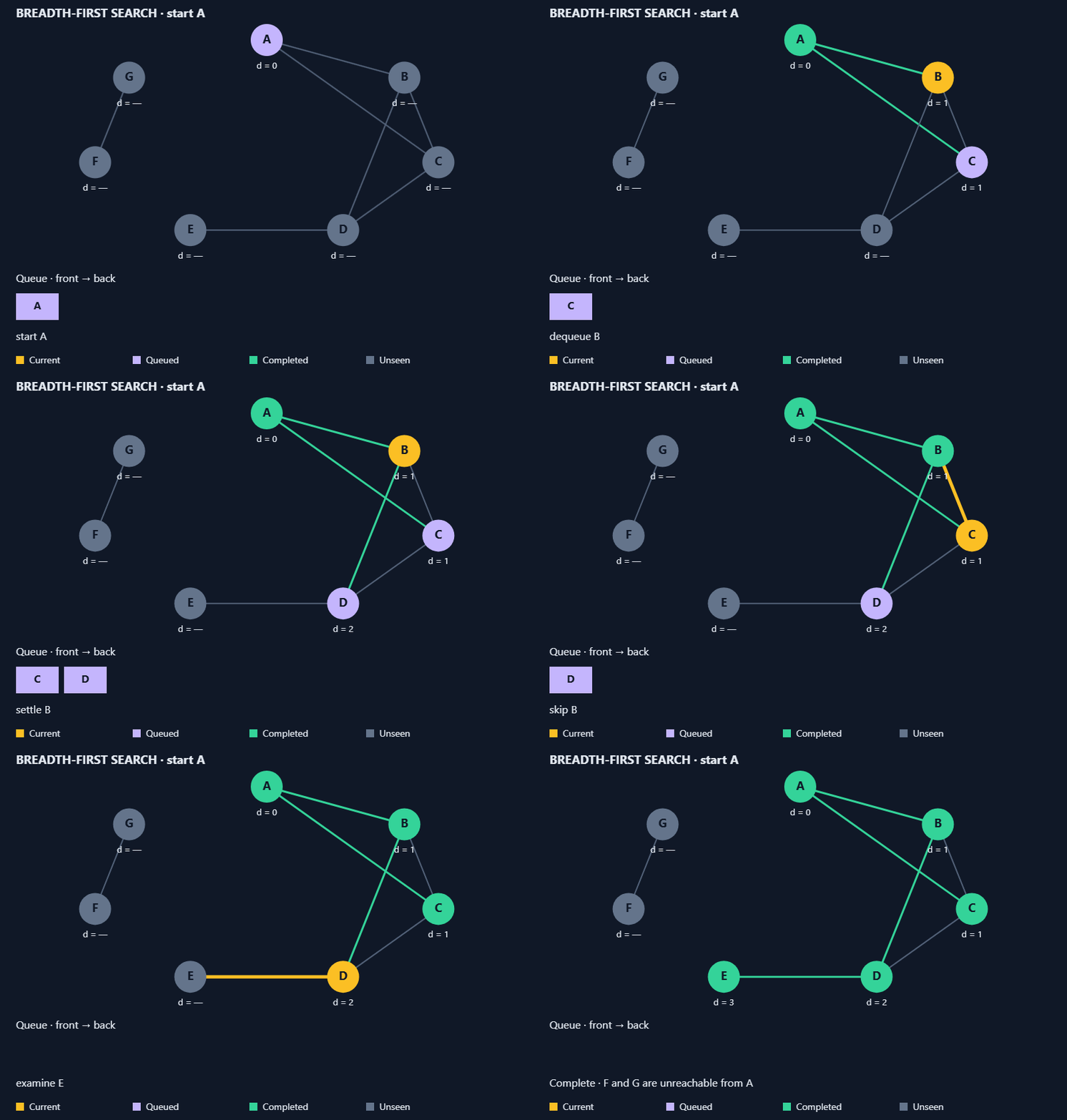
*An application-owned BFS algorithm with custom objects. Exported with
|
|
10
|
-
[CanvasTake](https://github.com/urffin/canvas-take) —
|
|
11
|
-
[try an interactive sorting demo](https://grundyjs.ru/algorithms/insertion-sort/)
|
|
12
|
-
or explore the [BFS source](https://github.com/urffin/algiviz/blob/master/examples/graph-demo.mjs).*
|
|
13
|
-
|
|
14
7
|
A TypeScript toolkit for building interactive algorithm explanations. Write your
|
|
15
8
|
algorithm as a generator, emit immutable states and choose how your objects look.
|
|
16
9
|
AlgiViz handles playback and scene matching; optional array operations and a Canvas
|
|
@@ -19,7 +12,7 @@ renderer help you get started.
|
|
|
19
12
|
[Live sorting demo](https://grundyjs.ru/algorithms/insertion-sort/) ·
|
|
20
13
|
[Library overview](https://grundyjs.ru/algiviz/) ·
|
|
21
14
|
[npm package](https://www.npmjs.com/package/@grundyjs/algiviz) ·
|
|
22
|
-
[Minimal example source](https://github.com/urffin/algiviz/blob/master/examples/
|
|
15
|
+
[Minimal example source](https://github.com/urffin/algiviz/blob/master/examples/visualization-pipeline.html)
|
|
23
16
|
|
|
24
17
|
- **Your algorithm:** control the loops, conditions and order of operations.
|
|
25
18
|
- **Your objects:** define custom types and handlers for Canvas, SVG or another target.
|
|
@@ -30,33 +23,7 @@ renderer help you get started.
|
|
|
30
23
|
|
|
31
24
|
Use it for educational demos, interactive articles and algorithm walkthroughs.
|
|
32
25
|
Algorithms and layouts belong to your application; AlgiViz provides the playback
|
|
33
|
-
and rendering API.
|
|
34
|
-
|
|
35
|
-
## Start with one custom object
|
|
36
|
-
|
|
37
|
-
The [standalone page](https://github.com/urffin/algiviz/blob/master/examples/minimal.html)
|
|
38
|
-
moves one token with a generator and a custom Canvas handler. It uses only public
|
|
39
|
-
package imports, without the shared demo controller. Copy its
|
|
40
|
-
[complete module](https://github.com/urffin/algiviz/blob/master/examples/minimal.mjs)
|
|
41
|
-
into your application and connect a canvas:
|
|
42
|
-
|
|
43
|
-
```js
|
|
44
|
-
import { createTokenPlayer } from './minimal.mjs';
|
|
45
|
-
|
|
46
|
-
const canvas = document.querySelector('canvas');
|
|
47
|
-
const player = createTokenPlayer(canvas.getContext('2d'));
|
|
48
|
-
player.advance(100); // Advance playback by 100 ms.
|
|
49
|
-
// Call advance(deltaMs) from your controls or animation loop.
|
|
50
|
-
// Call player.dispose() when removing the visualization.
|
|
51
|
-
```
|
|
52
|
-
|
|
53
|
-
[Follow the walkthrough](https://github.com/urffin/algiviz/blob/master/docs/minimal-example.md)
|
|
54
|
-
for local setup, snapshot ownership and lifecycle. For a larger custom-object
|
|
55
|
-
example, see the [graph BFS walkthrough](https://github.com/urffin/algiviz/blob/master/docs/custom-graph-example.md).
|
|
56
|
-
|
|
57
|
-
For a complete TypeScript integration with two object types and Play/Pause/Restart,
|
|
58
|
-
see [custom-objects.ts](examples/custom-objects.ts) and the
|
|
59
|
-
[setup instructions](docs/minimal-example.md#a-complete-typescript-integration).
|
|
26
|
+
and rendering API.
|
|
60
27
|
|
|
61
28
|
## Install
|
|
62
29
|
|
|
@@ -68,522 +35,122 @@ There is no root entry point or CommonJS build. Import the modules you need:
|
|
|
68
35
|
`/array`, `/playback`, `/scene` and `/canvas`.
|
|
69
36
|
|
|
70
37
|
Algorithms live in application code and examples.
|
|
71
|
-
|
|
38
|
+
Version 0.x may introduce breaking changes
|
|
72
39
|
in minor releases; consult [CHANGELOG.md](CHANGELOG.md) when updating.
|
|
73
40
|
|
|
74
|
-
##
|
|
41
|
+
## Start with one custom object
|
|
75
42
|
|
|
43
|
+
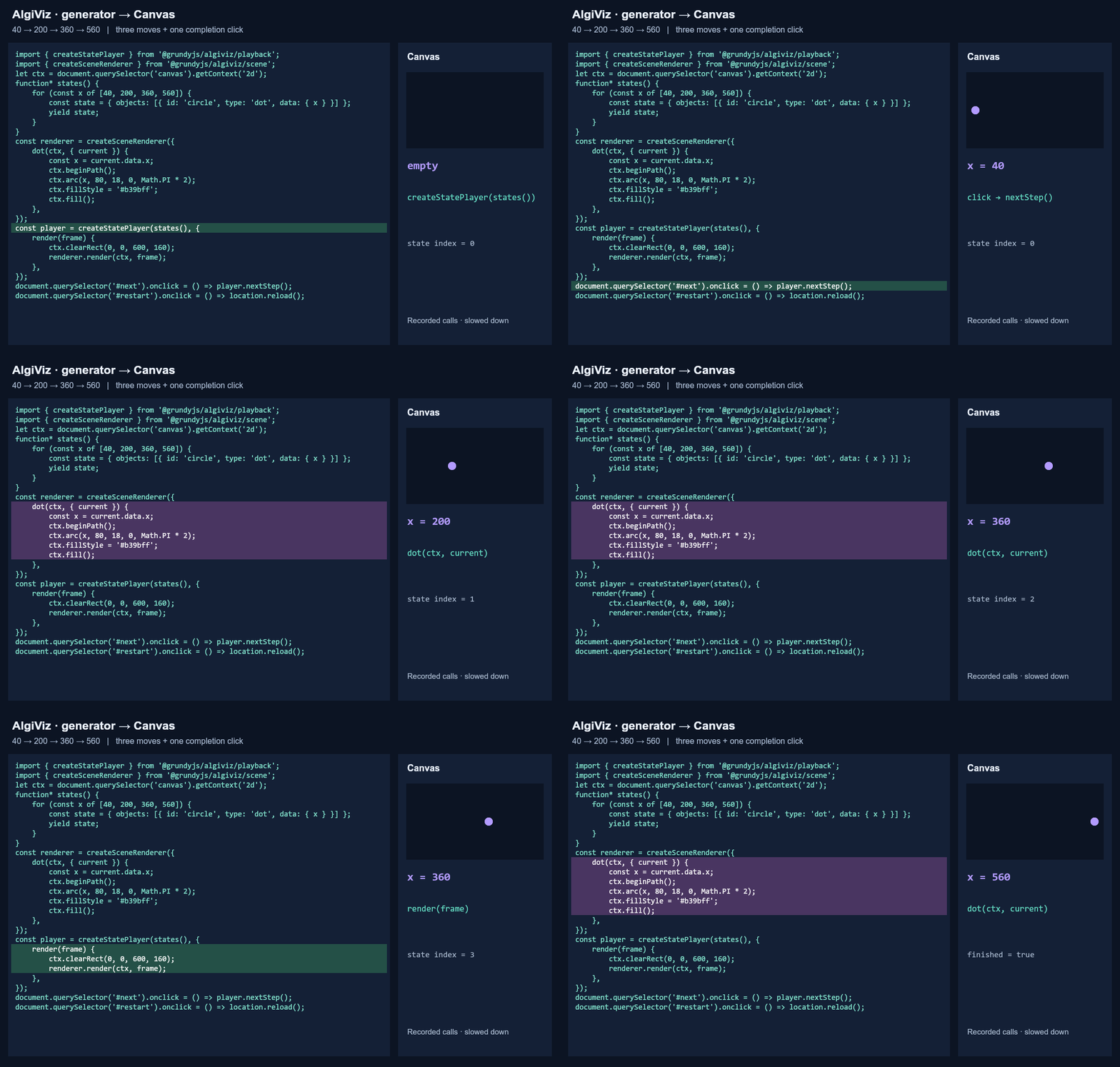
Four states of one circle: `40 → 200 → 360 → 560`. The generator supplies
|
|
44
|
+
coordinates, the `dot` handler draws the circle, and the player requests the next
|
|
45
|
+
state. Add a canvas and button to your HTML, then load the JavaScript below as a
|
|
46
|
+
module through a bundler that resolves imports from the installed npm package.
|
|
76
47
|
|
|
77
|
-
|
|
48
|
+
|
|
78
49
|
|
|
79
|
-
|
|
80
|
-
- `@grundyjs/algiviz/playback`: generic playback of any immutable states and events.
|
|
81
|
-
- `@grundyjs/algiviz/scene`: typed objects and user-provided visualizations.
|
|
82
|
-
- `@grundyjs/algiviz/canvas`: the ready-made array renderer.
|
|
50
|
+
*Actual example calls replayed slowly. The dot changes position at the drawing stage. [Explore the interactive walkthrough](https://github.com/urffin/algiviz/blob/master/examples/visualization-pipeline.html).*
|
|
83
51
|
|
|
84
|
-
|
|
85
|
-
|
|
52
|
+
```html
|
|
53
|
+
<canvas width="600" height="160"></canvas>
|
|
54
|
+
<button id="next">Next state</button>
|
|
55
|
+
```
|
|
86
56
|
|
|
87
57
|
```js
|
|
88
|
-
import {
|
|
89
|
-
import {
|
|
90
|
-
|
|
91
|
-
const
|
|
92
|
-
|
|
93
|
-
for (
|
|
94
|
-
|
|
95
|
-
yield
|
|
58
|
+
import { createPlayer } from '@grundyjs/algiviz/playback';
|
|
59
|
+
import { createSceneRenderer } from '@grundyjs/algiviz/scene';
|
|
60
|
+
|
|
61
|
+
const ctx = document.querySelector('canvas').getContext('2d');
|
|
62
|
+
function* steps() {
|
|
63
|
+
for (const [index, x] of [40, 200, 360, 560].entries()) {
|
|
64
|
+
const state = { objects: [{ id: 'circle', type: 'dot', data: { x } }] };
|
|
65
|
+
yield { index, state, event: index === 3 ? 'done' : 'position' };
|
|
96
66
|
}
|
|
97
|
-
|
|
67
|
+
}
|
|
68
|
+
const renderer = createSceneRenderer({
|
|
69
|
+
dot(ctx, { current }) {
|
|
70
|
+
ctx.beginPath();
|
|
71
|
+
ctx.arc(current.data.x, 80, 18, 0, Math.PI * 2);
|
|
72
|
+
ctx.fillStyle = '#b39bff';
|
|
73
|
+
ctx.fill();
|
|
74
|
+
},
|
|
98
75
|
});
|
|
99
|
-
|
|
100
|
-
|
|
101
|
-
|
|
102
|
-
|
|
103
|
-
|
|
104
|
-
|
|
105
|
-
|
|
76
|
+
const player = createPlayer(steps(), {
|
|
77
|
+
stepDurationMs: 1000, finalHoldMs: 0,
|
|
78
|
+
isTerminal: step => step.event === 'done',
|
|
79
|
+
render(frame) {
|
|
80
|
+
ctx.clearRect(0, 0, 600, 160);
|
|
81
|
+
renderer.render(ctx, frame);
|
|
82
|
+
},
|
|
106
83
|
});
|
|
107
|
-
|
|
108
|
-
// No calls while paused; advance(0) redraws after resizing.
|
|
109
|
-
// On teardown: cancel your animation loop and call player.dispose().
|
|
110
|
-
|
|
111
|
-
// Alternatively, retain history and seek:
|
|
112
|
-
const timeline = createArrayTimeline(reverse.steps([1, 2, 3, 4]), options);
|
|
113
|
-
renderer.render(ctx, timeline.sample(500));
|
|
114
|
-
```
|
|
115
|
-
|
|
116
|
-
`defineArrayAlgorithm` returns `iterate(values)` and `steps(values)`. Each
|
|
117
|
-
iterator owns a separate workspace and copies/validates input on the first
|
|
118
|
-
`next()`. `steps` collects the iterator into a frozen array. Yield every
|
|
119
|
-
operation immediately, begin with `start`, and end with `done`. Each operation
|
|
120
|
-
updates the workspace and returns an immutable snapshot; it does not draw.
|
|
121
|
-
The player invokes the supplied `render` initially and on every `advance`.
|
|
122
|
-
Rendering errors close the iterator and propagate to the caller.
|
|
123
|
-
|
|
124
|
-
### Array operations
|
|
125
|
-
|
|
126
|
-
| Operation | Effect |
|
|
127
|
-
| --- | --- |
|
|
128
|
-
| `at(index)`, `held`, `length` | Read a frozen item, the held item or array length |
|
|
129
|
-
| `start(regions?)` | Emit initial state; call once |
|
|
130
|
-
| `compare(left, right)` | Highlight two positions and count one comparison; either position can be `"held"` |
|
|
131
|
-
| `highlight(positions)` | Highlight items for this step without changing counters |
|
|
132
|
-
| `swap(left, right, regions?)` | Exchange occupied positions; count two writes (non-adjacent swaps are supported) |
|
|
133
|
-
| `select(from, regions?)` | Hold an item and leave a hole; no counted writes |
|
|
134
|
-
| `shift(from, to, regions?)` | Move an item into the hole; count one write |
|
|
135
|
-
| `insert(to, regions?)` | Fill the hole with the held item; count one write |
|
|
136
|
-
| `pass(end, regions?)` | Describe a completed pass without changing items or counters |
|
|
137
|
-
| `done(regions?)` | Finish; requires no held item; does not sort or infer sorted regions |
|
|
138
|
-
|
|
139
|
-
`regions` can contain `sortedPrefixLength` and `sortedSuffixLength`.
|
|
140
|
-
Omitted markers retain their previous values. The author decides when regions
|
|
141
|
-
are sorted; AlgiViz validates their bounds but does not prove that claim. Positions
|
|
142
|
-
are zero-based; invalid positions, occupied destinations and invalid operation
|
|
143
|
-
order throw before mutating the workspace. Read snapshots rather than modifying
|
|
144
|
-
items yourself. `createArrayTrace(values)` exposes the same operations directly,
|
|
145
|
-
with immediate input validation, for authors writing their own generator wrapper.
|
|
146
|
-
|
|
147
|
-
Insertion and bubble sort implementations live in [examples/algorithms.mjs](examples/algorithms.mjs).
|
|
148
|
-
The algorithms belong to the application; they require no changes to the library.
|
|
149
|
-
|
|
150
|
-
### Custom structures and renderers
|
|
151
|
-
|
|
152
|
-
`/playback` does not know arrays, sorting, Canvas, or event names. A source yields
|
|
153
|
-
`Step<State, Event>` objects with a numeric `index`, immutable
|
|
154
|
-
`state` and `event`. Supply `isTerminal` to identify the final step and
|
|
155
|
-
`render` to draw each interpolated frame using any rendering technology:
|
|
156
|
-
|
|
157
|
-
```js
|
|
158
|
-
import { createPlayer, createTimeline } from "@grundyjs/algiviz/playback";
|
|
159
|
-
|
|
160
|
-
const player = createPlayer(myTraversal(), {
|
|
161
|
-
stepDurationMs: 300,
|
|
162
|
-
finalHoldMs: 1000,
|
|
163
|
-
isTerminal: step => step.event.kind === "finished",
|
|
164
|
-
render: frame => drawGraph(frame.previous, frame.current, frame.progress, frame.event)
|
|
165
|
-
});
|
|
166
|
-
```
|
|
167
|
-
|
|
168
|
-
Both engines preserve the supplied index; it need not start at zero or be
|
|
169
|
-
contiguous. Timing follows source order. `createStepEmitter` provides consecutive
|
|
170
|
-
zero-based numbering for convenience.
|
|
171
|
-
|
|
172
|
-
The render callback is optional. Without it, read `player.frame` and render
|
|
173
|
-
manually. `createTimeline(steps, timing)` supports seeking with the same generic
|
|
174
|
-
frame shape; call your renderer with its `sample(timeMs)` result. The generic
|
|
175
|
-
engine does not clone or freeze user states; that is the source's responsibility.
|
|
176
|
-
It retains adjacent snapshots only; the timeline retains the supplied history.
|
|
177
|
-
Custom array events or tree/graph operations can use this contract and a custom
|
|
178
|
-
renderer. The scene API below dispatches individual objects; there is no built-in
|
|
179
|
-
graph/tree algorithm or operation set.
|
|
180
|
-
|
|
181
|
-
### Playback contracts
|
|
182
|
-
|
|
183
|
-
Playback retains application snapshots without cloning them; keep steps, state and
|
|
184
|
-
events immutable while they are in use. A timeline copies the input array only.
|
|
185
|
-
Timeline timing follows array position, and finite sample times are clamped to its
|
|
186
|
-
range. Generator playback requires an explicit terminal step; an early end throws.
|
|
187
|
-
`dispose()` closes the source at most once, keeps the last frame readable and
|
|
188
|
-
prevents further advancement. Restart uses a fresh source.
|
|
189
|
-
|
|
190
|
-
Version 0.7.0 makes timeline `stepIndex` preserve the source `step.index`,
|
|
191
|
-
matching the player. If source consumption, a terminal predicate or rendering
|
|
192
|
-
throws, cleanup is attempted without replacing that primary error. A standalone
|
|
193
|
-
cleanup error from disposal or normal completion still propagates.
|
|
194
|
-
|
|
195
|
-
### Step emission helper (since 0.6.0)
|
|
196
|
-
|
|
197
|
-
Version 0.6.0 adds `createStepEmitter` from `/playback`. It removes manual step numbering and freezes the step wrapper:
|
|
198
|
-
|
|
199
|
-
```js
|
|
200
|
-
import { createStepEmitter } from '@grundyjs/algiviz/playback';
|
|
201
|
-
|
|
202
|
-
function* counter() {
|
|
203
|
-
let count = 0;
|
|
204
|
-
const emit = createStepEmitter(() => Object.freeze({ count }));
|
|
205
|
-
yield emit('start');
|
|
206
|
-
count++;
|
|
207
|
-
yield emit('done');
|
|
208
|
-
}
|
|
84
|
+
document.querySelector('#next').onclick = () => player.advance(1000);
|
|
209
85
|
```
|
|
210
86
|
|
|
211
|
-
|
|
212
|
-
|
|
213
|
-
|
|
214
|
-
|
|
215
|
-
|
|
87
|
+
The first frame (`x = 40`) is drawn immediately inside `createPlayer(...)`. Each
|
|
88
|
+
click advances one 1000 ms step: the player resumes the loop until the next
|
|
89
|
+
`yield`, then renders. There is no interpolation here: the handler draws only
|
|
90
|
+
`current`. Each snapshot is created afresh and never mutated. Call
|
|
91
|
+
`player.dispose()` when removing the visualization.
|
|
216
92
|
|
|
217
|
-
|
|
93
|
+
[Interactive walkthrough with sequential code highlighting](https://github.com/urffin/algiviz/blob/master/examples/visualization-pipeline.html)
|
|
94
|
+
shows initial rendering behind a Start button and the subsequent loop iterations
|
|
95
|
+
(Russian UI). This is an example page in the repository; run it locally using
|
|
96
|
+
the [local setup instructions](https://github.com/urffin/algiviz/blob/master/docs/minimal-example.md).
|
|
218
97
|
|
|
219
|
-
|
|
220
|
-
provide a visualization for every type. AlgiViz matches identities and dispatches
|
|
221
|
-
objects; your handlers decide how data becomes geometry and how it interpolates.
|
|
98
|
+
## How it works
|
|
222
99
|
|
|
223
|
-
|
|
224
|
-
|
|
100
|
+
- **Algorithm:** a generator emits independent state snapshots.
|
|
101
|
+
- **Player:** requests steps and passes frames to your rendering callback.
|
|
102
|
+
- **Scene:** describes objects with stable IDs, types and application-owned data.
|
|
103
|
+
- **Handler:** chooses geometry and drawing behavior, including interpolation.
|
|
225
104
|
|
|
226
|
-
|
|
227
|
-
|
|
228
|
-
|
|
105
|
+
Do not mutate emitted states. Players require an explicit terminal step;
|
|
106
|
+
call `dispose()` when removing a visualization. Algorithms, layouts and animation
|
|
107
|
+
scheduling belong to the application.
|
|
229
108
|
|
|
230
|
-
|
|
231
|
-
badge(ctx, object) {
|
|
232
|
-
const from = (object.previous ?? object.current)!.data;
|
|
233
|
-
const to = (object.current ?? object.previous)!.data;
|
|
234
|
-
const x = from.x + (to.x - from.x) * object.progress;
|
|
235
|
-
const y = from.y + (to.y - from.y) * object.progress;
|
|
236
|
-
ctx.save();
|
|
237
|
-
try {
|
|
238
|
-
ctx.globalAlpha = object.presence;
|
|
239
|
-
ctx.fillText(to.label, x, y);
|
|
240
|
-
} finally { ctx.restore(); }
|
|
241
|
-
}
|
|
242
|
-
});
|
|
109
|
+
## Playback modes
|
|
243
110
|
|
|
244
|
-
|
|
245
|
-
|
|
246
|
-
|
|
247
|
-
|
|
248
|
-
|
|
249
|
-
|
|
250
|
-
// Keep these states immutable. A generic timeline/player can provide this frame.
|
|
251
|
-
renderer.render(ctx, {
|
|
252
|
-
previous: before, current: after, progress: 0.5, stepIndex: 1, event: "move"
|
|
253
|
-
});
|
|
254
|
-
```
|
|
111
|
+
| | Generator: `createPlayer` | History: `createTimeline` |
|
|
112
|
+
| --- | --- | --- |
|
|
113
|
+
| Steps | Consumed on demand | Collected up front |
|
|
114
|
+
| Retention | Adjacent snapshots | Complete history |
|
|
115
|
+
| Seeking backward | No | Yes, via `sample(timeMs)` |
|
|
116
|
+
| Total duration | Unknown in advance | Available |
|
|
255
117
|
|
|
256
|
-
|
|
257
|
-
|
|
258
|
-
retained ID cannot change type; use a new ID to replace an object of another type.
|
|
259
|
-
- Handlers receive `previous` and `current` objects, with `null` for a missing
|
|
260
|
-
endpoint. `phase` is `enter`, `update` or `exit`. `progress` is the raw 0–1 frame
|
|
261
|
-
progress. `presence` is progress on entry, 1 on update and 1−progress on exit;
|
|
262
|
-
handlers may use it for opacity or scale. It is not applied automatically.
|
|
263
|
-
- Lower `zIndex` draws first. Ties follow the current snapshot's object order;
|
|
264
|
-
removed objects follow in their previous order. The current layer wins when it
|
|
265
|
-
changes. There is no implicit layout or coordinate system.
|
|
266
|
-
- The third handler argument exposes `scene.get(id)` for links, pointers and other
|
|
267
|
-
references. It returns the referenced object's full transition, including both
|
|
268
|
-
endpoints; missing references return `undefined`. The application decides how to
|
|
269
|
-
handle them and how to interpolate positions or changing targets.
|
|
270
|
-
- `createSceneFrame(frame)` exposes the same resolved transitions without drawing.
|
|
271
|
-
The registry is captured at renderer construction. Missing handlers, duplicate
|
|
272
|
-
IDs, invalid progress/layers and changed types fail before any handler is called.
|
|
273
|
-
- Scene processing is stateless, so arbitrary seeking is supported. Handlers may
|
|
274
|
-
see zero-presence objects. They are frame draws, **not guaranteed lifecycle
|
|
275
|
-
callbacks**: skipping steps can skip appearances/exits entirely. Clear Canvas
|
|
276
|
-
each frame; a retained SVG/DOM backend must reconcile its elements against the
|
|
277
|
-
current frame, removing stale IDs itself. Save/restore Canvas state inside each
|
|
278
|
-
handler. Exceptions propagate; there is no rollback of drawing already performed.
|
|
279
|
-
- Snapshots and user data are not cloned or deep-frozen. The author owns their
|
|
280
|
-
immutability, as with generic playback. Scene indexing uses O(n) additional
|
|
281
|
-
memory and layer ordering O(n log n) time per frame.
|
|
282
|
-
|
|
283
|
-
`arrayScene(snapshot)` from `/canvas` adapts an array to a `Scene<ArrayObjects>`
|
|
284
|
-
with `bar` objects whose data contains `item`, `index` and `held`. The built-in
|
|
285
|
-
array renderer uses this same dispatcher. You can provide a different `bar`
|
|
286
|
-
visualization using `createSceneRenderer<ArrayObjects, YourContext>`.
|
|
287
|
-
|
|
288
|
-
### State-to-scene projection
|
|
289
|
-
|
|
290
|
-
`createSceneProjector` adapts
|
|
291
|
-
playback frames from your state model to scenes without changing the algorithm:
|
|
118
|
+
Generators reduce retained history, not the cost of producing each snapshot.
|
|
119
|
+
[Memory and performance details](https://github.com/urffin/algiviz/blob/master/docs/performance.md).
|
|
292
120
|
|
|
293
|
-
|
|
294
|
-
import { createSceneProjector } from '@grundyjs/algiviz/scene';
|
|
295
|
-
const projectFrame = createSceneProjector(state => ({
|
|
296
|
-
objects: state.items.map(item => ({ id: item.id, type: 'node', data: item }))
|
|
297
|
-
}));
|
|
298
|
-
// Reuse the projector across renders, with either history or generator playback.
|
|
299
|
-
renderer.render(ctx, projectFrame(frame));
|
|
300
|
-
```
|
|
121
|
+
## Modules and documentation
|
|
301
122
|
|
|
302
|
-
|
|
303
|
-
function and immutable states/scenes. Endpoints are compared with `Object.is`;
|
|
304
|
-
mutating a retained state or changing captured projection settings will not
|
|
305
|
-
invalidate the cache. Create a new projector when those settings change.
|
|
306
|
-
At most two endpoint projections are retained; seeking to older states may
|
|
307
|
-
recompute them. Events, step indices and progress are preserved. Viewport layout
|
|
308
|
-
and animation belong in render handlers, not in this cached projection.
|
|
309
|
-
The returned frame is frozen; user states and projected scenes are not cloned
|
|
310
|
-
or deep-frozen. Scene validation still happens in the scene renderer.
|
|
311
|
-
The merge example uses this adapter to avoid rebuilding two cell scenes on every
|
|
312
|
-
animation frame. The algorithm, object types and visual behavior remain external.
|
|
313
|
-
|
|
314
|
-
## Playback and rendering
|
|
315
|
-
|
|
316
|
-
Array players and timelines use the same frame shape as generic playback:
|
|
317
|
-
`previous`, `current`, `progress`, `stepIndex` and `event`.
|
|
318
|
-
A frame describes the transition into the current step; that step's state is the
|
|
319
|
-
state after its operation.
|
|
320
|
-
|
|
321
|
-
| API | Behavior |
|
|
123
|
+
| Module | Purpose |
|
|
322
124
|
| --- | --- |
|
|
323
|
-
| `
|
|
324
|
-
| `
|
|
325
|
-
| `
|
|
326
|
-
| `createArrayRenderer({ theme: "dark" \| "light" })` | Full-frame Canvas array rendering |
|
|
327
|
-
| `createSceneRenderer(handlers)` | Dispatches custom objects to your visualization handlers |
|
|
328
|
-
| `createSceneProjector(project)` | Adapts immutable state endpoints to scenes with a bounded cache |
|
|
329
|
-
|
|
330
|
-
Players read the first step at construction and expose `frame`, `advance(deltaMs)`,
|
|
331
|
-
`finished` and `dispose()`. The initial frame has progress 1.
|
|
332
|
-
`advance` accepts finite, non-negative elapsed playback time; zero consumes no steps.
|
|
333
|
-
Pause by not advancing. Apply speed by multiplying elapsed time.
|
|
334
|
-
The optional render callback runs initially and on every advance.
|
|
335
|
-
|
|
336
|
-
The source must reach a terminal step. The player closes the iterator after its
|
|
337
|
-
final transition and becomes finished after `finalHoldMs`. Premature exhaustion,
|
|
338
|
-
source errors and render errors propagate and close the iterator.
|
|
339
|
-
`dispose()` closes early and can be repeated; the frame remains readable, but
|
|
340
|
-
advancing a disposed player throws. Restart with a new iterator and player.
|
|
341
|
-
|
|
342
|
-
Timelines require an array of steps. Step i completes at `i * stepDurationMs`;
|
|
343
|
-
`finalHoldMs` extends the last frame. Sampling clamps finite times to the timeline
|
|
344
|
-
range and rejects non-finite times. There is no seeking or known total duration
|
|
345
|
-
in generator playback.
|
|
346
|
-
|
|
347
|
-
Animation scheduling belongs to your application. For example:
|
|
348
|
-
|
|
349
|
-
```js
|
|
350
|
-
const player = createArrayPlayer(reverse.iterate([1, 2, 3, 4]), options);
|
|
351
|
-
let last;
|
|
352
|
-
let requestId;
|
|
353
|
-
let paused = false;
|
|
354
|
-
let speed = 1;
|
|
355
|
-
|
|
356
|
-
function tick(now) {
|
|
357
|
-
const delta = last === undefined ? 0 : Math.min(100, now - last);
|
|
358
|
-
last = now;
|
|
359
|
-
if (!paused) player.advance(delta * speed);
|
|
360
|
-
renderer.render(ctx, player.frame);
|
|
361
|
-
if (!player.finished) requestId = requestAnimationFrame(tick);
|
|
362
|
-
}
|
|
363
|
-
requestId = requestAnimationFrame(tick);
|
|
364
|
-
// On teardown: cancelAnimationFrame(requestId); player.dispose();
|
|
365
|
-
// To replay after finishing, create a new player and schedule a new loop.
|
|
366
|
-
```
|
|
367
|
-
|
|
368
|
-
This is an alternative to the player setup in the earlier array example, reusing
|
|
369
|
-
its `reverse`, `options`, `ctx` and `renderer`. Large deltas consume intervening steps
|
|
370
|
-
synchronously, so cap elapsed time or pause on hidden tabs to avoid a long catch-up.
|
|
125
|
+
| [`/playback`](https://github.com/urffin/algiviz/blob/master/docs/playback.md) | Steps, players, timelines, termination and lifecycle |
|
|
126
|
+
| [`/scene`](https://github.com/urffin/algiviz/blob/master/docs/scene.md) | Custom types, object matching and projection |
|
|
127
|
+
| [`/array` and `/canvas`](https://github.com/urffin/algiviz/blob/master/docs/array.md) | Array operations, ready-made rendering and palettes |
|
|
371
128
|
|
|
372
|
-
|
|
373
|
-
|
|
374
|
-
|
|
375
|
-
plot. Dense charts hide labels. For recording, use a canvas with fixed export
|
|
376
|
-
dimensions. Rendering does not start an animation loop or record video.
|
|
129
|
+
[Complete TypeScript example](https://github.com/urffin/algiviz/blob/master/examples/custom-objects.ts) ·
|
|
130
|
+
[Project setup and integration](https://github.com/urffin/algiviz/blob/master/docs/minimal-example.md) ·
|
|
131
|
+
[Custom graph walkthrough](https://github.com/urffin/algiviz/blob/master/docs/custom-graph-example.md)
|
|
377
132
|
|
|
378
|
-
|
|
379
|
-
|
|
380
|
-
Version 0.8.0 accepts partial palette overrides on both `createArrayRenderer`
|
|
381
|
-
and its compatible alias `createSortRenderer`:
|
|
382
|
-
|
|
383
|
-
```ts
|
|
384
|
-
import { createArrayRenderer, type ArrayPaletteOverrides } from '@grundyjs/algiviz/canvas';
|
|
385
|
-
const colors: ArrayPaletteOverrides = { background: '#ffffff', text: '#182230', active: '#e87900' };
|
|
386
|
-
const renderer = createArrayRenderer({ theme: 'light', colors });
|
|
387
|
-
renderer.render(ctx, currentFrame);
|
|
388
|
-
```
|
|
389
|
-
|
|
390
|
-
`ArrayPalette` defines six string roles: `background` (full canvas), `text`
|
|
391
|
-
(all labels), `bar` (ordinary bars), `sorted` (sorted prefix/suffix), `active`
|
|
392
|
-
(highlighted/compared/moved items), and `held` (the held item, taking precedence
|
|
393
|
-
over active and sorted). `ArrayPaletteOverrides` is its partial form;
|
|
394
|
-
`ArrayRendererOptions` describes the options object. Values are Canvas color
|
|
395
|
-
strings, passed through without CSS validation. Omitted or undefined roles use
|
|
396
|
-
the selected theme. Existing theme-only calls and default colors are unchanged.
|
|
397
|
-
|
|
398
|
-
Overrides are copied when creating a renderer. Changing the input object later
|
|
399
|
-
has no effect. To switch theme or palette, create a new renderer and render the
|
|
400
|
-
same current frame. This changes colors only, not playback, snapshots, layout or
|
|
401
|
-
bitmap/DPR handling. Try the theme presets, six color inputs and reset control
|
|
402
|
-
in [Sorting lab](examples/index.html).
|
|
403
|
-
|
|
404
|
-
## Memory and generation cost
|
|
405
|
-
|
|
406
|
-
Array operations copy the input, validate finite numbers and reject sparse inputs.
|
|
407
|
-
`defineArrayAlgorithm` performs this work on the first iterator `next()`;
|
|
408
|
-
`createArrayTrace` validates immediately. Each iterator owns its workspace.
|
|
409
|
-
Array steps, events, snapshots and items are frozen; immutable items can be shared
|
|
410
|
-
between snapshots.
|
|
411
|
-
|
|
412
|
-
Generator playback retains adjacent snapshots, not the entire history. Array
|
|
413
|
-
playback therefore uses O(n) snapshot memory if the caller does not retain old
|
|
414
|
-
frames. Generic states and algorithm-specific storage may have different costs.
|
|
415
|
-
Each full array snapshot still copies n slots: laziness reduces retained history,
|
|
416
|
-
not the cost of producing every step. Collecting steps restores the history cost.
|
|
417
|
-
For example, a quadratic sorting trace with O(n)-sized snapshots can take O(n³)
|
|
418
|
-
time and history space. Iteration is synchronous and can block the UI.
|
|
419
|
-
|
|
420
|
-
## Browser examples
|
|
421
|
-
|
|
422
|
-
Build the project, serve the repository root with a static HTTP server and open
|
|
423
|
-
one of these pages. Examples are application code in the repository and are not
|
|
424
|
-
included in the npm archive.
|
|
133
|
+
## Examples
|
|
425
134
|
|
|
426
135
|
| Example | What it demonstrates |
|
|
427
136
|
| --- | --- |
|
|
428
|
-
| [
|
|
429
|
-
| [
|
|
430
|
-
| [
|
|
431
|
-
| [
|
|
432
|
-
| [
|
|
433
|
-
| [
|
|
434
|
-
| [Graph
|
|
435
|
-
| [
|
|
436
|
-
|
|
437
|
-
|
|
438
|
-
[
|
|
439
|
-
|
|
440
|
-
|
|
441
|
-
|
|
442
|
-
|
|
443
|
-
|
|
444
|
-
|
|
445
|
-
|
|
446
|
-
|
|
447
|
-
|
|
448
|
-
their text status.
|
|
449
|
-
|
|
450
|
-
### Merge sort
|
|
451
|
-
|
|
452
|
-
The [algorithm](examples/merge-algorithm.mjs) and
|
|
453
|
-
[renderer](examples/merge-scene.mjs) use `/playback` and `/scene`.
|
|
454
|
-
Equal values have letter suffixes to demonstrate stability. Cells use row/position
|
|
455
|
-
IDs because copy-back temporarily duplicates item identities. Left wins ties.
|
|
456
|
-
The algorithm uses O(n) auxiliary memory; full snapshot history has an
|
|
457
|
-
O(n² log n) space upper bound.
|
|
458
|
-
|
|
459
|
-
### Quick sort
|
|
460
|
-
|
|
461
|
-
Choose Lomuto or three-way partitioning while preserving loaded values.
|
|
462
|
-
Both algorithms and their scene belong to the example. Three-way recursion skips
|
|
463
|
-
the equal band: n ≥ 2 equal items take 2n scalar checks and zero swaps, versus
|
|
464
|
-
n(n−1)/2 checks with this Lomuto variant. Neither variant guarantees stability.
|
|
465
|
-
Worst-case algorithm time is quadratic; recursion can use O(n) stack space.
|
|
466
|
-
Full snapshot history has a separate O(n³) space upper bound.
|
|
467
|
-
|
|
468
|
-
### Heap sort
|
|
469
|
-
|
|
470
|
-
The [algorithm](examples/heap-algorithm.mjs) owns immutable states and events.
|
|
471
|
-
The [scene](examples/heap-scene.mjs) assigns separate tree/array visual IDs to each
|
|
472
|
-
element and uses the public scene projector with viewport-independent endpoints.
|
|
473
|
-
Tree positions stay fixed as the heap shrinks. At most 15 array cells wrap on narrow
|
|
474
|
-
screens; larger arrays use a dense row and hide unreadable labels.
|
|
475
|
-
Bottom-up construction is O(n), worst-case sorting O(n log n), and the iterative
|
|
476
|
-
in-place algorithm uses O(1) auxiliary space. This demo copies input and retains
|
|
477
|
-
O(n) adjacent snapshot data in generator mode; full history can use O(n² log n).
|
|
478
|
-
It is not stable: [2a, 2b, 1] becomes [1, 2b, 2a].
|
|
479
|
-
|
|
480
|
-
### Binary search
|
|
481
|
-
|
|
482
|
-
The [algorithm](examples/binary-search-algorithm.mjs) finds the first occurrence, including duplicates. Equal values save a candidate and continue searching left. Input must be sorted; invalid loads preserve the current session. Generate sorted arrays by count with the shared history/generator limits. The counter counts inspected middle elements.
|
|
483
|
-
|
|
484
|
-
The [scene](examples/binary-search-scene.mjs) uses stable index-based IDs and viewport-independent projection. Up to 32 cells wrap; larger arrays use a dense strip and suppress unreadable labels. Search takes O(log n) time and O(1) extra algorithm space. The demo validates and copies input in O(n), shares a frozen array across snapshots and stores O(n + log n) history data. The example is not part of the npm package and needs no new public export.
|
|
485
|
-
|
|
486
|
-
### Tree traversal
|
|
487
|
-
|
|
488
|
-
The example defines its own `node`, `edge` and `pointer` types. The pointer follows
|
|
489
|
-
tree edges through shared ancestors between visited nodes. The Renderer selector
|
|
490
|
-
switches between Canvas and SVG without restarting playback.
|
|
491
|
-
[tree-svg.mjs](examples/tree-svg.mjs) retains elements by ID, restores layer order
|
|
492
|
-
and removes stale elements even after seeking skips exit transitions.
|
|
493
|
-
No tree-specific algorithm or renderer is added to the package.
|
|
494
|
-
|
|
495
|
-
### Graph breadth-first search
|
|
496
|
-
|
|
497
|
-
Open [examples/graph.html](examples/graph.html), choose a graph, start and optional
|
|
498
|
-
target, then Apply. BFS marks on enqueue, completes the reachable component and
|
|
499
|
-
restores one shortest path by following parents. Try the isolated H, a zero-edge
|
|
500
|
-
path to the start, a chain or a diamond with equal-length paths. The original
|
|
501
|
-
disconnected graph shown in the README GIF remains a separate preset.
|
|
502
|
-
|
|
503
|
-
The scene shows a fixed graph, an animated queue, distances, parent/path edges and
|
|
504
|
-
explicit discovery/processing/neighbor-inspection counters. On narrow screens the
|
|
505
|
-
queue wraps below the graph. Canvas rendering uses logical coordinates and DPR.
|
|
506
|
-
Self-loops and parallel edges remain supported; neighbor order can change which
|
|
507
|
-
shortest path is chosen, but not its length.
|
|
508
|
-
|
|
509
|
-
Both playback modes use the same immutable generator. Restart and mode changes
|
|
510
|
-
replay the applied graph/start/target, not draft controls. Generator mode consumes
|
|
511
|
-
lazily without collecting history. Full history enables backward seeks and has an
|
|
512
|
-
O(V(V + E)) snapshot-space upper bound, separately from graph and algorithm data.
|
|
513
|
-
|
|
514
|
-
See [Building a custom graph example](docs/custom-graph-example.md) for the
|
|
515
|
-
algorithm, projection and renderer boundaries. This example uses the existing
|
|
516
|
-
public APIs and adds no graph-specific package exports.
|
|
517
|
-
|
|
518
|
-
### Graph depth-first search
|
|
519
|
-
|
|
520
|
-
Open [examples/dfs.html](examples/dfs.html) to compare DFS with BFS on the same
|
|
521
|
-
graph layouts. Choose a graph, start and optional target. Each explicit call frame
|
|
522
|
-
stores its next neighbor cursor; marking happens before entry. Returning pops the
|
|
523
|
-
finished call and resumes its parent. The stack contains the active branch only.
|
|
524
|
-
|
|
525
|
-
The default discovery order is A, B, D, G, E, C, F; return order is F, C, E, G, D, B, A.
|
|
526
|
-
The DFS tree path to F has 6 edges; BFS finds A → C → F with 2. DFS tree depth is not
|
|
527
|
-
a shortest distance. H is unreachable. Traversal finishes before reconstructing the
|
|
528
|
-
path. The example accepts simple undirected graphs; self-loops and parallel edges
|
|
529
|
-
are rejected. Neighbor order follows edge input order.
|
|
530
|
-
|
|
531
|
-
The fixed-capacity stack moves below the graph on narrow screens. Canvas uses
|
|
532
|
-
logical coordinates and DPR. Both modes share one immutable generator and the
|
|
533
|
-
[shared demo player](examples/demo-player.mjs); restart reuses applied inputs.
|
|
534
|
-
Generator playback is lazy, while history enables backward seeks. The traversal
|
|
535
|
-
uses O(V + E) time and O(V) auxiliary space; snapshot history has a separate
|
|
536
|
-
O(V(V + E)) upper bound. No graph API or built-in DFS is added to the package.
|
|
537
|
-
|
|
538
|
-
## Development
|
|
539
|
-
|
|
540
|
-
Requires Node.js 22 or later and npm.
|
|
541
|
-
|
|
542
|
-
```sh
|
|
543
|
-
npm ci
|
|
544
|
-
npm test
|
|
545
|
-
npm run test:package
|
|
546
|
-
```
|
|
547
|
-
|
|
548
|
-
`npm test` builds the library, checks TypeScript fixtures and runs the tests.
|
|
549
|
-
`npm run test:package` builds a tarball, installs it offline in an isolated temporary
|
|
550
|
-
consumer, compiles against the installed declarations and exercises public APIs,
|
|
551
|
-
including rejection of the removed `/core` export. The temporary consumer is removed afterward.
|
|
552
|
-
|
|
553
|
-
GitHub Actions runs both checks on pushes to `master` and pull requests, using
|
|
554
|
-
Node.js 22 and 24 on Linux and Windows. CI checks do not publish packages.
|
|
555
|
-
|
|
556
|
-
`npm pack` rebuilds automatically. The archive includes dist, README, LICENSE,
|
|
557
|
-
CHANGELOG and package metadata. Source and issues:
|
|
558
|
-
[urffin/algiviz](https://github.com/urffin/algiviz). Licensed under MIT.
|
|
559
|
-
|
|
560
|
-
### Performance checks
|
|
561
|
-
|
|
562
|
-
Run `npm run benchmark` for 2,000-element insertion, bubble, merge and both quick-sort
|
|
563
|
-
variants. It reports generation of 1,000 steps, median rendering CPU time over five
|
|
564
|
-
100-frame samples and retained Node heap after each 5,000 playback steps, up to
|
|
565
|
-
25,000. Drawing uses a mock Canvas: these are CPU comparisons, not browser FPS or
|
|
566
|
-
GPU measurements. Heap samples use explicit GC and include the Node process;
|
|
567
|
-
they are diagnostics, not portable pass/fail thresholds.
|
|
568
|
-
|
|
569
|
-
## Release
|
|
570
|
-
|
|
571
|
-
Publishing is a maintainer action. Update the package version, lockfile and changelog;
|
|
572
|
-
run `npm test` and `npm run test:package`, commit and push, and check CI on the
|
|
573
|
-
candidate commit.
|
|
574
|
-
|
|
575
|
-
The [publish workflow](.github/workflows/npm-publish.yml) runs when a stable GitHub
|
|
576
|
-
Release is published. Drafts, prereleases and tag pushes alone do not publish.
|
|
577
|
-
Use `v` followed by the exact package version, such as `v0.8.0`, at the tested commit.
|
|
578
|
-
|
|
579
|
-
The workflow uses Node.js 24 and npm 11, checks the version and packed consumer,
|
|
580
|
-
then publishes with provenance through npm trusted publishing (OIDC).
|
|
581
|
-
The publish lifecycle also runs tests and rebuilds. No `NPM_TOKEN` secret is required.
|
|
582
|
-
|
|
583
|
-
The npm trusted publisher must match GitHub owner `urffin`, repository `algiviz`
|
|
584
|
-
and workflow `npm-publish.yml`. The workflow does not use a GitHub environment.
|
|
585
|
-
See [npm trusted publishing](https://docs.npmjs.com/trusted-publishers/).
|
|
586
|
-
|
|
587
|
-
After publication, verify the Actions run and the exact version in npm.
|
|
588
|
-
Never reuse an already published npm version. If a workflow fails, check whether
|
|
589
|
-
publication occurred before deciding whether to rerun it.
|
|
137
|
+
| [How a frame is made](https://github.com/urffin/algiviz/blob/master/examples/visualization-pipeline.html) | AlgiViz visualizes its own generator → player → scene → renderer pipeline (Russian walkthrough) |
|
|
138
|
+
| [Sorting lab](https://github.com/urffin/algiviz/blob/master/examples/index.html) | Insertion and bubble sort using the array operations and renderer |
|
|
139
|
+
| [Merge sort](https://github.com/urffin/algiviz/blob/master/examples/merge.html) | Custom state and a two-row scene for the main array and buffer |
|
|
140
|
+
| [Quick sort partitions](https://github.com/urffin/algiviz/blob/master/examples/quick.html) | Lomuto and three-way partitioning with custom state and scene |
|
|
141
|
+
| [Heap sort](https://github.com/urffin/algiviz/blob/master/examples/heap.html) | Max-heap construction and extraction with synchronized tree and array identities |
|
|
142
|
+
| [Binary search](https://github.com/urffin/algiviz/blob/master/examples/binary-search.html) | First occurrence in sorted input, closed search intervals and lazy playback |
|
|
143
|
+
| [Graph BFS](https://github.com/urffin/algiviz/blob/master/examples/graph.html) | Queue, layers, shortest paths, unreachable targets and history/generator playback |
|
|
144
|
+
| [Graph DFS](https://github.com/urffin/algiviz/blob/master/examples/dfs.html) | Recursive call frames, backtracking, tree depth and paths; history/generator playback |
|
|
145
|
+
| [Tree traversal](https://github.com/urffin/algiviz/blob/master/examples/tree.html) | Custom nodes, edges and pointer with Canvas and retained SVG backends |
|
|
146
|
+
|
|
147
|
+
[Full catalog, local setup and algorithm details](https://github.com/urffin/algiviz/blob/master/docs/examples.md).
|
|
148
|
+
Examples live in the repository and are not included in the npm package.
|
|
149
|
+
|
|
150
|
+
## Development and license
|
|
151
|
+
|
|
152
|
+
[Contributing](https://github.com/urffin/algiviz/blob/master/CONTRIBUTING.md) ·
|
|
153
|
+
[Changelog](https://github.com/urffin/algiviz/blob/master/CHANGELOG.md) ·
|
|
154
|
+
[Report an issue](https://github.com/urffin/algiviz/issues)
|
|
155
|
+
|
|
156
|
+
Licensed under [MIT](https://github.com/urffin/algiviz/blob/master/LICENSE). Minor releases in 0.x may change the API.
|