@grundyjs/algiviz 0.7.0 → 0.8.0
This diff represents the content of publicly available package versions that have been released to one of the supported registries. The information contained in this diff is provided for informational purposes only and reflects changes between package versions as they appear in their respective public registries.
- package/CHANGELOG.md +15 -0
- package/README.md +76 -13
- package/dist/canvas/index.d.ts +16 -3
- package/dist/canvas/index.js +6 -1
- package/package.json +8 -4
package/CHANGELOG.md
CHANGED
|
@@ -1,5 +1,20 @@
|
|
|
1
1
|
# Changelog
|
|
2
2
|
|
|
3
|
+
## 0.8.0 — 2026-10-19
|
|
4
|
+
|
|
5
|
+
- Add partial custom colors to the Canvas array renderer and its compatible alias,
|
|
6
|
+
with exported ArrayPalette, ArrayPaletteOverrides and ArrayRendererOptions types.
|
|
7
|
+
- Preserve theme defaults and isolate copied overrides per renderer instance.
|
|
8
|
+
- Add theme presets, six color controls and palette reset to Sorting lab without
|
|
9
|
+
restarting playback or changing the current frame.
|
|
10
|
+
|
|
11
|
+
## 0.7.1 — 2026-10-15
|
|
12
|
+
|
|
13
|
+
- Update package description and keywords for custom algorithm visualizations.
|
|
14
|
+
- Improve the README introduction, demo links and standalone integration guide.
|
|
15
|
+
- Add a BFS GIF preview exported with CanvasTake, hosted on GitHub.
|
|
16
|
+
- No runtime API or behavior changes.
|
|
17
|
+
|
|
3
18
|
## 0.7.0 — 2026-10-15
|
|
4
19
|
|
|
5
20
|
- Breaking: remove the deprecated /core entry point and bundled insertion/bubble
|
package/README.md
CHANGED
|
@@ -1,19 +1,56 @@
|
|
|
1
1
|
# AlgiViz
|
|
2
2
|
|
|
3
|
-
|
|
4
|
-
algorithm and define your objects; AlgiViz provides array operations, playback,
|
|
5
|
-
typed scene dispatch and a ready-made Canvas array renderer. No runtime dependencies.
|
|
6
|
-
Playback works without DOM, React or Next.js. ESM only, with TypeScript declarations.
|
|
3
|
+
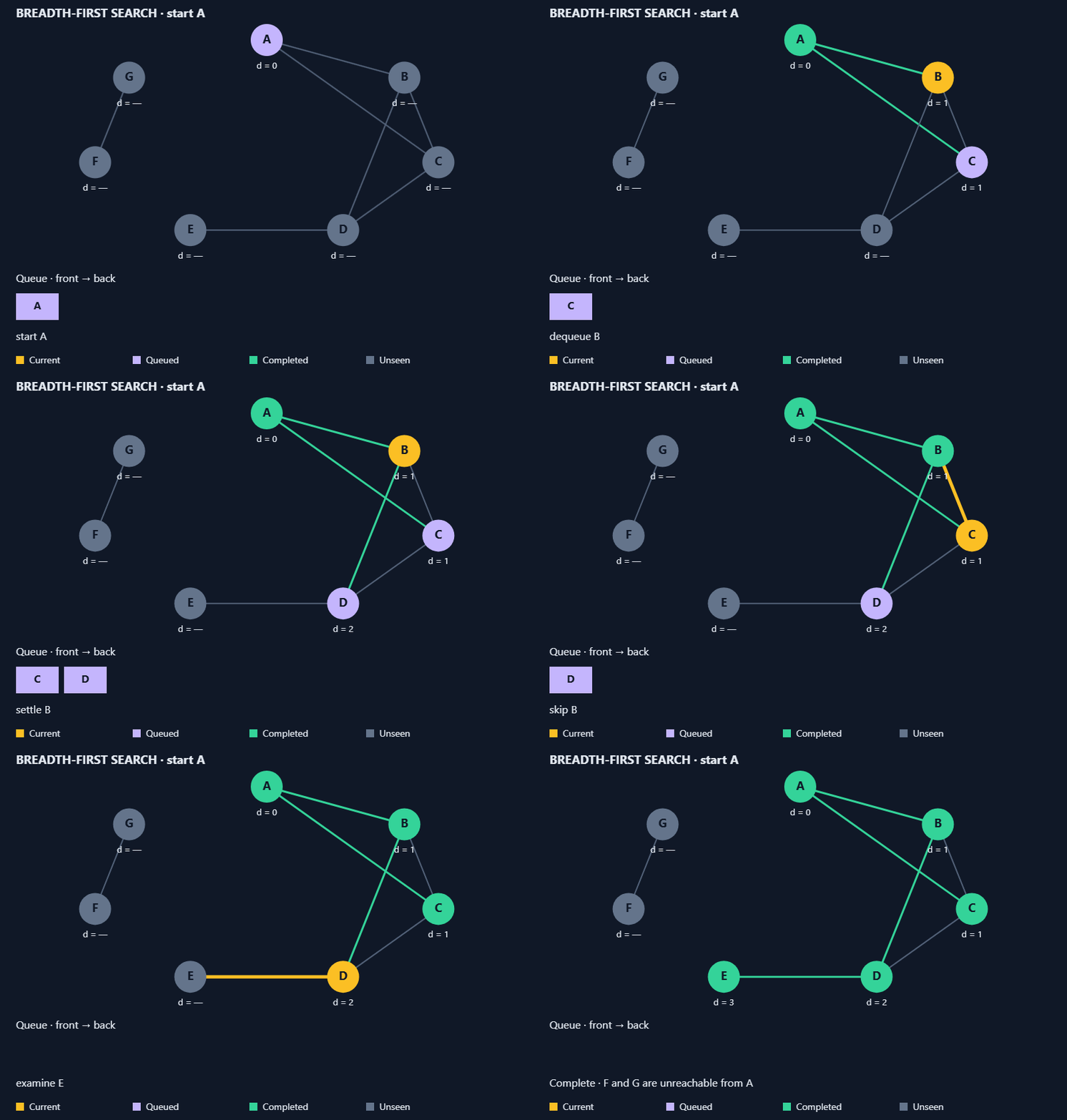
**Your algorithms and objects. Step-by-step playback and custom rendering.**
|
|
7
4
|
|
|
8
|
-
|
|
5
|
+
|
|
9
6
|
|
|
10
|
-
|
|
7
|
+
*An application-owned BFS algorithm with custom objects. Exported with
|
|
8
|
+
[CanvasTake](https://github.com/urffin/canvas-take) —
|
|
9
|
+
[try an interactive sorting demo](https://grundyjs.ru/algorithms/insertion-sort/)
|
|
10
|
+
or explore the [BFS source](https://github.com/urffin/algiviz/blob/master/examples/graph-demo.mjs).*
|
|
11
11
|
|
|
12
|
-
|
|
13
|
-
|
|
14
|
-
|
|
15
|
-
|
|
16
|
-
|
|
12
|
+
A TypeScript toolkit for building interactive algorithm explanations. Write your
|
|
13
|
+
algorithm as a generator, emit immutable states and choose how your objects look.
|
|
14
|
+
AlgiViz handles playback and scene matching; optional array operations and a Canvas
|
|
15
|
+
renderer help you get started.
|
|
16
|
+
|
|
17
|
+
[Live sorting demo](https://grundyjs.ru/algorithms/insertion-sort/) ·
|
|
18
|
+
[Library overview](https://grundyjs.ru/algiviz/) ·
|
|
19
|
+
[npm package](https://www.npmjs.com/package/@grundyjs/algiviz) ·
|
|
20
|
+
[Minimal example source](https://github.com/urffin/algiviz/blob/master/examples/minimal.mjs)
|
|
21
|
+
|
|
22
|
+
- **Your algorithm:** control the loops, conditions and order of operations.
|
|
23
|
+
- **Your objects:** define custom types and handlers for Canvas, SVG or another target.
|
|
24
|
+
- **Two playback modes:** retain history for seeking, or consume a generator with
|
|
25
|
+
only adjacent snapshots retained by the player.
|
|
26
|
+
- **No runtime dependencies:** ESM and TypeScript declarations; playback works
|
|
27
|
+
without DOM, React or Next.js.
|
|
28
|
+
|
|
29
|
+
Use it for educational demos, interactive articles and algorithm walkthroughs.
|
|
30
|
+
Algorithms and layouts belong to your application; AlgiViz provides the playback
|
|
31
|
+
and rendering API. This README describes version 0.8.0.
|
|
32
|
+
|
|
33
|
+
## Start with one custom object
|
|
34
|
+
|
|
35
|
+
The [standalone page](https://github.com/urffin/algiviz/blob/master/examples/minimal.html)
|
|
36
|
+
moves one token with a generator and a custom Canvas handler. It uses only public
|
|
37
|
+
package imports, without the shared demo controller. Copy its
|
|
38
|
+
[complete module](https://github.com/urffin/algiviz/blob/master/examples/minimal.mjs)
|
|
39
|
+
into your application and connect a canvas:
|
|
40
|
+
|
|
41
|
+
```js
|
|
42
|
+
import { createTokenPlayer } from './minimal.mjs';
|
|
43
|
+
|
|
44
|
+
const canvas = document.querySelector('canvas');
|
|
45
|
+
const player = createTokenPlayer(canvas.getContext('2d'));
|
|
46
|
+
player.advance(100); // Advance playback by 100 ms.
|
|
47
|
+
// Call advance(deltaMs) from your controls or animation loop.
|
|
48
|
+
// Call player.dispose() when removing the visualization.
|
|
49
|
+
```
|
|
50
|
+
|
|
51
|
+
[Follow the walkthrough](https://github.com/urffin/algiviz/blob/master/docs/minimal-example.md)
|
|
52
|
+
for local setup, snapshot ownership and lifecycle. For a larger custom-object
|
|
53
|
+
example, see the [graph BFS walkthrough](https://github.com/urffin/algiviz/blob/master/docs/custom-graph-example.md).
|
|
17
54
|
|
|
18
55
|
## Install
|
|
19
56
|
|
|
@@ -328,7 +365,33 @@ magnitude for bar height and retain their sign in labels; this is not a signed-a
|
|
|
328
365
|
plot. Dense charts hide labels. For recording, use a canvas with fixed export
|
|
329
366
|
dimensions. Rendering does not start an animation loop or record video.
|
|
330
367
|
|
|
331
|
-
|
|
368
|
+
#### Custom array colors (since 0.8.0)
|
|
369
|
+
|
|
370
|
+
Version 0.8.0 accepts partial palette overrides on both `createArrayRenderer`
|
|
371
|
+
and its compatible alias `createSortRenderer`:
|
|
372
|
+
|
|
373
|
+
```ts
|
|
374
|
+
import { createArrayRenderer, type ArrayPaletteOverrides } from '@grundyjs/algiviz/canvas';
|
|
375
|
+
const colors: ArrayPaletteOverrides = { background: '#ffffff', text: '#182230', active: '#e87900' };
|
|
376
|
+
const renderer = createArrayRenderer({ theme: 'light', colors });
|
|
377
|
+
renderer.render(ctx, currentFrame);
|
|
378
|
+
```
|
|
379
|
+
|
|
380
|
+
`ArrayPalette` defines six string roles: `background` (full canvas), `text`
|
|
381
|
+
(all labels), `bar` (ordinary bars), `sorted` (sorted prefix/suffix), `active`
|
|
382
|
+
(highlighted/compared/moved items), and `held` (the held item, taking precedence
|
|
383
|
+
over active and sorted). `ArrayPaletteOverrides` is its partial form;
|
|
384
|
+
`ArrayRendererOptions` describes the options object. Values are Canvas color
|
|
385
|
+
strings, passed through without CSS validation. Omitted or undefined roles use
|
|
386
|
+
the selected theme. Existing theme-only calls and default colors are unchanged.
|
|
387
|
+
|
|
388
|
+
Overrides are copied when creating a renderer. Changing the input object later
|
|
389
|
+
has no effect. To switch theme or palette, create a new renderer and render the
|
|
390
|
+
same current frame. This changes colors only, not playback, snapshots, layout or
|
|
391
|
+
bitmap/DPR handling. Try the theme presets, six color inputs and reset control
|
|
392
|
+
in [Sorting lab](examples/index.html).
|
|
393
|
+
|
|
394
|
+
## Memory and generation cost
|
|
332
395
|
|
|
333
396
|
Array operations copy the input, validate finite numbers and reject sparse inputs.
|
|
334
397
|
`defineArrayAlgorithm` performs this work on the first iterator `next()`;
|
|
@@ -462,7 +525,7 @@ candidate commit.
|
|
|
462
525
|
|
|
463
526
|
The [publish workflow](.github/workflows/npm-publish.yml) runs when a stable GitHub
|
|
464
527
|
Release is published. Drafts, prereleases and tag pushes alone do not publish.
|
|
465
|
-
Use `v` followed by the exact package version, such as `v0.
|
|
528
|
+
Use `v` followed by the exact package version, such as `v0.8.0`, at the tested commit.
|
|
466
529
|
|
|
467
530
|
The workflow uses Node.js 24 and npm 11, checks the version and packed consumer,
|
|
468
531
|
then publishes with provenance through npm trusted publishing (OIDC).
|
package/dist/canvas/index.d.ts
CHANGED
|
@@ -10,10 +10,23 @@ export type ArrayObjects = {
|
|
|
10
10
|
};
|
|
11
11
|
/** Adapts array identities to the same public scene contract used by custom objects. */
|
|
12
12
|
export declare function arrayScene(state: SortSnapshot): Scene<ArrayObjects>;
|
|
13
|
+
/** Canvas color strings for the semantic roles in the array renderer. */
|
|
14
|
+
export interface ArrayPalette {
|
|
15
|
+
readonly background: string;
|
|
16
|
+
readonly text: string;
|
|
17
|
+
readonly bar: string;
|
|
18
|
+
readonly sorted: string;
|
|
19
|
+
readonly active: string;
|
|
20
|
+
readonly held: string;
|
|
21
|
+
}
|
|
22
|
+
/** Overrides are copied at renderer creation; omitted roles retain the theme color. */
|
|
23
|
+
export type ArrayPaletteOverrides = Partial<ArrayPalette>;
|
|
24
|
+
export interface ArrayRendererOptions {
|
|
25
|
+
readonly theme: "light" | "dark";
|
|
26
|
+
readonly colors?: ArrayPaletteOverrides;
|
|
27
|
+
}
|
|
13
28
|
export { createSortRenderer as createArrayRenderer };
|
|
14
29
|
/** Stateless full-frame renderer. Bitmap dimensions determine layout and video size. */
|
|
15
|
-
export declare function createSortRenderer(options: {
|
|
16
|
-
theme: "light" | "dark";
|
|
17
|
-
}): Readonly<{
|
|
30
|
+
export declare function createSortRenderer(options: ArrayRendererOptions): Readonly<{
|
|
18
31
|
render(ctx: CanvasRenderingContext2D, frame: SortFrame): void;
|
|
19
32
|
}>;
|
package/dist/canvas/index.js
CHANGED
|
@@ -36,7 +36,12 @@ function positions(state) {
|
|
|
36
36
|
}
|
|
37
37
|
/** Stateless full-frame renderer. Bitmap dimensions determine layout and video size. */
|
|
38
38
|
export function createSortRenderer(options) {
|
|
39
|
-
const colors = palettes[options.theme];
|
|
39
|
+
const colors = { ...palettes[options.theme] };
|
|
40
|
+
for (const key of Object.keys(colors)) {
|
|
41
|
+
const color = options.colors?.[key];
|
|
42
|
+
if (color !== undefined)
|
|
43
|
+
colors[key] = color;
|
|
44
|
+
}
|
|
40
45
|
const projectFrame = createSceneProjector(arrayScene);
|
|
41
46
|
return Object.freeze({
|
|
42
47
|
render(ctx, frame) {
|
package/package.json
CHANGED
|
@@ -1,7 +1,7 @@
|
|
|
1
1
|
{
|
|
2
2
|
"name": "@grundyjs/algiviz",
|
|
3
|
-
"version": "0.
|
|
4
|
-
"description": "
|
|
3
|
+
"version": "0.8.0",
|
|
4
|
+
"description": "TypeScript toolkit for custom algorithm visualizations with step-by-step playback and extensible rendering",
|
|
5
5
|
"type": "module",
|
|
6
6
|
"files": [
|
|
7
7
|
"dist/array",
|
|
@@ -52,10 +52,14 @@
|
|
|
52
52
|
},
|
|
53
53
|
"homepage": "https://grundyjs.ru/algiviz/",
|
|
54
54
|
"keywords": [
|
|
55
|
+
"algorithm-visualization",
|
|
55
56
|
"algorithms",
|
|
56
57
|
"visualization",
|
|
57
|
-
"
|
|
58
|
-
"
|
|
58
|
+
"animation",
|
|
59
|
+
"step-by-step",
|
|
60
|
+
"playback",
|
|
61
|
+
"data-structures",
|
|
62
|
+
"educational",
|
|
59
63
|
"canvas",
|
|
60
64
|
"typescript"
|
|
61
65
|
],
|