@gregoriusrippenstein/node-red-contrib-introspection 0.4.5 → 0.5.1
This diff represents the content of publicly available package versions that have been released to one of the supported registries. The information contained in this diff is provided for informational purposes only and reflects changes between package versions as they appear in their respective public registries.
- package/README.md +56 -35
- package/examples/client-code.json +926 -0
- package/examples/drawsvg-flow.json +18 -14
- package/examples/get-flows.json +471 -31
- package/examples/orphans.json +220 -0
- package/examples/seeker-sink.json +349 -2465
- package/nodes/60-client-code.html +69 -9
- package/nodes/60-client-code.js +23 -0
- package/package.json +5 -6
- package/plugins/orphans.html +45 -0
- package/plugins/screenshot.html +74 -0
- package/examples/trigger-and-save-screenshot.json +0 -155
- package/nodes/15-screenshot.html +0 -576
- package/nodes/15-screenshot.js +0 -29
- package/nodes/20-orphans.html +0 -183
- package/nodes/20-orphans.js +0 -17
- package/nodes/25-ismobile.html +0 -49
- package/nodes/25-ismobile.js +0 -17
- package/nodes/30-navigator.html +0 -77
- package/nodes/30-navigator.js +0 -17
- package/nodes/40-drawsvg.html +0 -51
- package/nodes/40-drawsvg.js +0 -25
package/README.md
CHANGED
|
@@ -12,25 +12,15 @@ Orphans node many or many not have their reasons, sometimes nodes aren't meant t
|
|
|
12
12
|
|
|
13
13
|
Sometimes I found myself having extremely complex flows, flows that went over multiple tabs via the link-in/out nodes. I was lost as to how specific nodes were ever reached. The birth of the Sink & Seeker nodes was inevitable.
|
|
14
14
|
|
|
15
|
-
## Nodes
|
|
16
|
-
|
|
17
|
-
All nodes are editor-only which means that are triggered by double clicking on them (once they have been dragged into a flow) to open the tray. The tray then shows the fulfilment of their purpose.
|
|
15
|
+
## Sidebar Nodes
|
|
18
16
|
|
|
19
17
|
There is no need nor requirement to deploy these nodes. Which implies that they also work in read-only mode of Node-RED. Since these nodes only provide information and make no changes, this should not be an issue.
|
|
20
18
|
|
|
21
|
-
###
|
|
22
|
-
|
|
23
|
-
Drag the Orphan node into a flow, double click and all nodes that have no connections are shown in the tray. Click on a node to highlight its location in the flow.
|
|
24
|
-
|
|
25
|
-
The nodes shown are across all flows and tabs, there is no need to have a Orphans node per flow.
|
|
26
|
-
|
|
27
|
-
### Sink & Seeker
|
|
28
|
-
|
|
29
|
-
Place the sink node at the end of a any flow, the point that needs to be reached. Place the seeker at the starting point. Double click on the seeker to open the tray and all possible paths (if there are any) between it and the sink are shown.
|
|
19
|
+
### Screenshot
|
|
30
20
|
|
|
31
|
-
|
|
21
|
+
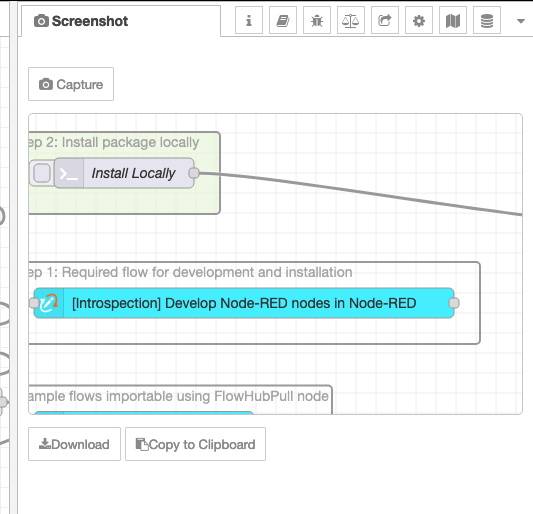
**Update**: Screenshot node has become a sidebar node. This means it can no longer be triggered by external forces.
|
|
32
22
|
|
|
33
|
-
|
|
23
|
+
|
|
34
24
|
|
|
35
25
|
Drag the node into a flow, double-click on the node and the tray opens -depending on the size of the flow, this might take a moment. Once the tray is opened, the SVG is shown in the editor window (I took the code from the template node hence the syntax dropdown). Below the editor window is the download button. Pressing that will download the SVG as it is in the editor window, so making changes in that window will be reflected in the downloaded content.
|
|
36
26
|
|
|
@@ -49,31 +39,23 @@ Disappointments:
|
|
|
49
39
|
- Limited testing: Firefox & Opera (on mac), your mileage might vary
|
|
50
40
|
- No error checking - network requests are assumed to work
|
|
51
41
|
|
|
52
|
-
|
|
53
|
-
|
|
54
|
-
There is an example [flow](/examples/trigger-and-save-screenshot.json) that demonstrates this feature. The author is aware that this is dangerously close to enabling spyware for flow modification, please see the [LICENSE](/LICENSE) and behaviour.
|
|
55
|
-
|
|
56
|
-
### IsMobile
|
|
57
|
-
|
|
58
|
-
Is a palette-only node meaning that it should not be included in any flows. It's single purpose is to remove the palette and sidebars on devices which have a screen width less that 890px. Node-RED has both bars open by default, that makes the mobile experience not so nice. This node is a simple hack that uses `onpaletteadd` callback to close both bars if the device is detected to have "small" width.
|
|
42
|
+
### Orphans
|
|
59
43
|
|
|
60
|
-
|
|
44
|
+
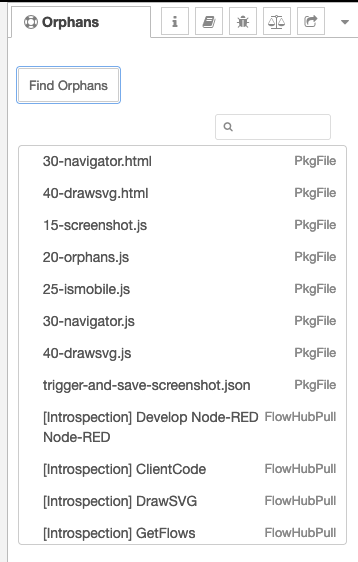
**Update**: This is now a sidebar plugin which shows all unconnected nodes across alls flow tabs.
|
|
61
45
|
|
|
62
|
-
|
|
46
|
+
~~Drag the Orphan node into a flow, double click and all nodes that have no connections are shown in the tray. Click on a node to highlight its location in the flow.~~
|
|
63
47
|
|
|
64
|
-
|
|
48
|
+
|
|
65
49
|
|
|
66
|
-
|
|
50
|
+
Clicking on a node will highlight that node in the workspace. The nodes shown are across all flows and tabs.
|
|
67
51
|
|
|
68
|
-
|
|
52
|
+
## Palette Nodes
|
|
69
53
|
|
|
70
|
-
|
|
71
|
-
|
|
72
|
-
This is a hack that uses the `onpaletteadd` callback to do its magic. If this functionality is not desired, then disable this node in the palette manager.
|
|
54
|
+
### Sink & Seeker
|
|
73
55
|
|
|
74
|
-
|
|
56
|
+
Place the sink node at the end of a any flow, the point that needs to be reached. Place the seeker at the starting point. Double click on the seeker to open the tray and all possible paths (if there are any) between it and the sink are shown.
|
|
75
57
|
|
|
76
|
-
|
|
58
|
+
Double click on the top-level node and all nodes in the pathway are highlighted. Opening the top-level node shows all nodes along the path. Clicking on a node will highlight that node in flow.
|
|
77
59
|
|
|
78
60
|
### GetFlows
|
|
79
61
|
|
|
@@ -97,8 +79,48 @@ The context in which the code is exected includes:
|
|
|
97
79
|
|
|
98
80
|
- `payload` which is the the `msg.payload` value
|
|
99
81
|
- `topic` which is the `msg.topic` value
|
|
82
|
+
- `msg.payload` contains the payload sent to the node.
|
|
83
|
+
- `node.id` and `nodeid` are the id of the current node
|
|
84
|
+
|
|
85
|
+
Functionality which interacts with the flow:
|
|
86
|
+
|
|
100
87
|
- `node.send(payload)` where `payload` becomes the output the node on the server side
|
|
101
88
|
- `node.error("msg")` where msg is shown as a notification within the editor
|
|
89
|
+
- `node.status({fill: 'red', shape: 'dot', text: 'hello world'})` - generate a status for the node.
|
|
90
|
+
|
|
91
|
+
An example if the client code node is this [flow](https://flowhub.org/f/01920991a09b7e95) where the node generates an in browser notification.
|
|
92
|
+
|
|
93
|
+
## Deprecated Nodes
|
|
94
|
+
|
|
95
|
+
### ~~IsMobile~~
|
|
96
|
+
|
|
97
|
+
*Deprecated without replacement.*
|
|
98
|
+
|
|
99
|
+
Is a palette-only node meaning that it should not be included in any flows. It's single purpose is to remove the palette and sidebars on devices which have a screen width less that 890px. Node-RED has both bars open by default, that makes the mobile experience not so nice. This node is a simple hack that uses `onpaletteadd` callback to close both bars if the device is detected to have "small" width.
|
|
100
|
+
|
|
101
|
+
If this functionality is not desired, then disable this node in the palette manager.
|
|
102
|
+
|
|
103
|
+
### ~~Navigator~~
|
|
104
|
+
|
|
105
|
+
*Deprecated without replacement.*
|
|
106
|
+
|
|
107
|
+
~~Is a palette-only node meaning that it should not be included in any flows. What it does is to highlight nodes if they are referenced in the URL. This node will check the hash value of the URL and if it contains a node id, it will jump to the workspace and focus on the node in question. The node id should be given in the form of `/n/<node id>`, for example: [`.../#flow/878170e6f86c502b/n/b3baf3ca092064a9`](https://demo.openmindmap.org/omm/#flow/878170e6f86c502b/n/b3baf3ca092064a9). Any flow id that is given will be ignored and instead the flow of the node will be shown.~~
|
|
108
|
+
|
|
109
|
+
This functionality will be part of Node-RED 3.1.x upon release, so this node only makes sense for Node-RED 3.0.x versions.
|
|
110
|
+
|
|
111
|
+
This now also support `/n/<node id>/edit` which is also part of the 3.1.x release.
|
|
112
|
+
|
|
113
|
+
One final feature of this node is path highlighting, this is done by appeanding a `/p/<node1Id>,<node2Id>,<node3Id>,...` to the URL. Whether this will be natively supported in Node-RED is the author unclear.
|
|
114
|
+
|
|
115
|
+
This is a hack that uses the `onpaletteadd` callback to do its magic. If this functionality is not desired, then disable this node in the palette manager.
|
|
116
|
+
|
|
117
|
+
### ~~DrawSVG~~
|
|
118
|
+
|
|
119
|
+
*Deprecated with ClientCode replacement.*
|
|
120
|
+
|
|
121
|
+
A node for inserting an SVG image into the workspace. The image is layered above the grid but below nodes and their connections. The input message must contain SVG data (in string form) in the `payload` attribute.
|
|
122
|
+
|
|
123
|
+
**Update**: See this [flow](https://flowhub.org/f/141037dcda5b69fd) for doing this with a client code node (see below for explanation of ClientCode node.)
|
|
102
124
|
|
|
103
125
|
|
|
104
126
|
## Node-RED Versions
|
|
@@ -109,12 +131,11 @@ These nodes have been tested and found to work on Node-RED 3.0.2 and 3.1.0.beta.
|
|
|
109
131
|
|
|
110
132
|
There are [example flows](/examples) contained in the package, examples can also be found online at [FlowHub.org](https://flowhub.org):
|
|
111
133
|
|
|
112
|
-
- [
|
|
113
|
-
- [Sink and Seeker](https://flowhub.org/f/139a816449acd89f)
|
|
114
|
-
- [Screenshot](https://flowhub.org/f/07b2d0f3b0445ab5)
|
|
134
|
+
- [ClientCode](https://flowhub.org/f/e02ba6e534f7a0f4)
|
|
115
135
|
- [DrawSVG](https://flowhub.org/f/141037dcda5b69fd)
|
|
116
136
|
- [GetFlows](https://flowhub.org/f/0b1bfbf6e540be66)
|
|
117
|
-
- [
|
|
137
|
+
- [Orphans](https://flowhub.org/f/2401c255b056e0e1)
|
|
138
|
+
- [Sink and Seeker](https://flowhub.org/f/139a816449acd89f)
|
|
118
139
|
|
|
119
140
|
## License
|
|
120
141
|
|