@graphcommerce/docs 7.0.0-canary.21 → 7.0.1-canary.0
This diff represents the content of publicly available package versions that have been released to one of the supported registries. The information contained in this diff is provided for informational purposes only and reflects changes between package versions as they appear in their respective public registries.
- package/CHANGELOG.md +207 -1
- package/feature-list.md +2 -1
- package/framework/config.md +59 -8
- package/framework/favicon.md +14 -0
- package/hygraph/cli.md +63 -0
- package/hygraph/dynamic-rows.md +107 -0
- package/{framework/graphcms.md → hygraph/readme.md} +2 -1
- package/magento/configurable-products.md +86 -0
- package/magento/readme.md +24 -0
- package/package.json +2 -2
- package/roadmap.md +20 -13
- package/upgrading/graphcommerce-6-to-7.md +96 -0
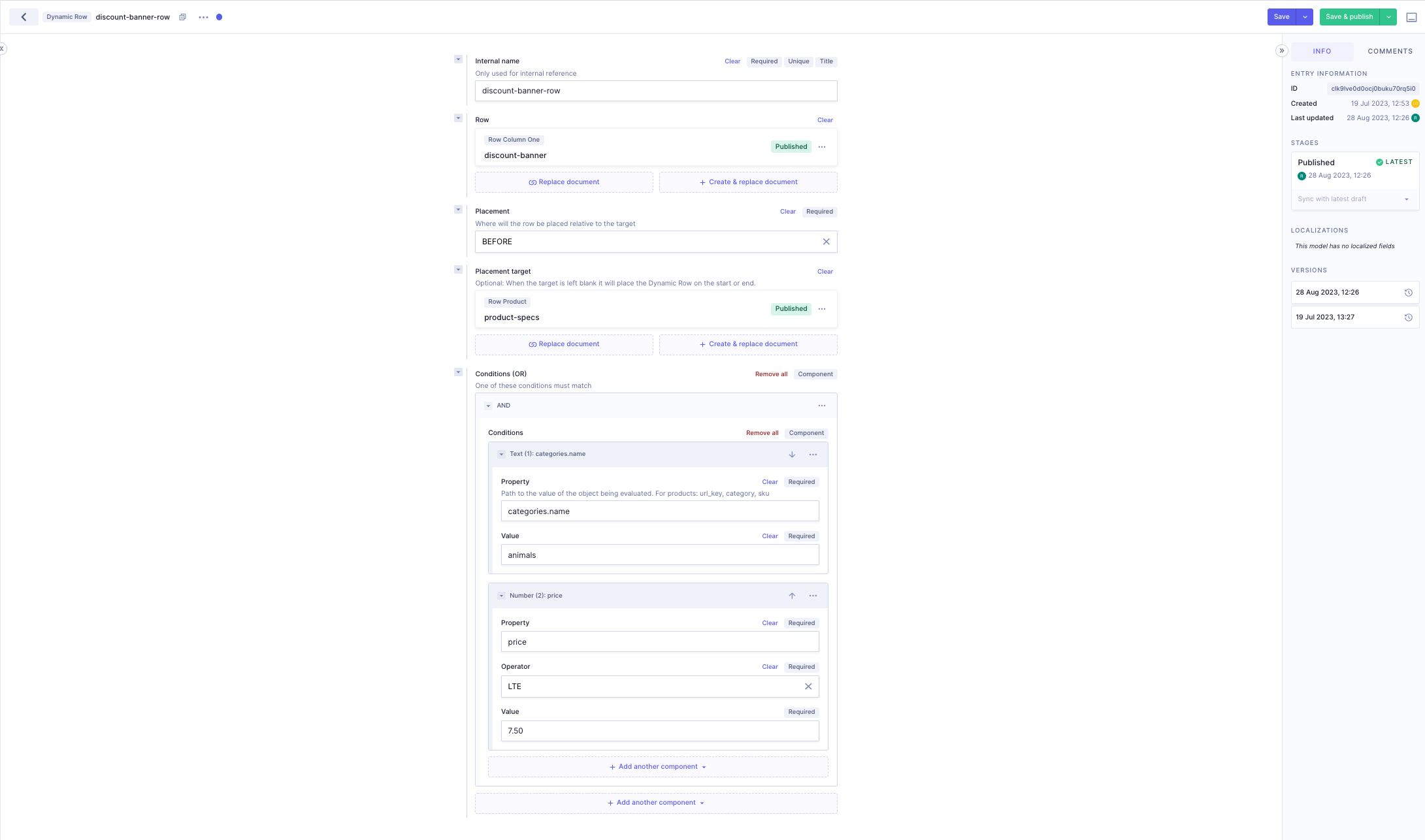
- package/upgrading/readme.md +1 -0
package/CHANGELOG.md
CHANGED
|
@@ -1,6 +1,212 @@
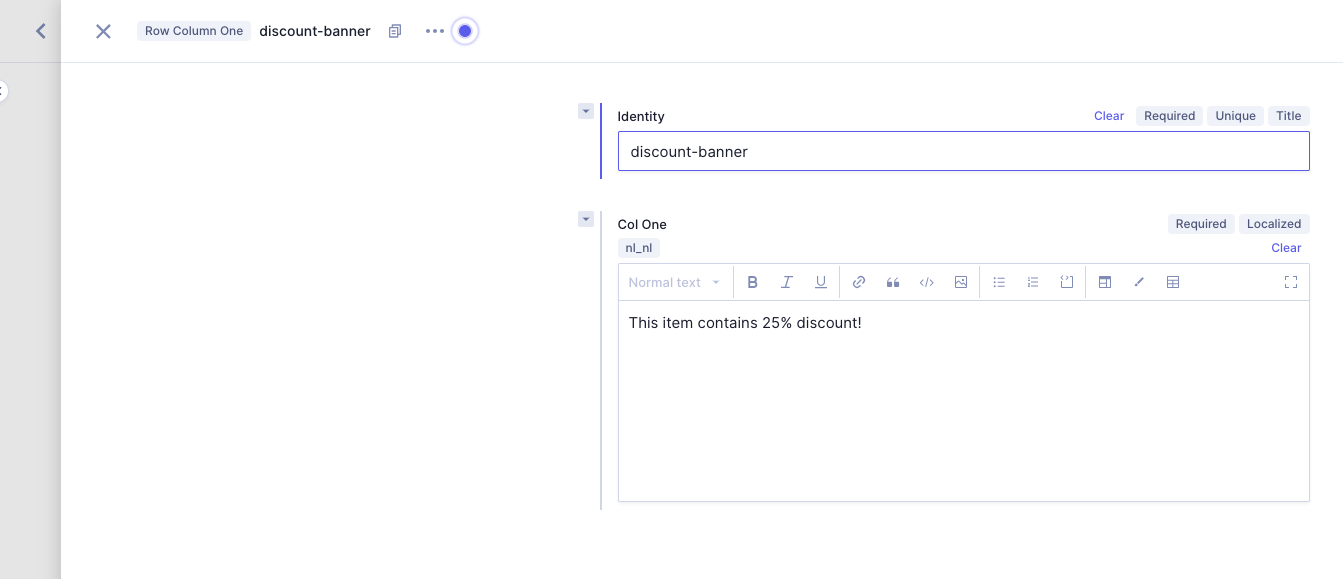
|
|
|
1
1
|
# Change Log
|
|
2
2
|
|
|
3
|
-
## 7.0.
|
|
3
|
+
## 7.0.1-canary.0
|
|
4
|
+
|
|
5
|
+
### Patch Changes
|
|
6
|
+
|
|
7
|
+
- [#2047](https://github.com/graphcommerce-org/graphcommerce/pull/2047) [`136580b39`](https://github.com/graphcommerce-org/graphcommerce/commit/136580b39e3cffdd07e3fa087e049bd532c3e8f1) - Updated all dependencies to the latest version where possible. ([@paales](https://github.com/paales))
|
|
8
|
+
|
|
9
|
+
## 7.0.0
|
|
10
|
+
|
|
11
|
+
### Patch Changes
|
|
12
|
+
|
|
13
|
+
- [#1933](https://github.com/graphcommerce-org/graphcommerce/pull/1933) [`e644887a7`](https://github.com/graphcommerce-org/graphcommerce/commit/e644887a75a3801a8b0dcf39558f56110a51d774) - Updated ReCAPTCHA docs ([@bramvanderholst](https://github.com/bramvanderholst))
|
|
14
|
+
|
|
15
|
+
- [`2f479c830`](https://github.com/graphcommerce-org/graphcommerce/commit/2f479c830e84137b739d83bc6dd1e36a6e299e3a) - Added advise about URL suffixes ([@paales](https://github.com/paales))
|
|
16
|
+
|
|
17
|
+
- [#2034](https://github.com/graphcommerce-org/graphcommerce/pull/2034) [`6fca47484`](https://github.com/graphcommerce-org/graphcommerce/commit/6fca474847fe52f004a6ac0abbd88492512b46ad) - Pre-resolve the customFetch in mesh config, so that it works with the new mesh version. ([@paales](https://github.com/paales))
|
|
18
|
+
|
|
19
|
+
- [#1978](https://github.com/graphcommerce-org/graphcommerce/pull/1978) [`0c91ac1f7`](https://github.com/graphcommerce-org/graphcommerce/commit/0c91ac1f70f58dec418e945fc4a6a8c6732cc21e) - When a user selects a variant, it will switch the values on the configurable page with the values of the configured variant. Enabling options here will allow switching of those variants. ([@carlocarels90](https://github.com/carlocarels90))
|
|
20
|
+
|
|
21
|
+
- [#1957](https://github.com/graphcommerce-org/graphcommerce/pull/1957) [`cb3c82163`](https://github.com/graphcommerce-org/graphcommerce/commit/cb3c82163c32768f977b85c21b029ead354847af) - Docs were directly applied to the config.md which is autogenerated ([@paales](https://github.com/paales))
|
|
22
|
+
|
|
23
|
+
- [#2020](https://github.com/graphcommerce-org/graphcommerce/pull/2020) [`c9ab0e827`](https://github.com/graphcommerce-org/graphcommerce/commit/c9ab0e827cbf866000a2184ee7fa38b123aa2cd2) - Update docs for Enable Guest Checkout Login setting ([@SimonPrins](https://github.com/SimonPrins))
|
|
24
|
+
|
|
25
|
+
- [#1959](https://github.com/graphcommerce-org/graphcommerce/pull/1959) [`d0809b132`](https://github.com/graphcommerce-org/graphcommerce/commit/d0809b132a0e4cbdfeb86164f6c16a89ebecd987) - Added support for default values in the Config.graphqls files for the documentation ([@JoshuaS98](https://github.com/JoshuaS98))
|
|
26
|
+
|
|
27
|
+
## 6.2.0-canary.98
|
|
28
|
+
|
|
29
|
+
## 6.2.0-canary.97
|
|
30
|
+
|
|
31
|
+
## 6.2.0-canary.96
|
|
32
|
+
|
|
33
|
+
## 6.2.0-canary.95
|
|
34
|
+
|
|
35
|
+
## 6.2.0-canary.94
|
|
36
|
+
|
|
37
|
+
### Patch Changes
|
|
38
|
+
|
|
39
|
+
- [#2020](https://github.com/graphcommerce-org/graphcommerce/pull/2020) [`c9ab0e827`](https://github.com/graphcommerce-org/graphcommerce/commit/c9ab0e827cbf866000a2184ee7fa38b123aa2cd2) - Update docs for Enable Guest Checkout Login setting ([@SimonPrins](https://github.com/SimonPrins))
|
|
40
|
+
|
|
41
|
+
## 6.2.0-canary.93
|
|
42
|
+
|
|
43
|
+
## 6.2.0-canary.92
|
|
44
|
+
|
|
45
|
+
## 6.2.0-canary.91
|
|
46
|
+
|
|
47
|
+
## 6.2.0-canary.90
|
|
48
|
+
|
|
49
|
+
### Patch Changes
|
|
50
|
+
|
|
51
|
+
- [#2034](https://github.com/graphcommerce-org/graphcommerce/pull/2034) [`6fca47484`](https://github.com/graphcommerce-org/graphcommerce/commit/6fca474847fe52f004a6ac0abbd88492512b46ad) - Pre-resolve the customFetch in mesh config ([@paales](https://github.com/paales))
|
|
52
|
+
|
|
53
|
+
## 6.2.0-canary.89
|
|
54
|
+
|
|
55
|
+
## 6.2.0-canary.88
|
|
56
|
+
|
|
57
|
+
## 6.2.0-canary.87
|
|
58
|
+
|
|
59
|
+
### Patch Changes
|
|
60
|
+
|
|
61
|
+
- [#2022](https://github.com/graphcommerce-org/graphcommerce/pull/2022) [`0495db84d`](https://github.com/graphcommerce-org/graphcommerce/commit/0495db84d1d450750bd74b94a379b4e7764a5753) - add documentation for the GraphCommerceStorefrontConfig gallery option. ([@carlocarels90](https://github.com/carlocarels90))
|
|
62
|
+
|
|
63
|
+
## 6.2.0-canary.86
|
|
64
|
+
|
|
65
|
+
## 6.2.0-canary.85
|
|
66
|
+
|
|
67
|
+
## 6.2.0-canary.84
|
|
68
|
+
|
|
69
|
+
## 6.2.0-canary.83
|
|
70
|
+
|
|
71
|
+
## 6.2.0-canary.82
|
|
72
|
+
|
|
73
|
+
## 6.2.0-canary.81
|
|
74
|
+
|
|
75
|
+
## 6.2.0-canary.80
|
|
76
|
+
|
|
77
|
+
## 6.2.0-canary.79
|
|
78
|
+
|
|
79
|
+
## 6.2.0-canary.78
|
|
80
|
+
|
|
81
|
+
## 6.2.0-canary.77
|
|
82
|
+
|
|
83
|
+
## 6.2.0-canary.76
|
|
84
|
+
|
|
85
|
+
## 6.2.0-canary.75
|
|
86
|
+
|
|
87
|
+
## 6.2.0-canary.74
|
|
88
|
+
|
|
89
|
+
## 6.2.0-canary.73
|
|
90
|
+
|
|
91
|
+
### Patch Changes
|
|
92
|
+
|
|
93
|
+
- [#1978](https://github.com/graphcommerce-org/graphcommerce/pull/1978) [`0c91ac1f7`](https://github.com/graphcommerce-org/graphcommerce/commit/0c91ac1f70f58dec418e945fc4a6a8c6732cc21e) - When a user selects a variant, it will switch the values on the configurable page with the values of the configured variant. Enabling options here will allow switching of those variants. ([@carlocarels90](https://github.com/carlocarels90))
|
|
94
|
+
|
|
95
|
+
## 6.2.0-canary.72
|
|
96
|
+
|
|
97
|
+
## 6.2.0-canary.71
|
|
98
|
+
|
|
99
|
+
## 6.2.0-canary.70
|
|
100
|
+
|
|
101
|
+
## 6.2.0-canary.69
|
|
102
|
+
|
|
103
|
+
## 6.2.0-canary.68
|
|
104
|
+
|
|
105
|
+
## 6.2.0-canary.67
|
|
106
|
+
|
|
107
|
+
## 6.2.0-canary.66
|
|
108
|
+
|
|
109
|
+
## 6.2.0-canary.65
|
|
110
|
+
|
|
111
|
+
## 6.2.0-canary.64
|
|
112
|
+
|
|
113
|
+
## 6.2.0-canary.63
|
|
114
|
+
|
|
115
|
+
## 6.2.0-canary.62
|
|
116
|
+
|
|
117
|
+
## 6.2.0-canary.61
|
|
118
|
+
|
|
119
|
+
## 6.2.0-canary.60
|
|
120
|
+
|
|
121
|
+
## 6.2.0-canary.59
|
|
122
|
+
|
|
123
|
+
## 6.2.0-canary.58
|
|
124
|
+
|
|
125
|
+
## 6.2.0-canary.57
|
|
126
|
+
|
|
127
|
+
## 6.2.0-canary.56
|
|
128
|
+
|
|
129
|
+
## 6.2.0-canary.55
|
|
130
|
+
|
|
131
|
+
## 6.2.0-canary.54
|
|
132
|
+
|
|
133
|
+
## 6.2.0-canary.53
|
|
134
|
+
|
|
135
|
+
## 6.2.0-canary.52
|
|
136
|
+
|
|
137
|
+
## 6.2.0-canary.51
|
|
138
|
+
|
|
139
|
+
### Patch Changes
|
|
140
|
+
|
|
141
|
+
- [`2f479c830`](https://github.com/graphcommerce-org/graphcommerce/commit/2f479c830e84137b739d83bc6dd1e36a6e299e3a) - Added advise about URL suffixes ([@paales](https://github.com/paales))
|
|
142
|
+
|
|
143
|
+
## 6.2.0-canary.50
|
|
144
|
+
|
|
145
|
+
## 6.2.0-canary.49
|
|
146
|
+
|
|
147
|
+
### Patch Changes
|
|
148
|
+
|
|
149
|
+
- [#1959](https://github.com/graphcommerce-org/graphcommerce/pull/1959) [`d0809b132`](https://github.com/graphcommerce-org/graphcommerce/commit/d0809b132a0e4cbdfeb86164f6c16a89ebecd987) - Added support for default values in the Config.graphqls files for the documentation ([@JoshuaS98](https://github.com/JoshuaS98))
|
|
150
|
+
|
|
151
|
+
## 6.2.0-canary.48
|
|
152
|
+
|
|
153
|
+
## 6.2.0-canary.47
|
|
154
|
+
|
|
155
|
+
## 6.2.0-canary.46
|
|
156
|
+
|
|
157
|
+
## 6.2.0-canary.45
|
|
158
|
+
|
|
159
|
+
## 6.2.0-canary.44
|
|
160
|
+
|
|
161
|
+
## 6.2.0-canary.43
|
|
162
|
+
|
|
163
|
+
## 6.2.0-canary.42
|
|
164
|
+
|
|
165
|
+
## 6.2.0-canary.41
|
|
166
|
+
|
|
167
|
+
## 6.2.0-canary.40
|
|
168
|
+
|
|
169
|
+
## 6.2.0-canary.39
|
|
170
|
+
|
|
171
|
+
### Patch Changes
|
|
172
|
+
|
|
173
|
+
- [#1957](https://github.com/graphcommerce-org/graphcommerce/pull/1957) [`cb3c82163`](https://github.com/graphcommerce-org/graphcommerce/commit/cb3c82163c32768f977b85c21b029ead354847af) - Docs were directly applied to the config.md which is autogenerated ([@paales](https://github.com/paales))
|
|
174
|
+
|
|
175
|
+
## 6.2.0-canary.38
|
|
176
|
+
|
|
177
|
+
## 6.2.0-canary.37
|
|
178
|
+
|
|
179
|
+
## 6.2.0-canary.36
|
|
180
|
+
|
|
181
|
+
## 6.2.0-canary.35
|
|
182
|
+
|
|
183
|
+
## 6.2.0-canary.34
|
|
184
|
+
|
|
185
|
+
## 6.2.0-canary.33
|
|
186
|
+
|
|
187
|
+
## 6.2.0-canary.32
|
|
188
|
+
|
|
189
|
+
## 6.2.0-canary.31
|
|
190
|
+
|
|
191
|
+
## 6.2.0-canary.30
|
|
192
|
+
|
|
193
|
+
## 6.2.0-canary.29
|
|
194
|
+
|
|
195
|
+
## 6.2.0-canary.28
|
|
196
|
+
|
|
197
|
+
## 6.2.0-canary.27
|
|
198
|
+
|
|
199
|
+
## 6.2.0-canary.26
|
|
200
|
+
|
|
201
|
+
## 6.2.0-canary.25
|
|
202
|
+
|
|
203
|
+
## 6.2.0-canary.24
|
|
204
|
+
|
|
205
|
+
## 6.2.0-canary.23
|
|
206
|
+
|
|
207
|
+
## 6.2.0-canary.22
|
|
208
|
+
|
|
209
|
+
## 6.2.0-canary.21
|
|
4
210
|
|
|
5
211
|
## 6.2.0-canary.20
|
|
6
212
|
|
package/feature-list.md
CHANGED
|
@@ -158,7 +158,8 @@ Features taken from the Magento Commerce 2 Feature List
|
|
|
158
158
|
- [ ] Control which products and categories can be viewed by each customer
|
|
159
159
|
group. — [Commerce]
|
|
160
160
|
- [ ] Show side-by-side product comparisons with two or more products. — [Todo]
|
|
161
|
-
- [ ] Display recently viewed
|
|
161
|
+
- [ ] Display recently viewed products. — [Todo]
|
|
162
|
+
- [x] Compare products. — [Enhanced]
|
|
162
163
|
- [x] Increase search relevancy and scalability with Elasticsearch technology.
|
|
163
164
|
- [x] Set stop words, attribute weightings, and search synonyms for higher
|
|
164
165
|
conversions.
|
package/framework/config.md
CHANGED
|
@@ -115,11 +115,30 @@ When Magento's StoreConfig adds this value, this can be replaced.
|
|
|
115
115
|
|
|
116
116
|
Use compare functionality
|
|
117
117
|
|
|
118
|
-
#### `compareVariant: [CompareVariant](#CompareVariant)`
|
|
118
|
+
#### `compareVariant: [CompareVariant](#CompareVariant) (default: ICON)`
|
|
119
119
|
|
|
120
120
|
By default the compare feature is denoted with a 'compare ICON' (2 arrows facing one another).
|
|
121
121
|
This may be fine for experienced users, but for more clarity it's also possible to present the compare feature as a CHECKBOX accompanied by the 'Compare' label
|
|
122
122
|
|
|
123
|
+
#### `configurableVariantForSimple: Boolean (default: [object Object])`
|
|
124
|
+
|
|
125
|
+
If a simple product is part of a Configurable product page, should the simple product be
|
|
126
|
+
rendered as a configured option of the configurable product page?
|
|
127
|
+
|
|
128
|
+
How does this work:
|
|
129
|
+
|
|
130
|
+
When the `products(filters: { url_key: { eq: 'simple-product' } }) { ... }` query is ran,
|
|
131
|
+
Magento also returns the Simple product and the Configurable product the simple belongs to.
|
|
132
|
+
|
|
133
|
+
If that is the case we render the configurable product page instead of the simple product page but
|
|
134
|
+
the options to select the simple product are pre-selected.
|
|
135
|
+
|
|
136
|
+
#### `configurableVariantValues: [MagentoConfigurableVariantValues](#MagentoConfigurableVariantValues) (default: [object Object])`
|
|
137
|
+
|
|
138
|
+
When a user selects a variant, it will switch the values on the configurable page with the values of the configured variant.
|
|
139
|
+
|
|
140
|
+
Enabling options here will allow switching of those variants.
|
|
141
|
+
|
|
123
142
|
#### `customerRequireEmailConfirmation: Boolean`
|
|
124
143
|
|
|
125
144
|
Due to a limitation in the GraphQL API of Magento 2, we need to know if the
|
|
@@ -132,7 +151,7 @@ This value should match Magento 2's configuration value for
|
|
|
132
151
|
|
|
133
152
|
Debug configuration for GraphCommerce
|
|
134
153
|
|
|
135
|
-
#### `demoMode: Boolean`
|
|
154
|
+
#### `demoMode: Boolean (default: true)`
|
|
136
155
|
|
|
137
156
|
Enables some demo specific code that is probably not useful for a project:
|
|
138
157
|
|
|
@@ -150,21 +169,24 @@ To override the value for a specific locale, configure in i18n config.
|
|
|
150
169
|
|
|
151
170
|
#### `googleRecaptchaKey: String`
|
|
152
171
|
|
|
153
|
-
Google reCAPTCHA site key.
|
|
154
|
-
When using reCAPTCHA, this value is required, even if you are configuring different values for each locale.
|
|
172
|
+
Google reCAPTCHA site key.
|
|
173
|
+
When using reCAPTCHA, this value is required, even if you are configuring different values for each locale.
|
|
155
174
|
|
|
156
175
|
Get a site key and a secret key from https://developers.google.com/recaptcha/docs/v3
|
|
157
176
|
|
|
158
177
|
The secret key should be added in the Magento admin panel (Stores > Configuration > Security > Google ReCAPTCHA Storefront > reCAPTCHA v3 Invisible)
|
|
159
178
|
ReCAPTCHA can then be enabled/disabled for the different forms, separately (Stores > Configuration > Security > Google ReCAPTCHA Storefront > Storefront)
|
|
160
179
|
|
|
161
|
-
|
|
162
180
|
#### `googleTagmanagerId: String`
|
|
163
181
|
|
|
164
182
|
The Google Tagmanager ID to be used on the site.
|
|
165
183
|
|
|
166
184
|
This value is required even if you are configuring different values for each locale.
|
|
167
185
|
|
|
186
|
+
#### `hygraphProjectId: String`
|
|
187
|
+
|
|
188
|
+
Hygraph Project ID. **Only used for migrations.**
|
|
189
|
+
|
|
168
190
|
#### `hygraphWriteAccessEndpoint: String`
|
|
169
191
|
|
|
170
192
|
Content API. **Only used for migrations.**
|
|
@@ -192,6 +214,12 @@ Project settings -> API Access -> Permanent Auth Tokens
|
|
|
192
214
|
- Delete existing components
|
|
193
215
|
- Update remote sources
|
|
194
216
|
- Delete remote sources
|
|
217
|
+
- Read existing environments
|
|
218
|
+
- Read public content views
|
|
219
|
+
- Create public content views
|
|
220
|
+
- Update public content views
|
|
221
|
+
- Delete public content views
|
|
222
|
+
- Can see schema view
|
|
195
223
|
|
|
196
224
|
```
|
|
197
225
|
GC_HYGRAPH_WRITE_ACCESS_ENDPOINT="https://...hygraph.com/v2/..."
|
|
@@ -215,12 +243,16 @@ Limit the static generation of SSG when building
|
|
|
215
243
|
|
|
216
244
|
To enable next.js' preview mode, configure the secret you'd like to use.
|
|
217
245
|
|
|
246
|
+
#### `productFiltersLayout: [ProductFiltersLayout](#ProductFiltersLayout) (default: DEFAULT)`
|
|
247
|
+
|
|
248
|
+
Layout how the filters are rendered.
|
|
249
|
+
DEFAULT: Will be rendered as horzontal chips on desktop and mobile
|
|
250
|
+
SIDEBAR: Will be rendered as a sidebar on desktop and horizontal chips on mobile
|
|
251
|
+
|
|
218
252
|
#### `productFiltersPro: Boolean`
|
|
219
253
|
|
|
220
254
|
Product filters with better UI for mobile and desktop.
|
|
221
255
|
|
|
222
|
-
@experimental This is an experimental feature and may change in the future.
|
|
223
|
-
|
|
224
256
|
#### `productRoute: String`
|
|
225
257
|
|
|
226
258
|
By default we route products to /p/[url] but you can change this to /product/[url] if you wish.
|
|
@@ -330,4 +362,23 @@ Add a gcms-locales header to make sure queries return in a certain language, can
|
|
|
330
362
|
|
|
331
363
|
#### `linguiLocale: String`
|
|
332
364
|
|
|
333
|
-
Specify a custom locale for to load translations.
|
|
365
|
+
Specify a custom locale for to load translations.
|
|
366
|
+
|
|
367
|
+
### MagentoConfigurableVariantValues
|
|
368
|
+
|
|
369
|
+
Options to configure which values will be replaced when a variant is selected on the product page.
|
|
370
|
+
|
|
371
|
+
#### `content: Boolean`
|
|
372
|
+
|
|
373
|
+
Use the name, description, short description and meta data from the configured variant
|
|
374
|
+
|
|
375
|
+
#### `gallery: Boolean`
|
|
376
|
+
|
|
377
|
+
This option enables the automatic update of product gallery images on the product page when a variant is selected,
|
|
378
|
+
provided that the gallery images for the selected variant differ from the currently displayed images.
|
|
379
|
+
|
|
380
|
+
#### `url: Boolean`
|
|
381
|
+
|
|
382
|
+
When a variant is selected the URL of the product will be changed in the address bar.
|
|
383
|
+
|
|
384
|
+
This only happens when the actual variant is can be accessed by the URL.
|
package/framework/favicon.md
CHANGED
|
@@ -35,6 +35,20 @@ to simplify the process of making correct favicons.
|
|
|
35
35
|
<figcaption>Favicon sketch template</figcaption>
|
|
36
36
|
</figure>
|
|
37
37
|
|
|
38
|
+
## Open Graph preview image
|
|
39
|
+
|
|
40
|
+
The Open Graph image is automaticly set for product and category pages if
|
|
41
|
+
possible. For product pages the first gallary image will be used and for
|
|
42
|
+
category pages the image uploaded to the `Category Image` attribute. If these
|
|
43
|
+
images are not availale or on any of the other other pages a preview image will
|
|
44
|
+
not be added unless added as `ogImage` prop to the `PageMeta`, `, CategoryMeta`
|
|
45
|
+
or `ProductPageMeta` components.
|
|
46
|
+
|
|
47
|
+
It is possible to enable a fallback image per route by setting the
|
|
48
|
+
`ogImageUseFallback` prop to `true` on either the `PageMeta`, `, CategoryMeta`
|
|
49
|
+
or `ProductPageMeta` components. The image used as fallback can be found at
|
|
50
|
+
`/public/open-graph-image.jpg`
|
|
51
|
+
|
|
38
52
|
## Next steps
|
|
39
53
|
|
|
40
54
|
- Lear more about [Static file serving](../framework/static-file-serving.md)
|
package/hygraph/cli.md
ADDED
|
@@ -0,0 +1,63 @@
|
|
|
1
|
+
---
|
|
2
|
+
menu: Hygraph cli
|
|
3
|
+
---
|
|
4
|
+
|
|
5
|
+
# Hygraph migrate cli
|
|
6
|
+
|
|
7
|
+
It is possible to upgrade your Hygraph schema using the Graphcommerce Hygraph
|
|
8
|
+
CLI: `yarn graphcommerce hygraph-migrate`
|
|
9
|
+
|
|
10
|
+
This is a tool that automatically modifies your Hygraph schema without having to
|
|
11
|
+
add models, components field and enumerations manually.
|
|
12
|
+
|
|
13
|
+
Please note that:
|
|
14
|
+
|
|
15
|
+
- All migrations are backwards compatible with previous versions of
|
|
16
|
+
GraphCommerce. This means that after running a migration, older versions of
|
|
17
|
+
GraphCommerce will still work (unless specified otherwise)
|
|
18
|
+
|
|
19
|
+
- There is no rollback functionality in the Hygraph migrate cli. Please create a
|
|
20
|
+
copy of the project to test te migration on first. Once you run a migration,
|
|
21
|
+
you can't undo these schema changes with the CLI. You will be required
|
|
22
|
+
rollback the from the UI yourself.
|
|
23
|
+
|
|
24
|
+
### Steps
|
|
25
|
+
|
|
26
|
+
The following steps are needed to utilize this tool:
|
|
27
|
+
|
|
28
|
+
1. Create a Hygraph migration token
|
|
29
|
+
1. Open your Hygraph project. Go to: Project settings > Permanent auth tokens
|
|
30
|
+
2. Click 'Add token' and give it a name, something like 'GraphCommerce Write
|
|
31
|
+
Access Token' and keep stage on 'Published'.
|
|
32
|
+
3. Under 'Management API', click 'Yes, Initialize defaults'
|
|
33
|
+
4. Click 'Edit Permissions' and enable: 'Update' and 'Delete' permissions for
|
|
34
|
+
'models', 'enumerations', 'fields', 'components' and 'sources':
|
|
35
|
+
- Update existing models
|
|
36
|
+
- Delete existing models
|
|
37
|
+
- Update existing fields
|
|
38
|
+
- Delete existing fields
|
|
39
|
+
- Update existing enumerations
|
|
40
|
+
- Delete existing enumerations
|
|
41
|
+
- Update existing components
|
|
42
|
+
- Delete existing components
|
|
43
|
+
- Update remote sources
|
|
44
|
+
- Delete remote sources
|
|
45
|
+
- Read existing environments
|
|
46
|
+
- Read public content views
|
|
47
|
+
- Create public content views
|
|
48
|
+
- Update public content views
|
|
49
|
+
- Delete public content views
|
|
50
|
+
- Can see schema view
|
|
51
|
+
5. Add this new token to your env file: `GC_HYGRAPH_WRITE_ACCESS_TOKEN=""`
|
|
52
|
+
2. Add the Content API key to your env file like this:
|
|
53
|
+
1. Open your Hygraph project. Go to: Project settings -> API Access
|
|
54
|
+
2. Copy the Content API URL and add to your env file:
|
|
55
|
+
`GC_HYGRAPH_WRITE_ACCESS_ENDPOINT=""`
|
|
56
|
+
3. Add your hygraphProjectId to your env file like this:
|
|
57
|
+
1. Copy the project ID from the URL when logged in
|
|
58
|
+
`https://app.hygraph.com/PROJECT_ID_IS_HERE/master`
|
|
59
|
+
2. Add the project ID to your env file: `GC_HYGRAPH_PROJECT_ID=””`
|
|
60
|
+
4. Run `yarn graphcommerce hygraph-migrate`
|
|
61
|
+
5. Select the migration you want to run and press enter.
|
|
62
|
+
6. The migrations should now be applied, check your Hygraph Schema if changes
|
|
63
|
+
are made.
|
|
@@ -0,0 +1,107 @@
|
|
|
1
|
+
# Hygraph Dynamic Rows
|
|
2
|
+
|
|
3
|
+
Dynamic Rows offer the ability to add rows to multiple pages using rule based
|
|
4
|
+
relations (instead of adding a row to each page manually). These rules are based
|
|
5
|
+
on common properties between those pages. An example of such property would be
|
|
6
|
+
the category. Let's take a deeper look.
|
|
7
|
+
|
|
8
|
+
> Note
|
|
9
|
+
>
|
|
10
|
+
> The Dynamic Row functionality is available since Graphcommerce 7.0.0
|
|
11
|
+
|
|
12
|
+
## Example of injecting a Dynamic Row
|
|
13
|
+
|
|
14
|
+
Let's say we want to inject a Dynamic Row which displays a discount banner for
|
|
15
|
+
all socks with animal prints with a price lower than €7.50. We want to place it
|
|
16
|
+
after the product specs:
|
|
17
|
+
|
|
18
|
+
1. We name the Dynamic Row `discount-banner-row`
|
|
19
|
+
2. The row we want to inject. In this case the row `discount-banner`.
|
|
20
|
+
|
|
21
|
+
3. We set the placement on `AFTER`
|
|
22
|
+
4. The placement target will be `product-specs`
|
|
23
|
+
5. For the conditions we will use the `Text` and `Number` components nested in
|
|
24
|
+
an `AND` component.
|
|
25
|
+
|
|
26
|
+
The result is as follows:
|
|
27
|
+
|
|
28
|
+
|
|
29
|
+
|
|
30
|
+
The Dynamic Row should now be injected on all the pages whose properties match
|
|
31
|
+
the conditions.
|
|
32
|
+
|
|
33
|
+
## How does it work?
|
|
34
|
+
|
|
35
|
+
The magic of the Dynamic Row functionality, is all in the `HygrahPageContent()`
|
|
36
|
+
function. This function takes 4 arguments.
|
|
37
|
+
|
|
38
|
+
1. The graphql client
|
|
39
|
+
2. The current page URL
|
|
40
|
+
3. Optional: The properties to match the dynamic row with. This should be an
|
|
41
|
+
object.
|
|
42
|
+
4. Optional: Cached (standard false)
|
|
43
|
+
|
|
44
|
+
## The structure of a Dynamic Row
|
|
45
|
+
|
|
46
|
+
To inject a dynamic row, go to Hygraph and add a Dynamic Row entry. You will see
|
|
47
|
+
the following fields:
|
|
48
|
+
|
|
49
|
+
1. Internal name. This is the name of the Dynamic Row.
|
|
50
|
+
2. Row. This is the Row you want to inject. i.e. a Row Column One or a Row
|
|
51
|
+
Links.
|
|
52
|
+
3. Placement. You can place the injection before or after the placement target.
|
|
53
|
+
You can also replace the placement target.
|
|
54
|
+
4. Placement Target. The row you want to place the Dynamic row before, after or
|
|
55
|
+
replaced.
|
|
56
|
+
5. Conditions. Here you will match which pages should display the dynamic row.
|
|
57
|
+
|
|
58
|
+
### Placement
|
|
59
|
+
|
|
60
|
+
Placement has a few key behaviours.
|
|
61
|
+
|
|
62
|
+
1. When placement target is empty or not found, and before is selected, the
|
|
63
|
+
Dynamic Row will be placed before all other rows.
|
|
64
|
+
2. When placement target is empty or not found, and after or replace is
|
|
65
|
+
selected, the Dynamic Row will be placed after all other rows.
|
|
66
|
+
3. When placement target is found, the injected row will be placed before, after
|
|
67
|
+
or replace the placement target accordingly.
|
|
68
|
+
|
|
69
|
+
### Conditions
|
|
70
|
+
|
|
71
|
+
The conditions are matched against the properties of the pages you want to
|
|
72
|
+
inject into. As explained in 'How does it work?' we can give an object of
|
|
73
|
+
properties to a page. You can add a custom object to the `HygraphPageContent()`
|
|
74
|
+
in your own NextJS pages. You can then use the conditions field in Hygraph to
|
|
75
|
+
match those properties.
|
|
76
|
+
|
|
77
|
+
The conditions field works as follows:
|
|
78
|
+
|
|
79
|
+
- We can match against string or number values using the Text and Number
|
|
80
|
+
components.
|
|
81
|
+
- Text and Number components contain a property and a value field. This way we
|
|
82
|
+
can match values against the page properties. If there is a match the Dynamic
|
|
83
|
+
Row will be injected.
|
|
84
|
+
- The property can be accessed with javascript dot notation. If the object
|
|
85
|
+
contains an array of objects, you don't have to use bracket notation. Let's
|
|
86
|
+
say categories is an array of category objects which hold the category name:
|
|
87
|
+
|
|
88
|
+
```tsx
|
|
89
|
+
{
|
|
90
|
+
categories [
|
|
91
|
+
{
|
|
92
|
+
name: "Animals",
|
|
93
|
+
},
|
|
94
|
+
{
|
|
95
|
+
name: "Landscapes",
|
|
96
|
+
},
|
|
97
|
+
]
|
|
98
|
+
}
|
|
99
|
+
```
|
|
100
|
+
|
|
101
|
+
In this case, the property field can be accessed using `categories.name`
|
|
102
|
+
syntax.
|
|
103
|
+
|
|
104
|
+
- Number components contain an additional field called operator. Here we can
|
|
105
|
+
match if a number is equal to, greater than or lower than.
|
|
106
|
+
- We can implement logic with the And & Or components. These components allow
|
|
107
|
+
nesting of Text and Number components.
|
|
@@ -1,5 +1,5 @@
|
|
|
1
1
|
---
|
|
2
|
-
menu:
|
|
2
|
+
menu: Overview
|
|
3
3
|
---
|
|
4
4
|
|
|
5
5
|
# Hygraph
|
|
@@ -66,3 +66,4 @@ Is used to add a`RowProduct (variant:Grid)` and a
|
|
|
66
66
|
|
|
67
67
|
- Learn how to
|
|
68
68
|
[build a custom Hygraph component](../getting-started/graphcms-component.md)
|
|
69
|
+
- Learn how to [upgrade your Hygraph schema](./upgrading.md)
|
|
@@ -0,0 +1,86 @@
|
|
|
1
|
+
---
|
|
2
|
+
menu: Configurable Products
|
|
3
|
+
---
|
|
4
|
+
|
|
5
|
+
# Configurable Products
|
|
6
|
+
|
|
7
|
+
Example:
|
|
8
|
+
[Simple product (with pre-selection)](https://graphcommerce.vercel.app/p/matriarch-s-edges-size-4-6y-gc-469-sock-6y)
|
|
9
|
+
|
|
10
|
+
GraphCommerce enables various ways to manage the display of data from
|
|
11
|
+
configurable products in Magento. This flexibility allows you to choose dynamic
|
|
12
|
+
updates for the following data:
|
|
13
|
+
|
|
14
|
+
- **Content:** Name, description, short description, and meta-data from the
|
|
15
|
+
selected variant.
|
|
16
|
+
- **Gallery:** Automatically updates product gallery images on the product page
|
|
17
|
+
when a variant is chosen, provided the gallery images for the selected variant
|
|
18
|
+
differ from the currently displayed ones.
|
|
19
|
+
- **URL:** The product URL changes in the address bar when a variant is
|
|
20
|
+
selected, but this only happens when the actual variant can be accessed via
|
|
21
|
+
the URL.
|
|
22
|
+
|
|
23
|
+
## Displaying the configured variant on a configurable product page for a simple product
|
|
24
|
+
|
|
25
|
+
Add the following to your `graphcommerce.config.js` file:
|
|
26
|
+
|
|
27
|
+
Determines whether a simple product should appear as a Configurable Product with
|
|
28
|
+
pre-selected options or as the default Simple Product.
|
|
29
|
+
|
|
30
|
+
### How does this work?
|
|
31
|
+
|
|
32
|
+
When the `products(filters: { url_key: { eq: 'simple-product' } }) { ... }`
|
|
33
|
+
query is ran, Magento also returns besides the requested Simple product also the
|
|
34
|
+
Configurable product the simple belongs to.
|
|
35
|
+
|
|
36
|
+
If that is the case we render the Configurable Product page instead of the
|
|
37
|
+
Simple Product page, but the options for the Simple Product are pre-selected.
|
|
38
|
+
|
|
39
|
+
```js
|
|
40
|
+
const config = {
|
|
41
|
+
configurableVariantForSimple: true,
|
|
42
|
+
}
|
|
43
|
+
module.exports = config
|
|
44
|
+
```
|
|
45
|
+
|
|
46
|
+
## Switching content when a variant is selected
|
|
47
|
+
|
|
48
|
+
Add the following to your `graphcommerce.config.js` file:
|
|
49
|
+
|
|
50
|
+
- `url`: When a variant is selected the URL of the product will be changed in
|
|
51
|
+
the address bar. Note that this only occurs when the actual variant can be
|
|
52
|
+
accessed through the URL.
|
|
53
|
+
|
|
54
|
+
- `content`: Use the name, description, short description and meta data from the
|
|
55
|
+
configured variant
|
|
56
|
+
|
|
57
|
+
- `gallery`: This option enables the automatic update of product gallery images
|
|
58
|
+
on the product page when a variant is selected, provided that the gallery
|
|
59
|
+
images for the selected variant differ from the currently displayed images.
|
|
60
|
+
|
|
61
|
+
```js
|
|
62
|
+
const config = {
|
|
63
|
+
configurableVariantValues: {
|
|
64
|
+
url: true,
|
|
65
|
+
gallery: true,
|
|
66
|
+
content: true,
|
|
67
|
+
},
|
|
68
|
+
}
|
|
69
|
+
```
|
|
70
|
+
|
|
71
|
+
## Magento configuration
|
|
72
|
+
|
|
73
|
+
### How to configure the simple and configurable products to use this feature?
|
|
74
|
+
|
|
75
|
+
By default Magento will return the simple and configurable for a simple variant,
|
|
76
|
+
no configuration required.
|
|
77
|
+
|
|
78
|
+
To make the automatic swithcing of URL's possible, make sure the simple product
|
|
79
|
+
has a URL by making sure it's visibility is set something different than
|
|
80
|
+
`Not Visible Individually`: `Catalog`, `Catalog, Search` or `Search`.
|
|
81
|
+
|
|
82
|
+
`Catalog -> Products -> [product] -> Visibility: [Catalog / Catalog, Search / Search]`
|
|
83
|
+
|
|
84
|
+
## Next steps
|
|
85
|
+
|
|
86
|
+
- [Overview](./readme)
|
package/magento/readme.md
CHANGED
|
@@ -50,6 +50,30 @@ For Magento Open Source:
|
|
|
50
50
|
For Adobe Commerce:
|
|
51
51
|
`Stores -> Attributes -> Customer Address -> street -> Lines Count`
|
|
52
52
|
|
|
53
|
+
### Remove URL suffixes from products and categorories (optional)
|
|
54
|
+
|
|
55
|
+
GraphCommerce does not support URL suffixes, because Next.js can not handle urls
|
|
56
|
+
ending in `.html`. When migrating from an existing shop, GraphCommerce will
|
|
57
|
+
automatically redirect to the suffix-less URL. However, GraphCommerce will need
|
|
58
|
+
to do an additional query to Magento to find the route.
|
|
59
|
+
|
|
60
|
+
If you are starting out from a new project, we recommend to remove the URL
|
|
61
|
+
suffixes from products and categories.
|
|
62
|
+
|
|
63
|
+
Remove the URL suffixes from products and categories. (default is `.html`)
|
|
64
|
+
`Stores -> Configuration -> Catalog -> Catalog -> Search Engine Optimization -> Product URL Suffix`
|
|
65
|
+
`Stores -> Configuration -> Catalog -> Catalog -> Search Engine Optimization -> Category URL Suffix`
|
|
66
|
+
|
|
67
|
+
### Enable guest checkout login
|
|
68
|
+
|
|
69
|
+
During customer login, GraphCommerce queries Magento to determine whether the
|
|
70
|
+
customer account already exists. To do this the following setting must be set to
|
|
71
|
+
Yes:
|
|
72
|
+
`Stores -> Configuration -> Sales -> Checkout -> Checkout Options -> Enable Guest Checkout Login`
|
|
73
|
+
|
|
74
|
+
If this is not set correctly, customers will not be able to log in, since they
|
|
75
|
+
will always be prompted to create a new account.
|
|
76
|
+
|
|
53
77
|
## Optional packages
|
|
54
78
|
|
|
55
79
|
- [Store Pickup / MSI](https://github.com/graphcommerce-org/graphcommerce/tree/main/packages/magento-cart-pickup)
|
package/package.json
CHANGED
|
@@ -2,10 +2,10 @@
|
|
|
2
2
|
"name": "@graphcommerce/docs",
|
|
3
3
|
"homepage": "https://www.graphcommerce.org/docs",
|
|
4
4
|
"repository": "github:graphcommerce-org/graphcommerce/docs",
|
|
5
|
-
"version": "7.0.
|
|
5
|
+
"version": "7.0.1-canary.0",
|
|
6
6
|
"sideEffects": true,
|
|
7
7
|
"devDependencies": {
|
|
8
|
-
"@graphcommerce/prettier-config-pwa": "7.0.
|
|
8
|
+
"@graphcommerce/prettier-config-pwa": "7.0.1-canary.0"
|
|
9
9
|
},
|
|
10
10
|
"prettier": "@graphcommerce/prettier-config-pwa"
|
|
11
11
|
}
|
package/roadmap.md
CHANGED
|
@@ -13,18 +13,29 @@ menu: Roadmap
|
|
|
13
13
|
The following overview contains the status of items on the GraphCommerce roadmap
|
|
14
14
|
(items are subject to change):
|
|
15
15
|
|
|
16
|
-
## In progress
|
|
16
|
+
## In progress / planned
|
|
17
17
|
|
|
18
|
-
- [ ] Algolia implementation
|
|
19
|
-
- [ ] Dynamic Row based content
|
|
20
|
-
- [ ] Product compare functionality
|
|
21
|
-
- [ ] Edge runtime for GraphQL Mesh and Streaming SSR rendering
|
|
22
18
|
- [ ] Global store messages
|
|
19
|
+
- [ ] Wishlist redesign
|
|
20
|
+
- [ ] Success page redesign
|
|
21
|
+
- [ ] Product thumbnails on product page
|
|
22
|
+
- [ ] Dutch Postcode API upgrades
|
|
23
|
+
- [ ] Invalid session handling improvements
|
|
24
|
+
- [ ] Performance improvements
|
|
25
|
+
- [ ] Migration to next/image in favor of @graphcommerce/image
|
|
23
26
|
|
|
24
|
-
##
|
|
27
|
+
## Released
|
|
25
28
|
|
|
26
29
|
[See all releases](https://github.com/graphcommerce-org/graphcommerce/releases?q=prerelease%3Afalse+&expanded=true)
|
|
27
30
|
|
|
31
|
+
- [x] Configurable variants for simple products
|
|
32
|
+
[ocs ↗](https://graphcommerce.org/docs/magento/configurable-products)
|
|
33
|
+
- [x] Cart redesign
|
|
34
|
+
- [x] Hygraph schema migrations
|
|
35
|
+
[docs ↗](https://graphcommerce.org/docs/hygraph/cli)
|
|
36
|
+
- [x] [Algolia Search (beta)](https://github.com/graphcommerce-org/graphcommerce/tree/main/packages/algolia-search)
|
|
37
|
+
- [x] [Dynamic Rows](https://github.com/graphcommerce-org/graphcommerce/tree/main/packages/hygraph-dynamic-rows)
|
|
38
|
+
- [x] [Product compare](https://github.com/graphcommerce-org/graphcommerce/blob/main/packages/magento-compare/Config.graphqls)
|
|
28
39
|
- [x] Google Tagmanager 4 datalayer implementation
|
|
29
40
|
[docs ↗](https://github.com/graphcommerce-org/graphcommerce/tree/main/packages/googleanalytics)
|
|
30
41
|
- [x] Paypal Express payment service
|
|
@@ -49,20 +60,16 @@ The following overview contains the status of items on the GraphCommerce roadmap
|
|
|
49
60
|
- [x] Checkout payment selection rebuild
|
|
50
61
|
- [x] Core stability (hydratation, caching, query optimization)
|
|
51
62
|
|
|
52
|
-
## Planned
|
|
53
|
-
|
|
54
|
-
- [ ] Redesigned cart
|
|
55
|
-
- [ ] Product thumbnail carousel
|
|
56
|
-
- [ ] React Server Components integration
|
|
57
|
-
|
|
58
63
|
## Future
|
|
59
64
|
|
|
60
|
-
- [ ]
|
|
65
|
+
- [ ] React Server Components integration
|
|
66
|
+
- [ ] Edge runtime for GraphQL Mesh
|
|
61
67
|
- [ ] Windows support
|
|
62
68
|
- [ ] Store locator
|
|
63
69
|
- [ ] Buckaroo payment service
|
|
64
70
|
- [ ] `magento` example without Hygraph
|
|
65
71
|
- [ ] PageBuilder support
|
|
72
|
+
[depends on ↗](https://github.com/magento/magento2/issues/37768)
|
|
66
73
|
|
|
67
74
|
## Next steps
|
|
68
75
|
|
|
@@ -0,0 +1,96 @@
|
|
|
1
|
+
# Upgrading from GraphCommerce 6 to 7
|
|
2
|
+
|
|
3
|
+
Depending on the amounts of customisations you've made, there are some manual
|
|
4
|
+
steps. Please follow the regular [upgrade steps first](./readme.md).
|
|
5
|
+
|
|
6
|
+
1. [Add `fetchPolicy: cache-first` to LayoutDocument](#add-cache-first-fetchpolicy-to-layoutdocument)
|
|
7
|
+
2. [Use thew new `hygraphPageContent` function instead of DefaultPageQuery](#use-the-new-hygraphpagecontent-function-instead-of-defaultpagequery)
|
|
8
|
+
3. [Translation file updates](#translation-file-updates)
|
|
9
|
+
4. [All @graphql-mesh/\* should be set to latest](#all-graphql-mesh-should-be-set-to-latest)
|
|
10
|
+
5. [Upgrading your Hygraph schema](#upgrading-your-hygraph-schema)
|
|
11
|
+
|
|
12
|
+
## Add `fetchPolicy: cache-first` to LayoutDocument queries
|
|
13
|
+
|
|
14
|
+
🟠 Only required if you've added custom pages
|
|
15
|
+
|
|
16
|
+
All occurences of LayoutDocument should get a `fetchPolicy: 'cache-first'`
|
|
17
|
+
option.
|
|
18
|
+
|
|
19
|
+
```tsx
|
|
20
|
+
// Find all occurences of
|
|
21
|
+
staticClient.query({ query: LayoutDocument })
|
|
22
|
+
|
|
23
|
+
// Replace with
|
|
24
|
+
staticClient.query({ query: LayoutDocument, fetchPolicy: 'cache-first' })
|
|
25
|
+
```
|
|
26
|
+
|
|
27
|
+
## Use the new `hygraphPageContent` function instead of DefaultPageQuery
|
|
28
|
+
|
|
29
|
+
🟠 Only required if you've added custom pages
|
|
30
|
+
|
|
31
|
+
The `DefaultPageDocument` is removed in favor of the new `hygraphPageContent`
|
|
32
|
+
query. This function handles caching better and allows for (currently in beta)
|
|
33
|
+
DynamicRows feature.
|
|
34
|
+
|
|
35
|
+
```tsx
|
|
36
|
+
// DefaultPageDocument
|
|
37
|
+
const page = staticClient.query({
|
|
38
|
+
query: DefaultPageDocument,
|
|
39
|
+
variables: { url: `blog/${urlKey}` },
|
|
40
|
+
})
|
|
41
|
+
|
|
42
|
+
// Becomes hygraphPageContent
|
|
43
|
+
const page = hygraphPageContent(staticClient, `blog/${urlKey}`)
|
|
44
|
+
```
|
|
45
|
+
|
|
46
|
+
## Translation file updates
|
|
47
|
+
|
|
48
|
+
🟠 Only required if you've added custom translations
|
|
49
|
+
|
|
50
|
+
All locales files now require a `msgid` comment. All translations need to have a
|
|
51
|
+
`#. js-lingui-explicit-id` comment added. This could be done with a
|
|
52
|
+
find-and-replace:
|
|
53
|
+
|
|
54
|
+
Find (including the empty line)
|
|
55
|
+
|
|
56
|
+
```
|
|
57
|
+
|
|
58
|
+
msgid
|
|
59
|
+
```
|
|
60
|
+
|
|
61
|
+
Replace with (including the empty line)
|
|
62
|
+
|
|
63
|
+
```
|
|
64
|
+
|
|
65
|
+
#. js-lingui-explicit-id
|
|
66
|
+
msgid
|
|
67
|
+
```
|
|
68
|
+
|
|
69
|
+
To validate your translations run `yarn lingui` to extract everything.
|
|
70
|
+
|
|
71
|
+
## All @graphql-mesh/\* should be set to latest.
|
|
72
|
+
|
|
73
|
+
🟠 Only required if you've added custom @graphql-mesh/\* packages
|
|
74
|
+
|
|
75
|
+
All @graphql-mesh packages are using a 0.x.x versioning schema. This means that
|
|
76
|
+
each minor change is considered a major change by yarn. This causes lots of
|
|
77
|
+
issues with version mismatches. Since `@graphql-mesh` isn't making any major
|
|
78
|
+
breaking before releasing 1.x this is the safest course of action for now. Once
|
|
79
|
+
1.x is released we'll switch to "^1.0.0" as a version constraint.
|
|
80
|
+
|
|
81
|
+
In your package.json
|
|
82
|
+
|
|
83
|
+
```json
|
|
84
|
+
// Replace
|
|
85
|
+
"@graphql-mesh/json-schema": "^0.37.6",
|
|
86
|
+
"@graphql-mesh/transform-filter-schema": "^0.15.8",
|
|
87
|
+
|
|
88
|
+
// With
|
|
89
|
+
"@graphql-mesh/json-schema": "latest",
|
|
90
|
+
"@graphql-mesh/transform-filter-schema": "latest",
|
|
91
|
+
```
|
|
92
|
+
|
|
93
|
+
## Upgrading your Hygraph schema
|
|
94
|
+
|
|
95
|
+
Upgrade your Hygraph schema with the [Hygraph migration cli](../hygraph/cli.md).
|
|
96
|
+
Select `graphcommerce6to7` as version.
|
package/upgrading/readme.md
CHANGED
|
@@ -107,6 +107,7 @@ find . -type f -name '*.rej' -delete
|
|
|
107
107
|
After resolving the diff issues, manually process upgrade instructions:
|
|
108
108
|
|
|
109
109
|
- [Upgrading to GraphCommerce 5 to 6](../upgrading/graphcommerce-5-to-6.md)
|
|
110
|
+
- [Upgrading to GraphCommerce 6 to 7](../upgrading/graphcommerce-6-to-7.md)
|
|
110
111
|
|
|
111
112
|
Run and validate your local environment:
|
|
112
113
|
|